Desktop GP6621 - Blood pressure monitor Geratherm - Free user manual and instructions
Find the device manual for free Desktop GP6621 Geratherm in PDF.



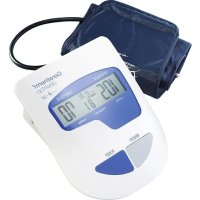
| Product type | Digital blood pressure monitor with control screen |
| Brand | Geratherm |
| Model | Desktop GP-6621 |
| Measurement method | Oscillometric |
| Blood pressure measurement range | 20 to 300 mmHg |
| Pulse measurement range | 40 to 200 beats/min |
| Blood pressure accuracy | ± 3 mmHg |
| Pulse accuracy | ± 5% of reading |
| Memory | 85 values |
| Compatible arm circumference | 22 to 32 cm |
| Power supply | 4 AA alkaline batteries (1.5 V) or AC adapter 6 V DC, 800 mA |
| Battery life | Approximately 250 measurements |
| Auto-off | 150 seconds after last operation |
| Dimensions | 171 x 139 x 54 mm |
| Weight (with batteries) | Approximately 550 g |
| Display | LCD (year, day, hour, blood pressure and pulse) |
| Irregular pulse detection | Yes (specific symbol) |
| Integrated clock | Yes, adjustable |
| Operating conditions | +5°C to +40°C, 15% to 90% RH |
| Storage conditions | -25°C to +55°C, 15% to 90% RH |
| Protection rating | IP20 |
| Warranty | 3 years (excluding batteries and cuff) |
| Cleaning | Cloth dampened with water or mild detergent |
| Standards | CE 0197, DIN EN ISO 81060-2, EN 60601-1-2 |
Frequently Asked Questions - Desktop GP6621 Geratherm
User questions about Desktop GP6621 Geratherm
0 question about this device. Answer the ones you know or ask your own.
Ask a new question about this device
Download the instructions for your Blood pressure monitor in PDF format for free! Find your manual Desktop GP6621 - Geratherm and take your electronic device back in hand. On this page are published all the documents necessary for the use of your device. Desktop GP6621 by Geratherm.
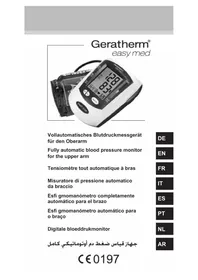
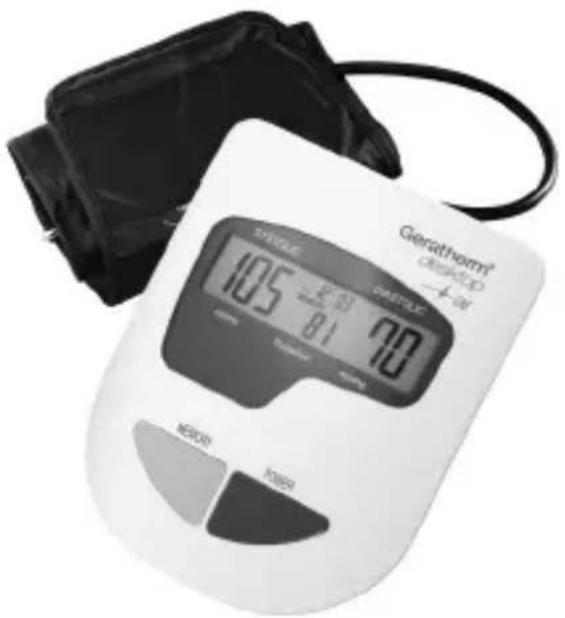
USER MANUAL Desktop GP6621 Geratherm
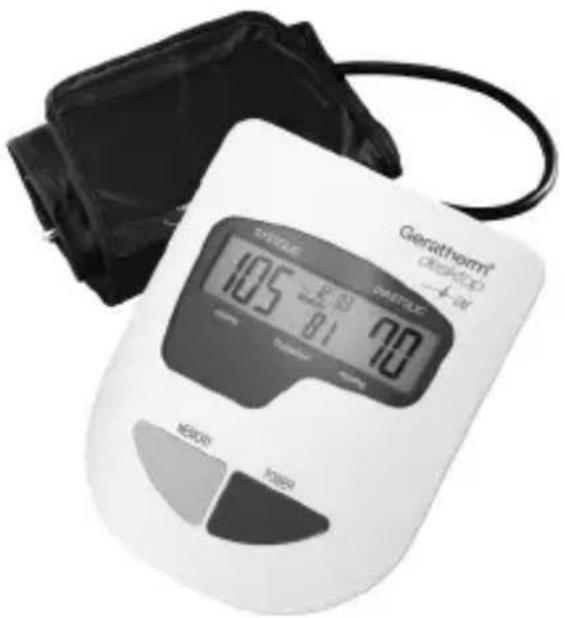
Digital Blood Pressure Monitor for the Upper Arm
Digital Blood Pressure Monitor for the Upper Arm
Geratherm
desktop
EN
INSTRUCTION FOR USE
GP-6621
C€0197
Contents
Designated Use 24
Precautions 25
Warranty 27
Information You Should Know
Before Operating the Unit 27
About the Unit
Explanation of Display 28
Preparation for Use
Installing/Replacing Batteries 29
Attaching the Pressure Cuff 30
Measuring Posture 30
How to Operate the Unit
Setting the Clock 31
Measuring Blood Pressure 31
Recalling Memories 32
Erasing Memories 33
EN
Care and Maintenance 34
Error Message 36
Disposal 36
Specifications 37
Quality Standard 38
Symbol Index 38
Annex 39
Designated Use
This unit uses an oscillometric measurement method in order to measure systolic and diastolic blood pressure, as well as the heart rate.
The measurement is conducted on the upper arm.
All values can be read on an LCD screen.
This unit has been developed for home and professional use and should only be used by adults over 18 years of age with an arm diameter of 22 32~cm /8.7-12.6 inches.
- This manual and the product are not substitutes for visiting the doctor.
Neither the information contained herein nor this product may be used to diagnose or treat health problems, or to prescribe drugs. If you have or suspect that you have a medical problem, please seek immediate advice from your doctor.
-
Do not conduct any measurements if the temperature is low (below +5^ ) or high (over +40^ ), or if the relative humidity is beyond the range of 15% to 90% , as this can lead to inaccurate readings.
-
Wait 30 to 45 minutes, before taking a measurement if you have just had a caffeinated drink or a cigarette.
Relax for at least 5 to 10 minutes before taking a measurement.
-
Please wait 3 to 5 minutes between measurements, so that your blood vessels can return to the state they were in prior to measurement. You may have to adapt the waiting time to your personal physiology.
-
It is recommended that you use the same arm for each measurement (preferably the left) and take the measurement at about the same time every day.
-
Sit down comfortably with your elbows placed on the table and both feet on the ground. Please do not interlock your legs during the measurement.
-
Place the unit at the level of the heart. Relax your hand. Your palm should be facing up.
Take the measurement at room temperature in a quiet and stress-free environment.
-
The unit should not be moved or shaken during the measurement. Please do not speak during the measurement.
-
Please keep in mind that blood pressure naturally varies depending on the time of day and is affected by many different factors. Blood pressure is usually highest at work and reaches its lowest level during the sleep phase.
-
Blood pressure measurements should be assessed by a doctor or trained healthcare professional who is familiar with your medical history. If you use the unit and regularly record the results, please keep your doctor informed with regard to the ongoing changes in your blood pressure.
-
If you suffer from a cardiovascular disease (such as atherosclerosis), diabetes, a liver or kidney disease.
EN
severe hypertension or peripheral circulatory disorders, etc., please consult your doctor before using this unit.
-
The performance of this device can be influenced as severe arrhythmias such as atrial or ventricular premature beats or atrial fibrillation are presented during measurement.
-
The blood pressure measurements conducted with this unit are equivalent to measurements obtained by a trained observer in accordance with the values achieved using the cuff/stethoscope auscultation method and are within the specified DIN EN ISO 81060-2 standard limits.
-
If the cuff causes any discomfort during the measurement, press the "POWER" button to turn off the unit immediately.
-
If the pressure is over 300mmHg and the cuff does not deflate automatically, pull off the Velcro strap to detach the cuff.
-
Do not use this appliance on infants, children or persons who cannot express their own intentions.
-
To avoid accidental strangulation, keep the product away from children and do not place the hose around the neck.
-
Measuring too frequently may result in circulatory disorders, which can cause unpleasant sensations such as localised bleeding under the skin or temporary numbness in your arm. These symptoms do not usually last long. However, if you have not recovered after some time, please consult your doctor.
-
Please take into consideration the electromagnetic compatibility of the unit (e.g. disruptions to the power supply, radio frequency interference, etc.) see annex. Please only use the unit indoors. To avoid inaccurate results due to electromagnetic interference between electrical and electronic equipment, please do not use the unit near mobile phones or microwave ovens. In the case of devices whose maximum power exceeds 2 W, the minimum distance from your blood pressure monitor should be 3.3 metres.
-
The unit is not waterproof. Never immerse this instrument in any liquids.
-
Do not use the instrument if you think it is damaged or if you notice anything unusual.
Warranty
The warranty for this blood pressure monitor is valid for any error on the part of the manufacturer under normal use for 3 years from the date of purchase. If your unit does not function properly due to defective parts or assembly, we will repair it free of charge.
With the exception of the battery and cuff, all parts of the unit are subject to this warranty. Damage caused by improper handling of your unit is not guaranteed.
We recommend that the accuracy of the unit be checked after 2 years from manufacturing date by an authorized laboratory.
This checking procedure is not a service provided under the warranty.
Information you should know before operating the unit
What is blood pressure?
A force is created by the heart as the ventricle forcibly ejects blood into the blood vessels and through the transport system. Another force is created by the arteries as they resist the blood flow. Blood pressure is the result of these two forces.
What are systolic and diastolic pressures?
Systolic pressure represents the highest pressure at the height of the heart's contraction. Diastolic pressure is the lowest pressure when the heart is resting.
Is my blood pressure normal?
See the following blood pressure classifi cation chart released by the WHO (World Health Organization) for evaluation of your blood pressure level.
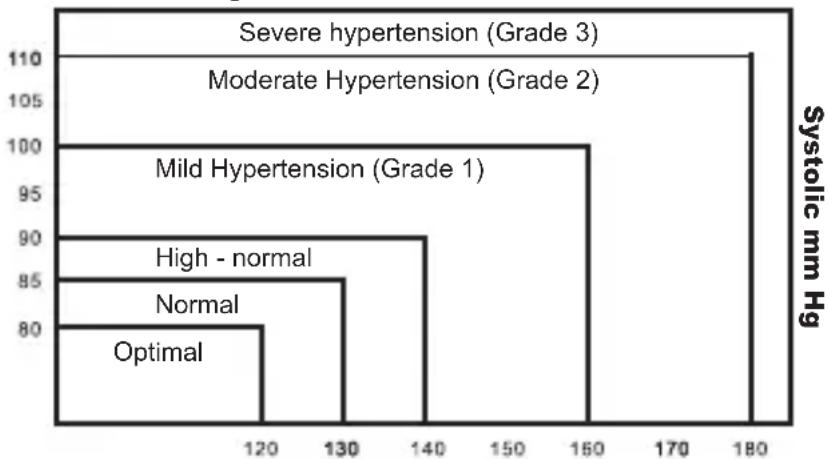
Diastolic mm Hg
Information you should know before operating the unit
What about low blood pressure?
In general, a lower blood pressure reading is better unless it causes some uncomfortable symptoms such as fainting and/or lightheadedness.
Fluctuation and variation in blood pressure
The following chart shows possible blood pressure fluctuations during a 24hr period.
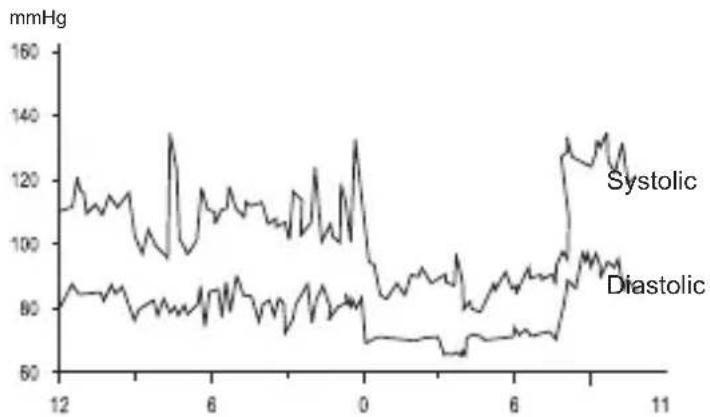
The following factors will influence blood pressure measurement results and cause variations.
EN
Bathing Breathing
- Conversation - Drinking alcohol
Exercise · Moving
- Mental tension - Meals
- Temperature change - Thoughts
Smoking etc.
About the unit
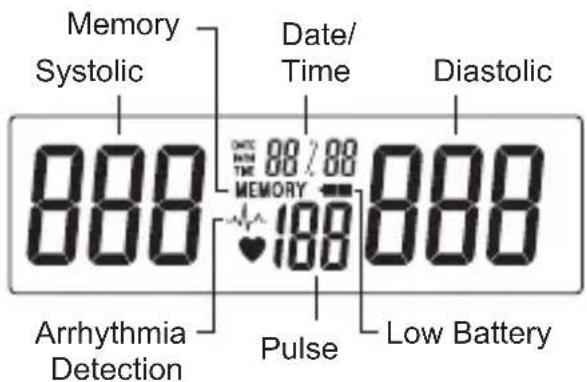
Explanation of Display
About the Unit
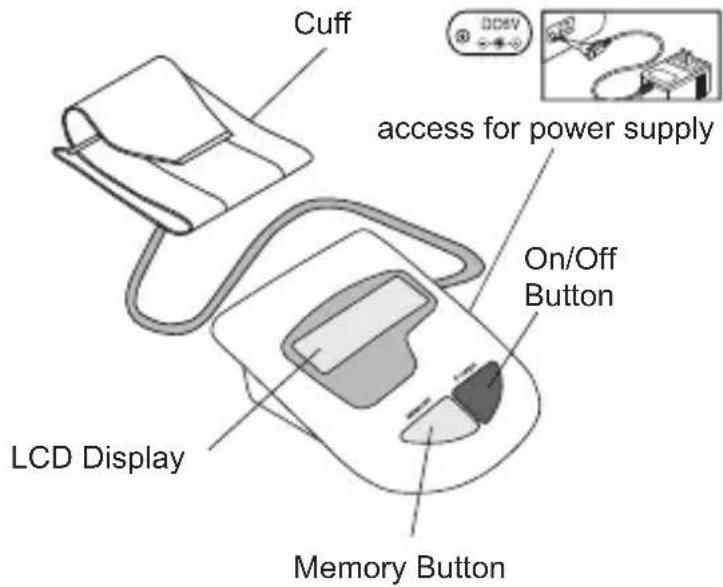

The cuff is designed to fit arm sizes between 22 and 32cm (8.7 to 12.6 inches.)
Preparation for Use
Installing/Replacing Batteries
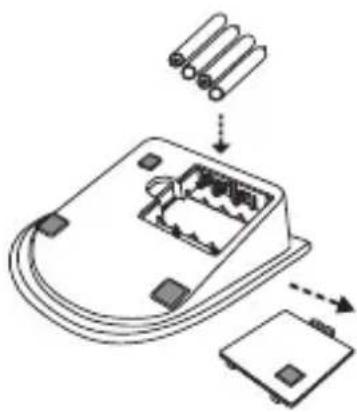
- Insert the batteries into the battery compartment matching correct polarities _n + " and " -".
- Replace all batteries if the low battery indicator appears.
- Remove the batteries if the unit will not be used for a long period of time.
- REMOVE all of the BATTERIES when utilizing the optional AC adapter.
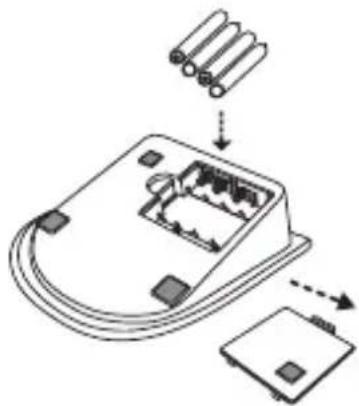

Note: It is recommended that the same type of alkaline batteries be used to avoid incompatibility.

Keep batteries away from small children. Do not throw batteries into fire: they could explode.
EN
Attaching the Pressure Cuff
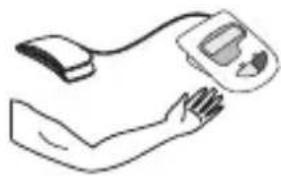
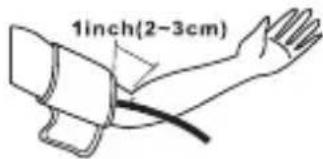
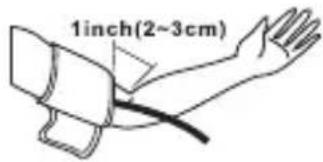
- Wrap the cuff around the left arm. The arm should be bare skin.
- Fasten the cuff. Don't pull it strongly and make the cuff too tight. The cuff's edge should be approximately 1 inch from crook of the arm.
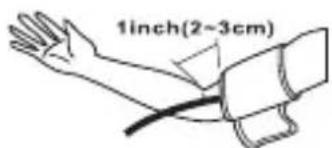
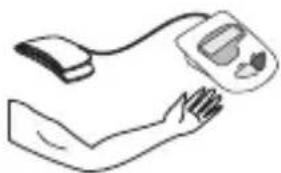
- Attach the cuff on the right hand as shown in the figure if it is not possible to measure on the left arm.
Measuring Posture
- Sit upright and ensure that the measuring site is at heart level. Relax and measure in a natural position.
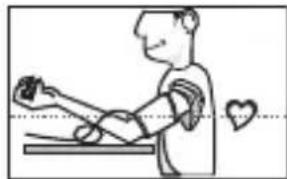
- Measure and record blood pressure at the same time every day to establish your blood pressure pattern.

AC Adapter (accessory)
Use the device only with a medical approved stabilized AC adapter (Input: 100 240V AC, 60 / 50Hz Output: 6V, DC, 800mA ).

Note:
- No batteries are required during operation using the AC adapter.
- If AC adapter power is interrupted during measurement, the device must be reset by disconnecting the AC adapter from the device.
- Only use medical approved adapters that comply with the specific cations in this manual. Using other adapters could cause damage your blood pressure monitor.
EN
How to Operate the Unit
1.Setting the Clock
To enter the setting mode by pressing and holding the memory key for over 3 seconds.
The display will show a blinking year.
Press the power key to adjust the year when it is blinking.
Then press and release the memory key again, the "month" will appear and blink to be adjusted, and then "date", "hour" and "minute" will follow up as you press and release the memory key again.

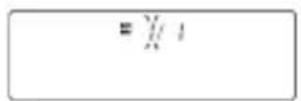

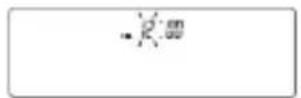

To adjust the clock
Press the memory key to adjust the values of the "month", "date", "hour", and "minute" when they are blinking.
2. Measuring Blood Pressure
Press and release the POWER key to start measuring automatically

Initial display
Pumping
Measuring and Buzzer sounds.
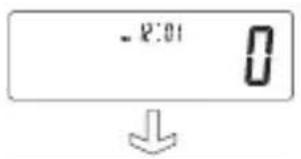
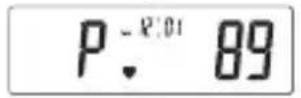
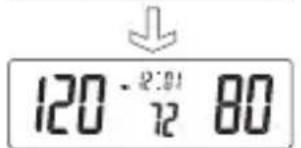
When the measurement is fi nished, the display will show the measured blood pressure and pulse value. Press the power key to turn off the unit. Otherwise the unit will turn off automatically 150 seconds later.
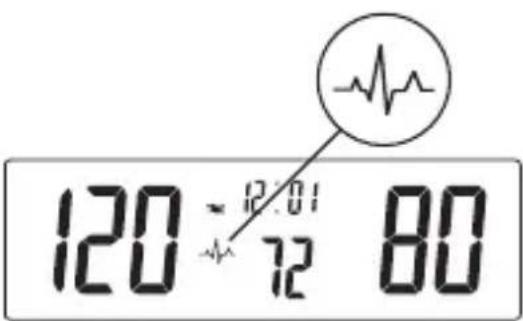
Note: If the symbol appears, it means the
unit has detected irregular pulse during measurement. If the symbol appears regularly please consult a qualified physician for professional advice.
3. Recalling Memories
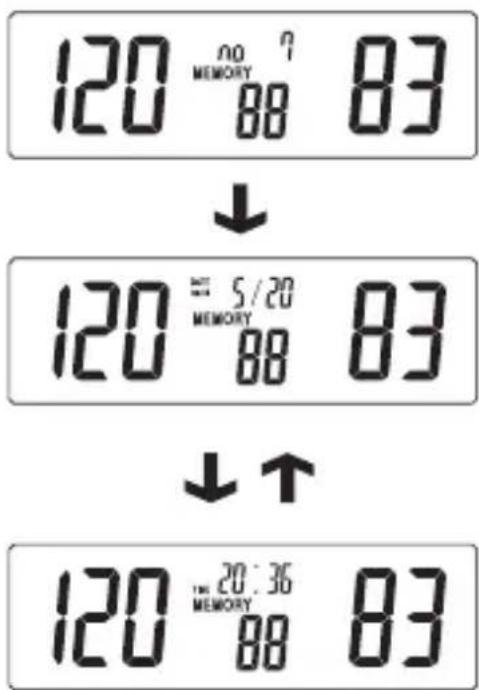
Press and release the MEMORY key to recall the last reading (Example: the no.7 memory). The display will show the memorized pressure and pulse value.
EN

Press and release the MEMORY key again to recall the no.6 memory. Press and release repeatedly to read the no 5,4,3,2,1 memorized pressures.
4. Erasing Memories
You may erase one or all records in memory.
Delete one record
- Press and release MEMORY key to choose the record that you wish to delete
- Press and hold the POWER key until the display shows "dEL".
- Press and release the power key again. After 3 beeps are heard, the unit erases the record.
Delete all records
- Press and release MEMORY key to choose the record that you wish to delete.
- Press and hold the POWER key until the display shows "dEL".
- Press and release the MEMORY key then the display shows "dEL ALL".
- Press and release the POWER key. After 3 beeps are heard, the unit erases all records.
EN

| Do not drop the unit. It is not shock-proof. | |
| Do not modify or disassemble the unit or the arm cuff. | |
| Do not twist the arm cuff. | |
| Use a cloth moistened with water or neutral detergent to clean the body of the unit and then wipe it dry. | |
| Avoid thinner, benzine, and other harsh cleaners. | |
| Keep the unit in a suitable place. Avoid high temperature, direct sunlight, high moisture, and dust. | |
| Remove the batteries if the unit will not be used for a long time. | |
| Do not press the POWER button if the cuff has not been properly wrapped around the arm. |
EN
Error Messages
| LL Err | The pressure measured was lower than 20 mm Hg. Please measure again. |
| UU Err | Excessive body movement is detected during measurement. Please measure again. |
| PErr | Pumping error. Please check cuff and try again. |
| rrErr | The pressure can not be measured due to signal noise. Please measure again. |
| HI | The pumping pressure is higher than 300 mm Hg. Please measure again. |
| Low battery. Check and replace the 4 batteries if necessary. |
EN
Disposal
Observe the applicable regulations when disposing of the device and batteries.
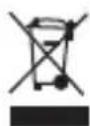
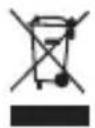
This product must not be disposed of together with domestic waste.
All users are obliged to hand in all electrical or electronic devices, regardless of whether or not they contain toxic substances, at a municipal or commercial collection point so that they can be disposed of in an environmentally acceptable manner.
Please remove the batteries before disposing of the device/unit.
Do not dispose of old batteries with your household waste, but at a battery collection station at a recycling site or in a shop.
Specifications
Model no. GP-6621
Display System Liquid Crystal Display
Measuring Method Oscillometric
Power Source 4 alkaline "AA" type batteries
(1.5 V) or AC adapter (input:
100~240 V, AC, 60/50 Hz;
output: 6 V, DC, 800 mA)
Measuring Range Blood pressure:
20 to 300mmHg
Heart pulse rate:
40 to 200 pulse beats/min
Accuracy
Heart pulse rate: ±3 mm Hg
Blood
pressure:
pulse rate: ±5 % Inflation
Micro rolling pump
Pressure Exhaust Electric solenoid valve
Memory
85
sets
Display
LCD
(year/date/time,
pressure and pulse)
Low Battery Indicator Yes
Auto Power-Off 150 secs. without any
operation
EN
Battery Life Around 250 measurements
Protection Level IP20 (protected against
foreign bodies < 12,5mm
Cuff Size 22 to 32cm /8.7-12.6 inches
Operating Environment +5^ to +40^
RH 15% to 90%
(+41^ to +104^)
Storage Environment -25 °C to +55 °C;
RH 15% to 90%
(-4^ to +122^)
Dimensions
171 mm x 139 mm x 54 mm
Weight
around 550g
(including batteries)
Specific cations are subject to change for
improvement without notice.
Quality Standard
Geratherm® is certified in accordance with Council Directive 93/42/EEC and EN ISO 13485 and is entitled to affix the CE-mark C0197 (Notified Body: TUV Rheinland LGA Products GmbH).
The blood pressure monitor conforms to
EN 60601-1 +A1 Medical electrical equipment. Part 1: General requirements for basic safety and essential performance.
- IEC/EN 60601-1-11 Medical electrical equipment. Part 1-11: General requirements for basic safety and essential performance - Collateral standard: Requirements for medical electrical equipment and medical electrical systems used in the home healthcare environment.
DIN EN ISO 81060-1
Non-invasive sphygmomanometers - Part 1: Requirements and test methods for non-automated measurement type (ISO 81060-1)
DIN EN ISO 81060-2
Non-invasive sphygmomanometers - Part 2: Clinical investigation of automated measurement type (ISO 81060-2)
EN 1060-3
Non-invasive sphygmomanometers - Part 3: Supplementary requirements for electro-mechanical blood pressure measuring systems
EN
Symbol index
| Follow the instruc-tions for use | |
| Keep dry | |
| 90% 15% | Store between 15 % and 90 % R.H. |
| +55°C -25°C | Store between -25 °C and +55 °C |
| The device must not be disposed of with household waste. |
Information on electromagnetic compatibility (EMC)
Electronic devices such as PCs and mobile phones can lead to the exposure of medical devices in operation to electromagnetic interference from other devices. This can lead to malfunction of the medical device and create a potentially unsafe situation.
Medical devices should also not interfere with any other devices.
The EN 60601-1-2 standard regulates the requirements for EMC (electromagnetic compatibility) and defi nes the levels of immunity to electromagnetic interference and the maximum electromagnetic emission levels for medical devices.
This blood pressure monitor, which is manufactured by Geratherm Medical AG, complies with the EN 60601-1-2 standard in relation to both immunity and emissions.
However, special precautions should be observed: please only use the device indoors and not in the vicinity of mobile phones or microwave ovens. In the case of devices whose maximum power exceeds 2W , the minimum distance from your blood pressure monitor should be 3.3 metres.
EN
| Guidance and manufacturer's declaration - electromagnetic emissions | ||
| The device is intended for use in the electromagnetic environments listed below, and should only be used in such environments: | ||
| Emissions test Compliance E | Electromagnetic | environment - guidance |
| RF emissions CISPR 11 Group 1 | RF energy is used only to maintain device's operation. Therefore, its RF emissions are so low that it's not likely to cause any interference in nearby electronic equipment. | |
| RF emissions CISPR 11 Class B | The device is suitable for use in all establishments, including domestic establishments, and those directly connected to the public low-voltage power supply networkthat supplies buildings used for domestic purposes. | |
| Harmonic emissions IEC 61000-3-2 | Class A | |
| Voltage fluctuations / flicker emissions IEC 61000-3-3 | complies | |
| Guidance and manufacturer's declaration - electromagnetic emissions | |||
| The device is intended for use in the electromagnetic environments listed below, and should only be used in such environments: | |||
| Immunity test | IEC 60601 - test level | Compliance level | Electromagnetic environment - guidance |
| Electrostatic discharge (ESD) IEC 61000-4-2 | ±6 kV contact ±8 kV air | ±6 kV contact ±8 kV air | Floors should be wood, concrete or ceramic tile. If floors are covered with synthetic material, the relative humidity should be at least 30%. |
| Power frequency (50/60 Hz) magnetic fi eld IEC 61000-4-8 | 3 A/m 3 A/m | Power frequency magnetic fi elds should be at levels characteristic of a typical location in a typical commercial or hospital environment. | |
EN
| Recommended separation distances between portable and mobile RF communication | |||
| The device is intended for use in an electromagnetic environment where radiated RF disturbances are under control. User can help prevent electromagnetic interference by keeping the device at a minimum distance from portable and mobile RF communications equipment (transmitters). Below table details the maximum output power of transmitter: | |||
| Rated maximum output power of transmitters in Watt | Separation distance according to frequency of transmitter / m | ||
| 150 kHz to 80 MHz d = 1.2 √P | 80 MHz to 800 MHz d = 1.2 √P | 800 MHz to 2.5 GHz d = 2.3 √P | |
| 0.01 | 0.12 | 0.12 | 0.23 |
| 0.1 | 0.38 | 0.38 | 0.73 |
| 1 | 1.2 | 1.2 | 2.3 |
| 10 | 3.8 | 3.8 | 7.3 |
| 100 | 12 | 12 | 23 |
| For transmitters rated at a maximum output power not listed above, the recommended separation distance d in metres (m) can be estimated using the equation applicable to the frequency of the transmitter, where P is the maximum output power rating of the transmitter in watts (W) according to the transmitter manufacturer. | |||
| NOTE 1: At 80 MHz and 800 MHz, the separation distance for the higher frequency range applies. | |||
| NOTE 2: These guidelines may not apply in all situations. Electromagnetic propagation is affected by absorption and reflection from structures, objects and people. | |||
| Guidance and manufacturer's declaration - electromagnetic immunity | |||
| The device is intended for use in the electromagnetic environments listed below, and should only be used in such environments: | |||
| Immunity test | IEC 60601 - test level | Compliance level | Electromagnetic environment - guidance |
| Portable and mobile RF communications equipment should be used no closer to any part of the device, including cables, than the recommended separation distance calculated from the equation applicable to the frequency of the transmitter. | |||
| Recommended separation distance: | |||
| Conducted RF IEC 61000-4-6 | 3 Vrms 150 kHz to 80 MHz | 3 Vrms d = 1.2 | √P |
| Radiated RF IEC 61000-4-3 | 3 V/m 80 MHz to 2.5 GHz | 3 V/m | d = 1.2 √P 80 MHz to 800 MHz |
| d = 2.3 √P 800 MHz to 2.5 GHz | |||
| where P is the maximum output power rating of the transmitter in watts (W) according to the transmitter manufacturer and d is the recommended separation distance in metres (m). Field strengths from fi xed RF transmitters, as determined by an electromagnetic site survey,a should be less than the compliance level in each frequency rangeb Interference may occur in the vicinity of equipment marked with the following symbol: | |||
| NOTE 1: At 80 MHz and 800 MHz, the higher frequency range applies. NOTE 2: These guidelines may not apply in all situations. Electromagnetic propagation is affected by absorption and reflect ion from structures, objects and people. | |||
| Guidance and manufacturer's declaration - electromagnetic immunity |
| a) Field strengths from fixed transmitters, such as base stations for radio (cellular/cord-less) telephones and land mobile radios, amateur radio, AM and FM radio broadcast and TV broadcast cannot be predicted theoretically with accuracy. To assess the electromagnetic environment due to fixed RF transmitters, an electromagnetic site survey should be considered. If the measured field strength in the location in which the device is used exceeds the applicable RF compliance level above, the device should be observed to verify normal operation. If abnormal performance is observed, additional measures may be necessary, such as reorienting or relocating the device. |
| b) Over the frequency range 150 kHz to 80 MHz, field strengths should be less than 3 V/m. |

Geratherm Medical AG
Fahrenheitstraße 1
99331 Geratal
Germany
www.geratherm.com
C€0197

Que signifi e hypotension?
Geratherm Medical AG
Fahrenheitstraße 1
99331 Geratal
Allemagne
www.geratherm.com
C€0197
FR

Geratherm Medical AG
Fahrenheitstraße 1
99331 Geratal
Germania
www.geratherm.com
C€0197

Monitor esfi gmomanometrico digital
Geratherm
desktop
INSTRUCCIONES DE USO
ES
GP-6621
C€0197
Indices
Uso prescritto 84
output: 6V, CC, 800mA)
Geratherm Medical AG
Fahrenheitstraße 1
99331 Geratal
Alemania
www.geratherm.com
C€0197
ES

Geratherm Medical AG
Fahrenheitstraße 1
99331 Geratal
Alemanha
www.geratherm.com
C€0197

J 1 J 1 J 1 J 1 J 1 J 1 J 1 J 1 J 1 J 1 J 1
gll lcc Lolil JI Lg .
a aall 1
JL
pss s 1s
jI JcJyLLe JwJJI jJiui juiuiipgagjlg
g 1c 1111 1111 00000000000
. Los leves
()aagdoaoggglgLJIyJn
AR
gJ gJ gJ gJ gJ gJ (j)
J Log aogdoa o gdo
jLg 1
jL 15 jg 1s
J 1 J 1 J 1 J 1 J 1 J 1 J 1
aLac slil aal 1
jIbjiJgJ11 1abwglp jll pJl b0s wLcIloc
gssssssssssssssssssssssssssssssssssssss
gddgdlbIgacLaWJabwglbIaJI WIL
Lg.Lc wgn a 1 1 1 1 1 1 1 1 1 1 1
.DIN EN ISO 81060-2 aLg
Jg Jg Jg Jg Jg Jg Jg Jg Jg Jg Jg Jg Jg Jg Jg Jg Jg Jg Jg Jg Jg Jg Jg Jg Jg Jg Jg Jg Jg Jg Jg Jg Jg Jg Jg Jg Jg Jg Jg Jg Jg Jg Jg
jLgJocLaX (sla/1j)"POwER, jI Jc
jglpdlh
x 1gglg y 110
a a a a a a a a a a a a a a a a a a a a a a a a a
L
aill 100 wlll bclll bll paa

p
J 1
LcLcLbJI 1
()"
5g(J)”-”9
山
LJ 15
1c 2y
A. iLii
A
1j01g 1p
1.112 + 13 + ·s + 1n + 1 + 1n + 2 + ·s + 1n + 1 + 1n + 2
J 1 J 1 J 1 J 1 J 1 J 1 J 1 J 1
Caiie aioa oXlisiagg:abg Xo 8i j no ayge Ljby

- Jla b 1 Jglioo cdoaon jnlln
J 1
AR
bcll 1 bLj
J_a = 12( a^2 + 1) = 12a^2 + 1a + 1
1
- 292 < 0
aX.bcllblj
aagaa bclnllbI
aLgSj j 1
oLjIg oJc oJy: JLJl
a a c 1s s
6 6 6
j j j J
. d g "Memory,
JJJ J
JJJ J
. g
.2g3g4g5
AR
a
1gj 5i j
a"
"Power" sLbI/1JzIJI jIoh.1. 1 L [g] "dEL
"Power. - sLb1/1j# 1j jlc b
"Memory" 1
"Power" sLbI/1jJ 11 j J IeH .dEL.
Pwr"1/1j 10.
"Power"
AR
AR
aalil j 1 aolll aclll absl g aiicll wls
auiy jie 8 pUw Jgio
jLgJn no Jn Jn Jn Jn Jn Jn Jn
aJill aolqJI jao LgJI sLaJI pgi
a aaiiaolalgaoai
jLg 1
aasiiia
Jbcx1 LcXy
S = 2x
EMV aolgo Lbji EN 60601-1-2 aolgl
1111 10 aclll lLg g (y jn bliogg
a. i.i.d. 150
G aolwll Geratherm Medical 5, 2011 jlg11
| الإستعمالobiologic學ical research and development of biological medicine (ESE) IEC 61000-4-2 (2018) | IEC 60601 | US العربية | الإستعمالobiologic学ical research and development of biological medicine (ESE) IEC 61000-4-2 (2018) | |
| IEC 60601 | US العربية | الإستعمالobiologic学ical research and development of biological medicine (ESE) IEC 60601 | IEC 60601 | |
| IEC 60601 | US العربية | IEC 60601 | IEC 60601 |
AR
Geratherm Medical AG
Fahrenheitstraße 1
Geratal 99331
Deutschland
L

AR
Geratherm

GERMANY
Geratherm Medical AG
Fahrenheitstraße 1
99331 Geratal
Germany
Phone: +49 36205 980
Fax: +49 36205 98 116
www.geratherm.com
PUBDDD000V803
2020-12