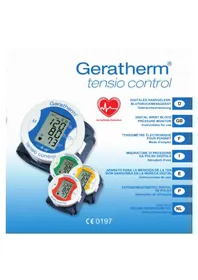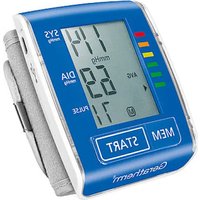
Active Control - Blood pressure monitor Geratherm - Free user manual and instructions
Find the device manual for free Active Control Geratherm in PDF.


| Product Type | Electronic Wrist Blood Pressure Monitor |
| Brand | Geratherm |
| Model | Active Control (GT-1215) |
| Measurement Method | Oscillometric |
| Measurement Range (Pressure) | 0 to 299 mmHg |
| Measurement Range (Pulse) | 40 to 199 beats/min |
| Blood Pressure Accuracy | ± 3 mmHg |
| Heart Rate Accuracy | ± 5% |
| Dimensions | 84 mm x 70 mm x 40 mm |
| Weight (with cuff) | 104 g |
| Power Supply | Built-in lithium-polymer battery 3.7 V 420 mAh |
| Charging | Via USB cable (power adapter 5 V = 1000 mA not included) |
| Battery Life | Approx. 15 days (3 measurements/day) |
| Memory | 60 measurements with date and time |
| Special Functions | Arrhythmia detection, position control, WHO color classification, automatic shut-off, average of last 3 measurements |
| Wrist Circumference | 13.5 to 21.5 cm |
| Maintenance | Clean with a soft, dry cloth. Do not use abrasive products. Do not wash the cuff in a machine. |
| Warranty | 2 years (excluding battery and cuff) |
| Repairability | Do not repair yourself. Contact an authorized service center. |
| Standards | CE 0197, EN ISO 13485, EN 60601-1-2 |
Frequently Asked Questions - Active Control Geratherm
User questions about Active Control Geratherm
0 question about this device. Answer the ones you know or ask your own.
Ask a new question about this device
Download the instructions for your Blood pressure monitor in PDF format for free! Find your manual Active Control - Geratherm and take your electronic device back in hand. On this page are published all the documents necessary for the use of your device. Active Control by Geratherm.
USER MANUAL Active Control Geratherm
text_image
88.0 mmHg AVG 88:88 ♥180 18/88 M 180text_image
Diagram showing a digital pressure meter connected to a laptop via cable, with both devices labeled in English.
natural_image
Simple line drawing of a person sitting on a bench inside a dashed border (no text or symbols)Funktion
Geratherm Medical AG
Fahrenheitstraße 1
99331 Geratal
Deutschland
www.geratherm.com
CE0197
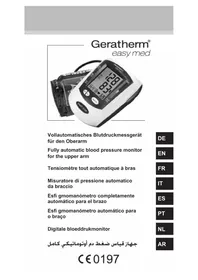
Digital wrist blood pressure monitor
Geratherm®
active control
text_image
1.4 mmHg AVG 6.9 M 7.1 SYS DIA THERM PULSE MEM START Gerathem®INSTRUCTION FOR USE
GT-1215
CE 0197

Contents
Indications for use 37
Contraindications 37
Precautions 38
Cleaning 39
Maintenance and Disposal 39
Storage 40
Warranty 40
Information You Should Know Before Operating the Unit 40
Measurement Principle 43
About the Unit
Information about the Device 44
Explanation of Display 45
Preparation for Use
Power Supply and Charging Power 46
Activate your Blood Pressure Monitor 49
Setting Date and Time 49
Attaching the Cuff 51
Measuring Posture 51
How to Operate the Unit
Measuring Blood Pressure 52
Retrieving Readings 54
Deleting Readings 55
Care and Maintenance 56
Error Messages 58
Specifications 59
Quality Standard 60
Symbol Index 60
Information on electromagnetic compatibility (EMC) 61
Annex 62
Thank you for choosing the Geratherm® active control blood pressure monitor.
This unit uses an oscillometric measurement method in order to measure systolic and diastolic blood pressure, as well as the heart rate. The measurement is conducted on the wrist and all values appear on an LCD display screen.
Before using your device for the first time, please read this instruction manual carefully.
Indications for use
This device is intended for non-invasive measuring and monitoring of arterial blood pressure. This device should only be used by adults over 18 years of age with a wrist circumference between 13.5 and 21.5 cm.
This unit was developed for home use exclusively.

Contraindications
This device is not intended for infants, pregnant women, patients with implanted electronic devices, patients with pre-eclampsia, premature ventricular beats, atrial fibrillation, peripheral artery disease and patients who are undergoing intravascular therapy or who have an arteriovenous shunt, or persons who have had a mastectomy. A doctor must be consulted prior to using the device on any of the persons listed above, and the suitability of the measuring method must be assessed.
This device is not suitable for continuous monitoring during medical emergencies and surgery. This device cannot be used simultaneously with HR surgical devices. The device is not intended for the transportation of patients outside medical establishments.
It is not intended for use on extremities other than the wrist or for functions other than obtaining a blood pressure measurement.
Do not wrap the cuff around an arm in which an arteriovenous shunt has been implanted or to which other medical devices are attached, as this could lead to temporary functional failure of the medical devices being used.
If you are allergic to polyester, nylon or plastic, please do not use this device.
The manufacturer cannot be held liable for any damage caused by improper use or failure to comply with the safety instructions in the instruction manual.

Precautions
- The device is intended for private use only.
- These instructions and the device are no substitute for visiting your doctor. Neither the information contained here nor this device may be used to diagnose or treat health problems or to prescribe medicines. If you have a medical problem or suspect that you may have such a problem, please seek immediate advice from your doctor.
- Do not mistake self-monitoring for self-diagnosis. This device enables you to monitor your blood pressure. Do not undertake any therapeutic measures on the basis of measurements you have taken yourself.
- Before using the device, ensure that it functions safely and is in perfect condition. Check the device. Do not use the device if it is damaged in any way. Continuing to use a damaged device can lead to injuries, false readings and serious danger.
- Keep the unit out of the reach of toddlers, children and pets. The inhalation or swallowing of small parts is dangerous and could be fatal.
- Please use only accessories that have been approved by the manufacturer. Otherwise, damage may be caused to the unit, the user may suffer injury or inaccurate measurements may occur.
- Please operate the unit under the environmental conditions described in the instructions. Otherwise, the performance and service life the blood pressure monitor will be adversely affected.
- This blood pressure monitor is not an AP/APG device and is not suitable for use in the presence of inflammable anaesthetic gases with air containing oxygen or nitrous oxide.
- If the cuff pressure reaches 300 mmHg (40 kPa), the air in the cuff is automatically released. If the cuff does not empty when the pressure reaches 300 mmHg (40 kPa), remove the cuff from your wrist and press the „START“ button to stop the inflation process.
- Too frequent and successive measurements may lead to disturbances of the blood circulation and cause injury.
- If you experience any discomfort during measurement, such as pain in the arm or other complaints, press the 'START' button to deflate the cuff. Release the cuff and remove it from your arm.
- Please ensure that the operation of the device does not permanently impair the patient's blood flow.
- Do not use the cuff on damaged skin.
- The material of the cuff has been tested and meet the requirements for the biological evaluation of medical devices in accordance with the standards DIN EN ISO 10993-5 and DIN EN ISO 10993-10. The constituent materials do not have the potential to produce any irritation or allergic reactions.
- If you need to test the measuring accuracy of the Geratherm ^ active control, please contact the manufacturer or your retailer.

Cleaning
- Please use a soft cloth for cleaning and do not use any abrasive or volatile cleaning agents. Use a solvent-free cleaner.
- Do not wash the cuff in the washing machine or dishwasher!
- The service life of the cuff can vary according to the frequency of washing, the condition of the skin and the manner of storage. The typical service life is approximately 10.000 measurements.
- Do not clean the blood pressure monitor while it is charging. Before cleaning, always remove it from the charger first.

Maintenance and Disposal
- Warning: Do not carry out any maintenance or upkeep while the device is in operation.
- Dispose of the unit, accessories and components in accordance with local regulations.
- In the event of malfunction, do not attempt to repair the device yourself. Only permit repairs to be carried out by authorised technicians.
- Upon request, the manufacturer will provide circuit diagrams, parts lists, descriptions, calibration instructions, etc., to support service personnel in the repair of parts.
- The device does not need to be calibrated for two years after reliable maintenance.
- Do not dispose your blood pressure monitor in fire. The rechargeable battery can explode and lead to injury or death.
- Batteries (battery pack or inserted batteries) must not be exposed to excessive heat such as sunshine, fire or similar.
Storage
- When it is not in use, please store the blood pressure monitor in a dry room and protect it from extreme humidity, heat, fluff, dust and direct sunlight. Do not place any heavy objects on top of the storage bag.
- This device contains sensitive parts and must be handled with care. Pay attention to the storage and operating instructions.
- It takes at least 30 minutes for the device to warm up from the minimum storage temperature to be ready for its intended use. The device must be allowed to cool down from the maximum storage temperature for at least 30 minutes before it is ready to be used again.
- Store the blood pressure monitor in a cool, dry and well-ventilated place. Keep it away from fire and heat sources, otherwise the battery could explode!
Warranty
The warranty for this blood pressure monitor is valid for any error on the part of the manufacturer under normal use for 2 years from the date of purchase.
If your unit does not function properly due to defective parts or assembly, we will repair it free of charge. With the exception of the battery and cuff, all parts of the unit are subject to this warranty.
Damage caused by improper use or handling of this blood pressure monitor is not covered by the warranty.
Information You Should Know Before Operating the Unit
What is blood pressure?
A force is created by the heart as the ventricle forcibly ejects blood into the blood vessels and through the vascular system. Another force is created by the arteries as they resist the blood flow. Blood pressure is the result of these two forces.
What are systolic and diastolic blood pressures?
Systolic blood pressure is the highest pressure at the heart's maximum contraction. Diastolic blood pressure is the lowest pressure when the heart is resting.
Information You Should Know Before Operating the Unit
Is my blood pressure normal?
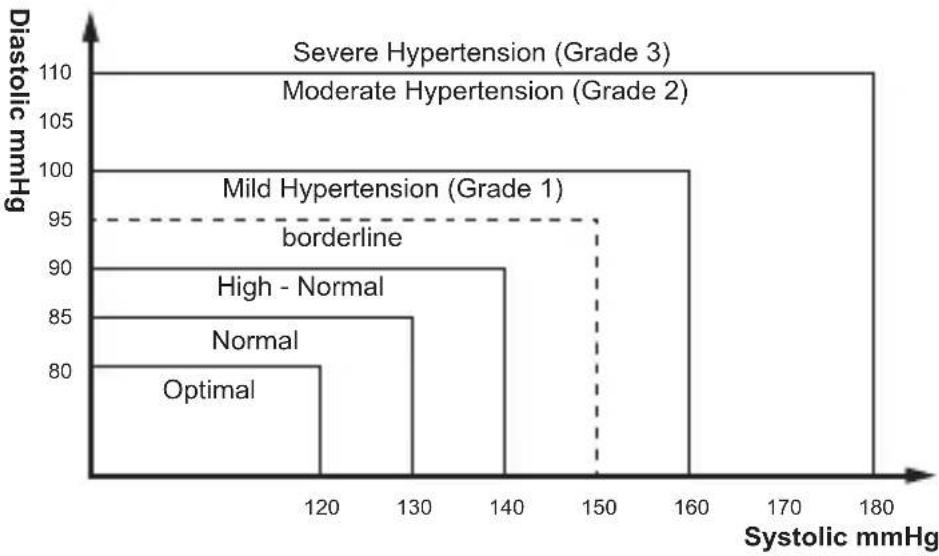
See the following blood pressure classification chart released by the WHO (World Health Organization) for evaluation of your blood pressure level.
bar
| Hypertension (Grade) | Diastolic mmHg | | :--- | :--- | | Severe Hypertension (Grade 3) | 110 | | Moderate Hypertension (Grade 2) | 105 | | Mild Hypertension (Grade 1) | 100 | | High - Normal | 90 | | Normal | 85 | | Optimal | 80 | Systolic mmHg on x-axis; borderline on y-axis.
| Classification of blood pressure monitor Systolic mmHg | Diastolic mmHg | Colour indicator |
| Optimal < 120 < 80 green | ||
| Normal 120 - 129 80 - 84 green | ||
| High - Normal 130 - 139 85 - 89 green | ||
| Grade 1 Hypertension 140 - 159 90 - 99 yellow | ||
| Grade 2 Hypertension 160 - 179 100 - 109 orange | ||
| Grade 3 Hypertension ≥ 180 ≥ 110 red |
Information You Should Know Before Operating the Unit
What does low blood pressure mean?
In general, a lower blood pressure reading is better unless it causes unpleasant symptoms such as fainting and/or lightheadedness.
Fluctuation and variation in blood pressure
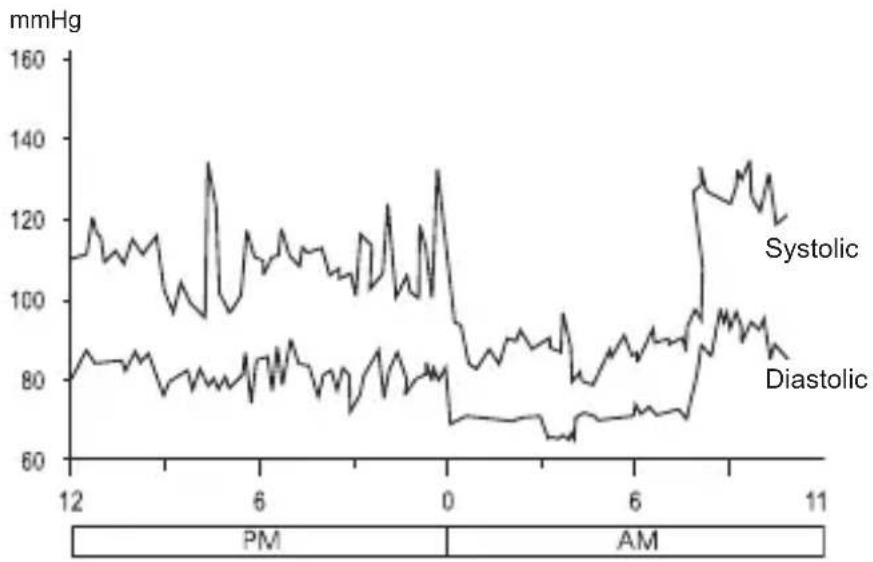
The following chart shows possible blood pressure fluctuations during a 24-hour period.

line
| Time | Systolic (mmHg) | Diastolic (mmHg) | |------|------------------|------------------| | 12 | ~110 | ~85 | | 6 | ~130 | ~80 | | 0 | ~130 | ~70 | | 6 | ~90 | ~75 | | 11 | ~130 | ~85 |The following factors will influence blood pressure measurement results and cause variations:
- Bathing • Conversation
- Drinking alcohol • Exercise
- Moving - Stress
- Meals • Temperature change
- Thoughts • Smoking etc.
Measurement Principle
This product uses the oscillometric measuring method to detect blood pressure. Before every measurement, the unit establishes a “zero pressure” equivalent to the air pressure.
Then it starts inflating the cuff. As it does so, the unit detects pressure oscillations generated by the pulsation of the blood flow.
The device compares the longest and the shortest time intervals of detected pulse waves with the mean time interval and then calculates the standard deviation.
Along with the blood pressure reading, the device also shows a symbol (arrhythmia icon) if the heart beat is irregular.

About the Unit
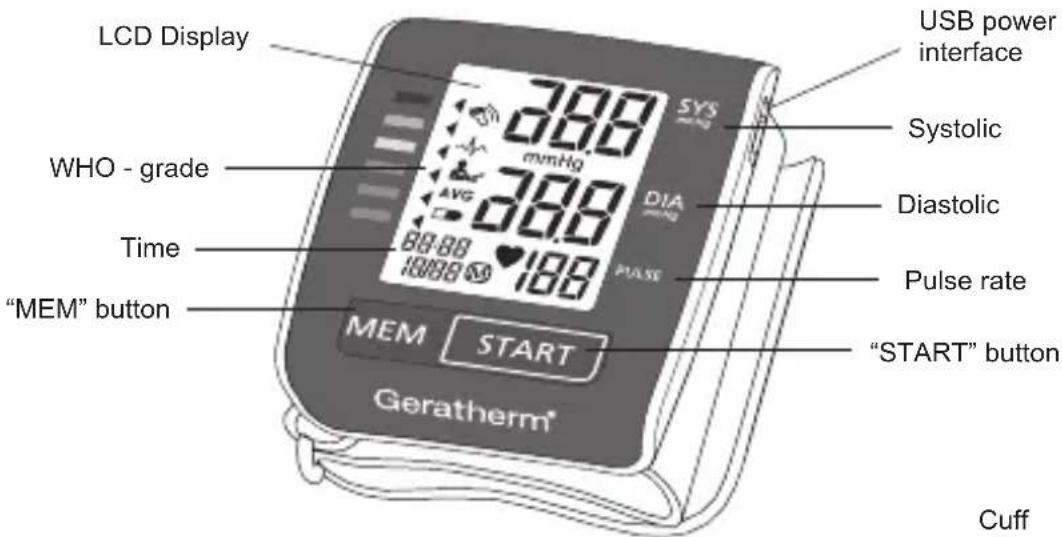
Information about the Device

text_image
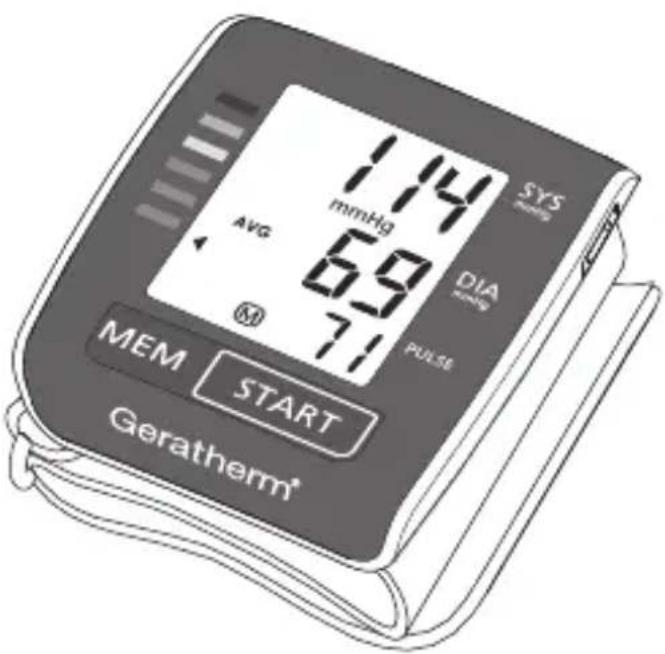
LCD Display WHO - grade Time "MEM" button MEM START Geratherm® 788 298 AVG 88:88 10888 SYS Systolic DIA PULSE USB power interface Systolic Diastolic Pulse rate "START" button CuffContent:
- Blood pressure monitor wrist type (GT-1215)
- User manual
- USB cable
- Storage bag
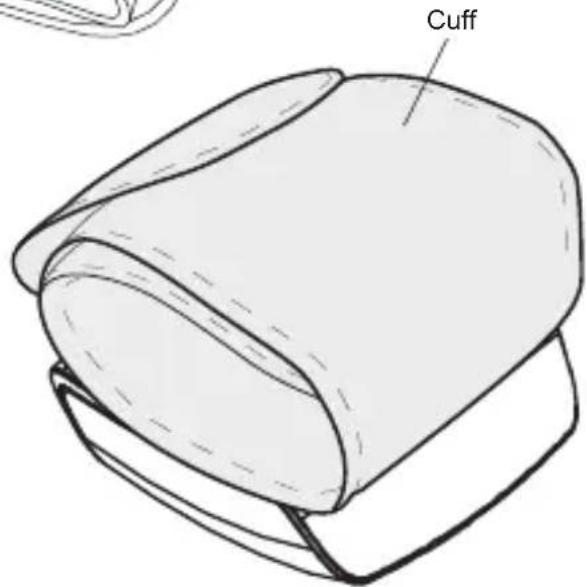
text_image
CuffThe cuff is suitable for wrist circumferences between 13.5 and 21.5 cm.
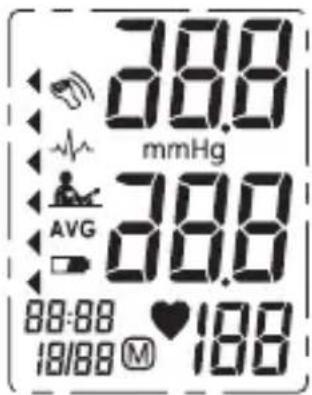
Explanation of the Display
text_image
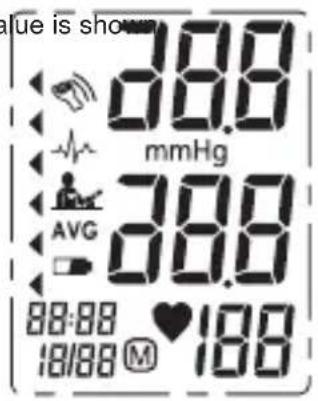
88.0 mmHg AVG 88:88 ♥ 188 18/88 M 190| Symbol | Description Explanation | |
| SYS | Systolic blood pressure | High pressure result |
| DIA | Diastolic blood pressure | Low pressure result |
| PULSE | Pulse Pulse/Minute; Beats/ Minute | |
| Movement detector | Movement will lead to inaccurate readings | |
| Arrhythmia Irregular heartbeat Detection | ||
| Position control | Taking up the correct position is necessary for obtaining accurate readings. | |
| AVG | The average value | The average value of the latest 3 blood pressure measurement results |
| - Lo | Low battery | Battery is low and needs to be charged |
| WHO Grade | Classification of the reading according to the WHO | |
| 88:8818/88 | Current date and time | Month/day, hour/minute |
| Memory | The displayed measurement values is from the memory. | |
| Heartbeat | Heartbeat detection during the measurement | |

Preparation for Use
Power Supply and Charge Power
- The battery of the Geratherm ^® active control is a built-in lithium-polymer battery with an electrical charge of 420 mAh.
- Please use a power adapter with a USB connection (not included) or another source of power with a USB connection and the enclosed USB cable for charging the rechargeable battery, as shown in the following illustrations:

Method 1
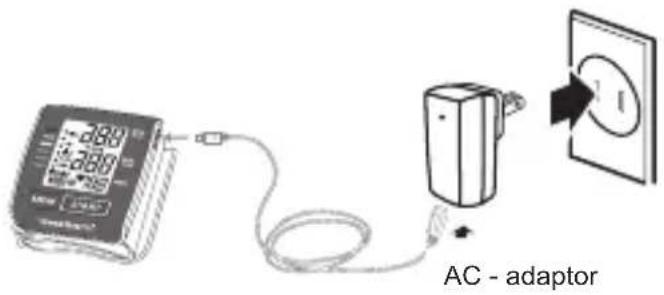
text_image
AC - adaptorMethod 2
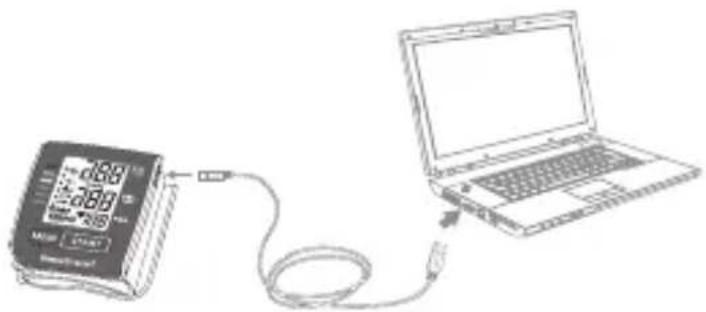
text_image
Diagram showing a digital pressure monitor connected to a laptop via cable, with measurement labels and connection points.
Note: Optional Adapter
(Please use an authorised adapter)
Input: AC 100 - 240 V \~ 50/60 Hz 0.2 A Max
Output: 5 V 1000 mA

Power needs to be charged under the following circumstances:
-on the LCD display
Preparation for Use
If you switch on the blood pressure monitor and the LCD display flashes “☐”, this means that the battery charge is low. Please recharge it in good time. You can still carry out the measurement.
If the LCD displays “- Lo” means the battery is too low, the blood pressure monitor will turn off automatically, you must charge the power at once.
During the process of charging, the LCD display will display the blinking power level, just like the following pictures:
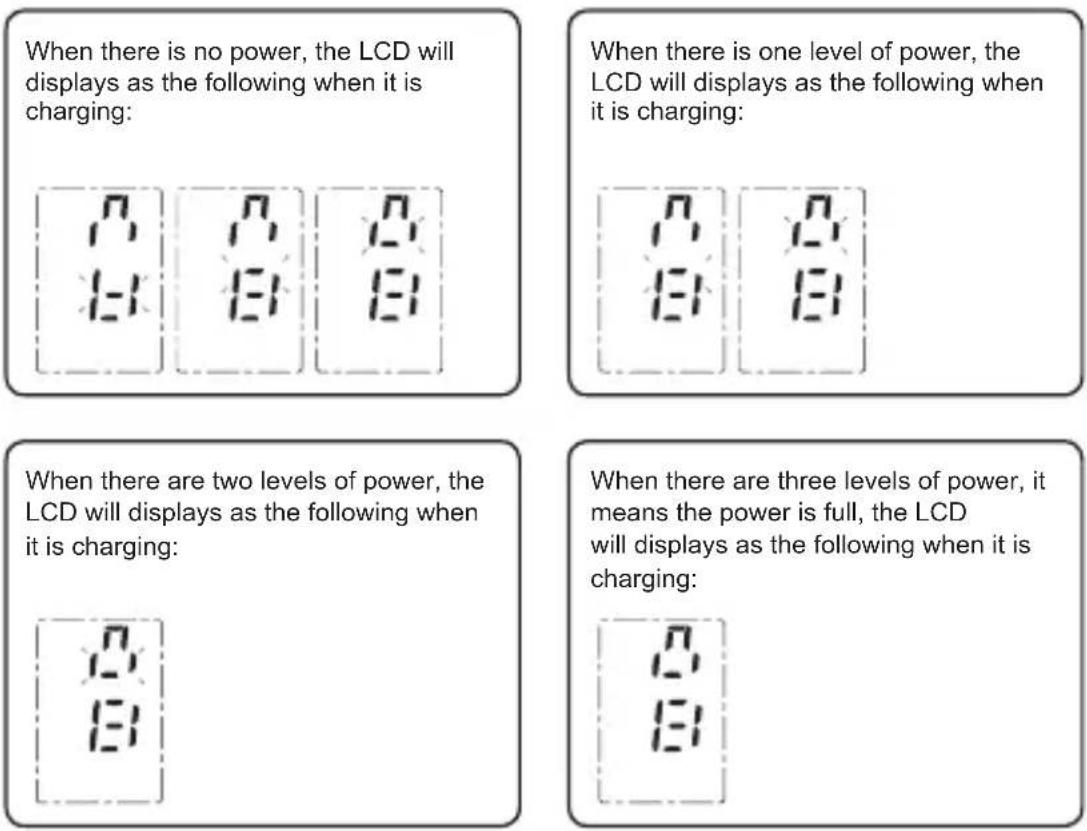
Preparation for Use

CAUTION:
- The battery of Geratherm ^® active control is a built-in rechargeable lithium-polymer battery, please do not attempt to disassemble the blood pressure monitor or force open the built-in battery by the unauthorized maintenance personnel.
- In normal use, the battery can be recharged about 300 times. If the battery fails to recharge or the unit cannot be used normally, please contact your dealer. If you measure your blood pressure three times a day, the unit can be used for up to 15 days without recharging.
- Do not attempt to replace the battery of your blood pressure monitor. The battery is built-in and is not replaceable
- Avoid recharging your blood pressure monitor in extremely high or low ambient temperatures.
- Do not clean the blood pressure monitor during recharging. Always remove the charging unit before cleaning.
- While it is charging, do not touch the charger connection and the patient simultaneously.
Preparation for Use
Activate your blood pressure monitor
Your blood pressure monitor is activated when the date and time are set.
Setting Date and Time
It is important to set the clock before using your blood pressure monitor, so that a time stamp can be assigned to each record that is stored in the memory. (time format: 24 h)
-
When the monitor is off, hold pressing "MEM" button about 3 seconds to enter the mode for year setting.
-
Press "START" button to change the year. Each press will increase the numeral by one in a cycling manner.
-
When you get the right year, press "MEM" button to set down and turn to next step.
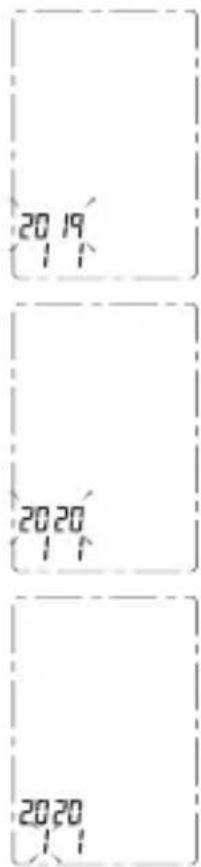
text_image
20 19 2020 2020 2020
Preparation for Use
- Repeat steps 2 and 3 to set the [MONTH] and [DAY].

-
Repeat steps 2 and 3 to set the [HOUR] and [MINUTE].
-
Repeat steps 2 and 3 to switch position control on or off. After confirming this as described in step 3, all the settings will be successively shown on the display. Then the unit will turn off.
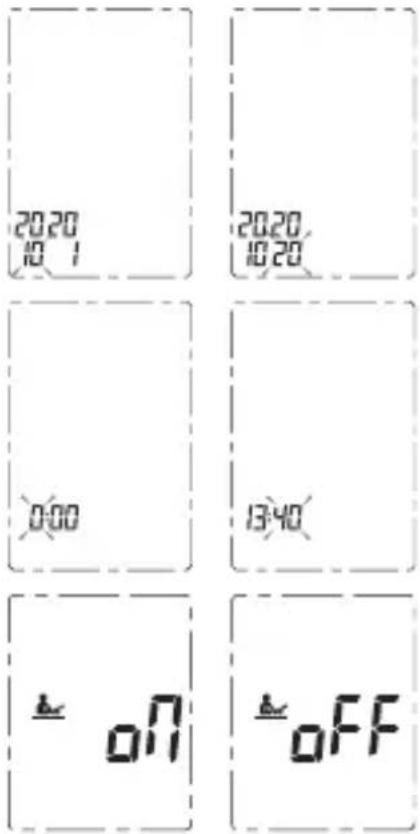
text_image
20:20 10:1 20:20, 10:20 0:00 13:40 = on = offPreparation for Use
Attaching the cuff
-
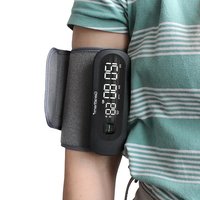
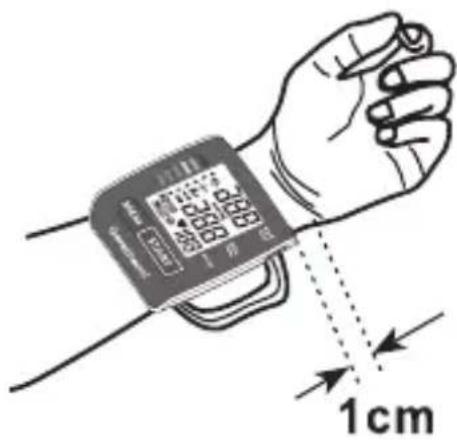
Wrap the cuff around the bare wrist. The display should face the side of the palm of the hand.
-
Fasten the cuff. Make sure it is not too tight. The cuff's upper edge should be approximately 1 cm (0.39 inch) from the palm line.
text_image
1cm
Measuring posture
-
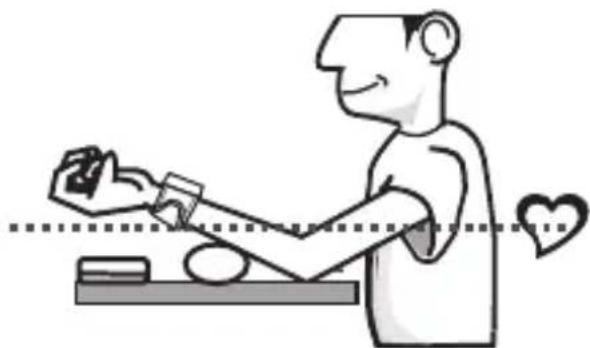
Rest for five minutes before measuring. Wait at least three minutes between measurements. This will enable your circulation to recover.
-
Sit upright and position your lower arm in such a way that the unit is at heart level. Relax and retain a natural posture during measurement.
natural_image
Illustration of a person sitting at a desk with a heart symbol and a hand near the arm (no text or symbols present)- Measure and record blood pressure at the same time every day to establish your blood pressure pattern.
How to Operate the Unit
Measuring Blood Pressure
- When the monitor is off, press the "START" button to turn on the monitor, and it will finish the whole measurement.

LCD display 0 - value is show
text_image
Value is shown 0.88 mmHg 3.88 AVG 0.88:00 ♥100 18/88 M 100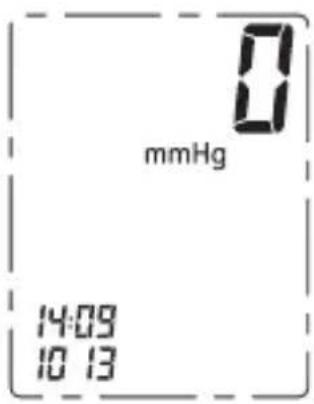
text_image
0 mmHg 14:09 10 13Inflating and measuring
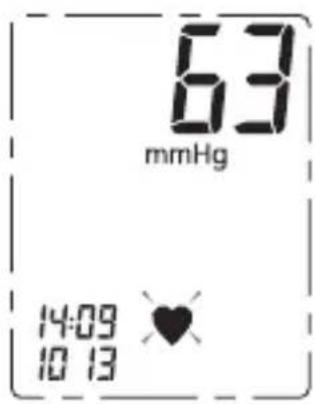
text_image
63 mmHg 14:09 10 13Results are dis- played and stored in the memory
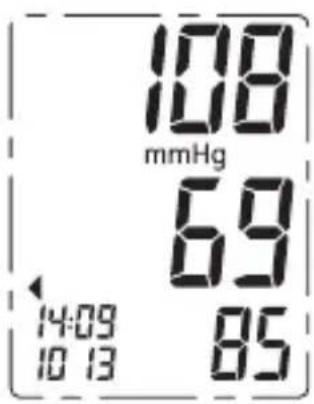
text_image
108 mmHg 69 14:09 85 10 13- As soon as the measurement is completed, the blood pressure and pulse readings appear on the display. Press the "START" button to switch off the unit. Otherwise, the unit will switch off automatically after one minute.
How to Operate the Unit
Note:
If you have turned on the Position Control function, once the measurement starts, the blood pressure monitor will detect the gesture first. The wrist must be between the angle of 30^ and 45^ . If the position is out of this angle, the measurement will not start and the display will show Symbol ERR until you have the correct position.
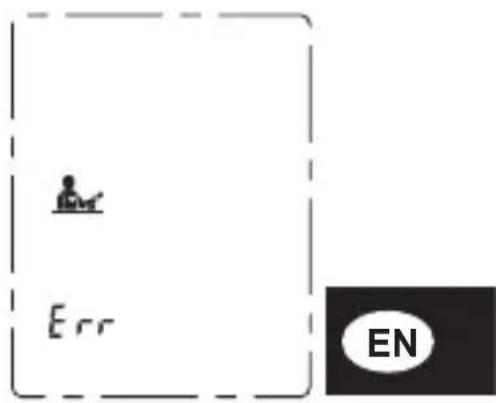
text_image
Err ENNote:
If you have the correct position, the display will show 📄 for about 3 seconds, and then continue with the measurement.
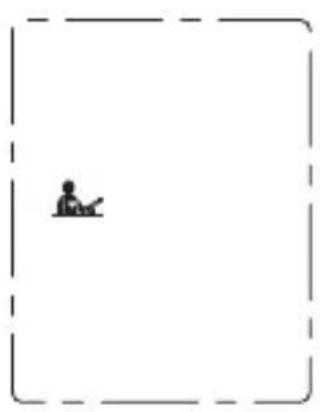
natural_image
Simple line drawing of a person sitting at a desk inside a dashed border (no text or symbols)How to Operate the Unit
Retrieving Readings
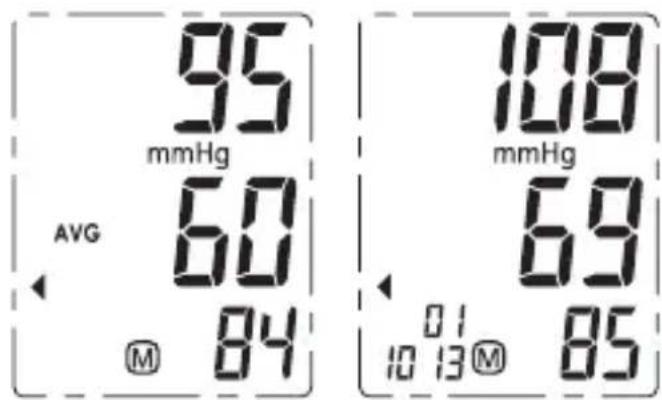
- When the monitor is off, please press "MEM" button to show the average value of the latest three records. (Note: If the records are less than 3 groups, the LCD will display the recent record instead.)

Note:
The device can record 60 measurements.
text_image
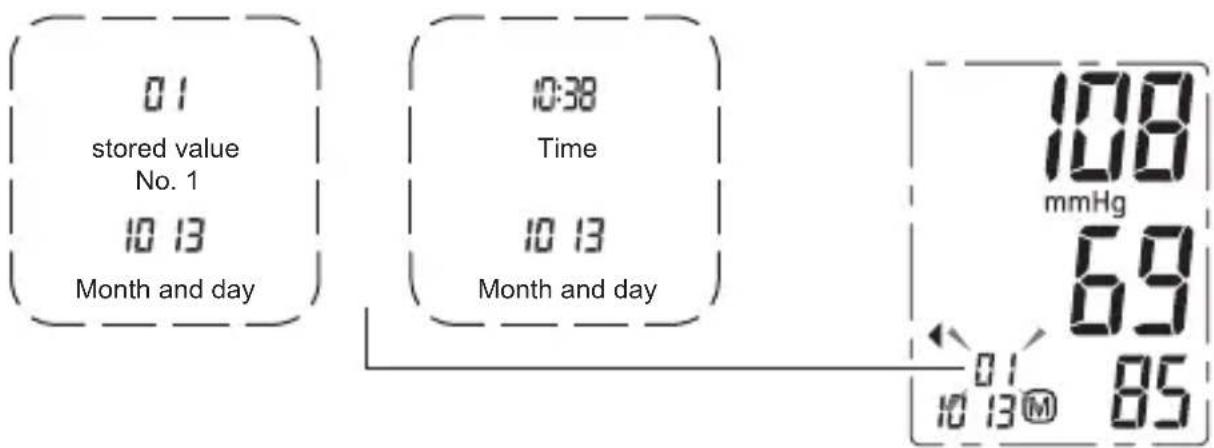
95 mmHg AVG 60 M 84 108 mmHg 69 01 10 13 M 85- By pressing again on the "MEM" button, all stored readings can be retrieved. The number of the stored reading is shown in the bottom left-hand corner. This appears alternately with the time when the reading was taken. The date is shown underneath.
The most recent record (1) is shown first. Each new measurement is assigned to the first (1) record. All other records are pushed back one digit (e.g., 2 becomes 3, and so on), and the last record is dropped from the list.
text_image
01 stored value No. 1 10 13 Month and day 0:38 Time 10 13 Month and day 108 mmHg 69 01 10 13③ M 85How to Operate the Unit
Deleting Readings
-
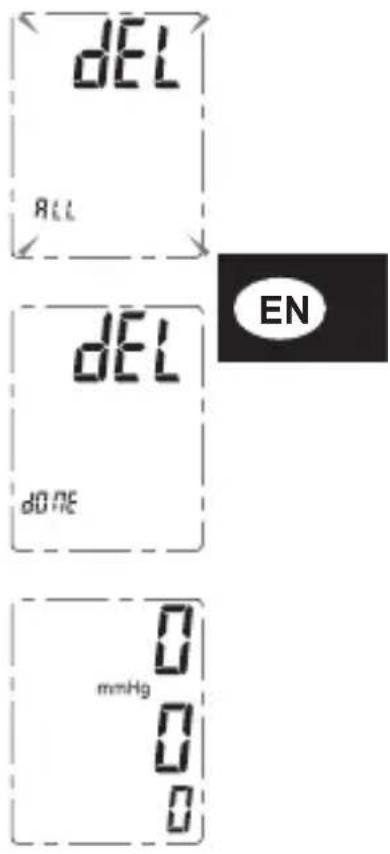
Hold pressing "MEM" button for 3 seconds when the monitor is in memory mode, the display will show "dEL ALL" ("delete all").
-
Press "MEM" button to confirm deleting and the monitor will display "dEL dOnE" ("deletion done") and then turn off.
-
If there is no record press "MEM" button, the LCD will display "0".
text_image
dEL ALL dEL DONE 0 mmHg 0 0 ENNote:
To exit out of delete mode without deleting any records, press "START" button before pressing "MEM" button to confirm any delete commands.
Care and Maintenance
| Do not drop the unit. | 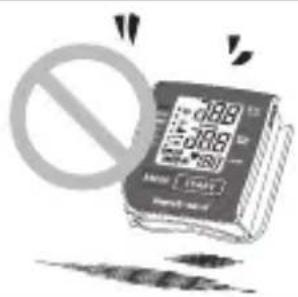 |
| Do not modify or disassemble the unit or the cuff. | 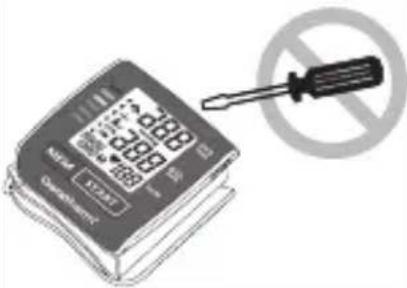 |
| Do not twist the cuff. | 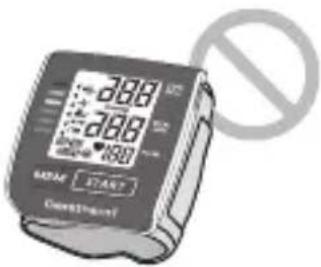 |
| Use a cloth moistened with water or neutral detergent to clean the body of the unit and then wipe it dry. | 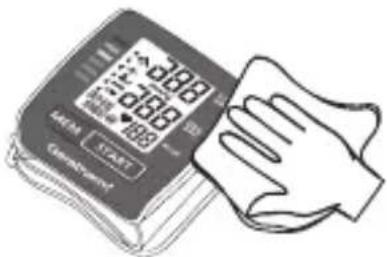 |
Care and Maintenance
| Avoid thinner, benzine, and other harsh cleaners. | 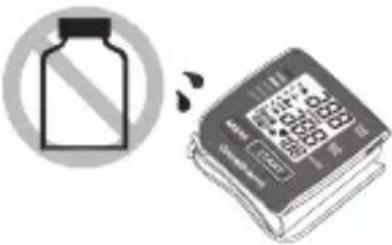 | |
| Keep the unit in a suitable place.Avoid high temperature, direct sunlight, high moisture, and dust. | 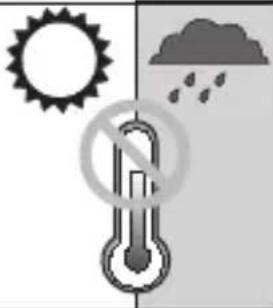 | |
| Do not press the “START” button until the cuff has been properly fastened on the wrist. | 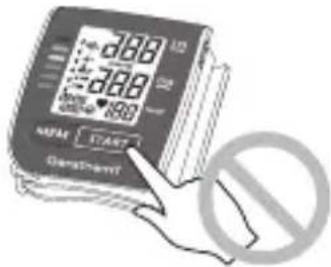 | |

Error messages
| Problem Display symbol Cause Solution | |||
| No power | Nothing appears on the display | Battery charge too low Charge battery | |
| Low battery power | Lo Indicator | Battery charge low Charge battery | |
| No power | Nothing appears on the display | Adapter / charging cable is not connected correctly | Check adapter and charging cable and plug in correctly |
| No display | No display when buttons pressed | Unit is not activated | Press and hold down „MEM“ button to activate the unit |
| Error messages | E 1 | The cuff is not properly fastened or pressure in the cuff is too high | Rest for a short period of time, re-fasten the cuff and measure the blood pressure again |
| E 2 | The unit hast detected movement or pulse rate is too low | Movement can influence the measurement.Relax for a moment and then measure again | |
| E 3 | No pulse signal is detected | Loosen clothing around the arm and measure again | |
| E 4 | The measuring process was not successful | Rest for a short time and retake the measurement | |
| EExx | A calibration error has occurred | Repeat the measurement.If the problem persists, contact your dealer or our customer service department for further support | |
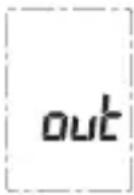 | Measured values are outside the measurement range | Relax for a moment. Re-fasten the cuff and measure again. If the problem re-occurs, consult your physician | |
Specifications
| Model no. GT-1215 | |
| Power supply 3.7 V 420 | mAh Built-in rechargeable lithium-polymer battery |
| Display mode Digital LCD Display V.A. 44.8 mm x 35.6 mm | |
| Measurement mode Oscillographic testing mode | |
| Measurement range | Rated cuff pressure: 0mm Hg ~ 299 mmHg (0 kPa ~ 40 kPa)Measurement pressure:SYS: 60 mmHg ~ 230 mmHg (8.0 kPa ~ 30.7 kPa)DIA: 40 mmHg ~ 130 mmHg (5.3 kPa ~ 17.3 kPa)Pulse value: (40 - 199) beat/minute |
| Accuracy | Pressure: ±3 mmHg (0.4 kPa)Pulse value: ±5 % |
| Operating condition | A temperature range between: +5 °C and +40 °CA relative air humidity range of: ≤85 % non-condensing but not requiring water vapour partial pressure of more than 50 hPaAn atmospheric pressure range of: 700 hPa to 1060 hPa |
| Storage & transportation condition | Temperature: -20 °C to 60 °CA relative air humidity range of ≤ 93 %, non-condensing, with water vapour pressure up to 50 hPa |
| Cuff size 13.5 cm ~ 21.5 cm | |
| Weight 104 g (including the cuff) | |
| External dimensions approx. 84 mm x 70 mm x 40 mm | |
| Attachment USB cable, storage bag, user manual | |
| Degree of protection | IP22, The device is protected against penetration by solid objects ≥ 12.5 mm in diameter and against the ingress of water in the form of vertically falling drops. |
| Device classification Battery mode: ME device with built-in lithium-polymer rechargeable battery | |
| Software Version A01 | |
Subject to changes in the interests of technical progress.
Quality Standard
Geratherm® is certified in accordance with Council Directive 93/42/EEC and EN ISO 13485 and is entitled to affix the CE-mark (Notified Body: TÜV Rheinland LGA Products GmbH).
Symbol Index

| Follow the instructions for use | |
| Keep dry Manufacturer | |
| Store at relative humidity levels ≤ 93 % | |
| Store between -20 °C and +60 °C | |
| The device must not be disposed of with household waste | |
| Direct current Reference number |
 | Type BF Equipment |
 | |
 | Batch code (YYMMXXX, Year/Month / Identification number) |
 | Caution! Read the instruction manual. |
 | Manufacturing date |
 |
Information on electromagnetic compatibility (EMC)
Electronic devices such as PCs and mobile phones can lead to medical devices in operation being exposed to electromagnetic interference from other devices. This can lead to malfunction of the medical device and create a potentially unsafe situation.
Medical devices should also not interfere with any other equipment.
The EN 60601-1-2 standard regulates the requirements for EMC (electromagnetic compatibility) and defines the levels of immunity to electromagnetic interference and the maximum electromagnetic emission levels for medical devices.
This blood pressure monitor, which is manufactured by Geratherm Medical AG, complies with the EN 60601-1-2 standard in relation to both immunity and emissions.
Nevertheless, special precautions should be observed:

Please only use the device indoors and not in the vicinity of mobile phones or microwave ovens. This device should not be used adjacent to or stacked with other devices; and if it has to be used adjacent to or stacked with other devices, it should be observed to verify normal operation in the configuration in which it is being used.
In the case of devices exceeding the maximum power of 2 W, the minimum distance from your blood pressure monitor should be 3.3 metres.
Warning:
The use of accessories, transducers and cables other than those specified or provided by the manufacturer of this device may result in increased electromagnetic emissions or reduced electromagnetic immunity of the device and may cause it to malfunction.
Annex
| Guidance and manufacturer's declaration – electromagnetic emissions | ||
| The device is intended for use in the electromagnetic environments listed below, and should only beused in such environments: | ||
| Emissions test Compliance Electromagnetic environment - guidance | ||
| RF emissions CISPR 11 Group 1 | RF energy is used only to maintain device's operation. Therefore, its RF emissions are so low that it's not likely to cause any interference in nearby electronic equipment. | |
| RF emissions CISPR 11 Class B | The device is suitable for use in all establishments, including domestic establishments, and those directly connected to the public low-voltage power supply net-workthat supplies buildings used for domestic purposes. | |
| Harmonic emissions IEC 61000-3-2 Class A | ||
| Voltage fluctuations / flicker emissions IEC 61000-3-3 | complies | |
| Guidance and manufacturer's declaration – electromagnetic emissions | |||
| The device or system is intended for use in the electromagnetic environments listed below. The customer and/or user of the device or system must ensure that it is used in an electromagnetic environment as described below: | |||
| Immunity test | IEC 60601 – test level | Compliance level | Electromagnetic environment - guidance |
| Electrostatic discharge (ESD) IEC 61000-4-2 | ± 6 kV contact ± 8 kV air | ± 6 kV contact ± 8 kV air | Floors should be wood, concrete or ceramic tile. If floors are covered with synthetic material, the relative humidity should be at least 30 %. |
| Power frequency (50/60 Hz) magnetic field IEC 61000-4-8 | 3 A/m 3 A/m | Power frequency magnetic fields should be at levels characteristic of a typical location in a typical commercial or hospital environment. | |
Annex
| Recommended separation distances between portable and mobile RF communication | |||
| The device is intended for use in an electromagnetic environment where radiated RF disturbances are under control.User can help prevent electromagnetic interference by keeping the device at a minimum distance from portable andmobile RF communications equipment (transmitters). Below table details the maximum output power of transmitter: | |||
| Rated maximum output powerof transmitters in Watt | Separation distance / m | ||
| 150 kHz to 80 MHzd = 1.2 √P | 80 MHz to 800 MHzd = 1.2 √P | 800 MHz to 2.5 GHzd = 2.3 √P | |
| 0.01 | 0.12 | 0.12 | 0.23 |
| 0.1 | 0.38 | 0.38 | 0.73 |
| 1 | 1.2 | 1.2 | 2.3 |
| 10 | 3.8 | 3.8 | 7.3 |
| 100 | 12 | 12 | 23 |
| For transmitters rated at a maximum output power not listed above, the recommended separation distance d in metres (m) can be estimated using the equation applicable to the frequency of the transmitter, where P is the maximumoutput power rating of the transmitter in watts (W) according to the transmitter manufacturer.NOTE 1: At 80 MHz and 800 MHz, the separation distance for the higher frequency range applies.NOTE 2: These guidelines may not apply in all situations. Electromagnetic propagation is affected by absorptionand reflection from structures, objects and people. | |||

Annex

| Guidance and manufacturer's declaration - electromagnetic immunity | |||
| The device or system is intended for use in the electromagnetic environments listed below. The customer and/or user of the device or system must ensure that it is used in an electromagnetic environment as described below: | |||
| Immunity test | IEC 60601 - test level | Compliance level | Electromagnetic environment - guidance |
| Portable and mobile RF communications equipment should be used no closer to any part of the device, including cables, than the recommended separation distance calculated from the equation applicable to the frequency of the transmitter. | |||
| Recommended separation distance: | |||
| Conducted RF IEC 61000-4-6 | 3 Vrms 150 kHz to 80 MHz | 3 Vrms d= 1.2 √P | |
| Radiated RF IEC 61000-4-3 | 3 V/m 80 MHz to 2.5 GHz | 3 V/m | d = 1.2 √P80 MHz to 800 MHz |
| d = 2.3 √P800 MHz to 2.5 GHz | |||
where P is the maximum output power rating of the transmitter in watts (W) according to the transmitter manufacturer and d is the recommended separation distance in metres (m).Field strengths from fixed RF transmitters, as determined by an electro-magnetic site survey, ^a should be less than the compliance level in each frequency range. ^b Interference may occur in the vicinity of equipment marked with the following symbol: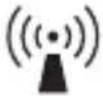 | |||
| NOTE 1: At 80 MHz and 800 MHz, the higher frequency range applies.NOTE 2: These guidelines may not apply in all situations. Electromagnetic propagation is affected by absorpti-on and reflection from structures, objects and people. | |||
Annex
| Guidance and manufacturer's declaration – electromagnetic immunity | |
| a) | Field strengths from fixed transmitters, such as base stations for radio (cellular/cordless) telephones and land mobile radios, amateur radio, AM and FM radio broadcast and TV broadcast cannot be predicted theoretically with accuracy. To assess the electromagnetic environment due to fixed RF transmitters, an electromagnetic site survey should be considered. If the measured field strength in the location in which the device is used exceeds the applicable RF compliance level above, the device should be observed to verify normal operation. If abnormal performance is observed, additional measures may be necessary, such as reorienting or relocating the device.b) Over the frequency range 150 kHz to 80 MHz, field strengths should be less than 3 V/m. |
| 1) | This equipment needs to be installed and put into service in accordance with the information provided in the user manual; |
| 2) | Wireless communications equipment such as wireless home network devices, mobile phones, cordless telephones and their base stations, walkie-talkies can affect this equipment and should be kept at least a distance d = 3,3 m away from the equipment. (Note: As indicated in Table 6 of IEC 60601-1-2 for ME EQUIPMENT, a typical cell phone with a maximum output power of 2 W yields d = 3,3 m at an IMMUNITY LEVEL of 3 V/m) |

The current version of the standards is valid.


Geratherm Medical AG
Fahrenheitstraße 1
99331 Geratal
Germany
www.geratherm.com
CE0197
text_image
88.0 mmHg AVG 88:88 ♥180 18/88 M 180text_image
Diagram showing a digital thermometer connected to a laptop via cable, illustrating the connection or data flow between devices.
natural_image
Illustration of a person interacting with a smartphone at a desk, with a heart symbol and dotted line indicating interaction (no text or symbols present)natural_image
Simple line drawing of a person sitting on a bench inside a dashed rectangular frame (no text or symbols)
Fonctions
Geratherm Medical AG
Fahrenheitstraße 1
99331 Geratal
Allemagne
www.geratherm.com
CE0197
text_image
88.0 mmHg AVG 88:88 ♥180 18/88 M 180text_image
Diagram showing a digital pressure meter connected to a laptop via cable, with measurement labels and connection point.
text_image
≡ on ≡ off
natural_image
Illustration of a person sitting at a desk with hands near a heart symbol (no text or symbols present)
Funzione
natural_image
Simple line drawing of a person sitting on a bench inside a dashed border (no text or symbols)
Funzione
Geratherm Medical AG
Fahrenheitstraße 1
99331 Geratal
Germania
www.geratherm.com
CE0197
text_image
88.0 mmHg AVG 88:88 ♥180 18/88 M 180text_image
Diagram showing a digital pressure meter connected to a laptop via cable, with both devices labeled in English.
natural_image
Illustration of a person interacting with a wristwatch (no text or symbols present)natural_image
Simple line drawing of a person sitting on a bench inside a dashed border (no text or symbols)
Funcionamiento
Geratherm Medical AG
Fahrenheitstraße 1
99331 Geratal
Alemania
www.geratherm.com
CE0197
natural_image
Simple line drawing of a rolled-up book or document (no text or symbols)

text_image
88.8 mmHg AVG 88:88 ♥180 18/88 M 180text_image
Diagram showing a digital pressure meter connected to a laptop via cable, with both devices labeled in English.

natural_image
Illustration of a person sitting at a desk with a heart symbol and a hand near the arm (no text or symbols present)
Função
natural_image
Simple line drawing of a person sitting on a bench inside a dashed border (no text or symbols)
Função
Consulta dos valores memorizados
Geratherm Medical AG
text_image
1.4 mmHg AVG 6.9 M 7.1 MEM START Gerathem® SYS DIA THERM PULSEGEBRUIKSAANWIJZING
GT-1215
CE 0197

Inhoud
text_image
88.8 mmHg AVG 88:88 ♥188 18/88 M 188text_image
Diagram showing a digital pressure monitor connected to a laptop via cable, illustrating measurement or data transfer.

natural_image
Illustration of a person sitting at a desk with a heart symbol and a hand near the arm (no text or symbols present)natural_image
Simple line drawing of a person sitting on a bench inside a dashed border (no text or symbols)
Functie
Geratherm Medical AG
Fahrenheitstraße 1
99331 Geratal
Duitsland
www.geratherm.com
C€0197
text_image
88.0 mmHg AVG 88:88 ♥100 18/88 M 100
text_image
Diagram showing a digital temperature meter connected to a laptop via cable, with measurement labels and connection arrows.تنبيه: محول بديل
text_image
20:20 10 1 20:20, 10:20 0:00 13:40 = on = offnatural_image
Illustration of a person sitting at a desk with a heart symbol above, no text or symbols presentGeratherm Medical AG
Fahrenheitstr. 1
Geratal 99331
Deutschland
ألمانيا autocادية


natural_image
Blank gray image with no visible content, text, or symbolsGeratherm

text_image
Professional DiagnosticGERMANY
Geratherm Medical AG
Fahrenheitstraße 1
D-99331 Geratal
Germany
Phone: +49 36205 980
Fax: +49 36205 98 116
www.geratherm.com
PUBDAC0003V05
2021-02