
ML2420 - Television Vevor - Free user manual and instructions
Find the device manual for free ML2420 Vevor in PDF.
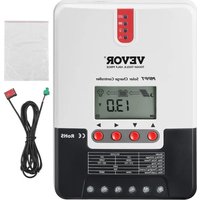


| Product Type | MPPT Solar Charge Controller |
| Brand | Vevor |
| Model | ML2420 |
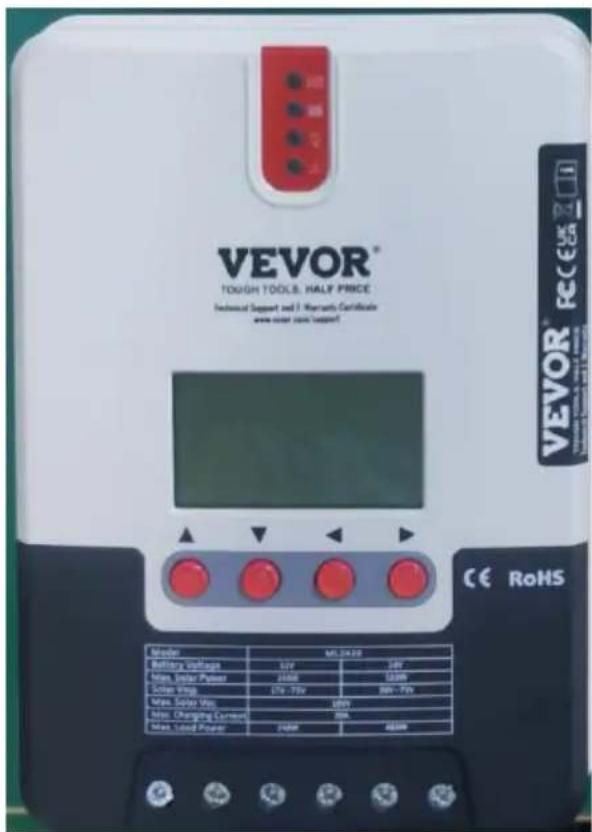
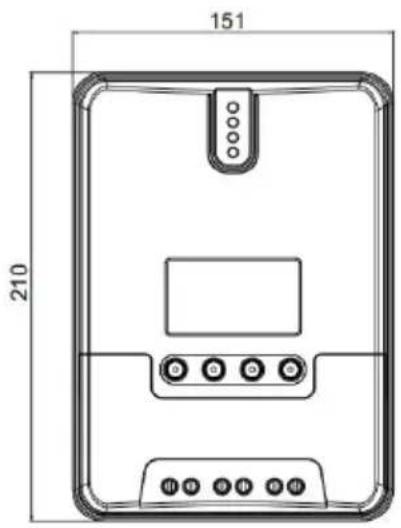
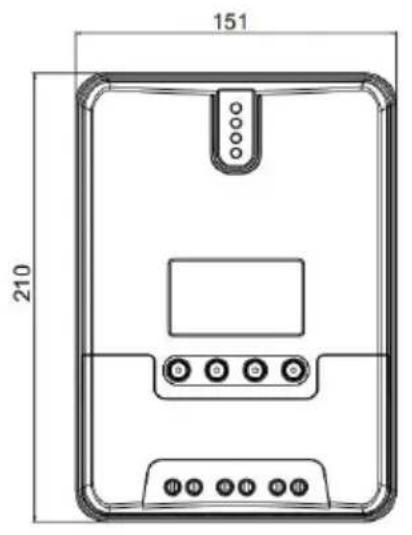
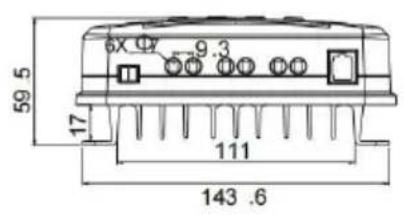
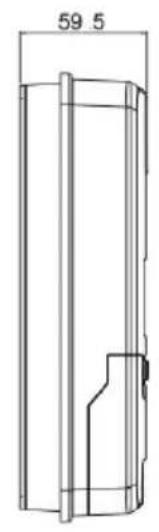
| Dimensions (L x W x H) | 210 x 151 x 59.5 mm |
| Weight | 1.4 kg |
| System Voltage | 12 V / 24 V automatic |
| Rated Charging Current | 20 A |
| Max. PV Input Voltage | 100 V (25 °C) / 90 V (-25 °C) |
| Max. PV Power | 260 W (12 V) / 520 W (24 V) |
| Conversion Efficiency | ≤ 98% |
| MPPT Tracking Efficiency | Up to 99.9% |
| Idle Consumption | 0.7 W to 1.2 W |
| Supported Battery Types | Sealed lead-acid, gel, open, lithium, user |
| Display | LCD screen + 4 LED indicators |
| Communication | RS232 / RS485 (Modbus protocol) |
| Protection Functions | Polarity reversal, overvoltage, short circuit, overheating, TVS lightning |
| Protection Rating | IP32 |
| Operating Temperature | -35 °C to 45 °C |
| Max. Altitude | 3000 m |
| Recommended Maintenance | Biannual inspection, heatsink cleaning, connection check |
| Spare Parts | Recommended fuse/circuit breaker (not included) |
| Warranty | Technical support via www.vevor.com/support |
Frequently Asked Questions - ML2420 Vevor
User questions about ML2420 Vevor
0 question about this device. Answer the ones you know or ask your own.
Ask a new question about this device
Download the instructions for your Television in PDF format for free! Find your manual ML2420 - Vevor and take your electronic device back in hand. On this page are published all the documents necessary for the use of your device. ML2420 by Vevor.
USER MANUAL ML2420 Vevor
ML MAXIMUM POWER POINT TRACKING (MPPT)
MODEL: ML2420
NEED HELP? CONTACT US!
Have product questions? Need technical support? Please feel free to contact us:
Technical Support and E-Warranty Certificate www.vevor.com/support
This is the original instruction. Please read all manual instructions carefully before operating. VEVOR reserves the right to interpret the user manual. The appearance of the product shall be subject to the product you received. Please forgive us that we won't inform you of any technology or software updates on our product.
 | Warning-To reduce the risk of injury, user must read instructions manual carefully. |
 | This device complies with Part 15 of the FCC Rules. Operat subject to the following two conditions:(1)This device may not harmful interference, and (2)this device must accept any inter received, including interference that may cause undesired oper |
 | This product is subject to the provision of European D 2012/19/EC. The symbol showing a wheelie bin crossed through indicates that the product requires separate refu collection in the European Union. This applies to the p and all accessories marked with this symbol. Products as such may not be discarded with normal domestic w must be taken to a collection point for recycling electri electronic devices |
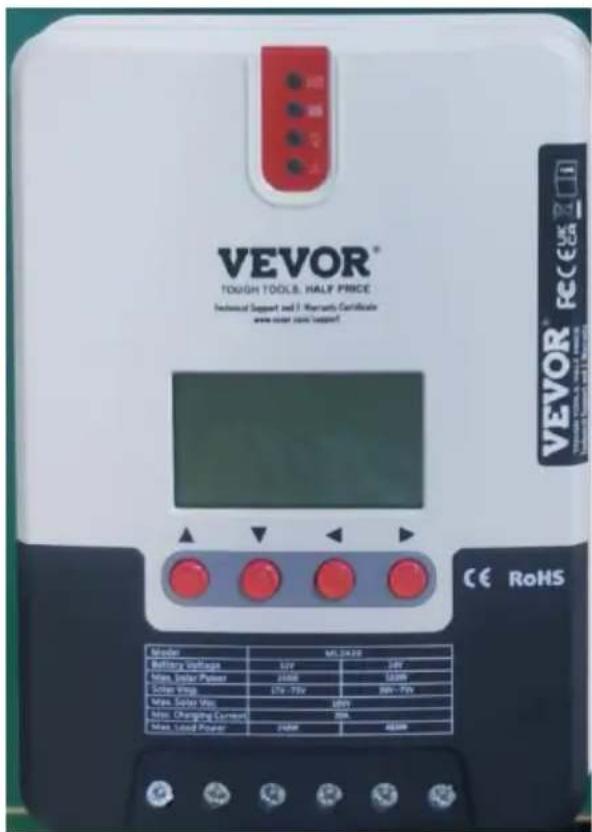
| Model | ML2420 |
| Battery voltage | 12V/24V |
| Max. PV open circuit voltag | 100V(25°C), 90V(-25°C) |
| Charge current | 20A |
| Max. PV input power | 20A |
Dear users, Thank you very much for choosing our products!
SAFETY INSTRUCTIONS
- As this controller deals with voltages that exceed the top limit for human safety, do not operate it before reading this manual carefully and completing safety operation training.
- The controller has no internal components that need maintenance or service, thus do not attempt to disassemble or repair the controller.
- Install the controller indoors, and avoid component exposure and water intrusion.
- During operation, the radiator may reach a very high temperature, therefore install the controller at a place with good ventilation.
- It's recommended that a fuse or breaker be installed outside the controller.
- Before installing and wiring the controller, make sure to disconnect the photovoltaic array and the fuse or breaker close to the battery terminal.
- After installation, check if all connections are solid and reliable to avoid loose connections that may give rise to dangers caused by heat accumulation.

Warning: means the operation in question is dangerous, and you should get properly prepared before proceeding.

Note: means the operation in question may cause damage.

Tips: means advice or instruction for the operator.
Table of Contents
- Product Introduction ......05
- Product Installation ....13
- Product Operation and Display....19
- Product Protection and System Maintenance....25
- Technical Parameters....30
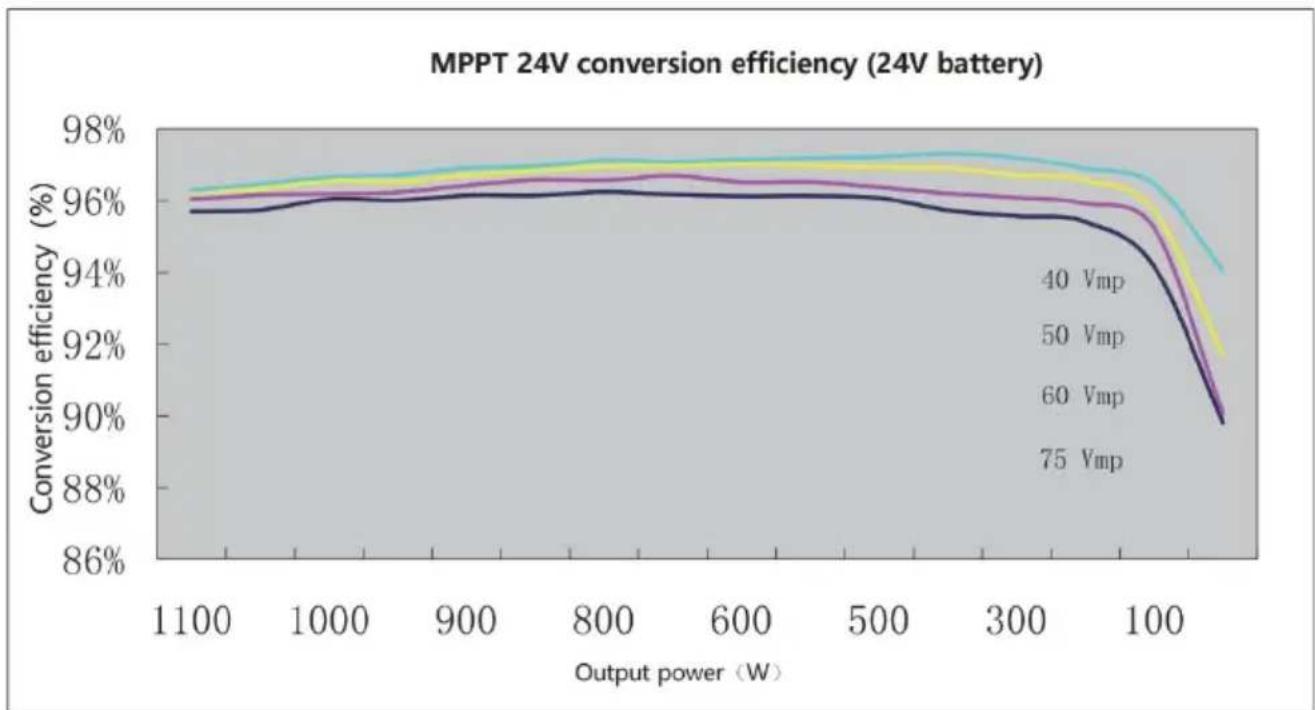
- Conversion Efficiency Curve....32
- Product Dimensions....33
- APP control function....34
1. PRODUCT INTRODUCTION
1.1 Product Overview
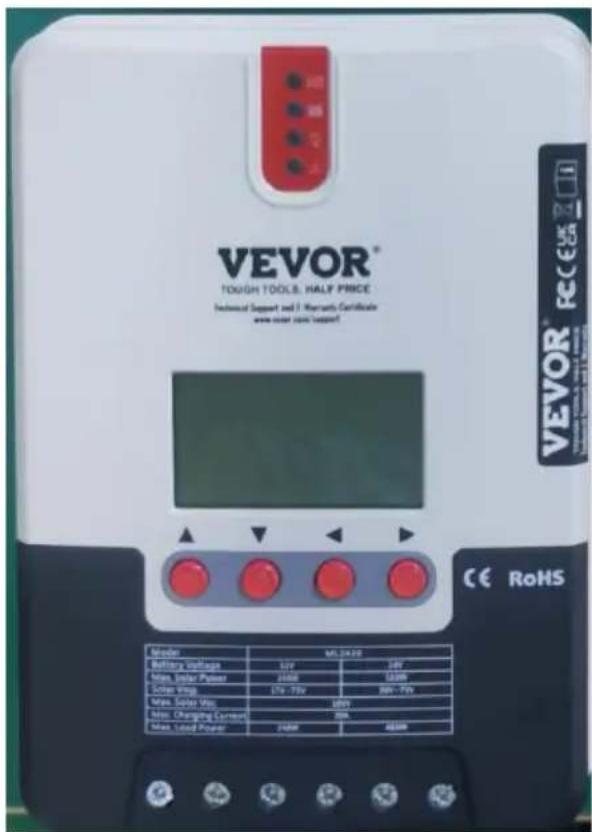
- This product can keep monitoring the solar panel's generating power and tracking the highest voltage and current values (VI) in real time, enabling the system to charge the battery at maximum power. It's designed to be used in off-grid solar photovoltaic systems to coordinate operation of the solar panel, battery and load, functioning as the core control unit in off-grid photovoltaic systems.
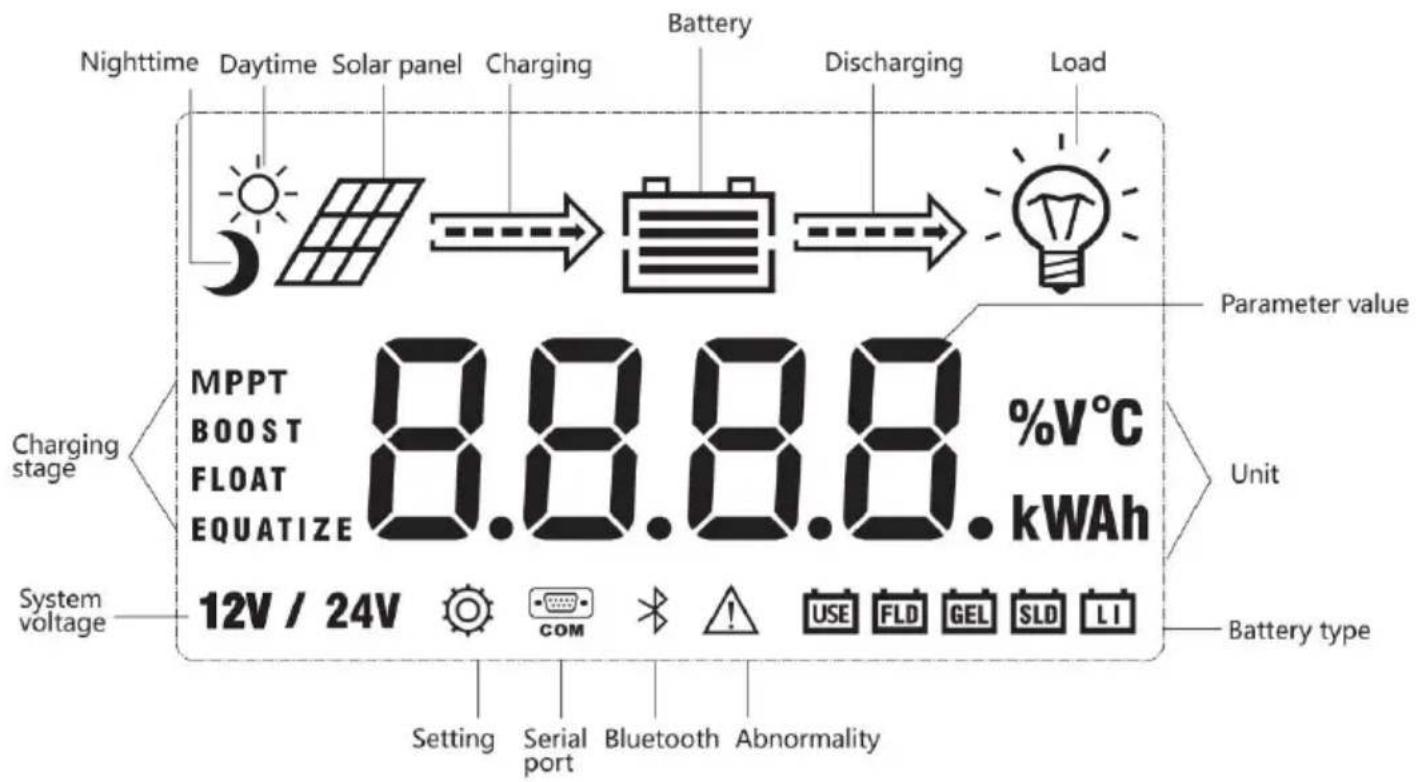
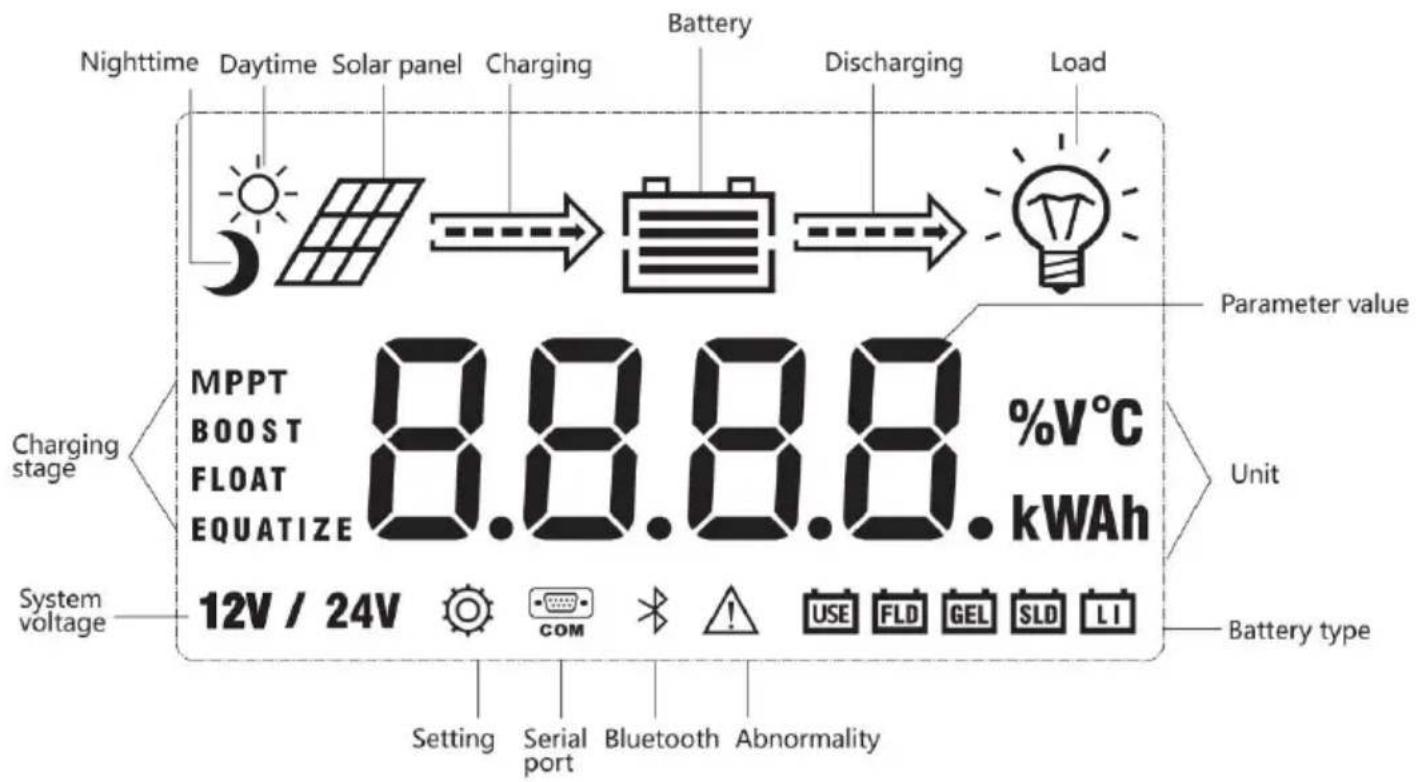
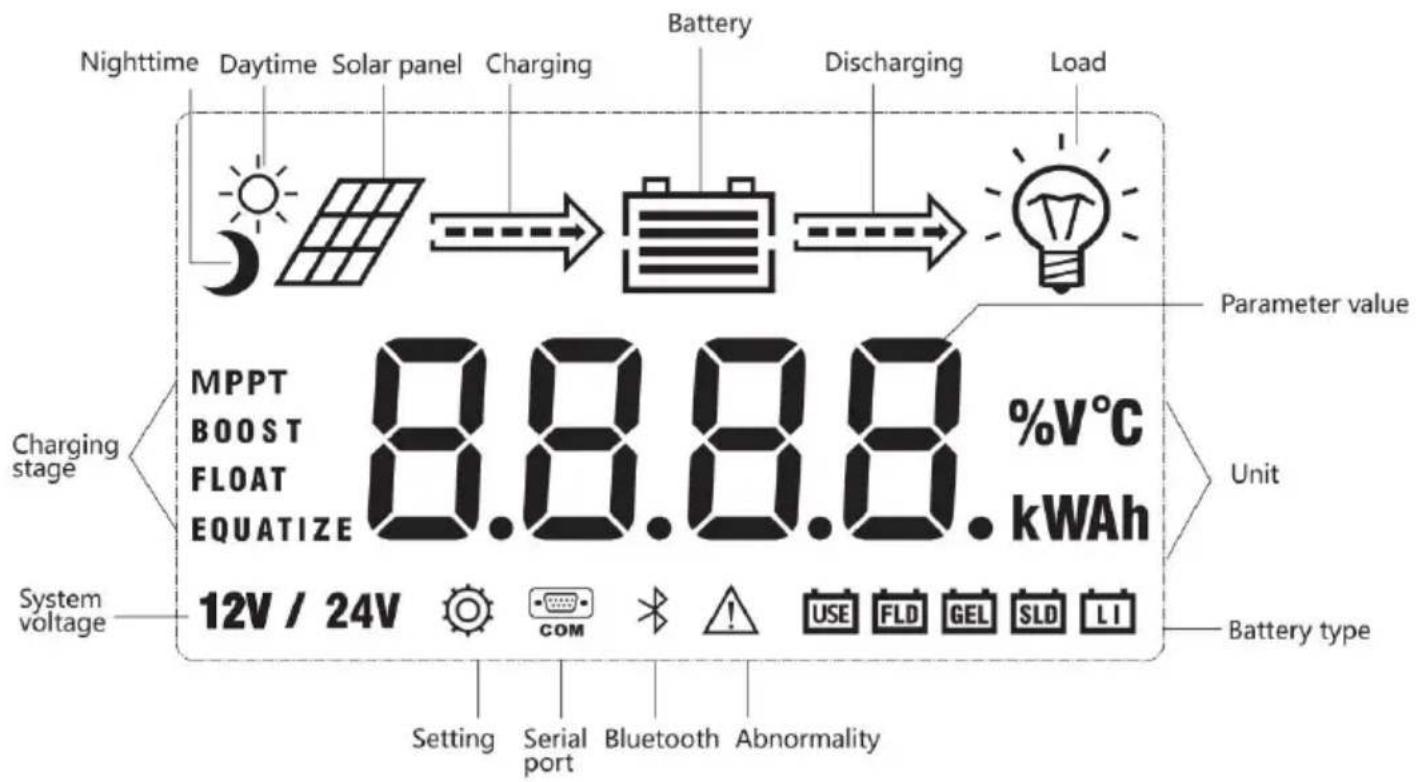
- This product features an LCD screen that can dynamically display operating status, operating parameters, controller logs, control parameters, etc. Users can conveniently check parameters by using the keys, and modify control parameters to cater to different system requirements.
- The controller utilizes the standard Modbus communication protocol, making it easy for users to check and modify system parameters on their own. Besides, by providing free monitoring software, we give users the maximum convenience to satisfy their varied needs for remote monitoring.
- With comprehensive electronic fault self-detecting functions and powerful electronic protection functions built inside the controller, component damage caused by installation errors or system failures can be avoided to the greatest extent possible.
1.2 Product Features
- With the advanced dual-peak or multi-peak tracking technology, when the solar panel is shadowed or part of the panel fails resulting in multiple peaks on the I-V curve, the controller is still able to accurately track the maximum power point.
- A built-in maximum power point tracking algorithm can significantly improve the energy utilization efficiency of photovoltaic systems, and raise the charging efficiency by 15% to 20% compared with the conventional PWM method.
- A combination of multiple tracking algorithms enables accurate tracking of the optimum working point on the I-V curve in an extremely short time.
- The product boasts an optimum MPPT tracking efficiency of up to 99.9%.
- Advanced digital power supply technologies raise the circuit's energy conversion efficiency to as high as 98%.
- Charging program options are available for different types of batteries including gel batteries, sealed batteries, open batteries, lithium batteries, etc.
- The controller features a limited current charging mode. When the solar panel power exceeds a certain level and the charging current is larger than the rated current, the controller will automatically lower charging power and bring the charging current to the rated level.
- Instantaneous large current startup of capacitive loads is supported.
- Automatic recognition of battery voltage is supported.
- LED fault indicators and an LCD screen which can display abnormality information help users to quickly identify system faults.
- Historical data storage function is available, and data can be stored for up to a year.
- The controller is equipped with an LCD screen that allows users to not only check device operating data and statuses, but also modify controller parameters.
- The controller supports the standard Modbus protocol, fulfilling the communication needs of various applications.
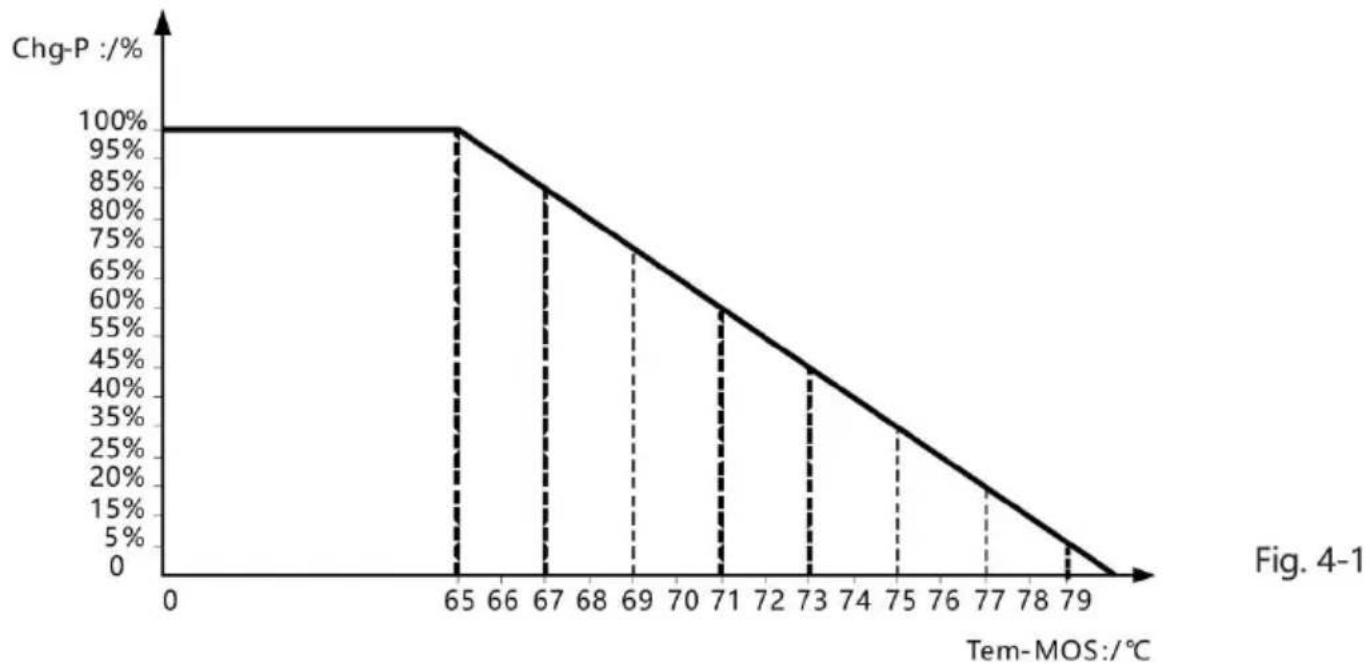
- The controller employs a built-in over-temperature protection mechanism. When the temperature surpasses the set value, the charging current will decline in linear proportion to the temperature, as well as the temperature rise of the controller, effectively preventing the controller from being damaged by overheating.
- Featuring a temperature compensation function, the controller can automatically adjust charging and discharging parameters to extend the battery's service life.
- TVS lightning protection.
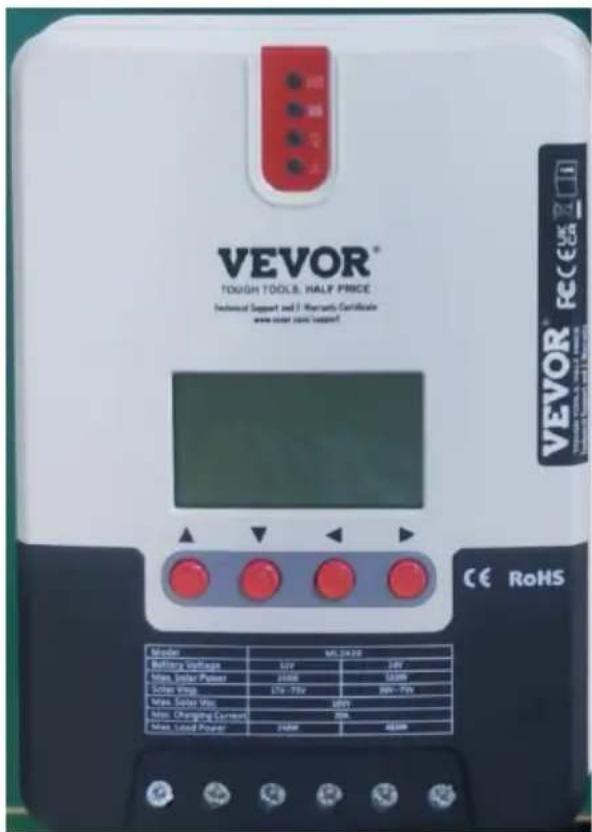
1.3 Exterior and Interfaces

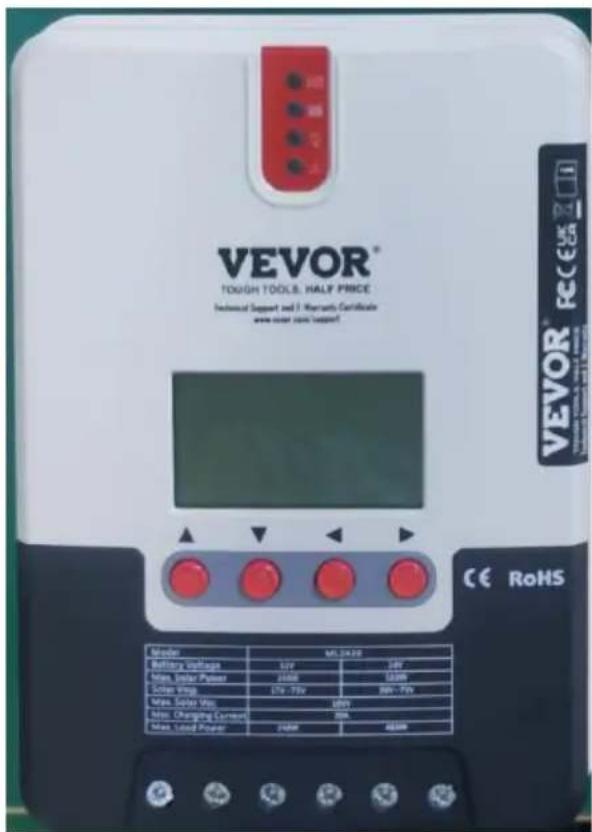
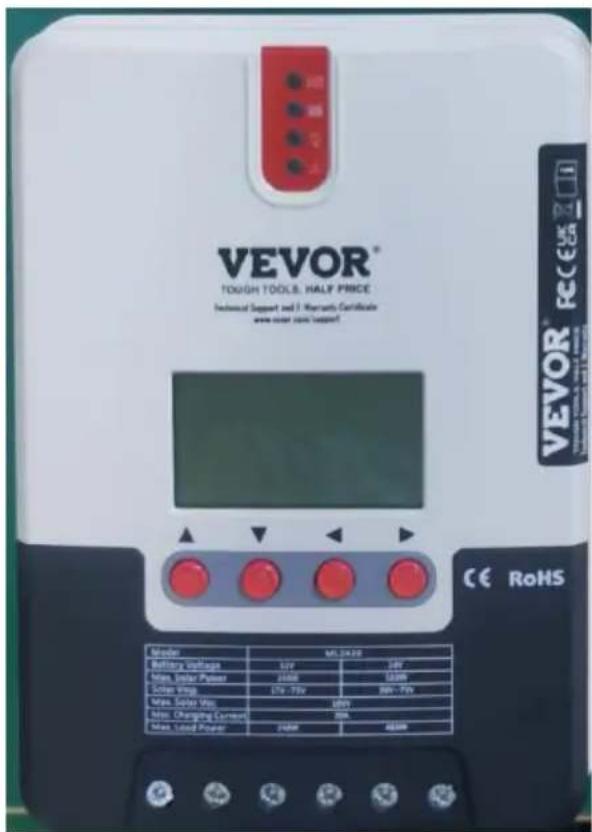
Fig. 1-1 Product appearance and interfaces
| No. | Item | No. | Item |
| 1 | Charging indicator | 10 | Battery "+" interface |
| 2 | Battery indicator | 11 | Battery "-" interface |
| 3 | Load indicator | @ | Load "+" interface |
| 4 | Abnormality indicator | 13 | Load "-" interface |
| 5 | LCD screen | 14 | External temperature sampling interface |
| 6 | Operating keys | 15 | RS232/RS485 communication interface |
| 7 | Installation hole | ||
| 8 | Solar panel "+" interfad | ||
| 9 | Solar panel "-" interfad |
1.4 Introduction to Maximum Power Point Tracking Technology
Maximum Power Point Tracking (MPPT) is an advanced charging technology that enables the solar panel to output more power by adjusting the electric module's operating status. Due to the nonlinearity of solar arrays, there exists a maximum energy output point (maximum power point) on their curves. Unable to continuously lock onto this point to charge the battery, conventional controllers (employing switching and PWM charging technologies) cannot get the most power from the solar panel. However, a charge controller featuring MPPT technology can continuously track the array's maximum power point to obtain the maximum amount of power to charge the battery.
Take a 12V system as an example. As the solar panel's peak voltage is approximately 17V while the battery's voltage is around 12V, when charging with a conventional charge controller, the solar panel's voltage will stay at around 12V, failing to deliver the maximum power. However, an MPPT controller can overcome this problem by adjusting the solar panel input voltage and current in real time, realizing maximum input power.
Compared with conventional PWM controllers, the MPPT controller can make the most of the solar panel's maximum power and therefore provide a larger charging current. Generally speaking, the latter can raise the energy utilization ratio by 15% to 20% in contrast with the former.
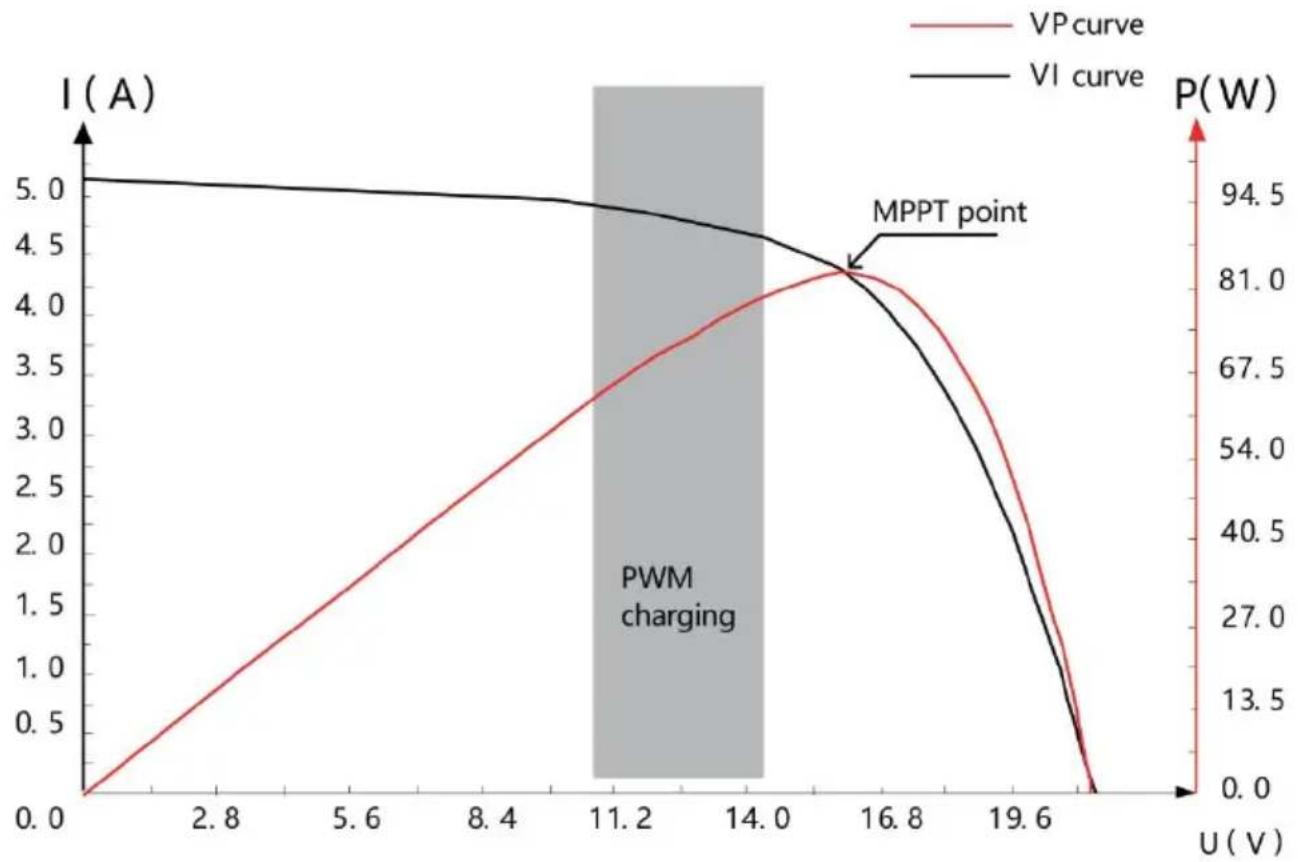
Fig. 1-2 Solar panel output characteristic curve
Meanwhile, due to changing ambient temperature and illumination conditions, the maximum power point varies frequently, and our MPPT controller can adjust parameter settings according to the environmental conditions in real time, so as to always keep the system close to the operating point. The whole process is entirely automatic without the need for human intervention.
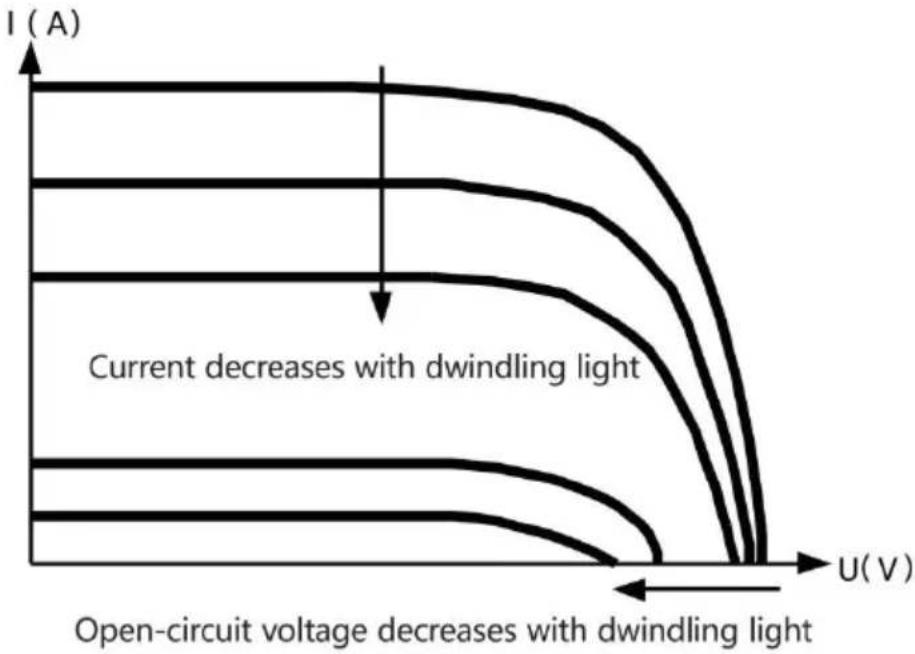
Fig. 1-3 Relation between solar panel output characteristics and illumination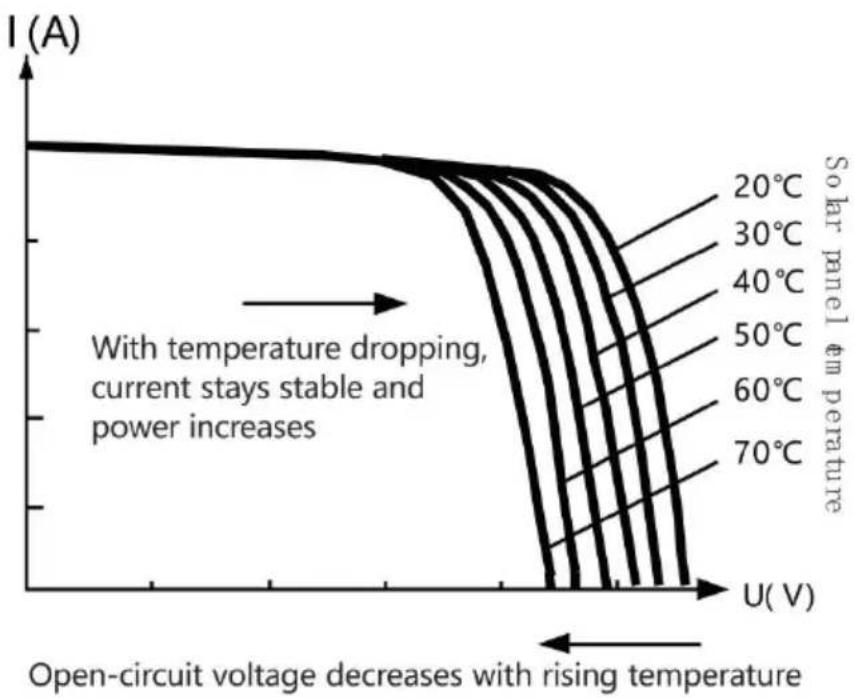
Fig. 1-4 Relation between solar panel output characteristics and temperature
1.5 Charging Stage Introductions
As one of the charging stages, MPPT cannot be used alone. It is required to combine boost charge, floating charge, equalizing charge and other charging methods to complete the battery charging process. A complete charging process includes: Quick charge, holding charge and floating charge. Charging curve is shown below:
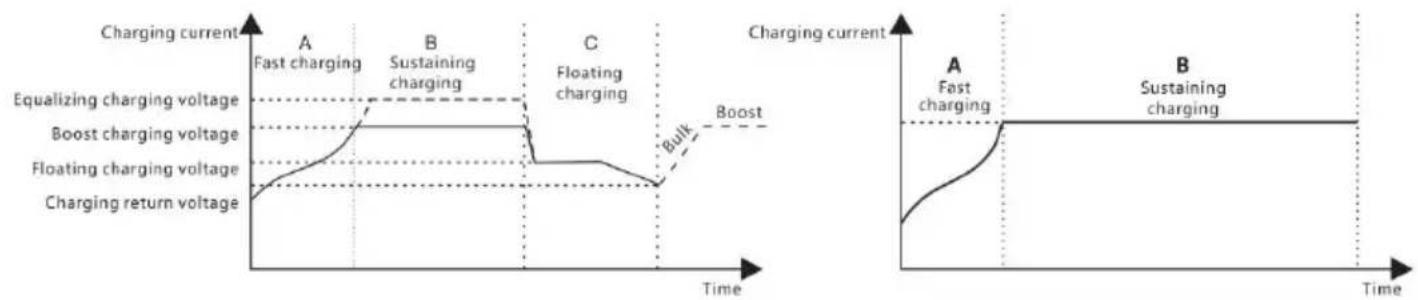
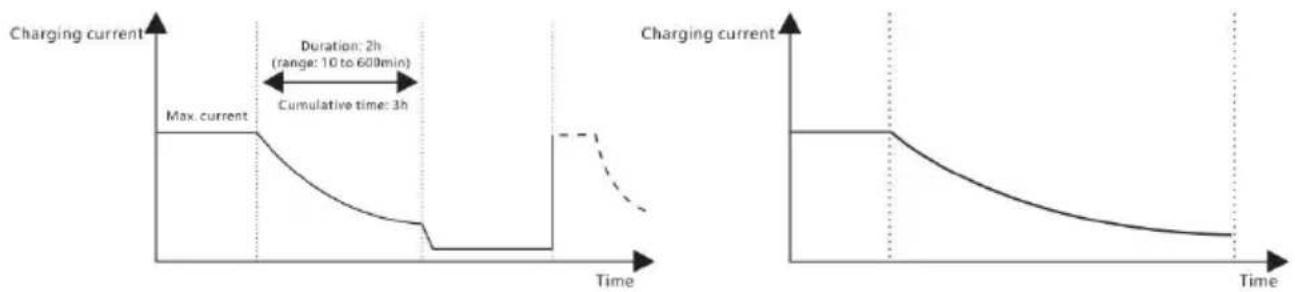
Fig. 1-5 SLD Battery charging stages diagram Fig. 1-6 LI Battery charging stages diagram
a) Fast charging
At the fast charging stage, as the battery voltage has not reached the value of full voltage (i.e. equalizing/boost voltage) yet, the controller performs MPPT charging on the battery with the maximum solar power. When the battery voltage reaches the preset value, constant voltage charging will begin.
b) Sustaining charging
When the battery voltage reaches the set value of holding voltage, the controller will perform constant voltage charging. This process will no longer include MPPT charging, and the charging current will gradually decrease with time. Holding charge comes in two stages, i.e. equalizing charge and boost charge. The two stages are conducted without repetition, in which equalizing charge is started once every 30 days.
Boost charging
By default, boost charging generally lasts for 2h, but users can adjust preset values of duration and boost voltage point according to the actual needs. When the duration reaches the set value, the system will then switch to floating charging.
Equalizing charging

Warning: Risk of explosion!
In equalizing charging, an open lead-acid battery can produce explosive gas, therefore the battery chamber shall have good ventilation condition.

Note: risk of equipment damage!
Equalizing charging may raise the battery voltage to a level that may damage sensitive DC loads. Check and make sure that allowable voltages of all the loads in the system are greater than the set value of battery equalizing charging.

Note: risk of equipment damage!
Overcharge or too much gas generated may damage battery plates and cause active material on the battery plates to scale off. Equalizing charging to an excessively high level or for too long a period may cause damage. Read carefully the actual requirements of the battery deployed in the system.
Some types of batteries benefit from regular equalizing charging which stirs the electrolyte, balances the battery voltage, and finishes the electrochemical reaction. Equalizing charging raises the battery voltage to a higher level than the standard supply voltage and gasifies the battery electrolyte. If the controller then automatically steers the battery into equalizing charging, the charging duration is 120 minutes (default). In order to avoid too much generated gas or battery overheating, equalizing charge and boosting charging won't repeat in one complete charging cycle.
Note:
1) When due to the installation environment or working loads, the system can't continuously stabilize the battery voltage to a constant level, the controller will initiate a timing process, and 3 hours after the battery
reaches the set value, the system will automatically switch to equalizing charging.
2) If no calibration has been done to the controller clock, the controller will perform equalizing charging regularly according to its internal clock.
➤ Floating charging
When finishing the sustaining charging stage, the controller will switch to floating charging in which the controller lowers the battery voltage by diminishing the charging current and keeps the battery voltage at the value of floating charging voltage. In the floating charging process, visible light charging is carried out for the battery to maintain it in a full state. At this stage, the loads can access almost all the solar power. If the loads consume more power than the solar panel can provide, the controller will not be able to keep the battery voltage at the floating charging stage, the battery voltage drops to the set value for returning to boost charge, the system will exit floating charging and re-enter into fast charging.
2. PRODUCT INSTALLATION
2.1 Installation Precautions
- Be very careful when installing the battery. For open lead-acid batteries, wear a pair of goggles during installation, and in case of contact with battery acid, flush with water immediately.
- In order to prevent the battery from being short-circuited, no metal objects shall be placed near the battery.
- Acid gas may be generated during battery charging, thus make sure the ambient environment is well ventilated.
- Keep the battery away from fire sparks, as the battery may produce flammable gas.
- When installing the battery outdoors, take sufficient measures to keep the battery from direct sunlight and rain water intrusion.
- Loose connections or corroded wire may cause excessive heat generation which may further melt the wire's insulation layer and surrounding materials, and even cause a fire. Therefore, make sure connections are tightened securely. Wires had better be fixed properly with ties, and when needs arise to move things, avoid wire sway as to keep connections from loosening.
- When connecting the system, the output terminal's voltage may exceed the top limit for human safety. If operation needs to be done, be sure to use insulation tools and keep hands dry.
- The wiring terminals on the controller can be connected with a single battery or a pack of batteries. Following descriptions in this manual apply to systems employing either a single battery or a pack of batteries.
- Follow the safety advice given by the battery manufacturer.
- When selecting connection wires for the system, follow the criterion that the current density is not larger than 2.4A/mm².
- Connect the controller's earth terminal to the ground.
2.2 Wiring Specifications
Wiring and installation methods must comply with national and local electrical specifications. The wiring specifications of the battery and load must be selected according to rated currents, and see the following table for wiring specifications:
| Models | Rated charging current | Rated discharging current | Battery wire diameter (mm2) | Load wire diameter (mm2) |
| ML2420 | 20A | 20A | 5 mm2 | 5 mm2 |
2.3 Installation and Wiring
Warning: risk of explosion! Never install the controller and an open battery in the same enclosed space! Nor shall controller be installed in an enclosed space where battery gas may accumulate.
controller and an open battery in the same enclosed space! Nor shall the controller be installed in an enclosed space where battery gas may accumulate.
Warning: danger of high voltage! Photovoltaic arrays
may produce a very high open-circuit voltage. Open the breaker or fuse before wiring, and be very careful during the wiring process.
Note: when installing the controller, make sure that
enough air flows through the controller's radiator, and leave at least 1 mm of space both above and below the controller so as to ensure convection for heat dissipation. If the controller is installed in an enclosure box, make sure the box delivers a reliable heat dissipation effect.
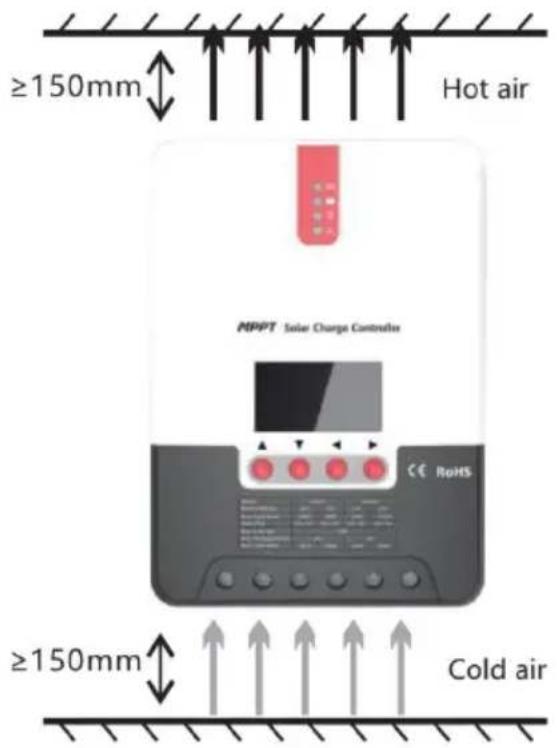
Fig. 2.1 Installation and heat dissipation
Step 1: choose the installation site
Do not install the controller at a place that is subject to direct sunlight, high temperature, or water intrusion, and make sure the ambient environment is well ventilated.
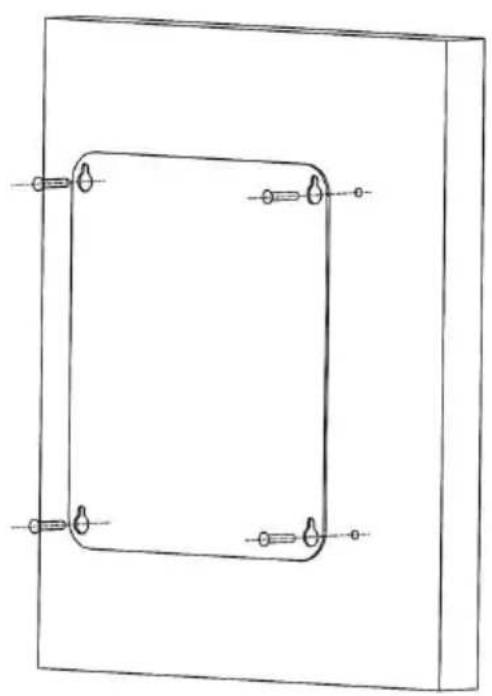
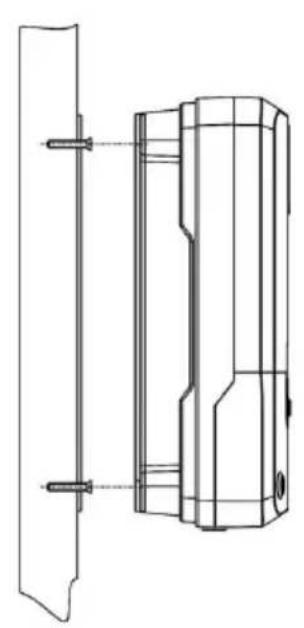
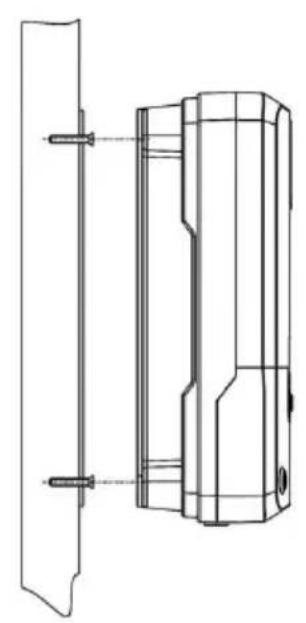
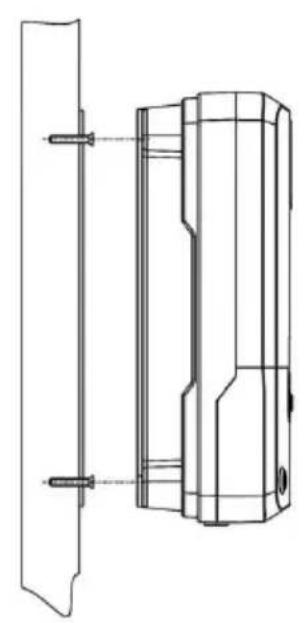
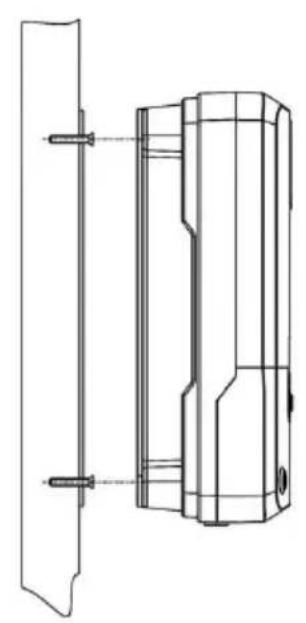
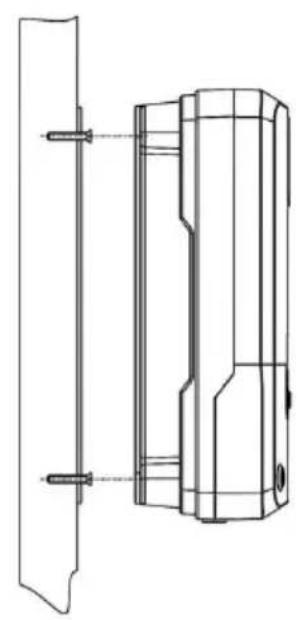
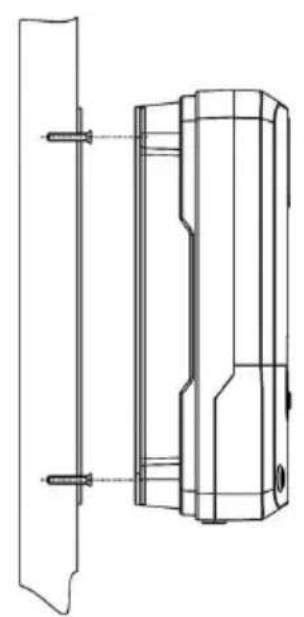
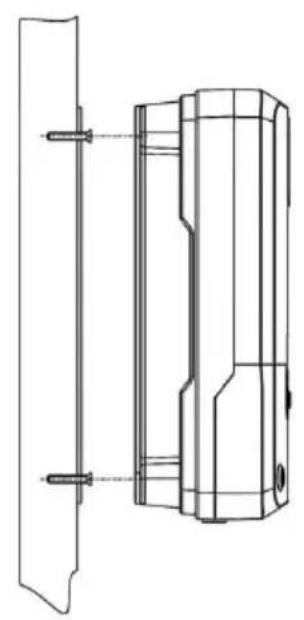
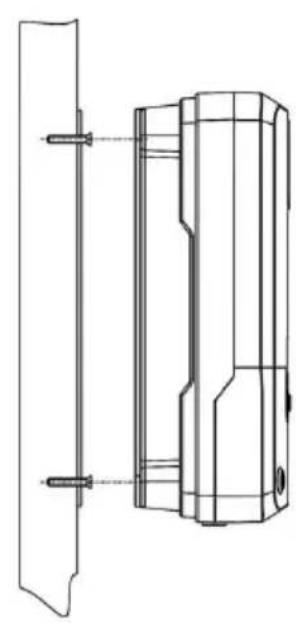
Step 2: first place the installation guide plate in a proper position, use a marking pen to mark the mounting points, then drill 4 mounting holes at the 4 marked points, and fit screws in.
Step 3: fix the controller
Aim the controller's fixing holes at the screws fit in Step 2 and mount the controller on.
Step 4: wire
First remove the two screws on the controller, and then begin wiring operation. In order to guarantee installation safety, we recommend the following wiring order; however, you can choose not to follow this order, as no damage will be incurred to the controller.
![graph TD A["Solar Panel"] -->|+| B["Temperature Sensor"] B -->|7| C["RoHS Controller"] C -->|1| D["Battery"] C -->|2| D C -->|3| E["Display Unit"] C -->|4| F["Ground"] C -->|5| G["Display Unit"] C -->|6| H["Display Unit"]](/content/2026/04/735963/images/e76e324f42ed00b5b7066508bbd28455f3af441377db2ec01dc2404d3ad388d5.jpg)
① Connecting to external temperature sampling interface ② Connecting communication cable ③ Connecting power cable
Warning: risk of electric shock! We strongly recommend that fuses or breakers be connected at the photovoltaic array side, load side, and battery side so as to avoid electric shock during wiring operation or faulty operations, and make sure the fuses and breakers are in an open state before wiring.
Warning: danger of high voltage! Photovoltaic arrays may produce very high open-circuit voltage. Open the breaker or fuse before wiring and be very careful during the wiring process.
Warning: risk of explosion! Once the battery's positive and negative terminals or leads that connect to the two terminals get short-circuited, fire or explosion will occur. Always be careful in operation.
First connect the battery, then the load, and finally the solar panel. During wiring, follow the order of first "+" and then "-".
④ Power on
After connecting all power wires solidly and reliably, check again that the wiring is correct and that the positive and negative poles are not reversed. After confirming that no faults exist, first close the fuse or breaker of the battery, then see whether the LED indicators light up and the LCD screen displays information. If the LCD screen fails to display information, open the fuse or breaker immediately and recheck that all connections are correctly done.
If the battery functions normally, connect the solar panel. If sunlight is intense enough, the controller's charging indicator will light up or flash to begin charging the battery.
After successfully connecting the battery and photovoltaic array, finally close the fuse or breaker of the load, and then you can manually test whether the load can be normally turned on and off. For details, reference information about load working modes and operations.
Warning: when the controller is in a normal charging state,
disconnecting the battery will have some negative effect on the DC load and in extreme cases, the loads may get damaged.
Warning: within 10 minutes after the controller stops charging, if the battery's poles are reversely connected, internal components of the controller may get damaged.
Note:
1) The battery's fuse or breaker shall be installed as close to the battery side as possible. It's recommended that installation distance be not more than 150mm.
2) If no remote temperature sensor is connected to the controller, the battery temperature will stay at 25\ °C .
3) If an inverter is deployed in the system, directly connect the inverter to the battery, and connect it to the controller's load terminals.
3. PRODUCT OPERATION AND DISPLAY
3.1 LED Indicators
  | [H5CS] | PV array indicato | Indicating the controller's current charging mode. |
  |  | BAT indicator | Indicating the battery's current state. |
  |  | LOAD indicator | Indicating the loads' On/ Off and state. |
  |  | ERROR indicator | Indicating whether the controller is functioning norma |

PV array indicator:
| No. | CHARGE STATUS | Indicator state | Charging state | |
| 1 |  | BULK | Steady on | MPPT charging |
| 2 |  | ACCEPTANCE | Slow flashing(a cycle of 2s with on and of lasting for 1s) | Boost charging |
| 3 |  | FLOAT | Single flashing(a cycle of 2s with on and off respectively for 0 1s and 1 | Floating charging |
| 4 |  | EQUALIZE | Quick flashing(a cycle of 0.2s with on and of lasting for 0.1s) | Equalizing charging |
| 5 |  | CURRENT-LIMITED | Double flashing(a cycle of 2s with on for 0.1s, on again for 0.1s, and off for 1.7s) | Current-limited charging |
| 6 | Off | No charging | ||

BAT indicator:
| Indicator state | Battery state |
| Steady on | Normal battery voltage |
| Slow flashing (a cycle of 2s with on and off each 1s) | Battery over-discharged |
| Quick flashing (a cycle of 0.2s with on and off each 0.1s) | Battery over-voltage |

LOAD indicator:
| Indicator state | Load state |
| Off | Load turned off |
| Quick flashing (a cycle of 0.2s with on and off e lasting for 0.1s) | Load overloaded/ short-circuited |
| Steady on | Load functioning normally |

ERROR indicator:
| Indicator state | Abnormality indication |
| Off | System operating normally |
| Steady on | System malfunctioning |
3.2 Keys Operation
| ▲ Up | Page up; increase the parameter value in setting |
| ▼ Down | Page down; decrease the parameter value in set |
| ◀ Return | Return to previous menu (exit without saving) |
| ▶ Set | Enter into sub-menu; set/ saveTurn on/ off loads (in manual mode) |
![graph TD A[" "] --> B[" "] B --> C[" "] C --> D[" "]](/content/2026/04/735963/images/2b9d9a8155a5429710dea94ede8c121a5eea6918045997a561593f5fd75a9a8b.jpg)
3.3 LCD Startup and Main Interface
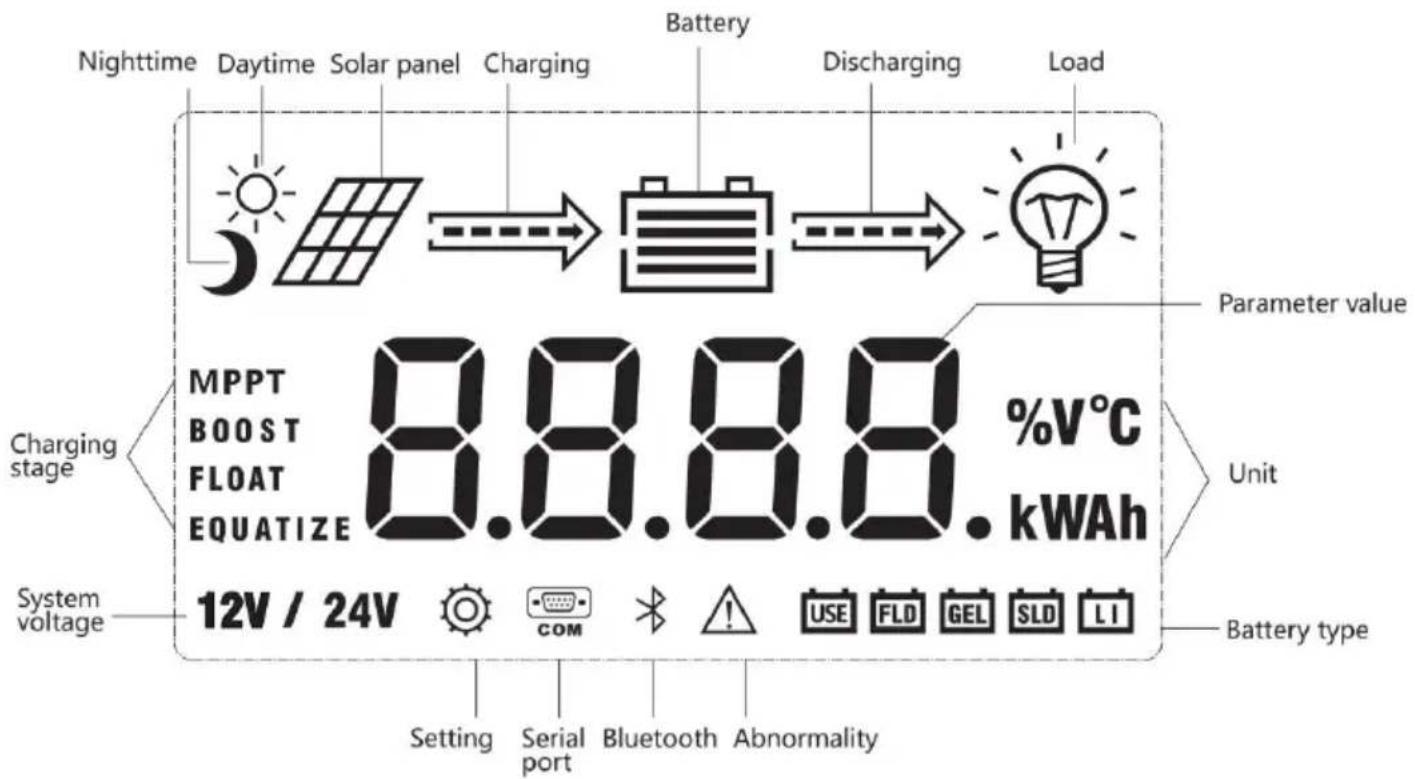
3.3.1 Startup interface
![graph TD A[" "] --> B[" "] B --> C[" "] C --> D[" "] D --> E[" "] E --> F[" "] F --> G[" "]](/content/2026/04/735963/images/0020c1ece5ba2d83c7d1812cc82312980622c0fbad368e7987093552b0d626cc.jpg)
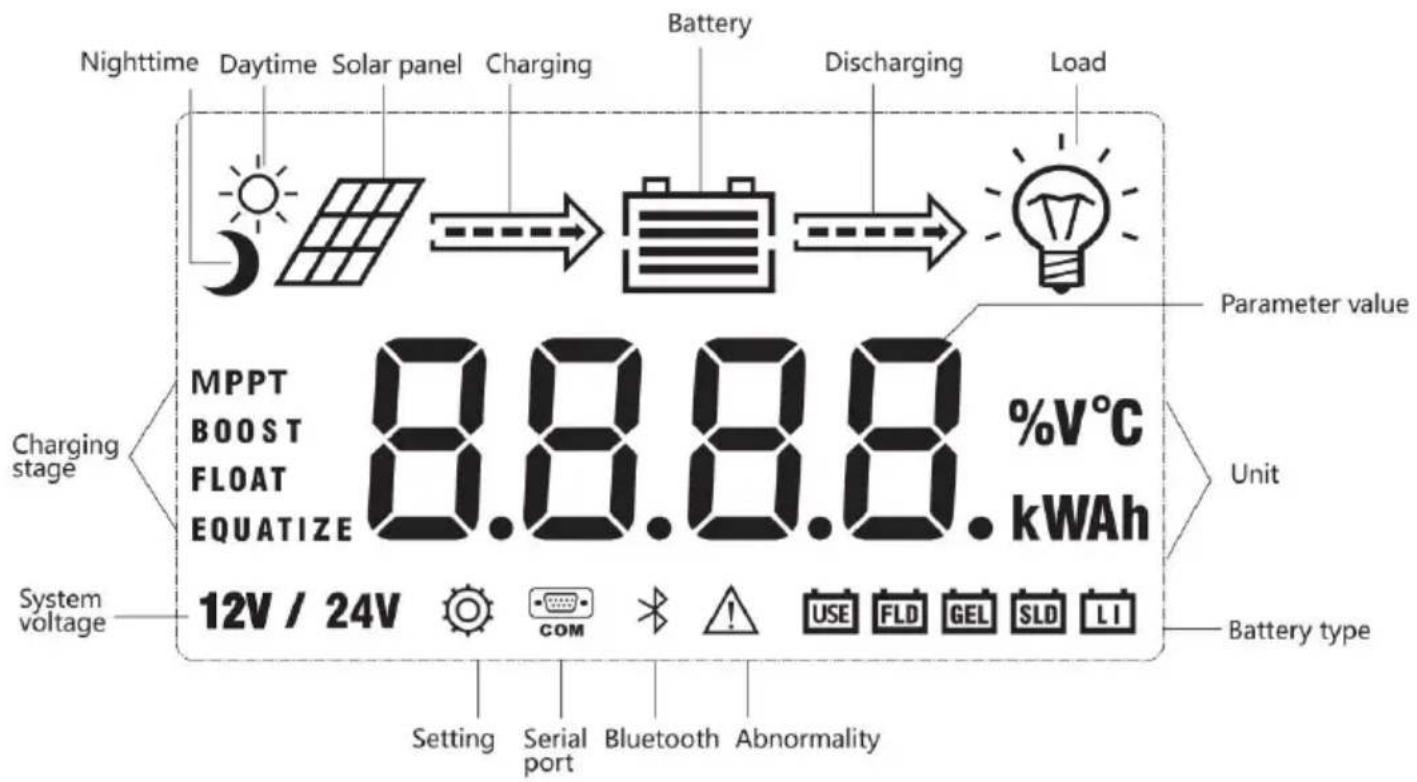
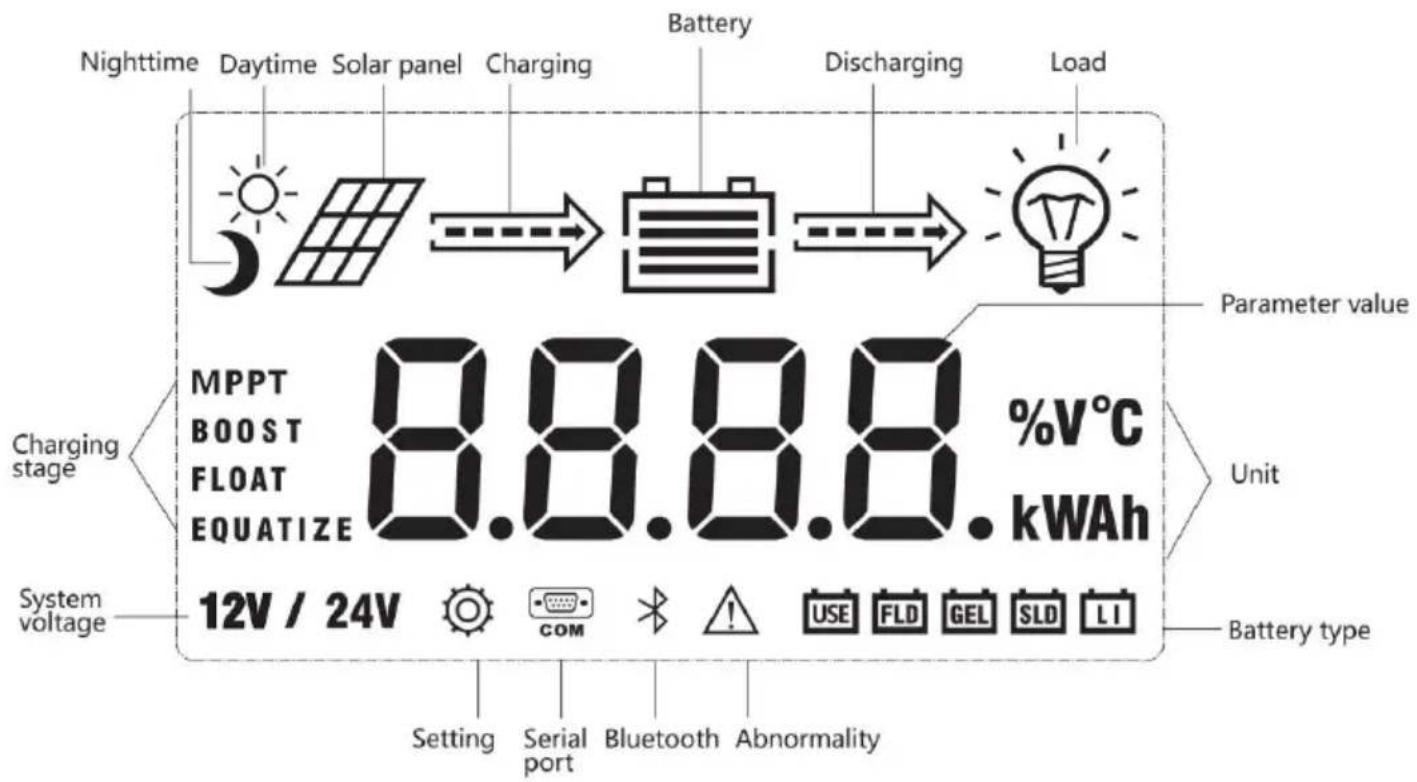
During startup, the 4 indicators will first flash successively, and after self-inspection, the LCD screen starts and displays the battery's voltage level which will be either a fixed voltage selected by the user or an automatically recognized one.
3.3.2 Main interface
![graph TD A["Main monitoring page"] --> B["Component voltage"] B --> C["Battery voltage"] C --> D["Charging current"] subgraph Main monitoring page E["12V → 12.3 V"] F["12V → 12.3 V"] G["Load mode: 6.0 V"] H["Device temperature: 15 °C"] end subgraph Component voltage I["0.0 V → 0.0 V"] J["12.3 V → 12…](/content/2026/04/735963/images/9f9f196c2dd4769bb0fa868bf7c176177ff9edc4b8b7839c0ec6f3a9a8073726.jpg)
3.4 Load Mode Setting Interface
3.4.1 Load modes introduction
This controller has 5 load operating modes which will be described below.
| No. | Mode | Descriptions |
| 0 | Sole light control (nighttime on and daytime off) | When no sunlight is present, the solar panel voltage is than the light control on voltage, and after a time delta controller will switch on the load; when sunlight emerge solar panel voltage will become higher than the light co off voltage, and after a time delay, the controller will s the load. |
| 1~14 | Light control + time contr to 14 hours | When no sunlight is present, the solar panel voltage is than the light control on voltage, and after a time delta controller will switch on the load. The load will be swit after working for a preset period of time. |
| 15 | Manual mode | In this mode, the user can switch the load on or off no matter whether it's day or night. This mode is desi some specially purposed loads, and is also used in the debugging process. |
| 16 | Debugging mode | Used for system debugging. With light signals, the load off; without light signals, the load is switched on. This enables a fast check of the correctness of system insta during installation debugging. |
| 17 | Normal on mode | The energized load keeps outputting, and this mode is for loads that need 24-hour power supply. |
3.4.2 Load mode adjustment
Users can adjust the load mode as needed on their own, and the default mode is debugging mode (see "load modes introduction"). The method of adjusting load modes is as follows:
![graph LR A["Load mode 15"] --> B["Press and hold the Set key to enter 15"] B --> C["Tap the Up or Down key to set the mode 16"] C --> D["Press and hold the Set key to save and exit 16"] D --> E["Tap the Return key to exit without saving 15"]](/content/2026/04/735963/images/22d046418680530eda5699b36bf25977bfaaf23356f3700bfebb1b9cae151cba.jpg)
3.4.3 Manual load on/off page
Manual operation is effective only when the load mode is manual mode (15), and tap the Set key to switch on/off the load under any main interface.
3.5 System Parameter Settings
![graph LR A["Battery type"] --> B["System voltage"] B --> C["Equalizing voltage"] C --> D["Boost voltage"] E["Over-discharge voltage"] --> F["Over-discharge return voltage"] F --> G["Floating charging voltage"] H["12V / 24V"] --> I["15.5 V"] J["1.0 V"] --> K["12.6 V"] L["13.8 V"] --> M["FLOAT"]](/content/2026/04/735963/images/a17993acfefbd361ca14130dc63650c9ac8167169d784cb42877b7847e94d45e.jpg)
Under any interface other than load modes, press and hold the Set key to enter the parameter setting interface.
After entering the setting interface, tap the Set key to switch the parameter value in the menu. Then tap the Return key to exit (without saving parameter setting), or press and hold the Set key to save the setting and exit.

Note: after system voltage setting, the power supply has to be switched off and then on again, otherwise the system may work under an abnormal system voltage.
The controller enables users to customize the parameters according to actual conditions, but parameter setting must be done under the guidance of a professional person, or else faulty parameter settings may render the system unable to function normally. For details about parameter settings, see table 3.
| Parameter setting cross reference table | ||||
| No. | Displayed item | Description | Parameter range | Default setting |
| 1 | TYPE OF BA | Battery type | User/flooded/Sealed/Gel | Sealed |
| 2 | VOLT OF SY | System voltage | 12V/24V | AUTO |
| 3 | EQUALIZ CHC | Equalizing charging voltage | 9.0 ~ 17.0V | 14.6V |
| 4 | BOOST CHG | Boost charging voltage | 9.0 ~ 17.0V | 14.4V |
| 5 | FLOAT CHG | Floating charging voltage | 9.0 ~ 17.0V | 13.8V |
| 6 | LOW VOL RECT | Over-discharge recovery voltage | 9.0 ~ 17.0V | 12.6V |
| 7 | LOW VOL DISC | Over-discharge voltage | 9.0 ~ 17.0V | 11.0V |
4. PRODUCT PROTECTION AND SYSTEM MAINTENANCE
4.1 Protections
▶ Waterproofing protection
Rating: IP32
▶ Input power limited protection
When the power of the solar panel is higher than the rated value, the controller will limit the power of the solar panel within the rated power range to prevent damage by over current, and the controller will enter the current-limiting charge.
▶ Battery reverse polarity protection
If the battery polarity is reversed, the system will not work but it will burn out the controller.
PV input end voltage is too high
If the voltage at the PV array input end is too high, the controller will automatically shut off the PV input.
PV input end short circuit protection
If the voltage at the PV array input end is short circuited, the control turns off charging; after the short circuit is removed, charging will automatically recover.
PV input reverse polarity protection
When the polarity of the PV array is reversed, the controller will not be damaged, and normal operation will continue after the wiring error is corrected.
Night reverse charging protection
Prevents battery discharge through the solar panel at night.
▶ TVS lightning protection
➢ Over-temperature protection
When the controller temperature exceeds the set value, it will decrease charging power or halt charging.
See the following diagram:
4.2 System Maintenance
- In order to maintain the best long-term performance for the controller, it is recommended to conduct inspections twice a year.
- Make sure the airflow around the controller is not obstructed and remove any dirt or debris from the heat sink.
- Check if the insulation layers of all exposed wires are damaged due to sun exposure, friction with other objects nearby, dry rot, destruction by insects or rodents, etc. If so, it is necessary to repair or replace the wire.
- Verify if indicators are consistent with the device operations. Please note to take corrective actions for any malfunctions or error indications if necessary.
- Check all wiring terminals for corrosion, insulation damage, signs of high temperature or burning/discoloration, and tighten the terminal screws firmly.
- Check for dirt, insects nesting and corrosion and clean as required.
- If the lightning arrester has failed, replace it in time to protect the controller and other devices of the user from being damaged by lightning operations. Please note to take corrective actions for any malfunctions or error indications if necessary.
Warning: risk of electric shock! Before carrying out the above checkings or operations, always make sure all power supplies of the controller have been cut off!
4.3 Abnormality Display and Warnings
| Error | Description | Controller action | Indicator status |
| E0 | Normal | - | LED indication |
| E1 | Over discharge | Turn off load | BAT indicator flashes slowly, ERROR indi is steady on |
| E2 | Battery over voltage | Turn off charging | BAT indicator flashes fast, ERROR indica steady on |
| E3 | Under-voltage warning | Battery level indicatio | ERROR indicator is steady on |
| E4 | Load short circuit | Turn off load | LOAD indicator flashes fast, ERROR indic is steady on |
| E5 | Load over current | Delayed to turn off load | LOAD indicator flashes fast, ERROR indic is steady on |
| E6 | Device over temperature | Run with reduced power | ERROR indicator is steady on |
| E7 | Battery over temperature | Turn off charging | ERROR indicator is steady on |
| E8 | Solar panel power too large | Charge with limited current | ERROR indicator is steady on |
| E10 | Solar panel over voltage | Disable charging | ERROR indicator is steady on |
| E13 | Solar panel revers polarity | Disable charging | ERROR indicator is steady on |
| E15 | Battery not connected lithium battery feed protection | When the lithium battery meets the charging conditions will activate chargingLead-acid battery, when the battery is not detected, it disables charging, when the battery is detected, it will rescharging automatically | ERROR indicator is steady |
| E16 | Battery over temperature (E7 and E16 are different in that charging and discharging have separate upper limit protection temperatures) | Turn off load | ERROR indicator is steady |
| E18 | BMS over-current protection | Turn off charging | ERROR indicator is steady |
5. TECHNICAL PARAMETERS
5.1 Electrical parameters
| Parameter | Value |
| Model | ML2420 |
| System voltage | 12V/24V Auto |
| No-load loss | 0.7W to 1.2W |
| Battery voltage | 9V to 35V |
| Max. solar input volta | 100V(25 °C) ; 90V(-25 °C) |
| Max. power point voltage | Battery Voltage+2V to 75V |
| Rated charging current | 20A |
| Rated load current | 20A |
| Max. capacitive load capacity | 10000uF |
| Max. photovoltaic system input power | 260W / 12V520W / 24V |
| Conversion efficiency | ≤98% |
| MPPT tracking efficien | >99% |
| Temperature | - 3 mv/°C / 2V (default) |
| Operating temperature | - 35 °C to 45 °C |
| Protection degree | IP32 |
| Weight | 1.4 kg |
| Communication method | RS232 / RS485 |
| Altitude | ≤ 3000 m |
| Product dimensions | 210 x 151 x 59.5 mm |
5.2. Battery type default parameters
| Comparison Table of Parameters for Each Type of Battery | |||||
| Setting VoltageBattery Type | SealedLead-AcidBattery | GelledLead-AcidBattery | OpenLead-AcidBattery | LI Battery | User(User-Defined) |
| OvervoltageDisconnectVoltage | 16.0V | 16.0V | 16.0V | 9~17V | |
| Equalizing Voltage | 14.6V | 14.8V | 9~17V | ||
| Boost Voltage | 14.4V | 14.2V | 14.6V | 14.4V | 9~17V |
| Floating Voltage | 13.8V | 13.8V | 13.8V | 9~17V | |
| Boost RestoringVoltage | 13.2V | 13.2V | 13.2V | 9~17V | |
| Low VoltageDisconnectRestoring Voltage | 12.6V | 12.6V | 12.6V | 12.6V | 9~17V |
| Under-VoltageAlarming Voltage | 12.0V | 12.0V | 12.0V | 9~17V | |
| Low VoltageDisconnectVoltage | 11.1V | 11.1V | 11.1V | 11.1V | 9~17V |
| Discharging LimitVoltage | 10.6V | 10.6V | 10.6V | 9~17V | |
| Over-DischargeDelay Time | 5s | 5s | 5s | 1~30s | |
| EqualizingDuration Time | 120Min | 120Min | 0~ 600Min | ||
| EqualizingCharging Interva | 30Days | 0Day | 30Days | 0~ 250D(0 refers close equalizing charging function) | |
| Boost DurationTime | 120Min | 120Min | 120Min | 10~600Min | |
When selecting User, the battery type is to be self-customized, and in that case, the default system voltage parameters are consistent with those of the sealed lead-acid battery. When modifying battery charging and discharging parameters, the following rule must be followed:
- Over-voltage cut-off voltage > Charging limit voltage ≥ Equalizing voltage ≥ Boost voltage ≥ Floating charging voltage > Boost return voltage; ● Over-voltage cut-off voltage > Over-voltage cut-off return voltage;
- Low-voltage cut-off return voltage > Low-voltage cut-off voltage ≥ Discharging limit voltage; ● Under-voltage warning return voltage > Under-voltage warning voltage ≥ Discharging limit voltage;
- Boost return voltage > Low-voltage cut-off return voltage
6. CONVERSION EFFICIENCY CURVE
6.1 12V System Conversion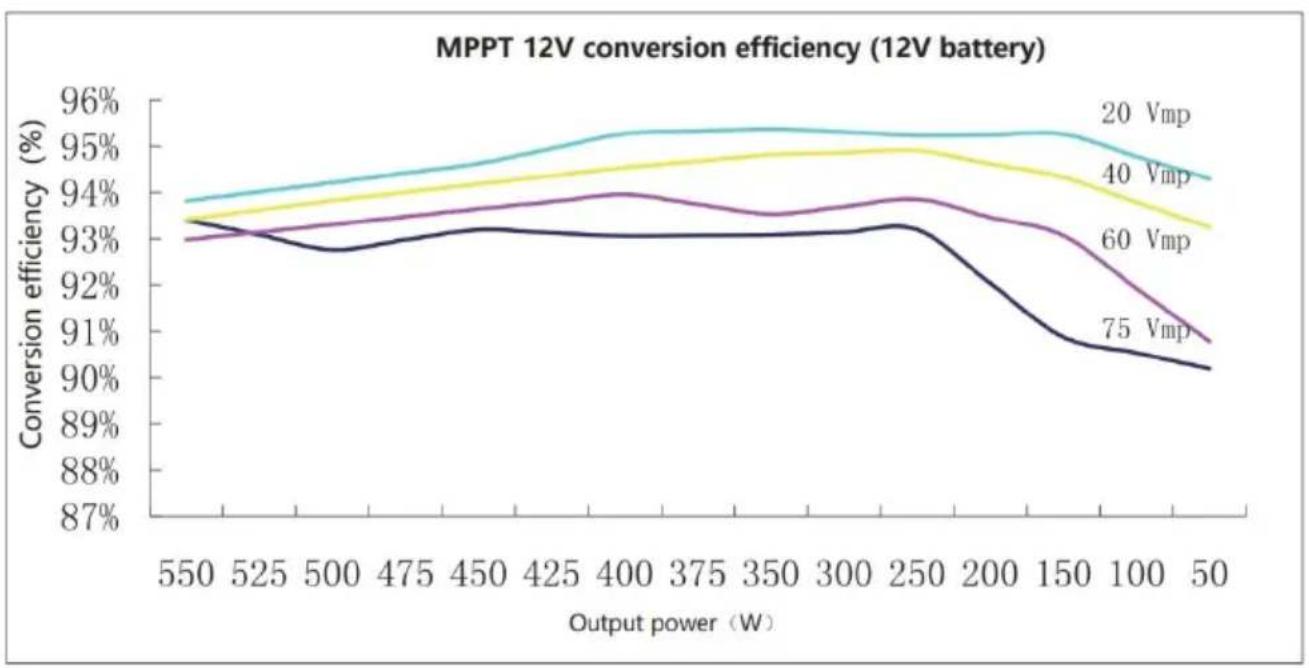
6.1 24V System Conversion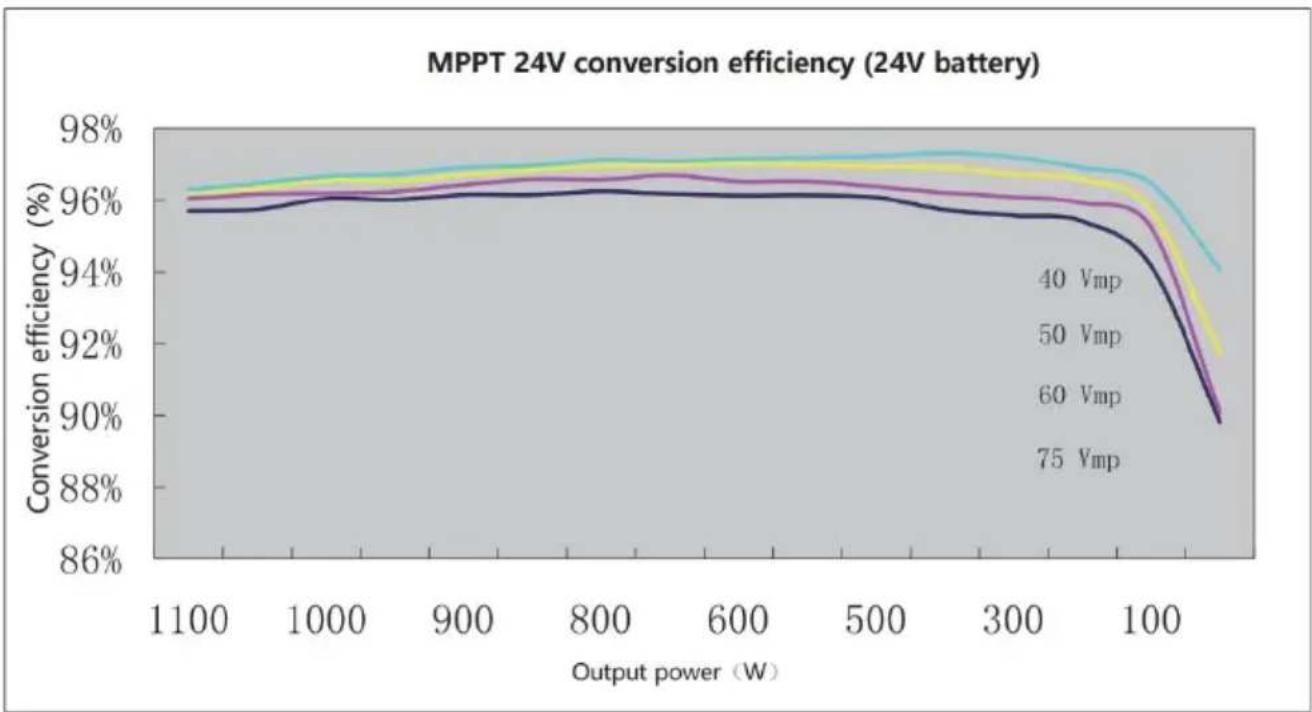
- PRODUCT DIMENSIONS
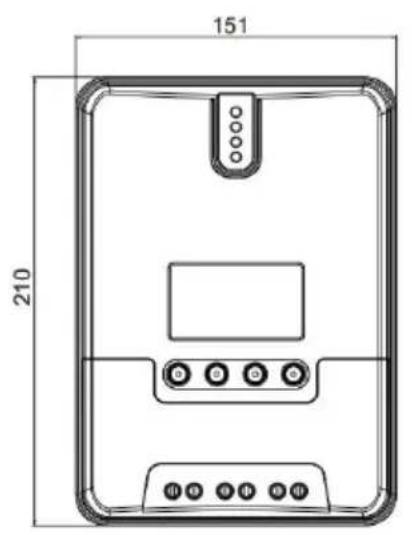
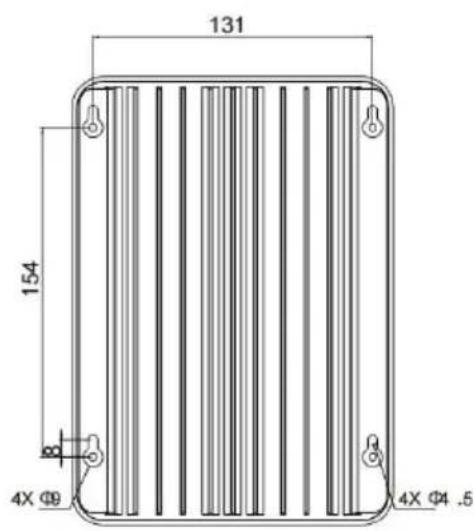
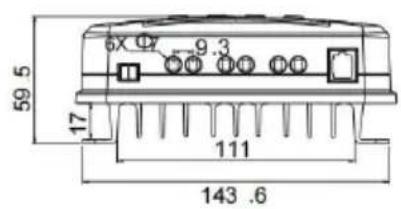
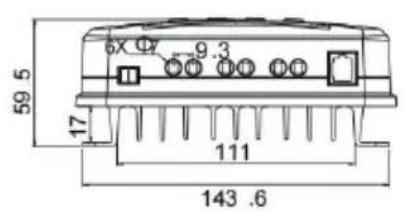
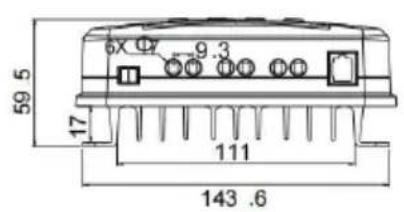
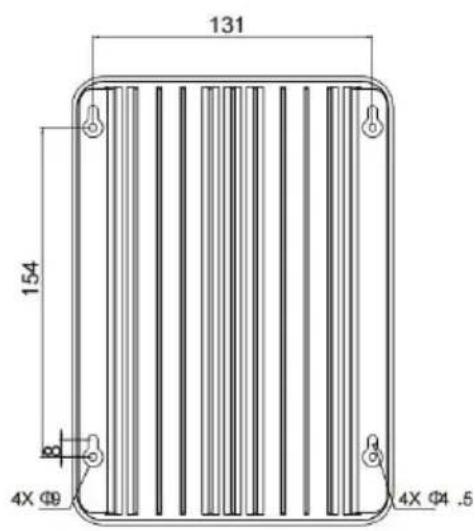
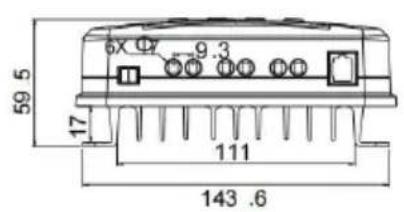
ML2420
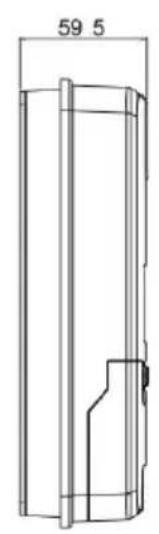
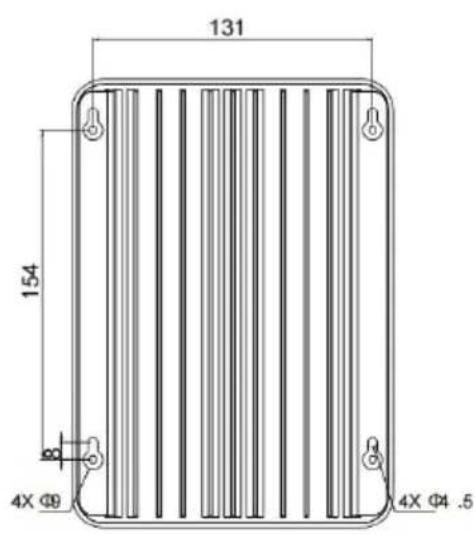
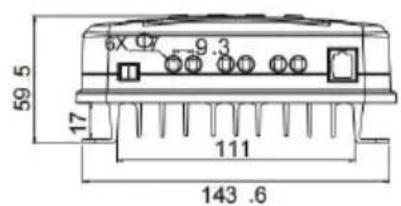
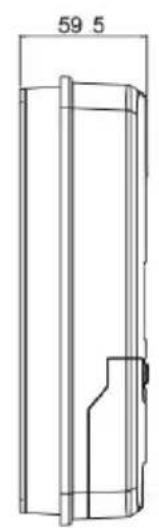
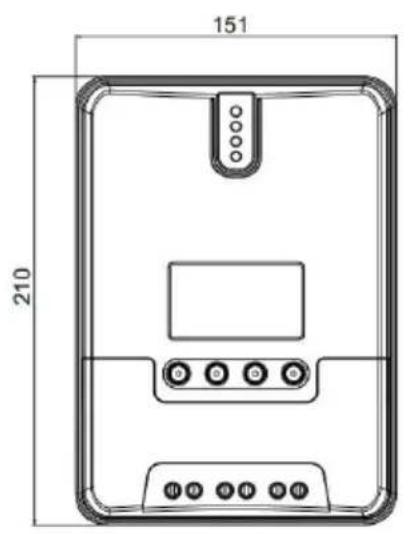
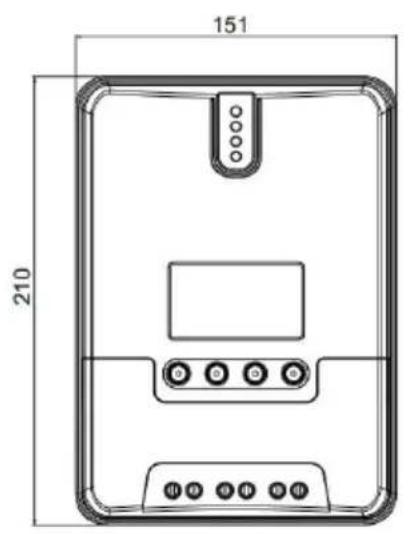
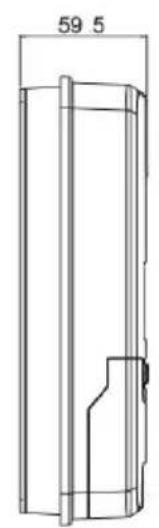
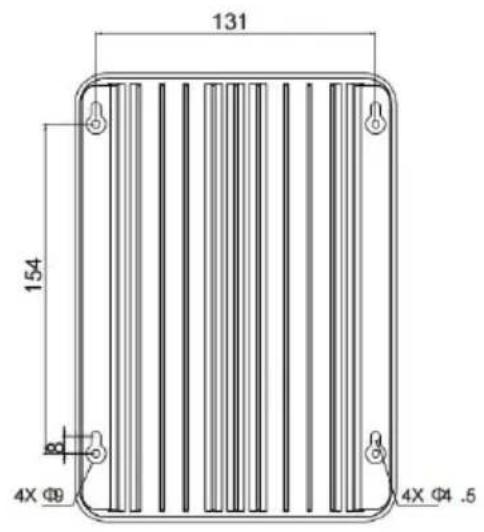
Product dimensions: 210*151*59.5mm
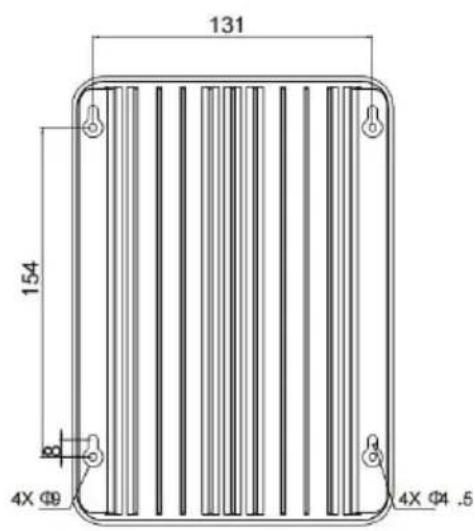
Hole positions: 154*131mm
Hole diameter: Φ3mm
Applicable wire: max. 8 AWG
8. APP CONTROL FUNCTION
- Please use your mobile phone to scan the QR code in the image

- Follow the prompts to download the APP software and complete the follow-up.
- After the APP installation is completed, please follow the prompts to set up the connection. After the connection is successful, you can query the information of the device and control the device on your mobile phone.
Address: Baoshanqu Shuangchenglu 803long 11hao 1602A-1609shi Shanghai
Imported to AUS: SIHAO PTY LTD, 1 ROKEVA STREETEASTWOOD NSW 2122 Australia
Imported to USA: Sanven Technology Ltd, Suite 250, 9166 Anaheim Place, Rancho Cucamonga, CA 91730
| EC | REP |
SHUNSHUN GmbH
Römeräcker 9 Z2021, 76351
Unit 5 Albert Edward House, The
Pavilions Preston, United Kingdom
Made In China
VEVOR®
TOUGH TOOLS, HALF PRICE
Technical Support and E-Warranty Certificate www.vevor.com/support
VEVOR®
TOUGH TOOLS, HALF PRICE
We continue to be committed to provide you tools with competitive price. "Save Half", "Half Price" or any other similar expressions used by us only represent of savings you might benefit from buying certain tools with us compared top brands and does not necessarily mean to cover all categories of tools offered are kindly reminded to verify carefully when you are placing an order with us actually saving half in comparison with the top major brands.
VEVOR®
TOUGH TOOLS, HALF PRICE
ML MAXIMUM POWER POINT TRACKING (MPPT)
MODEL: ML2420
NEED HELP? CONTACT US!
Have product questions? Need technical support? Please feel free to contact us:
Technical Support and E-Warranty Certificate www.vevor.com/support
This is the original instruction, please read all manual instruction carefully before operating. VEVOR reserves a clear interpretation user manual. The appearance of the product shall be subject to product you received. Please forgive us that we won't inform you there are any technology or software updates on our product.
1. PRODUCT INTRODUCTION
1.1 Product Overview
1.2 Product Features
1.3 Exterior and Interfaces
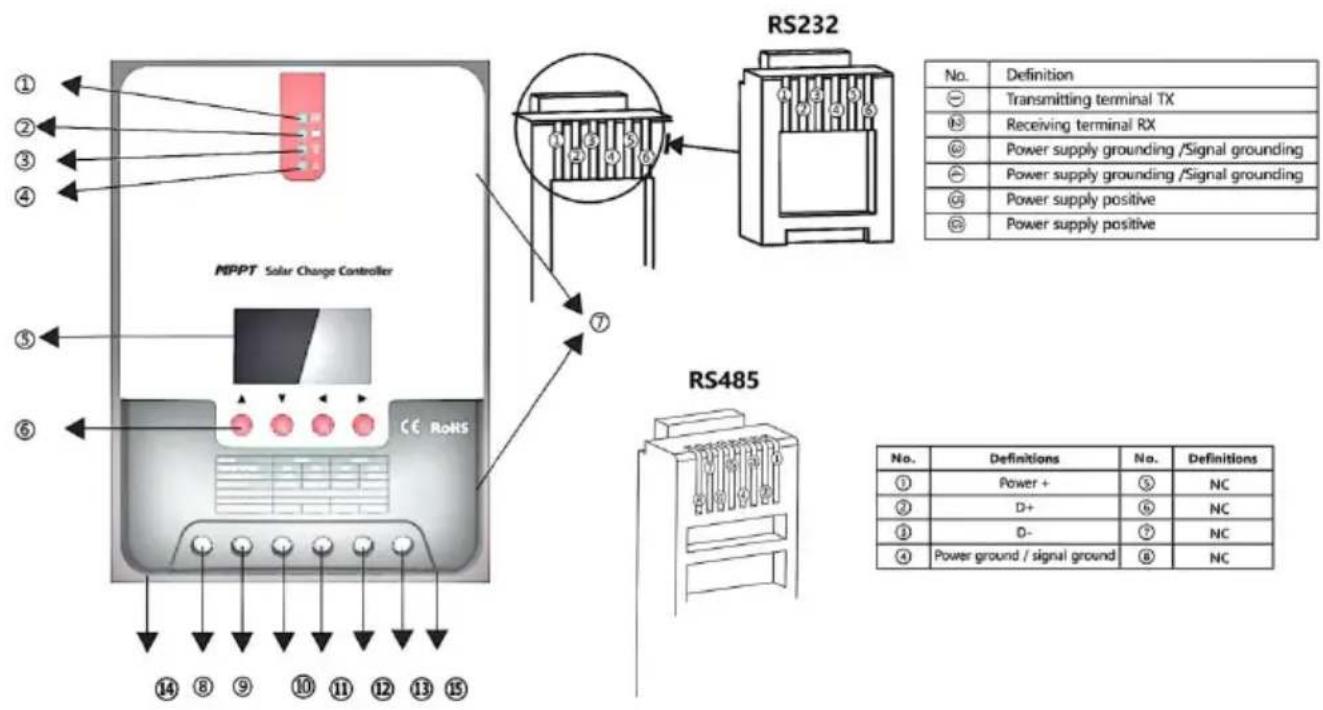
Fig. 1-2 Solar panel output characteristic curve
Fig. 1-3 Relation between solar panel output characteristics and illumination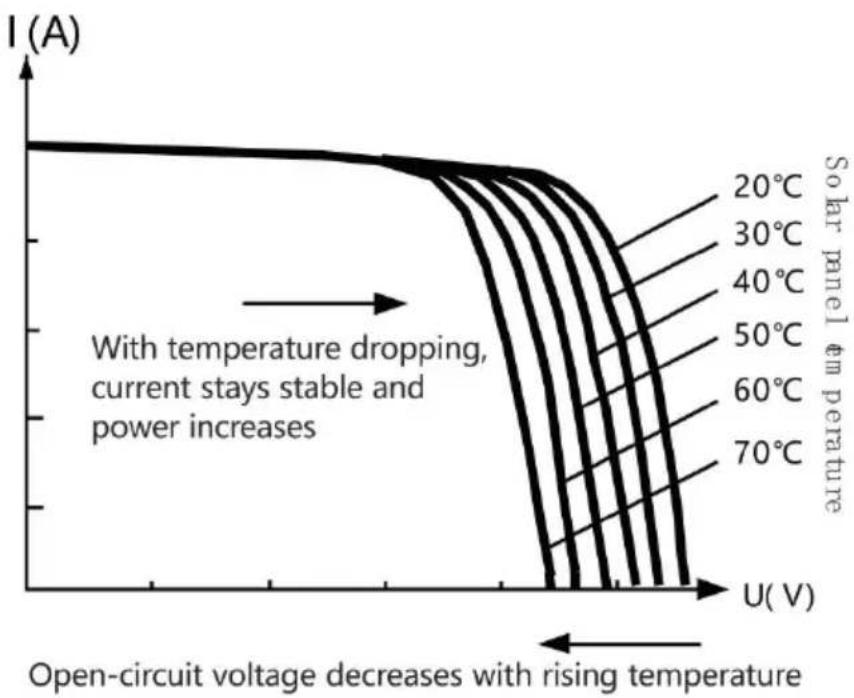
Fig. 1-4 Relation between solar panel output characteristics and temperature
1.5 Charging Stage Introductions
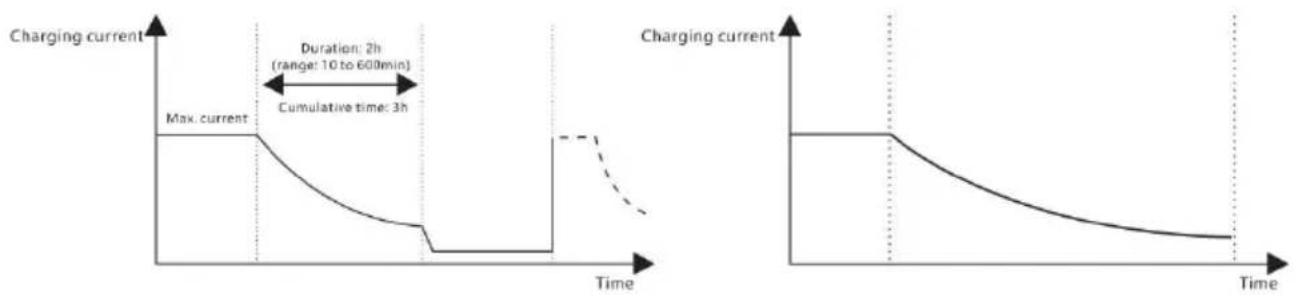
Fig. 1-5 SLD Battery charging stages diagram Fig. 1-6 LI Battery charging stages diagram
a) Fast charging
2. PRODUCT INSTALLATION
2.1 Installation Precautions
Fig. 2.1 Installation and heat dissipation
Step 4: the wire
3. PRODUCT OPERATION AND DISPLAY
3.1 LED Indicators
3.3 LCD Startup and Main Interface
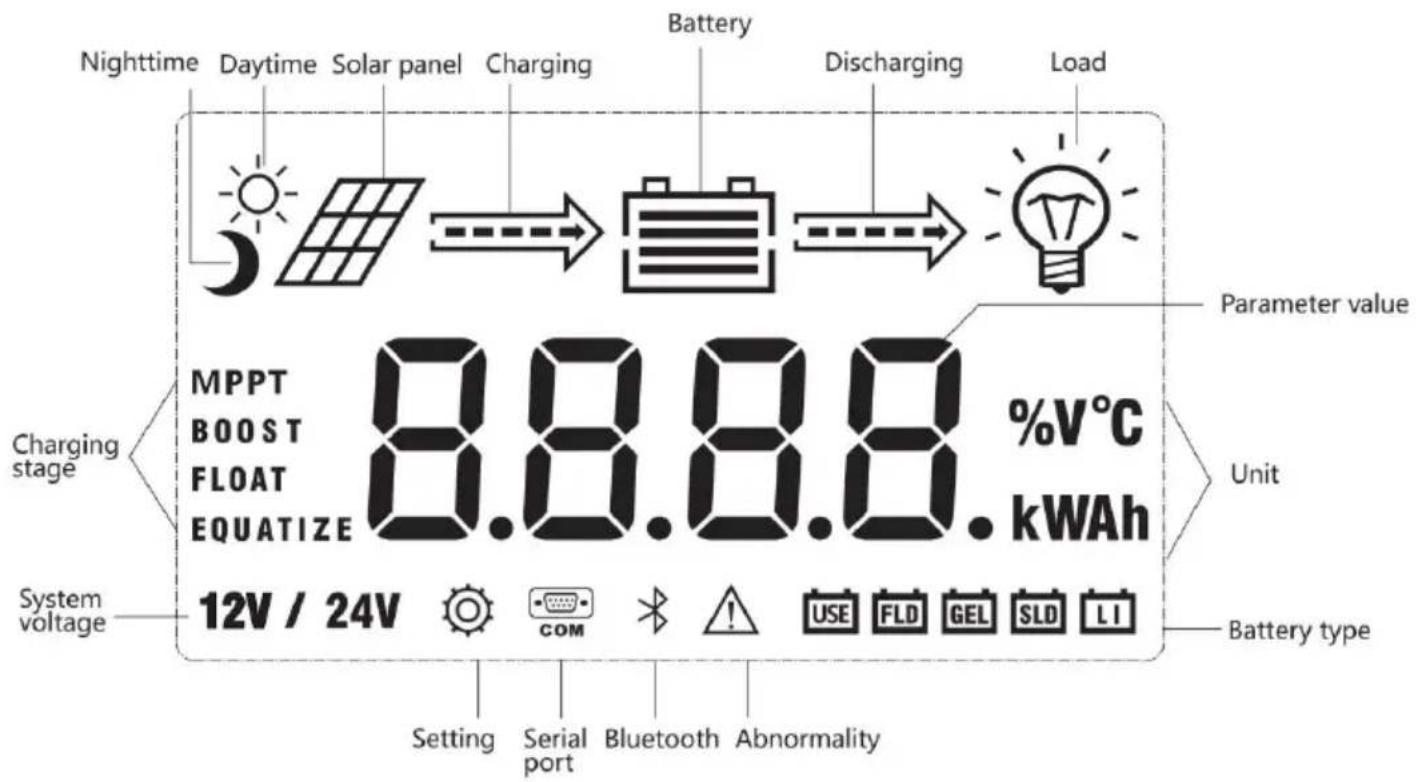
3.3.1 Startup interface
![graph TD A[" "] --> B[" "] B --> C[" "] C --> D[" "] D --> E[" "] E --> F[" "] F --> G[" "]](/content/2026/04/735963/images/45e1bc4eae51a2afb3edbcc187343b33cbd8be66999bea57e659b338c047014f.jpg)
3.4.3 Manual load on/off page
Manual operation is effective only when the load mode is manual mode (15), and tap the Set key to switch on/off the load under any main interface.
3.5 System Parameter Settings
![graph LR A["Battery type"] --> B["System voltage"] B --> C["Equalizing voltage"] C --> D["Boost voltage"] E["Over-discharge voltage"] --> F["Over-discharge return voltage"] F --> G["Floating charging voltage"] H["12V / 24V"] --> I["15.5 V"] J["14.4 V"] --> K["13.8 V"] L["11.0 V"] --> M["12.6 V"]](/content/2026/04/735963/images/ce990a3bab37567a2303309877f7ed38297d58920341372a4173f0973dcf86f3.jpg)
4.3 Abnormality Display and Warning
6.1 24V System Conversion
MPPT 24V conversion efficiency (24V battery)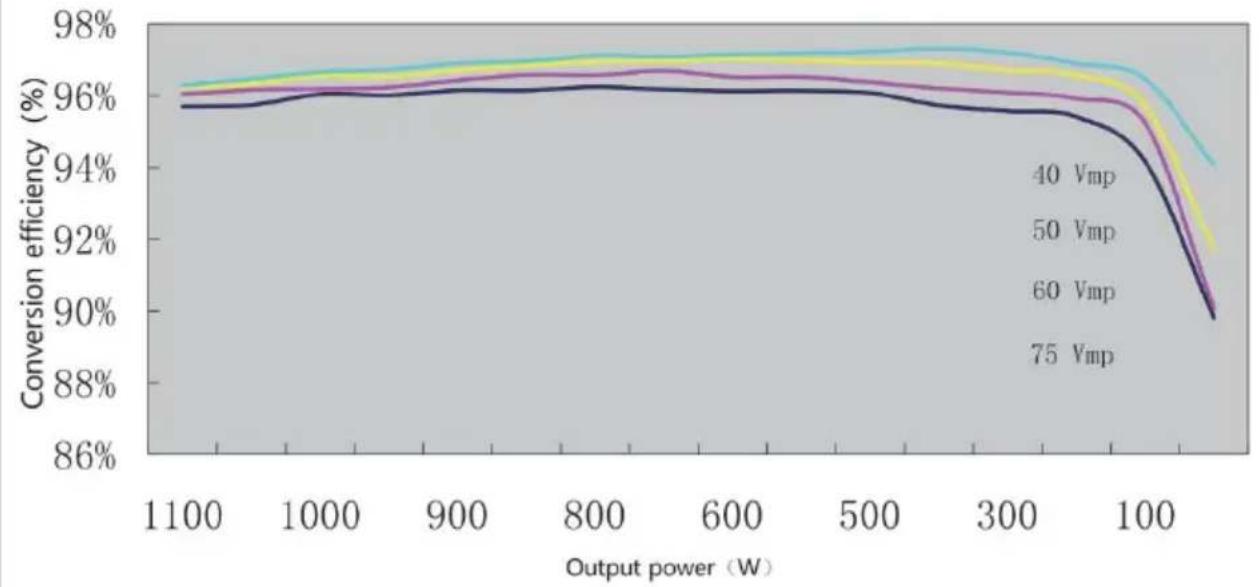
7. PRODUCT DIMENSIONS
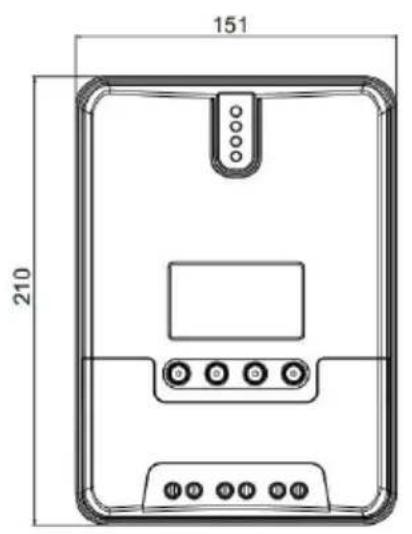
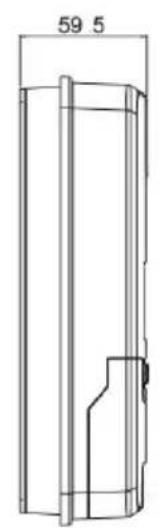
ML2420
Product dimensions: 210*151*59.5mm
Hole positions: 154*131mm
Hole diameter: Φ3mm
Applicable wire: max. 8 AWG
8. APP CONTROL FUNCTION
Unit 5 Albert Edward House, The
Pavilions Preston, United Kingdom
Made in China
VEVOR®
TOUGH TOOLS, HALF PRICE
ML MAXIMUM POWER POINT TRACKING (MPPT) SERIES
ML2420 SOLAR CHARGE AND DISCHARGE CONTROLLER
OPERATING INSTRUCTIONS
We continue to be committed to provide you tools with competitive price. "Save Half", "Half Price" or any other similar expressions used by us only represent savings you might benefit from buying certain tools with us compared to top brands and does not necessarily mean to cover all categories of tools offered. We kindly remind you to verify carefully when placing an order with us to ensure you are actually saving half in comparison with the top major brands.
VEVOR®
TOUGH TOOLS, HALF PRICE
ML MAXIMUM POWER POINT TRACKING (MPPT)
MODEL: ML2420
NEED HELP? CONTACT US!
Have product questions? Need technical support? Please feel free to contact us:
Technical Support and E-Warranty Certificate www.vevor.com/support
This is the original instruction, please read all manual instruction carefully before operating. VEVOR reserves a clear interpretation user manual. The appearance of the product shall be subject to product you received. Please forgive us that we won't inform you there are any technology or software updates on our product.
1. PRODUCT INTRODUCTION
1.1 Product Overview
1.2 Product Features
1.3 Exterior and Interfaces
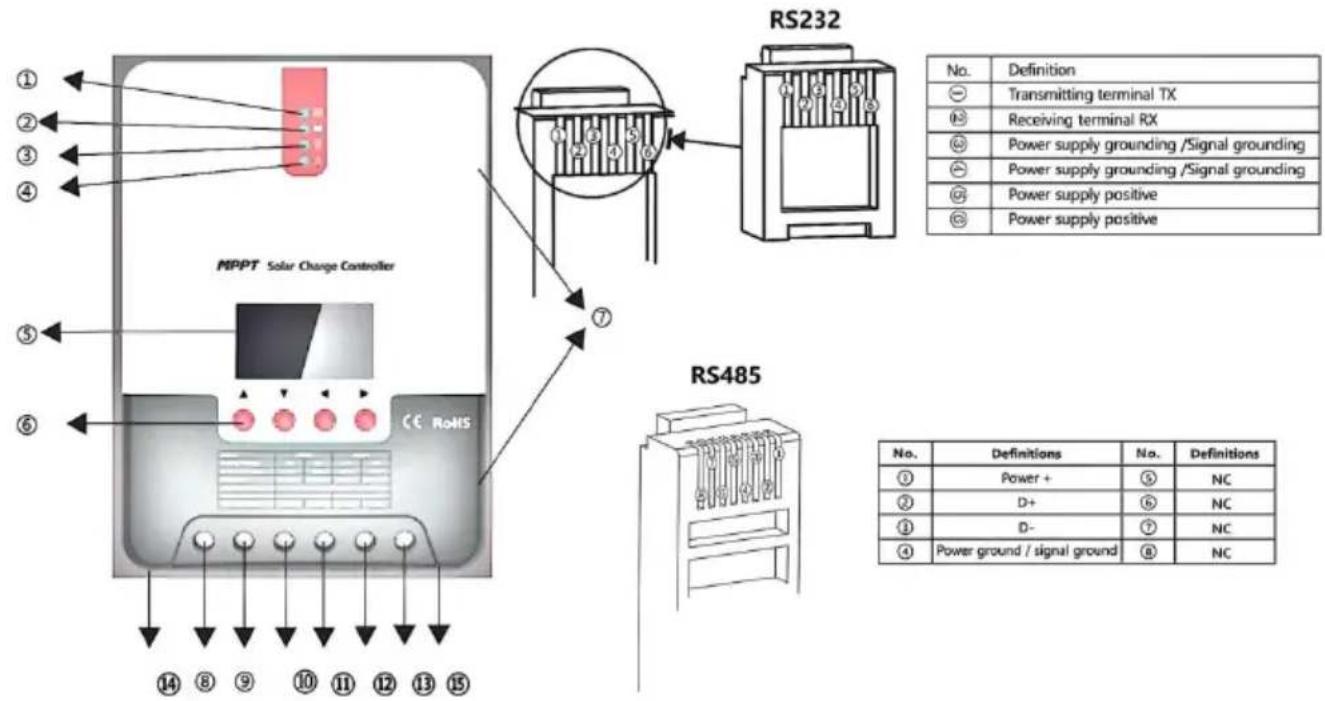
Fig. 1-2 Solar panel output characteristic curve
Fig. 1-3 Relation between solar panel output characteristics and illumination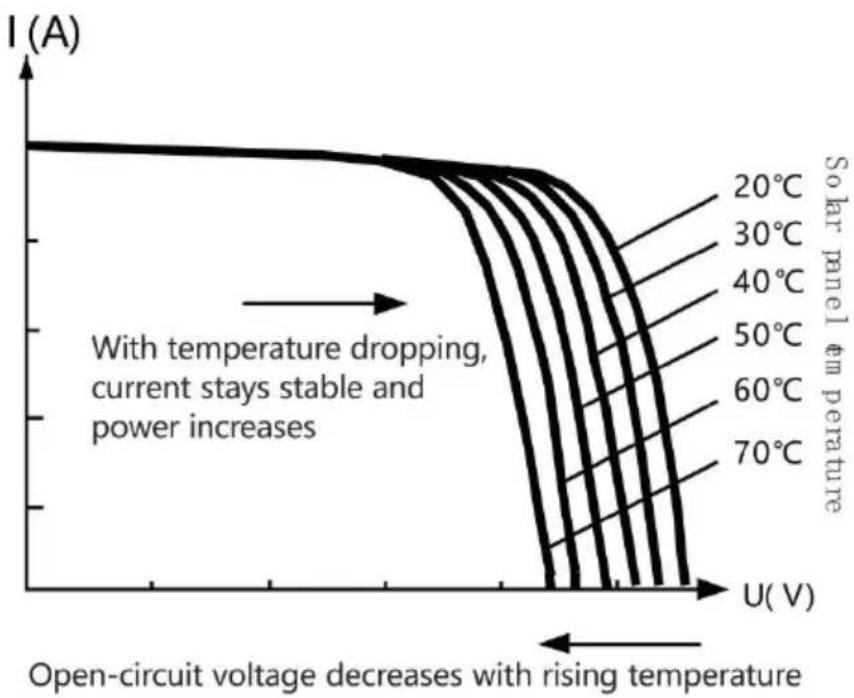
Fig. 1-4 Relation between solar panel output characteristics and temperature
1.5 Charging Stage Introductions
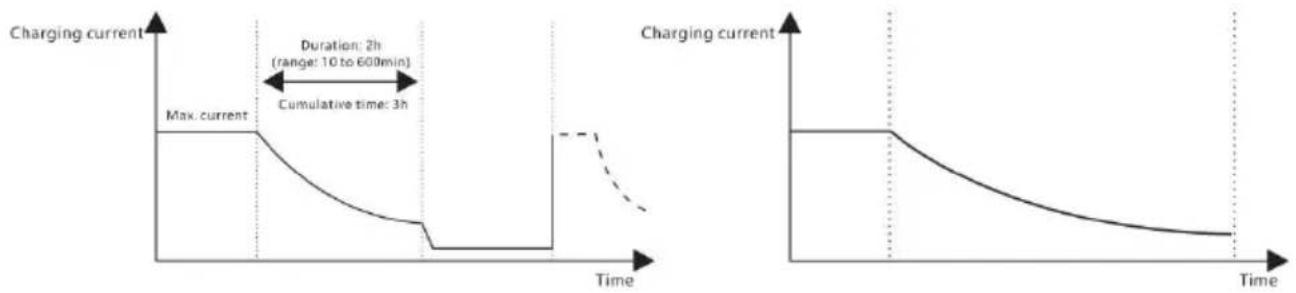
Fig. 1-5 SLD Battery charging stages diagram Fig. 1-6 LI Battery charging stages diagram
a) Fast charging
2. PRODUCT INSTALLATION
2.1 Installation Precautions
Fig. 2.1 Installation and heat dissipation
Step 4: Wire
3. PRODUCT OPERATION AND DISPLAY
3.1 LED Indicators
3.3 LCD Startup and Main Interface
3.3.1 Startup interface
![graph TD A[" "] --> B[" "] B --> C[" "] C --> D[" "] D --> E[" "] E --> F[" "] F --> G[" "]](/content/2026/04/735963/images/cb2f535eabcb2d22a2a6788f877423c9ac62ee7e0db01e999c0b22d68757cf6b.jpg)
3.4.3 Manual load on/off page
Manual operation is effective only when the load mode is manual mode (15), and tap the Set key to switch on/off the load under any main interface.
3.5 System Parameter Settings
![graph LR A["Battery type"] --> B["System voltage"] B --> C["Equalizing voltage"] C --> D["Boost voltage"] E["Over-discharge voltage"] --> F["Over-discharge return voltage"] F --> G["Floating charging voltage"] H["12V / 24V"] --> I["15.5 V"] J["1.0 V"] --> K["12.6 V"] L["13.8 V"] --> M["FLOAT"]](/content/2026/04/735963/images/82730e6dc37a18e456275e607a462d1afa7019b064237e7c11d5a0e12c8675d9.jpg)
4.3 Abnormality Display and Warnings
6.1 24V System Conversion
MPPT 24V conversion efficiency (24V battery)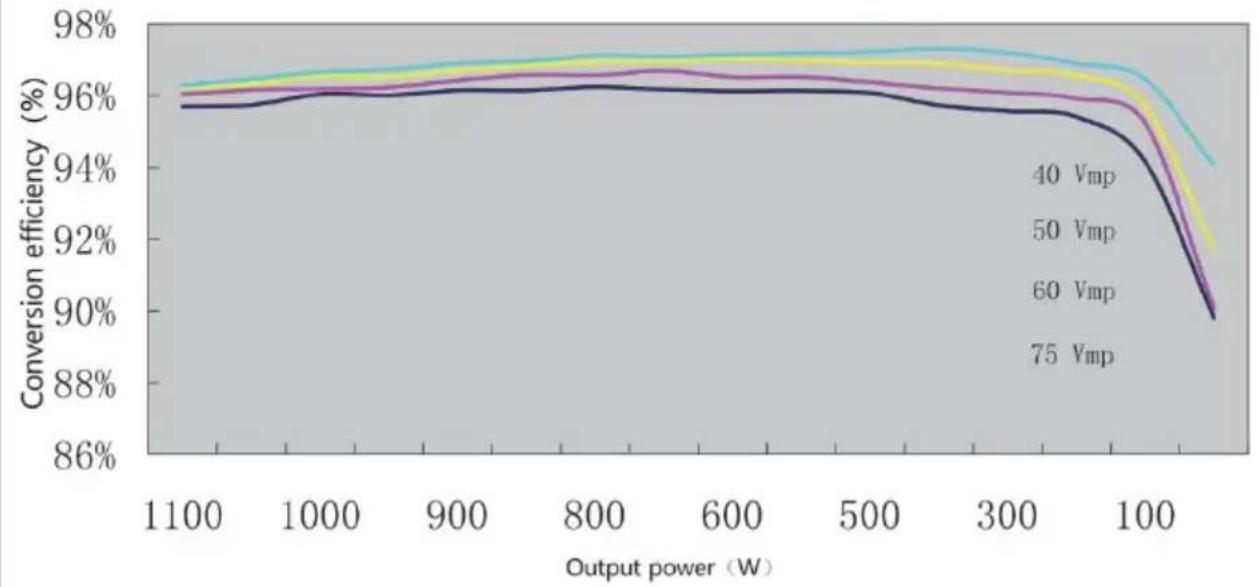
7. PRODUCT DIMENSIONS
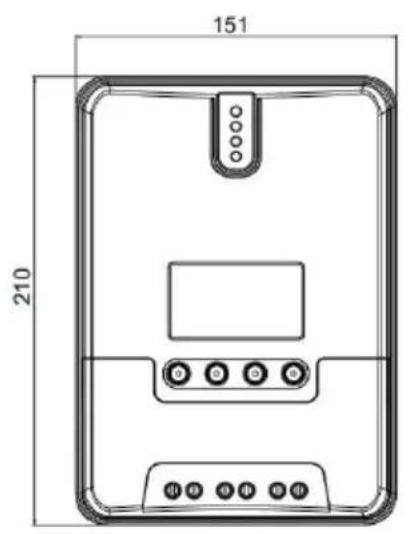
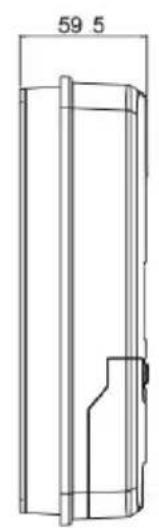
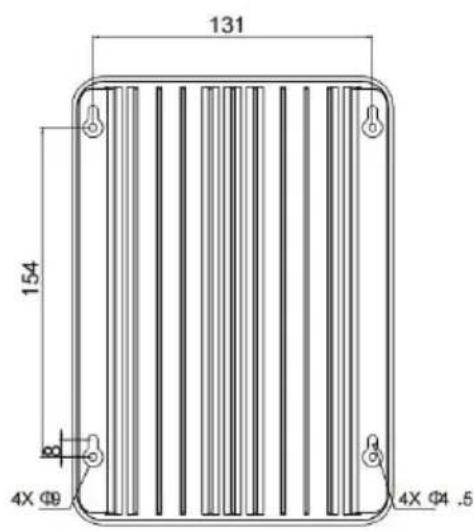
ML2420
Product dimensions: 210*151*59.5mm
Hole positions: 154*131mm
Hole diameter: Φ3mm
Applicable wire: max. 8 AWG
8. APP CONTROL FUNCTION
Unit 5 Albert Edward House, The
Pavilions Preston, United Kingdom
We continue to be committed to provide you tools with competitive price. "Save Half", "Half Price" or any other similar expressions used by us only represent of savings you might benefit from buying certain tools with us compared top brands and does not necessarily mean to cover all categories of tools offered are kindly reminded to verify carefully when you are placing an order with us actually saving half in comparison with the top major brands.
VEVOR®
TOUGH TOOLS, HALF PRICE
ML MAXIMUM POWER POINT TRACKING (MPPT
MODELLO:ML2420
NEED HELP? CONTACT US!
Have product questions? Need technical support? Please feel free to contact us:
Technical Support and E-Warranty Certificate www.vevor.com/support
This is the original instruction, please read all manual instructions carefully before operating. VEVOR reserves a clear interpretation of the user manual. The appearance of the product shall be subject to the product you received. Please forgive us that we won't inform you of any technology or software updates on our product.
1. PRODUCT INTRODUCTION
1.1 Product Overview
1.2 Product Features
1.3 Exterior and Interfaces
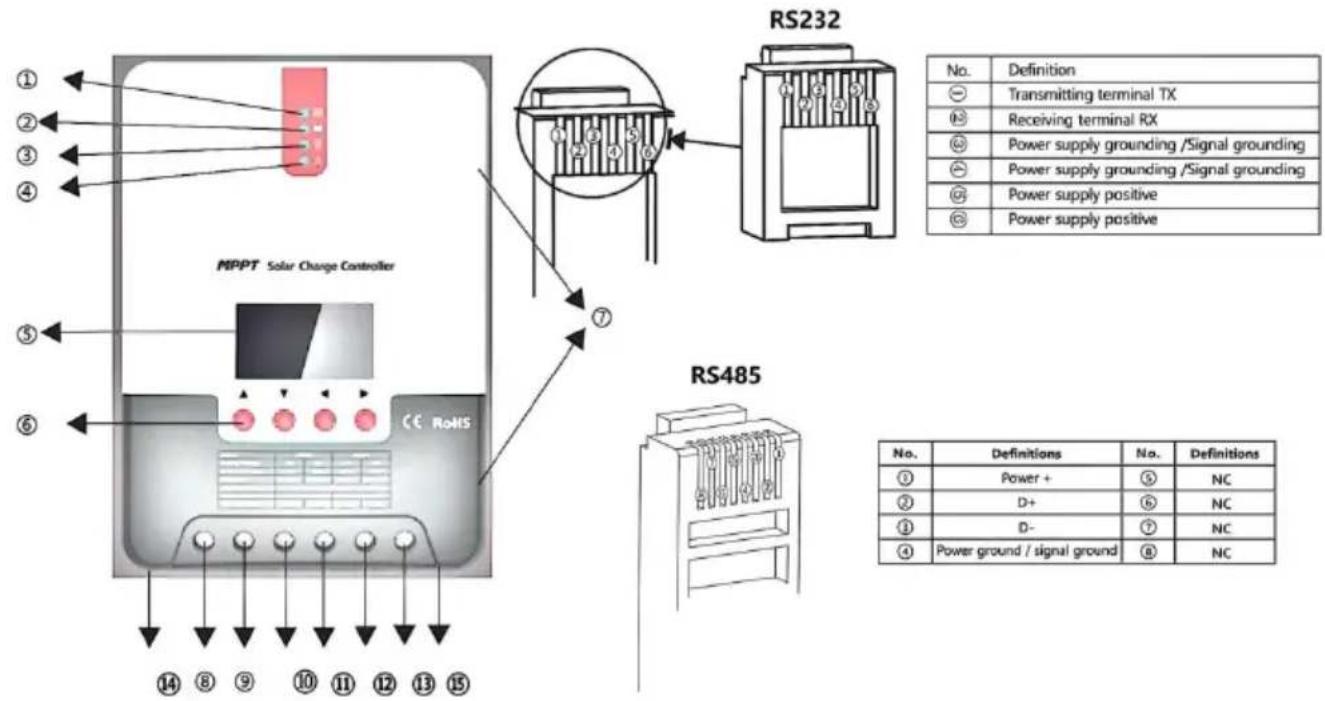
Fig. 1-2 Solar panel output characteristic curve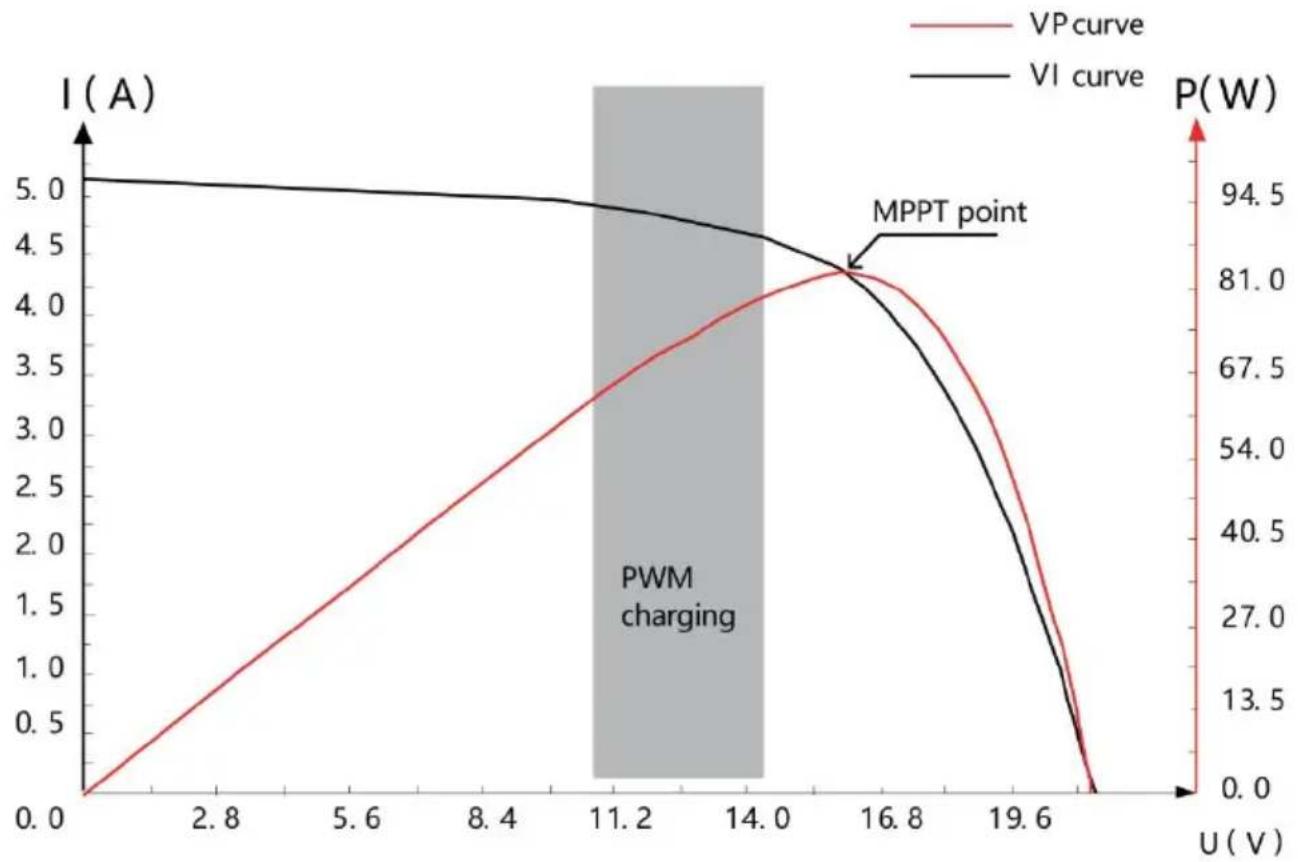
Fig. 1-3 Relation between solar panel output characteristics and illumination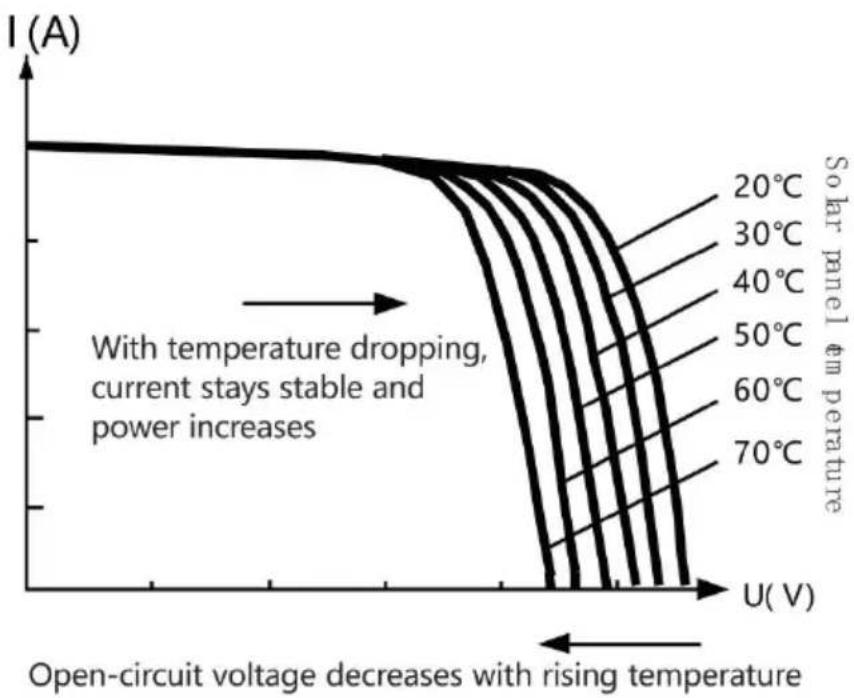
Fig. 1-4 Relation between solar panel output characteristics and temperature
1.5 Charging Stage Introductions
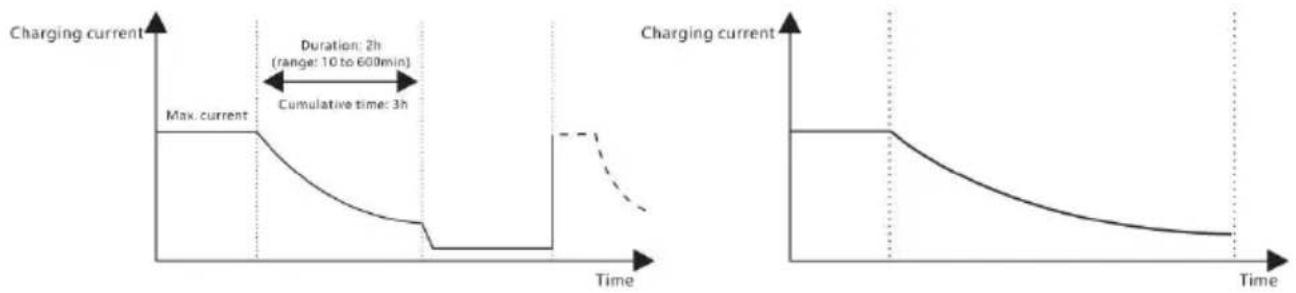
Fig. 1-5 SLD Battery charging stages diagram Fig. 1-6 LI Battery charging stages diagram
a) Fast charging
2. PRODUCT INSTALLATION
2.1 Installation Precaution
2.3 Installation and Wiring
Fig. 2.1 Installation and heat dissipation
Phase 4: wire
3. PRODUCT OPERATION AND DISPLAY
3.1 LED Indicators
3.3 LCD Startup and Main Interface
3.3.1 Startup interface
![graph TD A[" "] --> B[" "] B --> C[" "] C --> D[" "] D --> E[" "] E --> F[" "]](/content/2026/04/735963/images/a751cde400ae1b851b83e6daecb9cdf0ed23b63d31ff775ac44b45451780445c.jpg)
3.4 Load Mode Setting Interface
3.4.3 Manual load on/off page
Manual operation is effective only when the load mode is manual mode (15), and tap the Set key to switch on/off the load under any main interface.
3.5 System Parameter Settings
![graph LR A["Battery type"] --> B["System voltage"] B --> C["Equalizing voltage"] C --> D["Boost voltage"] E["Over-discharge voltage"] --> F["Over-discharge return voltage"] F --> G["Floating charging voltage"] H["12V / 24V"] --> I["15.5 V"] J["14.4 V"] --> K["13.8 V"] L["11.0 V"] --> M["12.6 V"]](/content/2026/04/735963/images/9a9101eddbc6ec0b82b8bf1062d607924f1cf7057fbd5cb2e23cd811d75d325e.jpg)
4.3 Abnormality Display and Warnings
6.1 24V System Conversion
MPPT 24V conversion efficiency (24V battery)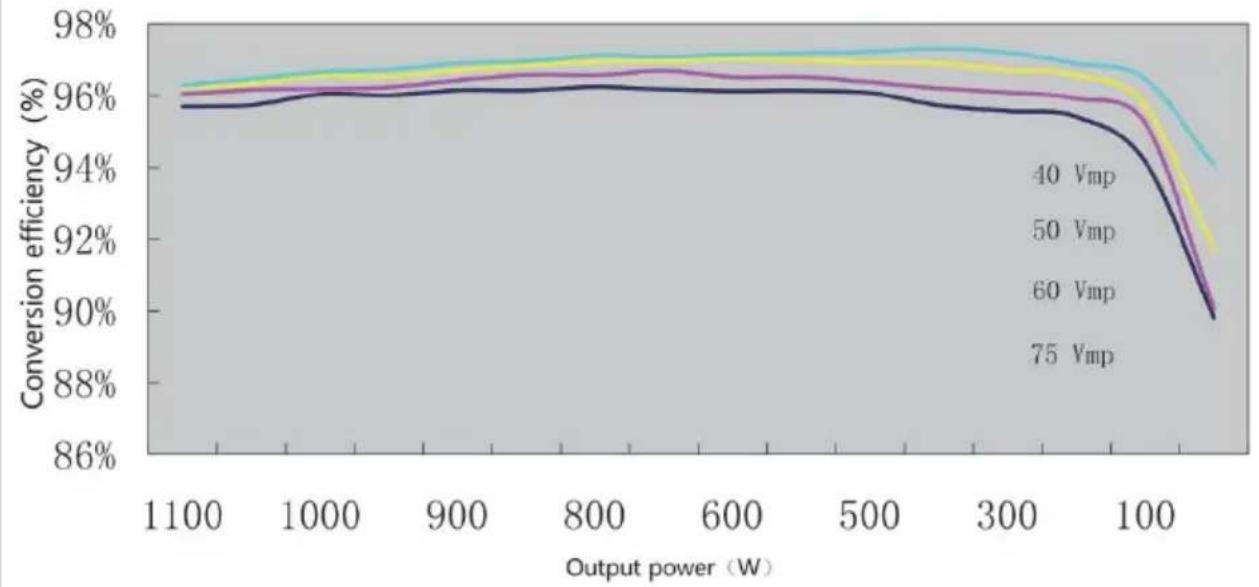
7. PRODUCT DIMENSIONS
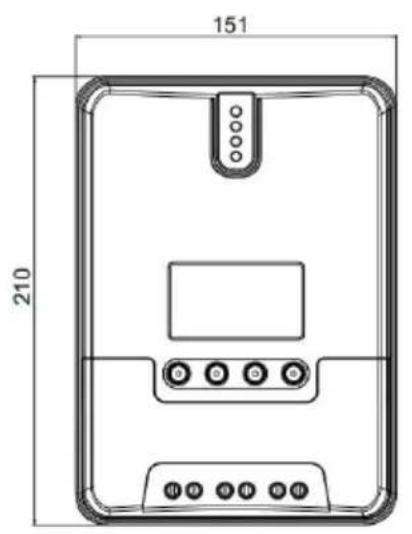
ML2420
Product dimensions: 210*151*59.5mm
Hole positions: 154*131mm
Hole diameter: Φ3mm
Applicable wire: max. 8 AWG
8. APP CONTROL FUNCTION
Imported in AUS: SIHAO PTY LTD, 1 ROKEVA STREETEASTWOOD NSW 2122 Australia
Imported in USA: Sanven Technology Ltd, Suite 250, 9166 Anaheim Place, Rancho Cucamonga, CA 91730
| EC | REP |
SHUNSHUN GmbH
Römeräcker 9 Z2021, 76351
Unit 5 Albert Edward House, The
Pavilions Preston, United Kingdom
Made in China
VEVOR®
TOUGH TOOLS, HALF PRICE
We continue to be committed to provide you tools with competitive price. "Save Half", "Half Price" or any other similar expressions used by us only represent of savings you might benefit from buying certain tools with us compared top brands and does not necessarily mean to cover all categories of tools offered are kindly reminded to verify carefully when you are placing an order with us actually saving half in comparison with the top major brands.
VEVOR®
TOUGH TOOLS, HALF PRICE
ML MAXIMUM POWER POINT TRACKING (MPPT)
MODEL: ML2420
NEED HELP? CONTACT US!
Have product questions? Need technical support? Please feel free to contact us:
Technical Support and E-Warranty Certificate www.vevor.com/support
This is the original instruction. Please read all manual instructions carefully before operating. VEVOR reserves a clear interpretation of the user manual. The appearance of the product shall be subject to the product you received. Please forgive us that we won't inform you of any technology or software updates on our product.
1. PRODUCT INTRODUCTION
1.1 Product Overview
1.2 Product Features
1.3 Exterior and Interfaces
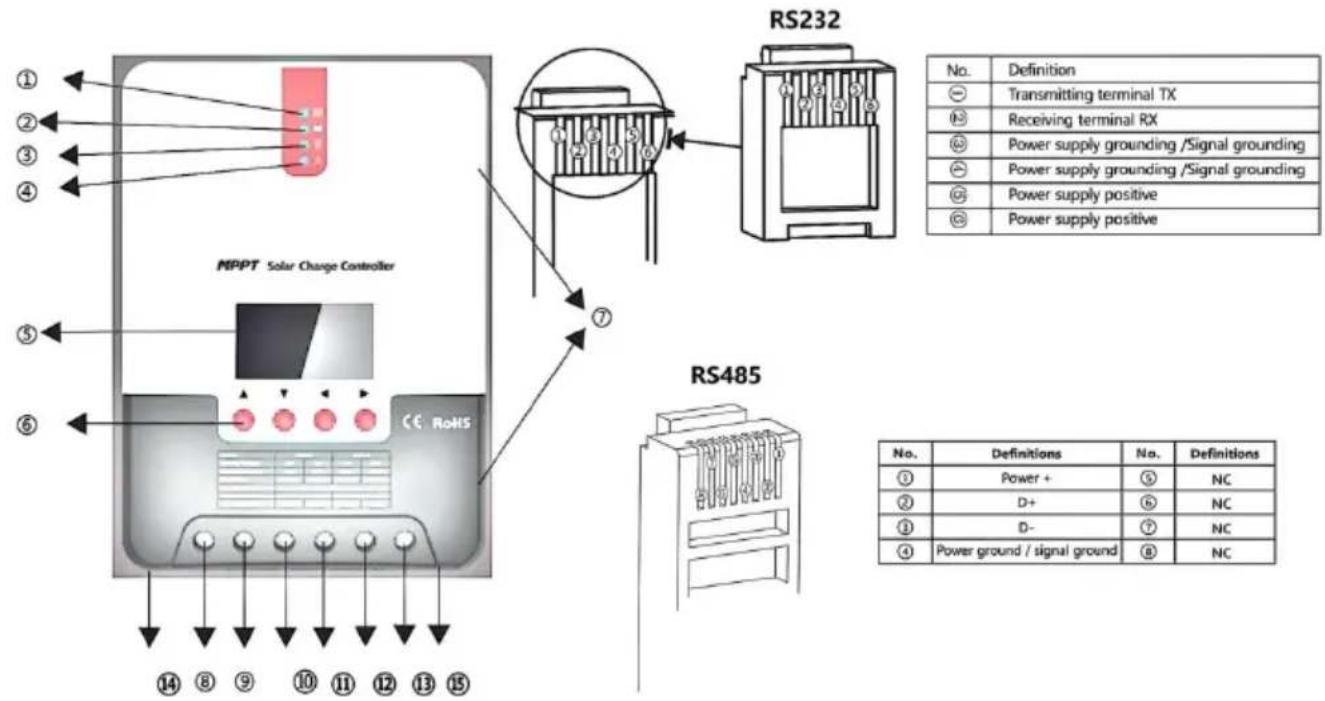
Fig. 1-2 Solar panel output characteristic curve
Fig. 1-3 Relation between solar panel output characteristics and illumination
Fig. 1-4 Relation between solar panel output characteristics and temperature
1.5 Charging Stage Introductions
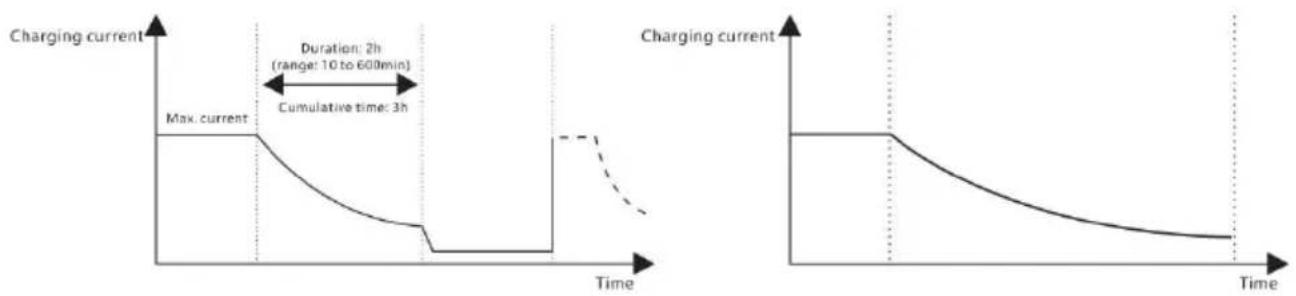
Fig. 1-5 SLD Battery charging stages diagram Fig. 1-6 LI Battery charging stages diagram
a) Fast charging
2. PRODUCT INSTALLATION
2.1 Installation Precaution
2.3 Installation and Wiring

Fig. 2.1 Installation and heat dissipation
Step 4: wiring
3. PRODUCT OPERATION AND DISPLAY
3.1 LED Indicators
3.3 LCD Startup and Main Interface
3.3.1 Startup interface
![graph TD A[" "] --> B[" "] B --> C[" "] C --> D[" "] D --> E[" "] E --> F[" "]](/content/2026/04/735963/images/db992a2c489a147aae1dd52a2e9ebce351ed2cd9e18262b9b2b8449b92d7c1ce.jpg)
3.4.3 Manual load on/off page
Manual operation is effective only when the load mode is manual mode (15), and tap the Set key to switch on/off the load under any main interface.
3.5 System Parameter Settings
![graph LR A["Battery type"] --> B["System voltage"] B --> C["Equalizing voltage"] C --> D["Boost voltage"] E["Over-discharge voltage"] --> F["Over-discharge return voltage"] F --> G["Floating charging voltage"] H["1.0 V"] --> I["12.6 V"] I --> J["13.8 V"]](/content/2026/04/735963/images/15569ebb6999097663c872d7624f98eac7a3887f4acd021056811c92abfd0b52.jpg)
4.3 Abnormality Display and Warning
6.1 24V System Conversion
MPPT 24V conversion efficiency (24V battery)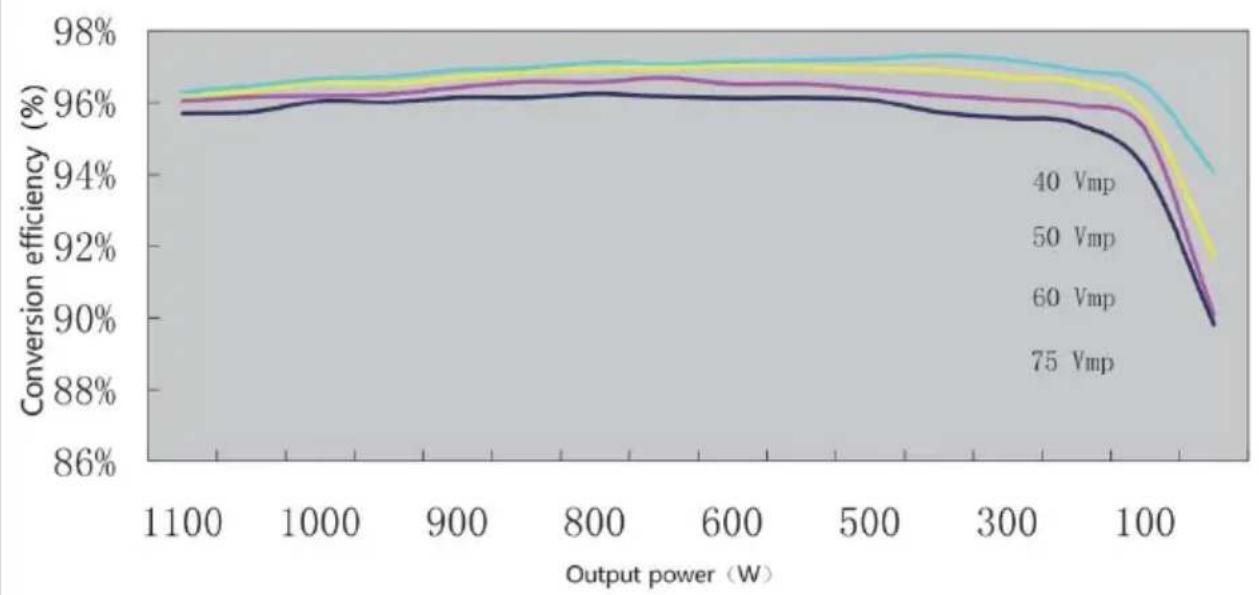
7. PRODUCT DIMENSIONS
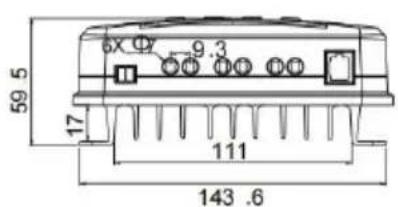
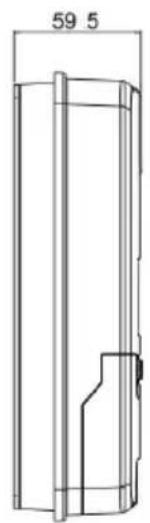
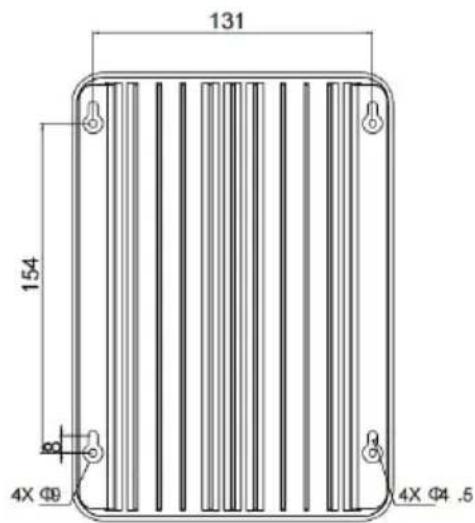
ML2420
Product dimensions: 210*151*59.5mm
Hole positions: 154*131mm
Hole diameter: Φ3mm
Applicable wire: max. 8 AWG
8. APP CONTROL FUNCTION
Imported to AUS: SIHAO PTY LTD, 1 ROKEVA STREETEASTWOOD NSW 2122 Australia
Imported to USA: Sanven Technology Ltd, Suite 250, 9166 Anah Place, Rancho Cucamonga, CA 91730
| EC | REP |
SHUNSHUN GmbH
Römeräcker 9 Z2021, 76351
Unit 5 Albert Edward House, The
Pavilions Preston, United Kingdom
Made in China
VEVOR®
TOUGH TOOLS, HALF PRICE
We continue to be committed to providing you with tools at competitive prices. "Save Half", "Half Price", or any other similar expressions used by us only represent the savings you might benefit from buying certain tools with us compared to top brands and do not necessarily mean to cover all categories of tools offered. We kindly remind you to verify carefully when placing an order with us that you are actually saving half in comparison with the top major brands.
VEVOR®
TOUGH TOOLS, HALF PRICE
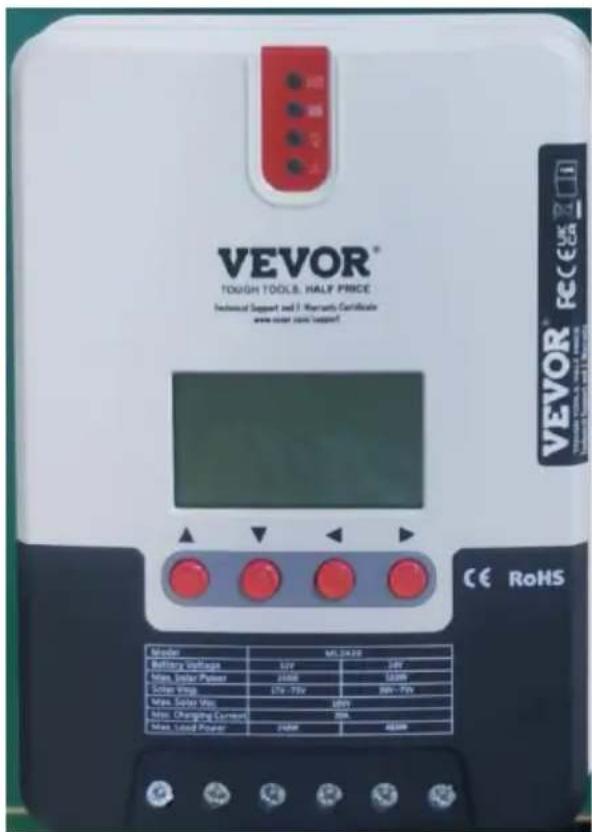
ML MAXIMUM POWER POINT TRACKING (MPPT)
MODEL: ML2420
NEED HELP? CONTACT US!
Have product questions? Need technical support? Please feel free to contact us:
Technical Support and E-Warranty Certificate www.vevor.com/support
This is the original instruction. Please read all manual instructions carefully before operating. VEVOR reserves the right to interpret the user manual. The appearance of the product shall be subject to the product you received. Please forgive us that we won't inform you of any technology or software updates on our product.
1. PRODUCT INTRODUCTION
1.1 Product Overview
1.2 Product Features
1.3 Exterior and Interfaces
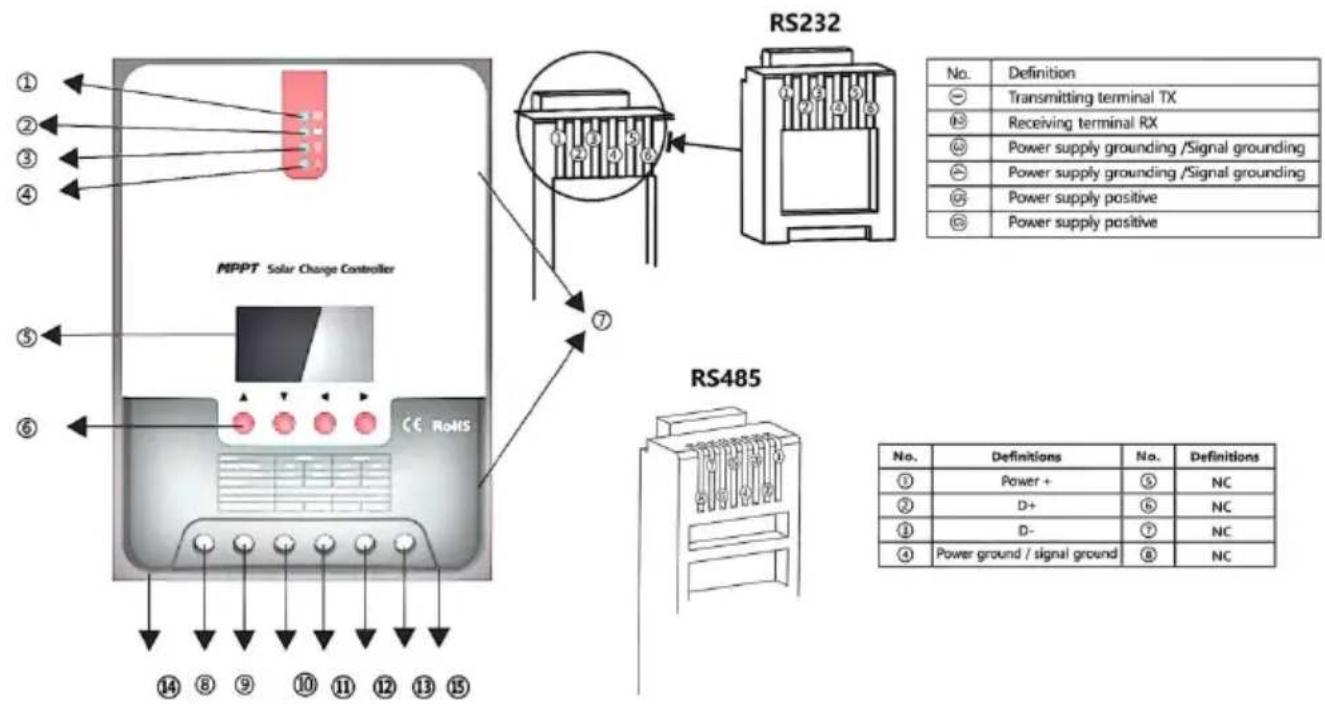
Fig. 1-2 Solar panel output characteristic curve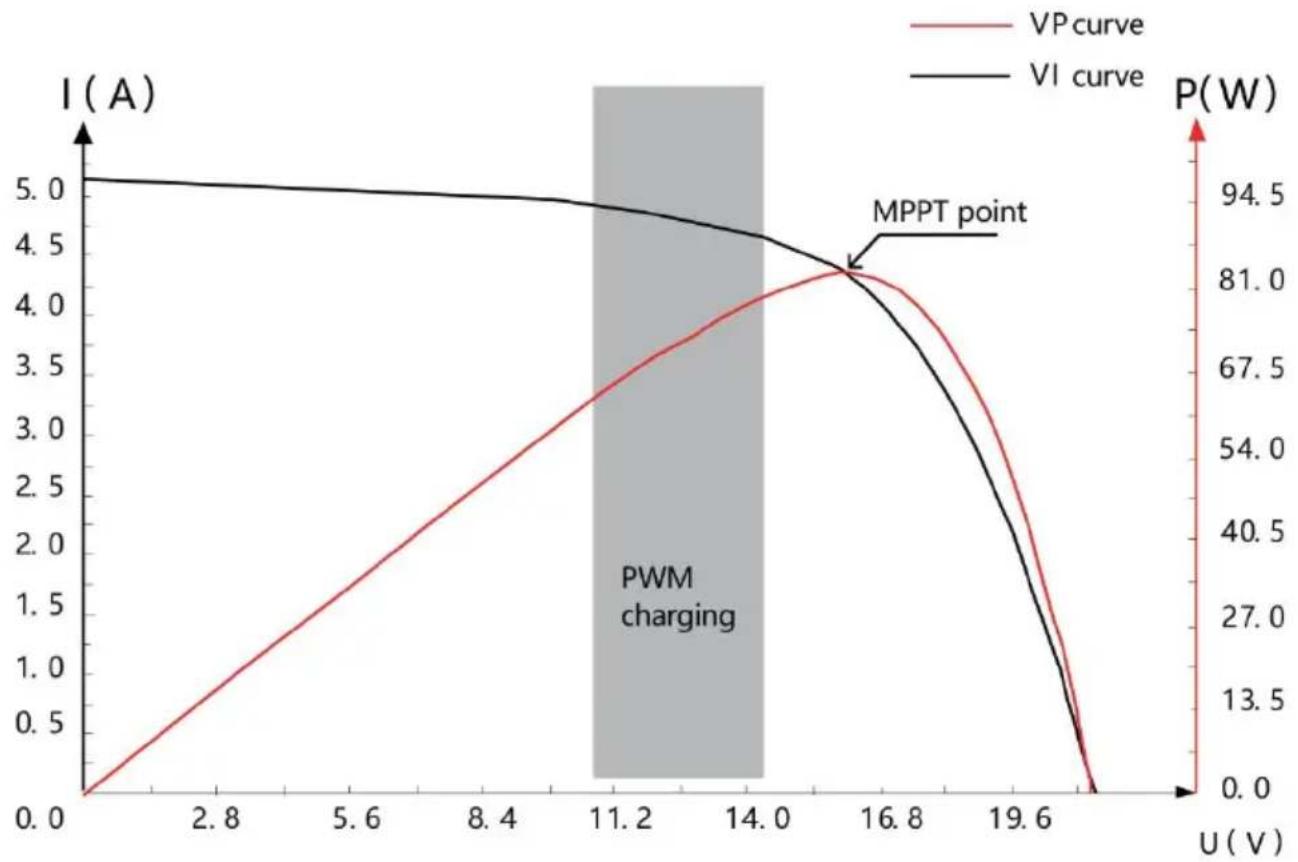
Fig. 1-3 Relation between solar panel output characteristics and illumination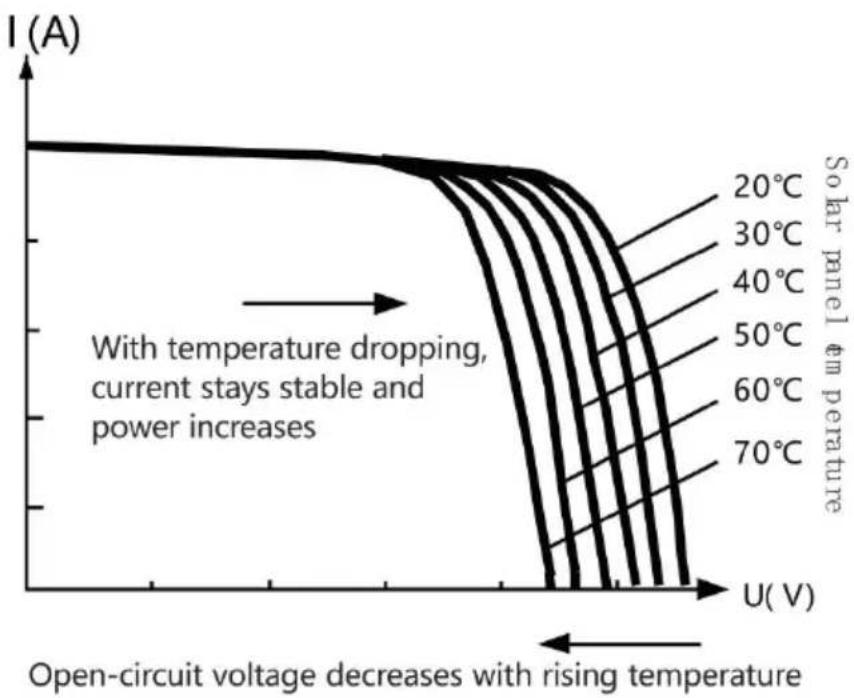
Fig. 1-4 Relation between solar panel output characteristics and temperature
1.5 Charging Stage Introductions
Fig. 1-5 SLD Battery charging stages diagram Fig. 1-6 LI Battery charging stages diagram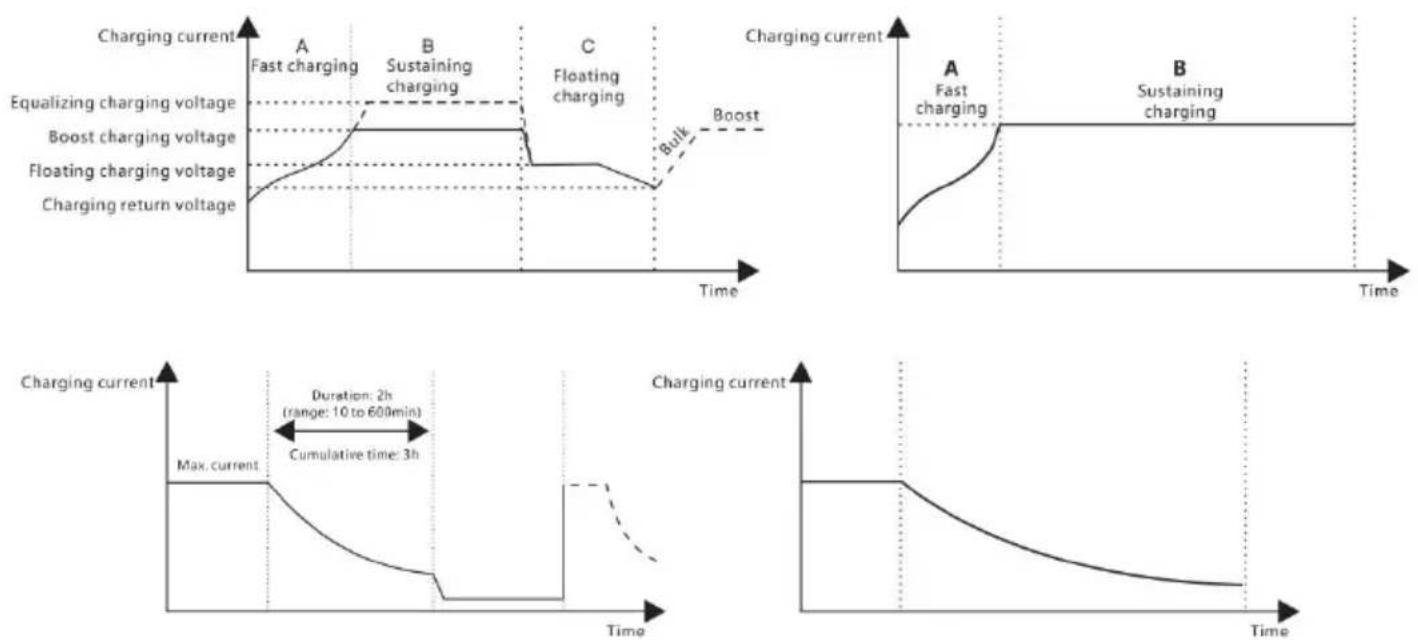
2. PRODUCT INSTALLATION
2.1 Installation Precautions
Fig. 2.1 Installation and heat dissipation
3. PRODUCT OPERATION AND DISPLAY
3.1 LED Indicators
3.3 LCD Startup and Main Interface
3.3.1 Startup interface
![graph TD A[" "] --> B[" "] B --> C[" "] C --> D[" "] D --> E[" "] E --> F[" "] F --> G[" "]](/content/2026/04/735963/images/937d146af357b5b13e0ea3e60c92af206f812b50480c076e2ed8fb693e1711b4.jpg)
3.4.3 Manual load on/off page
Manual operation is effective only when the load mode is manual mode (15), and tap the Set key to switch on/off the load under any main interface.
3.5 System Parameter Settings
![graph LR A["Battery type"] --> B["System voltage"] B --> C["Equalizing voltage"] C --> D["Boost voltage"] E["Over-discharge voltage"] --> F["Over-discharge return voltage"] F --> G["Floating charging voltage"] H["12V / 24V"] --> I["15.5 V"] J["14.4 V"] --> K["13.8 V"] L["11.0 V"] --> M["12.6 V"]](/content/2026/04/735963/images/c48b45901ce1e6636144e6c8a0763389b3883be6900a00c3cba7114f4f06a6f3.jpg)
4.3 Abnormality Display and Warnings
6.1 24V System Conversion
MPPT 24V conversion efficiency (24V battery)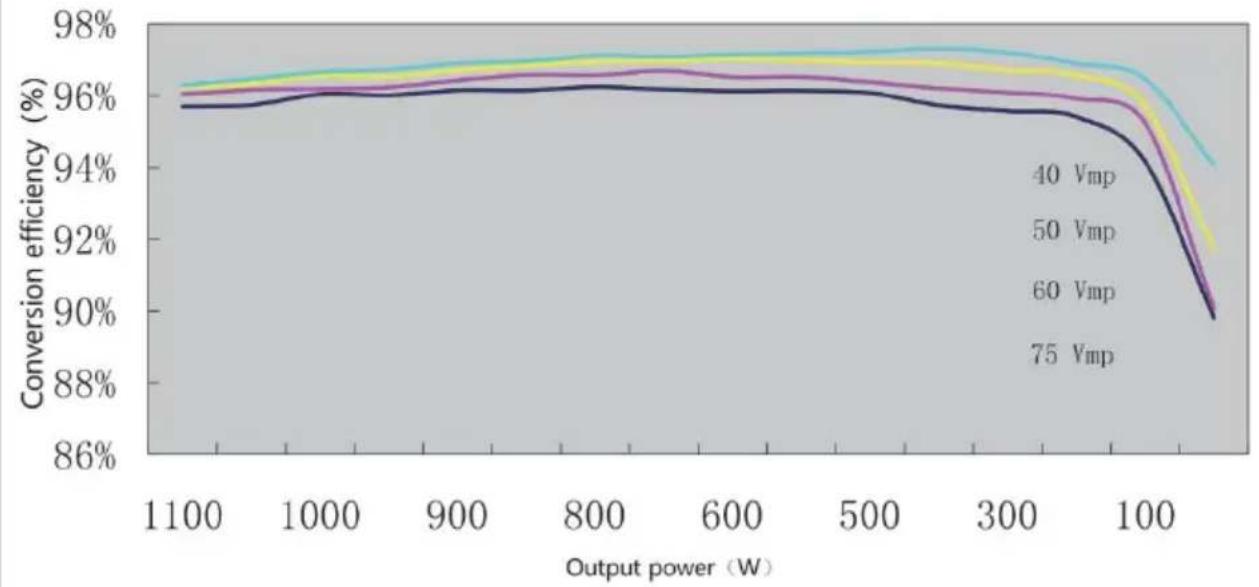
7. PRODUCT DIMENSIONS
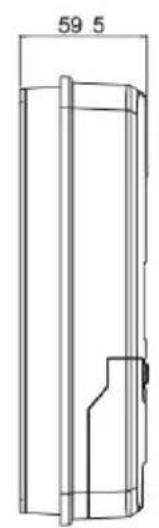
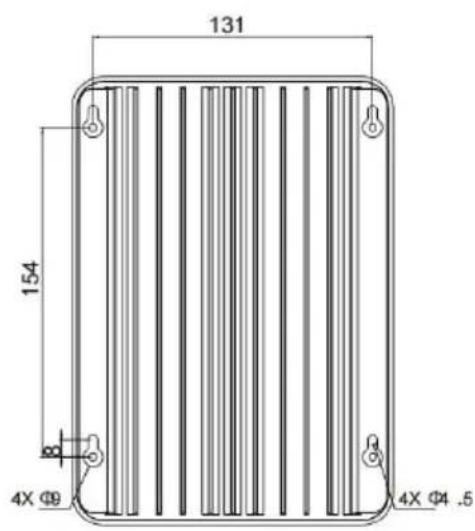
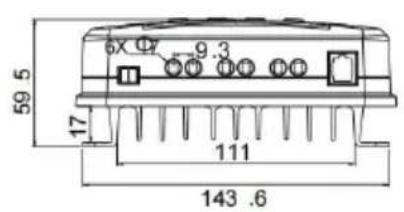
ML2420
Product dimensions: 210*151*59.5mm
Hole positions: 154*131mm
Hole diameter: Φ3mm
Applicable wire: max. 8 AWG
8. APP CONTROL FUNCTION
STREET EASTWOOD NSW 2122 Australia
Imported to USA: Sanven Technology Ltd, Suite 250, 9166 Anar Place, Rancho Cucamonga, CA 91730
| EC | REP |
SHUNSHUN GmbH
Römeräcker 9 Z2021, 76351
Unit 5 Albert Edward House, The
Pavilions Preston, United Kingdom
ML MAXIMUM POWER POINT TRACKING (MPPT) SERIES
We continue to be committed to providing you with tools at competitive prices. "Save Half", "Half Price", or any other similar expressions used by us only represent the savings you might benefit from buying certain tools with us compared to top brands and do not necessarily mean that all categories of tools offered are covered. We kindly remind you to verify carefully when placing an order with us that you are actually saving half in comparison with the top major brands.
VEVOR®
TOUGH TOOLS, HALF PRICE
ML MAXIMUM POWER POINT TRACKING (MPPT)
MODEL: ML2420
NEED HELP? CONTACT US!
Have product questions? Need technical support? Please feel free to contact us:
Technical Support and E-Warranty Certificate www.vevor.com/support
This is the original instruction. Please read all manual instructions carefully before operating. VEVOR reserves a clear interpretation of the user manual. The appearance of the product shall be subject to the product you received. Please forgive us that we won't inform you of any technology or software updates on our product.
1. PRODUCT INTRODUCTION
1.1 Product Overview
1.2 Product Features
1.3 Exterior and Interfaces
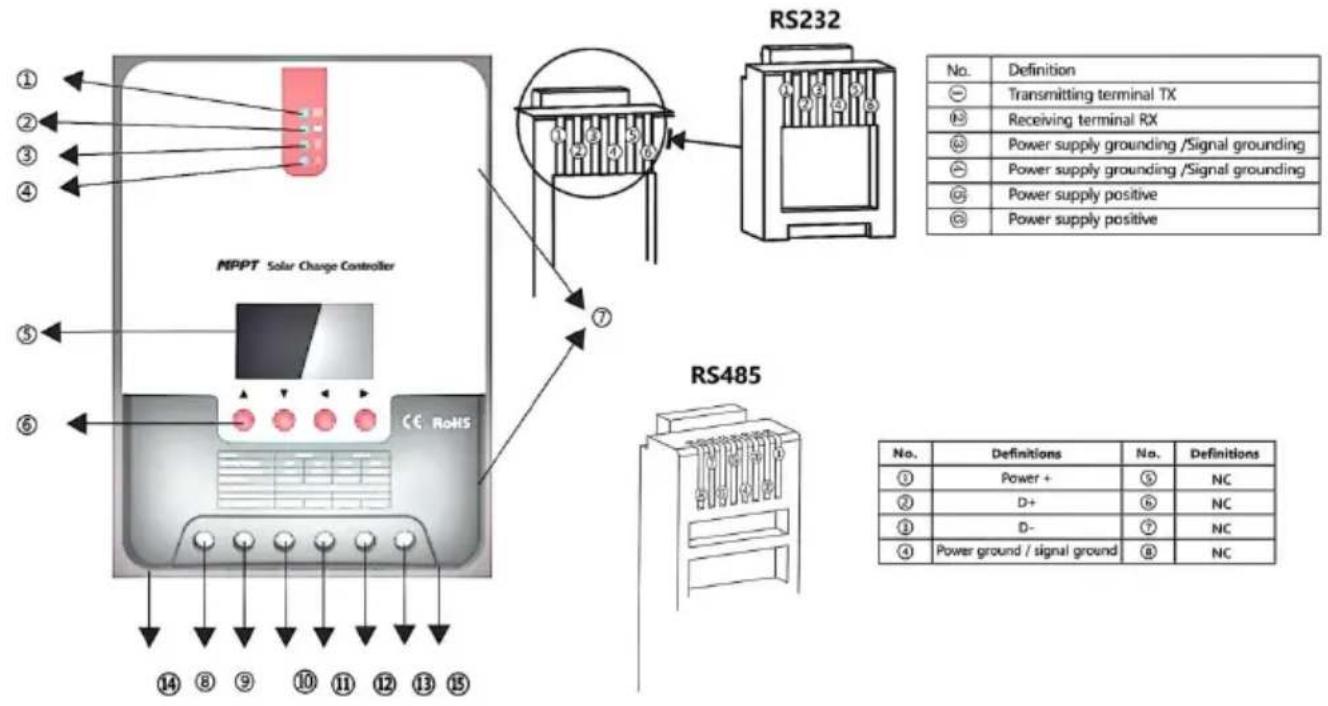
Fig. 1-2 Solar panel output characteristic curve
Fig. 1-3 Relation between solar panel output characteristics and illumination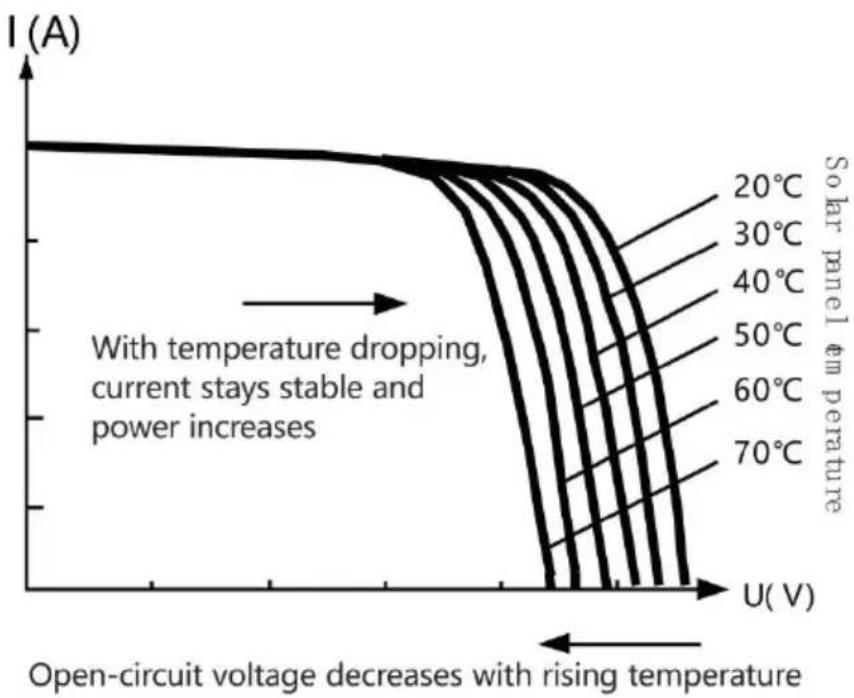
Fig. 1-4 Relation between solar panel output characteristics and temperature
1.5 Charging Stage Introductions
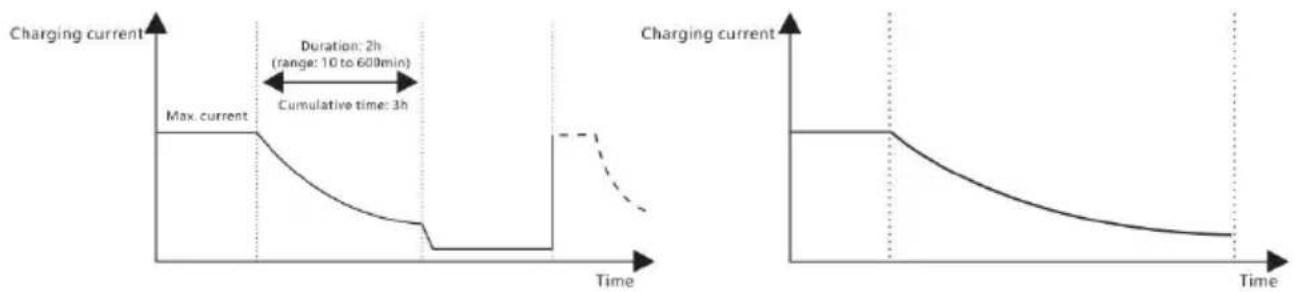
Fig. 1-5 SLD Battery charging stages diagram Fig. 1-6 LI Battery charging stages diagram
a) Fast charging
2. PRODUCT INSTALLATION
2.1 Installation Precautions
2.3 Installation and Wiring

Fig. 2.1 Installation and heat dissipation
Step 4: wire
3. PRODUCT OPERATION AND DISPLAY
3.1 LED Indicators
  |  | PV reeks indicat | Indiceren de controller ' s huidig opladen modus . |
  |  | KNUPPEL indicator | Indiceren de batterij ' s huidig staat . |
  |  | LADEN indicator | Indiceren de ladingen ' Aan / Uit En staat . |
  |  | FOUT indicator | Indiceren of de regelaar is functioneren normaal gesproken . |
PV-array-indicator:
3.3 LCD Startup and Main Interface
3.3.1 Startup interface
![graph TD A[" "] --> B[" "] B --> C[" "] C --> D[" "] D --> E[" "] E --> F[" "]](/content/2026/04/735963/images/00f6529cffc09ce23ffc2bd16190a0f5ac2a6e264abea2e94891bf1358622d7d.jpg)
3.4 Load Mode Setting Interface
3.4.1 Introduction to load modes
3.4.3 Manual load on/off page
Manual operation is effective only when the load mode is manual mode (15), and tap the Set key to switch on/off the load under any main interface.
3.5 System Parameter Settings
![graph LR A["Battery type"] --> B["System voltage"] B --> C["Equalizing voltage"] C --> D["Boost voltage"] E["Over-discharge voltage"] --> F["Over-discharge return voltage"] F --> G["Floating charging voltage"] H["12V / 24V"] --> I["15.5 V"] J["1.0 V"] --> K["12.6 V"] L["13.8 V"] --> M["FLOAT"]](/content/2026/04/735963/images/f15a703006353af91ad5b62ffbd5bf1db01a7d99da74bc4f89926d0ba31ac1cf.jpg)
4.3 Abnormality Display and Warnings
6.1 24V System Conversion
MPPT 24V conversion efficiency (24V battery)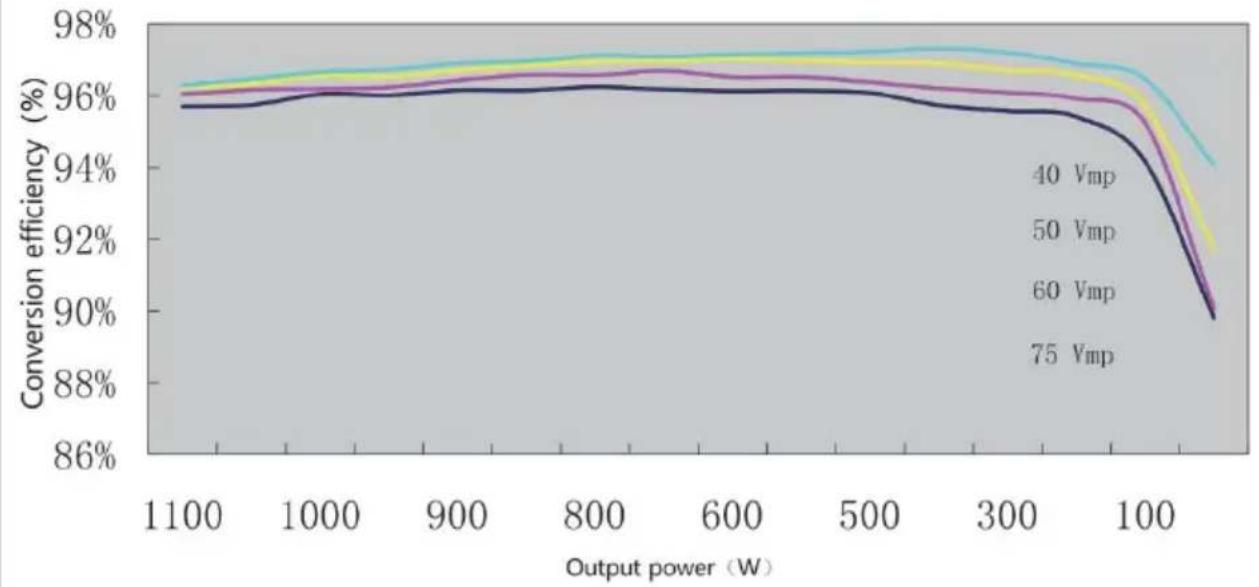
7. PRODUCT DIMENSIONS
ML2420
Product dimensions: 210*151*59.5mm
Hole positions: 154*131mm
Hole diameter: Φ3mm
Applicable wire: max. 8 AWG
8. APP CONTROL FUNCTION
Anaheim Place, Rancho Cucamonga, CA 91730
| EC | REP |
SHUNSHUN GmbH
Römeräcker 9 Z2021, 76351
Unit 5 Albert Edward House, The
Pavilions Preston, United Kingdom
Made in China
VEVOR®
TOUGH TOOLS, HALF PRICE
Technical Support and E-warranty Certificate www.vevor.com/support
VEVOR®
TOUGH TOOLS, HALF PRICE
ML MAXIMUM POWER POINT TRACKING (MPPT) SERIES
ML2420 SOLAR CHARGE AND DISCHARGE CONTROLLER
USER MANUAL
We continue to be committed to provide you tools with competitive price. "Save Half", "Half Price" or any other similar expressions used by us only represent savings you might benefit from buying certain tools with us compared to top brands and does not necessarily mean to cover all categories of tools offered. We kindly remind you to verify carefully when you are placing an order with us to ensure you are actually saving half in comparison with the top major brands.
VEVOR®
TOUGH TOOLS, HALF PRICE
ML MAXIMUM POWER POINT TRACKING (MPPT)
MODEL: ML2420
NEED HELP? CONTACT US!
Have product questions? Need technical support? Please feel free to contact us:
Technical Support and E-Warranty Certificate www.vevor.com/support
This is the original instruction. Please read all manual instructions carefully before operating. VEVOR reserves a clear interpretation of the user manual. The appearance of the product shall be subject to the product you received. Please forgive us that we won't inform you if there are any technology or software updates on our product.
1. PRODUCT INTRODUCTION
1.1 Product Overview
1.2 Product Features
1.3 Exterior and Interfaces
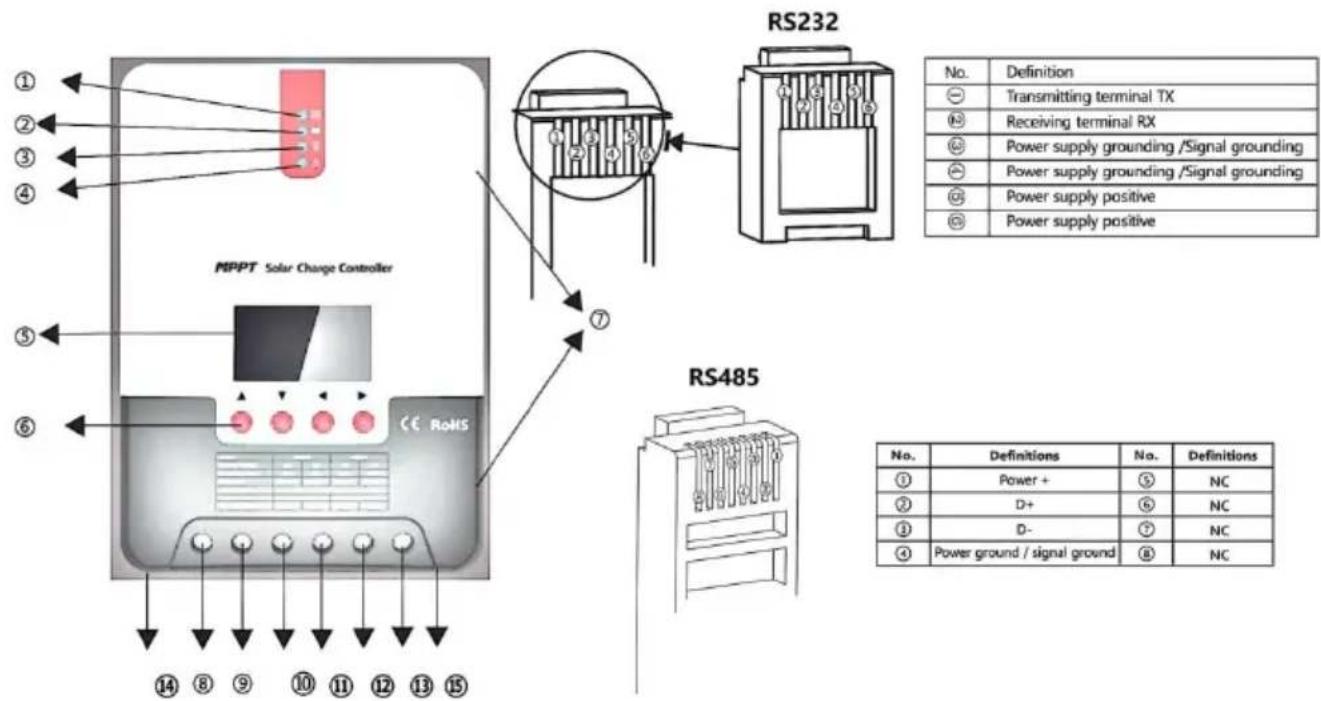
Fig. 1-2 Solar panel output characteristic curve
Fig. 1-3 Relation between solar panel output characteristics and illumination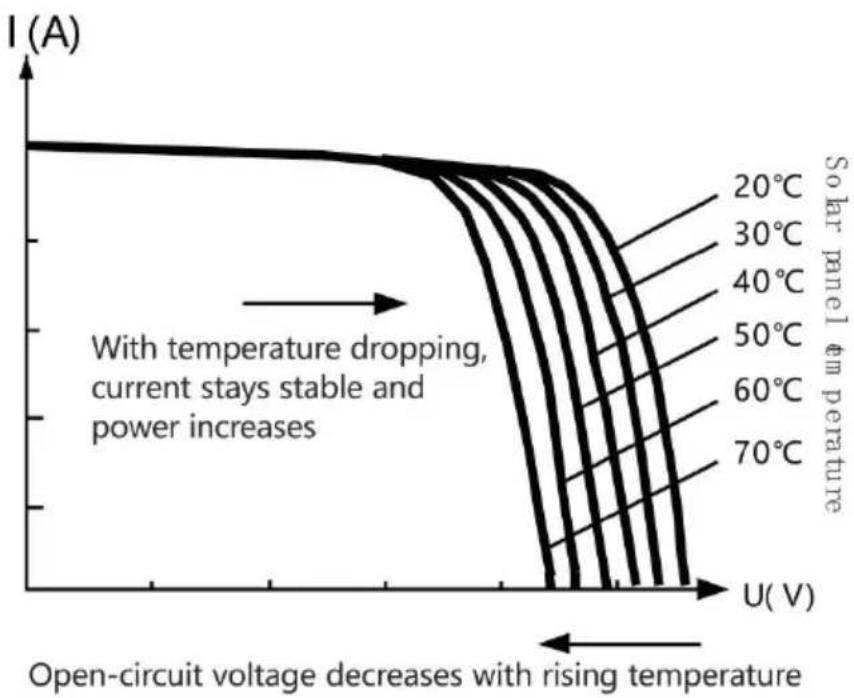
Fig. 1-4 Relation between solar panel output characteristics and temperature
1.5 Charging Stage Introductions
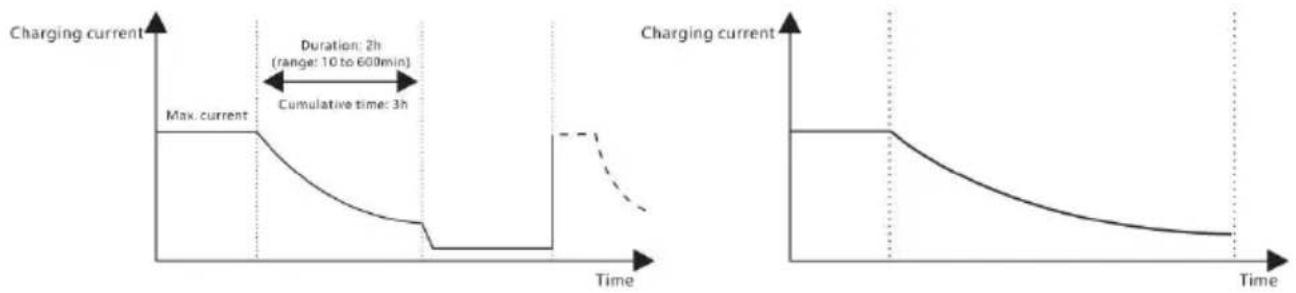
Fig. 1-5 SLD Battery charging stages diagram Fig. 1-6 LI Battery charging stages diagram
a) Fast charging
2. PRODUCT INSTALLATION
2.1 Installation Precautions
2.3 Installation and Wiring

Warning: risk of explosion! Never install
Fig. 2.1 Installation and heat dissipation
Step 1: choose installation location
Step 4: wiring
3. PRODUCT OPERATION AND DISPLAY
3.1 LED Indicators
3.3 LCD Startup and Main Interface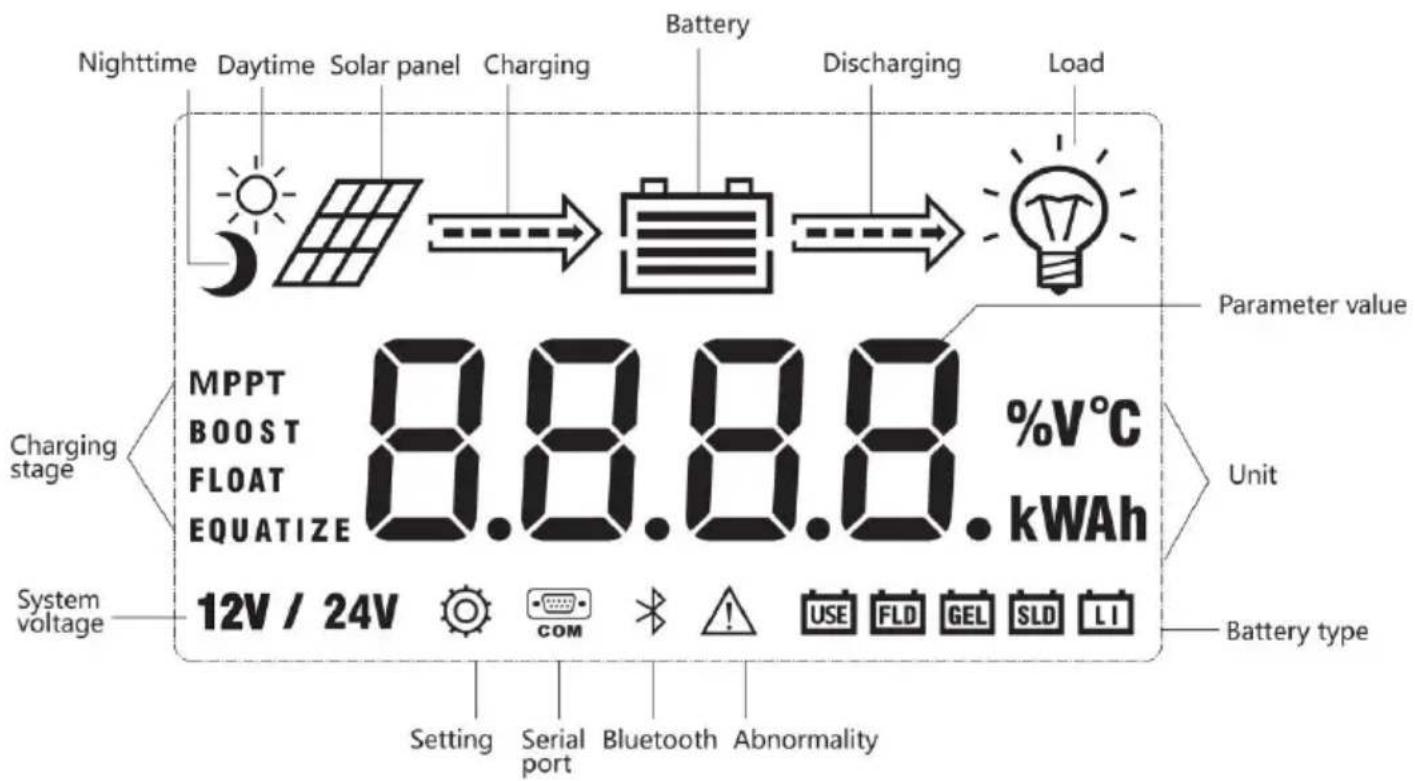
3.3.1 Startup Interface
![graph TD A[" "] --> B[" "] B --> C[" "] C --> D[" "] D --> E[" "] E --> F[" "] F --> G[" "]](/content/2026/04/735963/images/2882996c1156e4d6417f8a039de887e71100ef2a1d1425b3494abafc4af7f2f4.jpg)
3.4.3 Manual Load On/Off Page
Manual operation is effective only when the load mode is manual mode (15), and tap the Set key to switch on/off the load under any main interface.
3.5 System Parameter Settings
![graph LR A["Battery type"] --> B["System voltage"] B --> C["Equalizing voltage"] C --> D["Boost voltage"] E["Over-discharge voltage"] --> F["Over-discharge return voltage"] F --> G["Floating charging voltage"] H["12V / 24V"] --> I["15.5 V"] J["1.0 V"] --> K["12.6 V"] L["13.8 V"] --> M["FLOAT"]](/content/2026/04/735963/images/f91d5914440efb5dce97207396fdf7f748fc3563c7fe4704a274ba1af051b91d.jpg)
Classification: IP32
4.3 Abnormality Display and Warnings
6.1 24V System Conversion
7. PRODUCT DIMENSIONS
ML2420
Product dimensions: 210*151*59.5mm
Hole positions: 154*131mm
Hole diameter: Φ3mm
Applicable wire: max. 8 AWG
8. APP CONTROL FUNCTION
Unit 5 Albert Edward House, The
Pavilions Preston, United Kingdom
Made in China
VEVOR®
TOUGH TOOLS, HALF PRICE



- ML MAXIMUM POWER POINT TRACKING (MPPT)
- NEED HELP? CONTACT US
- SAFETY INSTRUCTIONS
- TABLE OF CONTENTS
- PRODUCT INTRODUCTION
- PRODUCT OVERVIEW
- PRODUCT FEATURES
- EXTERIOR AND INTERFACES
- INTRODUCTION TO MAXIMUM POWER POINT TRACKING TECHNOLOGY
- CHARGING STAGE INTRODUCTIONS
- FAST CHARGING
- SUSTAINING CHARGING
- BOOST CHARGING
- EQUALIZING CHARGING
- WARNING: RISK OF EXPLOSION
- NOTE: RISK OF EQUIPMENT DAMAGE
- NOTE
- ➤ FLOATING CHARGING
- PRODUCT INSTALLATION
- INSTALLATION PRECAUTIONS
- WIRING SPECIFICATIONS
- INSTALLATION AND WIRING
- STEP 1: CHOOSE THE INSTALLATION SITE
- STEP 3: FIX THE CONTROLLER
- STEP 4: WIRE
- ④ POWER ON
- PRODUCT OPERATION AND DISPLAY
- LED INDICATORS
- PV ARRAY INDICATOR
- BAT INDICATOR
- LOAD INDICATOR
- ERROR INDICATOR
- KEYS OPERATION
- LCD STARTUP AND MAIN INTERFACE
- STARTUP INTERFACE
- MAIN INTERFACE
- LOAD MODE SETTING INTERFACE
- LOAD MODES INTRODUCTION
- LOAD MODE ADJUSTMENT
- MANUAL LOAD ON/OFF PAGE
- SYSTEM PARAMETER SETTINGS
- PRODUCT PROTECTION AND SYSTEM MAINTENANCE
- PROTECTIONS
- WATERPROOFING PROTECTION
- INPUT POWER LIMITED PROTECTION
- BATTERY REVERSE POLARITY PROTECTION
- PV INPUT END VOLTAGE IS TOO HIGH
- PV INPUT END SHORT CIRCUIT PROTECTION
- PV INPUT REVERSE POLARITY PROTECTION
- TVS LIGHTNING PROTECTION
- ➢ OVER-TEMPERATURE PROTECTION
- SYSTEM MAINTENANCE
- TECHNICAL PARAMETERS
- BATTERY TYPE DEFAULT PARAMETERS
- CONVERSION EFFICIENCY CURVE
- ML
- APP CONTROL FUNCTION
- VEVOR®
- TOUGH TOOLS, HALF PRICE
- MODEL: ML
- STEP 4: THE WIRE
- V SYSTEM CONVERSION
- PRODUCT DIMENSIONS
- ML MAXIMUM POWER POINT TRACKING (MPPT) SERIES
- OPERATING INSTRUCTIONS
- ML MAXIMUM POWER POINT TRACKING (MPPT
- MODELLO:ML
- INSTALLATION PRECAUTION
- PHASE 4: WIRE
- STEP 4: WIRING
- ABNORMALITY DISPLAY AND WARNING
- PV-ARRAY-INDICATOR
- INTRODUCTION TO LOAD MODES
- USER MANUAL
- STEP 1: CHOOSE INSTALLATION LOCATION
Brand : Vevor
Model : ML2420
Category : Television