
Easy Fry Dual EZ9018 - Deep fryer MOULINEX - Free user manual and instructions
Find the device manual for free Easy Fry Dual EZ9018 MOULINEX in PDF.
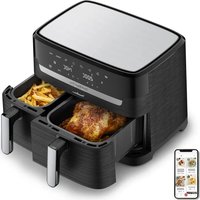


| Brand | Moulinex |
| Model | Easy Fry Dual EZ9018 |
| Category | Hot air fryer (Air Fryer) |
| Product type | Dual basket air fryer |
| Number of baskets | 2 (basket 1: large, basket 2: standard) |
| Capacity basket 1 (fries) | Up to 1400 g |
| Capacity basket 2 (fries) | Up to 800 g |
| Power supply | 220-240 V, 50/60 Hz |
| Power | Approximately 1800 W |
| Control panel | Touchscreen digital display |
| Automatic programs | Fries, Chicken, Vegetables, Fish, Dessert, Dehydrate |
| Additional program | Grill (depending on model) |
| Synchronization mode (SYNC) | Yes, to finish cooking both baskets at the same time |
| Temperature range | 40 to 200 °C |
| Timer | 0 to 60 minutes |
| Material of baskets and grills | Non-stick coating |
| Maintenance and cleaning | Baskets and grills dishwasher safe; exterior clean with damp cloth |
| Safety | Automatic shut-off, do not immerse in water, hot surfaces |
| Spare parts and repairability | Removable grills available; after-sales service via website or hotline |
| Dimensions (estimated) | Approximately 40 x 35 x 30 cm |
| Weight (estimated) | Approximately 8 kg |
Frequently Asked Questions - Easy Fry Dual EZ9018 MOULINEX
User questions about Easy Fry Dual EZ9018 MOULINEX
0 question about this device. Answer the ones you know or ask your own.
Ask a new question about this device
Download the instructions for your Deep fryer in PDF format for free! Find your manual Easy Fry Dual EZ9018 - MOULINEX and take your electronic device back in hand. On this page are published all the documents necessary for the use of your device. Easy Fry Dual EZ9018 by MOULINEX.
USER MANUAL Easy Fry Dual EZ9018 MOULINEX
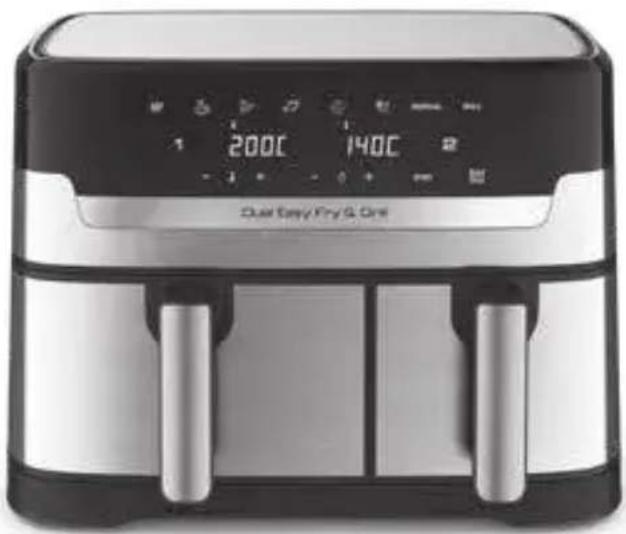
DUAL EASY FRY™ DUAL EASY FRY™ & GRILL
*depending on model
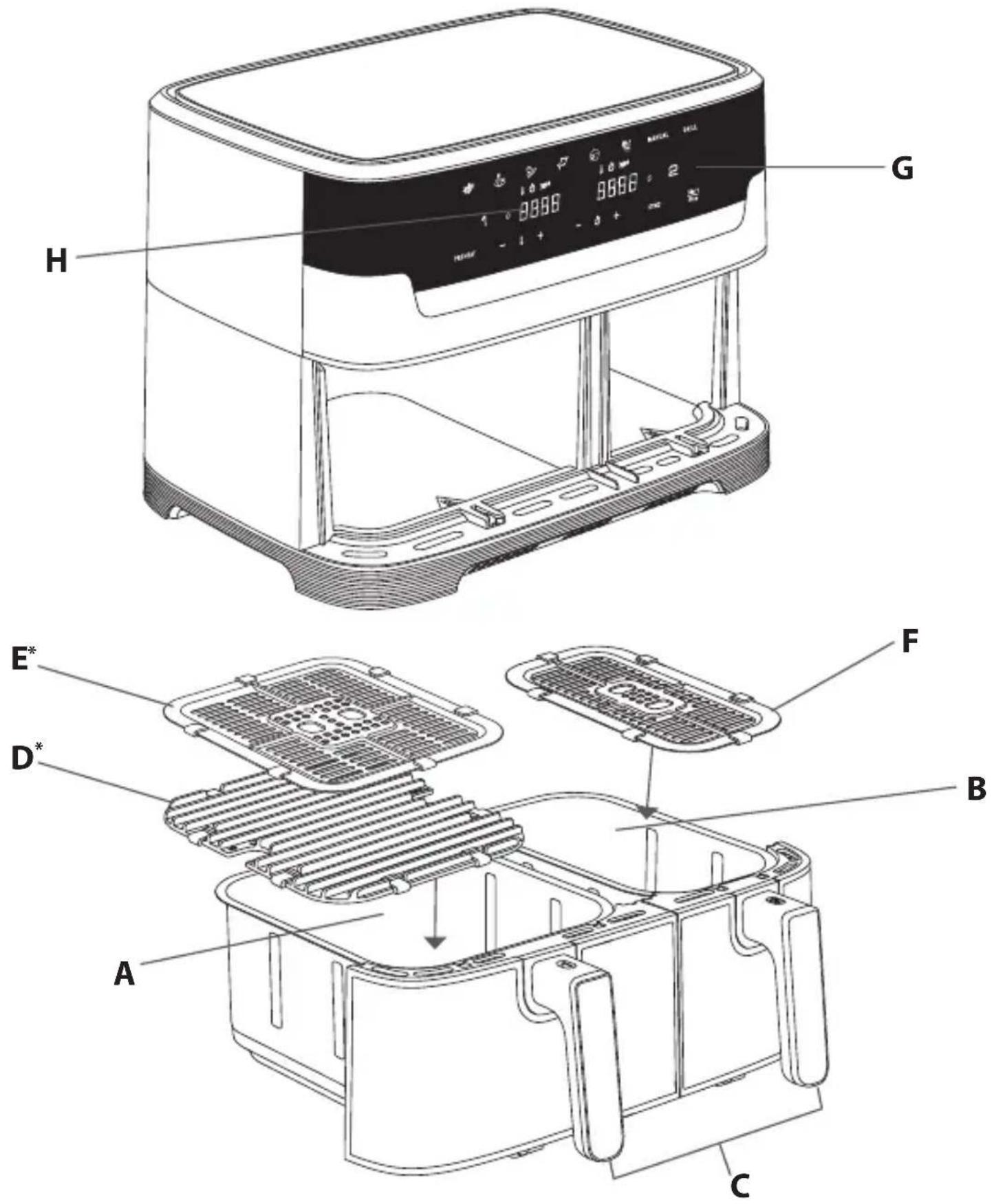
DESCRIPTION
A. Drawer 1 (large bowl) B. Drawer 2 (regular bowl) C. Drawer handles D. Large removable die-cast grill grid with silicon pads (depending on model)
E. Large removable grid with silicon pads (depending on model) F. Removable grid with silicon pads G. Digital touchscreen panel H. Time/temperature display
EN
DUAL EASY FRY user interface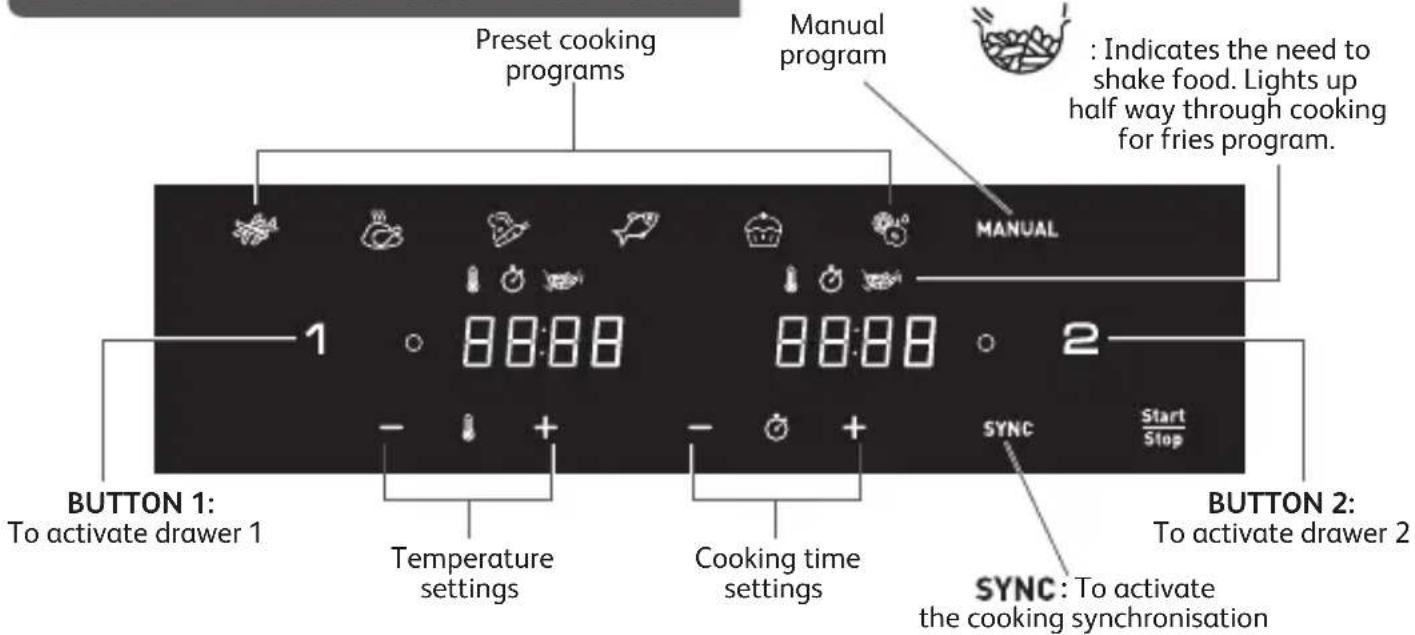
OFF : indicates the drawer is off. To activate, click on 1 or 2 buttons.
DUAL EASY FRY & GRILL user interface*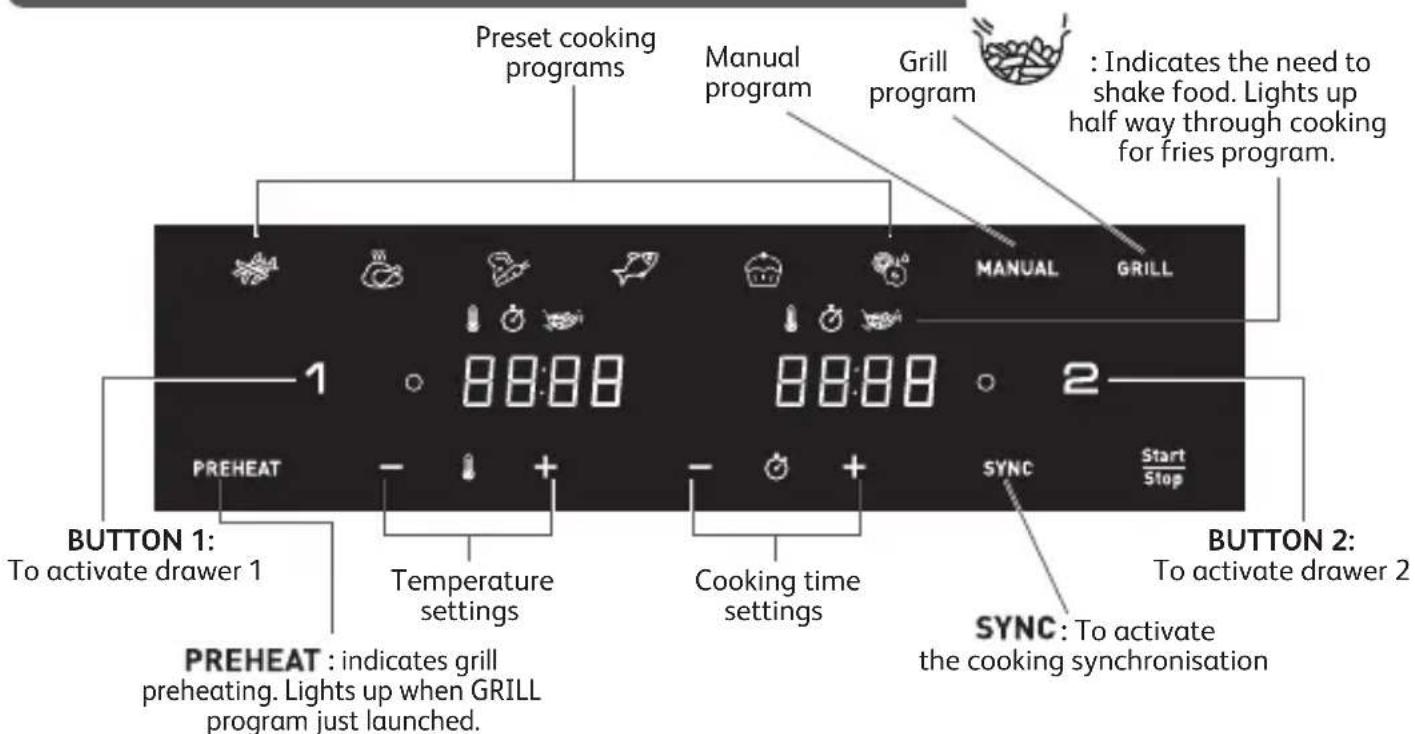
OFF : indicates the drawer is off. To activate, click on 1 or 2 buttons.
*depending on model
AUTOMATIC COOKING MODES

Fries
Chicken

Vegetables
Fish
Dessert
Dehydrate
MANUAL Manual mode
GRILL Grill program (depending on model)
EN
BEFORE FIRST USE
- Remove all packaging material.
- Remove any stickers from the appliance (sticker on the drawer for example), except QR code sticker.
- Thoroughly clean the drawer and removable grids with hot water, some washing-up liquid and a non-abrasive sponge. The drawers and the grids are dishwasher safe.
- Wipe the inside and outside of the appliance with a damp cloth. The appliance works by producing hot air. Do not fill the drawer with oil or frying fat.
PREPARING FOR USE
- Place the appliance on a flat, stable, heat-resistant work surface away from water splashes.
- Do not fill the drawer with oil or any other liquid. Do not put anything on top of the appliance. This disrupts the airflow and affects the hot air frying result.
IMPORTANT: To prevent the appliance from overheating, do not place it in a corner or below a wall cupboard. A gap of at least 15cm should be left around the appliance to allow air to circulate.
- Press Start/Stop to switch on the appliance.
- Fries mode is displayed as default for drawer 1 while OFF is displayed on the screen for drawer 2.
- Any drawer can be activated for selection by pressing the '1' or '2' button. (To cancel the selection, press the '1' or '2' button again; the drawer will be OFF and cancelled).
Note: Never exceed the maximum amount indicated in the table (see section 'Cooking Guide'), as this could affect the quality of the end result.
- Always place the suitable grids in the drawers before cooking for optimal cooking results.
USING BOTH DRAWERS ON SYNCHRONISATION MODE (DUAL COOKING)
Cook 2 different types of food at the same time thanks to both drawers and SYNC Mode.
- Press Start/Stop to switch on the appliance. Fries mode is displayed as default for drawer 1 while OFF is displayed on the screen for drawer 2.
- Press the desired cooking mode and adjust timing and temperature if different to the pre-set settings (by pressing + and -). The settings are saved.
- Place your first food in drawer 1 (left drawer). Slide the drawer back into the appliance.
Note: When the screen displays "Add" and if there is no action for 10 minutes, the program stops and the screen returns to display "START/STOP". You will need to re-select to restart cooking.
- To activate drawer 2, press '2'.
- Press the second desired cooking mode and adjust timing and temperature if different from the pre-set settings (by pressing + and -).
- Place your second food in drawer 2 (right drawer). Slide the drawer back into the appliance.
- Press SYNC to have both foods ready at the same time. If the two cooking modes selected have different cooking times, 'HOLD' appears on the screen for the shortest cooking mode (for the food that needs less time to cook). This means the appliance delays the start of cooking to have both types of food ready at the same time.
- Press Start/Stop to begin cooking.
- The appliance beeps when the food is ready, at the same time.
- When the food is cooked, take out the drawer. To remove food, use a pair of tongs to lift the food out of the drawer.
Caution: After hot frying, the grids and the food are very hot.
Note: During cooking, if you remove one of the drawers and do not slide it back within 5 minutes, that drawer's panel will display 'OFF'. The other drawer keeps running, but it ends the 'SYNC' program.
USING ONLY ONE DRAWER OF THE APPLIANCE
- Press Start/Stop to switch on the appliance.
- Fries mode is displayed as default for drawer 1 while OFF is displayed on the screen for drawer 2.
- Any drawer can be activated by pressing the '1' or '2' button. The other drawer remains OFF (to cancel the selection, press the '1' or '2' button again).
- To begin cooking, you can select between the preset cooking mode or the manual settings. a. If choosing preset cooking mode:
- Select the desired cooking mode by pressing the corresponding icon on the touchscreen panel (these modes are described in detail in the “Cooking guide” section).
- Confirm the cooking mode by pressing the Start/Stop button. This will launch the cooking process.
- Cooking starts. The remaining cooking time is displayed on the screen.
b. If choosing manual settings:
- Press MANUAL mode.
- Adjust the temperature with the + and - buttons on the digital screen. The thermostat varies from 40-200°C.
- Then set the desired cooking time by pressing the + and - buttons. The timer can be set for between 0 and 60 minutes.
- Press the Start/Stop button to begin cooking with the selected temperature and time settings. Cooking starts. The remaining cooking time is displayed on the screen.
- Excess oil from the food is collected in the bottom of the drawer.
- Some food will require shaking halfway through the cooking time for optimal cooking results. (see section 'Cooking Guide'). To shake the food, pull the drawer out of the appliance by the handle and shake it. Then slide the drawer back into the appliance and the cooking restarts automatically.
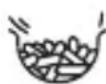
During Fries cooking mode, this pictogram flashes half way through cooking. It indicates the need to shake the fries for even cooking and browning.
*depending on model
- When you hear the timer sound, the cooking time set has finished. Pull the drawer out of the appliance and place it on a heat-resistant surface.
- Check if the food is ready. If the food is not ready yet, simply slide the drawer back into the appliance and set the timer for a few extra minutes.
- When the food is cooked, take out the drawer. To remove food, use a pair of tongs to lift the food out of the drawer. Caution: The drawer should never be turned upside down with the grid. After cooking, the drawer, the grid, and the food are very hot.
- When a batch of food is ready, the appliance is instantly ready for preparing another batch of food.
USING BOTH DRAWERS ON SYNC MODE WITH THE GRILL PLATE*
Grill function is only suitable for drawer 1.
- Always place the grill plate in drawer 1 of the appliance.
- Press Start/Stop. Fries mode is displayed as default for drawer 1 while OFF is displayed on the screen for drawer 2.
- Press GRILL on the screen to select the Grill mode and adjust cooking time if needed. The temperature is automatically set at 200°C. Do not place the food in drawer 1; a grill preheating phase will be launched automatically.
- Press '2' to activate drawer 2 and select the desired cooking mode (e.g., Fries) and adjust time and temperature if needed.
- Add your food in drawer 2. Slide the drawer back into the appliance.
- Press SYNC.
- Start the cooking by pressing Start/Stop. This will launch the preheating phase for the grill (drawer 1). PREHEAT lights up and the screen displays 'Pre Heat'. The grilling temperature is automatically set at 200°C.
- When you hear the timer sound, the preheating phase has finished. The screen displays 'Add'.
- Take drawer 1 out of the appliance and place it on a heat-resistant surface.
Caution: the drawer and the grill grid are very hot. Use a pair of tongs to place the food on the grill plate.
Note: When the screen displays "Add" and there is no action for 10 minutes, the program stops and the screen returns to display "START/STOP". You will need to re-select to restart cooking.
- Place the food on the grill plate and put back the drawer into the appliance.
- The cooking starts automatically. The remaining cooking time is displayed on the screen.
Note: the pieces of meat can be turned at halfway through cooking.
Excess oil from the food is collected in the bottom of the drawer.
- When you hear the timer sound, the cooking has finished. Take the drawers out of the appliance and place them on a heat-resistant surface.
- To remove food, use a pair of tongs to lift the food out of the drawer.
Caution: After cooking, the drawers, the grids and the food are very hot.
Note: During cooking, if you remove one of the drawers and you do not slide it back in within 5 minutes, this drawer panel will display 'OFF'. The other drawer keeps running, but it ends 'SYNC' program.
COOKING GUIDE
The table below helps you to select the basic settings for the food you want to prepare.
Note: The cooking times below are only a guide and may vary according to the variety and batch of potatoes used. For other food, the size, shape, and brand may affect results.
Therefore, you may need to adjust the cooking time slightly.
*depending on model
| Quantity | Approx. Time (min) | Temperature | Cooking mode | Shake | Extra information | ||
| Potatoes & fries | |||||||
| Frozen fries (10 mm x 10 mm standard thickness) | Drawer 1 | 600 - 1400 g | 25 - 40 min | 180°C |  | x2 | |
| Drawer 2 | 300 - 800 g | 25 - 35 min | x2 | ||||
| Homemade fries (8 mm x 8 mm) | Drawer 1 | 500 g | 40 min | 180°C | [60YT] | x4 | Dry it by towel before cooking |
| Drawer 2 | 200 g | 35 min | x4 | ||||
| Frozen potato wedges | Drawer 1 | 600 - 1400 g | 25 - 40 min | 180°C |  | x2 | |
| Drawer 2 | 300 - 800 g | 25 - 40 min | x2 | ||||
| Meat & Poultry | |||||||
| Frozen beef burgers | Drawer 1 | up to 4 pieces | 10-18 min | 200°C | MANUAL | x1 flip | |
| Drawer 2 | up to 2 pieces | 10-15 min | |||||
| Chicken breast fillets (boneless) | Drawer 1 | up to 4 pieces | 10 min | 200°C |  | x1 flip | |
| Drawer 2 | up to 2 pieces | 10 min | 200°C |  | |||
| Chicken whole | Drawer 1 | up to 1300 g | 50 min | 160°C | [V3TK] | Drawer 1 only | |
| Snacks | |||||||
| Chicken nuggets | Drawer 1 | up to 1 kg | 12 min | 200°C |  | x1 | |
| Drawer 2 | up to 400 g | 12 min | 200°C | ||||
| Chicken wings | Drawer 1 | up to 1 kg or 8/9 pieces | 22 min | 200°C |  | x1 | |
| Drawer 2 | up to 400 g or 4/5 pieces | 22 min | 200°C | ||||
| Snacks | |||||||
| Pizza | Drawer 1 | up to 3 slices 5 | min 170°C | MANUAL | |||
| Drawer 2 | up to 2 slices 5 | min 170°C | MANUAL | ||||
| Vegetables | Drawer 1 | up to 1 kg 22 | min 200°C |  | x4 | ||
| Drawer 2 | 400 - 600 g 22 | min 200°C | x4 | ||||
| Fish | |||||||
| Salmon fillet | Drawer 1 | up to 4 pieces | 8-10 min 200°C | [3c6G] | |||
| Drawer 2 | up to 2 pieces | 8-10 min 200°C | |||||
| Prawns | Drawer 1 | up to 500 g to 1 kg | 8-10 min 200°C | x1 | |||
| Drawer 2 | up to 400 g | 8-10 min 200°C | x1 | ||||
| Baking | |||||||
| Muffins | Drawer 1 | up to 6/8 pieces | 16 min 160°C |  | |||
| Drawer 2 | up to 4 pieces | 16 min 160°C | |||||
| Chocolate cakes | Drawer 1 | 1 round cake pan | 30-35 min 160°C | ||||
| Dehydrate | |||||||
| Sliced Apple | Drawer 1 | 8 slices | 8h 40°C |  | |||
| Drawer 2 | 4 slices | 8h 40°C | |||||
| Type of cooking | Quantity | Approx. Time | Temperature | Shake | Extra information | ||
| GRILL PROGRAM* | |||||||
| Beef | Drawer 1 | rare up to 4 pieces 4 min | 200°C | x1 flip | Drawer 1 onlyYou can add oil, aromatic herbs and salt for better taste. At mid-cooking, you can return the food. | ||
| medium up to 4 pieces 6 min | 200°C | ||||||
| well-done up to 4 pieces 8 min | 200°C | ||||||
| Pork chops | Drawer 1 | done up to 3 pieces 12-16 min | 200°C | x1 flip | |||
| Lamb loin chops | Drawer 1 | done up to 4-6 pieces 12-14 min | 200°C | ||||
| Chicken fillets | Drawer 1 | done up to 4-6 pieces 10 min | 200°C | x1 flip | |||
| Sausages | Drawer 1 | done | up to 8-10 pieces | 16-20 min | 200°C | x3 flip | |
| Fish fillets | Drawer 1 | done up to 4-6 pieces 8 min | 200°C | ||||
TIPS
- Smaller foods usually require a slightly shorter cooking time than larger size foods.
- Shaking smaller size foods halfway through the cooking time improves the end result and can help prevent uneven cooking.
- To make your potatoes extra crispy, try adding a small amount of oil before cooking and shake to evenly cover. We recommend 14ml of oil (1 tablespoon).
- Snacks that can be cooked in an oven can also be cooked in the appliance.
- The optimal recommended quantity for cooking fries is 1,200 grams (800g in drawer 1 and 400g in drawer 2).
- Use ready-made puff and shortcrust pastry to make filled snacks quickly and easily.
- Place an oven dish in the appliance's bowl if you want to bake a cake or quiche or if you want to fry delicate ingredients or filled ingredients. You can use an oven dish in silicon, stainless steel, aluminium, terracotta.
- You can also use the appliance to reheat food. To reheat food, set the temperature to 160°C for up to 10 minutes. Cooking time could be adjusted depending on food quantity in order to fully reheat the food.
CLEANING
Clean the appliance after every use.
The bowl and the grid have a non-stick coating. Do not use metal kitchen utensils or abrasive cleaning materials to clean them, as this may damage the nonstick coating.
- Remove the mains plug from the wall socket and let the appliance cool down.
Note: Remove the bowl to let the appliance cool down more quickly.
- Wipe the outside of the appliance with a damp cloth.
- Clean the bowl and grid with hot water, some washing-up liquid and a non-abrasive sponge.
You can use a degreasing liquid to remove any remaining dirt.
Note: the bowl and the grid are dishwasher safe.
Tip: If food debris/residue is stuck at the bottom of the bowl and the grid, fill them with hot water and some washing-up liquid. Let the bowl and the grid soak for approximately 10 minutes. Then rinse clean and dry.
- Wipe inside of the appliance with hot water and a damp cloth.
- Clean the heating element with a dry, cleaning brush to remove any food residues.
- Do not immerse the appliance in water or any other liquid.
STORAGE
- Unplug the appliance and let it cool down.
- Make sure all parts are clean and dry.
GUARANTEE AND SERVICE
If you need service or information or if you have a problem, please visit the brand website or contact the brand Consumer Care Centre in your country. You can find the phone number in the worldwide guarantee leaflet. If there is no Consumer Care Centre in your country, go to your local brand dealer.
TROUBLESHOOTING
If you encounter problems with the appliance, visit the brand website (see cover page on this manual) for a list of frequently asked questions or contact the Consumer Care Centre in your country.
DESCRIPTION
MANUAL Programme Manual
(depending on model)
ET
BEFORE FIRST USE


- DUAL EASY FRY™ DUAL EASY FRY™ & GRILL
- DESCRIPTION
- AUTOMATIC COOKING MODES
- BEFORE FIRST USE
- PREPARING FOR USE
- USING BOTH DRAWERS ON SYNCHRONISATION MODE (DUAL COOKING)
- USING ONLY ONE DRAWER OF THE APPLIANCE
- USING BOTH DRAWERS ON SYNC MODE WITH THE GRILL PLATE
- GRILL FUNCTION IS ONLY SUITABLE FOR DRAWER
- COOKING GUIDE
- TIPS
- CLEANING
- STORAGE
- GUARANTEE AND SERVICE
- TROUBLESHOOTING
Brand : MOULINEX
Model : Easy Fry Dual EZ9018
Category : Deep fryer