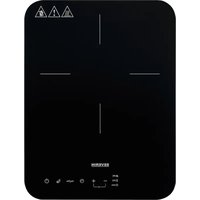
KP 1032 - Cooker SEVERIN - Free user manual and instructions
Find the device manual for free KP 1032 SEVERIN in PDF.


| Product type | Induction cooktop |
| Brand | Severin |
| Model | KP 1032 |
| Dimensions (approx.) | 35 x 29 x 8 cm |
| Weight (approx.) | 3.5 kg |
| Power supply | 220-240 V ~ 50/60 Hz |
| Maximum power | 2000 W |
| Adjustment ranges | Power: 1-10; Temperature: 60-240 °C (in 20 °C increments) |
| Timer | Up to 3 hours |
| Child safety | Key lock (simultaneous press of + and - for 3 seconds) |
| Utensil detection | Automatic (message E1 if unsuitable or absent) |
| Residual heat indicator | Display H (hot) or L (cold) |
| Automatic shut-off | In case of overheating, timer elapsed, inactivity for 1 minute |
| Maximum load | 6 kg |
| Utensil diameter | 10 cm to 22 cm, flat magnetic base, thickness ≥ 2 mm |
| Cooktop material | Ceramic glass |
| Maintenance | Damp cloth; ceramic scraper; mild detergent; occasional special products |
| Electrical safety | Do not immerse in water; unplug before cleaning; grounded outlet |
| Repairs | After-sales service only (see warranty) |
| Usage | Domestic and similar; do not build-in; wall distance ≥ 10 cm |
| Ambient temperature | Do not use near flammable materials |
Frequently Asked Questions - KP 1032 SEVERIN
User questions about KP 1032 SEVERIN
0 question about this device. Answer the ones you know or ask your own.
Ask a new question about this device
Download the instructions for your Cooker in PDF format for free! Find your manual KP 1032 - SEVERIN and take your electronic device back in hand. On this page are published all the documents necessary for the use of your device. KP 1032 by SEVERIN.
USER MANUAL KP 1032 SEVERIN
Before using the appliance, read the following instructions carefully and keep this manual for future reference. The appliance must only be used by persons familiar with these instructions.
Connection to the mains supply
The appliance must only be connected to a properly installed power socket with an earth connection.
Make sure that the supply voltage corresponds with the voltage marked on the rating label. This product complies with all binding CE labelling directives.
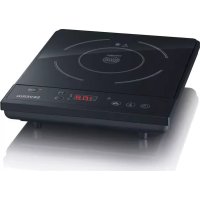
Familiarisation
- Power cord with plug
- Cooking surface
- Control panel
- On/Stand-by switch
- Temperature/Power toggle button
- Max/Min quick selection button
- Timer selection button
- Increase/decrease power/temperature/timer and child lock selection buttons
- Function indicators
- Nameplate (appliance underside)
- Display
Important safety instructions
In order to avoid hazards, and to comply with safety requirements, repairs to this electrical appliance or its power cord must be carried out by our customer service. If repairs are needed, please send the appliance to our customer service department (see separate warranty booklet).
Before cleaning the appliance, ensure it is disconnected from the power supply and has cooled down completely.
- To avoid the risk of electric shock, do not clean the appliance with liquids or immerse it.
Clean the cooking surfaces with a damp cloth after each use. For detailed information on cleaning the appliance, please refer to
the section Cleaning and care.
- Caution: To avoid the risk of electric shock, the unit must be switched off and disconnected from the mains if the surface shows any sign of cracking or similar damage.
The appliance is not intended to be operated by means of an external timer or separate remote-control system.
Warning! This symbol indicates that ceramic glass surfaces may heat up because of the heat emitted by the cookware. There is, therefore, a danger of burns! -
Do not place any metal objects (eg knives, forks or spoons) onto the cooking surfaces, as such objects may become hot.
-
This appliance is intended for domestic or similar applications, such as the - staff kitchens in shops, offices and other similar working environments, - agricultural working environments, - by customers in hotels, motels etc. and similar accommodation, - in bed-and breakfast type environments.
-
This appliance may be used by children (at least 8 years of age) and by persons with reduced physical, sensory or mental capabilities, or lacking experience and knowledge, provided they have been given supervision or instruction concerning the use of the appliance and fully understand all dangers and safety precautions
involved.
Children must not be permitted to play with the appliance.
Children must not be permitted to carry out any cleaning or maintenance work on the appliance unless they are supervised.
The appliance and its power cord must be kept well away from children under 8 at all times.
-
Caution: Keep any packaging materials well away from children - such materials are a potential source of danger, e.g. of suffocation.
-
Every time the appliance is used, the main body including the power cord as well as any attachment fitted should be checked thoroughly for any defects. Should the appliance, for instance, have been dropped onto a hard surface, or if excessive force has been used to pull the power cord, it must no longer be used: even invisible damage may have adverse effects on the operational safety of the appliance.
This unit must not be fitted into a countertop.
People fitted with pacemakers should consult their doctors before using the appliance, as the pacemaker's function
may be affected.
- This appliance should only be used with sufficient clearance from any objects that respond to magnetic fields (eg credit cards, cassettes, TV sets or radios).
- Do not leave the appliance unattended while in use.
- Do not position or operate the appliance close to or underneath any wall-cupboards or hanging objects such as curtains or any other inflammable materials.
During operation, the appliance must be placed on a
level,
-heat-resistant,
- non-metallic
- surface that is impervious to splashes and clear of any obstructions.
Always ensure that air is able to circulate freely underneath the unit. A minimum distance of 10cm to any wall must also be observed.
The ventilation slots on the unit must not be covered during use.
- Do not operate the unit, unless suitable cookware (with food in) has been put on the cooking surface. When an empty pot or pan is being heated, the overheat protection will automatically turn the appliance off. In this case, however, damage to cookware or the unit itself cannot be completely ruled out.
Caution: Food containing fat or oil may catch fire when over-heated.
- Do not attempt to move the unit while there is cookware on the ceramic surface.
- Do not pull or slide cookware over the control panel.
-
Do not plug the appliance into a multiple socket to which other appliances are connected.
Always remove the plug from the wall socket -
after use,
- in case of any malfunction, and also
-
before cleaning the appliance.
-
When removing the plug from the wall socket, never pull on the power cord; always grip the plug itself.
- Never leave the power cord dangling downwards.
The power cord must be kept well away from any hot part of the appliance.
No responsibility will be accepted if damage results from improper use, or if these instructions are not complied with.
Start up
Before using the appliance for the first time, remove any remaining packaging and stickers from it. The nameplate must not be removed. Wipe the outer surfaces of the appliance with a damp cloth and leave to dry.
Suitable cookware
This appliance must only be used with cookware suitable for use with induction-type hot-plates, eg stainless-steel with a ferro-magnetic base, or cast-iron or enamelled steel cookware.
Cookware can be tested for its suitability by simply holding a magnet to the base; if the magnet is attracted, the cookware is suitable for use with this appliance.
Only flat-bottom pots and pans may be used.
- Do not use any cookware with a base less than 2mm thick.
- Only pots and pans with a diameter of 10 to around 22cm may be used.
If unsuitable cookware is used, the appliance will respond with an error message (see 'Troubleshooting' table).
- Coated pots and pans may be damaged by excessive heat. It is therefore important to select the appropriate temperature level for the cookware in use, and to follow the information provided by the cookware's manufacturer.
A maximum load of 6kg for the cooking plate must not be exceeded.
Setting the power output / temperature
Use the button to switch between "Power" and "Temperature" controls.
The indicator light for the selected function lights up.
- For heating water, steaming and similar cooking applications, we recommend using "Power" control. For frying, deep-frying and the like, "Temperature" control should be used.
Max/Min selection
- Use the Max/Min button to adjust the heat level between "1" (minimum power) and "10" (maximum power).
- Timer cannot be selected with this function.
Power
Use the button to select "Power" control.
The display shows the default setting "7".
Using the + and - selection keys, the power setting can be adjusted from 1 to 10 as required.
Temperature
- Use the button to select "Power" control.
The display shows the default setting, 180^
Using the + and - selection keys, the required temperature level can be selected in steps of 20^ within a range from 60^ to 240^ .
Timer
The timer function allows for setting the intended cooking time.
Once the desired function has been selected, press the operating key and then use the + and - selection keys to select the cooking time.
- Tapping the buttons once increases/ decreases the time by one minute. Long pressing the buttons changes the time in 10-minute increments.
Once selected, wait a few seconds for the changes to take effect. Or press the button again to confirm.
The maximum timer setting is 3 hours.
Once the preset time has elapsed, a beep signal is heard and the appliance powers off.
If no timer setting is selected, cooking can only be interrupted by pressing the
按钮.
- Do not leave the appliance unattended while in use.
Child lock function
- Press and hold the "+" and "-" buttons simultaneously for about 3 seconds to secure the appliance against unwanted switch-on or alteration of settings. The display shows "Loc".
The function cannot be selected in standby mode.
To deactivate the child lock, press and hold the ^ 十 + ^ 一 and - buttons again for 3 seconds or press the button.
Function indicators
The function indicators show whether
"Power" W
"Temperature" (℃)
"Timer" (min)
control has been selected.
Automatic recognition of suitable cookware
The appliance detects whether any cookware has been placed on the plate, and whether it is suitable for this appliance. If any function is selected with non-suitable cookware on the plate, a number of beeps will be heard, and the display will show the error message E1. The appliance beeps and switches to standby mode after 30 seconds.
Residual heat indicator
In standby mode, any residual heat in the plate(s) is indicated on the display. If the temperature is below approx. 60^ , the indicator L shows in the display. For a residual heat exceeding approx. 60^ , the display shows H.
Operation
- Connect the unit to mains power.
- You will hear a beep. The LED on the button and the low heat indicator "L" will start flashing. The appliance is now in standby mode.
- Put the food into the pot or pan and put it on the cooking surface.
- Press the button to switch it on. You will hear a beep, and the LED on the button and the low heat indicator "L" will light up continuously.
- If you do not press any button within a minute after the switch-on, the appliance returns to standby mode, and the fan continues to run for some time.
- Use the button to select the desired function.
The appliance starts the heating process. -
Use the + and - selection keys to select the desired power setting or temperature level.
If so desired, use the timer function to select the cooking time.
Once cooking is finished, switch the appliance off and let it cool down for about 1 minute. The fan keeps running for a while. -
Disconnect the appliance from the mains. The appliance can only be switched off completely by unplugging it from the mains.
Cleaning and care
- Before cleaning the appliance, ensure it is disconnected from the power supply and has cooled down completely.
- To avoid the risk of electric shock, do not clean the appliance with liquids or immerse it.
- Do not use abrasives or harsh cleaning solutions.
After use, any spills can be removed from the cooking surfaces using a damp cloth and, if necessary, some detergent or a special scraper for ceramic surfaces.
Periodically clean the hob with a conventional cleaning agent.
Disposal
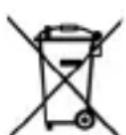
Devices marked with this symbol must be disposed of separately from your household waste, as they contain valuable materials
which can be recycled. Proper disposal protects the environment and human health. Your local authority or retailer can provide information on the matter.
Troubleshooting
In the case of problems, the following error messages may appear on the display:
| Error message Cause Action to be taken | ||
| E0 Internal fault Contact customer service. | ||
| E1 | No cookware or unsuitable cookware (non-magnetic base, diameter less than 10 cm) | See section “Suitable cookware”. Allow the appliance to cool down. |
| E2 Electronics overheated | Allow the appliance to cool down completely. Ensure the ventilation slots are unobstructed. | |
| E3, E4 Internal fault Contact customer service. | ||
| E5, E6 Internal fault Contact customer service | ||
| E7 | Temperature sensor in the hob has switched off. | Allow the appliance to cool down. Do not place empty cookware on the hob; ensure the ventilation slots on the appliance are unobstructed. |