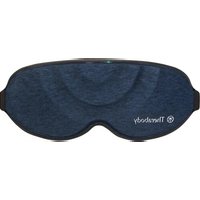
SleepMask - Massage device THERAGUN - Free user manual and instructions
Find the device manual for free SleepMask THERAGUN in PDF.


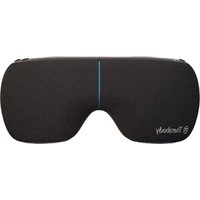
| Brand | Theragun (Therabody) |
| Model | SleepMask |
| Product Type | Sleep mask with vibration massage |
| Dimensions (approx.) | 25 x 10 x 5 cm |
| Weight (approx.) | 100 g |
| Power supply | Rechargeable lithium-ion battery via USB-C (power adapter not included, recommended 20W min.) |
| Battery life | Up to several 15-minute sessions, full recharge in about 2 hours |
| Main functions | 3 vibration modes (Pulse, Wave, Linear) with 2 intensity levels (low/high), automatic shut-off after 15 minutes, memory of last mode used, lock function (3 clicks) |
| Materials | Polyester, elastane, PU foam, magnets |
| Water resistance | IP22 (protected against solid bodies >12.5 mm and tilted water drops) |
| Connectivity | Bluetooth (for the Therabody app and TheraMind sound) |
| Care and cleaning | Removable inner layer: machine washable in cold water (delicate cycle), air dry only. Outer layer: wipe with a damp, lint-free cloth. Travel case: machine washable (same instructions). Do not dry clean, do not bleach, do not iron, do not tumble dry. |
| Safety | Do not use if you have epilepsy, a pacemaker, or are pregnant without medical advice. Avoid any contact with water on electronic components. Do not use under a blanket or pillow. |
| Spare parts and repairability | Replaceable removable inner layer (available at www.therabody.com). Do not attempt to repair yourself; contact Therabody. |
| Warranty | Limited warranty, see www.therabody.com/warranty |
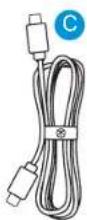
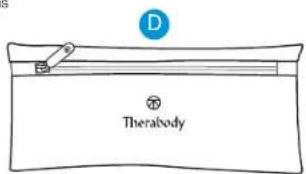
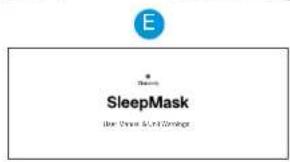
| Box contents | SleepMask, removable inner layer, USB-C to USB-C cable, travel case, instruction manual |
Frequently Asked Questions - SleepMask THERAGUN
User questions about SleepMask THERAGUN
0 question about this device. Answer the ones you know or ask your own.
Ask a new question about this device
Download the instructions for your Massage device in PDF format for free! Find your manual SleepMask - THERAGUN and take your electronic device back in hand. On this page are published all the documents necessary for the use of your device. SleepMask by THERAGUN.
USER MANUAL SleepMask THERAGUN
User Manual & Unit Warnings
Table of contents
- Product Overview
- What's in the Box
- Getting to Know the Device
- Using the Device
- How the Device Works
- Download the Therabody App
- Care, Cleaning, and Charging
- Troubleshooting Guide
| EN | 3-15 |
| DE | 16-29 |
| FR | 30-43 |
| IT | 44-57 |
| ES | 58-71 |
| RU 72-85 | |
| FRCA | 86-99 |
| ESMX | 100-113 |
| SC | 114-126 |
| TC | 127-140 |
| KR | 141-154 |
1. Product Overview
SleepMask
Ultra-comfortable 100% blackout eye mask with gentle massaging vibration for better quality sleep.
Better sleep just got easier with Therabody SleepMask device. With an ultra-comfortable 100% blackout design and 3 gentle massaging vibration patterns with adjustable intensity levels, the device helps you fall asleep faster and improve sleep quality, so you wake up feeling refreshed. Designed for all-night comfort in any sleep position, the soft, breathable fabric conforms perfectly to every face shape without any pressure on the eyes, and the adjustable, non-slip strap prevents hair tangling. Plus, with the Therabody app, you can access TheraMind™ sound therapy, an extensive library of music and audio that uses science-backed composition techniques to help you relax and sleep – perfectly paired with the device. Whether you're winding down for the night, traveling, or napping, the device creates the perfect environment for restful sleep anytime, anywhere.
Intended Use
The Therabody SleepMask device's comfortable, light-blocking design and gentle massaging vibration patterns are intended to help you fall asleep faster, improve quality of sleep, and reduce sleep disturbances so you wake up feeling refreshed and alert.


2. What's in the Box 3. Getting to Know the Device
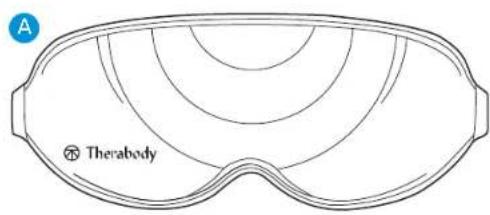
A. Therabody SleepMask
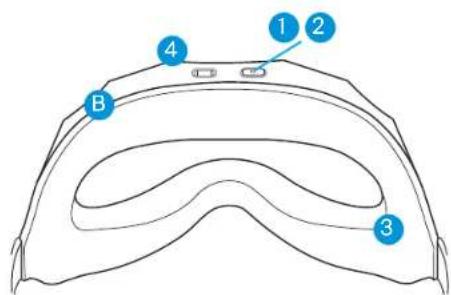
B. Washable Removable Inner Layer
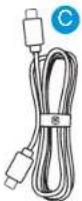
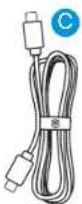
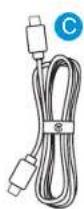
C. USB-C to USB-C cable
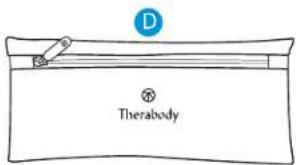
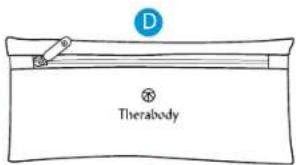
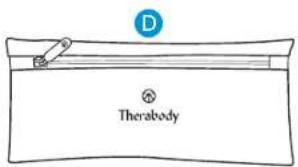
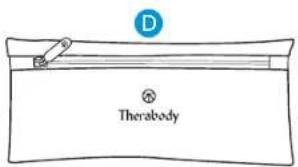
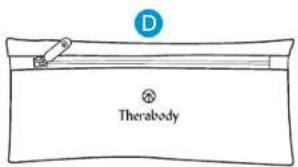
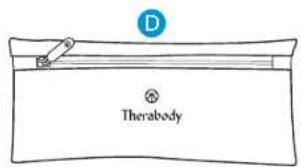
D. Travel pouch
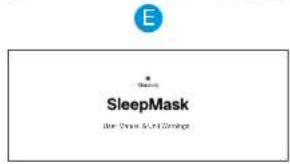
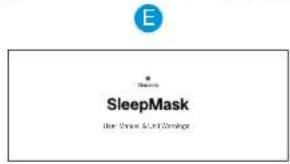
E. Instruction manual
Note: A power adapter is not included with this device. For best performance, use a USB-C power adapter of at least 20W power capacity. Ensure it is from a certified manufacturer and has not suffered any structural damage.
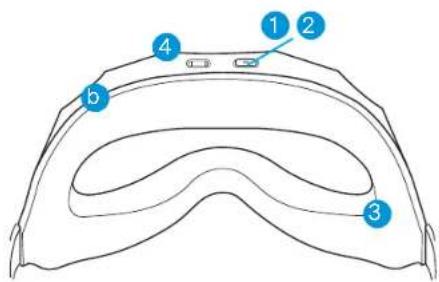
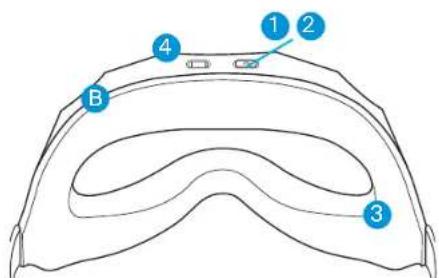
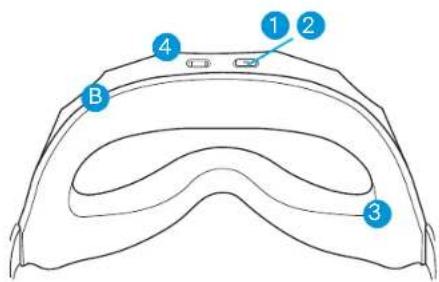
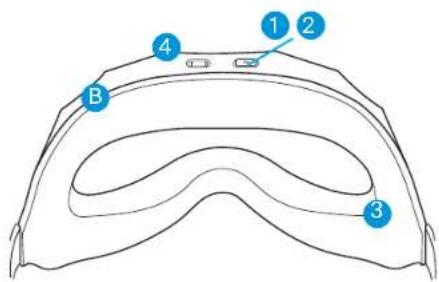
- Multi-functional power/vibration button
- LED battery status indicator
- Therabody SleepMask (assembled removable inner and outer control layer)
- USB-C charging port
4. Use the Device
- Clean the device, Your device and travel pouch should be cleaned before its first use. Carefully follow the cleaning instructions in the Cleaning, Care & Charging section for the inner layer, outer layer and travel pouch to keep your mask in good condition.
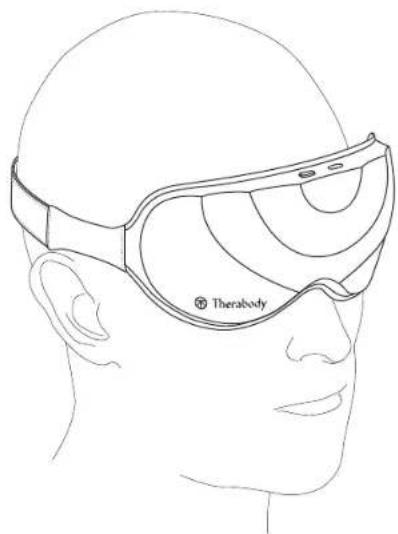
- Put on the device. Once clean, place the device on clean, dry skin comfortably on your face and completely covering your eyes. Remove makeup, eyeglasses, and contact lenses prior to use.
- Adjust the strap. The strap should sit just above your ears. For a full light block experience, tighten the strap by adjusting the buckle. Moving it to the right makes it tighter and to the left makes it looser. The device should feel snug on your face yet still comfortable.
- Get into your desired sleeping position. Find a comfortable sleeping position on your back, side or stomach and adjust the device to ensure it is secured.
- Turn on the device. Firmly press and hold the multi-functional power button located on the top center of the mask. The LED light on the button will turn on when the device is on.
- Select a vibration pattern and intensity. Press the same button to toggle through the three vibration patterns: Pulse, Wave, and Constant. Each vibration pattern has two intensity levels: low and high, with the first pattern starting at low intensity. Press the button again to switch to high intensity or keep pressing to cycle through each vibration pattern and intensity level. With the stored memory feature, the device will remember the last vibration pattern used so that the next time you turn it on, the same pattern will start.
- Relax and enjoy. The full treatment will last for 15 minutes. The LED indicator will turn off 5 seconds after the treatment starts. The intensity level will gradually decrease as the treatment progresses.
- Turn off the device. The device will automatically shut off after the treatment is completed. Press the button at any point during the treatment to turn off the device. The LED light on the button will turn off when the device is off.
- Lock the device. When not in use or during transport, lock the device to prevent turning it on accidentally. Quickly press the button three times to initiate the lock function. The device will flash three times when successfully locked. Quickly press three times again to unlock. The device will flash three times when successfully unlocked.
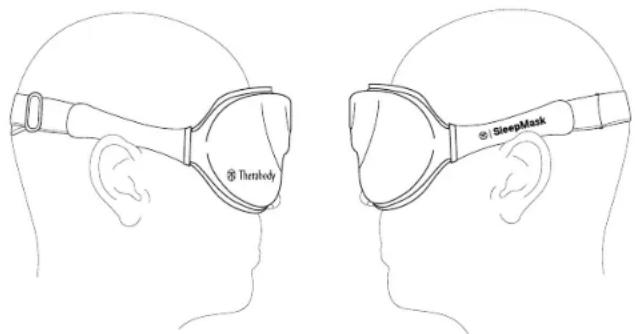
Using the device


5. How the Device Works
Modes Overview
The device has three strategically designed vibration patterns, Pulse, Wave and Constant, each with two intensity levels, Low & High (6 total). Vibration can help to promote relaxation and Improve sleep quality.
The Pulse pattern is a gentle pulsing rhythm like a calm, relaxed heartbeat.
- Pulse: Low
- Pulse: High
The Wave pattern is a slow rise and fall like a mellow rolling wave, and the inhale and exhale of your breath.
- Wave: Low
- Wave: High
The Constant pattern is a gentle, steady rhythm — like white noise in physical form.
- Constant: Low
- Constant: High
With the stored memory feature, the device will remember the last vibration pattern used so that the next time you turn it on, the same pattern will start.
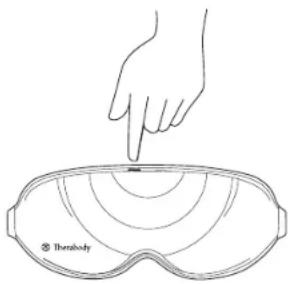
Press and hold the power button to turn on the device. Press the same button to toggle through the vibration patterns and intensity levels.
6. Download the Therabody App
Experience even better sleep with free TheraMind sound therapy content in the Therabody app.
- Download the Therabody app from the App Store or Play Store.
- Follow the in-app instructions to create a new app account and verify your email.
- Once logged in, browse the expansive catalog of TheraMind sound therapy tracks to listen to during your SleepMask treatment. These science-backed audio tracks use special composition techniques to help you relax and sleep.
- Select a sound that works for you. Whether you prefer the soothing sounds of nature, peaceful piano melodies, or even guided meditations.
- Save your favorite sounds for easy access.
- Set a sleep timer so that the sound gently fades as you drift off to sleep.

Scan the QR code to get started.

7. Care, Cleaning and Charging
Device Maintenance
The following maintenance instructions are important to ensure that your device continues to work as it was designed. Failure to follow these instructions may cause your device to stop working.
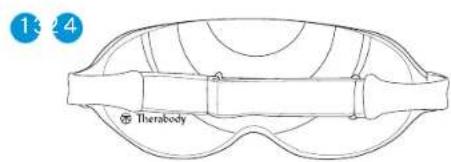
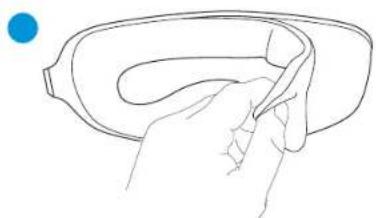
Assemble and Disassemble the Device
- Lay the device flat, with the inside facing up towards you.
- Move the elastic strap to the front of the device, so it is out of the way.
- Hold one end of the eye mask's removable inner layer and gently peel it off to detach it from the outer control layer.
- To reattach, hold both ends of the removable eye mask to reattach it to the front layer. There is a magnet in the center to ensure the layers are correctly attached.
natural_image
Line drawing of a hand holding a curved object, no text or symbols present
natural_image
Simple line drawing of two hands holding a rounded object, with a blue dot above (no text or symbols)Assembling the device


Cleaning the Device
Your device and travel pouch should be cleaned before its first use. For ongoing care, clean at least once a week, similar to your bedding. Carefully follow the cleaning instructions below to ensure longevity of the device and its components.
Removable Inner layer + Travel pouch
- Carefully remove the inner layer from the device following the instructions above. Place ONLY the removable inner layer into the washing machine.
- Machine wash the removable inner layer on cold with mild detergent using the delicate wash cycle.
- Once the wash cycle is complete, remove the inner layer from the washing machine and lay it flat to air dry completely in a cool and dry area (this can take up to 8 hours or more, depending on conditions). Wait until completely dry before reassembling and using the device. DO NOT place the inner layer in the dryer, as the heat will damage the fabric. DO NOT wring, twist, or squeeze the inner layer to dry.
- Follow the same cleaning instructions above to wash the travel pouch. Hand-wash after 75 cycles.
Outer Control Layer
- The outer control layer of the device is NOT waterproof, hand-washable, or machine-washable. Do not allow excess liquids or water to enter the device.
- To clean the outer control layer, wipe the fabric with a non-abrasive, lint-free cloth.
- Lightly dampen a non-abrasive, lint-free cloth with water or an alcohol-based solution to clean if necessary. Do not allow water to touch or enter the power button or USB-C port.
- Dry with a non-abrasive, lint-free cloth.
*Note: For the best experience, we recommend replacing the removable inner layer annually, available at www.therabody.com.
| Label Description Location of Label | ||
| Cold wash this layer, air dry only | Removable Inner layer + Travel pouch | |
| Hand Wash | Removable Inner layer + Travel pouch | |
| Do not dry-clean | Removable Inner layer + Travel pouch | |
| Do not tumble dry | Removable Inner layer + Travel pouch | |
| Do not bleach | Removable Inner layer + Travel pouch | |
| Do not iron | Removable Inner layer + Travel pouch | |
| Max washing temperature 20°C normal process | Removable Inner layer + Travel pouch | |
| Do not wash this layer Outer | Control Layer | |
Charging the Device
-
The device is USB-C enabled and comes with a charging cable. Before charging the device, ensure that the device is powered off.
-
Connect one end of the charging cable to the USB-C charging port on the device. It is located in the top center next to the power button. Connect the other end of the charging cable to a power adapter.
-
The LED light will indicate the battery status when the device is on and charging. Press the button to check the battery status while the device is off.
-
Flashing orange: Low battery
- Flashing blue: Half battery
• Flashing green: High battery
• Solid green: Full battery
**Note: If using a charger from a third party, ensure that it is from a certified manufacturer and has not suffered any structural damage. Do not try to use the device while charging.


8. Troubleshooting
SCENARIO SYMPTOM POTENTIAL CAUSES POTENTIAL SOLUTIONS
| Device does not turn on. | Battery indicator LED doesn't turn on | Battery ran out or No battery power in the device | Connect the USB-C cable (included in box) to the device and plug in the other end to a power outlet. Verify that the device is charging by checking proper connection between the power adapter, the USB-C cable, and the USB-C port on the device. |
| USB-C cable is damaged | Ensure you are using the USB-C to USB-C cable provided, or one from a certified manufacturer. | ||
| Internal malfunction | If the device is not charging after verifying all the above, Contact Therabody for further assistance. Visit https://www.therabody.com/us/en-us/support/support.html for the available contact methods. | ||
| Power LED can light on but the device not work | Battery ran out or No battery power in the device | Charge the device and try again | |
| If the issue still persists, Contact Therabody for further assistance.Visit https://www.therabody.com/us/en-us/support/support.html for the available contact methods. |
SCENARIO SYMPTOM POTENTIAL CAUSES POTENTIAL SOLUTIONS
| Slow charging | Slow charging or incompletely charging | Adapter issue or Adapter power too low | Ensure you are using the USB-C to USB-C cable provided, or one from a certified manufacturer. |
| If the issue still persists, Contact Therabody for further assistance. Visit https://www.therabody.com/us/en-us/support/support.html for the available contact methods. | |||
| Device does not turn on | Device does not turn on and the LED flashes white three times | Device is locked | Press the button three times. The device will vibrate twice and the LED will flash green twice. Then, the device will unlock. |
| After verifying the above, if the device does not turn on, the device may be damaged. Contact Therabody for further assistance. Visit https://www.therabody.com/us/en-us/support/support.html for the available contact methods. | |||
| Vibration function is not working | Vibration does not turn on even after vibration button is pressed | Internal Malfunction | If the vibration treatment does not turn on after verifying the above, Contact Therabody for further assistance. Visit https://www.therabody.com/us/en-us/support/support.html for the available contact methods. |
| Mechanical Noise | Rattling noise when powered ON | Internal Malfunction | Contact Therabody for further assistance. Visit https://www.therabody.com/us/en-us/support/support.html for the available contact methods. |
DO NOT attempt to troubleshoot by disassembling the device as this will void the warranty and may cause injury.
Store and Transport the Device
To store and transport the device, lay it flat in its travel pouch to not damage the internal components.
EN

Warnings and Guidance (Precautions and Contraindications)
Background
Therabody products are designed to unlock the body's natural ability to achieve health and well-being. Through science and technology, the Therabody portfolio of products allows people to access the therapeutic benefits of different natural phenomena to meet both their needs and preferences. There will be times when it is advisable to modify how devices are used (precautions) or times when it is not appropriate to use certain devices (contraindications). Read the following safety information for the device in its entirety prior to use.
Important Safety Information
General device Use
This device is intended for use by people in good health. This device is contraindicated against and should not be used by or on anyone with a history of epilepsy, seizures or cardiopathy.
The device is not recommended for anyone with an electronic implanted device (such as a pacemaker), cardiac arrhythmia, tumors, or acute episodes of inflammatory diseases. The device is not recommended for those who have arteriosclerosis, thromboses, or implants in the body region being treated.
Please consult your physician prior to using the device if you are pregnant and/or nursing. Immediately stop using the device at the first sign of discomfort. The device IS NOT a toy. If you have any medical considerations please consult your doctor before using the device.
Safety, Precautions, and Contraindications
Specific Therapies
These recommendations are derived from consultation with medical experts and published research regarding precautions and contraindications as of the printing date. For up-to-date information, please visit us online at
https://www.therabody.com/us/en-us/precautions-and-contraindictions.html.
Precautions:
Due care is required in these circumstances and device use may need to be modified. Consult with a medical professional if you currently have or suspect you may have any of the following conditions or if you have any questions.
• Recent injury or surgery
• Hypertension (controlled)
• Abnormal sensations (e.g., numbness)
• Sensitivity to pressure
• Bony prominences or regions
• Mild peripheral neuropathy
- It's recommended that you remove contact lenses before using the device
- This device should fit tightly but should NOT restrict circulation in any way
Contraindications:
The following are circumstances where the potential risks may outweigh the benefits. Consult a medical professional before use.
-
Skin rash, open wounds, blisters, local tissue inflammation, infections, bruises, or tumors
• Hypertension (uncontrolled)
• Vascular/arterial and circulation diseases, including blood clots, phlebitis, thromboses, and varicose veins
• Acute or severe cardiac, liver, or kidney disease -
Severe peripheral neuropathy or other causes of sensory impairment
- Bleeding disorders
- Connective tissue disorders
• Medications that may alter or thin the blood or alter sensations - Direct pressure over surgical site or hardware
• Pacemaker or ICD
• History of embolism - Allergy to device material (polyester, spandex, PU foam)
- Do not use in the presence of unexplained pain
Limited Warranty and Customer Service
For full warranty information, please visit www.therabody.com/warranty.
Customers who are in need of product support should visit
https://www.therabody.com/us/en-us/support/support.html for the available contact methods.
FDA-Registered
Limited Warranty Only With Authorized Retailer Purchase
© 2024 Therabody, Inc. All Rights Reserved.
Patents at www.therabody.com/patents
Manufactured and Distributed by:
Therabody, Inc
1640 S Sepulveda, Suite 300
Los Angeles, CA 90025
In the Australian market, the Therabody SleepMask warranty is 1 year.
For Australian Market Only: The purchase of this device is accompanied by a limited warranty. For complete details about the rights afforded to you under this warranty, visit https://therabody.com/anz/en-au/warranty-support/.
Imported and Distributed By:
Therabody Australia Pty Ltd
Waterman Business Centre
175 Maroondah Highway
Suite 16, C307, Level 3
Ringwood Vic 3134 Australia
Importers:
Therabody International Limited
5th Floor, 40 Mespil Road.
DO4C2N4 Dublin, Ireland
Therabody UK Limited
Portsoken House 155-157
The Minorities, London,
United Kingdom, EC3NILJ
Therabody China Limited
READ ALL INSTRUCTIONS AND CAUTIONARY MARKINGS IN THIS MANUAL, ON THE CHARGER, AND ON THE DEVICE BEFORE USING OR CHARGING THE DEVICE AND ITS ACCESSORIES.
When using the device, the following precautions should always be adhered to:
1. USE ONLY AS INSTRUCTED. Use only Therabody recommended accessories and replacement parts. This device is not intended to diagnose, mitigate, or treat diseases. The device is an advanced mechanical tool with electric components. If the device and its accessories are not used or maintained properly, there is a risk of fire, electric shock, or injury. Failure to use and maintain the device and corresponding attachments in accordance with the instructions outlined in this manual will void the warranty and may result in product damage or physical injury. The device is intended for commercial and home use.
2. NOT FOR CHILDREN. The device is not intended for use by young children or persons with reduced physical, sensory or reasoning capabilities or lack of experience and knowledge, unless given supervision or instruction concerning use of the device by a person responsible for their safety. The device is not a toy. Do not play with, bend, or pull the electrical components. Advise children not to play with the device or accessories. Adult supervision should be provided for those under 1B using the device.
3. CHARGING, if your device doesn't turn on or the battery indicator displays a low battery level, please charge before first use. Charge the battery using the USB-C cable (included). When you use the charging cable (included), make sure its USB-C connector is fully inserted into a compatible power adapter before you plug the adapter into a power outlet. You can also charge the battery with third party cables that are compliant with USB-C and with applicable country regulations and international and regional safety standards. Other adapters may not meet applicable safety standards, and charging with such adapters could pose a risk of death or injury. Do not force the cable into place. Fully charge the device at least once every six months to prevent device and battery damage. Unplug the power adapter and charging cable when not in use.

- DO NOT OVERCHARGE. Do not leave the device connected to the power adapter for more than one hour after the battery has been fully charged. The battery includes a protection system to avoid the risk of overcharging. However, overcharging may reduce its life over time.
- CHARGING LOCATIONS Ensure that the battery status LED is OFF before charging. Insert the USB-C cable into the port (behind the power button) to charge the device. Do not use the device while charging. Avoid skin contact when the USB-C is plugged into a power source as it may cause discomfort or injury. Do not sleep or sit on the USB-C connector. The device should be charged indoors in a well-ventilated, dry location. Do not charge the device outdoors, in a bathroom, or within 10 feet (3.1 meters) of a bathtub or pool. Do not use the device or charger on wet surfaces, and do not expose the charger to moisture, rain, or snow. Do not use the device or its compatible charger in the presence of explosive atmospheres (gaseous fumes, dust, grain, metal powders, or flammable materials). Sparks may be generated, possibly causing a fire.
- UNI LUGGING THE CHARGER. Pull the plug, not the cord, to reduce the risk of damage to the electrical plug and cord. Never carry the charger by its cord. Keep the cord away from heat, oil, and sharp edges. Do not stretch the charger cord or place the cord under strain. Do not handle the charger, terminals, or the device with wet hands. Always unplug this appliance from the electrical outlet immediately after using and before cleaning. Store cable to ensure it is not stepped on, tripped over or otherwise subjected to damage or stress. Do not use a power adapter or charging cable that has received a sharp blow, been dropped, run over, or damaged in any way. For long-term storage, store with a fully charged battery.
- USAGE AND SKIN SENSITIVITIES. Adjust the strap to fit comfortably on your head. The device should perfectly align with your temples and sit comfortably on your nose bridge. Always adjust the device while the device is OFF. Long press the Power Button to turn off the device. Make sure the Battery status LED is OFF. Discontinue the use of the device if you feel any discomfort. Use the device on clean, dry skin. Remove makeup before device use. Some people may experience reactions to certain materials used in wearable items that are in prolonged contact with their skin. This can be due to allergies, environmental factors, extended exposure to irritants like sweat or other causes. You may be more likely to experience irritation from any wearable device if you have allergies or other sensitivities. If you have known sensitivities, take special care when using the device and accessories. If you experience redness, swelling, itchiness, or any other irritation or discomfort on your skin around, or beneath, your device, remove the device and consult your physician before resuming wear. Continued use, even after symptoms subside, may result in renewed or increased irritation.
- DO NOT OPERATE UNDER BLANKET AND PILLOW. Excessive heating can occur and cause fire, electric shock, or injury.
- DEVICE CARE AND SERVICE. Remove eyeglasses before using the device. It's recommended that you remove contact lenses before using the device. Handle the device with care. The device contains electronic components that can be damaged if dropped, burned, punctured, or crushed. Do not disassemble the device or attempt to repair the device yourself. Disassembling the device may damage it, result in loss of water resistance, and may cause injury. If the device is damaged or if malfunctions occur, contact Therabody Customer service. The warranty will be void if the device, batteries, or charger are disassembled or if any parts have been removed. Do not use if damaged as these may cause injury. Avoid heavy exposure to dust or sand. Do not puncture or damage the device. Puncturing the device can lead to incorrect operation.
- CLEANING INSTRUCTIONS. The outer electronic layer is NOT waterproof or machine washable. Clean the outer layer, elastic strap, and side fabric with a lint-free damp cloth to remove stains, dirt, makeup, ink, acids, or acidic food. Do not use a cloth soaked in water to clean the device. Only the Inner layer is machine washable. Carefully remove the Inner layer from the device and place ONLY
the inner layer into the washing machine. Machine wash the inner layer on cold with mild detergent using the delicate wash cycle. Once the wash cycle is complete, remove the inner layer from the washing machine and lay it flat to air dry completely (this can take up to 8 hours or more depending on conditions). DO NOT place the inner layer in the dryer, as the heat may damage the fabric. Wait until completely dry before reassembling the device. DO NOT wring, twist, or squeeze the inner layer to dry. A properly cleaned device should have no visible signs of debris or moisture.
11. STORING THE DEVICE AND ACCESSORIES. Store in a cool, dry place. Only charge the device when the ambient temperature is between 40°C/104°F and 10°C/50°F. Do not store the device or charging cable where temperatures may exceed 40°C/104°F, such as in direct sunlight, in a vehicle, or in a metal building during the summer.
12. DEVICE DISPOSAL. This device contains a lithium-ion battery, and care must be taken upon disposal of the device. Before disposal of this device, please review your local laws and requirements surrounding Lithium-Ion Battery disposal. The preferred method of disposal is recycling the whole device.
Reporting adverse events to FDA
MedWatch is the Food and Drug Administration's (FDA) program for reporting serious reactions, product quality problems, therapeutic inequivalence/failure, and product use errors with human medical products, including drugs, biologic products, medical devices, dietary supplements, infant formula, and cosmetics.
If you think you or someone in your family has experienced a serious reaction to a medical product, you are encouraged to take the reporting form to your doctor. Your health care provider can provide clinical information based on your medical record that can help the FDA evaluate your report. However, we understand that for a variety of reasons, you may not wish to have the form filled out by your healthcare provider, or your health care provider may choose not to complete the form. Your health care provider is not required to report to the FDA. In these situations, you may complete the Online Reporting Form yourself. You will receive an acknowledgement from the FDA when your report is received. Reports are reviewed by FDA staff. You will be personally contacted only if we need additional information.
Submitting adverse event reports to FDA
Use one of the methods below to submit voluntary adverse event reports to the FDA:
1. Report Online at: www.accessdata.fda.gov/scripts/medwatch/index.cfm?action=reporting.home
2. Consumer Reporting Form FDA 3500B. Follow the instructions on the form to either fax or mail it in for submission. For help filling out the form, see MedWatchLearn. The form is available at: www.fda.gov/downloads/aboutFDA/reportsmanualsforms/forms/ucm349464.pdf
3. Call FDA at 1-800-FDA-1088 to report by telephone.
4. Reporting Form FDA 3500 commonly used by health professionals. The form is available at: www.fda.gov/downloads/aboutFDA/reportmanualsforms/forms/ucm163919.pdf
| Label Description Location of Label | ||
| Do not dry-clean Removable Inner layer + Travel pouch | ||
| Do not tumble dry Removable Inner layer + Travel pouch | ||
| Do not bleach Removable Inner layer + Travel pouch | ||
| Do not Iron Removable Inner layer + Travel pouch | ||
| IP 22 | Degree of protection against ingress of water | On rating label |
| Read Instructions before use On rating label | ||
| Level of protection type BF applied part | On rating label | |
| Therabody, Inc.1640 S, Sepulveda Blvd.Suite 300Los Angeles, CA 90025 | On rating label | |
| Label Description Location of Label | ||
| Unique Device Identification (UDI) | Packaging | |
| Separate collection for waste electrical and electronic equipment.Note: For more information about disposal of equipment, its parts and accessories, please contact your local distributor. | On rating label | |
| UKCA | UKCA Mark for UK On garment label | |
| Bluetooth® | Bluetooth On garment label | |
| IC | IC (Canada) On garment label | |
| RCM On garment label | ||
31
15
natural_image
Line drawing of a hand holding a pen, poised to write on a curved surface (no text or symbols)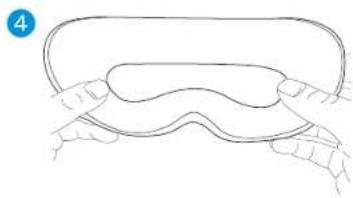
natural_image
Line drawing of two hands holding a rounded object, no text or symbols presentTherabody International Limited
5th Floor, 40 Mespil Road,
DO4C2N4 Dublin, Ireland
Therabody UK Limited
Portsoken House 155-157
The Minorities, London,
United Kingdom, EC3N1LJ
WARNHINWEISE
natural_image
Line drawing of a hand holding a textured object, no text or symbols present
natural_image
Simple line drawing of two hands holding a rounded object, with a blue dot above (no text or symbols)Therabody International Limited
5th floor, 40 Mespil Road,
DO4C2N4 Dublin, Irlande
Therabody UK Limited
Portsoken House 155-157
The Minorities, London,
natural_image
Line drawing of a hand holding a small object, no text or symbols present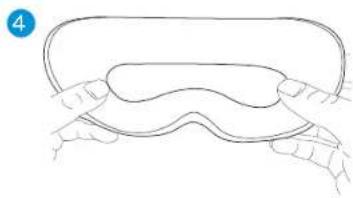
natural_image
Line drawing of two hands holding a rounded object, no text or symbols presentTherabody International Limited
Therabody UK Limited
Portsoken House 155-157
The Minorities, Londra,
natural_image
Line drawing of a hand holding a curved object, with a blue dot above (no text or symbols)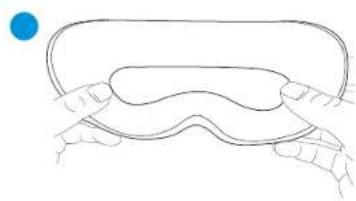
natural_image
Simple line drawing of a hand holding a curved object with a blue dot above (no text or symbols)Therabody International Limited
5th Floor, 40 Mespil Road,
DO4C2N4 Dublin, Irlanda
Therabody UK Limited
Portsoken House 155-157
The Minorities, Londres,
natural_image
Line drawing of a hand holding a curved object, with a blue dot above (no text or symbols)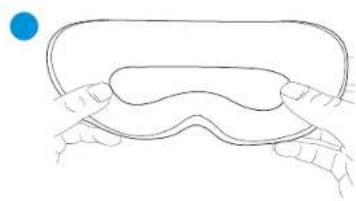
natural_image
Simple line drawing of two hands pressing down on a curved object, with a blue dot above (no text or symbols)Сборка устройства
Очистка устройства
https://www.therabody.com/us/en-us/support/support.html.
Therabody International Limited
5th Floor, 40 Mespil Road,
Therabody UK Limited
Portsoken House 155-157
Миньеритиз, Лондон,
natural_image
Line drawing of a hand holding a textured object, possibly a tool or component (no text or symbols)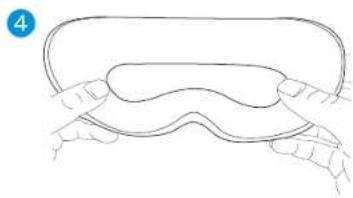
natural_image
Line drawing of a hand holding a rounded object with a wavy top (no text or symbols)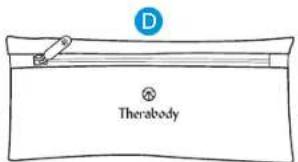
natural_image
Line drawing of a hand holding a textured object, no text or symbols present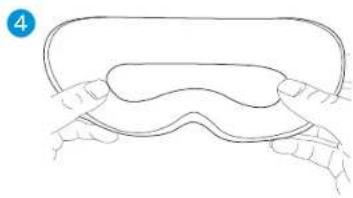
natural_image
Line drawing of a hand holding a rounded object with a wavy top (no text or symbols)
4. 使用设备
natural_image
Line drawing of a hand holding a textured object, no text or symbols present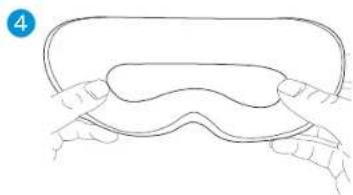
natural_image
Line drawing of a hand holding a curved object with fingers touching it (no text or symbols)组装设备
清洁设备
Therabody China Limited
natural_image
Line drawing of a hand holding a textured object, no text or symbols present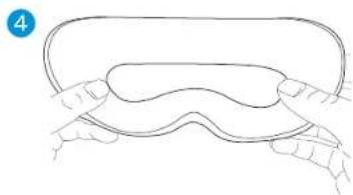
natural_image
Line drawing of a hand holding a curved object with fingers touching it (no text or symbols)清潔裝置
Therabody China Limited

4. 제품 사용하기
natural_image
Line drawing of a hand holding a textured object, no text or symbols present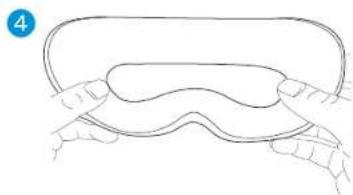
natural_image
Line drawing of a hand holding a curved object with fingers touching it (no text or symbols)디바이스 청소
https://www.therabody.com/us/en-us/support/support.html
미국FDA승인
© 2024 Therabody, Inc. All Rights Reserved.
특허 정보: www.therabody.com/patents
제조 및 유통업체:
Therabody, Inc.
1640 S Sepulveda, Suite 300
Los Angeles, CA 90025
제품 주의사항
Born in Los Angeles, CA. Designed for everybody.


@Therabody
VA