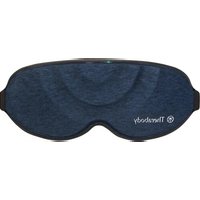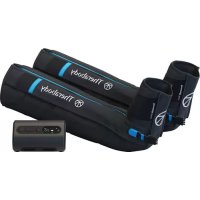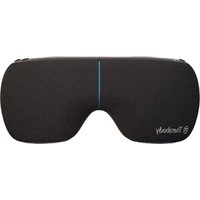
SmartGoggles 2nd Generation - Massage device THERAGUN - Free user manual and instructions
Find the device manual for free SmartGoggles 2nd Generation THERAGUN in PDF.


| Product type | Compression, heat and vibration massage device |
| Brand | Theragun (Therabody) |
| Model | SmartGoggles 2nd Generation |
| Power supply | Rechargeable lithium-ion battery via USB-C, 20 W power adapter recommended |
| Battery life | Approximately 120 minutes |
| Battery indicator | LED: flashing orange (low), flashing blue (50%), flashing green (100%), steady green (full) |
| Pre-programmed modes | SmartRelax, Headache and eye fatigue, Sleep preparation (15 min each) |
| Main functions | Compression massage (inflation/deflation), vibrations (pulse, wave, low, high), heat (low, medium, high, off), biometric heart rate sensor, Bluetooth connectivity for Therabody app |
| Customization via app | Adjustments for vibrations, heat, duration, TheraMind sound therapy, biometric tracking |
| Design | 100% light blocking, adjustable strap, nose pad, lightweight and quiet |
| Protection rating | IP22 |
| Cleaning and maintenance | Wipe with a non-abrasive damp cloth or alcohol-free wipe; do not immerse; dry completely before storing |
| Box contents | SmartGoggles device, USB-C to USB-C cable, soft case, instruction manual |
| Safety and contraindications | Do not use if you have epilepsy, pacemaker, heart conditions, pregnancy or breastfeeding without medical advice; not recommended for under 16 years; do not use under a blanket |
| Warranty | Limited warranty (see Therabody website) |
| Repairability and support | Do not disassemble; contact Therabody via the support website for any malfunction |
Frequently Asked Questions - SmartGoggles 2nd Generation THERAGUN
User questions about SmartGoggles 2nd Generation THERAGUN
0 question about this device. Answer the ones you know or ask your own.
Ask a new question about this device
Download the instructions for your Massage device in PDF format for free! Find your manual SmartGoggles 2nd Generation - THERAGUN and take your electronic device back in hand. On this page are published all the documents necessary for the use of your device. SmartGoggles 2nd Generation by THERAGUN.
USER MANUAL SmartGoggles 2nd Generation THERAGUN
- Product Overview
- Download the Therabody App
- What's in the Box
- Getting to Know the Device
- Using the Device
- Modes Overview
- Care, Cleaning, and Charging
- Troubleshooting Guide
EN 3-23
ES 24-44
FR 45-65
IT 66-86
DE 87-107
RU 108-128
FRCA 129-149
ESMX 150-170
SC 171-189
TC 190-209
KR 210-229
1. Product Overview
SmartGoggles
Relaxation meets comfort.
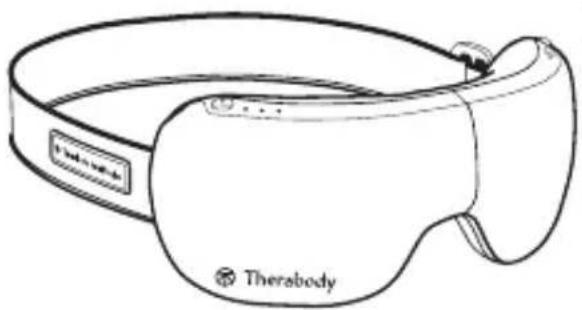
Lightweight, quiet and 100% blackout - the redesigned Therabody SmartGoggles device is an effective, soothing way to relax, reduce
stress, relieve tension headaches, ease eye strain and improve sleep. Using a therapeutic combination of compression massage, heat and vibration, the device treats your forehead, brows and temples for relief in 15 minutes or less. The SmartRelax mode uses our proprietary biometric sensor to deliver personalized treatments based on your heart rate - designed to promote relaxation and lower your heart rate. The new blackout design blocks 100% of light to help create the perfect environment for deep relaxation, while the improved adjustable fit gently cushions every face shape for unparalleled comfort. Plus, when worn as part of your bedtime routine, it is scientifically proven to reduce stress, enhance relaxation, increase the amount of deep sleep you get and improve your overall sleep quality - because better days start with better nights.
Intended Use
The Therabody SmartGoggles device is intended to deliver soothing compression massage, heat and vibration to the forehead, eyebrows, and temples to promote relaxation, reduce stress, relieve tension headaches and eye strain, and prepare you for better sleep.
EN 2. Download the Therabody App
If you currently have the Therabody app, proceed to step 4.
- Download the Therabody app from the App Store or Play Store.
- Follow the in-app instructions to create a new app account and verify your email.
- Once logged in, follow the onboarding steps to connect your device to the app. Be sure that the Bluetooth settings are enabled for your phone.
- Select "SmartGoggles (2nd Generation)" as your Therabody device when prompted.
- Press and hold the power button on your device to turn it on. The device must be powered on to locate and pair to the app.
- Select "SmartGoggles" to confirm the device and app connection.
- Once connected, you can customize the heat, vibration, and length of treatments to help you relax, ease eye strain and headaches, and prepare for sleep.
- You can also select from an expansive catalog of TheraMind sound therapy, science-backed audio to listen to during your SmartGoggles treatment for a fully immersed experience.

Scan the QR code to get started.
3. What's in the Box
A. Therabody SmartGoggles device
B. USB-C to USB-C cable
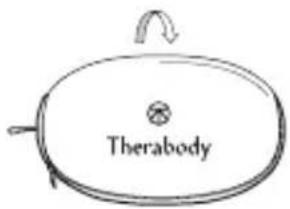
C. Soft case
D. Instruction manual
EN
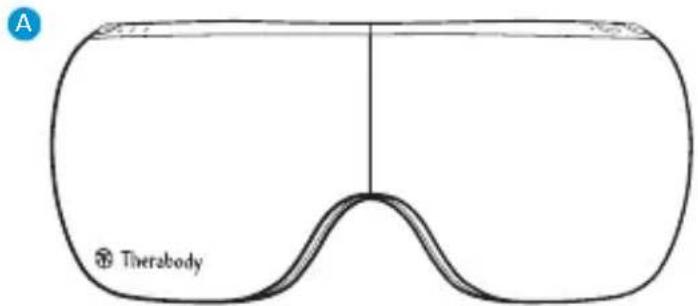
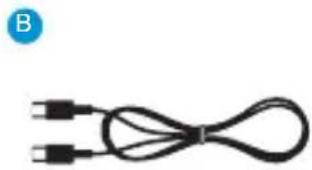
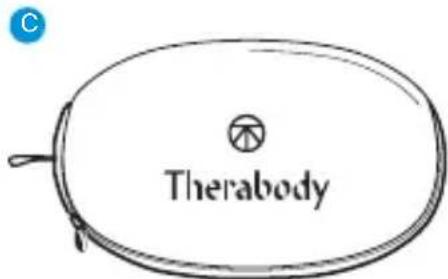
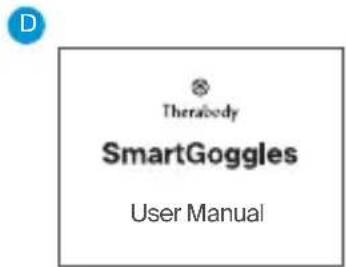
Note: A power adapter is not included with this device. For best performance, use a USB-C power adapter of at least 20W power capacity. Ensure it is from a certified manufacturer and has not suffered any structural damage.
EN 4. Getting To Know Your Device
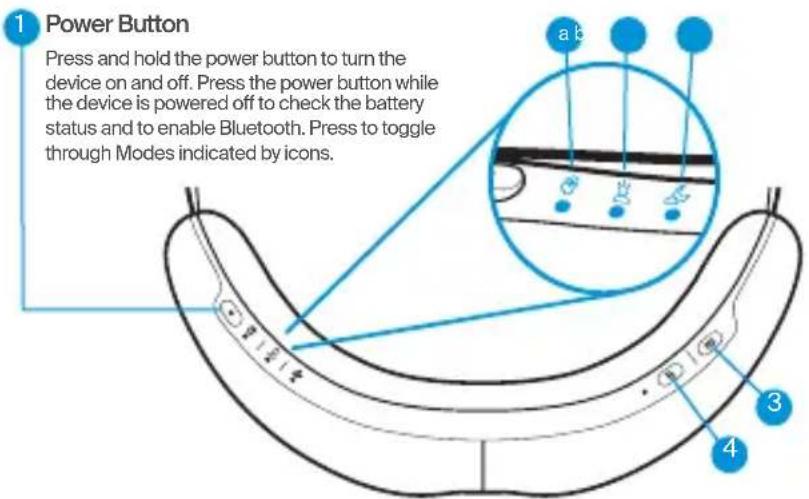
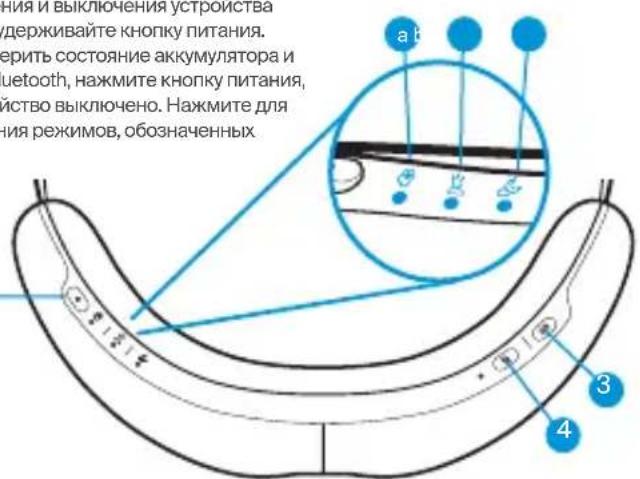
- Power Button
- Mode LED Light Indicators
a. SmartRelax
b. Headaches & Eye Strain
c. Sleep Prep
- Vibration Button
- Heat Button
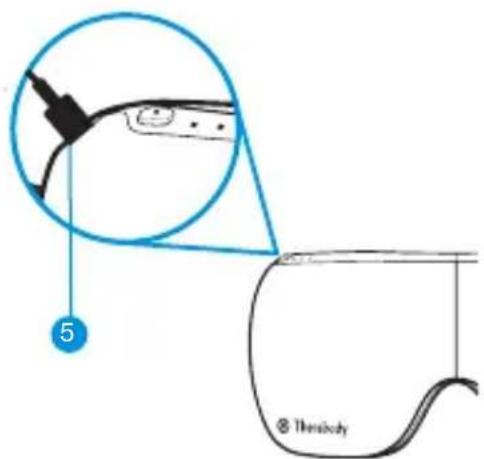
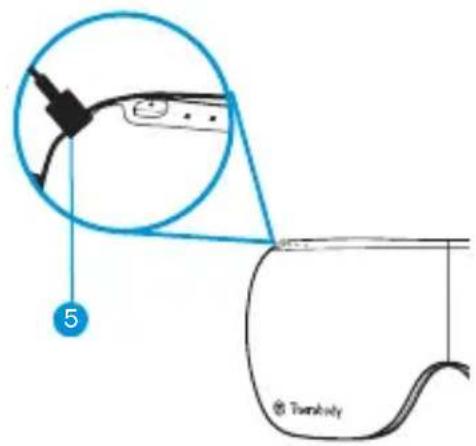
- USB-C Charging Port
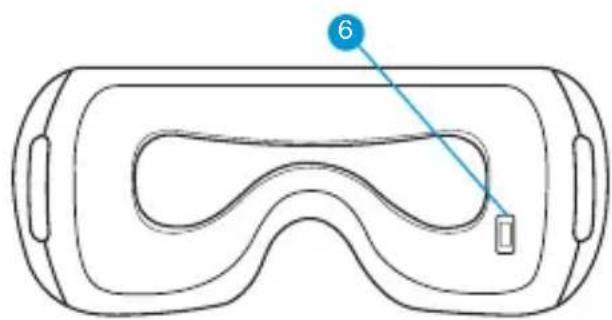
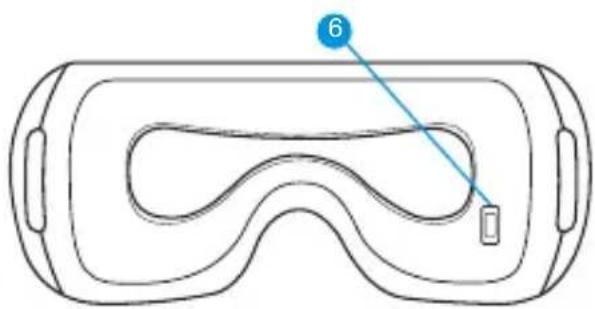
- Biometric Sensor
5. Use the Device
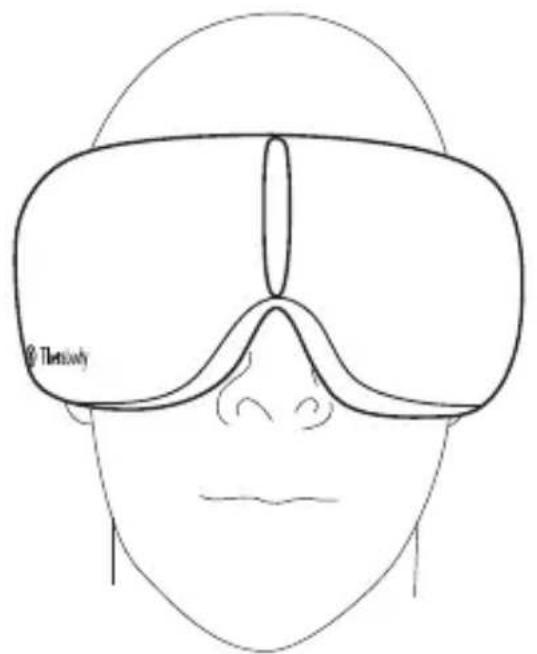
- Put on your device. Place the device on clean, dry skin. Remove makeup, eyeglasses, and contact lenses prior to use.
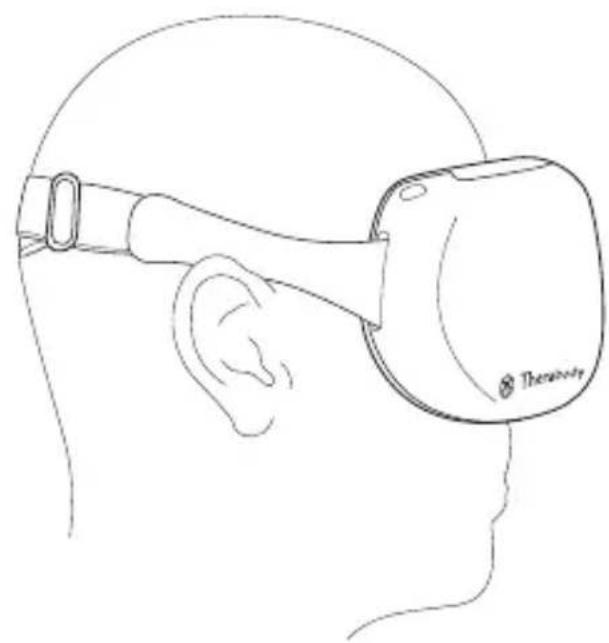
- Adjust your device. Place the device on your head and adjust the strap. The device should perfectly align with your temples and sit comfortably on your nose bridge for 100% blackout. The strap should sit just above your ears. For a full light block experience, tighten the strap by adjusting the buckle. Moving it to the right makes it tighter and to the left makes it looser. The heart rate sensor should maintain contact with your cheekbone.
- Turn on the device. Press and hold the power button to turn on the device.
- Choose a treatment. Press the power button again to toggle through the three modes: SmartRelax, Headaches & Eye Strain, and Sleep Prep.
- Adjust the vibration setting. Press the vibration button to toggle through the vibration settings available in your selected treatment. Press and hold the vibration button to turn off the vibration.
- Adjust the heat temperature. Press the heat button to add heat to your treatment and to toggle through the three heat temperature options. Press and hold the heat button to turn off the heat.
- Customize and enhance your treatment using the Therabody app. You can also select and customize your treatment preferences in the Therabody app. Save your favorite routines and settings in the Therabody app for easy access to the treatments you use most. You can also see how your heart rate is impacted by your treatment by viewing your biometrics at the end of each session in the Therabody app. Listen to specially composed TheraMind sound therapy, designed using science-backed techniques to melt away stress and help with sleep, through the Therabody app.
- Sit back and relax. Keep your eyes closed during the treatment. Avoid frequent movement during treatment as it may impact heart rate tracking.
- Turn off the device. Press and hold the power button to turn off the device. Make sure the Battery status LED is OFF. The device will automatically shut off following your treatment.
EN
EN
Using the device
6. Modes Overview
EN
The device has three strategically designed presets, SmartRelax, Headaches & Eye Strain, and Sleep Prep.
| Mode Vibration Settings Heat Settings | |||
| SmartRelax 15 minutes Melt away stress with a calming combination of heat, massage and personalized vibration patterns designed to lower your heart rate and help you relax. | Default: Pulse Press the vibration button to turn vibration off | Default: Low Press the heat button to toggle through additional heat settings: medium, high, off | |
| Headaches & Eye Strain 15 minutes Relieve tension headaches and eye strain with a soothing combination of vibration and heat. | Default: Wave Press the vibration button to tog- gle through additional vibration settings: low, high, off | Default: Medium Press the heat button to toggle through additional heat settings: high, off, low | |
| Sleep Prep 15 minutes Prepare your body for restful sleep with slow wave vibration and a relaxing temple massage. | Default: Low Press the vibration button to tog- gle through additional vibration settings: high, wave, off | Default: Off Press the heat button to toggle through additional heat settings: low, medium, high | |
EN 7. Care, Cleaning, and Charging
Device Maintenance
The following maintenance instructions are important to ensure that your device continues to work as it was designed. Failure to follow these instructions may cause your device to stop working.
Cleaning the Device
Read the following instructions carefully before cleaning the device to ensure longevity of the device and its components.
- Visually inspect the device for any obvious signs of debris build-up.
- Wipe the device with a non-abrasive, lint-free damp cloth or alcohol-free cleansing wipe.
- Dry the device with a non-abrasive, lint-free cloth.
- After cleaning, allow the device to dry thoroughly before storing or beginning another treatment. The device is NOT waterproof or machine washable. Do not allow excess liquids or water to enter the product.
- A properly cleaned device should have no visible signs of debris or moisture.
Note: Do not submerge the device in water or clean it under running water. Do not allow the device to come into contact with corrosive solutions, which can damage the device's appearance and function.
Charging the Device
- The device is USB-C enabled and comes with a charging cable. Before charging the device, ensure that it is powered off.
- Connect one end of the charging cable to the USB-C charging port on the device. It is located on the side of the device, behind the power button. Connect the other end of the charging cable to a power adapter.
-
The LED light, next to the USB-C port, will indicate the battery status when the device is on or charging. Turn on the device or press the power button to check the battery status.
-
Flashing Orange: Low battery
-
Flashing Blue: Half battery
-
Flashing Green: High battery
Solid Green: Full battery -
The battery life of the device is approximately 120 minutes.
**Note: If using a charger from a third party, ensure that it is from a certified manufacturer and has not suffered any structural damage. Do not try to use the device while charging.
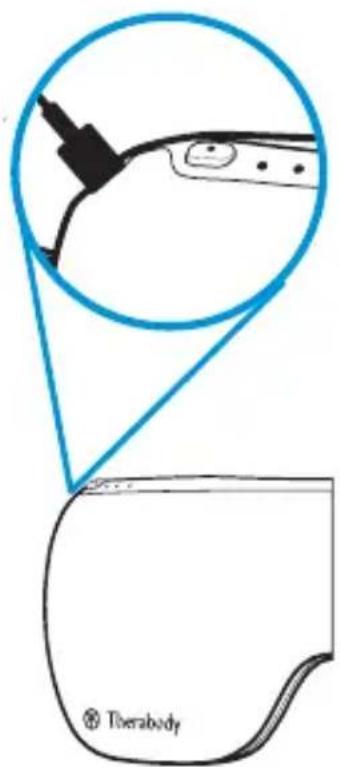
EN Store and Transport the Device
To store and transport the device, keep the device in its soft pouch, and handle it gently. Store the device in a cool and dry place (Temperature: 0^ / 32^ - 40^ / 104^ Relative humidity: 10 95% RH). Do not store the device where temperatures may exceed 40^ / 104^ , such as in direct sunlight or in a vehicle.
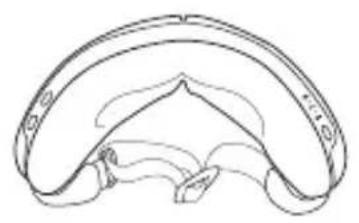
1
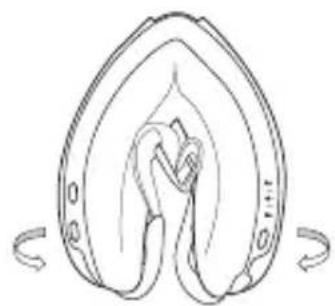
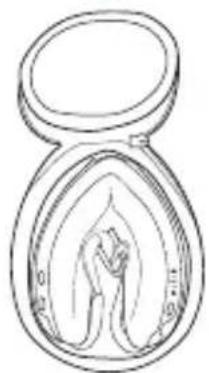
8. Troubleshooting Guide
EN
| SCENARIO SYMPTOM POTENTIAL CAUSES POTENTIAL SOLUTIONS | |||
| Device does not turn on. | Battery indicator LED doesn't turn on | Battery ran out or no battery power in the device | Connect the USB-C cable (included in box) to the device and plug in the other end to a power outlet. Verify that the device is charging by checking proper connection between the power adapter, the USB-C cable, and the USB-C port on the device. Battery LED indicator will display the level. |
| Charging USB-C cable is damaged | Ensure you are using the USB-C to USB-C cable provided, or one from a certified manufacturer. | ||
| Internal malfunction | If the device is not charging after verifying all the above, the power adapter or device may be damaged. Contact Therabody for further assistance. Visit https://www.therabody.com/us/en-us/support/support.html for the available contact methods. | ||
| Power LED can light on but the device not work | The device ran out of battery or there is no battery power in the device | Charge the device and try again | |
| If the issue still persists, Contact Therabody for further assistance. Visit https://www.therabody.com/us/en-us/support/support.html for the available contact methods. | |||
| Slow charging | Slow charging or incompletely charging | There may be an adapter issue or the adapter power is too low | Ensure you are using the USB-C to USB-C cable provided, or one from a certified manufacturer. |
| If the issue still persists, Contact Therabody for further assistance. Visit https://www.therabody.com/us/en-us/support/support.html for the available contact methods. | |||
| The compression massage is not working or is not moving when turned on | Compression massage chambers do not inflate or move when turned on | False defect or software bug | Turn off the device, and then charge it, turn on and check if the device can deflate normally |
| There may be an air leakage or loss of connection with valves | Check for air flow noise. Switch to other modes to confirm if issue still persist. | ||
| Internal malfunction | If the issue still persists after verifying all of the above, the device may be damaged. Contact Therabody for further assistance. Visit https://www.therabody.com/us/en-us/support/support/support.html for the available contact methods. | ||
| Mechanical noise | There is a rattling noise when the device is turned on | Internal malfunction | Contact Therabody for further assistance. Visit https://www.therabody.com/us/en-us/support/support.html for the available contact methods. |
| SCENARIO SYMPTOM POTENTIAL | CAUSES POTENTIAL SOLUTIONS | ||
| Bluetooth connectivity issue | Cannot connect to the app or the device isn't working properly once connected | The firmware is not updated to the latest version | Update the device firmware and try to connect to the Bluetooth again. |
| The phone version or system cannot support the connectivity | Update your phone version. If this doesn't work, try to install the app on another phone device. | ||
| The vibration function is not working | The device is on but the vibration is not working | Vibration treatment is turned off Press the vibration button to turn on the treatment. | |
| The vibration does not turn on even after the vibration button is pressed | Vibration button issue | If the vibration treatment does not turn on after verifying the above, the vibration connection may be damaged. Contact Therabody for further assistance. Visit https://www.therabody.com/us/en-us/support/support.html for the available contact methods. | |
| Heat function is not working | The device is on and heat is not working and the heat LED is off | Heat treatment is turned off | Press the heat button to turn on the treatment. |
| SCENARIO SYMPTOM POTENTIAL CAUSES POTENTIAL SOLUTIONS | |||
| Heat does not turn on even after heat button is pressed, heat LED is off | Heat button issue | If the heat treatment does not turn on after verifying the above, the heat connection may be damaged. Contact Therabody for further assistance. Visit https://www.therabody.com/us/en-us/support/support.html for the available contact methods. | |
| Heat is low | Low heat level may be selected | Increase the heat intensity by pressing the heat button | |
| The device feels very hot | The temperature feels very high | High heat level may be selected | Decrease the heat intensity by pressing the heat button |
| Internal heat malfunction | Contact Therabody for further assistance. Visit https://www.therabody.com/us/en-us/support/support.html for the available contact methods. | ||
| Biometric sensor not working | The device is on and the heart rate sensor is not working | Heart rate sensor malfunction | Keep a finger on the heart rate sensor, and see if a red light illuminates and if the Therabody app is capturing the heart rate data. If the heart rate sensor doesn't capture the data and red light does not turn on after verifying the above, the heart rate sensor may be damaged. Contact Therabody for further assistance. Visit https://www.therabody.com/us/en-us/support/support.html for the available contact methods. |
| The device and the heart rate sensor are working, but the red light is off | |||
| Biometric sensor is not capturing the data or displaying it in Therabody app | Skin contact with the biometric sensor is not correct | Ensure your device perfectly aligns with your temples and it is sitting comfortably on your nose bridge. The strap should sit just above your ears. Tighten the strap by adjusting the buckle. Moving it to the right makes it tighter and to the left makes it looser. Biometric sensor should maintain contact with your skin. | |
DO NOT attempt to troubleshoot by disassembling the device as this will void the warranty and may cause injury.
EN Warnings and Guidance (Precautions and Contraindications)
Background
Therabody products are designed to unlock the body's natural ability to achieve health and well-being. Through science and technology, the Therabody portfolio of products allows people to access the therapeutic benefits of different natural phenomena to meet both their needs and preferences. There will be times when it is advisable to modify how devices are used (precautions) or times when it is not appropriate to use certain devices (contraindications). Read the following safety information for the device in its entirety prior to use.
Important Safety Information
General Device Use
This device is intended for use by people in good health. This device is contraindicated against and should not be used by or on anyone with a history of epilepsy, seizures or cardiopathy.
The device is not recommended for anyone with an electronic implanted device (such as a pacemaker), cardiac arrhythmia, tumors, or acute episodes of inflammatory diseases. The device is not recommended for those who have arteriosclerosis, thromboses, or implants in the body region being treated.
Please consult your physician prior to using the device if you are pregnant and/or nursing. Immediately stop using the device at the first sign of discomfort. If you have any medical considerations please consult your doctor before using the device.
Safety, Precautions and Contraindications
These recommendations are derived from consultation with medical experts and published research regarding precautions and contraindications as of the printing date. For up-to-date information, please visit us online at https://www.therabody.com/us/en-us/precautions-and-contraindications.html.
Precautions:
Due care is required in these circumstances and device use may need to be modified. Where appropriate, or if you have any concerns, seek the advice of a medical professional.
Recent injury or surgery
Hypertension (controlled)
Abnormal sensations (e.g., numbness)
- Sensitivity to heat or pressure
Bony prominences or regions
Mild peripheral neuropathy
- Remove eye lenses (i.e. contact lenses) before using the device
- This device should fit tightly but should NOT restrict circulation in any way
Contraindications:
The following are circumstances where the potential risks may outweigh the benefits. Consult a medical professional before use.
- Skin rash, open wounds, blisters, local tissue inflammation, infections, bruises, or tumors
Hypertension (uncontrolled)
Vascular/arterial and circulation diseases, including blood clots, phlebitis, thromboses, and varicose veins - Acute or severe cardiac, liver, or kidney disease
- Severe peripheral neuropathy or other causes of sensory impairment
- Bleeding disorders
Connective tissue disorders - Medications that may thin the blood or alter sensations
- Direct pressure over surgical site or hardware
- Pacemaker or ICD
History of embolism - Do not use in the presence of unexplained pain
Limited Warranty
For full warranty information, please visit www.therabody.com/warranty. Customers who are in need of product support should visit https://www.therabody. com/us/en-us/support/support.html for the available contact methods.
FDA-Registered
Limited Warranty Only With Authorized Retailer Purchase
© 2024 Therabody, Inc. All Rights Reserved.
Patents at www.therabody.com/patents
Manufactured and Distributed by:
Therabody, Inc.
1640 S Sepulveda, Suite 300
Los Angeles, CA 90025
In the Australian market, the Therabody SmartGoggles device warranty is 1 year. For Australian Market Only: The purchase of this device is accompanied by a limited warranty. For complete details about the rights afforded to you under this warranty, visit https://therabody.com/anz/en-au/warranty-support/.
Imported and Distributed By:
Therabody Australia Pty Ltd
Waterman Business Centre
175 Maroondah Highway
Suite 16, C307, Level 3
Ringwood Vic 3134 Australia
Importers:
Therabody International Limited
5th Floor, 40 Mespil Road,
DO4C2N4 Dublin, Ireland
Therabody UK Limited
Portsoken House 155-157
The Minorities, London,
United Kingdom, EC3N1LJ
Therabody China Limited
READ ALL INSTRUCTIONS AND CAUTIONARY MARKINGS IN THIS MANUAL, ON THE CHARGER, AND ON THE DEVICE BEFORE USING OR CHARGING THE Therabody SmartGoggles DEVICE AND ITS ACCESSORIES.
When using the device, the following precautions should always be adhered to: 1. USE ONLY AS INSTRUCTED. Use the device as described in the Therabody SmartGoggles Instruction Manual only. Use only Therabody recommended accessories and replacement parts. This device is not intended to diagnose, mitigate, or treat diseases. The device is an advanced mechanical tool with electric components. If the device and its accessories are not used or maintained properly, there is a risk of fire, electric shock, or injury. Failure to use and maintain the device and corresponding attachments in accordance with the instructions outlined in this manual will void the warranty and may result in product damage or physical injury. The device is intended for commercial and home use.
- NOT FOR CHILDREN. The device is designed to fit and be used by individuals 16 years of age and older, and should not be used by individuals under the age of 16. The device and accessories are not intended for use by individuals with reduced physical, sensory, or reasoning capabilities or lack of experience and knowledge, unless given supervision or instruction concerning use of the device by a person responsible for their safety. The device is not a toy. Advise children not to play with the device or accessories. Adult supervision should be provided for those under

18 using the device.
3.CHARGING. If your device doesn't turn on or the battery indicator displays a low battery level, please charge before first use. Charge the battery using the USB-C cable (included). When you use the charging cable (included), make sure its USB-C connector is fully inserted into a compatible power adapter before you plug the adapter into a power outlet. You can also charge the battery with third party cables that are compliant with USB-C and with applicable country regulations and international and regional safety standards. Other adapters may not meet applicable safety standards, and charging with such adapters could pose a risk of death or injury. Do not force the cable into place. Fully charge the device at least once every six months to prevent device and battery damage. Unplug the power adapter and charging cable when not in use.
4.DO NOT OVERCHARGE. Do not leave the device connected to the power adapter for more than one hour after the battery has been fully charged. The battery includes a protection system to avoid the risk of overcharging. However, overcharging may reduce its life over time.
5.CHARGING LOCATIONS. Ensure that the battery status LED is OFF before charging. Insert the USB-C cable into the port (behind the power button) to charge the device. Do not use the device while charging. Avoid skin contact when the USB-C is plugged into a power source as it may cause discomfort or injury. Do not sleep or sit on the USB-C connector. The device should be charged indoors in a well-ventilated, dry location. Do not charge the device outdoors, in a bathroom, or within 10 feet (3.1 meters) of a bathtub or pool. Do not use the device or charger on wet surfaces, and do not expose the charger to moisture, rain, or snow. Do not use the device or its compatible charger in the presence of explosive atmospheres (gaseous fumes, dust, grain, metal powders, or flammable materials). Sparks may be generated, possibly causing a fire.
6.UNPLUGGING THE CHARGER AND CARE.Pull the plug, not the cord, to reduce the risk of damage to the electrical plug and cord. Never carry the charger by its cord. Keep the cord away from heat, oil, and sharp edges. Do not stretch the charger cord or place the cord under strain. Do not handle the charger, terminals, or the device with wet hands. Always unplug this device from the electrical
outlet immediately after using and before cleaning. Store cable to ensure it is not stepped on, tripped over, or otherwise subjected to damage or stress. Do not use a power adapter or charging cable that has received a sharp blow, been dropped, run over, or damaged in any way. For long-term storage, store with a fully charged battery.
- USAGE AND SKIN SENSITIVITIES. Discontinue the use of the device if you feel any discomfort. Use the device on clean, dry skin. Some people may experience reactions to certain materials used in wearable items that are in prolonged contact with their skin. This can be due to allergies, environmental factors, extended exposure to irritants like sweat or other causes. You may be more likely to experience irritation from any wearable device if you have allergies or other sensitivities. If you have known sensitivities, take special care when using the device and accessories. If you experience redness, swelling, itchiness, or any other irritation or discomfort on your skin around, or beneath, your device, remove the device and consult your physician before resuming wear. Continued use, even after symptoms subside, may result in renewed or increased irritation. Make sure the Battery status LED is OFF when the device is not in use.
8.DO NOT OPERATE UNDER BLANKET AND PILLOW. Excessive heating can occur and cause fire, electric shock, or injury.
9.DEVICE CARE AND SERVICE. Handle the device with care. The device contains electronic components that can be damaged if dropped, burned, punctured, or crushed. Do not disassemble the device or attempt to repair the device yourself. Disassembling the device may damage it and may cause injury. If the device is damaged or if malfunctions occur, contact Therabody Customer service. The warranty will be void if the device, batteries, or charger are disassembled or if any parts have been removed. Do not use if damaged as these may cause injury. Avoid heavy exposure to dust or sand. Do not puncture or damage the device. Puncturing the device can lead to incorrect operation.
10.CLEANING INSTRUCTIONS. The device is NOT waterproof. Visually inspect the device for any obvious signs of debris build-up. Wipe your device with a damp cloth or alcohol-free cleansing wipe. After cleaning, allow the device to dry thoroughly before storing or beginning another treatment. A properly cleaned
device should have no visible signs of debris or moisture. Only clean with a damp cloth or alcohol-free cleansing wipe by wiping the device. Do not submerge the device in water or clean it under running water. Do not allow the device to come into contact with corrosive solutions, which can damage the device's appearance and function.
11.STORING THE DEVICE AND ACCESSORIES. Store in a cool, dry place. Only charge the device when the ambient temperature is between 40^ / 104^ and 0^ / 32^ . Do not store the device or charging cable where temperatures may exceed 70^ / 158^ , such as in direct sunlight, in a vehicle, or in a metal building during the summer.
12.DEVICE DISPOSAL. This device contains a lithium-ion battery, and care must be taken upon disposal of the device. Before disposal of this device, please review your local laws and requirements surrounding Lithium-Ion Battery disposal. The preferred method of disposal is recycling the whole device.
Reporting adverse events to FDA
MedWatch is the Food and Drug Administration's (FDA) program for reporting serious reactions, product quality problems, therapeutic inequivalence/failure, and product use errors with human medical products, including drugs, biologic products, medical devices, dietary supplements, infant formula, and cosmetics. If you think you or someone in your family has experienced a serious reaction to a medical product, you are encouraged to take the reporting form to your doctor. Your health care provider can provide clinical information based on your medical record that can help the FDA evaluate your report. However, we understand that for a variety of reasons, you may not wish to have the form filled out by your healthcare provider, or your health care provider may choose not to complete the form. Your health care provider is not required to report to the FDA. In these situations, you may complete the Online Reporting Form yourself. You will receive an acknowledgement from the FDA when your report is received. Reports are reviewed by FDA staff. You will be personally contacted only if we need additional information.
Submitting adverse event reports to FDA
Use one of the methods below to submit voluntary adverse event reports to the FDA:
1.Report Online at: www.accessdata.fda.gov/scripts/medwatch/index.cfm?action reporting.home
2.Consumer Reporting Form FDA 3500B. Follow the instructions on the form to either fax or mail it in for submission. For help filling out the form, see MedWatch-Learn. The form is available at: www.fda.gov/ downloads/aboutFDA/reportsmanualforms/forms/ucm349464.pdf
3.Call FDA at 1-800-FDA-1088 to report by telephone.
4. Reporting Form FDA 3500 commonly used by health professionals. The form is available at: www.fda.gov/downloads/aboutFDA/reportmanualsforms/forms/ucm163919.pdf


Garment Care
Meaning of symbols
| Label Description Location of Label | ||
| Do not dry-clean Removable Inner layer + Travel pouch | ||
| Do not tumble dry Removable Inner layer + Travel pouch | ||
| Do not bleach Removable Inner layer + Travel pouch | ||
| Do not iron Removable Inner layer + Travel pouch | ||
| IP 22 | Degree of protection against ingress of water On rating label | |
| Read instructions before use On rating label | ||
| Level of protection type BF applied part On rating label | ||
| Therabody, Inc. 1640 S. Sepulveda Blvd. Suite 300 Los Angeles, CA 90025 | On rating label | |
| UKCA® | Unique Device Identification (UDI) | Packaging |
| X | Separate collection for waste electrical and electronic equipment. Note: For more information about disposal of equipment, its parts and accessories, please contact your local distributor. | On rating label |
| UKCA | UKCA Mark for UK On garment label | |
| Bluetooth | Bluetooth On garment label | |
| IC | IC (Canada) On garment label | |
| RCM On garment label | ||
| Date of Manufacture On garment label | ||
| CE | In accordance with Directive 2014/35/EU electrical equipent designed for use within certain voltage limits, and Directive 2014/30/EU electromagnetic compatibility | On garment label |
EN
DE
1. Produktübersicht
SmartGoggles
Download on the App Store
Therabody International Limited
5th Floor, 40 Mespil Road,
DO4C2N4 Dublin, Ireland
Therabody UK Limited
Portsoken House 155-157
The Minorities, London,
United Kingdom, EC3N1LJ
WARNHINWEISE
Download on the App Store
Therabody International Limited
5th floor, 40 Mespil Road,
DO4C2N4 Dublin, Irlande
Therabody UK Limited
Portsoken House 155-157
The Minorities, London
Download on the App Store
Therabody International Limited
5^ piano, 40 Mespil Road,
DO4C2N4Dublin, Irl
Therabody UK Limited
Portsoken House 155-157
The Minorities, Londra.
Download on the App Store
Therabody International Limited
5th Floor, 40 Mespil Road,
DO4C2N4 Dublin, Irlanda
Therabody UK Limited
Portsoken House 155-157
The Minorities, Londres,
1 KhoNka BkIOUOHeHn/BoIKIOUOHeHn
ДлгвКLOЧЕНИ N BblKLOЧЕНИ yCTpoNTBa HAnKMITE N UdpeKMBaTe KHOKNY nITaNHa.
TObI npOBepnB coCToHHe aKKyMylrTopa N BkIOHtB Bluteoth, hAKMITE KHOIXY nITAHIN, KOrJa yCtpoiCTBO BbIKIOUeHO. HAKMITE dJI NpeKIIIOHeHPEKIMOB, 06O3HaueHHbIX 3HaKaMMi.
IpeDynpexKdEHHN I peKOMeHdaCnN (Mepbl npedocTopoXHOCTN IN pOToHBONoka3AHNA)
067aHΦopMaun
IpoDyKunTherabody npEHa3HaHeHnA kTtBaunecTeCBeHbIX cnoc6bHcTeopraHmMA KnpdepkAHIO 3DopOBBnXoPoWero camOhyBCTBn. IopTfoNIO BvICOKOTEXHOJNOHIpOdyKunTherabody OXBtBAeT camble p3aHoo6pa3Hbte TINb TEpeNAEBYCECKORO BO3eJeCTBn - YTObI KaJDbM OR b1pTaTl C6eONITMaJIbHbB BApNaHT NO Co6CBHeHHbIM Tpe6oBaHNm IpEaONOTeHNm. B HeKOTOpBx cLuyAaPekOMeHNyETcN 3MeHNTb CnoOC6 pa6ToBy yctPOnCTB (CM.MpeNOCOTOPXHcOHT), a B HEKOTOpBx - ONpeENeHNbYeCTPOnCTBA nCNoJIb3ObaTb He peKOMeHNyETcN (PpOtnBONOKa3AHn). PpeNcNoJIb3OBAHNem PpOHTTE cNeDuOyUIO INHOFMaUIO IO TexNHke 6eONacHOCTn DnI yCTPOnCTBA B NtHOM o6BeMe.
BaxkhaHhΦopMaunno6e3onacHOCTn
O6UnepeKoMeHdaCnIIOHCNoB30BaHnUyCTpoiCTBa
3To ycTroHCTBO npeHa3HaueHO dIy IIOde C xopoUIM 3dOpOBbEm. Pnp6op
PpOTIBONOKa3AH K NcPb3OBAHnO H Ne DJIKeH NcPb3OBAbCRAIIOBmC
3IINIECNIE, cyDopOrAMn IINI KApDIONaTne B aHAmHe3e.
YcTroHCTBO He peKOMeHNoBAHO NIOJAM C 3JIeKTPOHNbIMN
IMPiAHTNOBaHnBHIMN YcTroHCTBaMn (HapPIMep, KApDIOCTMUYIATOPOM),
cepDeuHO apITMneI, OTyXoJMAm IINI OCTpbIM BOcPaNTeNBbIMN
3aOBeBAHnIMN. YcTroHCTBO He peKOMeHNyETC NOJDM C aptepINOckLepo3OM,
TpOMBaMn INI MII PAnlTAmN B o6pa6aTBiBaEMo OBlaCTn TEa.
EcNI Bbl BepeMeHHbI N/INI KOpMTe rpydbIO, Do pImeHENH
PpOKOHcYbTIpyTeCb BcpaHOM. He3aMeDNbTEHo npekPatntE
NCpOJIb3OBAHnE ppi60pa Prn nepbIX ppi3hakx DiCKOMfOpTa. EcNI y Bac
ecBy KaKHe-NIbO MeMNCHNe POKa3AHN, PpOKOHcYbTIpyTeCb C BpaHOM
pepeNcPb3OBAHnEM ycTroCTBa.
Be30nachoctb, Mepbl npedoctoPOXHOCTN npOTNBONOKa3AHM
3Tn peKoMeHndaunnoMpeam npedeocTOPOXHOCTN npoTNOBIOKAaHNR OCHOBaHb Ha KOHCyIbTaUHX C MeDNIuHcKIMN hKcPepTaMn I onbyLknOBaHHb IM NCCNEOBAHmN, nAkTuaybHa H aTy neaTn. JIra noJIyHeHcAMoA kTuaybHnIHfOpMaunnNoceITNe Hau caHT https://www.therabody.com/us/en-us/precautions-and-contraindications.html.
Mepbippeoctopoxxhoctu:
B 3TINX 6OCToTeNbCTBax Tpe6yETc CObIIOaTaB OCTOpOXHOCb, INMOKET NOtpe6oBaTbCBA HceCHeN 3MMeHEn B NcIOJIb3OBAHne yCTpoCTBa.EcIn IMeIOTC COMHeHn IIN PnHaIIuY BAC KaKnx-ⅡI60 IpO6IeM 6bPaTNTecb 3a KOHCyIbTaUneK BpAHy.
- HeJaBnHra TpaBMa nIIN XnpyrNueCKoe BMeJaTeNbCTBO
-ΓnepTeH3n(KoHTpOIpnyEma) - ATINNHyIe OUsyUeHnna (Haipmep, OHeMeHne)
- UyBCTBNTeHbOCTb K TeTnIy IIN DaBHeHHIO
KocThbIe BbICTyblnnnyactKN - UmepenHna nepiΦepeuYecka HeipoNaTn
-Перед НаалOM ИСпОЛьЗOBAHЯ уСТРОДСТВа ВБИБTe ИЗ Гla3 KOHTaKTHbie IINH3bl.
3ToycTPOIcTBoDOJIKNHOIIIOTHOIIPIIeIaTb,HOHEIOJNHO KaKIM-NIN60 6bpa3OM OgrpaHIVHBAbTuIpKpyIauKIO KpOBi.
IpoTMBONOKa3AHN.
B cneIyUxN x o6CToRteJIbCTbX nOTeHuaJIbHbIe pNCKn MOrYT nepeBeWuBaT bNoJIb3y OT npIMHeHn yCTpOcTBA. Do nCNoJIb3OBaHn IpOKOHcyJIbTIpPyITecb C BpaHOM.
KoKaHaa cblb,otKpbTbe paHbI,BOJdbipn,MeCTHOe BocpnaJIe HTKaHei, HneKuIN, CInRAKn UIN ONyXONI
-Γιπερτηκυσγ(HEKΘHTρολίργeΜα)
CocyndtbeI npTepeNaIbHbIe 3a6oJIeBaHnI, 3a6oJIeBaHnI CnCTeMbI KpOBo06paUeHHN, BKNIOuA CryCTKINKpOBN, fneBtBu, TpOM603bI
BapNKo3Hoe paCImpeHne BeH
- Octpoe nll TjxkeNoe 3aboneBaHne cepua, neeuHn nll noueK
- BbipaxeHnag npinpeepueckag HebpotaN npyIe npuHbI ceHCOPbIX Hanyuhen
HapyuHnCBeptbBaEMoCTN KPOBNI
3a6oJIeBaHnO CoEINHITeIbHO TkaHn
- JIeKapCTBHeHbI IpeNaPaTbI dIra pa3XnXKeHn KpOBN nIyUyUHeHn 乌BCTBNTeJIbHOCTN
- PIPRMOE BO3DcEJICTBnE Ha MecTo XnpyprHcckOro BMeJaTeIbCTBa IINYCTaHOBJENHHbIMNPTaHT
KapdnoocTmMyJrTop uHnIKD
3M60nB aHaAMHe3e
He nCnOlb3yIte npnNoBnHn Heo6bAChIMbIX 60Je
OTPAHUYEHHAIAPAHTNIA
Дя поуеня понов Инфорmaци O rapaHTM, NOXKANCTA, NOCEITE WWW. therabody.com/warranty.
B clyae, eCn BAM Heo6xOIMa TexHuecka noDepkka nO BaSeMy npOkyT, nocTeTte caT https://www.therabody.com/us/en-us/support/ support.html.
OrpaHueHHa rapaHTn npi nokyInke Tolbko y aBTopn3oBaHHoro po3HHOro npoIabua
© 2024 Therabody, Inc. Bce npaBa 3aunueHbI.
VHopmaunna o natehtax Ha caite www.therabody.com/patents
I3ROTOBNEHO npacnpocTpaHEKOMNAHHe:
Therabody, Inc.
1640 S Sepulveda, Suite 300
Los Angeles, CA 90025
VMrnpTepb:
Therabody International Limited
5th Floor, 40 Mespil Road,
DO4C2N4Ду6ин,ИрnaHnIa
Therabody UK Limited
Portsoken House 155-157
MnHbepNTm3,LoHdoH,
Belenko6pntaHnE,EC3N1LJ
https://www.therabody.com/us/en-us/precautions-and-contraindictions.html.
Precauciones:
Therabody China Limited
Therabody China Limited
Downs on the App Store
sikshaharreqQRkDtSkanh
3. 썽명류
| 본재pez eventually => in => => => => => => => => => => => => => => => => => => => => => => => => => => => => => => => => => => => => => => => => => => => => => => => => => => => => => => => => => => => => => => => => => => => => => => => => => => => => => => => => => => => => => => => => => => => => => => => => => => => =>> > => => => => =>> > => => => =>> > => => => =>> > => => => =>> > => => => =>> > => => => =>> > => => => =>> > => => => =>> > => => => =>> > => => => =>> > => => => =>> > => => => =>> > => => => =>> > => => => =>> > => => => =>> > =>> > =>> > =>> > =>> > =>> > =>> > =>> > =>> > =>> > =>> > =>> > =>> > =>> > =>> > =>> > =>> > =>> > =>> > =>> > =>> > =>> > =>> > =>> > =>> > =>> > > =>> > =>> > =>> > =>> > =>> > =>> > =>> > =>> > =>> > =>> > =>> > =>> > =>> > =>> > =>> > =>> > =>> > =>> > =>> > =>> > =>> > =>> > =>> > =>> > =>. > =>> > =>> > =>> > =>> > =>> > =>> > =>> > =>> > =>> > =>> > =>> > =>> > =>> > =>> > =>> > =>> > =>> > =>> > =>> > =>> > =>> > =>> > =>> > =>> > =>? > =>> > =>> > =>> > =>> > =>> > =>> > =>> > =>> > =>> > =>> > =>> > =>> > =>> > =>> > =>> > =>> > =>> > =>> > =>> > =>> > =>> > =>> > =>> > =>> > =>) > =>> > =>> > =>> > =>> > =>> > =>> > =>> > =>> > =>> > =>> > =>> > =>> > =>> > =>> > =>> > =>> > =>> > =>> > =>> > =>> > =>> > =>> > =>> > =>> > =>; > =>> > =>> > =>> > =>> > =>> > =>> > =>> > =>> > =>> > =>> > =>> > =>> > =>> > =>> > =>> > =>> > =>> > =>> > =>> > =>> > =>> > =>> > =>> > =>> > => > =>> > =>> > =>> > =>> > =>> > =>> > =>> > =>> > =>> > =>> > =>> > =>> > =>> > =>> > =>> > =>> > =>> > =>> > =>> > =>> > =>> > =>> > =>> > =>> > =>} > =>> > =>> > =>> > =>> > =>> > =>> > =>> > =>> > =>> > =>> > =>> > =>> > =>> > =>> > =>> > =>> > =>> > =>> > =>> > =>> > =>> > =>> > =>> > =>> > => > => > => > => > => > => > => > => > => > => > => > => > => > => > => > => > => > => > => > => > => > => > => > => > => > => = > => > => > => > => > => > => > => > => > => > => > => > => > => > => > => > => > => > => > => > => > => > => > => > => > = > = > = > = > = > = > = > = > = > = > = > = > = > = > = > = > = > = > = > = > = > = > = > = > = > = > = > = > = > = > = > = > = > = . > = > = > = > = > = > = > = > = > = > = > = > = > = > = > = > = > = > = > = > = > = > = > = > = > = > = > = > = > = > = > = > = > = < img src=""> < img src=""> < img src=""> < img src=""> < img src=""> < img src=""> < img src=""> < img src=""> < img src=""> < img src=""> < img src=""> < img src=""> < img src=""> < img src=""> < img src=""> < img src=""> < img src=""> < imgsrc=""> < img src=""> < img src=""> < img src=""> < img src=""> < img src=""> < img src=""> < img src=""> < img src=""> < img src=""> < img src=""> < img src=""> < img src=""> < img src=""> < img src=""> < img src=""> < img src=""> </img src> <img src> <img src> <img src> <img src> <img src> <img src> <img src> <img src> <img src> <img src> <img src> <img src> <img src> <img src> <img src> <img src> <img src> <img src> <img src> <img src> </img src> <img src> <img src> <img src> <img src> <img src> <img src> <img src> <img src> <img src> <img src> <img src> <img src> <img src> <img src> <img src> <img src> <img src> <img src> <img src> |
© 2024 Therabody, Inc. All Rights Reserved.
耿海 购报:www.therabody.com/patents
制末吴用
Therabody, Inc.
1640 S Sepulveda, Suite 300
Los Angeles, CA 90025
Therabody China Limited
Born in Los Angeles, CA.
Designed for everybody.


@Therabody