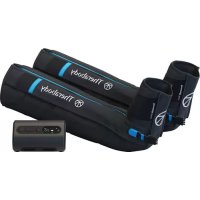
RecoveryAir Prime - Massage device THERAGUN - Free user manual and instructions
Find the device manual for free RecoveryAir Prime THERAGUN in PDF.


| Product type | Pneumatic compression system |
| Brand | THERAGUN |
| Model | RecoveryAir Prime |
| Power supply | DC power adapter 100-240 V (multi-voltage) |
| Battery | Integrated rechargeable (3 LED indicator) |
| Pressure range | 20 to 100 mmHg (in increments of 10 mmHg, 5 mmHg via app) |
| Treatment durations | 20, 40, 60 minutes or continuous |
| Preset programs | Recovery and Warm-up (via Therabody app) |
| Connectivity | Bluetooth (app control) |
| Number of chambers | 4 (overlapping, negative gradient) |
| Boot material | Medical-grade non-porous, bacteria-resistant |
| Cleaning | Disinfectant wipe or spray; wipe pump |
| Intended use | Temporary relief of muscle pain and increased circulation |
| Included accessories | Pump, pair of boots, 2 plug blockers, DC adapter, carrying case |
| Operating temperature | 10 to 30 °C |
| Operating humidity | 30% RH to 75% RH non-condensing |
| Maximum altitude | 3000 m |
| Protection rating | IP22 |
| Equipment class | Class III (very low voltage) |
| Maintenance | Do not wash; clean surface only |
Frequently Asked Questions - RecoveryAir Prime THERAGUN
User questions about RecoveryAir Prime THERAGUN
0 question about this device. Answer the ones you know or ask your own.
Ask a new question about this device
Download the instructions for your Massage device in PDF format for free! Find your manual RecoveryAir Prime - THERAGUN and take your electronic device back in hand. On this page are published all the documents necessary for the use of your device. RecoveryAir Prime by THERAGUN.
USER MANUAL RecoveryAir Prime THERAGUN
Simplified Recovery.
| EN | 1-12 |
| DE | 13-24 |
| FR | 25-36 |
| IT | 37-48 |
| ES | 49-60 |
| NL | 61-72 |
| PL | 73-84 |
| EL | 85-96 |
| NO | 97-108 |
| SV | 109-120 |
| PT | 121-132 |
| RU | 133-134 |
RecoveryAir Prime
Advanced compression simplified for everybody.
See Warnings on pg. 5 for important safety instructions.
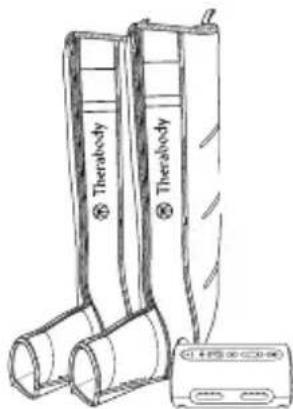
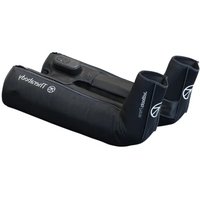
Your RecoveryAir Prime pneumatic compression system comes with a pump, a set of compression boots, a blocker plug, a DC power adapter, and a carrying pouch.
Getting started
- To turn on the RecoveryAir Prime pump, press and hold the power button.
- To get started, put your boots on first before attaching them to the pump. This allows you to get into the most comfortable position and avoid any disruption in the air flow connection.
- Next, plug in the connector from the boots into the pump. Make sure you hear a "click" so that you know the RecoveryAir Prime is fully connected, is plugged in, and there is a proper seal.
- Once connected and comfortable, you are ready to customize your treatment.
Prepare your treatment
- To turn on the RecoveryAir Prime pump, press and hold the power button.
- Access two preset program options when connected to the Therabody app: Recover and Warm-up.
- Once you have chosen your desired program, use the (<) and (>) buttons to adjust the pressure setting.
- Then, toggle through the time options using the Time button to set your desired treatment time (20min, 40min, 60min, or continuous).
- Once you have selected the treatment options that are right for you, press start, relax, and you'll be on your way to recovery in no time.
Feature Callouts
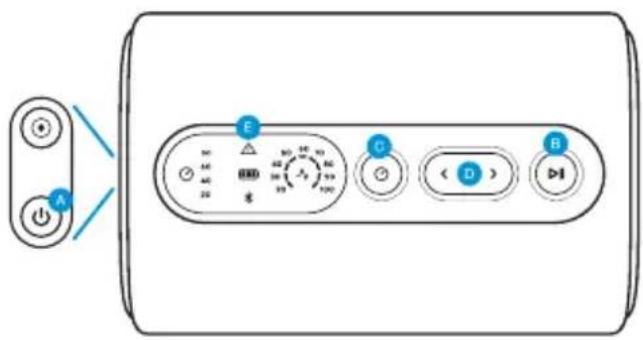
Buttons Indicators
EN


Power Button


Start/Pause/Stop Button


Time Button:
4 time intervals (20, 40, 60, and continuous)

Pressure UP/Down Button:
Adjustable Pressure Range (20-100 mmHg) in increments of 10 mmHg
Adjustable pressure changes via the Therabody app in increments of 5 mmHg


Warning Indicator
Indicator lights up solid ON or blinking when a device malfunction is detected

Bluetooth Indicator
Indicator turns ON only when connected to the App

Battery Indicator
3 LED lights to indicate battery life
RecoveryAir Prime Programs
About negative gradient for all programs:
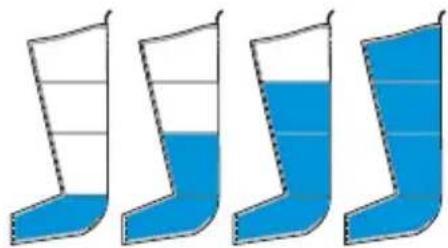
The RecoveryAir Prime's unique true negative gradient of pressure sequentially travels up the limb from the foot toward the heart in four internal overlapping chambers. The spiraling overlap of chambers safely maximizes circulation.
The pressure can be the same in two consecutive chambers, but the pump won't allow a back chamber to have a higher pressure than a front chamber.
• The minimum pressure level of each chamber is 20 mmHg.
Recover and Warm-Up preset programs
- Access the Recover and Warm-Up preset programs via the Therabody app.
• The Recover program is the perfect go-to when experiencing fatigue, tension, or soreness brought on by your everyday activities or post workout.
• The Warm-Up program is recommended for use before workout.
• The only difference between the two programs is the default pressure level and treatment time.
Sequential inflation cycle
Both the Recovery and Warm-Up preset programs use the Sequential inflation cycle.
• A directional massage is applied, starting at the base of the treated area, and progresses upwards towards the torso and then releases. (see Figure 1)
• Starting with Chamber 1, once the inflating chamber has reached its preset pressure level, the pressure level for that chamber is held and the next chamber begins inflating.
Figure 1 - Sequential Cycle Mode
natural_image
Four identical blue and white striped objects resembling boots or containers, arranged horizontally (no text or symbols)Chamber 4
Chamber 3
Chamber 2
Chamber 1
Smart Features
The RecoveryAir Prime also connects to the Therabody app via Bluetooth, giving you control of your RecoveryAir Prime session from the convenience of your smartphone.
Not only can you easily access the Recover and Warm-up treatment options, but you can also adjust the pressure and time.
Scan the QR code to get started.

Charging the RecoveryAir Prime
- After turning off the pump, plug the power adapter into the charging port of the RecoveryAir Prime pump.
- You can continue to use the RecoveryAir Prime while charging.
- Charging is complete when all 3 LED lights of the LED battery indicator are lit.
Traveling with your RecoveryAir Prime Compression System
When traveling with your RecoveryAir Prime Compression System, we recommend:
- Roll the hose tightly and slide it into the foot section of your garment. It is important to keep the hose from creasing to protect the hose's integrity and its ability to properly distribute airflow.
• Once you secure the hose, simply fold your garment to fit into your travel bag or carry-on luggage. - Secure your pump in the provided carrying pouch
Superior, hygienic design
It's important to take proper care of your RecoveryAir Prime compression boots because the longer they last, the longer you will feel the benefits. RecoveryAir Prime compression boots have non-porous medical grade material that help fight bacteria and provide a resistant surface. Our internal overlapping chambers provide a smooth surface to clean, this means no wiping under chamber flaps where bacteria can build up. This also means, no smells.
How to Clean
Here are simple steps to cleaning your RecoveryAir Prime compression boots:
- Unzip the boots completely and lay them on a flat surface.
- Take a disinfectant wipe or spray, and gently clean the inside of the boots. Avoid any oil based cleaning product.
- Once you have cleaned your garment, make sure to fully dry the surface by hanging them up or wiping them down.
- We also recommend you wipe down the exterior of the pump to reduce surface contaminants.
What it is and why it's important:
We use medical-grade material covering the internal chamber to help reduce the potential for microbial growth and moisture retention. Whether you are an individual, or a clinic, our boots are designed to help limit the potential for bacterial transmission.
Important Safety Information
Read all instructions before using the RecoveryAir Prime Compression System for the first time Warning
This system is intended for use by people in good health. This system is not recommended for people who have heart problems, or vascular problems, have a condition requiring the use of any medical device, or have any condition that may affect their normal well-being.
- If you are, or may be, pregnant, consult with your physician before use.
• Do not use this system over insensitive or numb areas, or in the presence of poor circulation. Do not use if you have been
Important Safety Information
diagnosed with blood clots, deep vein thrombosis or phlebitis. This system should not be used over swollen or inflamed areas or skin eruptions. Do not use in the presence of unexplained calf pain.
- Consult your physician prior to use.
EN Safety Warnings and Precautions
Warning
- Explosion Hazard: Do not use the RecoveryAir Prime Compression System in the presence of flammable gases, including flammable anesthetics.
• Electric Shock Hazard: Do not allow liquid to enter any part of the RecoveryAir Prime Compression System pump. Do not immerse in water or liquid. To clean, follow instructions found on page 5.
• Electric Shock Hazard: To prevent electric shock, do not open the pump. Do not attempt to service the pump yourself. All repairs should be performed only by Therabody trained and authorized service personnel. Service by unauthorized personnel will void any warranty.
- Stop using the system if there is any change in RecoveryAir Prime Compression System's performance.
- Do not modify any part of the RecoveryAir Prime Compression System.
• The RecoveryAir pneumatic compression system includes small parts that could cause choking in children.
- Keep away from children and pets.
• Do not inflate the garment without wearing it over the intended body area or with open zippers. Doing so can damage the garment.
- Do not apply excessive force to the garment straps. Do not use the straps for any purpose other than intended by the manufacturer. Use of excessive force and/or misuse shall void the manufacturer's warranty.
- Do not stand or walk while wearing the garment.
- Disconnect the pump from the electrical outlet before cleaning and let it dry completely before reconnecting it to the electrical outlet.
Caution
- Do not operate the RecoveryAir Prime Compression System while operating a vehicle.
- Do not store or transport the RecoveryAir Prime Compression System beyond the specified temperature, humidity, and atmospheric pressure range.
• Do not use the RecoveryAir Prime Compression System beyond the specified temperature range: 10 to 30°C (50 to 86°F). - Do not use the RecoveryAir Prime Compression System beyond the specified humidity range: 30%rH–75%rH, non-condensing.
- Only use the RecoveryAir Prime Compression System up to 3000m above mean sea level.
• To prevent any damage to the RecoveryAir Prime Compression System, keep it away from dust, lint, and dirt. Keep away from sources of heat or moisture.
• To prevent any damage to equipment, use only accessories, detachable parts, and materials described in this User Manual.
Important Safety Information
• While in use, place the pump on a horizontal firm surface only. Do not place the pump on a bed, blanket, mattress, pillow, or soft furniture. Do not cover the pump.
• The equipment is to be installed and put into service according to the EMC information provided in Chapter 11 - EMC Manufacturer Declarations.
- Portable and mobile RF communication equipment might affect the equipment.
- For indoor use only.
- Use only the DC power adapter provided with the pump.
• The massage sensation should be pleasant and comfortable. If you experience pain or discomfort during or after the massage or if there is onset of bruising or irritation during or after the massage, discontinue use and consult your physician.
- Do not hand or machine wash. Surface wipe only.
- Do not allow liquid to get into the air inlets.
- Do not use bleach.
- Do not dry clean.
- Do not wring, iron, tumble, or force heat dry.
Labels
The following labels and symbols appear on the pump, garments and/or packaging.
| Label | Description | Location |
| IP 22 | Degree of protection against ingress of water | On pump base |
| Read instructions before use On pump base | ||
| Read instructions before use (for China only) | On pump base | |
| Read instructions before use On garment label |
| Label Description Location | ||
| Level of protection type BF applied part | On pump base | |
| Class III equipment(only in the EU per IEC60335-2-32)Equipment relying on limitation of voltage to extra-low-voltage (ELV) values as provision for basic protection and with no provision for fault protection. | On pump base(only in the EU) | |
| Label | Description Location | |
 | Double insulation | On DC power adapter |
 | Direct current On pump base | |
 | Therabody, Inc.6100 Wilshire Blvd. Suite 200Los Angeles, CA 90048 | On garment labeland on pump base |
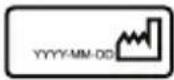 | Date of Manufacture On pump base | |
 UDI:(01) 00810036057288(10) 2143(21) 00001 UDI:(01) 00810036057288(10) 2143(21) 00001 | Unique Device Identification (UDI) | On pump baseand package, andgarment bag andpackage |
 | Separate collection for wasteelectrical and electronicequipment | On pump base |
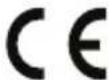 | In accordance with Directive2014/35/EU electrical equipment designed for use withincertain voltage limits, andDirective 2014/30/EU electromagnetic compatibility | On pump |
| Label Description Location | ||
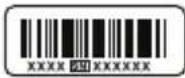 | Serial number of the console | On console base |
 | Fragile, handle with care | On package |
 | Keep dry | On package and console base. |
 | This side Up On package | |
| [8200] | Keep away from sunlight | On package |
 | Transportation & storage humidity limitation | On package |
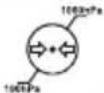 | Transportation & storage atmospheric pressure limitation | On package |
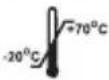 | Transportation & storage temperature limitation | On package |
| Label | Description Location |
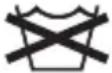 | Do not wash On garment tag |
 | Do not dry-clean On garment tag |
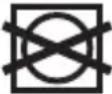 | Do not tumble dry On garment tag |
| Label Description Location | ||
 | Do not bleach On garment tag | |
 | Do not iron On garment tag | |
EN
Indications for Use
RecoveryAir is indicated for the temporary relief of minor muscle aches and pains, and for the temporary increase in circulation to the treated areas in people who are in good health. RecoveryAir simulates kneading and stroking of tissues by using an inflatable garment.
Note
- The pump is "multi-voltage" and can be used for travel.
- An appropriate socket adapter must be used in countries with incompatible wall outlets.
- Use only RecoveryAir garments with the RecoveryAir pump.
- When immediate garment deflation is necessary, disconnect the garment hose bundle from the pump to immediately deflate the air pressure in the garment.
Troubleshooting
| Note | Possible Cause Action | |
| The pump is not working. | No electricity Inspect the electrical wall outlet. | |
| DC power adapter Verify that the DC power adapter cable is connected to the DC adapter socket on the console, and the DC power adapter is connected to the 100-240 Volt wall outlet. | ||
| DC power adapter cable Examine the cable for any defects. | ||
| The Status Indicator is On in yellow | Malfunction | Contact Therabody. |
| The pump starts working and stops immediately. The air cannot move through the garment hose. | Air cannot move through the garment hose. | Examine hoses for kinks, twists and folds. |
| One garment inflates but the second one does not. | The second garment does not receive air. | Examine its hoses for kinks, twists and folds. |
| The pump stops working, the Status Indicator turns On in yellow. | Hose is not connected properly to garment or pump, or prong plug is not inserted into unused air outlet. | Examine and fasten all air connections. When treating only one limb, always plug the unused air outlet with the prong plug provided with the pump. If all air connections are OK and the problem persists, contact Therabody. |
| The pump works at a very low pressure, regardless of the pressure set by the user. | Defective garment Replace garment and check again. |
Warranty
For full warranty information, please visit www.therabody.com/warranty. To request a copy of the warranty by mail, you may send a request to the following address:
Therabody - WarrantyAttn: Customer Service
6100 Wilshire Blvd.,
Los Angeles, CA 90048
Please note, this is not a return address or a retail location. No products or packages will be accepted at this location.
Reporting adverse events to FDA
MedWatch is the Food and Drug Administration's (FDA) program for reporting serious reactions, product quality problems, therapeutic inequivalence/failure, and product use errors with human medical products, including drugs, biologic products, medical devices, dietary supplements, infant formula, and cosmetics.
If you think you or someone in your family has experienced a serious reaction to a medical product, you are encouraged to take the reporting form to your doctor. Your health care provider can provide clinical information based on your medical record that can help the FDA evaluate your report. However, we understand that for a variety of reasons, you may not wish to have the form filled out by your healthcare provider, or your health care provider may choose not to complete the form. Your health care provider is not required to report to the FDA. In these situations, you may complete the Online Reporting Form yourself.
You will receive an acknowledgement from the FDA when your report is received. Reports are reviewed by FDA staff. You will be personally contacted only if we need additional information.
Submitting adverse event reports to FDA
Use one of the methods below to submit voluntary adverse event reports to the FDA:
- Report Online at: www.accessdata.fda.gov/scripts/medwatch/index.cfm?action=reporting.home
- Consumer Reporting Form FDA 3500B. Follow the instructions on the form to either fax or mail it in for submission. For help filling out the form, see MedWatchLearn. The form is available at: www.fda.gov/downloads/aboutFDA/reportsmanualsforms/forms/ucm349464.pdf
- Call FDA at 1-800-FDA-1088 to report by telephone.
- Reporting Form FDA 3500 commonly used by health professionals. The form is available at www.fda.gov/downloads/aboutFDA/reportmanualsforms/forms/ucm163919.pdf
Storage environment:
- The pump can be transported or stored for short periods of time within:
• Temperature range of -4 - 158°F (-20 - 70°C)
• Humidity range of 10-93% RH non-condensing
• Atmospheric pressure range of 190 - 1060hPa
- Allow the pump to reach a reasonable room temperature of 50 - 86°F (10 - 30°C) before operating.
• When the system has been stored in extreme temperature conditions of -20^ ( -4^ ) or 70^ ( 158^ ) between uses, wait
for two (2) hours before using again.
FCC compliance statement
This device complies with Part 15 of the FCC Rules. Operation is subject to the following two conditions: (1) this device may not cause harmful interference, and (2) this device must accept any interference received, including interference that may cause undesired operation. Changes or modifications not expressly approved by the party responsible for compliance could void the user's authority to operate the equipment.
This equipment has been tested and found to comply with the limits for a Class B digital device, pursuant to Part 15 of the FCC Rules. These limits are designed to provide reasonable protection against harmful interference in a residential installation. This equipment generates, uses and can radiate radio frequency energy and, if not installed and used in accordance with the instructions, may cause harmful interference to radio communications. However, there is no guarantee that interference will not occur in a particular installation.
If this equipment does cause harmful interference to radio or television reception, which can be determined by turning the equipment off and on, the user is encouraged to try to correct the interference by one or more of the following measures:
- Reorient or relocate the receiving antenna.
- Increase the separation between the equipment and receiver.
- Connect the equipment into an outlet on a circuit different from that to which the receiver is connected.
- Consult the dealer or an experienced radio/TV technician for help.
Radiation Exposure statement
This equipment complies with FCC/IC RSS-102 radiation exposure limits set forth for an uncontrolled environment.
RecoveryAir Prime
RecoverAir Prime-Programme
natural_image
Four stylized blue and white musical notes (no text or symbols)Kammer 4
Kammer 3
Kammer 2
Kammer 1
Scan the QR code to get started.

natural_image
Four stylized blue and white boots with liquid, arranged horizontally (no text or symbols)Chambre 4
Chambre 3
Chambre 2
Chambre 1
Scan the QR code to get started.

Programmi RecoverAir Prime
natural_image
Four identical blue and white striped objects resembling boots or containers, arranged horizontally (no text or symbols)Camera 4
Camera 3
Camera 2
Camera 1
Funzioni smart
Scan the QR code to get started.

Ricaricare RecoveryAir Prime
Therabody - WarrantyAttn: Customer Service
6100 Wilshire Blvd.,
Los Angeles, CA 90048
Programas de RecoveryAir Prime
natural_image
Four identical blue and white striped boots with no text or symbolsCámara 4
Cámara 3
Cámara 2
Cámara 1
Scan the QR code to get started.

Therabody - WarrantyAttn: Customer Service
6100 Wilshire Blvd.,
Los Angeles, CA 90048
Indicator turns ON only when connected to the App

Batterij-indicator
RecoveryAir Prime-programma's
natural_image
Four stylized boots with blue liquid, no text or symbols presentKamer 4
Kamer 3
Kamer 2
Kamer 1
Smart-functies

Scan the QR code to get started.

NL
De RecoveryAir Prime opladen
Therabody - WarrantyAttn: Customer Service
6100 Wilshire Blvd.,
Los Angeles, CA 90048
RecoveryAir Prime – programy
natural_image
Four identical blue and white striped objects resembling boots or containers, arranged horizontally (no text or symbols)Komora 4
Komora 3
Komora 2
Komora 1
Scan the QR code to get started.

PL
Therabody - WarrantyAttn: Customer Service
6100 Wilshire Blvd.,
Los Angeles, CA 90048
natural_image
Four identical blue and white striped boots arranged in a row (no text or symbols)Θάλαμος 4
Θάλαμος 3
Θάλαμος 2
Θάλαμος 1
Scan the QR code to get started.

Therabody - WarrantyAttn: Customer Service
6100 Wilshire Blvd.
Los Angeles, CA 90048
Start/Pause/Stopp Knapp


Time-knapp:
Om negativ gradient for alle programmer:
About negative gradient for all programs:
natural_image
Four stylized boots with blue liquid, no text or symbols presentKammer 4
Kammer 3
Kammer 2
Kammer 1
Smarte funksjoner
Scan the QR code to get started.

Therabody - WarrantyAttn: Customer Service
6100 Wilshire Blvd.,
Los Angeles, CA 90048
Please note, this is not a return address or a retail location. No products or packages will be accepted at this location.
Start/paus/stopp-knapp


Time-knapp:
RecoverAir Prime Program
natural_image
Four identical blue and white striped boots with liquid, arranged horizontally (no text or symbols)Kammare 4
Kammare 3
Kammare 2
Kammare 1
Smarta funktioner
Scan the QR code to get started.

Ladda RecoveryAir Prime
Therabody - WarrantyAttn: Customer Service
6100 Wilshire Blvd.,
Los Angeles, CA 90048
Programas RecoverAir Prime
natural_image
Four identical blue and white striped objects resembling boots or containers, arranged horizontally (no text or symbols)Câmara 4
Câmara 3
Câmara 2
Câmara 1
Scan the QR code to get started.

Carregar a RecoveryAir Prime
Therabody - WarrantyAttn: Customer Service
6100 Wilshire Blvd.,
Los Angeles, CA 90048
natural_image
Four identical blue and white striped legs shaped like a letter 'L' or stylized letter 'J', arranged horizontally (no text or symbols)Камера 4
Камера 3
Камера 2
Камера 1
Scan the QR code to get started.

Therabody - WarrantyAttn: Customer Service
6100 Wilshire Blvd.,
Los Angeles, CA 90048
DECLARATION OF CONFORMITY
(DE) KONFORMITÄTSERKLÄRUNG | (FR) DÉCLARATION DE CONFORMITÉ | (IT) DICHIARAZIONE DI CONFORMITÀ | (ES) DECLARACIÓN DE CONFORMIDAD | (NL) CONFORMITEITSVERKLARING | (PL) DEKLARACJA ZGODNOŚCI | (EL) ΔΗΛΩΣΗ ΣΥΜΜΟΡΦΩΣΗΣ |
(NO) SAMSVARSERKLÆRING | (SR) DEKLARACIJA O USAGLAŠENOSTI | (SV) INTYGANDE OM ÖVERENSSTÄMMELSE | (TR) UYGUNLUK BEYANI | (PT) DECLARAÇÃO DE CONFORMIDADE | (RU) DEKLARACIJA COOTBETCTBIIЯ | (AR) إعلان المطابقة
Applicant/Importer certifies that the following designated product
(DE) Der Antragsteller/Importeur bestätigt, dass das folgend bezeichnete Produkt | (FR) Le requérant/L'importateur certifie que le produit désigné suivant | (IT) Il richiedente/importatore certifica che il seguente prodotto designato | (ES) El solicitante/importador certifica que el siguiente producto designado | (NL) Aanvrager/importeur verklaart dat het volgende aangewezen product | (PL) Wnioskodawca/importer poświadcza, że określony poniżej produkt | (EL) O aitów/εισαγωγέας πιστοποιεί ότι το παρακάτω καθοριαμένο προϊόν | (NO) Søkeren / importøren sertifiserer at følgende angitte produkt | (SR) Podnosilac zahteva/uvoznik potvrđuje da je dolenavedeni proizvod | (SV) Sökande / importör intygar att produkt med följande beteckning | (TR) Başvuru sahibi/ithalatçı, aşağıda belirtilen ürünün | (PT) O requerente / importador certifica que o seguinte produto designado | (RU) Заявитель / импортер удостоверяет, что следующий продукт | (AR) يшедш مقدم الطلب /中最ورد أن النتج المعين التالي
Product Name: Massager
(DE) Produktname: Massagegerät | (FR) Nom du produit : Masseur | (IT) Denominazione prodotto: Massaggiatore |
(ES) Nombre del producto: Masajeador | (NL) Productnaam: Massageapparaat | (PL) Nazwa produktu: Masažer | (EL) 'Ovoja προϊόντος: Συσκευή μασάζ
(NO) Produktnavn: Massasjeapparat | (SV) Produktbeteckning: Massageapparat | (PT) Nome do produto: Massajador | (RU) Название продукта:
Массажер
Model No.: RecoveryAir Prime (DE) Modellnr.: RecoveryAir Prime | (FR) Modèle n°: RecoveryAir Prime | (IT) Modello n.: RecoveryAir Prime | (ES) Modelo n.º: RecoveryAir Prime | (NL) Modelnummer:
RecoveryAir Prime | (PL) Nr modelu: RecoveryAir Prime | (EL) Ap. μοντέλου: RecoveryAir Prime | (NO) Modell nr.: RecoveryAir Prime | (SR) Oznaka modela: RecoveryAir Prime | (SV)
Modell: RecoveryAir Prime | (TR) Model No.: RecoveryAir Prime | (PT) Modelo n.º: RecoveryAir Prime | (RU) Модель No: RecoveryAir Prime | (AR)
Is in fully conformity with the harmonized standard(s)
(DE) Vollkommen mit der(den) folgenden harmonisierten Norm(en) übereinstimmt | (FR) Est pleinement conforme à la ou aux normes harmonisées | (IT) È pienamente conforme alla(e) norma(e) armonizzata(e) | (ES) Cumple completamente los estándares armonizados | (NL) Volledig conform de geharmoniseerde standaard(en) is | (PL) Zachowuje pełną zgodność z normą zharmonizowaną (normami zharmonizowanymi) | (EL) Συμμορφώνεται πλήρως με τα εναρμονιομένα πρότυπα | (NO) Eri fullt samsvar med de(n) harmoniserte standarden(e) | (SR) U potpunosti usaglašen sa harmonizovanim standardima | (SV) Helt överensstämmer med harmoniserade standarder | (TR) Aşağıdaki uyumlaştırılmış standartlara tamamen uygun olduğunu tasdik eder | (PT) Está em total conformidade com a(s) norma(s) harmonizada(s) | (RU) полностью соответствует согласованному стандарту(ам) | (AR) يتوافق ت DEAAMA مع المعيار (المعابار (المنسق
- EN 55014-1:2017+A11:2020
- EN 55014-2:2015
- EN 61000-3-2:2019
- EN 61000-3-3:2013+A1:2019
-EN60335-1:2012+A11:2014+A13:2017+A1:201
9+A2:2019+A14:2019
-EN60335-2-32:2003+A2:2015
-EN 300328 V2.2.2:2019- EN 50663:2017
- EN 301489-1 V2.2.4:2020
- EN 62479:2010
- EN 50663:2017
- EN 62368-1:2014
- EN 62233:2008- EN
62479:2010
Under the Council Directive
(DE) Im Rahmen der Richtlinie des Rates | (FR) Conformément à la directive du Conseil | (IT) Ai sensi della direttiva del Consiglio | (ES) Según la Directiva del Consejo | (NL) Volgens de richtlijn van de Raad | (PL) Na mocy Dyrektywy Rady | (EL) Σύμφωνα με την Οδηγία του Συμβουλίου | (NO) Under rådsdirektivet | (SR) Na osnovu direktive Saveta | (SV) Rådets direktiv | (TR) Konsey Direktifi Kapsaminda | (PT) Nos termos da Diretiva do Conselho | (RU) B соответствии с директивой Совета | (AR) möcup توجيهات المحليس
2014/53/EU Radio Equipment
2011/65/EU (RoHS) Directive
Directive
2015/863/EU (RoHS amendment) Directive
2014/35/EU Low Voltage
EC1907/2006 (REACH)
Directive
2014/30/EU Electromagnetic
Compatibility
The declaration is the sole responsibility of the applicant/importer
(DE) Die Erklärung unterliegt ausschließlich der Verantwortung des Antragstellers/Importeurs | (FR) La déclaration relève de la seule responsabilité du requérant/de l'importateur | (IT) La dichiarazione è di esclusiva responsabilità del richiedente/importatore | (ES) La declaración es responsabilidad únicamente del solicitante/importador | (NL) De verklaring is de exclusieve verantwoordelijkheid van de aanvrager/importeur
| (PL) Deklaracja stanowi wyłączną odpowiedzialność wnioskodawcy/importera | (EL) Η δήλωση αποτελεί αποκλειστική ευθύνη του αιτούντος/ εισαγυγέα | (NO) Έrklæringen er eneansvaret til sökeren/importøren | (SR) Podnosilac zahteva/uvoznik snosi svu odgovornost za ovu deklaraciju | (SV) Intygandet utfärdas helt under sökandens / importörens ansvar | (TR) Beyan, tamamen başvuru sahibinin/ithalatçinin sorumluluğundadir | (PT) A declaração é da exclusiva responsabilidade do requerente / importador | (RU) Исключительную ответственностью за декларацию несет
заявитель/импортер
Company Name: Therabody Inc.
(DE) Name des Unternehmens: Therabody Inc. | (FR) Nom de l'entreprise: Therabody Inc. | (IT) Nome azienda: Therabody Inc. | (ES) Nombre de la empresa: Therabody Inc. | (NL) Bedrijfsnaam: Therabody Inc. | (PL) Nazwa spółki: Therabody Inc. | (EL) Ovoμασία εταιρείας: Therabody Inc. | (NO) Selskapsnavn: Therabody Inc. | (SR) Naziv kompanije: Therabody Inc. | (SV) Företagets namn: Therabody Inc. | (TR) Şirket Adi: Therabody Inc. | (PT) Nome da empresa: Therabody Inc. | (RU) Название компании: Therabody Inc. | (AR) .Therabody Inc. :]
إسم Course
6100 Wilshire Blvd. Suite 200 Los Angeles, CA 90048-5107, USA
(EN) Company address: | (DE) Unternehmensadresse: | (FR) Adresse de l'entreprise: | (IT) Indirizzo aziendale: | (ES) Dirección de la empresa: | (NL) Bedrijfsadres: | (PL) Adres spółki: | (EL) Διεύθυνση εταιρείας: | (NO) Selskapsadresse: | (SR) Adresa kompanije: | (SV) Företagets adress: | (TR) Şirket adres: | (PT) Endereço da empresa: | (RU) Адрес компании: | (AR): عوان الشركة:
2021/11/19
(DE) BEGINN DER CE KENNZEICHNUNG : 27/03/2020 | (FR) DÉBUT DU MARQUAGE CE : 2020/03/27 | (IT) INIZIO MARCATURA CE : 2020/03/27 |
(ES) INICIO DE MARCADO CE: 27/03/2020 | (NL) START VAN CE-AANDUIDING: 27/03/2020 | (PL) POCZATEK OZNACZEN CE: 2020/03/27 |
(EL) ENAPÉHTHΣ ΕΠΙΣΗΜΑΝΣΗΣ CE: 27/03/2020 | (NO) START PÅ CE-MERKING: 2020/03/27 | (SR) DATUM POSTAVLJANJA CE ZNAKA: 27/03/2020 |
(SV) CE-MÄRKNING FRÄN DEN: 2020/03/27 | (TR) CE IŞARETİ BAŞLANGICI: 2020/03/27 | (PT) INÍCIO DA MARCAÇÃO CE: 27/03/2020 |
(RU) НАЧАЛО МАРКИРОВКИ СЕ: 2020/03/27 | (AR)2020/03/27 : بداية علامة سی اي:
(EN) Signature | (DE) Unterschrift | (FR) Signature | (IT) Firma | (ES) Firma | (NL) Handtekening | (PL) Podpis | (EL) Υπογραφή | (NO) Signatur |
(SR) Potpis | (SV) Underskrift | (TR) Imza | (PT) Assinatura | (RU) Подпись | (AR): Bosnia علامة سى إي.
(EN) Compliance Team (Therabody Inc) | (DE) Compliance-Team (Therabody Inc) | (FR) Équipe de vérification de la conformité (Therabody Inc) | (IT) Team di conformità (Therabody Inc) | (ES) Equipo de cumplimiento (Therabody Inc) | (NL) Conformiteitsteam (Therabody Inc) | (PL) Zespół ds. zgodności (Therabody Inc) | (EL) Ομαδα Συμμόρφωσης (Therabody Inc) | (NO) Samsvarsteam (Therabody Inc) | (SR) Tim za usaglašenost (Therabody Inc) | (SV) Efterlevnadsavdelningen (Therabody Inc) | (TR) Uyum Ekibi (Therabody Inc) | (PT) Equipa de conformidade (Therabody Inc) | (RU) Группа по вопросам нормативно-правового соответствия (Therabody Inc) | (AR) (Therabody Inc) فريق الامتغال
VF
RecoveryAir
by Therabody
Born in Los Angeles, CA.
Designed for everybody.

@Therabody
- RecoveryAir Prime
- Getting started
- Prepare your treatment
- Feature Callouts
- RecoveryAir Prime Programs
- About negative gradient for all programs:
- Recover and Warm-Up preset programs
- Sequential inflation cycle
- Smart Features
- Charging the RecoveryAir Prime
- Traveling with your RecoveryAir Prime Compression System
- Superior, hygienic design
- How to Clean
- What it is and why it's important:
- Important Safety Information
- EN Safety Warnings and Precautions
- Warning
- Caution
- Labels
- Indications for Use
- Note
- Warranty
- Reporting adverse events to FDA
- Submitting adverse event reports to FDA
- Storage environment:
- FCC compliance statement
- Radiation Exposure statement
- RecoverAir Prime-Programme
- Programmi RecoverAir Prime
- Funzioni smart
- Ricaricare RecoveryAir Prime
- Programas de RecoveryAir Prime
- RecoveryAir Prime-programma's
- Smart-functies
- De RecoveryAir Prime opladen
- RecoveryAir Prime – programy
- Om negativ gradient for alle programmer:
- Smarte funksjoner
- RecoverAir Prime Program
- Smarta funktioner
- Ladda RecoveryAir Prime
- Programas RecoverAir Prime
- Carregar a RecoveryAir Prime
- DECLARATION OF CONFORMITY
- Applicant/Importer certifies that the following designated product
- Product Name: Massager
- Is in fully conformity with the harmonized standard(s)
- Under the Council Directive
- The declaration is the sole responsibility of the applicant/importer
- Company Name: Therabody Inc.
- Wilshire Blvd. Suite 200 Los Angeles, CA 90048-5107, USA
- 2021/11/19
- RecoveryAir
Brand : THERAGUN
Model : RecoveryAir Prime
Category : Massage device