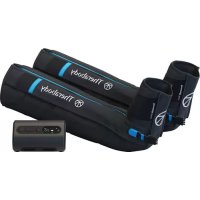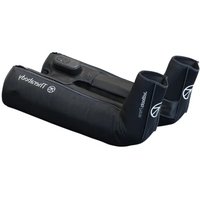
JetBoots Prime - Massage device THERAGUN - Free user manual and instructions
Find the device manual for free JetBoots Prime THERAGUN in PDF.


| Product Type | Pneumatic compression therapy device |
| Brand | Theragun (Therabody) |
| Model | JetBoots Prime |
| Intended Use | Temporary relief of muscle pain and improvement of blood circulation |
| Technology | TruGrade Technology - precise sequential pressure |
| Number of chambers per boot | 4 |
| Pressure levels | 25, 50, 75, 100 mmHg |
| Treatment durations | 20, 40, 60 minutes or continuous |
| Battery life | Approximately 180 minutes |
| Power supply | Rechargeable lithium-ion battery via USB-C |
| Recommended adapter | USB-C 20 W (not included) |
| Material | Medical-grade nylon, non-porous |
| Cleaning | 70% isopropyl alcohol solution |
| Protection rating | IP22 |
| Applied part type | BF |
| Weight (estimated) | Approximately 1.5 kg |
| Dimensions (unfolded, estimated) | Height approximately 70 cm |
| Box contents | 2 boots, drawstring backpack, 2m USB-C cable, manual |
| Warranty | Limited, see Therabody website |
| Manufacturer | Therabody, Inc., Los Angeles, CA |
| Safety | Do not use on persons under 18 years of age, medical contraindications |
| Locking | Lock function to prevent accidental activation |
Frequently Asked Questions - JetBoots Prime THERAGUN
User questions about JetBoots Prime THERAGUN
0 question about this device. Answer the ones you know or ask your own.
Ask a new question about this device
Download the instructions for your Massage device in PDF format for free! Find your manual JetBoots Prime - THERAGUN and take your electronic device back in hand. On this page are published all the documents necessary for the use of your device. JetBoots Prime by THERAGUN.
USER MANUAL JetBoots Prime THERAGUN
- Product Overview
- What's in the Box
- Getting to Know the Device
- Using the Device
- How the Device Works
- Care, Cleaning, and Charging
EN 3-14
DE 15-26
FR 27-38
IT 39-50
ES 51-62
RU 63-74
JetBoots Prime
1. Product Overview
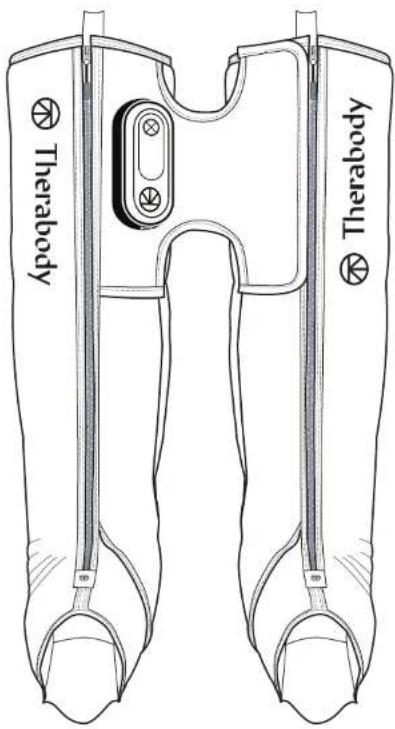
Refresh and recover your legs with Therabody JetBoots Prime device—wireless, ultra-portable and uniquely designed to fold up like a pair of pants so you can take the science-backed benefits of pneumatic compression anywhere. Customize your treatment time and pressure to your body's needs, accelerating recovery, reducing muscle soreness and improving performance with maximum comfort and control. The device features our proprietary TruGrade Technology that delivers precise, sequential pressure to optimize circulation and remove metabolic waste more safely and effectively than competitors. So you can just sit back, relax and recharge your legs.
Intended Use
The Therabody JetBoots Prime device is an air compression therapy device intended to provide graduated pressure to the legs. The device is indicated for the temporary relief of minor muscle aches and pains, and for a temporary increase in blood circulation to the treated area in people who are in good health. The device simulates kneading and stroking of tissues by using an inflatable garment.
2. What's in the box
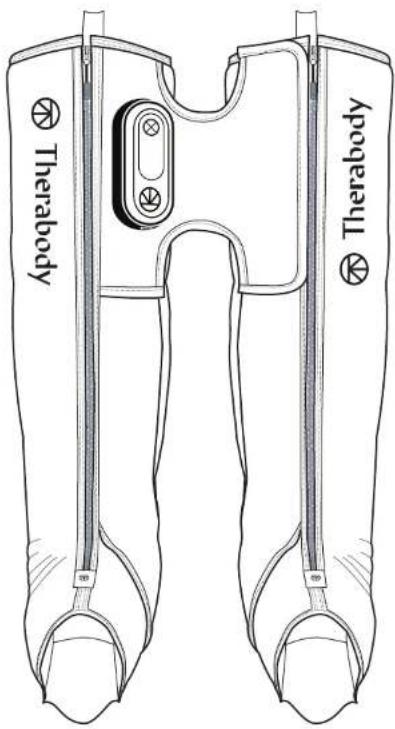
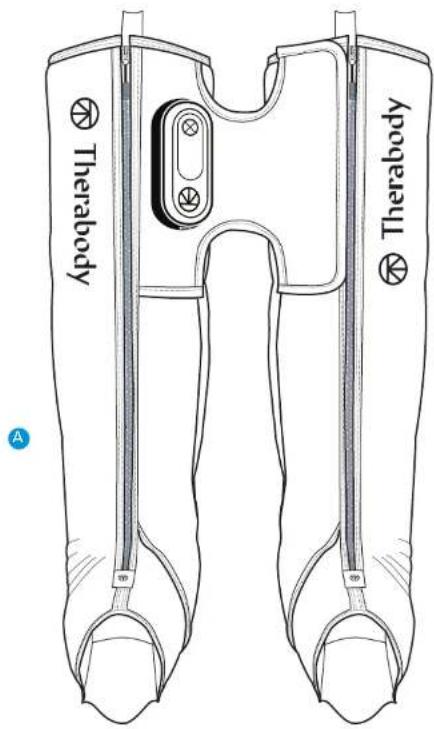
A Two connected compression boots
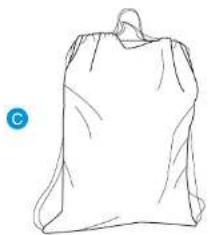
C Drawstring travel backpack
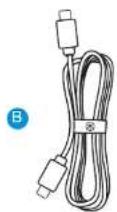
B 2 meter USB-C to USB-C charging cable Note: A power adapter is not included with this device. For best performance, use a USB-C power adapter of at least 20W power capacity. Ensure it is from a certified manufacturer and has not suffered any structural damage.
D Instruction manual
natural_image
Simple line drawing of a bag with a handle and a circular label 'C' in the corner (no text or symbols on the bag itself)
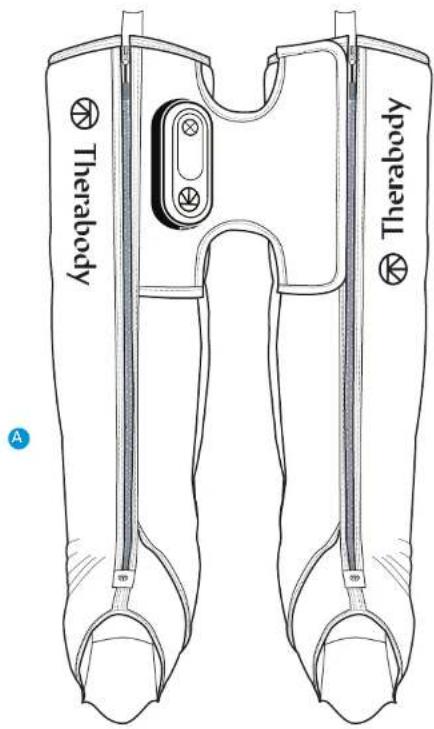
Figure 1. What's in the box

3. Getting To Know Your Device
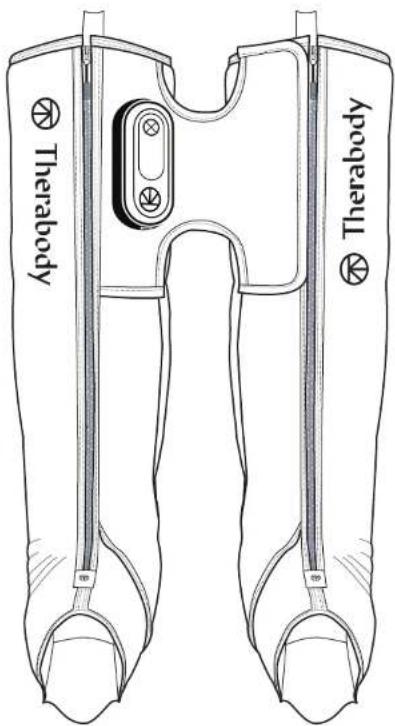
1 Lead Compression Boot
2 Support Compression Boot
3 Console and Control Panel
a Navigation buttons (power, start/pause, pressure, time)
b Indicators
c USB-C Charging Port
4 Fabric Bridge
5 External pockets
6 Main Zippers
7 Pulling/Hanging Loops
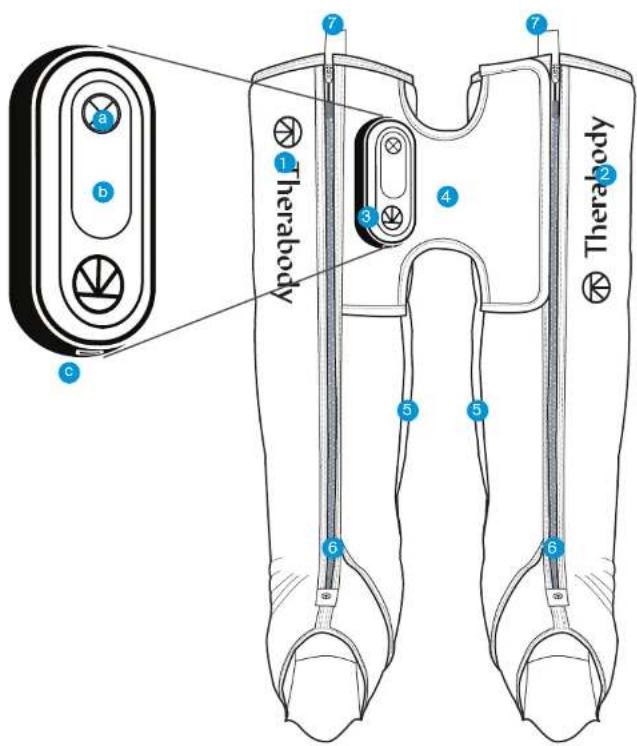
Figure 2. the JetBoots Prime and control panel
4. Use the device
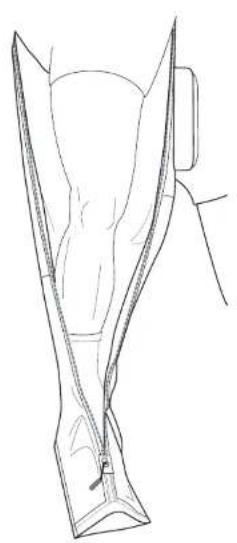
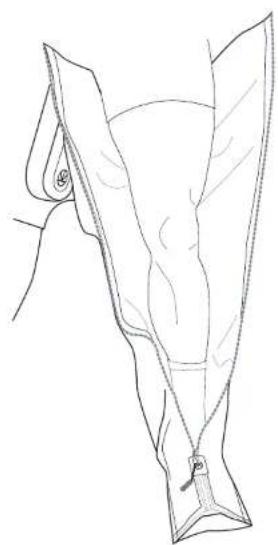
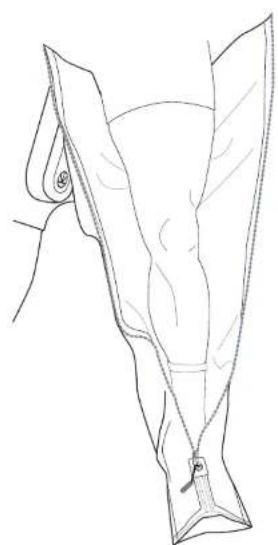
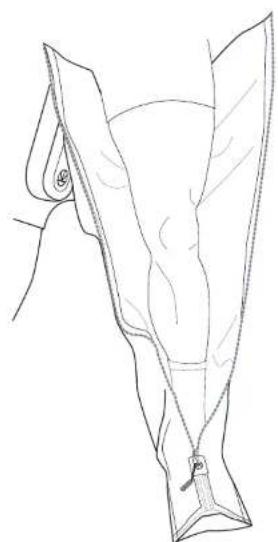
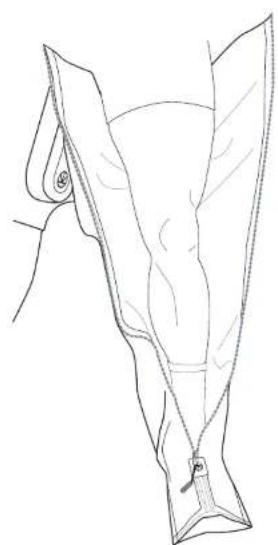
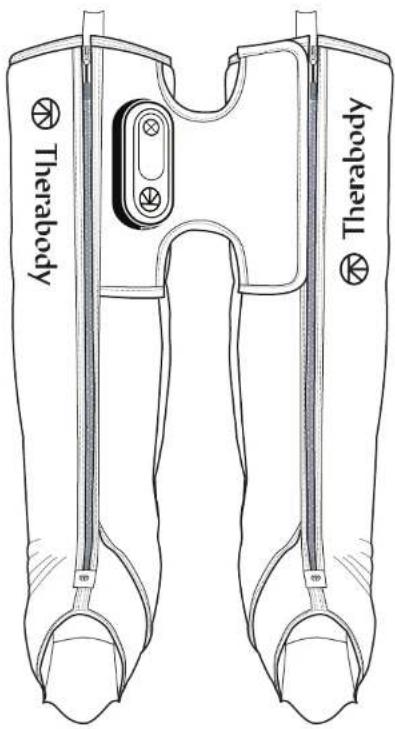
- Put on your boots. It is recommended that you wear shorts or thin pants while using the device. Reach a comfortable position, either sitting upright or lying down with your legs straight and feet in line with your waist. Unzip the compression boots completely and place each leg and foot inside each boot. Your legs should be in the center of each boot with your feet as close to the bottom as possible.
- Zip up the boots and keep them flat. Keep your legs straight and flat to prevent kinks and folds. Only hold the boots' edges when handling them. Avoid holding the device by the control panel. Zip both boots up.
**Do not use the device while standing or walking.
natural_image
Line drawing of a human leg and foot (no text or symbols)
natural_image
Line drawing of a garment sleeve with zipper, showing fabric texture and stitching (no text or symbols)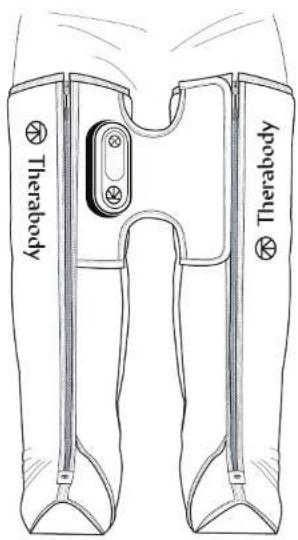
Figure 3. How to position oneself in the boots


- Turn on the device. To power on your device, press and hold the power button on the control panel. The LED indicators on the control panel will light up when the boots are on.
- Select your pressure intensity. Press the pressure button to toggle through four pressure intensity options: 25 mmHg, 50 mmHg, 75 mmHg, 100 mmHg. The pressure setting used in your last treatment will become the default setting for your next treatment. You can also add or subtract pressure during your treatment if desired.
- Select your treatment time. Press the time button to toggle through four time options: 20 minutes, 40 minutes, 60 minutes, or continuous. The time setting used in your last treatment will become the default setting for your next treatment.
- Start, pause, and exit treatment. Begin your treatment by pressing the start button. Press the pause button at any point during your treatment to pause and deflate the boots. Press the start button again to resume the treatment.
- Turn off the device. Press and hold the power button on the control panel to turn off the device. The device will automatically shut off after 10 minutes of inactivity, including completed or paused treatments. Unzip the compression boots fully and store.
- Lock the device. When not in use or during transport, lock the device to prevent turning it on accidentally. Turn off the device to activate the lock function. Quickly press the power button three times to initiate the lock function. Each LED light will flash sequentially to indicate that the device is locked. Quickly press the button three times again to unlock. Each LED light will flash sequentially (in the opposite direction) to indicate that the device is unlocked.

Buttons Indicators

Power Button

Start/Pause/Stop Button

Time Button

Pressure Button
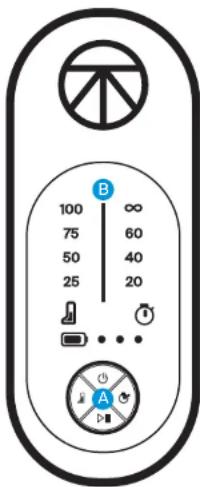
4-time intervals (20, 40, 60, and continuous)

Battery Indicator
3 dots indicate full battery level
2 dots indicate mid battery level
1 dot indicates low battery level
Figure 4. UI for settings
5. How the Device Works
Pneumatic compression applies controlled pressure to the legs. The pressure applied through sequential inflation and deflation increases circulation, which enhances the body's natural healing processes, delivering more oxygen and nutrients to the muscles and transporting waste products from exercise away from the muscle. This increase in circulation also helps reduce swelling and fluid buildup, so you feel less stiff and sore, making this an effective method for recovery, particularly after physical activity.
JetBoots Prime TruGrade Technology
TruGrade Technology uses advanced, innovative technology to deliver precise pressure gradually up your legs, starting from your feet moving up to your thighs. Each of the JetBoots Prime compression boot's four air chambers overlap so pressure is delivered up the leg sequentially, without the risk of harmful pressure gaps. This optimizes circulation and removes metabolic waste more safely, and effectively. No matter the size of your leg, you will experience the same amount of pressure when selecting the same treatment setting as someone of a different size. Other systems deliver a set amount of pressure regardless of the leg size, which can lead to dangerous over-constriction and numbness. Our precise pressure control not only optimizes recovery, but provides a safer massage experience.
How the Sequential Cycle Works
During a sequential cycle, pressure is applied directionally, starting at the base (feet) and progressing upwards (torso). Once Chamber 1 inflates and reaches its preset pressure level, it holds the pressure and begins inflating Chamber 2. The device continues to hold pressure in each subsequent chamber until all four chambers are inflated. Once all four chambers are inflated, the device releases pressure.
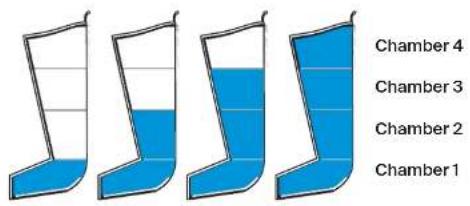
Figure 5. Sequential cycle
6. Care, Cleaning, and Charging
Device Maintenance
The following maintenance instructions are important to ensure that your device continues to work as it was designed. Failure to follow these instructions may cause your device to stop working.
Cleaning the Device
The JetBoots Prime compression boots have non-porous medical grade material that helps prevent bacteria buildup and provides a resistant surface. The internal overlapping chambers provide a smooth surface to clean, meaning no chamber flaps where bacteria and odors can build up.
- Unzip the boots completely and lay them on a flat surface.
- Use a 70% isopropyl alcohol (IPA) cleaning solution to gently clean the inside of the boots. Never use oil-based cleaning products.
- Wipe down the device's exterior using a soft cloth that is free of debris to reduce surface contaminants.
- Ensure there is no remaining debris after fully cleaning the device.
- Once you have fully cleaned the device, fully pat dry the surface and hang to dry completely before continuing use.
Note: This product is NOT waterproof. Do not submerge the device in water or clean it under running water. Do not allow the device to come into contact with corrosive solutions, which can damage the device's appearance and function.
Charging the Device
- The device is USB-C enabled and comes with a 6.5 feet (2-meter) USB-C charging cable. The device can charge while the device is powered on or off.
- Connect one end of the charging cable to the USB-C charging port on the device. It is located on the side of the control panel. Plug the other side into a 20 W USB-C power adapter for optimal performance. Using a power adapter with less capacity may not allow you to use the device while charging.
- When the device is on, the LED indicators will show the battery status when the device is on or charging. Turn on the device to check the battery status.
• 1 LED: Low battery
• 2 LEDs: Medium battery
• 3 LEDs: High battery
- The battery life of the device is approximately 180 minutes.
**Note: If using a charger from a third party, ensure that it is from a certified manufacturer and has not suffered any structural damage.
Store and Transport the Device
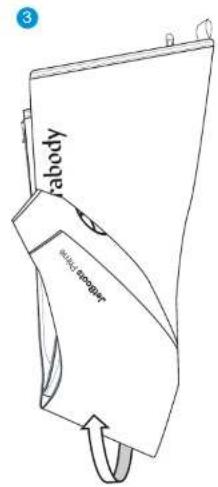
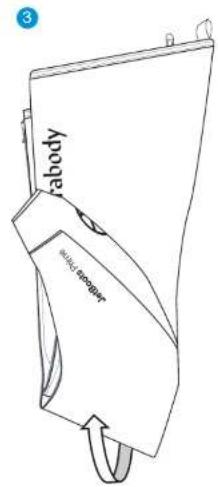
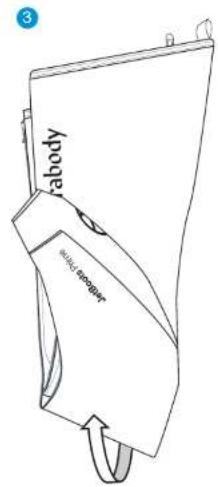
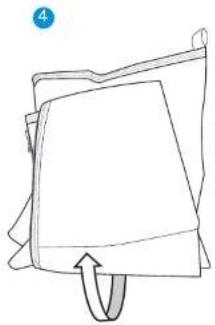
- Lay the device flat with the control panel facing up and allow compression boots to fully deflate.
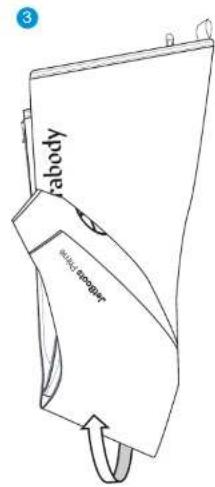
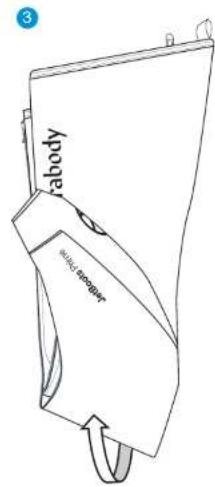
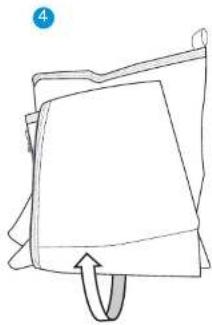
- Fold the right boot over the left boot, like you would a pair of pants. Align all edges of the boots, so it looks like a single boot.
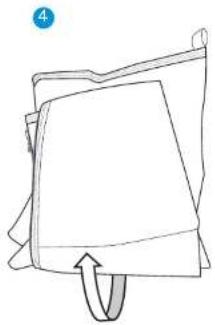
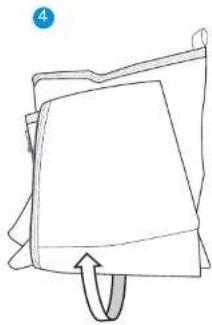
- Starting at the feet, fold them up 1/3 of the way up the leg.
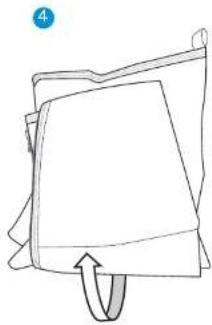
- Fold once more, so that the fold reaches the top of the boots. DO NOT fold the boots too tight as this can damage the hoses and connection points.
- Slide the folded device into the drawstring bag. Pull the side strings outward to close the bag and wear as a backpack or pull the top strings to use as a carrying bag.
Ensure that the device is clean and dry before storing. To store and transport the device, keep the device in its drawstring travel backpack, and handle it gently. Store the device in a cool and dry place (Temperature: -4-113°F (-20-45°C), Relative humidity: 10\~93% RH), atmospheric pressure 190.0-1060 hPa. Do not store the device where temperatures may exceed 45°C/113°F, such as in direct sunlight or in a vehicle.
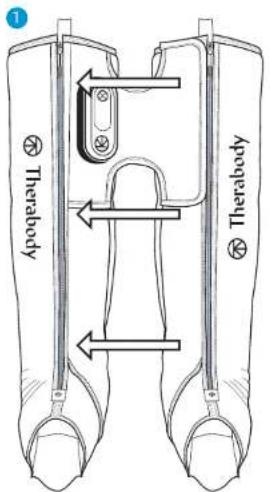
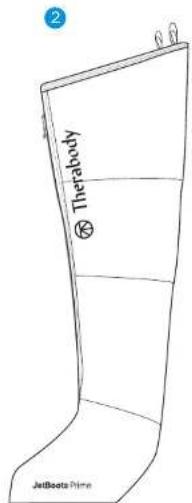
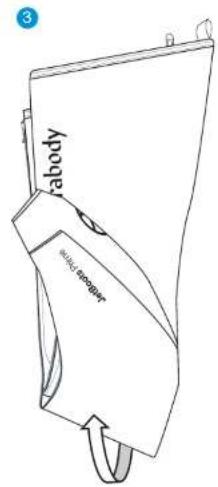
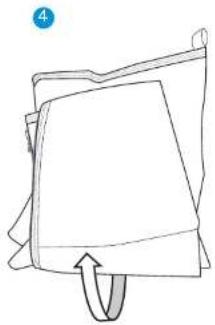
natural_image
Simple line drawing of a folded paper or document with a curved arrow indicating rotation (no text or symbols)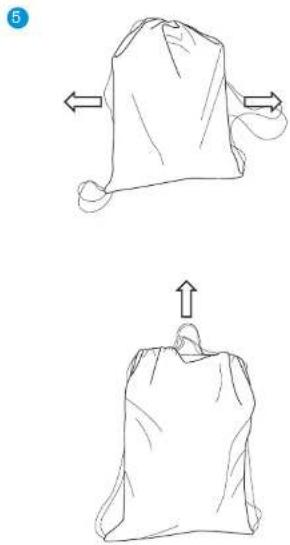
natural_image
Two hand-drawn sketches of a sack with arrows indicating movement, no text or symbols presentFigure 6. Folding Instructions

Troubleshooting
| SCENARIO POTENTIAL CAUSES POTENTIAL SOLUTIONS | ||
| Device does not turn on. | No electric power and no battery power in the device. | 1. Use the provided USB-C charging cable and a 20W USB-C power adapter to connect the device to a power outlet. Verify the device is charging or turning on. Note: using power adapters of lower power capacity will only allow the device to either charge or work, but not both simultaneously.2. Check that the power adapter, charging cable, and the console are all properly connected.3. If the device is not charging after verifying all of the above, the power adapter or the device may be damaged. If using another power adapter does not solve the issue, contact Therabody for further assistance. Visit https://www.therabody.com/us/en-us/support/support.html for the available contact methods. |
| Power adapter or USB-C charging cable damaged | ||
| Internal malfunction | ||
| Device automatically turns off and starts charging when connected to a USB-C power adapter. | The power adapter in use does not provide enough power to work and charge simultaneously | Check that the USB-C power adapter can provide at least 20W. If lower, allow the device to charge before using it. Contact Therabody for further assistance if the issue persists. Visit https://www.therabody.com/us/en-us/support/support.html for the available contact methods. |
| One or both compression boots do not fully inflate, and the device stops working. One yellow light is displayed. | Air leakage at the air hose connection or bladders. | 1. Inspect the air hose connections. Open the black zipper in the external pockets located in the internal side of the boots (under the "bridge").2. Check the air hoses are well connected to the air bladder nozzles. If loose, push and connect the air hose to the nozzle and check if the issue has been solved.3. If the issue persists, the air bladders may be damaged. Contact Therabody for further assistance. Visit https://www.therabody.com/us/en-us/support/support.html for the available contact methods. |
| One or both boots do not fully inflate, and the device stops working. Two yellow lights are displayed. | Air cannot move through the air hoses or air bladders (kinking) | 1. Ensure both boots are worn properly and the legs are fully extended. Check that the device is not kinked, folded, or twisted. Note that if the size is too long, the device may kink and fold, leading to discomfort.2. Check the "bridge" area is not folded while in use. Please adjust the "bridge" or your sitting position to ensure it is not folded. This may lead to air hose kinks.3. Inspect the air hose connections for air hose kinks. Open the black zipper in the external pockets located on the internal side of the boots (under the "bridge").4. Contact Therabody for further assistance if the issue persists. Visit https://www.therabody.com/us/en-us/support/support.html for the available contact methods. |
| Device stops working and displays two yellow lights blinking. | Internal components are overheating | 1. Check the environmental conditions are within the specified range. Operating Temperature: 32-95°F (0-35°C); Relative Humidity: 30-85% RH; Atmospheric Pressure: 700-1060 hPa.2. Stop using the device and allow it to cool down for 15 to 20 mins.3. Contact Therabody for further assistance if the issue persists. Visit https://www.therabody.com/us/en-us/support/support.html for the available contact methods. |
| Device stops working and displays three yellow lights blinking. | Battery is overheating | |
| Device stops working and displays three yellow lights. | Internal component malfunction | Contact Therabody for further assistance. Visit https://www.therabody.com/us/en-us/support/support.html for the available contact methods. |
DO NOT attempt to troubleshoot by disassembling the device as this will void the warranty and may cause injury.
Warnings and Guidance (Precautions and Contraindications)
Background
Therabody products are designed to unlock the body's natural ability to achieve health and well-being. Through science and technology, the Therabody portfolio of products allows people to access the therapeutic benefits of different natural phenomena to meet both their needs and preferences. There will be times when it is advisable to modify how devices are used (precautions) or times when it is not appropriate to use certain devices (contraindications). Read the following safety information for the device in its entirety prior to use.
Important Safety Information
General device Use
This device is intended for use by people in good health. This device is contraindicated against and should not be used by or on anyone with a history of epilepsy, seizures or cardiopathy.
The the device is not recommended for anyone with an electronic implanted device (such as a pacemaker), cardiac arrhythmia, tumors, or acute episodes of inflammatory diseases. The device is not recommended for those who have arteriosclerosis, thromboses, or implants in the body region being treated.
Please consult your physician prior to using the device if you are pregnant and/or nursing. Immediately stop using the device at the first sign of discomfort. The device IS NOT a toy. If you have any medical considerations please consult your doctor before using the device.
Safety, Precautions, and Contraindications
Specific Therapies
These recommendations are derived from consultation with medical experts and published research regarding precautions and contraindications as of the printing date. For up-to-date information, please visit us online at https://www.therabody.com/us/en-us/precautions-and-contraindications.html.
Precautions:
Due care is required in these circumstances and device use may need to be modified. Consult with a medical professional if you currently have or suspect you may have any of the following conditions or if you have any questions.
• Hypertension (controlled)
- Osteopenia
- Osteoporosis
- Pregnancy
- Diabetes
- Varicose veins
• Bony prominences or regions
• Abnormal sensations (e.g., numbness)
• Sensitivity to pressure
• Recent injury or surgery
• Scoliosis or spinal deformity
• Medications that may alter client sensations
- Due to movement of fluids in the body when using the device, use with caution on patients with heart disease. High pressure is not recommended for patients who have peripheral occlusion disease.
Contraindications:
The following are circumstances where the potential risks may outweigh the benefits. Consult a medical professional before use.
- Skin rash, open wounds, blisters, local tissue inflammation, bruises, or tumors
• Deep vein thrombosis, osteomyelitis
• Bone fracture or myositis ossificans
• Hypertension (uncontrolled)
• Acute or severe cardiac, liver, or kidney disease
- Neurologic conditions resulting in loss or altered sensation
- Direct application to the face, throat, or genitalia
- Bleeding disorders
• Recent surgery or injury
- Connective tissue disorders
• Peripheral vascular insufficiency or disease
• Medications that thin the blood or alter sensations
- Direct pressure over surgical site or hardware
- Direct pressure over eyes or throat
• Extreme discomfort or pain felt by client
• Severe scoliosis or spinal deformity
• Pacemaker, ICD, or history of embolism
- Allergy to device material (Nylon)
• Pregnancy/ nursing
• Abnormal sensations (ex. numbness)
• Cancer/tumors
- Epilepsy
• Cardiopathy (heart disease
Limited Warranty and Customer Service
For full warranty information, please visit www.therabody.com/warranty.
Customers who are in need of product support should visit
https://www.therabody.com/us/en-us/support/support.html for the available contact methods.
FDA-Cleared
Limited Warranty Only With Authorized Retailer Purchase
© 2024 Therabody, Inc. All Rights Reserved.
Patents at www.therabody.com/patents
Manufactured and Distributed by:
Therabody, Inc.
1640 S Sepulveda, Suite 300
Los Angeles, CA 90025
In the Australian market, the JetBoots Prime warranty is 1 year.
For Australian Market Only: The purchase of this device is accompanied by a limited warranty. For complete details about the rights afforded to you under this warranty, visit https://therabody.com/anz/en-au/warranty-support/.
Imported and Distributed By:
Therabody Australia Pty Ltd
Waterman Business Centre
175 Maroondah Highway
Suite 16, C307, Level 3
Ringwood Vic 3134 Australia
Importers:
Therabody International Limited
5th Floor, 40 Mespil Road,
DO4C2N4 Dublin, Ireland
Therabody UK Limited
Portsoken House 155-157
The Minorities, London.
United Kingdom, EC3N1LJ
UNIT WARNINGS
READ ALL INSTRUCTIONS AND CAUTIONARY MARKINGS IN THIS MANUAL, ON THE CHARGER, AND ON THE DEVICE BEFORE USING OR CHARGING THE Therabody JetBoots Prime DEVICE AND ITS ACCESSORIES.
When using the device, the following basic precautions should always be adhered to:
- USE ONLY AS INSTRUCTED. Use the device as described in the Therabody JetBoots Prime User Manual only. The device is intended for over-the-counter use. The device is not intended to diagnose, cure, or prevent diseases. Use only Therabody recommended accessories and replacement parts. The device is an advanced mechanical tool with electric components. If the device and its accessories are
not used or maintained properly, there is a risk of fire, electric shock, or injury. Failure to use and maintain the device and corresponding attachments in accordance with the instructions outlined in this manual will void the warranty and may result in product damage or physical injury. The device is intended for commercial and home use.
-
NOT FOR CHILDREN. The device and its accessories are not intended for use by anyone under the age of 18. The device and accessories are not intended for use by individuals with reduced physical, sensory, or reasoning capabilities or lack of experience and knowledge, unless given supervision or instruction concerning use of the device by a person responsible for their safety. The device is not a toy. Advise children not to play with the device or accessories.
-
DO NOT STAND WHILE USING THE DEVICE. Do not attempt to stand up while using the device. Standing up while using the device can lead to discomfort, falling, and damage to the device's internal components.
-
CHARGING. If your device doesn't turn on or the battery indicator displays a low battery level, please charge before first use. Charge the battery using the USB-C cable (included). When you use the charging cable (included), make sure its USB-C connector is fully inserted into a compatible power adapter before you plug the adapter into a power outlet. You can also charge the battery with third party cables that are compliant with USB-C and with applicable country regulations and international and regional safety standards. Other adapters may not meet applicable safety standards, and charging with such adapters could pose a risk of death or injury. Do not force the cable into place. Fully charge the device at least once every six months to prevent device and battery damage. Unplug the power adapter and charging cable when not in use.
-
DO NOT OVERCHARGE. Do not leave the device connected to the power adapter for more than one hour after the battery has been fully charged. The battery includes a protection system to avoid the risk of overcharging. However, overcharging may reduce its life over time.
-
CHARGING LOCATIONS. Charge the device with a power adapter and charging cable. Avoid skin contact when the USB-C is plugged into a power source as it may cause discomfort or injury. Do not sleep or sit on the USB-C connector. The device should be charged indoors in a well-ventilated, dry location. Do not charge the device outdoors, in a bathroom, or within 10 feet (3.1 meters) of a bathtub or pool. Do not use the device or charger on wet surfaces, and do not expose the charger to moisture, rain, or snow. Do not use the device or its compatible charger in the presence of explosive atmospheres (gaseous fumes, dust, grain, metal powders, or flammable materials). Sparks may be generated, possibly causing a fire.
-
UNPLUGGING THE CHARGER AND CARE. Pull the plug, not the cord, to reduce the risk of damage to the electrical plug and cord. Never carry the charger by its cord. Keep the cord away from heat, oil, and sharp edges. Do not stretch the charger cord or place the cord under strain. Do not handle the charger, terminals, or the device with wet hands. Always unplug this appliance from the electrical outlet immediately after using and before cleaning. Store cable to ensure it is not stepped on, tripped over, or otherwise subjected to damage or stress. Do not use a power adapter or charging cable that has received a sharp blow, been dropped, run over, or damaged in any way. For long-term storage, store with a fully charged battery.
-
USAGE. Discontinue use of the device if you are feeling pain or discomfort. If at any point during the treatment you feel pain or discomfort beyond what's expected from a compression device or a massage, stop the treatment immediately and remove the device. Discontinue use of the device if it overheats or becomes uncomfortably hot. Do not place any objects between your skin and the device.
-
DO NOT OPERATE UNDER BLANKET AND PILLOW. Excessive heating can occur and cause fire, electric shock, or injury.
-
DEVICE CARE AND SERVICE. Handle the device with care. The device contains electronic components that can be damaged if dropped, burned, punctured, or crushed. Do not disassemble
the device or attempt to repair the device yourself. Disassembling the device may damage it and may cause injury. If the device is damaged or if malfunctions occur, contact Therabody Customer service. The warranty will be void if the device, batteries, or charger are disassembled or if any parts have been removed. Do not use if damaged as these may cause injury. Do not puncture or damage the device. Puncturing the device can lead to incorrect operation. The device is NOT waterproof. The device is not machine washable. Do not place or store the device where it can fall or be pulled into a tub or sink. Do not place in or drop into water or other liquid. Do not reach for an appliance that has fallen into or come into contact with water. Unplug immediately. Clean the device according to the instructions found in the "Cleaning" section in the User Manual.
- BATTERY CHEMICALS CAUSE SERIOUS BURNS. Never allow the internal battery to come into contact with the skin, eyes, or mouth. If a damaged battery leaks chemicals, use rubber or neoprene gloves to dispose of it. If skin is exposed to battery fluids, wash with soap and water and rinse with vinegar. If eyes are exposed to battery chemicals, immediately flush with water for 20 minutes and seek medical attention. Remove and dispose of contaminated clothing.
- DO NOT SHORT CIRCUIT. A battery will short circuit if a metal object makes a connection between the positive and negative contacts on the battery or the 16V connector. Do not place a battery near anything that may cause a short circuit, such as coins, keys, or nails in your pocket. A short-circuited battery may cause fire and personal injury.
- STORING THE DEVICE AND ACCESSORIES. Store in a cool, dry place. Only charge the device when the ambient temperature is between -4-113°F (-20-45°C). Do not store the device, or charging cable where temperatures may exceed 113°F (45°C), such as in direct sunlight, in a vehicle, or in a metal building during the summer. Avoid tightly rolling the device, as this may damage the device's internal components.
- DEVICE DISPOSAL. This device contains a lithium-ion battery, and care must be taken upon disposal of the device. Before disposal of this device, please review your local laws and requirements surrounding Lithium-Ion Battery disposal. The preferred method of disposal is recycling the whole device.
Reporting adverse events to FDA
MedWatch is the Food and Drug Administration's (FDA) program for reporting serious reactions, product quality problems, therapeutic inequivalence/failure, and product use errors with human medical products, including drugs, biologic products, medical devices, dietary supplements, infant formula, and cosmetics. If you think you or someone in your family has experienced a serious reaction to a medical product, you are encouraged to take the reporting form to your doctor. Your health care provider can provide clinical information based on your medical record that can help the FDA evaluate your report. However, we understand that for a variety of reasons, you may not wish to have the form filled out by your healthcare provider, or your health care provider may choose not to complete the form. Your health care provider is not required to report to the FDA. In these situations, you may complete the Online Reporting Form yourself.
You will receive an acknowledgement from the FDA when your report is received. Reports are reviewed by FDA staff. You will be personally contacted only if we need additional information.
Submitting adverse event reports to FDA
Use one of the methods below to submit voluntary adverse event reports to the FDA:
1. Report Online at: www.accessdata.fda.gov/scripts/medwatch/index.cfm?action=reporting.home
2. Consumer Reporting Form FDA 3500B. Follow the instructions on the form to either fax or mail it in for submission. For help filling out the form, see MedWatchLearn. The form is available at: www.fda.gov/downloads/aboutFDA/reportsmanualsforms/forms/ucm349464.pdf
3. Call FDA at 1-800-FDA-1088 to report by telephone.
- Reporting Form FDA 3500 commonly used by health professionals. The form is available at: www.fda.gov/downloads/aboutFDA/reportmanualsforms/forms/ucm163919.pdf
GARMENT CARE
Meanings of symbols
Labels
SYMBOLS DESCRIPTION LOCATION
| IP 22 Degree of protection against ingress of water On rating label | ||
| [5008] | Read instructions before use On rating label | |
| [A66D] | Level of protection type BF applied part On rating label | |
 | Therabody, Inc.1640 S. Sepulveda Blvd. Suite 300Los Angeles, CA 90025 | On rating label |
| [5844] | Unique Device Identification (UDI) | On rating label and packaging |
 | Separate collection for waste electrical and electronic equipment.Note: For more information about disposal of equipment, its parts and accessories, please contact your local distributor. | On rating label |
JetBoots Prime
1. Produktübersicht
natural_image
Simple line drawing of a bag with a handle and a circular label 'C' in the corner (no text or symbols on the bag itself)
A
natural_image
Line drawing of a human leg and foot (no text or symbols)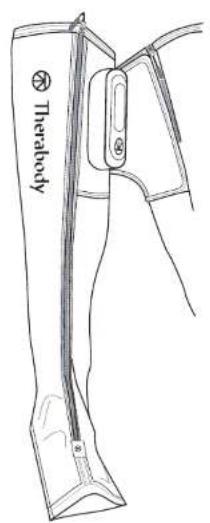
natural_image
Line drawing of a garment sleeve with zipper, no text or symbols present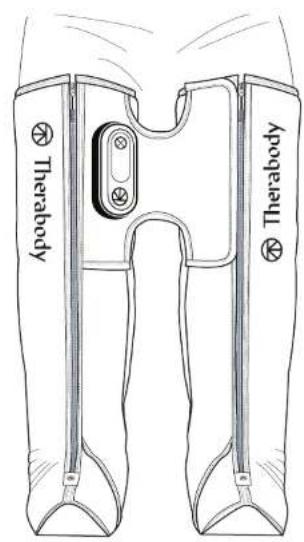
JetBoots Prime TruGrade Technology
natural_image
Four identical blue and white striped objects resembling stylized boots or containers, arranged horizontally (no text or symbols)Kammer 4
Kammer 3
Kammer 2
Kammer 1
natural_image
Simple line drawing of a folded paper or document with a curved arrow indicating rotation (no text or symbols)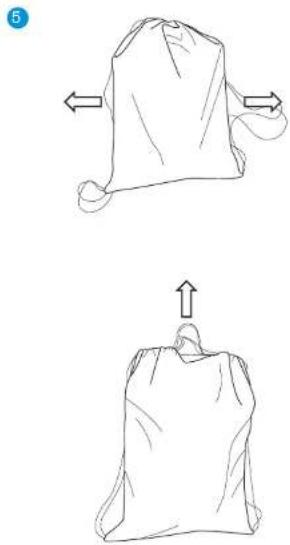
natural_image
Two hand-drawn sketches of a sack with arrows indicating movement, no text or symbols presentTherabody International Limited
5th Floor, 40 Mespil Road,
DO4C2N4 Dublin, Ireland
Therabody UK Limited
Portsoken House 155-157
The Minorities, London,
United Kingdom, EC3N1LJ
WARNHINWEISE
Unique Device Identification (UDI)

natural_image
Simple line drawing of a bag with a handle and a circular label 'C' in the corner (no text or symbols on the bag itself)
JetBoots Prime TruGrade Technology
natural_image
Four identical blue and white striped objects resembling stylized boots or containers, arranged horizontally (no text or symbols)Chambre 4
Chambre 3
Chambre 2
Chambre 1
natural_image
Simple line drawing of a folded paper or document with a curved arrow indicating rotation (no text or symbols)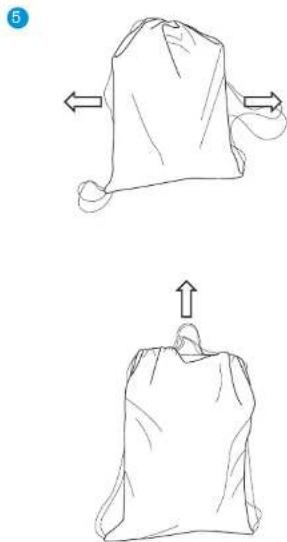
natural_image
Two hand-drawn sketches of a sack with arrows indicating movement, no text or symbols presentIllustration 6. Instructions de pillage

Dépannage
Therabody International Limited
Therabody UK Limited
Portsoken House 155-157
natural_image
Simple line drawing of a bag with a handle and a circular label 'C' in the corner (no text or symbols on the bag itself)
A
natural_image
Line drawing of a human leg and foot (no text or symbols)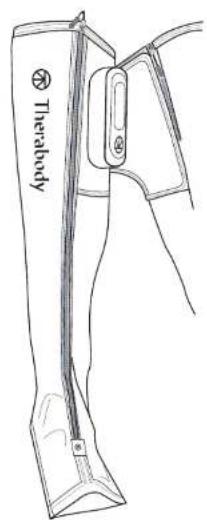
natural_image
Line drawing of a garment sleeve with zipper, showing fabric texture and stitching (no text or symbols)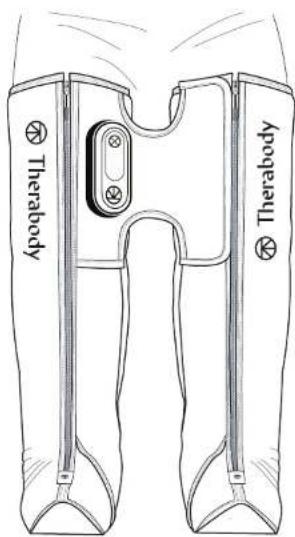
JetBoots Prime TruGrade Technology
natural_image
Simple line drawing of a folded paper or document with a curved arrow indicating rotation (no text or symbols)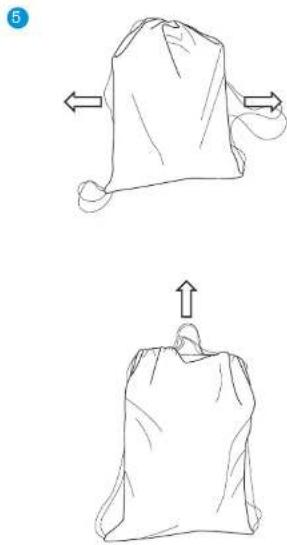
natural_image
Two hand-drawn sketches of a fabric bag with arrows indicating fold changes (no text or symbols)Therabody International Limited
5th Floor, 40 Mespil Road,
DO4C2N4 Dublino, Irlanda
Therabody UK Limited
Portsoken House 155-157
The Minorities, Londra,
natural_image
Simple line drawing of a bag with a handle and a circular label 'C' in the corner (no text or symbols on the bag itself)
A
natural_image
Line drawing of a human leg and foot (no text or symbols)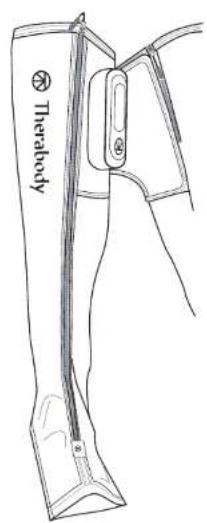
natural_image
Line drawing of a garment sleeve with zipper, showing fabric texture and stitching (no text or symbols)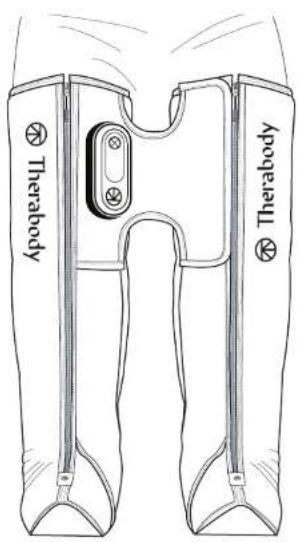
JetBoots Prime TruGrade Technology
natural_image
Simple line drawing of a folded paper or document with a curved arrow indicating rotation (no text or symbols)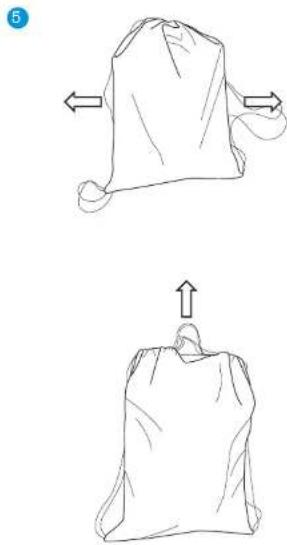
natural_image
Two hand-drawn sketches of a bag with arrows indicating movement, no text or symbols presentTherabody International Limited
5th Floor, 40 Mespil Road,
DO4C2N4 Dublín, Irlanda
Therabody UK Limited
Portsoken House 155-157
The Minorities, Londres,
natural_image
Simple line drawing of a bag with a handle and a circular label 'C' in the corner (no text or symbols on the bag itself)D

A
natural_image
Anatomical line drawing of a human leg and foot (no labels or text)natural_image
Line drawing of a garment sleeve with zipper, showing fabric texture and stitching (no text or symbols)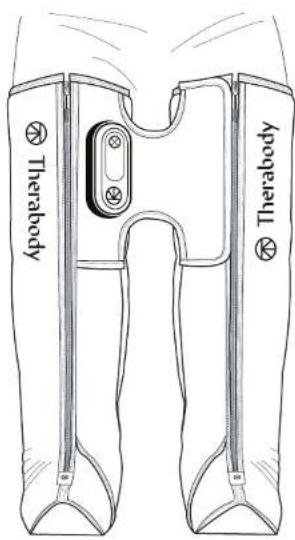
JetBoots Prime TruGrade Technology
natural_image
Four identical boots with blue liquid, shown in side-by-side color blocks (no text or symbols)Камера 4
Камера 3
Камера 2
Камера1
natural_image
Simple line drawing of a folded paper or document with a curved arrow indicating rotation (no text or symbols)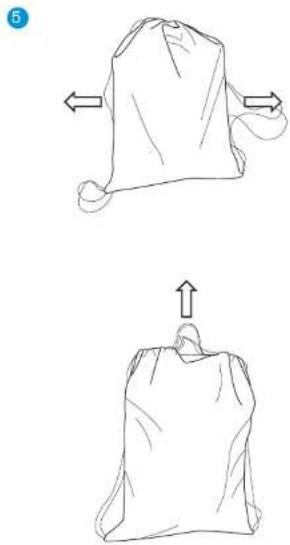
natural_image
Two hand-drawn sketches of a sack with arrows indicating movement, no text or symbols presentTherabody UK Limited
Born in Los Angeles, CA. Designed for everybody.


@Therabody