
Conga 13090 Spin Revolution Home&Wash - Robot vacuum CECOTEC - Free user manual and instructions
Find the device manual for free Conga 13090 Spin Revolution Home&Wash CECOTEC in PDF.
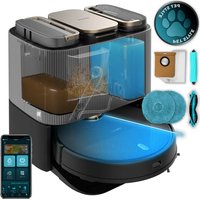


| Product Type | Robot vacuum and mop |
| Brand | Cecotec |
| Model | Conga 13090 Spin Revolution Home&Wash |
| Reference | A01_EU01_100B28 |
| Approximate dimensions (diameter x height) | 35 cm x 10 cm |
| Approximate weight | 3.8 kg |
| Power | 20 VDC 1.5 A, rechargeable lithium-ion battery 14.8 V, 3200 mAh |
| Connectivity | Wi-Fi IEEE 802.11 b/g/n, 2.4 GHz band |
| Cleaning modes | Auto, Edges, Spiral, Manual, Smart Zone, Spot, Restricted Zone, Full Clean |
| Suction power levels | Off, Eco, Normal, Turbo |
| Main functions | Mapping, Intelligent Return to Base (Total Surface 2.0), Scheduling, Carpet Cleaning (Turbo on Carpets), Night Function, Map Editing, Robot Localization |
| Self-cleaning base | Automatic emptying of dirt tank, cleaning and drying of cloths, clean and dirty water tanks |
| Dirt tank capacity | Not specified in the manual, but typical for this type: approx 400 ml |
| Clean water tank capacity | Not specified, estimated: 200 ml |
| Brushes | Main brush (rotating), side brush (3 bristles), 2 rotating mop pads |
| Filtration | High efficiency filter (HEPA), primary mesh filter, sponge filter |
| Recommended maintenance | Clean main and side brushes weekly, HEPA filter weekly, replace main brush before 320 h, HEPA filter every 3 months, side brushes every 3 months |
| Safety | Anti-drop sensors, obstacle detection, automatic stop on carpets (wet brushes), protection against extreme temperatures (0-40 °C), do not vacuum liquids |
| Spare parts available | Main brush, side brush, HEPA filter, primary filter, sponge filter, mop pads, dust bag for base, battery |
| Warranty and after-sales service | Official Cecotec After-Sales Service at +34 9 63 2107 28, repairs by qualified personnel |
| Origin | Made in China, designed in Spain |
Frequently Asked Questions - Conga 13090 Spin Revolution Home&Wash CECOTEC
User questions about Conga 13090 Spin Revolution Home&Wash CECOTEC
0 question about this device. Answer the ones you know or ask your own.
Ask a new question about this device
Download the instructions for your Robot vacuum in PDF format for free! Find your manual Conga 13090 Spin Revolution Home&Wash - CECOTEC and take your electronic device back in hand. On this page are published all the documents necessary for the use of your device. Conga 13090 Spin Revolution Home&Wash by CECOTEC.
USER MANUAL Conga 13090 Spin Revolution Home&Wash CECOTEC
Robot Aspirador/Vacuum-cleaner robot
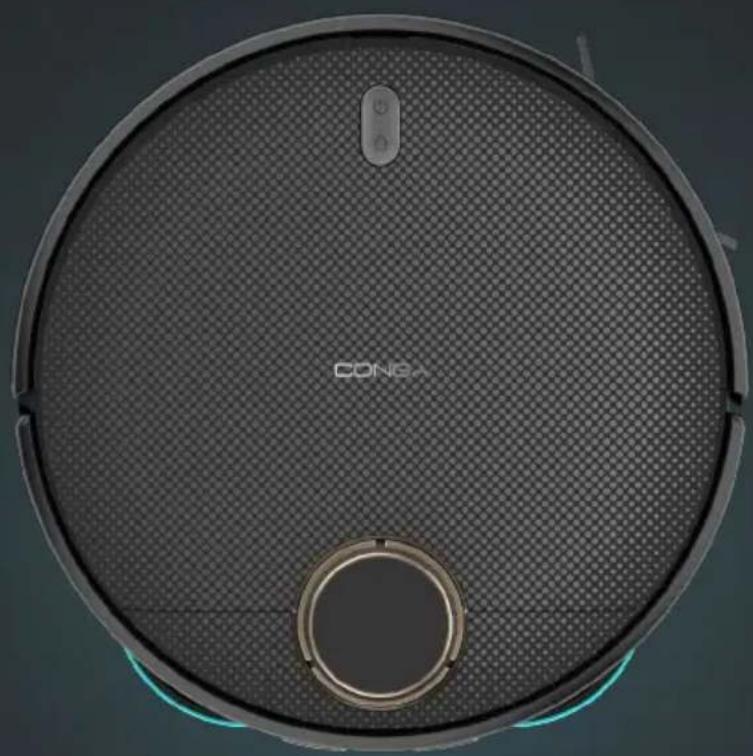
cecotec
Safety instructions 9
- Parts and components
- Before use
- Operation
4.Cleaning and maintenance 76
5.Troubleshooting 70
- Technical specifications
- Disposal of old electrical and
Electronic appliances
- Technical support and warranty
- Copyright
- Declaration of conformity
TABLE OF CONTENTS
- Read these instructions thoroughly before using the appliance. Keep this instruction manual for future reference or new users.
- This appliance must be used in accordance with these operating instructions. Cecotec will not be held liable or responsible for any damages or injuries caused by improper use.
- Make sure that the mains voltage matches the voltage stated on the rating label of the appliance and that the wall outlet is earthed.
- Check the power cable regularly for visible damage. If the cable is damaged, it must be repaired by the official Cecotec Technical Support Service to avoid any type of danger.
- This appliance is designed for domestic use only and is not intended for bars, restaurants, farmhouses, hotels, motels, and offices.
- Do not attempt to repair the appliance yourself. Contact the official Cecotec Technical Support Service for advice.
- Do not use the appliance to vacuum liquids, lit matches, cigarette ends, hot ash, or on wet surfaces.
- Do not use this appliance on concrete, asphalt, or other rough surfaces.
- Stop using the appliance if you notice an abnormal sound or sense a temperature higher than usual.
- Do not block the appliance openings or airflow. Keep openings free of any objects, and do not block them with clothes or your fingers.
- Turn off and unplug the appliance from the mains supply when it is not going to be used for a long period of time, before cleaning or repairing, before attaching components, and before removing the battery. Pull from the plug, not the cable, to disconnect it from the outlet.
- WARNING: the appliance has rotating parts which may pose a risk of entrapment. Exercise extreme caution.
- Do not immerse the cable, plug, or any other part of the appliance in water or any other liquid or expose electrical connections to water. Make sure your hands are dry before handling the plug or switching on the appliance.
- This appliance can be used by children aged 8 years and above and people with reduced physical, sensory, or mental capabilities or lack of experience and knowledge if they have been given supervision or instruction concerning use of the appliance in a safe way and understand the hazards involved. Children must not play with the appliance. Cleaning and user maintenance should not be carried out by unsupervised children.
- Unplug the power cable of the charging base before cleaning or maintenance.
- The appliance can only be used with the supply unit provided with it.
- The appliance must only be supplied with a very low safety voltage as indicated.
- Never touch the cable or the power socket with wet hands.
- Do not expose the appliance to direct sunlight, fire, water, or moisture.
- Do not sit or place sharp or heavy objects on top of the appliance. Before operating the robot vacuum cleaner, prepare the room and supervise it. To do so, remove any objects and cables that may affect its operation.
- Keep the appliance away from clothing, curtains, and similar materials. Always place the appliance on a flat and stable surface. Avoid placing it on unstable surfaces from which it could fall (such as tables or chairs).
- Before operation, make sure all the robot vacuum cleaner and charging base connections are in good condition.
- Avoid operating the robot vacuum cleaner under extremely high or low temperatures.
- The appliance must only be used with the battery supplied with the appliance or with compatible charging units approved by Cecotec.
- Non-rechargeable batteries must not be recharged.
- Make sure the appliance is not plugged into a mains socket before cleaning it or carrying out maintenance on it.
- Make sure the charging base is not plugged into a power outlet before cleaning it.
Battery instructions
- The appliance includes a Li-ion battery. Do not incinerate or expose it to high temperatures, as it may explode.
- Batteries may leak under extreme conditions. Should that be the case, do not touch the liquid. If the liquid gets into contact with skin, wash immediately with soap and water. If the liquid gets into the eyes, wash them immediately with clean water for a minimum of 10 minutes and seek medical attention. Wear gloves when handling the battery or cells and dispose of it immediately in accordance with local regulations.
- Avoid contact between batteries and small metal objects such as paper clips, coins, keys, nails, or screws.
- Never modify the charger in any way.
- Batteries must be removed from the appliance for safe disposal.
- Keep batteries out of the reach of children if they can be swallowed.
- Battery ingestion can cause burns, perforation of soft tissue,
and death. It can cause severe burns within two hours of the ingestion. - In case of battery ingestion, please seek medical help immediately. - WARNING: to recharge the battery, use only the charging base supplied with the appliance. - The batteries' supply terminals must not be short-circuited. - If the appliance is to be stored for a long period of time, it is advisable to remove the batteries. - Batteries must be inserted in the correct position. Pay attention to polarity when inserting it.
SAFETY INSTRUCTIONS
- Charging terminals
- Infrared sensor
- Laser sensor
- Top lid
- Back Home button
- Indicator lights
- Power button
- Infrared sensor
- Rotating mops
- Drive wheels
- Main brush cover
- Main brush
- Side brush
- Omnidirectional wheel 15. Free-fall sensors
- Battery
Robot vacuum cleaner accessories. Fig. 1.2:
- Mains cable
- Side brush
- Mop (x2)
- Self-cleaning brush
- High-efficiency filter
- Self-emptying base bag
- Instruction manual
- Brush
Self-cleaning base. Fig. 2:
- Dirt tank
- Clean-water tank
- LED indicator light
- Washing base
- Dirt tank cover
- Waste-water tank 7. Water duct
- Mop washing system
- Charging terminals
- Tank emptying system
- Tank emptying system
- Access tray and robot bracket
Mixed tank. Fig. 3
- Dirt tank
- Tank opening
- Top dirt tank cover
- High-efficiency filter + primary filter + sponge filter
NOTE:
The graphics in this manual are schematic representations and may not exactly match the device.
2. BEFORE USE
This robot vacuum cleaner includes a package designed to protect it during transport. Take the robot vacuum cleaner out of the box. Keep the original box and other elements in a safe place, as this will help you prevent damage to the robot vacuum cleaner when transporting it in the future. In case the original packaging is disposed of, make sure all packaging materials are recycled accordingly. - Make sure all parts and components are included and in good conditions. If there is any piece missing or not in good condition, contact the official Cecotec Technical Support Service immediately.
Warnings
- Remove all objects around the robot vacuum cleaner such as clothing, papers, cables, curtains, or other fragile objects which may block or slow down the operation of the robot vacuum cleaner. Fig. 4
- If the room to be cleaned is near a balcony or stairs, a physical barrier should be placed to prevent the robot vacuum cleaner from failing and getting damaged, thus ensuring safe operation. Fig. 5.
- Do not use the robot vacuum cleaner to vacuum up liquids. Fig. 6.
- Direct exposure to sunlight or heavy light contrasts may affect the correct operation of the sensors. If this happens, the robot vacuum cleaner will cease operation. Move it to a new location for it to start operating again.
- Please note that the total height of the robot vacuum cleaner is 10 cm, and the sensors are at the bottom, so it is advisable to prevent access to all areas below 10 cm to avoid damaging the laser.
Charging base installation
- Place the charging base against a wall and leave a minimum free space of 1.5 metres to the front and 0.5 metres to each side. Fig.7
- Connect the charging base to a power socket. Wind and store the remaining cable to prevent accidents.
- Press and hold the Start/Pause button for a few seconds.
- When the indicator light turns on, place the robot vacuum cleaner in the charging base and make sure the charging terminals on the robot match those on the charging base. If the indicator light is flashing blue, it means the battery is not completely charged. To ensure the maximum cleaning time, wait until the indicator light turns into steady blue, as this indicates that the battery is fully charged, and that the robot vacuum cleaner is ready to clean.
Note
- Take the robot vacuum cleaner to the charging base if the battery is low. The robot vacuum cleaner may not turn on if battery is too low.
- The robot vacuum cleaner will automatically turn on when placed on the charging base. The robot vacuum cleaner cannot be turned off during recharge.
Clean water tank installation (Fig. 8)
- Pull out the clean-water tank (tank with transparent cover) in the direction shown.
- Lift up the cover and fill the water tank with clean water. Do not exceed the "MAX" mark on the tank. Install again the clean-water tank in its original position.
Recommendations
Add a few drops of cleaning agent to the water, if necessary, as long as it is non-corrosive. - Using cleaning agents in excess might block water outlets. - In order to get perfect scrubbing, it is suggested to moisten the mop before using it and washing it after each use.
First use
- Once the robot vacuum cleaner and the charging base are installed, follow these steps before the first cleaning. First of all, fully charge the robot vacuum cleaner. It is suggested to allow the robot to charge overnight. Once fully charged, it may carry out the first cleaning cycle and save the first map. To do so, activate the Auto mode and select the Eco suction level. It is very important to follow these instructions so that the robot vacuum cleaner recognises every corner of your house and can carry out a complete mapping of it.
- If your house is very large and the robot vacuum cleaner runs out of battery, it will return to the charging base, save both complete and incomplete maps, and, once charged, it will
resume cleaning where it left off until the entire surface has been mapped. The robot vacuum cleaner is constantly mapping, so it adapts in an individual and personalised way to the particularities of each home and constantly improves its map.
The robot will return to the charging base to clean the mops and moisten them again to continue cleaning, according to the frequency selected in the application.
Information about the charging base
The charging base includes the charging function, mop cleaning, and dirt tank emptying. After cleaning, the robot will automatically return to the charging base to recharge the battery, empty the dirt tank, clean and dry the mops. During cleaning, the robot will return to the charging base to clean the mops and moisten them again to continue cleaning where it left off, depending on the frequency selected in the app. - The base will perform the self-emptying function according to the emptying frequency value selected on the app. In addition, it is possible to force the emptying of the dirt tank from the robot vacuum cleaner by pressing the Back Home button or from the app. - When the robot vacuum cleaner reaches the charging base, it will beep once, indicating that it has made good contact with the charging terminals of the base. - The base will then clean the mops and collect the dirty water generated. After cleaning and dirty water collection, the base will activate the mop drying function. If the indicator light on the charging base is red, it may indicate that the dirt bag is not attached or is full, the clean-water tank is empty, or the dirty water tank is full. - If so, fit or replace the bag, fill the clean-water tank, or empty the dirty water tank.
3. OPERATION
Robot vacuum cleaner's buttons
Auto Mode
- Press the Start/Pause button on the robot vacuum cleaner or from the app for the robot to automatically start cleaning in Edge mode and perform a cleaning cycle in an orderly zig-zag pattern while recognising which areas it has cleaned and which it hasn't. The robot vacuum cleaner will automatically plan the cleaning route during cleaning.
- The robot will return to the charging base to clean the mops and moisten them again to continue cleaning, according to the frequency selected in the application. If you control the robot vacuum cleaner manually during this mode, the robot will recalculate the route, so it may pass through already cleaned areas. To ensure efficient cleaning, do not operate the robot vacuum cleaner manually during automatic cleaning. Thanks to its Total Surface 2.0 technology, if the battery is low during the cleaning cycle,
the robot vacuum cleaner will smartly return to the charging base automatically and once fully charged, it will resume the cleaning process from the same point. During cleaning, the robot vacuum cleaner will stop briefly to evaluate the area and calculate the cleaning route (this stop will vary depending on the house conditions).
Back Home mode
- Press the Back Home button on the robot vacuum cleaner or from the app to send the robot vacuum cleaner to the charging base.
- This mode can be activated during any cleaning cycle.
- The robot vacuum cleaner will take the shortest route back to the charging base thanks to its map-memorisation feature and the smart back-home function. Upon completing a cleaning cycle or when the battery is low, thanks to its TotalSurface 2.0 technology, the robot vacuum cleaner will automatically return to the charging base to avoid running out of battery. Once the robot has recharged, it will resume cleaning from the point it has stopped.
Note:
If there is no good access to the charging base, the robot vacuum cleaner will not be able to return to it. If this happens, manually place it in the self-emptying base.
Functions
Pause
While the robot vacuum cleaner is operating, press the Start/Pause button on the robot vacuum cleaner or select it in the app to pause the cleaning process. Press the Start/Pause button on the robot vacuum cleaner or on the app to resume the cleaning process.
Standby
The robot vacuum cleaner will automatically enter standby mode after 10 minutes of inactivity. Press the Start/Pause button on the robot vacuum cleaner or in the app to activate it again.
Cleaning modes
- The robot vacuum cleaner includes different modes and functions that can be toggled from the app.
- In addition, in every one of the cleaning modes on the app, you will be able to select the Turbo mode on carpets, which activates the maximum suction power when the robot vacuum cleaner detects a carpet. Please note that the robot will stop the rotary movement of the mops when it detects the carpet, but if the mops are wet it may dampen the carpet. To avoid this, from the application you can indicate restricted areas in the areas where the carpets are in your home, or directly from the application indicate that the robot does not climb on the carpet when it detects it.
Edge mode
- When this mode is selected, the robot vacuum cleaner will clean along walls and around furniture (e.g., table or chair legs). The robot will return to the charging base to clean the mops and moisten them again to continue cleaning, according to the frequency selected in the application.
- Press the edge cleaning mode in the app.
Spiral mode
- When this mode is enabled, the robot vacuum cleaner will thoroughly clean a specific area. It will start cleaning at a specific spot and will move outwards in a spiral motion, and it will return to the starting spot in an inwards spiral motion again.
- When it finishes and returns to the starting spot, the robot vacuum cleaner will return to the charging base directly. Before using this mode, place it in the spot you wish to clean.
- Select the spiral cleaning mode on the app.
Manual mode
The robot vacuum cleaner can be moved manually by selecting manual mode in the app and using the arrow keys.
Back Home mode
Press the Back Home button on the robot vacuum cleaner or select the option in the app to send the robot vacuum cleaner to the charging base in any cleaning mode.
Smart Area mode
Once the home's map has been saved, select this mode for the robot to clean a specific area in zigzag motion. The robot vacuum cleaner will clean the selected area and then return directly to the charging base. You can select more than one area on the map at a time. The robot vacuum cleaner will only clean the area selected on the map. It will therefore go to the selected area and return to the base without vacuuming. - To activate this mode, select the Smart Area option on the app.
Spot mode
- Select this mode if you want to thoroughly clean a specific point in the map, making the most of the robot vacuum cleaner's maximum power. The robot vacuum cleaner will clean an area of 1.6m × 1.6m in a zigzag pattern and return directly to the charging base once finished. The robot vacuum cleaner will only clean the area selected on the map. It will therefore go to the selected area and return to the base without vacuuming.
- To activate this mode, select the spot cleaning option on the app.
Restricted Area mode
Mark out specific areas on the map that you do not want the robot vacuum cleaner to clean. The robot vacuum cleaner will detect the defined area and will not clean it. You can select more than one restricted area on the map.
Complete cleaning mode
Select this mode to perform a deep cleaning of your house. The robot vacuum cleaner will clean in Edge mode and continue zigzagging horizontally and vertically. It will then return to the charging base.
To activate this mode, select the Complete Cleaning option on the app.
Power level function
Select the power level on the app to control the robot vacuum cleaner's suction power during cleaning. There are four suction power levels: 3: Off, Eco, Normal and Turbo.
Cleaning schedule
- To make cleaning easier, the robot vacuum cleaner has a function that allows it to be programmed daily from the app. According to the setting, the robot vacuum cleaner will automatically start cleaning in the selected days at the desired time.
- Before adjusting the time and settings, make sure the robot vacuum cleaner is switched on.
- In addition, you can select different predefined clearing programmes for different situations in your daily life.
Other Functions
Sleep mode
A Do Not Disturb time slot can be selected to control the operation of the robot vacuum cleaner, and it can be modified or cancelled from the app. During the set time, the robot vacuum cleaner will disable the automatic continuous cleaning and timer functions.
Map editing function
This function allows you to edit the generated maps: rename cleaning areas, split or combine areas, and edit cleaning mode, mark restricted areas and select different suction powers.
Robot vacuum cleaner's Location function
Allows to locate the robot vacuum cleaner on the map.
4. CLEANING AND MAINTENANCE
Cleaning the main brush. Fig.9
The main brush spins at top speed and helps push dirt into the suction mouth. This brush is in contact with the floor, and therefore with dirt, so it can wear out over time, negatively affecting cleaning efficiency. For this reason, it is suggested to replace the main brush after a maximum of 320 hours or less.
- Slightly press the tabs on the main brush frame to open the main brush compartment and remove it.
- Remove hair, lint, and other dirt trapped in the brush and around the shafts with the help of the self-cleaning brush.
- Clear and clean the robot vacuum cleaner's suction channel.
- Install the main brush and its frame.
Recommendation
It is recommended to clean the main brush once a week with the help of the self-cleaning brush.
Side brush. Fig.10
The side brush is designed with many bristles and is used both to push dirt into the suction mouth and to thoroughly clean edges and corners. This brush may wear out over time, which will negatively affect cleaning efficiency.
Recommendations
It is recommended to clean the side brush once a week with the help of the self-cleaning brush. Remove the retaining screw of the side brush with a screwdriver and clean the brush regularly. After cleaning, reinstall the side brush using the screwdriver.
Recommendation
To ensure perfect cleaning, it is recommended to change the side brush every 3 months (depending on frequency and type of use).
Dirt tank. Fig. 11.
- Lift the top cover of your robot.
- Press the tank removal button and remove the tank.
- Use the self-cleaning brush to clean the inside of the mixed tank.
- You can clean the dirt tank with water, without immersing the tank.
- Reinstall the dust tank on the robot vacuum cleaner.
Filters.
High-efficiency filter
The high-efficiency filter is designed with fibres that help trap dust particles, dust mites, pollen, etc. It is very important to periodically clean the filter, to prevent these particles from building up in the filter causing efficiency loss. It is convenient to carry out this maintenance once a week. - Replace the high efficiency filter every 3 months, depending on the frequency and type of use.
Recommendation
You can remove dirt from the high-efficiency filter with a small brush or gently shake the filter on a hard surface to remove the dust. The high-efficiency filter cannot be washed.
Primary mesh filter and sponge filter
The filtering system is featured with a primary mesh filter and a sponge filter. Located next to the high-efficiency filter. It is suggested to replace them either after a maximum of 160 hours of use or when they are worn out due to operation.
Recommendation
Dirt can be removed with a small brush or by shaking carefully against a hard surface for dust to fall off. You can also use warm water without detergents to obtain better results. Always make sure they are completely dry before installing them again; otherwise, moisture can reach the robot vacuum cleaner's motor and damage it.
Sensor cleaning. Fig. 12
- The robot vacuum cleaner has different types of sensors, for example, proximity sensors that allow the robot to move around while detecting obstacles, or fall-detection sensors that help the robot detect slopes or possible gaps/unevenness such as staircases. These sensors are always in contact with dust particles, and therefore can deteriorate over time, causing possible navigation errors.
- Use a clean, dry, and soft cloth to wipe off any dust from the free-fall sensor located on the robot vacuum cleaner part.
- It is recommended to clean all sensors of the robot vacuum cleaner every 35 hours of use or less, using a soft, dry cloth.
Mop holder. Fig. 13
- The mop holder is attached to the robot with magnets. It is important to keep these clean to ensure good contact.
- For cleaning, remove the mop holders and wipe the magnets with a soft, dry, clean cloth.
- Replace the holders.
Charging base. Fig. 14:
Clean the dirty water tank and the different cleaning areas of your charger base by removing these parts as indicated by the direction arrows.
- In addition, the charging base has two charging terminals that can be dusty and dirty. Wipe them with a clean, soft, dry cloth.
Charging and replacing the battery
- To extend battery life, leave the robot vacuum cleaner charging on the self-emptying base whenever not in use.
- Remove the battery and store it in a safe, dry place if the robot vacuum cleaner will not be used for a long period of time.
- To replace the battery, follow the instructions below:
- Unscrew the screws on the bottom battery cover. Remove the cover and remove the battery.
- Insert the new battery.
- Replace the battery and the lower casing and refasten the screws.
5. TROUBLESHOOTING
Robot vacuum cleaner
| Problem Possible cause and solution | |
| The robot vacuum cleaner does not switch on or does not clean | The robot vacuum cleaner does not work when battery is low. Charge it before operation. |
| The room temperature is below 0 °C or above 40 °C. | |
| The robot vacuum cleaner isn't charging or returning to the self-emptying base | There are too many obstacles near the self-emptying base. Relocate the base to an obstacle-free area. |
| Clean the charging terminals of the robot vacuum cleaner and the self-emptying base. | |
| Make sure the robot vacuum cleaner is switched on. | |
| The robot vacuum cleaner is too far away from the self-emptying base. Place it closer and try again. | |
| The robot vacuum cleaner does not work properly | Turn off the robot vacuum cleaner and turn it on again. |
| Reset the robot vacuum cleaner by pressing the side Reset button. |
| The robot vacuum cleaner makes a strange noise during operation | The main brush, side brush, or omnidirectional wheel are blocked or tangled. Stop the robot vacuum cleaner and clean them. |
| The robot vacuum cleaner does not clean efficiently or doesn't pick up all the dirt | The high-efficiency filter is blocked. Clean it. |
| The main brush is blocked or tangled. Clean it. | |
| The dirt tank is full, empty it. | |
| The robot vacuum cleaner could not connect to the Wi-Fi network | Bad Wi-Fi signal. Check that the robot vacuum cleaner is located in an area with good Wi-Fi signal. |
| The Wi-Fi connection is unstable. Reset the router, check if there are any App updates, and try again. This robot vacuum cleaner only supports the 2.4 GHz band. | |
| Make sure that your smartphone mobile data are disabled to improve the pairing process. | |
| The robot vacuum cleaner did not carry out the scheduled cleaning task | Check if the robot vacuum cleaner is in Sleep mode and change mode. This option can be found on the general settings of the robot vacuum cleaner and allows you to define time slots in which the robot will not perform the scheduled cleaning tasks when in Sleep mode. |
| Make sure the robot vacuum cleaner is plugged to the mains, that it will not be able to carry out scheduled cleanings offline, and that the battery is not low. | |
| The robot vacuum cleaner does not return to the self-emptying base after finishing Spot cleaning or changing the starting position | The robot vacuum cleaner will map and calculate a new route after running in Spot cleaning mode or after changing its starting position. |
| If the self-emptying base is too far away from the robot vacuum cleaner, the latter won't be able to return to the base. Manually move the robot vacuum cleaner close to the base. |
| The robot vacuum cleaner does not resume cleaning | Make sure the robot vacuum cleaner is not in Sleep mode, as it will not resume cleaning in this mode. |
| When manually placed in the self-emptying base, the robot will not resume cleaning. | |
| The robot vacuum cleaner is always offline | Make sure the robot vacuum cleaner is successfully connected to a 2.4 GHz network and always in areas with good Wi-Fi signal. |
| The connection between the smartphone and the robot vacuum cleaner failed | Make sure the robot vacuum cleaner and the charging base are in an area with good Wi-Fi signal, reset the router, and retry connection. |
Self-cleaning base
| Problem Possible cause and solution | |
| The self - cleaning base does not clean the maps | There is not enough water in the clean - water tank. Fill it in. |
| The waste - water tank is full. Empty and clean it. Also, clean the openings of the waste water filter. |
6. TECHNICAL SPECIFICATIONS
Product: Conga 13090 Spin Revolution Home&Wash
Product reference: EU01_100828
Voltage: 20 V DC 1.5 A
Rechargeable Li-ion battery
Rated capacity: 14.8V = 3200mAh
Wi-Fi connection: Wi-Fi IEEE 802.11 b/g/n 2.4 GHz
Maximum Transmission Power: 20 dBm
Product: Self-emptying base
Input: 220-240 V - 50/60 Hz
Output: 20V ~ 1.8A
Power: 650W
Technical specifications may change without prior notification to improve product quality. Made in China | Designed in Spain
7. DISPOSAL OF OLD ELECTRICAL AND ELECTRONIC APPLIANCES
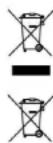
This symbol indicates that, according to the applicable regulations, the product and/or batteries must be disposed of separately from household waste. When this product reaches the end of its shelf life, you should dispose of the batteries/accumulators and take them to a collection point designated by the local authorities.
Consumers must contact their local authorities or retailer for information concerning the correct disposal of old appliances and/or their batteries.
Compliance with the above guidelines will help protecting the environment.
8. TECHNICAL SUPPORT AND WARRANTY
Cecotec shall be liable to the end user or consumer for any lack of conformity that exists at the time of delivery of the product under the terms, conditions, and deadlines established by the applicable regulations.
It is recommended that repairs be carried out by qualified personnel.
If at any moment you detect any problem with your product or have any doubt, do not hesitate to contact the official Cecotec Technical Support Service at +34 963 210 728.
9. Copyright
The intellectual property rights over the texts in this manual belong to CECOTEC INNOVACIONES, S.L. All rights reserved. The contents of this publication may not, in whole or in part, be reproduced, stored in a retrieval system, transmitted, or distributed by any means (electronic, mechanical, photocopying, recording or similar) without the prior authorization of CECOTEC INNOVACIONES. S.L.
10. DECLARATION OF CONFORMITY
Cecotec Innovaciones hereby declares that this robot vacuum cleaner, model EU01_100828
Conga 13090 Spin Revolution HomeRtWash is in conformity with the Radio Equipment Directive 2014/53/EU.
The full text of the EU Declaration of Conformity can be found on the following website: www.cecotec.es
1. PARTS AND COMPONENTS
Input: 220-240V - 50/60Hz
Output: 20V - 1.8A
Power: 650W
Technical specifications may be modified without prior notification in order to
Product: Congo 13090 Spin Revolution Home & Wash.
Voltage: 20 V DC 1.5 A
Replaceable Li-ion battery
Nominal power: 14.8V-3200 mAh
Wi-Fi connection: Wi-Fi IEEE 802.11 b/g/n 2.4 GHz
Transmission power: 20 dBm
Product: Self-emptying base
Input: 220-240V~50/60Hz
Output: 20V-1.5A
Power: 650W
Program Return to base:
2. INSTRUCTIONS FOR USE
The packaging materials are recyclable. Please dispose of them in the appropriate recycling bins. Do not dispose of the packaging or the appliance with household waste. Take the packaging and the appliance to a recycling point for proper disposal. If you wish to dispose of the appliance, please ensure it is recycled through the appropriate channels. Make sure the appliance is disposed of correctly and in accordance with local regulations. If you have any questions, contact the Cecotec Technical Support Service.
Precautions
- This appliance is excluded from any liability for damages caused by misuse. Do not use the appliance on rugs, carpets, or other surfaces that may be damaged by the appliance. Fig. 4 If the appliance is used on a surface that is too rough or sharp, it may cause damage to the appliance or the floor. Fig. 5 Do not use the appliance to clean liquids. Fig. 6 The appliance should only be used with the original accessories. If the appliance is not working properly, contact the technical support service. Keep the appliance away from heat sources and open flames. Do not immerse the appliance in water or any other liquid. Keep the appliance at least 10 cm away from walls and furniture to ensure proper ventilation.
Installation
Place the charging base on a flat surface with at least 1.5 meters of clearance on each side and 0.5 meters in front. Fig. 7 - Connect the power adapter to the base. Plug in and store the excess cable to avoid tripping hazards. Keep the power button pressed for a few seconds to turn on the appliance. When the indicator light turns on, the appliance is ready for use. Place the appliance on the charging base and ensure it is properly aligned with the charging contacts. If the indicator light does not turn on, the battery may be empty. To ensure a long battery life, charge the appliance fully before first use. The indicator light will turn off when the battery is fully charged.
The base is placed in the water, and if the battery is low, the base is placed in the water and it may need to be replaced if the battery is low. The base flow is activated automatically by the timer. The battery cannot be replaced during the timer duration.
Install the device in clean water. Fig. 8
Fill the device with clean water (preferably with distilled water) towards the indicated direction. - Rinse the device with clean water. Do not use the device with the water tank empty. - Place the device back in clean water at the start of the operation.
Maintenance
Check the filter in the water; if it is necessary, it is enough that it is not dirty. Do not overuse cleaning agents, as they may damage the water base. For stubborn dirt, it is recommended to remove the pre-filters from the device and clean them after each use.
Use
After installing the base and the water base, you will need to follow the instructions below for the first cleaning. First, the base flow must be checked for water circulation. It is recommended to start it during the duration of the operation. When the battery is low, it must be cleaned and refilled with water. This is done by activating the automatic function (Auto) and turning off the
the reference value. It is important to clean this guide, so that the base flow can be adjusted to the angle of the sun and can be used for paper recycling. If the sun is strong and the base flow is without interruption, it will allow the water base to be cleaned from the first time and the paper filters, and the filters, it is recommended to clean them from the place where they are placed and to recycle them after the operation. The base flow is recycled continuously. Remove the pre-filters from the device and clean them with a soft brush and then rinse them with water. The flow will allow the water base to clean the pre-filters and to put them back in place to continue the cleaning according to the instructions that have been given in the guide.
Information about the water base
The washing machine performs a wash cycle, taking into account the type of fabric and the degree of soiling of the laundry. After the wash cycle, the machine automatically performs 10 wash cycles to rinse, spin, and drain the laundry. During the wash cycle, the machine will heat the water to wash the laundry and the temperature will be one degree higher to ensure the wash cycle is effective. The machine will perform an automatic wash cycle according to the selected program. It is possible that a separate rinse cycle is necessary to remove detergent residues from the laundry. When the machine is in operation, the door is locked and cannot be opened until the cycle is complete. Then, the machine will drain the water and spin the laundry. After the wash cycle and the spin cycle, the machine will cool down the heating element. If the water in the machine is hot, it may indicate that the laundry is not properly rinsed or is still dirty, and the rinse water is dirty or the spin cycle is not effective. In this case, the machine will drain the water and refill it with clean water or spin the laundry again.
3. OPERATION
Control panel buttons
Automatic operation
- Press the button to start the wash cycle. The machine will automatically begin the wash cycle in the selected program and will continue to perform wash cycles with a specific frequency, while recognizing which areas have been washed and which areas will be automatically rinsed. The machine will heat the water to wash the laundry and will spin it to remove excess water, according to the selected program. If you open the door during this operation, the machine will stop and the door will unlock, so it is possible to add or remove items that are not yet washed. To ensure an effective wash, do not open the door during the automatic wash cycle. Thanks to the Total Surface 2.0 technology, the machine automatically adjusts the water level and the drum speed according to the load and the type of fabric. During the wash cycle, the machine will make a small pause to distribute the laundry and to plan the rinse cycle (this pause may vary depending on the conditions of the machine).
Spin operation
NOTE TO THE USER: This appliance is intended for household use only. It should not be used for any other purpose. The appliance must be cleaned regularly to maintain proper operation. The cleaning process is automatic and does not require any special maintenance. Thanks to TotalSurface 2.0 technology, the robot vacuum can automatically detect the type of flooring and adjust its cleaning mode accordingly. When the dust bin is full, the appliance will indicate that it needs to be emptied.
Specifications:
The appliance must not be used if the power cord is damaged. If this occurs, contact the manufacturer or an authorized service center.
ENGLISH ENGLISH
Features
Power:
To turn the appliance on, press the power button on the appliance or the remote control. To start the cleaning cycle, press the power button again. To stop the cleaning cycle, press the power button once more.
Standby:
The appliance will automatically enter standby mode after 10 minutes of inactivity. Press the power button on the appliance or the remote control to wake it up.
Cleaning Modes
This appliance offers different cleaning modes that can be selected according to your needs. For example, the "Turbo" mode is suitable for deep cleaning of carpets, and it activates the maximum suction power. The robot vacuum will automatically detect the type of flooring and adjust its cleaning mode accordingly. If the floor is wet, the robot may slip. To avoid this, you can restrict certain areas using the virtual wall or magnetic strip.
Auto Mode
When Auto Mode is selected, the robot vacuum will clean the entire floor area in a systematic pattern (e.g., back and forth, edge cleaning, etc.). The robot will navigate around obstacles and continue cleaning until the battery is low, then it will return to the charging base.
Spot Mode:
When Spot Mode is selected, the robot vacuum will intensively clean a specific area. It will spiral outward from the center of that area, then return to the center and repeat the spiral pattern. Once the cleaning is complete, the robot will return to the charging base.
- Press the button to start the cleaning program. The device will automatically clean the filter.
Manual operation:
The device can be moved manually by operating the manual control on the handle and using the wheels.
Cleaning program 1
Press the button once to start the cleaning program. The device will clean the filter automatically. Press the button again to stop the cleaning program.
Cleaning program 2
As soon as the device is turned on, the cleaning program starts automatically. This program is for cleaning the filter with a brush. At the end of the cleaning program, the device will stop automatically. You can find more information in the user manual. The device will activate the cleaning program automatically, so it will stop and start without any action. To activate this program, press the button on the handle.
Cleaning program 3
This program is for cleaning the filter with a brush. The device will activate the cleaning program only in the cleaning mode, so it will stop and start without any action. To activate this program, press the button on the handle.
Cleaning program 4
This program is for cleaning the filter with a brush. The device will activate the cleaning program only in the cleaning mode, so it will stop and start without any action. To activate this program, press the button on the handle.
Cleaning program 5
This program is for cleaning the filter with a brush. The device will activate the cleaning program only in the cleaning mode, so it will stop and start without any action. To activate this program, press the button on the handle.
GREEK GREEK
To activate this program, press the button on the handle.
Select the cleaning mode to set the desired cleaning intensity according to the duration of the cleaning session. There are four cleaning modes: Off, Eco, Normal, and Turbo.
Cleaning schedule:
To schedule cleaning, the robot must be connected to the app. Depending on the settings, the robot will start cleaning automatically at the selected times. To set the time and modes, make sure the robot is connected. - Additionally, you can select different scheduled cleaning programs for different days of the week.
Functions:
Night mode
The robot can be set to operate at a specific time interval, which can be set in the app. During this scheduled cleaning period, the robot will operate at reduced noise levels.
Advanced settings
This function allows you to adjust the cleaning parameters, increase cleaning areas, reduce or increase areas, and adjust the cleaning function. You can set restricted areas and select different suction powers.
Positioning of the robot or the base:
Place the robot on the charging base.
4. CLEANING AND MAINTENANCE
Cleaning the central brush (Fig. 9)
The central brush must be cleaned regularly to help maintain optimal cleaning performance. This brush works on all floor types and, therefore, with use, it may accumulate hair and debris, which can have a negative impact on
cleaning efficiency. Therefore, it is recommended to replace the central brush every 320 hours or less.
Remove the central brush from the vacuum cleaner to empty the dust container. 2. Remove dirt, dust and cleaning residues from the filter and from the devices with the help of the brush. 3. Check and clean the filter of the vacuum cleaner regularly. 4. Reinstall the central brush.
2007
You can remove the central brush for thorough cleaning using the brush.
Central brush Fig.10
The central brush is almost maintenance-free. The brushes are used only to remove dust from the vacuum cleaner and to clean the edges and corners. This brush can be used for a long time, which is why it has an anti-wear coating that protects it from wear.
Assembly
You can clean the central brush with a brush or with the help of the brush.
Remove the brush from the central brush with a clean cloth and clean the brush.
After cleaning, reinstall the central brush using the clip.
Sigma
For optimal cleaning, it is recommended to replace the central brush every 3 months (depending on the frequency and intensity of use).
See Fig.11.
- Lift the cover of the dust container.
- Press the release button of the dust container and remove the dust container.
- Use the brush to clean the inside of the dust container.
- Mtnopeite va nluvei tnv koiotn ta ngokovns vepo, xupic va buioe in dekqevn.
- TomoBtntne gava to doxieio anoBean oKovn otokoupaouot
ΦiAtpa.
DiIpo uynArsiooos
To qiltpo uynanc andoanc evai axbiaaepve me eva biKtuovuou oupaalae onny Mayieuan ownamdlv avokncaapeuwkovng, yupn ka. Enoevw,pinei va
EAAHNIKA EAAHNIKA
Kaipepetai Tepoikia yai va atopoeiyeta n ouoaepeun autow tww ouamilwiu oto qaipto kai n eioi n taoiteeauatokitacousu. 15avika, autn n auvtnpn Ta pTeirva npayatototieira laopa npy 880a4da. - Suovitatai va alaicete to qlatpo uynanst omoosn kale 3 mvec (avaoy a e n auvoiota ka tov turo (xnofns).
Σuσtaaŋ
MTOpeTe VA apaIpaTeTe Tn pIoAIOIc AMTo oI pIoTPO uINiAC mtOdoAnC ME iia iKpI Bouptra n Va avakivNCTe ATALo To pIoTPO eioAOKnPf EtnApVEIOVA vA to AIOJAKPVETe Tn OKov. To pIoTPO uINiAC tAOOIOE VvTAVEtAI.
BaoKo pIAtpo TAEyMA TOc KaI pIAtpo aouyyapio
To aotnma qipaplaqaroc aumnpwovet at o eva npweodov qltpo taymuoc kai eva qilpto opouyyapoiu, ta oioia pkiokovtai dima sto qilto uynnc an odoonc Zuvitatai n avktaaantou to apyoteo mra 160 wpc xphnng n arav naptnpneTe on trapounaQauv @bopcs.
Σuστaση
Mtopeite va aapapeetene t npuiia me ia kipn boupstra n va ta kouvnte atana ale iia oxanipmtapveia vya va atoakupveeta n okvni. Mtopeite emiongva xpanjauotinae cetote vepo xupic atoppuattviia va etimuxte eva kalutepo atoteremaqa, povtivocatva eivai evteaowstpvta atavikataaeta, biopetika u ypaia mtopei va eioxwnepa sto porep kai va tpokalaei BApn onkouta pumont.
Kaepapiaooctwwao0nnpw. Eik.12:
H akouta potot aac diabeetie diaopepetikouc tuntouiaontpuiv, yia npadaiyua, oiaontripec troooyians tvn bongouv va kaapkei evtonoictva mida eumodia kai oiaontripec katia nnc twnan tvn bongouv va envticke kaioei keva otwocakae.Autoi oiaontripec biokovar ae ouevx etanp ie uowatioda okiovkn kai ogk toitou. uipouv va utobaoiuovv ne tynpadoo tovxovou, onyuvvtrac oe thavec Badaec kainynop Xpnjouotoiotie 1eva Kbaopoeiyeovka oiaokao Tvi yia va okoutiote IN kovn tiouc diapocouo aioiipnc tsk oukantouit. - Suviata va kaabapicete aleouc touaiothnpiec tsokoutac pounot k35 wpcxphnnc nanytepo, xpaonmuowvrae eva paakko, un yypo tavi.
The vacuum cleaner is connected to the mains. It is important to keep it clean to ensure its proper operation. Clean the vacuum cleaner and its accessories with a soft, dry cloth. -DO NOT IMMERSE IN WATER.
Base station. Fig. 14:
Clean the base station with a damp cloth and the different accessories. Clean the base of your appliance by wiping these parts as shown in the figures. -Additionally, the base station has two side brushes that can be removed and cleaned. Clean them with a soft, dry cloth.
Mode Area Intelligent:
Voltage: 20 V DC 1.5 A
Rechargeable Li-ion battery
Nominal Capacity: 14.8 V = 3200 mAh
CATALACATALA
WiFi connection. WiFi IEEE 802.11 b/g/n 2.4 GHz Maximum transmission power: 20 dBm
Product: Robot vacuum base Input: 220-240V~50/60Hz Output: 20V=1.8A Power: 650W
Technical specifications may change without prior notice to improve product quality. Made in China | Designed in Spain
7. RECYCLING OF ELECTRICAL AND ELECTRONIC APPLIANCES
Fig./Img/Abb/Afb/Rys.6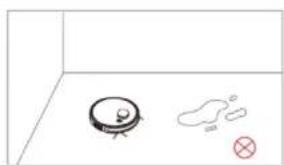
Fig./Img/Abb/Afb/Rys.7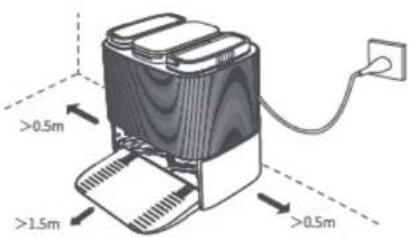
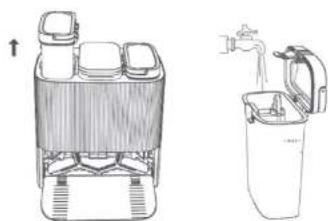
Fig./Img/Abb/Afb/Rys.8 Fig./Img/Abb/Afb/Rys.9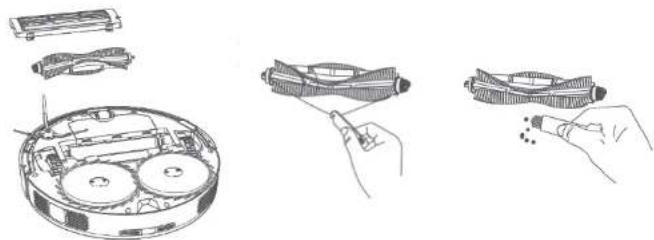
Fig. 10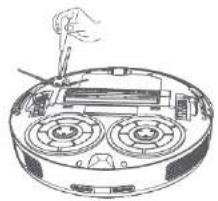
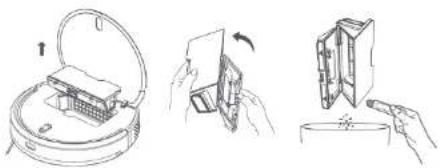
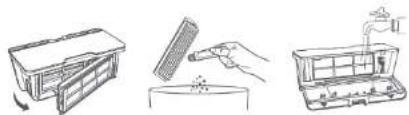
Fig. 11, Fig. 12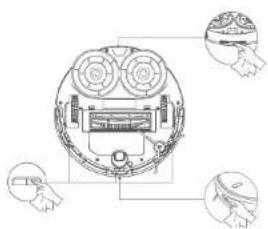
Fig. 13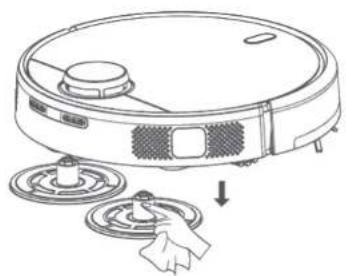
Fig. 14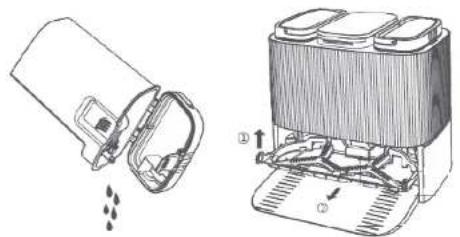
www.cecotec.es


- TABLE OF CONTENTS
- BATTERY INSTRUCTIONS
- SAFETY INSTRUCTIONS
- ROBOT VACUUM CLEANER ACCESSORIES. FIG
- SELF-CLEANING BASE. FIG
- BEFORE USE
- WARNINGS
- CHARGING BASE INSTALLATION
- NOTE
- CLEAN WATER TANK INSTALLATION (FIG. 8)
- RECOMMENDATIONS
- FIRST USE
- INFORMATION ABOUT THE CHARGING BASE
- OPERATION
- ROBOT VACUUM CLEANER'S BUTTONS
- AUTO MODE
- BACK HOME MODE
- FUNCTIONS
- PAUSE
- STANDBY
- CLEANING MODES
- EDGE MODE
- SPIRAL MODE
- MANUAL MODE
- SMART AREA MODE
- SPOT MODE
- RESTRICTED AREA MODE
- COMPLETE CLEANING MODE
- POWER LEVEL FUNCTION
- CLEANING SCHEDULE
- OTHER FUNCTIONS
- SLEEP MODE
- MAP EDITING FUNCTION
- ROBOT VACUUM CLEANER'S LOCATION FUNCTION
- CLEANING AND MAINTENANCE
- RECOMMENDATION
- PRIMARY MESH FILTER AND SPONGE FILTER
- SENSOR CLEANING. FIG
- CHARGING AND REPLACING THE BATTERY
- TROUBLESHOOTING
- SELF-CLEANING BASE
- TECHNICAL SPECIFICATIONS
- DISPOSAL OF OLD ELECTRICAL AND ELECTRONIC APPLIANCES
- TECHNICAL SUPPORT AND WARRANTY
- COPYRIGHT
- DECLARATION OF CONFORMITY
- PARTS AND COMPONENTS
- PROGRAM RETURN TO BASE
- INSTRUCTIONS FOR USE
- PRECAUTIONS
- MAINTENANCE
- USE
- ENGLISH ENGLISH
- POWER
- MANUAL OPERATION
- CLEANING PROGRAM
- GREEK GREEK
- EAAHNIKA EAAHNIKA
- ΣUΣTAAŊ
- ΣUΣΤAΣΗ
- MODE AREA INTELLIGENT
- CATALACATALA
- RECYCLING OF ELECTRICAL AND ELECTRONIC APPLIANCES
Brand : CECOTEC
Model : Conga 13090 Spin Revolution Home&Wash
Category : Robot vacuum