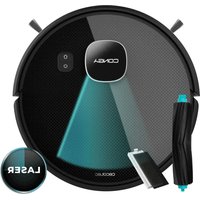
Conga 7690 Immortal Max Home - Robot vacuum CECOTEC - Free user manual and instructions
Find the device manual for free Conga 7690 Immortal Max Home CECOTEC in PDF.
Pick your language and provide your email: we'll send you a specifically translated version.
| Product Type | Robot vacuum |
| Brand | Cecotec |
| Model | Conga 7690 Immortal Max Home |
| Dimensions (L x W x H) | 35 x 35 x 10 cm |
| Weight | 3.2 kg |
| Power | Lithium-ion battery 14.4 V / 2600 mAh |
| Battery Life | Up to 120 minutes |
| Charging Time | Approximately 4 hours |
| Suction Power | 30 W (max 2000 Pa) |
| Dustbin Capacity | 300 ml |
| Water Tank Capacity | 180 ml (for mopping function) |
| Navigation System | Laser Lidar and infrared sensors |
| Main Functions | Sweeping, vacuuming, mopping, scheduling, obstacle detection |
| Control | Cecotec app, remote control, touch buttons |
| Connectivity | Wi-Fi 2.4 GHz |
| Noise Level | 65 dB (medium) |
| Maintenance and Cleaning | Washable HEPA filter, removable brushes, washable dust and water tanks |
| Safety | Drop detection, shock sensors, automatic shutdown in case of overheating |
| Spare Parts and Repairability | Side brushes, filter, tank, battery (replaceable) |
| Box Contents | Robot, charging station, adapter, cable, water tank, brushes, remote control, spare filter |
Frequently Asked Questions - Conga 7690 Immortal Max Home CECOTEC
How to start the robot for the first time?
Place the robot on the charging station, plug in the adapter and let it charge fully. Download the Cecotec app, connect the robot via Wi-Fi, then press the 'Start' button.
How to schedule a cleaning?
Open the Cecotec app, select 'Scheduling', choose the desired days and times. The robot will start automatically at the set time.
The robot does not connect to Wi-Fi, what to do?
Make sure the Wi-Fi is 2.4 GHz (the robot does not support 5 GHz). Check that the password is correct and that the robot is close to the router. Reset the network in the app.
How to clean the filter and brushes?
Remove the dustbin, take out the filter and wash it with warm water (no detergent). Let it dry completely before reinserting. The side brushes can be removed to remove hair and lint.
What to do if the robot makes unusual noise?
Check the main brush and side brushes for obstructions (hair, strings). Clean them if necessary. If the noise persists, contact customer service.
How to use the mopping function?
Attach the water tank to the robot, fill it with water (not too hot) and optionally a little cleaning agent. Select the 'Mopping' mode in the app or on the remote control.
The robot does not return to base, why?
Make sure the charging station is plugged in and the path is clear. Check that the base sensors are not dirty. If the problem persists, try moving the base to a more open area.
How to reset the robot?
Press and hold the 'Power' button for 10 seconds until the robot turns off. For a factory reset, press and hold 'Power' and 'Home' simultaneously for 5 seconds.
What are common error codes?
Error codes are displayed on the robot or in the app. For example: E1 = drop sensor obstructed, E2 = brush blocked, E3 = wheel blocked. Refer to the manual for the full meaning.
Where to buy spare parts?
Spare parts (brushes, filters, battery, tank) are available on the Cecotec website or from authorized dealers. Use only genuine parts.
User questions about Conga 7690 Immortal Max Home CECOTEC
0 question about this device. Answer the ones you know or ask your own.
Ask a new question about this device
No questions yet. Be the first to ask one.
Download the instructions for your Robot vacuum in PDF format for free! Find your manual Conga 7690 Immortal Max Home - CECOTEC and take your electronic device back in hand. On this page are published all the documents necessary for the use of your device. Conga 7690 Immortal Max Home by CECOTEC.