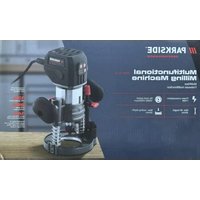
PPMF 710 A1 - Milling machine PARKSIDE - Free user manual and instructions
Find the device manual for free PPMF 710 A1 PARKSIDE in PDF.


| Product type | Multifunction router |
| Brand | Parkside |
| Model | PPMF 710 A1 |
| Power consumption | 710 W |
| Rated voltage | 230 V, 50 Hz |
| Protection class | Double insulation (Class II) |
| No-load speed range | 10,000 – 34,000 min⁻¹ (6 levels) |
| Lifting height (plunge router) | 0 – 40 mm |
| Lifting height (trimmer) | 0 – 35 mm |
| Tool holder | 6 mm and 8 mm |
| Sound pressure level | 83.9 dB(A) (uncertainty K=3 dB) |
| Sound power level | 91.9 dB(A) (uncertainty K=3 dB) |
| Vibration emission value (hand/arm) | 2.5 m/s² (uncertainty K=1.5 m/s²) |
| Supplied material | Multifunction router, plunge router module, angle milling module, trimming module, parallel guide, wrench, 2 suction adapters, collets 6 mm and 8 mm, copy rings 10 mm and 16 mm, carrying case, instruction manual |
| Intended use | Milling grooves, edges, profiles, elongated holes in wood, plastic and light materials; copy milling |
| Safety | Wear hearing protection and dust mask; use protective gloves; keep children away |
| Maintenance | Check and replace carbon brushes; clean with a dry cloth; do not use solvents |
| Warranty | 5 years (device), 3 years (X12V/X20V Team batteries if included) |
| Customer service France | 0800 907 612 |
| Customer service Belgium | 0800 12614 |
| IAN code | 463350_2404 |
Frequently Asked Questions - PPMF 710 A1 PARKSIDE
User questions about PPMF 710 A1 PARKSIDE
0 question about this device. Answer the ones you know or ask your own.
Ask a new question about this device
Download the instructions for your Milling machine in PDF format for free! Find your manual PPMF 710 A1 - PARKSIDE and take your electronic device back in hand. On this page are published all the documents necessary for the use of your device. PPMF 710 A1 by PARKSIDE.
USER MANUAL PPMF 710 A1 PARKSIDE
MULTIFUNCTIONAL MILLING MACHINE MULTIFRASE / FRAISEUSE MULTIFONCTION PPMF 710 A1
GB/IE
MULTIFUNCTIONAL MILLING MACHINE
Translation of the original instructions
FR/BE
FRAISEUSE MULTIFONCTION
Before reading, unfold both pages containing illustrations and familiarise yourself with all functions of the device.
DE/AT/CH
GB/IE Translation of the original instructions Page 1
| DE/AT/CH Originalbetriebsanleitung | Seite | 17 | |||
| FR/BE Traduction des instructions d'origine Page 33 | |||||
| NL/BE Vertaling van de originele gebruiksaanwijzing Page 53 | |||||
| CZ Přeplad originálniho provozního námodu Strana 69 | |||||
| PL Tlumaczenie oryginalej instrukcji obstugi | Strona | 85 | |||
| SK Preklad originálneho námodu na obsluhu | Strana | 103 | |||
| ES Traducción del manual de instrucciones original | Págrina | 119 | |||
| DK Oversættelse af den originale driftsvejledning | Side | 137 | |||
| IT Traduzione delle istruzioni d'uso originali | Pagina | 153 | |||
| HU Az originál használati utasítás fordítása | Oldal | 171 | |||
Contents
Introduction 2
Intended use. 2
Appliance description 2
Package contents 3
Technical data 3
General power tool safety warnings. 4
1.Work area safety 4
2. Electrical safety 4
3. Personal safety 4
4. Power tool use and care 5
5. Service 5
Safety instructions for routers 6
Supplementary notes 6
Original accessories/attachments 6
Before use. 6
Inserting a router bit 6
Connecting the extraction nozzle to the routing module 7
Connecting the extraction nozzle to the edge routing module 7
Changing the collet chuck 7
Getting started 7
Fitting/removing the multifunction router 7
Setting the routing depth (angle router/edge router) 7
Setting the routing depth (router) 8
Switching on and off 9
Preselecting the rotation speed 9
Routing direction 9
1. Routing operation 93
Fitting the copy sleeve 9
Routing with copy sleeves 10
Adjusting and attaching the rip fence 10
Routing with the rip fence 10
Using the angle routing module 11
Using the edge routing module 11
Maintenance and cleaning 11
Replacing the carbon brushes 11
Cleaning 12
Disposal. 12
Kompernass Handels GmbH warranty. 13
Service. 14
Importer. 14
Translation of the original Conformity Declaration. 15
Introduction
Congratulations on the purchase of your new appliance. You have selected a high-quality product. The operating instructions are part of this product. They contain important information about safety, usage and disposal. Before using the product, please familiarise yourself with all instructions regarding safety and use. Use the product only as described and for the specified range of applications. Please also pass on all documents to any future owner.
Intended use
This appliance is designed for routing grooves, edges, profiles and oblong holes in wood, plastic and lightweight materials on a fixed support, as well as for copy routing. The appliance is not intended for use outside. Any other uses of or modifications to the appliance are deemed to be improper usage and may result in serious physical injury. Not intended for commercial use.
Appliance description
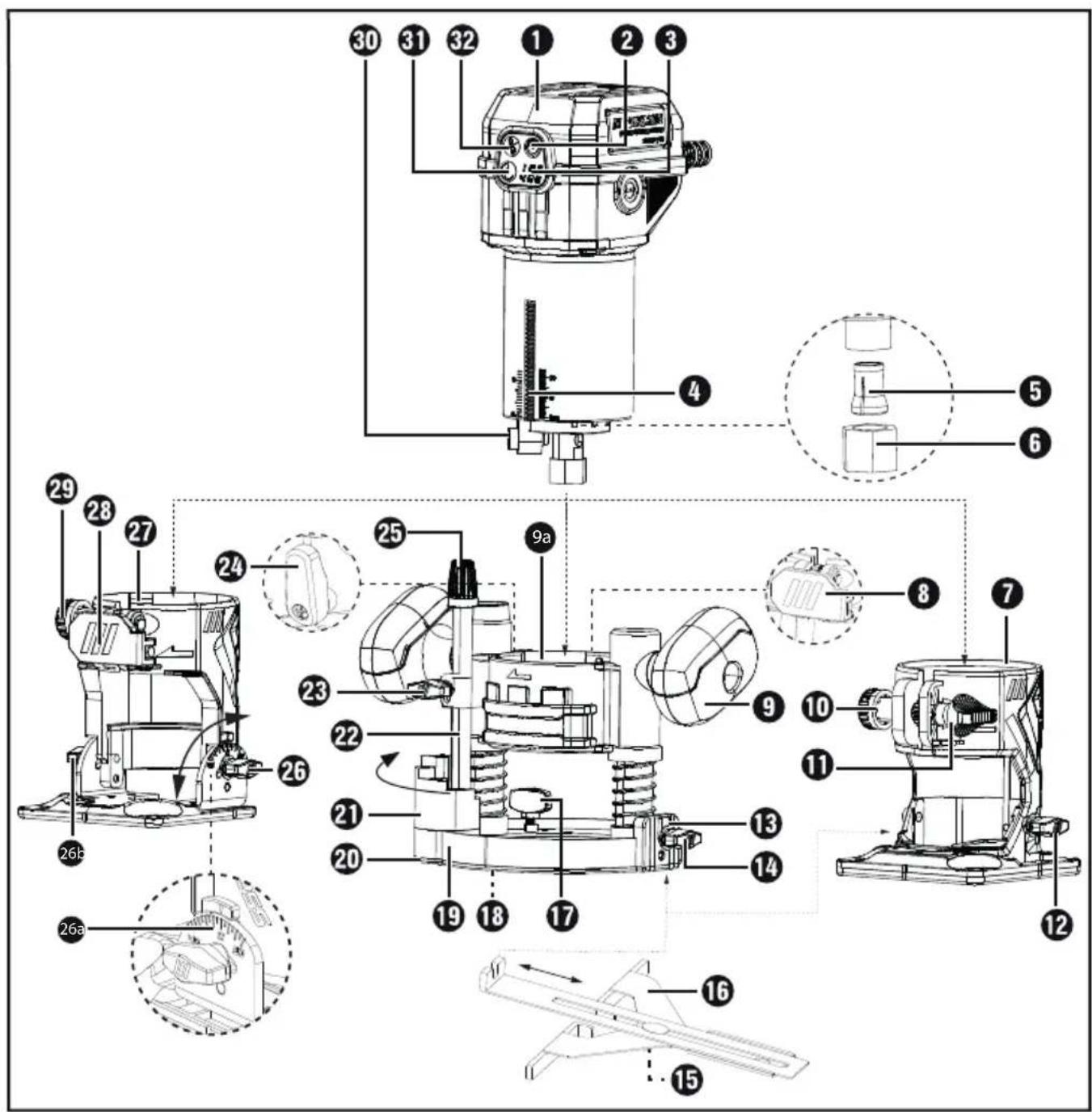
Multifunction router
ON/OFF button
Rotation speed setting
Scale
Collet chuck 8 mm
Union nut
Edge routing module
8 Clamping lever
9 Handle of routing module
9a Routing module
10 Setting screw
Knurled screw
12 Locking screw
13 Rip fence mount
Locking screw (pre-fitted on edge routing module)
15 Wing screw
16 Rip fence
17 Locking screw
18 Hole for the extraction nozzle
19 Base plate
20 Skid plate
Step stop
2 Depth stop (routing depth adjustment scale)
Locking screw
24 Clamping lever
25 Dial (fine routing depth adjustment)
25 Locking screw
26a Scale for angle adjustment
26b Locking screw
Angle routing module
28 Clamping lever
Setting screw
30 Spindle locking button
Speed preselection
Safety lock-out
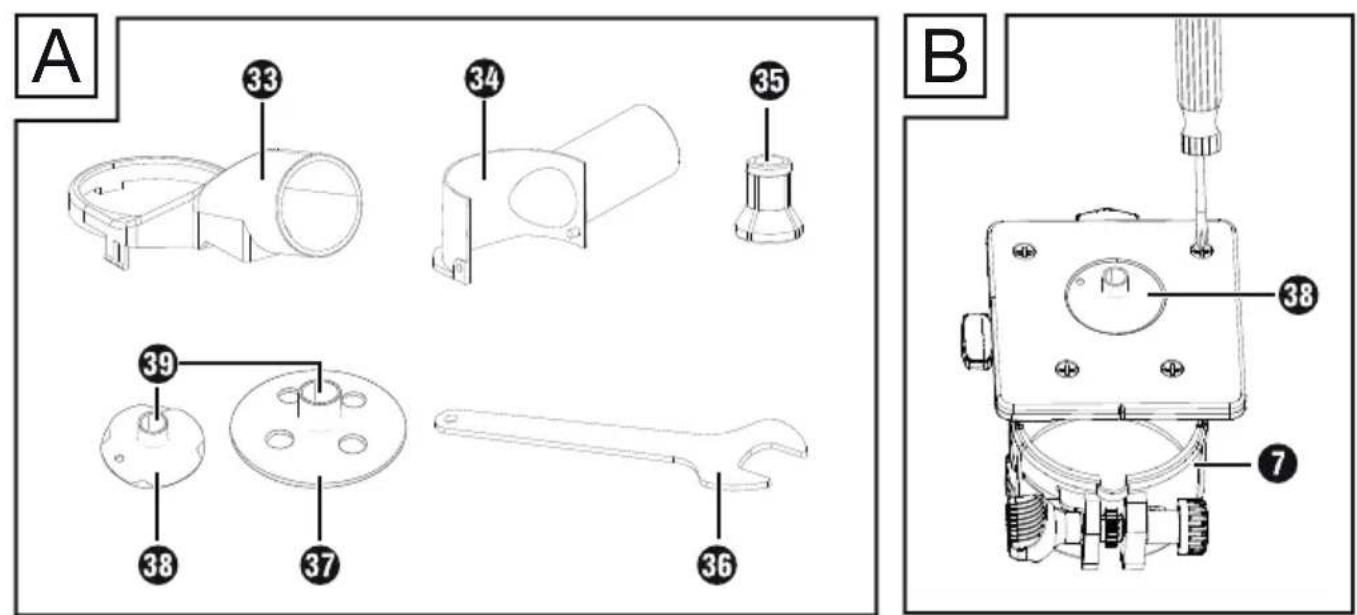
Fig. A
Extraction nozzle for routing module
34 Extraction nozzle for edge routing module
35 Collet chuck 6 mm
36 Open-ended spanner
37 Copy sleeve 16 mm (for routing module)
38 Copy sleeve 10mm (for edge routing module)
39 Copy sleeve race
Package contents
1 multifunctional milling machine
1 routing module
1 angle routing module
1 edge routing module
1 rip fence
1 open-ended spanner
2 extraction nozzles
1 collet chuck 6 mm
1 collect chuck 8 mm (pre-fitted)
2 copy sleeves (10 mm + 16 mm)
1 carrying case
1 set of instructions for use
Technical data
Power consumption 710 W
Rated voltage 230V ,50Hz
Protection class II/ double
insulation)
Rated idle speed n 10,000-34,000 rpm
Level 1 = approx. 10,000 rpm
Level 2 = approx. 12,000 rpm
Level 3 = approx. 17,000 rpm
Level 4 = approx. 22,000 rpm
Level 5 = approx. 27,000 rpm
Level 6 = approx. 34,000 rpm
Lifting height of router 0-40 mm
Lifting height of edge
router 0-35
Tool holder 6/8 mm
Noise emission value
Noise measurement value determined in accordance with EN 62841. The A-weighted noise level of the power tool is typically:
Sound pressure level L _pA = 83.9 dB
Uncertainty K_pA = 3 dB
Sound power level L WA = 91.9 dB
Uncertainty K K_WA^m,n = 3 dB
Wear hearing protection!
Vibration emission value
Total vibration values (vector sum of three directions) determined in accordance with EN 62841:
Hand/arm vibration a_h < 2.5 m/s^2
Uncertainty K = 1.5m / s^2
NOTE
The vibration emission values and noise emission values given in these instructions have been measured in accordance with a standardised test procedure and can be used for comparison of the power tool with another tool.
The specified total vibration values and the noise emission values can also be used to make a provisional load estimate.

WARNING!
Depending on the manner in which the power tool is being used, and in particular the kind of workpiece being worked, the vibration and noise emission values can deviate from the values given in these instructions during actual use of the power tool.
Try to keep the vibration load as low as possible. Measures to reduce the vibration load are, e.g. wearing gloves and limiting the working time. Wherein all states of operation must be included (e.g. times when the power tool is switched off and times where the power tool is switched on but running without load).

General power tool safety warnings

WARNING!
Read all safety warnings, instructions, illustrations and specifications provided with this power tool. Failure to follow all instructions listed below may result in electric shock, fire and/or serious injury.
Save all warnings and instructions for future reference.
The term "power tool" in the warnings refers to your mains-operated (corded) power tool or battery-operated (cordless) power tool.
1. Work area safety
a) Keep work area clean and well lit. Cluttered or dark areas invite accidents.
b) Do not operate power tools in explosive atmospheres, such as in the presence of flammable liquids, gases or dust. Power tools create sparks which may ignite the dust or fumes.
c) Keep children and bystanders away while operating a power tool. Distractions can cause you to lose control.
2. Electrical safety
a) Power tool plugs must match the outlet. Never modify the plug in any way. Do not use any adapter plugs with earthed (grounded) power tools. Unmodified plugs and matching outlets will reduce risk of electric shock.
b) Avoid body contact with earthed or grounded surfaces, such as pipes, radiators, ranges and refrigerators. There is an increased risk of electric shock if your body is earthed or grounded.
c) Do not expose power tools to rain or wet conditions. Water entering a power tool will increase the risk of electric shock.
d) Do not abuse the cord. Never use the cord for carrying, pulling or unplugging the power tool. Keep cord away from heat, oil, sharp edges or moving parts. Damaged or entangled cords increase the risk of electric shock.
e) When working outdoors with an electrical power tool, always use extension cords that are also suitable for outdoor use. Use of a cord suitable for outdoor use reduces the risk of electric shock.
f) If operating a power tool in a damp location is unavoidable, use a residual current device (RCD) protected supply. Use of an RCD reduces the risk of electric shock.
3. Personal safety
a) Stay alert, watch what you are doing and use common sense when operating a power tool. Do not use a power tool while you are tired or under the influence of drugs, alcohol or medication. A moment of inattention while operating a power tool may result in serious personal injury.
b) Usepersonal protective equipment. Always wear safety goggles. Protective equipment such as a dust mask, nonskid safety shoes, hard hat or hearing protection used for appropriate conditions will reduce personal injuries.
c) Prevent unintentional starting. Ensure the switch is in the off-position before connecting to power source and/or battery pack, picking up or carrying the tool. Carrying power tools with your finger on the switch or energising power tools that have the switch on invites accidents.
d) Remove any adjusting key or wrench before turning the power tool on. A wrench or a key left attached to a rotating part of the power tool may result in personal injury.
e) Do not overreach. Keep proper footing and balance at all times. This enables better control of the power tool in unexpected situations.
f) Dress properly. Do not wear loose clothing or jewellery. Keep your hair and clothing away from moving parts. Loose clothes, jewellery or long hair can be caught in moving parts.
g) If devices are provided for the connection of dust extraction and collection facilities, ensure these are connected and properly used. Use of dust collection can reduce dust-related hazards.
h) Do not allow yourself to get lulled into a false sense of security, and do not ignore the safety regulations for power tools, even if you are familiar with the power tool after repeated use. A careless action can cause severe injury within a fraction of a second.
4. Power tool use and care
a) Do not force the power tool. Use the correct power tool for your application. The correct power tool will do the job better and safer at the rate for which it was designed.
b) Do not use the power tool if the switch does not turn it on and off. Any power tool that cannot be controlled with the switch is dangerous and must be repaired.
c) Disconnect the plug from the power source and/or remove the battery pack, if detachable, from the power tool before making any adjustments, changing accessories, or storing power tools. Such preventive safety measures reduce the risk of starting the power tool accidentally.
d) Store idle power tools out of the reach of children and do not allow persons unfamiliar with the power tool or these instructions to operate the power tool. Power tools are dangerous in the hands of untrained users.
e) Maintain power tools and accessories. Check for misalignment or binding of moving parts, breakage of parts and any other condition that may affect the power tool's operation. If damaged, have the power tool repaired before use. Many accidents are caused by poorly maintained power tools.
f) Keep cutting tools sharp and clean. Properly maintained cutting tools with sharp cutting edges are less likely to bind and are easier to control.
g) Use the power tool, accessories and tool bits, etc. in accordance with these instructions, taking into account the working conditions and the work to be performed. Use of the power tool for operations different from those intended could result in a hazardous situation.
h) Keep handles and grasping surfaces dry, clean and free from oil and grease. Slippery handles and grasping surfaces do not allow for safe handling and control of the tool in unexpected situations.
5. Service
a) Have your power tool serviced by a qualified repair person using only identical replacement parts. This will ensure that the safety of the power tool is maintained.
Safety instructions for routers
a) Always hold the appliance using the insulated handle surfaces since the router can damage its own power cord. Contact with a live wire may make exposed metal parts of the power tool live and could give the operator an electric shock.
b) Fix and secure the workpiece to a stable base using clamps or other methods. If you hold the workpiece in your hands or against your body only, it will remain unstable. This can result in a loss of control.
Wear a dust mask.
Supplementary notes
The maximum speed of the router bit used must be at least as high as the maximum speed specified for the power tool. Accessories which rotate faster than the maximum permissible rate can be destroyed.
- Router bits or other accessories must fit exactly into the collet chuck (shank diameter 6/8mm ) of your power tool. Router bits which do not fit precisely into the collet chuck of the power tool will rotate unevenly, vibrate severely and can lead to a loss of control.
Always switch on the power tool before applying it to the workpiece. Otherwise, there is a risk of a kickback if the tool gets caught in the workpiece. - Keep your hands clear of the cutting area and the router bit. Hold the auxiliary handle or motor housing with your other hand. If both hands are being used to hold the router, neither can be injured by the router bit.
Never use the router over metal objects, nails or screws. The router bit can be damaged, and it can lead to increased vibrations.
Use a suitable detector to locate hidden utility lines or consult your local utility company. Contact with electrical lines can cause fires or electric shocks. Damage to a gas pipeline can lead to an explosion. Drilling into a water pipe can cause damage to property.
Do not exceed the maximum speed indicated on the tool.
Tools with visible cracks must be discarded.
Original accessories/attachments
Use only the accessories and attachments that are specified in the operating instructions and are compatible with the appliance.
Before use
Inserting a router bit
WARNING! RISK OF INJURY!
- Switch the appliance off and disconnect the plug from the mains power outlet before starting any work on the appliance.
Press the spindle locking button and hold it down. The spindle lock must enter into the shaft.
Undo the union nu6 by turning it anticlockwise with the open-ended spanner 35.
Release the spindle locking button.
Now insert the router bit. This must be inserted to a depth of at least 20~mm
Press the spindle locking button and hold it down. The spindle lock must enter into the shaft.
Tighten the union nu using the open-ended spanner 36.
Release the spindle locking button.
Connecting the extraction nozzle to the routing module
Unscrew the locking screw
Fit the extraction nozzle onto the hole provided for the extraction nozzle 13. Make sure that the projection on the extraction nozzle 33 rests in the notch of the routing module 9a, then tighten the locking screw 17 on the extraction nozzle 33 (Fig. D).
To remove the extraction nozzle, follow the steps in reverse order.
Attach an approved dust and sawdust extractor to the extraction nozzle.
Connecting the extraction nozzle to the edge routing module
Fit the extraction nozzle into the recess on the edge routing module 7.
Undo the locking screw.
Secure the extraction nozzle using the locking screw Fig.E).
To remove the extraction nozzle, follow the steps in reverse order.
Attach an approved dust and sawdust extractor to the extraction nozzle.
Changing the collet chuck
NOTE
- Use the pre-fitted colle (8 mm) for router bits with an 8 mm shank. When using router bits with a 6 mm shank, replace the collet chuck as described below.
Press the spindle locking button and hold it down. The spindle lock must enter into the shaft.
Undo the union nu6 anticlockwise with the open-ended spanner 36 until the collet chuck 5 (8 mm) can be removed.
Fit the collet chuck5 (6 mm).
ATTENTION! Do not tighten the union nut with the open-ended spanner unless a router bit is fitted. Otherwise, the collet chuck 535 may be damaged.
Release the spindle locking button.
Getting started
Fitting/ removing the multifunction router
Routing module 9a / Angle routing module
Open the corresponding clamping lever 8/28 and insert the multifunction router 1to the desired module.
The guide groove of the multifunction router 1 must be aligned with the projection on the respective router cage.
Close the corresponding clamping lever 8/28.
Edge routing module 7
Loosen the knurled screw and then insert the multifunction router into the module.
The guide groove of the multifunction router must be aligned with the projection on the router cage.
Tighten the knurled nu.
Setting the routing depth (angle router/edge router)

WARNING! RISK OF INJURY!
- Switch the appliance off and disconnect the plug from the mains power outlet before starting any work on the appliance.
To adjust the routing depth, turn the assembled appliance upside down and place it on a flat surface.
Open the clamping leve28 or loosen the knurled screw 11
Then adjust the base plate by turning the setting screw 29/10 (see Fig. F/G).
Close the clamping level or tighten the knurled screw again.
Setting the routing depth (router)
WARNING! RISK OF INJURY!
- Switch the appliance off and disconnect the plug from the mains power outlet before starting any work on the appliance.
Make sure that the clamping level is locked. If it is released, turn it anticlockwise until it is locked.
Place the appliance onto the workpiece.
Turn the step stop until the lowest position (0mm) is reached. The depth stop 2s now in line with the lowest position (0mm)
Undo the locking screw.
Release the clamping level by turning it clockwise and pushing the appliance downwards until the router bit is touching the surface of the workpiece (Fig. H).
Lock the clamping level by turning it anticlockwise.
Slide the depth stop downwards until it reaches the lowest position (0 mm) of the step stop 2Fig.1).
Set the depth stop to the desired routing depth, tighten the locking screw.
NOTE
The values shown on the routing depth adjustment scale (depth stop) do not correspond to the actual routing depth. It should always be set relative to a selected point on the routing depth adjustment scale (depth stop)
Now, release the clamping level and raise the appliance again (Fig. J).
Check the routing depth by means of a practical test.
Re-adjusting the routing depth
The routing depth can be readjusted using the dial 25.
Release the clamping level by turning it clockwise. Push the appliance downwards until the depth stop 2ests against the step stop
Lock the clamping level by turning it anticlockwise.
Undo the locking screw. Use the dial 25 to adjust the routing depth adjustment scale (depth stop) so that you can set the exact zero point, for example. Retighten the locking screw
Release the clamping level by turning it clockwise and raise the appliance again. Check the routing depth by means of another practical test.
Setting the routing depth with the step stop
NOTE
The step stop can be used for greater routing depths in several stages with less chip removal.
Set the desired routing depth to the lowest step (0mm) of the step stop (as described above).
Then set the higher levels for the first machining steps.
Check the routing depth by means of a practical test.
Switching on and off
WARNING!RISK OF INJURY!
Wear protective gloves when touching the metal housing, as it can heat up during operation.
Switching on
Press the safety lock-out. It remains active for 10 seconds.
Press and hold the ON/OFF button2 for approx. 2 seconds. Or:
Press the ON/OFF button 2 twice in quick succession to switch on continuous operation.
Switching off
Press the ON/OFF button.
Preselecting the rotation speed
Press the safety lock-out.
Set the required speed using the button for speed preselection 31.
The corresponding digit of the speed level 3 lights up and means:
Level 1 = approx. 10,000 rpm
Level 2 = approx. 12,000 rpm
Level 3 = approx. 17,000 rpm
Level 4 = approx. 22,000 rpm
Level 5 = approx. 27,000 rpm
Level 6 = approx. 34,000 rpm
Routing direction
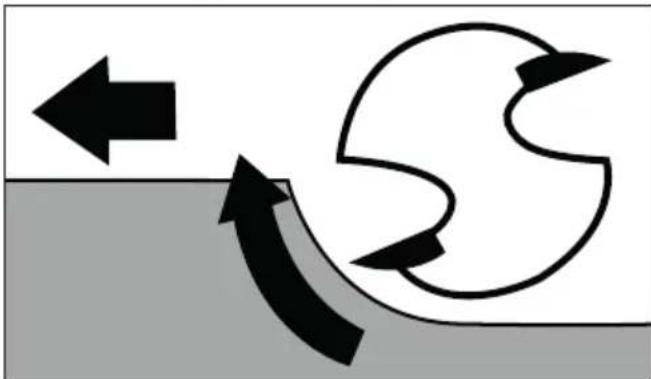
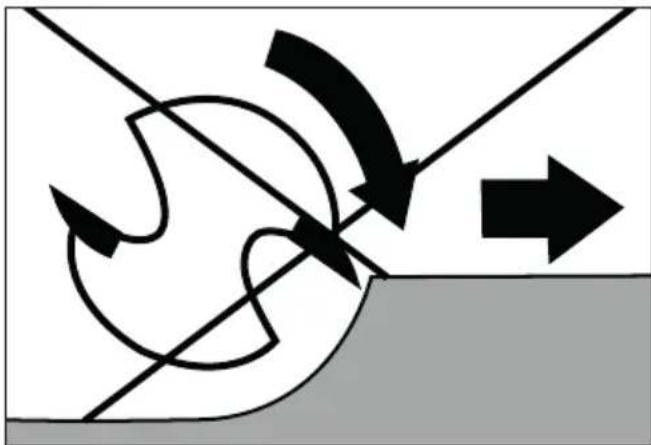
The router must always be moved against the direction of rotation of the router bit (up cut). ATTENTION! When routing in the direction of rotation (down cut), the power tool can be ripped out of your hand.
Routing operation
Adjust the desired routing depth as described above.
Place the appliance onto the workpiece and switch it on.
Release the clamping lever by turning it clockwise. Push the appliance downwards until the depth stop tests against the step stop
Lock the appliance by turning the clamping lever 24 anticlockwise.
Carry out the routing process at a uniform speed and contact pressure.
Fitting the copy sleeve
You can use a copy sleeve 37 transfer templates onto the workpiece.
NOTE
The template must be at least as high as the race of the copy sleeve.
Select a smaller router bit than the inner diameter of the copy sleeve 37. 38
Copy sleeve for edge router (Fig. B)
Remove the 4 screws on the base plate of the edge routing module and remove the base plate.
Insert the copy sleeve into the opening of the base plate.
Reattach the base plate to the edge routing module using the 4 screws (see Fig. B).
Copy sleeve for router (Fig. C):
Remove the 2 screws A on the skid plate 20 of the routing module 9a.
Insert the copy sleeve into the skid plate 20 from below.
Attach the copy sleeve to the skid plate using the two screws A. Ensure that you insert the copy sleeve the right way around - the race must be facing downwards (see Fig. C).
Routing with copy sleeves
Attach the template to the workpiece.
Position the tool with the copy sleeve / 38 on the template.
Set the desired routing depth.
Now guide the appliance along the side edge of the template with the copy sleeve 串 / 串 protruding. Do not exert excessive pressure when working.
NOTE
Due to the different diameters of the copy sleeve and router bit, the workpiece is cut to a slightly smaller size than the template.
Adjusting and attaching the rip fence
Loosen the wing screw on the rip fence 16.
Set the desired distance.
Retighten the wing screw on the rip fence
Undo the locking screw from the edge routing module
Secure the rip fence to the rip fence mount using the locking screw (Fig. K).
NOTE
You can also attach the rip fence on the rear of the edge routing module 7 Also use the locking screw or this.
Routing with the rip fence
Set the rip fence according to the required dimension.
Place the rip fence against the edge of the workpiece.
Carry out the routing process with uniform speed and contact pressure (Fig. L/M).
NOTE
If the distance from the edge of the workpiece to the routing point is too wide for the rip fence or if the workpiece does not have a straight side, clamp a straight board to the workpiece and use its edge as a guide for the base plate of the routing module.
Using the angle routing module
WARNING!RISK OF INJURY!
- Switch the appliance off and disconnect the plug from the mains power outlet before starting any work on the appliance.
Insert the multifunction route as described above.
While doing so, set the desired routing depth using the scale 4 on the multifunction router 1
Release the clamping leve28 and then turn the setting screw to the desired routing depth (Fig. G).
Close the clamping levee28.
NOTE
Before working on the actual workpiece, make a test cut.
Loosen the locking screws26/26b and adjust the multifunction router 1 to the desired angle.
The currently set angle can be conveniently read using the scale 26a on the locking screw 26.
Tighten the locking screws again.
Carry out the routing process at a uniform speed and contact pressure.
Disassembly is carried out in reverse order.
Using the edge routing module
WARNING! RISK OF INJURY!
- Switch the appliance off and disconnect the plug from the mains power outlet before starting any work on the appliance.
When using the edge routing module 7, always make use of the extraction nozzle 34.
Insert the multifunction route as described above.
While doing so, set the desired routing depth using the scale 4 on the multifunction router 1
Loosen the knurled screw and then turn the setting screw to the desired routing depth (Fig. F).
Tighten the knurled screw again.
NOTE
Before working on the actual workpiece, make a test cut.
Carry out the routing process at a uniform speed and contact pressure.
Disassembly is carried out in reverse order.
NOTE
- You can also attach the rip fence on the back side of the edge routing module (see the section "Adjusting and attaching the rip fence").
Maintenance and cleaning
WARNING! RISK OF INJURY!
- Switch the appliance off and disconnect the plug from the mains power outlet before starting any work on the appliance.
Replacing the carbon brushes
Check the carbon brushes at regular intervals. If they are more than half worn, replace them.
NOTE
Always replace both carbon brushes together.
Only use identical carbon brushes.
To replace the carbon brush, open the cover cap A using a slotted screwdriver.
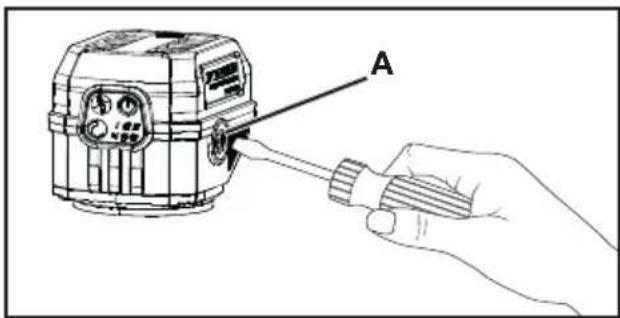
Remove the worn carbon brush and replace it with a new one.
Then screw the cover cap A back in.
Proceed in the same way on the opposite side.
Always keep the carbon brushes clean so that they can slide freely in their holder.
Cleaning
The appliance must always be kept clean, dry and free from oil or grease.
Never allow liquids to get inside the appliance.
Use a dry cloth to clean the housing. Never use petrol, solvents or cleansers which can damage plastic.

WARNING!
Have your appliances repaired by the Service Centre or a trained electrician, and use only original replacement parts. This will ensure that the safety of the appliance is maintained.
If the mains cable needs to be replaced, this must be carried out by the manufacturer or an authorised representative in order to avoid safety hazards.
Disposal
Applies only to France

FR
The product, its packaging and the operating instructions are recyclable. They are subject to an extended manufacturer responsibility and will be collected separately.
Do not dispose of power tools in your normal domestic waste!
The adjacent symbol of a crossed-out dustbin means
that this appliance is subject to Directive 2012/19/EU. This directive states that this appliance may not be disposed of in the normal household waste at the end of its useful life, but must be taken to specially set-up collection locations, recycling depots or disposal companies.
The disposal is free of charge for the user. Protect the environment and dispose of this appliance properly.
If your old appliance has stored any personal data, you are responsible for deleting it yourself before returning it.

Your local community or municipal authorities can provide information on how to dispose of the worn-out product.

The packaging is made from environmentally friendly material and can be disposed of at your local recycling plant.

Dispose of the packaging in an environmentally friendly manner. Note the labelling on the packaging and separate the packaging
material components for disposal if necessary. The packaging material is labelled with abbreviations (a) and numbers (b) with the following meanings: 1-7: plastics, 20-22: paper and cardboard, 80-98: composites.
Applies only to Spain:
The packaging contains paper and/or cardboard components.

The packaging contains plastic and/or metal components.
This appliance comes with a 5-year warranty valid from the date of purchase. If included with the product on delivery, the battery packs of the X12V and X20V Team series come with a 3-year warranty from the date of purchase. In the event that this product has any defects, you, the buyer, have certain statutory rights. Your statutory rights are not limited in any way by the warranty described below.
Warranty conditions
The warranty period starts on the date of purchase. Please keep your receipt in a safe place. This will be required as proof of purchase.
If any material or manufacturing fault occurs within three years of the date of purchase of the product, we will either repair or replace the product for you or refund the purchase price (at our discretion). This warranty service requires that you present the defective appliance and the proof of purchase (receipt) within the three-year warranty period, along with a brief written description of the fault and of when it occurred.
If the defect is covered by the warranty, your product will either be repaired or replaced by us. The repair or replacement of a product does not signify the beginning of a new warranty period.
Warranty period and statutory claims for defects
The warranty period is not prolonged by repairs effected under the warranty. This also applies to replaced and repaired components. Any damage and defects present at the time of purchase must be reported immediately after unpacking. Repairs carried out after expiry of the warranty period shall be subject to a fee.
Scope of the warranty
This appliance has been manufactured in accordance with strict quality guidelines and inspected meticulously prior to delivery. The warranty covers material faults or production faults. The warranty does not cover product parts that are subject to normal wear and tear and can therefore be considered wearing parts, such as saw blades, replacement blades, abrasive papers, etc. or for damage to fragile parts, such as switches or parts made of glass.
The warranty does not apply if the product has been damaged, improperly used or improperly maintained. The directions in the operating instructions for the product regarding proper use of the product are to be strictly followed. Uses and actions that are discouraged in the operating instructions or which are warned against must be avoided.
This product is intended solely for private use and not for commercial purposes. The warranty shall be deemed void in cases of misuse or improper handling, use of force and modifications/repairs which have not been carried out by one of our authorised Service centres.
The warranty does not apply to
Normal reduction of the battery capacity over time
Commercial use of the product
Damage to or alteration of the product by the customer
Non-compliance with safety and maintenance instructions, operating errors
Damage caused by natural hazards
Warranty claim procedure
To ensure quick processing of your case, please observe the following instructions:
Please have the till receipt and the item number (IAN) 463350_2404 available as proof of purchase.
You will find the item number on the type plate on the product, an engraving on the product, on the front page of the operating instructions (below left) or on the sticker on the rear or bottom of the product.
If functional faults or other defects occur, please first contact the service department listed below by telephone or use our contact form, which you can find on parkside-diy.com in the Service category.
You can return a defective product to us free of charge to the service address that will be provided to you. Ensure that you enclose the proof of purchase (till receipt) and information about what the defect is and when it occurred.

You can view and download these instructions along with many other manuals at parkside-diy.com. This QR code will take you directly to parkside-diy.com. Select your
country and use the search box to search for the operating instructions. Enter the article number (IAN) 463350_2404 to find the operating instructions for your article.
Service
GB Service Great Britain
Tel.: 0800 051 897 0
Contact form on parkside-diy.com
IE Service Ireland
Tel.: 1800 851251
Contact form on parkside-diy.com
IAN 463350_2404
Importer
Please note that the following address is not the service address. Please use the service address provided in the operating instructions.
KOMPERNASS HANDELS GMBH
BURGSTRASSE 21
44867 BOCHUM
GERMANY
www.kompernass.com
Translation of the original Conformity Declaration
We, KOMPERNASS HANDELS GMBH, Documents Officer: Mr Semi Uguzlu, BURGSTR. 21, 44867 BOCHUM, Germany, hereby declare that this product complies with the following standards, normative documents and EC directives:
Machinery Directive (2006/42/EC)
EMC (Electromagnetic Compatibility) (2014/30/EU)
RoHS Directive (2011/65/EU)*
- The manufacturer bears the sole responsibility for compliance with this conformity declaration. The subject of the declaration described above meets the requirements of Directive 2011/65/EU of the European Parliament and Council of 8 June 2011 on the restriction of the use of certain hazardous substances in electrical and electronic equipment.
Applied harmonised standards
EN 62841-1:2015/A11:2022
EN 62841-2-17:2017
EN IEC 55014-1:2021
EN IEC 55014-2:2021
EN IEC 61000-3-2:2019/A1:2021
EN 61000-3-3:2013/A2:2021
EN IEC 63000:2018
Type designation of machine: Multifunctional milling machine PPMF 710 A1
Year of manufacture: 10-2024
Serial number: IAN 463350_2404
Bochum, 12/08/2024

Semi Uguzlu
- Quality Manager -
We reserve the right to make technical changes in the context of further product development.
Inhaltsverzeichnis
Einleitung 18
KOMPERNASS HANDELS GMBH
BURGSTRASSE 21
44867 BOCHUM
DEUTSCHLAND
www.kompernass.com
Imprecision K K WA = 3 dB
Chere cliente, cher client,
Chere cliente, cher client,
KOMPERNASS HANDELS GMBH
BURGSTRASSE 21
44867 BOCHUM
ALLEMAGNE
www.kompernass.com
Directive relative aux machines (2006/42/CE)
Directive RoHS (2011/65/EU)*
WAARSCHUWING! LETSELGEVAARI!
WAARSCHUWING! LETSELGEVAAR!
WAARSCHUWING! LETSELGEVAAR!
WAARSCHUWING! LETSELGEVAAR!
WAARSCHUWING! LETSELGEVAAR!
WAARSCHUWING! LETSELGEVAAR!
WAARSCHUWING! LETSELGEVAAR!
KOMPERNASS HANDELS GMBH
BURGSTRASSE 21
44867 BOCHUM
DUITSLAND
www.kompernass.com
KOMPERNASS HANDELS GMBH
BURGSTRASSE 21
44867BOCHUM
NEMECKO
www.kompernass.com
KOMPERNASS HANDELS GMBH
BURGSTRASSE 21
44867 BOCHUM
NIEMCY
www.kompernass.com
Neurcitost K K_WA = 3 dB
Noste chránice sluchu!
Hodnota emisii vibracié
Celković hodnoty vibracij (súčet vektorov troch smerov) zistované podla EN 62841:
Vibrovanie ruky/ramena a_n < 2.5 m/s^2
Neurcitost K = = 1,5m / s
UPOZORNENIE
Kopírovacie puzdro pre hornú frézu (obr. C):
KOMPERNASS HANDELS GMBH
BURGSTRASSE 21
44867 BOCHUM
NEMECKO
www.kompernass.com
Sernica o RoHS (2011/65/EU)*
KOMPERNASS HANDELS GMBH
BURGSTRASSE 21
44867 BOCHUM
ALEMANIA
www.kompernass.com
KOMPERNASS HANDELS GMBH
BURGSTRASSE 21
44867 BOCHUM
TYSKLAND
www.kompernass.com
KOMPERNASS HANDELS GMBH
BURGSTRASSE 21
44867 BOCHUM
GERMANIA
www.kompernass.com
KOMPERNASS HANDELS GMBH
BURGSTRASSE 21
44867BOCHUM
GERMANY
www.kompernass.com