
Detect TB401EU - Food Processor NINJA - Free user manual and instructions
Find the device manual for free Detect TB401EU NINJA in PDF.


| Product type | Food processor |
| Brand | Ninja |
| Model | Detect TB401EU |
| Power | 1200 watts |
| Voltage | 220-240 V, 50-60 Hz |
| Pitcher capacity | 2.1 L (max liquid 700 ml) |
| Individual bowl capacity | 500 ml |
| Processor bowl capacity | 1.6 L |
| Main functions | BlendSense, manual (speeds 1-10), mixing modes (Disc, Slice, Chop fine/coarse), Pulse |
| Included accessories | Total Crushing stacked blade assembly, Hybrid Edge blade assembly, chopping blade assembly, kneading blade assembly, reversible slicing/shredding disc, lid with pour spout, pusher |
| Material | Plastic, stainless steel blades |
| Cleaning | Hand wash or dishwasher (top rack, no drying cycle) |
| Safety | Safety lock, error detection (INSTALL, ADD LIQUID, Er), automatic shut-off in case of overload |
| Warranty | 2-year commercial warranty + legal guarantees |
| Estimated weight | Approximately 4.5 kg |
| Estimated dimensions | 20 x 20 x 40 cm |
Frequently Asked Questions - Detect TB401EU NINJA
User questions about Detect TB401EU NINJA
0 question about this device. Answer the ones you know or ask your own.
Ask a new question about this device
Download the instructions for your Food Processor in PDF format for free! Find your manual Detect TB401EU - NINJA and take your electronic device back in hand. On this page are published all the documents necessary for the use of your device. Detect TB401EU by NINJA.
USER MANUAL Detect TB401EU NINJA
natural_image
Black Ninja blender with visible control panel and digital display (no text or symbols on the device itself)
REGISTRER DIT K∅B
ninjakitchen.eu/register-guarantee
natural_image
Line drawing of three-step cooking process: mixing a blender with liquid, adding sauce, and using a tool (no text or symbols)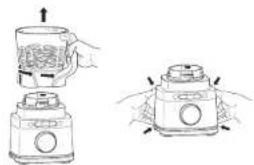
natural_image
Illustration of a blender with hands holding the cup and lid, showing two steps of adding liquid (no text or symbols)ninjakitchen.eu/register-guarantee

natural_image
Illustration of a blender with hands holding the lid and a handle, showing internal components (no text or symbols)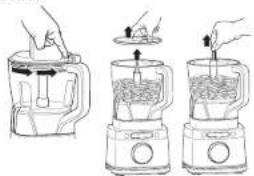
natural_image
Three-step illustration of a blender with hands using different methods to generate contents (no text or symbols)www.ninjakitchen.eu/register-guarantee
ninjakitchen.co.uk/register
Scan QR code using mobile device
RECORD THIS INFORMATION
Model Number: ____
Serial Number: ____
Date of Purchase:
(Keep receipt)
Store of Purchase:
TECHNICAL SPECIFICATIONS
Voltage: 220V - 240V, 50-60Hz
Power: 1200 Watts
IMPORTANT SAFETY INSTRUCTIONS
PLEASE READ ALL INSTRUCTIONS BEFORE USE • FOR HOUSEHOLD USE ONLY
Read and review instructions for operation and use.
Indicates the presence of a hazard that can cause personal injury, death, or substantial property damage if the warning included with this symbol is ignored.
For indoor and household use only.
When using electrical appliances, basic safety precautions should always be followed, including the following:
WARNING: To reduce the risk of injury, fire, electrical shock or property damage, basic safety precautions must always be followed, including the following numbered warnings and subsequent instructions. DO NOT use appliance for other than intended use.
1 Read all instructions prior to using the appliance and its accessories.
2 This product is provided with Ninja Detect: Total Crushing & Chopping Blades (Stacked Blade Assembly) and Chopping Blade Assembly. ALWAYS exercise care when handling blade assemblies. The blade assemblies are loose and sharp and are NOT locked in place in their containers. The blade assemblies are designed to be removable to facilitate cleaning and replacement if needed. ONLY grasp the blade assemblies by the top of the shaft. Failure to use care when handling the blade assemblies will result in a risk of laceration.
3 Handle the Hybrid Edge Blades Assembly with care, as the blades are sharp.
4 Before operation, ensure all utensils are removed from containers. Failure to remove utensils can cause containers to shatter and potentially result in personal injury and property damage.
5 DO NOT blend hot, effervescent, or carbonated liquids or ingredients. Doing so may cause excessive pressure buildup, resulting in risk of laceration and or the user being burned.
6 Remove the Hyorid Edge Blades Assembly from the Single-Serve Cup upon completion of blending. DO NOT stores ingredients before or after blending them in the cup with the blade assembly attached. Some foods may contain active ingredients or release gases that will expand if ielt in a sealed container, resulting in excessive pressure buildup that can pose a risk of laceration, burns, or property damage.
7 Carefully observe and follow all warnings and instructions. This unit contains electrical connections and moving parts that potentially present risk to the user.
8 ALWAYS take your time and exercise care during unpacking and appliance setup. Blades are loose and sharp. ALWAYS exercise care when handling blade assemblies. This appliance contains sharp, loose blades that can cause risk of laceration if mishandled.
9 Take Inventory of all contents to ensure you have all parts needed to properly and safely operate your appliance.
10 Upon completion of processing, ensure the blade assembly is removed BEFORE emptying container's contents. Remove the blade assembly by carefully grasping the top of the shaft and lifting it from the container. Failure to remove the blade assembly before emptying the container results in a risk of laceration.
11 If using the jug's pour spout, hold the cover in place on the container or ensure lid lock is engaged when pouring to avoid risk of laceration.
12 ONLY grasp the Hybrid Edge Blades Assembly by the outer perimeter of the blade assembly base. Failure to use care when handling the blade assembly will result in a risk of laceration.
13 Turn the appliance OFF, then unplug the appliance from the outlet when not in use, before assembling or disassembling parts, and before cleaning. To unplug, grasp the plug by the body and pull from the outlet. NEVER unplug by grasping and pulling the flexible cord.
14 Before each use, inspect blade assemblies for damage. If a blade is bent or damage is suspected, contact SharkNinja to arrange for replacement.
15 DO NOT use this appliance outdoors. It is designed for indoor household use only.
16 DO NOT modify the plug in any way.
IMPORTANT SAFETY INSTRUCTIONS
PLEASE READ ALL INSTRUCTIONS BEFORE USE • FOR HOUSEHOLD USE ONLY
17 DO NOI operate any appliance with a damaged cord or plug, or after the appliance malfunctions or is dropped or damaged in any manner. This appliance has no user-serviceable parts. If damaged, contact SharkNinja for servicing.
18 The entire supply cord is not suitable for replacement. If damaged, please contact SharkNinja for service.
19 Extension cords should NOT be used with this appliance.
20 To protect against the risk of electric shock, DO NOT submerge the appliance or allow the power cord to contact any form of liquid.
21 DO NOT allow the cord to hang over the edges of lables or counters. The cord may become snagged and pull the appliance off the work surface.
22 DO NOT allow the unit or the cord to contact hot surfaces, including stoves and other heating appliances. 23 ALWAYS use the appliance on a dry and level surface.
24 DO NOT allow children to operate this appliance or use as a toy. Close supervision is necessary when any appliance is used near children.
25 This appliance is NOT intended to be used by people with reduced physical, sensory, or mental capabilities, or lack of experience and knowledge, unless they have been given supervision or instruction concerning use of the appliance by a person responsible for their safety.
26 ONLY use attachments and accessories that are provided with the product or are recommended by SharkNinja. The use of attachments, including canning jars, not recommended or sold by SharkNinja may cause fire, electric shock, or injury.
27 NEVER place a blade assembly or disc on the motor base without it first being attached to its corresponding container (jug, cup, or processor bowl) with the lid also in place.
28 Keep hands, hair, and clothing out of the container when loading and operating.
29 During operation and handling of the appliance, avoid contact with moving parts
30 DO NOT fill containers past the MAX FILL or MAX LIQUID lines to avoid risk of injury due to damage to the Iids or containers.
31 DO NOT operate the appliance with an empty container.
32 DO NOT microwave any containers or accessories provided with the appliance.
33 NEVER leave the appliance unattended while in use.
34 DO NOT process dry ingredients with the Single Serve Cup and Hybrid Edge Blades Assembly, the jug and Stacked Blade Assembly or the processor bowl and Chopping Blade Assembly.
35 DO NOT perform grinding operations with the Single-Serve Cup and Hybrid Edge Blades Assembly, the jug and Stacked Blade Assembly or the processor bowl and Chopping Blade Assembly.
36 NFERR operate the appliance without lids and caps in place. DO NOT attempt to defeat the interlock mechanism. Ensure the container and lid are properly installed before operation.
37 Keep hands and utensils away from moving blades or discs while processing food to reduce the risk of severe personal injury or damage to the blender. A scraper may be used ONLY when the blender is not running.
38 If you find unmixed ingredients sticking to the sides of the cup, stop the appliance, remove the blade assembly, and use a scraper to dislodge ingredients.
39 DO NOT open the jug's pour spout cap while blender is operating.
40 If you find unmixed ingredients sticking to the sides of the jug, stop the appliance, remove the lid, and use a spatula to dislodge ingredients. NEVER insert your hands into the jug, as you may contact one of the blades and experience a laceration.
41 DO NOT attempt to remove the container or Id from the motor base while the blade assembly is still spinning. Allow the appliance to come to a complete stop before removing lids and containers.
42 If the appliance overheats, a thermal switch will activate and temporarily disable the motor. To reset, unpug the appliance and allow it to cool for approx mately 30 minutes before using again.
34 35ninjakitchen.eu
43 DO NOT expose the containers and accessories to extreme temperature changes. They may experience damage.
44 The maximum wattage rating for this appliance is based on the configuration of the Hybrid Edge Blades Assembly and Single-Serve Cup. Other configurations may draw less power or current.
45 DO NOT submerge the motor base or control panel in water or other liquids. DO NOT spray motor base or control panel with any liquid.
46 DONOT attempt to sharpen blades.
47 Turn off the appliance and unplug the motor base before cleaning.
48 Unit is intended to create a dough ball. It is NOT intended to continuously knead. After dough ball forms, additional kneading should be done by hand on a work surface. If the unit moves excessively on the work surface, remove the dough ball and knead by hand.
49 NEVER feed food into processor bowl by hand. ALWAYS use the provided food pusher with the feed chute lid.
SAVE THESE INSTRUCTIONS
PARTS BLENDSENSE TECHNOLOGY
A Jug Lid With Pour Spout
B Ninja Detect Total Crushing
& Chopping Blades
(Stacked Blade Assembly)
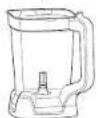
C 2.1 L ^4 Full-Size Jug
D Power Food Processor Bowl Feed Chute Lid and Pusher
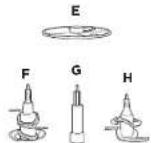
E Reversible Slicing/Shredding Disc
F Cropping Blade Assembly
G Spincle
H Dough Blade Assembly
1.6 L Power Food Processor Bowl
J Spout Lid
K Hybrid Edge Blades Assembly
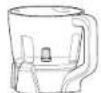
L 600ml Single-Serve Cup
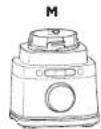
M Motor Base
(attached power cord not shown)
*700ml max liquid capacity.
To purchase more accessories and find great recipes, visit ninjakitchen.co.uk.




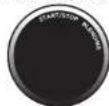
Intelligent BlendSense program revolutionises traditional blending by sensing your ingredients and blending to perfection every time. The BlendSense program will be active by default. Press ☐ button, then START/STOP. Once the program begins, it will automatically stop when blending is complete. To stop blending before the end of the program, press the dial again.
Simply press the dial to start the BlendSense program.

SENSE
Starts blending
to sense your
Ingredients.

BLEND
Automatically chooses
the blending speed,
time, and pulses.

ENJOY
Blends to perfection,
no matter the
portion size.

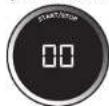
BlendSense is best used to achieve smooth blends such as smoothies.
frozen drinks, smoothie bowls, dips, purées, doughs and sauces.
INITIAL BLENDING

SENSING
In the first 15 seconds, actively adjusts speed and time based on ingredients and recipe size.
BLENDING POSSIBILITIES

BLENDING
Blonds continuously
without pulsing.

CRUSH AND MAX-CRUSH
Detects tougher and
Frozen ingredients, then
adjusts the pulsing pattern for a smooth blend.

THICK MODE
Creates thick
soconable results.

DOUGH
Processes doughs and
Bottlers, including pie, pizza, and cookie doughers. Use with
Ocug-Blade Assembly.
NOTE: Once blending possibility is selected, runtime will count up on the display in seconds. Total time varies from seconds up to almost two minutes.
ERROR DETECTION

INSTALL
Illuminates if no vesse
is installed or if a vesse
is installed incorrect
To resolve, reinstall
the vessel

ADD LIQUID
When using the Single-Serve Cup, this illuminates
if, during blending, your recipe requires more
liquid to blend. When "ADD LIQUID" displays
on the dial, press START/STCP and remove the
cuts from the base. Add 120-240m of additional
liquid. Renstain the cup, then press it to run the BlendSense program again.
BEFORE FIRST USE
IMPORTANT: Review all warnings at the beginning of this Owner's Guide before proceeding
⚠ WARNING: The Stacked Blade Assembly and Chopping Blade Assembly are NOT locked in place in the jug. Handle the Stacked Blade Assembly and Chopping Blade Assembly by grasping the top of the shaft.
1 Remove all packaging materials from the unit. Exercise care when unpacking the Stacked Blade Assembly, Hybrid Edge Blades Assembly, and Chopping Blade Assembly, as the blades are loose and sharp.
2 Handle the Hybrid Edge Blades Assembly by grasping around the perimeter of the blade assembly base.
3 Wash containers, lids, and blade assemblies in warm, soapy, water using a dishwashing utensil with a handle to avoid direct contact with the blades. Exercise care when handling blade assemblies, as the blades are loose and sharp.
4 Thoroughly rinse and a r-dry all parts.
5 Wipe control panel with a soft cloth. Allow it to dry completely before using
NOTE: All attachments are BPA free. Accessories are top-rack dishwasher safe and should NOT be cleaned with a heated dry cycle. Ensure blade assemblies and lids are removed from the containers before placing in the dishwasher. Exercise care when handling blade assemblies.
36 37mijajakitbharedu
USING THE CONTROL PANEL
NOTE: Press the dial to START or STOP any program. Turn to select
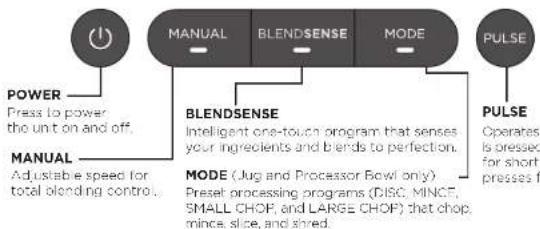
flowchart
graph TD
    A["POWER"] --> B["Press to power the unit on and off."]
    C["MANUAL"] --> D["Adjustable speed for total blending control."]
    E["BLENDSENSE"] --> F["Intelligent one-touch program that senses your ingredients and bends to perfection."]
    G["MODE"] --> H["Preset processing programs (DISC, MINCE, SMALL CHOP, and LARGE CHOP) that chop, mince, slice, and shred."]
    I["PULSE"] --> J["Operates is pressed for short presses f."]
PROCESSING MODE PROGRAMS

DISC: Processor Bowl only. Use with the Reversible Slicing/Shredding Disc.
MINCE, SMALL CHOP, AND LARGE CHOP: Jug and Processor Bow only.
Smart preset programs combine unique pausing patterns that process for you. Press MODE, turn the dial to select your desired program, then press START/STOP. The program will automatically stop when complete. Press the dial again to stop the program sooner. They do not work in conjunction with the BlendSense program or Manual programs.
NOTE: Number of seconds is displayed for the program's runtime.
MANUAL PROGRAMS

Go manual for total control of your blending speed and textures. Press MANUAL, turn the dial to select your desired program, then press START/STOP. When selected, each speed runs continuously for 60 seconds. Press the dial again to stop the program sooner. Manual programs do not work in conjunction with the BlendSense program or Processing Mode programs.
VARIABLE SPEED CONTROL (Speeds 1-10): Jug only.
START SLOW (Speeds 1-3): Always start at low speed to better incorporate ingredients and prevent them from sticking to the sides of the vessel.
DIAL UP THE SPEED (Speeds 4-7): Smoother blends call for higher speeds. Low speeds are great for chopping veggies, but you'll need to ramp up for purées and dressings.
HIGH-SPEED BLENDING (Speeds 8-10): Blend until your desired consistency is reached. The longer you blend, the better the breakdown and smoother the outcome will be.
LOW, MEDIUM, HIGH Speeds: Single-Serve Cup and Processor Bowl only.
NOTE: Once speed is selected, runtime will count up on the display in seconds.
- Review all warnings at the beginning of this Owner's Guide before proceeding.
- As a safety feature, if the jug and lid are not properly installed, the timer will display INSTALL and the motor will be disabled. If this happens, repeat step 5 on this page.
⚠ WARNING: Ninja Detect Total Crushing & Chopping Blades (Stacked Blade Assembly) are loose and sharp and NOT locked in place. If using the pour spout, ensure the lid is fully locked onto the blender jug. If pouring with the lid removed, carefully remove the Stacked Blade Assembly first, holding it by the shaft. Failure to do so will result in a risk of laceration.
NOTE:
- DO NOT add ingredients before completing installation of the Stacked Blade Assembly.
- If the Stacked Blade Assembly is not fully sealed, you will not be able to install and lock the lid.
- The lug lid handle will not fold down unless it is attached to the lug.
• DO NOT process or grind dry ingredients:
- For best results, b end fresh leafy greens and herbs in the single-serve cup.
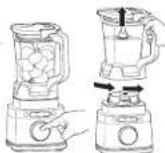
1 Plug in motor base and place on a clean, dry, level surface such as a countertop or table.
2 Lower the jug onto the motor base. The handle should be aligned slightly to the right and the jug should be oriented so the LOCK symbols are visible on the motor base. Rotate the jug clockwise until it clicks into place
3 Exercising cars, grasp the Stacked Blade Assembly by the top of the shaft and place it onto the drive gear inside the jug. Note that the blade assembly will lift loosely onto the drive gear.
4 Add ingredients to the jug. DO NOT add ingredients past the MAX LIQUID line.
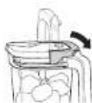
5 Place the lid on the jug. Press down on the handle until it clicks into place. Once the lid is locked in place, press the Power button to turn unit on. The BlendSense program will illuminate
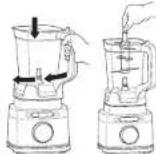
6a If using the BlendSense program, simply press the dial. The program will automatically stop once complete. To stop the unit at any time, press the dial again
6b I' using a Processing Mode program, select MODE then use the dial to select your desired program. To start, press the dial. The program will automatically stop once complete. To stop the unit at any time, press the dial again.
6c If using a Manual program, select MANUAL, then use the dial to select your desired speed (1-10). To start, press the dial. Once the ingredients have reached your desired consistency, press the dial again or wait 60 seconds for the unit to come to a complete stop on its own.
7 To remove the lug from the motor base, turn the lug ant-clockwise and then lift up.

8a To pour out thinner mixtures, ensure the io is locked in place, then open the pour spout cap.
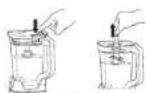
8b For thicker mixtures that cannot be emptied through the pour spout, remove the lid and Stacked Blade Assembly before pouring. To remove the lid, press the RELEASE button and lift the handle. To remove the blade assembly, carefully grasp it by the top of the shaft and pull straight up. The jug can then be emptied.
9 Turn the unit off by pressing the Power button. Unplug the unit when finished. Refer to the Care & Maintenance section for cleaning and storage instructions.

USING THE POWER FOOD PROCESSOR BOWL BLADE ASSEMBLIES
WARNING: Chopping Blade Assembly is loose, sharp, and NOT locked in place. Before removing blended ingredients from the bowl, carefully remove the blade assembly first, holding it by the shaft. Failure to do so will result in a risk of laceration.
NOTE:
• DO NOT process or grind dry ingredients.
- DO NOT add ingredients before completing installation of the blade assembly.
- Follow the same instructions to install the Dough Blade Assembly as the Chopping Blade Assembly.
1 Plug in motor base and place on a clean, dry, level surface such as a countertop or table.
2 Lower the Power Food Processor Bowl onto the motor base and rotate clockwise until it clicks into place.
3 To install the blade assembly, exercise care and grasp the Chopping Blade Assembly by the top of the shaft and place it onto the drive gear inside the bowl. Note that the Chopping Blade Assembly will fit loosely onto the drive gear.
4 Add ingredients to the bowl, making sure not to exceed the MAX FILL line.
5 Place the feed chute lid on the bowl and turn clockwise until you hear a click, indicating the lid is locked in place. Once the lid is locked in place, press the Power button to turn unit on. The BlendSense program will illuminate.
6a If using the BlendSense program, simply press the dial. The program will automatically stop once complete. To stop the unit at any time, press the dial again.
6b If using a Processing Mode program, select MODE, then use the dial to select your desired program. To start, press the dial. The program will automatically stop once complete. To stop the unit at any time, press the dial again.
NOTE: When using the Chopping Blade Assembly, it is recommended to use M NCE, SMALL CHOP, or LARGE CHOP. Processing Mode programs are not recommended when using the Dough Blade Assembly.
6c If using a Manual program, select MANUAL, then use the dial to select your desired speed (LOW, MEDIUM, or HIGH). To start, press the dial. Once the ingredients have reached your desired consistency, press the dial again or wait 60 seconds for the unit to come to a complete stop on its own.
NOTE: When using the Dough Blade Assembly, only use LOW speed.
7 When finished, press the button on the lid near the handle to unlock, then turn anti-clockwise and lift up from the bowl. Always remove the Chopping Blade Assembly before emptying the ingredients from the bowl. To remove the Chopping Blade Assembly, carefully grasp it by the top of the shaft and lift it out of the bowl.
8 To remove the bowl from the motor base, turn the bowl anti-clockwise and then lift up.
9 Turn the unit off by pressing the Power button. Unp.ug the unit when finished Refer to the Care & Maintenance section for cleaning and storage instructions.
40 41ninjakitchen.eu
USING THE REVERSIBLE SLICING/SHREDDING DISC
NOTES:
- The Slicing/Shredding Disc is reversible. Use the side labelled "Slicer" for slicing. Carefully flip the disc over to the side labelled "Shredder" for shredding.
• The food chute lid features a pusher to guide food through the chute.
1 Plug in motor base and place on a clean, dry, level surface such as a countertop or table.
2 Lower the Power Food Processor Bowl onto the motor base and rotate clockwise until it clicks into place.
3 To install the Reversible Slicing/Shredding Disc, place the disc spindle onto the drive gear inside the bowl. Then, use the finger holes to grasp the Reversible Slicing/Shredding Disc and place it over the spindle, with the side you would like to use facing up.
4 Place the food chute lid on the bowl and turn clockwise until you hear a click, indicating the lid is locked in place. Once the lid is locked in place, press the Power button to turn unit on. The BlendSense program will illuminate.
5a If using a Processing Mode program, select MODE, then use the dial to select DISC.
5b If using a Manual program, select MANUAL, then use the dial to select your desired speed (LOW recommended).
NOTE: It is not recommended to use the Blendsense program with the Reversible Slicing/Shredding Disc.
6 Press the dia to begin the program. Add the prepped ingredients you want to slice or shred through the feed chute on the lid. Use the pusher to help guide the ingredients through the feed chute. The program will automatically stop spinning once completed. To stop the unit at any time, press the dial again.
7 To remove the lid, press the button on the feed chute lid near the handle to unlock, then turn the lid anti-clockwise. Lift the lid from the bowl.
8 Using the finger holes, carefully lift the disc out of the bowl. Then, grasp the spindle by the top of the shaft and lift it out of the bowl.
9 To remove the bowl from the motor base, turn the bowl anti-clockwise and then lift up.
10 Turn the unit off by pressing the Power button. Unplug the unit when finished. Refer to the Care & Maintenance section for cleaning and storage instructions.
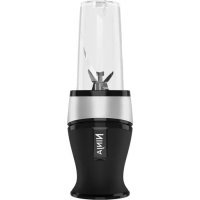
USING THE SINGLE-SERVE CUP
IMPORTANT: Review all warnings at the beginning of this Owner's Guide before proceeding
WARNING:
- Handle the Hybrid Edge Blades Assembly with care, as the blades are sharp.
- Remove utensils prior to processing. Failure to remove may cause the Single-Serve Cup to be damaged or to shatter, which may cause personal injury.
• DO NOT blend hot, effervescent, or carbonated liquids. Doing so may cause excessive pressure build-up, resulting in risk of laceration and/or the user being burned.
• DO NOT process or grind dry ingredients.
- Remove the Hybrid Edge Blades Assembly from the Single-Serve Cup upon completion of blending. DO NOT store ingredients before or after blending them in the cup with the blade assembly attached. Some foods may contain active Ingredients or release gases that will expand if left in a sealed container, resulting in excessive pressure build-up that can pose a risk of injury.
1 Plug in motor base and place on a clean, dry, level surface such as a counter, op or table.
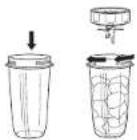
2 Add Ingredients to the Single-Serve Cup. DO NOT add ingredients past the MAX LIQUID line on the cup.
3 Install the Hybrid Edge Blades Assembly onto the top of the cup. Twist the lid clockwise until it's sealed tightly.
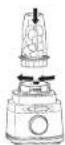
4 Turn the cup upside down and install on the motor base. Align the tabs on the cup with the slots on the base, then rotate cup clockwise until it clicks into place. Once the cup is locked in place, press the Power button to turn unit on. The BlendSense program will illuminate.
5a If using the BlendSense program, simply press the dial. The program will automatically stop once complete. To stop the unit at any time, press the dial again.
5b If using a Manual program, select MANUAL then use the dial to select your desired speed (LOW, MED UM, or HIGH). To start, press the dial. Once the ingredients have reached your desired consistency, press the dial again or wait 60 seconds for the unit to come to a complete stop.
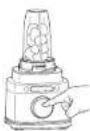
NOTE: Processing Mode programs are only compatible with the jug.
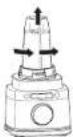
To remove the cup from the motor base, turn the cup anti-clockwise and then lift up.
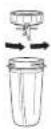
Remove the Hybrid Edge Blades Assembly by twisting the cap anti-clockwise. DO NOT store blended contents with blade assembly attached. Exercise care when handling the blade assembly, as the blades are sharp
8 Turn the unit off by pressing the Power button. Unplug the unit when finished. Refer to the Care & Maintenance section for cleaning and storage instructions.
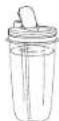
9 To enjoy your orix on the go, place the Spout Lio onto the cup and twist lid clockwise until firmly sealed. For storing ingredients in the cup, use only the Spout Lio to cover.

Separate all parts. Wash all containers in warm, soapy water with a soft cloth.
- Hand-Washing
Wash blade assemblies in warm, soapy water using a dishwashing utensil with a handle to avoid direct contact with the blades. Exercise care when handling blade assemblies, as the blades are sharp. Thoroughly rinse and air-dry all parts
• Dishwasher
Accessories are top-rack dishwasher safe but should NOT be cleaned with a heated dry cycle. Ensure the blade assemblies are removed from their containers before placing in the dishwasher. Exercise care when handling blade assemblies.
- Motor Base
Turn off the unit and unplug the motor base before cleaning. Wipe motor base with a clean, damp cloth. DO NOT use abrasive cloths, pads, or brushes to clean the base.
STORING
For cord storage, wrap cord with hock-and-loop fastener near the back of the motor base. DO NOT wrap the cord around the bottom of the base for storage. Store the unit upright and store all blade assemblies inside or attached to their respective containers with their lids locked in place.
DO NOT store blended or unblended ingredients in the Single-Serve Cup with the Hybrid Edge Blades assembly attached.
DO NOT stack items on top of the containers. Store any remaining attachments alongside the unit or in a cabinet where they will not be damaged or create a hazard.
RESETTING THE MOTOR
This unit features a safety system that prevents damage to the motor and drive system should you inadvertently overload the it. If the unit is overloaded, the motor will be temporarily disabled. Should this occur, follow the reset procedure be on.
- Unplug the unit from the electrical outlet.
2 Allow the unit to cool for approximately 15 minutes.
3 Remove the container's lid and blade assembly: Empty the container and ensure no ingredients are jamming the blade assembly.
IMPORTANT: Ensure that maximum capacities are not exceeded. This is the most typical cause of appliance overload.
If your unit needs servicing, please call Customer Service at 0800 862 0453. So we may better assist you, please register your product online at ninjakitchen.co.uk/register and have the product on hand when you call.
ORDERING REPLACEMENT PARTS
To order additional parts and attachments, visit ninjakitchen.co.uk.
TROUBLESHOOTING GUIDE
⚠ WARNING: To reduce the risk of shock and unintended operation, turn power off and unplug unit before troubleshooting.
Display will show "INSTALL" once connected to power.
- Place container or base and rotate it clockwise until container clicks into place. Press the Power button 🔒 to turn unit on, and the BlendSense program will illuminate, indicating the unit is ready for use.
Display reads "ADD LIQUID ^0 " during the BlendSense Program.
- If the display roaks "ADD LIQUID" during the BlendSense program, the unit detects more liquid is needed to fully blend. Press START/STOP, remove the cup from the base, and add 120-240ml of additional liquid. Reinstall the cup on the base, then press START/STOP to run the BlendSense program again. Only available when using the Single Serve Cup.
Display reads "Er".
- If the display reads "Fr" unplug the unit from the electrical outlet and allow it to cool for 15 minutes. Remove the container's lid and blade assembly and empty the contents to ensure no ingredients are jamming the blade assembly
Lid/Hybrid Edge Blades Assembly is hard to install on the cup.
- Set the cup on a level surface. Carefully place the lid or Hybrid Edge Blades Assembly on the top of the cup and align the threads so the lid/Hybrid Edge Blades Assembly sits flat on the cup. Twist clockwise until you have a tight seal.
Unit doesn't mix well; Ingredients get stuck.
- Using the BlendSense program is the easiest way to achieve great results. The pulses and pauses allow the ingredients to settle toward the blade assembly. If ingredients are routinely getting stuck, adding some liquid will usually help.
- When filling the cup, start with liquids or yoghurt, followed by fresh fruit or veggies, then leafy greens or herbs. Next add seeds, powders, or nut butters. Finally, add ice or frozen ingredients.
Motor base won't stick to counter or tabletop.
• Make sure surface and suction feet are wiped clean. Suction feet will only stick to smooth surfaces.
- Suction feet: will not stick on some surfaces such as wood, tile, and non-polished finishes
- DO NOT attempt to use unit when the motor base is stuck to a surface that is not secure (cutting board, platter, plate, etc.)
Unit is difficult to remove from counter for storage.
- Place your hands underneath both sides of the motor base and gently pull the unit up and toward you.
Unit displays a blinking "-" message.
- The unit can detect which container is on the motor base. You may be trying to use a program that is not designed for the container you have installed. The programs will light up, indicating which programs are available for each container.
Food is not evenly chopped.
- For best results when chopping, cut pieces of ingredients in a uniform size and don't overfill the vessel.
The jug lid handle will not fold down.
- The handle will not fold down if the lid isn't attached to the jug. For storage, place the lid on the jug and press down on the handle until it clicks into place.
PRODUCT REGISTRATION
Please visit ninjakitchen.co.uk/register to register your new Ninja® product within ten (10) days of purchase. You will be asked to provide the store name, date of purchase, and model number along with your name and address.
The registrat on will enable us to contact you in the unlikely event of a product safety notification. By registering, you acknowledge you have read and understood the instructions for use and warnings set forth in the accompanying instructions.
NINJA
TWO (2) YEAR LIMITED GUARANTEE
When a consumer buys a product in Europe, they get the benefit of legal rights relating to the quality of the product (your statutory rights). You can enforce these rights against your retailer. We give you an additional manufacturer's guarantee of two years. These terms and conditions relate to our manufacturer's guarantee only - your statutory rights are unaffected.
The conditions below describe the prerequisites and scope of our guarantee. They do not affect your statutory rights or the obligations of your retailer and your contract with them.
Ninja® Guarantees
Every Ninja machine comes with a free parts and labour guarantee. You'll also find online support at www.ninjakitchen.eu
How do I register my Ninja guarantee?
You can register your guarantee online within 28 days of purchase. To save time, you'll need the following information about your fan
- Date you purchased the unit (receipt or delivery note).
• To register online, please visit
www.ninjakitchen.eu
IMPORTANT
• The guarantee will only cover your product from the date of purchase.
- Please keep your receipt at all times. Should you need to use your guarantee we will need your receipt to verify the information you have supplied to us is correct. The inability to produce a valid receipt may invalidate your guarantee.
What are the benefits of registering my free Ninja guarantee?
When you register your guarantee we'll have your details to hand if we ever need to get in touch. You can also receive Lps and advice on how to get the best out of your Ninja unit and near the latest news about new Ninja® technology and launches. If you register your guarantee online, you'll get instant confirmation that we've received your details.
What is covered by the free Ninja guarantee?
Repair or replacement of your Ninja machine (at Ninja's discretion), including all parts and labour. A Ninja guarantee is in addition to your legal rights as a consumer.
What is not covered by the free Ninja guarantee?
-
Normal wear and tear of wearable parts (such as accessories). Replacement parts are available for purchase at www.ninjakitchen.eu
-
Damage caused by misuse, abuse, negligent handling, failure to perform required maintenance or damage due to mishandling in transit.
-
Damage caused by maintenance not authorised by Ninja.
Where can I buy genuine Ninja spares and accessories?
You'll find a full range of Ninja spares and replacement parts/accessories for all Ninja machines at www.ninjakitchen.eu
Please remember that damage caused by the use of non-Ninja spares may not be covered under your guarantee.

REGISTRA TU COMPRA

ninjakitchen.eu/register-guarantee

y suchil as de picar
(cuchias de precision)
C Jama grande de 211°
natural_image
Three-step illustration of a blender being processed with a tool, showing the blade and handle (no text or symbols)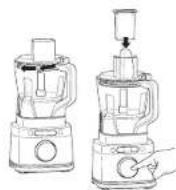
natural_image
Three-step illustration of a blender being prepared with a spoon, showing step-by-step preparation (no text or symbols)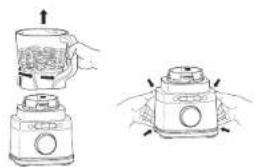
natural_image
Illustration of a blender with hands holding the lid and a water-filled cup, showing internal components (no text or symbols)ninjakitchen.lr/register guarantee

INSTALL (INSTALLATION)
Sallamis si aucti recipient
West State to 91 Jun
natural_image
Illustration of three-step cooking process: mixing a blender with a spatula, adding liquid, and using a tool (no text or symbols)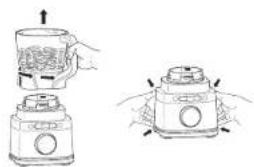
natural_image
Illustration of a hand holding a mug with liquid, next to a smaller jar with a lid and handle (no text or symbols)https://ninjakitchen.eu/register-guarantee

natural_image
Three-step illustration of a blender being processed with a tool, showing step-by-step steps (no text or symbols)ninjakitchen.eu/reg ster-guarantee

natural_image
Illustration of a blender with hands performing a press operation (no text or symbols)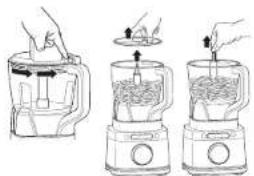
natural_image
Line drawings of three kitchen utensils in a blender, showing hand positioning and pouring process (no text or symbols)ninjakitchen.co.uk/register

n QR code using mobile device
RECORD THIS INFORMATION
Mode Number:
Serial Number:
Date of Purchase:
(Keep receipt)
Store of Purchase:
TECHNICAL SPECIFICATIONS
Voltage: 220V - 240V, 50-60Hz
Power: 1200 Watts
VIKTIGE SIKKERHETSINSTRUKSJONER
LES ALLE INSTRUKSJONER F∅R BRUK • SKAL KUN BRUKES I HJEMMET

natural_image
Three-step illustration of a blender being processed with a handle (no text or symbols)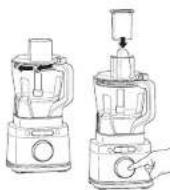
natural_image
Illustration of three-step cooking process: mixing a blender with chopsticks, adding sauce, and pouring liquid into a stand (no text or symbols)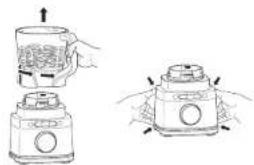
natural_image
Illustration of a hand holding a glass jar with a lid, next to a smaller container with arrows indicating motion (no text or symbols)STELL OG VEDLIKEHOLD
RENGJ∅RING
ninjakitchen.eu/register-guarantee

natural_image
Three line drawings of a blender with hands operating the lid (no text or symbols)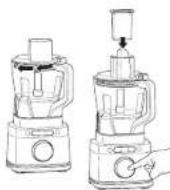
natural_image
Illustration of three-step cooking process: mixing a blender with a spoon, adding liquid, and pouring into a stand mixer (no text or symbols)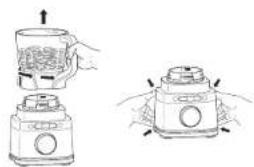
natural_image
Illustration of a hand holding a mug with a lid, next to a smaller jar with a lid and handle (no text or symbols)ninjakitchen.eu/register-guarantee
B Ninja Delec. Total Crushing-
ja Chopo ng-terát (monitasoteráys kko)
C 2,1 litran* táysizokoinen kanni.
natural_image
Three-step line drawing of a blender with a handle, showing step-by-step usage (no text or symbols)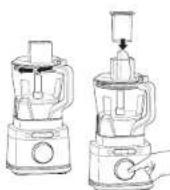
natural_image
Illustration of three-step cooking process: mixing a blender with a spoon, adding liquid, and adding a pencil (no text or symbols)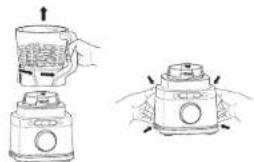
natural_image
Illustration of a blender with a handle and lid, showing the process from top to bottom (no text or symbols)rinjakitchen.eu/register-guarantee

(staploid black-entering)
C 2,1 L ^a Tillbringare - full storlek
D Lock med meltingsrännt för den
natural_image
Illustration of a hand holding a mug with a lid, next to a smaller container with a lid and handle (no text or symbols)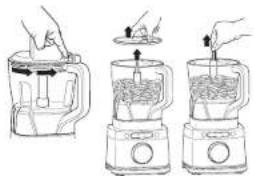
natural_image
Illustration of three-step cooking process: mixing a blender with liquid, adding a pan, and pouring into a stand mixer (no text or symbols)© 2024 SharkNinja Operating LLC. TRYKT | KINA
DEUTSCH
© 2024 SharkNinja Operating LLC. GEDRUCKT IN CHINA
ENGLISH
Illustrations may differ from actual product. We are constantly striving to improve our products, therefore the specifications contained herein are subject to change without notice.
NINJA is a registered trademark of Shark Ninja Operating LLC.
© 2024 SharkNinja Operating LLC. PRINTED IN CHINA
ESPAÑOL
© 2024 SharkNinja Operating LLC. IMPRESO EN CHINA
FRANÇAIS
© 2024 SharkNinja Operating LLC. IMPRIMÉ EN CHINE
ITALIANO
© 2024 SharkNinja Operating LLC. STAMPATO IN CINA
SharkNinja Germany GmbH,
Rotfeder-Ring 9,
60327 Frankfurt am Main, Germany
ninjakitchen.eu
NEDERLANDS
© 2024 SharkNinja Operating LLC. GEDRUKT IN CHINA
NORSK
© 2024 SharkNinja Operating LLC. TRYKKET I KINA
PORTUGUÊS
© 2024 SharkNinja Operating LLC. IMPRESSO NA CHINA
SUOMI
© 2024 SharkNinja Operating LLC. PAINETTU KIINASSA
SVENSKA
© 2024 SharkNinja Operating LLC. TRYCKT I KINA
SharkNinja Europe Ltd,
1st/2nd Floor Building 3150,
Thorpe Park, Century Way,
Leeds, England, LS15 8ZB
ninjakitchen.eu

- REGISTRER DIT K∅B
- RECORD THIS INFORMATION
- TECHNICAL SPECIFICATIONS
- IMPORTANT SAFETY INSTRUCTIONS
- WARNING: To reduce the risk of injury, fire, electrical shock or property damage, basic safety precautions must always be followed, including the following numbered warnings and subsequent instructions. DO NOT use appliance for other than intended use.
- PLEASE READ ALL INSTRUCTIONS BEFORE USE • FOR HOUSEHOLD USE ONLY
- SAVE THESE INSTRUCTIONS
- PARTS BLENDSENSE TECHNOLOGY
- INITIAL BLENDING
- BLENDING POSSIBILITIES
- ERROR DETECTION
- BEFORE FIRST USE
- ⚠ WARNING: The Stacked Blade Assembly and Chopping Blade Assembly are NOT locked in place in the jug. Handle the Stacked Blade Assembly and Chopping Blade Assembly by grasping the top of the shaft.
- USING THE CONTROL PANEL
- PROCESSING MODE PROGRAMS
- MANUAL PROGRAMS
- NOTE:
- USING THE POWER FOOD PROCESSOR BOWL BLADE ASSEMBLIES
- USING THE REVERSIBLE SLICING/SHREDDING DISC
- NOTES:
- USING THE SINGLE-SERVE CUP
- WARNING:
- - Hand-Washing
- • Dishwasher
- - Motor Base
- STORING
- RESETTING THE MOTOR
- ORDERING REPLACEMENT PARTS
- TROUBLESHOOTING GUIDE
- ⚠ WARNING: To reduce the risk of shock and unintended operation, turn power off and unplug unit before troubleshooting.
- Display will show "INSTALL" once connected to power.
- Display reads "ADD LIQUID 0 " during the BlendSense Program.
- Display reads "Er".
- Lid/Hybrid Edge Blades Assembly is hard to install on the cup.
- Unit doesn't mix well; Ingredients get stuck.
- Motor base won't stick to counter or tabletop.
- Unit is difficult to remove from counter for storage.
- Unit displays a blinking "-" message.
- Food is not evenly chopped.
- The jug lid handle will not fold down.
- PRODUCT REGISTRATION
- NINJA
- TWO (2) YEAR LIMITED GUARANTEE
- Ninja® Guarantees
- How do I register my Ninja guarantee?
- www.ninjakitchen.eu
- IMPORTANT
- What are the benefits of registering my free Ninja guarantee?
- What is covered by the free Ninja guarantee?
- What is not covered by the free Ninja guarantee?
- Where can I buy genuine Ninja spares and accessories?
- REGISTRA TU COMPRA
- INSTALL (INSTALLATION)
- VIKTIGE SIKKERHETSINSTRUKSJONER
- LES ALLE INSTRUKSJONER F∅R BRUK • SKAL KUN BRUKES I HJEMMET
- STELL OG VEDLIKEHOLD
- RENGJ∅RING
- DEUTSCH
- ENGLISH
- ESPAÑOL
- FRANÇAIS
- ITALIANO
- NEDERLANDS
- NORSK
- PORTUGUÊS
- SUOMI
- SVENSKA
Brand : NINJA
Model : Detect TB401EU
Category : Food Processor