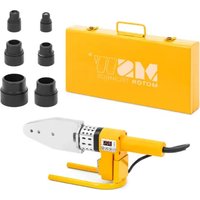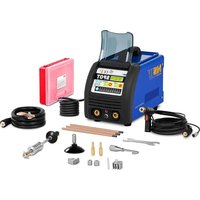
S-SPOTTER 3500 - Welding machine MSW - Free user manual and instructions
Find the device manual for free S-SPOTTER 3500 MSW in PDF.


| Product type | Spot welding machine (dent removal) |
| Brand | MSW |
| Model | S-SPOTTER 3500 |
| Input voltage | 400 V ~ 2 phases, 50 Hz |
| Input power | 16 kW |
| Input current | 42 A |
| Max output current | 3500 A |
| Recommended fuse | 63 A |
| Power plug | 40 A |
| Power cable | 6 mm² |
| Weight | 25 kg |
| Welding functions | Welding of elements, triangular elements, rods/screws, unilateral pressure welding, corrugated cable welding, carbon electrode heating, steel wire heating, carbon wire cutting |
| Trigger modes | MAN (gun button) and AUTO (automatic on contact) |
| Protection | Overload protection device with automatic cooling |
| Maintenance | Cleaning with mild non-corrosive products; storage in a dry, cool place away from sunlight |
| Safety | Mandatory PPE (gloves, mask, fireproof clothing); proper grounding; sufficient ventilation |
Frequently Asked Questions - S-SPOTTER 3500 MSW
User questions about S-SPOTTER 3500 MSW
0 question about this device. Answer the ones you know or ask your own.
Ask a new question about this device
Download the instructions for your Welding machine in PDF format for free! Find your manual S-SPOTTER 3500 - MSW and take your electronic device back in hand. On this page are published all the documents necessary for the use of your device. S-SPOTTER 3500 by MSW.
USER MANUAL S-SPOTTER 3500 MSW

flowchart
graph LR
    A["Electricity Pump"] --> B["Fuel"]
    B --> C["Warning Symbol"]
    C --> D["→"]

flowchart
graph LR
    A["Tool with spring"] --> B["Pump"]
    B --> C["Warning symbol: ▲ %"]
    C --> D["Arrow indicating direction"]
The operation manual must be read carefully.
Never dispose of electrical equipment together with household waste.
CE The product satisfies the relevant safety standards.
Caution, risk of electric shock!
For indoor use only.
Attention! Hot surface may cause burns.
Attention! Risk of fire or explosion.
Use full body protective clothes.
Attention! Wear protective gloves.
Safety goggles must be worn.
Attention! Harmful fumes, danger of poisoning. Gases and vapours may be hazardous to health. Welding gases and vapours are released during welding. Inhalation of these substances may be hazardous to health.
PLEASE NOTE! Drawings in this manual are for illustration purposes only and in some details it may differ from the actual product.
The original operation manual is in German. Other language versions are translations from German.
I. SAFETY OF USE
1.1 GENERAL NOTES
• Take care of your own safety and the one of third parties by reviewing and strictly following the instructions, included in the operating manual of the device.
• Only qualified and skilled personnel can be allowed to start, operate, maintain and repair the machine.
- The machine must never be operated contrary to its intended purpose.
1.2 PREPARATION OF WELDING WORK SITE
PLEASE NOTE: WELDING OPERATIONS MAY CAUSE FIRE OR EXPLOSION!
- Strictly follow the occupational health and safety regulations applicable to welding operations and make sure to provide appropriate fire extinguishers at the welding work site.
• Never carry out welding operations in flammable places that pose the risk of material ignition. - Never carry out welding operations in an atmosphere containing flammable particles or vapours of explosive substances.
- Use safety measures against sparks and glowing particles of metal.
- Make sure that sparks or hot metal splinters do not penetrate through the slots or openings in the coverings, shields or protective screens.
- Do not weld tanks or barrels that contain or have contained flammable substances. Do not weld in the vicinity of such containers and barrels.
- Do not weld pressure vessels, pipes of pressurised installations or pressure trays.
• Always ensure adequate ventilation. - It is recommended to take a stable position prior to welding.
1.3 PERSONAL PROTECTION EQUIPMENT
PLEASE NOTE: ELECTRIC ARC RADIATION CAN CAUSE DAMAGE TO EYES AND SKIN!
- When welding, wear clean, oil stain free protective clothing made of non-flammable and non-conductive material (leather, thick cotton), leather gloves, high boots and protective hood.

• Before welding remove all flammable or explosive items, such as propane butane lighters or matches.
- Use facial protection (helmet or shield) and eye protection, with a filter featuring a shade level matching the sight of the welder and the welding current. The safety standards suggest colouring No. 9 (minimum No. 8) for each current below 300 A. A lower colouring of the shield can be used if the arc is covered by the workpiece.
• Always use approved safety glasses with side protection under the helmet or any other cover.
• Use guards for the welding operations site in order to protect other people from the blinding light radiation or projections..
• Always wear earplugs or another hearing protection to protect against excessive noise and to avoid spatter entering the ears.
- Bystanders should be warned to not look at the arc.
1.4. PROTECTION AGAINST ELECTRIC SHOCK
PLEASE NOTE: ELECTRIC SHOCK CAN BE LETHAL!
- The power cable must be connected to the nearest socket and placed in a practical and secure position. Positioning the cable negligently in the room and on a surface which was not checked must be avoided as it can lead to electrocution or fire.
- Touching electrically charged elements can cause electrocution or serious burns.
• Electrical arc and the working area are electrically charged during the power flow.
- Input circuit and inner power circuit of the devices are also under voltage charge when the power supply is turned on.
- The elements under the voltage charge must not be touched.
- Dry, insulated gloves without any holes and protective clothing must be worn at all times.
• Insulation mats or other insulation layers, big enough as not to allow for body contact with an object or the floor, must be placed on the floor.
• The electrical arc must not be touched.
- Electrical power must be shut down prior to cleaning or electrode replacement.
- It must be checked if the earthing cable is properly connected or the pin is correctly connected to the earthed socket. Incorrect connection of the earthing can cause life or health hazard.
• The power cables must be regularly checked for damage or lack of insulation. Damaged cables must be replaced. Negligent insulation repair can cause death or serious injury.
• The device must be turned off when it is not in use.
• The cable mustn't be wrapped around the body.
• A welded object must be properly grounded.
- Only equipment in good condition can be used.
- Damaged device elements must be repaired or replaced. Safety belts must be used when working at height.
- All fitting and safety elements must be stored in one place.
• From the moment of turning on the release, the handle end must be kept away from the body.
- The chassis ground must be mounted to the welded element or as close to it as possible (e.g. to a work table).
PLEASE NOTE: THE DEVICE CAN STILL BE UNDER VOLTAGE UPON FEEDER DISCONNECTION!
- The voltage in the input capacitor must be checked upon turning off the device and disconnecting it from the power source. One must make sure that the voltage value is equal to zero. Otherwise, the device elements must not be touched.

1.5 GASES AND FUMES
PLEASE NOTE: GAS MAY BE LETHAL OR DANGEROUS TO HUMAN HEALTH!
• Always keep a certain distance from the gas outlet.
- When welding, ensure good ventilation. Avoid inhalation of the gas.
- Chemical substances (lubricants, solvents) must be removed from the surfaces of welded objects as they burn and emit toxic smokes under the influence of temperature.
• The welding of galvanised objects is permitted only when efficient ventilation is provided with filtration and access to fresh air. Zinc fumes are very toxic, an intoxication symptom is the so called zinc fever.
- TECHNICAL DATA
| Product name Dent Puller Spot Welder | |
| Model S-SPOTTER 3500 | |
| Voltage [V]/frequency [Hz] | 400~2 phase/50 |
| Input power [kW] | 16 |
| Rated input current [A] | 42 |
| Maximum current [A] | 1200 |
| Output current [A] | 3500 |
| Fuse [A] | 63 |
| Socket [A] | 40 |
| Supply cable [mm2] | 6 |
| Weight [kg] | 25 |
3. OPERATION
3.1 GENERAL NOTES
- The device must be applied according to its purpose, with observance of OHS regulations and restrictions resulting from data included in the rating plate (IP level, operation cycle, supply voltage, etc.).
- The machine must not be opened as it will cause warranty loss and, in addition, exploding, unshielded elements can cause serious injuries.
- The producer does not bear any responsibility for technical changes in the device or material losses caused by the introduction of the said changes.
• In case of incorrect device operation, contact the service centre. - Louvers must not be shielded – the welder must be positioned at 30 cm distance from objects surrounding it.
• The welder must not be kept under your arm or near to your body.
• The machine must not be installed in rooms with aggressive environments, high dustiness and near devices with high electromagnetic field emission.
3.2 DEVICE STORAGE
• The machine must be protected against water and moisture.
• The welder must not be positioned on heated surfaces.
• The device must be stored in a dry and clean room.


3.3 CONNECTING THE DEVICE 3.3.1 CONNECTING THE POWER
- Connection of the device must be performed by a qualified person. In addition, a person with required qualifications should check if the earthing or electrical installation with protection system is in line with the safety regulations and if they operate correctly.
• The device must be placed near the work station. - Connection of excessively long conduits to the machine must be avoided.
• One-phase welders should be connected to the socket fitted with an earthing prong. - Welders powered from a 3-Phase network are delivered without a plug, the plug must be obtained independently and installation should be assigned to a qualified person.
PLEASE NOTE: THE DEVICE MAY ONLY BE USED UPON CONNECTION TO AN INSTALLMENT WITH A PROPERLY FUNCTIONING FUSE!
4. OPERATION
4.1 MACHINE DESCRIPTION
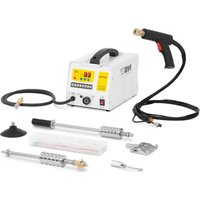
S-SPOTTER 3500
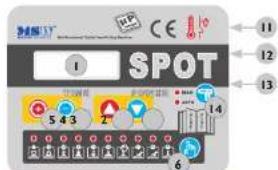
I. LCD display
2 Reduce power
3. Increase power
4. Reduce time
5. Increase time
6. Mode selection
7. Earth cable
8. Socket for gun lead
9. Gun test button
10. Control socket
11. ON/OFF switch
12. Fuse
13. Power cable
14. MAN – Press the gun's trigger to start welding.
AUTO – there is no need to press the gun's trigger to start welding. Welding starts automatically after the gun's electrode touches the welded surface.
Component elements (may vary from depending on the model).
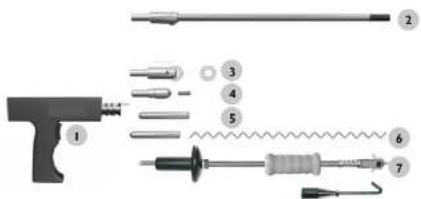
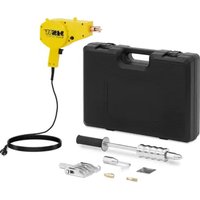
I. Working handle (gun)
2. Carbon arc nozzle
3. Nozzle for washers
4. Nozzle for bolts, pins, etc.
5. Electrode for one sided welding
6. Electrode with a flat pin for welding zigzag wires
7. Hammer with a nozzle for welding washers / hook for pulling dents
4.2 DEVICE OPERATING MODES
| Function | Description | Time range ^ | Power range ^1,2 |
| Model | S-SPOTTER 3500 | S-SPOTTER 3500 | |
| Welding triangular washers | 0,01 – FFF | 25 – FF | |
| Welding washers | 0,01 – FFF | 25 – FF | |
| Welding pins/bolts etc. | 0,01 – FFF | 25 – FF | |
| One sided welding | 0,01 – FFF | 25 – FF | |
| Zigzag wire welding | 0,01 – FFF | 25 – FF | |
| Swelling – hearing up sheet metal using a carbon arc | FFF | 25 – FF | |
| Sheet metal overlap welding | FFF | 25 – FF | |
| Carbon arc heating and shrinking | FFF | 25 – FF | |
| Carbon arc cutting | FFF | 25 – FF |
* FFF means unlimited time
^44 FF means maximum current
4.3 CONNECTING THE DEVICE
The machines are powered by two phase 400 V alternating current. Plug connection diagram:
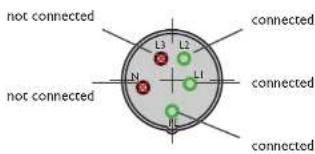
Green-yellow wire is used to connect the PE earth cable. The two phases should be connected to L1 and L2. Phase three L3 and neutral N connections remain unconnected in the plug. A qualified electrician is required to perform these connections.
4.3.1 CONNECTING EARTH
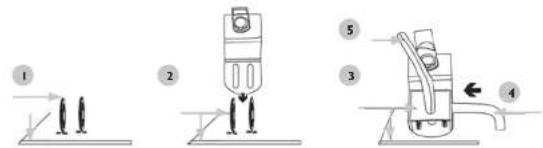

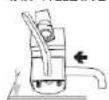
- Weld 2 washers on a metal work surface as close as possible.
- Connect the washers with a wire.
- Apply a metal lock to the washers.
- Insert locking bolt.
- Tighten the lock.
4.4 DEVICE OPERATION 4.4.1 WELDING WASHER

Connect the earth cable to a clean, unpainted work surface, near to the welding spot. Connect the adapter for washers to the gun, then insert a washer. Set the required welding current.


Set the welding time. Align the gun with the surface at a 90°C angle, then apply pressure to the gun and press the trigger. Remove the gun. Use the hammer to remove a welded washer: insert the hammer hook through the washer eye and move the hammer handle quickly towards you.
4.4.2 WELDING TRIANGULAR WASHERS
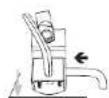

Connect the earth cable to a clean, unpainted work surface, near to the welding spot. Connect the adapter for triangular washers to the gun, then insert a washer. Set the required welding current.


natural_image
Three diagrams showing a vertical object with an arrow pointing to its surface, before and after rotation, and a curved surface with a dotted line below (no text or symbols)Set the welding time. Align the gun with the surface at a 90°C angle, then apply pressure to the gun and press the trigger. Remove the gun. Use the hammer to remove a welded washer: insert the hammer hook through the washer eye and move the hammer handle quickly towards you.

4.4.3 CARBON ROD HEATING UP

flowchart
graph LR
    A["Tool with left-angle arrow"] --> B["Processed"]
    B --> C["Warning symbol: +, %"]
    C --> D["→"]
Connect the earth cable to a clean, unpainted work surface, near to the welding spot. Connect the carbon rod and the adapter to the gun. Set the required welding current.
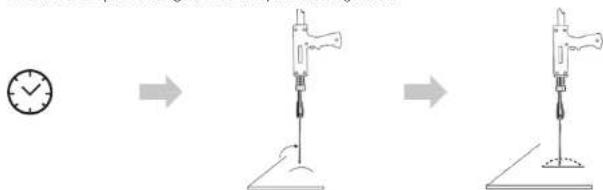
Set the welding time. To heat up sheet metal, rotate the carbon rod clockwise. Use cold water or a wet cloth to cool down the hot surface. This will cause the sheet metal to shrink back to its normal state.
4.4.4 WELDING ZIGZAG WIRE

flowchart
graph LR
    A["Device with left arm"] --> B["Tool with 20% warning symbol"]
    B --> C["Warning symbol: +, %"]
    C --> D["Return"]
Connect the earth cable to a clean, unpainted work surface, near to the welding spot. Connect an appropriate electrode. Set the required welding current.
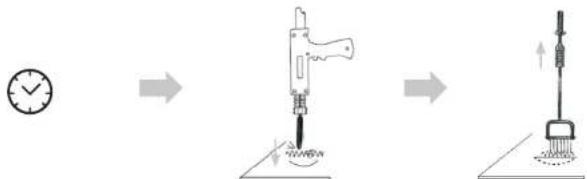
Set the welding time. Align the zigzag wire with the work surface, align the gun at a 90°C angle, then apply pressure to the gun and press the trigger. Connect the hook with the hammer, quickly move the hammer handle to "pull out" the denc.
ATTENTION! The device is protected against overheating, during operation the device may switch of and activate its fans to cool down. Refrain from using the device for 15 minutes until it cools down. If this occurs frequently reduce the welding current and / or the welding time.
ATTENTION! To prevent damaging the work surface, test the operation of the device on a different piece of metal (with the same properties) to adjust the welding current and time.


4.4.5 WORKING WITH THE SUCTION PAD
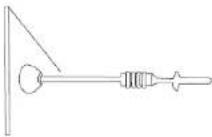
Connect the suction pad with the hammer, press down on the suction pad so that it attaches to a surface and then move the hammer handle quickly towards yourself.
5. DISPOSING OF PACKAGING
The various items used for packaging (cardboard, plastic straps, polyurethane foam) should be kept, so that the device can be sent back to the service centre in the best possible condition in case of any problems!
6. TRANSPORTATION AND STORAGE
Shaking, crashing and turning upside down of the device should be prevented when it is transported. Store it in a properly ventilated surrounding with dry air and without any corrosive gas.
7. CLEANING AND MAINTENANCE
• Always unplug the device before cleaning it and when the device is not in use.
- Use cleaner without corrosive substances to clean surface.
• Dry all parts well before the device is used again.
- Store the unit in a dry, cool place, free from moisture and direct exposure to sunlight.
8. CHECK REGULARLY THE DEVICE
Check regularly that the device doesn □t present any damage. If there is any damage, please stop using the device. Please contact your customer service to solve the problem.
What to do in case of a problem?
Please contact your customer service and prepare following information:
• Invoice number and serial number (the latter is to be found on the technical plate on the device).
- If relevant, a picture of the damaged, broken or defective part.
It will be easier for your customer service clerk to determine the source of the problem if you give a detailed and precise description of the matter. The more detailed your information, the better the customer service will be able to answer your problem rapidly and efficiently!
CAUTION: Never open the device without the authorization of your customer service. This can lead to a loss of warranty!
INSTRUKCJA OBSŁUGI
SYMBOLE

flowchart
graph LR
    A["Tool with left-angle arrow"] --> B["Power Tool"]
    B --> C["Circle Indicator 1: +%, -"]
flowchart
graph LR
    A["Start"] --> B["Arrow to soldering device"]
    B --> C["Arrow to soldering tool"]
    C --> D["Warning symbol: %"]
    D --> E["Arrow back"]
flowchart
graph LR
    A["Tool with arrow"] --> B["Power Tool"]
    B --> C["Percentage Indicator: 4%"]
    C --> D["Next Step"]
flowchart
graph LR
    A["Device with lever"] --> B["Fuel Gun"]
    B --> C["Warning Symbol: +%, -%"]
flowchart
graph LR
    A["Tool with left angle"] --> B["Soldering Gun"]
    B --> C["Warning Symbol: %"]
    C --> D["Percentage Indicator"]
flowchart
graph LR
    A["Drain Pump"] --> B["Adder"]
    B --> C["Pressure Gauge"]
    C --> D["Product Inspection"]
flowchart
graph LR
    A["Manual Tool with Pin"] --> B["Step 1: Inserted"]
    B --> C["Step 2: Cut to Stick"]
    C --> D["Step 3: Replace with Symbol"]
    D --> E["Step 4: Select with + and - symbols"]
flowchart
graph LR
    A["Left Hand with lever"] --> B["Arrow to Right"]
    B --> C["Arrow to Right"]
    C --> D["Arrow to Right"]
    D --> E["Arrow to Right"]
flowchart
graph LR
    A["Tool with left arrow"] --> B["Power Tool"]
    B --> C["Arrow with percentage symbol"]
    C --> D["Arrow with downward triangle symbol"]
flowchart
graph LR
    A["Electricity Tool"] --> B["Transfer to Fuel Injector"]
    B --> C["Safety Warning Symbol: 100%"]
    C --> D["End"]


flowchart
graph LR
    A["Start"] --> B["Arrow to toolbar with pencil icon"]
    B --> C["Arrow to tool with pencil icon"]
    C --> D["Arrow to target symbol with percentage indicator"]
    D --> E["Arrow to target symbol with percentage indicator"]
natural_image
Diagram showing a mechanical device being adjusted to a base, with no visible text or symbolsflowchart
graph LR
    A["Mechanical Device"] --> B["Electrician"]
    B --> C["Warning Symbol: 100%, 90%"]
natural_image
Diagram showing a tool pressing down on a surface and then moving to a cleaning or cleaning board (no text or symbols present)NAMEPLATE TRANSLATIONS
| Manufacturer scending Pocka sp. 3,9 o.o. B. d. Nuryy Kielu Ternawazna 7,60 002 Szulna Sora | Poland, B | |
| Product name (Dent Rutter) | port weight |
| Mood | |
| Power | |
| Voltage/temperature 2 Phase | (500/-10Hz) |
| Weight | |
| Sensitivity | |
| Production year | |
| agustard.com | |
Derivate / Signature / People / Signature / Event / Drama / Practice
Piotr R. Gajos
Name: Vosana, Stelle (Name, Action, Line)
Amelebe, Amelebe, Japan, France, Poland.
Cintana, Ame, John del Responsable, | Ame Nombre elaste (entreal, meso, mio
nDpC
www.riskCF.pl
rev.05-05-2017
For the disposal of the device please consider and act according to the national and local rules and regulations.
CONTACT
expondo Polska sp. z o.o. sp. k.