Iron Professional - Steam cleaner CECOTEC - Free user manual and instructions
Find the device manual for free Iron Professional CECOTEC in PDF.


| Product type | Steam generator |
| Brand | Cecotec |
| Model | Iron Professional |
| Rated power | 2520 - 3000 W |
| Supply voltage | 220 - 240 V ~ 50/60 Hz |
| Water tank capacity | 1.8 L |
| Soleplate | Thermal soleplate with non-slip coating |
| Temperature settings | 4 positions: 70-120 °C, 100-160 °C, 140-210 °C, 170-225 °C |
| Continuous steam function | Yes, with steam trigger |
| Steam jet function | Yes, by pressing the trigger twice |
| Automatic shut-off | After 10 minutes of inactivity |
| Fill indicator | Light and vibration indicator |
| Cleaning/descaling indicator | Light indicator |
| Anti-scale system | Manual descaling via generator cover |
| Iron lock | Yes, locking lever on the base |
| Cable storage | Slot for cable and tube |
| Weight (approx.) | Approximately 5 kg |
| Dimensions (L x W x H, approx.) | 30 x 20 x 30 cm |
| Use | Household use only |
| Warranty | Official Cecotec after-sales service |
Frequently Asked Questions - Iron Professional CECOTEC
User questions about Iron Professional CECOTEC
0 question about this device. Answer the ones you know or ask your own.
Ask a new question about this device
Download the instructions for your Steam cleaner in PDF format for free! Find your manual Iron Professional - CECOTEC and take your electronic device back in hand. On this page are published all the documents necessary for the use of your device. Iron Professional by CECOTEC.
USER MANUAL Iron Professional CECOTEC
Safety instructions 7
-
Parts and components 40
-
Before use 40
-
Operation 41
-
Cleaning and maintenance 4/4
-
Technical specifications 45
-
Disposal of old electrical
and electronic appliances 45
-
Technical support and warranty 46
-
Copyright 46
SOMMAIRE
Read these instructions thoroughly before using the device. Keep this instruction manual for future reference or new users.
- All safety instructions must be closely followed when using the appliance.
- This appliance can be used by children aged 8 years and above and persons with reduced physical, sensory, or mental capabilities or lack of experience and knowledge if they have been given supervision or instruction concerning use of the appliance in a safe way and understand the hazards involved. Children must not play with the appliance. Cleaning and user maintenance should not be carried out by unsupervised children.
- The appliance must not be left unattended while connected to the power supply.
- The plug must be removed from the socket before filling up the water tank.
- The filling opening must not be open during use.
- The appliance must be used and placed on a flat, stable, and heat-resistant surface.
- When placing the iron on the base, make sure the surface on which the base is placed is stable.
- Do not use the appliance if it has been dropped, shows visible damage, or is leaking.
- Keep the appliance and its power cable out of reach of
children under 8 years old when plugged in or cooling down.
- This symbol means "Caution: hot surface". The

temperature of accessible surfaces may be high while the appliance is in use and could cause burns. Do not touch hot surfaces during operation lately after.
- This appliance is designed for domestic use only and is not intended for bars, restaurants, farmhouses, hotels, motels, and offices.
- When using electrical and electronic appliances, basic precautions must always be followed to reduce the risk of fire, electrical shock, and injury.
- Ensure that the mains voltage matches the voltage specified on the device rating label and that the plug is earthed.
- Do not immerse the cable, plug, or any other non-removable part of the device in water or any other liquid or expose electrical connections to water. Make sure your hands are dry before handling the plug or switching on the device.
- Check the power cable regularly for visible damage. If the cable is damaged, it must be repaired by the official Cecotec Technical Support Service to avoid any type of danger.
- If the appliance falls accidentally in water, unplug it immediately. Do not touch the water!
- Do not expose the appliance to atmospheric agents.
- Do not use the iron on very wet fabrics.
- Do not twist, bend, pull, or damage the power cable. Protect it from sharp edges and heat sources. Do not allow the cable to touch hot surfaces. Do not let the cable hang over the edge of the surface or worktop.
- This appliance is not intended to be operated by means of an external timer or separate remote-control system.
- Turn off and unplug the appliance from the mains supply
when not in use and before cleaning it. Pull from the plug, not the cable, to disconnect it from the outlet.
- This appliance is designed to iron textiles. It is designed for domestic use only and, therefore, not suitable for commercial use. Do not use outdoors.
- To protect against burns or injuries to persons, do not iron textiles while being worn on the body.
- Do not use any accessory that has not been recommended by Cecotec, as they might cause injuries or damage.
- To protect against burns or injuries, do not direct steam toward persons or animals when ironing.
- Keeping the iron at maximum temperature for too long may cause discolouration, which will not affect the performance of the appliance.
- Do not try to repair the appliance by yourself. Contact the official Cecotec Technical Support Service for advice.
- Cleaning and maintenance must be carried out according to this instruction manual to make sure the appliance functions properly. Turn off and unplug the appliance before moving and cleaning it. Make sure the iron has completely cooled down before storing it.
- Cecotec takes no responsibility for any damage caused by misuse of the machine. Any misuse or non-compliance with these instructions voids the warranty and Cecotec's liability.
- Warning: All our ironing range products have undergone quality control tests previous to their commercialisation. These tests consist of filling the water tank in order to check tightness and to ensure the correct operation of the appliance. Once the test has been carried out, the tank is emptied and dried, but some water may still remain inside.
INSTRUCTIONS DE SÉCURITÉ
-
Filling opening
-
Tank handle
-
Water tank
-
Base
-
Cable storage slot
-
Temperature knob
-
Soleplate
-
Handle
-
Steam trigger
-
Lock lever
-
Iron
-
Heat-insulated bracket
-
Control panel
Fig. 2.
- 70 °C-120 °C (Minimum)
- 100 °C-160 °C
- 140 °C-210 °C
- 170 °C-225 °C (Maximum)
Buttons and Indicator LightsFig. 3
- Power button
- Steam level selection button
- Power indicator light
- Descaling indicator
- Filling indicator
- Low-steam indicator
- Medium-steam indicator
- High-steam indicator
2. BEFORE USE
- This appliance is packaged in a way as to protect it during transport. Take the device out of its box and remove all packaging materials. You can keep the original box and other packaging elements in a safe place. This will help you prevent damage to the device when
transporting it in the future. In case the original packaging is disposed of, make sure all packaging materials are recycled accordingly.
- Make sure all parts and components are included and in good conditions. If there is any piece missing or in bad conditions, contact the official Cecotec Technical Support Service immediately.
Box content
- Steam station
- Instruction manual
3. OPERATION
First use
- Before switching on the iron, remove all protective stickers and adhesives from the appliance.
- Fill the water tank with water and heat up the iron. Then, iron over a piece of damp cloth for several minutes for the purpose of removing any residue on the soleplate.
- Note: some parts of the iron have been lightly oiled, which may cause the iron to emit a slight smoke when it is first switched on. Smoke will disappear after a short time.
- It is normal for the appliance to give off a strange odour on first use. The smell will disappear after a short time.
- When you switch on the appliance, the steam generator may make a pumping sound. This is normal. This sound indicates that water is being pumped into the steam generator.
- The soleplate may automatically emit steam for approximately three seconds while heating up.
Filling the water tank
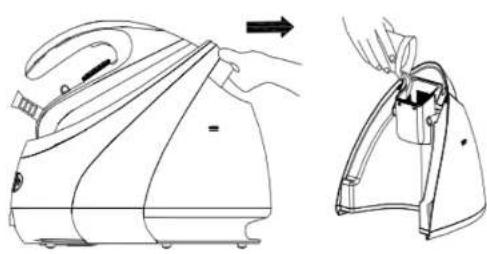
- Remove the water tank by pulling the handle when the iron is switched off. Fill the tank through the filling opening.
- Make sure the water does not exceed the MAX. mark on water tank.
On/off
- The appliance must be plugged in for switch-on. Press the power button: the power indicator light will switch on. Low Steam is the default steam setting upon switch-on, so the corresponding indicator light will come on.
- Press the power button for two seconds to switch off the appliance.
Steam level selection
- The steam level can be changed by pressing the steam level selection button.
- Depending on which one is chosen, the corresponding indicator light will flash and remain steady once the iron is finished preheating.
ENGLISHENGLISH
Temperature knob
Adjust the ironing temperature according to the fabric to be ironed. To enable the Steam function, select the steam temperature range, otherwise steam will not be sprayed properly.
Temperature indicator light
When the iron is heating up, the temperature indicator will light up. Once the iron has reached the selected temperature, it will switch off. The temperature indicator light will turn on and off while the iron maintains the selected temperature during ironing.
Lock button
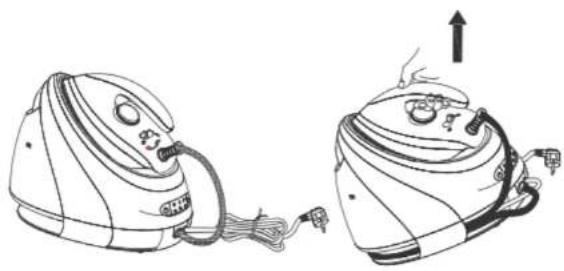
Place the steam station on the base heat-insulated support and move the lock lever in the locked position to safely leave the iron on the base. To unlock the iron, move the lock lever to the unlocked position. You can now start ironing. The whole steam station can be lifted by the handle, as long as the iron is in the locked position on the base. Fig 4.
Steam trigger
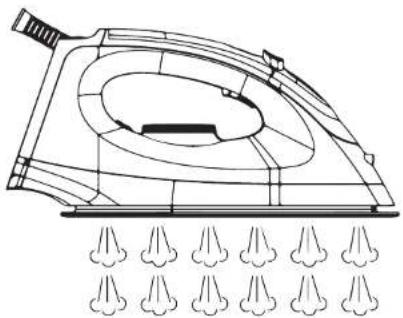
After pressing the power button and choosing the desired steam level, and the indicator lights stop flashing, the iron will have already reached the temperature at which steam can be used. Then, lightly press the steam trigger to make steam come out continuously from the soleplate (Fig. 5): When the steam trigger is fully released, the appliance can only be used for dry ironing without steam. Fig. 5
Steam burst
Press the steam trigger twice in less than one second to activate the steam burst function. Use the steam burst function to remove stubborn creases.
Filling Indicator
When the water level in the tank is low, the Filling indicator will light up, followed by a buzzing sound; the, the steam generator will stop working. When this happens, add water to the water tank. To do this, remove the water tank, fill it up through the filling opening, and put it back in place. Fig. 6
Cleaning Indicator
If the Descaling indicator light comes on, the steam generator needs to be cleaned of mineral residue. To clean it, follow the steps specified in the "Cleaning and maintenance" section. Once the residue has been removed, the indicator light will switch off.
Cable storage slot
When not in use, the steam supply hose and power cable can be stored in the cable storage slot.
Auto switch-off
The appliance will automatically switch off after 10 minutes of inactivity.
Dry ironing
- Put the appliance on the heat-insulated bracket
- Plug the power cord into the outlet. This will cause the temperature indicator light and the MAX steam indicator light to light up.
- Set the temperature regulator using the temperature knob. Once done, the iron will start to heal up.
- When the desired temperature is reached, the temperature indicator light will go out. You can start ironing now.
Warning
Do not touch the soleplate before it cools down!
Steam Ironing
- Take the water tank handle to remove it and fill it with water through the filling opening. Use purified water with little limescale. After that, re-install the water tank. The maximum water tank capacity is 1.8 L. The water level must not exceed the MAX mark.
- Place the steam station on the base.
- Connect the power cable to the power outlet and press the power button. The default low steam intensity indicator light will start flashing. There are three modes: low, medium and high steam intensity. Select the desired steam intensity for each garment according to your needs. Ensure there is enough water in the tank.
- Adjust the temperature according to the fabric to be ironed, and the indicator light will light up. The steam station will start emitting heat. Refer to the ironing tips and the table in this manual when adjusting the temperature.
- The water in the steam generator will heat up and, after a few minutes, the temperature indicator light will switch off. This indicates that the soleplate has reached the desired temperature. When the default steam intensity indicator light changes from flashing to steady, it indicates that the iron is ready for use.
- Lightly press the steam trigger to make steam come out continuously from the soleplate.
Warning
Never direct steam at people!
- After ironing, press the Power button for two seconds: the appliance will switch off along with all indicators. Unplug the power cable from the wall socket. Be careful: the soleplate may still be hot. Never touch it if hot. Place the iron on the heat-insulated support until it has cooled down completely.
ENGLISHENGLISH
Ironing tips
- Always check for ironing instructions on the garment label. If present, follow these instructions.
The appliance heats up faster than it cools down. Therefore, start by ironing garments that require lower temperatures, such as synthetic-fibre garments. - If the garment is composed of different types of fibres, you should always select the lowest ironing temperature.
- Silk and other fabrics that tend to be shiny should be ironed on the inside.
- Velvet and other textures that become shiny quickly should be ironed in the same direction with light pressure. Always keep the iron moving.
Pure-wool fabrics (100% wool) can be ironed with the steam iron. Set the temperature knob preferably to the third position and use a dry cloth between the iron and the garment. - Never iron over zips or rivets. This may damage the iron.
Warning
When woollen fabrics are ironed, they may become shiny. In this case, it is advisable to turn the garment inside out and iron on the inside.
| Adjustment Temperature Fabric | ||
| 170°C-120°C Acetate, elastane, polyamide. | polypropylene. | |
| 2100°C-160°C Cupro, polyester, silk. | ||
| 3140°C-210°C | Triacetate, viscose, wool. | |
| Maximum | 170°C-225°C | Cotton, linen. |
4. CLEANING AND MAINTENANCE
- Turn off, unplug the appliance from the power supply, empty the water tank (do it after each use) and allow it to cool down completely.
- Wipe off any residue left on the soleplate with a damp cloth or a non-abrasive (liquid) cleaner.
Warning
Do not use abrasive cleaners or scouring pads to clean the device.
- Use a soft, damp cloth to clean the surface of the device. Wipe off any water droplets on the base and the heat-insulated bracket with a dry cloth.
If any fabric has stuck to the soleplate, use a cloth dampened with vinegar to clean the sole.
Cleaning/descaling
- To remove the mineral residue accumulated inside the steam generator, follow the steps below.
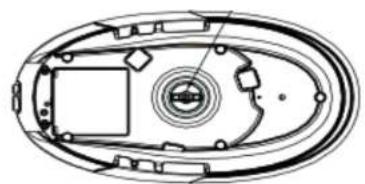
- Turn the base upside down and place it horizontally on a flat surface. Make sure that the base is stable.
- Gently pry the cover with a screwdriver and remove it (fig. 7).
- Refill the steam generator tank.
- Put the cover back in position by pressing on the hole and shake the base of the iron to remove any mineral residue that may be stuck to it.
- Open the cover again and empty the steam generator tank.
- Close the cover again.
Warning
- To avoid burns, make sure the steam generator has cooled down completely.
- If the appliance is not going to be used for a long time, empty the water tank. Place the iron on the support and move the lock lever to the locked position.
5. TECHNICAL SPECIFICATIONS
05199 Iron Professional
2520-3000 W, 220-240 V\~, 50-60 Hz
Technical specifications may change without prior notification to improve product quality. Made in China | Designed in Spain
6. DISPOSAL OF OLD ELECTRICAL AND ELECTRONIC APPLIANCES

This symbol indicates that, according to the applicable regulations, the product and/or battery must be disposed of separately from household waste. When this product reaches the end of its shelf life, you should dispose of the cells/batteries/accumulators and take them to a collection point designated by the local authorities.
Consumers must contact their local authorities or retailer for information
concerning the correct disposal of old appliances and/or their batteries.
Compliance with the above guidelines will help protecting the environment.
7. TECHNICAL SUPPORT AND WARRANTY
Cecotec shall be liable to the end user or consumer for any lack of conformity that exists at the time of delivery of the product under the terms, conditions, and deadlines established by the applicable regulations.
It is recommended that repairs be carried out by qualified personnel.
If at any moment you detect any problem with your product or have any doubt, do not hesitate to contact the official Cecotec Technical Support Service at +34 963 210 728.
8. COPYRIGHT
The intellectual property rights over the texts in this manual belong to CECOTEC INNOVACIONES, S.L. All rights reserved. The contents of this publication may not. In whole or in part, be reproduced, stored in a retrieval system, transmitted, or distributed by any means (electronic, mechanical, photocopying, recording or similar) without the prior authorization of CECOTEC INNOVACIONES, S.L.
1. PIÈCES ET COMPOSANTS
Img.
Regulator temperature
Fig./Img./Abb./Afb./Rys.1

Fig./Img./Abb./Afb./Rys.2
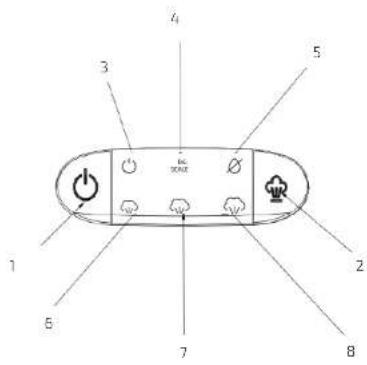
Fig./Img./Abb./Afb./Rys.3
natural_image
Line drawing of two steam covers with attached wires, one showing a hand pressing down (no text or symbols)Fig./Img./Abb./Afb./Rys.4
natural_image
Technical line drawing of a mechanical device with multiple flange-like structures below (no text or symbols)Fig./Img./Abb./Afb./Rys.5
natural_image
Line drawing of a steam iron being placed into a bag, showing the handle and side view (no text or symbols)Fig./Img./Abb./Afb./Rys. 6
natural_image
Technical line drawing of an oval-shaped mechanical or electronic component with internal components and no visible text or symbolsFig./Img./Abb./Afb./Rys.7
www.cecotec.es