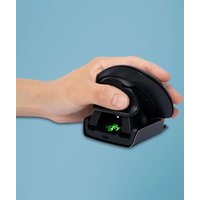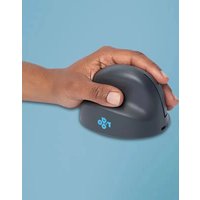
R-Go Tools HE Basic - Mouse

HE Basic - Mouse R-Go Tools - Free user manual and instructions

Find the device manual for free HE Basic R-Go Tools in PDF.

📄 101 pages English EN Download 💬 AI Question
Notice R-Go Tools HE Basic - page 6
Pick your language and provide your email: we'll send you a specifically translated version.

User questions about HE Basic R-Go Tools

0 question about this device. Answer the ones you know or ask your own.

Ask a new question about this device

The email remains private: it is only used to notify you if someone responds to your question.

No questions yet. Be the first to ask one.

Download the instructions for your Mouse in PDF format for free! Find your manual HE Basic - R-Go Tools and take your electronic device back in hand. On this page are published all the documents necessary for the use of your device. HE Basic by R-Go Tools.

USER MANUAL HE Basic R-Go Tools

natural_image Line drawing of a helmet with a strap and handle, no text or symbols present

R-Go HE Basic

RGOHEBAMRWL

English manualR-Go Tools HE Basic - R-Go HE Basic - 1
Deutsche Anleitung p.13R-Go Tools HE Basic - R-Go HE Basic - 2
Manuel en français p.25R-Go Tools HE Basic - R-Go HE Basic - 3
Nederlandse handleiding p.36R-Go Tools HE Basic - R-Go HE Basic - 4
Polski podręcznikR-Go Tools HE Basic - R-Go HE Basic - 5
Manual en español p.58R-Go Tools HE Basic - R-Go HE Basic - 6
Manual em português p.67R-Go Tools HE Basic - R-Go HE Basic - 7
Manuale italianoR-Go Tools HE Basic - R-Go HE Basic - 8
Svensk manualR-Go Tools HE Basic - R-Go HE Basic - 9

R-Go Tools HE Basic - R-Go HE Basic - 10

natural_image Line drawing of a helmet with a strap and handle, no text or symbols present

R-Go Tools HE Basic - R-Go HE Basic - 11

ergonomic mouse

R-Go HE Basic

RGOHEBAMRWL

medium | right

Bluetooth connection

Contents

Product overview 5 Setup 6 Maintenance 11 Troubleshooting

Our ergonomic R-Go HE Basic has a vertical grip that ensures a natural, relaxed position of your hand and wrist. The mouse stimulates movements from the forearm instead of the wrist, which prevents RSI. This comfortable mouse supports your thumb and fingers and is as lightweight as possible, hereby reducing the muscle tension. HE is the way to a healthy life! #stayfit

System requirements/Compatibility: Windows XP/Vista/10/11, MacOS
R-Go Tools HE Basic - Contents - 1

text_image QR code image with no visible text or symbols beyond the matrix pattern

For more information about this product, scan the QR code! https://r-go.tools/hebasic_web_en

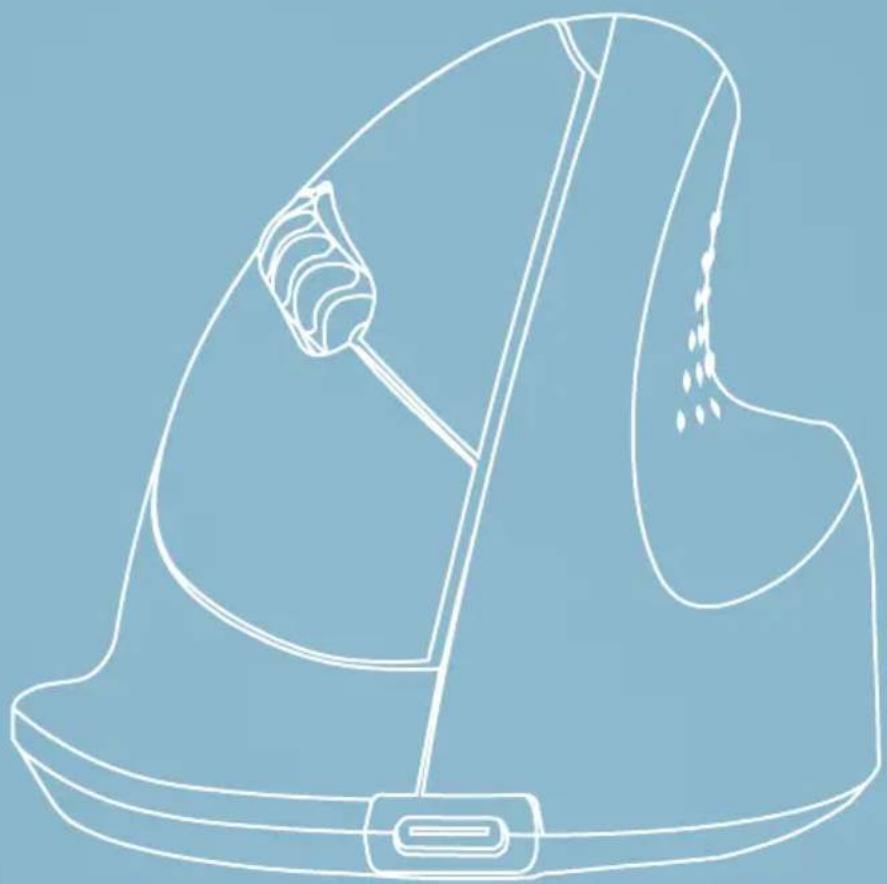
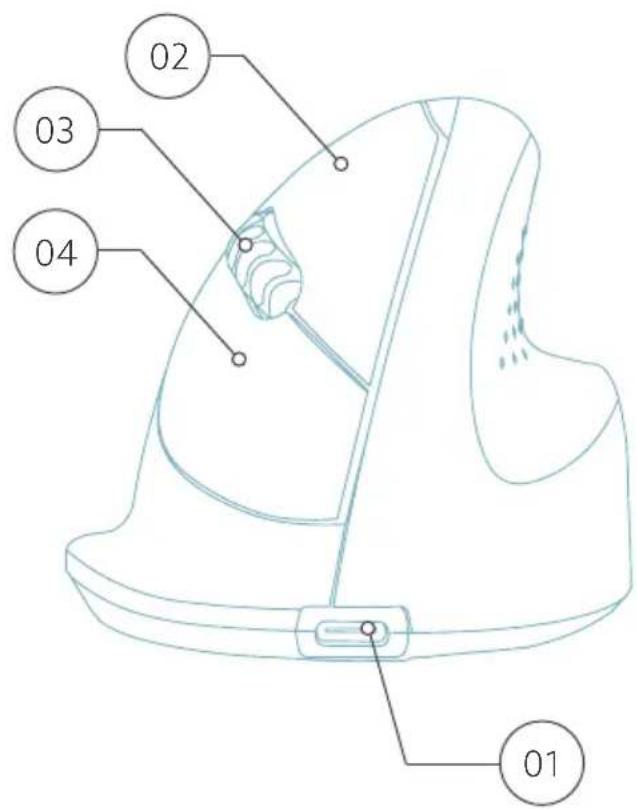
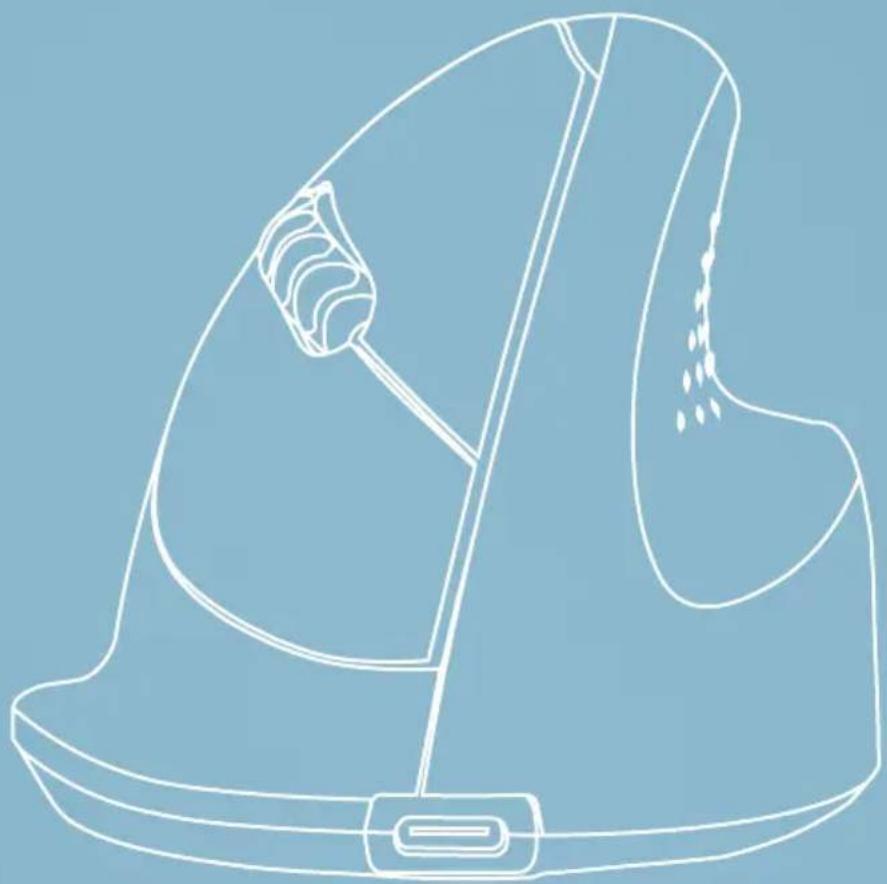
01 Connection for charging cable
02 Left (primary) button
03 Scroll wheel
04 Right (secondary) button
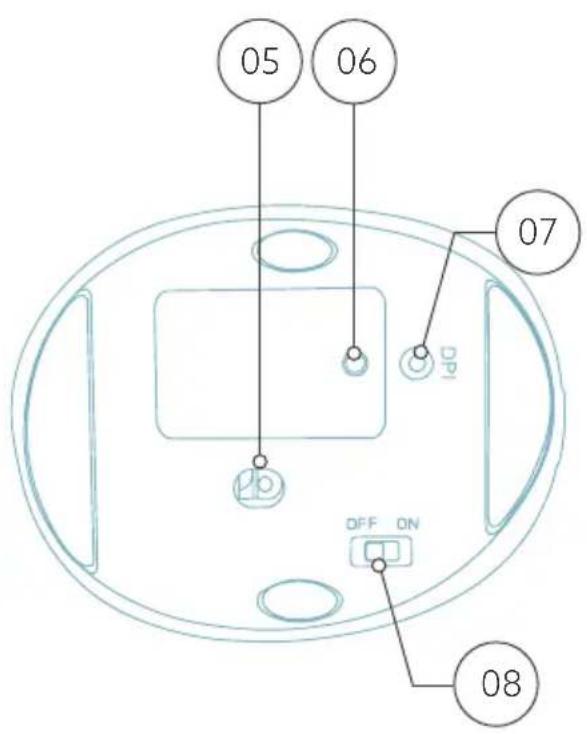
05 Sensor
06 Pair button
07 DPI button
08 On/off button
09 USB cable (for charging only)

R-Go Tools HE Basic - Contents - 2

text_image 09

R-Go Tools HE Basic - Contents - 3

text_image 01 02 03 04

R-Go Tools HE Basic - Contents - 4

text_image 05 06 07 DPI OFF ON 08

Windows

  1. Turn your mouse on. At the bottom of the mouse you will find the on/off switch. Turn the switch to "on".
  2. Press the pair button for 5 seconds. You will see a blue light on the bottom of the mouse blinking.
  3. Go to Bluetooth & other devices menu on your screen. To find this you can type "Bluetooth" in your Windows bar.

R-Go Tools HE Basic - Windows - 1

text_image bluetooth and other device
  1. Check if Bluetooth is on. If not, turn on Bluetooth or check if your PC has got Bluetooth.

R-Go Tools HE Basic - Windows - 2

text_image Bluetooth & devices > Devices Bluetooth Discoverable as "DESKTOP-63M5H0B" On Connect a new device to "DESKTOP-63M5H0B" Add device Input R GO BREAK Mouse Connected 63% ...
  1. Add device and click on 'Bluetooth'. Select your mouse. The mouse will connect to your PC/laptop.

Add a device

R-Go Tools HE Basic - Windows - 3

Add a device

Choose the kind of device you want to add.

R-Go Tools HE Basic - Add a device - 1

Bluetooth

Audio devices, mice, keyboards, phones, pens, controllers, and more

R-Go Tools HE Basic - Add a device - 2

Wireless display or dock

Wireless monitors, TVs, or PCs that use Miracast, or wireless docks

R-Go Tools HE Basic - Add a device - 3

Everything else

Xbox controllers with Xbox Wireless Adapter, DLNA, and other devices

To check if your PC has got Bluetooth, type 'device manager' in the Windows bar at the bottom of your screen.

R-Go Tools HE Basic - Add a device - 4

R-Go Tools HE Basic - Add a device - 5

device manag

R-Go Tools HE Basic - Add a device - 6

R-Go Tools HE Basic - Add a device - 7

You will see the following screen (see picture). When your PC doesn't have Bluetooth, you won't find 'Bluetooth' in the list. You won't be able to use Bluetooth devices.
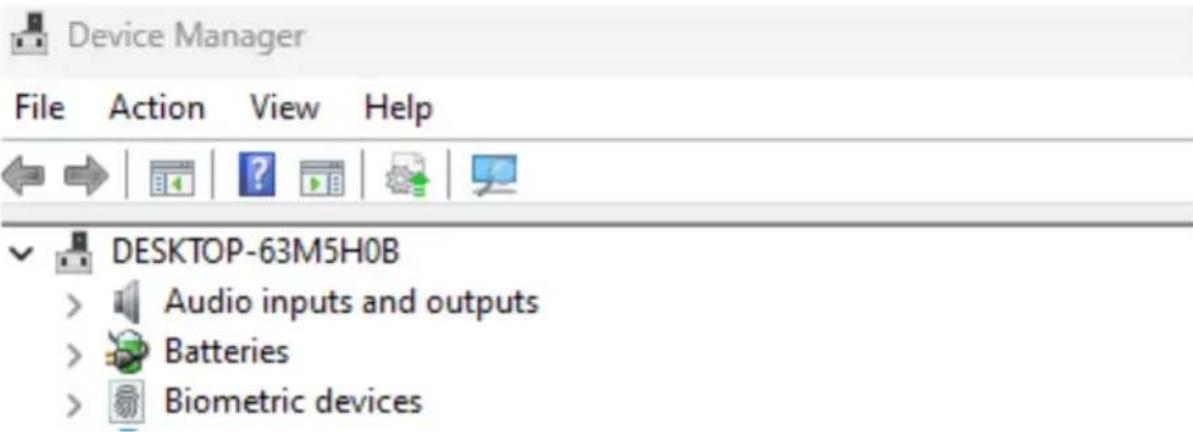
R-Go Tools HE Basic - Add a device - 8

text_image Device Manager File Action View Help DESKTOP-63M5H0B Audio inputs and outputs Batteries Biometric devices

Mac

  1. Turn your mouse on. At the bottom of the mouse you will find the on/off switch. Turn the switch to "on".
  2. Press the pair button for 5 seconds. You will see a blue light on the bottom of the mouse blinking.
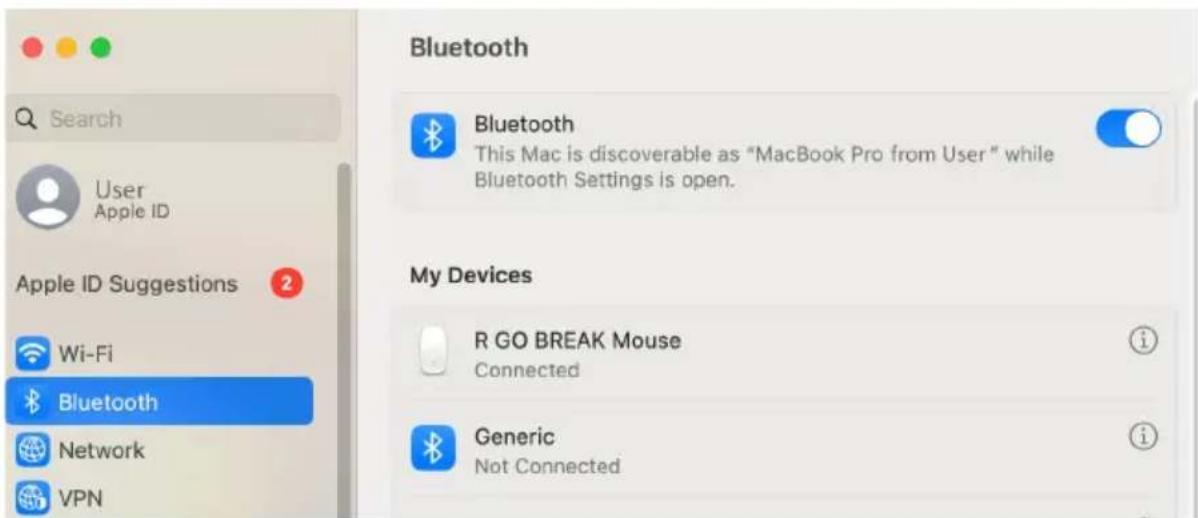
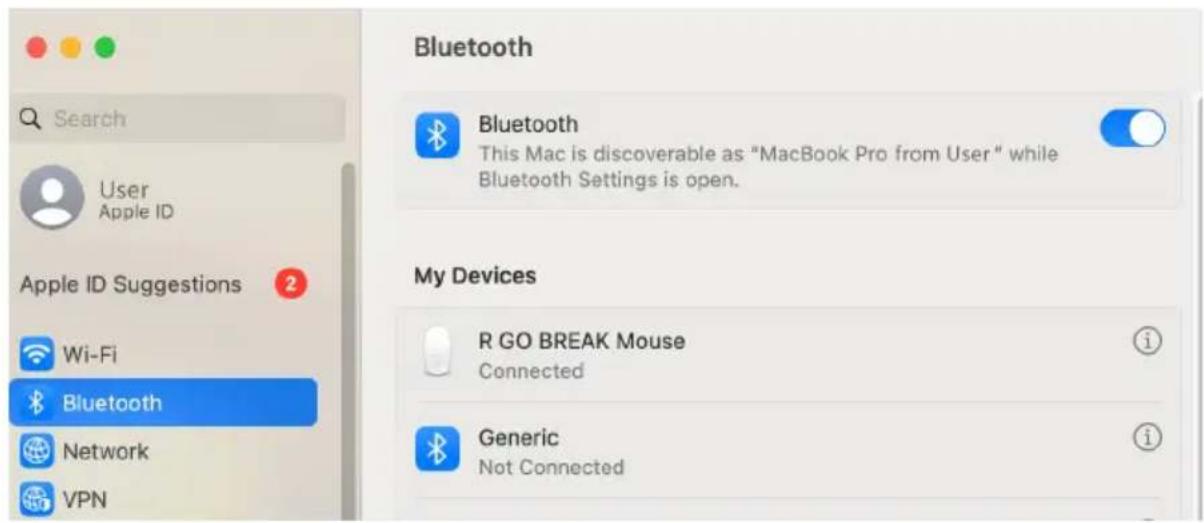
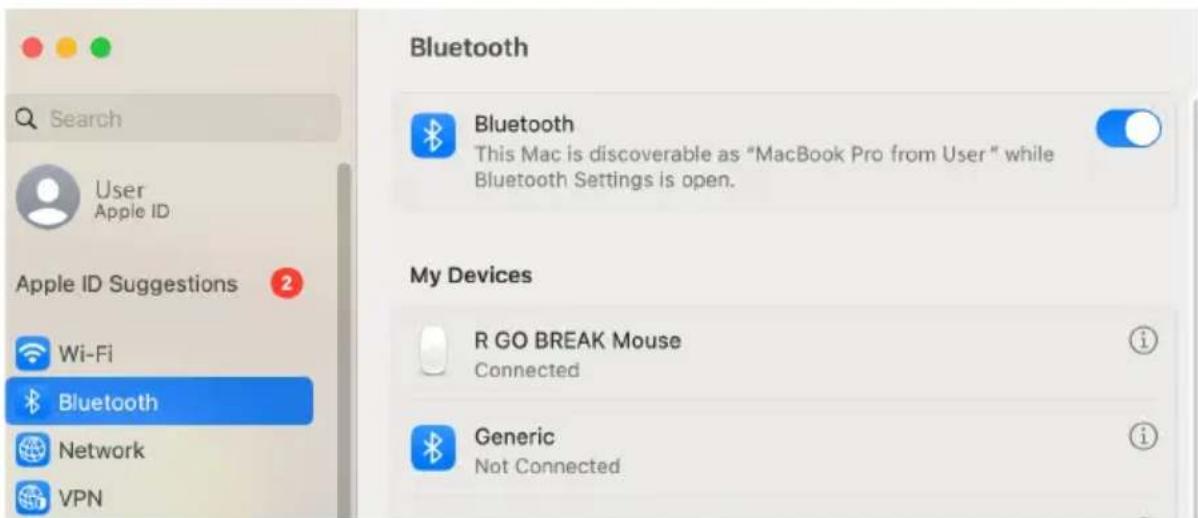
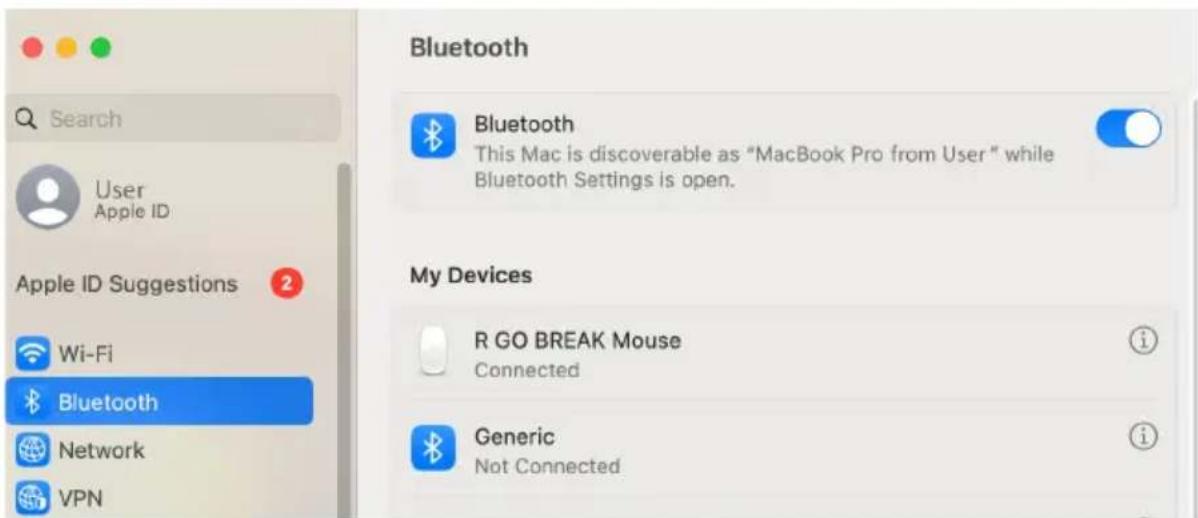
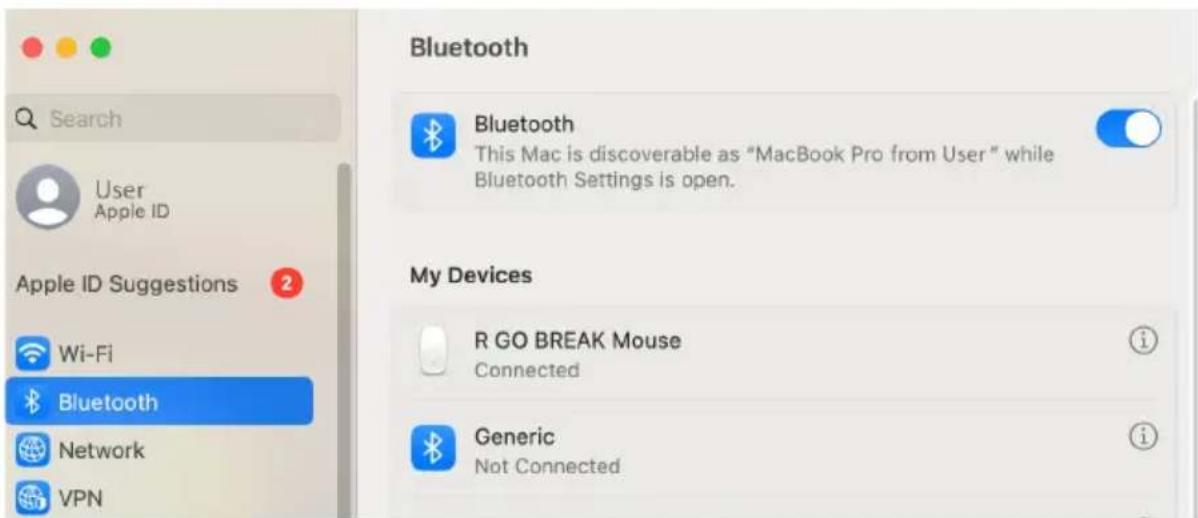
  3. Go to Bluetooth on your screen. To find this you click on the Mac icon in the upper left and go to System settings.
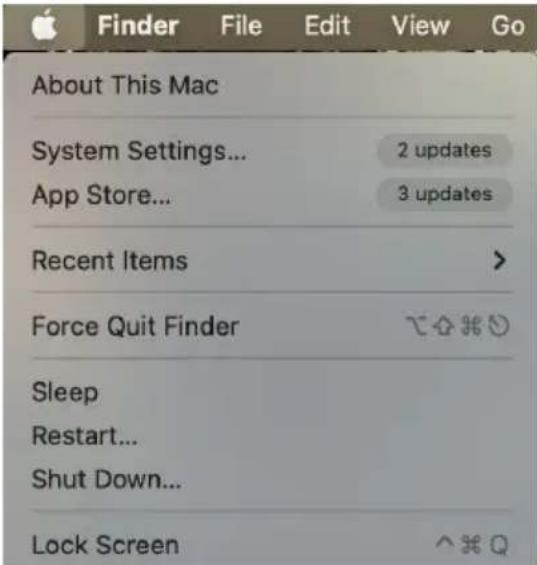
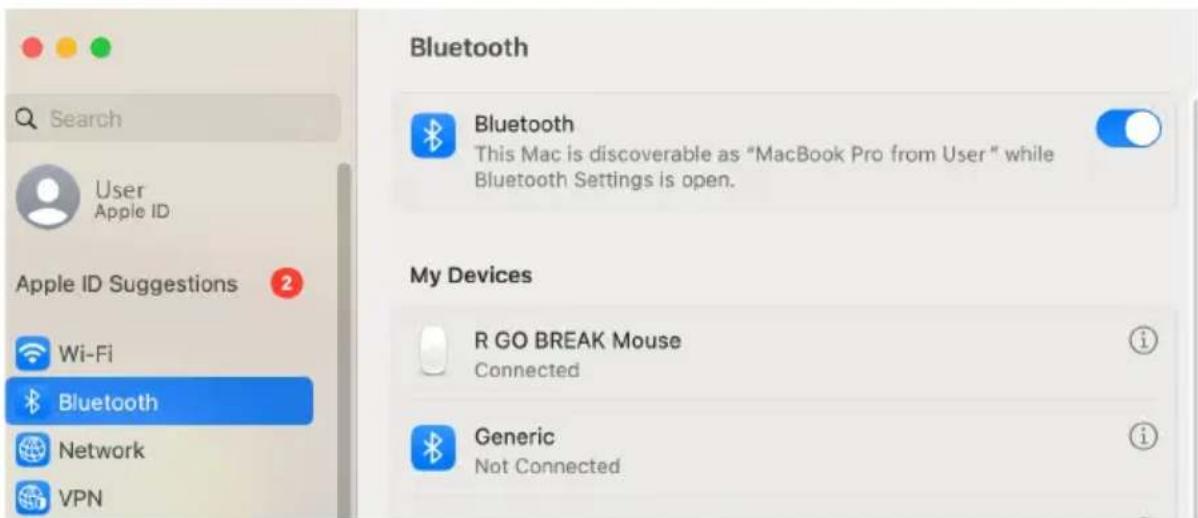
R-Go Tools HE Basic - Mac - 1

text_image About This Mac System Settings... App Store... Recent Items Force Quit Finder Sleep Restart... Shut Down... Lock Screen

R-Go Tools HE Basic - Mac - 2

text_image Search User Apple ID Apple ID Suggestions 2 Wi-Fi Bluetooth Network VPN Bluetooth This Mac is discoverable as "MacBook Pro from User" while Bluetooth Settings is open. My Devices R GO BREAK Mouse Connected Generic Not Connected
  1. Check if Bluetooth is on. If not, turn on Bluetooth or check if your PC has Bluetooth.
  2. Scroll down to 'Nearby Devices' and click Connect.
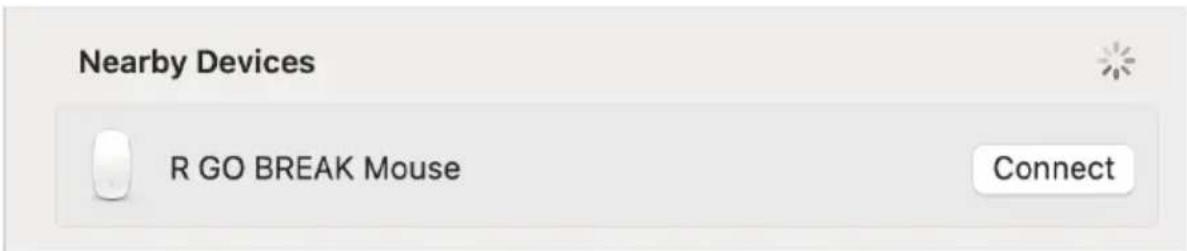
R-Go Tools HE Basic - Mac - 3

text_image Nearby Devices R GO BREAK Mouse Connect
  • Do not bring the mouse in contact with water. Water could damage the electronic parts inside the mouse. To clean the mouse, disconnect the device from your PC. Do not clean the mouse with alcohol or with water and soap. This will damage the coating of the mouse. If you want to clean the mouse, use a water-based damp cloth.
  • Do not remove any of the rubber parts on the bottom of the mouse. You will not be able to place them back and your mouse will not move smoothly as before.
  • Do not obstruct the laser on the bottom of the mouse.

Is your mouse not working properly, or do you experience problems while using it? Please follow the steps mentioned below.

  • Check if the mouse is connected properly (page 6-10).
  • Click the 'Pair' button on the bottom of the mouse to start the pairing process. Check if the device appears on the screen. If it does not appear, restart your computer.
  • Test the mouse on another device, if it is still not working contact us via info@r-go-tools.com.
R-Go Tools HE Basic - Mac - 4

natural_image Line drawing of a helmet with a strap and handle, no text or symbols present

Ergonomische Maus

R-Go HE Basic

RGOHEBAMRWL

mittel | rechts

text_image QR code image with no visible text or symbols beyond the matrix pattern
text_image bluetooth and other device
text_image Bluetooth & devices > Devices Bluetooth Discoverable as "DESKTOP-63M5H0B" On Connect a new device to "DESKTOP-63M5H0B" Add device Input R GO BREAK Mouse Connected 63% ...

Choose the kind of device you want to add.

R-Go Tools HE Basic - Ergonomische Maus - 1

Bluetooth

Audio devices, mice, keyboards, phones, pens, controllers, and more

R-Go Tools HE Basic - Ergonomische Maus - 2

Wireless display or dock

Wireless monitors, TVs, or PCs that use Miracast, or wireless docks

R-Go Tools HE Basic - Ergonomische Maus - 3

Everything else

Xbox controllers with Xbox Wireless Adapter, DLNA, and other devices
text_image About This Mac System Settings... App Store... Recent Items > Force Quit Finder Sleep Restart... Shut Down... Lock Screen

R-Go Tools HE Basic - Ergonomische Maus - 4

text_image Search User Apple ID Apple ID Suggestions 2 Wi-Fi Bluetooth Network VPN Bluetooth This Mac is discoverable as "MacBook Pro from User" while Bluetooth Settings is open. My Devices R GO BREAK Mouse Connected Generic Not Connected
text_image Nearby Devices R GO BREAK Mouse Connect
natural_image Line drawing of a helmet with a strap and handle, no text or symbols present

souris ergonomique

R-Go HE Basic

moyen | droite

Connexion Bluetooth

RGOHEBAMRWL

Aperçu du produit

Mise en place

text_image QR code image with no visible text or symbols beyond the matrix pattern
text_image bluetooth and other device
text_image Bluetooth & devices > Devices Bluetooth Discoverable as "DESKTOP-63M5H08" On Connect a new device to "DESKTOP-63M5H08" Add device Input R GO BREAK Mouse Connected 63% ...

Choose the kind of device you want to add.

R-Go Tools HE Basic - souris ergonomique - 1

Bluetooth

Audio devices, mice, keyboards, phones, pens, controllers, and more

R-Go Tools HE Basic - souris ergonomique - 2

Wireless display or dock

Wireless monitors, TVs, or PCs that use Miracast, or wireless docks

R-Go Tools HE Basic - souris ergonomique - 3

Everything else

Xbox controllers with Xbox Wireless Adapter, DLNA, and other devices

text_image Search User Apple ID Apple ID Suggestions 2 Wi-Fi Bluetooth Network VPN Bluetooth This Mac is discoverable as "MacBook Pro from User" while Bluetooth Settings is open. My Devices R GO BREAK Mouse Connected Generic Not Connected
text_image Nearby Devices R GO BREAK Mouse Connect
natural_image Line drawing of a helmet with a strap and handle, no text or symbols present

R-Go Tools HE Basic - souris ergonomique - 4

ergonomische muis

R-Go HE Basic

middel | rechts

Bluetooth-verbinding

RGOHEBAMRWL

Productoverzicht

Installatie

Onderhoud

Problemen oplossen

4

text_image QR code image with no visible text or symbols beyond the matrix pattern
text_image bluetooth and other device
text_image Bluetooth & devices > Devices Bluetooth Discoverable as "DESKTOP-63M5H08" On Connect a new device to "DESKTOP-63M5H08" Add device Input R GO BREAK Mouse • Connected 63% ...

Choose the kind of device you want to add.

R-Go Tools HE Basic - ergonomische muis - 1

Bluetooth

Audio devices, mice, keyboards, phones, pens, controllers, and more

R-Go Tools HE Basic - ergonomische muis - 2

Wireless display or dock

Wireless monitors, TVs, or PCs that use Miracast, or wireless docks

R-Go Tools HE Basic - ergonomische muis - 3

Everything else

Xbox controllers with Xbox Wireless Adapter, DLNA, and other devices

text_image Search User Apple ID Apple ID Suggestions 2 Wi-Fi Bluetooth Network VPN Bluetooth This Mac is discoverable as "MacBook Pro from User" while Bluetooth Settings is open. My Devices R GO BREAK Mouse Connected Generic Not Connected
text_image Nearby Devices R GO BREAK Mouse Connect
natural_image Line drawing of a helmet with a strap and handle, no text or symbols present

R-Go Tools HE Basic - ergonomische muis - 4

ergonomiczna mysz

R-Go HE Basic

RGOHEBAMRWL

średna | prawa

text_image QR code image with no surrounding text or symbols
text_image bluetooth and other device
text_image Bluetooth & devices > Devices Bluetooth Discoverable as "DESKTOP-63M5H08" On Connect a new device to "DESKTOP-63M5H08" Add device Input R GO BREAK Mouse Connected 63% ...

Choose the kind of device you want to add.

R-Go Tools HE Basic - ergonomiczna mysz - 1

Bluetooth

Audio devices, mice, keyboards, phones, pens, controllers, and more

R-Go Tools HE Basic - ergonomiczna mysz - 2

Wireless display or dock

Wireless monitors, TVs, or PCs that use Miracast, or wireless docks

R-Go Tools HE Basic - ergonomiczna mysz - 3

Everything else

Xbox controllers with Xbox Wireless Adapter, DLNA, and other devices
text_image About This Mac System Settings... App Store... Recent Items Force Quit Finder Sleep Restart... Shut Down... Lock Screen

R-Go Tools HE Basic - ergonomiczna mysz - 4

text_image Search User Apple ID Apple ID Suggestions 2 Wi-Fi Bluetooth Network VPN Bluetooth This Mac is discoverable as "MacBook Pro from User" while Bluetooth Settings is open. My Devices R GO BREAK Mouse Connected Generic Not Connected
text_image Nearby Devices R GO BREAK Mouse Connect
natural_image Line drawing of a helmet with a strap and handle, no text or symbols present

R-Go Tools HE Basic - ergonomiczna mysz - 5

ratón ergonómico

R-Go HE Basic

medio | derecho

Conexión Bluetooth

RGOHEBAMRWL

text_image QR code image with no visible text or symbols beyond the matrix pattern
text_image bluetooth and other device
text_image Bluetooth & devices > Devices Bluetooth Discoverable as "DESKTOP-63M5H0B" On Connect a new device to "DESKTOP-63M5H0B" Add device Input R GO BREAK Mouse Connected 63% ...

Choose the kind of device you want to add.

R-Go Tools HE Basic - ratón ergonómico - 1

Bluetooth

Audio devices, mice, keyboards, phones, pens, controllers, and more

R-Go Tools HE Basic - ratón ergonómico - 2

Wireless display or dock

Wireless monitors, TVs, or PCs that use Miracast, or wireless docks

R-Go Tools HE Basic - ratón ergonómico - 3

Everything else

Xbox controllers with Xbox Wireless Adapter, DLNA, and other devices

text_image About This Mac System Settings... App Store... Recent Items Force Quit Finder Sleep Restart... Shut Down... Lock Screen

R-Go Tools HE Basic - ratón ergonómico - 4

text_image Search User Apple ID Apple ID Suggestions 2 Wi-Fi Bluetooth Network VPN Bluetooth This Mac is discoverable as "MacBook Pro from User" while Bluetooth Settings is open. My Devices R GO BREAK Mouse Connected Generic Not Connected
text_image Nearby Devices R GO BREAK Mouse Connect
natural_image Line drawing of a helmet with a strap and handle, no text or symbols present

R-Go Tools HE Basic - ratón ergonómico - 5

rato ergonómico

R-Go HE Basic

médio | direito

Ligação Bluetooth

RGOHEBAMRWL

text_image QR code image with no surrounding text or symbols
text_image bluetooth and other device
text_image Bluetooth & devices > Devices Bluetooth Discoverable as "DESKTOP-63M5H0B" On Connect a new device to "DESKTOP-63M5H0B" Add device Input R GO BREAK Mouse Connected 63% ...

Choose the kind of device you want to add.

R-Go Tools HE Basic - rato ergonómico - 1

Bluetooth

Audio devices, mice, keyboards, phones, pens, controllers, and more

R-Go Tools HE Basic - rato ergonómico - 2

Wireless display or dock

Wireless monitors, TVs, or PCs that use Miracast, or wireless docks

R-Go Tools HE Basic - rato ergonómico - 3

Everything else

Xbox controllers with Xbox Wireless Adapter, DLNA, and other devices
text_image About This Mac System Settings... App Store... Recent Items Force Quit Finder Sleep Restart... Shut Down... Lock Screen

R-Go Tools HE Basic - rato ergonómico - 4

text_image Search User Apple ID Apple ID Suggestions 2 Wi-Fi Bluetooth Network VPN Bluetooth This Mac is discoverable as "MacBook Pro from User" while Bluetooth Settings is open. My Devices R GO BREAK Mouse Connected Generic Not Connected
text_image Nearby Devices R GO BREAK Mouse Connect
natural_image Line drawing of a helmet with a strap and handle, no text or symbols present

R-Go Tools HE Basic - rato ergonómico - 5

mouse ergonomico

R-Go HE Basic

medio | destro

Connessione Bluetooth

RGOHEBAMRWL

text_image QR code image with no visible text or symbols beyond the matrix pattern
text_image bluetooth and other device
text_image Bluetooth & devices > Devices Bluetooth Discoverable as "DESKTOP-63M5H0B" On Connect a new device to "DESKTOP-63M5H0B" Add device Input R GO BREAK Mouse • Connected 63% ...

Choose the kind of device you want to add.

R-Go Tools HE Basic - mouse ergonomico - 1

Bluetooth

Audio devices, mice, keyboards, phones, pens, controllers, and more

R-Go Tools HE Basic - mouse ergonomico - 2

Wireless display or dock

Wireless monitors, TVs, or PCs that use Miracast, or wireless docks

R-Go Tools HE Basic - mouse ergonomico - 3

Everything else

Xbox controllers with Xbox Wireless Adapter, DLNA, and other devices

text_image About This Mac System Settings... App Store... Recent Items Force Quit Finder Sleep Restart... Shut Down... Lock Screen

R-Go Tools HE Basic - mouse ergonomico - 4

text_image Search User Apple ID Apple ID Suggestions 2 Wi-Fi Bluetooth Network VPN Bluetooth This Mac is discoverable as "MacBook Pro from User" while Bluetooth Settings is open. My Devices R GO BREAK Mouse Connected Generic Not Connected
text_image Nearby Devices R GO BREAK Mouse Connect
natural_image Line drawing of a helmet with a strap and handle, no text or symbols present

R-Go Tools HE Basic - mouse ergonomico - 5

Ergonomisk mus

R-Go HE Basic

RGOHEBAMRWL

text_image QR code image with no visible text or symbols beyond the matrix pattern
text_image bluetooth and other device
text_image Bluetooth & devices > Devices Bluetooth Discoverable as "DESKTOP-63M5H08" On Connect a new device to "DESKTOP-63M5H08" Add device Input R GO BREAK Mouse • Connected 63% ▶ ...

Choose the kind of device you want to add.

R-Go Tools HE Basic - Ergonomisk mus - 1

Bluetooth

Audio devices, mice, keyboards, phones, pens, controllers, and more

R-Go Tools HE Basic - Ergonomisk mus - 2

Wireless display or dock

Wireless monitors, TVs, or PCs that use Miracast, or wireless docks

R-Go Tools HE Basic - Ergonomisk mus - 3

Everything else

Xbox controllers with Xbox Wireless Adapter, DLNA, and other devices
text_image Search User Apple ID Apple ID Suggestions 2 Wi-Fi Bluetooth Network VPN Bluetooth This Mac is discoverable as "MacBook Pro from User" while Bluetooth Settings is open. My Devices R GO BREAK Mouse Connected Generic Not Connected
text_image Nearby Devices R GO BREAK Mouse Connect
Manual assistant
Powered by Anthropic
Waiting for your message
Product information

Brand : R-Go Tools

Model : HE Basic

Category : Mouse