HE Sport - Mouse R-Go Tools - Free user manual and instructions
Find the device manual for free HE Sport R-Go Tools in PDF.


Pick your language and provide your email: we'll send you a specifically translated version.
| Product Type | Ergonomic wired mouse |
| Brand | R-Go Tools |
| Model | HE Sport |
| Connectivity | USB wired connection |
| Sensor Technology | Optical sensor with precise tracking |
| DPI Range | Adjustable from 400 to 1600 DPI |
| Button Count | 6 buttons, including scroll wheel |
| Scroll Wheel | Standard clickable scroll wheel |
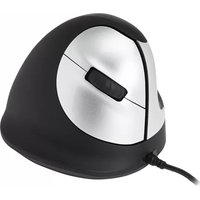
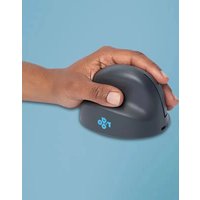
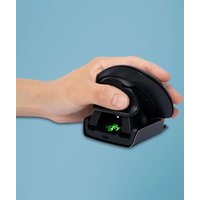
| Ergonomic Shape | Vertical handshake design to reduce wrist strain |
| Hand Orientation | Right-handed |
| Dimensions (W x D x H) | 70 mm x 110 mm x 75 mm |
| Weight | 105 g |
| Cable Length | 1.8 m |
| Material | Durable ABS plastic with soft-touch coating |
| Compatibility | Windows, macOS, and Chrome OS |
| Maintenance | Periodically clean the sensor and surface |
| Cleaning | Wipe with a dry or slightly damp soft cloth |
| Safety | Use only the supplied USB cable; avoid exposure to liquids |
| Spare Parts | Replaceable mouse feet available separately |
| Repairability | User-serviceable: screws accessible under the feet |
| Package Contents | Mouse, USB cable, user manual |
Frequently Asked Questions - HE Sport R-Go Tools
Is the R-Go Tools HE Sport compatible with laptops?
Yes, the HE Sport is compatible with any laptop that has a USB port, including Windows, macOS, and Chrome OS devices.
How do I clean the mouse?
To clean your mouse, unplug it first, then wipe the surface with a dry or slightly damp soft cloth. Avoid using harsh chemicals or submerging the device in water.
Does the mouse require software for DPI adjustment?
The DPI can be adjusted on the fly using the dedicated DPI button, without any software installation. You can cycle through preset levels from 400 to 1600.
Is the mouse suitable for left-handed users?
The HE Sport is designed for right-handed users. Its ergonomic shape is sculpted to fit the right hand, so left-handed users might find it less comfortable.
Can I use the mouse with a USB hub?
Yes, you can connect the mouse through a USB hub, as long as the hub provides sufficient power and is functioning properly.
How does the ergonomic design help prevent RSI?
The vertical handshake shape positions your hand and wrist in a natural, neutral posture, which reduces muscle strain and helps prevent repetitive strain injuries during long computer sessions.
What is the warranty period?
R-Go Tools offers a 2-year limited warranty on the HE Sport mouse, covering defects in materials and workmanship under normal use.
Are replacement feet available?
Yes, replacement mouse feet are available as spare parts. You can order them directly from R-Go Tools or authorized retailers.
How do I adjust the DPI settings?
Simply press the DPI button on the mouse to cycle through preset sensitivity levels (400, 800, 1200, 1600). The selected level is indicated by an LED light.
Does it work with gaming?
While the HE Sport is primarily designed for ergonomic office use, it can handle basic gaming thanks to its optical sensor and adjustable DPI. However, it lacks gaming-specific features like programmable macros.
User questions about HE Sport R-Go Tools
0 question about this device. Answer the ones you know or ask your own.
Ask a new question about this device
No questions yet. Be the first to ask one.
Download the instructions for your Mouse in PDF format for free! Find your manual HE Sport - R-Go Tools and take your electronic device back in hand. On this page are published all the documents necessary for the use of your device. HE Sport by R-Go Tools.
USER MANUAL HE Sport R-Go Tools


Manual assistant
Powered by Anthropic
Waiting for your message
Product information
Brand : R-Go Tools
Model : HE Sport
Category : Mouse