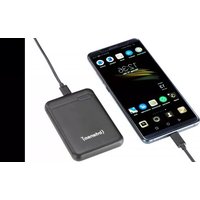
XS5000 - Power bank INTENSO - Free user manual and instructions
Find the device manual for free XS5000 INTENSO in PDF.


| Product Type | Portable Battery (Powerbank) |
| Brand | Intenso |
| Model | XS5000 |
| Battery Capacity | 10000 mAh (3.7V Lithium Polymer) |
| Dimensions (L x W x H) | 91 x 63 x 22 mm |
| Charging Input (microUSB) | 5V - 2.1A max |
| Charging Input (USB Type-C) | 5V - 2.4A max |
| Charging Output (USB-A) | 5V - 3.1A max (shared) |
| Charging Output (USB Type-C) | 5V - 3.1A max (shared) |
| Output Ports | 1 x USB-A, 1 x USB Type-C |
| Charge Indicator | 4 LEDs (25-100% level) |
| Built-in Protections | Overcharge, deep discharge, overvoltage, short circuit |
| Operating Temperature | 0°C to 40°C |
| Storage Temperature | -10°C to 45°C (charge every 3 months) |
| Package Contents | XS5000 Powerbank, USB-A to USB-C cable, user manual |
| Maintenance and Cleaning | Use a dry cloth, no water or chemicals |
| Safety | Do not open, do not expose to heat, keep out of reach of children |
| Warranty | 2 years (excluding misuse or modification) |
| Repairability | Not user-repairable (warranty void if opened) |
| Compatibility | 5V devices (smartphones, tablets, MP3 players, etc.) |
| Standby Time | Up to 3 months |
Frequently Asked Questions - XS5000 INTENSO
User questions about XS5000 INTENSO
0 question about this device. Answer the ones you know or ask your own.
Ask a new question about this device
Download the instructions for your Power bank in PDF format for free! Find your manual XS5000 - INTENSO and take your electronic device back in hand. On this page are published all the documents necessary for the use of your device. XS5000 by INTENSO.
USER MANUAL XS5000 INTENSO
1 Intenso Powerbank XS10000 USB A zu 2ype C Ladekabel
3 Anleitung
Bedienung
| LED-Leuchte | ||||
| % - Energie LED 1 LED 2 LED 3 LED 4 | ||||
| 1% - 25% | ● | ○ | ○ | ○ |
| 26% - 50% | ● | ● | ○ | ○ |
| 51% - 75% | ● | ● | ● | ○ |
| 76% - 100% | ● | ● | ● | ● |
Declaration of conformity 2
General 2
Use
Device overview
Operation 3
Safety instructions 4
Operating conditions 5
Technical data 5
Disposal
Exclusion of liability 6
Guarantee Conditions and complaints procedure 7
2
3
6
OVERVIEW
Delivery scope
![graph TD A["(Intenso)"] --> B["1"]](/content/2026/04/694043/images/9b2b5e2ed91532bf906382330ba83f303346084012b3d903f72b7eddf60fbbff.jpg)
1 Intenso Powerbank XS10000
3 Instruction

2 USB A to type C charging cable
Declaration of conformity

The CE marking says that this product meets the requirements of all EU Directives applicable for this product.
GENERAL
About these instructions
Read these instructions carefully and please observe and heed all references made in these instructions to guarantee a long life and reliable use of the device. Please keep these instructions ready to hand and pass them on to other users of the device.
Intended use
This Powerbank is intended exclusively for the power supply of devices with an operating voltage of 5V direct current (mobile phones, MP3 player, etc.) Another use, or one going beyond this, is deemed as not intended and can lead to damages and injuries. This product is not intended for commercial use or for medical and special applications, where the failure of the product can cause injuries, mortalities or considerable material damages. Claims of any kind due to damages from improper use or non-observance of safety instructions are excluded.
USE
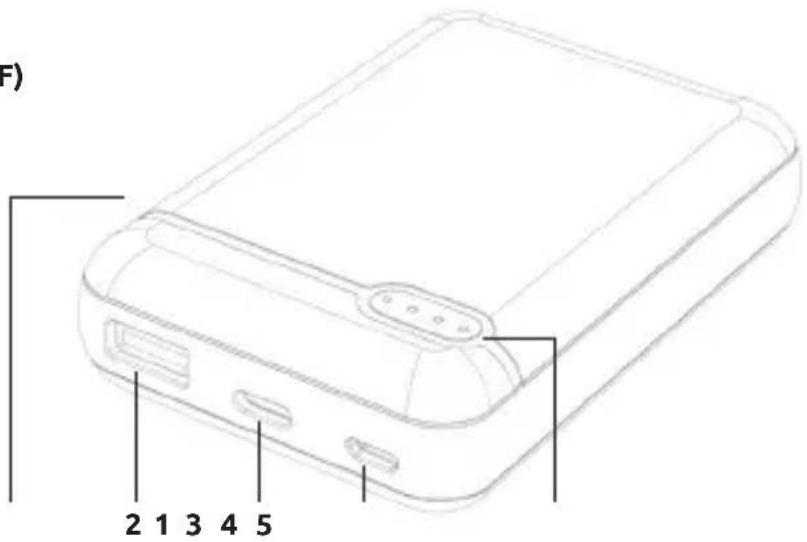
Device overview
1 - Function key (ON/OFF)
2 - USB A Out
3 - Type C In/Out
4 - microUSB In
5 - Status LEDs
Operation
1. Function key (ON/OFF)
By briefly pressing the key, the current battery status is displayed through the LED lights and the Powerbank is activated.
If no device is connected to the Powerbank, or the connected device is fully charged, the Powerbank changes automatically into standby mode after a time interval of approx. 30 seconds.
2. LED Status display
The current charge status of the Powerbank is displayed via the status LEDs when charging or discharging the Powerbank.
| LED light | ||||
| % Energy LED 1 | LED 2 LED 3 LED | 4 | ||
| 1% - 25% | ● | ○ | ○ | ○ |
| 26% - 50% | ● | ● | ○ | ○ |
| 51% - 75% | ● | ● | ● | ○ |
| 76% - 100% | ● | ● | ● | ● |
3. Commissioning / Charging the Powerbank / Charging connected devices
a) Charging the Powerbank
Please connect the supplied USB A to Type C cable with the Type C connection (Type C In/Out) of the Powerbank and connect the opposite end of the USB cable with the Standard USB Port of a computer or USB power supply. You can also use a USB A to microUSB cable to charge the Powerbank through the microUSB connection (microUSB In). Always use only one of the two charging options, the Type C port (Type C In/Out) or the microUSB port (microUSB In)!
The charge process and the current charge status is signalled by the LED status lights. If the Powerbank is fully charged, the LED status lights are lit permanently. The required charging time of the Powerbank is dependent on the selected charging source and its output power (microUSB In max. 5V / 2.1A; Type C In/Out max. 5V / 2.4A).
b) Charging devices with the Powerbank
- This Powerbank has a USB A connection (USB A Out) and a USB type C connection (Type C In/Out) to charge connected devices.
- With the Powerbank you can charge two devices at the same time, for example a table to the USB A connection and a smartphone to the USB type C connection.
- Connection the supplied USB A to cable type C with the USB A connection (USB A Out) of the Powerbank and the opposite end of the USB cable with the USB type C connection of the device to be charged. If the charging procedure does not start automatically, press the function key to manually start the charging procedure.
- Of course, you can also use your own USB charging cable to connect the Powerbank to your device. However, please consider that the devices can only be charged by the USB A connection (USB A Out) and the USB type C connection (Type-C In/Out) of the Powerbank.
- If a device is charged with the Powerbank and the capacity of the Powerbank is almost exhausted, this is signalled by blinking of the last status LED. Please re-charge the Powerbank.
- Please note that while charging a device with a Powerbank, about 30% of the total capacity is used up just through the charging process. This is due, for example, through the loss of power from circuit warmth and voltage conversion.
- The Powerbank has to be used regularly for optimum performance. If this is not the case, charge the Powerbank fully at least every three months.
• Make sure that the warmth created through the charging process can be emitted from the device (ideally place the Powerbank on a firm and heat-resistant base while in use).
SAFETY INSTRUCTIONS
Dangers for children and persons with restricted physical, sensory or mental abilities:
Children often underestimate dangers or do not recognise them at all. This device is not intended to be used by persons (including children) with restricted sensory, physical or mental abilities or lack of experience and/or knowledge, unless they are supervised by a person responsible for their safety or received instructions from the person on how to use the device and they have understood the resultant dangers. Unsupervised children should not have access to the device. Make sure that children do not play with the device.
General
Do not use the device in extremely cold, hot, humid or dusty areas. Do not subject it to direct sunlight. Protect the product from open fire. There is danger of explosion!
Protect the device in every operating state against impact and falling.
This device is sensitive to electrostatic discharge. Therefore protect the device against every possible electrostatic discharge.
To avoid malfunctions, do not connect the USB output ports of the device with USB ports of computers or other devices. They are only intended for charging devices.
Do not disassemble to device into its component parts and do not try to repair it yourself. It does not contain any parts requiring maintenance and the guarantee expires in this case.
Do not insert any items, which are not intended for its use, into the openings of the product. This could lead to an electrical short-circuit and a resultant fire.
Do not operate this device with wet hands.
Please do not use water or chemical solutions to clean the device. Please use only a dry cloth for this purpose.
Do not try to repair the device yourself. The guarantee expires in this case.
The device develops warmth when in use, this is normal. Do not cover the device when this is in use.
Do not use the device when it shows visible damage or has become moist.
OPERATING CONDITIONS
Operate the device at 0 to 40 degrees Celsius at max. 90% relative humidity (for a short time). If you do not use the Powerbank for a longer period of time, store it at between -10 and 45 degrees Celsius at max. 90% relative humidity (for a short time) and charge this every three months to retain the full performance.
TECHNICAL DATA
| Dimensions: 91 x 63 x 22 mm | |
| Power consumption (input): 5 V 2.1 A (microUSB) | 5V 2.4 A (Type C) |
| Charging current delivery (Output) 5V - 3.1A (shared) | |
| Internal battery: 10000 mAh / 3.7 V Lithium polymer battery | |
| Status display: 4 LED lights | |
| Integrated overcharge protection / discharge protection / overvoltage protection / short circuit fuse: | Yes |
| Standby time: Up to 3 months |
DISPOSAL
 | Disposal of old batteries:The devices marked with this symbol are subject to the European Directive 2006/66/EC All old batteries must be disposed of separate from the municipal waste stream via designated collection facilities appointed by the government or the local authorities You avoid environmental damage with the proper disposal. |
 | Disposal of old electronic equipment:The devices marked with this symbol are subject to the European Directive 2012/19/EC. All electrical appliances and old electrical appliances must be disposed of separate from the municipal waste stream via designated collection facilities appointed by the government or the local authorities You avoid environmental damage with the proper disposal of old electrical equipment. |
 | Packaging:Packaging is raw material. The packaging material of this product is suitable for recycling and can be re-used. Please pay attention to the local recycling provisions when disposing of any materials. |
EXCLUSION OF LIABILITY
The firmware and/or hardware may be changed at any time without prior notice. For this reason it is possible that parts of these instructions, technical data and images in this documentation differ slightly from the product in your possession. All points described in these instructions only serve the purpose of clarification and must not inevitably correspond to a certain situation. Legal claims cannot be made on the basis of these instructions.
GUARANTEE CONDITIONS AND COMPLAINTS PROCEDURE
Guarantee conditions:
Intenso International GmbH grants a two-year guarantee for this product in addition to the statutory warranty. The guarantee applies only to material and production errors. Intenso International GmbH is not liable for the loss of data. The free-of-charge guarantee relates to the repair or exchange of faulty parts. You are responsible for the safe elimination of your data which is not carried out by us. The sales receipt must be retained for the determination of the guarantee period. Please understand that we cannot provide a guarantee service in the case of, e.g.:
• Non-observance of the Operating Instructions
- Abusive or improper treatment, installation or use
• Damages, scratches or wear
• Arbitrary modifications, opening the housing, interventions or repairs
• Damage through other devices, force majeur or transport
Complaints procedure:
In the case of a complaint, please proceed as follows:
- Only returns with sales receipt and full accessories will be accepted.
- Furthermore, an RMA number is absolute precondition for returns. You can request this RMA number via the homepage, by email or via the service hotline. It must be attached clearly visible on the parcel.
- Please pack the product including the sales receipt and complete accessories in a transport-proof manner. The parcel must have sufficient postage.
Please send the parcel to the following address:
INTENSO INTERNATIONAL GMBH
Service Center (your RMA-No.)
(0,39 € / min. from the German fixed network mobile phone prices may vary.)
MODE D'EMPLOI
Table des matières
Vue d'ensemble
Matériel fourni
Email (assistance technique): support@intenso-international.de
Funzionamento
MANUAL DE INSTRUÇÕES
Índice
Visão geral
Material fornecido
Operação
2 USB A na Type C kabel za punjenje
Izjava o sukladnosti

| Lampka LED | ||||
| % energii LED 1 | LED 2 LED 3 LED | 4 | ||
| 1% - 25% | ● | ○ | ○ | ○ |
| 26% - 50% | ● | ● | ○ | ○ |
| 51% - 75% | ● | ● | ● | ○ |
| 76% - 100% | ● | ● | ● | ● |
Obsluha
| LED lámpa | ||||
| Energia % LED 1 | LED 2 | LED 3 | LED 4 | |
| 1% - 25% | ● | ○ | ○ | ○ |
| 26% - 50% | ● | ● | ○ | ○ |
| 51% - 75% | ● | ● | ● | ○ |
| 76% - 100% | ● | ● | ● | ● |
- BEDIENUNG
- GENERAL 2
- USE
- OVERVIEW
- DELIVERY SCOPE
- DECLARATION OF CONFORMITY
- GENERAL
- ABOUT THESE INSTRUCTIONS
- INTENDED USE
- DEVICE OVERVIEW
- OPERATION
- FUNCTION KEY (ON/OFF)
- LED STATUS DISPLAY
- COMMISSIONING / CHARGING THE POWERBANK / CHARGING CONNECTED DEVICES
- CHARGING THE POWERBANK
- CHARGING DEVICES WITH THE POWERBANK
- SAFETY INSTRUCTIONS
- DANGERS FOR CHILDREN AND PERSONS WITH RESTRICTED PHYSICAL, SENSORY OR MENTAL ABILITIES
- OPERATING CONDITIONS
- DISPOSAL
- EXCLUSION OF LIABILITY
- GUARANTEE CONDITIONS AND COMPLAINTS PROCEDURE
- GUARANTEE CONDITIONS
- COMPLAINTS PROCEDURE
- MODE D'EMPLOI
- TABLE DES MATIÈRES
- FUNZIONAMENTO
- MANUAL DE INSTRUÇÕES
- ÍNDICE
- OPERAÇÃO
- IZJAVA O SUKLADNOSTI
- OBSLUHA
Brand : INTENSO
Model : XS5000
Category : Power bank