NWSW8 - Switch Schwaiger - Free user manual and instructions
Find the device manual for free NWSW8 Schwaiger in PDF.


| Product Type | 8 Port Gigabit Ethernet Switch |
| Brand | Schwaiger |
| Model | NWSW8 |
| Number of Ports | 8 RJ45 ports |
| Supported speeds | 10/100/1000 Mbps |
| Network standards | IEEE 802.3, IEEE 802.3u, IEEE 802.3ab, IEEE 802.3x |
| Functions | Auto MDI/MDI-X, auto-negotiation, flow control |
| Power supply | External power adapter 5V DC / 0.55A |
| Power consumption | 2.75W (max) |
| LED indicators | Power (green), Link/Act (green) per port |
| Enclosure | Metal |
| Operating temperature | 0 °C to 60 °C |
| Operating humidity | 10% to 90% |
| Storage temperature | -10 °C to 70 °C |
| Storage humidity | 5% to 90% |
| Network cables | UTP Cat. 3, 4, 5; STP |
| Compliance | CE |
| Warranty | From date of purchase (proof required) |
| Maintenance | Clean with a lint-free cloth; disconnect before cleaning |
| Safety | Do not open the enclosure; protect from moisture; use only the supplied power adapter |
Frequently Asked Questions - NWSW8 Schwaiger
User questions about NWSW8 Schwaiger
0 question about this device. Answer the ones you know or ask your own.
Ask a new question about this device
Download the instructions for your Switch in PDF format for free! Find your manual NWSW8 - Schwaiger and take your electronic device back in hand. On this page are published all the documents necessary for the use of your device. NWSW8 by Schwaiger.
USER MANUAL NWSW8 Schwaiger
GB OPERATING AND SAFETY INSTRUCTIONS
8 -PORT GIGABIT ETHERNET NETWORK SWITCH
MODE D'EMPLOI ET CONSIGNES DE SECURITE
DU SWITCH RÉSEAU GIGABIT ETHERNET 8 PORTS
ISTRUZIONI PER L'USO E AVVERTENZE DI SICUREZZA
PER SWITCH DI RETE GIGABIT ETHERNET A 8 PORTE
natural_image
Exterior view of a USB network switch with power cord and cable (no text or symbols visible)1. Einführung
10/100/1000 Mbit/s RJ45 Ports (1-8)
natural_image
Front view of a network switch with Ethernet and GUSB ports, no visible text or symbols on the device itself.Congratulations and thank you for purchasing the 8 port Gigabit Ethernet network switch. All devices sold by us comply with the safety regulations valid at the time of purchase and are fundamentally safe when used as intended! Please observe the following instructions to avoid possible hazards, damage or malfunctions.
These operating instructions and safety instructions are included with the 8 port Gigabit Ethernet network switch. It contains important information on handling the product. To make it easier to read the operating instructions and safety instructions, the 8 Port Gigabit Ethernet Network Switch is referred to below as the „Network Switch“. Please read the operating instructions completely and carefully before using the network switch. This applies in particular to the safety instructions. Failure to observe these operating instructions may result in serious injury or damage to the network switch. Keep the operating instructions for future reference. If you leave the network switch to other people, make sure that you enclose these operating instructions.
2. Package contents
• 8 ports 10 / 100 / 1000 Mbit network switch
• External plug-in power supply unit
- Operating instructions & safety instructions
3. Features
• Data transfer rate 10 Mbit / 100 Mbit / 1000 Mbit
- Auto-detection
- 8 twisted pair ports
- LEDs for checking the network connection and indicating data transmission
- Metal housing
4. Intended use
The network switch is used for wired networking (shielded connection cable) of computers or other suitable devices. The network switch is designed for network environments in which network traffic and the number of users are constantly increasing. The network switch is ideal for work-
groups with shared bandwidths of 100 or 1000 Mbps with multiple high-speed servers. The largest bandwidth is 2000 Mbps (1000 Mbps full duplex), and each port provides a delay-free data line for a workstation to access the server simultaneously.
The network switch may only be operated in conjunction with corresponding 10/100 or 1000 MBit network cards or other network components, otherwise the product and all computers/devices connected to the network will be damaged.
Any other use is considered improper and may result in damage to property or personal injury (also associated with hazards such as short circuit, fire, electric shock, etc.). Schwaiger GmbH accepts no liability for damage resulting from improper use, improper installation or incorrect use. In such cases, the warranty and guarantee expire. The network switch is easy to install and use. It does not require any configuration or installation.
5. General safety and maintenance instructions
- The network switch is an electronic product that does not belong in the hands of children! Therefore, keep it out of the reach of children.
- Incorrect electrical installation or excessive mains voltage can lead to an electric shock.
- The network switch must not be modified or converted. The housing must not be opened.
- Only use the product in dry and closed environments. Protect the product from moisture.
- Do not drop the product and do not expose it to strong shocks.
- Only clean this product with a lint-free cloth. Take particular care to ensure that no water (liquid or moisture) gets into the product.
6. Features
General data
• Supports IEEE802.3x for full-duplex operation.
- 10Base-T, 100Base-T and 1000Base-TX operation.
- Supports flow control for full-duplex operation and back pressure for half-duplex operation.
• LED status indicators for operation and connection
- Supports full speed of 1,488,000 (148800) packets/sec for 1000 M (100m).
• Automatic MDI/MDI-X configuration.
- Interfaces: 8 RJ45 ports.
7. Description of the network switch
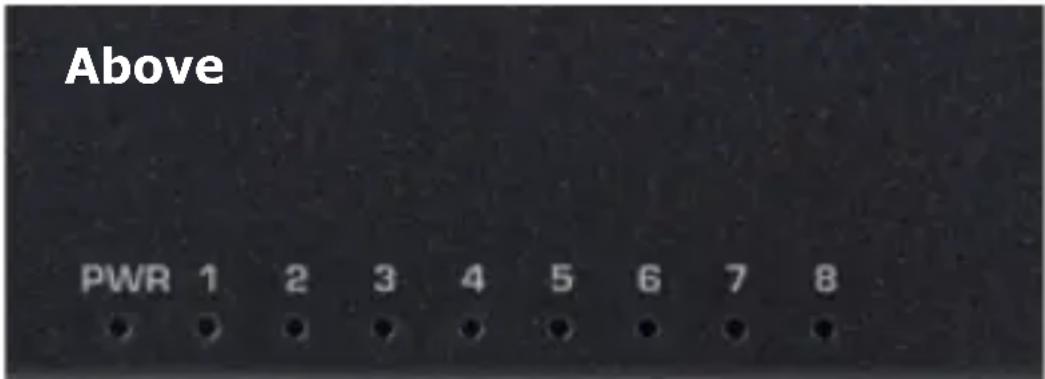
Operating LED (Power)
This LED is displayed when the network switch is powered.
LED indicator lights
(Ports, see 8. LED display)
Each 10 / 100 / 1000 Mbps RJ45 port has a corresponding LED light on the top of the network
switch. The LED indicators allow you to monitor, diagnose and troubleshoot any problem with the network switch, the connection or the connected devices. One green LED per port serves as a link/act LED. The green LED lights up continuously when there is a faultless network connection or flashes during data transmission.
Front page

Connection for plug-in power supply unit
The connection socket (DC IN) for the power supply unit is located on the front of the network switch: Supports 100-240 V, 50/60 Hz
10/100/1000 Mbit/s RJ45 ports (1-8)
8 x 10/100/1000 Mbit/s RJ45 ports are located on the front of the network switch.
8. LED display
The following table shows the LED displays of the network switch with an explanation (Operation, Link/Act).
| Indicator Colour State Description | |||
| Operating display (PWR) | Green On | Power supply switched on | |
| Off Power supply switched off | |||
| LED 1-8 Link/Act | Green On | Network device connected to the corresponding port | |
| Flash-ing | Data transmission between network switch and network device | ||
9. Installation and connection
Please read the following sections and carry out the steps in the order shown to avoid incorrect installation.
- Please position the network switch on a stable place or desk.
-
Never open the housing of the network switch, not even in the event of a power failure.
-
The network switch may only be operated with the enclosed plug-in power supply unit and must be connected to the correct mains voltage range, which corresponds to the mains voltage on the type plate sticker on the network switch.
- Please ensure good air circulation around the network switch.
Switching on the switch
The network switch is supplied with power by the external plug-in power supply unit.
Plug-in power supply unit:
- Connect the hollow plug of the supplied plug-in power supply unit to the DC IN socket on the back of the network switch. Connect the plug-in power supply unit to a mains socket. Check whether the power indicator (Power) is illuminated. If it lights up, the power supply is guaranteed.
- The plug-in power supply unit may only be connected to a mains voltage of 100 - 230 V, 50/60 Hz. The plug-in power supply must be easily accessible at all times so that the appliance can be disconnected from the mains. Supply cables must not be damaged or crushed by any objects. Only connect the plug-in power supply unit to a properly installed mains socket! Avoid using multiple sockets!
- If the plug-in power supply unit of the appliance is defective or if the appliance is otherwise damaged, it must not be put into operation. If liquids or foreign objects have accidentally got into the appliance, it is essential to unplug the power supply unit from the socket immediately. Have the appliance checked by a specialist before using it again.
- Never open the plug-in power supply unit or the device! Before cleaning the network switch, please disconnect it from the power supply (pull out the mains plug). Do not touch the plug-in power supply unit with wet hands, risk of electric shock! In the event of faults or smoke and odours coming from the housing, immediately unplug the mains adapter from the socket!
- If water or foreign bodies get inside the device or the network switch is damaged, the device must not be put into operation or must be disconnected from the power supply immediately.
- The appliance must be checked or repaired by a specialist (technical customer service) before being reused.
Connecting a computer to the network switch
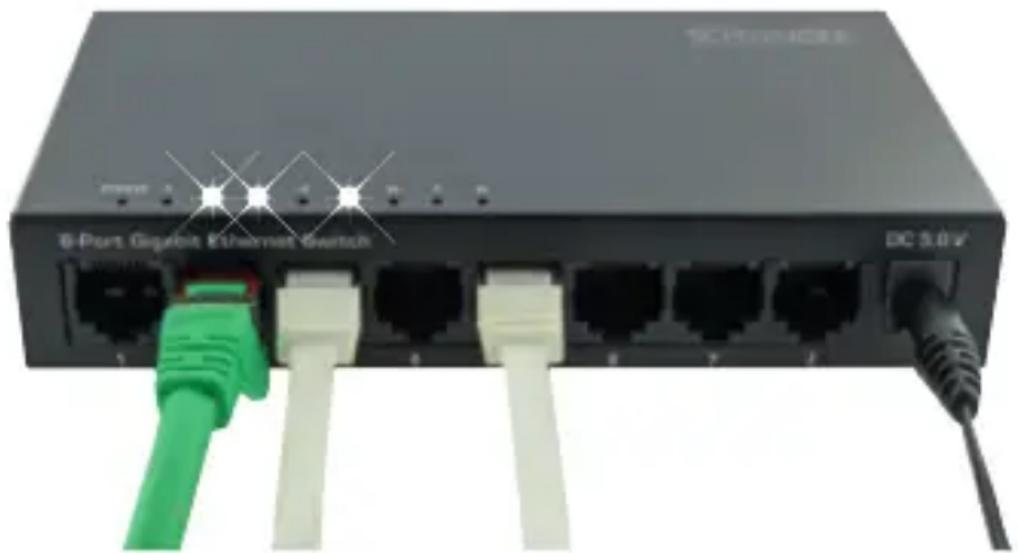
Connect the RJ45 network ports of the network switch to the corresponding ports of your computers (or to other devices with network connections, e.g. TVs, satellite receivers, games consoles, etc.). If the devices have been switched on and the connection is OK, the Link/Act status indicators of the corresponding ports of the network switch on the top of the device will light up.
natural_image
Front view of a network switch with Ethernet and G Gaubit ports (no visible text or symbols on the device body)10. Technical data and operating environment
| Standards IEEE | 802.3 10Base-T EthernetIEEE 802.3u 100Base-TX Fast EthernetANSI/IEEE 802.3 NwayAuto-negotiationIEEE 802.3X flow control |
| Protocol CSMA/ | CD |
| Data transfer rate | Fast Ethernet: 100 Mbit/s (half-duplex), 200 Mbit/s (full-duplex) GigaEthernet: 1000 Mbit/s (half-duplex), 2000 Mbit/s (full-duplex) |
| Network cable 10 | 0 BASE-T: 2-Pair UTP Cat. 3, 4, 5;EIA/TIA-568 1000 Ohm STP1000BASE-TX: 2-Pair UTP Cat. 5;EIA/TIA-5681000 Ohm STP |
| Power supply External power supply unit5.0 V DC/0.55 A | |
| Temperature & humidity | Operation: 0~60°C,storage: -10~70°CHumidity: 10-90%, storage: 5-90% |

Note
The mains adapter may only be plugged into an easily accessible socket outlet. This socket outlet must be equipped with a disconnecting device.
Disposal
Electrical and electronic devices, as well as batteries, cannot be disposed of with general household waste. The consumer is legally obliged to return electrical and electronic devices, as well as batteries that are at the end of their useful life, to the public collection points that have been set up for this purpose or to the point of sale. Individual aspects of this are governed by the applicable Country Law. The symbol on the product, the operating instructions or the packaging points out this provision.
Conformity

The CE marking is Schwaiger GmbH's declaration that the product meets the essential protection requirements stipulated in the applicable directives and regulations.
Disclaimer
Schwaiger GmbH does not accept any liability or warranty for damages that are sustained due to improper installation or mounting, improper use of the product or non-compliance with the safety instructions.
Manufacturer's information
Dear Customer, please contact our Technical Support if you need technical advice and your retailer is unable to help you.
Warranty
The warranty period starts when the product is purchased. The purchase receipt, such as a till receipt, invoice or delivery slip, serves as proof of this date. Keep these documents in a safe place. Our warranty is based on our warranty conditions valid at the time of purchase.
| Specifications in accordance with Regulation (EU) 2019/1782 | |
| Manufacturer's name or trade mark, commercial registration number and importer, address | Schwaiger GmbH, HRB12220 Würzburger Straße 17, 90579 Langenzenn |
| Manufacturer, address | Shenzhen Cudy Technology Co., Ltd. ADD: 7/F, Lepu Tower (West), 66 Xingke Rd, Nanshan, Shenzhen, China |
| Model number power supply | DSA-3PFM-05-FEU 050055 |
| Model identifier | NWSW8 011 |
| Input voltage | 100 - 230 V AC |
| Input AC frequency | 50/60 Hz |
| Output voltage | 5.0 V DC |
| Output current | 0.55 A |
| Output power | 2.75 W |
| Average active efficiency | 68,95 % |
| No-load power consumption | 0.07 W |
1. Introduction
Ports RJ45 10/100/1000 Mbit/s (1-8)
natural_image
Front view of a B-Port Gigabyte Ethernet switch with green and white USB cables (no text or symbols visible on the device body)natural_image
Front view of a network switch device with Ethernet ports and power connections (no readable text or symbols)natural_image
Front view of a network switch with green and white USB cables connected to ports (no visible text or symbols)natural_image
Front view of a 6-port Gigabit Ethernet switch with green and white connectors (no text or symbols visible on the device body)natural_image
Close-up of a network switch device with multiple Ethernet ports and green/red cables attached (no visible text or symbols)natural_image
Front view of a B-Port Gigabit Ethernet switch with green and white USB cables (no text or symbols visible on the device body)natural_image
Front view of a 8-port Gigabyte Ethernet switch with green and white connectors (no text or symbols visible on the device body)Priključek za vtično napajalno enoto
natural_image
Front view of a black network switch with multiple Ethernet ports and green/red cables attached (no visible text or symbols)natural_image
Front view of a network switch device with Ethernet switches and power lines (no readable text or symbols)Schwaiger GmbH
Würzburger Straße 17
90579 Langenzenn
Hotline: +49 (0) 9101 702-299
www.schwaiger.de
info@schwaiger.de
Geschäftszeiten
Office Hours (Technical Support in German)
Monday to Thursday: 8:00 a.m. - 5:00 p.m.
Friday: 08:00 a.m. - 2:30 p.m.
- GB OPERATING AND SAFETY INSTRUCTIONS
- MODE D'EMPLOI ET CONSIGNES DE SECURITE
- ISTRUZIONI PER L'USO E AVVERTENZE DI SICUREZZA
- Einführung
- 10/100/1000 Mbit/s RJ45 Ports (1-8)
- Package contents
- Features
- Intended use
- General safety and maintenance instructions
- Features
- General data
- Description of the network switch
- Operating LED (Power)
- LED indicator lights
- Front page
- Connection for plug-in power supply unit
- LED display
- Installation and connection
- Switching on the switch
- Plug-in power supply unit:
- Connecting a computer to the network switch
- Technical data and operating environment
- Note
- Disposal
- Conformity
- Disclaimer
- Manufacturer's information
- Warranty
- Introduction
- Ports RJ45 10/100/1000 Mbit/s (1-8)
- Priključek za vtično napajalno enoto
- Schwaiger GmbH
- Geschäftszeiten
- Office Hours (Technical Support in German)
Brand : Schwaiger
Model : NWSW8
Category : Switch