Alio Junior DAB+ - Radio TANGENT - Free user manual and instructions
Find the device manual for free Alio Junior DAB+ TANGENT in PDF.


User questions about Alio Junior DAB+ TANGENT
0 question about this device. Answer the ones you know or ask your own.
Ask a new question about this device
Download the instructions for your Radio in PDF format for free! Find your manual Alio Junior DAB+ - TANGENT and take your electronic device back in hand. On this page are published all the documents necessary for the use of your device. Alio Junior DAB+ by TANGENT.
USER MANUAL Alio Junior DAB+ TANGENT
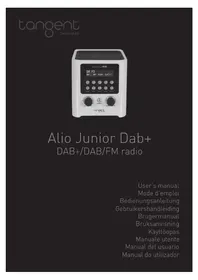
Alio Junior Dab+
DAB+/DAB/FM radio
User's manual
Mode d'emploi
Bedienungsanleitung
natural_image
Line drawing of a microwave oven with control panel and display (no text or symbols)Instruction Manual
ALIO Junior
DAB / DAB+, FM Digital Radio
Safety Precautions
To achieve the utmost in enjoyment and performance, and in order to become familiar with its features, please read this manual carefully before attempting to operate the unit, this will assure you years of faithful, trouble free performance and listening pleasure.
Important Notes
- This safety and operating instruction should be retained for future reference.
- The apparatus shall not be exposed to dripping or splashing and that no objects filled with liquids, such as vases, shall be placed on apparatus.
-
Avoid installing the unit in locations described below:
-
Places exposed to direct sunlight or close to heat radiating appliances such as electric heaters.
- On top of other stereo equipment that radiate too much heat.
- Places blocking ventilation or dusty places.
- Places subject to constant vibration.
- Humid or moist places.
- No naked flame sources such as lighted candles should be placed on or near the unit.
• The use of apparatus in moderate climates.
- Operate turning controls and switches as instructed in the manual.
- Before turning on the power for the first time, make sure the power cord is properly installed.
For safety reasons, do not remove any covers or attempt to gain access to the inside of the product. Refer any servicing to qualified personnel.
Do not attempt to remove any screws, or open the casing of the unit; there are no user serviceable parts inside, refer all servicing to qualified service personnel.

CAUTION: TO REDUCE THE RISK OF ELECTRIC SHOCK DO NOT REMOVE COVER (OR BACK), NO USER SERVICEABLE PARTS INSIDE, REFER SERVICING TO QUALIFIED SERVICE PERSONNEL.

DANGEROUS VOLTAGE
Dangerous Voltages, that may be of sufficient magnitude to constitute a risk of electric shock to persons is present within this product's enclosure.

ATTENTION
The owner's manual contains important operating and maintenance instructions, for your safety, it is necessary to refer to the manual.
WARNING: TO PREVENT FIRE OR SHOCK HAZARD, DO NOT EXPOSE THIS APPLIANCE TO DRIPPING OR SPLASHING.
NOTE: This unit can become warm when used for a long period of time. This is normal and does not indicate a problem with the unit.
Safety Information
Some Do's and Don'ts on the Safe Use of Equipment
This equipment has been designed and manufactured to meet international safety standards but, like any electrical equipment, care must be taken if you are to obtain the best results and safety is to be assured.
DO read the operating instructions before you attempt to use the equipment.
DO ensure that all electrical connections (including the mains plug, extension leads and inter-connections between the pieces of equipment) are properly made and in accordance with the manufacturer's instructions. Switch off and withdraw the mains plug before making or changing connections.
DO consult your dealer if you are ever in doubt about the installation, operation or safety of your equipment.
DON'T remove any fixed cover as this may expose dangerous voltages. Overheating will cause damage and shorten the life of the equipment.
DON'T allow electrical equipment to be exposed to dripping or splashing, or objects filled with liquids, such as vases, to be placed on the equipment.
DON'T place hot objects or naked flame sources such as lighted candles or nightlights on, or close to equipment. High temperatures can melt plastic and lead to fires.
DON'T use equipment such as personal stereos or radios so that you are distracted from the requirements of traffic safety.
DON'T listen to headphones at high volume level, do so may damage your hearing.
DON'T leave equipment switched on when it is unattended unless it is specifically stated that it is designed for unattended operation. Switch off using the switch on the equipment and make sure that your family knows how to do this. Special arrangements may need to be made for infirm or handicapped people.
DON'T continue to operate the equipment if you are in any doubt about if it's working normally or if it's damaged in any way. Switch it off and withdraw the mains plug and consult your dealer.
ESD Remark: In case of malfunction due to electrostatic discharge just reset the product (reconnection of power source may be required) to resume normal operation.
NOTE: Do not open any covers and do not repair by yourself. Qualified personnel must carry out repair work.
Content
Safety Precautions....2
Important Notes 2
Safety Information....4
Some Do's and Don'ts on the Safe Use of Equipment 4
Content......5
Front View 6
Rear View....7
DAB Mode....8
Switching ON/OFF 8
Selecting another station 8
Auto scan....9
Manual Tune 9
DRC (Dynamic Range Control) 9
Prune Invalid....10
View Station Information 10
FM Mode 10
Selecting FM Mode....10
Manual scan 10
Auto scan....11
Scan setting 11
Audio setting 11
View Station Information 11
Storing Preset Stations (DAB and FM Mode) 12
Recalling a Preset Station (DAB and FM Mode) 12
Aux Mode 12
General Operation....13
Sleep....13
Time 13
Alarm....14
Equaliser....14
Backlight 15
Language 15
Factory Reset 15
SW Version....15
Specification 16
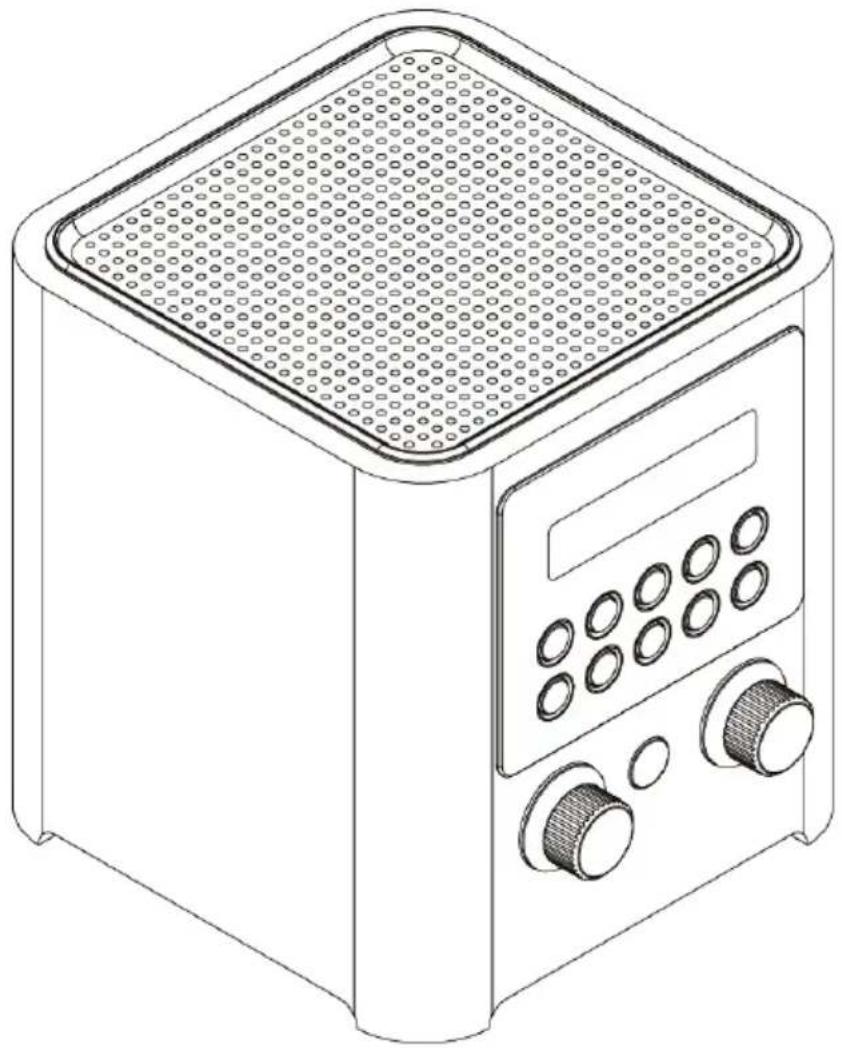
Front View
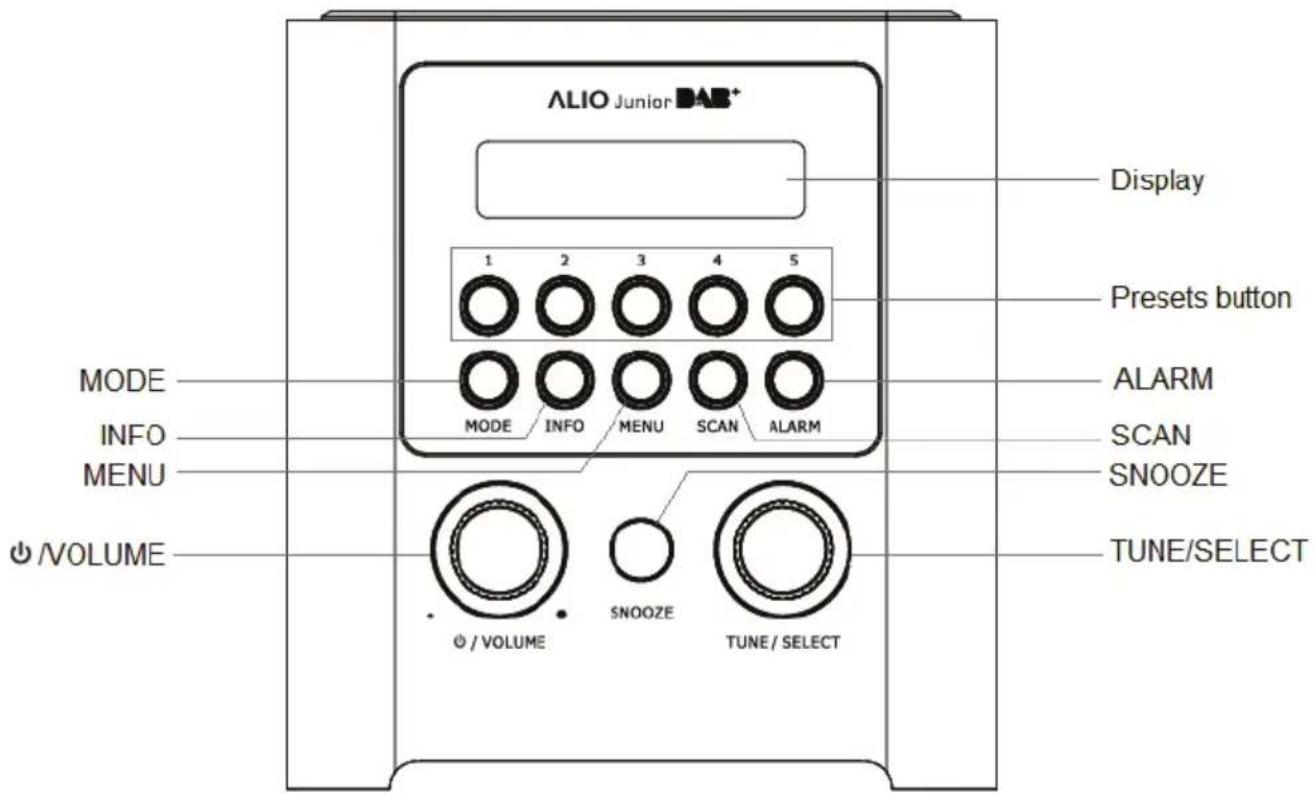
| CONTROL | All MODES |
| /VOLUME | Press to turn on radio, press again to switch radio to standby mode. |
| SNOOZE | Press to activate snooze function. |
| TUNE/SELECT knob | Turn to browse optionsPress to select option.In FM mode, turn to manually change frequency. |
| MODE | Press to convert among DAB, FM and Aux in mode. |
| INFO | Press to browse station information. |
| MENU | Press to display menu options. |
| SCAN | In DAB and FM mode, press to automatically scan stations. |
| ALARM Press to setup alarm. | |
| Presets button 1-5 | Press and hold to store current playing station.Press to recall a saved preset station. |
Rear View
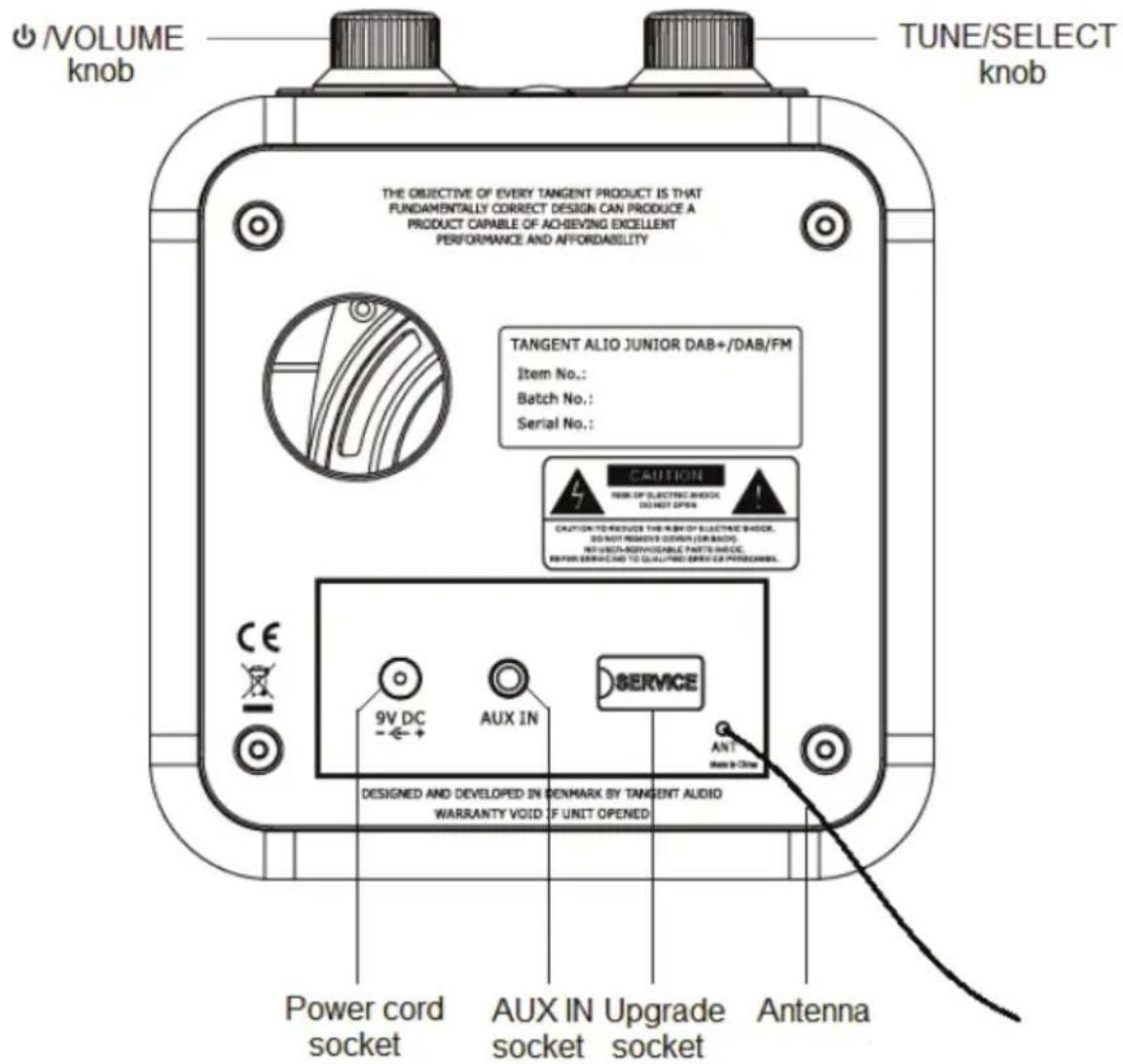
1.
2.
3.
4.
| Items | Remark |
| 1. Power cord socket: | Connect Included 9V DC power adapter. |
| 2. AUX IN socket: | Connect a 3.5mm audio cable. |
| 3. Upgrade socket: | It's for service engineer professional use only. |
| 4. Antenna: | Adjust to obtain best reception for DAB/FM. |
DAB Mode
Carefully remove your radio from the box. You may wish to store the packaging for future use.
Inside the box you will find:
- Main Unit
- Power Adapter
- User Guide
Switching ON/OFF
- Connect the power adapter between your radio and the mains socket, your radio will be in standby mode.
- Unwind the aerial, and then press ⏻/VOLUME knob to switch unit on. Press ⏻/VOLUME knob again to switch it to standby mode.
- For initial use, the unit will automatically enter DAB mode and carry out a full scan. During scan the display will show a slide bar that indicates the progress of the scan and the amount of stations that have been found so far.
Scanning ...
19

- Once the scanning is finished, the DAB stations will be displayed in alphanumeric order and the first station in the list will be broadcasted.
Selecting another station
- Turn TUNE/SELECT knob to browse station list and then press TUNE/SELECT knob to confirm your selection.
- Or, you can press MENU button to find 'Station list', then turn TUNE/SELECT knob to browse and press to confirm.
Auto scan
If no DAB signal is found in your area, you may need to relocate your radio and perform an auto scan.
To active auto scan, press MENU button and then turn TUNE/SELECT knob to select 'Full scan', press TUNE/SELECT knob to confirm. You can also press SCAN button on the unit to scan automatically.
Manual Tune
Sometimes, you might want a station with your appointed frequency, following this order, it can be easily reached.
- Press MENU button and then turn TUNE/SELECT knob to select 'Manual tune', press TUNE/SELECT knob to confirm.
- The display will show the channel number and frequency list. Turn TUNE/SELECT knob to browse and press TUNE/SELECT knob to select your preferred radio channel.
- If there is a multiplex corresponding to this channel and frequency, then the display will show a tuning meter with the signal strength and the multiplex name after a few seconds.
5A 174.928MHz

- Press TUNE/SELECT knob to exit this order.
DRC (Dynamic Range Control)
You can set the level of compression stations to eliminate the differences in dynamic range or sound level between radio stations. If you are listening to music with high dynamic range in a noisy environment, you may wish to compress the audio dynamic range.
- Press MENU button and then turn TUNE/SELECT knob to select 'DRC', press TUNE/SELECT knob to confirm.
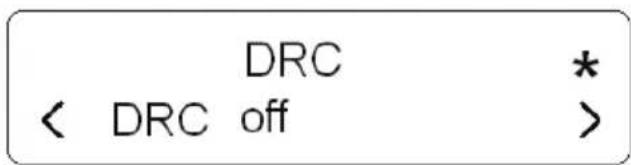

Note:
a. Set DRC to off means no compression;
b. Set DRC to low indicates little compression;
c. Set DRC to high shows maximum compression.
- Turn TUNE/SELECT knob to select high/low/off and then press TUNE/SELECT knob to confirm the setting.
Prune Invalid
You may remove all unavailable stations from the station list.
- Press MENU button and then turn TUNE/SELECT knob to select 'Prune', press TUNE/SELECT knob to confirm.
Prune? <No> Yes
- Turn TUNE/SELECT knob to select 'Yes' and then press to confirm.
View Station Information
While playing a DAB program, press INFO button repeatedly, the display will show the information through DLS (Dynamic Label Segment), Signal Strength, Program Type, Ensemble, Program Frequency, Signal Quality, Bitrate, Time and Date on the lower segment of display.
FM Mode
Selecting FM Mode
- Press MODE button repeatedly to select FM mode.
- For initial use, unit will start at the beginning of the FM frequency range (87.50MHz). Otherwise, the last FM station you were listening to will be selected.
Manual scan
While frequency shows up, turn TUNE/SELECT knob to adjust the frequency by 0.05MHz per step.
Auto scan
While frequency is showing up, simply press SCAN button on the unit to scan automatically.
Scan setting
By default, FM scans stop at any available station. This may result in a poor signal-to-noise ratio (hiss) from weak stations.
- To change the scan settings to stop only at stations with good signal strength, press MENU button and then turn TUNE/SELECT knob to select 'Scan setting', press TUNE/SELECT knob to confirm.
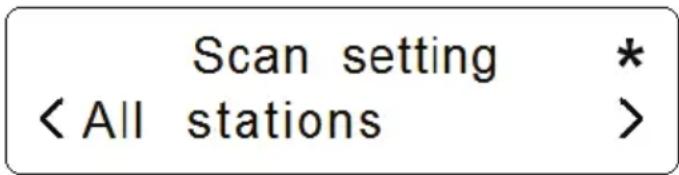
- Turn TUNE/SELECT knob to browse 'All stations' and 'Strong stations only', and then press TUNE/SELECT knob to confirm 'Strong stations only'.
Audio setting
By default, all stereo stations are reproduced in stereo. For weak stations, this may result in a poor signal-to-noise ratio (hiss).
- To play weak stations in mono, press MENU button and then turn TUNE/SELECT knob to select 'Audio setting', press TUNE/SELECT knob to confirm.
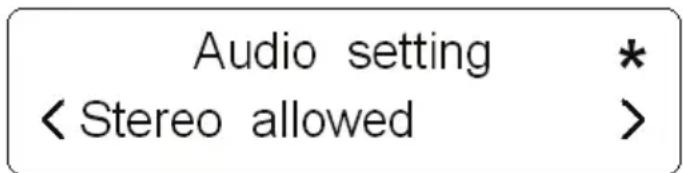
- Turn TUNE/SELECT knob to browse 'Stereo allowed' and 'Forced mono', and then press TUNE/SELECT knob to confirm 'Forced mono'.
View Station Information
While playing a FM program, press INFO button repeatedly, the display will show the information through Radio Text, Program Type, Program frequency, Audio Info, Time and Date on the lower segment of display.
Storing Preset Stations (DAB and FM Mode)
You can store up to both 5 of your favorite DAB and FM stations as preset stations. This will enable you to access your favorite stations quickly and easily. To store current playing station, press and hold one of PRESETS buttons 1-5 until display shows 'Preset # stored'.
Preset 1 stored
Recalling a Preset Station (DAB and FM Mode)
To select a station that you have saved, press one of PRESETS buttons 1-5 to recall the preset station.
If you choose a preset button that hasn't been allocated a station, 'Preset Empty' will be displayed.
Aux Mode
AUX IN allows for quick and easy connection to an MP3 player or other external audio sources.
- Before connecting to the mains socket, use a 3.5mm audio cable (not supplied) to connect to your external audio device through the Aux in socket on the rear of unit.
- Connect power adapter to mains socket, press ⏻/VOLUME knob to switch unit on.
- Press MODE button repeatedly to select Auxiliary Input mode.
Auxiliary Input 08:00:10
- In Aux in mode, you may operate your audio device directly for playback features.
- To gain optimal volume levels, adjusting the output volume level on the audio device as well is recommended.
General Operation
Sleep
This function enables your unit to switch to standby mode by itself after a set sleep time
- Press MENU button and then turn TUNE/SELECT knob to select 'Sleep', press TUNE/SELECT knob to confirm.
- Turn TUNE/SELECT knob to select off/15/30/45/60/90 minutes, then press TUNE/SELECT knob to confirm the setting.
- To turn the sleep function off while the sleep timer is still counting down, select 'Sleep' option, turn TUNE/SELECT knob to select 'Sleep off'.
Time
- Press MENU button and then turn TUNE/SELECT knob to select 'SleepTime', press TUNE/SELECT knob to confirm.
- Turn TUNE/SELECT knob to select options, and then press TUNE/SELECT knob to confirm the setting.
| Set Time/date: | Manually set-up both Time and Date |
| Auto update: | ‘Update from DAB’ or ‘No update’ |
| Set date format: | ‘Set 24 hour’ or ‘Set 12 hour’ |
| Set 12/24 hour format: | ‘DD-MM-YYYY’ or ‘MM-DD-YYYY’ |
Alarm
Your radio includes dual alarms. Setting Alarm, make sure setting time at first.
- Press ALARM button on the unit repeatedly to select 'Alarm 1' or 'Alarm 2', press TUNE/SELECT knob to confirm
- Turn TUNE/SELECT knob to select options, and then press TUNE/SELECT knob to confirm the setting.
| Alarm states: On or Off | |
| Alarm time: | On Time: 00:00 (manually set up the time) |
| Alarm duration time: | 15/30/45/60/90 minutes |
| Alarm source: | DAB, FM or Buzzer (since you were selected DAB or FM as alarm source, select last listened or saved preset station to play when alarm sounds) |
| Alarm active day: | Daily, Once, Weekends or Weekdays |
| Alarm volume: | turn TUNE/SELECT knob to adjust the alarm volume |
- When display shows 'Alarm Saved', the alarm setting is successful.
- To temporarily switch off alarm, press SNOOZE button to activate Snooze function when the alarm is soundings. Press SNOOZE button repeatedly can set Snooze time of 5, or 10 minutes in turn.
- To turn off alarm, press ⏻/VOLUME knob or ALARM button when the alarm is soundings.
- To cancel Alarm, refer to steps 1-3 to set Alarm states to 'Off'.
- In Off mode you can push the alarm button once for alarm 1 and twice for alarm 2, use select knob to choose ON/OFF and push select to make the choice.
Equaliser
Select this option to choose a sound equalisation profile Each of the equalisation settings will change the tone of the sound from your radio when selected.
- Press MENU button and then turn TUNE/SELECT knob to select 'Equaliser', press TUNE/SELECT knob to confirm.
- Turn TUNE/SELECT knob and then press it to select Normal, Classic, Jazz, Pop, Rock, Speech or My EQ.
- To set up My EQ, select 'My EQ ...', set up Treble, Bass and Loudness.
Backlight
- Press MENU button and then turn TUNE/SELECT knob to select 'Backlight', press TUNE/SELECT knob to confirm.
- Turn TUNE/SELECT knob to select 'Power On' or 'Standby', then press TUNE/SELECT knob to confirm.
- Turn TUNE/SELECT knob to cycle through options: High/Medium/low, and then press TUNE/SELECT knob to confirm the setting.
Language
- Press MENU button and then turn TUNE/SELECT knob to select 'Language', press TUNE/SELECT knob to confirm.
- Turn TUNE/SELECT knob to select language, and then press TUNE/SELECT knob to confirm.
Factory Reset
Sometimes, you might want to delete all the settings your radio currently has, try have your radio return to its factory default settings, please do the following:
- Press MENU button and then turn TUNE/SELECT knob to select 'Factory Reset', press TUNE/SELECT knob to confirm.
- Turn TUNE/SELECT knob to 'Yes', then press TUNE/SELECT knob to confirm.
Software upgrade
This is for service engineer professional use only.
SW Version
The helpdesk may ask you for the software version of your product.
Press MENU button and then turn TUNE/SELECT knob to select 'SW version', press TUNE/SELECT knob to confirm. The software version will show on the display.
Specification
| ITEMS | SPECIFICATIONS |
| Description: | DAB/DAB+, FM digital radio |
| Power Requirements: | AC/DC Adapter: Input: 100-240Vac, 50-60HzOutput: 9Vdc / 660mA |
| Frequency Range | FM: 87.5-108 MHzDAB: 174.928 – 239.200 MHz |
| Speaker Output: 3Wrms | |
| Power Consumption: | 6W (max) |
| Dimension (W x D x H): | 130 x 130 x 140mm |

This symbol on the product or in the instructions means that your electrical and electronic equipment should be disposed of at the end of its life separately from your household waste. There are separate collection systems for recycling in the EU.
For more information, please contact the local authority or the retailer where you purchased the product.
tangent® DANMARK
natural_image
Line drawing of a microwave oven with control panel and display (no text or symbols)Mode d'emploi
ALIO Junior
DAB+ / DAB, FM Digital Radio
Scan setting *
< All stations >
Audio setting *
< Stereo allowed >
Auxiliary Input 08:00:10
natural_image
Line drawing of a microwave oven with control panel and display (no text or symbols)Bedienungsanleitung
ALIO Junior
DAB+ / DAB, FM Digital Radio
Scan setting * < All stations >
Audio setting * < Stereo allowed >
Auxiliary Input 08:00:10
natural_image
Line drawing of a microwave oven with control panel and display (no text or symbols)DAB/DAB+, FM Digital Radio
Audio setting * < Stereo allowed >
natural_image
Line drawing of a microwave oven with control panel and display (no text or symbols)Betjeningsmanual
ALIO Junior
DAB / DAB+, FM Digital Radio
Se stationsinformation....11
Scan setting * < All stations >
- Drej TUNE/SELECT-knappen for at gå frem til 'All stations' (alle stationer) og 'Strong stations only' (kun kraftige stationer), og tryk så på TUNE/SELECT-knappen for at bekræfte 'Strong stations only' (kun kraftige stationer).
Lydindstilling
Audio setting * < Stereo allowed >
- Drej TUNE/SELECT-knappen for gå til 'Stereo allowed (stereo tilladt)' og 'Forced mono (tvungen mono)', og tryk så TUNE/SELECT-knappen for at bekræfte 'Forced mono (tvungen mono)'.
Se stationsinformation
Under afspilning af FM, tryk på INFO-knappen gentagne gange, displayet vil, i det nederste segment, vise informationen gennem radiotekst, programtype, programfrekvens, lyd-info, tid og dato.
Auxiliary Input 08:00:10
natural_image
Line drawing of a microwave oven with control panel and display (no text or symbols)Bruksanvisning
ALIO Junior
DAB+ / DAB, FM Digital Radio
Visa stationsinformation....10
FM-läge 10
Välja FM-läge 10
Visa stationsinformation 12
Visa stationsinformation
Visa stationsinformation
natural_image
Line drawing of a microwave oven with control panel and buttons (no text or symbols)Käyttöohje
ALIO Junior
DAB+ / DAB, FM Digital Radio
Turvaohjeet
Scan setting *
< All stations >
Audio setting *
< Stereo allowed >
natural_image
Line drawing of a microwave oven with control panel and buttons (no text or symbols)natural_image
Line drawing of a microwave oven with control panel and buttons (no text or symbols)Scan setting * < All stations >
Audio setting * < Stereo allowed >
Auxiliary Input 08:00:10
natural_image
Line drawing of a microwave oven with control panel and display (no text or symbols)Scan setting * < All stations >
Audio setting * < Stereo allowed >