
Dab2go junior - Radio TANGENT - Free user manual and instructions
Find the device manual for free Dab2go junior TANGENT in PDF.


| Product Type | Radio DAB/DAB+/FM with Bluetooth |
| Brand | Tangent |
| Model | Dab2go junior |
| Dimensions (approx.) | 180 x 120 x 70 mm |
| Weight (approx.) | 0.5 kg |
| Power Supply | DC 5V 1A mains adapter (included) or 4 AA batteries (not included) |
| Frequency Bands | FM 87.5 – 108 MHz, DAB/DAB+ Band III |
| Connectivity | Bluetooth, 3.5 mm headphone jack, micro USB port (power) |
| Display | 2-line LCD screen with backlight |
| Main Features | DAB/DAB+ and FM radio, Bluetooth, dual alarm, sleep, snooze, 10 DAB presets + 10 FM, automatic and manual tuning, station information display |
| Antenna | Built-in telescopic antenna |
| Care and Cleaning | Wipe with a soft, dry cloth. Do not use any abrasive or solvent-based products. |
| Safety | CE certification, WEEE recycling symbol. Do not expose to moisture or extreme temperatures. |
| Spare Parts and Repairability | The appliance contains no user-serviceable parts. In case of malfunction, contact an approved service center. |
| General Information | User manual available in 62 pages. Box contents: radio, mains adapter, instruction manual. |
| Warranty | Manufacturer's warranty 2 years (according to applicable legislation) |
| Country of Manufacture | China (estimated) |
| Max Sound Level | Not specified, adjustable volume |
| Power Consumption | 5V 1A max (5W) |
| Operating Temperature | 5 °C to 35 °C |
Frequently Asked Questions - Dab2go junior TANGENT
User questions about Dab2go junior TANGENT
0 question about this device. Answer the ones you know or ask your own.
Ask a new question about this device
Download the instructions for your Radio in PDF format for free! Find your manual Dab2go junior - TANGENT and take your electronic device back in hand. On this page are published all the documents necessary for the use of your device. Dab2go junior by TANGENT.
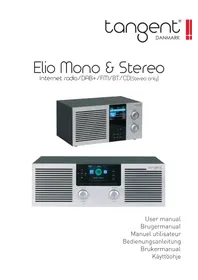
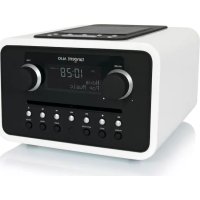
USER MANUAL Dab2go junior TANGENT
DAB+/DAB/FM/Bluetooth radio

natural_image
Two Tangent brand radio units, one with gray textured cover and 'Dabzigo junior' branding, the other with black back cover and 'Dabzigo junior' logo (no visible text on main body)User's manual
Mode d'emploi
Brugermanual
Käyttöopas
DAB/DAB+ and FM Radio with Bluetooth
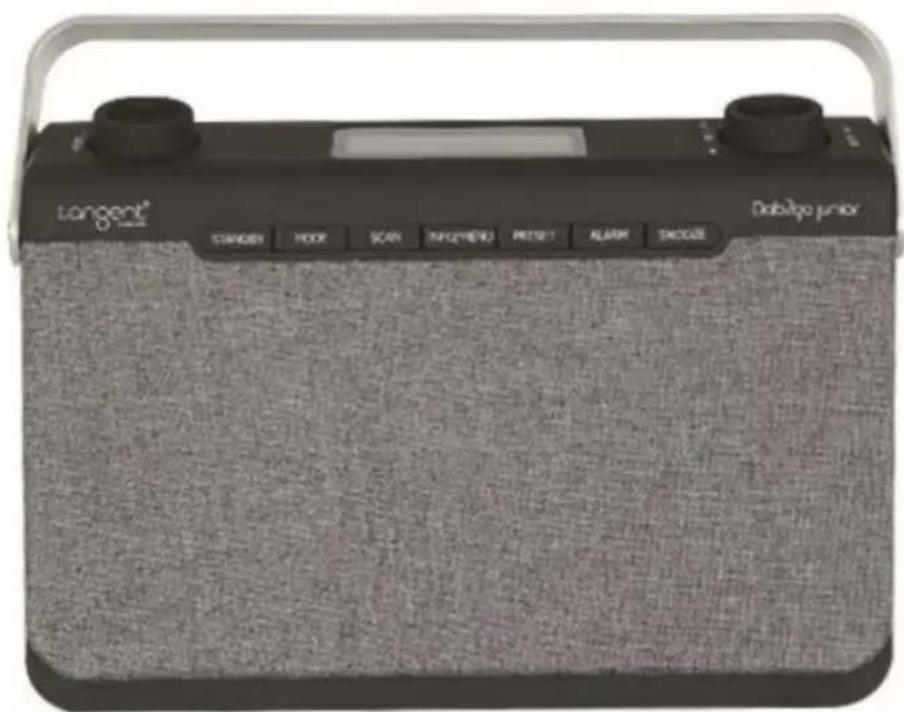
Thank you for purchasing your new Tangent Dab2go Junior DAB/DAB+/FM Radio with Bluetooth. It has many exciting features to make your listening to music experience more enjoyable. We recommend that you spend some time reading this instruction manual in order that you fully understand all the operational features it offers. You will also find some hints and tips to help you resolve any issues.
Read all the safety instructions carefully before use and keep this instruction manual for future reference.
Safety Warnings
- Always protect the device against moisture and humidity. Do not put this device in water or other liquids! If you spill any liquid into the device, it can cause serious damage. Switch it off at the mains immediately. Withdraw the mains plug and consult your dealer.
- Using the device in rooms or climates with high humidity and temperatures may cause condensation to form inside the device. Condensation may damage the device.
- Using the device in a dusty condition may cause damages to the interior electronic components, which may lead to malfunctions in the device.
- The device must be placed on a flat stable surface and should not be subjected to vibrations.
- To reduce the risk of electric shock, do not remove screws. The device does not contain any user-serviceable parts. Please leave all maintenance work to qualified personnel.
- Only use the power adaptor delivered with the device.
- Avoid extreme degrees of temperature, either hot or cold. Place the device well away from heat sources such as radiators or gas/ electric fires.
- The mains socket must be located near the device and should be easily accessible.
- Never touch the plug or the device itself with wet hands. Never pull the power cable when disconnecting the power adaptor from power supply.
- Ensure that the available supply voltage agrees with the required operational voltage of the device before use.
- If the device is not in use for a long period of time (e.g. holidays), disconnect it from the power supply.
- In case of using the headphones, be reminded that excessive sound pressure or volumes from headphones or earphones can lead to damage to the hearing. Always adjust the volume to a pleasant, not too loud level. If you have adjusted the volume of the headphones to be too high and use that for an extended period, it can damage the listener's hearing.

natural_image
Warning symbol with a triangle containing a stylized ear and sound waves (no text or numbers)- Ensure to unplug the device from the mains socket before cleaning.
- Batteries (battery pack or batteries installed) shall not be exposed to excessive heat such as sunshine, fire or the like.
- Remove dead batteries from equipment and all batteries from equipment you know you are not going to use for a long time. Otherwise the batteries may leak and cause damage.
- Never dispose of batteries in fire as this can cause them to explode. Please recycle dead batteries; do not put with the normal household waste.
- Do not use any type of abrasive pad or abrasive cleaning solutions as these may damage the device's surface.
- Before using the device, please familiarize yourself with all of the safety information and instructions for use. When passing this device on to others, please also include all the documents.
What's in the box? 1
Controls and Functions ....1
Front View....1
Back view....2
Before First Use 2
Instruction Guide ....3
Basic Operation ....3
DAB Radio 3
FM Radio 4
Bluetooth Mode....4
Station information for DAB and FM Radio 5
Menu Setting....6
Dual Alarm Setting and Alarm Snooze 6
Troubleshooting....8
Specifications 9
What's in the box?
• Instruction Manual
• DAB/FM Radio
• Power Adaptor
Controls and Functions
Front View

- Volume -/+
- Standby
3.Mode -
Scan
5.Info/Menu -
Preset
- Alarm
- Snooze
- Tune+/-/Enter/ ▶
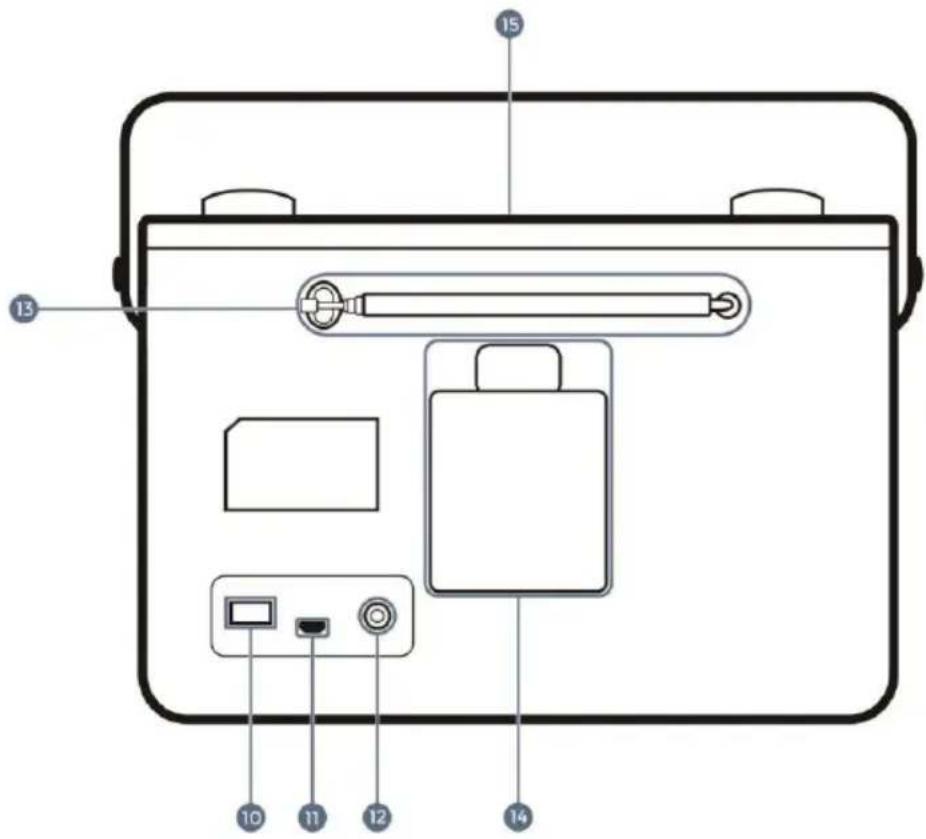
Back view

-
ON/OFF 13. Antenna
-
USB Power Supply Port 14. Battery Compartment
-
Earphone Jack 15. Display Screen
Before First Use
Unpack the unit.
Please retain all packaging unit you have checked and counted all the parts and the contents against the parts list.
Your unit is now ready for normal use.
Instruction Guide
Basic Operation
- Plug the connector into the back of system labelled USB and the power supply into the mains.
- Ensure the antenna is extended as far as possible so that you can rotate it. This will enable you to get the best signal you can. Switch the button on the rear of the unit to "On".
- Press the Standby button to turn the unit on. When DAB radio is activated for the first time, press the Scan button then a full scan will automatically commence, or will play the last station before the unit was turned off.
- To scroll through the stations, use the Tune/Enter button. Press the Tune/Enter button to listen to a station.
- To change the mode, press the Mode button.
This will switch between DAB Radio/ FM Radio and Bluetooth mode. - The display screen will dim automatically after 10 seconds if left in standby or working mode.
DAB Radio
- Press the Mode button to switch to DAB Radio. Fully extend the antenna.
- To auto scan, press the Scan button and then release. This will start scanning up the frequency band and store all stations that have good signal.
- The radio will automatically save all the stations with a strong signal.
After searching has finished it will automatically play the first station stored. - To listen to all stations that have been stored turn the Tune/Enter button to scroll through them. Press the Tune/Enter button when on the required station.
- The Radio will display station information when you press the Info/Menu button. Press multiple times to view all information available.
When you turn the radio on after switching off, it will automatically tune to the same station (DAB or FM) that was last selected.
In DAB mode, the radio will synchronize with the time and date of the station.
FM Radio
Press the Mode button multiple times to switch between DAB/FM/BT.
The first time you do this, the FM frequency “87.5 MHz” will be displayed on the screen. Remember to extend the antenna.
To auto scan, press and release the Scan button. This will start scanning up the frequency band and play the first station finds with good signal.
To scan down the frequency band, press and hold the Scan button for a few seconds. The radio will display station information when you press the
Info/Menu button. Press multiple times to view all information available.
FM Scan setting
Choose between scanning strong and week signals (All) or only the strong stations (Only). Press and hold the Info/Menu button. To make your choice, twist the Tune/Enter button to highlight your option.
The radio will automatically save all the stations with a strong signal. After searching has finished it will automatically play the first station Stored. Select "FM Scan Setting" and press Tune/Enter button down. Turn the Tune/Enter button to choose between "All" or "Only". Press the Tune/Enter button down to confirm your choice.
Manual scan
To listen to a specific frequency, turn the Tune/Enter button to search forward and back.
Mono and Stereo
In working mode, press the Tune/Enter button to switch between "Set to Mono" or "Set to Stereo".
Bluetooth Mode
Press the Mode button to select Bluetooth Mode and then the display will show "Bluetooth Pairing".
Turn on your device Bluetooth on and search the pairing name "Dab2go Junior" then press it to pair. After the pairing successfully, the display will show "Bluetooth Paired Play/ Pause".
When play the music, the display will show “Bluetooth Paired Play”; when pause the music, there will be show “Bluetooth Paired Pause”
Press the Tune/Enter button to play or pause the song playback.
Turn the Tune/Enter button to play the next or previous song.
Turn the Volume-/+ button to increase or decrease the volume.
Set Up of Preset Stations
How to store a preset radio station
You can store up to 10 DAB and 10 FM radio stations.
To store a station, you must be listening to the station you want to save.
Press and hold the Preset button, the display will show “1:(Empty)”. If a station is already stored, will show the station name and preset number.
Twist the Tune/Enter button to select the preset number you want to store the station as, and then press the Tune/Enter button to save, the display will show "Preset # stored".
How to play a preset radio station
Press the Preset button and turn the Tune/Enter button to select the desired preset station's number.
Press the Tune/Enter button to play the stored station.
Station information for DAB and FM Radio
DAB Radio
Press the Info/Menu repeatedly to show the different program information.
Signal Strength: Displays a signal bar with the strength of the current station.
Bit Error Rate: Provides details of the signal error rate.
Channel and Frequency: Displays the station's transmission channel number and frequency.
PTY (Program Type): Shows the type and description of the program provided by the DAB station.
Time and Date: Displays the time and date information provided by the broadcaster.
Bit Rate: The data rate which the signal is being transmitted.
Dynamic Label Segment: Displays scrolling text information supplied by the broadcaster.
FM Radio
Press the Info/Menu button repeatedly to show the different program information.
Program Type: Displays a description of the type of program provided by the broadcaster..
Signal Strength: Displays a signal bar with the strength of the current station..
Time and Date: Displays the time and the date.
Frequency: Displays the station's transmission frequency.
Audio Type: Displays the audio type of the station you are listening to. It will either be Stereo or Mono.
Radio Text: Displays scrolling test information supplied by the broadcaster.
Menu Setting
With the radio turned on, press and hold the Info/Menu button. This will open the "Set Menu".
Turn the Tune/Enter button to select your desired Sub-option between:
Time/Date:
Press the Tune/Enter button, the hour digitals will flash. Turn the Tune/Enter button to set the hour correctly, then press the Tune/Enter button to confirm. Repeat the last two steps to set the minutes, the year, Month, Date.
System Version:
Press the Tune/Enter button, then you can check the software version number.
Factory reset:
Press the Tune/Enter button and the display will show "Factory reset ?
Press the Tune/Enter button again and will reset the radio.
Dual Alarm Setting and Alarm Snooze
Alarm Setting
Press the Alarm button to use Alarm 1 and press again to use Alarm2.
Then press the Tune/Enter button and turn the Tune/Enter button until the word "ON" is flashing and press the Tune/Enter button again to confirm.
The hour digits for the alarm will flash, turn the Tune/Enter button to change the hour and press the Tune/Enter button to confirm.
Turn the Tune/Enter button to change the minute and press the Tune/Enter button to confirm.
Turn the Tune/Enter button to change the volume and press the Tune/Enter button to confirm.
Turn the Tune/Enter button to change between Alarm-DAB-FM and press the Tune/Enter button to confirm.
To set the Alarm 2, follow the Alarm 1 instructions.
Note: You can press the Info/Menu button to get back last one step when in the process of setting the alarm.
Turn off the alarm
To turn off the alarm, turn the Tune/Enter button until the word "OFF" is flashing and then press the Tune/Enter button. The alarm is OFF now.
Turn off the alarm when sounding
Press the Standby button to turn off the alarm when it is sounding.
Sleep timer
In working mode, press and hold the Alarm button and will display "Set Sleep: OFF".
Turn the Tune/Enter button to select either OFF-120-90-60-45-30-15-5 minutes.
Then press the Tune/Enter button to confirm.
Snooze Function
When the alarm sounds, press the Snooze button to snooze for 9 minutes, the radio will go into standby mode.
To turn the alarm off completely when sounding, press the Standby button.
Troubleshooting
| Problem | Solution |
| No sound | The station is not tuned in. Fine tune the station.The volume is set to a low position. Increase the volume.Headphones may be connected. Disconnect the headphones. |
| Buttons a not working | Turn off the unit and turn on again after a few seconds. |
| FM: Static soundDAB+: Burbling/ intermittent cut-out | Signal reception is too low.Adjust the aerial or move the unit to a stronger signal location.Rescan stations. |
| Sound is distorted | The volume is too high. Adjust the volume control. |
| Desired station not found | Weak signal. Use the manual tune function. |
| Display shows “No Service” | There is no DAB+ coverage in your area, or poor reception.Adjust the position of the aerial,or move the unit to a stronger signal location. |
| Display is blank | This may occur if the broadcaster changes the label of a service or removes a lable while tuned.The unit will try to retuned or perform a scan. |
| Time and date not setting automatically | For the time and date to set automatically you need to turn on the system and switch to DAB radio and let this scan.The date and clock will update automatically. |
Specifications
Description DAB/DAB+/FM Radio with Bluetooth
Display 2 line display
FM 87.5 – 108.0 MHz
DAB/DAB+ Band III
Power adaptor Input : AC 100-240V, 50/60 Hz
Output : DC 5V, 1A
Connections DC IN (power supply)
EARPHONE (3.5mm socket)

This symbol on the product or in the instructions means that your electrical and electronic equipment should be disposed at the end of its life separately from your household waste. There are separate collection systems for recycling in the EU.

CE
Tangent Dab2go Junior
- Volume -/+
- Standby
3.Mode -
Scan
5.Info/Menu -
Preset
- Alarm
- Snooze
- Tune+/-/Enter/ ▶
Vue arrière

natural_image
Warning symbol with a sine wave inside a triangle (no text or numbers)Station information for DAB og FM Radio....6
Menu Setting 6
Alarm Indstillinger og Alarm Snooze....7
Fejlsøgning 8
Specifikationer 9
1.Volume -/+
2. Standby
3.Mode
4. Scan
5.Info/Menu
- Preset
- Alarm
- Snooze
- Tune+/-/Enter/ ▶
Set bagfra

Station information for DAB og FM Radio
DAB Radio
PTY (Program Type): Viser program typen.
- Volume -/+
- Standby
3.Mode -
Scan
5.Info/Menu -
Preset
- Alarm
- Snooze
- Tune+/-/Enter/ ▶
Näkymä takaa

natural_image
Warning symbol with a sine wave inside a triangle (no text or numbers)Menu-instelling....6
- Volume -/+
-
Standby
3.Mode
4.Scan
5.Info/Menu -
Preset
- Alarm
- Snooze
- Tune+/-/Enter/ ▶
Achteraanzicht
DAB+/DAB/FM/Bluetooth radio
WWW.TANGENT-AUDIO.COM
- Safety Warnings
- What's in the box?
- Controls and Functions
- Front View
- Back view
- Before First Use
- Instruction Guide
- Basic Operation
- DAB Radio
- FM Radio
- FM Scan setting
- Manual scan
- Mono and Stereo
- Bluetooth Mode
- Set Up of Preset Stations
- How to store a preset radio station
- How to play a preset radio station
- Station information for DAB and FM Radio
- Menu Setting
- System Version:
- Factory reset:
- Dual Alarm Setting and Alarm Snooze
- Specifications
- Tangent Dab2go Junior
- Vue arrière
- Set bagfra
- Station information for DAB og FM Radio
- Näkymä takaa
- Achteraanzicht
- DAB+/DAB/FM/Bluetooth radio
Brand : TANGENT
Model : Dab2go junior
Category : Radio