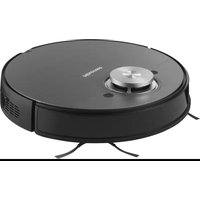
RVCL144AB - Vacuum Cleaner HISENSE - Free user manual and instructions
Find the device manual for free RVCL144AB HISENSE in PDF.


| Product type | Robot vacuum cleaner |
| Brand | Hisense |
| Model | RVCL144AB |
| Rated voltage | 14.4 V= |
| Rated power | 55 W |
| Battery type | Rechargeable lithium-ion |
| Battery capacity | 5,200 mAh / 74.88 Wh |
| Charging voltage | 16.9 V= |
| Docking station | Model M7-DS |
| Docking station input | 100-240 V~, 50-60 Hz, 38 W |
| Docking station output | 16.9 V=, 2 A |
| Main functions | Vacuuming, mopping, smart navigation, obstacle detection |
| Connectivity | Wi-Fi 2.4 GHz, Bluetooth |
| Compatible app | ConnectLife Robot (iOS 9.0+, Android 6.0+) |
| Filter type | HEPA |
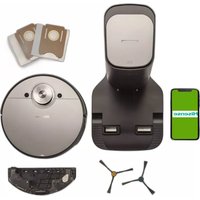
| Box contents | Robot, docking station, power cable, 2 side brushes, mopping pad holder, mopping pad, cleaning brush, manual |
| Warranty | 1 year (minimum, depending on country) |
| Certifications | CE, Laser class 1 |
| Safety | Important safety instructions, use under supervision for persons with reduced capabilities |
| Cleaning and maintenance | Cleaning of brushes, HEPA filter, water tank, sensors and wheels |
Frequently Asked Questions - RVCL144AB HISENSE
User questions about RVCL144AB HISENSE
0 question about this device. Answer the ones you know or ask your own.
Ask a new question about this device
Download the instructions for your Vacuum Cleaner in PDF format for free! Find your manual RVCL144AB - HISENSE and take your electronic device back in hand. On this page are published all the documents necessary for the use of your device. RVCL144AB by HISENSE.
USER MANUAL RVCL144AB HISENSE
natural_image
Line drawing of a two-panel interior scene with furniture and a checkmark (no text or symbols)natural_image
Two technical diagrams showing a robotic vacuum cleaner and a paper sheet with blue arrows indicating rotation (no text or symbols)natural_image
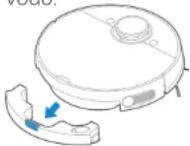
Line drawing of a robotic vacuum cleaner with a blue arrow indicating the part of its side (no text or symbols present)2. vodo in odstranite posodo za vodo.
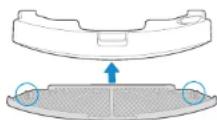
4. posodo za vodo.
flowchart
graph TD
    A["Top Robot"] --> B["Step 1: Initial state"]
    B --> C["Step 2: Assembly with blue arrow"]
    C --> D["Step 3: Final state with gray panel"]
natural_image
Line drawings of a handheld device and a hand holding a small electronic device (no text or symbols)natural_image
Diagram showing a car interior with wheels and a hand pressing a button, alongside a close-up of the dashboard (no text or symbols)natural_image
Diagram showing a device with a close-up view of the internal structure and a close-up of its screen (no text or symbols present)flowchart
graph LR
    A["Wood being added"] --> B["Picking down in a bowl"]
    B --> C["Hand holding a spoon, cleaning food"]
    C --> D["Washing fish with water"]
Important safety instructions
Please read this manual carefully before you use the appliance and save it for future reference.
Warning for the ROBOT UNIT
- This appliance can be used by children aged from 8 years and above and persons with reduced physical, sensory or mental capabilities or lack of experience and knowledge if they have been given supervision or instruction concerning use of the appliance in a safe way and understand the hazards involved.
Children shall not play with the appliance.
Cleaning and user maintenance shall not be made by children without supervision. - Plug must be removed from the socket-outlet before cleaning or maintaining the appliance. Switch off before cleaning or maintaining the appliance.
- If the supply cord is damaged, it must be replaced by a special cord or assembly available from the manufacturer or its service agent.
- WARNING: For the purposes of recharging the battery, only use the detachable docking station provided with this appliance.
Use only with M7-DS docking station. - This appliance contains batteries that are only replaceable by skilled persons.
EN-01 EN-02
- Do not bring the smart robot close to heatsource, radiation or burning cigarette butts. It is strictly forbidden to vacuum the following objects:
a) All liquids such as water and solvents;
b) Lime, cement dust and other construction dust and garbage;
c) Heat generating objects, such as unextinguished carbon butts, cigarette butts;
d) Sharp fragments, such as glass, etc.;
e) Flammable and explosive items, such as gasoline and alcohol products.
-
Before using, please remove all fragile items from the ground (such as glasses, lamps, etc.), and items that may be tangled with the side brush, Roller brush and drive wheels(such as wires, curtains and other easily-entangled materials).
-
Please pay attention to your hair and avoid entanglement on wheels or roller brushes when using, cleaning and maintaining the robot.
-
Do not use this product at an altitude of more than 2000m.
- Correct Disposal of this product.
This marking indicates that this product should not be disposed with other household wastes throughout the EU. To prevent possible harm to the environment or human health from uncontrolled waste disposal, recycle it responsibly to promote the sustainable reuse of material resources. To return your used device, please use the return and collection systems or contact the retailer where the product was purchased. They can take this product for environmental safe recycling.
- Warranty Information
The manufacturer provides warranty in accordance with the legislation of the customer's own country of residence, with a minimum of 1 year (Germany: 2 years), starting from the date on which the appliance is sold to the end user. The warranty only covers defects in material or workmanship.
The repairs under warranty may only be carried out by an authorized service centre. When making a claim under the warranty, the original bill of purchase (with purchase date) must be submitted. The warranty will not apply in cases of: a) Normal wear and tear
EN-03 EN-04
b) Incorrect use, e.g. overloading of the appliance, use of non-approved accessories
c) Use of force, damage caused by external influences
d) Damage caused by non-observance of the user manual, e.g. connection to an unsuitable mains supply or non-compliance with the installation instructions
e) Partially or completely dismantled appliances
-
WIFI:2400-2483.5MHz, MAX POWRE:20dBm, BLUETOOTH MAX POWR:10dBm To satisfy RF exposure requirements, a separation distance of 20 cm or more should be maintained between the antenna of this device and persons during device operation. To ensure compliance, operations at closer than this distance is not recommended.
-
CLASS 1 LASER PRODUCT INVISIBLE LASER RADIATION
Warning for the DOCKING STATION
-
"IMPORTANT SAFETY INSTRUCTIONS - SAVE THESE INSTRUCTIONS" and "DANGER - TO REDUCE THE RISK OF FIRE OR ELECTRIC SHOCK, CAREFULLY FOLLOW THESE INSTRUCTIONS".
-
This appliance can be used by children aged from 8 years and above and persons with reduced physical, sensory or mental capabilities or lack of experience and knowledge if they have been given supervision or instruction concerning use of the appliance in a safe way and understand the hazards involved. Children shall not play with the appliance. Cleaning and user maintenance shall not be made by children without supervision.
-
Plug must be removed from the socket-outlet before cleaning or maintaining the appliance. Switch off before cleaning or maintaining the appliance.
-
If the supply cord is damaged, it must be replaced by a special cord or assembly available from the manufacturer or its service agent.
-
Docking station is only applicable to the product RVCL144AB.
-
Warning: The battery charger (Docking station) is not intended to charge non-rechargeable batteries.
EN-05 EN-06
Warning for the BATTERY
- Do not dismantle, open or shred secondary cells or batteries.
Do not expose cells or batteries to heat or fire. Avoid storage in direct sunlight. - Do not short-circuit a cell or a battery. Do not store cells or batteries haphazardly in a box or drawer where they may short-circuit each other or be short-circuited by other metal objects.
- Do not remove a cell or battery from its original packaging until required for use.
- Do not subject cells or batteries to mechanical shock.
- In the event of a cell leaking, do not allow the liquid to come in contact with the skin or eyes. If contact has been made, wash the affected area with copious amounts of water and seek medical advice.
- Do not use any charger other than that specifically provided for use with the equipment.
- Observe the plus (+) and minus (-) marks on the cell, battery and equipment and ensure correct use.
- Do not use any cell or battery which is not designed for use with the equipment.
-
Do not mix cells of different manufacture, capacity, size or type within a device.
-
Keep cells and batteries out of the reach of children.
- Seek medical advice immediately if a cell or a battery has been swallowed.
| [symbol IEC 60417-5957(2004-12)] | for indoor use only | |
| [symbol ISO 7000-0790(2004-01)] | read operator's manual | |
| [symbol IEC 60417-5031(2002-10)] | direct current | |
| time-lag miniature fuse-link where X is the symbol for the time/current characteristic as given in IEC 60127 | ||
| [symbol IEC 60417-5032(2002-10)] | alternating current | |
| [symbol IEC 60417-5172(2003-02)] | class II equipment | |
EN-07 EN-08
- Always purchase the correct cell or battery for the equipment.
- Keep cells and batteries clean and dry.
- Wipe the cell or battery terminals with a clean dry cloth if they become dirty.
- Secondary cells and batteries need to be charged before use. Always use the correct charger and refer to the manufacturer's instructions or equipment manual for proper charging instructions.
- Do not leave a battery on prolonged charge when not in use.
- After extended periods of storage, it may be necessary to charge and discharge the cells or batteries several times to obtain maximum performance.
- Secondary cells and batteries give their best performance when they are operated at normal room temperature (20 °C ± 5 °C).
- Retain the original product literature for future reference.
- Use only the cell or battery in the application for which it was intended.
- When possible, remove the battery from the equipment when not in use.
- Dispose of properly.
TECHNICAL DATA
- Product Model: RVCL144AB
- Host Charging Voltage: 16.9 V=
- Host Rated Voltage: 14.4 V—
- Host Rated Power: 55 W
- Docking Station Model: M7-DS
- Docking Station Input: 100-240V-,50-60Hz,38W
- Docking Station Output: 16.9V = .2A
- Battery Model: BP14452B
- Battery Rated Voltage: 14.4V=
- Battery Capacity: 5200mAh 74.88Wh
- Charging Limit Voltage: 16.8V---
EN-09 EN-10
PRODUCT DESCRIPTION AND PARTS
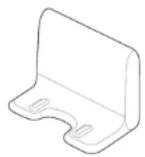
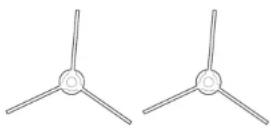
Charging base 1x Side brush pair 2x
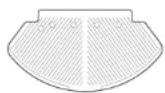

Mop cloth holder 1x Power cable 1x
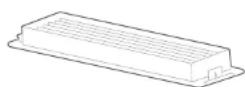
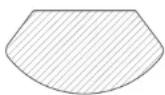
HEPA filter 1x Mop cloth 1x
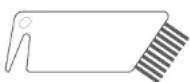
Manual
Cleaning brush 1x User manual 1x
EN-11 EN-12
PRODUCT OPERATION
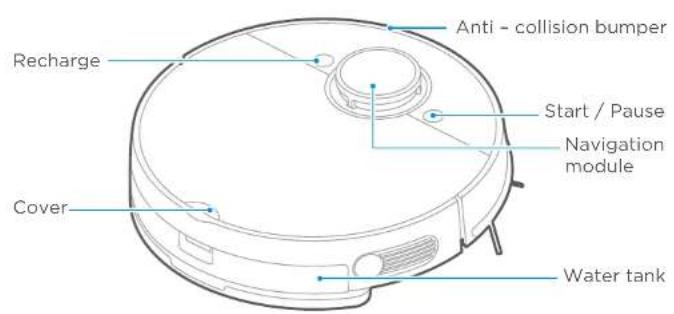
BUTTONS FUNCTION
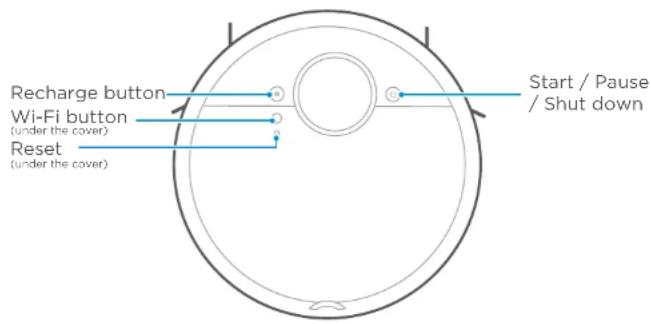
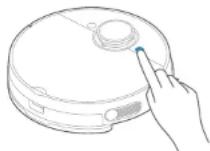
Start/Pause/Shut Down button
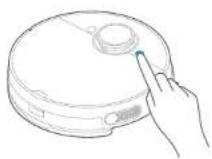
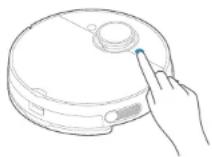
START: Press and hold for 3s to hear a startup voice then the machine turns on.
PAUSE: Press one time and the machine will stop. Press again, the machine will start work again.
SHUT DOWN: BEFORE SHUT DOWN PLEASE REMOVE
ROBOT FROM CHARGING BASE then press and hold for 3s to hear a shutdown voice and the machine will turn off.
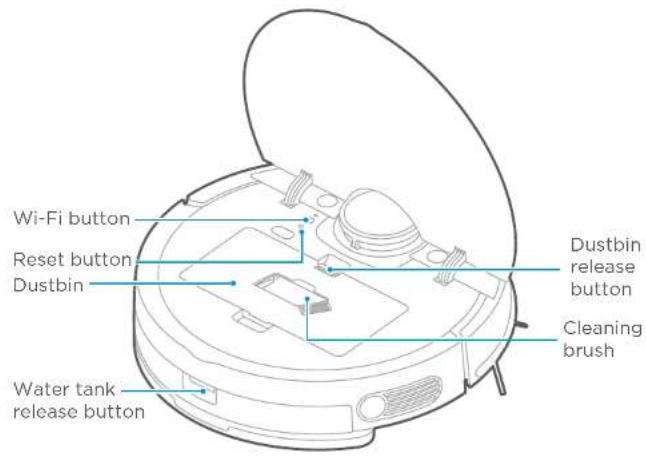
Wi-Fi button (under the cover) Wi-Fi
Press for 3 seconds for Wi-Fi matching. Robot is in matching status if light is flickering.
Recharge button
Short press for recharging.
Reset button (under the cover)
Press "Reset" to restart the robot when it is out of work.
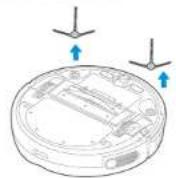
INSTALLING SIDE BRUSHES
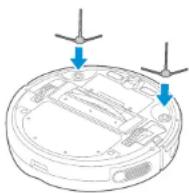
- Turn the unit over.
- With unit upside down, align side brush over brush post.
Please keep the color of side brushes' same as each brush posts. - Press brushes downside until it snaps in place.
- Ensure side brushes can rotate freely.
- Reference to picture above.
CHARGING ROBOT VACUUM CLEANER

- Place the charging base against a wall and remove all of obstructions around the charging base, as shown in the picture above. Please do not place the charging base on a carpet and keep the area dry. Also help to remove the mopping holder when it is charging.
- Turn the power switch on. Refer to chapter BUTTONS FUNCTION.
- Place vacuum on the charging base, ensuring the charging contacts are touching. A white light will start flashing, indicating the robot is charging. Charge for 12 hours before first use.
EN-13 EN-14
NOTE: To effectively extend battery life, you should:
- Please charge before first use.
- When the battery is low power, please charge it as soon as possible.
- If you do not use the appliance for an extended period of time, fully charge the battery and put it in a ventilated and dry place.
- Charge the robot every 3 months if it is not used for a long time to protect battery.
- This machine has automatic recharge function. In some special cases (such as battery is dead, the machine is stuck, etc.), the main unit may not be able to automatically recharge.
BEFORE CLEANING TIPS
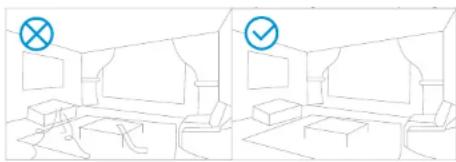
natural_image
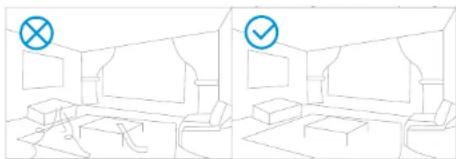
Line drawing of a two-panel interior scene with furniture and a checkmark (no text or symbols)Please clean up the wires and sundries scattered on the ground and remove valuable, fragile items that are easy to fall before cleaning. If there is a suspended environment in the clean area, please use objects to fix and block to avoid any potential harm. It is recommended to follow the sweeping robot to find some possible problems during the first cleaning process. The robot can clean much more smoothly after that. If certain special areas do not need to be cleaned or the robot may be trapped, you can add a restricted area or virtual wall on the map in the APP to prevent the robot from entering the above special area.
natural_image
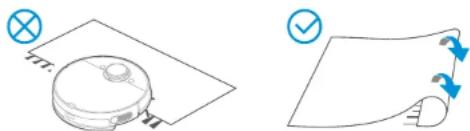
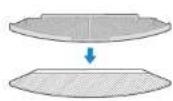
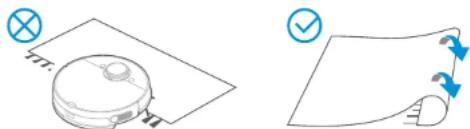
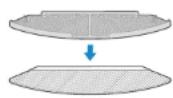
Two diagrams showing a robotic vacuum cleaner and a folded paper with blue arrows indicating rotation (no text or symbols)Do not use your robot on wet surfaces or surfaces with standing water. Before using the product on a rug with tasseled edges, please fold the rug edges under.
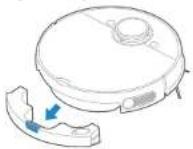
MOPPING
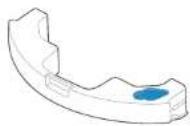
- Abschreoption of tattle mopping holder.
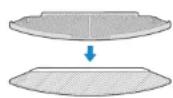
- Aitake waterthroughywater inlet/outlet.
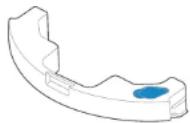
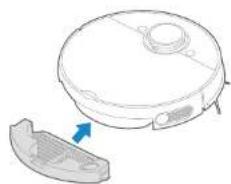
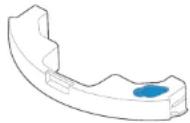
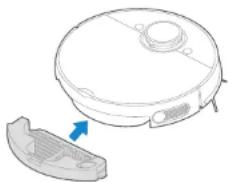
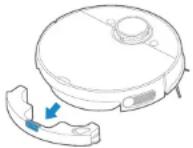
- Press START Assembly into robot until "click" sound.
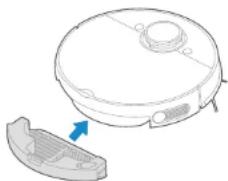
natural_image
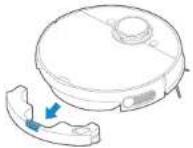
Diagram of a robotic vacuum cleaner with a blue arrow pointing to its side panel (no text or symbols present)2.
and remove it.
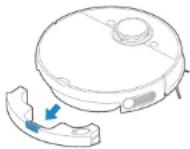
4.
water tank.
6.
start mopping.
NOTE:
- Please do not fill the water more than the "Max" level.
- It is recommended to use clean water in the water tank. Do not use any detergent in the water.
- Please clean the mopping cloth after cleaning.
- You will hear a click sound when the water tank is installed properly.
- Remove the mopping holder when the robot is under charging.
- Please set virtual wall by APP or roll up the carpet if you don't want the robot to go on your carpet while mopping.
- Please adjust water flow by APP according to your requirement.
EN-15 EN-16
USING APP
NOTE:
If your home Wi-Fi name or password is changed, you will need to re-establish connection with your robot vacuum.
- App supports iOS 9.0 and above, Android 6.0 and above phone system versions, but Pad device is not accepted. Generally, the phone system version may be checked by clicking "Settings-About Mobile Phone" in the mobile phone.
- This model does not support WEP encrypted router.
- The network accessing configuration of the cleaner requires Wi-Fi network of 2.4GHz frequency range, 5 GHz frequency range is not currently compatible.
- Do not configure network accessing under the charging state.
- Wi-Fi is mandatory for network accessing configuration of the cleaner, once the network accessing is configured successfully, App may be operated in Wi-Fi/2G/3G/4G network environment and the cleaner may be controlled remotely.
- If your home WIFI password is changed, the cleaner will be displayed off-line.
- If others want to use App to operate same cleaner, they need be invited on App by the device owner by sharing the device to the new user's account (on the condition that the invitee has downloaded App and registered an account).
- The device will be removed from the former device owner's device list if a new account owner connects the device successfully.
- Once the robot is configured successfully network accessing, the following operations will result in clearance of Wi-Fi settings and secondary network accessing configuration is required; Long press the network accessing configuration key on the device over 3 seconds and after a tick sound is heard, all Wi-Fi information will be cleared.
PAIRING ROBOT WITH MOBILE PHONE APP
- Ensure mobile phone is connected to your home Wi-Fi. Provide yourself a password from your Wi-Fi.
- Download ConnectLife Robot app and register your robot following two steps: a) Scan QR code or search for the ConnectLife Robot APP in the Apple app store (https://www.apple.com/app-store/) or Google play store (https://play.google.com/store/apps) than download it.

Google Play Store

Apple store
b) Open the app, Sign Up and create your personal account following instructions on screen.
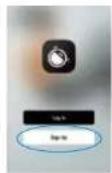
- Add your robot to your app from available devices by pressing "Add device" or "+" symbol.
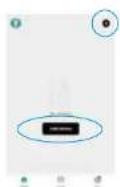
- If your phone has Bluetooth ON device might pop up for you in upper part of screen (lower LEFT picture) where you select it and follow instruction on APP. In case of manual adding robot find Small Home Appliances in tab on the LEFT and then choose Robot Vacuum (Wi-Fi). Find it with scrolling down possible devices (lower RIGHT picture).
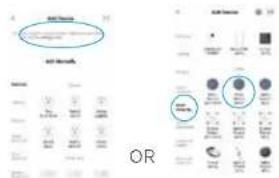
- Follow additional instruction for finishing this pairing.
EN-17 EN-18
MAINTENANCE
CLEANING SIDE BRUSHES
- Regularly check the side brush for hair wrapping.
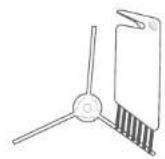
- Clean the side brush with the cleaning tool or a rag.
- If the side brush has deformed from hair wrap, remove the side brush by pulling it off the vacuum and place. it in warm water for 5 seconds.
- If the side brush is permanently damaged, replace with the spare set of brushes.
CLEANING DUSTBIN AND FILTER
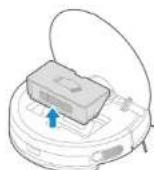
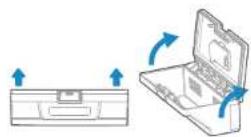
- Empty dustfilm release station to remove it.
2.
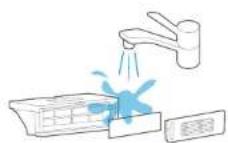
button. Help with cleaning brush.
- Assimdalyhalqvaretsand filbert and totally dry before use!
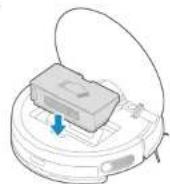
4.
dustbin back into robot.
CLEANING WATER TANK AND MOP CLOTH
flowchart
graph TD
    A["Robot with attached sensor"] --> B["Add"]
    B --> C["Add to final product"]
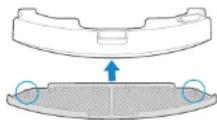
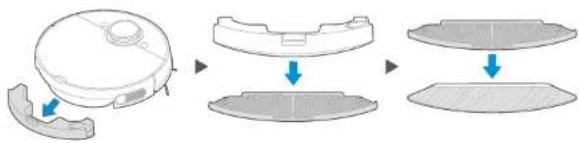
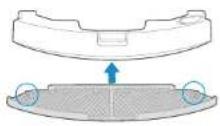
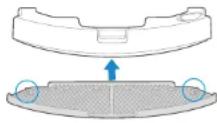
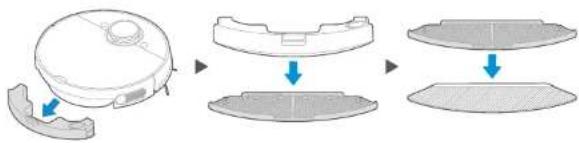
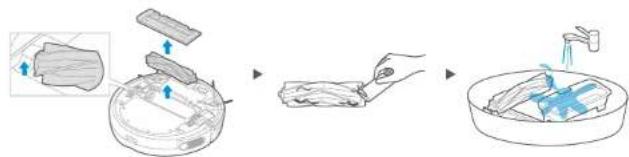
- Once finished mopping, press the water tank release button and pull to remove the water tank. Detach the mop holder by pulling them apart and remove mop cloth from holder.
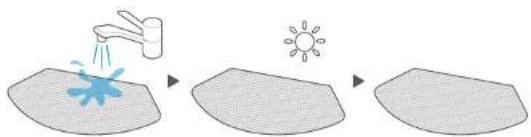
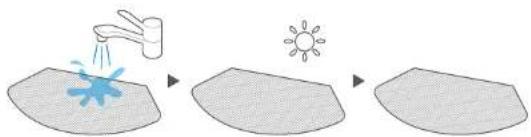
- Wash the mopping pad by hand and dry THOROUGHLY. If specified on mop cloth you can wash in washing machine.
natural_image
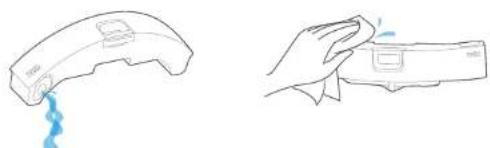
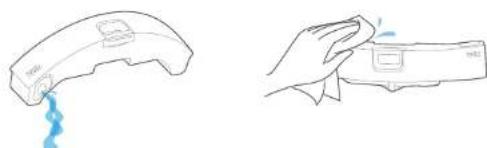
Line drawings of a hand holding a small electronic device with liquid droplets (no text or symbols)- Open the cover and pour out the remaining water in the water tank. Wipe dry the water tank. Exposure to sunlight is not recommended.
EN-19 EN-20
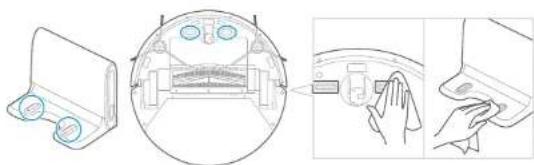
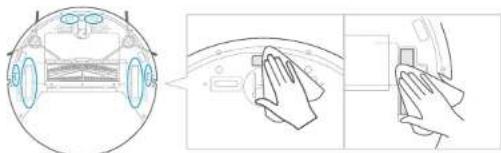
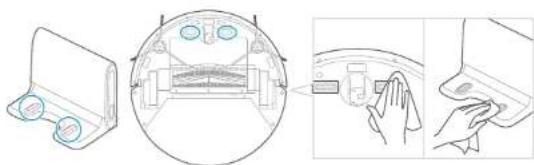
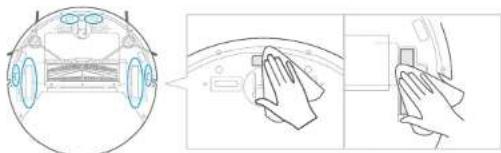
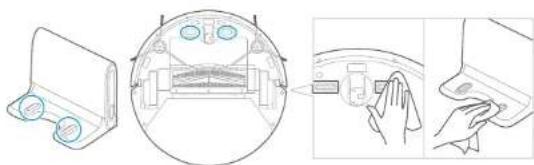
CLEANING BOTTOM SENSORS AND WHEELS
natural_image
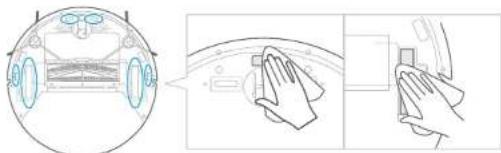
Diagram showing a car interior with hand gestures and a close-up of the dashboard (no text or symbols)Wipe the sensor and wheels gently with a soft cloth, as shown in the figure.
CLEANING CHARGING STATION TERMINALS
natural_image
Diagram showing a device with a magnified view of internal components, including a hand holding a button (no text or symbols present)Wipe the charging terminals on both the robot and charging dock with a soft cloth, as shown in the figure.
CLEANING BRUSH ROLL
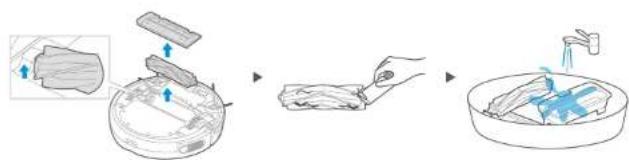
Brush roll can removed by removing protective cover. Then you can clean threads or hair wrapped around the brush roll with included brush cleaner. Use sharp V shape blade within it. Wash with water and dry THOROUGHLY.
FAQS
In case of malfunction, please refer to the following table.
FAQs ROBOT AND CHARGING STATION
| Problem Cause Solution | ||
| The appliance is not charging. | 1. The power switch is not turned on while charging.2. The appliance and charging terminals are not in full contact. | 1. Power on the appliance.2. Make sure the appliance is fully in contact with the charging terminal. |
| The appliance gets stuck. | 1. The appliance is covered by wires on the ground, dropping curtain fabric or blankets are obstacle.2. Side brush and brush roll, etc. got stuck, and the appliance cannot run normally. | 1. The appliance will automatically start the escape mode. If it is not out of trouble, it needs manual help.2. Clean the windings on the side brush and restart it. If not, contact the post-sales department. |
| Not cleaned completely, and recharge it. | 1. The appliance does not have enough battery power. | 1. Charge the appliance and for future leave feature Resume from breakpoint on ON status. |
| No cleaning according to the scheduled time. | 1. The power switch is not on.2. Scheduled appointment is cancelled. | 1. Turn on the power switch of appliance.2. Reset and make schedule. |
| After the mop holder is installed, the appliance is non-operational. | 1. The mop holder magnet falls off.2. There's no water in water tank.3. The appliance base outlet hole is blocked. | 1. Contact the aftorsales service center.2. Add water.3. Clear water outlet and tank filter. |
| The appliance has missed sweeps, there is no plan for cleaning, and the map in app shows irregularly. | 1. The ground is slippery.2. Wires, shoes and other objects placed on the ground, affecting the normal operation of the appliance.3. Cleaning is interrupted halfway. | 1. If the floor is wet, dry it before use.2. Minimize ground items as much as possible.3. Do not move or block the appliance during work. |
| Appliance does not work. | 1. The power switch is not turned ON.2. Low battery.3. Wheels are stopped and the three groups of drop sensors are in a falling state. | 1. Turn ON the power switch.2. Charge the appliance.3. Place the appliance close to the ground.4. Contact post-sales service center. |
| Appliance retreats. | 1. There is obstacle ahead.2. Bumper rail is clamped. | 1. Clear the front obstacles.2. Tap the bumper rail to check for if there is foreign matter stuck. |
EN-21 EN-22
FAQs APP
| Problem Cause Solution Troubleshooting | |||
| App displays disconnection. | Disconnection between the mobile phone and the appliance. | Judge if the mobile phone is access to network; Judge if the router works normally; The cleaner is required to be powered; The Wi-Fi configurations of the equipment are cleared; The Wi-Fi password or network is changed. | The mobile phone shall be accessed to network once again; Re-start the router; Power on the cleaner once again; Add new appliances into App; After system start-up, long press “Wi-Fi” 3 seconds and release it after a tick sound is heard; clear all Wi-Fi configurations of the cleaner and add household electrical appliances once again for operation. |
| Slow App operation. | Network connection is not so smooth. | Network busy; Poor Wi-Fi signal reception of the mobile phone; The network bandwidth is not so adequate. | Re-start the router and reduce the number of access users; Check the settings of the mobile phone itself; Broaden network bandwidth. |
| The QR code of the mobile phone itself cannot be scanned by App. | The hardware configurations of the mobile phone are very low, the camera has no focus function. | Change mobile phones for confirmation. | Change mobile phones and scan; Add appliance by product category. |
2400-2483.5MHz, WIFI MAX RF POWER: 20 dBm, BLUETOOTH MAX RF POWER: 10 dBm
This marking indicates that this product should not be disposed with other household wastes throughout the EU. To prevent possible harm to the environment or human health from uncontrolled waste disposal, recycle it responsibly to promote the sustainable reuse of material resources. To return your used device, please use the return and collection systems or contact the retailer where the product was purchased. They can take this product for environmentally safe recycling.
SIGURNOSNE UPUTE
Važne sigurnosne upute
Pažljivo pročitajte ovaj priručnik prije uporabe uređaja i spremite ga za buduću uporabu.
Upozorenje za ROBOTSKU JEDINICU
- Djeca starija od osam godina, kao i osobe smanjenih fizičkih, osjetilnih ili umnih sposobnosti ili osobe s nedostatkom znanja i iskustva, smiju koristiti uređaj isključivo pod odgovarajućim nadzorom, odnosno ako su upoznate sa sigurnom uporabom uređaja i ako jasno razumiju opasnosti koje su povezane s uporabom uređaja. Nemojte dopustiti djeci da se igraju uređajem. Djeca ne smiju čistiti ili održavati uređaj bez nadzora odgovorne osobe.
- Prije čišćenja ili održavanja uređaja, izvadite utikač iz utičnice. Prije čišćenja ili održavanja, isključite uređaj.
- Ako je kabel napajanja oštećen, treba ga zamijeniti posebnim kabelom ili kompletom dostupnim od proizvođača ili njegovog servisera.
- UPOZORENJE: Za punjenje baterije koristite samo odvojivu jedinicu za napajanje isporučenu s ovim uređajem.
Koristite samo s M7-DS jedinicom za napajanje. -
Ovaj uređaj sadržava baterije koje mogu zamijeniti samo kvalificirane osobe.
-
Robotski usisavač ne smije biti blizu izvora topline, radijacije ili zapaljenih opušaka. Strogo je zabranjeno usisavati sljedeće predmete:
a) Sve tekućine kao što su voda i otapala;
b) Vapno, cementna prašina i druga građevinska prašina i smeće;
c) Predmeti koji proizvode toplinu, kao što su neugašeni komadi ugljika, opušci cigareta;
d) Oštri dijelovi, kao što je staklo, itd.;
e) Zapaljivi i eksplozivni predmeti, kao što su benzin i alkoholni proizvodi. - Prije uporabe uklonite sve krhke predmete s poda (kao što su naočale, svjetiljke itd.) i predmete koji se mogu zapetljati u bočnu četkicu, valjak četku i pogonske kotače (kao što su kabeli, zavjese i drugi materijali koji se mogu lako zapetljati).
- Obratite pozornost na kosu i izbjegavajte zapetljavanje u kotače ili valjak četke pri uporabi, čišćenju i održavanju robotskog usisavača.
- Nemojte koristiti ovaj proizvod na visini većoj od 2000 m.
natural_image
Line drawing of a two-panel interior scene with furniture and a checkmark (no text or symbols)natural_image
Two diagrams showing a robotic vacuum cleaner on a flat surface and a folded paper sheet with blue arrows indicating rotation (no text or symbols)Nemojte koristiti usisavač na mokrim površinama ili površinama na kojima stoji voda. Prije uporabe uredaja na tepihu s resama, stavite rese ispod tepiha.
BRISANJE
- Pričvrstite krpu za brisanje na držač.
- Nalijte vodu kroz ulazni/izlazni otvor za vodu.
- Umetnite spremnik za vodu u usisavač dok se ne začuje "klik".
natural_image
Diagram of a robotic vacuum cleaner with a blue arrow indicating a component (no text or symbols present)- Pritisnite gumb na spremniku i uklonite ga.
- Pričvrstite krpu na spremnik za vodu.
- Pritisnite gumb START za početak brisanja.
NAPOMENA:
- Nemojte puniti vodom preko razine "Max".
- Preporučuje se uporaba čiste vode u spremniku za vodu. Nemojte koristiti deterdžent.
- Nakon čišćenja očistite krpu.
- Kad je spremnik za vodu pravilno postavljen, čut ćete zvuk klika.
- Uklonite držač krpe kada se usisavač puni.
- Postavite virtualni zid u APLIKACIJI ili zamotajte tepih ako ne želite da usisavač ide na tepih dok čisti.
- U APLIKACIJI prilagodite protok vode onako kako vama odgovara.
HR-15 HR-16
KORIŠTENJE APLIKACIJE
NAPOMENA:
Ako promijenite naziv ili zaporku za Wi-Fi u vašem domu, trebat ćete ponovno uspostaviti vezu s robotskim usisavačem.
flowchart
graph TD
    A["Initial Robot"] --> B["Step 1: Transformation"]
    B --> C["Step 2: Final Structure"]
    C --> D["Step 3: Final Structure"]
- Kad završite s brisanjem, pritisnite gumb za otpuštanje spremnika za vodu i povucite kako biste ga uklonili. Odvojite držač krpe tako što ćete ga odvojiti od krpe i uklonite krpu s držača.
natural_image
Line drawings of a handheld device and a hand holding a handheld device, both showing blue drops (no text or symbols)- Otvorite poklopac i izlijte preostalu vodu iz spremnika. Obrišite spremnik za vodu. Ne preporučuje se izlaganje sunčevoj svjetlosti.
HR-19 HR-20
ČIŠĆENJE DONJIH SENZORA I KOTAČA
Lagano obrišite senzor i kotače mekom krpom, kao što je prikazano na slici.
ČIŠČENJE PRIKLJUČNICA STANICE ZA PUNJENJE
natural_image
Diagram showing a device with a close-up view of the internal structure and a close-up of its screen (no text or symbols present)Valjak četka može se ukloniti uklanjanjem zaštitnog poklopca. Zatim možete očistiti niti ili kosu koja se omotala oko valjak četke isporučenim sredstvom za čišćenje četke. Koristite oštru oštricu V oblika unutar nje. Operite vodom i DOBRO osušite.
ČESTO POSTAVLJANA PITANJA
U slučaju kvara, pogledajte sljedeću tablicu. Često postavljana pitanja ROBOTSKI USISAVAČ I STANICA ZA PUNJENJE
| Problem Uzrok Rješenje | ||
| Uređaj se ne puni. | 1. Prokidač napajanja nije uključon tijkom punjenja.2. Urodaj i priključnice za punjenje nemaju puni kontakt. | 1. Ukijučite uredaj.2. Provjorito je li urodaj u potpunosti povezan s priključnicom za punjenje. |
| Uređaj se zaglavio. | 1. Urođaj jo prokriven kabolma na podu, preproke su zavljoše ili doko.2. Zaglavilo su se bočna četikica i valjak četka i uređaj ne može normalno raditi. | 1. Uredaj će automatski pokrenuti način rada za umicanje. Ako nije uspio prevladati prepreke, potrebna mu je ručna pomoč.2. Očistite namotaje na bočnoj četkici i ponovno ga pokrenite. Ako se no pokrone, obratite se postprodajnom odjelu. |
| Nije potpuno očišćen i treba ga ponovno napuniti. | 1. Uređaj nema dovoljno baterije. | 1. Napunite urodaj i ubuduće ostavito uključenu značajku "Resume from breakpoint" (nastavite od točke prekida). |
| Nema zakazanog čišćenja prema vremenskom rasporedu. | 1. Prekidač napajanja nije uključen.2. Zakazano čišćenje otkazano je. | 1. Ukijučite prekidač uređaja.2. Resetirajte i kreirajte raspored. |
| Nakon postavljanja držača za krpu, uređaj ne radi. | 1. Magnet držača krpe spada.2. Nema vode u spremniku za vodu.3. Izlaz baze uređaja je blokiran. | 1. Kontaktirajte ovlašteni servis.2. Dodajte vodu.3. Očistite izlazni otvor za vodu i filtar spremnika. |
| Uređaj nije očistio neke površine, nema plana za čišćenje, a mapa u aplikaciji prikazuje se nepravilno. | 1. Pod je klizav.2. Kabeli, cipele i ostali predmeti na podu utječu na normalan rad uređaja.3. Čišćenje je prokinuto na pola procesa. | 1. Ako je pod mokar, osušite ga prije uporabo usisavača.2. Uklonite što višo predmeta s poda.3. Nemojte pomicati ili blokirati uređaj tijekom rada. |
| Uređaj ne radi. | 1. Prokidač napajanja nije uključen.2. Prazna baterija.3. Kotaći su blokirani i sve tri grupe senzora imaju status padanja. | 1. Ukijučite prokidač napajanja.2. Napunite uređaj.3. Postavite uređaj na pod.4. Kontaktirajte postprodajni servisni centar. |
| Uređaj se povlači. | 1. Našao je na prepreku.2. Odbojnik je zapeo. | 1. Uklonite prepreke.2. Dodirnite vodliku odbojnika kako biste provjerili je li so nokakav predmet zeglavio. |
HR-21 HR-22
Često postavljana pitanja o aplikaciji
| Problem | Uzrok Rješenje | Rješavanje problema | |
| Aplikacija prikazuje prekid veze. | Prekinuta je veza između mobilnog telefona i uređaja. | Provjerite ima II mobilni telefon pristup mroži; Provjerite radi II usmjerivač normalno; Za usisavač jepotrebno napajanje; Wi-Fi konfiguracijouredaja obrisano su; Promljenjona je Wi-Fi zaporka IImreža. | Mobilni telefontreba ponovno povozati s mrožom; Rosetirajte usmjerivač; ponovno uključite usisavač; Dodajte nove uredaje u aplikaciju; Nakon pokretanjasustava, diugo pritisnite "Wi-Fi" 3 sekunde i otpustite nakon što se čuje zvuk kuckanja; izbrišito svoWi-Fi konfiguracije usisavača i još jednom dodajte kućanske električne uredaje za rad. |
| Usporeni rad aplikacije. | Mrežna veza nije dobra. | Mrožaje zauzeta; Slab prljom Wi-Fi signala na mobilnom telefonu; Mrežna propusnost nije adekvatna. | Rosetirajte usmjerivač i smanjite broj korisnika koji imaju pristup; Provjerite postavke mobilnog telefona; proširite propusni opseg mreže. |
| Aplikacija ne može skenirati QR kõd mobilnog telefona. | Konfiguracijo hardvoramobiln og telefona vrlo su niske, fotoaparat nemafunkciju izostravanja. | Promljenito mobilne telefone radi potvrdo. | Promljenite mobilne telefono i skenirajto; Dodajte uredaj proma kategoriji proizvoda. |
2400-2483,5 MHz, WIFI MAKSIMALNA RF SNAGA: 20 dBm, BLUETOOTH MAKSIMALNA RF SNAGA: 10 dBm
Ova oznaka označava da se ovaj proizvod ne smije odlagati s drugim kućanskim otpadom diljem EU-a. Kako biste spriječili moguću štetu za okoliš ili ljudsko zdravlje zbog nekontroliranog odlaganja otpada, odgovorno ga reciklirajte kako biste promicali održivu ponovnu uporabu materijalnih resursa. Da biste vratili rabljeni uređaj, upotrijebite sustave za povrat i prikupljanje ili se obratite prodavaču gdje je proizvod kupljen. Oni mogu uzeti ovaj proizvod za ekološki sigurno recikliran
BEZBEDNOSNA UPUTSTVA
- Postavite bazu za punjenje uz zid i uklonite sve prepreke oko baze za punjenje, kao što je prikazano na slici iznad. Nemojte da postavljate bazu za punjenje na tepih i održavajte površinu suvom. Takođe uklonite držač krpe dok se puni.
- Uključite prekidač. Pogledajte poglavlje FUNKCIJA DUGMADI.
- Postavite usisivač na bazu za punjenje, osiguravajući da se kontakti za punjenje dodiruju. Belo svetlo će početi da treperi, što znači da se robot usisivač puni. Punite 12 sati pre prve upotrebe.
NAPOMENA: Da biste efikasno produžili životni vek baterije, treba da:
- Napunite pre prve upotrebe.
- Kada je baterija prazna, napunite je što je pre moguće.
- Ako uredaj ne koristite duže vreme, potpuno napunite bateriju i stavite ga na provetreno i suvo mesto.
-
Punite ga svaka 3 meseca ako se ne koristi duže vreme da biste zaštitili bateriju.
-
Ovaj uređaj ima funkciju automatskog punjenja. U nekim posebnim slučajevima (npr. ako je baterija prazna, uređaj se zaglavio itd.), glavna jedinica se možda neće moći automatski napuniti.
SAVETI PRE ČIŠĆENJA
natural_image
Line drawing of a two-panel interior scene with furniture and a checkmark (no text or symbols)Pre čišćenja uklonite kablove i predmete razbacane po podu i uklonite vredne, krhke predmete koji mogu lako da padnu na pod. Ako u prostoru koji čistite visi nekakav predmet sa stola, pričvrstite ga i blokirajte da biste izbegli potencijalna oštećenja. Preporučuje se da nagdlegate usisivač da biste otkrili moguće probleme tokom prvog procesa čišćenja. Robot usisivač može lakše da čisti nakon toga. Ako određena posebna područja nije potrebno čistiti ili ako se robot usisivač može zaglaviti, možete da dodate ograničeno područje ili virtuelni zid na mapi u APLIKACIJI da biste sprečili da usisivač ude u gore navedeno posebno područje.
natural_image
Two diagrams showing a robotic vacuum cleaner and a folded paper with directional arrows (no text or symbols)Nemojte da koristite usisivač na mokrim površinama ili površinama na kojima stoji voda. Pre upotrebe uredaja na tepihu sa resama, stavite rese ispod tepiha.
BRISANJE
- Pričvrstite krpu za brisanje na držač.
- Naspite vodu kroz ulazni/izlazni otvor za vodu.
- Umetnite posudu za vodu u usisivač dok se ne začuje zvuk "klik".
natural_image
Diagram of a robotic vacuum cleaner with a blue arrow indicating the component (no text or symbols present)- Pritisnite dugme na posudi i uklonite je.
- Pričvrstite krpu na posudu za vodu.
- Pritisnite dugme START da biste započeli brisanje.
NAPOMENA:
- Nemojte da punite vodom preko nivoa "Max".
- Preporučuje se korišćenje čiste vode u posudi za vodu. Nemojte da koristite deterdžent.
- Očistite krpu nakon čišćenja.
- Kada je posuda za vodu pravilno nameštena, čućete zvuk klika.
- Uklonite držač krpe kada se usisivač puni.
- Postavite virtuelni zid u APLIKACIJI ili zamotajte tepih ako ne želite da usisivač ide na tepih dok čisti.
- Podesite protok vode u APLIKACIJI u skladu sa vašim potrebama.
SR-15 SR-16
KORIŠĆENJE APLIKACIJE
NAPOMENA:
Ako promenite ime ili lozinku za Wi-Fi kod kuće, moraćete ponovo da uspostavite vezu sa robot usisivačem.
- Aplikacija podržava iOS 9.0 i novije verzije, Android 6.0 i novije verzije telefonskog sistema, ali ne podržava Pad uređaj. Generalno, verzija telefonskog sistema može da se proveri klikom na "Podešavanja-O telefonu" u mobilnom telefonu.
- Ovaj model ne podržava WEP kriptovani ruter.
- Konfiguracija pristupa mreži usisivača zahteva Wi-Fi mrežu frekvencijskog opsega 2,4 GHz, dok frekvencijski opseg od 5 GHz trenutno nije kompatibilan.
- Nemojte da konfigurišete pristup mreži tokom punjenja.
- Wi-Fi je obavezan za konfiguraciju pristupa mreži usisivača, nakon što je pristup mreži uspešno konfigurisan, aplikacija se može koristiti u Wi-Fi/2G/3G/4G mrežnom okruženju i usisivač se može daljinski kontrolisati.
- Ako promenite lozinku za kućni Wi-Fi, usisivač neće biti priključen na mrežu.
- Ako drugi žele da koriste aplikaciju da bi rukovali usisivačem, vlasnik uređaja treba da ih pozve u aplikaciju deljenjem uređaja sa računom novog korisnika (pod uslovom da je pozvani preuzeo aplikaciju i registrovao nalog).
- Uređaj će biti uklonjen sa liste uređaja bivšeg vlasnika uređaja ako se novi vlasnik naloga uspešno poveže sa uređajem.
- Kada se usisivač uspešno konfiguriše za pristup mreži, sledeće operacije će dovesti do uklanjanja Wi-Fi podešavanja i potrebna je konfiguracija sekundarnog pristupa mreži; Dugo pritisnite taster za konfiguraciju pristupa mreži na uređaju tokom 3 sekunde i nakon što se čuje zvuk kukanja, sve informacije o Wi-Fi mreži će biti obrisane.
UPARIVANJE ROBOTA SA APLIKACIJOM ZA MOBILNI TELEFON
- Proverite da li je mobilni telefon povezan sa Wi-Fi mrežom. Unesite lozinku za Wi-Fi.
- Preuzmite aplikaciju ConnectLife Robot i registrujte robot usisivač u sledeća dva koraka:
a) Skenirajte QR kôd ili potražite aplikaciju ConnectLife Robot u Apple App Store-u (https://www.apple.com/app-store/) ili
Google Play Store-u (https://play.google.com/store/apps) i preuzmite.

Google Play Store

Apple store
b) Otvorite aplikaciju, registrujte se i napravite lični nalog u skladu sa uputstvima na ekranu.
natural_image
Two line drawings showing a hand holding a small electronic device with a blue smoke trail (no text or symbols)- Otvorite poklopac i izlijte preostalu vodu iz posude. Obrišite posudu za vodu. Ne preporučuje se izlaganje sunčevoj svetlosti.
SR-19 SR-20
ČIŠĆENJE DONJIH SENZORA I TOČKOVA
Lagano obrišite senzor i točkove mekom krpom, kao što je prikazano na slici.
ČIŠČENJE PRIKLJUČAKA STANICE ZA PUNJENJE
natural_image
Diagram showing a device with a magnified view of the internal structure and a close-up of its hand interacting with a device (no text or symbols present)Valjak-četka se može ukloniti skidanjem zaštitnog poklopca. Zatim možete da očistite niti ili kosu koja se omotala oko valjak-četke priloženim sredstvom za čišćenje četke. Koristite oštro sečivo u obliku slova V unutar nje. Operite vodom i POTPUNO osušite.
ČESTO POSTAVLJANA PITANJA
natural_image
Line drawing of two rooms with checkmarks and a crossed-out X symbol (no text or labels)natural_image
Two technical diagrams showing a robotic vacuum cleaner and a paper sheet with arrows indicating rotation (no text or symbols)natural_image
Two line drawings showing a hand holding a small object with blue liquid, no text or symbols present.natural_image
Diagram showing a car interior with wheels and a hand pressing a button, alongside a close-up of the dashboard (no text or symbols)natural_image
Diagram showing a device with a magnified view of internal components, including a hand pressing a button (no text or symbols present)flowchart
graph LR
    A["Raw Material"] --> B["Add Food"]
    B --> C["Heated Starch"]
    C --> D["Washing with Dish"]
    D --> E["Final Washing"]
natural_image
Line drawing of two rooms with checkmarks and a cross symbol, no text or labels presentnatural_image
Two technical diagrams showing a robotic vacuum cleaner and a paper sheet with arrows indicating rotation (no text or symbols)flowchart
graph TD
    A["Robot with attached sensor"] --> B["Add"]
    B --> C["Add to final product"]
natural_image
Line drawings of a hand cleaning a device with a blue spray and a white handle (no text or symbols)natural_image
Diagram showing a device with a magnified view of the internal structure, plus a close-up of hands interacting with a device (no text or symbols present)PUTERE MAX. RF WI-FI: 20 dBm,
PUTERE MAX. RF BLUETOOTH: 10 dBm
natural_image
Line drawing of a two-panel interior scene with furniture and a checkmark (no text or symbols)natural_image
Two technical diagrams showing a robotic vacuum cleaner and a folded paper sheet with blue arrows indicating motion (no text or symbols)natural_image
Diagram of a robotic vacuum cleaner with a blue arrow indicating the component (no text or symbols present)natural_image
Two line drawings showing a hand holding a small electronic device with a blue smoke trail (no text or symbols)natural_image
Diagram showing a device with a close-up view of the internal structure and a hand holding a button (no text or symbols present)flowchart
graph LR
    A["Raw Material"] --> B["Add Food"]
    B --> C["Heated Dish"]
    C --> D["Washing Water Discharge"]
natural_image
Line drawing of a two-panel room with furniture and a checkmark (no text or symbols)natural_image
Two technical diagrams showing a robotic vacuum cleaner and a paper sheet with blue arrows indicating rotation (no text or symbols)natural_image
Two line drawings showing a hand holding a small object with blue liquid, next to a curved device (no text or symbols)natural_image
Diagram showing a car interior with hand positioning and control panel, no text or symbols presentnatural_image
Line drawing of a two-panel room layout with furniture and a checkmark indicators (no text or symbols)natural_image
Two technical diagrams showing a robotic vacuum cleaner and a folded paper sheet with blue arrows indicating rotation (no text or symbols)natural_image
Diagram of a robotic vacuum cleaner with a blue arrow indicating the component (no text or symbols present)2.
flowchart
graph TD
    A["Top Robot"] --> B["Step 1: Initial state"]
    B --> C["Step 2: Assembly with blue arrow"]
    C --> D["Step 3: Final state with gray panel"]
natural_image
Two line drawings showing a hand holding a small device with a blue liquid droplet (no text or symbols)natural_image
Diagram showing a device with a close-up view of the internal structure and a hand holding a tool, no text or symbols present.flowchart
graph LR
    A["Raw food with sauce"] --> B["Lacking plate with dipping sauce"]
    B --> C["Heating liquid in a bowl with a blue star"]
natural_image
Line drawing of a two-panel room with furniture and a checkmark (no text or symbols)natural_image
Two technical diagrams showing a robotic vacuum cleaner and a folded paper sheet with blue arrows indicating rotation (no text or symbols)natural_image
Illustration of a robotic vacuum cleaner with a blue arrow pointing to its side panel (no text or symbols present)2.
natural_image
Line drawings of a hand holding a device with a blue smoke trail (no text or symbols)natural_image
Diagram showing a car interior with hand gestures and a close-up of the dashboard (no text or symbols)natural_image
Diagram showing a device with a close-up view of the internal structure and a close-up of its hand interacting with a device (no text or symbols present)flowchart
graph LR
    A["Raw Material Input"] --> B["Add Food to Dish"]
    B --> C["Place with Paper Toward Stacking"]
    C --> D["Washing Water to Dish"]
    style A fill:#f9f,stroke:#333
    style D fill:#bbf,stroke:#333
natural_image
Line drawing of a two-panel interior scene with furniture and a checkmark (no text or symbols)natural_image
Two technical diagrams showing a vacuum cleaner and a paper sheet with blue arrows indicating rotation (no text or symbols)natural_image
Diagram of a robotic vacuum cleaner with a blue arrow indicating the component (no text or symbols present)ČISTÍCÍ NÁDRŽ NA VODU A UTĚRKA NA MOP
flowchart
graph TD
    A["Top Robot"] --> B["Step 1"]
    B --> C["Step 2"]
    C --> D["Step 3"]
natural_image
Line drawings of a hand holding a small electronic device with a blue smoke trail (no text or symbols)natural_image
Diagram showing a car interior with hand positioning and cleaning steps (no text or symbols)natural_image
Diagram showing a device with a close-up view of the internal structure and a hand holding a button (no text or symbols present)flowchart
graph LR
    A["Raw vegetable"] --> B["Washing with chopsticks"]
    B --> C["Box with fish inside bowl"]
natural_image
Line drawing of a two-person living room with furniture and a checkmark (no text or symbols)natural_image
Two diagrams showing a robotic vacuum cleaner and a folded paper with blue arrows indicating motion (no text or symbols)natural_image
Diagram of a robotic vacuum cleaner with a blue arrow indicating the component (no text or symbols present)2
a vyberte ju.
flowchart
graph TD
    A["Initial Robot"] --> B["Step 1: Initial Robot Position"]
    B --> C["Step 2: Assembly Point"]
    C --> D["Step 3: Final Assembly Point"]
- Umyte vytieraciu podložku ručne a DÖKLADNE osušte. Ak je to uvedené na handričke mopu, môžete ju prat v práčke.
natural_image
Line drawings of a handheld device and a hand holding a rectangular device, both without any text or symbols.natural_image
Diagram showing a car interior with hand gestures and a close-up of the dashboard (no text or symbols)natural_image
Diagram showing a device with a circular component, a close-up of a mechanical assembly, and a hand holding a tool near a surface (no text or symbols)Utrite nabíjacie terminály na robote aj nabíjaciu stanicu mäkkou handričkou, ako je znázornené na obrázku.
ČISTENIE KEFOVÉHO VALCA
flowchart
graph LR
    A["Wood being added"] --> B["Picking down in a bowl"]
    B --> C["Hand washing fish with water"]
natural_image
Line drawing of a two-person living room with a checkmark and crossed-out box (no text or symbols)natural_image
Two technical diagrams showing a robotic vacuum cleaner and a paper sheet with blue arrows indicating rotation (no text or symbols)natural_image
Illustration of a robotic vacuum cleaner with a blue arrow indicating the component (no text or symbols present)2
flowchart
graph TD
    A["Top Robot"] --> B["Step 1: Downward movement"]
    B --> C["Step 2: Downward movement"]
    C --> D["Step 3: Downward movement"]
natural_image
Two line drawings showing a hand cleaning a device with a blue spray (no text or symbols)natural_image
Diagram showing three steps of a car interior: heading, pressing action, and holding a device (no text or symbols present)natural_image
Diagram showing a device with a close-up view of the internal structure and a close-up of its screen (no text or symbols present)POTENZA RF MASSIMA WIFI: 20 dBm,
POTENZA RF MASSIMA BLUETOOTH: 10 dBm
natural_image
Line drawing of a two-panel layout showing a sofa and coffee table, with no text or symbols present.natural_image
Line drawing of a robotic vacuum cleaner with a blue arrow indicating motion (no text or symbols)2
natural_image
Line drawings of a hand holding a small electronic device with a blue liquid droplet (no text or symbols)natural_image
Diagram showing a car interior with hand gestures and a close-up of the dashboard (no text or symbols)natural_image
Diagram showing a device with a magnified view of internal components, including a hand holding a button (no text or symbols present)natural_image
Line drawing of a two-panel layout showing a sofa and coffee table with a crossed-out X symbol (no text or labels)natural_image
Two technical diagrams showing a robotic vacuum cleaner and a paper sheet with arrows indicating rotation (no text or symbols)Apple App Store (https://www.apple.com/app-store/) n to
Google Play Store (https://play.google.com/store/apps) και κάντε λήψη.

Google Play Store

Apple store
natural_image
Line drawings of a handheld device and a hand holding a small electronic device (no text or symbols)natural_image
Diagram showing a device with a magnified view of internal components, including a hand holding a button (no text or symbols present)flowchart
graph LR
    A["Raw vegetable with arrows"] --> B["Washing fish and dipping water"]
    B --> C["Heating fish and dropping water"]