
DD 808 - Dehumidifier QLIMA - Free user manual and instructions
Find the device manual for free DD 808 QLIMA in PDF.
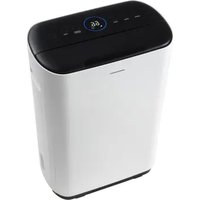


| Product type | Dehumidifier |
| Brand | Qlima |
| Model | DD 808 |
| Dimensions (L x W x H) | 358 x 213 x 537 mm |
| Power supply | 230 V ~ 50 Hz |
| Power consumption | 610 W |
| Dehumidification capacity | 8 L/day (at 20 °C, 60% RH) |
| Airflow | 150 m³/h |
| Outlet air temperature | ≥ 40 °C |
| Water tank capacity | 2.0 L |
| Operating temperature range | 5 °C to 35 °C |
| Main functions | Continuous dehumidification, timer, fan mode, swing, child lock, continuous drainage |
| Humidity level indicator | LED green (≤ 59%), orange (60-69%), red (≥ 70%) |
| Filter cleaning | Washable prefilter with soapy water; vacuum or soft brush recommended |
| Maintenance | Unplug before cleaning; do not use solvents; empty tank before storage |
| Safety | Auto shut-off when tank full, anti-tilt protection, overheat protection, child lock |
| Warranty | 2 years against manufacturing defects |
| Error codes | C1 (NTC1), C2 (NTC2), C3 (NTC1 and NTC2), C4 (synchronization motor), P3 (filter cleaning), 88 (sensor) |
Frequently Asked Questions - DD 808 QLIMA
User questions about DD 808 QLIMA
0 question about this device. Answer the ones you know or ask your own.
Ask a new question about this device
Download the instructions for your Dehumidifier in PDF format for free! Find your manual DD 808 - QLIMA and take your electronic device back in hand. On this page are published all the documents necessary for the use of your device. DD 808 by QLIMA.
USER MANUAL DD 808 QLIMA
guarantee

YEARS
| D | GEBRAUCHSANWEISUNG | 2 |
| DK | BRUGSANVISNING | 12 |
| E | INSTRUCCIONES DE USO | 22 |
| F | MANUEL D'UTILISATION | 32 |
| FIN | KÄYTTÖOHJE | 42 |
| GB | OPERATING MANUAL | 52 |
| I | MANUALE OPERATIVO | 62 |
| N | BRUKSANVISNING | 72 |
| NL | GEBRUIKSAANWIJZING | 82 |
| P | MANUAL DE INSTRUÇÕES | 92 |
| PL | INSTRUKCJA OBSŁUGI | 102 |
| S | BRUKSANVISNING | 112 |
| SL | PRIROČNIK ZA UPORABO | 122 |
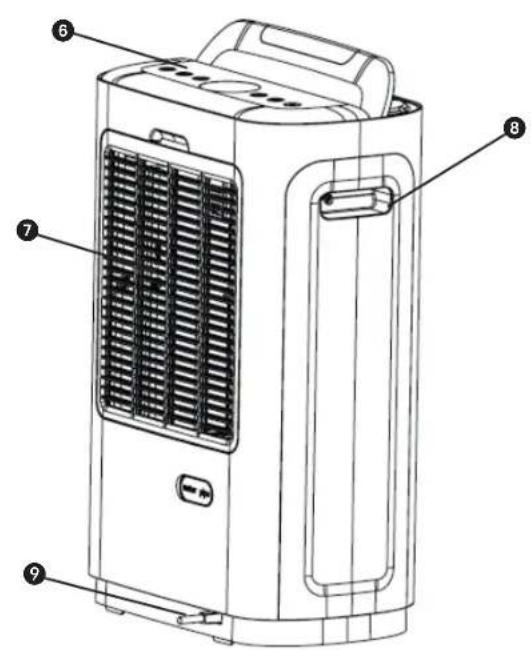
IMPORTANT COMPONENTS


ALARM WHEN WATER TANK IS FULL
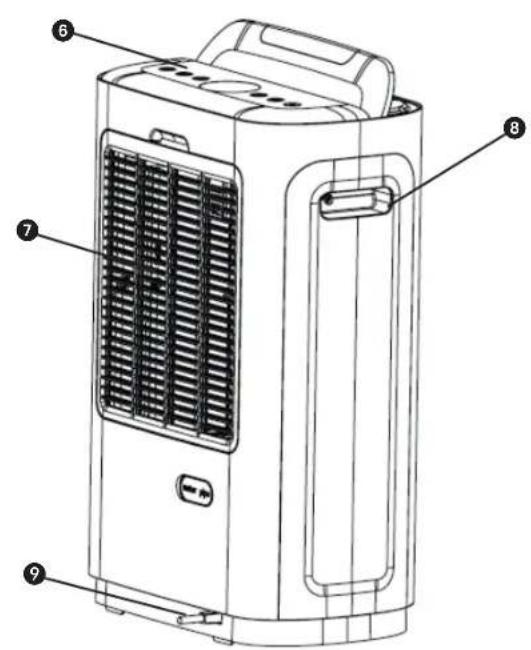
IMPORTANT PARTS
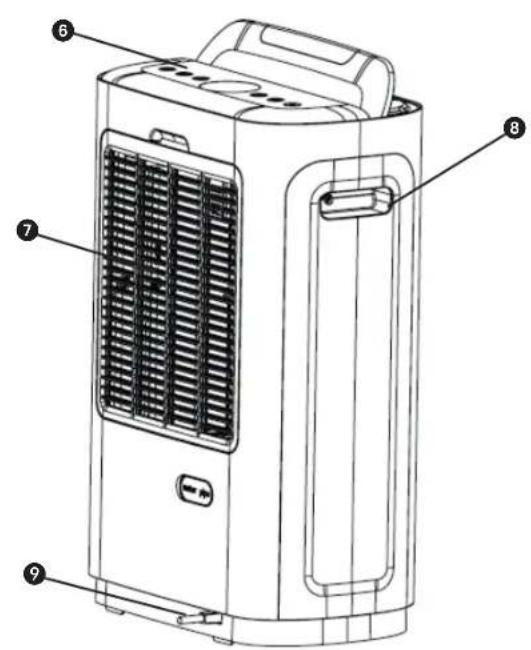
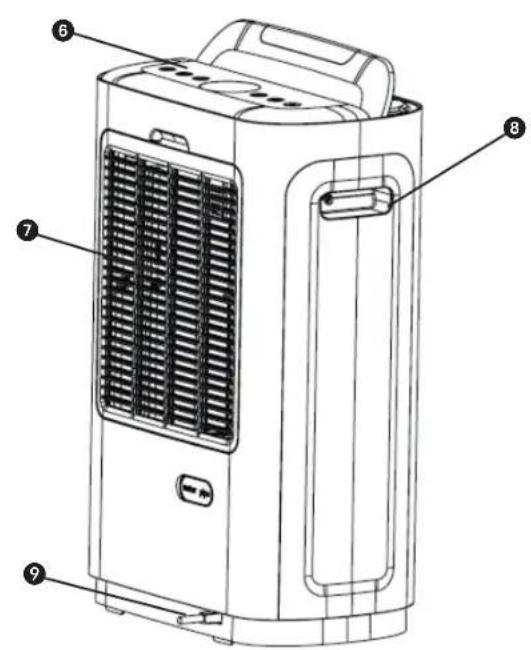
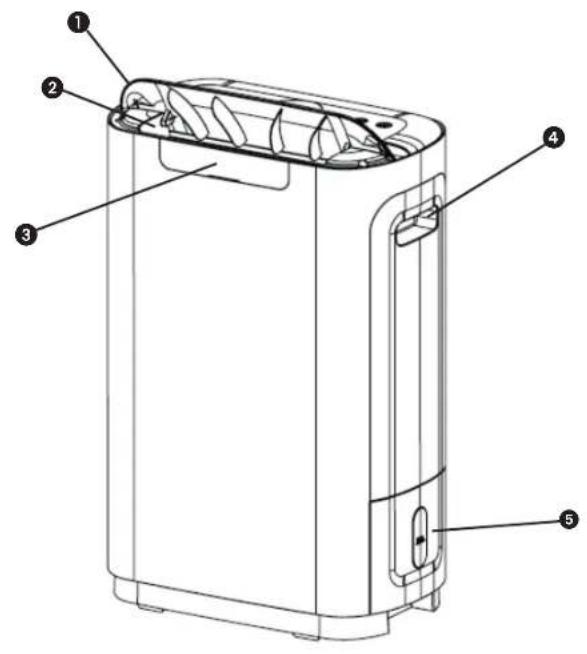
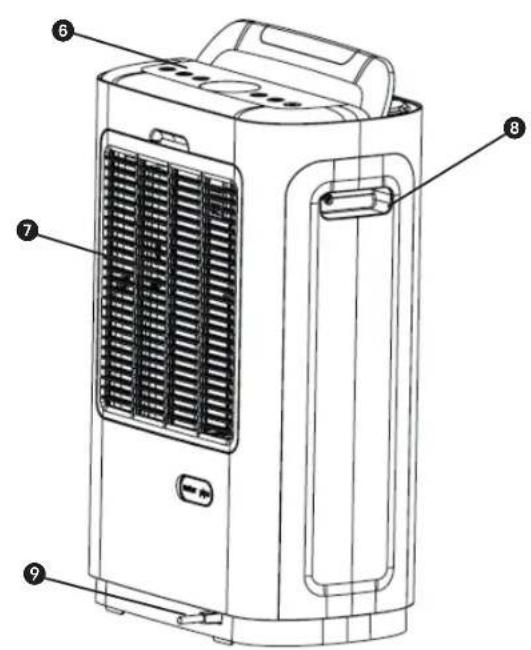
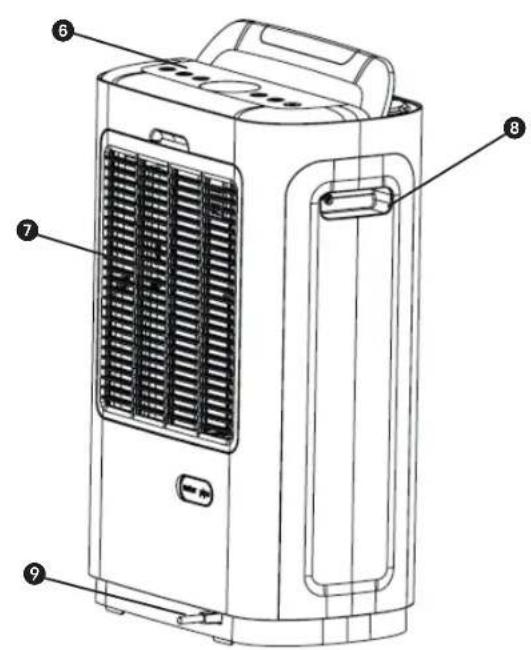
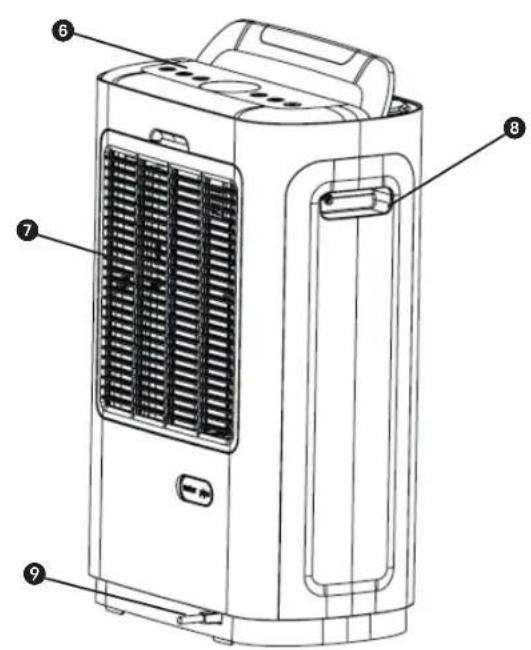
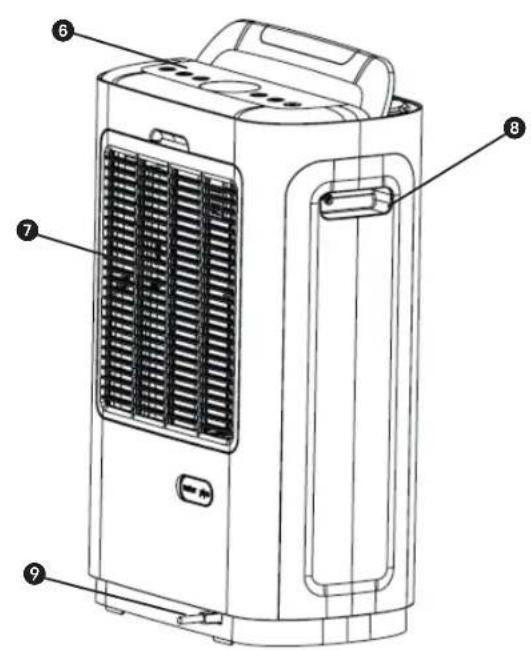
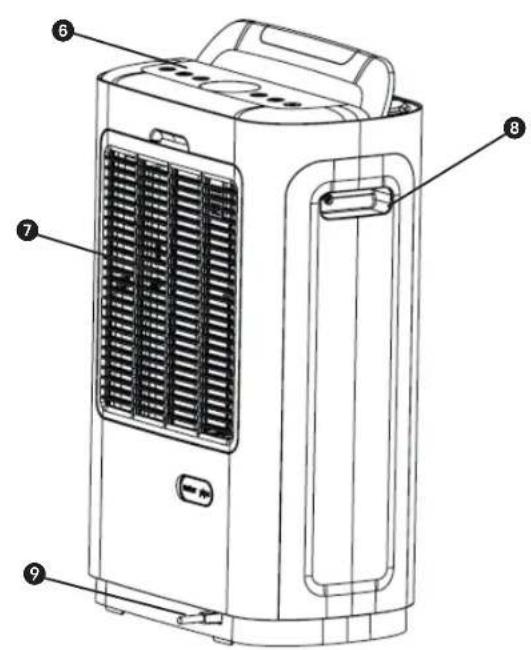
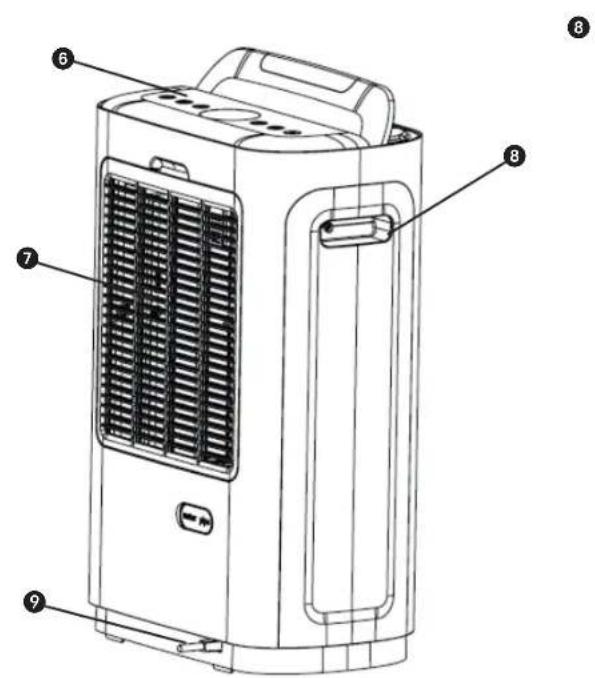
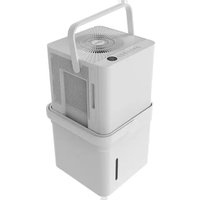
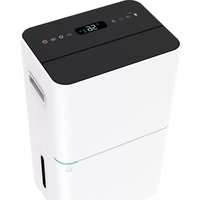
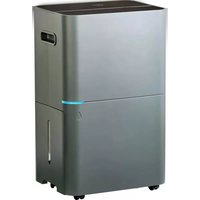
① Air deflector ② Air outlet 3 LED indicator 4 Handle ⑤ Water tank 6 Control panel ⑦ Air inlet grille 8 Handle 9 Power cord
DK
SAFETY INSTRUCTIONS
MAINTENANCE
MAIN COMPONENTS


MAINTENANCE
MAIN PARTS
DEHUMIDIFY

TIMER
POWER
WATER TANK FULL ALERT
IMPORTANT COMPONENTS
- READ THE USER'S MANUAL FIRST.
- IF YOU ARE UNSURE ABOUT ANYTHING, CONTACT YOUR DEALER.
FIN
43
SAFETY INSTRUCTIONS
WATER TANK FULL ALERT
MAINTENANCE
Congratulations with the purchase of your dehumidifier. You have acquired a high quality product which will give you many years of pleasure, if you use it responsibly. Please read the user's manual first in order to ensure the optimum life span of your dehumidifier. On behalf of the manufacturer, we provide a two-year warranty on material- or manufacturing defects.
Enjoy your dehumidifier.
Yours sincerely,
PVG Holding B.V.
Customer Service Department
1 PLEASE READ THE USER'S MANUAL FIRST.
If you have any doubts, consult your dealer.
IMPORTANT COMPONENTS
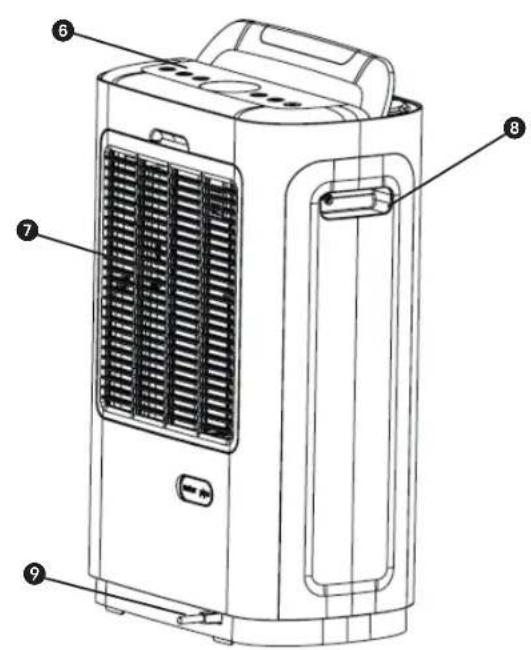
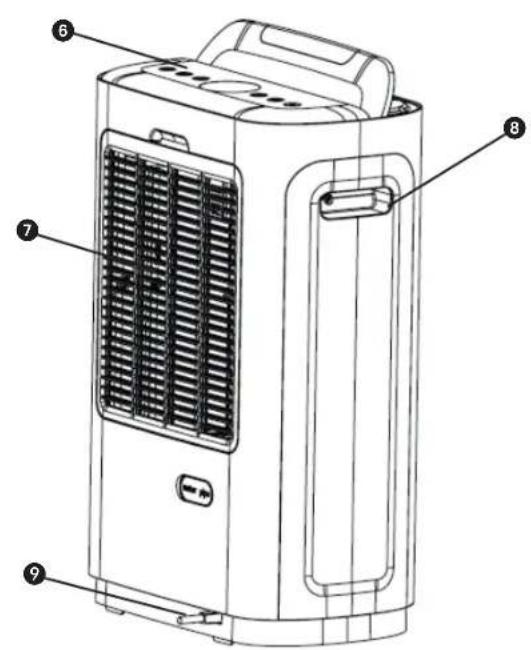
1. Air deflector 2. Air outlet 3. LED indicator 4. Handle 5. Water tank 6. Control panel 7. Air intake grille 8. Handle 9. Power cord
SAFETY INSTRUCTIONS
Read this user manual carefully before using the appliance and keep it for future reference. Install this appliance only when it complies with local/national legislation, ordinances and standards. This appliance is intended to be used as a dehumidifier in residential houses and is only suitable for use in normal household conditions, indoors in living room, kitchen and garage. This appliance is only suitable for earthed sockets, connection voltage 220-240 V. / ~50 Hz.
GENERAL
- Ensure that all windows are closed in order to achieve maximum efficiency.
- The capacity of the appliance depends on the temperature and the humidity in the room.
- Ensure that the screen filter is kept clean. This prevents unnecessary power consumption and guarantees optimum efficiency.
- If the power supply has been interrupted, the appliance will restart after three minutes.
- If the appliance ever tips or falls over, unplug the power cord immediately. Make sure the appliance has dried out thoroughly before operation if the appliance ever tips or falls over when water tank is filled.
- Do not use the appliance in bathroom or shower room.
- Do not use the appliance near flammable materials or fire.
- Do not unplug the appliance from the power socket with wet hands.
- Switch off the power before removing the plug from the power socket. Empty the water when the water tank is full or when the appliance is not in
use for a prolonged period.
To disconnect the power, grip the plug and pull it out from the power socket; never drag the cord.
IMPORTANT

The appliance MUST always have an earthed connection. If the power supply is not earthed, you may not connect the appliance. The plug must always be easily accessible when the appliance is connected. Read these instructions carefully and follow the instructions.
Before connecting the appliance, check the following:
- The voltage supply must correspond with the mains voltage stated on the rating label.
- The socket and power supply must be suitable for the current stated on the rating label.
- The plug on the cable of the appliance must fit into the wall socket.
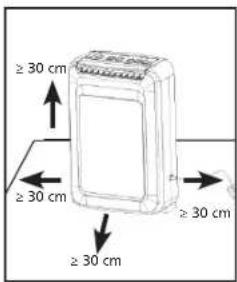
- The appliance must be placed on a flat and stable surface.
The electricity supply to the appliance must be checked by a recognised professional if you have any doubts regarding the compatibility.
- This appliance is not intended for use by persons (including children) with reduced physical, sensory or mental capabilities, or lack of experience and knowledge, unless they have been given supervision or instruction concerning use of the appliance by a person responsible for their safety.
- This appliance is manufactured according to CE
safety standards. Nevertheless, you must take care, as with any other electrical appliance.
- Do not cover the air inlet and/or outlet.
- Empty the water reservoir before moving the appliance.
- Never allow the appliance to come into contact with chemicals.
- Never submerge the appliance in water.
- Do not insert objects into the openings of the appliance.
- Always remove the plug from the electric power supply before cleaning or replacing the appliance or components of the appliance.
- Never use an extension cable to connect the appliance to the electric power supply. If there is no suitable, earthed wall socket available, have one installed by a recognised electrician.
- Children should be supervised to make sure that they do not play with the appliance.
- Have any repairs only carried out by a recognised service engineer or your supplier. Follow the instructions for use and maintenance as indicated in the user manual of this appliance.
- Always remove the plug of the appliance from the wall socket when it is not in use.
- If the power cable is damaged it must be replaced by the manufacturer, its customer service department or persons with comparable qualifications in order to prevent danger.
- This appliance can be used by children aged from 8 years and above and persons with reduced physical, sensory or mental capabilities or lack of experience and knowledge if they have been given supervision or instruction concerning use of the appliance in a safe way and understand the hazards involved.
- Cleaning and user maintenance shall not be
made by children without supervision.

ATTENTION!
- Never use the appliance with a damaged power cord, plug, cabinet or control panel. Never trap the power cord or allow it to come into contact with sharp edges.
ATTENTION!
- Failing to follow the instructions may lead to nullification of the guarantee on this device.
THE CONTROL PANEL
• Working temperature range: 5°C-35°C
OPERATING INSTRUCTIONS
FUNCTIONS OF CONTROL PANEL
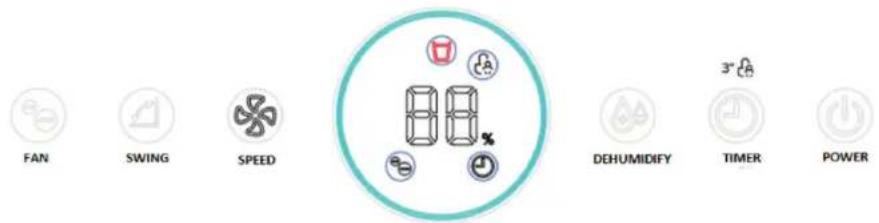
- Ⓞ The POWER button can be used to turn the power on or off
1 Plug the appliance into the power socket, the buzzer will beep 3 times. All LEDS on the display will be lighted for 1 sec. The louver will be raised to 80 degrees.
2 Use the POWER button to turn on the appliance. the appliance will start in continuous dehumidification mode by default. The fan will operate at speed 2
3 Pressing the POWER button will also switch the appliance off again. The fan motor will continue to run for about 10 minutes to allow the temperature of the desiccant and heating element to drop after the power is turned off. The plug should not be unplugged until no more air flows from the outlet.
- ☑ 1 The TIMER button can be pressed to set a timer when the appliance will switch off.
2 When the timer is set, the timer indicator lights up. When the timeris set, the display shows the currently set timer data for 3 seconds and then switches to the display of the current humidity level.
3 When the timer button is pressed for 3 seconds, the child lock can be switched on or off (If the power is suddenly switched off and then on again, the appliance will not remember the child lock).
- Press the DEHUMIDIFICATION button to set the humidity:
CO 40% □45% □50% □55% □60% □65% □70% □75% □80%, CO stands for continuous dehumidification.
- 1 Press the MODE button to set the mode to 1(Low)-2(Medium)-3(High)-Auto.
2 If the appliance operates in fan mode only, press the button to set the fan level to 1(Low)-2(Medium)-3(High).
3 When the appliance works continuously for 360hr, the display will show the P3 code to remind the user to clean the filter. Then press the button for 3 sec to clean the P3 code, then the P3 code will disappear and the display will show the current ambient temperature level.
- Press the SWING button to turn the swing function on/off
- Press the FAN button to turn the fan function on/off.
When the appliance is in fan function, the user can press the SPEED button to set the fan speed to 1(low)-2(medium)-3(high).
- Beep on/off button:
When the appliance is operating, press the SWING and TIMER button for 3 sec to turn the beep on or off.
- Humidity level indicator:
The LED indicator is located in the front casing of the appliance. When the humidity is ≤59%, the indicator lights up green; when the humidity is ≥60%, it lights up orange; and when the humidity is ≥70%, it lights up red.
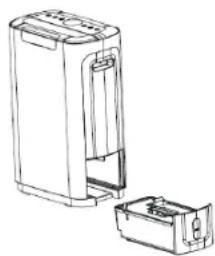
WATER TANK FULL ALERT
When the appliance's water tank is full, a signal will be emitted 10 times and the water-full indicator light will come on. The appliance will then stop working immediately. Make sure the water tank is emptied and placed back into the appliance correctly. The appliance will then resume operating in its last set mode.
MEMORY FUNCTION
(1) When the appliance is switched off and is in standby mode, it will remember the last setting and will start up when the appliance is switched on again. (2) If the power fails while the appliance is switched on, the appliance will also remember the last setting for when the power is switched on again. (3) When the child lock and timer are set, the appliance switches off when the time has elapsed. At that time, the appliance will not remember the child lock for when it is set again; it will have to be reactivated.
SYNC MOTOR FAILURE
When a sync motor failure occurs, the appliance will show C4. The main motor, sync motor, and hot air motor will stop working after 10 minutes.
| Error code Reason | |
| C1 | NTC1 is open cut or short cut |
| C2 | NTC 2 is open cut or short cut |
| C3 | NTC1 &NTC 2 are open cut or short cut |
| C4 | Sync motor is failure |
| P3 | Pre-filter clean notice |
| 88 | Temperature and humidity sensor is failure |
PROTECTION AGAINST FALLING OVER
The appliance has a heater inside. To prevent overheating, the appliance is equipped with a tilt switch that automatically switches off when the appliance falls over.
CONTINUOUS DRAINAGE FUNCTION
The appliance has a continuous drain hole that can be connected to a plastic pipe of 2 meters in length. The water can be drained into a sink or larger container. This appliance uses gravity to drain the collected water, and therefore the drain should be lower than the appliance's water outlet. Make sure that the drain pipe runs downward and allows the water to flow out smoothly. Do not kink or bend the pipe.
CLEANING THE FILTER
The air intake can easily collect dust, so clean it regularly with a soft, damp cloth. If the filter is covered with dust, the airflow and performance of the appliance will be affected. It may even cause damage to the appliance. We recommend cleaning the filters regularly. The appliance must be unplugged before maintenance, and the filters must be completely dried before use.
1) Remove the filters from the appliance and pat away the dust. 2) Clean the mesh filter with a vacuum cleaner or soft brush.
If dirt and grease have accumulated, wash the mesh filter in hot soapy water. 3) This should dry thoroughly before replacing the filter in the appliance.
MAINTENANCE
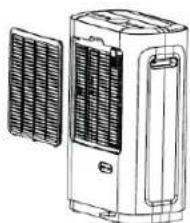
- Do not place the appliance in direct sunlight as the housing is made of plastic.
- Remove the water tank carefully. Do not use alcohol, petrol or other benzene-containing chemical solvents to clean the appliance.
- Keep the filter clean: remove the filter, then use a hoover or water to clean it, then put it in a ventilated place until it is dry.
- Unplug the appliance before cleaning or performing other maintenance work.
- Turn off the appliance, unplug the power cord and remove the water from the tank before putting the appliance away.
- If you are not going to use the appliance for a long time, switch it off, unplug it, empty the water tank and wait 2 days to ensure the appliance is completely dry inside before packing it away. Then make sure the appliance is stored upright. Do not place the appliance horizontally or upside down.
- If the appliance needs repair. Enlist the help of after-sales service or another professional person. We are not responsible for accidents or damage caused by repairing the appliance yourself.
- Send the waste after repairing the appliance to the factory qualified for waste disposal.
- When the life of the appliance has expired, take it to the professional manufacturer for environmental protection. Do not throw it away.
CONDITIONS OF WARRANTY
There is a two-year warranty on this appliance from the date of purchase. All material or manufacturing defects will be repaired free of charge.
The following applies:
- All claims for compensation, including consequential damage, will not be entertained.
- Any repairs or replacement of components during the warranty period will not result in an extension of the warranty period.
- The warranty will expire if any alterations have been made, not genuine components have been fitted or if the appliance has been repaired by a third party.
- Components subject to normal wear and tear, such as the air filter, are not covered by the warranty.
- The warranty is only valid on presentation of the original, unaltered, and date-stamped purchase receipt.
- The warranty does not cover damage caused by actions that deviate from those as described in the user's manual or by neglect.
- Transportation costs and the risks involved during the transportation of the appliance or components shall always be for the account of the purchaser.
To prevent unnecessary expenses, we recommend that you always carefully read the user's manual first. If this does not provide a solution, take the appliance to the distributor for repair.
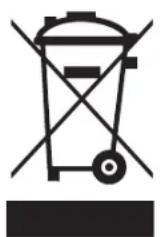
Do not dispose of electrical appliances as unsorted municipal waste, use separate
collection facilities. Contact your local government for information regarding the collection systems available. If electrical appliances are disposed of in landfills or dumps, hazardous substances can leak into the groundwater and get into the food chain, damaging your health and well-being. When replacing old appliances with new once, the retailer is legally obligated to take back your old appliance for disposal at least for free of charge. Do not throw batteries into the fire, where they can explode or release dangerous liquids. If you replace or destroy the remote control, remove the batteries and throw them away in accordance with the applicable regulations because they are harmful to the environment.
TECHNICAL SPECIFICATIONS
| Model DD808 | |
| Rated Voltage 230V/50HZ | |
| Dehumidification 8.0L/D (20°C 60%RH) | |
| Power consumption 610W (20°C 60%RH) | |
| Air volume 150m3/h | |
| Outlet air temperature ≥40°C | |
| Water tank size 2.0L | |
| Dimension 358*213*537mm | |
* To be used as indication Subject to change without prior notice.
IMPORTANT COMPONENTS
DEHUMIDIFY

TIMER
POWER
IMPORTANT PARTS
① Air deflector ② Air outlet ③ LED indicator ④ Handle ⑤ Water tank ⑥ Control panel ⑦ Air inlet grille ⑧ Handle ⑨ Power cord
N
73
SAFETY REGULATIONS
DEHUMIDIFY
TIMER
POWER
IMPORTANT PARTS
WARNING: FULL WATER TANK
TIP-OVER PROTECTION
CONTINUOUS DRAIN FUNCTION
MAINTENANCE
1 READ THE USER MANUAL FIRST.
2 IF IN DOUBT, CONSULT YOUR DEALER.
WATER TANK FULL ALERT
MAINTENANCE
1 READ THE OPERATING INSTRUCTIONS FIRST.
2 IF IN DOUBT, CONSULT YOUR AGENT.
DEHUMIDIFY

TIMER
POWER
WATER TANK FULL ALARM
MAINTENANCE
1 READ THE USER MANUAL FIRST.
2 IF IN DOUBT, CONSULT YOUR RETAILER.
IMPORTANT COMPONENTS
① Air deflector
② Air outlet
3 LED indicator
4 Handle
⑤ Water tank
6 Control panel
⑦ Air intake grille
8 Handle
9 Power cord
SAFETY INSTRUCTIONS
IMPORTANT COMPONENTS
DEHUMIDIFY
TIMER
POWER
WARNING ABOUT FULL WATER TANK
MAINTENANCE
Distributed in Europe by PVG Holding B.V.
If you need more information or encounter any problems, please visit our website www.qlima.com or contact our customer service (T: +31 412 694 694). For further information or if you have any problems with the appliance, please refer to www.qlima.com or your local customer center (T: +45 77 34 33 30). (6) If you need information or have any problems, please visit our website www.qlima.es or contact customer service (T: +34 916 113 113). ⑤ If you would like additional information or if you encounter a problem, please visit our website (www.qlima.fr / www.fr.qlima.be) or contact our customer service (T: +33 2 32 96 07 47 / +32 (0)3 326 39 39). If you need service assistance, more information, or if you have problems with the device, please visit our website at www.qlima.com or ask for advice from the PVG consumer service center (T: +45 77 34 33 30). @ If you need information or if you have a problem, please visit our website (www.qlima.com) or contact our sales support (T: +31 412 694 694). ① For information and in case of problems, visit the website www.qlima.it or contact the Customer Assistance Center (T. +39 0571 628 500). ① If you need information, or if you have a problem with the product, you can visit the website www.qlima.com. Alternatively, you can contact PVG's consumer service (T: +45 77 34 33 30). If you need information or if you have a problem, please visit our website (www.qlima.nl / www.qlima.be) or contact the sales support department (T: +31 412 694 694 / +32 (0)3 326 39 39). If you need information or if you have problems, visit the website www.qlima.es or contact the Assistance Center (T: +34 916 113 113). In case of problems and for detailed information, visit the Qlima website at www.qlima.com or contact the Qlima contact center (T: +48 48 613 00 70) ⑧ If you need service or information or have problems with the appliance, you can visit www.qlima.com or contact Qlima customer service (T: +45 77 34 33 30). ⑤D If you would like additional information, visit the company's website at www.qlima.si or call the telephone number (T: +386 (0)41 674 139).
PVG Holding BV – Kanaalstraat 12 C - 5347 KM Oss – the Netherlands P.O. Box 96 - 5340 AB Oss – the Netherlands

- IMPORTANT COMPONENTS
- ALARM WHEN WATER TANK IS FULL
- IMPORTANT PARTS
- SAFETY INSTRUCTIONS
- MAINTENANCE
- MAIN COMPONENTS
- MAIN PARTS
- WATER TANK FULL ALERT
- GENERAL
- IMPORTANT
- ATTENTION
- OPERATING INSTRUCTIONS
- FUNCTIONS OF CONTROL PANEL
- MEMORY FUNCTION
- SYNC MOTOR FAILURE
- PROTECTION AGAINST FALLING OVER
- CONTINUOUS DRAINAGE FUNCTION
- CLEANING THE FILTER
- CONDITIONS OF WARRANTY
- TECHNICAL SPECIFICATIONS
- SAFETY REGULATIONS
- WARNING: FULL WATER TANK
- TIP-OVER PROTECTION
- CONTINUOUS DRAIN FUNCTION
- WATER TANK FULL ALARM
- WARNING ABOUT FULL WATER TANK
- DISTRIBUTED IN EUROPE BY PVG HOLDING B.V
Brand : QLIMA
Model : DD 808
Category : Dehumidifier