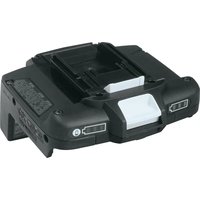
BCV03 - Battery converter MAKITA - Free user manual and instructions
Find the device manual for free BCV03 MAKITA in PDF.

 FR
FR
 BG
BG
 CS
CS
 DA
DA
 DE
DE
 EL
EL
 EN
EN
 ES
ES
 ET
ET
 FI
FI
 HU
HU
 ID
ID
 IT
IT
 KO
KO
 LT
LT
 LV
LV
 MK
MK
 NL
NL
 PL
PL
 PT
PT
 RO
RO
 RU
RU
 SK
SK
 SQ
SQ
 SR
SR
 SV
SV
 TR
TR
 UK
UK
 VI
VI
 ZH
ZH
User questions about BCV03 MAKITA
0 question about this device. Answer the ones you know or ask your own.
Ask a new question about this device
Download the instructions for your Battery converter in PDF format for free! Find your manual BCV03 - MAKITA and take your electronic device back in hand. On this page are published all the documents necessary for the use of your device. BCV03 by MAKITA.
USER MANUAL BCV03 MAKITA
GBBattery converter Instruction Manual
123
4
5
English (Original instructions)
| Explanation of general view | ||
| 1 Button | 5 Remaining battery | 9 Screws |
| 2 Battery cartridge | capacity indication | 10 Label |
| 3 Battery converter | lamp for battery 2 | 11 Battery converter |
| 4 Remaining battery capacity indication | 6 Button | symbol |
| 7 Battery guard | 12 Battery capacity | |
| lamp for battery 1 | 8 Protrusion | display button |
Applications
This battery converter uses two 18 V batteries, and can be used with 36 V battery-powered products.
Compatible battery: BL1815N, BL1820, BL1820B, BL1830, BL1830B, BL1840, BL1840B, BL1850, BL1850B, BL1860B
Note: BL1815 cannot be used with the battery converter.

CAUTION:
- Be sure to carefully read the product main unit instruction manual before use.
- This battery converter is designed exclusively for use with 18 V batteries. Do not use 14.4 V batteries.
- Install two 18 V batteries for use. This battery converter cannot be used with only one 18 V battery.
- Do not insert the battery converter into the charger. Charging is not possible in this case.
Removing or installing batteries and battery converter

CAUTION:
• Always switch off the tool before installing or removing of the battery cartridges.
- Firmly hold the battery converter and battery cartridges when replacing battery cartridges.
Failure to firmly hold the battery converter and battery cartridges may damage them or cause a serious injury.
- When replacing battery cartridges with the battery converter installed on the tool, firmly hold the battery cartridges and the tool.
- Firmly hold the tool and battery converter when removing the battery converter. Failure to firmly hold the tool and the battery converter may drop them and cause damage to them or a serious injury.
Removing/installing the battery cartridges from/on the battery converter (Fig. 1)
- To remove battery cartridge from the battery converter, slide it from the battery converter while sliding the button on the front of the battery cartridge.
- To install the battery cartridge, align the tongue on the battery cartridge with the groove in the battery converter and slip it into place. Always insert it all the way until it locks in place with a little click. If you can see the red indicator on the upper side of the button, it is not locked completely. Install it fully until the red indicator cannot be seen. If not, it may accidentally fall out of the battery converter, causing injury to you or someone around you.
Do not use force when installing the battery cartridge. If the cartridge does not slide in easily, it is not being inserted correctly.
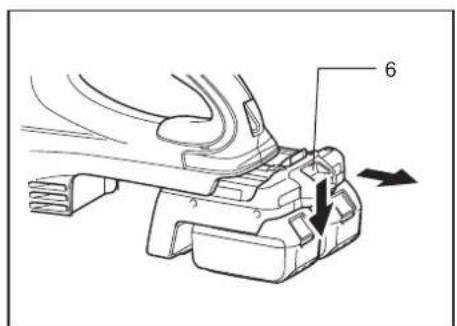
Removing/installing the battery converter from/on the tool (Fig. 2)
- To remove the battery converter, slide it from the tool while sliding the button on the front of the battery converter.
- To install the battery converter, align the tongue on the battery converter with the groove in the tool and slip it into place. Always insert it all the way until it locks in place with a little click. If you can see the red indicator on the upper side of the button, it is not locked completely. Install it fully until the red indicator cannot be seen. If not, it may accidentally fall out of the tool, causing injury to you or someone around you. Do not use force when installing the battery converter. If the battery converter does not slide in easily, it is not being inserted correctly.

CAUTION:
- Be careful not to pinch your fingers when inserting batteries and the battery converter.
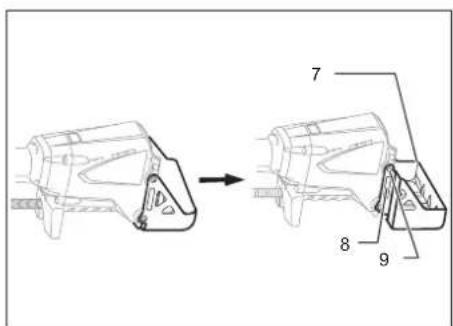
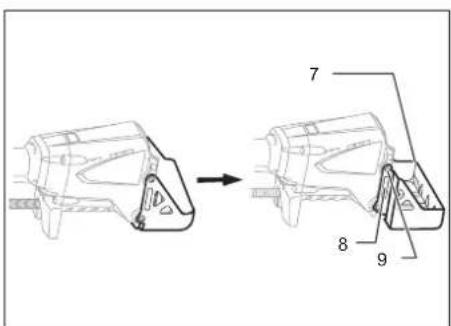
How to use this converter with the 36 V cordless brushcutter (Fig. 3)
When using with the above cordless brushcutter, mount the battery guard (optional accessory).
To install the accessory battery guard, fit it over the protrusion of the tool and then secure it with screws.
To remove the accessory battery guard, unscrew and slide it off.
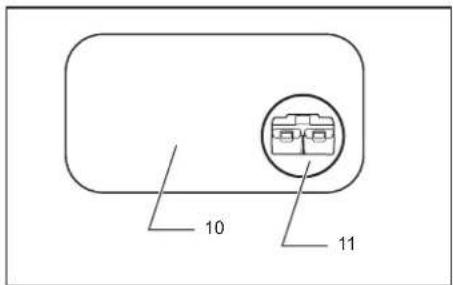
How to use this converter with the chain saw Model BUC250, UC250D (Fig. 4)
Note:
- Model BUC250, UC250D only with a label including the battery converter symbol shown in the figure can be used with this converter.
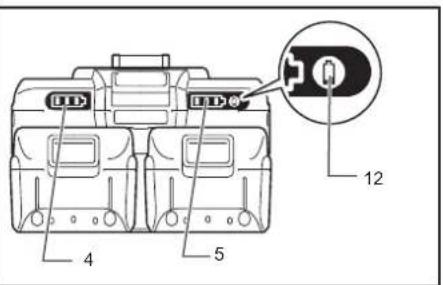
Remaining battery capacity indication (Fig. 5)
Press the remaining battery capacity display button to light the indicator lamps and indicate the remaining battery capacities. The indicator lamps correspond to each battery.
NOTE:
- When only the lowermost indicator lamp blinks for either Battery 1 or Battery 2, this means that the battery capacity is low, so the product does not operate. In these cases, charge the battery that is low, or replace it with a fully charged battery. The product does not operate when either of the batteries has run out.
- The indicated charge may be slightly lower than the actual level during use or immediately after using the product.
How to read the remaining battery capacity indication
| Indicator lamps (Battery 1 or Battery 2) | Remaining charge or indication contents | ||
| : On |  | [Blinking] | |
| 50% to 100% | ||
| 20% to 50% | ||
| 0% to 20% | ||
 | Charge the battery | ||
- Depending on the conditions of use and the ambient temperature, the remaining capacity may not be indicated correctly.
Example of remaining charge indication (Battery 1: 80%, Battery 2: 10%)
| Battery 1 Battery 2 | |||||||
Abnormal indications during use
The BCV03 indicates various states using the remaining battery capacity indication.
| Indicator lamps | Indication contents | |||||
| Gewel: On : Off | Gewel: Blinking | |||||
| Battery 1 Battery 2 | ||||||
| The BCV03 may have malfunctioned. | ||||||
| The protective function operated. | ||||||
| The protective function operated. | ||||||
| Charge the battery. | ||||||
| The BCV03 detected an abnormally high voltage. | ||||||








ion


- BCV03 protective function
When a product is used continuously at a high load, the motor may stop automatically. This is due to the BCV03's protective function, and is not a malfunction. If the product does not operate even when the product switches are operated, stop use, disconnect the product and batteries from the BCV03, and let the BCV03 cool down.
- Battery protective function
The batteries have an internal protective function that automatically stops power output in order to extend the battery life. When the following states occur during product use, the motor stops automatically, but this is due to the battery's protective function, and is not a malfunction.
When the battery temperature rises above a certain level, the motor stops automatically, and remains stopped even when the switches are operated. In these cases, stop battery use, remove the batteries from the BCV03, and allow the batteries to cool or charge the batteries.
When the battery capacity becomes low, the product's motor stops automatically. If the product does not operate even when the switches are operated, remove the batteries from the BCV03 and charge the batteries.
- BCV03 abnormally high voltage detection
When the BCV03 detects an abnormally high battery voltage, the motor stops automatically. This is due to the BCV03's protective function, and is not a malfunction. In these cases, the motor remains stopped even when the switches are operated. Remove the batteries from the BCV03, and use different batteries with normal voltage.
NOTE:
When the product stops automatically without any BCV03 indication
When the product enters an overload state, power output stops automatically in order to extend the battery life. This is due to the battery's protective function, and is not a malfunction. In addition, in these cases the BCV03 does not indicate anything, but this is not a malfunction. When this happens, release the switch, and remove the cause of the overload. The product can then be used again by operating the switch again.
Français (Instructions originales)
Batterie compatible : BL1815N, BL1820, BL1820B, BL1830, BL1830B, BL1840, BL1840B, BL1850, BL1850B, BL1860B
Kompatibler Akku: BL1815N, BL1820, BL1820B, BL1830, BL1830B, BL1840, BL1840B, BL1850, BL1850B, BL1860B
Batteria compatibile: BL1815N, BL1820, BL1820B, BL1830, BL1830B, BL1840, BL1840B, BL1850, BL1850B, BL1860B
Geschikte accu: BL1815N, BL1820, BL1820B, BL1830, BL1830B, BL1840, BL1840B, BL1850, BL1850B, BL1860B
Batería compatible: BL1815N, BL1820, BL1820B, BL1830, BL1830B, BL1840, BL1840B, BL1850, BL1850B, BL1860B
Bateria compatível: BL1815N, BL1820, BL1820B, BL1830, BL1830B, BL1840, BL1840B, BL1850, BL1850B, BL1860B
Kompatibel akku: BL1815N, BL1820, BL1820B, BL1830, BL1830B, BL1840, BL1840B, BL1850, BL1850B, BL1860B
Uyumlu batarya: BL1815N, BL1820, BL1820B, BL1830, BL1830B, BL1840, BL1840B, BL1850, BL1850B, BL1860B
Kompatibelt batteri: BL1815N, BL1820, BL1820B, BL1830, BL1830B, BL1840, BL1840B, BL1850, BL1850B, BL1860B
Kompatibelt batteri: BL1815N, BL1820, BL1820B, BL1830, BL1830B, BL1840, BL1840B, BL1850, BL1850B, BL1860B
Merknad: BL1815 kan ikke brukes med batterikonverteren.
NBI
Savietojamais akumulators: BL1815N, BL1820, BL1820B, BL1830, BL1830B, BL1840, BL1840B, BL1850, BL1850B, BL1860B
Suderinamas akumuliatorius: BL1815N, BL1820, BL1820B, BL1830, BL1830B, BL1840, BL1840B, BL1850, BL1850B, BL1860B
Ühilduv aku: BL1815N, BL1820, BL1820B, BL1830, BL1830B, BL1840, BL1840B, BL1850, BL1850B, BL1860B
Akumulator zgodny z adapterem: BL1815N, BL1820, BL1820B, BL1830, BL1830B, BL1840, BL1840B, BL1850, BL1850B, BL1860B
| Akumulator 1 Akumulator 2 | |
 |  |
BL1830B, BL1840, BL1840B, BL1850, BL1850B, BL1860B
| Akumulator 1 Akumulator 2 | |
Neprirodno prikazivanje kapaciteta prilikom korištenja proizvoda Adapter BCV03 prikazuje raznolika stanja kapaciteta kod korištenja prikaza preostalog kapaciteta akumulatora.
| Indikatorske lampice | Oznake prikaza | ||
 |  peri peri | ||
| Akumulator 1 Akumulator 2 | |||
 |  | Adapter BCV03 je u kvaru. | |
 |  | ||
 |  | Pokrenuta zaštitna funkcija. | |
 |  | Pokrenuta zaštitna funkcija. | |
 |  | Napunite akumulator. | |
 |  | Adapter BCV03 detektirao je neprirodno visoku razinu napona. | |
-
Kvar na adapteru BCV03 Ako sve tri indikatorske lampice za Akumulator 1 i sve tri lampice za Akumulator 2 naizmjenično trepere, možda je došlo do kvara BCV03 adaptera. Obratite se svom preprodavaču proizvoda tvrtke Makita ili najbližem prodajnom centru tvrtke Makita radi provjere ispravnosti i/ili popravka proizvoda.
-
Zaštitna funkcija adaptera BCV03 Ako se proizvod koristi dulje vrijeme bez prekida, može doći do automatskog prekida rada motora. U tom slučaju nije došlo do kvara proizvoda, već se aktivirala zaštitna funkcija adaptera BCV03. Ako proizvod ne radi iako su uključeni svi prekidači, prekinite s korištenjem, odspojite proizvod i akumulatore od adaptera BCV03 i pričekajte da se adapter BCV03 malo ohladi.
-
Zaštitna funkcija akumulatora Akumulatori imaju ugrađenu unutamju zaštitnu funkciju koja automatski zaustavlja stvaranje električne energije kako bi se produžio radni vijek akumulatora. Ako dođe do pojava neke od narednih situacija prilikom korištenja proizvoda, motor se automatski zaustavlja, ali pritom nije došlo do kvara proizvoda, već se aktivirala zaštitna funkcija akumulatora.
Kada se akumulator zagrije iznad određene granice, motor se automatski zaustavlja čak i kad su uključeni svi prekidači. U tom slučaju prekinite s korištenjem akumulatora, uklonite ih iz adaptera BCV03 i pričekajte da se ohlade ili ih spojite na punjač.
Motor proizvoda se automatski zaustavlja ako je prenizak preostali kapacitet akumulatora. Ako proizvod nije moguće pokrenuti iako su uključeni svi prekidači, uklonite akumulatore iz adaptera BCV03 i spojite ih na punjač.
- Detekcija neprirodno visokog napona adaptera BCV03 Ako adapter BCV03 detektira neprirodno visoki napon akumulatora, motor proizvoda automatski prestaje s radom. U tom slučaju nije došlo do kvara proizvoda, već se aktivirala zaštitna funkcija adaptera BCV03. U tom slučaju motor nije moguće pokrenuti iako su uključeni svi prekidači. Uklonite akumulatore iz adaptera BCV03 i koristite drugi par akumulatora s normalnim razinama napona.
NAPOMENA:
Kada proizvod prestane s radom bez upozorenja adaptera BCV03
Ako dođe do preopterećenja proizvoda, automatski se prekida dovod električne energije kako bi se produžio radni vijek akumulatora. U tom slučaju nije došlo do kvara, već se aktivirala zaštitna funkcija akumulatora. Također, adapter BCV03 u tom slučaju ne prikazuje poteškoću u radu, ali ne radi se o kvaru. Kada dođe do ovakve situacije, otpustite prekidač i uklonite uzrok preopterećenja. Proizvod je moguće ponovno koristiti uključivanjem prekidača.
Baterie compatibilă: BL1815N, BL1820, BL1820B, BL1830, BL1830B, BL1840, BL1840B, BL1850, BL1850B, BL1860B
BL1830B, BL1840, BL1840B, BL1850, BL1850B, BL1860B