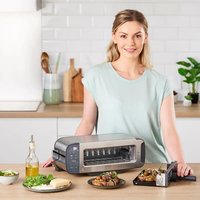
Foodi ST202EU - Toaster NINJA - Free user manual and instructions
Find the device manual for free Foodi ST202EU NINJA in PDF.


| Product Type | 3-in-1 Toaster (toaster, grill, oven) |
| Brand | Ninja |
| Model | Foodi ST202EU |
| Power Supply | 220-240 V~, 50/60 Hz, 2000-2400 W |
| Main Functions | Toast, Bagel, Defrost, Grill, Panini, Bake, Reheat |
| Usage Modes | Vertical (toaster) and horizontal (grill/oven) |
| Browning Settings | 7 levels (1-7) for Toast and Bagel functions |
| Temperature Settings | Low (120°C), Medium (160-175°C), High (205°C) depending on function |
| Timer | 1 to 20 minutes in horizontal mode |
| Capacity | Up to 2 slices of bread in vertical mode |
| Dimensions (approx.) | 35 x 25 x 20 cm |
| Weight (approx.) | 3.0 kg |
| Exterior Material | Stainless steel and plastic |
| Non-stick Coating | PTFE on cooking grid |
| Cord Length | Approximately 90 cm |
| Maintenance | Removable crumb tray, hand wash of baking tray and panini press, wipe exterior |
| Safety | Auto shut-off, lever lock, hot surface warnings |
| Included Accessories | 1 baking tray, 1 panini press, 1 crumb tray |
| Warranty | 2 years (Ninja commercial warranty and legal warranty) |
| Country of Origin | China (estimated) |
Frequently Asked Questions - Foodi ST202EU NINJA
User questions about Foodi ST202EU NINJA
0 question about this device. Answer the ones you know or ask your own.
Ask a new question about this device
Download the instructions for your Toaster in PDF format for free! Find your manual Foodi ST202EU - NINJA and take your electronic device back in hand. On this page are published all the documents necessary for the use of your device. Foodi ST202EU by NINJA.
USER MANUAL Foodi ST202EU NINJA
Bake (Bagning) 11
Reheat (Gencpyarm) 11
Rengering 12
Daglig renrging 12
Fejmeddeleser og ofte stille sporgsmal 13
Produktregistrering 14
VIGTIGE SIKKERHEDSFORANSTALT-NINGER
KUN TIL ANVENDELSE I PRIVATE HJEM · LAES ALLE ANVISNINGER INDEN BRUG
for purchasing the Ninja Foodi 3-in-1 Toaster, Grill and Panini Press

REGISTER YOUR PURCHASE

ninjakitchen.eu/registryguarantee/

Jan QR code using mobile device
THIS BOOK COVERS MODEL
NUMBERS ST200EU/ST202EU
RECORD THIS INFORMATION
Model Number:
Serial Number:
Date of Purchase:
(Keep receipt)
Store of Purchase:
TECHNICAL SPECIFICATIONS
Voltage: 220-240V, 50-60Hz
Watts: 2000-2400W
PLEASE READ CAREFULLY AND
KEEP FOR FUTURE REFERENCE.
TIP: You can find the model and serial numbers on the QR code label located on the base of the unit.

This marking indicates this product should not be disposed of with other household waste. To prevent possible harm to the environment or human
disposal, recycle it responsibly to promote the sustainable reuse of material sources. To return your used device, please use the return and collection systems or contact the retailer where this product was purchased. They can take this product for environmentally safe recycling.
CONTENTS
Important Safeguards. 34
Parts 36
Before First Use 37
Flipping to the Grill Position 37
Using the Control Panel 38
Functions 39
Control Panel Display & Operating Buttons 39
Using the Toaster Modes (Vertical) 40
40
Begel 41
As For Choosing Your Shade Selection. 41
Using the Grill Modes (Horizontal) 42
Grill 12
Panini 42
Bake 13
Reheat 43
Cleaning 44
Everyday Cleaning 44
Error Messages & FAQ. 45
Product Registration 46
IMPORTANT SAFEGUARDS
HOUSEHOLD USE ONLY·READ ALL INSTRUCTIONS BEFORE USE
When using electrical appliances, basic safety precautions should always be followed, including the following:
AWARNING
1 Read all instructions prior to use.
2 Remove and discard all packaging materials and labeling before use.
This appliance can be used by persons with reduced physical, sensory or mental capabilities or lack of experience and knowledge if they have been given supervision or instruction concerning use of the appliance in a safe way and understand the hazards involved.
4 Take inventory of all contents to ensure you have all parts needed to properly and safely operate.
5 DO NOT run the unit without, the crumb tray installed.
6DONOT run the unit in grill position without the grill tray fully inserted. DO NOT override the grill tray detect switch
7 Keep the appliance and its cord out of reach of children. Do not allow the appliance to be used by children. Close supervision is necessary when used near children.
BDonot use an extension cord. A short power-supply cord is used to reduce the risk of children grabbing the cord or becoming entangled and to reduce the risk of people tripping over a longer cord.
9 DO NOT let cord hang over edges of tables or counters or touch hot surfaces, including stoves and other heating ovens.
1ONEVER use electrical socket below counter.
11 NEVER leave the toaster unattended while in use.
12 DO NOT cover crumb tray or grill tray or any part of the unit with metal foil or beking parchment. This may cause the unit to overheat or cause a fire.
13 To protect against electrical shock DO NOT immerse cord, plugs, or main unit housing in water or other liquids.
14 DO NOT use the unit with damage to the power cord or plug. Regularly inspect the unit and power cord. If the oven malfunctions or has been damaged in any way, immediately stop use and call Customer Service.
15 Prevent food contact with heating elements. Excessive or oversized food loads, metal foil packages, or utensils must NOT be inserted as they may cause risk of fire or electric shock.
16 Extreme caution must be used when the toaster contains hot food. Improper use may result in personal injury.
17 ALWAYS use the lightest toast setting when heating toaster pastries.
18 DO NOT cover the air intake vents or air electrical socket vents while unit is operating. Doing so will prevent even cooking and may damage the unit or cause it to overheat.
19 DO NOT insert anything in the ventilation slots and do not obstruct them.
20 DONOT use accessory and attachments not recommended or sold by SharkNinja.
21 DO NOT place items on top of the unit, including food, while unit is operating except for authorised recommended Ninja accessories.
22 Before placing any accessories into the toaster ensure they are clean and dry.
23 Intended for countertop use only. DO NOT place the oven near the edge of a countertop. Ensure the surface is level, clean and dry.
24 This oven is for household use only. DO NOT use this unit for anything other than its intended use. Misuse may cause injury.
25 DO NOT use outdoors. DO NOT use in moving vehicles or boats.
26DONOT operate in enclosed space or under cabinets.
27 Provide adequate space above (minimum 10"254mm) and on all sides (minimum 4"102mm) for air circulation.
28 DO NOT place anything on the toaster during operation. A fire may occur if the unit is covered or touching flammable material, including curtains, draperies, walls, or the like when in operation.
29 DO NOT spray any type of aerosol spray or flavouring inside the unit white cooking.
30 Use caution when inserting and removing anything from the unit, especially when not.
31 Electrical socket voltages can vary, affecting the performance of your product. To prevent possible illness, use a thermometer to check that your food is cooked to the temperatures recommended.
32 DO NOT insert metal utensils such as a knife into the unit to remove jammed toast, bagels or any other items. This can damage the heating elements or cause electric shock.
33 Unplug the unit before cleaning any food that becomes stuck or is spilled into cavity.
34 DO NOT place any of the following materials in the unit: paper, cardboard, plastic, roasting bags and the like. They may cause fire.
35 Extreme caution should be exercised when using containers constructed of any materials other than metal or glass.
36DONOT touch hot surfaces. The unit's surfaces are hot curing and after operation. To prevent burns or personal injury, ALWAYS use protective hot pads or insulated oven gloves and use available handics and knobs.
37 Please refer to the Cleaning & Maintenance section for regular maintenance of the unit.
38. Cleaning and user maintenance must not be done by children.
39 Press the power button to turn unit off and allow to cool completely before cleaning, moving and flipping for storage.
40 Unolug from electrical socket when not in use. To unolug, grasp the plug by the body and pull from the electrical socket. Never unplug by grasping and pulling the flexible cord.
41 DONOT clean with metal scouring pads. Pieces can break off the pad and touch electrical parts, causing a risk of electrical shock.
42 DO NOT store any materials, other than supplied accessories, in this unit when not in use.
43 DO NOT use the unit as a source of heat or for drying.
44 NEVER connect this appliance to an external timer switch or separate remote-control system.
Indicates to read and review instructions to understand operation and use of product.
Indicates the presence of a hazard that can cause personal injury, death or substantial property damage if the warning included with this symbol is ignored.
Take care to avoid contact with hot surface. Always use hand protection to avoid burns.
For indoor and household use only.
SAVE THESE INSTRUCTIONS
PARTS
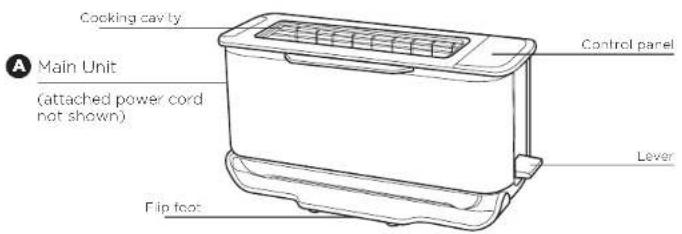
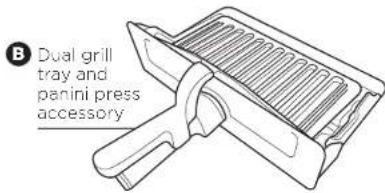
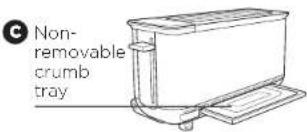
Converting the Panini Press into a Grill tray
1 Lift up top handle to separate the plates.
2 Push the PRESS tab on the left panini arm inward, sliding it off the grill tray pin.
3 Slide the right panini press arm off the grill tray pin.
4 Use as a grill tray for Grill, Bake and Remeat functions.
5 Re-attach loop plate for Panini function.
NOTE: To re-attach the panini press, align right panini arm hole with right grill tray pin. Push the PRFSS tab and align the panini hole with the bake pin to slot in place.
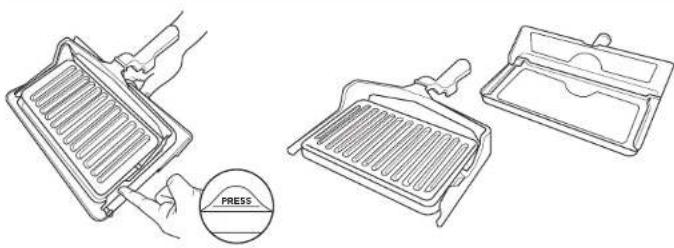
To order additional parts and accessories, visit ninjakitchen.eu.
BEFORE FIRST USE
1 Remove and discard any packaging material and tape from the unit. Some stickers are to be permanently kept on the unit, ONLY remove stickers with 'peel here'.
2 Remove all accessories from the package and read this manual carefully. Please pay particular attention to operational instructions, warnings, and important safeguards to avoid any injury or property damage.
3 Separate the panini press from the grill tray following the instructions listed in the Converting the Panini Press Into a Grill tray section. Then wash the panini press and grill tray in warm, soapy water. Rinse and dry thoroughly. NEVER submerge the main unit in water.
4 We recommend placing the grill tray inside the toaster and running it on GRILL IIICII for 10 minutes without adding food. Refer to section below FLIPPING TO GRILL POSITION for how to use the toaster on GRILL mode. Make sure the area is well ventilated. This removes any packaging residue and odour traces that may be present. This is completely safe and not detrimental to the performance of the toaster.
NOTE: For longest life, we recommend hand-washing the accessories. For best results, remove the panini press from the grill tray and wash separately.
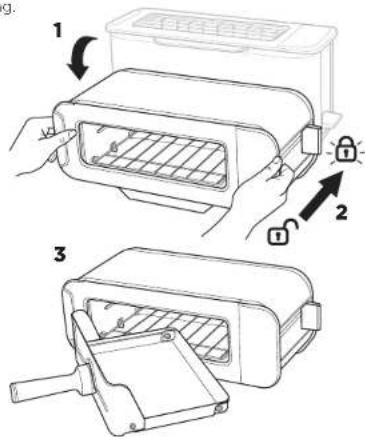
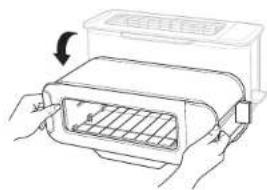
FLIPPING TO THE GRILL POSITION
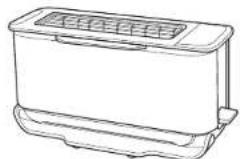
1 Flip the unit down,
2 Push the toast lever back to open the cooking cavity. Lock icon: Lever must be pushed all the way back to lock position. The lock icon will illuminate if the lever is locked and flash if not locked.
Insert the grill tray to begin grilling.
"LOC"
Appears on the display when the unit is in the horizontal mode but the lever has not been pushed back and locked into place. There will be an audible click when lever is locked and LOC will disappear
"NO PAN"
Appears on the display if the grill tray is not inserted and START/STOP has been pressed to start cooking. Insert pan correctly to begin cooking.
The unit will auto shut off if the grill tray has been removed for 5 minutes.
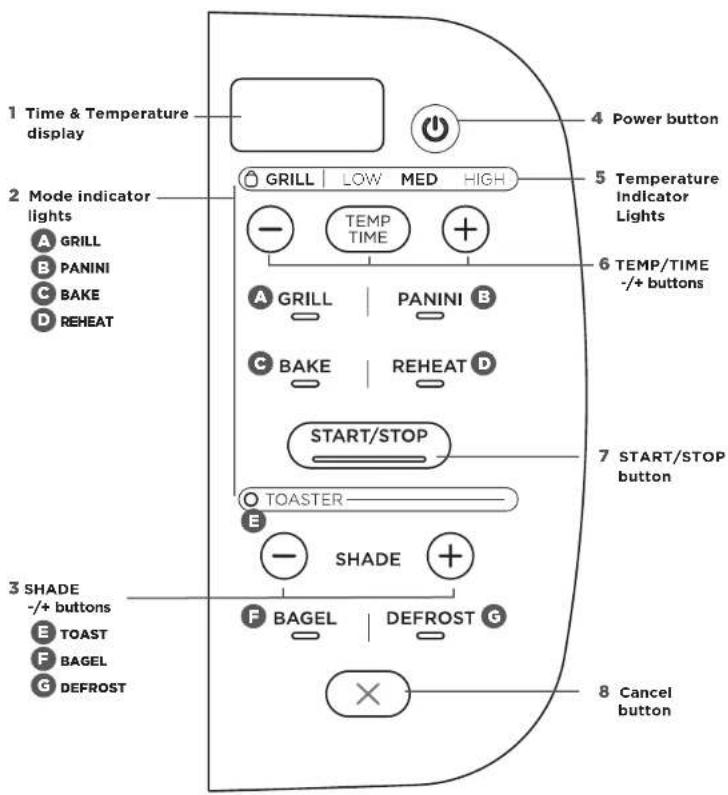
USING THE CONTROL PANEL
When the unit is flipped from coaster position to grill position the control panel will change to show all functions and the buttons you are able to select in that mode.
HORIZONTAL FUNCTION
A GRILL: Ideal for melted cheese on toast, toasted sandwiches or for crisping foods.
PANINI: Make cafe style pressed parfini and toasted sandwiches.
BAKE: Everly bakes breakfast; pastries and even small quiches.
REHEAT: Quickly reheat cooked foods like a slice of pizza.
VERTICAL FUNCTIONS
TOAST: Everly toasts up to 2 slices of bread to your perfect level of darkness.
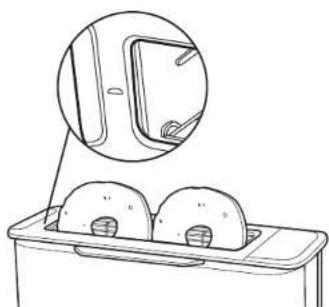
F BAGEL: Perfectly toast up to 2 slices of bagel haves when they're placed cut-side forward in the toaster. The icon on your unit will show instructed direction.
DEFROST: Press for added time when loasting bread and begels from frozen.
TTmedisplay:Shows the cook time and will count down when cooking is in progress.
NOTE: Cook time and temperature will revert to the same settings from the last time the oven was in use.
2 Mode Indicator lights: Signify horizontal or vertical orientation. Flip unit down and press down lever to engage horizontal functions.
3 SHADE/-+ buttons: Adjust the loast shape for TOAST and BAGI functions.
4 Power button: Press to turn unit on or off.
5 Temperature Indicator Lights: LOW/ MED/HIGH for temperature control in GRILL, PANINI, BAKE and REHEAT functions.
6 TEMP/TIME 一 + buttons: Press TEMPT/ TIME to toggle between selections, then use - / + buttons to adjust.
| LOW MED HIGH | |||
| Grill 120°C | 160°C | 205°C | |
| Panini 120°C | 160°C | 205°C | |
| Bake | 120°C | 175°C | 205°C |
| Reheat | 150°C | 160°C | 175°C |
approximate temperature queries
NOTE: The cook time and temperature can be adjusted at any time during the cooking cycle.
7 START/STOP button: Press to start or stop cooking. Cooking will begin shortly thereafter.
8CancelButton:Press to cancel and eject your food load when in toaster mode.
USING THE TOASTER MODES (VERTICAL)
To turn on the unit, plug the power card into a well socket and press the button.
Toast
1 Flip the unit up to the Toaster position and make sure the lever is pulled up. Check the flip foot is at the bottom of the unit.
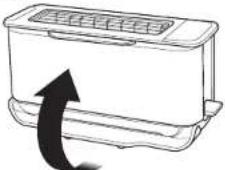
2 Use the +/- SHADE buttons to select the desired shade level from 1-7.
NOTE: There is no temperature or time adjustment available for the TOAST function. These are automated within the shade selection.
Place your sliced bread into the toaster slot. Push the lever down to start the toasting cycle.
NOTE: Check on progress during cooking by lifting lever to raise toast. The cooking cycle will continue so push lever back down once done.
NOTE: Select CANCEL during a cooking cycle. This will pop the toast up.
4 When toasting is finished, the unit will beep and the lever and the toast will pop up.
NOTE: The unit uses an algorithm to ensure consistent shade results whetherasting from a color or pre-warmed unit. As a result, the total toest time may change - to add more or less time adjust the shade setting on the dial.
Bagel
1 Flip the unit up to the Toaster position and make sure the lever is pulled up.
2 Select the BACCL button. The button will illuminate.
3 Select your desired shade level by rotating the shade dial.
NOTE: There is no temperature or time adjustment available for the BAGEL function. Those are automated within the shade selection.
Place bagel halves, cut-side facing you in the toaster. There is a small icon on the unit to indicate. Push the lever down to startasting.
NOTE: Check on progress during cooking by lifting lever to raise toast. The cooking cycle will continue so push lever back down once done.
NOTE: Select CANCEL during a cooking cycle. This will pop the bagel up.
5 When toasting is finished, the unit will be and the lever and the bagel will oo up.
NOTE: The unit uses an algorithm to ensure consistent shade results whether toasting from a cold or pre-warmed unit. As a result, the total toast time may change - to add more or less time adjust the shade setting on the dial.
Defrost
1 Defrost can ONLY be used with either the TOAST or BAGEL function.
2 Select the DFFROST button to add extra time for defrosting your food beforeasting.
| Shade | Pre-Set Toasting Times | Additional Time when DEFROST is selected | Pre-Set Defrost Times |
| 1 | 1:43 mins | + 0.20 seconds | 2:03 mins |
| 2 | 2:04 mins | + 0.22 seconds | 2:26 mins |
| 3 | 2:10 mins | + 0.23 seconds | 2:33 mins |
| 4 | 2:22 mins | + 0.24 seconds | 2:46 mins |
| 5 | 2:45 mins | + 0.26 seconds | 3:11 mins |
| 6 | 3:04 mins | + 0.29 seconds | 3:33 mins |
| 7 | 3:30 mins | + 0.31 seconds | 4:01 mins |
NOTE: These are default times on first use when the unit is cold. Times will vary when the unit has heated up.
TIPS FOR CHOOSING YOUR SHADE SELECTION
With multiple slices, place next to each other. Make sure there is no overlap of the slices so they can toast consistently. If bread slices do not fit next to each other, try rotating them sideways for a better fit.
For drier or stale breads, adjust the shade lower than your standard setting.
For freshly baked or whole wheat breads, adjust the shape higher than your standard setting.
Sweet or fruit bread (fruit loaf, tea cakes), toast much quicker, adjust the shade setting lower.
For breads with an uneven surface (like English muffins), adjust the shade higher than your standard setting. Be sure to slice bread evenly for consistent toasting
For thick-cut pieces, adjust the shade higher than your standard setting. Be sure to slice bread evenly for consistent foasting.
Split bagels in half before toasting. Place the cut side facing you.
For frozen waffles, frozen French toast or frozen bages ensure you also press the Defrost button to add extra time.
Be aware that very thin slices may burn. Use the lowest shade selection and monitor while toasting.
| SETTING COLOUR | |
| 1-2 Light | |
| 3-5 Medium | |
| 6-7 Dark | |
USING THE GRILL MODES (HORIZONTAL)
grill
1 From the toaster position, flip the unit down so it is horizontal. Push the lever back until it clicks into place. Select GR.LL.
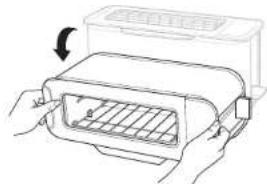
2 Set the time. Press the TEMP/TIME button to see the time display. Then use the +/- buttons to select a time between 1 minute and 10 minutes.
3 Set the temperature. Press the TEMP/ TIME button then use the +/- buttons to select LOW/MED/HIGH.
4. Place ingredients on the grill tray and insert tray into the unit.
5 Press START/STOP to begin the cooking cycle. Cooking will begin when the tray is correctly inserted.
6 During cooking, you can remove the grill tray to check on food. The timer will pause until the grill tray has been rinsed in the unit.
7 When cooking time reaches zero, the unit will beep to signal the cooking cycle is complete.
NOTE: if cooking for less than 10 minutes, the clock will count down by minutes and seconds. If cooking for 10 minutes or more, the clock will count down by minutes only until the times reaches below 10 minutes.
Panini
1 Flip unit down to the horizontal position and push the lever back, Select PANINI.
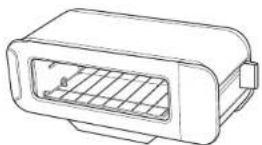
2 Set the time. Press the TEMP/TIME button to see the time display. Then use the +/- buttons to select a time between 1 minute and 20 minutes.
3 Set the temperature. Press the TEMP/ TIME button then use the +/- buttons to select LOW/MED/HIGH.
4 Place ingredients in the panini press and insert into the unit. Cooking will begin when the press is correctly inserted.
5 Press START/STOP to begin the cooking cycle. Cooking will begin when the press is correctly inserted.
6 During cooking, you can remove the canini press to check on food. The timer will pause until the grill tray has been reinserted in the unit.
When cooking time reaches zero, the unit will keep to signal the cooking cycle is complete.
Bake
1 Flip unit down to the horizontal position and push the lever back. Select BAKE.
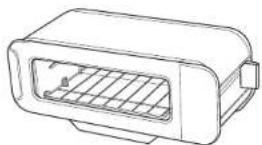
2 Set the time. Press the TEMP/TIME button to see the time display. Then use the +/- buttons to select a time between 1 minute and 20 minutes.
3 Set the temperature. Press the TEMP/ TIME button then use the +/- buttons to select LOW/MED/HIGH.
4 Place ingredients on the grill tray and insert tray into the unit.
5 Press START/STOP to begin the cooking cycle. Cooking will begin when the tray is correctly inserted.
6 During cooking, you can remove the grill tray to check on food. The timer will pause until the grill tray has been reinserted in the unit.
7 When cooking time reaches zero, the unit will beep to signal the cooking cycle is complete.
Reheat
1 Flip unit down to the horizontal position and push the lever back. Select REHEAT.
2 Set the time. Press the TEMP/TIME button to see the time display. Then use the +/- buttons to select a time between 1 minute and 20 minutes.
3 Set the temperature. Press the TEMP/ TIME button then use the +/- buttons to select LOW/MED/HIGH.
4 Place ingredients on the grill tray and insert tray into the unit.
5 Press START/STOP to begin the cooking cycle. Cooking will begin when the tray is correctly inserted.
During cooking, you can remove the panini press to check on food. The timer will pause until the grill tray has been reinserted in the unit.
NOTE: For all functions heating elements will cycle on and off during a given cook to maintain the set temperature precisely.
7 When cooking time reaches zero, the unit will beep to signal the cooking cycle is complete.
ERROR MESSAGES & FAQMAINTENANCE
ERROR MESSAGES
"CALL CUST 5RVC" followed by "Er1," "Er2," "Er3," "Er4," "Er5," "Er6" or "Er7". Power off the unit. You can find online support at ninjakitchen.eu. So we may better assist you, please register your product online at ninjakitchen.eu/registrationarantee and have the product on hand when you call.
FAQ
Why won't the unit turn on?
- Make sure the power cord is securely plugged into the electrical socket.
- Try plugging the cord into a different electrical socket.
Press the Power button.
If the issue persists after following the steps above, contact customer service.
Why aren't the Grill functions illuminated when the unit is in the horizontal position?
- Make sure the toast lever is pushed all the way back to open the cooking cavity. You will hear a click when the lever is fully pushed back.
Make sure the flip foot is on the bottom of the unit.
Can I look at my food while the unit is cooking?
- Yes, in horizontal mode you can remove the grill tray at any time to check on your food. The cook time will pause until you reinsert the tray.
- In the vertical position, you can lift the toast lever at any point to check on progress without canceling toasting.
Why do the heating elements appear to be turning on and off?
- This is normal. The toaster is designed to control temperature precisely for every function by automatically adjusting the power levels of the heating elements.
Why Is It only toasting on one slide?
- Bagel function likely to be selected. If wanting to use the toast function forasting both sides evenly, ensure the BAGEL button is NOT Illuminated, if it is, the side facing forwards will be more toasted than the reverse. To deselect Bagel, press the Bagel button once so it is not Illuminated.
What coating is used on the grill tray?
- The tray has a PTFE non-stick coating. We advise to hand-wash and to avoid using metal utensils to maintain the non-stick coating.
Can I use baking paper or aluminum foil?
We would advise against this due to the proximity of the tray to the heating elements.
PRODUCT REGISTRATION
TWO (2) YEAR LIMITED GUARANTEE
When you buy a product in Europe as a consumer, you get the benefit of legal rights relating to the quality of the product (your "statutory rights"). You can enforce these statutory rights against your retailer. However, at Ninja we are so confident about the quality of our products (the "Products") that we give you a manufacturer's guarantee of two years. This guarantee only applies to the Product if it is bought in new and unused condition. These terms and conditions relate to our guarantees only - your statutory rights as a buyer are unaffected. Please note that the 2 year guarantee is available in all EU countries.
The conditions below describe the prerequisites and scope of our guarantees which are issued by SharkNinja Germany GmbH, c/o Regus Management GmbH, Excellent Business Center 10. +1/ Stock, Westfalenplatz 1, 60327 Frankfurt am Main (Germany) ("us", "our" or "we"). They do not affect your statutory rights or the obligations of your retailer and your contract with them. The same applies if you have purchased the product directly from Ninja.
Ninja Guarantees
A household kitchen appliance constitutes a sizeable investment. Your new machine needs to work properly for as long as possible. The guarantee it comes with is an important consideration - and reflects how much confidence the manufacturer has in its product and manufacturing quality.
You'll find online support at www.ninjakitchen.eu.
How do I register my guarantee?
You can register your guarantee online within 28 days of purchase. To save time, you'll need the following information about your machine:
Model no.
Serial Number (only if available)
- Date of purchase of the Product (receipt or delivery note)
To register online, please visit www.ninjakitchen.eu
IMPORTANT
The guarantee covers your Product for 2 years starting on the date of purchase.
- Please keep the receipt at all times. Should you need to use your guarantee we will need the receipt to verify the information supplied to us is correct. The inability to produce a valid receipt will invalidate your guarantee.
What are the benefits of registering my guarantee?
When you register your guarantee, you can choose to receive our newsletter containing tips, advice and competitions. Hear the latest news about new Ninja technology and launches. If you register your guarantee online, you'll get instant confirmation that we've received your details.
For details of our privacy policy please visit www.ninjaikchen.eu
How long are our Products guaranteed for?
Our confidence in our design and quality control means that your Product is guaranteed for two years.
PRODUCT REGISTRATION
What Is covered by the guarantee?
Repair or replacement (st Ninja's discretion) of your Product, including all parts and labour in case of any defect in design, materials and workmanship (including transport and shipping costs). Our guarantee is in addition to your legal rights as a consumer.
What is not covered by the guarantee?
Normal wear and tear.
- Accidental damage, faults caused by negligent use or care, misuse, neglect, careless operation or handling of the kitchen appliance which is not in accordance with the Ninja Instruction Manual supplied with your machine.
- Use of the kitchen appliance for anything other than normal domestic household purposes.
- Use of parts not assembled or installed in accordance with the operating instructions.
Use of parts and accessories which are not Ninja Genuine Components.
- Faulty installation (except where installed by Ninja).
- Repairs or alterations carried out by parties other than Ninja or its agents, unless you can show that the repairs or alterations carried out by others are not related to the defect for which you exercise the guarantee.
What happens when my guarantee runs out?
Ninja does not design products to last for a limited time. We do appreciate that there may be a desire for our customers to want to repair their kitchen appliance after the guarantee has expired. You'll find more support at ninjakitchen.cn.
Where can I buy genuine Ninja spares and accessories?
Ninja spares and accessories are developed by the same engineers who developed your Ninja kitchen appliance. You'll find a full range of Ninja spires, replacement parts and accessories for all Ninja machines at www.mijnakitchen.eu
Please remember that using non-Ninja spares may invalidate your manufacturer's guarantee. However, your statutory rights are unaffected.
GRACIAS
Defrost (Decongele) 75
Cerie grrnme cie puii sncr ie prucu d rui o consmater de e cier cie a granelege de conform t, ence les conditions nroves au cheile VII sa lice for the hne 1d code de ce consmation, or of the law of the State of the State, and the law of the State of the State.
Steen had no sooner in anstopo contact on her appearance in te schakelein en druk oo deKnop.
Toast
Reheat (Oppvarming) 123
Rengjoring 124
Daglig renjoring 124
TIPS FOR A VELGE NYANSE
Nar ou har flore sklor, glasser dom vod sidon av hvorandre. Pass pe at dit likke er roen overlapping av skrven slik et de kan risste jevn. Hvis bredsklor likke passer ved sidon av hvorandre, kan du prune a rotere dom sidelengs for a fa en budre pasfostr.
For torrera eiffer foreidicle brao, juster nyansen lavere en standarddinstillingen.
For nybakte bred oler fullkernsored, juster nyansen hoyere onn standard nristilngen.
Soll bred eler fruktbrd (fruklioff bokkar) ristcs mye raskere, sa juster nyanseninstillingen lavere
For bred med ujev overflote (som engolske muffins), juster nyansen heyer en standardinnstillingen, Serg for a skiere bred, eVTL for konsekvent rising
- For Lytkskarne skiver, Juster nyar huyere enn standardinnitlingen. Song for skaere bredec jevnt for konsekvent risting.
- Del bagos i for duristor. Logg don kuttete siden motieg.
Frofrosne valler, frossne arme riddere erlerfrosne bagels ma du trykkpe Defrost-knappen for a legge t ekstra tio.
Vaeopmksompalvldgynthe skiver kan bI bren. Bruk del lavesto nyansen og folg medms durister.
| INNSTILLING FARGE | |
| 1-2 Lys | |
| 3-5 Medium | |
| 6-7 Mørk | |
BRUKE GRILLMODUSER (SIDELIGGENDE)
Grill
1 Frá brádristerposión, vendenhétensilk at den er horssonal. Press spakentilake tlen klikner pa piass. Velg GRILL
2 Still inn tiden. Trykk sa TEMP/ TID-knappen for a se tiövsinngen Bruk derotter knappene +/- for a velge en tic melom 1 minut og 20 minuutter.
3 Still inn temperatures. Trykx pa TEMP/ TID-knappen og bruk derelter knappene +/- for avelge LOW/MED/HIGH.
4 Passer ingredisone pstekebretto og sett brett inn hhenen.
Trykpa START/STOP for a begyme 5tllberedingen. Tilberedingen vill starte narrbretor sattnnttikg.
6 Under tiberginden kan du fjerna stekebrett for e skegke maten.Timeren vil stoope miclidertig ul stekebretter. er satt inn gien ieherten.
7 Nár stekeienden nár null, vil enheten pipe for a signaisere at Liberedhingsyklusen er fullert.
REHEAT (Oppvarminging)
STYRING AV STRØMLEDNING
Ledningsystemet vart er designet sik at达标forstyrerbrdistereres filfunksonjalet.
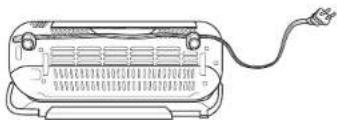
Alternativ 1:Stikkontakt til hayre. Plasser edingnen i vestre krok pa baksiden av bradisteren.Vi ledeningen sik at den brede silder er horisont for a feste den sikkitk 1 kroken.
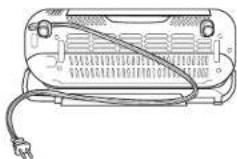
Alternativy 2: Stikkontakt til venstre erller pa baskiden av bredristeren. Passer ledingen i begge krokene pa baskiden av braocristeren. Vri ledingen silk at den brede sien cr horisontal for a feste den sikket i krokene.
FEILMELDINGER OG VANLIGE SPÖRSMÄL
FEILMELDINGER
CALL CUS: SrVc) otterfulg t av Eri, Er2, Er3a, Er4r, Er5r, Er6r oller Er7r) SlA av ehenten. Du finner online sata ninaikticheneu. For at vki kal kurne asister deg bedre, register producer ditt online p ninjaklenen.eu/registrationguaranteeo go h produkt et for hancn n der du ringer.
Vanlige sporsmal
Reheat (reaquecer). 139
Limpeza 140
Limpeza diaria 140
PYSTYASENNOSSA TOIMINNOT
© 2022 SharkNinja Operating LLC. GEDRUCKT IN CHINA
FRANÇAIS
© 2022 SharkNinja Operating LLC. IMPRIMÉ EN CHINE
ENGLISH
Illustrations may differ from actual product. We are constantly striving to improve our products, therefore the specifications contained herein are subject to change without notice.
NINJA is a registered trademark in the European Union of SharkNinja Operating LLC.
© 2022 SharkNinja Operating LLC. PRINTED IN CHINA
DANSK
© 2022 SharkNinja Operating LLC. TRYKT | KINA
ESPANOL
© 2022 SharkNinja Operating LLC. IMPRESO EN CHINA
ITALIANO
© 2022 SharkNinja Operating LLC. STAMPATO IN CINA
SharkNinja Europe Limited, 3150 Century Way,
Thorpe Park,
Leeds,
LS15 8ZB, UK
ninjakitchen.eu
NEDERLANDS
© 2022 SharkNinja Operating LLC. GEDRUKT IN CHINA
NORSK
© 2022 SharkNinja Operating LLC. TRYKKET I KINA
PORTUGUESE
© 2022 SharkNinja Operating LLC. IMPRESSO NA CHINA
SUOMI
© 2022 SharkNinja Operating LLC. PAINETTU KIINASSA
SVENSKA
- VIGTIGE SIKKERHEDSFORANSTALT-NINGER
- REGISTER YOUR PURCHASE
- RECORD THIS INFORMATION
- TECHNICAL SPECIFICATIONS
- PLEASE READ CAREFULLY AND
- CONTENTS
- IMPORTANT SAFEGUARDS
- HOUSEHOLD USE ONLY·READ ALL INSTRUCTIONS BEFORE USE
- AWARNING
- SAVE THESE INSTRUCTIONS
- PARTS
- Converting the Panini Press into a Grill tray
- BEFORE FIRST USE
- FLIPPING TO THE GRILL POSITION
- "LOC"
- "NO PAN"
- USING THE CONTROL PANEL
- HORIZONTAL FUNCTION
- VERTICAL FUNCTIONS
- USING THE TOASTER MODES (VERTICAL)
- Toast
- Bagel
- Defrost
- TIPS FOR CHOOSING YOUR SHADE SELECTION
- USING THE GRILL MODES (HORIZONTAL)
- grill
- Panini
- Bake
- Reheat
- ERROR MESSAGES & FAQMAINTENANCE
- ERROR MESSAGES
- FAQ
- Why won't the unit turn on?
- Why aren't the Grill functions illuminated when the unit is in the horizontal position?
- Can I look at my food while the unit is cooking?
- Why do the heating elements appear to be turning on and off?
- Why Is It only toasting on one slide?
- What coating is used on the grill tray?
- Can I use baking paper or aluminum foil?
- PRODUCT REGISTRATION
- TWO (2) YEAR LIMITED GUARANTEE
- Ninja Guarantees
- How do I register my guarantee?
- IMPORTANT
- What are the benefits of registering my guarantee?
- How long are our Products guaranteed for?
- What Is covered by the guarantee?
- What is not covered by the guarantee?
- What happens when my guarantee runs out?
- Where can I buy genuine Ninja spares and accessories?
- GRACIAS
- TIPS FOR A VELGE NYANSE
- BRUKE GRILLMODUSER (SIDELIGGENDE)
- REHEAT (Oppvarminging)
- STYRING AV STRØMLEDNING
- FEILMELDINGER OG VANLIGE SPÖRSMÄL
- FEILMELDINGER
- Vanlige sporsmal
- PYSTYASENNOSSA TOIMINNOT
- FRANÇAIS
- ENGLISH
- DANSK
- ESPANOL
- ITALIANO
- NEDERLANDS
- NORSK
- PORTUGUESE
- SUOMI
- SVENSKA
Brand : NINJA
Model : Foodi ST202EU
Category : Toaster