
Party Rocker One Plus - Speakers HISENSE - Free user manual and instructions
Find the device manual for free Party Rocker One Plus HISENSE in PDF.
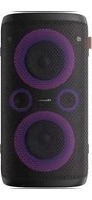


| Product Type | Portable Party Speaker |
| Brand | Hisense |
| Model | Party Rocker One Plus |
| Dimensions (W × H × D) | 295 × 550 × 258 mm |
| Mains Power | AC 100-240 V ~ 50/60 Hz |
| Built-in Battery Power | Li-ion 7.2 V, 7650 mAh |
| Battery Life | Up to 15 hours |
| Battery Charging Time | Approx. 4.5 hours |
| Power Consumption (AC) | 80 W |
| Maximum Audio Power | 300 W |
| Bluetooth Version | 5.0 |
| Bluetooth Range | Up to 8 meters |
| Supported USB Audio Formats | MP3, WMA, WAV (USB 2.0, up to 32 GB) |
| FM Band | 87.5 - 108 MHz |
| Main Functions | Bluetooth playback, AUX input, AUX output, FM radio, USB port, wireless microphones (×2), guitar input, wireless charging, DJ effects, LED lighting, equalizer (ROCK/JAZZ/SAMBA/POP/BALANCE), bass mode, vocal balancer, TWS function |
| Inputs/Outputs | AUX IN (3.5 mm), AUX OUT (3.5 mm), MIC (6.35 mm), GUITAR (6.35 mm), USB (Type A, charge 5V/1A), DC IN (12V/2A), AC input socket |
| Wireless Microphone | 2 microphones included, AA batteries (1.5 V × 2), range ≤ 20 m |
| Water Resistance Rating (top panel) | IPX4 |
| Care and Cleaning | Clean with a soft, dry cloth. Do not use abrasive products. |
| Safety | Read all safety instructions before use. Do not open the device. Use only the supplied mains adapter. |
| Spare Parts and Repairability | Wireless microphones and AA batteries replaceable. For any repairs, contact customer service. |
| Operating Temperature | 0 °C to +45 °C |
Frequently Asked Questions - Party Rocker One Plus HISENSE
User questions about Party Rocker One Plus HISENSE
0 question about this device. Answer the ones you know or ask your own.
Ask a new question about this device
Download the instructions for your Speakers in PDF format for free! Find your manual Party Rocker One Plus - HISENSE and take your electronic device back in hand. On this page are published all the documents necessary for the use of your device. Party Rocker One Plus by HISENSE.
USER MANUAL Party Rocker One Plus HISENSE
Read all the safety instructions carefully before use and keep this instruction manual for future reference.
Features
Thanks for your purchase of our product. Please read through this manual before making connections and operating this product. Retain this manual for future reference.
- Bluetooth playback
- AUX IN
- FM tuner
- USB SLOT
- Microphone function
- Guitar function ● Multiple EQ sound effect mode
*If the Modes is different, the actual situation prevails.
Package Contents
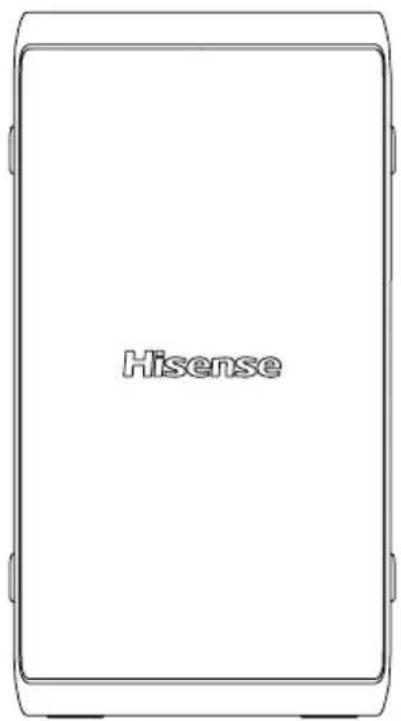
Main Unit
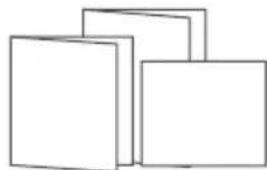
User Manual Quick Start Guide Warranty Card
Wireless Microphone ×2 (Only for Party Rocker One Plus)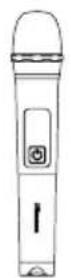
* AC power cord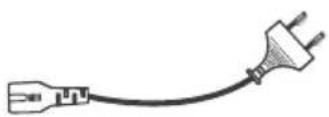
AA battery (1.5V) × 4 (Only for Party Rocker One Plus)
Product Diagram
Top View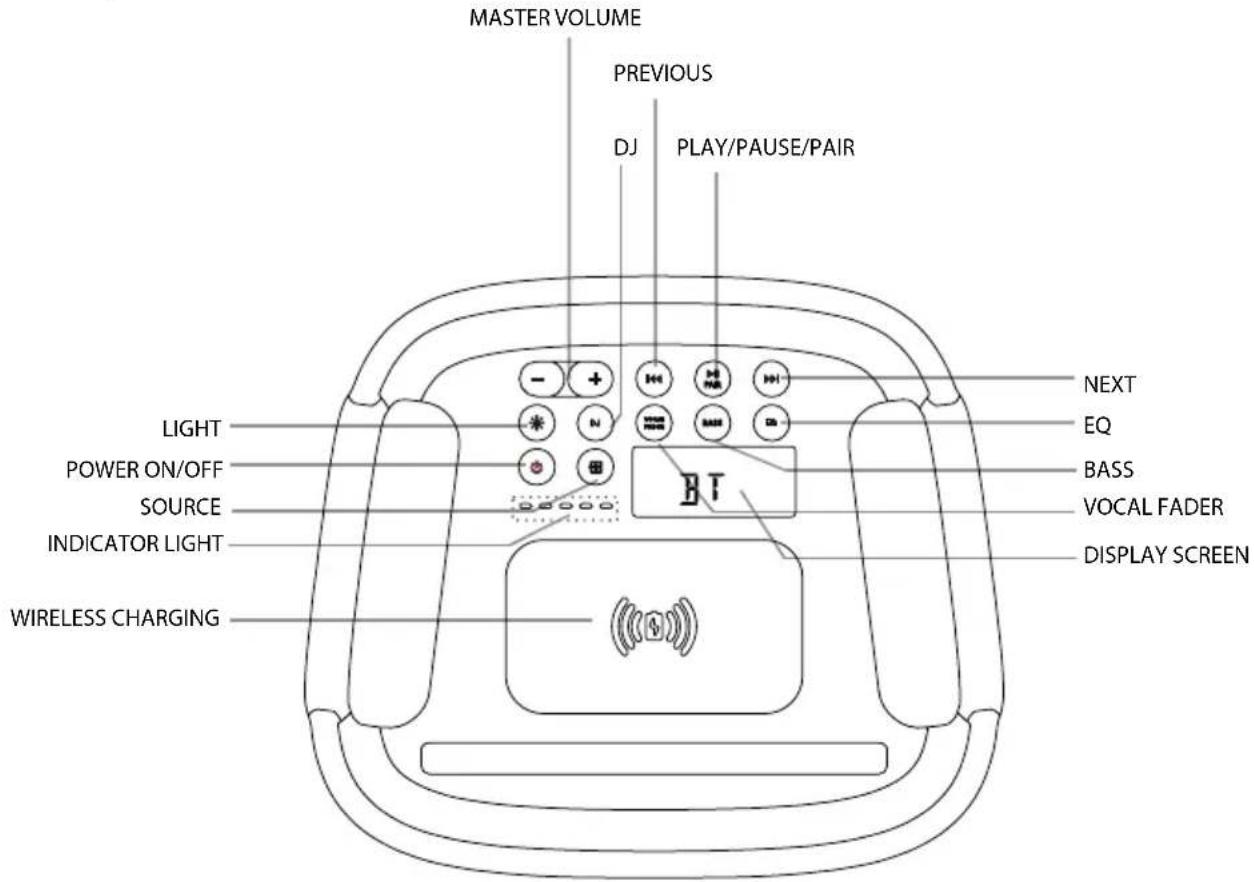
Party Rocker One Port
| LIGHT | Select the different lighting mode of LED Indicator |
| POWER ON/OFF | Power on/off |
| SOURCE | Select a play function |
| INDICATOR LIGHT Built-in battery charging Indicator | |
| WIRELESS CHARGING Wireless charging | |
| MASTER VOLUME | Increase/Decrease the volume level |
| DJ DJ effect | |
| PREVIOUS |◀◀ | Press to the previous track |
| PLAY/PAUSE/PAIR | Play/Pause/Pair playback |
| NEXT ▶▶I | Press to the next track |
| EQ Equalizer manual mode | |
| BASS ON/OFF the BASS mode | |
| VOCAL FADER Switch between vocal | fader on and vocal fader off |
| DISPLAY SCREEN Display screen | |
Product Diagram
Rear View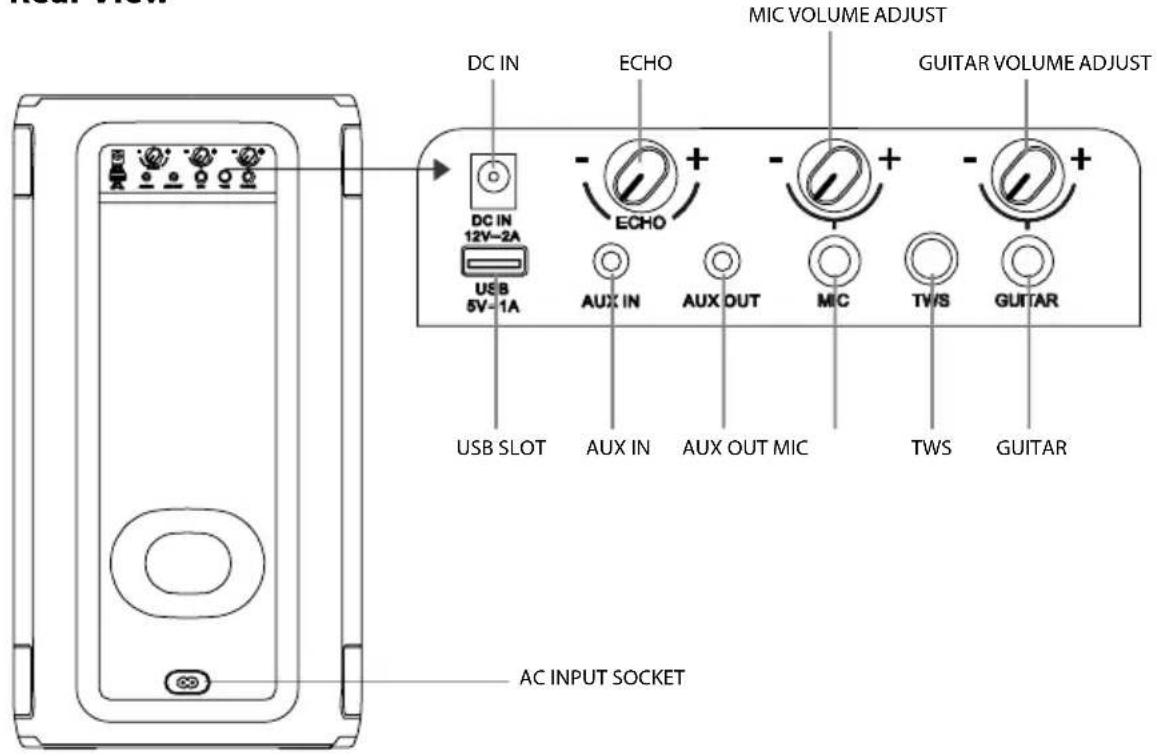
Party Rocker One Port
| DC IN DC input socket (Only available for vehicle DC power adapter) | |
| ECHO Increase/decrease the mic echo volume level | |
| MIC VOLUME ADJUST Increase/decrease the mic volume level | |
| GUITAR VOLUME ADJUST Increase/decrease the guitar volume level | |
| USB SLOT USB slot | |
| AUX IN AUX input socket | |
| AUX OUT AUX output socket | |
| MIC MIC socket | |
| TWS Press to enter TWS pairing mode | |
| GUITAR Guitar socket | |
| AC INPUT SOCKET AC power socket | |
Connections
Connect Power
Rear panel of the main unit
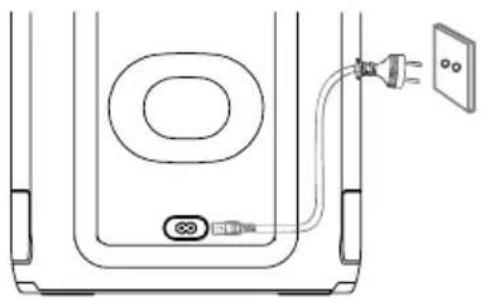
Risk of product damage!
Ensure that the power supply voltage corresponds to the voltage printed on the back or the underside of the unit.
Insert the AC power cord into a mains socket.
AUX IN Socket
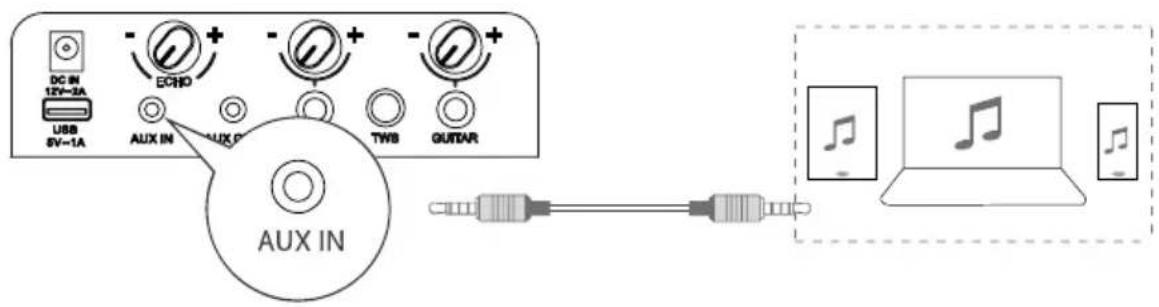
This unit has an audio input terminal. You can input the analogue stereo audio signals from extra devices such as VCD, CD, VCR, MP3 player, etc.
Use the audio cable with a 3.5 mm connector (not supplied) to connect the input terminal AUX IN on the rear panel of the unit, then press the ➞ button to select AUX IN mode.
AUX OUT Socket
Rear View of the Main Unit
Rear View of Another Main Unit (not included)
![graph LR A["USB 6V=1A"] -->|DO IN 12V=2A| B["AUX OUT"] B --> C["AUX OUT"] C --> D["AUX OUT"] D --> E["AUX OUT"] E --> F["AUX OUT"] F --> G["AUX OUT"] G --> H["AUX OUT"] H --> I["AUX OUT"] I --> J["AUX OUT"] J --> K["AUX OUT"] K --> L["AUX OUT"] L --> M["AUX OUT"] M --> N["AUX OUT"] N --> O["AUX OUT"…](/content/2026/04/672139/images/b01ee1258c07f4dbd411e5ec831e4ba6d844f5665c6a0c6f0ba5c33979b80ed5.jpg)
This unit has an AUX OUT jack. You can output the analog stereo audio signals to external devices such as an active speaker.
Connect an audio cable (not supplied) to the AUX OUT jack on the rear panel of the unit and the AUX IN jack of the external device, and the unit will output audio automatically to the external device.
Connections
MIC Socket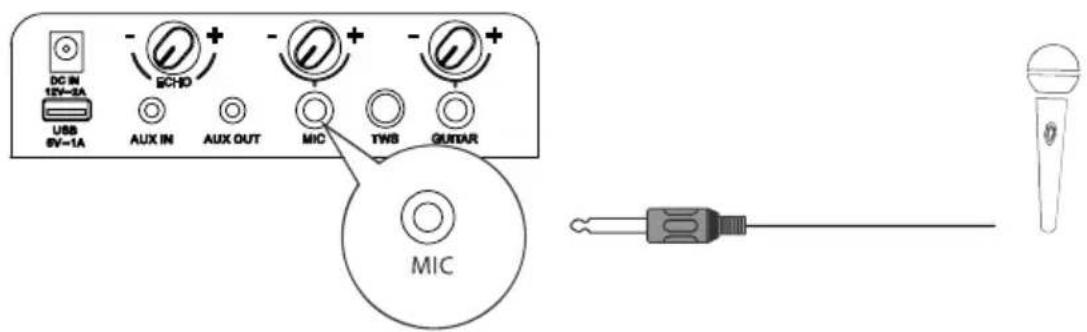
Insert the microphone into the microphone socket on the rear panel and adjust to a low level using the microphone volume knob on the rear panel.
Adjust the microphone volume level to your desired level using the microphone volume knob on the rear panel.
Now, enjoy the karaoke singing!
GUITAR Socket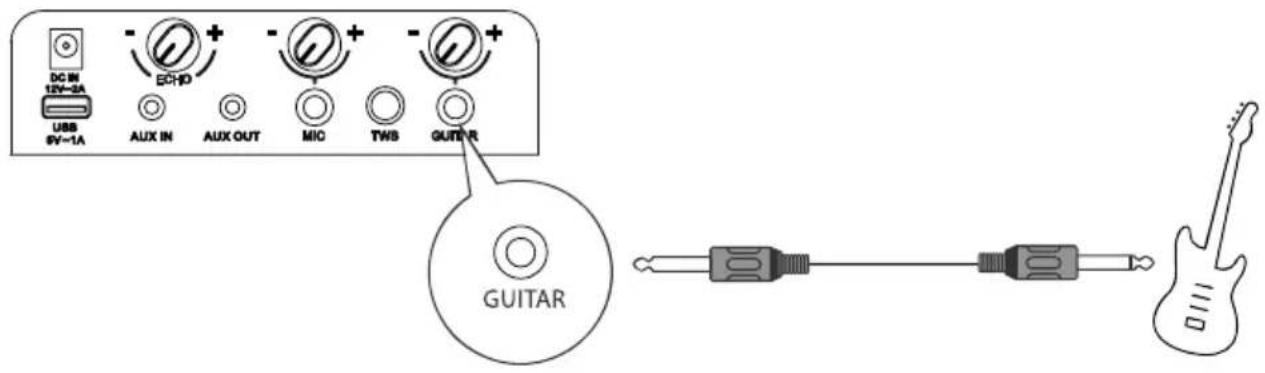
Insert the guitar cable into the guitar socket on the rear panel.
Now, enjoy yourself!
WIRELESS MICROPHONE CONNECTION (Only for Party Rocker One Plus)
Connecting Microphone
To connect the supplied wireless microphone By default, the wireless microphone comes pre-paired with the speaker at the factory.
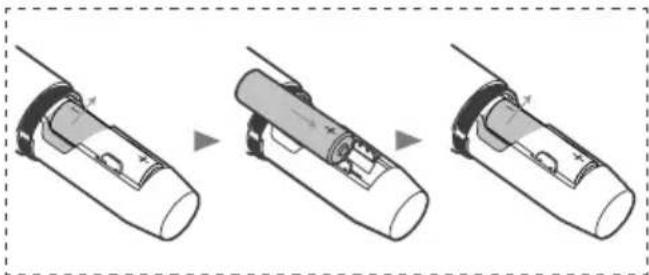
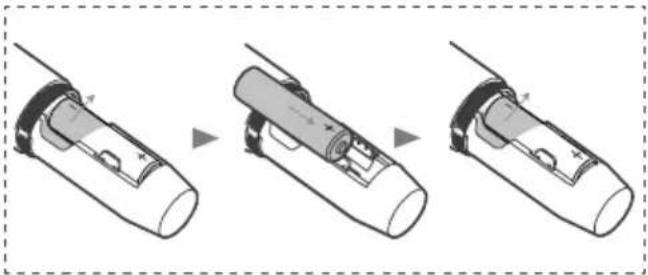
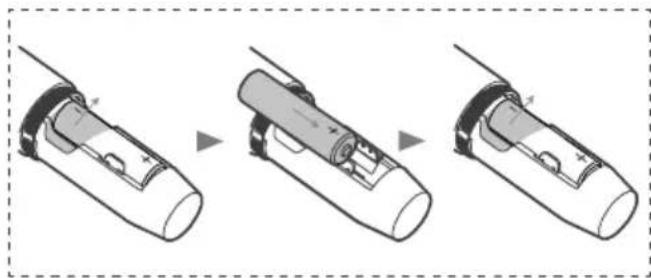
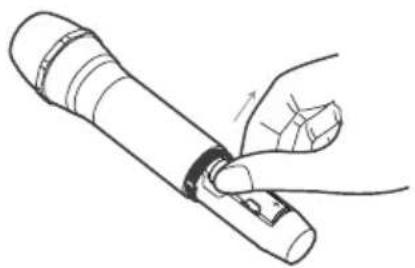
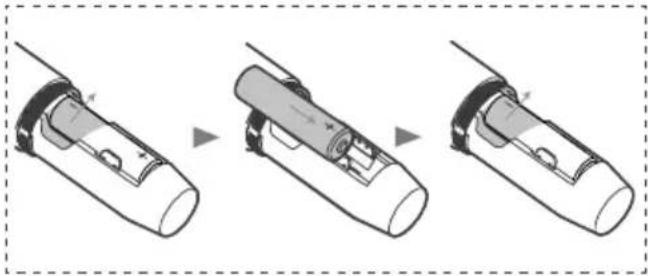
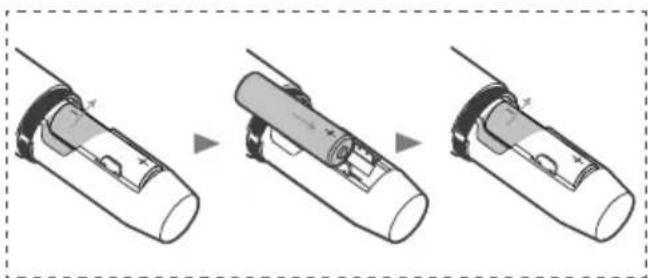
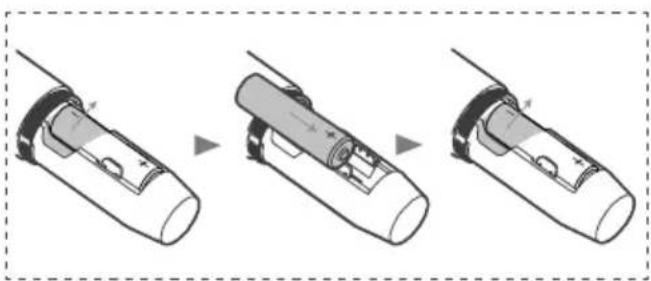
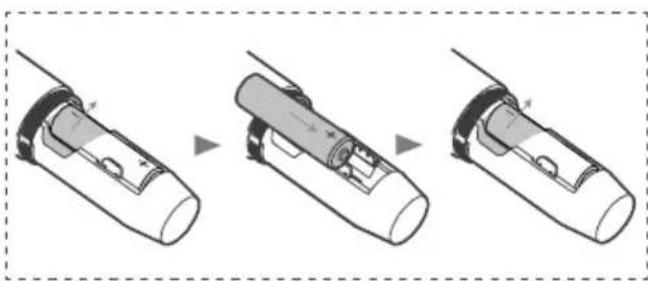
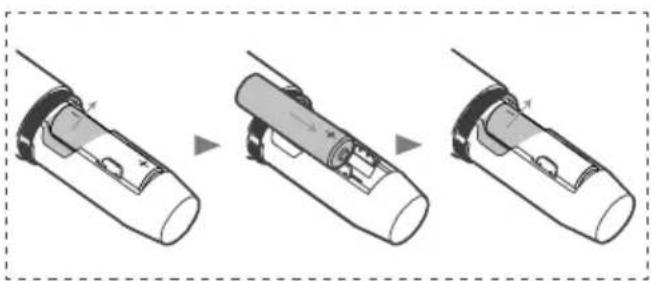
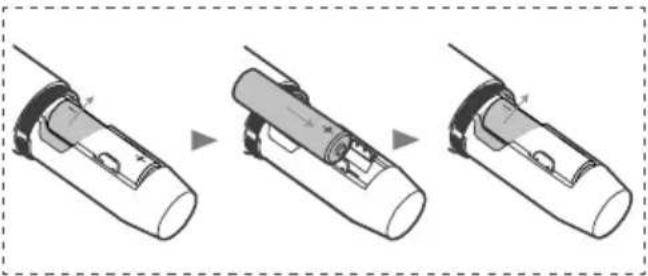
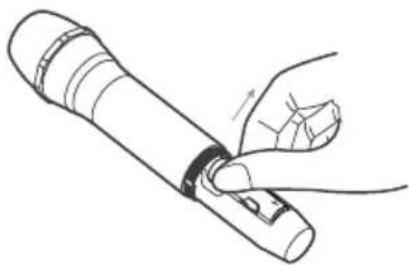
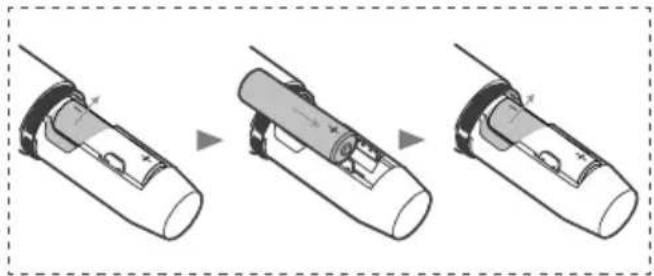
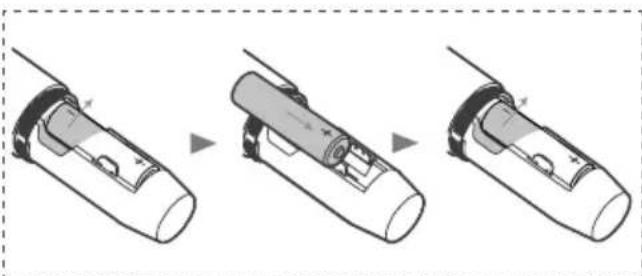
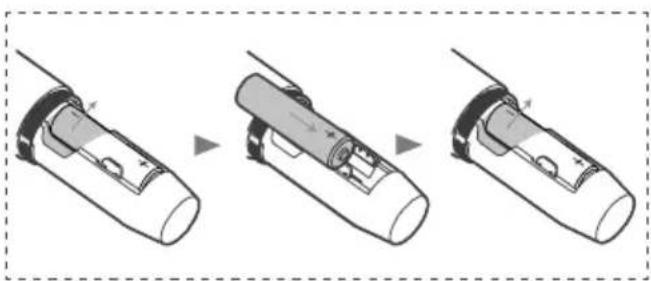
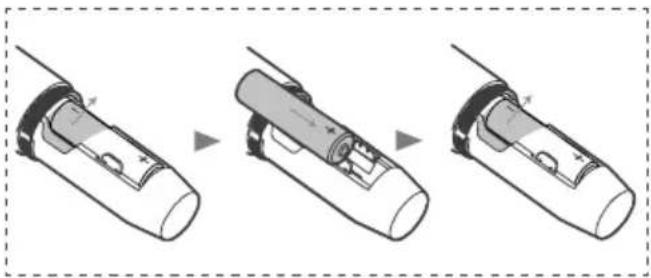
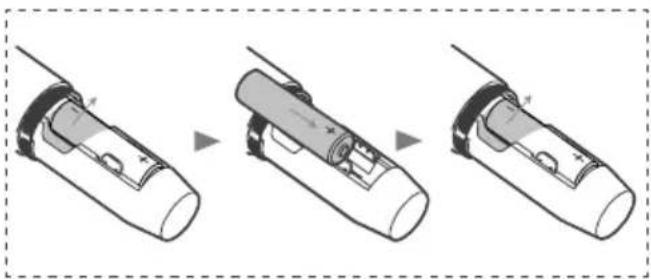
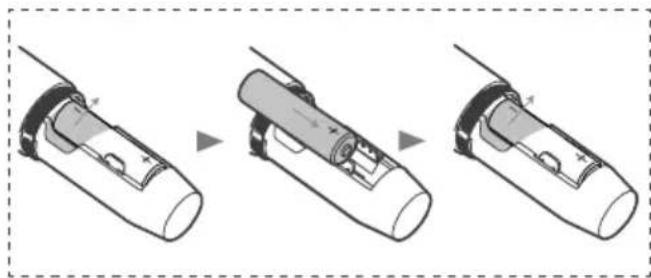
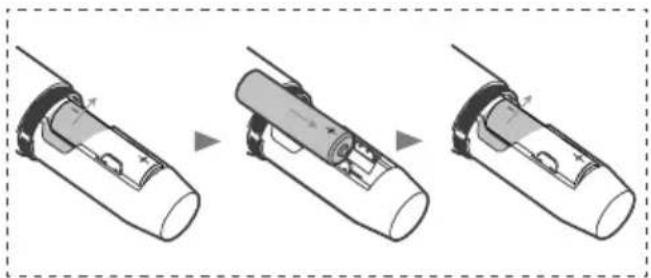
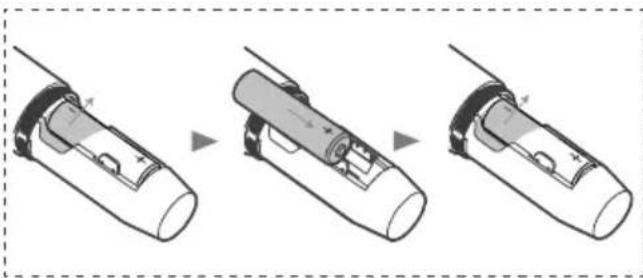
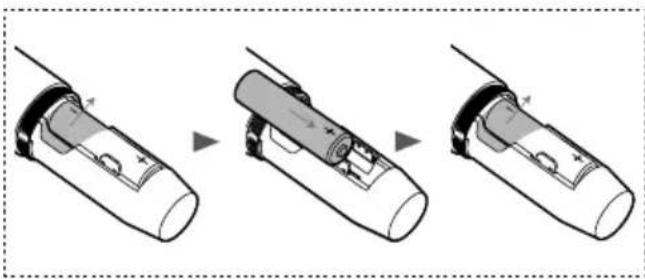
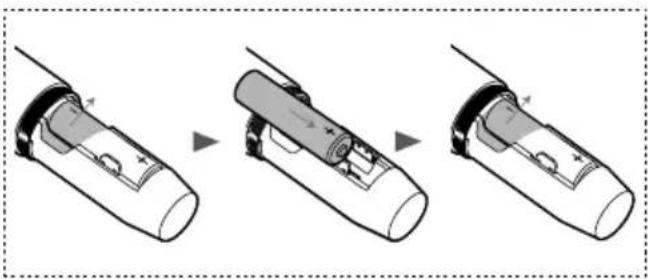
- Load the two Alkaline AA batteries with correct polarity.
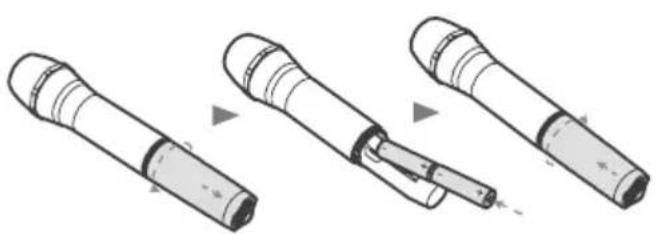
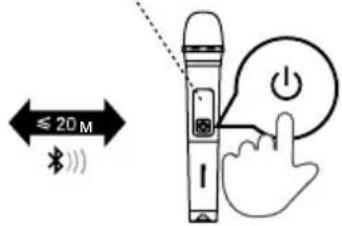
- Turn on the speaker and the supplied wireless microphone successively.
- Wireless connection will be set up automatically.
Notes:
- The microphone powers off automatically after 20 minutes of inactivity. - A maximum of two wireless microphones are supported.
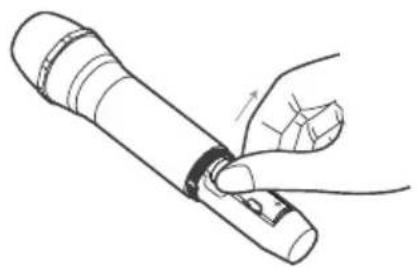
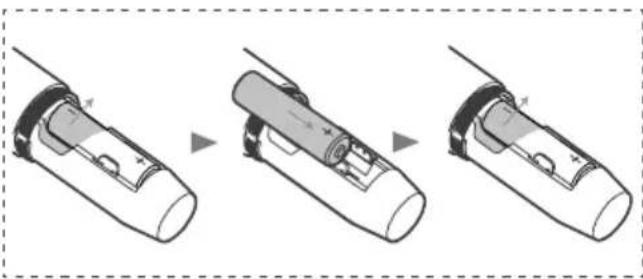
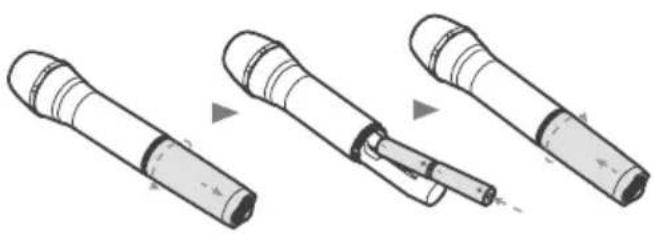
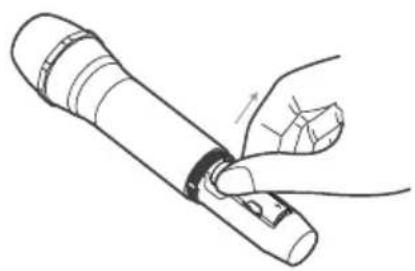
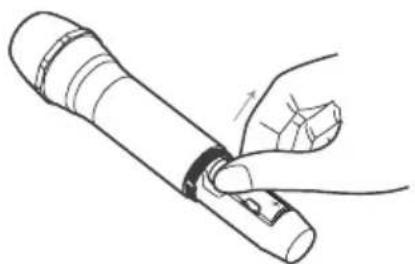
To replace wireless microphone batteries
Cautions:
- Do not mix batteries (old and new or carbon and alkaline, etc.).
- Remove batteries if they are exhausted or if the microphone is not to be used for a long time.
- Batteries contain chemical substances; they should be disposed of properly.
1. Low battery prompt.
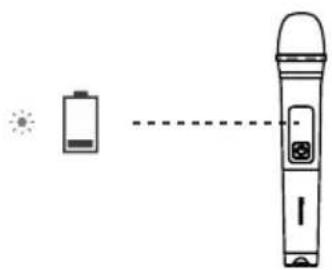
Indicator blinking red
2. If the battery level is low, replace the old batteries with new ones.
Connecting
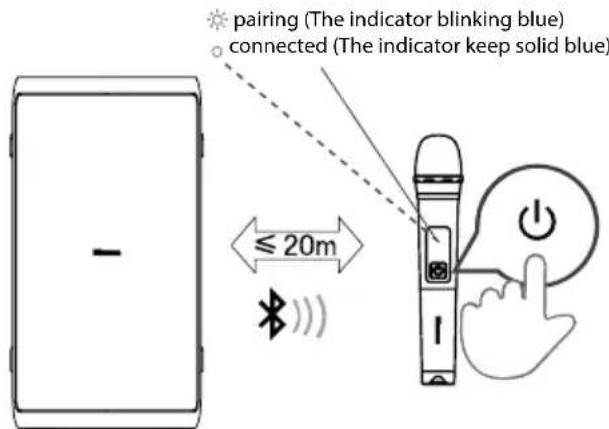
Press the button on the top panel of the unit to switch on the unit.
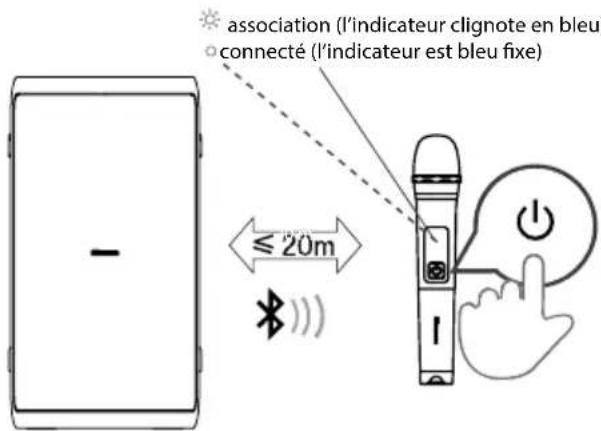
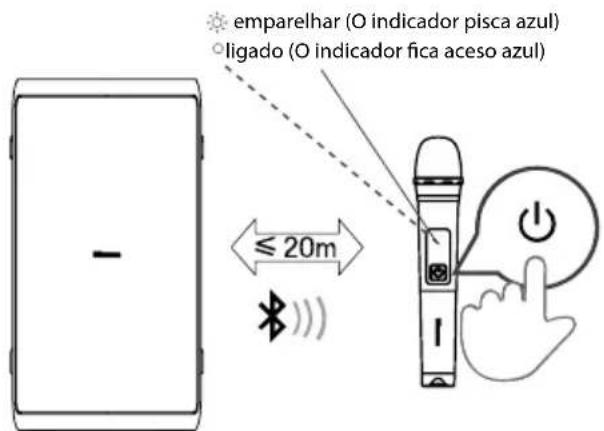
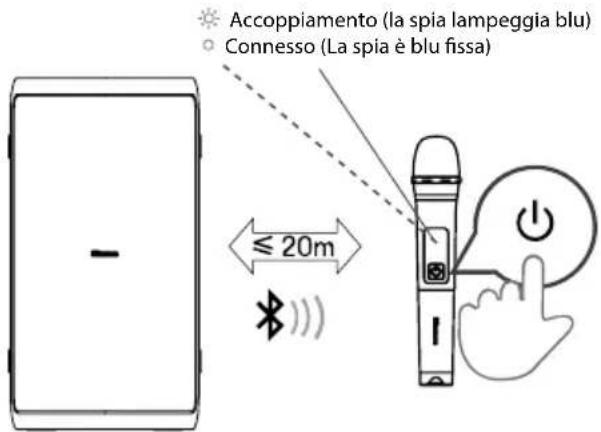
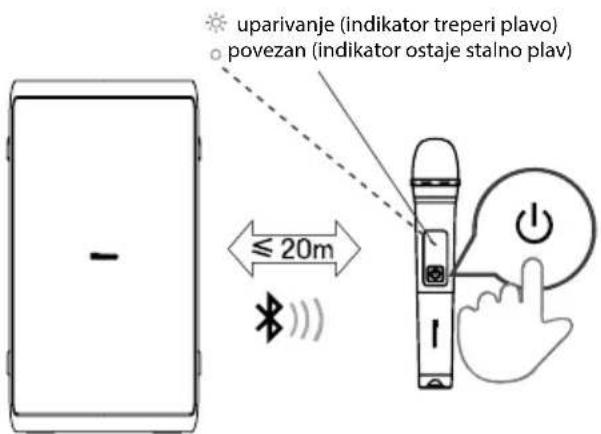
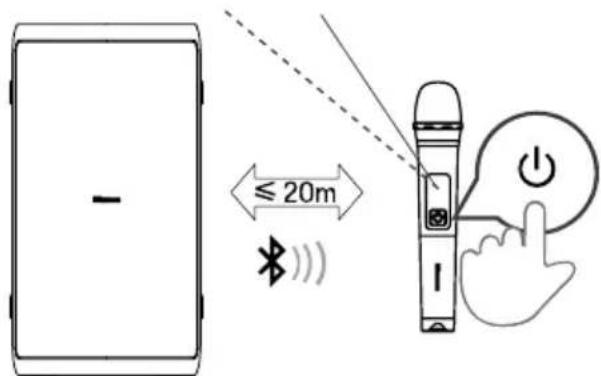
Press the ⏻ button on the wireless microphone to switch on the wireless microphone. The indicator on the wireless microphone will blink blue, and the wireless microphone will pair with the unit automatically. Once paired successfully, the indicator on the wireless microphone will keep solid blue.
Adjust the microphone volume level to your desired level using the microphone volume knob on the rear panel.
Note: When the battery of the wireless microphone is in a low battery state, the indicator on the wireless microphone blinks red, and you need to replace the old batteries in the wireless microphone battery compartment with new ones.
Basic Operation
Standby/ON
- Press the ⏻ button on the unit to switch the main unit ON. Press and hold for 2 seconds to switch OFF.
- Disconnect the main plug from the main socket if you want to switch the unit off completely.
- When there is no input signal from the unit for more than 15 minutes, it will switch to Standby mode automatically.
DJ Effect
- Press the DJ button to select different DJ effects.
- Press the DJ key once to play the current DJ effect. When you press the DJ key continuously within 1 second, it cycles to select different DJ sound effects. Press the DJ key for 1 second to start playing the current DJ sound effect after no operation.
- DJ sound effect types: DJ1 cheering sound, DJ2 drum sound, DJ3 alarm sound, DJ4 horn sound, DJ5 disc playing sound.
Select Modes *If the modes are different, the actual situation prevails.
- Press the ➕ button on the unit to select the play function: BT, USB, AUX IN, FM mode.
Adjust the Volume
- Press the VOL+/VOL- button on the unit to adjust the volume.
Preset Equalizer
- During play, press the EQ button repeatedly to select: ROCK-JAZZ-SAMBA-POP-BALANCE.
Bass settings
- Press BASS button to select BASS ON / BASS OFF.
Adjust the LED light
- Press the ⚙ button repeatedly to select the LED effect: LED OFF, LED1, LED2, LED3, LED4, LED5.
- Press and hold ⚙️ to switch ON/OFF the strobe light.
AUX IN Operation
1. Ensure that the unit is connected to the TV or other audio devices. 2. Press the ➕ button on the unit to select the AUX IN mode. 3. Operate your audio device directly for playback features. 4. Press the VOL+/VOL- button to adjust the volume to your desired level.
WIRELESS CHARGING
The party speaker can charge wireless charging compatible phones by placing your phone on top of the wireless charging logo of the party speaker.
Note:
1 The wireless charging can be used for charging compatible smart phones when the unit is in power on state for AC mode. 2 In order to prolong the service life of the battery, direct wireless charging is not allowed in the battery mode.
Bluetooth Operation
Pair Bluetooth-enabled Devices
The first time you connect your Bluetooth device to this player, you need to pair your device to this player.
Note:
- The operational range between this player and a Bluetooth device is approximately 8 meters (without any object between the Bluetooth device and the unit).
- Before you connect a Bluetooth device to this unit, ensure you know the device's capabilities.
- Compatibility with all Bluetooth devices is not guaranteed.
- Any obstacle between this unit and a Bluetooth device can reduce the operational range.
- If the signal strength is weak, your Bluetooth receiver may disconnect, but it will re-enter pairing mode automatically.
1 Press the ➞ on the unit to select Bluetooth mode.
2 The word "PAIRING" will be shown on the display screen, the system has entered pairing mode.
3 Activate your Bluetooth device and select the search mode. "Hisense Party Rocker One" or "Hisense Party Rocker One Plus" will appear on your Bluetooth device.
4 Select "Hisense Party Rocker One" or "Hisense Party Rocker One Plus" in the pairing list, the system is successfully connected and the word "CONNECTED" will scroll show on the display screen.
5 Begin playing music from the connected Bluetooth device.
To disconnect the Bluetooth function, you can:
- Switch to another function on the unit.
- Disable the Bluetooth function on your device.
- Press and hold the "▶II" button on the unit.
Tips:
- Enter "0000" for the password if necessary.
- The player will also be disconnected when your device is moved beyond the operational range.
- If you want to reconnect your device to this player, place it within the operational range.
- If the device is moved beyond the operational range, when it is brought back, please check if the device is still connected to the player. • If the connection is lost, follow the instructions above to pair your device to the player again.
Listen to Music from Bluetooth Device
If your Bluetooth device supports A2DP, play music via your device.
- To pause/resume playback, press ▶II.
- To skip to a track, press ◀◀◀ or ▶▶◀
- Press the VOL+/- button to increase or decrease the volume.
TWS Connection
• This TWS (TRUE WIRELESS STEREO) Bluetooth connection only works between the same two speakers. - Power on both speakers, press the ➕ button on both speakers to switch to Bluetooth mode, press the TWS button on one of the speakers, the display screen of the speaker scrolls to show TWS ON, and then scrolls to show TWS PAIRING, the two speakers enter the pairing state automatically. Once paired successfully, one speaker scrolls to display MASTER on its screen, indicating it is configured as the master, the other displays SLAVE, indicating it is configured as the slave. - Enable your Bluetooth device and make sure it is in searching mode. - Select "Hisense Party Rocker One" or "Hisense Party Rocker One Plus" from the list of discovered devices and connect to it. - The master speaker will act as the left channel during TWS and will receive the Bluetooth signal, the other speaker will act as the right channel to play music. - Press and hold the TWS button to disconnect the MASTER and SLAVE speaker connection in TWS connection mode, the display screens of both speakers scroll to show TWS OFF.
USB Operation
USB Operation
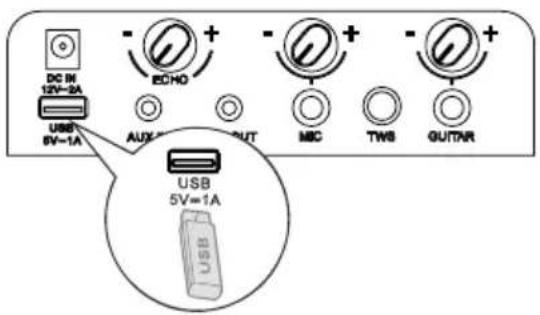
1. Insert the USB device and press the → button to select USB mode. 2. Play starts automatically. If play does not start automatically, press the ▶ button. - To skip to the previous/next track, press the buttons on the unit. - To skip to the previous/next folder, press and hold the <</▶▶ buttons on the unit. 3. In PLAY/PAUSE state, press and hold the ▶ II button for 3 seconds to switch among REPEAT 1, REPEAT ALL, RANDOM, and NORMAL.
Charging from the USB Port
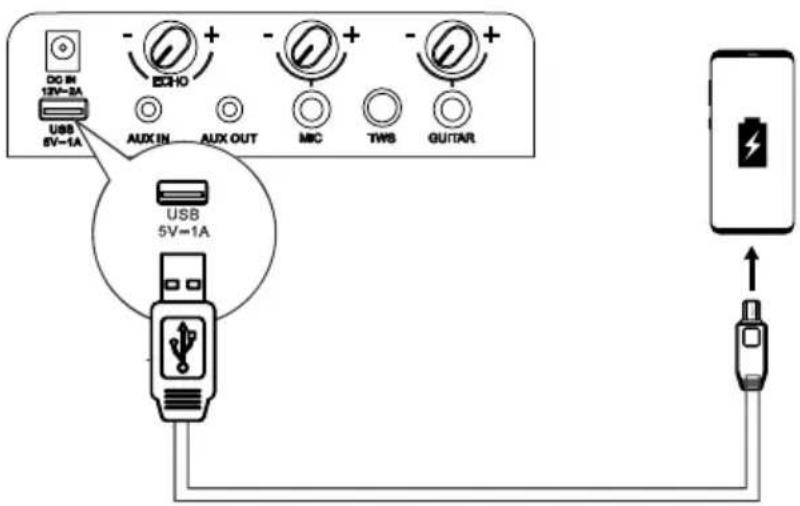
The Charging 5 V = 1 A socket is designed for charging mobile devices (e.g., MP3 player, mobile phone, etc.). It supplies 5V DC at a charging current up to 1000 mA (1 A).
In power on mode, use a USB cable (not included) to connect a mobile device to the Charging 5 V A Socket of the unit and the mobile device will start charging.
FM Radio Operation *If the modes are different, the actual situation prevails.
Press the button repeatedly to select the TUNER source. The display will show "TUNER".
Tuning in a Station
Auto Tuning
1. Press and hold the ▶■ button to start auto tuning. Press the ▶ button again to stop the auto tuning. 2. The searched radio stations will be stored as preset stations.
Note: The search may not stop at a station with a very weak signal.
Manual Tuning
Press and hold the button to start the forward or reverse scanning. The display will show the frequency being searched. Once a station has been found, the scanning will stop automatically. To change the frequency, press the button again until you find the station you want.
Searching for a radio station manually
Briefly press the buttons ◀◀ or ▶▶ until the optimal reception frequency is reached. Each time the buttons ◀◀◀ or ▶▶▶ are pressed, the frequency decreases/increases by 0.05 MHz.
Recalling a preset station
Press the ▶ II button to switch between preset station and frequency. Press the ◀◀/▶▶ button to select your desired preset station.
Battery Charging For Party Speaker
Built-in Battery Charging
Use the AC power cord (included) to connect the AC power input socket on the unit to an AC power outlet. The current charging-indicator light on the unit will flash during charging. When the five charging-indicator lights on the unit remain solid, the battery has been fully charged.
Alternatively, connect one terminal of the vehicle DC power adapter (not included) to the DC input socket on the unit and connect the other terminal of the vehicle DC power adapter to the power socket on the vehicle.
5 LED white lights up = approx. 100% full 4 LED white lights up = approx. 80% full 3 LED white lights up = approx. 60% full 2 LED white lights up = approx. 40% full 1 LED white light up = approx. 20% full
(indicating charging is needed)
Note: When the battery is low, the unit will emit a prompt beep.
When DC in is connected for charging, the unit can only be charged and cannot be played.
Troubleshooting
To keep the warranty valid, never try to repair the system yourself. If you encounter problems when using this unit, review the following before requesting service.
No power
- Ensure that the AC cord is properly connected.
- Ensure that there is power at the AC outlet.
- Press the ⏻ button on the speaker.
I hear buzzing or humming.
- Ensure all cables and wires are securely connected.
- Connect a different source device (e.g., Blu-ray player) to see if the buzzing persists. If it does not, the problem may be with the original device.
- Connect your device to a different input on the speaker.
I can't find the Bluetooth name of this unit on my Bluetooth device.
- Ensure the Bluetooth function is activated on your Bluetooth device.
- Re-pair the unit with your Bluetooth device.
SPECIFICATIONS
| Model name | Party Rocker One |
| Model name | Party Rocker One Plus |
Power supply
| Voltage AC 100-240 V ~ 50/60 Hz; DC IN 12 V 2 A | |
| Power consumption(AC) 80 W | |
| Dimensions(W × H × D) 295 × 550 × 258 mm |
Amplifier (Max Audio Power)
| Amplifier Maximum Audio Power Total 300 W |
Ambient conditions
| In operation min. 0°C - max. +45°C / 60% relative humidity | |
| Not in operation min. -10°C - max. +60°C / 65% relative humidity | |
| Built-in battery | Li-ion 7650 mAh, 7.2 V |
| Battery charge time | 4,5 hours |
| Battery playtime 15 hours* | |
Radio *If the modes are different, the actual situation prevails.
| FM band FM 87.5-108 MHz. | |
| FM antenna Permanently installed wire aerial |
System
| Frequency range 20 Hz to 20 KHz | |
| Signal-to-noise > 80 dB | |
| USB port USB 2.0 to 32GB WAV \WMA \ MP3 | |
| USB output Output: 5 V 1 A max. |
Bluetooth®
| Bluetooth Version 5.0 | |
| Bluetooth Transmitter Power | <10 dBm |
| Frequency Range | 2.4 GHz-2.4835 GHz |
Waterproof
| Top-Panel | IPX4 |
Wireless microphone (Only for Party Rocker One Plus)
| Battery type | AA battery (1.5 V × 2) |
| Transmission power | 9 dBm |
| Distance between transmitter and receives | ≤ 20 m |
Party Rocker One Port
Party Rocker One Port
Connecting...
Connect
Indicator flashes red
BS
B

Connecting
R
Party Rocker One Port
Party Rocker One Port
Risk of product damage!
Connection
Connecting
Connect
4 LEDs white = approximately 80% full
3 LEDs white = approximately 60% full
2 LEDs white = approximately 40% full
Party Rocker One – panel
Party Rocker One – panel
Connection
Press the button on the top panel of the device to turn it on.
Party Rocker One
Party Rocker One
- Turn on the speaker and then the supplied wireless microphone.

5 white LEDs = approx. 100% full, 4 white LEDs = approx. 80% full, 3 white LEDs = approx. 60% full, 2 white LEDs = approx. 40% full, 1 white LED = approx. 20% full
User manual Quick start guide Warranty card
Wireless microphone × 2
(Only for Party Rocker One Plus model)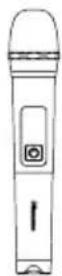
AC power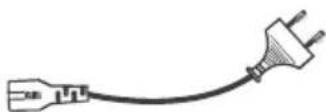
AA battery (1.5 V) × 4
(Only for Party Rocker One Plus model)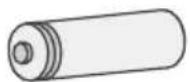
* The number of power cables and plug types vary by region.
- Turn on the speaker and the supplied wireless microphone one after the other.
- The wireless connection is established automatically.
Notes:
- The microphone automatically turns off after 20 minutes of inactivity.
- A maximum of two wireless microphones are supported.
Replacing the wireless microphone batteries Precautions:
The indicator blinks red
2. If the battery level is low, replace the old batteries with new ones.
Connecting
Connecting
Risk of product damage!
Connection
Connecting
- Turn on the speaker and the supplied wireless microphone in order.
Indicator flashes red
2. If the battery level is low, replace the old batteries with new ones.
Connection
Press the button on the top panel of the unit to turn on the unit.
Press the 📍 button on the wireless microphone to turn on the wireless microphone. The indicator on the wireless microphone will flash blue, and the wireless microphone will automatically pair with the unit. When pairing is successful, the indicator on the wireless microphone will stay blue. Adjust the microphone volume to the desired level using the microphone volume button on the rear panel.
Note: When the battery of the wireless microphone is low, the indicator on the wireless microphone flashes red, and you need to replace the old batteries in the battery compartment of the wireless microphone with new ones.
Basic operations
- Turn on the speaker, then the supplied wireless microphone.
Indicator flashes red
2. If the battery level is low, replace the old batteries with new ones.
Connection
Pairing (indicator flashes blue) or connected (indicator solid blue).
Press the button on the top panel of the unit to turn on the unit.
Press the 📍 button on the wireless microphone to turn on the wireless microphone; the indicator on the wireless microphone will flash blue, and the wireless microphone will automatically pair with the unit. After successful pairing, the indicator on the wireless microphone will stay solid blue. Adjust the microphone volume level to the desired level using the microphone volume button on the rear panel.
Note: When the wireless microphone battery is low, the indicator on the wireless microphone flashes red, and the old batteries in the battery compartment of the wireless microphone should be replaced with new ones.
Basic Operation
Standby/On
- Press the button on the unit to turn ON the main unit. Press and hold for 2 seconds to turn OFF.
- Unplug the power plug from the power outlet if you want to completely turn off the unit.
- When there is no input signal from the unit for more than 15 minutes, it automatically switches to Standby mode.
DJ Effect
- Press the DJ button to select a different DJ effect.
- Press the DJ button once to play the current DJ. When you press and hold the DJ function for 1 second, scroll to find different DJ sound effects. Press and hold the DJ button for 1 second to start playing the current DJ sound effect after not using it.
- Types of DJ sound effects: DJ1 rewind sound, DJ2 drum sound, DJ3 alarm sound, DJ4 siren sound, DJ5 disc playback sound.
Connection
Wireless microphone × 2
(Only for Party Rocker One Plus)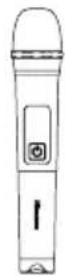
The indicator blinks red
Connection
USER MANUAL

Main unit
Connection

USER MANUAL

Main unit
Connection
- FEATURES
- PACKAGE CONTENTS
- PRODUCT DIAGRAM
- CONNECTIONS
- CONNECT POWER
- RISK OF PRODUCT DAMAGE
- AUX IN SOCKET
- AUX OUT SOCKET
- WIRELESS MICROPHONE CONNECTION (ONLY FOR PARTY ROCKER ONE PLUS)
- CONNECTING MICROPHONE
- NOTES
- TO REPLACE WIRELESS MICROPHONE BATTERIES
- CAUTIONS
- LOW BATTERY PROMPT
- IF THE BATTERY LEVEL IS LOW, REPLACE THE OLD BATTERIES WITH NEW ONES
- CONNECTING
- BASIC OPERATION
- STANDBY/ON
- DJ EFFECT
- ADJUST THE VOLUME
- PRESET EQUALIZER
- BASS SETTINGS
- ADJUST THE LED LIGHT
- AUX IN OPERATION
- WIRELESS CHARGING
- NOTE
- BLUETOOTH OPERATION
- PAIR BLUETOOTH-ENABLED DEVICES
- TO DISCONNECT THE BLUETOOTH FUNCTION, YOU CAN
- TIPS
- LISTEN TO MUSIC FROM BLUETOOTH DEVICE
- TWS CONNECTION
- USB OPERATION
- CHARGING FROM THE USB PORT
- FM RADIO OPERATION *IF THE MODES ARE DIFFERENT, THE ACTUAL SITUATION PREVAILS
- TUNING IN A STATION
- AUTO TUNING
- MANUAL TUNING
- SEARCHING FOR A RADIO STATION MANUALLY
- RECALLING A PRESET STATION
- BATTERY CHARGING FOR PARTY SPEAKER
- BUILT-IN BATTERY CHARGING
- TROUBLESHOOTING
- NO POWER
- I HEAR BUZZING OR HUMMING
- I CAN'T FIND THE BLUETOOTH NAME OF THIS UNIT ON MY BLUETOOTH DEVICE
- SPECIFICATIONS
- BS
- B
- R
- CONNECTION
- CONNECT
- REPLACING THE WIRELESS MICROPHONE BATTERIES PRECAUTIONS
- BASIC OPERATIONS
- USER MANUAL
Brand : HISENSE
Model : Party Rocker One Plus
Category : Speakers