
HyperX QuadCast - Microphone HP - Free user manual and instructions
Find the device manual for free HyperX QuadCast HP in PDF.


| Product type | Electret condenser microphone |
| Brand | HP - HyperX |
| Model | HyperX QuadCast |
| Microphone weight | 254 g |
| Stand and shock mount | 364 g |
| Total weight with USB cable | 710 g |
| Cable length | 3 m |
| Power | 5V 125mA via USB |
| Sampling rate | 48 kHz |
| Bit rate | 16 bits |
| Microphone frequency response | 20 Hz - 20 kHz |
| Headphone frequency response | 20 Hz - 20 kHz |
| Sensitivity | -36 dB (1V/Pa at 1 kHz) |
| Headphone output impedance | 32 Ω |
| Polar patterns | Stereo, omnidirectional, cardioid, bidirectional |
| Signal-to-noise ratio (headphone) | ≥ 90 dB |
| Maximum headphone output power | 7 mW |
| THD (Total harmonic distortion) | ≤ 0.05% (1 kHz/0 dBFS) |
| Tap-to-mute function | Yes, tap the top of the microphone to mute/unmute |
| Gain control | Rotary knob |
| Headphone jack | 3.5mm jack |
| Compatibility | PC, Mac, PS4 |
| Condenser type | Three 14mm condensers |
| Stand adapter included | Compatible with 3/8 and 5/8 inch threads |
Frequently Asked Questions - HyperX QuadCast HP
User questions about HyperX QuadCast HP
0 question about this device. Answer the ones you know or ask your own.
Ask a new question about this device
Download the instructions for your Microphone in PDF format for free! Find your manual HyperX QuadCast - HP and take your electronic device back in hand. On this page are published all the documents necessary for the use of your device. HyperX QuadCast by HP.
USER MANUAL HyperX QuadCast HP
HyperX QuadCast™ Microphone
Find the language and latest documentation for your HyperX QuadCast™ Microphone here.
HyperX QuadCast™ Microphone Headset Installation Guide
For instructions in English, Spanish, German, French, Italian, Portuguese, Polish, Russian, Turkish, Japanese, Korean, Thai, and Vietnamese.
Simplified Chinese ..... 简体中文说明书
Traditional Chinese ....繁體中文說明
HyperX QuadCast™
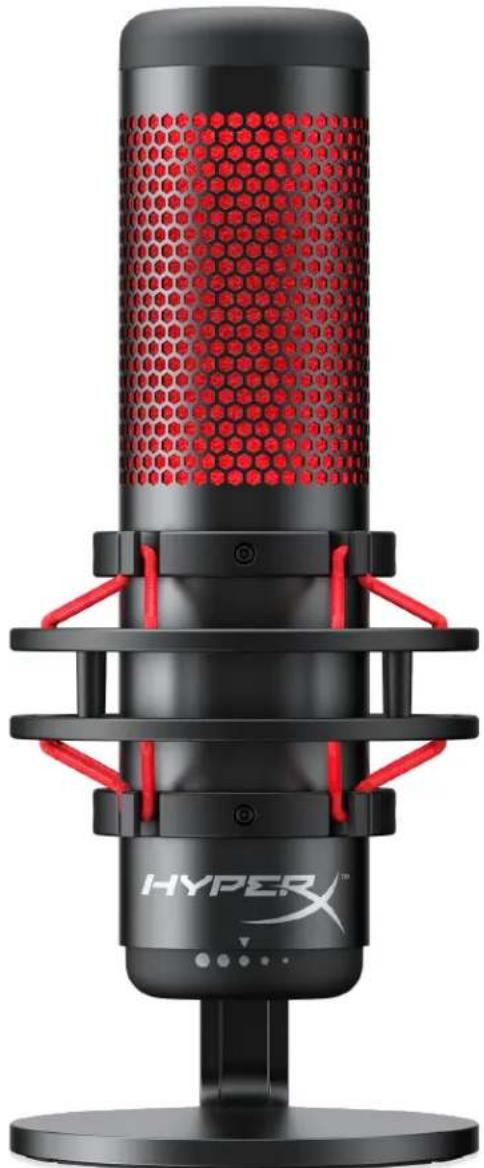
Part Numbers
HX-MICQC-BK
TABLE OF CONTENTS
Overview....3
Specifications 4
Microphone Controls....5
Using with PC or Mac 7
Using with PS4™ 11
Connecting Headphones.... 12
Controlling Microphone Monitoring.... 13
Installing the Mount Adapter 15
Overview
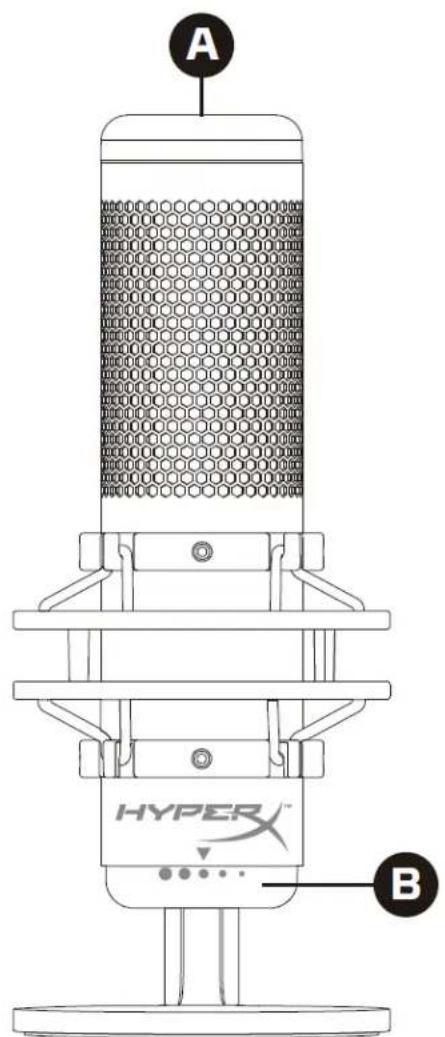
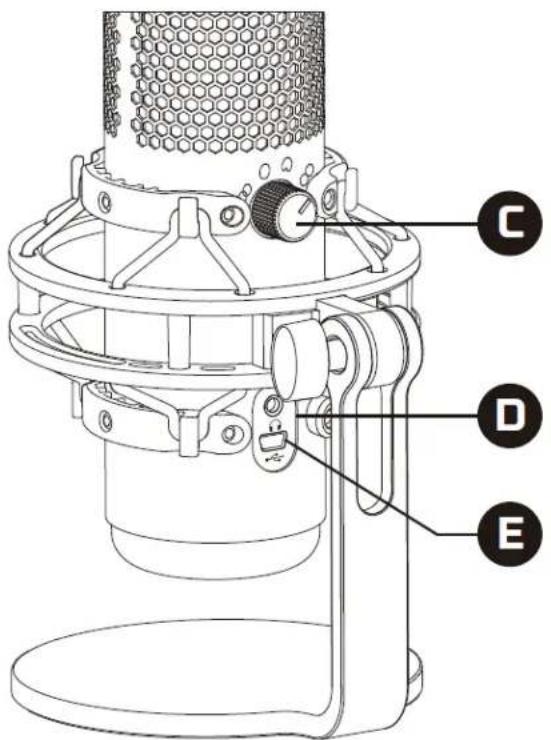
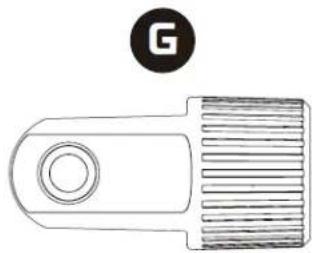

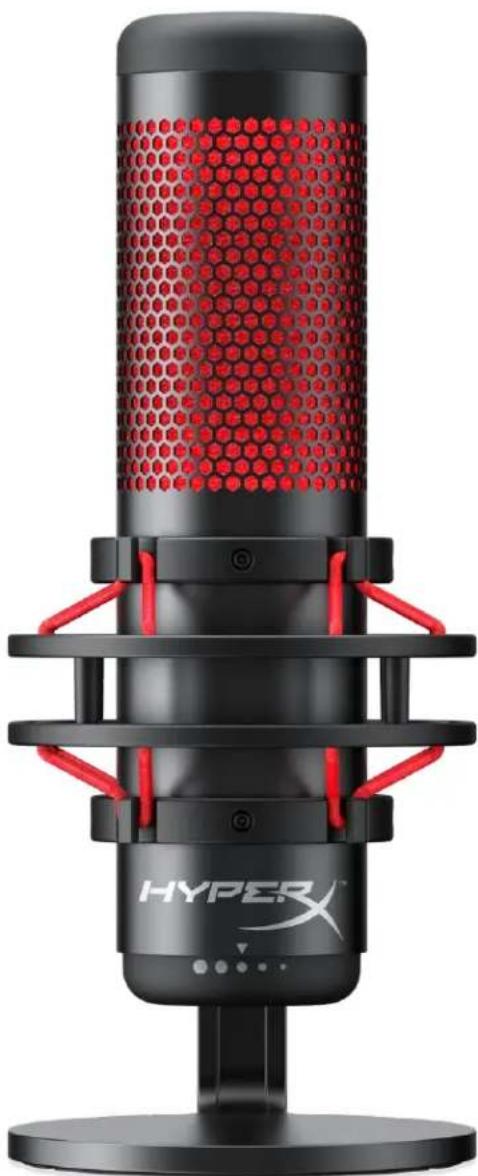
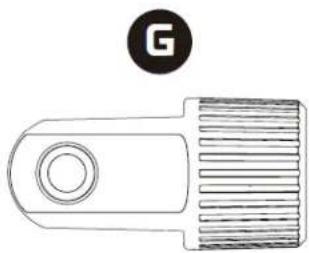
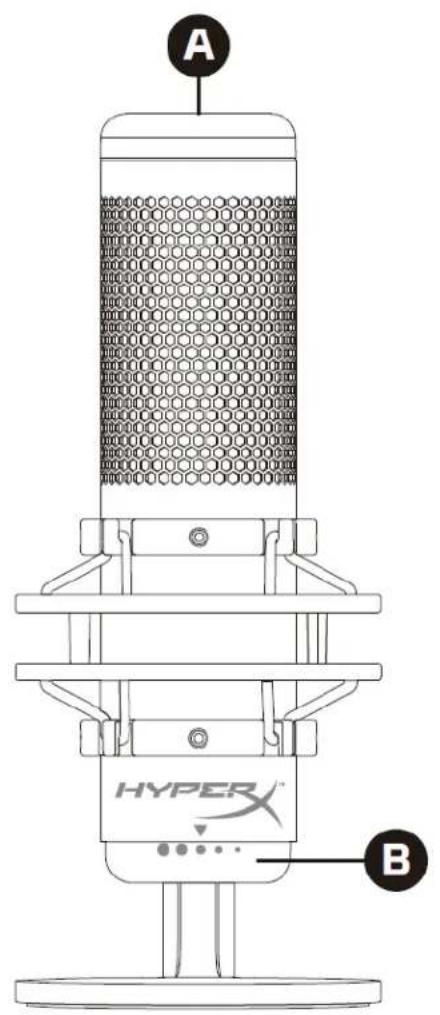
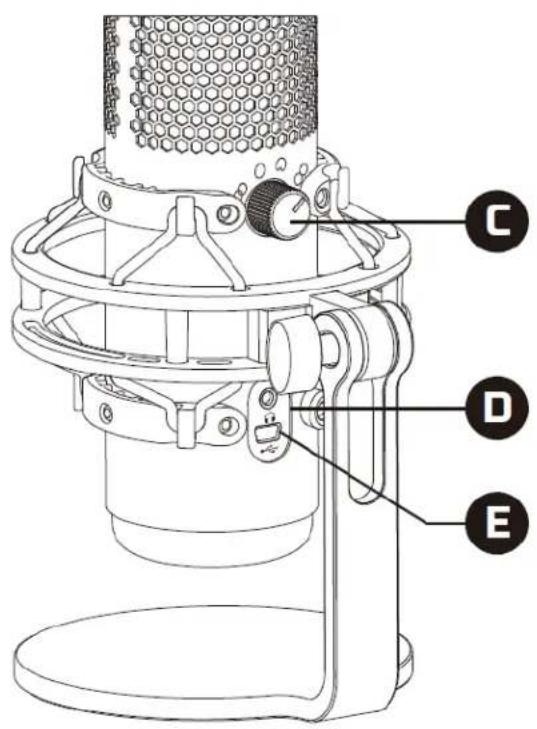
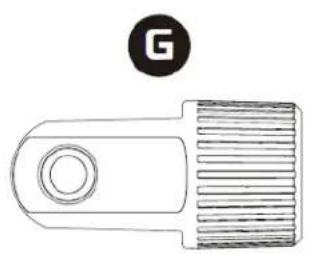
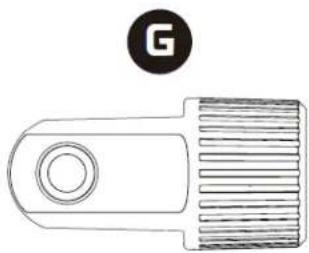
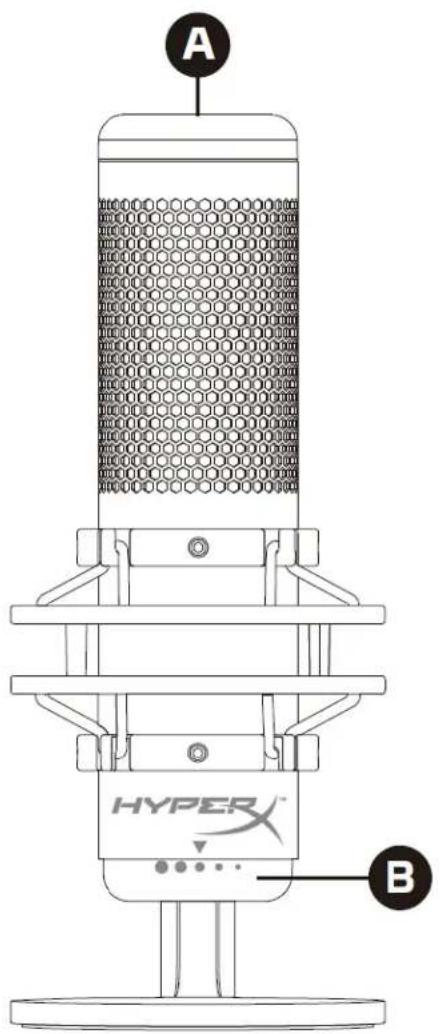
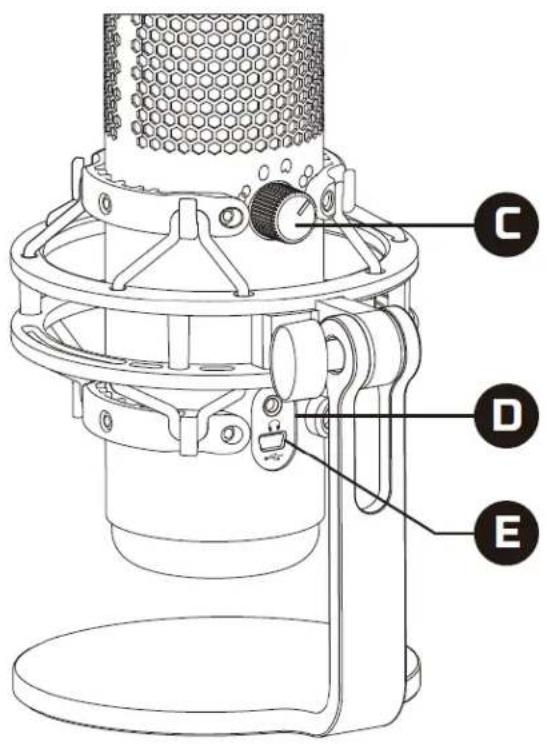
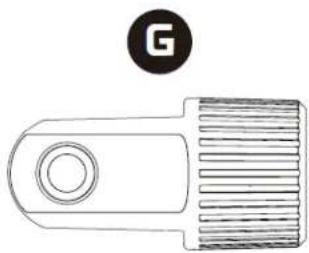
A. Tap-to-Mute Sensor B. Gain Control Knob C. Polar Pattern Knob D. Headphone Jack E. USB Cable Port F. USB Cable G. Mount Adapter* *Supports both 3/8" and 5/8" thread sizes
Specifications
Microphone
Power consumption: 5V 125mA
Sample/bit rate: 48kHz/16-bit
Element: Electret condenser microphone
Condenser type: Three 14mm condensers
Polar patterns: Stereo, Omnidirectional, Cardioid, Bidirectional
Frequency response: 20Hz - 20kHz
Sensitivity: -36dB (1V/Pa at 1kHz)
Cable length: 3m
Weight:
- Microphone: 254g • Shock mount and stand: 364g • Total with USB cable: 710g
Headphone Output
Impedance: 32 Ω
Frequency response: 20Hz - 20kHz
Maximum power output: 7mW
THD: ≤ 0.05% (1kHz/0dBFS)
SNR: ≥ 90dB (1kHz, RL=∞)
Microphone Controls
Selecting a Polar Pattern
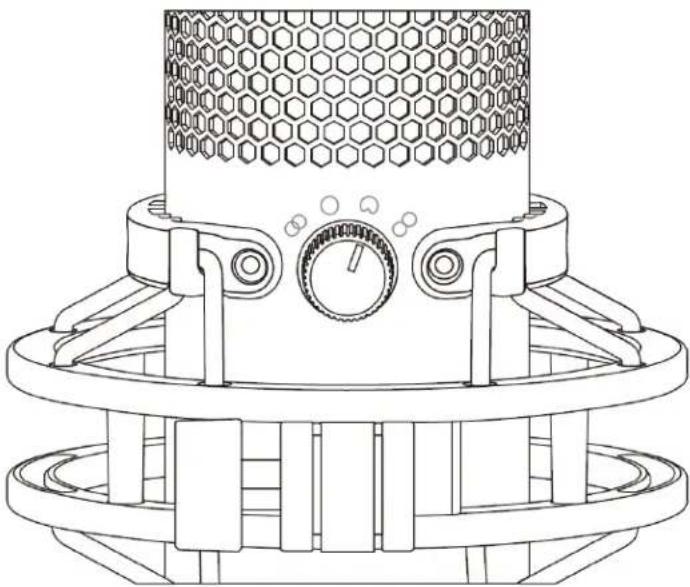
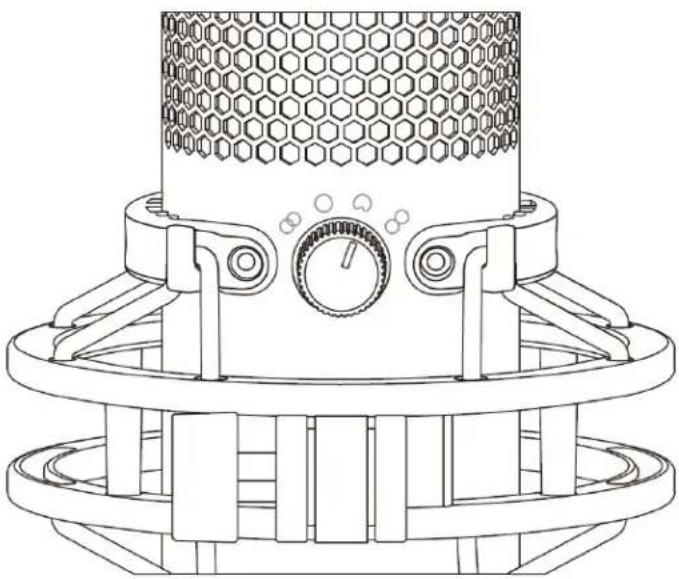
Rotate the polar pattern knob to select one of the four polar patterns.
| Symbol | Sound Direction | Polar Pattern | Scenarios |
 | 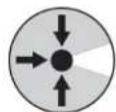 | Stereo | Vocals, instruments |
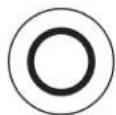 | 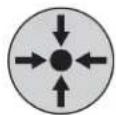 | Omnidirectional | Multi-person podcasts, conference calls |
 | 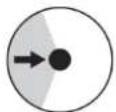 | Cardioid | Podcasts, streaming, voiceovers, instruments |
 | 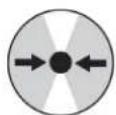 | Bidirectional | Face-to-face interviews |
Adjusting Gain Control
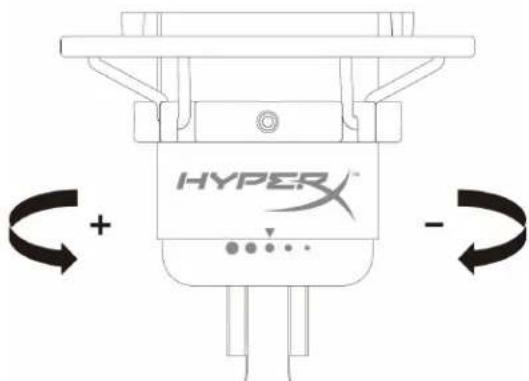
Rotate the gain control knob to adjust the gain of the microphone.
Muting the Microphone
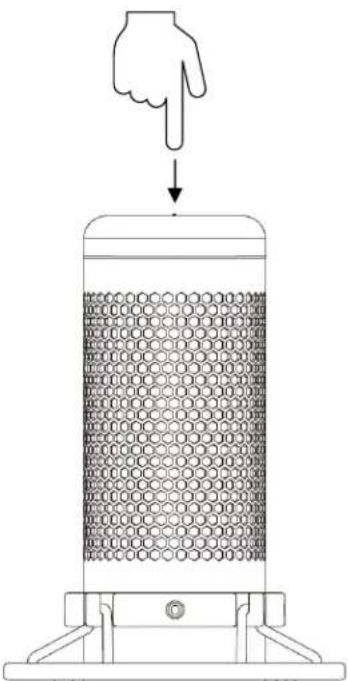
Tap the top of the microphone to mute/unmute the microphone. The microphone LED will indicate the current mute status of the microphone.
| Microphone LED | Mute Status |
| Red | Mute off |
| Off | Mute on |
Using with PC or Mac
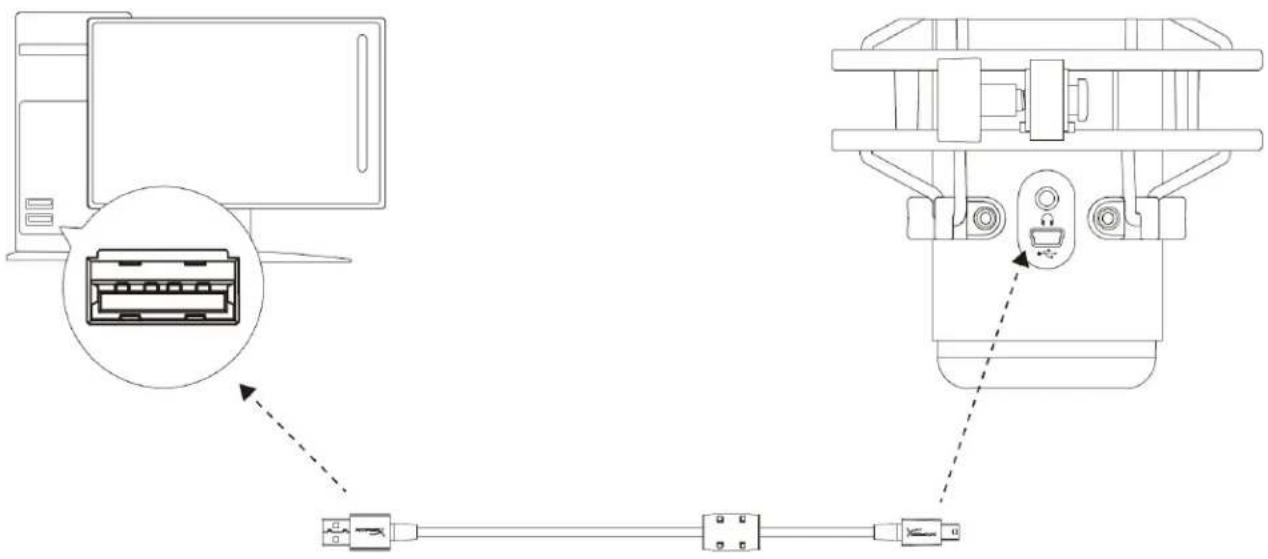
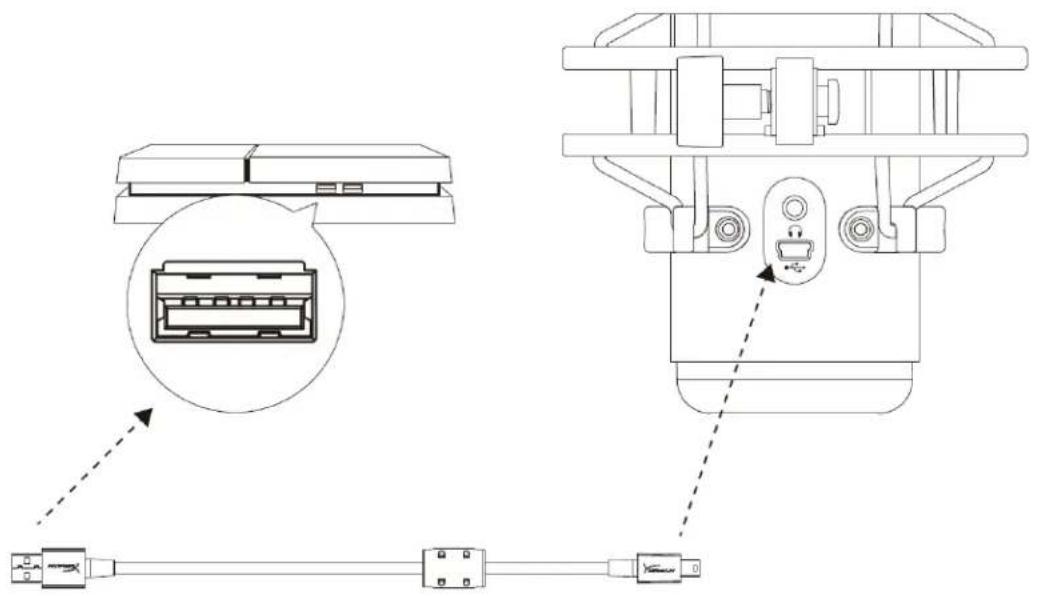
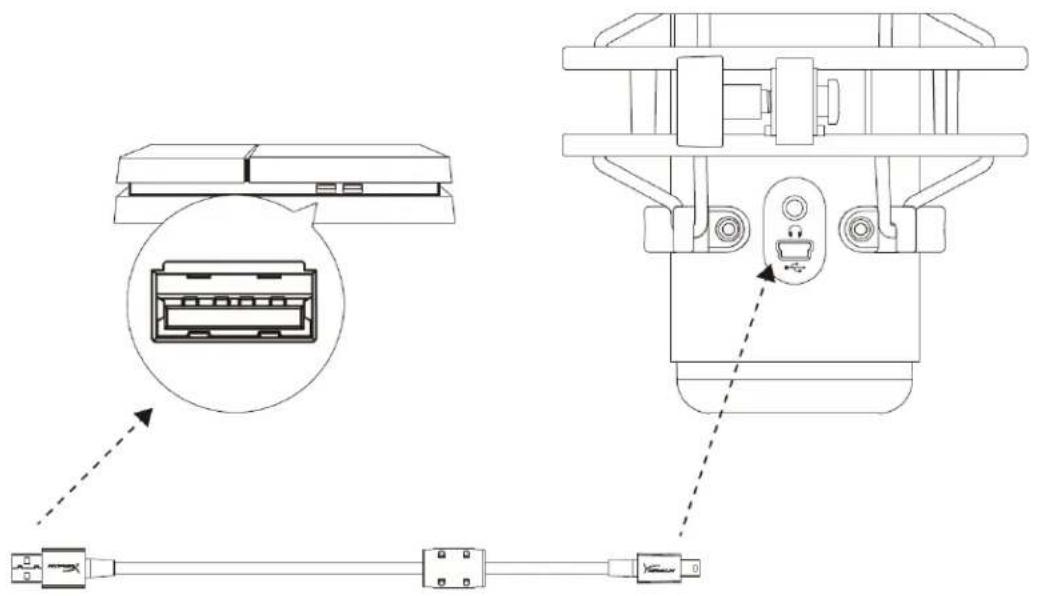
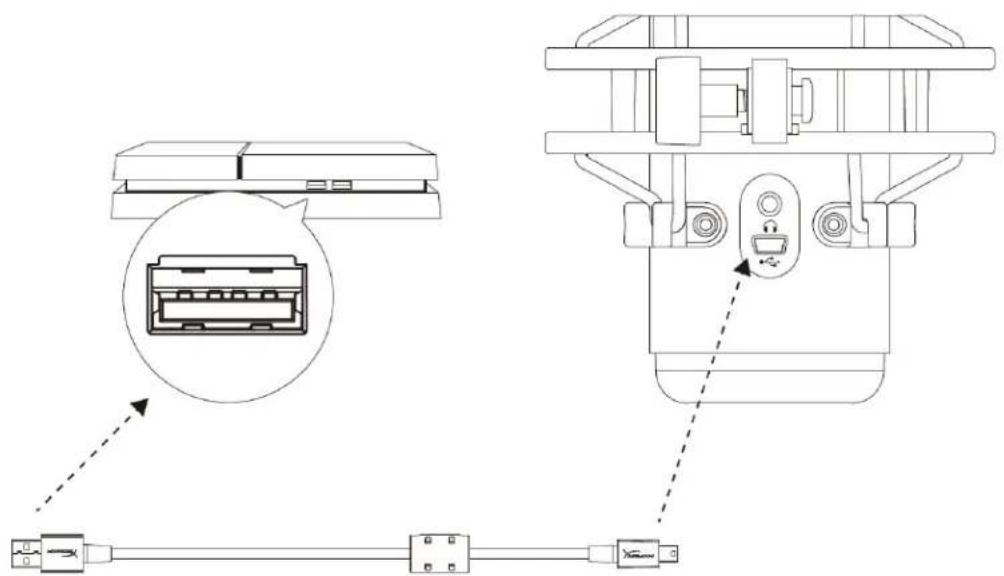
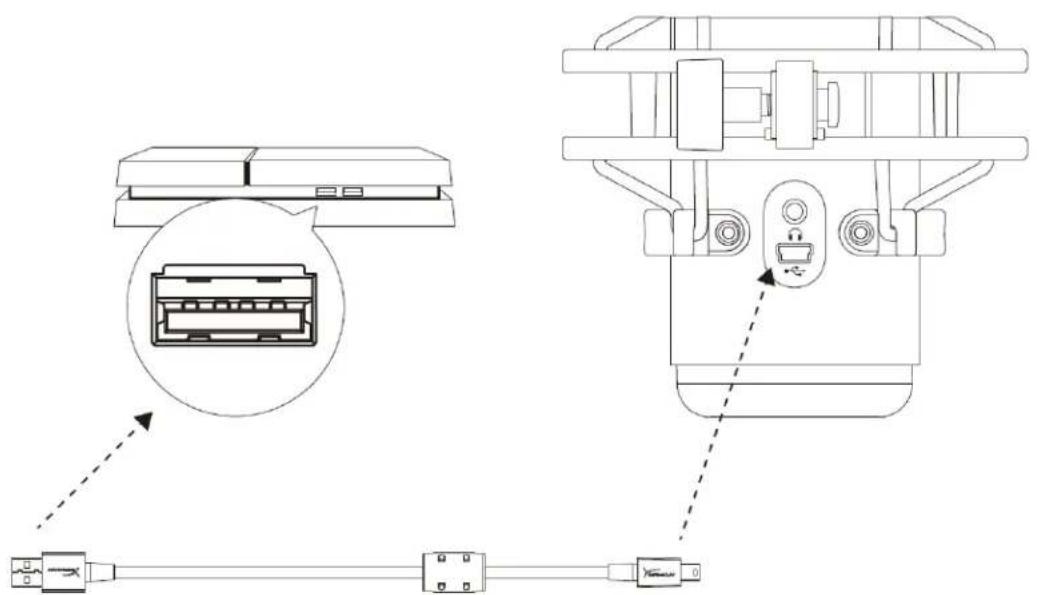
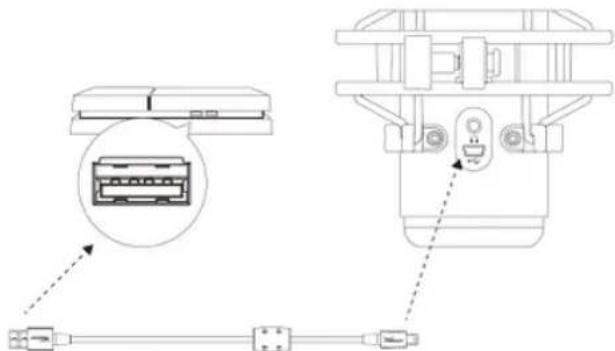
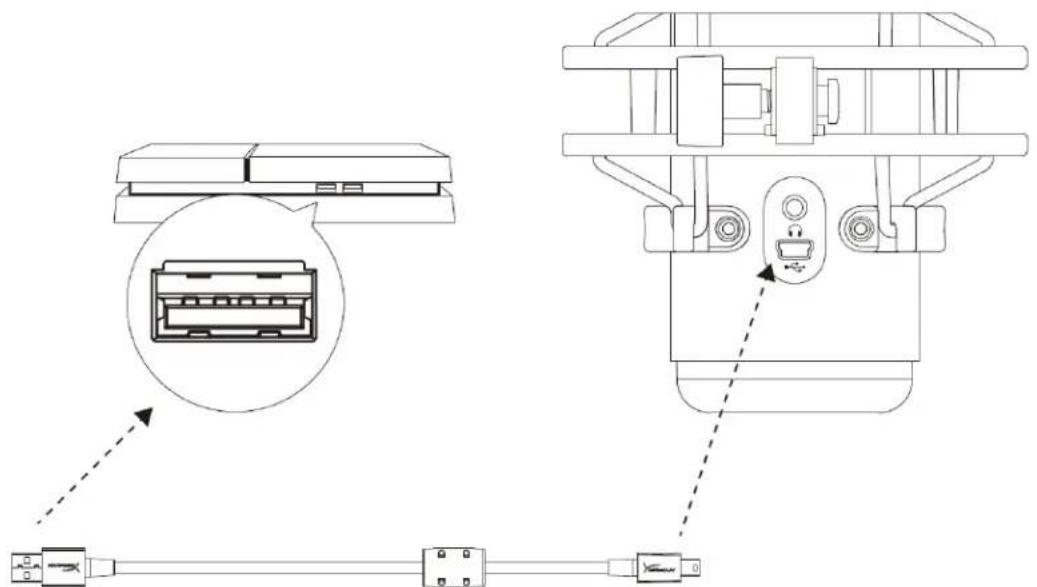
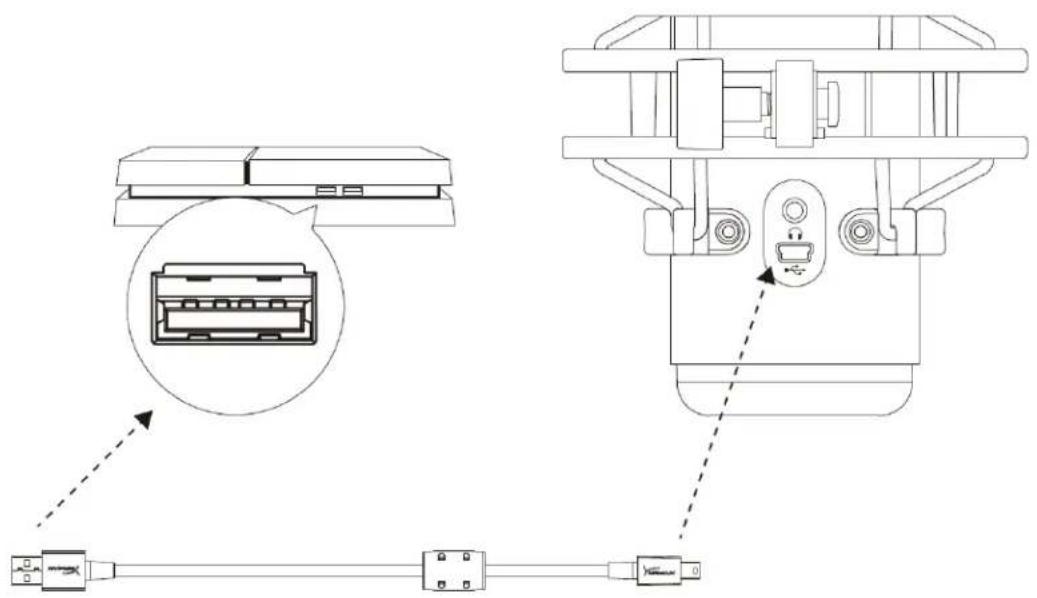
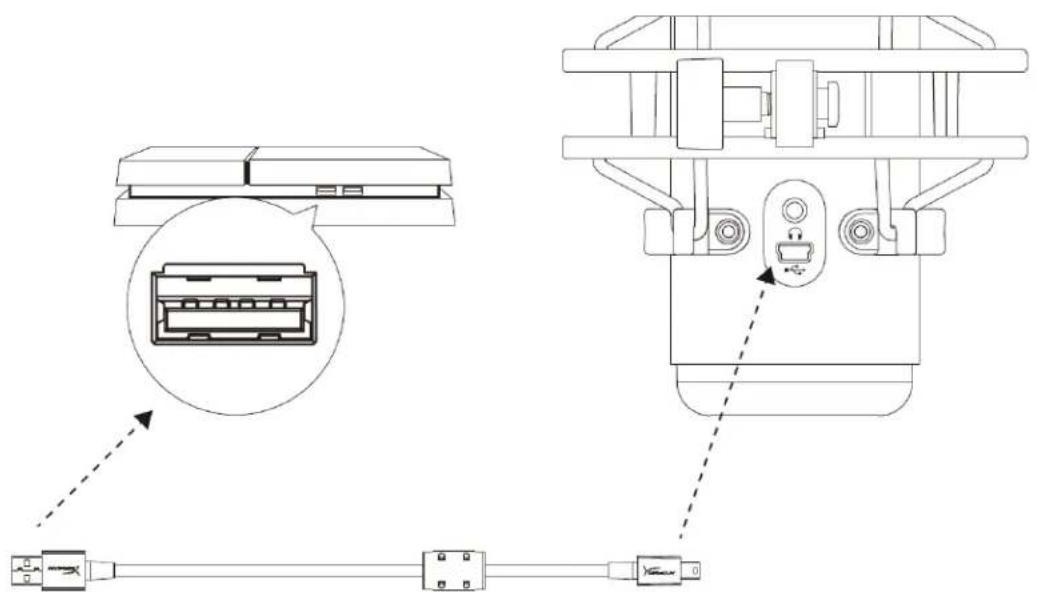
Connect the microphone to a USB port on the PC or Mac with the included USB cable.
Windows
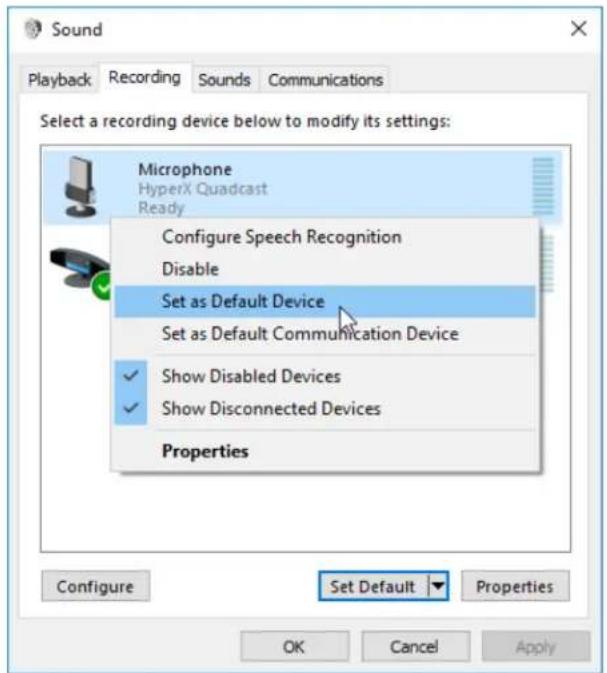
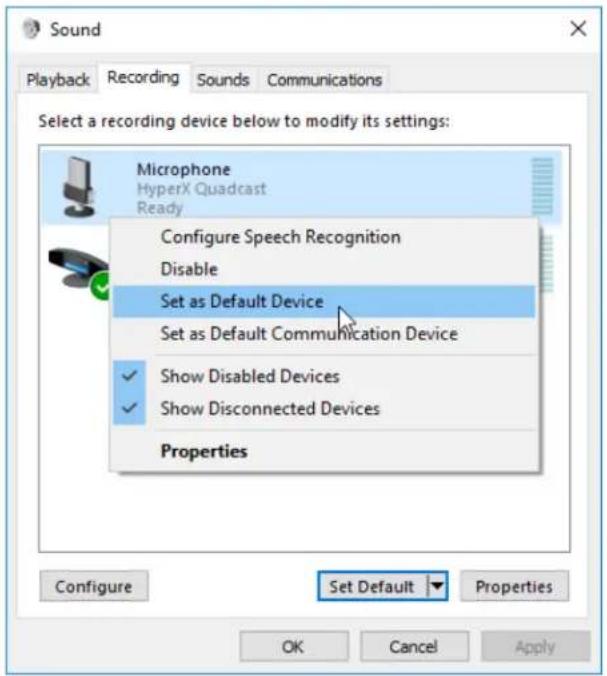
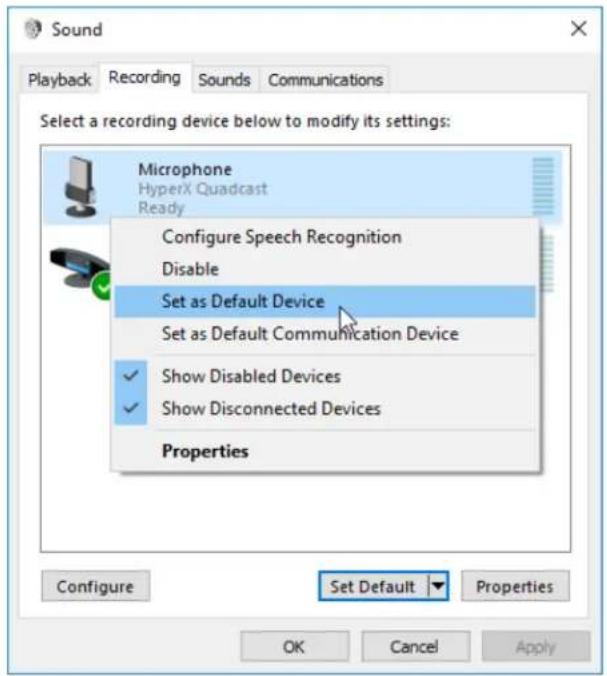
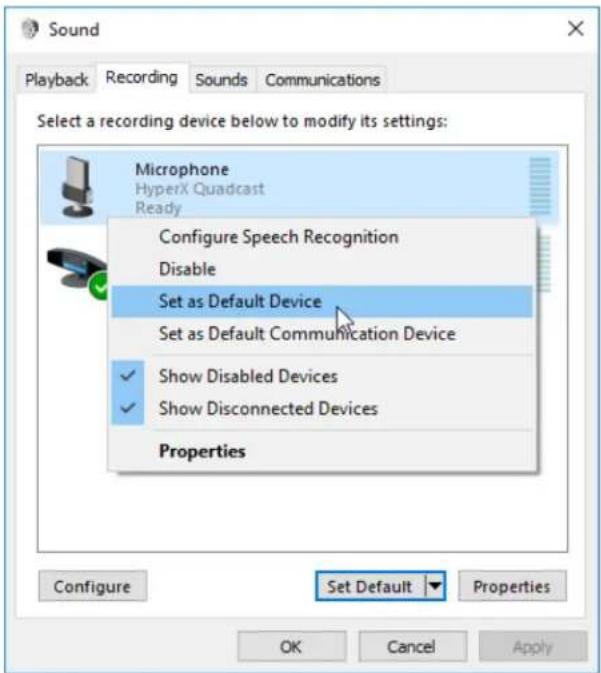
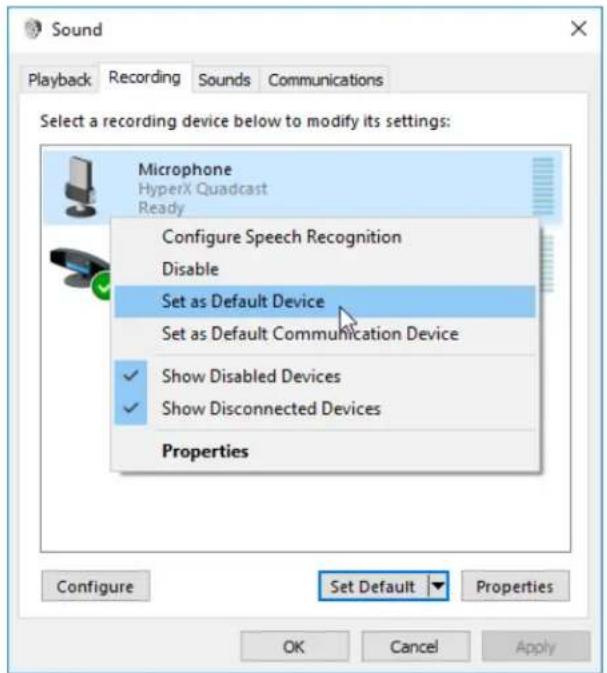
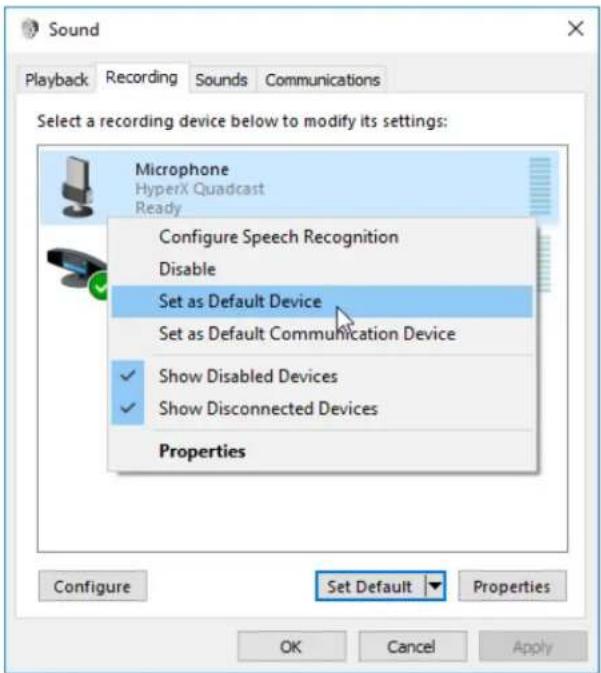
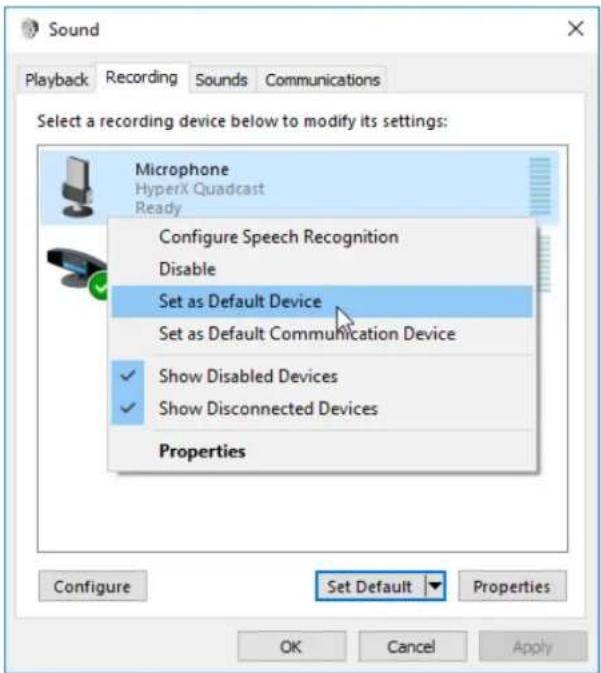
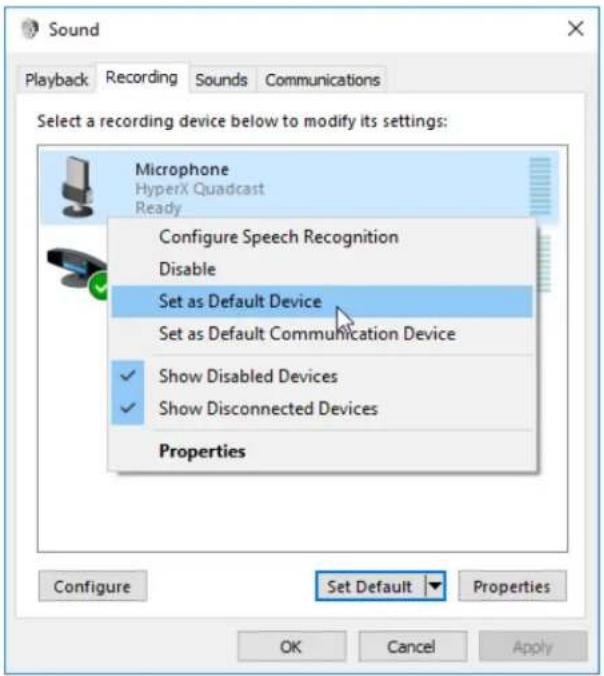
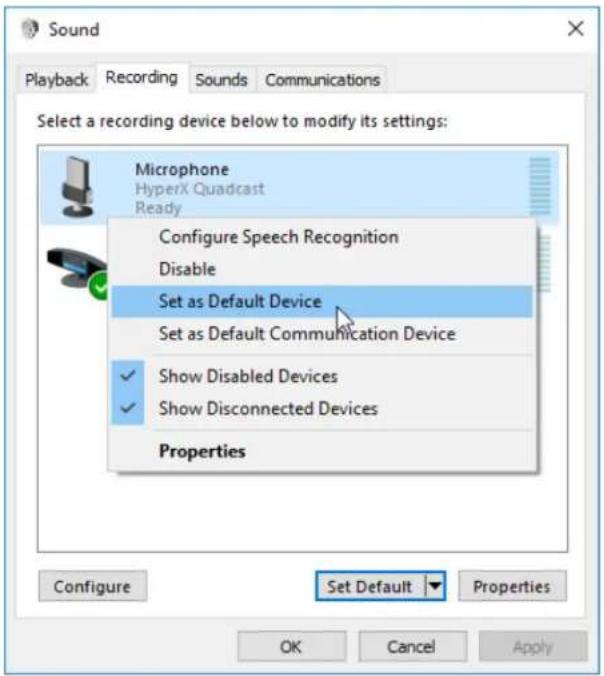
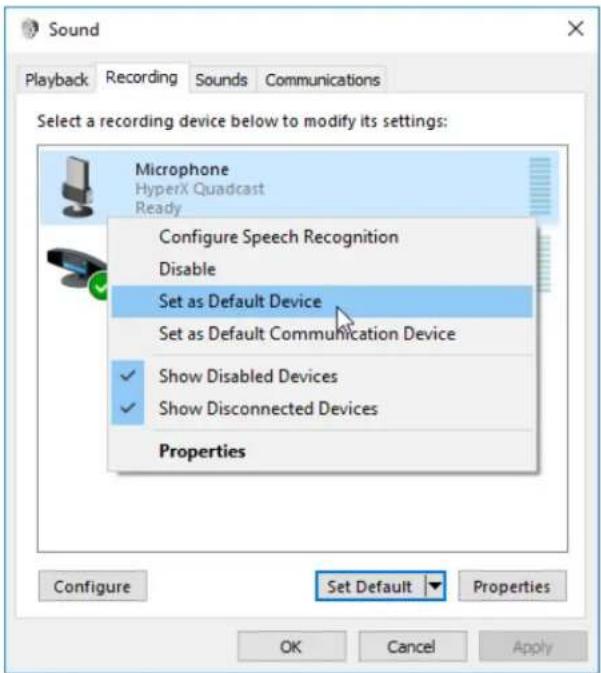
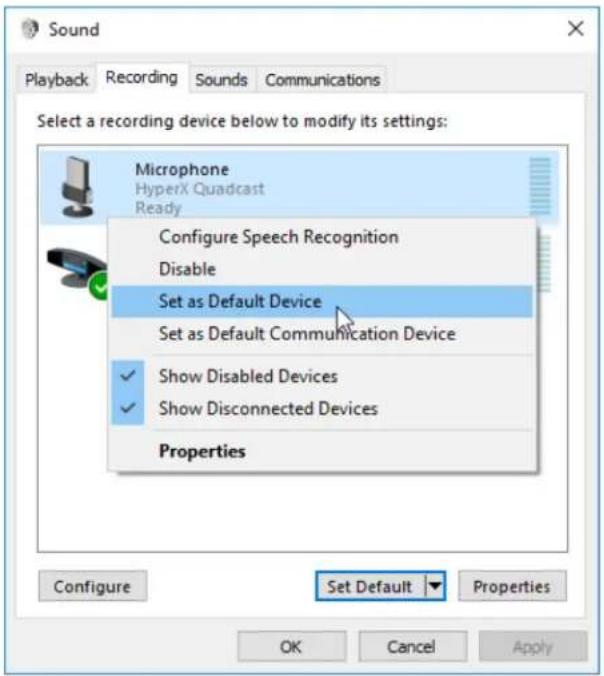
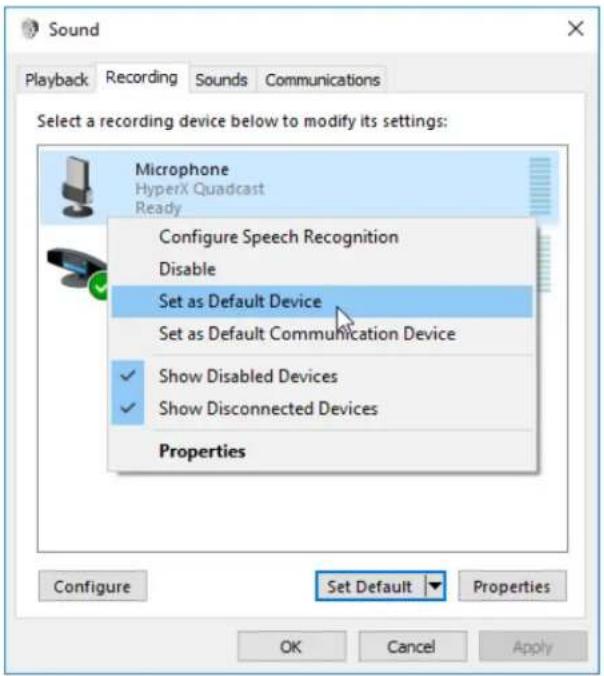
To ensure the microphone is configured correctly on the PC, follow the steps below:
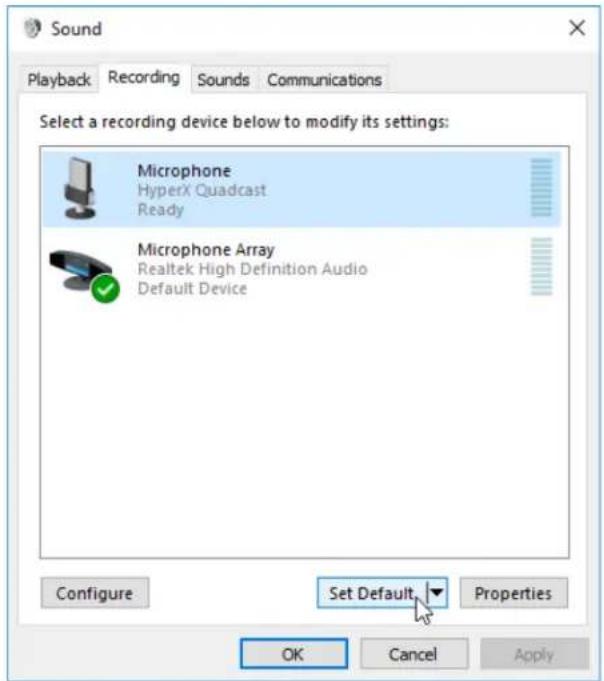
- Right-click on the sound icon on the system tray and select Sounds.
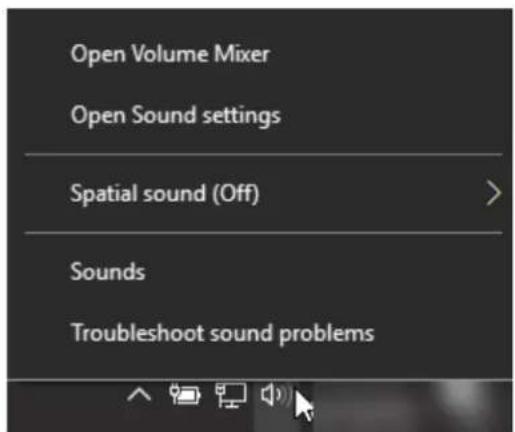
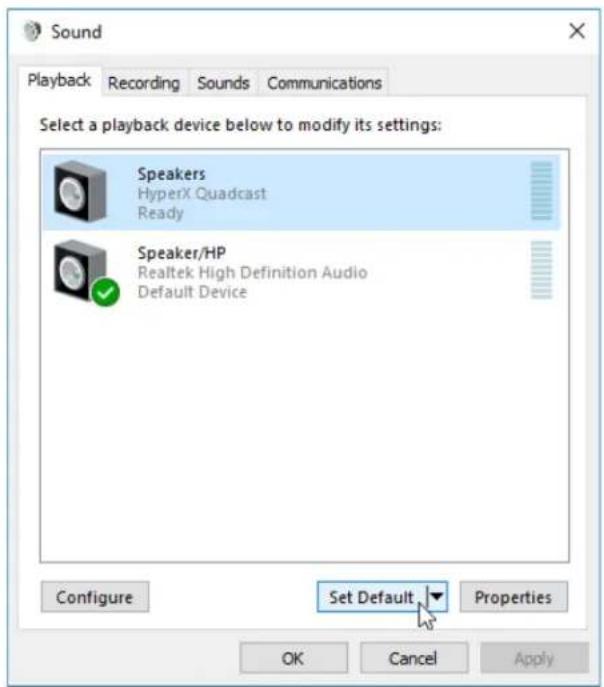
- On the Playback tab, select Speakers HyperX QuadCast and click on the Set Default button.
- On the Recording tab, select Microphone HyperX QuadCast and click on the Set Default button.
macOS
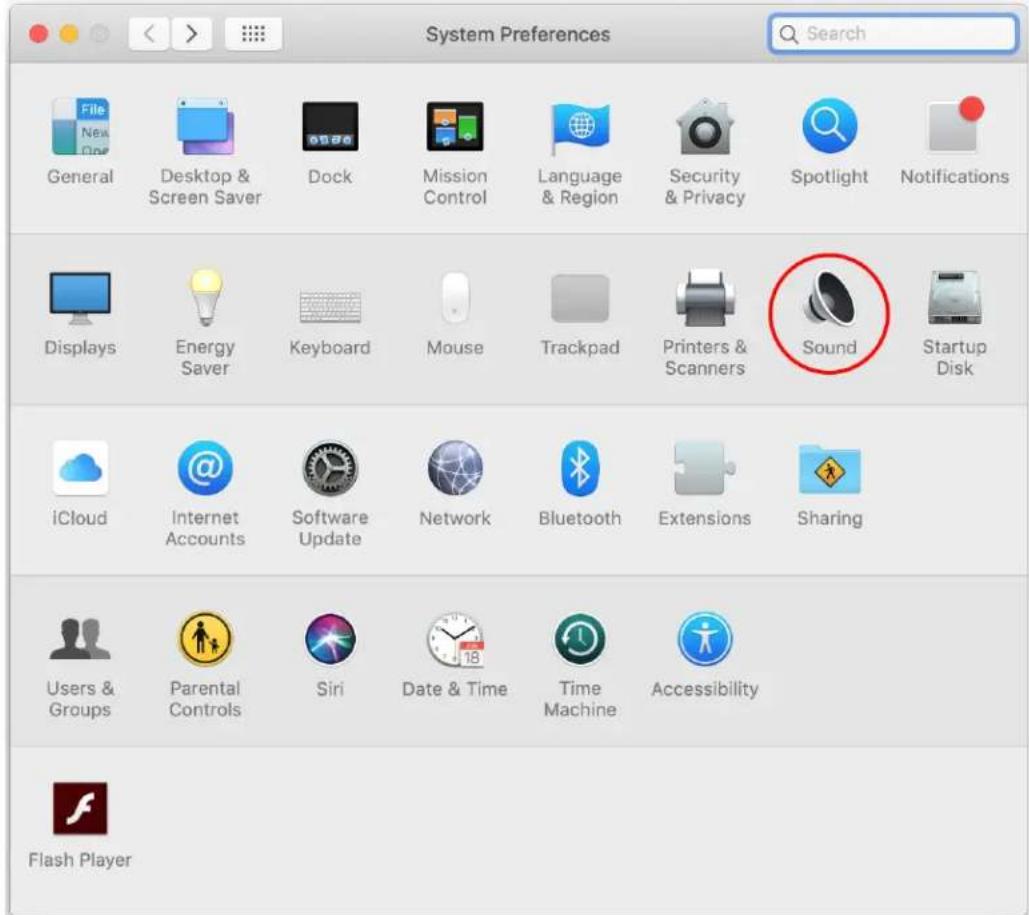
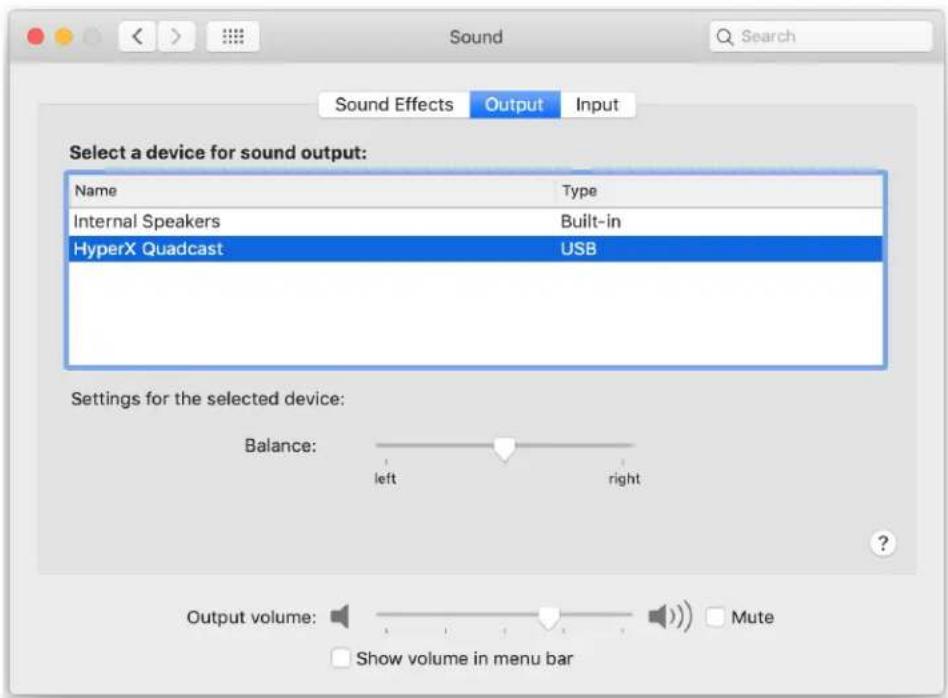
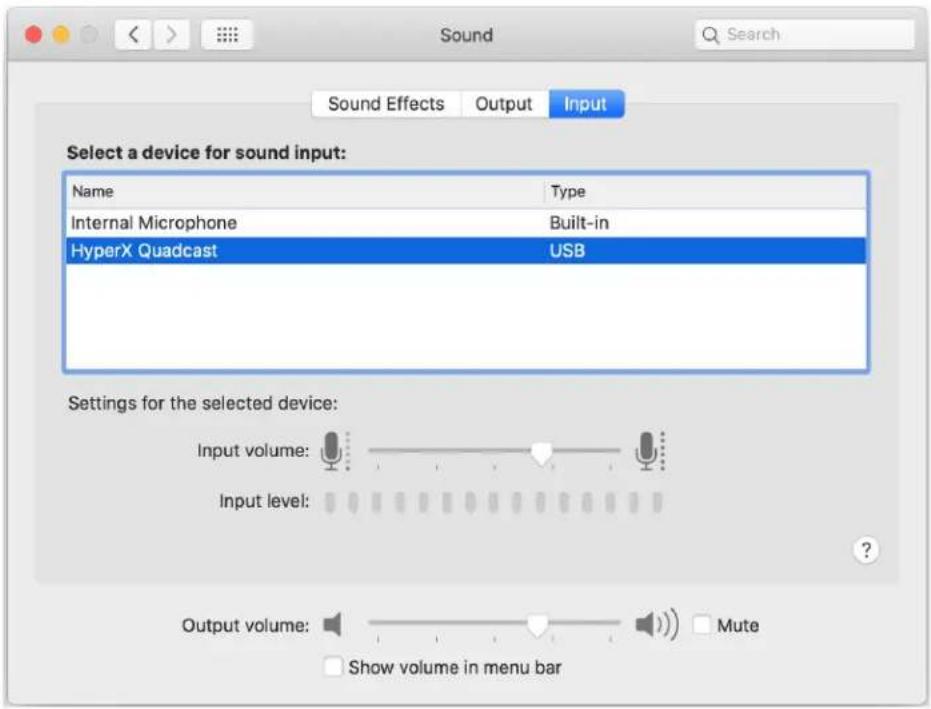
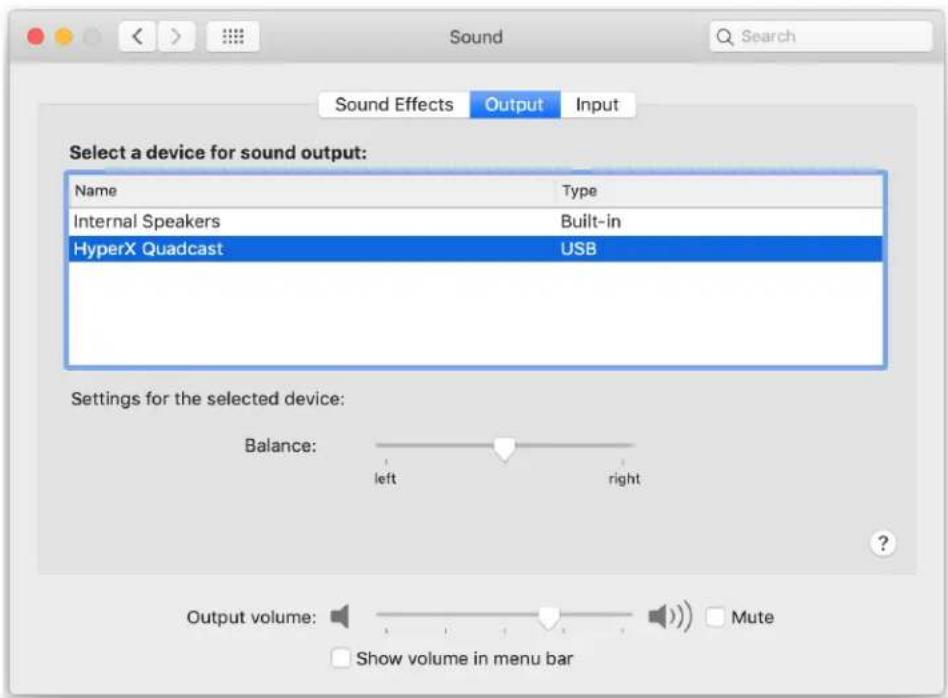
To ensure the microphone is configured correctly on the macOS, follow the steps below:
- Open System Preferences and select Sound.
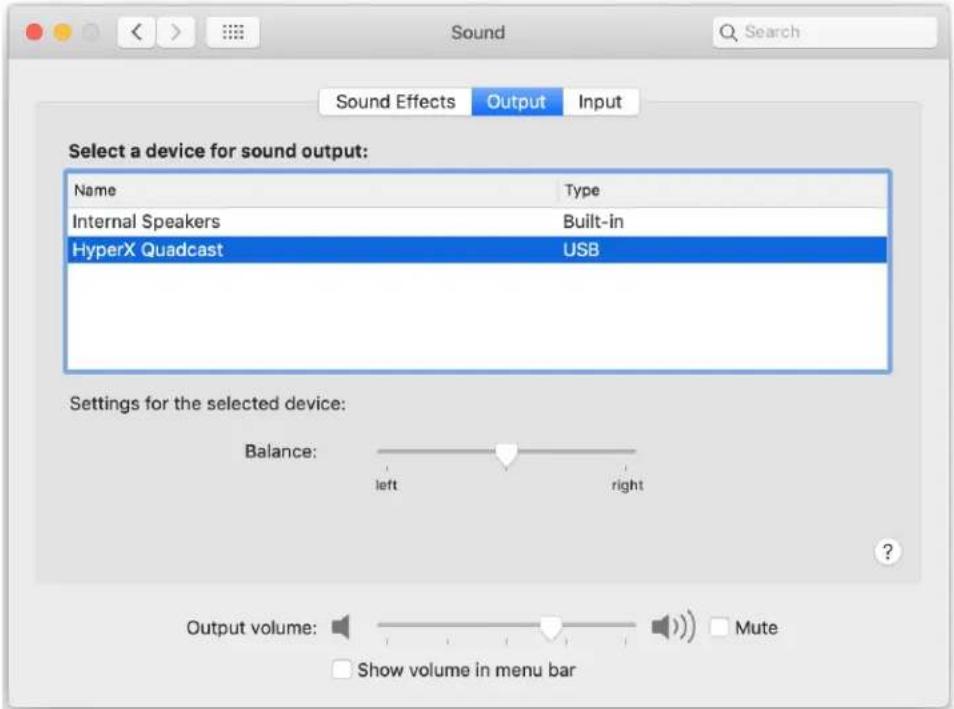
2. On the Output tab, select HyperX QuadCast.
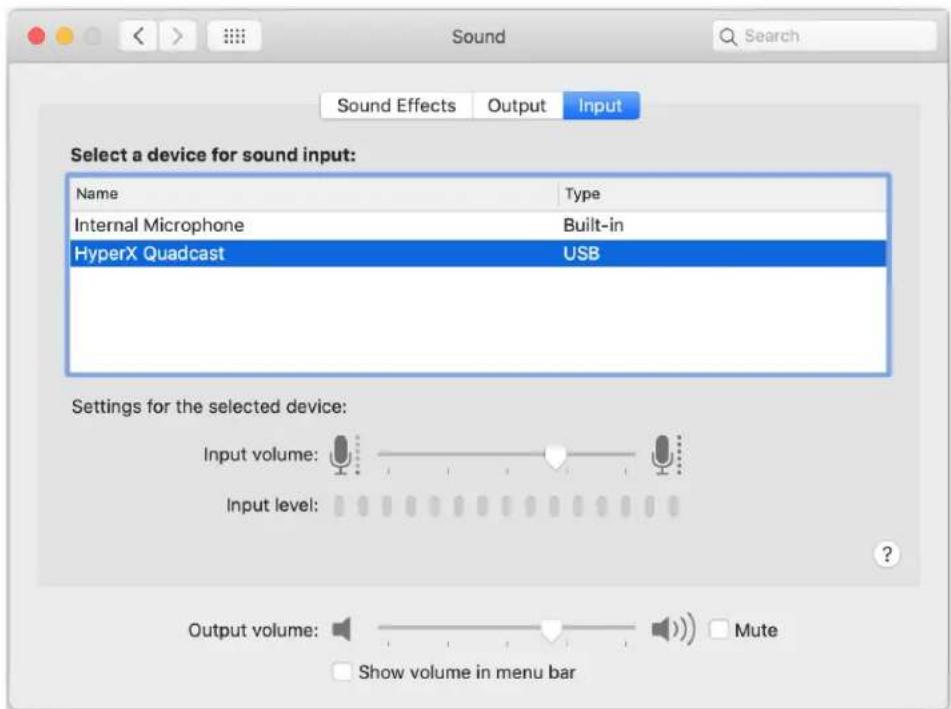
3. On the Input tab, select HyperX QuadCast.
Using with PS4™
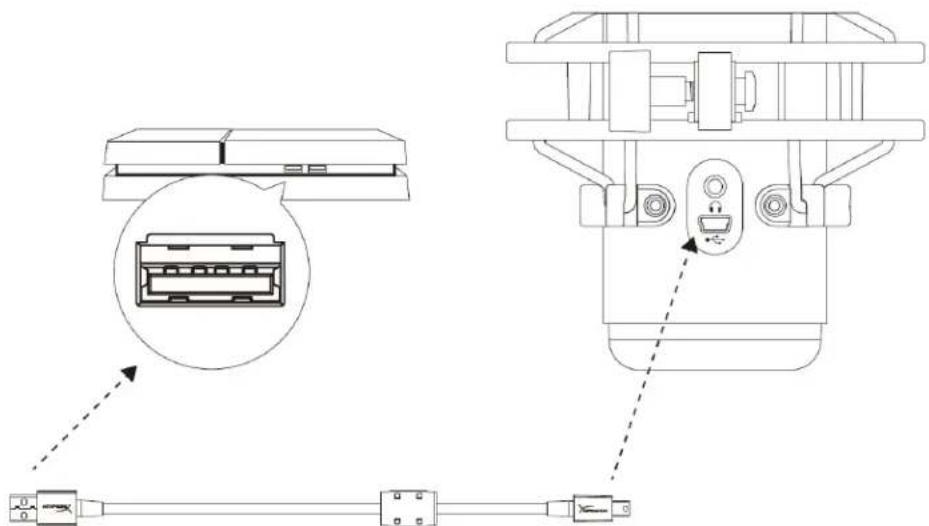
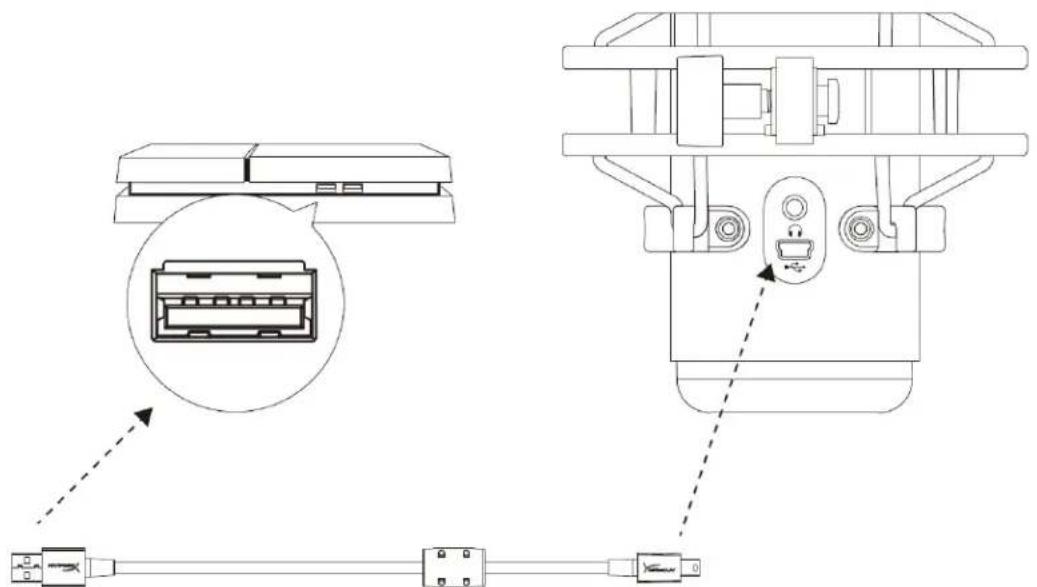
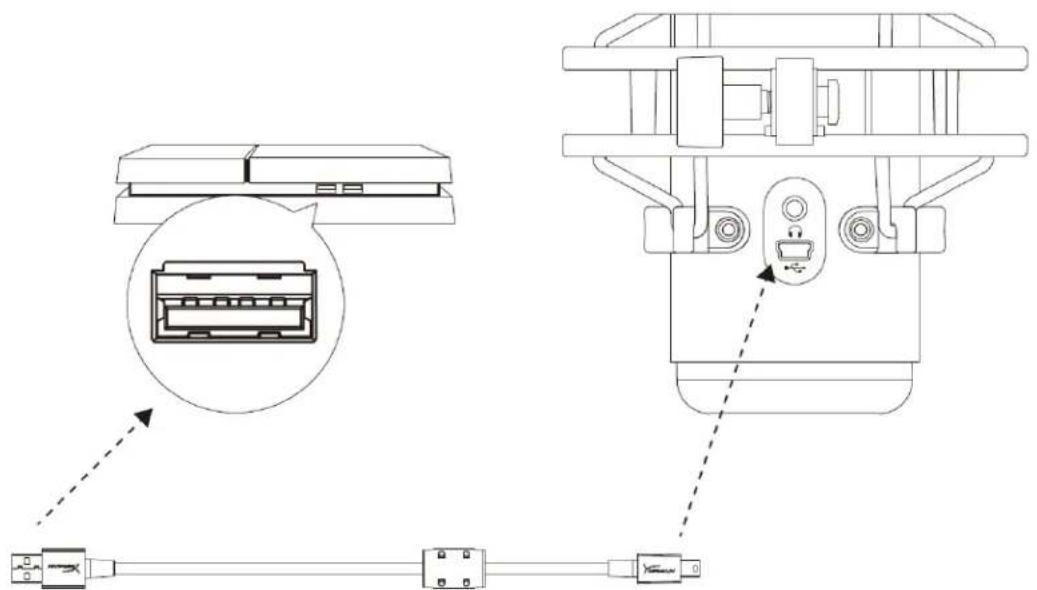
Connect the microphone to a USB port on the PS4 with the included USB cable.
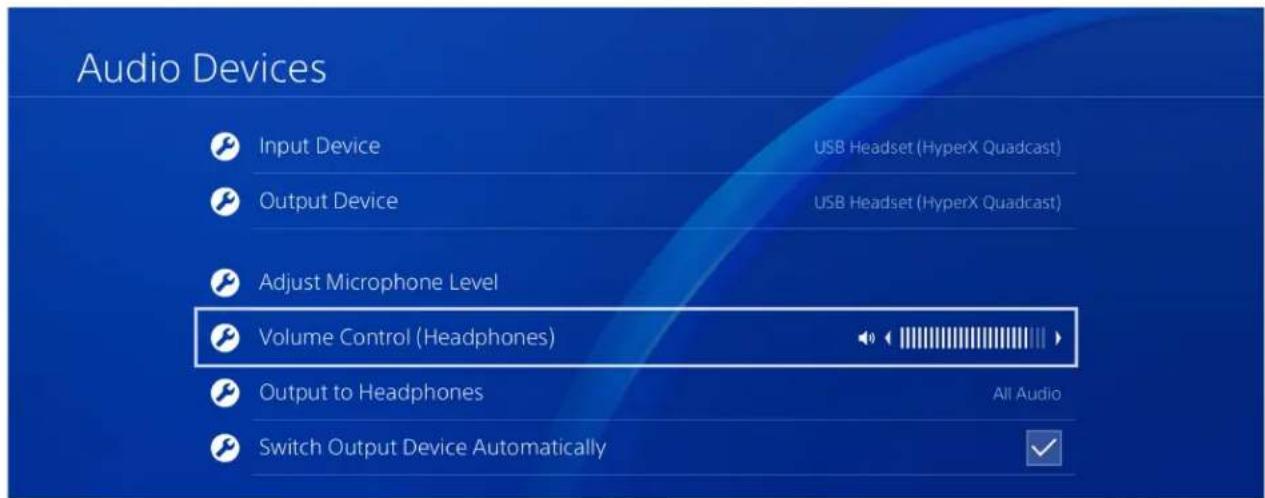
To ensure the microphone is configured with the most optimal settings on the PS4, follow the steps below:
- From the PS4 main menu, go to Settings > Devices > Audio Devices
- Set Input Device to USB Headset (HyperX QuadCast)
- Set Output Device to USB Headset (HyperX QuadCast)
- Set Output to Headphones to All Audio
- Set Volume Control (Headphones) to desired volume.
Connecting Headphones
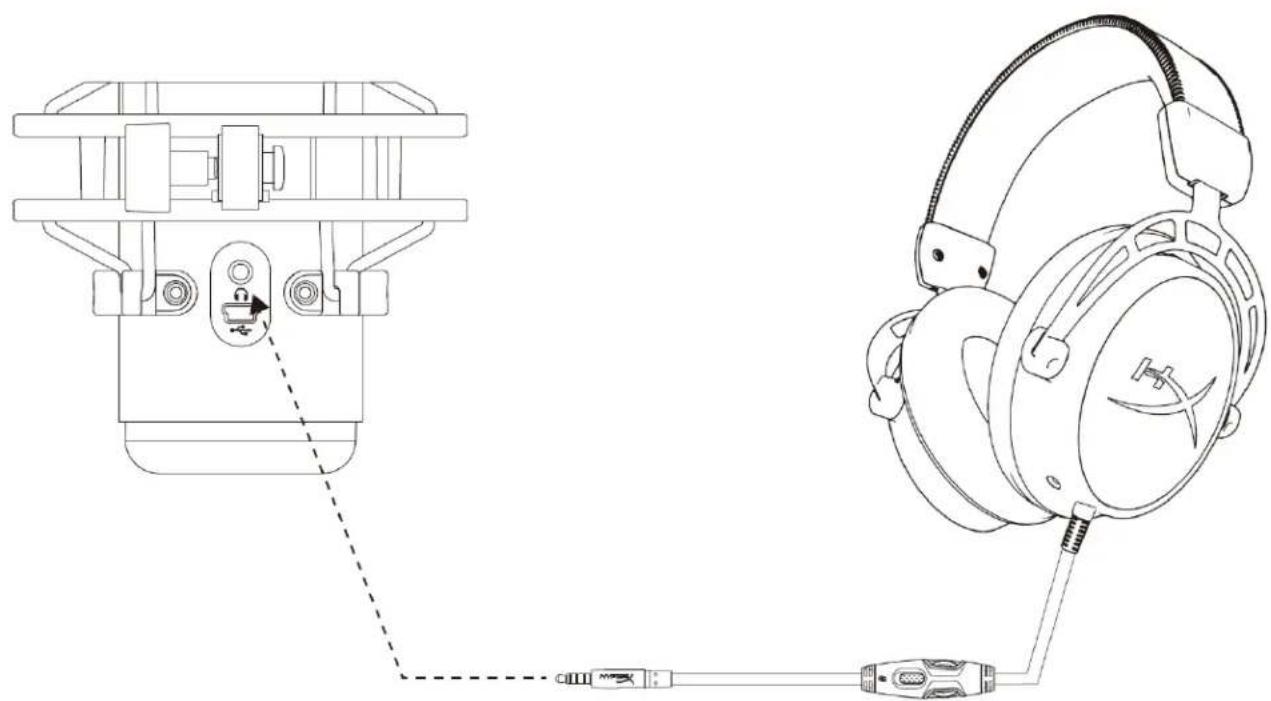
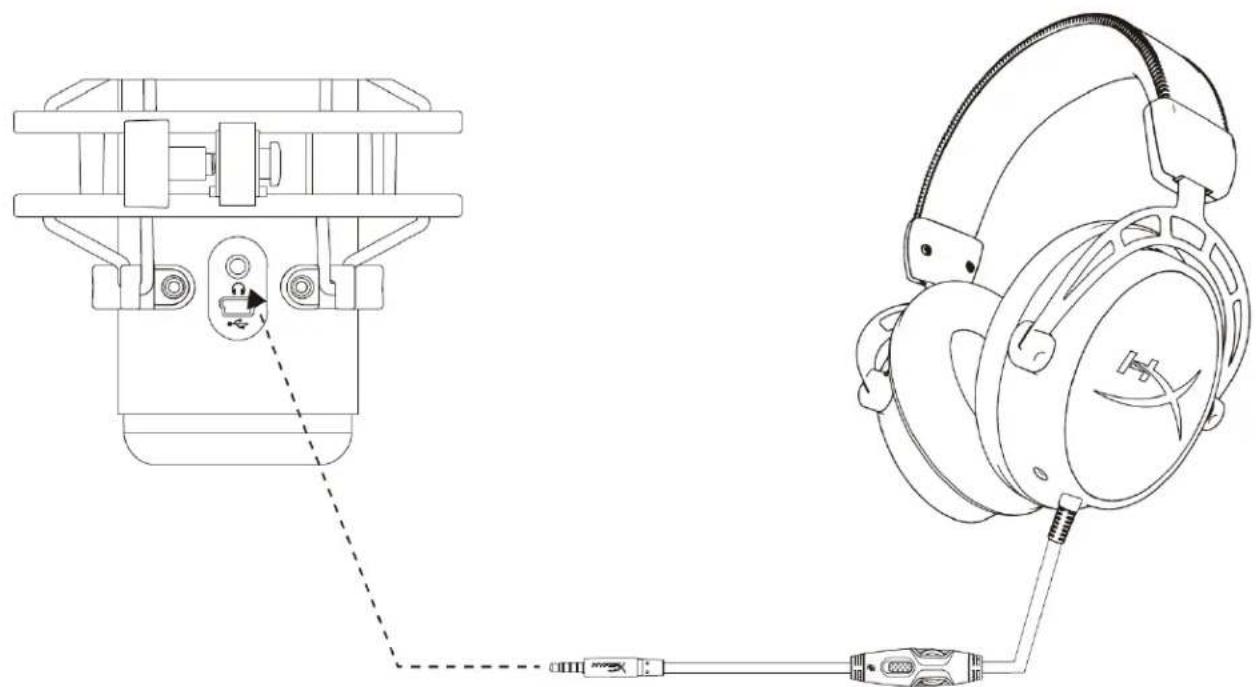
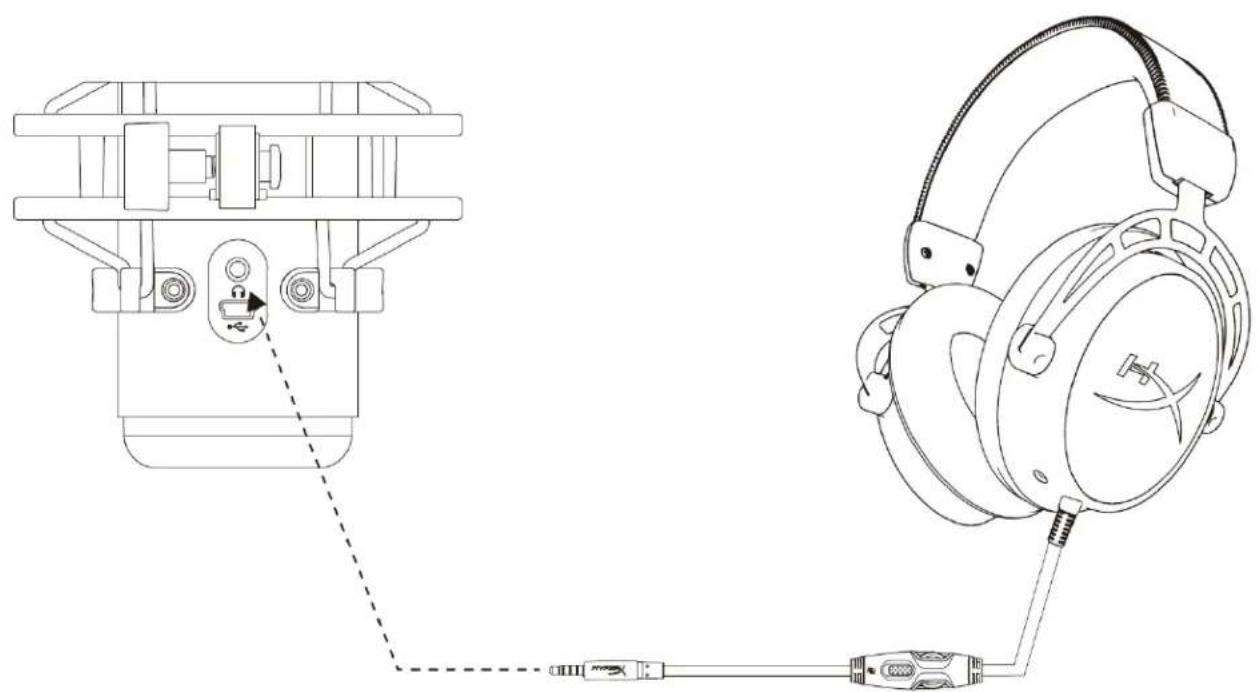
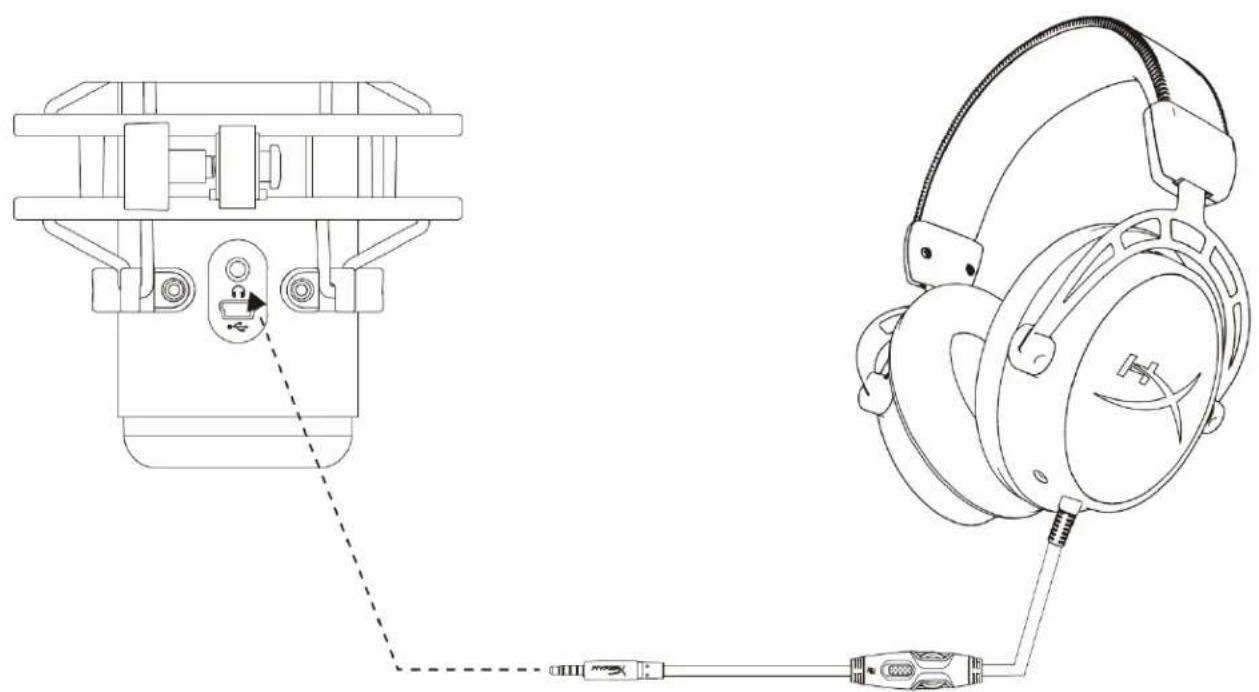
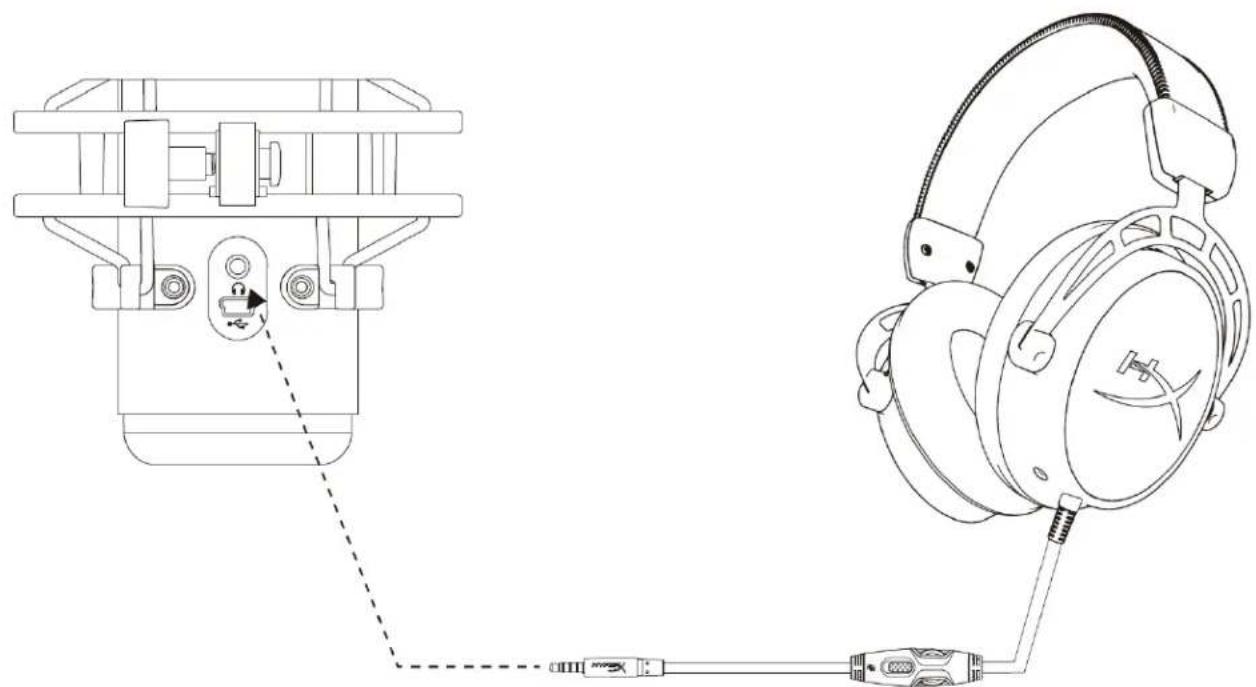
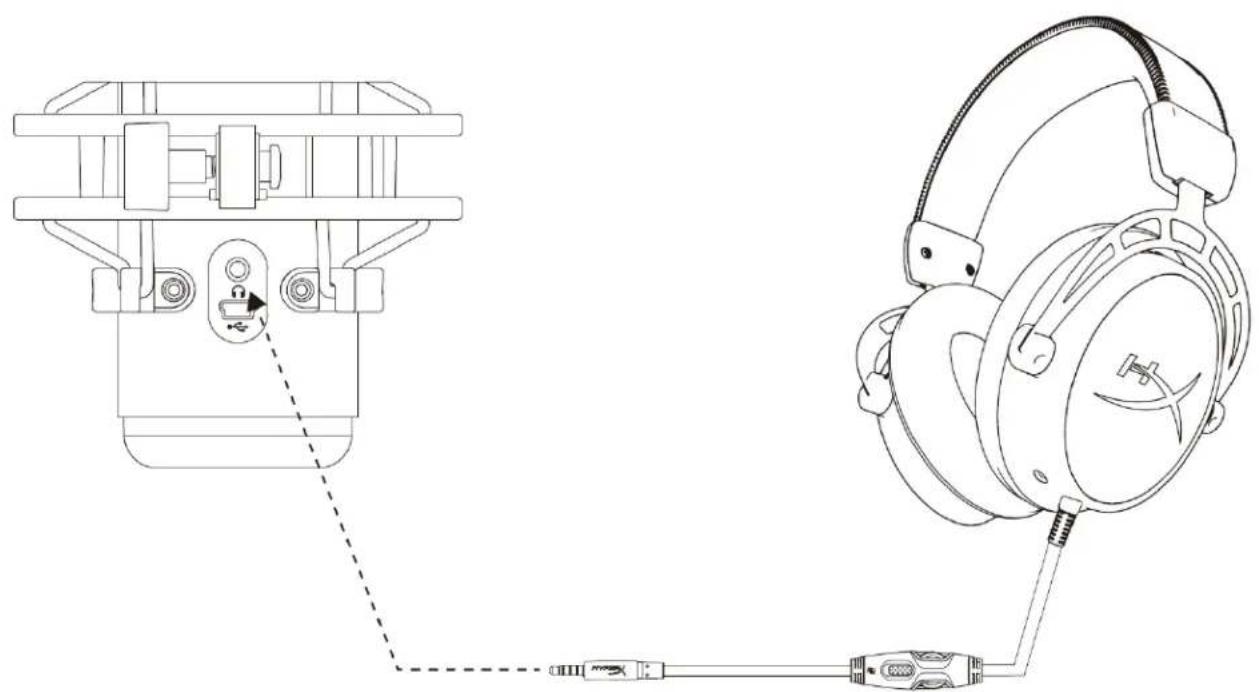
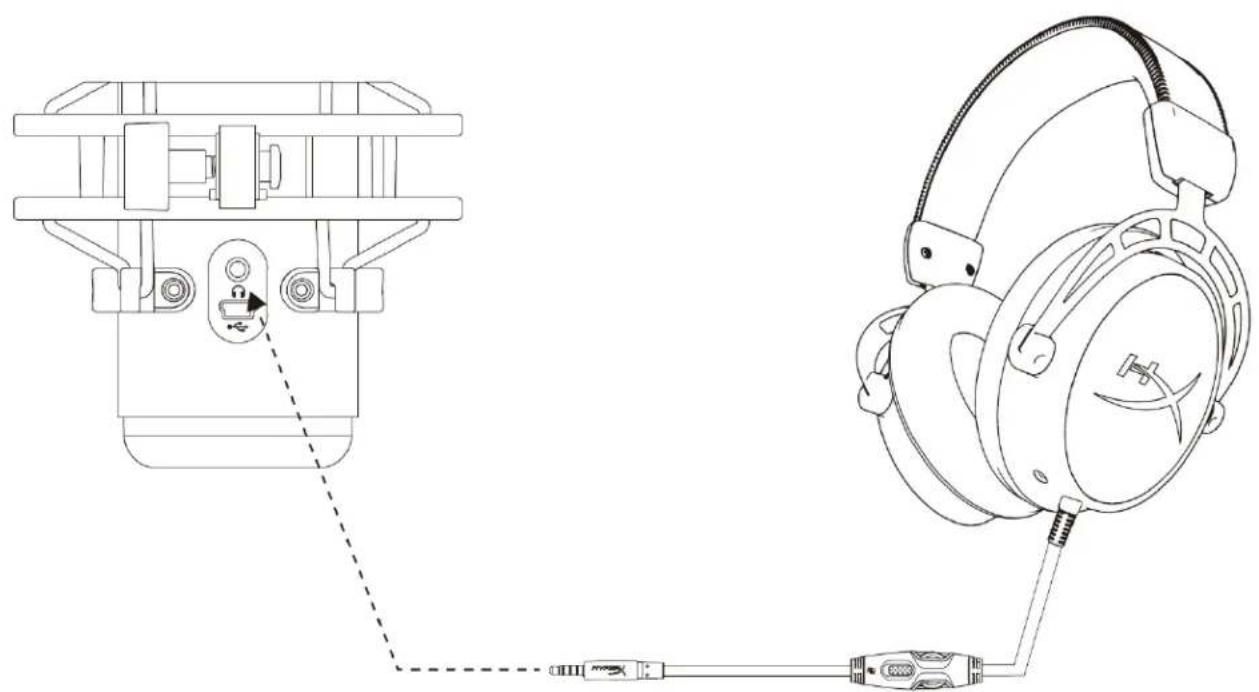
Connect headphones to the headphone jack on the microphone for microphone monitoring and playback audio.
Controlling Microphone Monitoring
PC
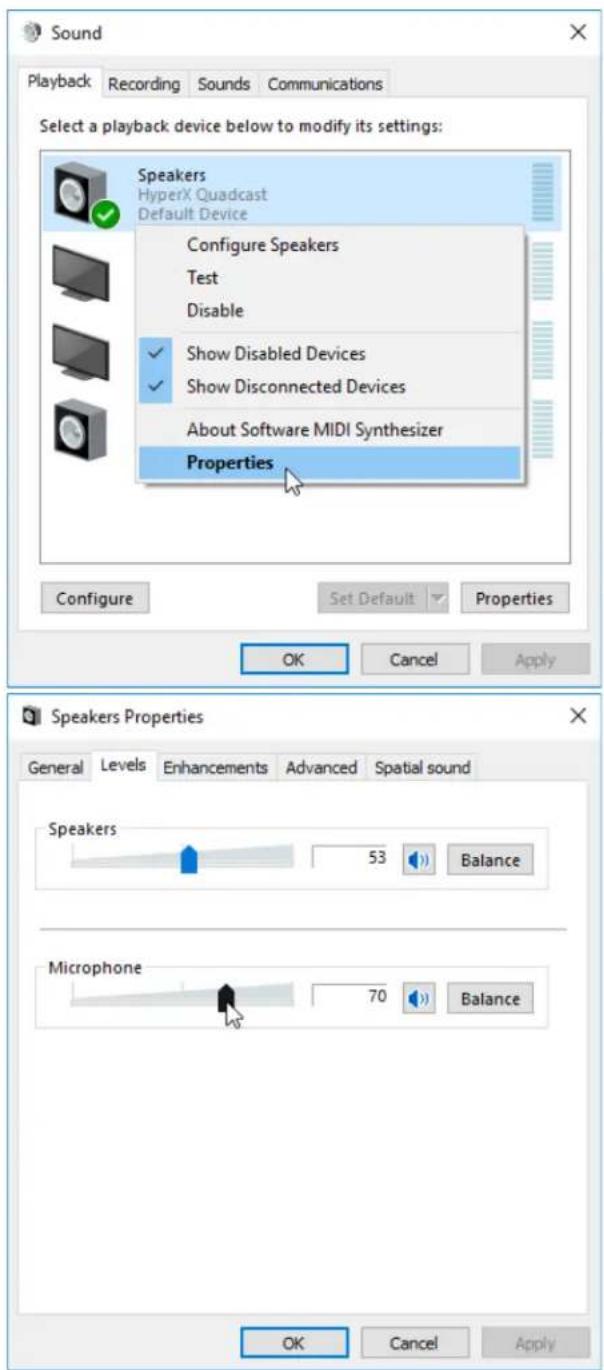
- From the Sound control panel, on the Playback tab, right-click on Speakers HyperX QuadCast and select Properties.
- On the Levels tab, adjust the Microphone volume slider to adjust the level of microphone monitoring.
macOS
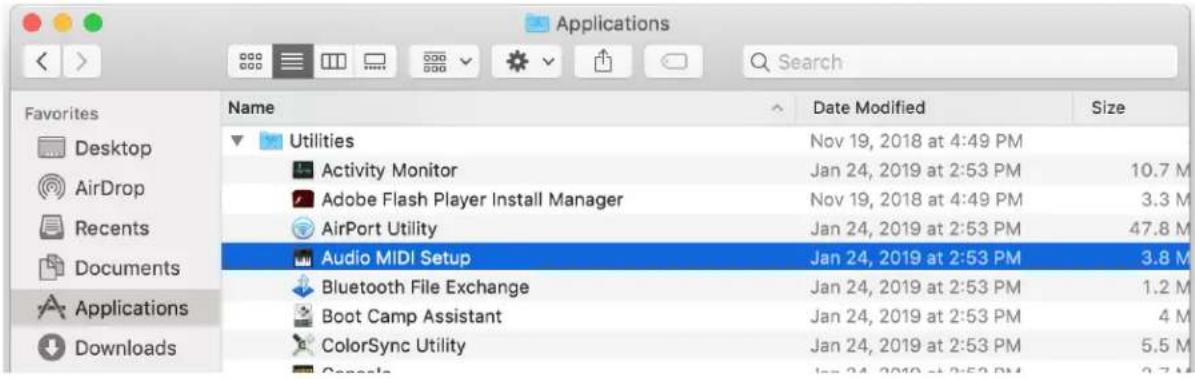
- Open the Finder app and go to Applications > Utilities > Audio MIDI Setup
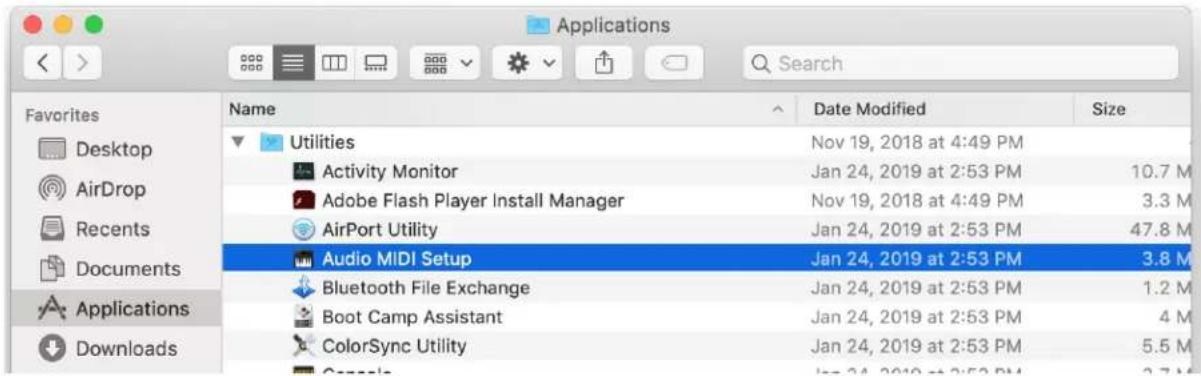
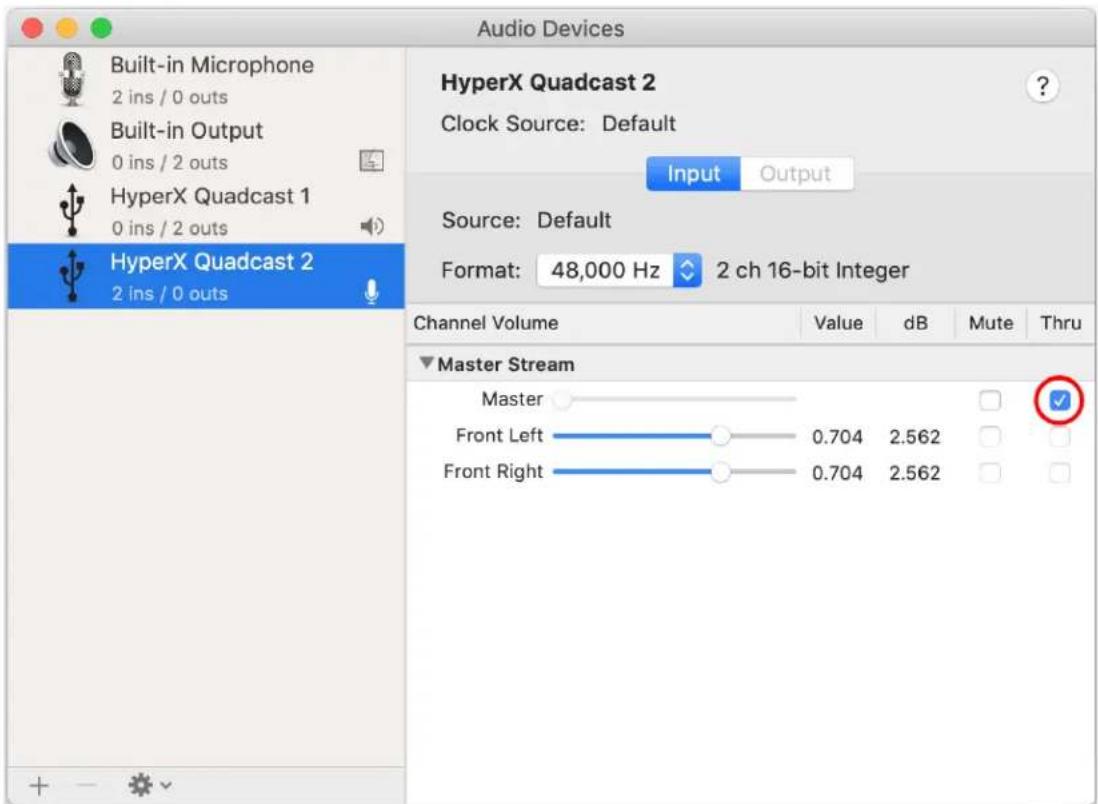
- Click on HyperX QuadCast 2 and click on the checkbox under the Thru column to toggle microphone monitoring on or off.
PS4
Microphone monitoring level cannot be directly controlled on PS4.
Installing the Mount Adapter
- Secure the included mount adapter onto a microphone boom arm. The mount adapter supports 3/8" and 5/8" thread sizes.
- Remove both the thumb screw and nut from the microphone stand.
- Remove the microphone stand from the microphone.
- Align the mount adapter with the microphone mount holes and secure the adapter with the thumb screw and nut.
Questions or Setup Issues?
Contact the HyperX support team at: hyperxgaming.com/support/
HyperX QuadCast™
SNR: ≥ 90 dB (1 kHz, RL=∞)
macOS
Use with PS4™
USB Headset (HyperX Quadcast)

Output Device
USB Headset (HyperX Quadcast)

Adjust Microphone Level

Volume Control (Headphones)



Output to Headphones
All Audio

Switch Output Device Automatically

macOS
PS4
Part Numbers
HX-MICQC-BK
CONTENTS
Overview....3
Specifications 4
Microphone control 5
Sample/bit rate: 48kHz/16-bit
Element: Electret condenser microphone
Condensers: Three 14mm condensers
Polar patterns: stereo, omnidirectional, cardioid, bidirectional
macOS
Use with PS4™
USB Headset (HyperX Quadcast)

Output Device
USB Headset (HyperX Quadcast)

Adjust Microphone Level

Volume Control (Headphones)


Output to Headphones
All Audio

Switch Output Device Automatically

macOS
PS4
Product References
HX-MICQC-BK
TABLE OF CONTENTS
Overview.... 3
Specifications 4
macOS
USB Headset (HyperX Quadcast)

Output Device
USB Headset (HyperX Quadcast)

Adjust Microphone Level

Volume Control (Headphones)



Output to Headphones
All Audio

Switch Output Device Automatically

Headphone connection
macOS
PS4
Part numbers
HX-MICQC-BK
INDEX
SNR: ≥ 90 dB (1 kHz, RL=∞)
Microphone control
macOS
USB Headset (HyperX Quadcast)

Output Device
USB Headset (HyperX Quadcast)

Adjust Microphone Level

Volume Control (Headphones)



Output to Headphones
All Audio

Switch Output Device Automatically

macOS
PS4
Product Code
HX-MICQC-BK
INDEX
Overview 3
Specifications....4
macOS
2. In the Output tab, select HyperX QuadCast.
3. In the Input tab, select HyperX QuadCast.
Using with PS4™
USB Headset (HyperX Quadcast)

Output Device
USB Headset (HyperX Quadcast)

Adjust Microphone Level

Volume Control (Headphones)



Output to Headphones
All Audio

Switch Output Device Automatically

macOS
PS4
Part Numbers
HX-MICQC-BK
TABLE OF CONTENTS
Introduction.... 3
Technical specifications 4

macOS system
Adjust microphone level
Volume control (headphones)

Output to headphones
All audio
Switch output device automatically

macOS
PS4
Catalog numbers
HX-MICQC-BK
CONTENTS
Overview 3
macOS
USB headset (HyperX Quadcast)

Output Device
USB Headset (HyperX Quadcast)

Adjust Microphone Level

Volume Control (Headphones)

All Audio

Output to Headphones

Switch Output Device Automatically

macOS
PS4
Part Numbers
HX-MICQC-BK
CONTENTS
General View 3
Technical Specifications 4
Microphone Controls 5
SNR: ≥ 90 dB (1 kHz, RL=∞)
Microphone Controls
Polar Pattern Selection
macOS
PS4™ Usage
USB Headset (HyperX Quadcast)

Output Device
USB Headset (HyperX Quadcast)

Adjust Microphone Level

Volume Control (Headphones)



Output to Headphones
All Audio

Switch Output Device Automatically

macOS
- From Finder, go to Applications > Utilities > Audio MIDI Setup.
PS4
Product number
HX-MICQC-BK
Table of contents
Overview 3
Specifications 4
Microphone controls 5

macOS
Use with PS4™
USB Headset (HyperX Quadcast)

Output Device
USB Headset (HyperX Quadcast)

Adjust Microphone Level

Volume Control (Headphones)



Output to Headphones
All Audio

Switch Output Device Automatically

Connecting Headphones
macOS
PS4
Part Number
HX-MICQC-BK
Table of Contents
Overview 3
Specifications 4
Microphone Control Unit 5
Using with PC or Mac 7
Using with PS4™.... 11
Connecting Headphones 12
Adjusting Microphone Monitoring....13
Mount Adapter Installation 15
Overview


macOS
For use with PS4™
USB Headset (HyperX Quadcast)

Output Device
USB Headset (HyperX Quadcast)

Adjust Microphone Level

Volume Control (Headphones)


Output to Headphones
All Audio

Switch Output Device Automatically

Headphone Connection
macOS
PS4
HYPER

Table of Contents
Overview 3



Technical Specifications
Not decorfin


macOS
Using with PS4™
macOS


Product Code
HX-MICQC-BK
Table of Contents
Overview 3

macOS
2. On the Output tab, select HyperX QuadCast.
Using with PS4™
USB Headset (HyperX Quadcast)

Output Device
USB Headset (HyperX Quadcast)

Adjust Microphone Level

Volume Control (Headphones)



Output to Headphones
All Audio

Switch Output Device Automatically

Connect the headset
macOS
PS4
Product model
HX-MICQC-BK
Table of contents
Overview 3
Specification 4
Microphone controls....5

macOS
Use with PS4 TM
USB Headset (HyperX Quadcast)

Output Device
USB Headset (HyperX Quadcast)

Adjust Microphone Level

Volume Control (Headphones)



Output to Headphones
All Audio

Switch Output Device Automatically

Connect Headphones
macOS
PS4
Product Model
HX-MICQC-BK
Table of Contents
Overview 3
Product Specifications....4
Microphone Controls....5
Using with PC or Mac 7
Using with PS4™ 11
Connecting the Microphone....12
Controlling Microphone Pickup Volume 13
Installing the Adapter....15
Overview

Turn the dial to switch the polar pattern.
macOS
Using with PS4™
USB Headset (HyperX Quadcast)

Output Device
USB Headset (HyperX Quadcast)

Adjust Microphone Level

Volume Control (Headphones)



Output to Headphones
All Audio

Switch Output Device Automatically

Connect Microphone
macOS
PS4
- HYPERX QUADCAST™ MICROPHONE
- HYPERX QUADCAST™ MICROPHONE HEADSET INSTALLATION GUIDE
- HYPERX QUADCAST™
- PART NUMBERS
- TABLE OF CONTENTS
- OVERVIEW
- SPECIFICATIONS
- MICROPHONE
- HEADPHONE OUTPUT
- MICROPHONE CONTROLS
- ADJUSTING GAIN CONTROL
- MUTING THE MICROPHONE
- USING WITH PC OR MAC
- WINDOWS
- MACOS
- ON THE OUTPUT TAB, SELECT HYPERX QUADCAST
- ON THE INPUT TAB, SELECT HYPERX QUADCAST
- USING WITH PS4™
- CONNECTING HEADPHONES
- CONTROLLING MICROPHONE MONITORING
- PC
- PS
- INSTALLING THE MOUNT ADAPTER
- QUESTIONS OR SETUP ISSUES
- USE WITH PS4™
- CONTENTS
- PRODUCT REFERENCES
- HEADPHONE CONNECTION
- INDEX
- MICROPHONE CONTROL
- PRODUCT CODE
- IN THE OUTPUT TAB, SELECT HYPERX QUADCAST
- IN THE INPUT TAB, SELECT HYPERX QUADCAST
- MACOS SYSTEM
- CATALOG NUMBERS
- PS4™ USAGE
- FOR USE WITH PS4™
- TECHNICAL SPECIFICATIONS
- NOT DECORFIN
- CONNECT THE HEADSET
- USE WITH PS4 TM
- CONNECT HEADPHONES
- CONNECT MICROPHONE
Brand : HP
Model : HyperX QuadCast
Category : Microphone