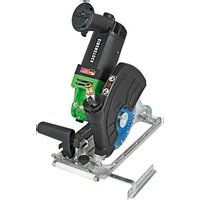
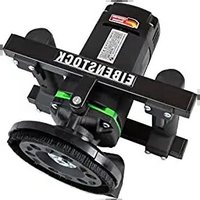
EDS 181 - Grinder Eibenstock - Free user manual and instructions
Find the device manual for free EDS 181 Eibenstock in PDF.


| Product type | Wet/dry professional diamond saw |
| Brand | Eibenstock |
| Model | EDS 181 |
| Rated voltage | 230 V ~ |
| Power input | 2300 W |
| Frequency | 50 - 60 Hz |
| No-load speed | 7500 min⁻¹ |
| Rated speed | 4300 min⁻¹ |
| Max. disc diameter | 200 mm |
| Arbor | ∅ 22.2 mm |
| Max. cutting depth (90°, without rail) | 63 mm |
| Max. cutting depth (45°, without rail) | 40 mm |
| Insulation | Class II |
| Protection class | IP 20 |
| Weight | approx. 7.7 kg |
| Sound pressure level | 83 dB(A) |
| Sound power level | 94 dB(A) |
| Vibration emission value | 2.6 m/s² |
| Main functions | Dry/wet cutting, miter cut 0-45°, plunge cut function, parallel guide |
| Safety | Protective cover, PRCD switch, electronic and thermal overload protection, spindle lock |
| Maintenance and cleaning | Clean the motor air vent regularly |
| Included accessories | Diamond cutting disc Ø180mm, tool set, metal case |
| Warranty | 12 months for businesses (on invoice) |
Frequently Asked Questions - EDS 181 Eibenstock
User questions about EDS 181 Eibenstock
0 question about this device. Answer the ones you know or ask your own.
Ask a new question about this device
Download the instructions for your Grinder in PDF format for free! Find your manual EDS 181 - Eibenstock and take your electronic device back in hand. On this page are published all the documents necessary for the use of your device. EDS 181 by Eibenstock.
USER MANUAL EDS 181 Eibenstock
natural_image
Industrial cutting machine with black and green components mounted on a metal frame (no visible text or symbols)EDS 181
Wichtige Hinweise
natural_image
Close-up of a mechanical component with a white arrow pointing to a specific part (no visible text or symbols)natural_image
Close-up of a metallic mechanical component with a black tool inserted, showing internal structure and a white arrow pointing to a feature (no text or symbols visible)natural_image
Close-up of a mechanical device with black components and a green handle, showing no visible text or symbols.natural_image
Close-up of a mechanical component with arrows pointing to features, no visible text or symbolsnatural_image
Close-up of a hand adjusting a black mechanical component with a metallic fitting (no visible text or symbols)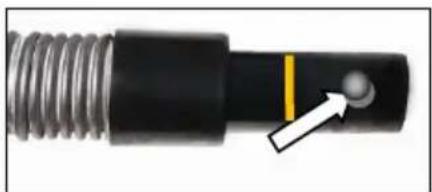
natural_image
Close-up of a mechanical component with threaded shaft and central pin (no visible text or symbols)natural_image
Close-up of hands using a black tool to adjust a mechanical component with a green tool in the background (no visible text or symbols)natural_image
Close-up of a green mechanical component with a white arrow pointing to a bolt (no text or symbols visible)natural_image
Close-up of a mechanical component with a curved arrow indicating rotation or motion (no text or symbols visible)natural_image
Symbol of a trash bin with crossed lines indicating no waste or discharge (no text or labels)Nur für EU-Länder
Frank Markert
Head of Engineering
English
Important Safety Instructions
Important instructions and warning notices are allegorized on the machine by means of symbols:

Before you start working, read the operating instructions of the machine.
Work concentrated and carefully. Keep your work-place clean and avoid dangerous situations.
In order to protect the user, take precautions.
During work you should wear ear protectors, goggles, dust mask, protective gloves and sturdy work clothes!

natural_image
Four circular icons showing different human and facial recognition symbols: headphones, glasses, hand gesture, and hand (no text or labels)Use ear protection
Wear safety goggles
Wear a dust mask
Wear protective gloves

Warning of general danger
Warning of dangerous voltage
Warning of hot surface
Danger of being ripped or cut
Technical Data
Wet-Dry Diamond Saw EDS 181
| Rated voltage: | 230 V ~ | 110 V ~ |
| Power input: | 2300 W | |
| Rated current | 20 A | |
| Order Number: | 0660P000 | 0660Q000 |
Frequency: 50 - 60 Hz
No-load speed: 7500 rpm
Rated speed: 4300 rpm
Max. disc diameter: 200 mm
Spindle connection: ∅ 22.2 mm
Cutting depth max.: 63 mm (with cutting disc ∅200mm and without guide rails)
Protection class: II
Degree of protection: IP 20
Net weight: ca. 7.7 kg
Available accessories:
| Ordernumber: | |
| Diamond cutting 180 mm | 37463000 |
| Diamond cutting 200 mm | 37444000 |
| Guide rail 750 mm | 37461000 |
| Guide rail 1500 mm | 37462000 |
| Connecting strip for guide rail | 37463000 |
| Set of 2 suction holder for guide rail | 37464000 |
| Industrial Vacuum Cleaner DSS 35 M iP | 09919000 |
Content of Delivery
EDS 181 with diamond cutting disc ∅ 180mm, tool kit and operating instructions in a metal case.
Application for Indented Purpose
The Wet-Dry Diamond Saw is intended for professional use and may only be operated after being fully installed in accordance with the installation instructions. With the appropriate diamond cutting disc, the EDS 181 can be used to cut natural stone such as granite, marble, concrete items such as flagstones, lawn borders and terrazzo as well as for joint renovation. During wet cutting, the diamond cutting disc must be cooled with water from the available water supply. During dry cutting, vacuum removal of the dust is absolutely essential. The machine may be used exclusively in conjunction with a diamond cutting disc and a vacuum cleaner of dust category M.
Only diamond cutting discs recommended by the manufacturer should be used.

Safe work with the machine is only possible if you read this operating instruction completely and follow the instructions contained strictly. Additionally, the general safety instructions of the leaflet supplied with the tool must be observed. Prior to the first use, the user should absolve a practical training. Save all warnings and instructions for future reference.

Work concentrated and carefully. Keep your work place clean and avoid dangerous situations.

In order to protect the user, take precautions.
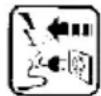
If the mains cable gets damaged or cut during the use, do not touch it, but instantly pull the plug out of the socket. Never use the tool with damaged mains cable.

The tool must neither be wet nor used in humid environment.
- Do not use the tool in an environment with danger of explosion.
- Do not drill into asbestos-containing materials.
■ Modifications of the tool are prohibited. - Never use the machine without dust guard.
- Always check the tool, cable and plug before use and plug before use. Have damages only repaired by specialists.
Insert the plug into the socket only when the tool switch is off. - When you work outside, the machine has to be used with a fault-current circuit breaker with max. 30 mA.
- The machine should only work under supervision of somebody.
Plug and switch the machine off if it is not under supervision, in case of putting up and stripping down the machine, in case of voltage drop or when fixing or mounting an accessory. - Switch the machine off if it stops for whatever reason. You avoid that it starts suddenly and not under supervision.
- Don't use the machine if a part of the housing is damaged or in case of damages on the switch, the cable or plug.
- Pay attention that the speed indicated on the cutting disc meets or is higher than the max. speed indicated on the machine.
- Use only diamond cutting wheels for your power tool.
- Wheels must be used only for recommended applications. For example: do not grind with the side of cutting wheel.
-
Cutting wheels have to be stored and used carefully according to the instructions of the producer.
-
Cutting discs flanges and other accessories must properly fit on the spindle of the power tool. Do not use any reducing pieces or adapters.
- Check the accessories before use. Do not use any products which are broken, cracked or damaged in another way.
■ Before use, make sure that the tool is correctly fixed and fastened.
Let it run idle for about 30 seconds in a safe position. If considerable vibrations occur or if other defects are recognised, switch off immediately.
- Always lead the mains and extension cable as well as the extraction hose to the back away from the machine.
■ Make sure the wheel is not contacting the workpiece before the switch is turned on. - Wait until the wheel attains full speed before cutting.
- Attention! The tool still runs for a little while after the machine was switched off.
■ Before setting the tool down after completing a cut, be sure that the wheel has come to a complete stop. - Do not stop the wheel by lateral pressure on the disc.
■ Never carry the machine at its cable. - Do not touch rotating parts.
- Persons under 16 years of age are not allowed to use the tool.




- During use, the operator and other persons standing nearly have to wear suitable ear protectors, a dust mask, protection goggles as well as protective gloves.
- Make sure that persons in the work space are not endangered by particles flying around.
- Keep the handles dry, clean and free of oil and grease.
■ Power tools have to be inspected by a specialist in regular intervals.
For further safety instructions, please refer to the enclosure!

Electrical Connection
The EDS 181 is made in protection class II. For protection purposes the machine can only be run with a GFCI. The machine is standard equipped with a PRCD protective switch integrated in the cord.
Attention!

- The PRCD protective switch must not lay in water.
- PRCD protective switches must not be used to switch the tool on and off.
■ Before starting your work, check the proper function by pressing the TEST button.
First, check the correspondence between voltage and frequency against the data mentioned on the identification plate.
Voltage differences of + 6 % to - 10 % are allowed.
Switching on and off
The EDS 181 is equipped with a lock-off button against unintentional switch-on.
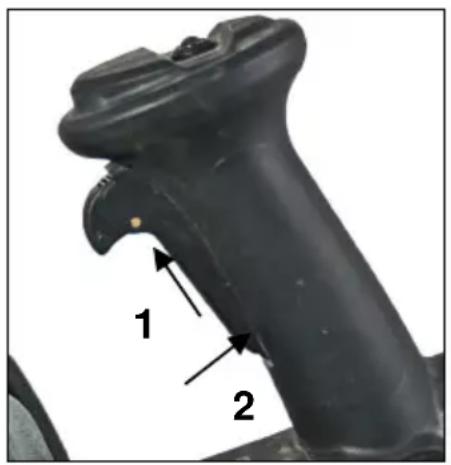
Switching-on: push the on/off switch forward (1) and then down (2)
Switching-off: release the on/off switch
Instructions for Use
Do not strain the machine so heavily that it comes to a standstill.
In order to work with as little dust as possible, we recommend setting the saw to the max. cutting depth for dry cutting. This assures optimum suction.
Only use combinations of diamond cutting discs and dust category M vacuum cleaners that are recommended by EIBENSTOCK. Other combinations can lead to insufficient dust collection and separation.
We recommend wet cutting for cuts with reduced cutting depth.
Adjust the cutting depth; see "Adjust cutting depth" section.
Hold the tool firmly with the right hand on the switch handle and the left hand on the front handle. Place the sliding block on the workpiece to be cut without allowing the diamond disc to come into contact with it. Then activate the tool and wait until the diamond disc has reached full speed. Now slide the tool in a flat and even manner across the surface of the workpiece until the cut is completed.
To achieve a clean cut, maintain a straight cutting line and a steady speed of advance. Curved cuts are not possible, as the diamond cutting disc will be angled into the workpiece.
Noticeable decreasing work progress and circular sparking are indications of a blunt diamond cutting disc. Briefly cutting into abrasive material (e.g. lime-sand brick or the EIBENSTOCK-diamond-sharpening-stone) can re-sharpen the disc again.
Pre-selection of the Cutting Depth
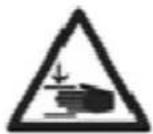
ACHTUNG! Risk of squashing
natural_image
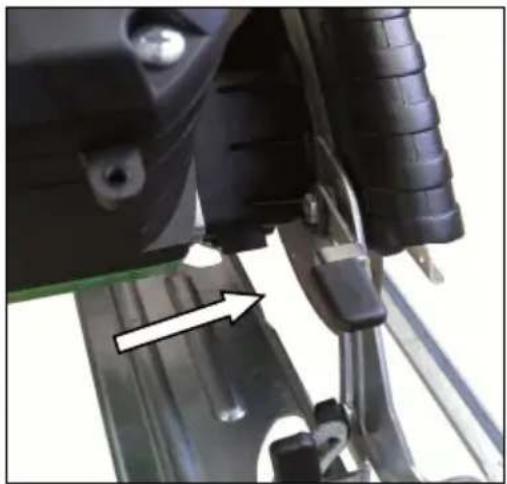
Close-up of a mechanical component with a white arrow pointing to a blue-green surface detail (no visible text or symbols)Release the lever on the depth control and move the sliding block up or down. Stop the sliding block at the desired cutting depth by tightening the lever. To achieve the maximum cutting depth of 63mm (with cutting disc ∅ 200 mm – special accessorie) the cutting depth limiter must be removed (see Section dipping function).
Cutting depths:
| . Disc diameter | Angle Guide rail max. Material thickness | |
| 180 mm 90° | no 53 mm | |
| 180 mm 45° | no 35 mm | |
| 180 mm 90° | yes 50 mm | |
| 180 mm 45° | ja 32 mm | |
| 200 mm 90° | no 63 mm | |
| 200 mm 45° | no 40 mm | |
| 200 mm 90° | yes 60 mm | |
| 200 mm 45° | yes 37 mm | |
Mitre cuts
natural_image
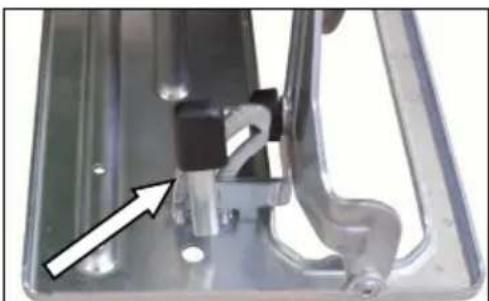
Close-up of a mechanical component with a black handle and white arrow indicator (no visible text or symbols)Release both levers on the respective angle scales on the front and rear of the sliding block.
Incline the tool to the desired angle (0 - 45°) and tighten the levers.
Parallel stop
natural_image
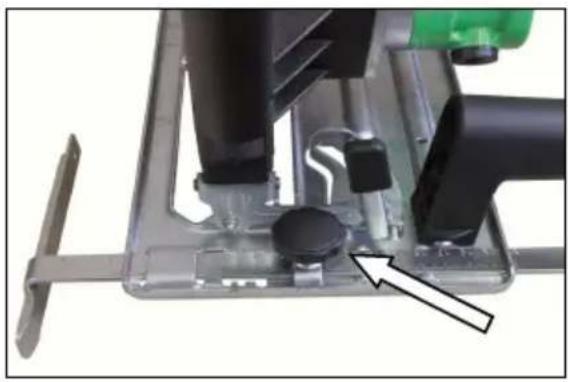
Close-up of a mechanical device with black components and a green handle, showing no visible text or symbols.The parallel stop enables precise cuts to be made.
Simply push the parallel stop firmly against the edge of the workpiece and secure it with the clamping screw on the front of the sliding block.
For absolutely precise cuts, especially at larger cutting lengths, guide rails (750mm and 1500mm) are available as an accessory.
Dipping function
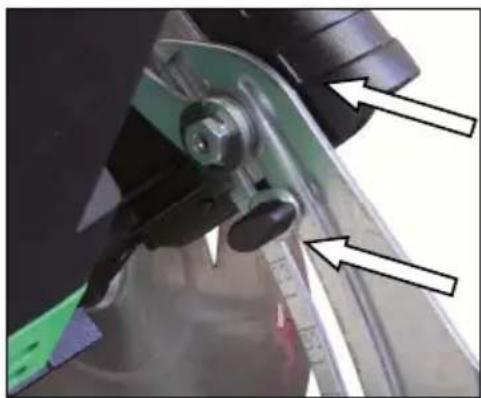
natural_image
Close-up of a mechanical component with arrows pointing to features, no visible text or symbolsTo create cut-out sections or for joint renovation, you can dip into the material with the diamond saw.
To do this, adjust the desired cutting depth using the cutting depth limiter (see arrow).
This is fitted to the depth control (see image).
Bring the sliding block to the desired position (the desired max. cutting depth) and position the cutting depth limiter directly below the depth control lever.
The lever must be open while dipping.
Place the machine on the workpiece.
Activate the machine without allowing the diamond cutting disc to touch the workpiece, and dip it into the workpiece.
After the cut, lift out of the material before switching the machine off.
Take extreme care when using this function!
Dry cutting
Dust which occurs during your work is hazardous to health. That is why the EDS 181 must be used with a vacuum cleaner, and a dust mask has to be worn.
The suitable Wet/Dry Vacuum Cleaner DSS 35 M iP is available as accessory. It can directly be attached to the connection on the dust hood.
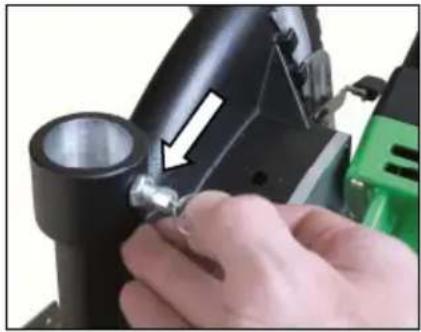
natural_image
Close-up of a hand adjusting a black mechanical component with a metallic fitting (no visible text or symbols)The suction hose can be locked against slipping out by means of the hose fixing. Make the necessary drill hole as follows:
Put the suction hose in the connector of the hood.
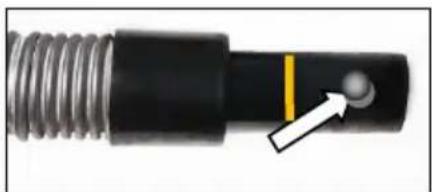
natural_image
Close-up of a mechanical component with threaded shaft and central hole, showing a white arrow pointing to a circular feature (no text or symbols)Mark the plug-in depth with a crayon. (see arrow) Drill 13 mm from this marking (line) a hole with diameter 6 mm in the nozzle.
When insert the suction hose pull the ring of the hose fixing and turn the nozzle till the fixation engages.
Wet cutting
If the diamond cutting disc is not adequately cooled with water, the diamond part can heat up, which can damage and weaken it. You should therefore always ensure that the water supply is not clogged.
To supply the machine with water please proceed as follows:
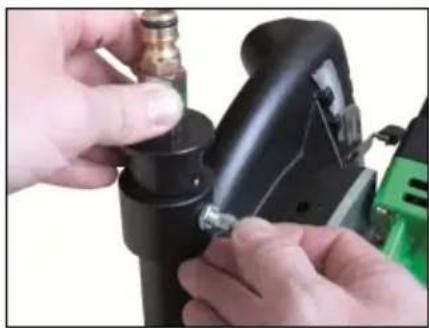
natural_image
Close-up of hands using a black welding torch to adjust a metal component (no visible text or symbols)Fasten the water connection to the connecting piece on the protective hood.
To do this, pull the anchorage ring when inserting the connection, and turn the water connection until the anchorage clicks into the corresponding hole.
- Connect the tool to the water supply system or a water pressure vessel using the GARDENA connector.
■ Always make sure that the machine only runs with enough clear water as the seals get damaged when the machine is running dry. - Attention! The maximum water pressure should not exceed 3 bar!
■ Make sure that the segments are well cooled. If the drilling water is clear, the segments are well cooled. - In case of frost warning, drain the water system.
Changing the Diamond Cutting Discs



Attention!
The Cutting discs, spacer discs and the flange nut might heat up enormously during operation. You could burn your hands or get cut or ripped by the segments.
Therefore, always use protective gloves when changing the grinding wheel.
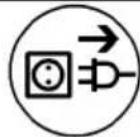
Before any work on the tool, disconnect the plug from the mains!
natural_image
Close-up of a green mechanical component with a white arrow pointing to a circular feature (no text or symbols visible)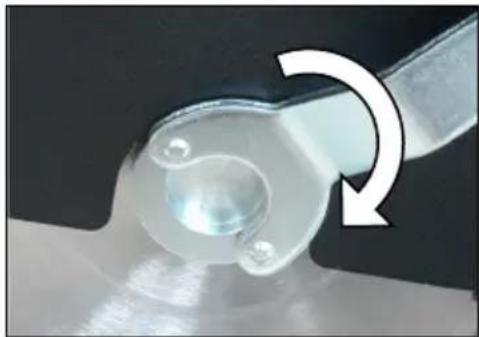
natural_image
Close-up of a mechanical component with a curved arrow indicating rotation or motion (no text or symbols visible)Press the spindle lock button to lock the work spindle.
Actuate the spindle lock button only when the work spindle is at a standstill.
Otherwise, the machine may become damaged.
Open the clamping screw with the face spanner and remove the diamond cutting discs as well as the spacer discs from the work spindle.
Clean the work spindle and all parts to be mounted.
Put the diamond cutting disc on the work spindle.
When mounting the diamond cutting discs, ensure that the direction of rotation arrows on the diamond cutting disc match with the rotation direction of the machine (see direction of rotation arrow on the protective hood).
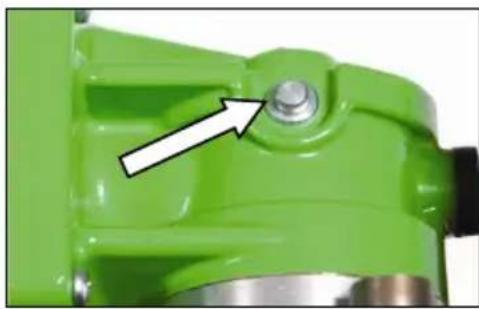
Press the spindle lock button to lock the work spindle
Press the spindle lock button to lock the work spindle (see arrow).
Screw on the clamping screw and tighten it with the face spanner
- Use only original accessory!
- The EDS 181 is in power and speed optimal adjusted to the EIBENSTOCK-diamond cutting discs.
In order to check whether the spindle stop is released before you switch on the tool, turn the spindle slightly.
Let the machine run for a short period of time and in a safe position. If the machine does not run easily, stop working immediately.
Overload Protection
In order to protect the operator, motor and tool, the wall chaser is equipped with an electronic and thermal overload protection.
Electronic: To warn the user against an overload of the machine due to too high contact pressure, a LED is attached to the switch grip. It does not light during idle run or at normal load. When the unit is overloaded the LED lights red, in this case, the unit must be stress-relieved. You can continue working after having stress-relieved and switching OFF and ON the power tool again.
Thermal: In case of permanent overload, a thermocouple protects the motor against destruction. In this case, the tool switches off automatically and can only be restarted after a certain cooling period (approx. 2 minutes). The cooling period depends on the heating of the motor winding and the ambient temperature.
Care and Maintenance
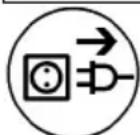
Before the beginning of maintenance or repair works you have to disconnect the plug from the mains.
Repairs may be executed only by appropriately qualified and experienced personnel. After every repair the machine has to be inspected by an electric specialist. Due to its design, the machine needs a minimum of care and maintenance. However, the following points always have to be observed:
■ Always keep the power tool and the ventilation slots clean.
- During work, please pay attention that no particles get inside the machine.
- In case of failure, a repair has to be carried out by an authorised service workshop.
Our after-sales service responds to your questions concerning maintenance and repair of your product as well as spare parts.
EIBENSTOCK's application service team will gladly answer questions concerning our products and their accessories.
Environmental Protection

Raw material recycling instead of waste disposal
To avoid damages on transportation, the power tool has to be delivered in a sturdy packing. Packaging as well as unit and accessories are made of recyclable materials and can be disposed accordingly.
The tool's plastic components are marked according to their material, which makes it possible to remove environmental friendly and differentiated because of available collection facilities.
Only for EU countries

natural_image
Symbol of a trash bin crossed with no text or numbers, representing waste sorting or recycling (no text present)Do not dispose of electric tools together with household waste material!
In observance of the European Directive 2012/19/EU on waste electrical and electronic equipment and its implementation in accordance with national law, electric tools that have reached the end of their life must be collected separately and returned to an environmentally compatible recycling facility.
Noise Emission / Vibration
Measured sound values determined according to EN 62841.
Typically the A-weighted noise levels of the product are:
Sound pressure level L_pA 83 dB(A)
Sound power level L_wA 94 dB(A)
Uncertainty K 3 dB

Wear ear protectors!
Vibration total values a_h and uncertainty K determined according to EN 62841:
Vibration emission value ah 2,6 m/s ^4
Uncertainty K 1,3 m/s ^4
The declared vibration emission level represents the main applications of the tool. However if the tool is used for different applications, with different accessories or poorly maintained, the vibration emission may differ. This may significantly increase the exposure level over the total working period. An estimation of the level of exposure to vibration should also take into account the times when the tool is switched off or when it is running but not actually doing the job. This may significantly reduce the exposure level over the total working period. Identify additional safety measures to protect the operator from the effects of vibration such as: maintain the tool and the accessories, keep the hands warm, organisation of work patterns.
Dust Protection
Dust from material such as paint containing lead, some wood species, minerals and metal may be harmful. Contact with or inhalation of the dust may cause allergic reactions and/or respiratory diseases to the operator or bystanders. Certain kinds of dust are classified as carcinogenic such as oak and beech dust especially in conjunction with additives for wood conditioning
(chromate, wood preservative). Material containing asbestos must only be treated by specialists.
- Where the use of a dust extraction device is possible it shall be used.
- To achieve a high level of dust collection, use industrial vacuum cleaner (dust category M) for wood and/or minerals together with this tool.
■ The work place must be well ventilated. - The use of a dust mask of filter class P2 is recommended.
Warranty
According to our general terms of delivery for business dealings, suppliers have to provide to companies a warranty period of 12 months for redhibitory defects (to be documented by invoice or delivery note).
Damages due to natural wear, overstressing or improper handling are excluded from this warranty. Damages due to material defects or production faults shall be eliminated free of charge by either repair or replacement.
Complaints will be accepted only if the tool is returned in non-dismantled condition to the manufacturer or an authorized Eibenstock service centre.
EU - Declaration of Conformity
We declare under our sole responsibility that the product described under “Technical Data” is in conformity with the following standards or standardization documents:
EN 62841-1:2023-03
EN IEC 55014-1:2022-12
EN IEC 55014-2:2022-10
EN 61000-3-2:2023-10
EN 61000-3-3:2023-02
according to the provisions of the directives 2011/65/EU, 2014/30/EU, 2006/42/EG
Technical file (2006/42/EC) at:
Lothar Lässig
General Manager
09.07.2024
Frank Markert
Head of Engineering
GB - Declaration of Conformity
We declare under our sole responsibility that the product described under "Technical Data" is in conformity with the following standards or standardization documents:
EN 62841-1:2023-03
EN IEC 55014-1:2022-12
EN IEC 55014-2:2022-10
EN 61000-3-2:2023-10
EN 61000-3-3:2023-02
according to the provisions of the directives 2011/65/EU, 2014/30/EU, 2006/42/EG
Technical file (2006/42/EC) at:
Lothar Lässig
General Manager
09.07.2024
Subject to change without notice.
Frank Markert
Head of Engineering
- The PRCD protective switch must not lay in water.
- PRCD protective switches must not be used to switch the tool on and off.
■ Before starting your work, check the proper function by pressing the TEST button.
natural_image
Close-up of a mechanical component with a white arrow pointing to a green surface detail (no visible text or symbols)natural_image
Close-up of a mechanical component with a black handle and arrow indicator (no visible text or symbols)natural_image
Close-up of a sewing machine's internal components, showing a black handle, black buttons, and a green needle (no visible text or symbols)natural_image
Close-up of a mechanical component with arrows pointing to features, no visible text or symbolsnatural_image
Close-up of a hand adjusting a black mechanical component with a green tool in the background (no visible text or symbols)natural_image
Close-up of a mechanical component with threaded shaft and central connector (no visible text or symbols)natural_image
Close-up of hands operating a black mechanical device with a green tool nearby (no visible text or symbols)natural_image
Close-up of a green mechanical component with a white arrow pointing to a bolt (no text or symbols visible)natural_image
Close-up of a mechanical component with a curved arrow indicating rotation or motion (no text or symbols visible)natural_image
Symbol of a trash bin with no text or labelsFrank Markert
Head of Engineering
Note importanti
natural_image
Close-up of a mechanical component with a white arrow pointing to a detail on a metallic surface (no visible text or symbols)natural_image
Close-up of a mechanical component with a white arrow pointing to a specific part (no visible text or symbols)natural_image
Close-up of a mechanical device with black components and a green handle, showing no visible text or symbols.natural_image
Close-up of a mechanical component with arrows pointing to features, no visible text or symbolsnatural_image
Close-up of a hand adjusting a black mechanical component with a metallic fitting (no visible text or symbols)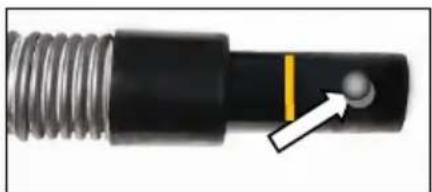
natural_image
Close-up of a mechanical component with threaded shaft and central pin (no visible text or symbols)natural_image
Close-up of hands operating a black electrical plug with a green tool nearby (no visible text or symbols)natural_image
Close-up of a green mechanical component with a white arrow pointing to a bolt (no text or symbols visible)natural_image
Close-up of a mechanical component with a circular feature and a curved arrow indicating rotation (no text or symbols)natural_image
Symbol of a trash bin crossed with no text or numbers, representing waste sorting or recycling (no text present)
Lothar Lässig
Frank Markert
Direttore generale
natural_image
Close-up of mechanical components with a white arrow pointing to a small black component (no visible text or symbols)natural_image
Close-up of a mechanical component with a black handle and metallic frame, showing a white arrow pointing to a small circular feature (no text or symbols visible)natural_image
Close-up of a mechanical device with black components and a green tool, showing no visible text or symbols.natural_image
Close-up of a mechanical component with arrows pointing to features, no visible text or symbolsnatural_image
Close-up of a hand using a black tool to adjust a mechanical component, with no visible text or symbols.natural_image
Close-up of a mechanical component with threaded end and highlighted section (no text or symbols)natural_image
Close-up of hands operating a black electrical shaver with a metal fitting (no visible text or symbols)Fasten the water connection to the connecting piece on the protective hood.
To do this, pull the anchorage ring when inserting the connection, and turn the water connection until the anchorage clicks into the corresponding hole.
natural_image
Close-up of a green mechanical component with a circular adjustment arrow indicating rotation (no text or symbols)natural_image
Symbol of a trash bin crossed with no text or labelsLothar Lässig
General Manager
09.07.2024
Frank Markert
Head of Engineering
natural_image
Four circular icons showing different human and safety symbols: headphones, face wearing glasses, hand gesture, and gloves (no text or labels)
Anvend høreværn
natural_image
Close-up of a mechanical component with a black plastic housing and a white arrow pointing to a detail (no visible text or symbols)natural_image
Close-up of a mechanical component with a white arrow pointing to a specific part (no visible text or symbols)natural_image
Close-up of a mechanical device with a black knob and green handle, showing internal components and a white arrow pointing to a component (no text or symbols visible)natural_image
Close-up of a mechanical component with green and black parts, no visible text or symbolsnatural_image
Close-up of a hand adjusting a black mechanical component with a green tool (no visible text or symbols)natural_image
Close-up of a mechanical component with threaded shaft and central hole, showing a white arrow pointing to a circular feature (no text or symbols)natural_image
Close-up of hands using a black power shaver to adjust a small component (no visible text or symbols)natural_image
Close-up of a green mechanical component with a white arrow pointing to a bolt (no text or symbols visible)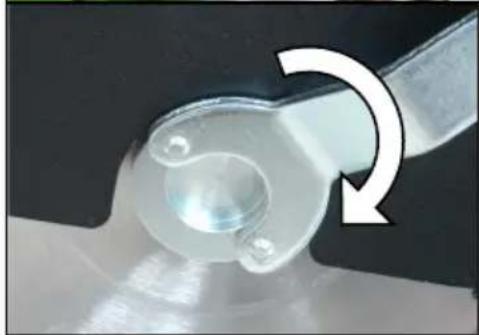
natural_image
Close-up of a mechanical component with a curved arrow indicating rotation (no text or symbols visible)natural_image
Symbol of a trash bin crossed with no text or labelsFrank Markert
Head of Engineering
natural_image
Close-up of a mechanical component with a white arrow pointing to a textured surface (no visible text or symbols)natural_image
Close-up of a mechanical component with a black handle and metallic frame, showing a white arrow pointing to a detail (no text or symbols visible)natural_image
Close-up of a mechanical device with a black knob and green handle, showing internal components and a white arrow pointing to a component (no text or symbols visible)natural_image
Close-up of a mechanical component with arrows pointing to features, no visible text or symbolsnatural_image
Close-up of a hand adjusting a black mechanical component with a metallic fitting (no visible text or symbols)natural_image
Close-up of a black mechanical component with threaded ends and a highlighted section, showing a small circular feature (no text or symbols)natural_image
Close-up of hands using a black power shaver with a green tool nearby (no visible text or symbols)natural_image
Close-up of a green mechanical component with a white arrow pointing to a bolt (no text or symbols visible)natural_image
Close-up of a mechanical component with a curved arrow indicating rotation or motion (no text or symbols visible)natural_image
Symbol of a trash bin crossed with no text or labelsLothar Lässig
Frank Markert
Γενικός Διευθυντής
09.07.2024


- Wichtige Hinweise
- Nur für EU-Länder
- English
- Important Safety Instructions
- Technical Data
- Content of Delivery
- Application for Indented Purpose
- For further safety instructions, please refer to the enclosure!
- Electrical Connection
- Attention!
- Switching on and off
- Instructions for Use
- Pre-selection of the Cutting Depth
- ACHTUNG! Risk of squashing
- Mitre cuts
- Parallel stop
- Dipping function
- Dry cutting
- Wet cutting
- Changing the Diamond Cutting Discs
- Overload Protection
- Care and Maintenance
- Before the beginning of maintenance or repair works you have to disconnect the plug from the mains.
- Environmental Protection
- Raw material recycling instead of waste disposal
- Only for EU countries
- Noise Emission / Vibration
- Wear ear protectors!
- Dust Protection
- Warranty
- EU - Declaration of Conformity
- GB - Declaration of Conformity
- Note importanti
Brand : Eibenstock
Model : EDS 181
Category : Grinder