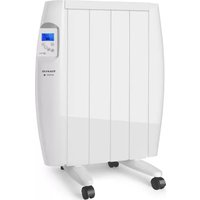
Malbork Connect 600 - Air Conditioning TAURUS - Free user manual and instructions
Find the device manual for free Malbork Connect 600 TAURUS in PDF.


| Product type | Smart electric heater |
| Brand | Taurus |
| Model | Malbork Connect 600 |
| Power | 600 W |
| Power supply voltage | 220-240 V ~ 50 Hz |
| Heating type | Convection |
| Thermostat | Electronic |
| Operating modes | Comfort, Eco, Frost Protection |
| Programmer | 3 programs (P1, P2, P3) |
| Timer | 0-24 hours |
| WiFi connectivity | Yes (2.4 GHz) |
| Mobile app | Taurus Connect (iOS/Android) |
| Open window function | Yes |
| Control panel lock | Yes |
| Display | Backlit LCD screen |
| Installation | Wall-mounted or on castors |
| Castors | Included |
| Wall bracket | Included |
| Cleaning | Damp cloth |
| Safety | Overheat protection |
Frequently Asked Questions - Malbork Connect 600 TAURUS
User questions about Malbork Connect 600 TAURUS
0 question about this device. Answer the ones you know or ask your own.
Ask a new question about this device
Download the instructions for your Air Conditioning in PDF format for free! Find your manual Malbork Connect 600 - TAURUS and take your electronic device back in hand. On this page are published all the documents necessary for the use of your device. Malbork Connect 600 by TAURUS.
USER MANUAL Malbork Connect 600 TAURUS
MALBORK CONNECT 600/900/1200/1500/2000
Emisor termico
Thermal transmitter Heater
Emetteur thermique
Wärmestrahler
A Power switch
B Control panel
C LCD screen
D Heat outlet
E Wheels
F Wall bracket
G Screws
CONTROL PANEL
1 On/Off button
2 Program set / Confirm / WiFi reset
3 Mode selector / Clock
4 Increase button
5 Decrease button
LCD SCREEN
I Clock
II Day
III Program / Mode
IV Target temperature
V Comfort
VI Economic
VII Anti-frost
VIII Stand by
IX Child lock
X Heating status
XIWiFi
XII Timer
XIII Weekly program mode
XIV Weekly program time
- If the model of your appliance does not have the accessories described above, they can also be bought separately from the Technical Assistance Service.
USE AND CARE:
- Fully extend the appliance's power cable before each use.
-
Do not use the appliance if the on/off switch does not work.
-
Do not use the appliance if it is tipped up and do not turn it over.
- Do not turn the appliance over while it is in use or connected to the mains.
- If you use the appliance in a bathroom or similar place, unplug the appliance from the mains when it is not in use, even if it is only for a short while, as proximity to water involves a risk, even if the appliance is disconnected.
- Disconnect the appliance from the mains when not in use and before undertaking any cleaning task.
- Store this appliance out of reach of children and/or persons with physical, sensory or reduced mental or lack of experience and knowledge.
- Do not store the appliance in a vertical position.
- Do not store the appliance if it is still hot.
- Keep the appliance in a dry, dust-free place, out of direct sunlight.
- Never leave the appliance unattended while in use.
- Never leave the appliance connected and unattended if is not in use. This saves energy and prolongs the life of the appliance.
- Do not use the appliance to dry textiles of any kind.
INSTALLATION
- Be sure to remove all packaging material from inside the appliance.
- Do not remove the support feet or wheels from the appliance.
- Ensure that the appliance is level with respect to the floor.
- Install the appliance away from flammable material such as textiles, cardboard or paper, etc.
- Install the appliance a minimum distance of 50cm away from combustible materials, such as curtains, furniture ...
- Ensure that neither the air access nor exit become either totally or partially covered by drapery, clothing, etc., as this increases the risk of fire.
-
In the event that the appliance is mounted on a bathroom wall, position it in such a way that the socket, power supply cable, switches or other controls are not within the reach a person in the bath, shower or at the wash-hand basin.
-
The appliance requires suitable ventilation in order to work properly. Leave a space of 30cm between walls or other obstacles and 10cm from the floor.
- Do not cover or obstruct any of the openings of the appliance.
- The plug must be easily accessible so it can be disconnected in an emergency.
- To achieve the highest efficiency from the appliance it should be situated in a place where the atmospheric temperature is between 12 and 32^ .
- To achieve the highest efficiency from the appliance and so as to be able to install the appliance on a cold wall (an exterior wall) and below a window. But never obstructing or covering a ventilation area.
- The appliance should work well with its wall support attached or with its wheels attached.
- The appliance has a wall bracket (F) which must be fixed to the wall.
- Ensure that the appliance is properly and safely fixed in his working position with screws. To avoid damaging the appliance, on recommend to use only the holes specifically made by the manufacturer.
ASSEMBLING THE WALL BRACKET:
- The appliance has a wall bracket (F) on which it can be supported.
- Taking into account the separation distances mentioned above, place the wall support in the required position and mark the drilling points on the wall (Fig.1).
- Drill into the wall where you marked and insert the rawlplugs.
- Place the support by matching the holes with the rawlplugs and screw them in firmly.
- Make sure that the bracket is firmly fixed; it should be able to support twice the weight of the appliance.
- Fit the appliance into the wall support.
FITTING THE BASE WHEELS:
- To assemble the base wheels, place the appliance face down.
- Position the wheels' support on the base of the body using the screws provided (G)(Fig.2)
- Stand the appliance up again so as to check that the wheels work properly.
INSTRUCTIONS FOR USE
BEFORE USE:
- Make sure that all products' packaging has been removed.
- Some parts of the appliance have been lightly greased. Consequently, the first time the appliance is used a light smoke may be detected. After a short time, this smoke will disappear.
- To eliminate the smell given off by the appliance when used for the first time, it is recommended to have it on at full power for 2 hours in a well-ventilated room.
- Prepare the appliance according to the function you wish to use.
WIFI CONNECTION & DOWNOADING THE APP:
- To be able to use the thermal transmitter Malbork Connect from anywhere, the Taurus Connect App has to be downoalded.
SET UP:
- Download the Taurus Connect App form the App Store or Google Play.
- Sign up using your email address and password.
- Confirm the registration using the verification code that will be sent to your email account.
- Create your home, name it, establish the geographical location and select the room where you are going to place this smart appliance.
- Add Malbork Connect by following the steps described in THE QUICK GUIDE.
IMPORTANT
- The device only supports 2.4GHz Wi-Fi network.
- If the connection fails again, check the following possible causes
- Malbork Connect is too far away from the router.
- The Wi-Fi password is incorrect.
- The Wi-Fi network is not 2.4GHz
USE:
- Extend the cable completely before plugging it in.
- Connect the appliance to the mains.
-
Power the appliance on, by using the power switch (A).
-
Turn the appliance on, by using the on/off button (1)
- For a first-time use, the screen will show as follows:
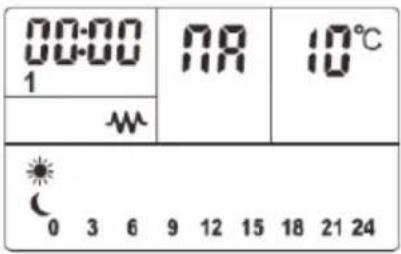
CLOCK SETTING:
- If the appliance is connected to the App, the clock will be set automatically.
- In manual setting, the hour will blink at first. Use the "+" and "-" buttons to set the right time (0-23h). Then press the confirm button (2) to set up the minutes (0-59min). Press the confirmation button (2) and set the date from 1-7. Press the confirmation button once more to finish the settings.
| 1 Monday |
| 2 Tuesday |
| 3 Wednesday |
| 4 Thursday |
| 5 Friday |
| 6 Saturday |
| 7 Sunday |
- To modify the clock after it has been set for the first time, long press the clock button (3), and follow the same process explained above.
FUNCTIONS
- Press the mode button (3) to choose the mode or the program:
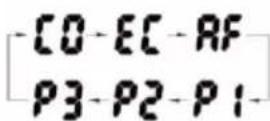
-Comfortmode
-ECO mode:
-Anti-Frost mode:RF
- Press the "+" and "-" buttons to select the desired temperature
- Comfort mode: Temperature can be set from 5^ to 35^ .
- ECO mode: Temperature can be set from 1^ to 31^
- Anti-Frost mode: It works on a standard setting of 7^ without the possibility of being changed.
PROGRAMMING
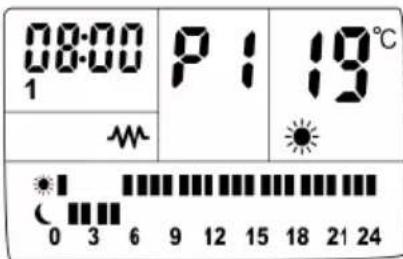
- P1 - PRESET PROGRAM 1: This program operates the same preset time and heat mode shown below from Monday to Sunday:
-
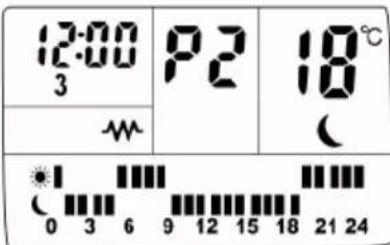
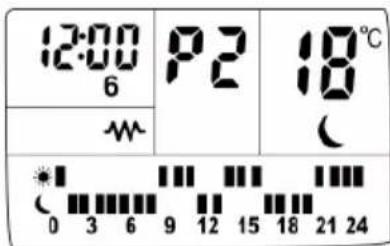
P2 - PRESET PROGRAM 2: This program operates the same preset time and heat mode from Monday to Friday and the same preset time and heat mode from Saturday to Sunday:
-
Monday - Friday
Saturday - Sunday
- P3 - PRESET PROGRAM 3: This program lets you set the time and mode for each individual day.
P3 - PROGRAMMING:
- When in mode P3, press the program setting button (2) until and the first hour bar and modes start to flash.
- Press the mode button (3) to chose the desired mode:
-Top bar means comfort mode;
Bottom bar means mode;
- No bar means Frost mode
- Once the mode is selected press the "+" button to move to the next hour, or "- if you want to move back to the previous hour.
- Repeat this process for the 24h for each of the 7 days. After you finish Sunday, press the the program button (2), to complete the P3 programming.
TIMER:
- Long press the clock button (3) until the display shows "00h" and the timer pilot light appears.
- Press the "+" or "-" to set the timer from 0-24h.
OPEN WINDOW FUNCTION
- When the radiator is working press the program button (2) and mode button (3) at the same time. The screen will display press "+" or "- to turn on off the open window function.
- When the open window function is on, it will detect sudden changes in the room's temperature. If the room temperature decreases 2 degrees within 2 minutes, the heater will stop working and the icon will start blinking.
BACKLIT SCREEN
- The appliance has a backlit LCD screen to make it easier to use.
SAFETY LOCK:
- After a minute without pressing any buttons, the use of the control panel will be blocked.
- The con will show on the screen.
- To unlock it, press the "+" and "-"
ONCE YOU HAVE FINISHED USING THE APPLIANCE:
-
Power the appliance off, using the on/off switch.
-
Let the appliance cool.
- Unplug the appliance from the mains.
- Clean the appliance.
SAFETY THERMAL PROTECTOR:
- The appliance has a safety device, which protects the appliance from overheating.
- When the appliance switches itself on and off repeatedly, for reasons other than the thermostat control, check to ensure that there are no obstacles that impede correct air entry or expulsion.
- If the appliance turns itself off and does not switch itself on again, disconnect it from the mains supply, and wait for approximately 15 minutes before reconnecting. If the machine does not start again seek authorised technical assistance.
CLEANING
- Disconnect the appliance from the mains and allow it to cool before undertaking any cleaning task.
- Clean the equipment with a damp cloth with a few drops of washing-up liquid and then dry.
- Do not use solvents, or products with an acid or base pH such as bleach, or abrasive products, for cleaning the appliance.
- Do not let water or any other liquid get into the air vents to avoid damage to the inner parts of the appliance.
- Never submerge the appliance in water or any other liquid or place it under running water.
- If the appliance is not in good condition of cleanliness, its surface may degrade and inexorably affect the duration of the appliance's useful life and could become unsafe to use.
François
RADIATEUR À INERTIE MALBORK CONNECT 600/900/1200/1500/2000
DESCRIPTION
CONNEXION WIFIETTELECHARGEMENT D'APPLICATION:
LIGAÇAO WI-FI E DOWNLOAD DA APP:
XPHESH KAI SYNTHPHESH:
IAPATHPHSEIEI PIN TH XPHSH:
- Beβaiωθειτοι exετα φαραρεσιόλa ta uλikα συκεμασίας του προίντος.
- Opioueva 3gaptnmuata nC oukeunc exouv AITav0ei eAaPwCs kai wC ek toutou, otav n oukeun mTei OE aeitoupyia yia Tpwtn qopac, iowcs avadu0ei liyoC katvoC. Suvtoua, autoc o kaTvoC th aapevi va avaduetai.
- Ia va aTIOPOUYETn mupwdi Tnou 8eKITepseI n oukeun Tnv Tpwn qop, ouviotatai va tn eote OE Aetoupyia Otn neyioTN eepokpacia yia 2 wpe, oe domegaatio Tnou aepizetai kala.
- Ipoetoiiaote n ouakeun avaloya e Tn ioupyia tou vaTpayatotoinoTe.
ΣYNΔΕΘΕITE ME TO WIFI KAI KATEBA ΣTE THN ΕΦΑΜΟΓΗ:
to App Store n to Google Play.
CБOPKA HACTEHHOrO KPOHHTEHA:
-Прбор Имeelн HabTeHHbI KpoHHTeH (F),Ha KOtOpOM OH MoKet 6bITb 3aKpeNJIeH.
- PpHIMaB BO BHMaHHe paCCTOAHne MeKdY np6Opom n CTeHO, NOMeCTnTe HAcTeHHoe KpeJIeHHe B HxHoe NOJoxeHne N HaMeTbTe ToKn CBepJeHnHa CTeHe (Fig.1).
- PpocBepnTe HameeHHbIe OTBepCTnBCTHe N BCTaBBTe IIO6EJI.
- YctaHOBnTe KPOHtTeH, COIOCTaBnJa npope3n CIO6eJMaM, INILOTHO 3aBHTnTe.
- Y6eIITecb, cTO KPOHHTeH 3aKpeIJIeH IIOTHO; OH DOJKeH BbIDepXINBaTb DBOHOM BEc npi6opa.
- YctaHOBtpe npHbOp Ha HAcTeHHbI KPOHHTeH.
YCTAHOBKA ONOPHBIX KOJECNKOB:
-ДпяТOrO,ЧTo6bI yCTaHOBuTb onOpHbIe KОлесиKn, ПОLOЖИTe npi6op nepeДнeй YacTbIO BHN3.
- YctaHOBnTe onopy dIy KOJecNkOB Ha OCHOBaHHe Kopnyca npnbopa c NOMOuBIO npnlaraeMbIX B KOMnKeTBe BNHTOB (G) (Fig.2).
- NocTaBbTe npnbop B nCxOdHoe noLoXeHne n y6eDnTEcB TOM, YTO OH nepemeuaetcdoJXHBIM 6pa30M.
XIII Mod program sāptāmānal
XIV Timp program saptamanal
VI PeknIM "IKOHOMUeH"
VII PeknM "pa3mpa3raBaHe"
VIII Pekim, nokoi
IX BLOKupaHe Ha KnaBnAtypata
XИЗБРАпрогама
XI WiFi
XII Taumep
XIIPEKIM
XIV Yacobn Dnana3OH
-Bcnyaaye ypeBbT, c KOITo pa3nojarate e MOdien, HeOKOMnIeKTOBaH C ropeONuCAHNTe npNCtABKN, TAX MoKeTe Da npNIO6neTe OTdEINHO B cepBn3HTe 3a TEXHNueCKO o6cnykBaHe.
yNOTPEBA N IOdPbJxKA:
-Прени уnotpe6а pa3BnTe HanbIHo 3axpaHbauu Ka6eHa ypea.
- He n3noJ3BaIe ypeJa npn noBpeJen 6JOK 3a "BKn./n3KJ".
-He n3noJ3BaIte ypeJa, KOraTo e HAKIoHEn nn o6bphat.
-He o6pbuatae ypea,dokaTo pa6oTu nn e BkIouenB eNeKtpnueckaTApexka.
-AKo n3non3BaTe ypeDa B 6aHra nn noO6Hn NOMeueHna, n3KnUoyBaIte ro ot eJ. KOHTaKT, KOrato He ro n3No13BaTe, dOpn da e 3a KpaTko BpeMe. Bn3ocTta Do BOda e Hocn pNCK, dOpn npn n3KnUoyen ypeD.
- N3KJIIOUeTe ypeJa, KOraTo He rO n3NON3BaTe, INN KOrato Ce RotBnTe Da rO NOuHCTnTe.
-CbXpaHЯBaIte ypeDaJaIeU OT Docera Ha Deua n/nn Xopa C HamaJIeHN Fn3NueCKn, CEH3OpHn IIN YMCTBeHN Bb3MOxHOCTn, INI INaTakIBa 6e3 OOnIT N NO3HaHIna 3a 6opabeHe C Hero.
-He cbyxpanhaBte ypeDa BbB BepTnKaJIHa I03nIy.
-He cbxpanhaBaiTe ypea,ako Bce oue e TOnbJ.
-CbXpaHraBaIte N NOCTaBraIte ypeDa Ha cyxo MRCTO, 6e3 npax N OTdaJIeueH OT CJIbHYeBaTa CBETJInHa.
- YpeIbT CneIbBA BnHaI Na ce I3NoI3Ba IIOI HaI3Op.
-BHnKaBb CnyaH He octabYte 6e3 Ha6JIIOHeHne ypeHa,doKaTo e BkIIOueH. ITO3n HauH NcECTNtE eHeprna n Ue ydbJXnTe XINBOTa Ha eN.ypeHa.
-He n3noJ3BaIte ypeJa 3a cyUeHe Ha npexn.
MOHTAK
- YBepete ce, ye cTe n3BaAnn BCnKOnaKOBKn OT BbTpewHocTTa Ha ypeJa.
- He otctpaHraBaiTe KOJIeJaTa IIN KpaKaTa Ha ypeDa.
-BHIMBaIte ypeIbT da e Iobpe HnBEnipaH cnprMo nOda. - NocTaBete ypeDa daJeue OTe 3aJaNIMMaTePnAJIIN KATO TEKCTUINH TbKaHN, KapTOH, XapTnaI n dp.
-ПocTaBeteуpedaHa MInHmym 50cmOT 3anaJInteJIHnMaTePnaJI, KaTo nepDeTa, Me6eJIu...
-Избягваite peшeTKaTa Ha Bb3dUxHa da 6bde иЗцЯно пи частунно рokрпта OT Meбени, пердета, дрени пи др., Тьн KaTo Има рuck OT поар. - B cnya, Ye ypeBt e noCTaBeH Ha cTeHa B 6aHn, noCTaBete rO Taka, Ye KOHTaKTbT,
3axpaHbauT Ka6en, npeKbcBaunTe N dpyrN KOHTpOJIepn Da He ca DoCTbHN Ha IIneTo, HAMpaO ce BbB BaHaTa, NOd Dyua INI INpeD MNBkata.
- YpeTc HxJa e OToxOJaIo npoBETpaBaHe, 3a da paBoTu Do6pe. MoJr, octabeTe OTCToHne ot 30 cMMexy CTeHnTe IIN Dpyn PpeNtCTBn, NOTCToHne ot 10 cm HaI noJa.
- He nokpmbaIte n He 3anyuBaIte OTbOpnte Ha ypeda.
- UencenbT cneBa da e nechoocTbneH, 3a Da MoKe npu n3BbHpeDHO NOLOXeHne Da 6bJe n3BaDeH.
-3a da 6bde ypeia no-eqnkaceh,ToT Tp8Ba Da ce HAMIPA Ha MRCTO KbDeTo CtaHata TemnepaTypa da 6bde Mexdy 12 n 32^ - C ueI NOCTHraHe Ha No-dO6pa efeKTHBHOCT, DOKOKKOto E Bb3MOxHO, MOHTnpaIte ypeDa Bbpxy CTydeHa (BbHNHa) CTeHa I NOD npo30peu, KATO ypeBbT B HnKaKbB CnyuaeH He 6nBa Da npeu nn 3anyuBa npedHa3NaueHo 3a npOBETpRABe Ne pOcTpAChTBO..
- YpeIbT cIeIbIa da pa60Ic CbC CTeHHaTa Cn IIOIopApnn C NOCTABEH KOnelIca.
- YpeIbT pa3noJIara cIc 3axpaHBaU 6Iok (F), KOITo CNeIbVa Da ce 3akpen Ha CTehata.
- YBepete Ce, Ye ypeDbT e yctOuHBO 3akpehen Ha MRCTO Cn C BNHTOBe Ha MRCTO Cn. 3a Da n36BerHeTe NobpeDn Ha ypeDa, Bn npenopbUBAme Da n3NoJ3BaTe eDINHCTBeHo Beue PpeDnDEHNTe OT pON3BOdnteJI OTBOPn.
MOHTIPAHE HA CTEHHATA NOCTABKA
- YpeBbT pa3noJara c nocTabka 3a cTeHa (F), Bbpxy KOrTo MoKe da ce 3akpen
-3akpenete NOCTaKaTa 3a CTeHa No HaunH, KOITo CMrTaTe 3a Hau-NoDxOJaUc: C DIOBeN, BnHTObE, JIeNEHKn N T.H.
-ИmaiknnpedBnD nocoyeHteNo-rope pa3ToHnHaOTdaJeueHoCT,NOJKeTe onopataHaXeJaHaTa BnCOUnHa N OT6JIeKTe Ha CTeHATA MeCTaT,KbDeTO Tp8Ba Da npo6NeTe DynkN(Fig.1)
-ПрбиTe dynKnte n cNoKeTe IIO6eNITE. - NonoKTe NOCTaBkTa KaTO BHMMaBaTe DynKnTe N da CbBNaHAT C DynKnTe Ha DIO6eJIte, cNeI KOeTO 3aBNHTeTe.
-
YBepete ce, ye onopata e DocTaTbUHO 3dpaBO 3axBaHaTa, ye da MoKe Da n3DbpKIn NOHe DBA NbTN TerNoTo Ha ypeDa.
-
Hamectete do6pe ypeia B noctabkata 3a cTeHa.
MOHTAX HA KOJIENLATA:
-3a da noCTaBnTe KOJIeIcAta, o6bPHeTe ypeDa Ha o6paTHo.
- 3akpenete konelata KbM Kopnyca Ha ypeda NocpeIcTBOM BnHTObe (G),doCTaBeHn Cypeda (Fig.2).
-ObpHete OTHOBO ypeHa n npOBepTe, daJI KoJIaTa pa6OraT u3npaBHO.
HAUYN HA YNOTPEBA
3A6EJEXKNI PEPEN YNOTPEBA:
- YBepete ce, Ye n3zraNo cTe OTCpaHnInn OnaKOBkata Ha ypeJa.
-HaON qactn Ha ypeDa ca JIeKO cMa3aHn, IopadN KOeTo, pN BKNIOUBAHe 3a NbpBn NbTe Bb3MOxHO ypeDbT da 3anOHe cna6o da dIMN. Ckopo cnei TOBa, dIMbT ue n3ye3He.
-3aДпремхнел МИрзмATA,OTДELЯСа ce pri Пьрвata ynoTpe6a Ha ypeDA,прорьчBa ce DA.To NOДьржATE BKЛЮЧENHa Ha MaKcIMaJIHа MOUHOCT B pOДьЛЖЕHne2 Yaca,Bdo6pe npOBeTpEO NOMEseHne. - PoirotBeTe ypeDa B 3aBnCmOcT OT cyHKunra KOTo KeNaete Da n3NON3BaTe.
BPTb3KA WIFI IN CBAJIARE HA IPINJIOXEHNETO:
-3a da mojkeTe Da n3noJ3BaTe paJnataOpa, Malbork Connect" HABcKbJe, cJeBa da cbAnTe npInoKeHneTo ot ,Taurus".
HACTPOIKA:
- Cbane npinoxkeHneTo Ha ,Taurus Connect" B,App Store" nn ,Google Play".
- PerinctpupaTe ce c eJeKtpoHHaTa cn noua n naponata.
-NotBbpepepepaTcncCNOTBbpKdAbaaKoD,KOToIeNoJyHHeHa CBOAIMeJ.
-Cb3daITe DOM, DaIte NMe Ha CBOI DOM, yCTaHOBeTe reOrpaΦcko NOLOXeHne I n36peTe cTaaTA, B KOrTo ige NoCTaBNTe INHTeINrEHTHOY UcTPOJCTBO.
-ДобаBeté „Malbork Connect“, седвайкNTbKNITE, onиcaHи в КРATКИСПAPBOUHнK.
BAXHO!
-Приема eДинстBEHOmpexu Wi-Fi ot 2,4GHz
-Bcnya,ye Bpb3kata ce pa3nadHe, npOBepete daJIToBa He ce IbJxHa cIeHNTE npuHn:
-Дали „Malbork Connect" He ce hamupa n3BbH obcera Ha DeiCTBne Ha pyTepa.
-Даи CTe BbBeJn npaBnHa napoJa 3a „WiFi".
-Дани МрекаТа Wi-Fi He e ot 2,4GHz.
YNOTPEBA:
-Прдулnotpe6a,pa3BnTe HanbJHo 3axpaHbauuKa6eI Ha ypeDa.
-BkIIOUeTe ypeDa B eNEKtpnueckaTa MpeKa.
-BkIIOUte ypea,3aJeIcTBaIKn IpeKbcBaay 3a BkIIOUbaHe/IN3KIOUbaHe (A).
- 3aeneCTbaIte ypeIa ype3 6yToH on/off (1).
- Pn nBpBO n3NoJ3BaHe Ha ypea, ekpaHbT 1e n3rJekda Taka:
| 00:00 1 | NR | 10°C |
| M | ||
| 0 3 6 9 12 15 18 21 24 | ||
HACTPOIKA HA DATATA N YACA
-Korato ypeIbTe BkHoueH KbM npJIOXeHHeTo, YacOBHNKbT Ue Ce HAcTpON CaMOCTOaTeJIHO.
-3apbuHaHacToPkaHaYacOBnKa,YacbT
Ue 3anOueHa npMmRBa.N3non3BaIte
6yToHnte ^ + " n ^ ,3a da HAcTpOnTe IpaBnHOb
BpeMeTO (0-23 h).CneT TOBa HATncHeTe
6yToHa 3a NOTBbPkDabAhe (2),3a da
HAcTpOnTe MNHyTte(0-59 min).OTHOBO
HatncHeTe 6yToHa 3a NOTBbPkDaBaHe
(2),3a da HAcTpOnTe DeH a CeDMuaTa
-Mexdy1n7.HatncHeTe OTHOBO 6yToHa
3a NotBbPkDaBaHe (2),3a Da 3aBbPshnte
HAcTpOnBaHeto.
CJIeI IPIKJIIOUBAHE HA PABOTATA C YPEDA:
- N3KJIIOUeTe ypeJa OT 6yToHa 3a BKNIOUBAHe/ N3KJIIOUBAHe.
- Octabete ype na ca ce oxnaDi
-ИЗклочеурдаOT3axphaHbauTaМрека.
-Поунстeteурда.
TEPM03AUHTA INPINPEPRBAHE:
- YpeBt e cHa6dEn CbC 3aUHTeH MExaHN3bM, npeNa3BaU rO OT BCaKaB BnD nperpaBaHe.
-Korato ypeDbT ce BKNIOUcbu N3KIOUcba NocneIOBaTeJIHO, IN npuHnHaTa He e B TepMoCTata 3a OKoJHaTa CpeDa, MOJa yBepeTe ce, Ye HMa npeuKn, 3aTpduHbAun HopMaHnOTo NoCTbNBAHe Nn3n3aHe Ha Bb3dYxa.
-Ako ypeIbT ce n3KIOHn ABTomTuHO n He Ce BKNOu NOBTOPO, N3BaTe Te uencela OT eJ. KOHTaKT, N3aKaIte OKoN 15 MInHyTu n Ro BKIOUcTe OTHOBO.AKO I TORaBa He pa6OTn, 06bpHeTe ce KbM OToPn3npaH cepBn3 3a TexHnuecko 06CnykBaHe.
ПОЧТBAHE
-Преди поочьache ИЗк nullуе Te ype da ot 3axpaHbaaata Мржа И Г оctabete Д a n3CTnHe.
-Почистеусяа CBлжнк Кьрna,Наноета с Няков Кankи Мпшпpenapat,Cлед Коетогоюсушete.
-3a NOUcTBAHeTo Ha ypeDa He H3NoI3BaIte pa3TBOpNTeIn N IpeNapatn C KInCeJIHHe INn OChOBen pH φakTop, KaTo 6eJIHa n a6pa3NBn npOdykTn.
- He donyckaTe npOHnKBaHeTo Ha Boda npe3 BeHTnlaUHOHHTe OTBOpN; B npOTnBEH cnyaM MoKe Da npEuIN3BnKaTe NOBpeDa Ha pa60THNe TaCTN BbB BbTpeUHOCCTTa Ha ypeDa.
- He notanai Te ypea BbB Boa nIIN dpya TeuHocT, IN He IIOCTaBnTe IOI Teuaa BOda.
- YpeTcneDbA da ce noDbpxa uNCT. B npotnbEN cnyaI NOBbpxHocTTa My MOxE da ce NOBpeDN, I TOBa Da cbKpaTN 6e3Bb3BpAtoHO EKCnNoaTaUOHHMy XJBOT, a CbsoI Da CTaHe pPunHa 3a Bb3HNKBaHe Ha OnaCHO NIOXKeHne.
1000 1000
Laaa aalaae! aaii gagg cagll gaaedll llll alaaa olae! gll gagg cagll gaaedll llaa
do111
a
gssy 10000000000000000000000000000000000000000000000
P - a00
8
gglglggly()eogj jde
aJg
OCE 1
aagaaal aagaaal
.10g aLw gJl lI aLw C5 1" jll g aLLaclll Jl Jaau " + , jll Je baoi, gogll ydoae 11 jle baoi Jyol aon no aol siie . aaiil pll no poy Jno ae Lw e Jno ae Lw aaoell
aagaaagaaagaaagaaagaaagaaagaaagaaagaaagaaagaaagaaagaaagaaagaaagaaagaaagaaagaaagaaagaaagaaagaaagaaagaaagaaagaaagaaagaaagaaagaaagaaagaaagaaagaaagaaagaaagaaagaaagaaagaaagaaagaa
aLw 1
:aaqab1aJelullaa.
aagb 3
Jooe Jee 1000000000000000000000000000000000000000000000000000
a100
aolj jol oolouol Jdcl DCI. aLJy sjo jgloll
:OswiI aogJia
aagai gai jaa aai jgi jgai jiaai i 90
aaii jie 1
Jaii"9"g"+jjli jie
jglj1 jlao1joo
LJyU/JeUeUeUeUeUeUeUeUeUeUeUeUeUeUeUeUeUeUeUeUeUeUeUeUeUeUeUeUeUeUeUeUeUeUeUeUeUeUeUeUeUeUeUeUeUeUe
.
jgljgljgljgljgljgljgljglj
y = kx + b
:40LwU g
jssll jssu j no jzall aolll syl jzgl jzglj z
jglal yae aillg aell gagaaa wlll 1d alwyy. aol yogogol jglal
Egi 1o oIoguHg bia jiljoull Joo
#
jglld jol no alldolgo gao allj j ao
jglqolll jlaa aaljlaa
a 1
...gjglgjjgJgAagannllolgblao 01001001001001001001001
...yj y jil 100000000000000000000000000000000000000000000000
(1.gf) gai yill bali bilal glgglgglgglgglgglgglgglgglgglgglg
.
y
jglj jg jz0 jy1 jS e 1 y o aol jgj
Jauyda aoe 1aou
:
Jie Jl jolal g. xolal
.(Fig)jglg aai (G) jall alabg jll Jk
eall
pIwUWlAaJb
:JUosuW uJgI UdoXo
gubl jao dclll g dlal 1o aolj o 50
English WARRANTY and Technical Assistance
This product enjoys the recognition and protection of the legal guarantee in accordance with current legislation. To enforce your rights or interests you must go to any of our official technical assistance services.
You can find the closest one by accessing the following web link: http://taurus-home.com/
You can also request related information by contacting us.
You can download this instruction manual and its updates at http://taurus-home.com/
Français GARANTIE ET ASSISTANCE TECHNIQUE
XXXXXXX XXXXXXXXXX XXXXXXX
Xx
XXXX.XXXXXXX
XXXXXXXXXXXXXXXXXXXXXXXX
X
.
XXXXXXXXXXXXXXXXXXXXXXXXXXXXXXXX
:
(
http://taurus-home.com
XXXX|X|XXXX|X|X|XXXX|X|X|X|XXX|X|X
COUNTRY ADDRESS PHONE
| Algeria Zone d'Activite, N° 62, Constantine 21377077756 | ||
| Argentina Av. del Libertador 1298,(B1638BEY), Vicente López (Pcia. Buenos Aires) | 541153685223 | |
| Belgium Mariëndonkstraat 5, 5154 EG, Elshout 31620401500 | ||
| Bulgaria | 265,Okolovrasten Pat, Mladost 4, 1766, Sofia | 35929211120 / 35929211193 |
| Congo (Republic of) 98 Blvd General Charles de Gaulle, Pointe Noire 242066776656 | ||
| Cyprus 20, Bethlehem Str. / P.O.Box 20430, 2033, Strovolos | 35722711300 | |
| Czech Republic Milady Horakove 357/4, 568 02, Svitavy 420 461 540 130 | ||
| Equatorial Guinea | SN Av Patricio Lumumba y C/ Jesus B, Bata | 00240 333 082958 / 00240 333 082453 |
| Equatorial Guinea | Calle de las Naciones Unidas, PO box 762, Malabo | 240333082958 / 240333082453 |
| Espana | Avda Barcelona, S/N, 25790 Oliana (Lleida) atencioncliente@taurus.es | 902 118 050 |
| France | Za les bas musats 18, 89100, Malay-le-Grand | 03 86 83 90 90 |
| Ghana | Ederick Place, Accra-Ghana | 302682448 / 302682404 |
| Gibraltar | 11 Horse Barrack Lane, 54000, Gibraltar | 00350 200 75397 / 00350 200 41023 |
| Greece Sapfous 7-9, 10553, Athens | +30 21 0373 7000 | |
| Hong Kong | Unit H,13/F., World Tech Centre, Hong kong | (852) 2448 0116 / 9197 3519 |
| Hungary Keszmarik utca 11-13, 1158, Budapest +36 1 370 4519 | ||
| India C-175, Sector-63, Noida, Gautam Budh Nagar - 201301, Delhi | (+91) 120 4016200 | |
| Ivory Coast 01 Rue Des Carrossiers-Zone 3, B.P 3747, Abidjan 01 (RCI) | 22521251820 / 225 21 353494 | |
| Luxembourg Mariëndonkstraat 5, 5154 EG, Elshout 31620401500 | ||
| Marruecos Big distribution society 4 Rue 13 Lot. Smara Oulfa, Casablanca | (+212) 522 89 40 21 | |
| Mauritania 134 Avenue Gamal Abdener Ilot D, Nouakchott 2225254469 / 2225251258 | ||
| Mexico Rosas Moreno N° 4-203 Colonia de San Rafael C.P. 06470 – Delegación Cuauhtémoc, Ciudad de México | (+52) 55 55468162 | |
| Montenegro Rastovac bb, 81400, Niksic +382 40 217 055 | ||
| Netherlands Mariëndonkstraat 5, 5154 EG, Elshout 31620401500 | ||
| Nigeria 8, Isaac; John Str,G.R.A Ikeja Lagos 23408023360099 | ||
| Paraguay | Denis Roa 155 c/ Guido Spano, Asunción | 21665100 |
| Peru | Calle los Negocios 428, Surquillo, Lima | (511) 421 6047 |
| Portugal Avenida Rainha D. Amélia, n°12-B, 1600-677, Lisboa | +351 210966324 | |
| Romania | Dudesti Pantelimon 23, 410554, Bucharest | 031.805.49.58 |
| Serbia | Rastovac bb, 81400, Niksic +382 40 217 055 | |
| Slovakia Milady Horakove 357/4, 568 02, Svitavy | 420 461 540 130 | |
| Southafrica | Unit 25 & 26, San Croy Office Park, Die Agora Road, Croydon, Kempton Park, 1619, Johannesburg | (+27) 011 392 5652 |
| Tunisia | 2, Rue de Turquie, Tunis | 21671333066 |
| Ukraine | Block 6, Ap Housing Estate Topol-2, B, 49000, Dnepropetrovsk | 380563704161 / 380563704161 |
| Uruguay | Luis Alberto de Herrera 3468, 11600, Montevideo | 598 2209 28 00 |
| Vietnam | Lot 7 Ind. Zone for, Ha Noi | 84437658111 / 84437658110 |
taurus
Avda. Barcelona, s/n
25790 Oliana
Spain

- MALBORK CONNECT 600/900/1200/1500/2000
- CONTROL PANEL
- LCD SCREEN
- USE AND CARE:
- INSTALLATION
- ASSEMBLING THE WALL BRACKET:
- FITTING THE BASE WHEELS:
- INSTRUCTIONS FOR USE
- BEFORE USE:
- WIFI CONNECTION & DOWNOADING THE APP:
- SET UP:
- IMPORTANT
- USE:
- CLOCK SETTING:
- FUNCTIONS
- PROGRAMMING
- P3 - PROGRAMMING:
- TIMER:
- OPEN WINDOW FUNCTION
- BACKLIT SCREEN
- SAFETY LOCK:
- ONCE YOU HAVE FINISHED USING THE APPLIANCE:
- SAFETY THERMAL PROTECTOR:
- CLEANING
- François
- RADIATEUR À INERTIE MALBORK CONNECT 600/900/1200/1500/2000
- DESCRIPTION
- CONNEXION WIFIETTELECHARGEMENT D'APPLICATION:
- LIGAÇAO WI-FI E DOWNLOAD DA APP:
- XPHESH KAI SYNTHPHESH:
- IAPATHPHSEIEI PIN TH XPHSH:
- ΣYNΔΕΘΕITE ME TO WIFI KAI KATEBA ΣTE THN ΕΦΑΜΟΓΗ:
- CБOPKA HACTEHHOrO KPOHHTEHA:
- YCTAHOBKA ONOPHBIX KOJECNKOB:
- yNOTPEBA N IOdPbJxKA:
- MOHTAK
- MOHTIPAHE HA CTEHHATA NOCTABKA
- MOHTAX HA KOJIENLATA:
- HAUYN HA YNOTPEBA
- 3A6EJEXKNI PEPEN YNOTPEBA:
- BPTb3KA WIFI IN CBAJIARE HA IPINJIOXEHNETO:
- HACTPOIKA:
- BAXHO!
- YNOTPEBA:
- HACTPOIKA HA DATATA N YACA
- CJIeI IPIKJIIOUBAHE HA PABOTATA C YPEDA:
- TEPM03AUHTA INPINPEPRBAHE:
- ПОЧТBAHE
- #
- :
- pIwUWlAaJb
- :JUosuW uJgI UdoXo
- English WARRANTY and Technical Assistance
- Français GARANTIE ET ASSISTANCE TECHNIQUE
- taurus
Brand : TAURUS
Model : Malbork Connect 600
Category : Air Conditioning