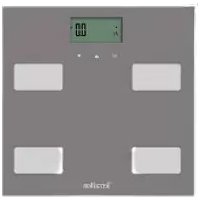
R-LINK - Scale TERRAILLON - Free user manual and instructions
Find the device manual for free R-LINK TERRAILLON in PDF.


User questions about R-LINK TERRAILLON
0 question about this device. Answer the ones you know or ask your own.
Ask a new question about this device
Download the instructions for your Scale in PDF format for free! Find your manual R-LINK - TERRAILLON and take your electronic device back in hand. On this page are published all the documents necessary for the use of your device. R-LINK by TERRAILLON.
USER MANUAL R-LINK TERRAILLON
text_image
1.0 ▲ SET ↓EN USER MANUAL | FR GUIDE D'UTILISATION
NL Gebruikshandleiding | IT Manuale d'uso | ES Manual del usuario
DE Bedienungsanleitung | PT Manual do utilizador

Terraillon®
WELLNESS COACH
www.terraillon.com
iPod® Touch 5th generation
iPad® 3 & + (iOS 8.0 & +)
iPad® Mini & + (iOS 8.0 & +)

Android 4.3 & +
Bluetooth Smart 4.0 / Bluetooth Smart Ready
Smartphone only / No tablet
text_image
QR code image containing encoded data, no visible human-readable text
text_image
Terraillon® WELLNESS COACH
text_image
QR code image containing encoded data, no visible human-readable text
text_image
QR code image containing encoded data, no visible human-readable text
iPhone is registered trademark of Apple Inc.
Android is a trademark of Google Inc.
The Bluetooth ^® word mark and logos are registered trademarks
owned by Bluetooth SIG, Inc.
Other trademarks and trade names are those of their respective owners.
R-LINK
EN TERRAILLON CONNECTED BODY COMPOSITION ANALYZER INSTRUCTION MANUAL 4
FR IMPÉDANCEMÈTRE CONNECTÉ TERRAILLON NOTICE D'UTILISATION .... 11
NL TERRAILLONLICHAAMSVETWEEGSCHAAL GEBRUIKSHANDLEIDING 18
IT BILANCIA MASSA GRASSA TERRAILLON MANUALE D'USO 25
Thank you very much for selecting the Terraillon Glass Body Fat Analyzer R-LINK.
NOTES ON SAFETY
Please read this section carefully to familiarize yourself with features and operations before using the unit. The warning signs and the sample icons shown here are listed in order for you to use this product safely and correctly as well as to prevent product damage, risk and injury to you or others. This appliance can be used by children aged from 8 years and above and persons with reduced physical, sensory or mental capabilities or lack of experience and knowledge if they have been given supervision or instruction concerning use of the appliance in a safe way and understand the hazards involved. Children shall not play with the appliance. Cleaning and user maintenance shall not be made by children without supervision.
| PRECAUTION WARNING | Indicate the right condition to use the product and prevent damage risk and injury. |
| IMPORTANT FOR USERS | Indicate the important elements users should read before using the product. |
| CARE AND MAINTENANCE | Indicate matters in which the possibility of damage may happen as a result of incorrect handling and improper maintenance. |

PRECAUTION WARNING
- Do not use the scale on subjects who have body implants such as pacemaker, artificial limbs, contraceptive devices, metal plates or screws. It may cause the devices to malfunction or produce an inaccurate result.
- When in doubt, please consult your physician.
- Do not disassemble the scale as incorrect handling may cause injury.

IMPORTANT FOR USERS
- Make sure use only the type of battery stated (see "Section Insert the Battery").
- The «Athlete» mode is only applicable to those aged 18 or over.
- Body fat percentage estimates will vary with the amount of water in the body, and can be affected by dehydration or over-hydration due to such factors as alcohol consumption, menstruation, illness, intense exercise, etc.
- Do not use on pregnant women. The result is inaccurate.
- For body fat and body water estimates, subject must always be barefoot.

CARE AND MAINTENANCE
- Do not disassemble the scale other than replacing the battery; it contains no user serviceable parts.
Damage to the scale may occur as a result of improper handling. - Remove battery when the scale is not used for a prolonged period of time.
- Clean the scale after use with a dampened cloth. Do not use solvents or immerse the unit in water.
- Avoid excessive impact or vibration to the scale, such as dropping it onto the floor.
FIND MORE INFORMATION ON
WWW.TERRAILLON.COM/FAQ
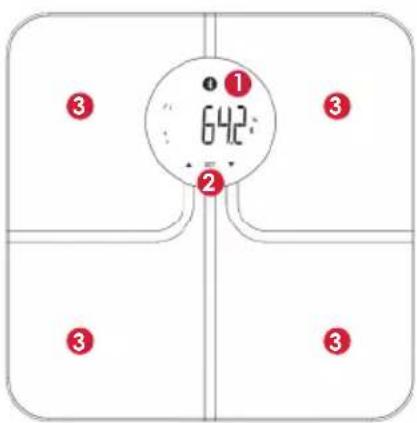
PRODUCT OVERVIEW
text_image
① 642° ② ③ ③ ③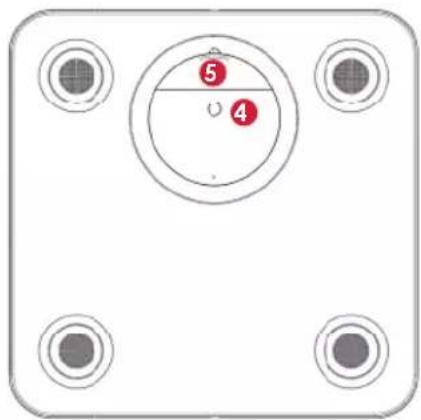
text_image
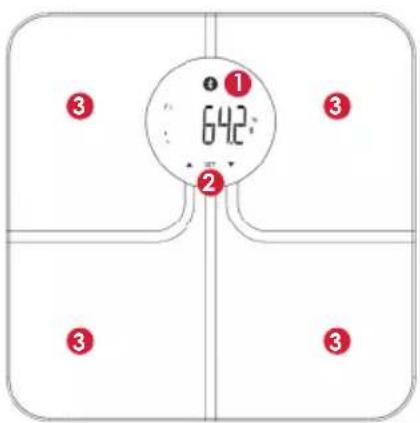
⑤ ④1 LCD Display
2 Profi le selection (UP/SET/DOWN)
3 Electrodes for body composition analysis
4 Unit and paring button
⑤Battery compartment
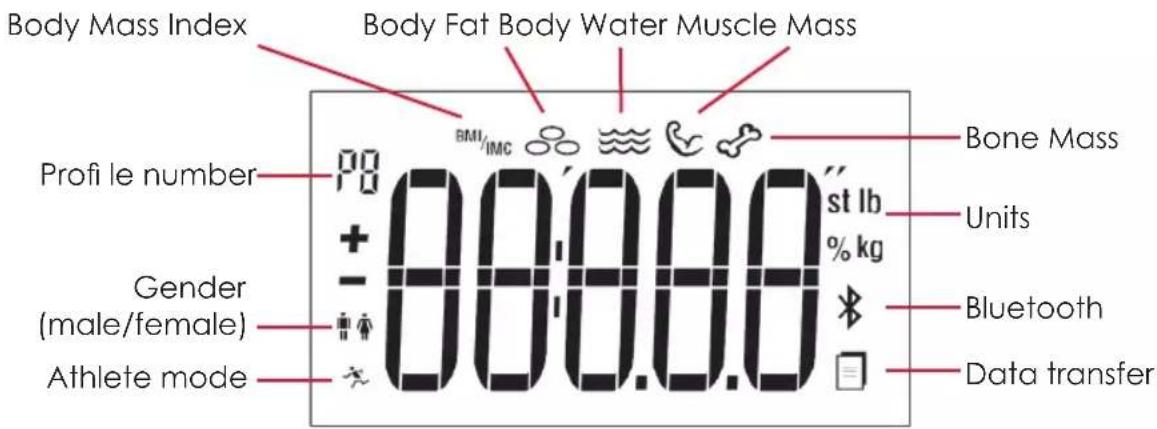
LCD OUTLOOK
text_image
Body Mass Index Body Fat Body Water Muscle Mass Profi le number BMI IMC Bone Mass + 00.00.0 st lb % kg Groups (male/female) Athlete mode Bluetooth Data transferFIRST USE
CREATE A WELLNESS COACH ACCOUNT
- Go to the App Store (iOS) or Google Play (Android) to download the Wellness Coach application.
- Once you have installed the application, follow the instructions to create your account. If required, you can download the full use/installation guide from the following address:
http://www.terraillon.com/sites/default/files/Guide%20utilisateur%20Wellness%20Coach_1.pdf
Download the Terraillon Wellness Coach user manual to know more about our app.
CONNECT TO YOUR TERRAILLON BATHROOM SCALE
-
Remove the plastic tab from the back of your Terraillon bathroom scale. The LCD screen will initially show "8888", then "0.0 kg".
-
Enable Bluetooth in your smartphone settings.*
-
Once the screen of your Terraillon bathroom scale has switched off, keep the button on the back of the product pressed down for 3 seconds to launch synchronisation: the screen will show a rotating symbol indicating that synchronisation is in progress.
-
In the app:
A. Open the side menu.
B. Click on Synchronise my devices.
C. Click on Start synchronisation.
D. Once the app has detected your device, click on Synchronise all devices.
E. Bind your Terraillon bathroom scale to your user account. To do so, select a profile and enter your name.
Then click on Next.
Note:
User account/Wellness Coach: account associated with your Wellness Coach app.
Profile: your Terraillon bathroom scale can store 8 different user profiles in its memory.
F. Your Terraillon bathroom scale is synchronised with your smartphone. If it fails, or if the synchronisation process lasts for over a minute, "E1" will appear on the screen of your Terraillon bathroom scale.
Click on Access my data to return to the dashboard.
*For Android users:
From Android version 6.0 onwards, Google will ask you to allow the Wellness Coach app to access GPS data to enable your Bluetooth. You must provide this authorisation then enable the GPS function to be able to use the features of your Terraillon bathroom scale which require a Bluetooth connection.
START MEASURING
-
Place your Terraillon bathroom scale on a flat, hard surface.
-
If you take your first measurement directly after having linked your Wellness Coach account, your Terraillon bathroom scale remains lit up and is configured on the profile selected in advance in the app.
If not, open the Wellness Coach app then check that your Bluetooth and your GPS data are enabled (if this is not the case, the Terraillon bathroom scale will record the data until the next Bluetooth connection, for up to a maximum of 10 records per user).
Select your profile number by pressing the arrows ▲ or ▼ when your Terraillon bathroom scale is switched off, press SET to confirm your profile number.
-
Step onto your Terraillon bathroom scale.
-
The Terraillon bathroom scale displays the weight; otherwise, it will switch off automatically after 10 seconds.
-
Once the weight has stabilised, the Terraillon bathroom scale measures your body composition (a progress symbol will scan the screen from left to right).
-
The different data appear on the screen. The symbol appears to show that the connection to the app was successful.
The ☐ symbol shows you that data is present in the memory; the disappearance of the symbol means that the data have been transmitted successfully to the app.
From now on, you will be able to consult the data transmitted by your Terraillon bathroom scale from your smartphone on the Wellness Coach app.
With the same smartphone, create a new account on the Wellness Coach app, then repeat steps 7 to 12 (please select an unassigned profile number).
YOU WANT TO USE A DIFFERENT SMARTPHONE:
Please repeat steps 1 to 12, choosing an unassigned profile number.
ARE YOU ONE OF MULTIPLE USERS WITH A SIMILAR WEIGHT?
TWO USERS HAVE A SIMILAR WEIGHT
In this case, the bathroom scale will ask you to confirm your profile number.
text_image
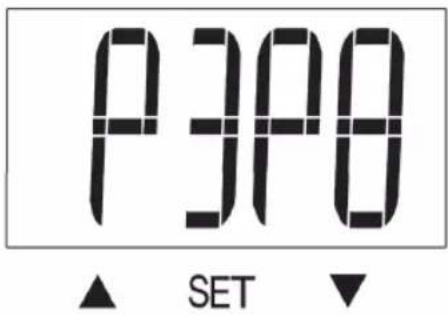
P3P8 ▲ SET ▼The example above shows you that profi les 3 and 8 have a similar weight. In fact, the screen displays the two profi les according to this logic:
PXPY (X and Y are the profile numbers with the similar weight)
If you are profi le 3, press ▲. And if you are profi le 8, press ▼.
MORE THAN TWO USERS HAVE A SIMILAR WEIGHT
In this case, the bathroom scale will ask you to confirm your profile number.
Initially, the bathroom scale will display two profi les (as above). If you do not confi rm which of the two suggestions is your profi le, the screen will show 2 different profi les to allow you to confi rm which is yours.
REPLACE THE BATTERIES
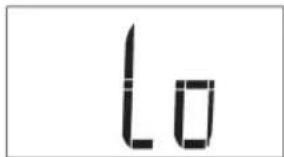
Lo appears on the screen, when batteries are low and need to be changed. To change the batteries, open the battery cover on the back of the scale unit. Remove used battery and insert new ones. Batteries should be removed and replaced by adults only. Only use recommended batteries or those of the same or equivalent type. Do not mix old and new batteries or batteries of different types. Batteries are to be inserted with the correct polarity.
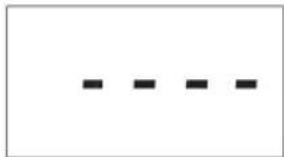
WARNING INDICATORS
natural_image
Four horizontal black lines on white background, no text or symbols presentOverload: remove weight immediately.
text_image
loBattery failure: replace it.
text_image
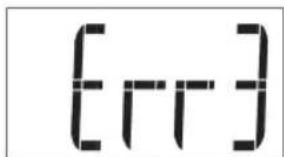
[rr]Impedance measurement error.
If the symbol ✝ blinks, it means the connection with the app is not effective.
- Please be sure that, on your Smartphone, your Wellness Coach app is open and the Bluetooth is on.
- The range between the scale and the smartphone should be reasonably close, from 1 meter to 10 meters.
MAINTENANCE
DO use a wet soft cloth, dipped into water and wrung out, to wipe the dirt. Then use a dry soft cloth to dry up the device. DON'T use propellant, abrasive or other chemicals.
PROTECT THE ENVIRONMENT
Dispose of used batteries in a designed container so that they can be collected and recycled. Do not mix different types of batteries. Do not mix new and used batteries. After life, dispose of this product at a designated waste recycling point.
WARRANTY
This scale is guaranteed against defects in materials or manufacturing for 2 years. During this period, any such defects will be repaired free of charge (proof of purchase must be shown in the case of a complaint under warranty). The warranty does not cover damage resulting from improper use or negligence. In the event of a claim, first contact the shop where you purchased your scale.
DECLARATION OF CONFORMITY
Hereby, Terraillon SAS declares that this device complies with the essential health and safety conditions. This product meets the essential requirements and other relevant provisions of the directive R&TTE 1999/5/EC.
The complete declaration of conformity is available on http://www.terraillon.com/fr/mentions-legales.
PRODUCT SPECIFICATION
- Wireless (Bluetooth Smart / BLE) communication between scale & Wellness Coach App
• Built in memory (maximum is 10) per user to store up the unsent BFA result for next BLE connection
• Auto on and off function
• Overload and Low battery indication
• Weight-only feature with automatic step on - Bioelectrical Impedance Analysis (BIA) technology for body fat and body water, bone mass and muscle mass estimation (4 Poles solution) (BF: 0.1%, BW: 0.1%, BM: 0.1 kg, MM: 0.1%)
- BMI calculation
- 8 User Memories
- 3 touch keys operation (UP/SET/DOWN)
• Age range from 10 to 85 years
• Normal or Athlete mode
• Height range from 75 to 225cm (2'5.5" to 7'4.5") - User recognition with +/-2 kg; +/-4,4 lbs
- Unit change (kg / st - lb / lb) by pushing the unit button behind the scale.
INFORMATION ABOUT BODY FAT
Weight is a useful indicator but not sufficient to monitor your health. Weight change in itself does not indicate whether it was the weight of body fat or muscle that had changed. In weight management, it is desirable that muscle mass be maintained while body fat is lost. Thus, monitoring the percentage fat of the body is an important step toward successful weight management and body health.
The optimal %BF of an individual varies according to age and gender.
The table as follows may be used as a guide. To know more about body composition, please visit www.terraillon.com
Standard for Men
| Rating Age | |||||
| 20-29 30 | -39 40-49 50 | -59 60+ | |||
| Low < 13 % < 14 % < 16 % < 17 % < 18 % | |||||
| Optimal 14-20 % 15-21 % 17-23 % 18-24 % | 19-25 % | ||||
| Moderate 21-23 % 22-24 % 24-26 % 25-27 % | 26-28 % | ||||
| High | >23 % > | 24 % >26 % | >27 % | >28 % | |
Standard for Women
| Rating Age | |||||
| 20-29 30 | -39 40-49 50 | -59 60+ | |||
| Low < 19 % < 20 % < 21 % < 22 % | < 23 % | ||||
| Optimal 20-28 % 21-29 % 22-30 % | 23-31 % 24 | -32 % | |||
| Moderate 29-31 % 30-32 % 31-33 % | 32-33 % | 33-35 % | |||
| High | >31 % > | 32 % >33 | % >34 % > | 35 % | |
text_image
① 642 ② ③ ③ ③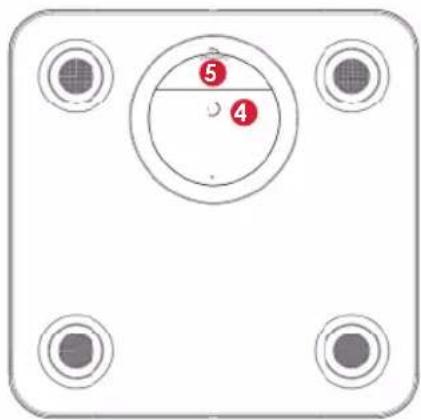
text_image
⑤ ④http://www.terraillon.com/sites/default/files/Guide%20utilisateur%20Wellness%20Coach_1.pdf
REPLACEMENT DES PILES
DÉCLARATION DE CONFORMITÉ
CARACTÉRISTIQUES DU PRODUIT
WAARSCHUWING VOOR GEBRUIK
GA VOOR MEER INFORMATIE NAAR
WWW.TERRAILLON.COM/FAQ
PRODUCTOVERZICHT
text_image
① 642. ② ③ ③ ③ ③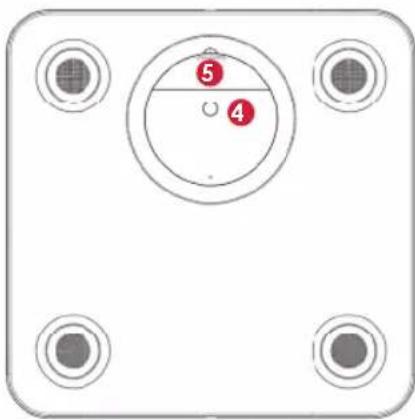
natural_image
Front view of a white electronic device with four circular ports and a central circular dial (no text or symbols)http://www.terraillon.com/sites/default/files/Guide%20utilisateur%20Wellness%20Coach_1.pdf
natural_image
Four black horizontal lines on a white background, no text or symbols presenttext_image
① 642 ② ③ ③ ③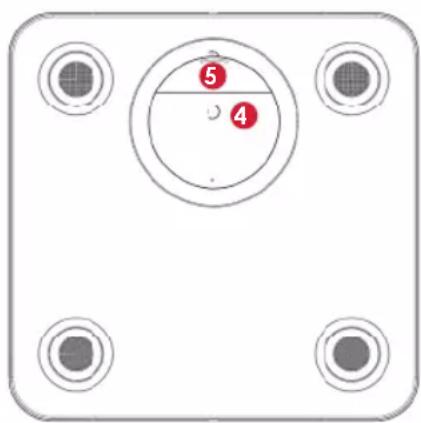
text_image
⑤ ④CREARE UN ACCOUNT WELLNESS COACH
text_image
① 642. ② ③ ③ ③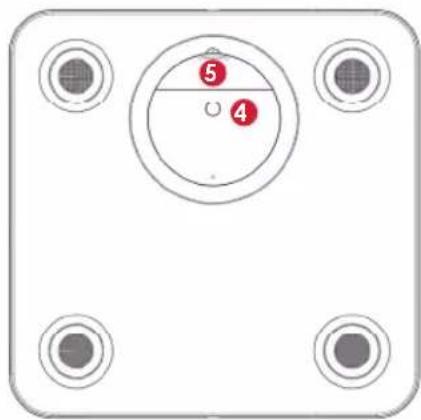
natural_image
Top-down view of a device panel with four circular ports and a central circular component (no text or symbols)http://www.terraillon.com/sites/default/files/Guide%20utilisateur%20Wellness%20Coach_1.pdf
natural_image
Four horizontal black dashed lines on white background (no text or symbols)text_image
① 642 ② ③ ③ ③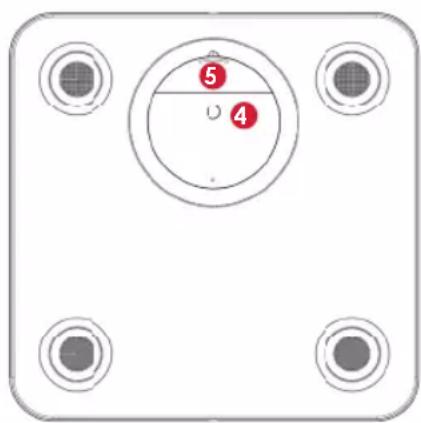
text_image
⑤ ④http://www.terraillon.com/sites/default/files/Guide%20utilisateur%20Wellness%20Coach_1.pdf
text_image
① 642 ② ③ ③ ③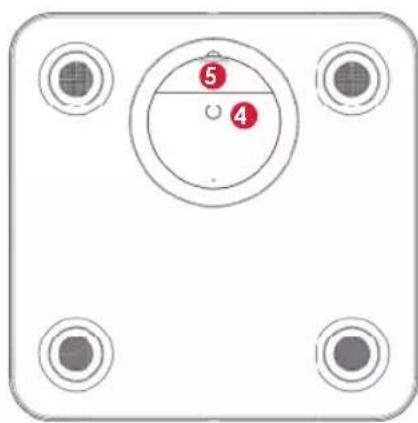
natural_image
Front view of a rectangular electronic device with four circular ports and a central circular dial (no text or symbols)http://www.terraillon.com/sites/default/files/Guide%20utilisateur%20Wellness%20Coach_1.pdf
natural_image
Four horizontal black lines on white background, no text or symbols presentnatural_image
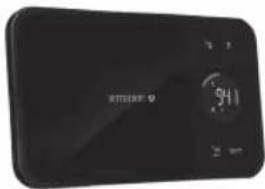
Black circular electronic device with a small screen and a smaller display (no visible text or symbols)weycoadh easyview

text_image
160KG BMI BIA
natural_image
Black digital balance scale with visible screen and buttons (no text or symbols)WebCoach Form

text_image
9:11nutritab

text_image
5KG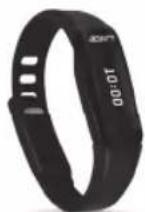
activiT
Band

text_image
Six circular icons representing different types of activities: running, location pin, flame, moon, alarm clock, and USB plug.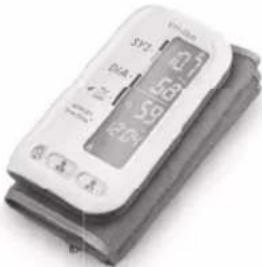
text_image
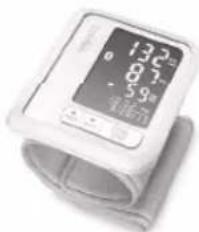
SPT DUA 5.8 5.9 2.0 0.4 ATensiosmart

natural_image
Digital blood pressure monitor with measurement markings (no visible text or symbols on device body)Tensio

Notes
Notes
Terraillon SAS France & Headquarters
1, rue Ernest Gouin
78290 Croissy-sur-Seine - France
Quarry Bay - Hong Kong
Tel: + 852 (0)2960 7200
customerservice@terraillon-asia.com