WEBCOACH SMART - Scale TERRAILLON - Free user manual and instructions
Find the device manual for free WEBCOACH SMART TERRAILLON in PDF.


| Product Type | Connected scale (smart body scale) |
| Brand | Terraillon |
| Model | WEBCOACH SMART |
| Display | LCD screen |
| Power | 3 AAA batteries (not included) |
| Connectivity | Bluetooth (smartphone synchronization) |
| Compatible app | Wellness Coach - Health (iOS/Android) |
| Main functions | Weight measurement, profile selection (up to 8 users), automatic synchronization via Bluetooth, data tracking in app |
| Units of measurement | Kilograms (kg), pounds (lb), stones (st) – selectable via button |
| Maximum capacity | 180 kg (standard estimate for this type of scale) |
| Accuracy | 100 g (standard estimate) |
| Dimensions (approx.) | 30 x 30 x 2 cm (standard estimate for a bathroom scale) |
| Device weight | Approximately 1.5 kg (standard estimate with batteries) |
| Material | Tempered glass / plastic (weighing surface in glass) |
| Maintenance and cleaning | Clean with a damp cloth only. Do not use detergents or chemicals. |
| Safety | Use on a hard, flat surface. Do not immerse in water. Risk of slipping if surface is wet. |
| Compliance | RED Directive 2014/53/UE (radio equipment). Declaration of conformity available online. |
| Warranty | 2 years against any material and manufacturing defects (excluding normal wear and misuse) |
| Spare parts and repairability | Replacement batteries (type AAA). For any other parts or repairs, contact customer service. |
| General information | Manufactured by Terraillon SAS. Consumer service: 0 826 88 1789 / serviceconsommateurs@terraillon.fr. Website: www.terraillon.com |
| Recycling | Do not dispose of with household waste. Recycle at designated facilities (WEEE). Contact local authorities or retailer. |
Frequently Asked Questions - WEBCOACH SMART TERRAILLON
User questions about WEBCOACH SMART TERRAILLON
0 question about this device. Answer the ones you know or ask your own.
Ask a new question about this device
Download the instructions for your Scale in PDF format for free! Find your manual WEBCOACH SMART - TERRAILLON and take your electronic device back in hand. On this page are published all the documents necessary for the use of your device. WEBCOACH SMART by TERRAILLON.
USER MANUAL WEBCOACH SMART TERRAILLON
iPhone is registered trademark of Apple Inc.
Android is a trademark of Google Inc.
The Bluetooth ® word mark and logos are registered trademarks owned by Bluetooth SIG, Inc.
Other trademarks and trade names are those of their respective owners.
DÉCLARATION DE CONFORMITÉ
Thank you very much for selecting the Terraillon connected scale WEB COACH SMART.

Any information provided by this device is in no way meant to treat, cure or prevent any disease or illness from happening.
FIND MORE INFORMATION ON
http://www.terraillon.com
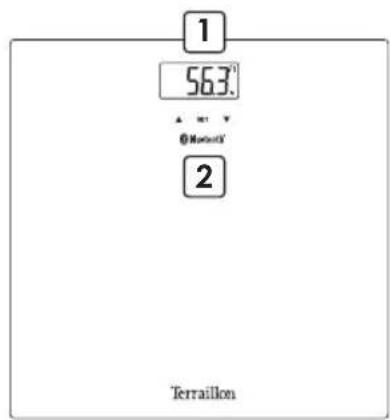
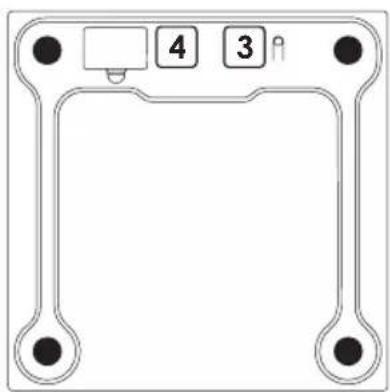
PRODUCT OVERVIEW
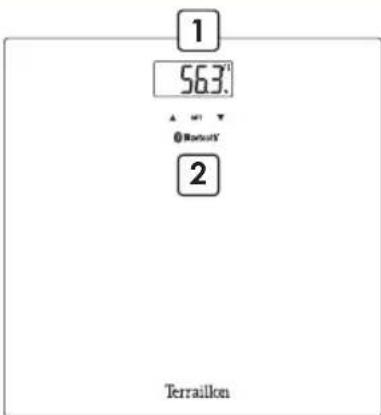
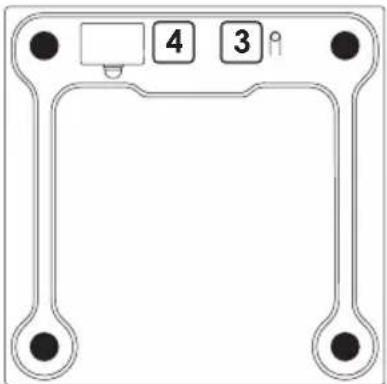
1 LCD Display
2 Profile selection
3 Unit and paring button
4 Battery compartment
FIRST USE
- Insert the batteries (3xAAA).
- You will need your smartphone to install your bathroom scales.
- Download the Wellness Coach – Health app, then open it.


- Follow the instructions that appear on your smartphone. Ensure you enter all the information requested.
- Your smartphone must remain near to the bathroom scales throughout the installation process.
- If you encounter any problems, please consult the help centre:
http://terraillonhelp.zendesk.com
START MEASURING
When the synchronization with your scale has been completed and the scale display is off, please select your profile number on the scale: use the arrows ▼▲ on your scale and press SET to confirm your profile. Step on the scale, the symbol ≈ remains fixed on the display: the connection with the application succeeded.
Tip: After synchronizing with your scale, you can mount directly on your scale before the screen goes out. In this case, the weight data will be assigned to the selected profile during synchronization.
If the symbol does not appear, please ensure that your Wellness Coach- Health app is open, that Bluetooth is enabled on your smartphone and that you have selected the correct profile on the scale. If the symbol 📄 appears on the display of your scale before weighing, it means that the data from your previous weighing has not been transferred and has been saved in your scale. If the symbol 📄 disappears from the display of your scale after weighing, it means that all the data has been transferred.
If two profiles have a similar weight, the scale will ask you to confirm your profile number. On the scale, press the right arrow ▼ if your profile number is the one on the right. In the example below, if you are profile 1, you must press the left arrow▲.
P1P8
Be sure to always weigh yourself on a hard and flat surface.
MAINTENANCE
Use water only. DON'T use propellant or other chemicals.
WARRANTY & ENVIRONMENT PROTECTION
This product is guaranteed for 2 years against material and manufacturing defects. During this period, such defects will be repaired free of charge (proof of purchase must be presented if the scale is under warranty). This warranty does not cover damage resulting from accidents, improper use or negligence. If you have a complaint please contact the store where you purchased the scale first.
Waste electrical products should not be disposed of with household waste. Please recycle where facilities exist. Check with your local authority or retailer for recycling advice.
MEER INFORMATIE OVER
http://www.terraillon.com
OVERZICHT
- Download en open de app Wellness Coach - Health.



Terraillon SAS France & Headquarters
1, rue Ernest Gouin
78290 Croissy-sur-Seine – France
16 Great Queen Street - Covent Garden
LONDON
WC2B 5AH
support.uk@terraillon.com
Terraillon Asia Pacific Ltd
4/F, Eastern Centre
1065 King's Road
Quarry Bay – Hong Kong
Tel: +852 (0)2960 7200
customerservice@terraillon-asia.com
Terraillon Corp USA



Brand : TERRAILLON
Model : WEBCOACH SMART
Category : Scale