
CSB60308BK - Scale TERRAILLON - Free user manual and instructions
Find the device manual for free CSB60308BK TERRAILLON in PDF.


| Product Type | Digital Bathroom Scale |
| Brand | Terraillon |
| Model | CSB60308BK |
| Color | Black |
| Dimensions (approx.) | 30 x 30 x 2 cm (12 x 12 x 0.8 in) |
| Weight (approx.) | 1.5 kg (3.3 lbs) |
| Power Supply | 2 x AAA batteries (not included) |
| Maximum Capacity | 180 kg (396 lbs) |
| Division (Graduation) | 0.1 kg / 0.2 lbs |
| Measurement Units | kg / lb / st |
| Auto On / Off | Yes |
| Low Battery Indicator | Yes |
| Overload Indicator | Yes |
| Display | LCD |
| Platform Material | Tempered glass |
| Cleaning | Wipe with a damp cloth; do not immerse in water |
| Safety Instructions | Use on a hard, flat surface; avoid impact and water |
| Spare Parts / Repair | Batteries are user-replaceable; other repairs by authorized service |
| General Information | Bathroom scale for personal weight measurement; follow manual |
Frequently Asked Questions - CSB60308BK TERRAILLON
User questions about CSB60308BK TERRAILLON
0 question about this device. Answer the ones you know or ask your own.
Ask a new question about this device
Download the instructions for your Scale in PDF format for free! Find your manual CSB60308BK - TERRAILLON and take your electronic device back in hand. On this page are published all the documents necessary for the use of your device. CSB60308BK by TERRAILLON.
USER MANUAL CSB60308BK TERRAILLON
Connected bathroom scales iOS / Android
- Download the Terraillon Wellness Coach app from the App Store (iOS) or Google Play Store (Android). Create your account (if you don't already have one). Ensure your Bluetooth connection is on.
- Hold the UNIT button down at the back of the bathroom scale until the display shows a rotating symbol to start pair up.
- Access "SYNCHRONISE MY DEVICES" (fig.1) from the menu on the right hand corner. Tap "START SYNCRONISATION" (fig.2) from your phone (this may take a few seconds). Once the operation succeeds and the symbol of your scale appears, tap "SYNCHRONISE ALLDEVICES" (fig.3).


fig.1 fig.2 fig.3
- The 2 devices should now be synchronised. (fig.4) It is important to bind your account with the bathroom scale for automatic recognition of user during weighing. Tap "NEXT". Choose a profile and edit the profile with your name (fig.5). Then press "CONFIRM".

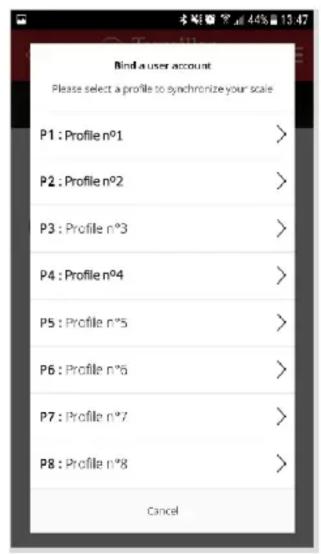
fig.4 fig.5
- Once you have bind a user account, your bathroom scale is set and ready to be used (on left corner you see PX, with X being your profile number). If you are not doing your first scale right after the synchronisation, the display will stay off. Select your profile name again and press “SET” (fig.5).
-
Use the bathroom scale on a hard, flat surface. Step onto the scale and you will see your weight displayed on the screen. Once your weight is stable, the display blinks.
-
If you step out right away, only your weight will be measured.
- If you stay longer on the scale, the “BIA” symbol appears on the left corner of the display. It means it starts analysing your body composition.
In both cases, a Bluetooth icon appears when weighting is complete.

Terraillon®
WELLNESS COACH
- A log book icon will flash on the screen confirming that the connection with the app is complete and that the data has been transmitted to the Wellness Coach app. From the Menu on the right hand corner, select 'ACCESS MY PROGRESS CHART'. Your dashboard will appear. Click on 'MY WEIGHT' to see your results i.e. weight, BMI and full body composition analysis (fig.6).

fig.6
Please note that the Wellness Coach APP is supported with :
- IOS 8 (4S) and above
- Android 4.3 and above.



Brand : TERRAILLON
Model : CSB60308BK
Category : Scale