
Evo Fit - Scale TERRAILLON - Free user manual and instructions
Find the device manual for free Evo Fit TERRAILLON in PDF.


| Product type | Connected impedance meter (connected scale) |
| Brand | Terraillon |
| Model | Evo Fit |
| Maximum capacity | 180 kg (397 lb / 28 st) |
| Power supply | 3 AAA batteries (not included) |
| Display | Color screen |
| Connectivity | Bluetooth Dual Mode (standalone or connected) |
| Measurements | Weight, body fat mass, muscle mass, water mass, BMI |
| User profiles | Up to 4 profiles in standalone mode, up to 8 profiles in connected mode |
| Mobile app | Wellness Coach - MyHealth (free, iOS and Android) |
| Compatibility | iOS 9 and above, Android 8 and above |
| Sensors | Electrodes for impedance analysis |
| Units of measurement | kg / lb / st selectable via button |
| Maintenance and cleaning | Slightly damp cloth, no chemicals |
| Safety | Do not use with pacemaker; do not jump on the scale; hard and flat surface |
| Warranty | 2 years against material and manufacturing defects |
| Country of manufacture | Not specified in the manual |
Frequently Asked Questions - Evo Fit TERRAILLON
User questions about Evo Fit TERRAILLON
0 question about this device. Answer the ones you know or ask your own.
Ask a new question about this device
Download the instructions for your Scale in PDF format for free! Find your manual Evo Fit - TERRAILLON and take your electronic device back in hand. On this page are published all the documents necessary for the use of your device. Evo Fit by TERRAILLON.
USER MANUAL Evo Fit TERRAILLON
MANUEL D'UTILISATION – INSTRUCTION MANUAL

EVO FIT
Terraillon®
CE
www.terraillon.com

iPhone is registered trademark of Apple Inc.
Android is a trademark of Google Inc.
The Bluetooth ® word mark and logos are registered trademarks owned by Bluetooth SIG, Inc. Other trademarks and trade names are those of their respective owners.
DÉCLARATION DE CONFORMITÉ
CARACTÉRISTIQUES DU PRODUIT
P.I.R.E: <= -3.29 dBm.
EN
TERRAILLON CONNECTED BODY COMPOSITION ANALYZER
Thank you very much for selecting the Terraillon Glass Body Fat Analyzer EVO FIT.

Don't use this product if you wear a pacemaker or implantable electronic device
Any information provided by this device is in no way meant to treat, cure or prevent any disease or illness from happening.
Do not stand on the edge of the scale or jump on it.
Do not overload the scale (max. 397 lb/180 kg/28 st).
Do not drop the scale or drop objects on it, as this could damage the sensors.
Do not immerse the scale in water or use chemicals to clean it. Clean the scale with a slightly damp cloth.
Always place the scale on a hard, dry, flat surface before taking a measurement.
Ensure your feet are dry before stepping on the scale.
Do not use the device if it is damaged. Continued use of a damaged device may result in injury or incorrect results.
Check the device before each use. Be careful when using it on a wet and slippery surface. For persons under the age of 16, the scale can only measure body weight.
PRODUCT OVERVIEW
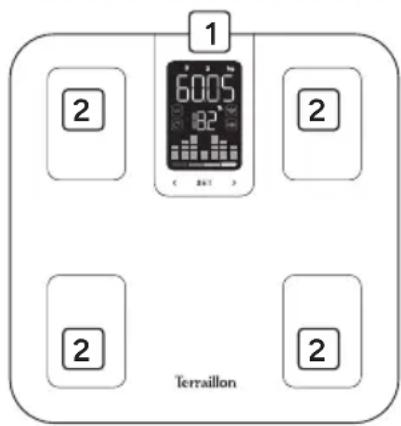
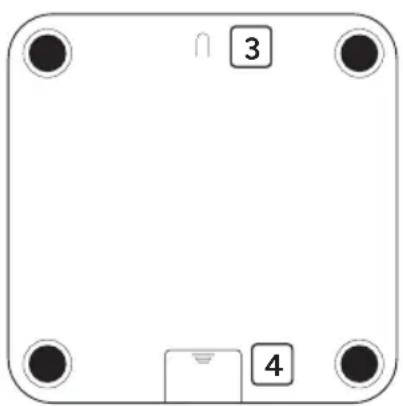
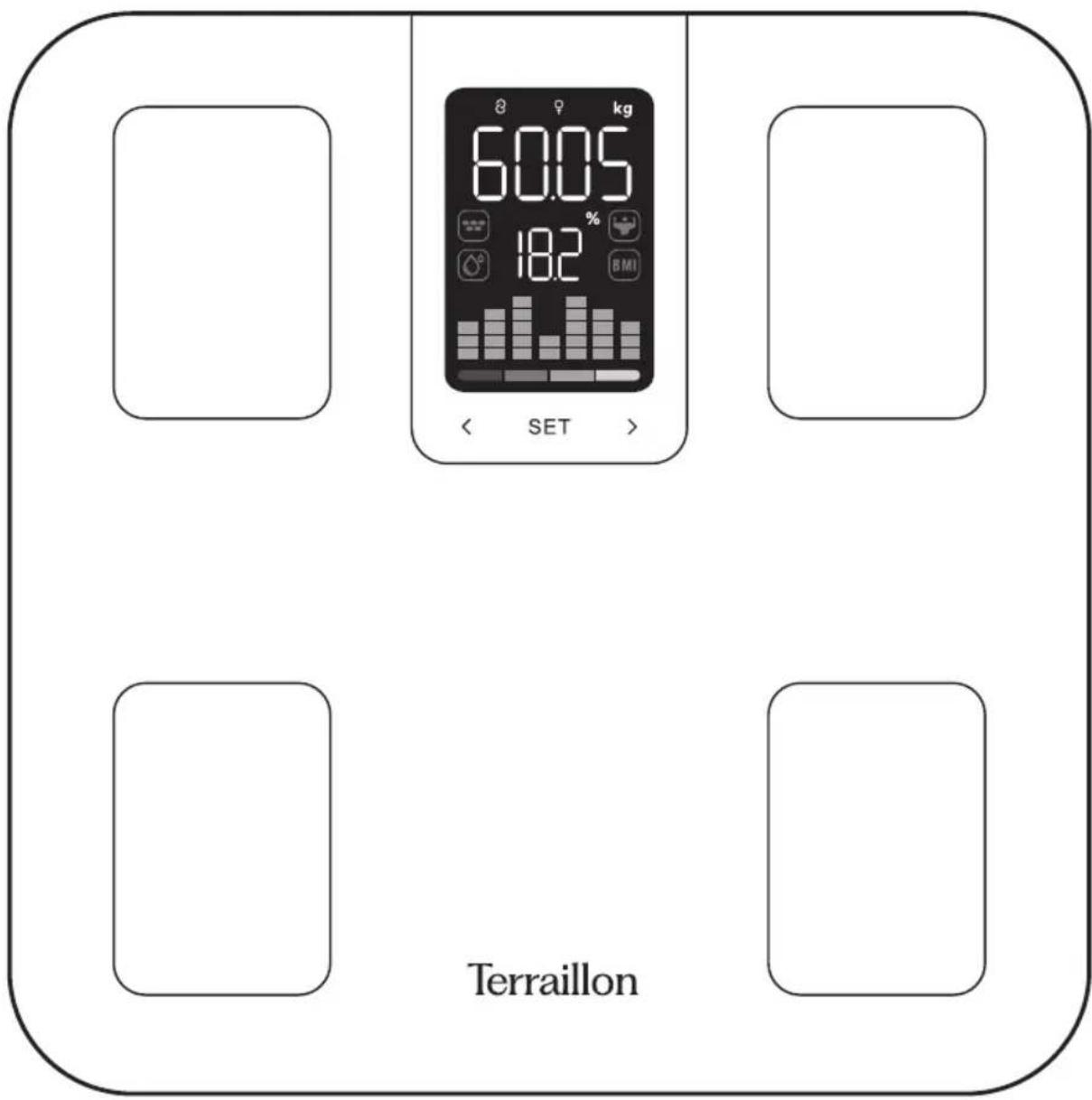
1 Colour display
2 Electrodes
3 Unit button
4 Battery compartment
EN
TERRAILLON CONNECTED BODY COMPOSITION ANALYZER
FIRST USE
- Insert 3 AAA batteries into the battery compartment.
- This device features DUAL MODE technology, allowing you to use it in standalone mode (not connected) by setting up to 4 profiles, or in connected mode (by connecting it to the Wellness Coach - My Health app) by setting up to 8 profiles.
- Follow the instructions in the following paragraphs according to the mode you wish to use.
USE IN STANDALONE MODE (NOT CONNECTED)
- This device has 4 user profiles for standalone use (not connected).
- After installing the batteries, switch on the device by pressing it lightly, then press SET to access the setting mode. To set the U-1 profile, press and hold when U-1 flashes. Enter your age as soon as the numbers at the top of the screen flash and the word AGE appears. Set the age by scrolling using the < and> buttons. Confirm by briefly pressing SET.
- Select gender: press the < and >buttons to choose between female or male profile, then press SET to confirm.
Terraillon.
EN
TERRAILLON CONNECTED BODY COMPOSITION ANALYZER
- Indicate the height : press the< and> buttons to indicate the size in centimetres, then press SET to confirm.
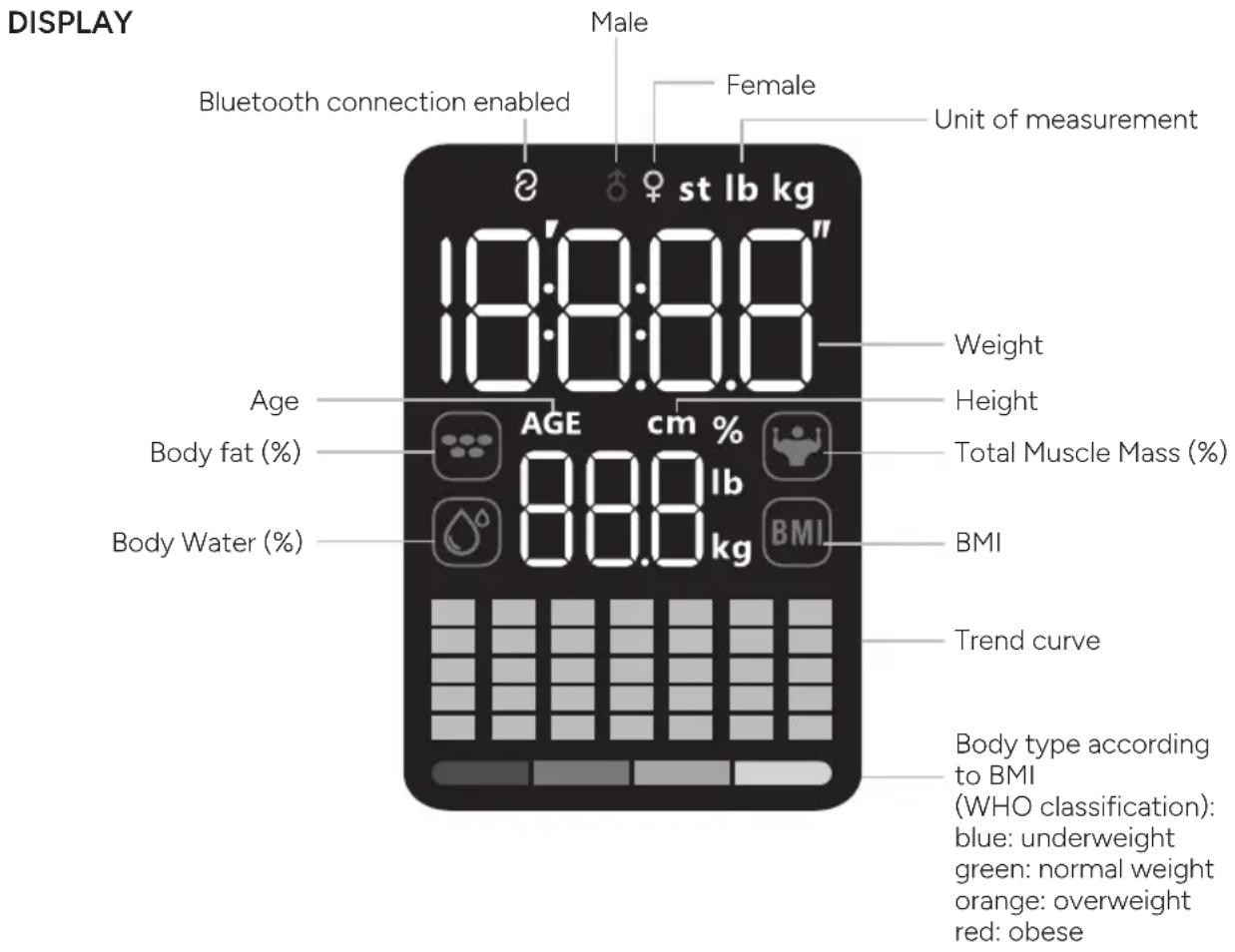
- The scale displays the information entered, then 0.00kg. You can now step onto the scale. Your weight will appear at the top of the screen after a few seconds, followed by your body composition measurements, which will scroll twice in the following order: fat mass, muscle mass, water mass and BMI.
- To configure the other profiles, press the < and >buttons to access profiles U-2, U-3 and U-4, then configure these profiles in the same way as described above.
- For offline use, press SET before each weighing and scroll using the
buttons to find your user profile among profiles U-1 to U-4. Press SET a second time to confirm the selected profile. - There is also a P-0 profile, which corresponds to the guest profile. To use this profile, you must enter your age, gender and height each time you weigh yourself: the profile will not be saved.
USE IN CONNECTED MODE (BLUETOOTH)
- To set up your bathroom scale in connected mode, please have your smartphone ready.
- Download the Wellness Coach - MyHealth app, then open it.

Download on the App Store

GET IT ON Google Play
- Follow the instructions that appear on your smartphone. Ensure you enter all the information requested.
- Your smartphone must remain near to the bathroom scales throughout the installation process.
- You can connect to your scale as an owner or as a member. Please note: only the owner of the scale can change its parameters as well as delete or add members.
If you have any difficulties or need more information, you can find our help centre by scanning this QR code with your smartphone. If you cannot find the answer to your question, you can also contact our After Sales Service: support.uk@terraillon.com
START MEASURING
- You must have bare feet to be able to analyse your body mass.
- Open the MyHealth application.
- Step onto your bathroom scale. Maintain contact with the electrodes and wait for the measurement to complete. The data is transmitted directly to the app.
EN
TERRAILLON CONNECTED BODY COMPOSITION ANALYZER
Next weigh-ins:
-
Step onto your weighing scale with your smartphone nearby and the MyHealth app open:
-
If your weight is within ±2 kg of your previous weight, the data is transmitted directly and linked to your profile in the application.
-
If your weight is not within ±2 kg of your previous weight, the data will be sent to the application's pending data. You will then need to assign it manually to your profile (▲ symbol in MyHealth).
-
Step on your scale without your smartphone nearby: if your weight is within ±2 kg of your previous weight, the scale will display all your measurements twice before saving them and turning off. To send them to the app, open MyHealth nearby and then lightly tap the scale to turn it on. The data will be sent automatically.
Always weigh yourself on a hard, flat surface.
MULTI-USER MANAGEMENT
At the end of the first pairing process, your MyBodyCheck application will ask you to become the owner of the device. There can only be one owner of the device. The owner has the rights to modify certain parameters, such as the device configuration. To invite a new user while remaining the owner of your EVO FIT, you can follow the steps below to display the QR code for pairing the invited user.
The guest user can add a device by scanning the QR code (add device / Scale / Connection via Scan code).
The guest user's profile is then associated with the bathroom scale.
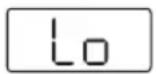
Lo appears on the display when the batteries are low and need to be replaced.
To change the batteries, open the battery compartment cover located on the back of the weighing scale. Remove the used batteries and insert the new ones. Batteries should only be removed and replaced by an adult. Only use the recommended batteries or batteries of the same type. Do not mix different types of batteries, or used batteries with new ones. The batteries must be inserted with the correct polarity.
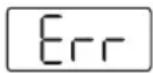
Overload, remove the weight immediately.
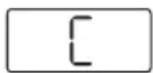
If the symbol 'C' appears on the screen when you step off the scales, this means that an error has occurred. Please weigh yourself again.
MAINTENANCE
Use water only. DON'T use propellant or other chemicals.
WARRANTY & ENVIRONMENT PROTECTION
This product is guaranteed for 2 years against material and manufacturing defects. During this period, such defects will be repaired free of charge (proof of purchase must be presented if the scale is under warranty). This warranty does not cover damage resulting from accidents, improper use or negligence. If you have a complaint please contact the store where you purchased the scale first.
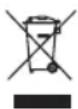
Waste electrical products should not be disposed of with household waste. Please recycle where facilities exist. Check with your local authority or retailer for recycling advice.
PRODUCT SPECIFICATION
E.I.R.P: <= -3.29 dBm.
DE
TERRAILLON KÖRPERFETTANALYSEWAAGE
Download on the App Store

GET IT ON Google Play
Terraillon SAS France & Headquarters
1, rue Ernest Gouin
78290 Croissy-sur-Seine – France
Quarry Bay – Hong Kong
Tel: +852 (0)2960 7200
customerservice@terraillon-asia.com
Terraillon Corp USA


- TERRAILLON®
- DÉCLARATION DE CONFORMITÉ
- CARACTÉRISTIQUES DU PRODUIT
- EN
- TERRAILLON CONNECTED BODY COMPOSITION ANALYZER
- PRODUCT OVERVIEW
- FIRST USE
- USE IN STANDALONE MODE (NOT CONNECTED)
- TERRAILLON
- USE IN CONNECTED MODE (BLUETOOTH)
- DOWNLOAD ON THE APP STORE
- GET IT ON GOOGLE PLAY
- START MEASURING
- MULTI-USER MANAGEMENT
- MAINTENANCE
- WARRANTY & ENVIRONMENT PROTECTION
- PRODUCT SPECIFICATION
- DE
- TERRAILLON KÖRPERFETTANALYSEWAAGE
- TERRAILLON SAS FRANCE & HEADQUARTERS
- TERRAILLON CORP USA
Brand : TERRAILLON
Model : Evo Fit
Category : Scale