Tracker - Scale TERRAILLON - Free user manual and instructions
Find the device manual for free Tracker TERRAILLON in PDF.


| Product type | Electronic scale with body composition analyzer |
| Brand | Terraillon |
| Model | Tracker |
| Power supply | 2 AAA batteries (not included) |
| Weighing capacity | 180 kg |
| Units of measurement | kg, st (stones) |
| Functions | Weighing, fat mass measurement, water mass measurement, BMI, calories |
| User memory | 12 profiles |
| Display | LCD with level indicators |
| Analysis type | Bio-impedancemetry (harmless weak current) |
| Fat mass measurement range | 4% – 60% |
| Water mass measurement range | 27.5% – 66% |
| Auto-off | Yes, after 10 seconds of inactivity |
| Usage | Private domestic use |
| Maintenance | Clean with a damp cloth; do not immerse |
| Safety | Do not use with electronic implants; pregnant women: weighing only |
| Warranty | 15 years (terms apply) |
| Certifications | CE |
Frequently Asked Questions - Tracker TERRAILLON
User questions about Tracker TERRAILLON
0 question about this device. Answer the ones you know or ask your own.
Ask a new question about this device
Download the instructions for your Scale in PDF format for free! Find your manual Tracker - TERRAILLON and take your electronic device back in hand. On this page are published all the documents necessary for the use of your device. Tracker by TERRAILLON.
USER MANUAL Tracker TERRAILLON
Terraillon®
CE
www.terraillon.com
EN
Thank you for purchasing this Body Analyser Digital Scale. Please read the instructions and warnings carefully before use to ensure safe and satisfactory operation of this product.
The body analyser uses the help of electrodes placed on the scale; it sends a small harmless current through the body, so small that you will not feel anything.
CAUTION: This product should not be used by people with implants such as pacemaker, artificial limbs, contraceptive devices, metal plates or screws. It may cause the device to malfunction or produce an inaccurate result. When in doubt, consult your physician. Pregnant women should only use the weight function.
Instructions for use
Operation
When first use, please install batteries (2 PCS AAA batteries).
Press the switch on the bottom of the scale, you can choose KG or ST. Select your desired unit of measure, always when the scale is turned on and 0.0 is displayed.
1. To measure weight only:
Put the scale on a hard & flat surface (avoid carpet or soft surface).
Then gently step on the scale directly, put your feet evenly on the scale without moving and you will see body weight flash 3 times and lock. Your correct weight will be displayed.
Step off the scale and it will turn off in 10 seconds automatically.
2. Personal data setting mode: Set user ID
Press the SET button to enter set-up mode:
- "P01-P12" will appear on the screen and flash - this refers to the user memory in use (1 to 12)
- Scroll up and down using ▲ or ▼ button to select number and then SET to confirm
- The scale will go back to weighing mode after the user profile is set up
Input personal information (gender/age/height) before using :
- To set gender: Scroll up and down using ▲ or ▼ button to select gender (select from female or male) and then SET to confirm.
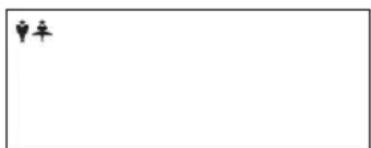
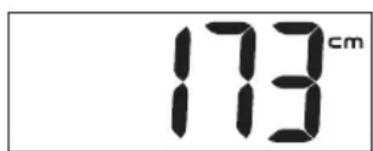
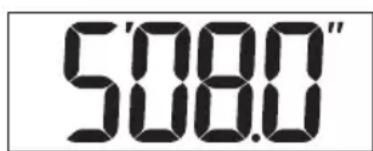
- To set height: Scroll up and down using ▲ or ▼ button to select height and then SET to confirm.
Terraillon®
EN
- To set age: Scroll up and down using ▲ or ▼ button to select age and then SET to confirm.
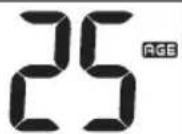
To weigh and measure
- After setting up the user profile, when the LCD displays 0.0, you may stand on the scale platform directly, with your barefoot aligned on the electrodes; your weight will be displayed.
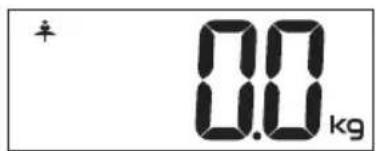
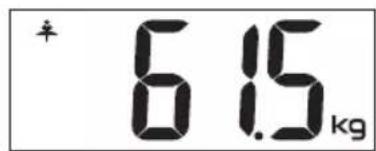
- After the weight is stable, a flashing 0 means that the scale is measuring the fat, the 0 signal moves from left to right across the screen, and then shows the data.
- Measurement display
Body Fat percentage Body Water percentage
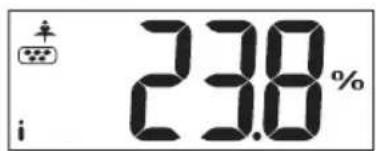
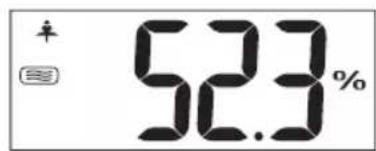
BMI (Body Mass Index) Calorie
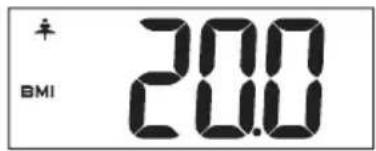
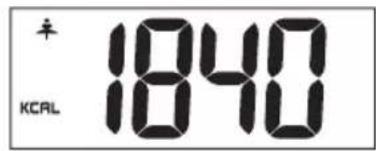
When the scale is on, to recall your user memory (once it has already been set up), scroll up and down using ▲ or ▼ button to select your user memory. Press SET to confirm. Your age and height are displayed. When the LCD displays 0.0, you may stand on the scale platform directly. Your weight, body fat percentage, body water percentage, calorie and BMI will be displayed.
The scale will turn off automatically.
- The body fat ratio (%): 4.0%-60.0%
| Age Fat | (F) Fat (M) Status | Key Line Indication | ||
| ≤30 | 4.0-16.0% 4 | 0-11.0% Too lean | i-- | |
| 16.1-20.5% 1 | 1.1-15.5% Lean | i- | ||
| 20.6-25.0% 1 | 5.6-20.0% Normal | i | ||
| 25.1-30.5% 2 | 0.1-24.5% Fat | i+ | ||
| 30.6-60.0% 2 | 4.6-60.0% Too fat | i++ | ||
| >30 | 4.0-20.0% 4 | 0-15.0% Too lean | i-- | |
| 20.1-25.0% 1 | 5.1-19.5% Lean | i- | ||
| 25.1-30.0% 1 | 9.6-24.0% Normal | i | ||
| 30.1-35.0% 2 | 4.1-28.5% Fat | i+ | ||
| 35.1-60.0% 2 | 8.6-60.0% Too fat | i++ | ||
Please be reminded that the %BF estimated with the scale represents only a good approximation of your actual body fat. There exist clinical methods of estimating body fat that can be ordered by your physician.
Why is it important to monitor percentage Total Body Water (% TBW) in the body?
Water is an essential component of the body and its level is one of the health indicators. Water makes up approximately between 50-70% of the body's weight. It is present proportionally more in lean tissue compared to fat tissue. Water is a medium for biochemical reactions that regulate bodily functions. Water provides form to cells; helps to maintain body temperature; provides moisture to skin and mucosa; cushions vital organs; lubricates joints and is a component of many body fluids. The amount of water in the body fluctuates with the hydration level of the body and state of health. Monitoring the level of body water can be a useful tool for one's health maintenance. The estimated %TBW may vary according to your hydration level, that is, how much you have drunk or how much you have sweated immediately prior to the measurement. For better accuracy, avoid fluctuation in hydration level prior to the measurement. The accuracy of the scale in estimating TBW will also decrease with individuals suffering from diseases that tend to accumulate water in the body.
The optimal %TBW of an individual varies according to age and gender.
The following table may be used as a guide:
EN
- The body water ratio (%): 27.5%-66.0%
| Age Hydration (F) Hydration (M) Status | Key Line Indication | |||
| ≤30 | 66.0-57.8% | 66.0-61.2% Too lean | lean | i-- |
| 57.7-54.7% | 61.1-58.1% Lean | lean | i- | |
| 54.6-51.6% | 58.0-55.0% Normal | Normal | i | |
| 51.5-47.8% | 54.9-51.9% Fat | Too fat | i+ | |
| 47.7-27.5% | 51.8-27.5% | i++ | ||
| >30 | 66.0-55.0% | 66.0-58.4% Too lean | lean | i-- |
| 54.9-51.6% | 58.3-55.3% Lean | lean | i- | |
| 51.5-48.1% | 55.2-52.3% Normal | Normal | i | |
| 48.0-44.7% | 52.2-49.2% Fat | Too fat | i+ | |
| 44.6-27.5% | 49.1-27.5% | i++ | ||
Please be reminded that the \% TBW estimated with the scale represents only a good approximation of your TBW. There exist clinical methods of estimating body fat that can be ordered by your physician.
When should I use the scale's body fat and total body water functions?
For maximum accuracy and repeatability, it is recommended that the scale's body fat and body water functions be used at approximately the same time of the day e.g. before breakfast in the morning. It is also a good practice to avoid swings in hydration level of the body prior to measurement. Establishing your own baseline level of %BF and %TBW and track their changes is better than merely comparing your %BF and %TBW value to the population's normal value.
Trouble Shooting
- When scale is overloaded or when scale is loaded before zero is captured and displayed, display shows "Err".
- Do not overload the scale and do not step on the scale before display shows "0.0".
- Display shows “ Errh/ErrL ” when body fat is out of range (under or over 60%).
- When battery is low, display shows "Lo". Replace battery.
- Error exists, please re-test to get the correct result. Display shows “£”.
EN
Changing the batteries
To change the batteries, open the battery cover on the back of the scale unit. Remove used battery and insert new battery.
Batteries should be removed and replaced by adults only.
Only use recommended batteries or those of the same or equivalent type.
Do not mix old and new batteries or batteries of different types.
Batteries are to be inserted with the correct polarity.
The supply terminals are not to be short-circuited.
Remove exhausted batteries from item.
Remove batteries if equipment is not used for extended periods of time.
Rechargeable batteries are to be removed from the item before being recharged.
Rechargeable batteries are only to be charged under adult supervision.
Do not attempt to recharge non-rechargeable batteries.
Batteries contain substances that may be harmful to the environment and human health.
Keep out of the reach of children and seek immediate medical help if swallowed.

This symbol 📄 indicates that batteries should not be disposed of in the normal household waste but taken to appropriate local recycling facilities, where and when these are available.
Never throw batteries in a fire or attempt to open outer casing.
(N.B if battery warnings appear on the packaging of a toy it should also include the statement -
Packaging must be retained as it contains important information).
Guarantee
This product is guaranteed against defects in materials or manufacturing. During the guarantee period, any such defects will be repaired free of charge (proof of purchase must be provided).
Claims during the first year of guarantee shall be addressed to the store where you purchased the product. From the second year of guarantee, claims should be addressed to: Terraillon UK 2 Waterhouse, Waterhouse Street, Hemel Hempstead, Hertfordshire, England, HP1 1 ES.
The commercial 15 years guarantee is only applicable for products purchased from UK/Ireland retail.
Warnings!
CAUTION: This product should not be used by people with implants such as pacemaker, artificial limbs, contraceptive devices, metal plates or screws. It may cause the device to malfunction or produce an inaccurate result. When in doubt, consult your physician.
Pregnant women should only use the weight function.
Do not disassemble the scale as incorrect handling may cause injury.
This product is not intended for professional or medical use; it is intended for private use only.
Clean with a lightly dampened cloth without allowing any water to get into the device.
Do not use solvents or immerse the product in water.
Avoid excessive impact or vibration to the unit, such as dropping the product onto the floor.

Please retain this information leaflet for future reference.
FR
Terraillon UK 2 Waterhouse, Waterhouse Street, Hemel Hempstead, Hertfordshire, England, HP1 1ES.
Terraillon SAS France & Headquarters
1, rue Ernest Gouin
78290 Croissy-sur-Seine – France
16 Great Queen Street - Covent Garden
LONDON
WC2B 5AH
support.uk@terraillon.com
Terraillon Asia Pacific Ltd
4/F, Eastern Centre
1065 King's Road
Quarry Bay – Hong Kong
Tel: +852 (0)2960 7200
customerservice@terraillon-asia.com
Terraillon Corp USA



Brand : TERRAILLON
Model : Tracker
Category : Scale