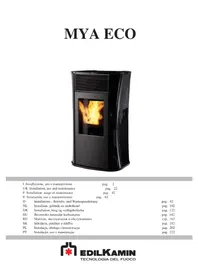
MYA ECO - Heating EDILKAMIN - Free user manual and instructions
Find the device manual for free MYA ECO EDILKAMIN in PDF.



User questions about MYA ECO EDILKAMIN
0 question about this device. Answer the ones you know or ask your own.
Ask a new question about this device
Download the instructions for your Heating in PDF format for free! Find your manual MYA ECO - EDILKAMIN and take your electronic device back in hand. On this page are published all the documents necessary for the use of your device. MYA ECO by EDILKAMIN.
USER MANUAL MYA ECO EDILKAMIN
natural_image
Black industrial fuel pump with visible flame inside, no text or symbols presentUK Installation, use and maintenance
F Installation, usage et maintenance
text_image
A B E C D G Ffig. 1
INFORMAZIONI PER LA SICUREZZA
natural_image
Close-up of a metallic electrical connector with wires and connectors, no visible text or symbolsCARATTERISTICHE
text_image
Technical diagram of a vertical structure with labeled components D and E, showing internal components and connections.text_image
fig.1 figB2 A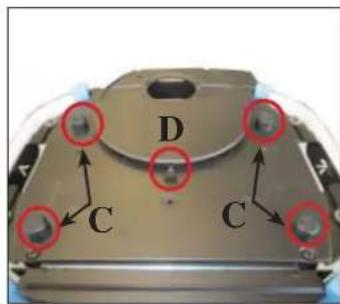
text_image
D C C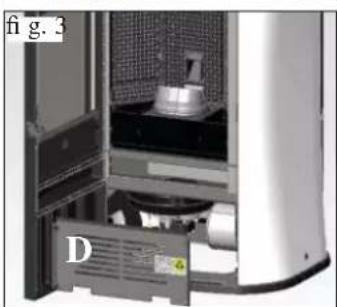
natural_image
Interior view of a server rack unit with labeled component D (no readable text or symbols)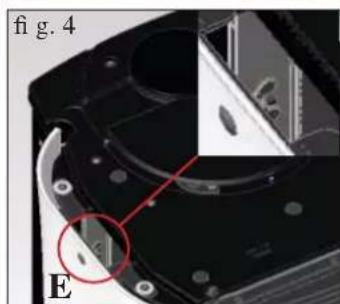
natural_image
Close-up of a mechanical component with a red circle highlighting a feature, labeled 'E' and 'fig. 4' (no readable text or symbols beyond labels)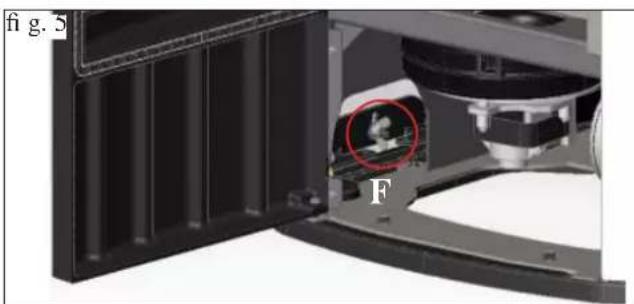
natural_image
Close-up of a mechanical device with a highlighted circular component and label 'F' (no readable text or symbols beyond labels)1) VERSIONE CON FIANCHI E TOP IN VETRO
natural_image
Exterior view of a portable water dispenser device (no text or symbols visible)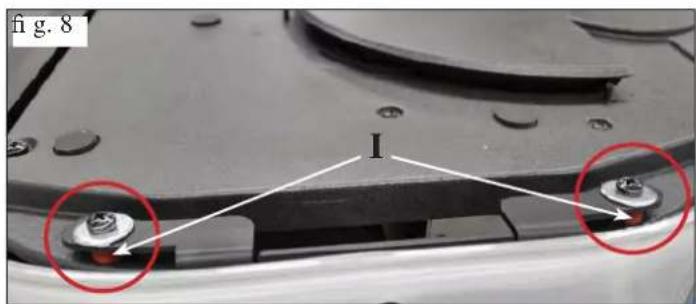
text_image
fig. 8 I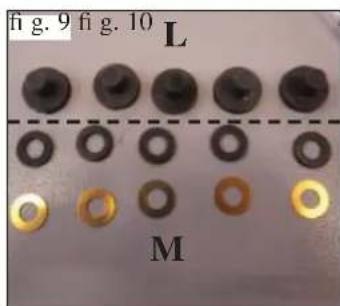
text_image
fig. 9 fig. 10 L M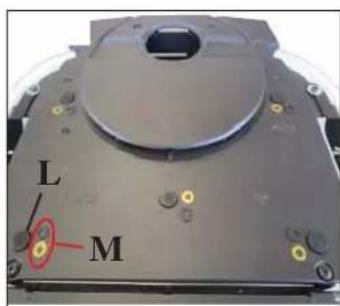
text_image
L M2) VERSIONE CON FIANCHI IN ACCIAIO E TOP IN VETRO
natural_image
Close-up of a white electronic device with a black lid and ventilation grille, labeled 'A' (no text or symbols on the device itself)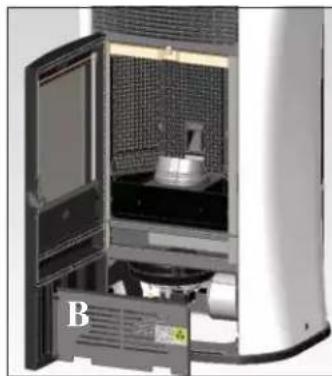
natural_image
Interior view of a laboratory or industrial machine with open door and internal equipment (no visible text or symbols)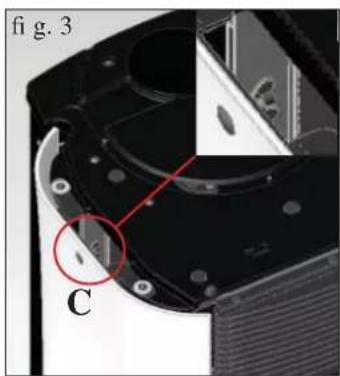
natural_image
Close-up of a mechanical component with labeled parts (C) and a red circle highlighting a feature, no readable text or symbols present.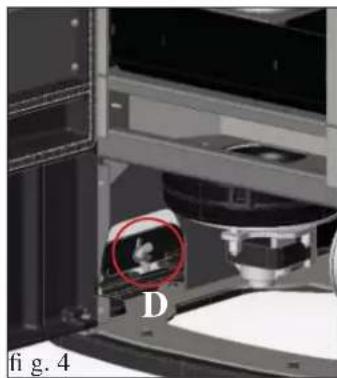
natural_image
Close-up of a mechanical device with a highlighted circular region labeled 'D' and figure marker 'fig. 4' (no readable text or symbols beyond labels)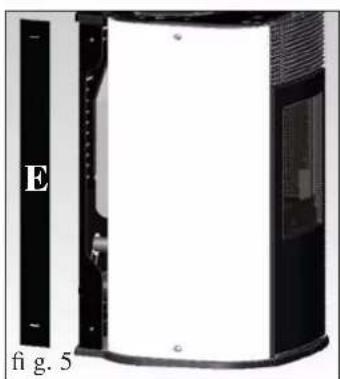
natural_image
Exterior view of a black and white industrial device with labeled section E, no visible text or symbols on the device itself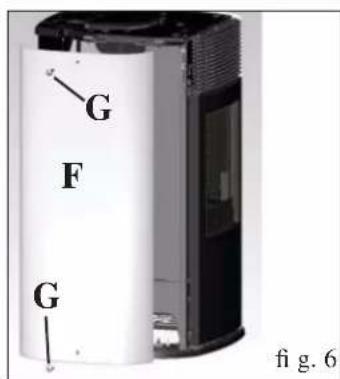
text_image
G F G fig. 6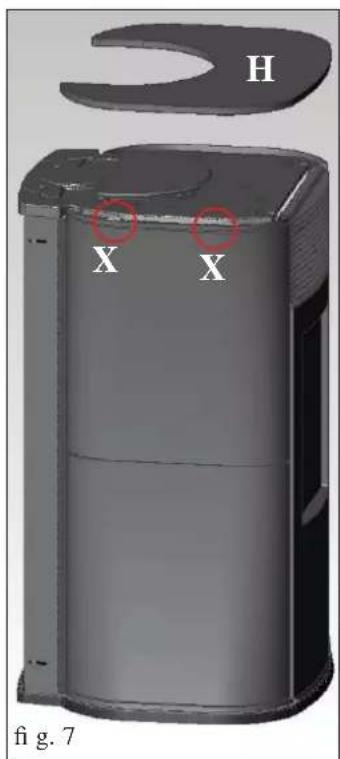
text_image
H X X fig. 7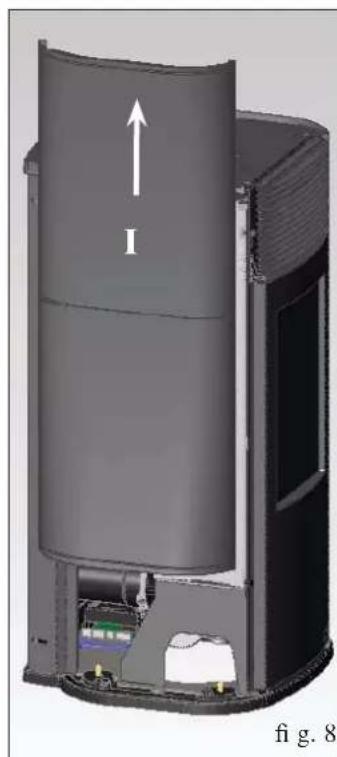
natural_image
3D cutaway view of a cylindrical device with internal components and an upward arrow, labeled 'fi g. 8' (no text or symbols on the diagram itself)3) USCITA FUMI DAL TOP
natural_image
Close-up of a mechanical component with labeled parts I and H, no readable text or symbols beyond labels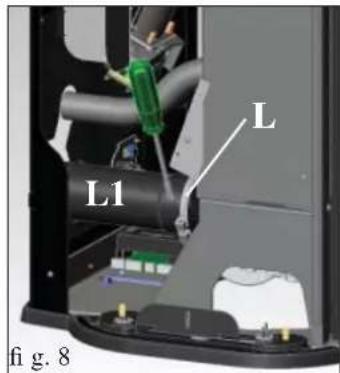
text_image
L L1 fi g. 8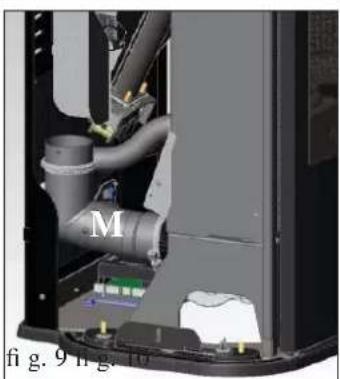
natural_image
Interior view of a mechanical device showing internal components and labeled parts (M, fig. 9 h.g.)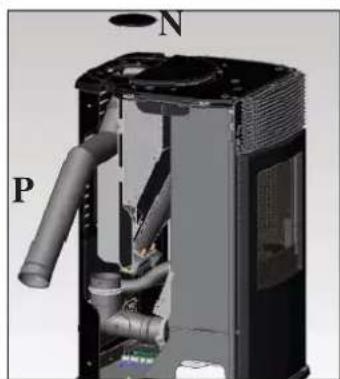
natural_image
3D cutaway view of a mechanical device showing internal pipes and housing (no text or symbols)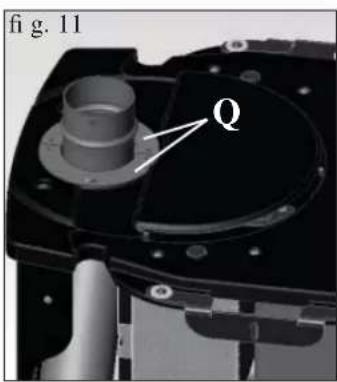
text_image
fig. 11 Q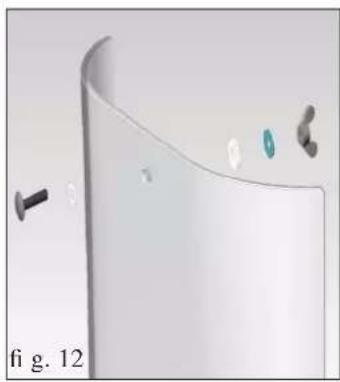
natural_image
3D rendered diagram of a curved surface with small components and a label 'fi g. 12' (no readable text or symbols)text_image
* premerefig.1
natural_image
Close-up of a white and black industrial air purifier with a circular vent cover (no text or symbols visible)fig. 2
natural_image
Close-up of a dark blue handheld electronic device with four rotary buttons labeled A, M, and -, displaying a green screen (no readable text or symbols beyond labels)
natural_image
Interior view of a modern kitchen appliance with open door and brick-patterned interior (no visible text or symbols)fig. A
natural_image
3D rendering of a mechanical device with a labeled component (2), no visible text or symbolsfig.B
natural_image
Interior view of a mechanical testing chamber with a central component and patterned panel (no visible text or symbols)CONSIGLI PER POSSIBILI INCONVENIENTI
KIT PER COLLEGAMENTO USCITA FUMI DAL TOP
KIT COPRICANNA PER COLLEGAMENTO USCITA FUMI DAL TOP
ACCESSORI PER LA PULIZIA
natural_image
Metal cylindrical container with black hose and handle, no visible text or symbolsCongratulations and thank you for choosing our product.
Please read this document carefully before you use this product in order to obtain the best performance in complete safety.
For further details or assistance, please contact the DEALER where you purchased the product or visit our website www.edilkamin.com. and click on DEALERS.
NOTE
- After having unpacked the stove, ensure that its contents are complete and intact (remote control, “cold hand” handle to open door, guarantee booklet, glove, CD/technical data sheet, spatula, dehumidifying salt, allen wrench).
In case of anomalies please contact the dealer where you purchased the product immediately.
You will need to present a copy of the warranty booklet and valid proof of purchase.
- Commissioning/ testing
Commissioning and testing must be performed by the DEALER. Failure to do so will void the warranty.
Commissioning, as specified in standard UNI 10683 consists in a series inspections to be performed with the insert installed in order to ascertain the correct operation of the system and its compliance to applicable regulations
- Incorrect installation, incorrect maintenance, or improper use of the product, shall relieve the manufacturer from any damage resulting from the use of this product.
- the proof of purchase tag, necessary for identifying the insert, is located:
- on the top of the package
- in the warranty booklet found inside the fi rebox
- on the ID plate affixed to the back side of the unit;
This documentation must be saved for identification together with the valid proof of purchase receipt. The data contained therein must be reported when requesting information and made available should servicing be required;
- All images are for illustration purposes only; actual products may vary.
The undersigned EDILKAMIN S.p.a. with head off ce headquarters at Via Vincenzo Monti 47 - 20123 Milan - Italy - VAT T00192220192
Declares under its own responsibility as follows:
The pellet stove illustrated below conforms to Regulation EU 305/2011 (CPR) and to the harmonised European Standard EN 14785:2006
WOOD PELLET STOVES, trademark EDILKAMIN, called MYA ECO
Year of manufacture: Ref. Data nameplate Declaration of performance (DoP - EK 091): Ref. data tag plate
In addition, it is hereby declared that:
the wood pellet stove MYA ECO is in compliance with the requirements of the European directives:
2006/95/EC - Low voltage directive
2004/108/EC - Electromagnetic compatibility directive
EDILKAMIN S.p.a. will decline all responsibility of malfunctioning or damage to the equipment in case of unauthorized substitution, assembly or modifications of any sort on the said equipment on the part of non-EDILKAMIN personnel.
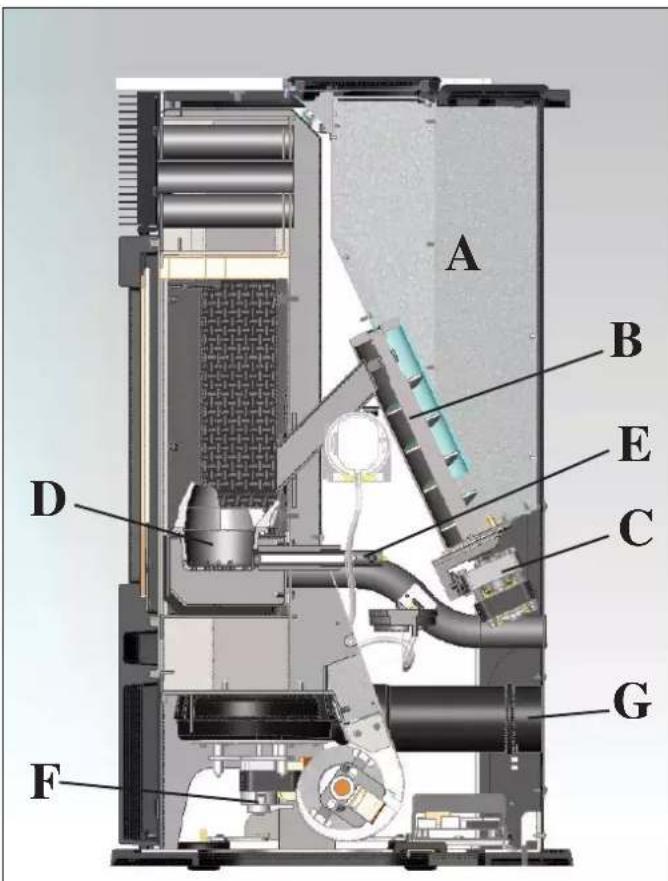
The stove produces hot air using wood pellets as fuel, with electronically controlled combustion. Hereunder is the explanation of its functions (the letters refer to figure 1).
The fuel (pellets) is provided by the storage hopper (A) and, to the combustion chamber (D) by means of a feed screw (B), which is driven by a gear motor (C).
The pellets are ignited by the air that is heated by an electrical resistance (E) and drawn into the combustion chamber by a smoke extractor (F).
The smoke produced by combustion is extracted from the hearth by the same fan (F), and expelled via the outlet (G) located at the bottom on the back of the stove, or on the top using an optional extra (see page 29).
The hearth is covered in cast iron, and closed frontally by a glass ceramic door (to open use the dedicated “cold hand” handle").
Fuel quantity, smoke extraction and combustion air supply are all controlled by an electronic control board, which is equipped with Leonardo® software to achieve high combustion efficiency and low emissions.
All phases of operation can be managed via radio remote control.
The stove is equipped with a serial port to connect an optional cable to be connected to devices that allow remote ignition (e.g. remote telephone, local thermostat).
text_image
A B E C D G Ffig. 1
SAFETY INFORMATION
The stove is designed to heat, through automatic pellet combustion in the hearth, the room where it is installed, both by radiation and the air that comes out of the front grille.
• The appliance is not designed to be used by people, including children, with reduced physical, sensorial or mental abilities. Children must be supervised to ensure they do not play with the appliance.
- The only risks that may derive from using the stove pertain to non-compliance with installation instructions, direct contact with live electrical parts (internal), contact with the fire or hot parts (glass, pipes, hot air output), when extraneous substances or non-recommended fuel are introduced, or due to incorrect maintenance.
- Only use certified, high quality, 6mm diameter wooden pellets for fuel.
- Should components fail, the stoves are equipped with safety devices that guarantee automatic shutdown. These are activated without any intervention required.
- In order to function correctly, the stove must be installed in accordance with the instructions given herein and the door must not be opened during operation: combustion is fully automatic and requires no intervention.
- Under no circumstances should any foreign substances be entered into the hearth or hopper.
- Do not use fl ammable products to clean the smoke channel (the fl ue section connecting the stove smoke outlet to the chimney fl ue).
• The hearth and hopper parts must only be cleaned when COLD.
- The glass can be cleaned when COLD with a suitable product (e.g. GlassKamin Edilkamin) and a cloth.
- Do not clean when hot.
- Make sure the stove is installed and ignited the first time by Edilkamin-qualified CAT personnel (technical assistance centre) in accordance with the instructions provided here within; this is an essential requirement for the validation of the guarantee.
- When the stove is in operation, the exhaust pipes and door become very hot (do not touch without wearing the thermal glove).
- Do not place anything, which is not heat resistant near the stove.
- NEVER use liquid fuel to ignite the stove or rekindle the embers.
- Do not obstruct the ventilation apertures in the room where the stove is installed, nor the air inlets of the stove itself.
- Do not wet the stove and do not go near electrical parts with wet hands.
- Do not use reducers on the smoke exhaust pipes.
- The stove must be installed in a room that is suitable for fire prevention and equipped with all that is required (power and air supply and outlets) for the stove to function correctly and safely.
- Should ignition fail, DO NOT re-ignite until you have emptied the combustion chamber.
- ATTENTION: THE PELLET EMPTIED FROM THE COMBUSTION CHAMBER MUST NOT BE DEPOSITED INSIDE THE HOPPER.TED INSIDE THE HOPPER.
DIMENSIONS AND FINISHINGS
THE STOVE COMES IN FOUR STYLES:
- Sides in white glass, top is cast iron and white glass
- Sides in black glass, top in cast iron and black glass
- Sides in grey glass, top in cast iron and grey glass
- Sides in grey steel, top in cast iron and grey glass
FRONT
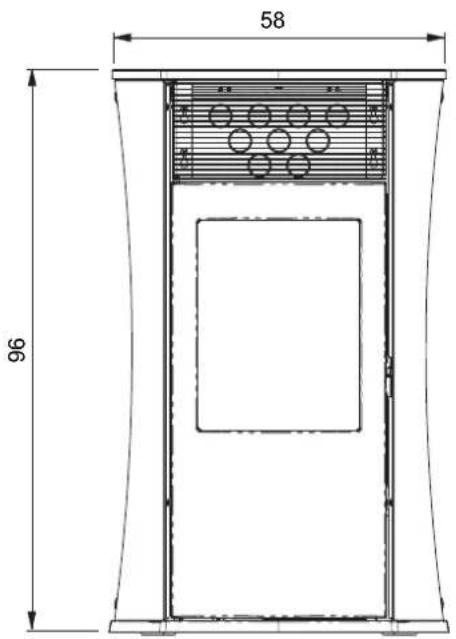
text_image
58 96BACK
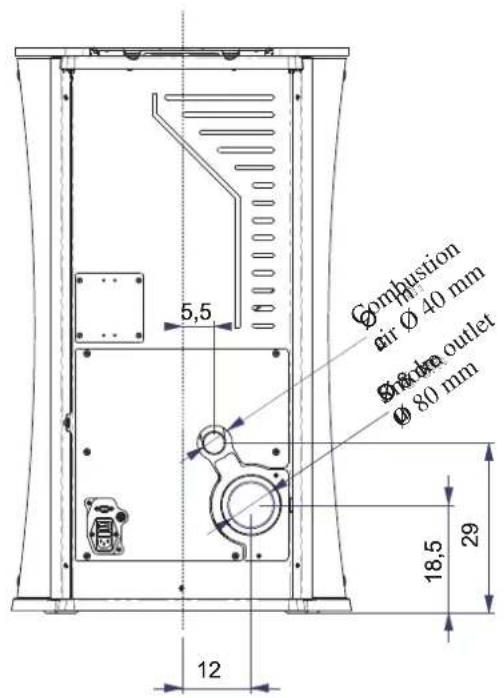
text_image
Combustion air Ø 40 mm Ø #dra outlet Ø 80 mm 18,5 29 12SIDE
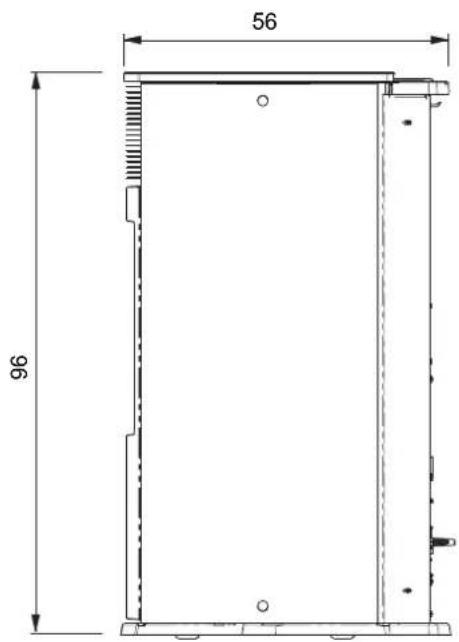
text_image
56 96SYSTEM
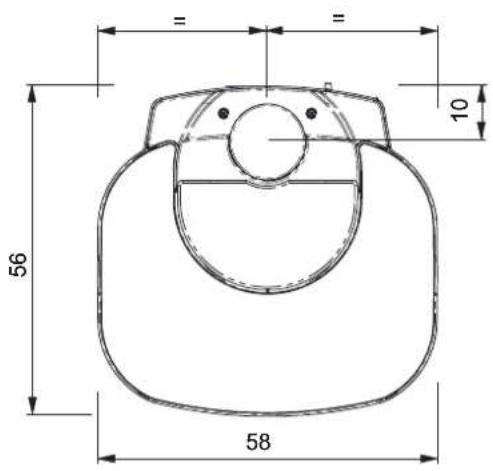
text_image
56 58 10CHARACTERISTICS
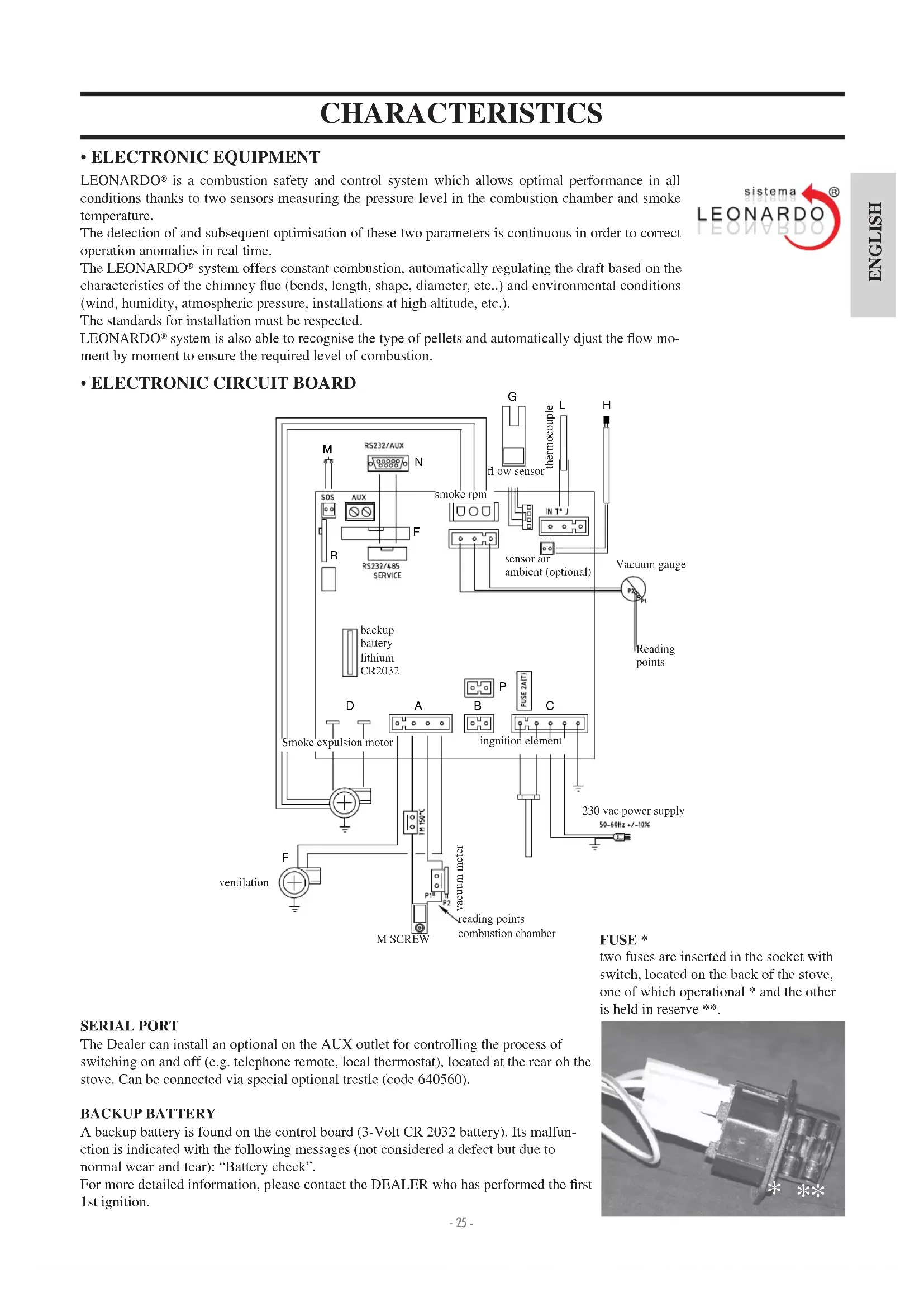
• ELECTRONIC EQUIPMENT
LEONARDO® is a combustion safety and control system which allows optimal performance in all conditions thanks to two sensors measuring the pressure level in the combustion chamber and smoke temperature.
The detection of and subsequent optimisation of these two parameters is continuous in order to correct operation anomalies in real time.
The LEONARDO® system offers constant combustion, automatically regulating the draft based on the characteristics of the chimney flue (bends, length, shape, diameter, etc..) and environmental conditions (wind, humidity, atmospheric pressure, installations at high altitude, etc.).
The standards for installation must be respected.
LEONARDO® system is also able to recognise the type of pellets and automatically djust the flow moment by moment to ensure the required level of combustion.
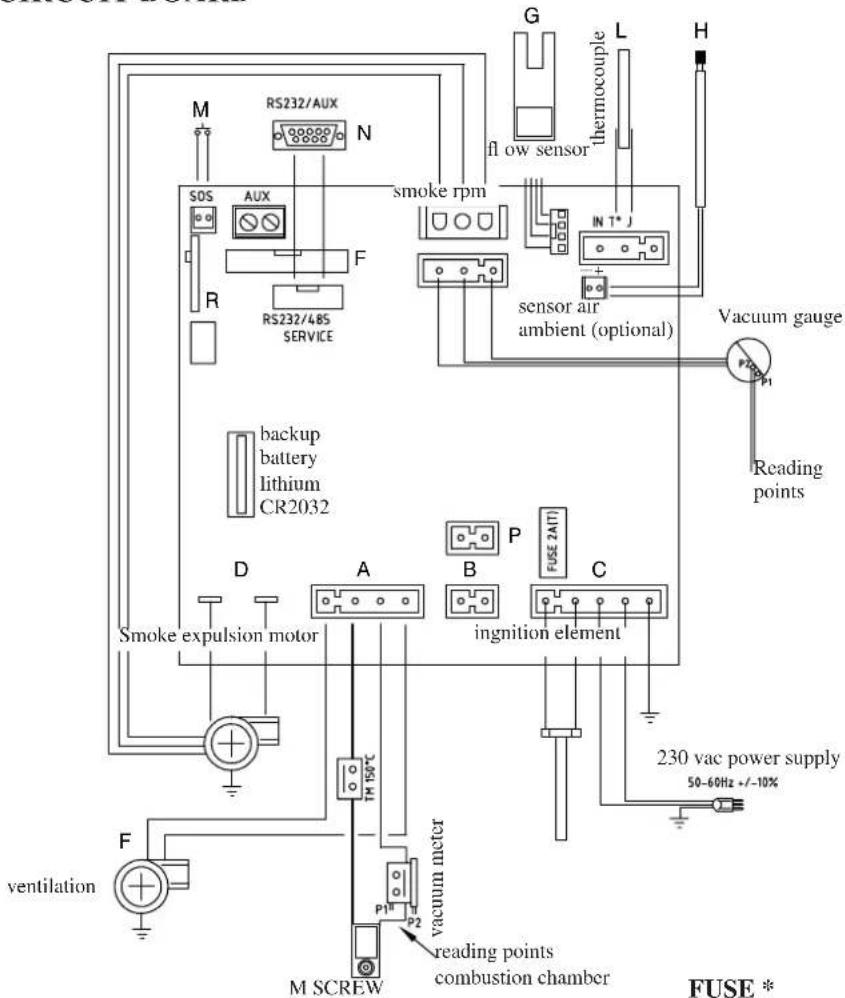
• ELECTRONIC CIRCUIT BOARD
text_image
M RS232/AUX N SOS AUX F RS232/48S SERVICE R down sensor G fl ow sensor L in T* sensor air ambient (optional) H Vacuum gauge P1 P2 reading points 230 vac power supply 50-60Hz +/-10% recipitation D A B C ingnition element SMoke expulsion motor T1 150°C P1 P2 M SCREW reading points combustion chamber FUSE * FUSE *
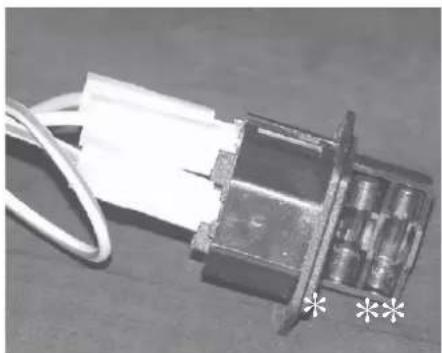
FUSE \*
two fuses are inserted in the socket with switch, located on the back of the stove, one of which operational * and the other is held in reserve **.
SERIAL PORT
The Dealer can install an optional on the AUX outlet for controlling the process of switching on and off (e.g. telephone remote, local thermostat), located at the rear oh the stove. Can be connected via special optional trestle (code 640560).
BACKUP BATTERY
A backup battery is found on the control board (3-Volt CR 2032 battery). Its malfunction is indicated with the following messages (not considered a defect but due to normal wear-and-tear): "Battery check".
For more detailed information, please contact the DEALER who has performed the first 1st ignition.
natural_image
Close-up of a metallic electrical connector with wires and connectors (no visible text or symbols)CHARACTERISTICS
| THERMO TECHNICAL CHARACTERISTICS according to EN 14785 | |||
| Nominal power Reduced power | |||
| Heat output | 6,5 | 2,4 | kW |
| Yield / Efficiency | 90,1 | 94,8 | % |
| Emissions CO 13% O2 | 0,014 | 0,041 | % |
| Maximum flue gas temperature | 133 | 71 | °C |
| Minimum draught | 12 - 5 | 10 - 3 | Pa |
| Mass flow rate of flue gas | 5,9 | 2,6 | g/s |
| Fuel consumption | 1,5 | 0,5 | kg/h |
| Hopper capacity | 18 | kg | |
| Autonomy | 10 | 30 | hours |
| Volume riscaldabile * | 170 | m^3 | |
| Smoke outlet pipe diameter (male) | 80 | mm | |
| Air intake pipe diameter (male) | 40 | mm | |
| Weight including packaging (glass/steel) | 170,5 / 166,5 | kg | |
* The heatable room dimensions are calculated on the basis home insulation in compliance with Italian law 10/91, and subsequent changes together with an expected heat output of 33Kcal / m^3 per hour.
| ELECTRICAL CHARACTERISTICS | ||
| Power supply 230Vac +/- 10% 50 Hz | ||
| On/off switch Yes | ||
| Average power consumption 100 W | ||
| Power consumption during ignition 400 W | ||
| Remote control frequency Radio waves 2,4 GHz | ||
| Protection on mains power supply* (see page 25) 2AT, | 250 Vac, 5x20 Fuse | |
| Protection on electronic circuit board 2AT, 250 Vac, 5x20 Fuse | ||
N.B.
1) keep in mind that external devices can cause interference to the operation of the circuit board.
2) caution: live parts. Servicing and/or inspections must be carried out by qualified staff.
The data shown above is purely indicative.
EDILKAMIN s.p.a. reserves the right to change the products at its discretion without notice.
SAFETY DEVICES
• THERMOCOUPLE:
Placed at the smoke outlet to detect the temperature.
Turns the stove on and off and controls its operation based on defined parameters.
• VACUUM GAUGE:
positioned on the smoke extractor, which detects the vacuum value (compared to the installation environment) in the combustion chamber.
• AIR FLOW SENSOR:
located in the suction channel, it is activated when the combustion air flow is not correct, with consequent pressure problems in the smoke circuit causing the stove to shut-down.
• SAFETY THERMOSTAT:
Trips when the temperature inside the stove is too high. It stops pellet loading, causing the stove to go out.
• SAFETY PRESSURE SWITCH:
This is activated if the vacuum inside the combustion chamber is insufficient for it to function correctly.
All local and national laws and European standards must be met when installing and using the appliance. In Italy, refer to the UNI 10683 standard, as well as any regional or local health authority regulations
It is necessary to refer to regulations in force in each country. If installing in an apartment building, check with the management company fi rst.
VERIFY COMPATIBILITY WITH OTHER DEVICES
The stove MUST NOT be installed in the same space as type B gas heating equipment (e.g. gas boilers, stoves, and equipment served by an extraction hood) as the stove may cause a vacuum in the space which may compromise or influence how these units work.
VERIFYTHE POWER SUPPLYCONNECTION (the plug must be accessible)
The stove is supplied with a power cable that is to be connected to a 230V 50 Hz socket, preferably fitted with a magnetothermic switch. Voltage variations exceeding 10% can damage the stove (unless already installed, an appropriate differential switch must be fitted). The electrical system must comply with the law; particularly verify the efficiency of the earthing system. The power line must have a suitable cross-section for the stove's power. An inadequate earthing system can cause anomalies for which Edilkamin cannot be held liable.
POSITIONING
The stove must be level for it to function correctly. Verify the bearing capacity of the floor.
FIRE PREVENTION SAFETY DISTANCES
The stove must be installed in compliance with the following safety conditions:
- minimum distance from flammable materials around the sides and back of the stove: 20 cm
- fl ammable materials must not be placed less than 80 cm from the front of the stove.
If it is not possible to comply with the above mentioned distances, technical and construction-related provisions must be taken to prevent fire hazards. If connected to wooden walls or other flammable materials, the smoke exhaust pipe must be appropriately insulated
AIR INTAKE
The room where the stove is located must have an air intake with cross section of at least 80cm2 to ensure replenishment of the air consumed by combustion. Alternatively, the stove air may be taken directly from outside through a 4 cm steel extension of the pipe.
In this case, there may be condensation problems and it is necessary to protect the air intake with a grille, which must have a freesection of at least 12 cm ^4 .
The pipe must be less than 1 metre long and have no bends. It must end with section at 90^ facing downwards or be fitted with a wind guard. In any case all the way air intake duct must be a free section of at least 12 cm^2 .
The external terminal of the air inlet channel must be protected with an anti-insect netting that does not reduce the 12 cm^2 through passage.
MOKE OUTLET
The stove must have its own smoke outlet (the smoke cannot be discharged into a smoke flue used by other devices).
The smoke is discharged through the 8 cm diameter outlet at the back of the stove. The smoke outlet must be connected to outside by means of suitable steel pipes EN 1856 certified.
The pipe must be hermetically sealed.
The material used to seal and if necessary insulate the pipes, must be resistant to high temperatures (high temperature silicone or mastic).
The only horizontal section allowed may be up to 2 m long. It may have up to three 90° bends.
A vertical section of at least 1.5m and an anti-wind terminal is necessary (if the discharge outlet is not in a chimney flue - reference UNI 10683).
The vertical duct can be internal or external. If the smoke channel is outside, it must be appropriately insulated.
If the smoke channel is fitted inside a chimney flue, the latter must be suitable for solid fuel.
If it is wider than 150 mm in diameter it must be improved by entering a pipe that has a suitable cross-section and is made of suitable material (e.g. 80 mm diameter steel). All sections of the smoke duct must be accessible for inspection.
The chimney pots and smoke ducts connected to the solid fuel appliances must be cleaned once a year (verify whether a specific legislation exists in your country).
Failure to regularly inspect and clean the stove increases the probability of a fire occurring in the chimney pot. In that case, proceed as follows: Do not use water to extinguish the fire; Empty the pellet hopper; Contact specialist personnel before reigniting the stove.
The stove is designed to work under any weather conditions. In case of particular conditions, such as strong wind, the safety system may be activated, which results in the stove being extinguished. If this happens, do not operate the stove with the safety devices disabled. If the problem persists, contact our Technical Service Department. In this case, do not operate the appliance while the safety devices are disabled. If the problem persists, contact the Service Centre.
TYPICAL EXAMPLES
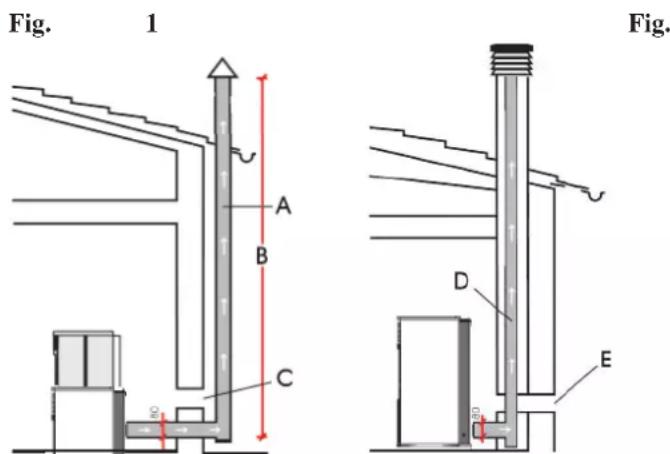
text_image
Fig. 1 A B C D E Fig.A: 'insulated steel fl ue
B: minimum height of 1.5 m and in any case above the height of the roof gutter
C-E: air intake from inside room (minimum internal section: 80 cm²)
D: steel flue, inside existing brick-built chimney.
CHIMNEY POT
The main characteristics are:
- an internal cross-section at the base, which is the same as that of the chimney fl ue
- an outlet cross-section which is no smaller than twice that of the chimney fl ue
- its position must be high enough to catch the wind and avoid downdraft areas in turbulent wind, it must be high enough to catch the wind and avoid downdraft areas in turbulent wind.
INSTALLATION
text_image
fig. 1 figB A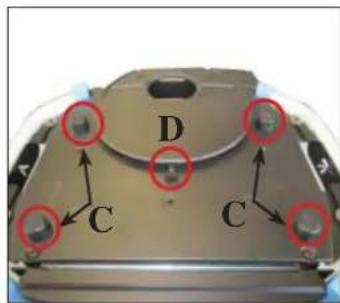
text_image
D C C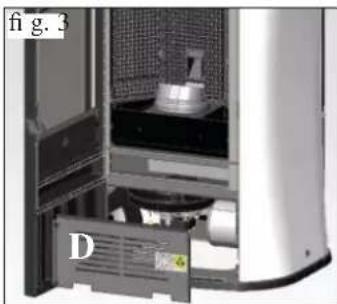
natural_image
Interior view of a server rack with labeled component D, showing internal components and no visible text or symbols.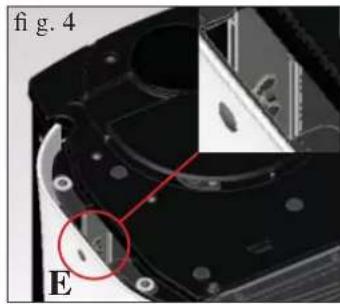
natural_image
Close-up of a mechanical component with highlighted section (E), no visible text or symbols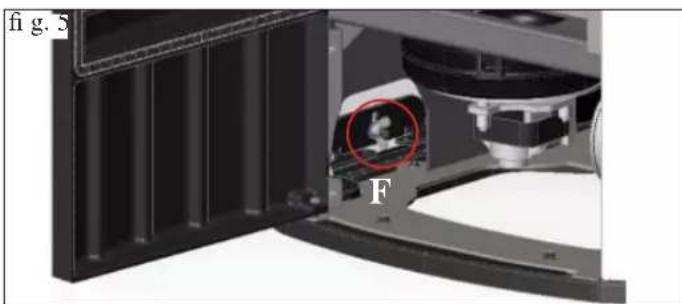
natural_image
Close-up of a mechanical assembly with labeled component 'F' and a red circle highlighting a feature (no readable text or symbols beyond labels)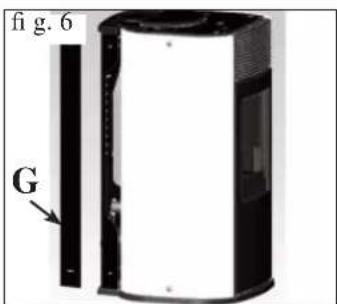
text_image
fi g. 6 G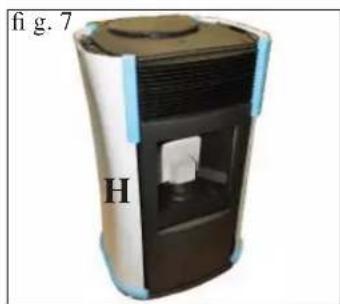
natural_image
Exterior view of a cylindrical device with labeled part 'H' and page number 'fig. 7' (no other text or symbols)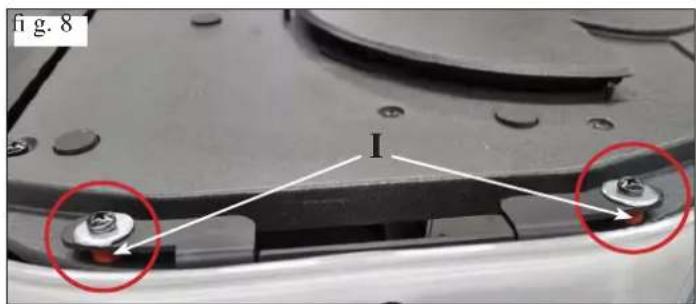
text_image
fig. 8 I1) VERSION WITH GLASS SIDES AND TOP
The stove is delivered with the sides and top removed and protected for the transportation phase.
To remove the protection, proceed as follows:
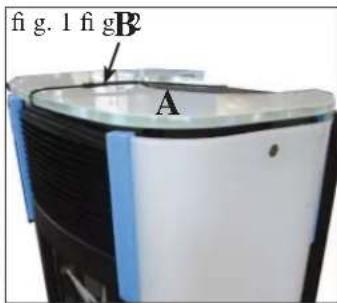
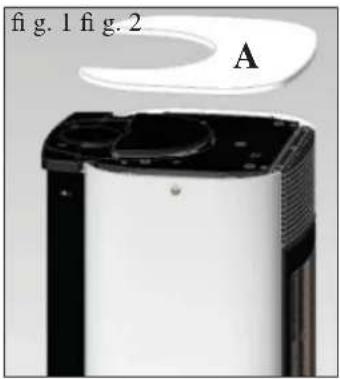
- Remove the glass top (A - fig. 1) by cutting the fastener (B - fig. 1) and remove the four spacers and the central bracket (C/D - fig. 2).
- Open the door and remove the galvanised panel (D - fig. 3)
- Slacken the wing nuts at the lower and upper ends on the inside of the glass sides (E/F -fi g. 4/5).
- Close the door and remove the plating profiles on the back (G - fi g. 6).
- Take the glass sides off (H - fig. 7) and remove the protection
- Remove the rubber pads fixed under the fixing brackets (upper and lower) for the glass sides (1 - fi g. 8)
- Remove everything and the repeat the steps listed in reverse order
- Before repositioning the glass top, fit the 5 rubbers and 10 washers supplied into their housings in the cast iron top (L/M - fi g. 9/10).
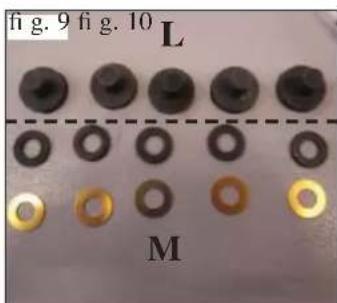
text_image
fig. 9 fig. 10 L M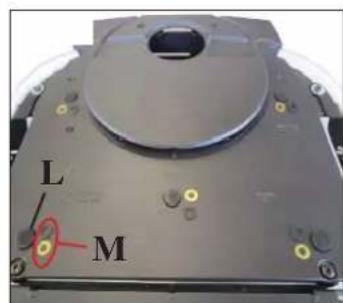
text_image
L M2) VERSION WITH STEEL SIDES AND GLASS TOP
The stove is delivered with the sides and top fitted, complete with protection for the glass top for the transportation phase. To remove the protection from the top, proceed as indicated above.
INSTALLATION
natural_image
Close-up of a white electronic device with a black lid and ventilation grille, labeled 'A' (no text or symbols on the device itself)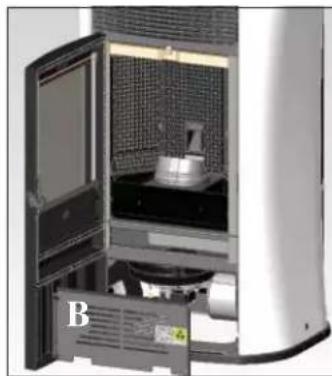
natural_image
Interior view of a laboratory or industrial equipment unit with a labeled component 'B' (no visible text or symbols on the main subject)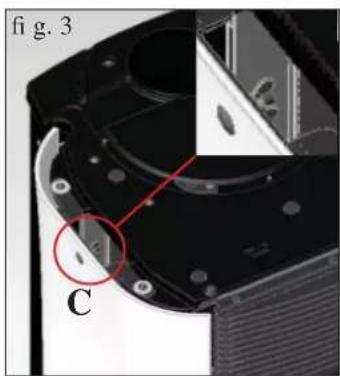
natural_image
Close-up of a mechanical component with labeled parts (C) and a red circle highlighting a feature, no readable text or symbols present.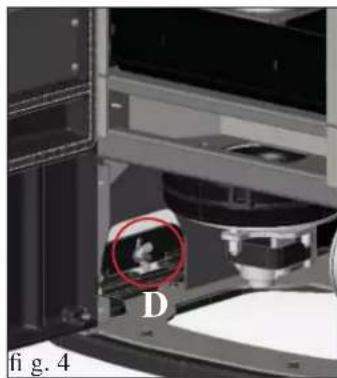
natural_image
Close-up of a mechanical device with a red circle highlighting a small object, labeled 'D' and 'fig. 4' (no readable text or symbols beyond labels)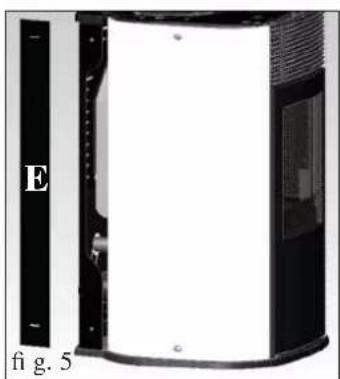
natural_image
Exterior view of a device with black panel and white interior, labeled 'E' and 'fi g. 5' (no other text or symbols)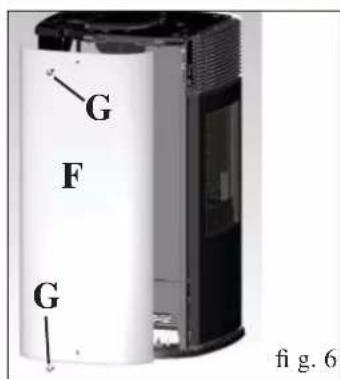
text_image
G F G fig. 6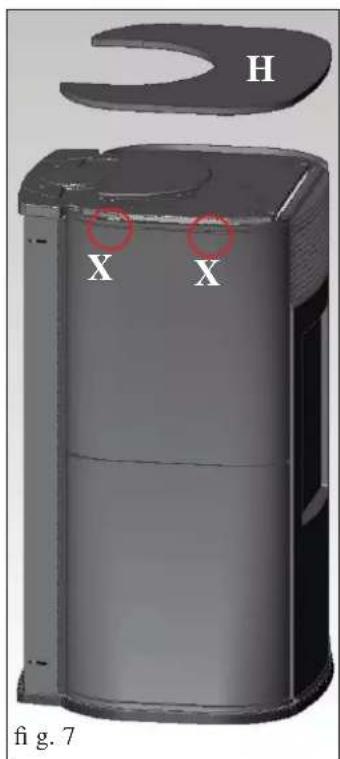
text_image
H X X fig. 7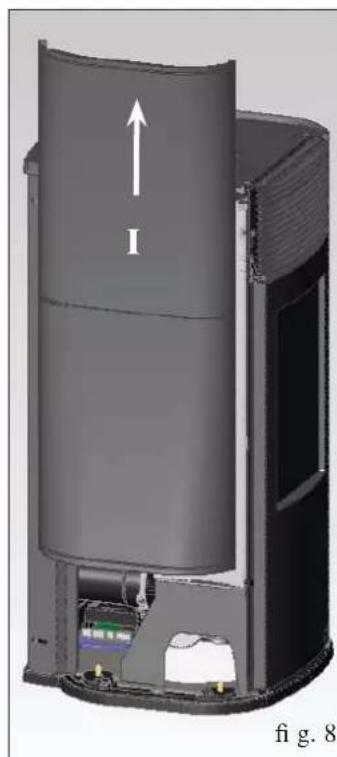
natural_image
3D cutaway diagram of a cylindrical device with internal components and an upward arrow labeled 'I', no readable text or symbols beyond the label.3) FLUE OUTLET AT THE TOP
MYA ECO is set up to allow the fl ue pipe to be connected at the top or the back.
The stove is delivered ready for the flue pipe to be fitted at the back.
To allow the flue pipe to be connected at the top, the specific optional extra kit must be used.
The kit includes the following parts:
- N° 1 80 ∅ clamp (L)
- N° 1 inspection elbow (M)
- N° 1 fl ue pipe outlet (P)
- N° 2 top fl ue pipe outlet closers (Q)
Tofi t the kit, proceed as follows:
For the version with glass sides
- Remove the supported glass top (A - fi g. 1).
- Open the door and remove the galvanised panel (B - fig. 2)
- Slacken the wing nuts at the lower and upper ends on the inside of the left side (C/D -fi g. 3/4).
- Close the door and remove the plating profi les on the back (E - fi g. 5).
- Remove the glass side (F - fi g. 6) removing the clamps (G - fi g. 6).
- Then proceed to fit the kit as indicated on the next page.
For the version with steel sides
- Remove the supported glass top (H - fi g. 7).
- Remove the side steel, fixed to the structure of the stove with
2 screws (X - Fig. 7) to remove, pulling it upwards (I - Fig. 8) - Then proceed to fit the kit as indicated on the next page.
INSTALLATION
natural_image
Close-up of a mechanical component with labeled parts I and H, no readable text or symbols beyond labels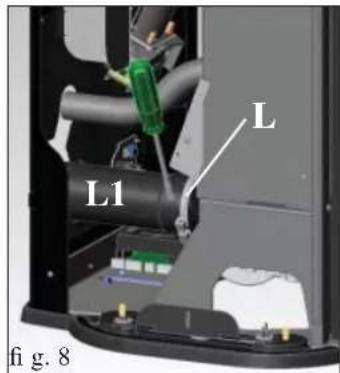
text_image
L L1 fi g. 8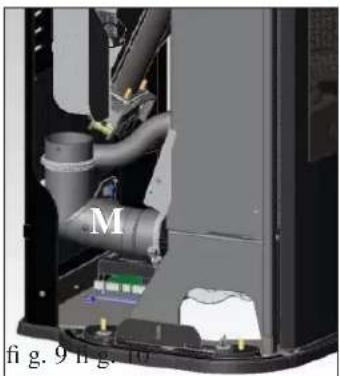
natural_image
Interior view of a mechanical device showing internal pipes and components (no visible text or symbols)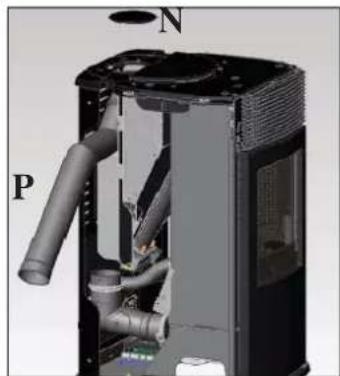
natural_image
3D cutaway view of a mechanical device showing internal pipes and housing (no text or symbols)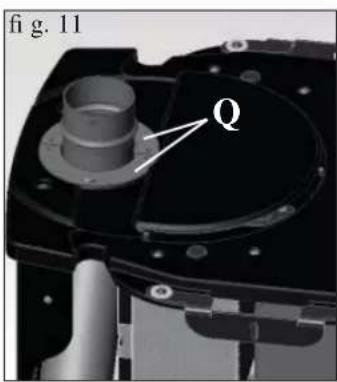
text_image
fig. 11 Q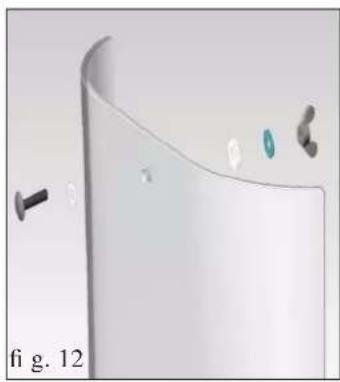
natural_image
3D rendering of a curved white object with small metallic components and a black screw, labeled 'fi g. 12' (no text or symbols on the object itself)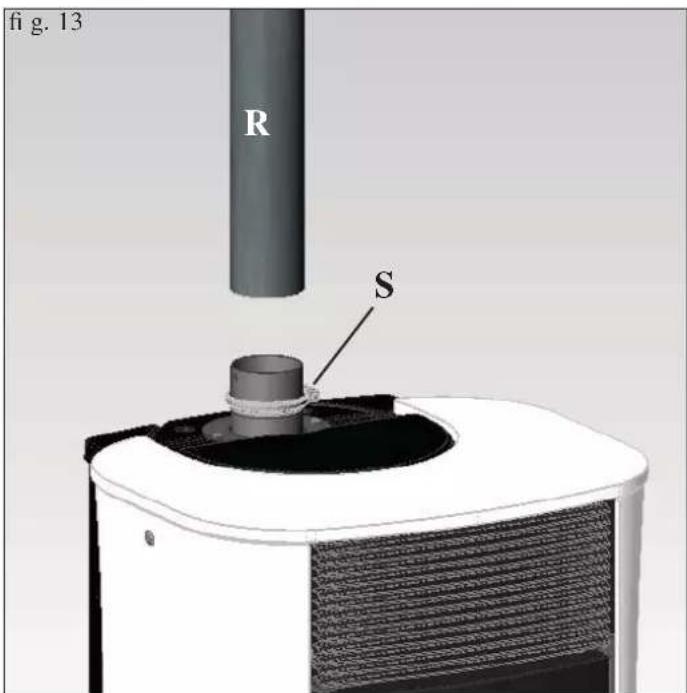
text_image
fig. 13 R SFitting the top fl ue pipe outlet kit (FOR ALL VERSIONS)
During the installation use the silicon paste to seal between the flue-gas extractor and the different connections of the flue outlet.
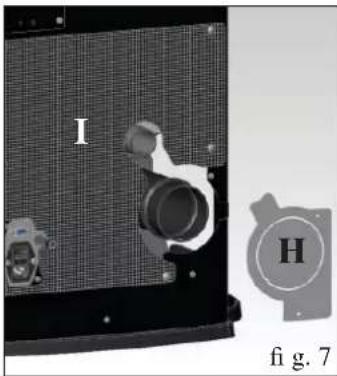
- Remove the diaphragm (H - fi g. 7) and, if necessary the perforated lower rear panel as well (I - fi g. 7).
-
Slacken the clamp (L - fig. 8) and remove the outlet flue pipe (L1 - fig. 8).
-
Position the inspection elbow (M - fig. 9) and fix it using the clamp slackened previously.
-
Remove the cast iron cap (N - fig. 10) resting on the top and fit the flue pipe outlet (P - fig. 10) from the side of the stove.
-
Position the two plating closers (Q - fig. 11) around the flue pipe outlet and fi x them using the screws.
- Fit the side removed previously (for the version with glass sides, put the gaskets and small parts back in place as shown in figure 12).
- Fit the flue pipe (R - fig. 13) (not supplied) over the outlet and fix it using the clamp (S - fig. 13) (not supplied).
INSTALLATION
text_image
fig. 1 fig. 2 A A A1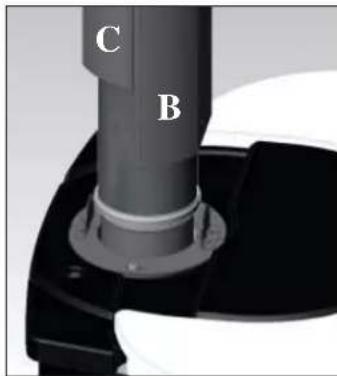
text_image
C BFLUE PIPE COVER KIT FOR VERTICAL FLUE PIPES - OPTIONAL EXTRA (CODE
The kit includes the following parts:
- N° 1 flue pipe fixing bracket (A)
- N° 2 short pipe cover elements L = 25 cm (B-B1)
- N° 2 long pipe cover elements L = 50 cm (C-C1)
- N° 2 self-tapping screws 4,2x13
- N° 2 self-tapping screws 4,2x6,5
text_image
fig. 3 C B ATo fit the kit, proceed as follows:
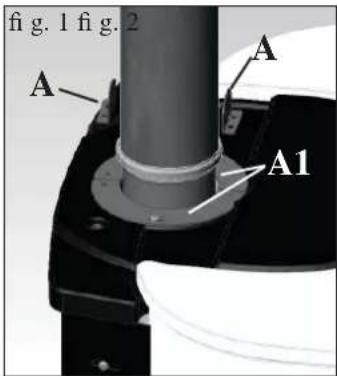
- Fit the pipe cover fixing bracket (A - fig. 1) using the screws 4,2x6,5 supplied, to the two plating closers (A1 - fig. 1) at the holes formed.
- Put a short pipe cover element on from the front (B - fig. 2) and a long pipe cover element on from the back (C - fig. 2)
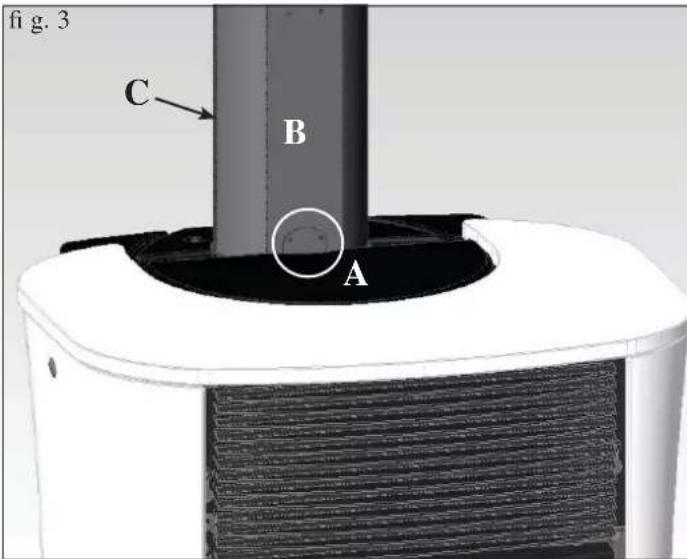
- Fix the bracket (A), installed previously, to the long pipe cover element on the back (C) using screws 4.2x13 (fig. 3).
- Fit another long pipe cover element from the front (C1 - fig. 4) and another short pipe cover element from the back (B1 - fig. 4) until a height of 83~cm is reached (equal to an overall height from floor level, including the stove, of 169~cm ).
- If you need to reach a height from floor level to ceiling of 270 cm, use another 4 long pipe cover elements (C-C1) (fig. 5).
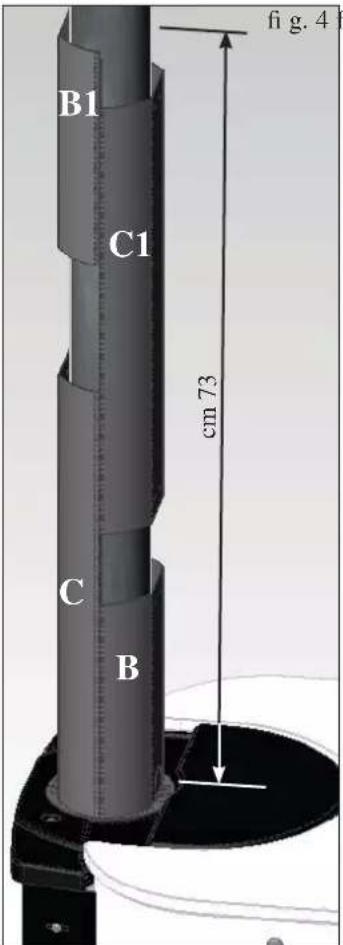
text_image
B1 C1 cm 73 B fi g. 4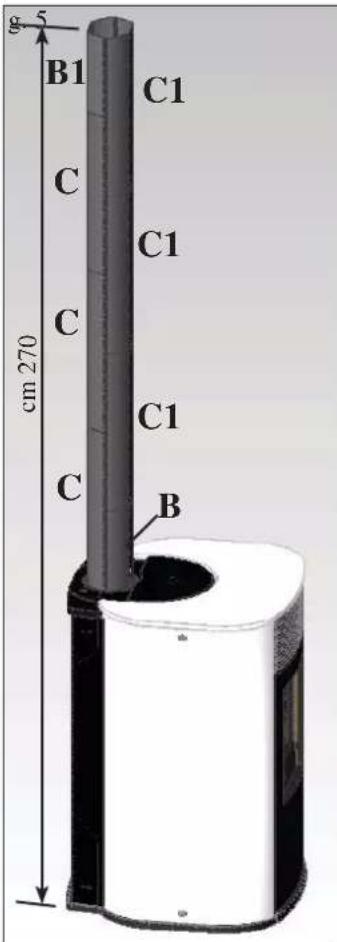
text_image
g 5 B1 C1 C C1 C cm 270 C1 B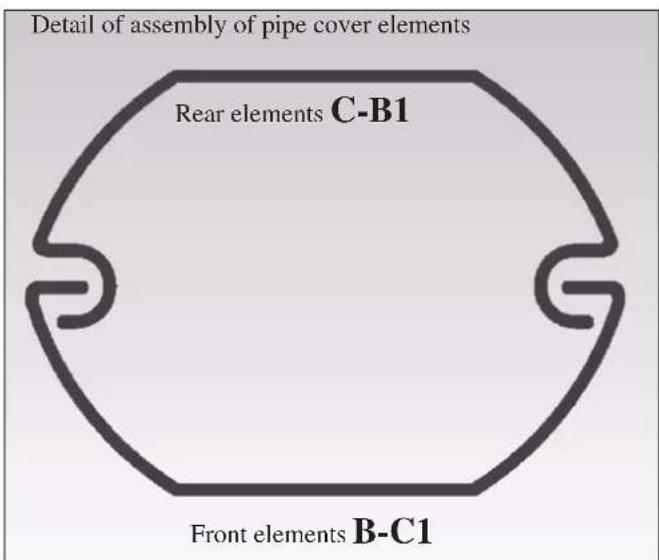
text_image
Detail of assembly of pipe cover elements Rear elements C-B1 Front elements B-C1INSTRUCTIONS FOR USE
Commissioning must be done by a Technical Service Centre authorised by Edilkamin (CAT) prior to ignition and testing according to the UNI 10683.
This standard indicates the control operations to be carried out in situ, aimed at ascertaining correct system function.
Before igniting.
To ignite for the first time, it is essential to contact your local Edilkamin technical service centre (CAT), (for information see the www.edilkamin.com website) to calibrate the stove according to the type of pellets used and installation conditions, thereby starting the guarantee.
Failure to have the stove ignited by an authorised C.A.T. prevents Edilkamin from guaranteeing correct functioning.
There may be a slight smell of paint the first few times it is ignited, however, this will disappear quickly.
Before igniting you must check:
• that installation is correct
• the power supply
• that the door closes properly to a perfect seal
• that the combustion chamber is clean
- that the display is on standby (the date, power or temperature fl ashes).
FILLING THE PELLET HOPPER
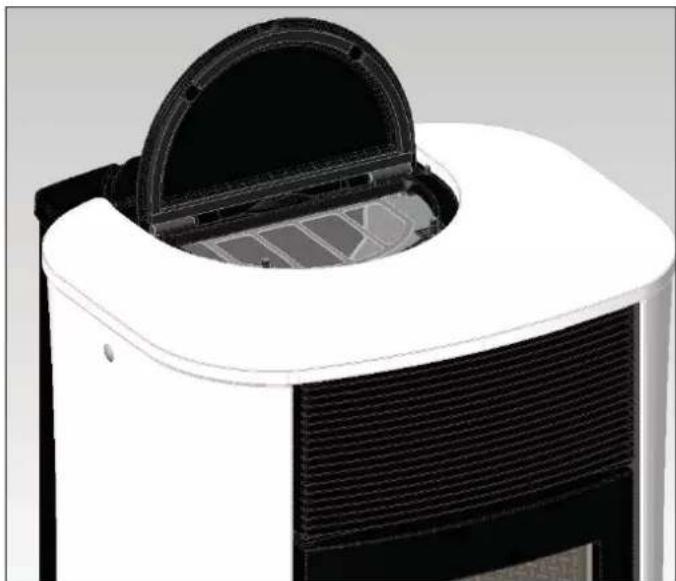
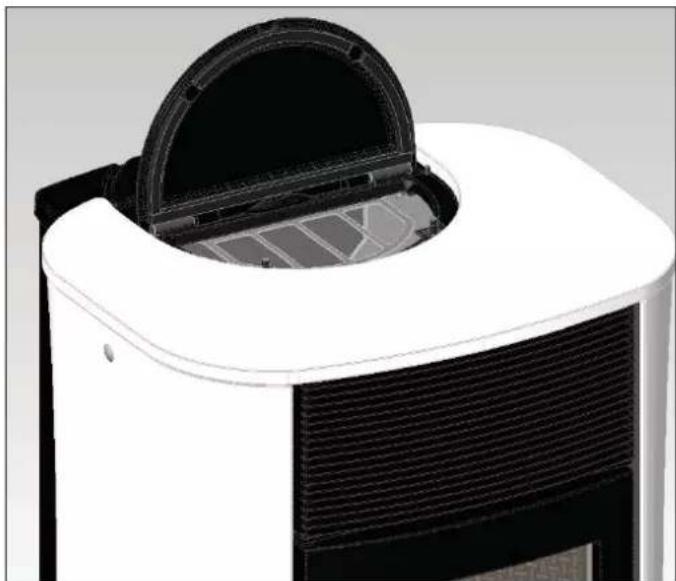
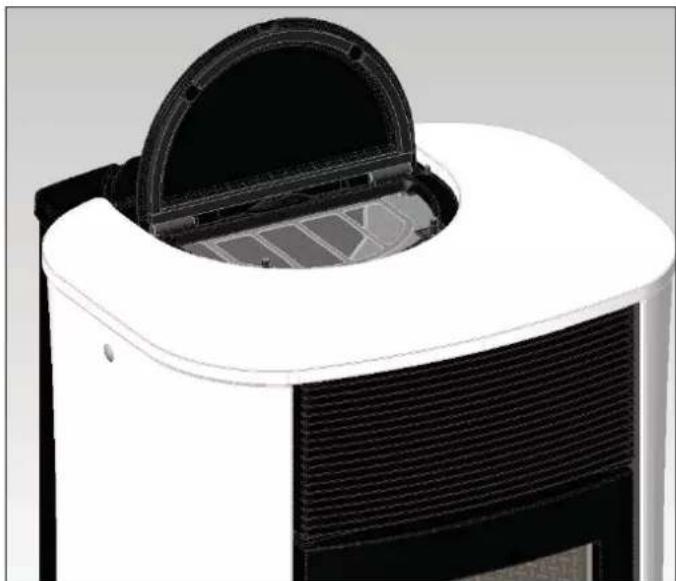
The hopper lid opens and closes with a practical click-clack system. Simply apply slight pressure to the front part of the cast iron lid (fi g. 1-2).
ATTENTION:
use the glove supplied when filling the stove whilst it is running and therefore is hot.
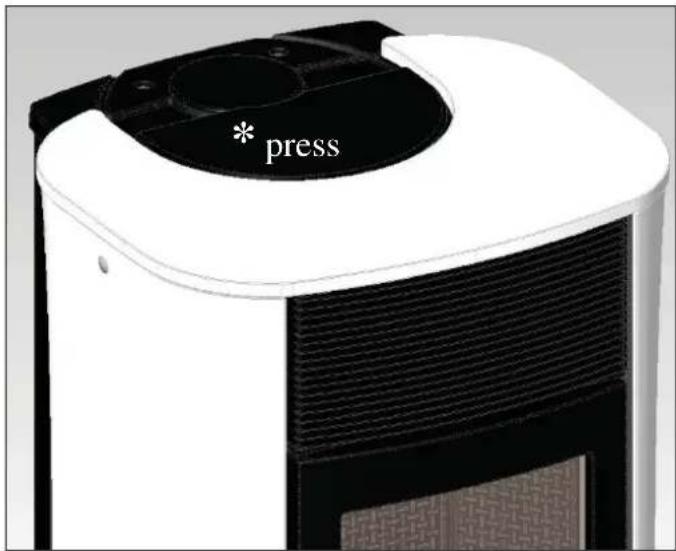
text_image
* pressfig.1
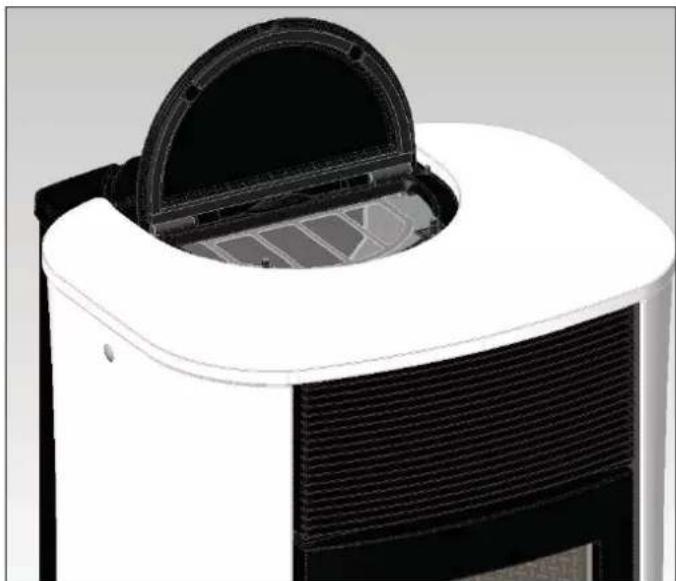
natural_image
Close-up of a white and black industrial air purifier with a circular vent cover (no text or symbols visible)fig. 2
NOTE regarding the fuel.
MYA ECO is designed and programmed to burn wood pellets with 6 mm diameter.
Pellets are a type of fuel in the form of little cylinders, made from compacted sawdust, compressed under high pressure with no adhesives or foreign materials.
They are sold in bags of 15 kg.
For the stove to function properly, you MUST NOT burn anything else in it. Using other materials (including wood) will render the warranty null and void. Such use is detected by laboratory analyses. Edilkamin has designed, tested and programmed their stoves to guarantee the best performance when pellets with the following characteristics are used:
diameter: 6 millimetres
maximum length: 40 mm
maximum moisture content: 8%
calorifi c value: at least 4300 kcal/kg.
If pellets with different characteristics are used, the stoves must be recalibrated a similar procedure to that carried out by the DEALER when the stove is ignited the first time.
Using unsuitable pellets may: decrease efficiency; cause malfunctions; stop the stove from functioning due to clogging, dirt on the glass, unburnt fuel, etc.
A simple, visual analysis of the pellets may be carried out:
Good quality: smooth, uniform length, not very dusty.
Poor quality: with longitudinal and transverse cracks, very dusty, various lengths and mixed with foreign matter.
INSTRUCTIONS FOR USE
REMOTE CONTROL
This controls all the functions.
Key to buttons and display:
: to turn off and on (to go from remote control on stand-by to remote control on)
+/- : to increase/decrease the various regulations
A : to select Automatic function
M : to select Manual function and access the control and programming menus
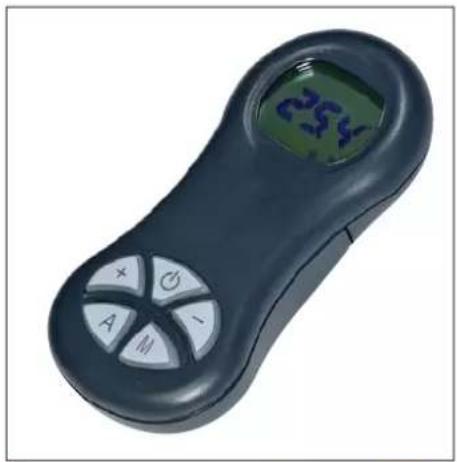
natural_image
Black handheld electronic device with a digital display showing '254' and control buttons (no readable text beyond basic symbols)
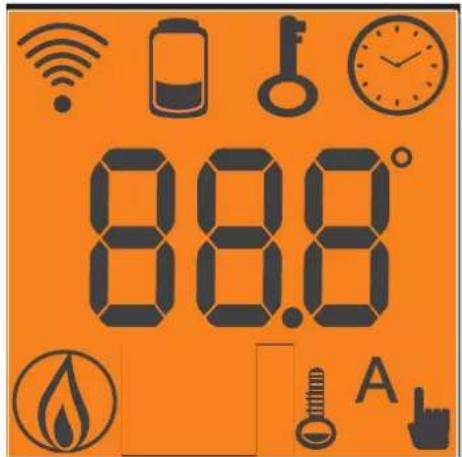
- icon flashing: remote control searching for network
- icon fi xed: remote control with connection enabled
keypad locked (press "A" and "M" in parallel for a few seconds to lock or unlock the keypad)
fl at battery (3 mini alkaline batteries type AAA)
programming enabled
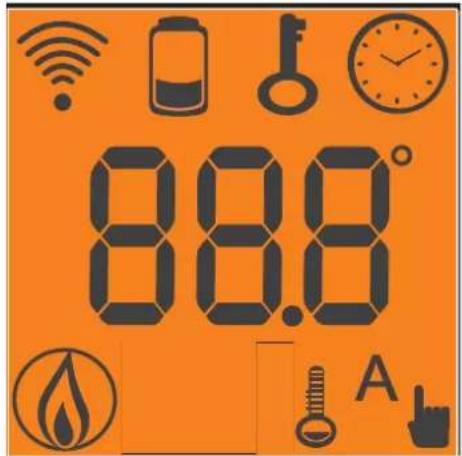
text_image
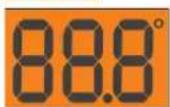
88.8 A
alphanumeric display consisting of 16 fi gures arranged in two lines of 8 fi gures
- icon fl ashing: stove turning on
- icon fi xed: stove working
manual adjustment function (display shows working power)
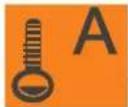
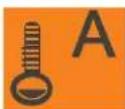
automatic function (display shows temperature)
The display also shows other useful information in addition to the icons described above.
- Stand-by position:
shows room temperature (20°C), kg of pellets (15 kg) remaining in tank and current time (15.33)
- Manual work phase:
shows power set (Power 1), room temperature (20°C), kg of pellets and autonomy remaining (15 kg 21 hrs)
- Automatic work phase:
shows temperature set (Set 22°C), room temperature (20°C), kg of pellets and autonomy remaining (15 kg 21 hrs).
DO NOT PRESS THE BUTTON MORE THAN ONCE

Note: If the radio control is not used for a few seconds, the display will go dark as it has moved into the power saving function. The display can be reactivated by pressing any button.
INSTRUCTIONS FOR USE
Filling the cochlea.
The first time you use the product, or should the tank be completely emptied of pellets, to fill the cochlea press both keys “+” and “−” on the remote control at the same time, holding for a few seconds. As you release the keys, the display should show the wording “LOAD”. This should be carried out before ignition if the stove has stopped due to having run out of pellets, at the end of operation to empty the combustion pot before turning. It is quite normal for some pellets to remain, that the cochlea cannot suction.
Automatic igniting.
With the stove on stand-by, press and hold the key ⬤, on the remote control for 2 seconds. This will start-up the ignition procedure, showing the wording “START”. At the same time, a countdown in seconds begins (from 1020 to 0). Ignition is not at a preset time, however: its duration is automatically shortened if the board reports that certain tests have been passed. The flame appears after about 5 minutes.
Manual igniting.
Temperatures of below 3^ C will not allow the electrical resistance to heat sufficiently. In this case, or should the resistance be temporarily out of action, Diavolina® type fire-starters can be used. Insert a piece of lit Diavolina into the combustion chamber, close the door and press 📍 the remote control.
POWER REGULATION
- Remote control manual operation
With the stove working, press the key “M” on the remote control once. The display will show the word “POWER P”. (specifying the power at which the insert is working). Press the keys “+” or “-” to increase or decrease the insert’s working power (from “POWER P1” to “POWER P5”).
- Remote control automatic operation
Press key “A” to switch to automatic operation, adjusting the temperature desired for the room (use the “+” and “−” keys to set the temperature from 5^ C to 35^ C, and the stove will regulate working power required to reach the temperature set. If a temperature below that of the room is set, the insert will stay on “POWER P1”.
Turning off
With the stove running, press and hold the key ⏻ rom the remote control for 2 seconds. The turn-off procedure will begin, showing a countdown on the display from 9 to 0 (for a total of 10 minutes).
The turn-off phase involves:
- Interruption of pellet supply
• Maximum ventilation. - Smoke expulsion motor.
Never pull the plug out whilst the device is still in the process of turning off.
OPERATIONS THAT CAN ONLY BE CARRIED OUT BY REMOTE CONTROL
Clock regulation
Press and hold the key “M” for 2 seconds to access the “Clock” menu. This allows you to set the internal electronic board clock. By then pressing the key “M”, the following data appears in sequence and can be regulated: day, month, year, hour, minutes, day of the week. The wording “SAVE?” will appear for confirmation with “M”. This will allow you to check that the operations performed are correct, prior to completion (the wording “SAVE” will then be shown on the display).
INSTRUCTIONS FOR USE
Weekly timer
Press and hold the “M” key on the remote control for 2 seconds. This turns on the clock regulation and by pressing the ‘+’ key, the weekly timer function is accessed, with the display showing the description “PROGRAMM ON/OFF”.
This function allows you to select the type of programming, which allows a maximum of three ignitions to be set.
As you confirm the display with the key “M”, one of the following options will appear:
NO PROG. (no programme set)
DAILY PROGRAM (single programme for every day of the week)
WEEKLY PROGRAM. (specifi c programme for each day individually)
Use the “+” and “−” keys to switch between programmes.
Confirming by pressing the “M” key “DAILY PROGRAM.” and pressing the “+” key, the choice of the number of programmes (ignition/extinguishing) per day can be made.
Use the “DAILY PROGRAM” to set identical programme/s for every day of the week.
By then pressing the “+” key, the following can be seen:
- Prog. no.
- 1st prog. (one turn on and one turn off per day), 2nd prog. (identical), 3rd prog. (identical)
Use the “-” key to show in reverse order.
If the 1st programme is selected, the turn on time is shown.
The display shows: 1 "ON" at 10 Use the "+" and "-" key to change the hour. Confirm with the "M" key (All 1 On/Hour 10).
The display shows: 1 "ON" at 30 Use the "+" and "-" key to change the minutes. Confirm with the "M" key (1 Off min).
The same applies for the turn-off time to be set and for subsequent turning on and off.
Confirm by pressing “M” and the wording “SAVE?” will appear on the display.y.
When confirming "WEEKLY PROGRAM", you will need to choose the day to which the programming is to apply:
7 Sat; Progr.1; 1 Mon ; 2 Tues; 3 Wed; 4 Thurs; 5 Fri; 6 Sa;
Once the day is set, use the keys “+” and “+” and confirm by pushing “M” key to choose 1 to 3 ignitions, to programme in the same way as for the “DAILY PROGRAM”, choosing whether or not to enable a programme for each day of the week, and if so choosing number of interventions and at what times.
Should you make an error during programming, you can leave the programme without saving. As you press a key, ☐, he display will show the word "no SAVE".
Changing pellet loading (with self-regulation deactivated)
When the “M” key on the radio control is held down for two seconds and the display is scrolled using the “+” and “−” keys, you come across the “User’s Menu”. When this is confirmed the display reads “ADJ-PELLET ; ADJ-DRAUGHT and RADIO MENU” (CAT). The pellet drop can be adjusted manually by changing the capacity in percentage terms (+/- 30 %).
By confirming this function with the menu key, you can access the function to adjust pellet loading. By decreasing the value set, pellet loading is decreased. By increasing the value set, pellet loading increases. This function is useful if changing the pellet type for which the stove has been calibrated and loading therefore needs correcting.
Should this correction not suffice, contact the Edilkamin-authorised Dealer, to establish the new operating axis.
Notes on flame variability
Flame status may vary depending on the type of pellet used, in addition to normal solid fuel flame variability and regular combustion chamber cleaning carried out automatically by the boiler.
(N.B.: which does NOT replace necessary cold suction by the user prior to ignition).
RESERVE WARNING
The stove is fitted with an electronic function that detects the residual quantity of pellets in the tank.
The detection system is integrated into the electronic board, allowing you to see how many hours and kg are left until pellet exhaustion, at all times. For correct system function, it is important that the following procedure is followed during the first ignition (by the Dealer).
This provides a reference indicator. Greater precision is obtained by regularly zeroing the system before filling it again. Edilkamin does not accept any responsibility for differences from what is indicated (which may be due to external factors).
INSTRUCTIONS FOR USE
Pellet reserve system
Before enabling the system, you need to load a sack of pellets into the tank and use the stove until the loaded fuel has run out. This allows for a short system road test.
After this, the tank can be filled completely and the stove started up.
When running, at the time at which a whole 15 kg sack of pellets can be loaded, the display will show the word "Reserve" fl ashing.
At this point, after having poured in a sack of pellets, you need to 'inform' the memory that you have loaded 15 kg (use the glove provided).
To do so, proceed as follows:
- press the "M" key (for approximately 3-4 seconds) until the word "Clock" appears.
- press the "+" key until the word "Reserve" appears.
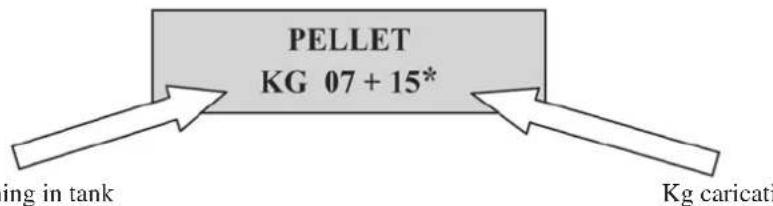
- press the "M" key until the following screen appears,
text_image
PELLET KG 07 + 15* ing in tank Kg caricatithen use the “+” key to take the figure ( ^* ) to the value equal to the Kg of pellets loaded (15 kg in the above example).
- press the "M" key to confirm
- press the key to exit.
After having completed the above procedure, after having consumed the 15 kg, the wording “Reserve” will appear flashing at intervals. After which the operation must be repeated, from point 1 to point 5.
EMERGENCY BUTTON
If the radio control should be faulty, the basic functions can be accessed using a red emergency button on the right side of the stove (see fig. 1). Push this button once or more times to activate the required function:
- A STOVE OFF
by pressing the red button for 2 seconds this turns on.
- A STOVE ON
by pressing the red button for 2 seconds this turns off.
- A STOVE ON
manual mode, by pressing the red button, you go from P1 to P3.
- A STOVE ON
automatic mode, by pressing the red button, you go from 5°C to 30°C.
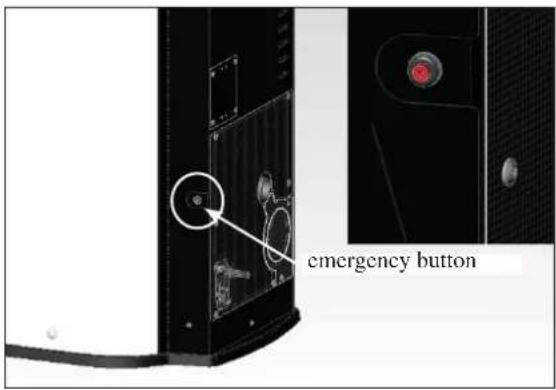
text_image
emergency buttonMAINTENANCE
Before performing any maintenance, disconnect the appliance from the mains.
Regular maintenance is required for the stove to function correctly.
Any problems resulting from lack of maintenance will immediately void the warranty.
DAILY MAINTENANCE
Operations must be performed when the stove is off, cold and unplugged from the power supply
- Cleaning must be carried out with a vacuum cleaner. (see optional extras page 41).
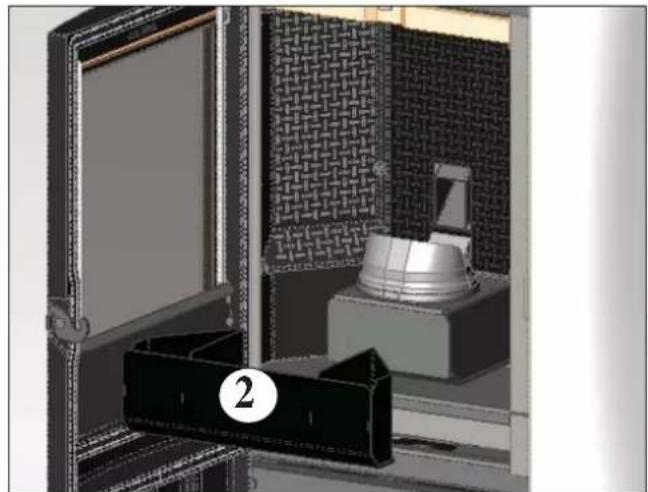
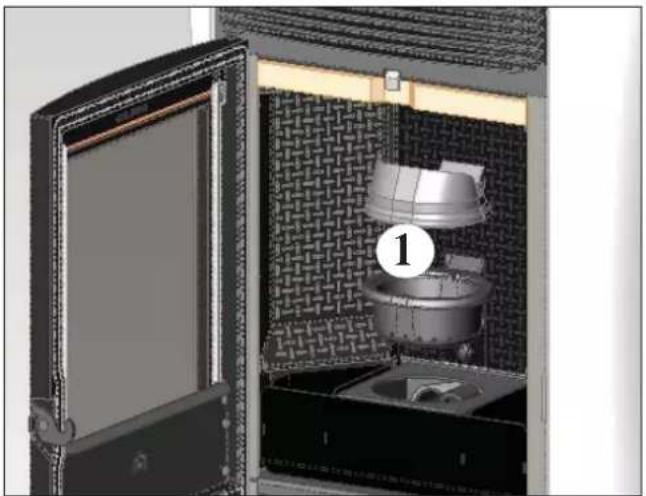
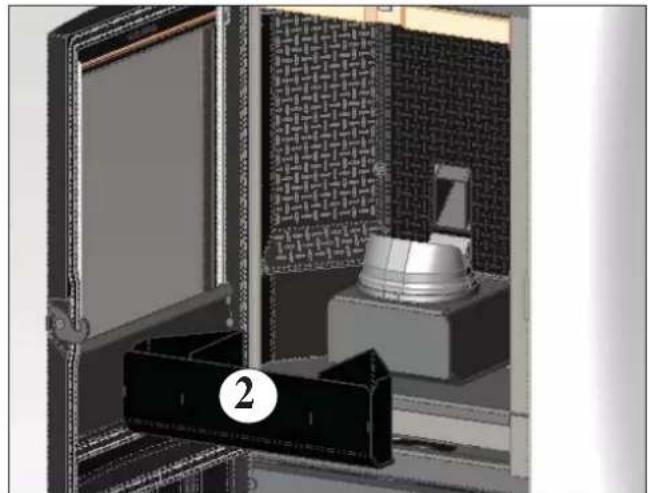
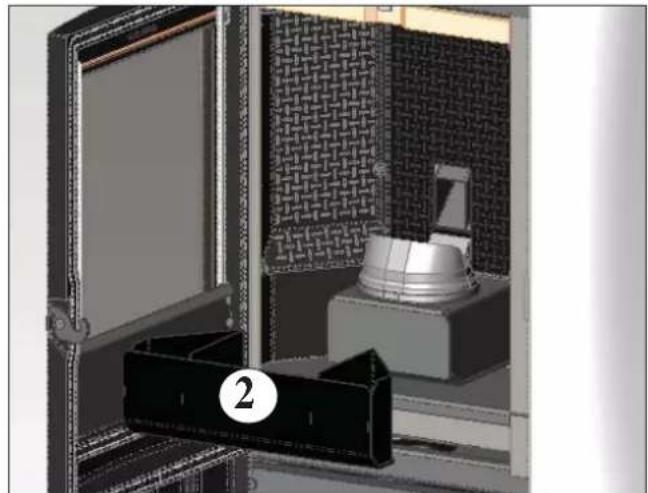
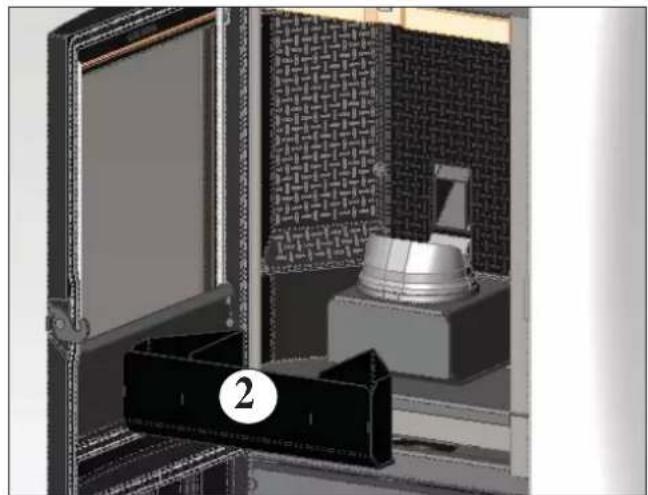
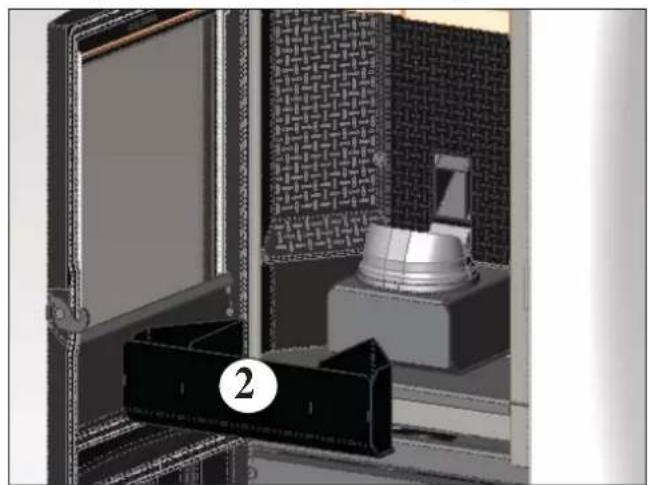
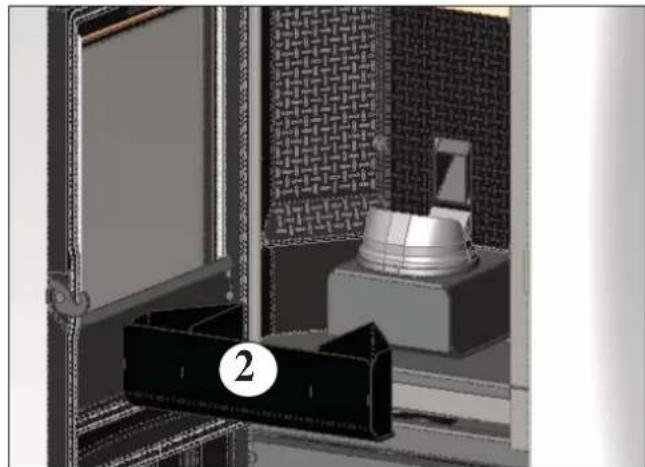
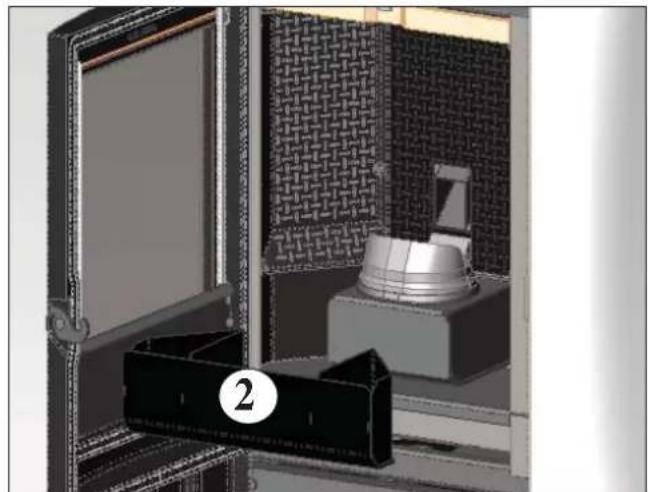
- Open the door, extract the fire box (1 - fig. A) and tip the residue into the ash drawer (2 - fig. B).
• DO NOT EMPTY THE RESIDUE OUT INTO THE PELLET HOPPER. - Pull the ash drawer (2 - fig. b) out and empty it into a non flammable container (the ash may still have some parts that are still hot and/or embers).
• Vacuum out the inside of the fire box, fire grate, and space around the fire box, into which the ash falls. - Remove the fire box (1 - fig. A) and remove any encrustation using the brush provided, clearing any clogging in the holes.
• Vacuum the fire box, clean the contact edges between the fire box and its seating. - Clean the glass, if necessary (when cold).
Never vacuum hot ash, it can make the vacuum cleaner breakdown and puts the household rooms at risk of fire.
natural_image
Interior view of a vintage-style storage unit with open door, patterned back panel, and internal equipment (no visible text or symbols)fig. A
natural_image
3D rendering of a mechanical device with a labeled component (2), no visible text or symbols on the main subject.fig.B
WEEKLY MAINTENANCE
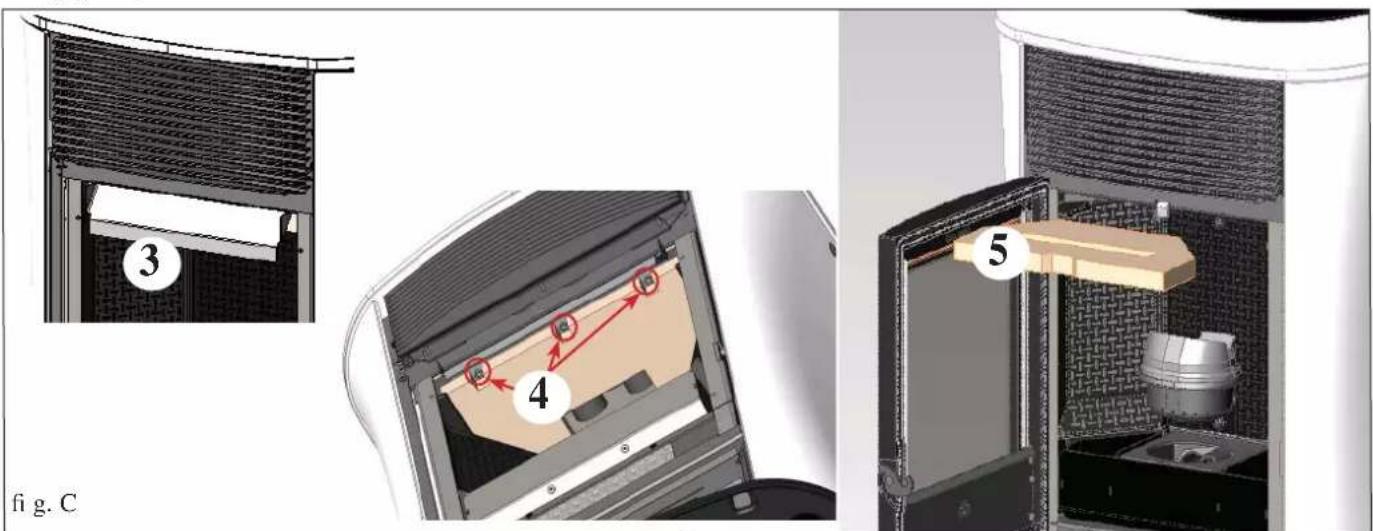
- Remove the ceiling (5 - fig. C) and tip the residue into the ash drawer (2 - fig. B). Removal of the ceiling is possible only after having removed the baffle (3 - fig. C) by removing the 3 screws located under this baffle (4 - fig. C).
The ceiling is a component subject to wear, Edilkamin does not accept responsibility for it, more so if any breaks are due to extracting or putting it back in its seating.
• Empty the pellet tank and vacuum the bottom.
text_image
3 4 5 fig. CMAINTENANCE
SEASONAL MAINTENANCE (implemented by the DEALER)
Consists in:
- Clean the stove internally and externally
• Thorough cleaning of the heat exchange piping inside the hot air outlet grille located in the upper part of the front of the stove
- Carefully clean and remove dirt from the combustion chamber and the relative compartment
- Clean fans, verify mechanical and clamp loosening
- Clean smoke channel (replace seals on smoke exhaust pipe)
- Clean smoke duct
- Clean smoke extraction fan compartment.
- Clean smoke flow sensor.
- Clean smoke check thermocouple.
- Clean, inspect and scrape any residue from the ignition resistance compartment and if necessary, replace it
- Clean/check the Synoptic Panel
- Visual check of power cables, connections and power cord.
- Clean the pellet hopper and check loosening of the feed screw - gear motor assembly
- Replace the door seal
- Functionality test: load the feed screw, ignite, let it run for 10 minutes and shutdown
If the stove is used very often, it is recommended to clean the smoke channel every 3 months.
ATTENTION !!!
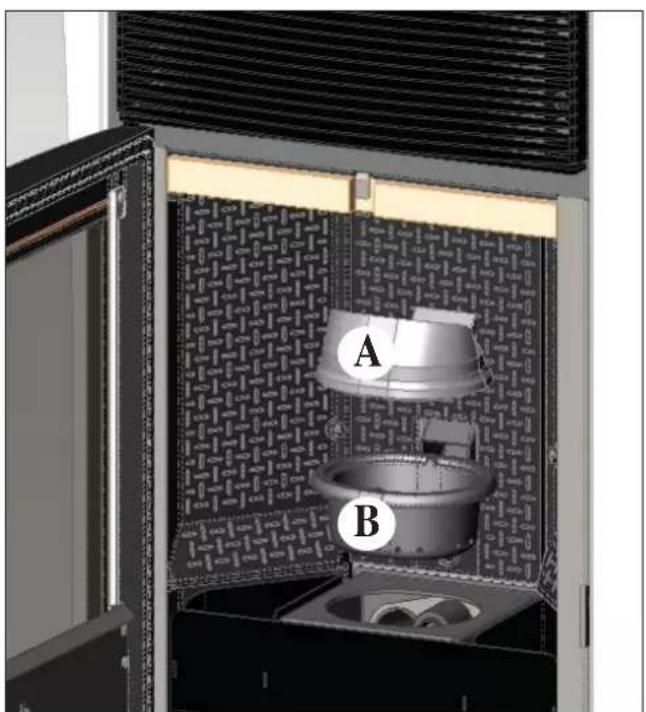
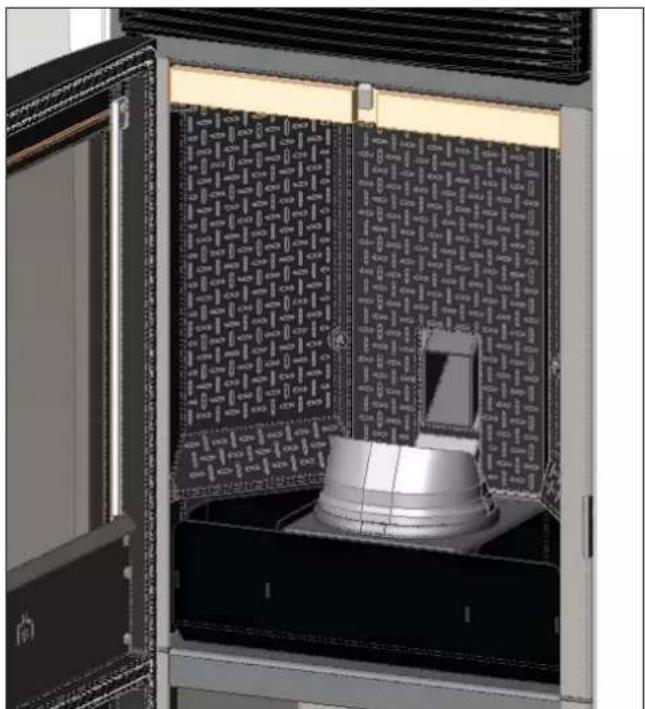
After implementing a normal cleaning procedure, INCORRECT coupling of the upper (A) (figura D) and lower (B) (figura D) combustion chambers can compromise the stove's performance.
Before igniting the stove, make sure the combustion chambers are correctly paired as indicated in (fig. E) without ash or unburnt material present on the support perimeter.
We remind you that using the stove without cleaning the melting pot, may cause a sudden ignition gas inside the combustion chamber with the consequent breaking of the glass
N.B.
- Any unauthorised modification is forbidden
- Use spare parts recommended by the manufacturer
- The use of pirate parts results in the guarantee becoming null and void
text_image
A Bfig. D fig. E
natural_image
3D rendering of a mechanical device with a central component and patterned panel (no visible text or symbols)POSSIBLE TROUBLESHOOTING
In the event of problems the stove stops automatically and runs the shutdown process and the display shows text regarding the motivation of the shutdown (see the various alarms below).
Never pull the plug during shutdown on account of malfunction.
Should it block, to restart the stove you will need to allow the turn-off procedure to take place (600 seconds with audible signal), and then press the button ⏻.
Do not turn the stove on again before checking the cause of the malfunction and CLEANING/ EMPTYING the crucible.
INDICATION OF POSSIBLE CAUSES OF MALFUNCTION AND INDICATIONS AND REMEDIES:
1) Signalling: Verific./air flow: (intervenes if the flow sensor detects insufficient combustion).
Problem: Turns off for lack of depression
Air flow may be insufficient because the door is open, the door does not close properly (e.g. bad seal), there is an air intake or smoke extraction problem, or the combustion chamber is clogged.
Actions: Check:
• door closure;
- combustion air intake duct (clean, paying attention to the flow sensor components);
- clean the flow sensor with dry air (like that used for PC keyboards);
- stove location: respect and check a minimum distance of 10cm from the wall;
- combustion chamber position and cleanliness (clean regularly according to the type of pellet);
• smoke duct (clean); - installation (if it does not comply with regulations or the smoke outlet has more than 3 bends);
If you suspect the sensor is malfunctioning, carry out cold tests. If the conditions are changed (for example by opening the door) and the value does not change, there is a sensor problem (DEALER).
N.B.: The no depression alarm may also occur during ignition, since the flow sensor starts monitoring 90 seconds after the ignition cycle begins.
2) Segnalazione: Signalling: Verific./extract.: (this trips if the smoke extraction speed sensor detects a fault)
Problem: Shutdown for smoke extraction speed fault detection
Actions: • Check smoke extractor function (devolution sensor connection) and board (DEALER).
- Check smoke channel for dirt
- Verify the electrical system and earthing system.
- Check eletronic circuit board (DEALER).
3) Signalling: Stop/Flame: (this trips if the thermocouple detects a smoke temperature lower than the value set, which it interprets as the absence of flames)
Problem: Turns off due to drop in smoke temperature
Actions: • lack of pellets
- too many pellets have suffocated the flame, check pellet quality (DEALER)
- the maximum thermostat has intervened (rare, this only intervenes in the event of excessive smoke temperature) (DEALER)
- Check correct functioning of the pressure switch (CAT)
4) Signalling: Block_FI/NO Start: (intervenes if a flame fails to appear within a maximum of 15 minutes, or if ignition temperature is not reached).
- Check correct functioning of the pressure switch (CAT)
Problem: Turns off due to incorrect smoke temperature during ignition
Distinguish either of the following cases:
Flame does NOT appear
Actions: • Check: - combustion chamber position and cleanliness;
- Check that there are pellets in the tank and the fire box
- arrival of combustion air in the combustion chamber;
- if the heating element is working (DEALER);
• room temperature (if lower than 3°C use a firelighter) and damp.
Try to light with a fi relighter (see page 34).
Flames appear, but AF appears on the display after Ar
Actions: • Check: (only by the Dealer)
- if the thermocouple is working (DEALER);
- start-up temperature setting in the parameters (DEALER).
- Repeat start up after having emptying the brazier.
5) Signalling: Black Out: (not a defect of the stove).
Problem: Turns off due to lack of electricity
Actions: • Check electricity connection and drops in voltage.
6) Signalling: Fault/RC: (intervenes if the thermo coupling has failed or is disconnected).
Problem: Turns off due to thermo coupling failed or disconnected
Actions: • Check connection of thermo coupling to board: check function in cold test (DEALER).
POSSIBLE TROUBLESHOOTING
7) Signalling: smoke °C/high.
Problem: turns off due to exceeding maximum smoke temperature.
Actions: • Check the pellet type
- Check for anomalies with the smoke extraction motor
- Check to see if there are any obstructions in the smoke channel
- Check correct installation
• Gear motor faulty (CAT)
8) Signalling: Check button (signals an anomaly on the emergency button)
Actions: • check maintenance status of the button and its board connection cable (DEALER).
9) Signalling: "Battery check"
Problem: The insert does not stop but the error appears on the display.
Actions: • The buffer battery of the control board needs changing (DEALER).
Remember that this component is subject to regular wear and so it is not covered by the guarantee.
10) Signalling: ALARM - HIGH CURRENT: Activated when anomalous, excessive current absorption is detected on the gear motor.. Actions: Check functioning (CAT): gear motor - Electrical connections and electronic board.
11) Signalling: ALARM - LOW CURRENT: Activated when anomalous, insufficient current absorption is detected on the gear motor. Actions: Check functioning (CAT): gear motor - pressure switch - tank thermostat - electrical connections and electronic board
12) Problem: Remote control not working
Actions: • Move closer to the stove
- check the battery and if necessary, replace it.
- Synchronisation with automatic search on activation: when you put the batteries into the radio control a radio channel search phase will start up automatically, and it will subsequently connect to the product detected. So that this occurs correctly, make sure to switch the product on before inserting the batteries in the radio control, and stay in the vicinity of the antenna in order to achieve radio coverage with certainty.
- Synchronisation with automatic search and manual activation - it is possible to launch an automatic search for a product manually, simply carry out the following operations after having already put the batteries into the radio control:
- Go close to the product's antenna and make sure it is connected to the electricity supply.
- With the display switched off (standby) hold the 0/I key down for 10".
- After 10" a "NETWORK SEARCH" message appears on the display, then release the o/I key, as this means that the automatic search has been activated.
- Automatic tuning of the radio channel will occur within a few seconds.
13) Problem: During ignition, the differential switch trips (DEALER):
Actions: • Check the condition of the ignition coil, the electrical system, and the electrical components.
14) Problem: Outgoing air not hot:
Actions: • Check that the fan is working.
NOTA 1
All signals/warnings remain shown until you intervene on the remote control, by pressing the button. Do not use the insert before having eliminated the problem.
NOTA 2
Once 1000 kg of pellets have been consumed or some other value set by the CAT during the first ignition, the display flashes a message that reads “maintenance”.
The stove works, but you must call the Dealer out to perform extraordinary maintenance.
NOTA 3
If due to the quality of pellets or particularly critical installation, the stove becomes clogged earlier, the message "CALL SERVICE" will appear. Proceed as per "Mainten." instructions.
N.B.:
The combustion chambers and smoke ducts connected to the solid fuel appliances must be cleaned once a year (check if your country has specific legislation covering this).
Failure to regularly check and clean increases the likelihood of a fire in the chimney pot.
IMPORTANT!!!
In the case of a fire in the stove, in the flue or in the chimney, proceed as follows:
- Disconnect the power supply
- Use a carbon dioxide (CO^2) extinguisher
- Call the fi re brigade
DO NOT ATTEMPT TO PUT THE FIRE OUT WITH WATER!
After the event, have the appliance checked by an authorised Service Centre and have an authorised technician check the flue.
CHECK LIST
To be integrated with a complete reading of the technical specifications
Positioning and installing
• First ignition performed by authorised CAT who released the guarantee certificate
- Room ventilation
• Only the stove outlet passes through the smoke channel/chimney flue
- The smoke channel has: a maximum of 3 curves, a maximum 2 horizontal metres
- Chimney pot that is high enough to avoid downdraft areas
• The discharge pipes are made of a suitable material (stainless steel is recommended)
- When using any flammable materials (e.g. wood), all precautions have been taken to prevent a fire hazard
Use
• Good quality, dry pellets are used
• The chimney pot and ash compartment are clean and well positioned
• The door is closed properly
- The combustion chamber is inserted properly into the relevant compartment
REMEMBER TO VACUUM THE COMBUSTION CHAMBER BEFORE EACH IGNITION
Should ignition fail, DO NOT re-ignite until you have emptied the combustion chamber.
OPTIONAL
TELEPHONE COMBINER FOR REMOTE IGNITION
The stove can be ignited remotely by asking the DEALER to connect the telephone combiner to the serial port behind the stove via the optional cable.
KIT FOR A SMOKE OUTLET CONNECTION ON TOP
PIPE COVER KIT FOR A SMOKE OUTLET CONNECTION ON TOP
CLEANING ACCESSORIES
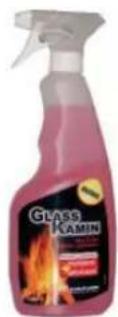
GlassKamin
(code 155240)
Used for cleaning the ceramic glass
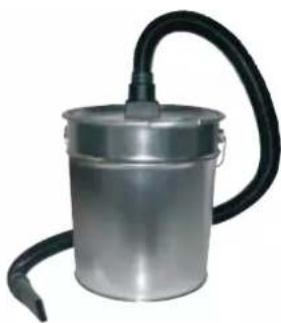
natural_image
Metal cylindrical container with black hose and outlet tube, no visible text or symbolsAsh vacuum cleaner
without motor
(code 275400)
User for cleaning
the hearth
INFORMATION FOR USERS
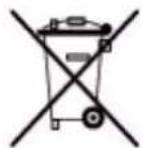
In accordance with Art. 13 of the Legislative Decree No. 151, dated 25 July 2005, “Implementation of Directives: 2002/95/EC, 2002/96/EC and 2003/108/EC, pertaining to the reduction of hazardous substances used in electrical and electronic equipment, as well as disposal of waste”. The crossed-out wheeled bin symbol shown on the equipment or on the packaging indicates that the product must be disposed of separately at the end of its useful life. Therefore, at the end of the equipment’s useful life, the user must hand in the equipment to suitable collection facilities for electrical and electronic waste, or return it to the retailer when a new, equivalent appliance is purchased in a ratio of one to one.
Madame, Monsieur,
2006/95/CE - Directive Basse Tension
natural_image
Close-up of a metallic electrical connector with wires and a small component, marked with asterisks (no readable text or symbols)
CARACTERISTIQUES
positioned on the smoke extractor, which detects the vacuum value (compared to the installation environment) in the combustion chamber.
• CAPTEUR FLUX D'AIR:
EVACUATION DES FUMEES
natural_image
Interior view of a server rack unit with labeled component D (no readable text or symbols)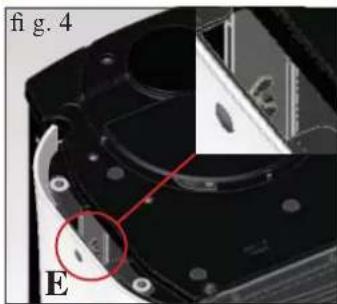
natural_image
Close-up of a mechanical component with a highlighted section and label 'E' (no readable text or symbols)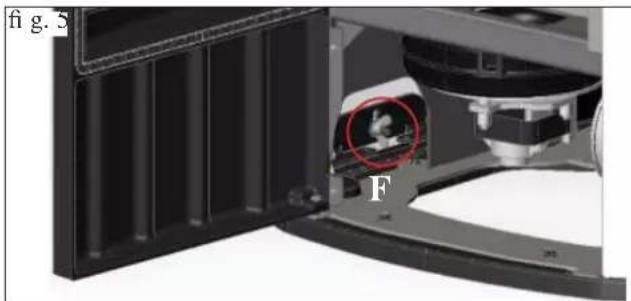
natural_image
Close-up of a mechanical device with a highlighted circular component and letter F, no visible text or symbols1) VERSION AVEC CÔTÉS ET PLAN SUPÉRIEUR EN VERRE
natural_image
Exterior view of a cylindrical water heater device with labeled part H (no text or symbols on the device itself)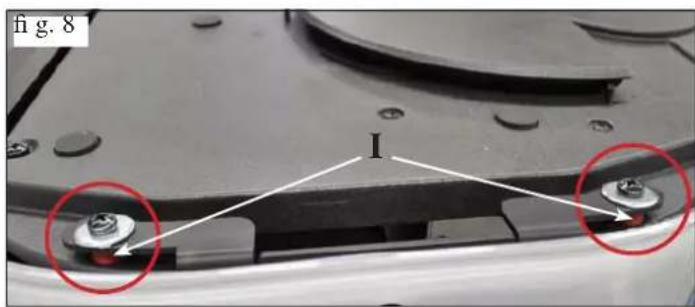
text_image
fig. 8 I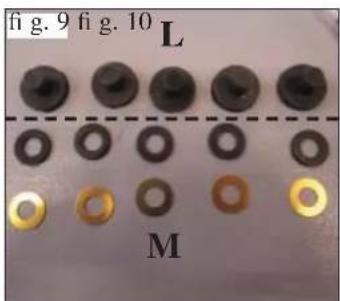
text_image
fig. 9 fig. 10 L M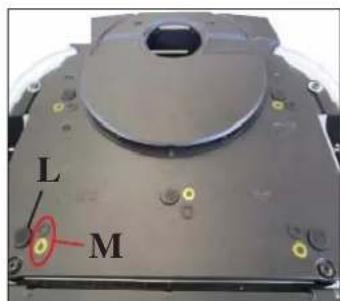
text_image
L M2) VERSION AVEC CÔTÉS EN ACIER ET PLAN SUPÉRIEUR EN VERRE
natural_image
Close-up of a white electronic device with black casing and ventilation slots, labeled 'A' (no text or symbols on the device itself)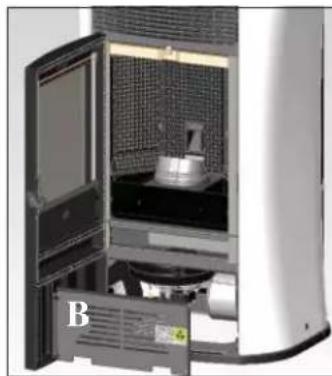
natural_image
Interior view of a laboratory or industrial equipment unit with a door open, showing internal components and a labeled part 'B' (no readable text or symbols beyond label)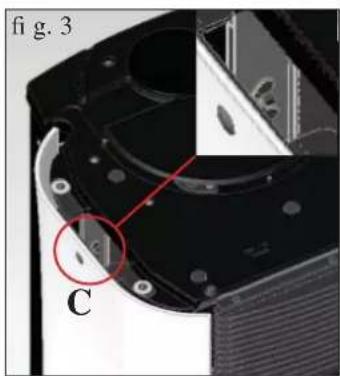
natural_image
Close-up of a mechanical component with labeled parts (C) and a red circle highlighting a feature, no readable text or symbols beyond labels.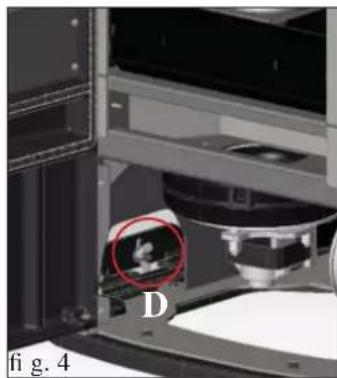
natural_image
Close-up of a mechanical device with a red circle highlighting a small object, labeled 'D' and 'fig. 4' (no readable text or symbols beyond labels)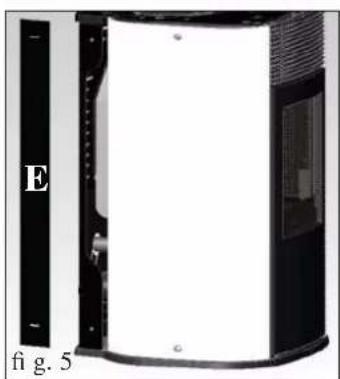
natural_image
Exterior view of a modern office building (no signage)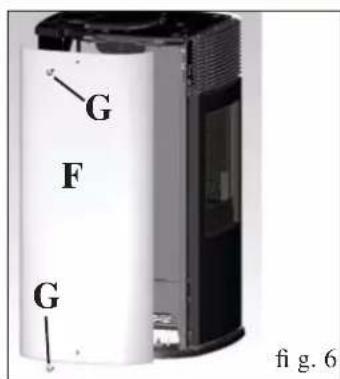
text_image
G F G fig. 6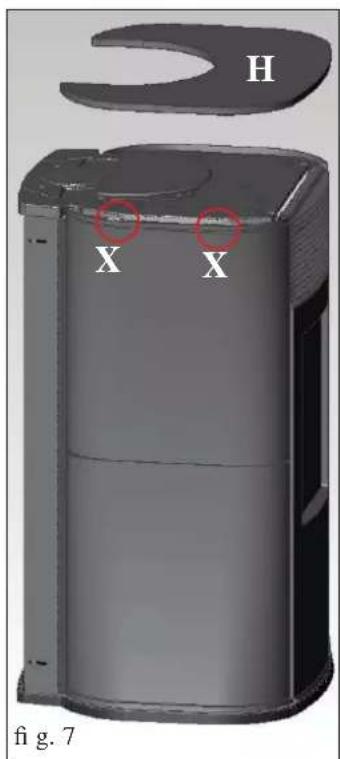
text_image
H X X fig. 7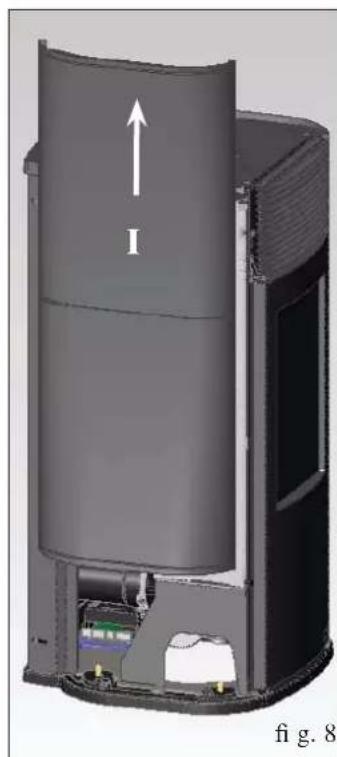
natural_image
3D cutaway diagram of a cylindrical device with internal components and an upward arrow labeled 'I', no readable text or symbols beyond the label.3) SORTIE FUMÉES DU PLAN SUPÉRIEUR
natural_image
Close-up of a mechanical component with labeled parts I and H, no readable text or symbols beyond labels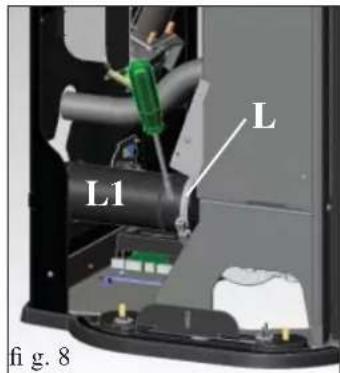
text_image
L L1 fi g. 8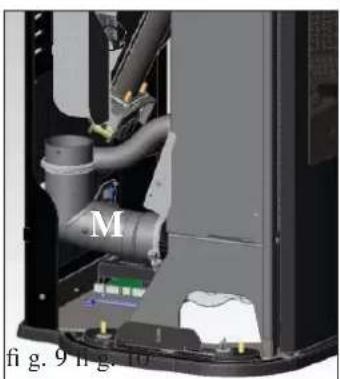
natural_image
Interior view of a mechanical device showing internal pipes and components (no visible text or symbols)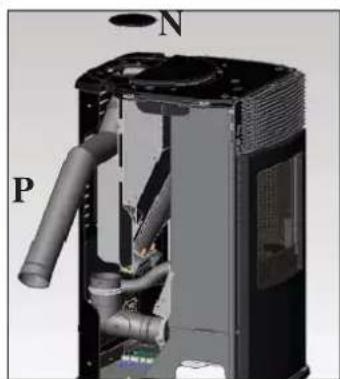
natural_image
3D cutaway view of a mechanical device showing internal pipes and housing (no text or symbols)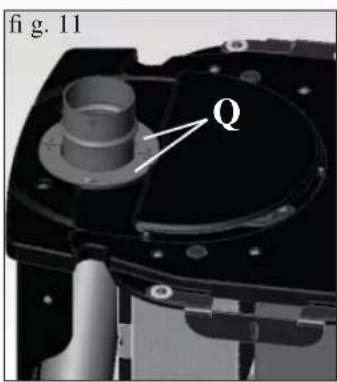
text_image
fig. 11 Q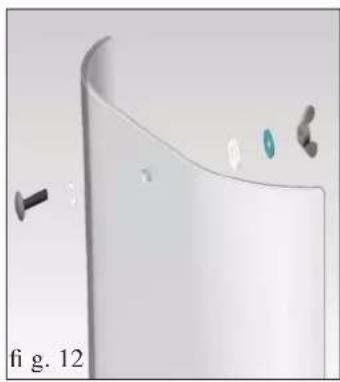
natural_image
3D rendered diagram of a curved surface with small components and a label 'fi g. 12' (no readable text or symbols)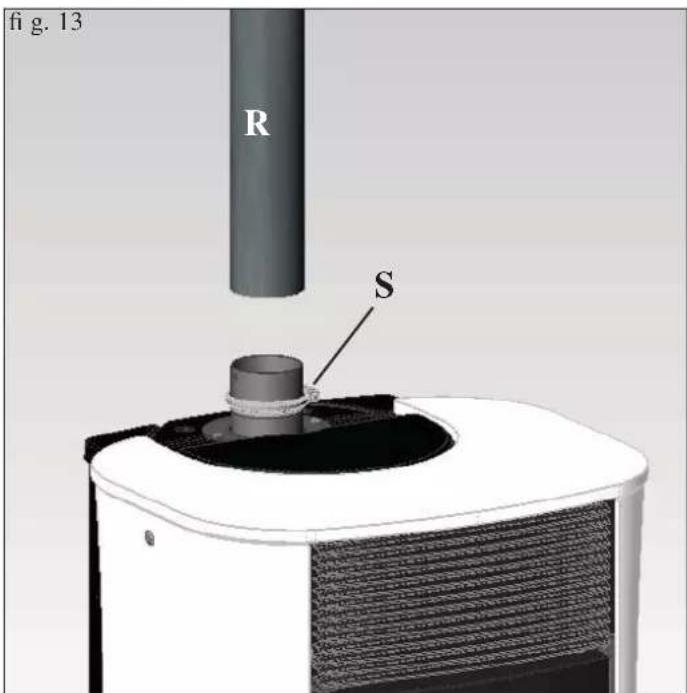
text_image
fig. 13 R Stext_image
* premerefig.1
natural_image
Close-up of a white and black industrial air purifier with a circular vent cover (no text or symbols visible)fig.2
natural_image
Close-up of a black handheld electronic device with a digital display showing '25%' and control buttons (no readable text beyond symbols)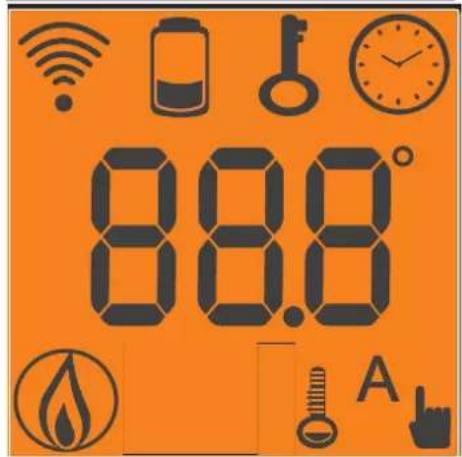
text_image
88.8°




- Position Stand-by:
natural_image
Interior view of a vintage-style kitchen or oven with a door open, showing internal components and a numbered label (1) on the cabinet (no readable text or symbols)fig. A
natural_image
Interior view of a room with a door, brick wall panel, and a metal cabinet (no visible text or symbols)fig.B
ENTRETIEN HEBDOMADAIRE
natural_image
Interior view of a mechanical or industrial enclosure with a central component and patterned panel (no visible text or symbols)INCONVENIENTS POSSIBLES
natural_image
Metallic cylindrical container with black hose and handle, no visible text or symbolsnatural_image
Close-up of a mechanical component with wires and a metallic housing (no visible text or symbols)CARACTERÍSTICAS
text_image
Technical diagram showing a structural component with labeled parts A, B, and C, including dimension lines and annotations.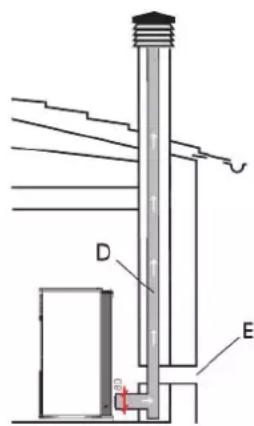
text_image
D Enatural_image
Interior view of a server rack unit with labeled component D (no readable text or symbols)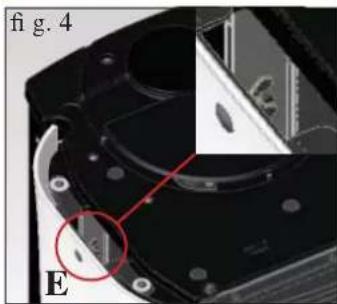
natural_image
Close-up of a mechanical component with a red circle highlighting a small feature, labeled 'E' and 'fig. 4' (no readable text or symbols beyond labels)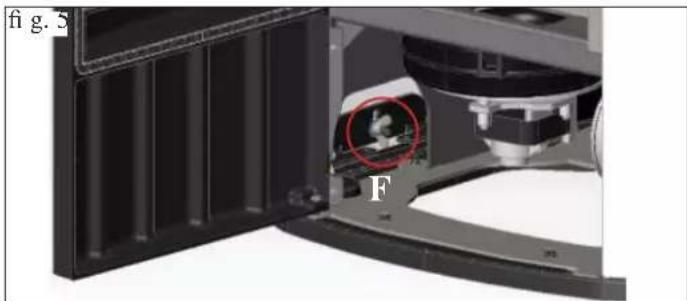
natural_image
Close-up of a mechanical component with a red circle highlighting a feature, labeled 'fig. S' and 'F', showing internal structure without any readable text or symbols.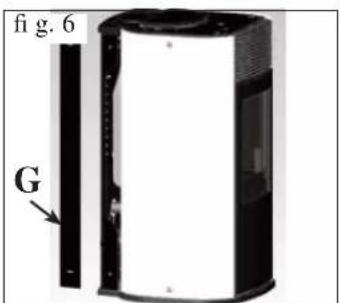
text_image
fig. 6 G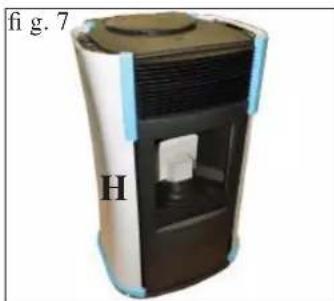
natural_image
3D rendering of a cylindrical device with internal components and labeled section 'H' (no text or symbols on the device itself)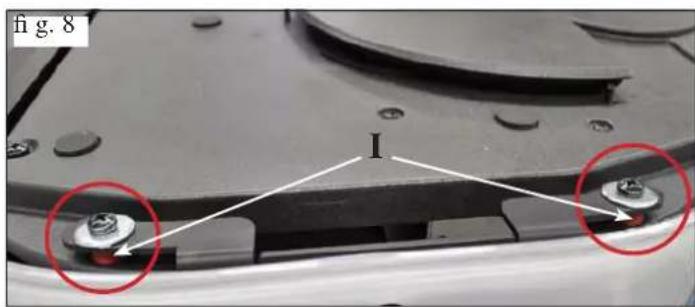
natural_image
Close-up of a mechanical component with two red-circled features and a central bolted joint (no text or symbols visible)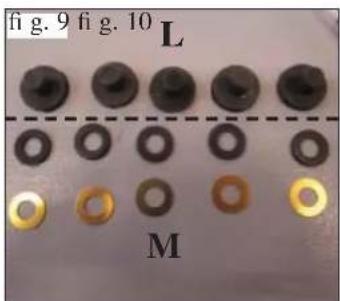
text_image
fig. 9 fig. 10 L M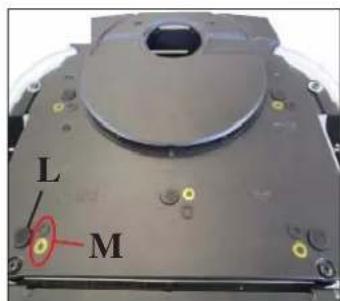
text_image
L Mnatural_image
Close-up of a white cylindrical device with black casing and ventilation slots, labeled 'A' (no text or symbols on the device itself)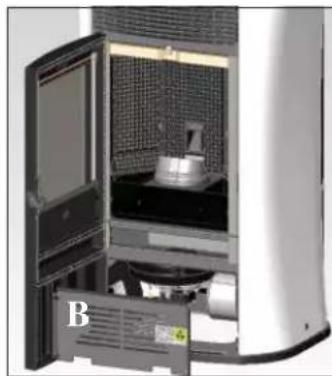
natural_image
Interior view of a modern kitchen appliance with open door and side panel (no visible text or symbols)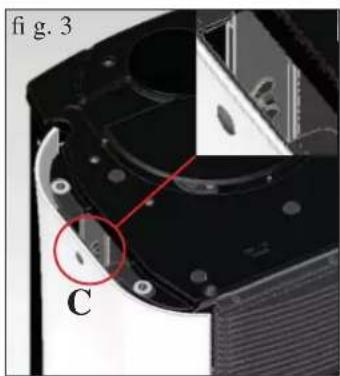
text_image
fi g. 3 C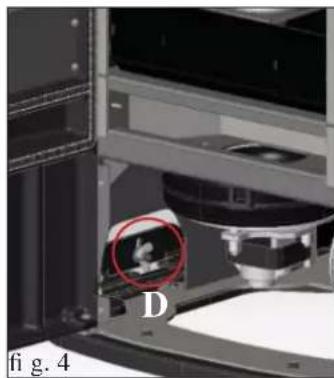
natural_image
Close-up of a mechanical device with a red circle highlighting a small object, labeled 'D', and 'fig. 4' (no readable text or symbols beyond labels)
natural_image
Exterior view of a modern office building (no signage)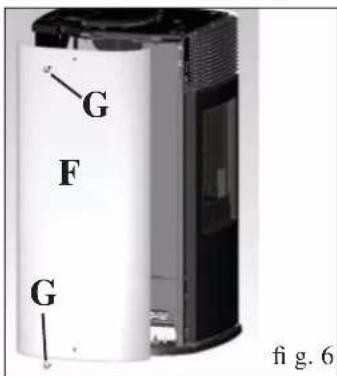
text_image
G F G fig. 6text_image
H X X fig. 7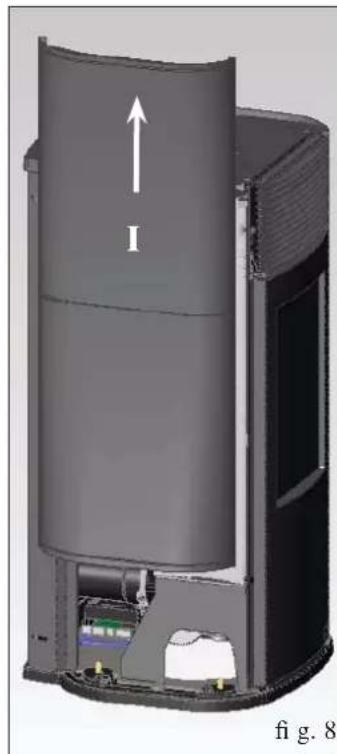
natural_image
Cross-sectional diagram of a cylindrical device with internal components and an upward arrow, labeled 'fi g. 8' (no text or symbols on the diagram itself)natural_image
Close-up of a mechanical component with labeled parts I and H, no readable text or symbols beyond labels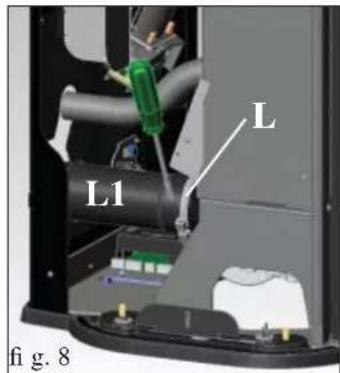
text_image
L L1 fi g. 8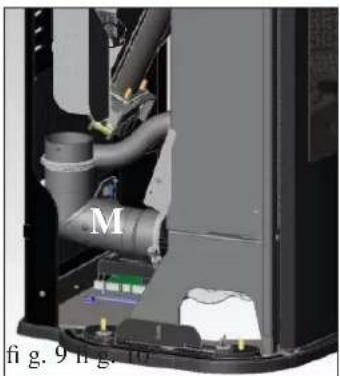
natural_image
Interior view of a mechanical device showing internal pipes and components (no visible text or symbols)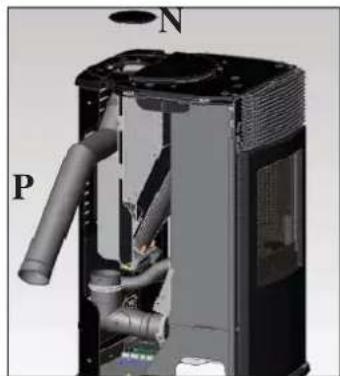
natural_image
3D cutaway view of a mechanical device showing internal pipes and housing (no text or symbols)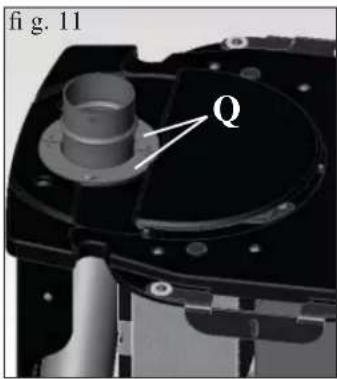
text_image
fig. 11 Q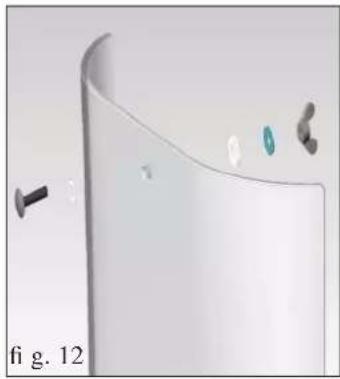
natural_image
3D rendered diagram of a curved white object with small metallic components and a black screw, labeled 'fi g. 12' (no text or symbols on the object itself)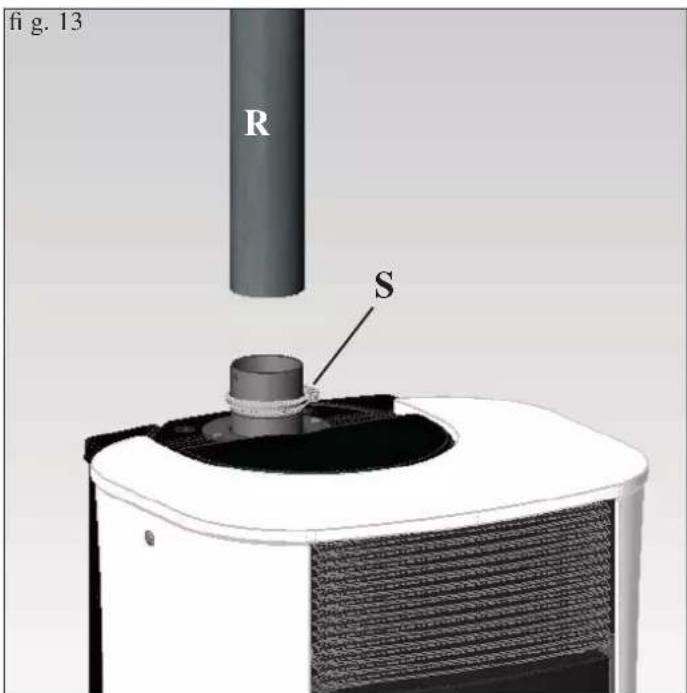
text_image
fig. 13 R Stext_image
* premerefig.1
natural_image
Exterior view of a white and black appliance with a circular lid and ventilation grilles (no text or symbols visible)fig. 2
natural_image
Black handheld electronic device with a digital display showing '2354' and control buttons (no readable text beyond symbols)

natural_image
Interior view of a vintage-style cabinet with open door, patterned backrest, and internal equipment (no visible text or symbols)fig. A
natural_image
Interior view of a vintage office or display cabinet with a black tray and patterned wall (no visible text or symbols)fig. B
MANTENIMIENTO SEMANAL
natural_image
Interior view of a mechanical or industrial enclosure with a central cylindrical component and patterned panel (no visible text or symbols)CONSEJOS PARAPOSIBLES INCONVENIENTES
natural_image
Metallic cylindrical device with black hose and lid, no visible text or symbolstext_image
A B E C D G FAbb. 1
SICHERHEITSHINWEISE
natural_image
Close-up of a mechanical component with wires and connectors, no visible text or symbolsMERKMALE
natural_image
Interior view of a server rack with labeled component D, showing internal components and no visible text or symbols.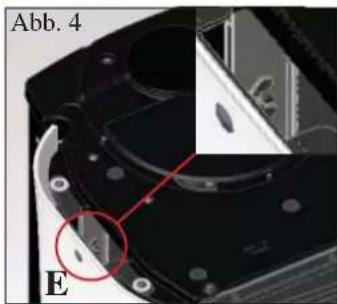
natural_image
Close-up of a mechanical component with labeled parts (A, B, E) and a red circle highlighting a feature, no readable text or symbols present.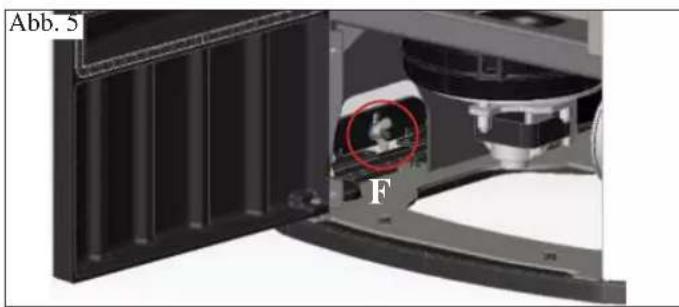
natural_image
Close-up of a mechanical component with labeled part 'F' and annotation 'Abb. 5' (no readable text or symbols beyond labels)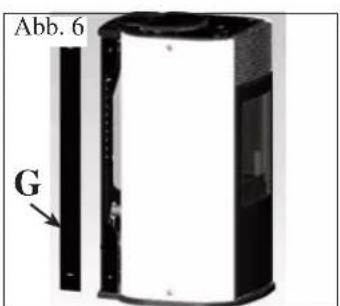
text_image
Abb. 6 G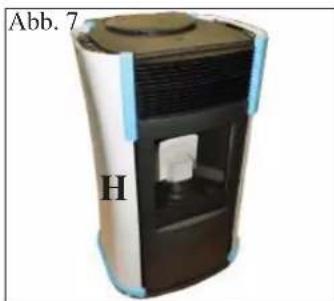
natural_image
Exterior view of a cylindrical device with internal components and labeled part 'H' (no text or symbols on the device itself)natural_image
Interior view of a laboratory or industrial equipment unit with open door and labeled component B (no visible text or symbols)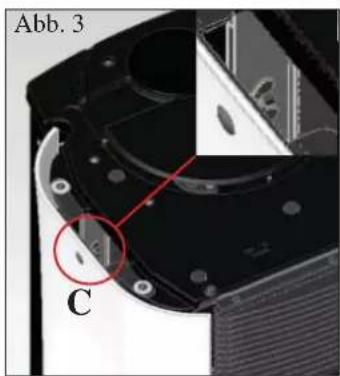
text_image
Abb. 3 C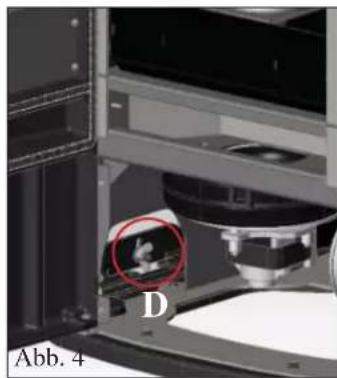
natural_image
Close-up of a laboratory instrument with a highlighted circular region labeled 'D', no visible text or symbols beyond the label.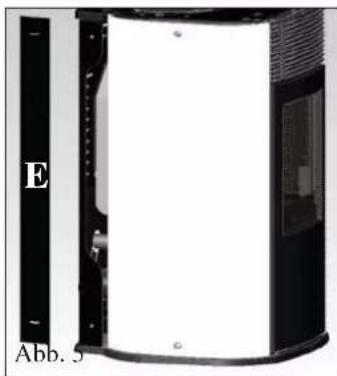
natural_image
Exterior view of a cylindrical device with labeled panel (E) and label (Abb. 5), no readable text or symbols beyond labels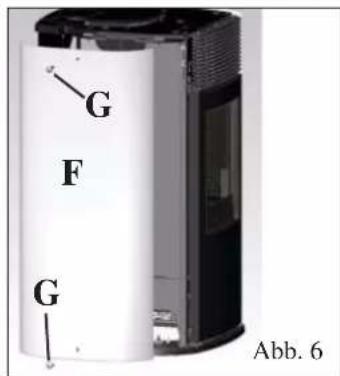
text_image
G F G Abb. 6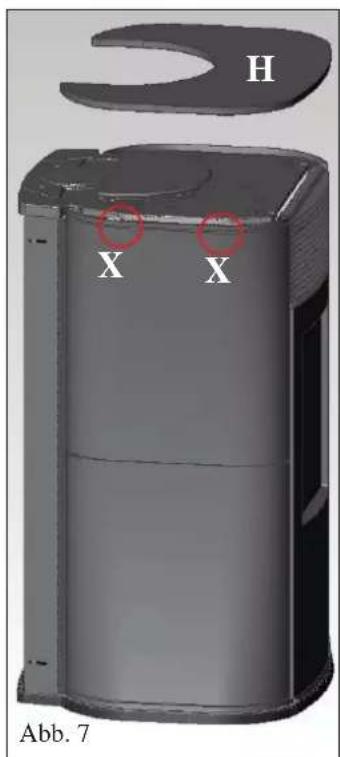
text_image
H X X Abb. 7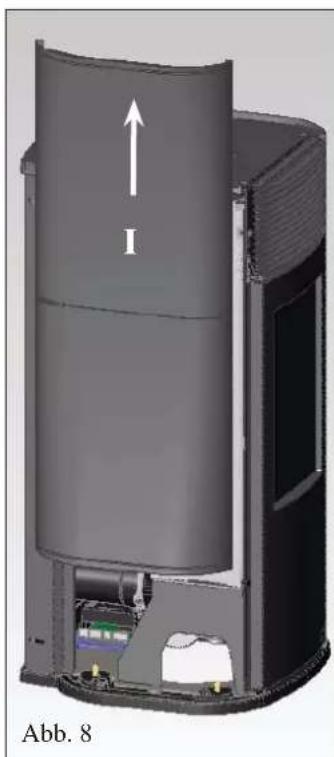
natural_image
3D cutaway view of a cylindrical device with internal components and an upward arrow, labeled Abb. 8 (no text or symbols on the diagram itself)natural_image
Interior view of a mechanical device showing internal pipes and components (no visible text or symbols)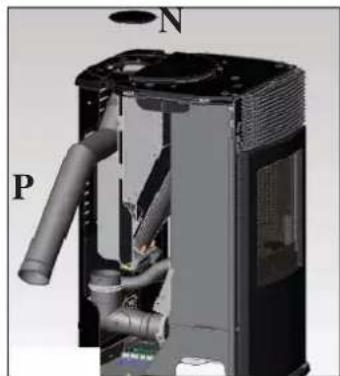
natural_image
3D cutaway view of a mechanical device showing internal pipes and housing (no text or symbols)natural_image
3D rendered object with curved surface and small accessories, labeled Abb. 12 (no text or symbols on the object itself)natural_image
Close-up of a white and black industrial air purifier with a circular vent cover (no text or symbols visible)Abb. 2
natural_image
Black handheld electronic device with a digital display showing '25%' and control buttons (no readable text beyond symbols)

text_image
88.8° A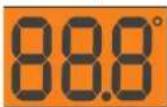

natural_image
Interior view of a vintage heating oven with open door and internal equipment (no visible text or symbols)Abb. A
natural_image
Interior view of a modern office or kitchen appliance with a glass door, patterned wallpaper, and a small mechanical component (no visible text or symbols)Abb. B
natural_image
Interior view of a server room with a central device and patterned insulation (no visible text or symbols)MÖGLICHE PROBLEME
natural_image
Metallic cylindrical container with black hose and handle, no visible text or symbolstext_image
A B E C D G FAfb. 1
VEILIGHEIDSINFORMATIE
natural_image
Close-up of a metallic electrical connector with wires and a plastic housing (no visible text or symbols)
EIGENSCHAPPEN
BESCHERMINGSINSTALLATIES
• THERMOKOPPEL:
text_image
Technical diagram showing a structural component with labeled parts A, B, and C, including dimension annotations.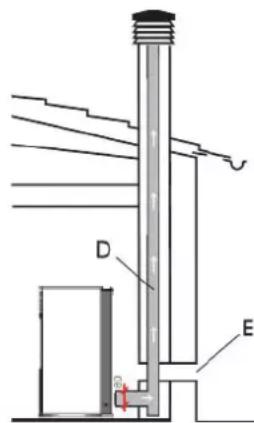
text_image
Technical diagram of a vertical structure with labeled components D and E, showing internal components and connections.natural_image
Interior view of a laboratory or industrial device with labeled components (Afb. 3 and D), showing internal components without any readable text or symbols.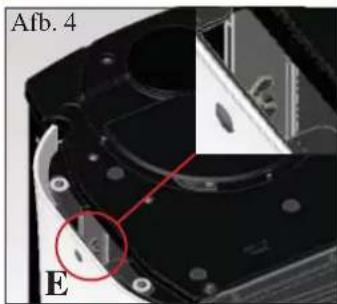
natural_image
Close-up of a mechanical component with labeled section Afb. 4 and red circle highlighting a feature (no readable text or symbols)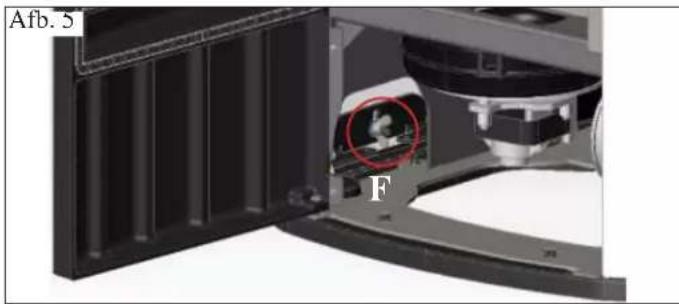
natural_image
Close-up of a mechanical device with a highlighted internal component (labeled 'F') and panel, showing no readable text or symbols.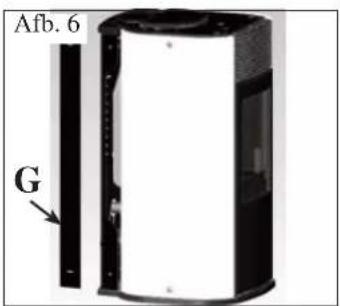
text_image
Afb. 6 G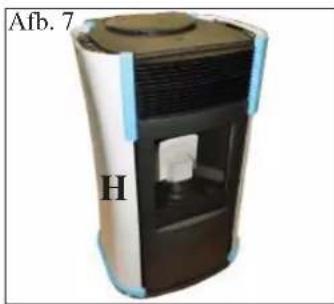
natural_image
Exterior view of a portable air purifier unit (no text or symbols visible)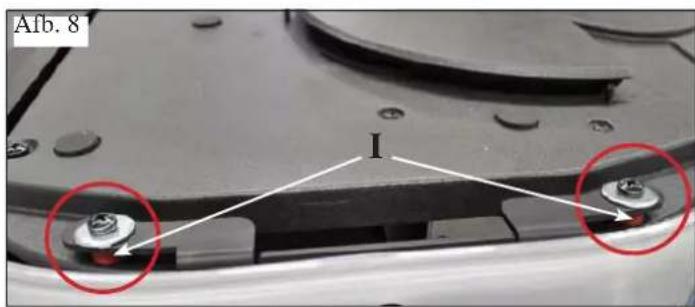
text_image
Afb. 8 I1) VERSIES MET ZIJKANTEN EN TOP IN GLAS
natural_image
Interior view of a laboratory or industrial equipment unit with a labeled component 'B' (no visible text or symbols on the main subject)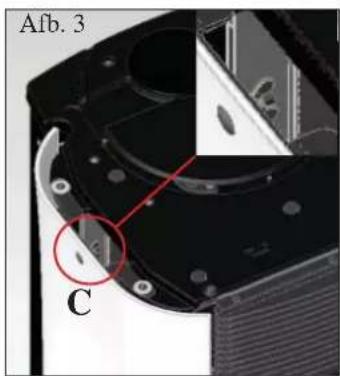
text_image
Afb. 3 C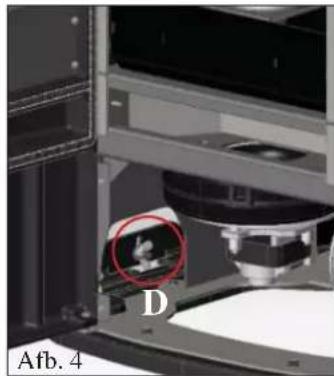
natural_image
Close-up of a laboratory setup with a labeled component 'D' and a red circle highlighting a small object (no readable text or symbols)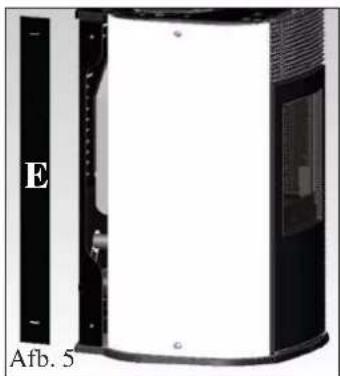
natural_image
Exterior view of a cylindrical device with a black panel and white interior, labeled 'E' and 'Afb. 5' (no other text or symbols visible)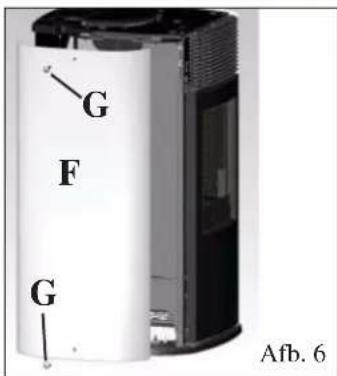
text_image
G F G Afb. 6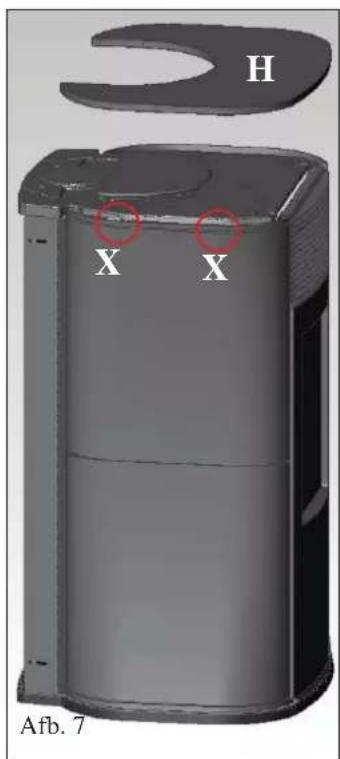
text_image
H X X Afb. 7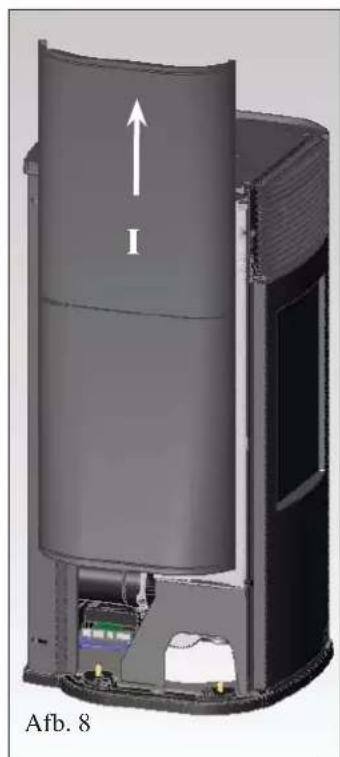
natural_image
3D cutaway view of a cylindrical device with internal components and an upward arrow labeled 'I', no visible text or symbols beyond the label 'Afb. 8'3) ROOKUITLAAT LANGS TOP
natural_image
Interior view of a mechanical device showing internal pipes and components (no visible text or symbols)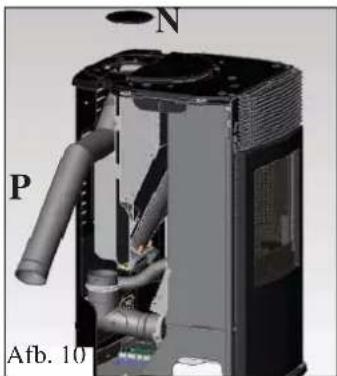
natural_image
3D cutaway view of a mechanical device showing internal components and labeled parts (N, P, Afb. 10), no readable text or symbols beyond labels.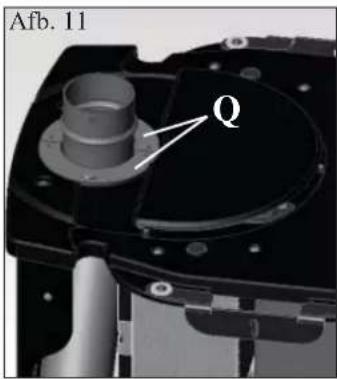
text_image
Afb. 11 Q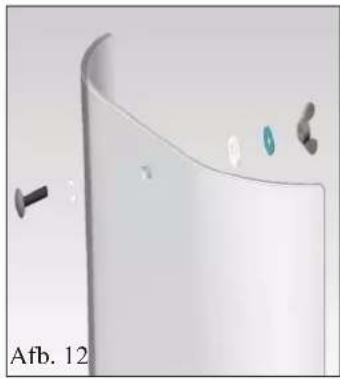
natural_image
3D rendering of a curved white object with small metallic components and a black screw, labeled 'Afb. 12' (no text or symbols on the object itself)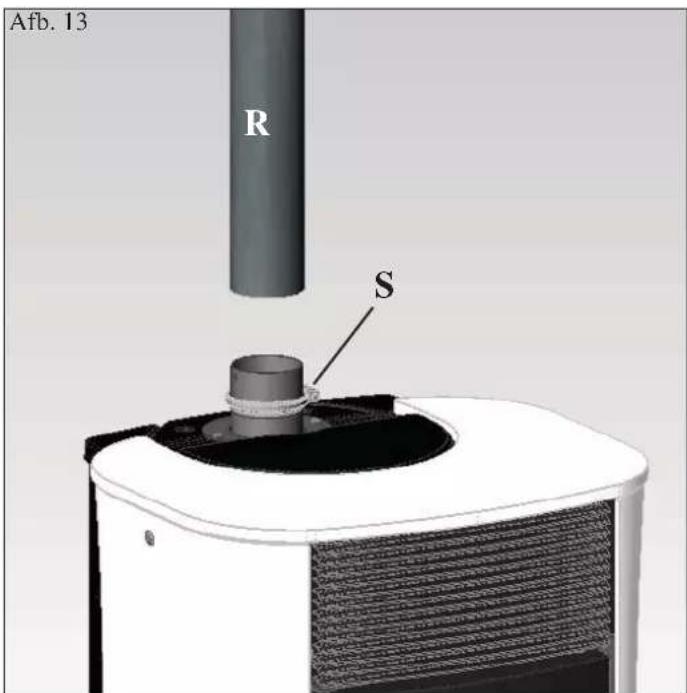
text_image
Afb. 13 R Snatural_image
Exterior view of a white and black appliance with a circular lid and ventilation grilles (no text or symbols visible)Afb. 2
OPMERKING betreffende de brandstof.
natural_image
Close-up of a black handheld electronic device with a green display screen and control buttons (no readable text or symbols)
DRUK DE TOETS NOOIT MEERDERE KEREN IN 📄.
Systeem pelletreserve
natural_image
Interior view of a vintage-style oven with open door, brick-patterned wall, and metal tray (no visible text or symbols)Afb. A
natural_image
3D rendering of a mechanical assembly with a numbered component (2) and no visible text or symbolsAfb. B
WEKELIJKS ONDERHOUD
natural_image
Interior view of a mechanical or electrical enclosure with a central component and patterned panel (no visible text or symbols)MOGELIJKE STORINGEN
KIT VOOR VERBINDING ROOKAFVOER LANGS TOP
KIT AFDEKSTUK VAN DE BUIS VOOR VERBINDING ROOKAFVOER LANGS TOP
REINIGINGSACCESSOIRES
natural_image
Metallic cylindrical device with black hose and lid, no visible text or symbolstext_image
A B E C D G Ffig. 1
SIKKERHEDSOPLYSNINGER
OVNEN FREMSTILLES I 4 FORSKELLIGE UDGAVER:
natural_image
Close-up of a mechanical component with wires and connectors (no visible text or symbols)SPECIFIKATIONER
CARATTERISTICHE TERMOTECNICHE ai sensi EN 14785
text_image
Technical diagram showing a structural component with labeled parts A, B, and C, including dimension annotations.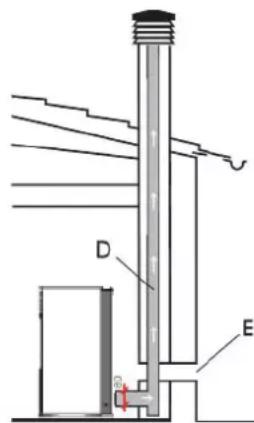
text_image
D Enatural_image
Interior view of a server rack unit with labeled component D (no readable text or symbols)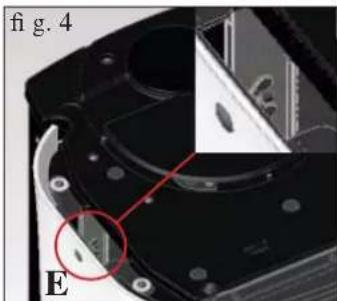
natural_image
Close-up of a mechanical component with a red circle highlighting a feature, labeled 'E' and 'fig. 4' (no readable text or symbols beyond labels)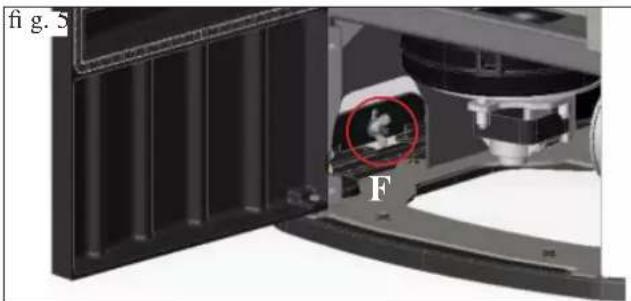
natural_image
Close-up of a mechanical device with a highlighted circular component (labeled F) and panel structure, no readable text or symbols present.1) UDGAVE MED SIDER OG TOP I GLAS
natural_image
3D rendering of a portable water dispenser with labeled part 'H' and no visible text or symbols on the device itself.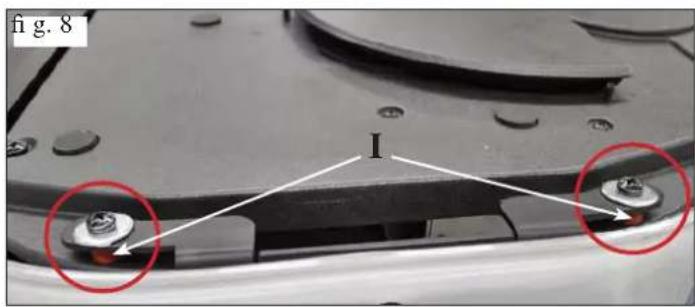
text_image
fig. 8 I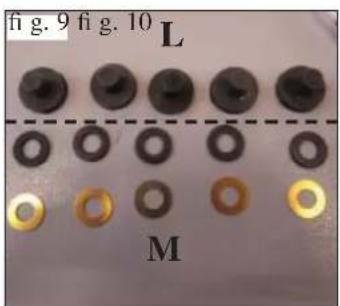
text_image
fig. 9 fig. 10 L M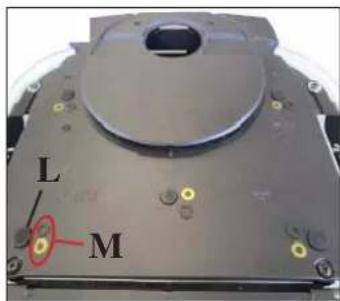
text_image
L M2) UDGAVE MED SIDER I STÅL OG TOP I GLAS
natural_image
Close-up of a white electronic device with a black lid and ventilation grille, labeled 'A' (no text or symbols on the device itself)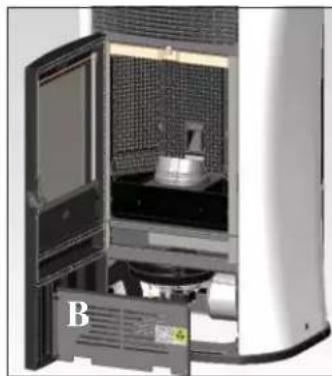
natural_image
Interior view of a laboratory or industrial equipment unit with a labeled component 'B' (no visible text or symbols on the main subject)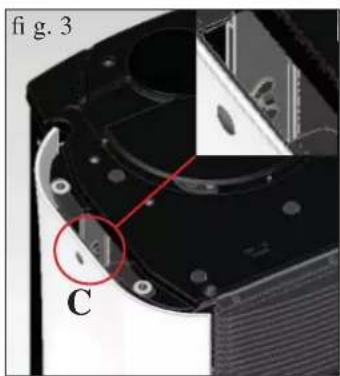
natural_image
Close-up of a mechanical component with labeled parts (C) and a red circle highlighting a feature, no readable text or symbols present.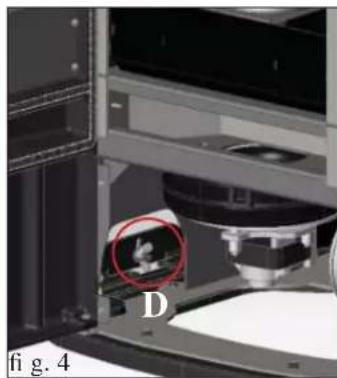
natural_image
Close-up of a mechanical device with a red circle highlighting a small object, labeled 'D' and 'fig. 4' (no readable text or symbols beyond labels)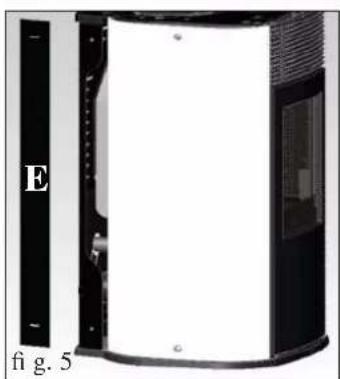
natural_image
Exterior view of a device with labeled section E and figure marker 5 (no readable text or symbols beyond labels)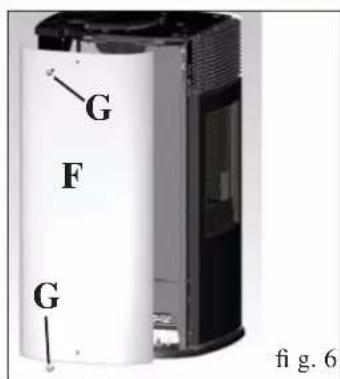
text_image
G F G fig. 6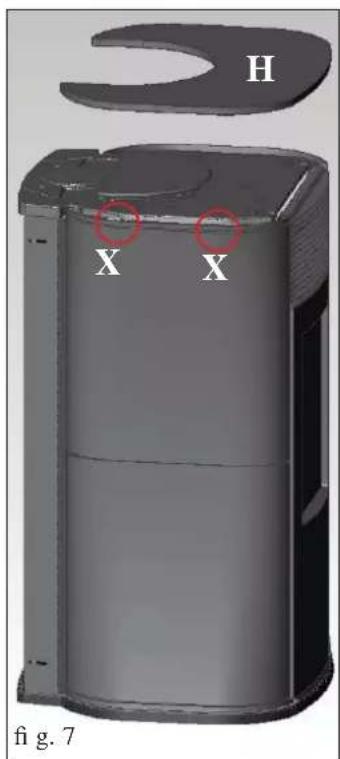
text_image
H X X fig. 7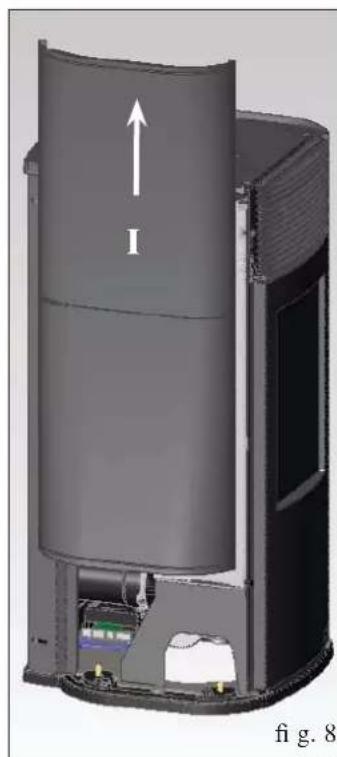
natural_image
Cross-sectional diagram of a cylindrical device with internal components and an upward arrow, labeled 'fi g. 8' (no text or symbols on the diagram itself)3) R∅GAFGANG FRA TOPPEN
natural_image
Close-up of a mechanical component with labeled parts I and H, no readable text or symbols beyond labels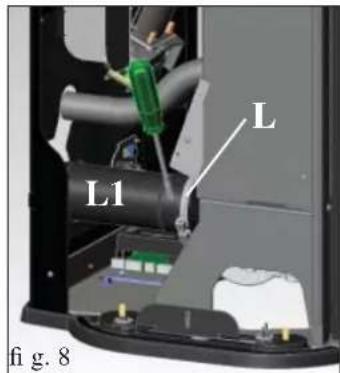
text_image
L L1 fi g. 8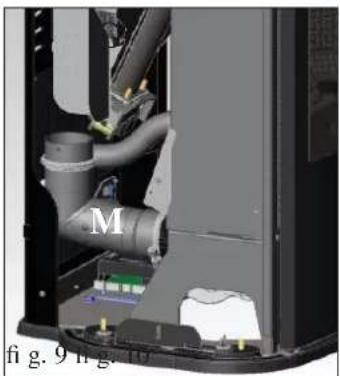
natural_image
Interior view of a mechanical device showing internal pipes and components (no visible text or symbols)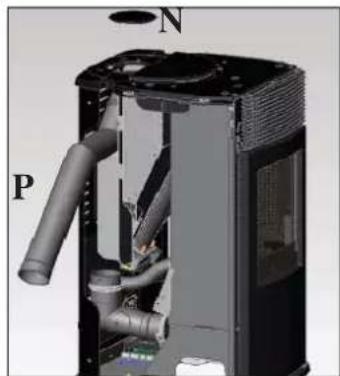
natural_image
3D cutaway view of a mechanical device showing internal pipes and housing (no text or symbols)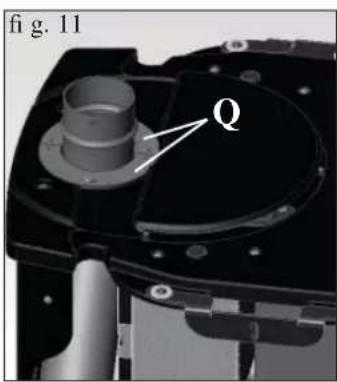
text_image
fig. 11 Q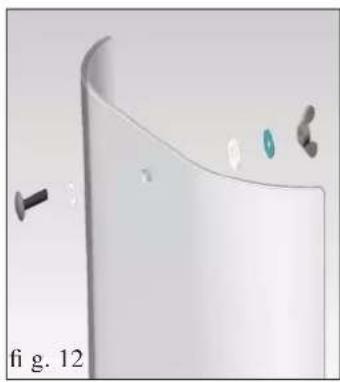
natural_image
3D rendered diagram of a curved surface with small components and a label 'fi g. 12' (no readable text or symbols)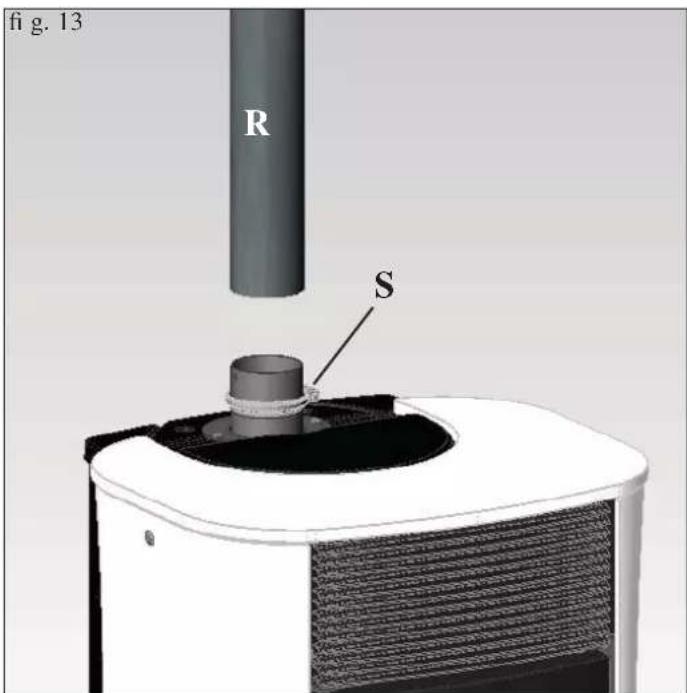
text_image
fig. 13 R Snatural_image
Close-up of a white and black industrial air purifier with a circular vent cover (no text or symbols visible)fig. 2
BEMÆRKNING OM BRÆNDSEL
natural_image
Black handheld electronic device with a digital display showing '254' and control buttons (no readable text beyond basic symbols)


Pellet reservesystem
natural_image
Interior view of a vintage-style oven with a mounted dish and patterned interior (no visible text or symbols)fig. A
natural_image
3D rendering of a mechanical assembly with a labeled component (2), showing internal components and structural elements without any readable text or symbols.fig.B
UGENTLIG VEDLIGEHOLDELSE
natural_image
Interior view of a mechanical or industrial enclosure with patterned panels and a central cylindrical component (no visible text or symbols)AFHJÆLPNING AF EVENTUELLE FEJL
natural_image
Metallic cylindrical device with black hose and lid, no visible text or symbolstext_image
A B E C D G Ffig. 1
I BIZTONSÁGI INFORMÁCIÓK
natural_image
Close-up of a metallic electrical connector with wires and connectors (no visible text or symbols)JELLEMZÖK
• BIMETÁL (TERMOCOPPIA)
natural_image
Interior view of a server rack unit with labeled component D (no readable text or symbols)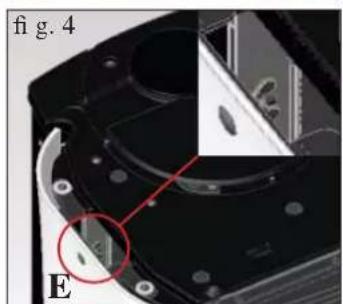
natural_image
Close-up of a mechanical component with a red circle highlighting a feature, labeled 'E' and 'fig. 4' (no readable text or symbols beyond labels)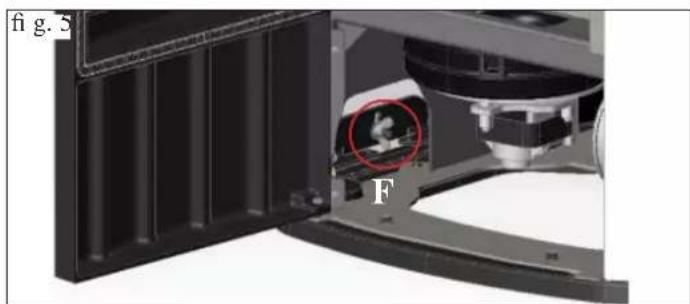
natural_image
Close-up of a mechanical component with a highlighted circular feature labeled 'F', no readable text or symbols present.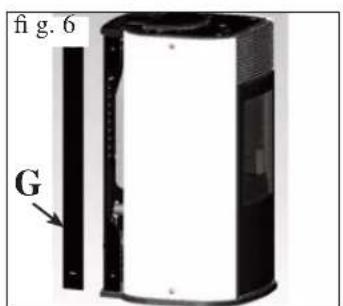
text_image
fig. 6 G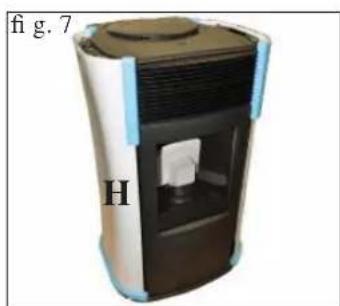
natural_image
3D rendering of a portable water dispenser with labeled part 'H' and no visible text or symbols on the device itself.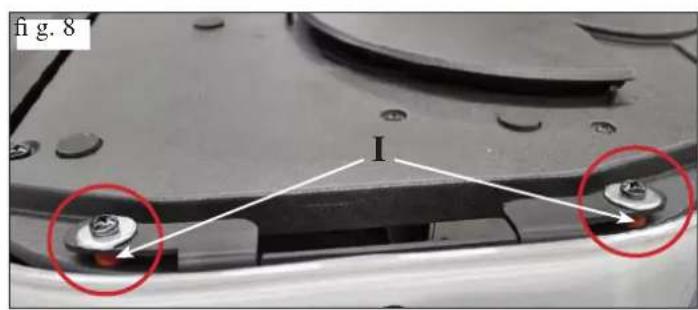
text_image
fig. 8 I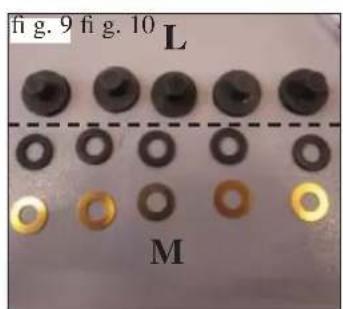
text_image
fig. 9 fig. 10 L M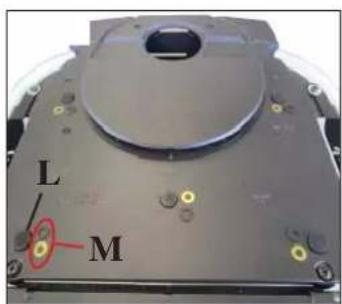
text_image
L M1) ÜVEG OLDALAK ÉS FEDLAP
natural_image
Close-up of a white electronic device with a black lid and ventilation grille, labeled 'A' (no text or symbols on the device itself)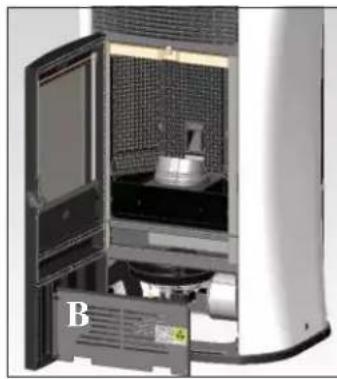
natural_image
Interior view of a white industrial air purifier with open door and internal components (no visible text or symbols)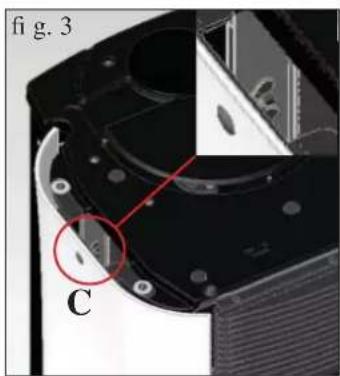
natural_image
Close-up of a mechanical component with labeled parts (C) and a red circle highlighting a feature, no readable text or symbols present.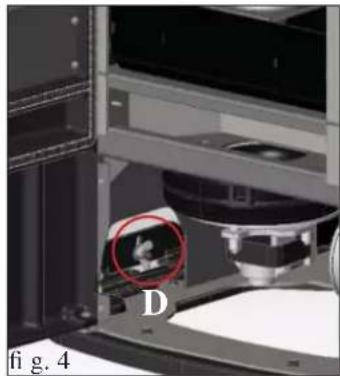
natural_image
Close-up of a 3D printer with a highlighted circular region labeled 'D', showing internal components and no readable text or symbols.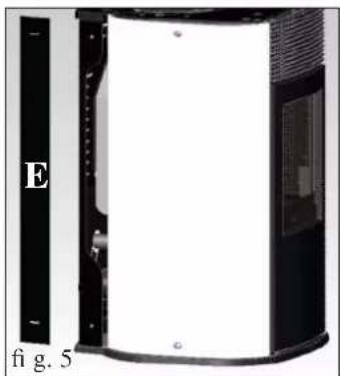
natural_image
Exterior view of a cylindrical device with a black panel and labeled section E, no readable text or symbols beyond labels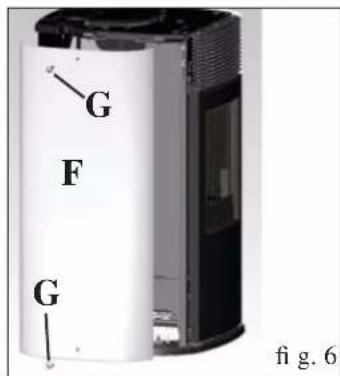
text_image
G F G fig. 6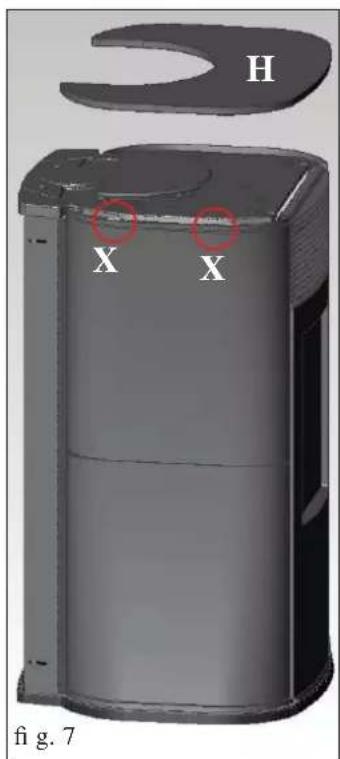
text_image
H X X fig. 7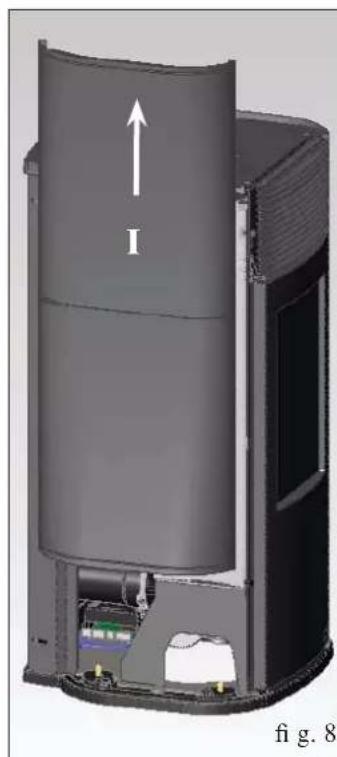
natural_image
3D cutaway view of a cylindrical device with internal components and an upward arrow labeled 'I', no readable text or symbols beyond the label.3) FELSŐ FÜSTKIVEZETÉS
natural_image
Close-up of a mechanical component with labeled parts I and H, no readable text or symbols beyond labels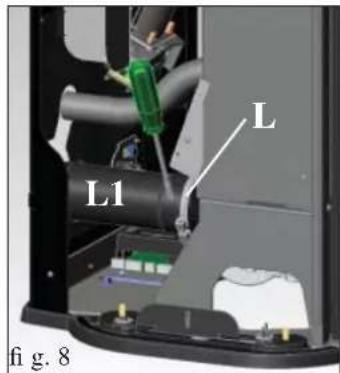
text_image
L L1 fi g. 8natural_image
Interior view of a mechanical device showing internal pipes and components (no visible text or symbols)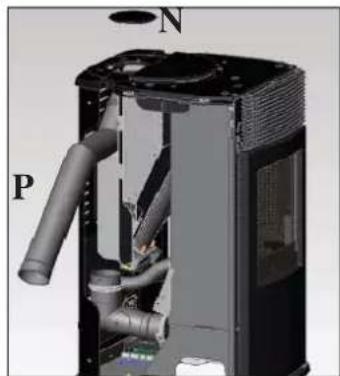
natural_image
3D cutaway view of a mechanical device showing internal pipes and housing (no text or symbols)natural_image
3D rendered object with cutaway view and small accessories, labeled 'fi g. 12' (no text or symbols on the object itself)text_image
MEGNYOMNIfig. 1
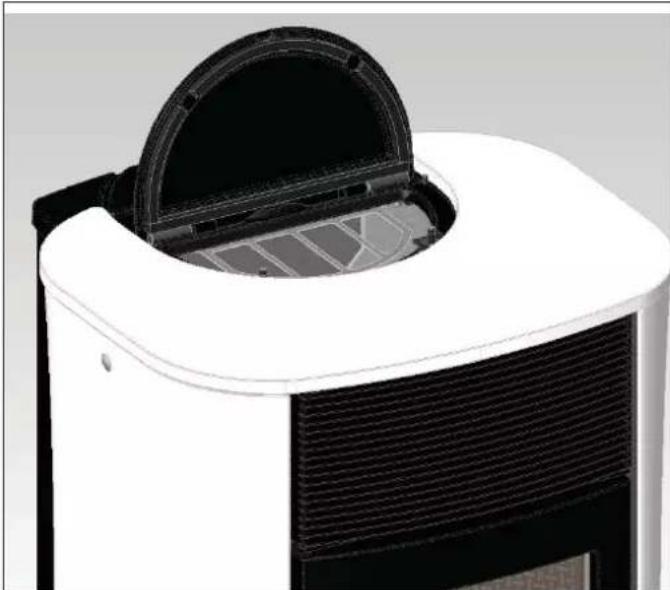
natural_image
Close-up of a white and black appliance with a circular lid and ventilation grille (no text or symbols visible)fig.2
natural_image
Close-up of a black handheld electronic device with a green display screen and control buttons (no readable text or symbols)
natural_image
Interior view of a vintage-style cabinet with open door and internal mechanical components (no visible text or symbols)fig. A
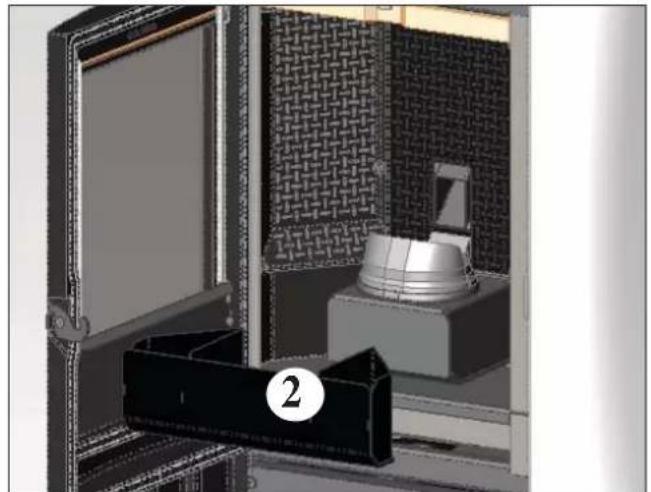
natural_image
Interior view of a mechanical or architectural installation with a metallic component and brick-patterned panel (no visible text or symbols)fig. B
HETI TISZTÍTÁS
natural_image
Interior view of a mechanical or industrial enclosure with a metallic component inside, showing no visible text or symbols.HIBAÜZENETEK JELZÉSE ÉS JAVASOL MEGOLDÁSOK
natural_image
Metallic cylindrical container with black hose and handle, no visible text or symbolstext_image
A B D E C G Fрис. 1
natural_image
Close-up of a mechanical component with wires and connectors (no visible text or symbols)
ХАРАКТЕРИСТИКИ
natural_image
Interior view of a computer room showing internal components and a labeled section 'D' (no readable text or symbols)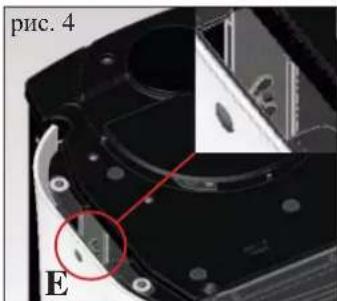
text_image
рис. 4 E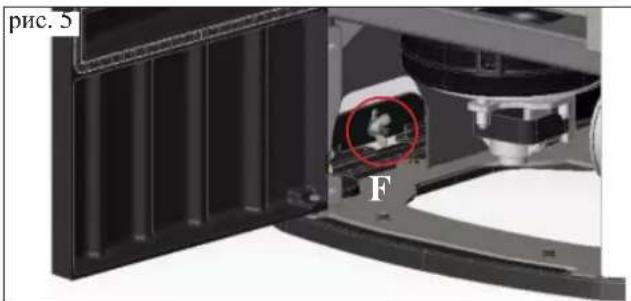
natural_image
Close-up of a mechanical device with a red circle highlighting a component, labeled 'F' (no readable text or symbols beyond label)natural_image
3D rendering of a portable water dispenser with labeled part 'H' and page number 'рис. 7' (no other text or symbols)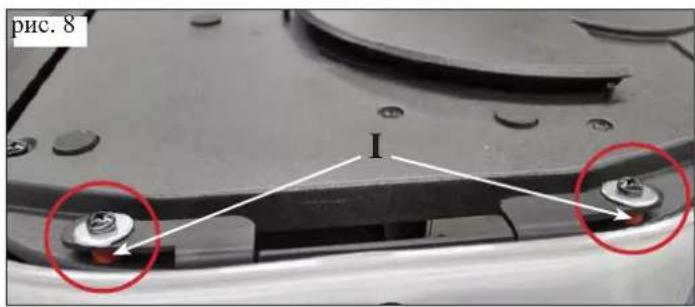
text_image
рис. 8 I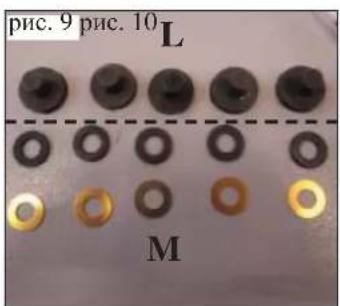
text_image
рис. 9 рис. 10 L M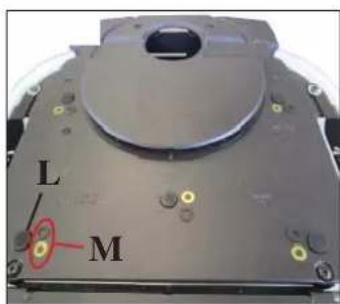
text_image
L Mnatural_image
Interior view of a laboratory or industrial equipment unit with a door open, showing internal components and a labeled component 'B' (no readable text or symbols beyond label)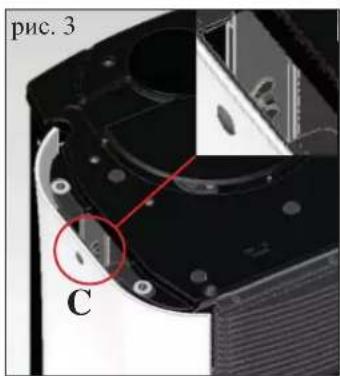
text_image
рис. 3 C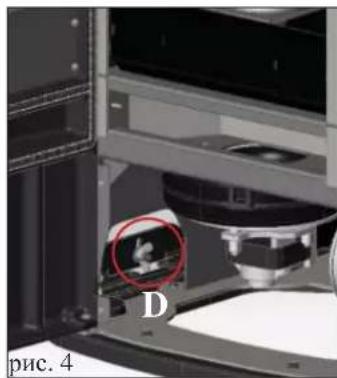
natural_image
Interior view of a laboratory or industrial equipment setup with labeled components and a red circle highlighting a feature (no readable text or symbols)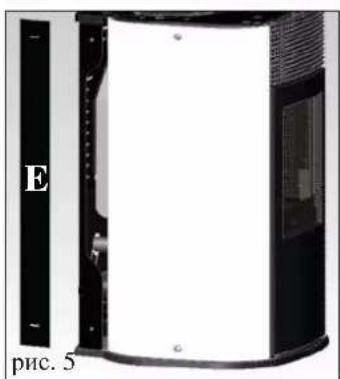
natural_image
Exterior view of a modern office building (no signage)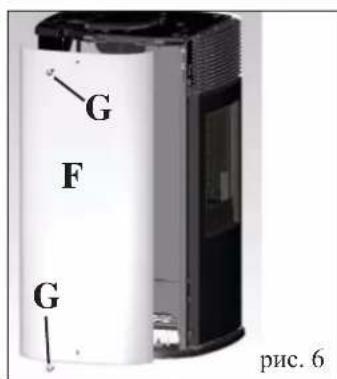
text_image
G F G рис. 6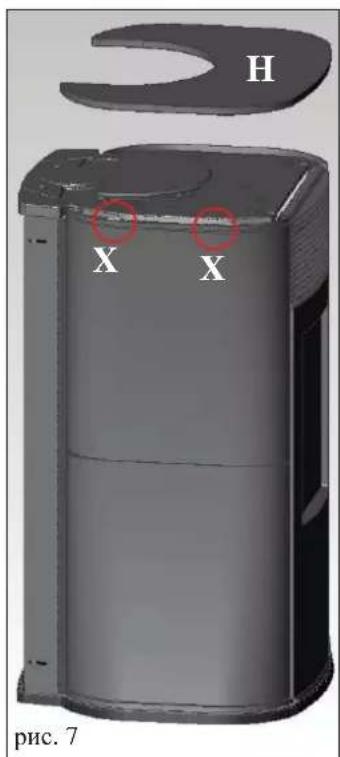
text_image
H X X рис. 7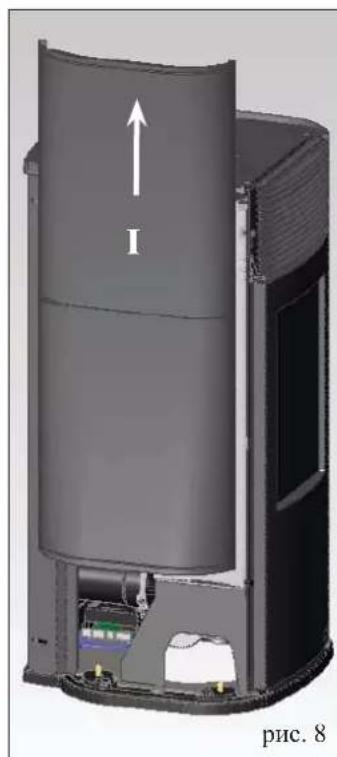
natural_image
3D cutaway view of a cylindrical device with internal components and an upward arrow labeled 'I', no readable text or symbols beyond the label.natural_image
Interior view of a mechanical device showing internal components and wiring (no visible text or symbols)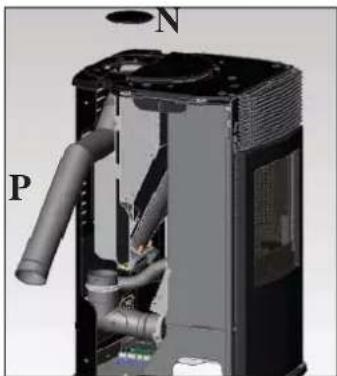
natural_image
3D cutaway view of a mechanical device showing internal components like pipes and valves (no text or symbols visible)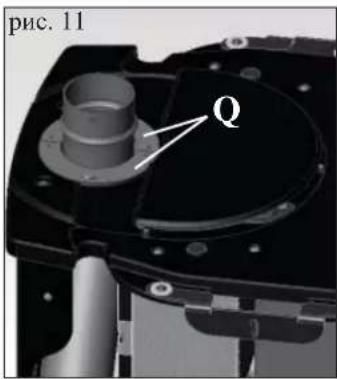
text_image
рис. 11 Q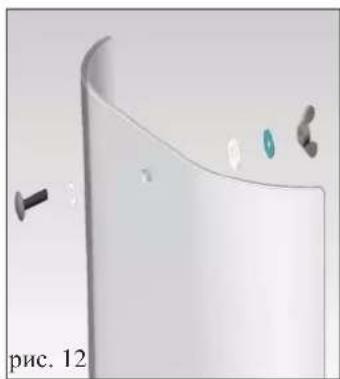
natural_image
3D rendered white object with cutaway view showing internal components and a small black screw (no text or symbols)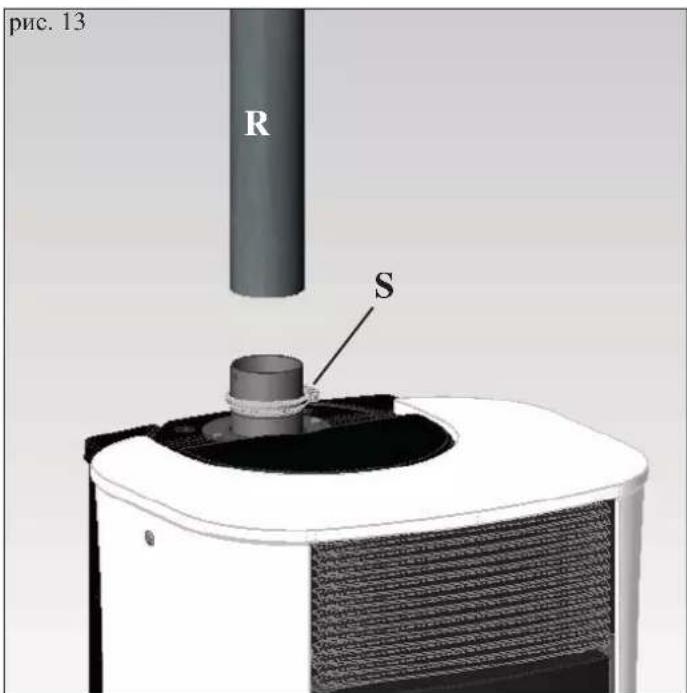
text_image
рис. 13 R Snatural_image
Close-up of a white and black appliance with a circular lid and ventilation grilles (no text or symbols visible)рис. 2
natural_image
Black handheld electronic device with a digital display showing '254' and control buttons (no readable text beyond basic symbols)

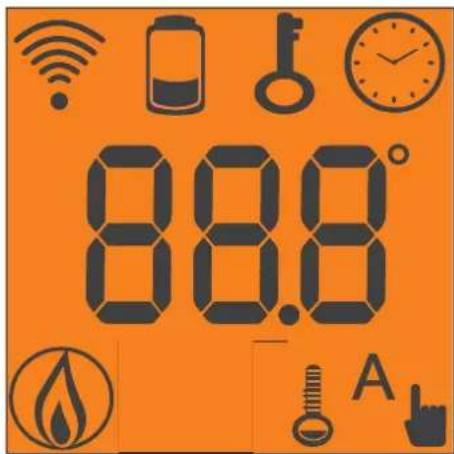
text_image
88.8 A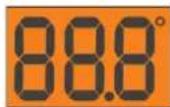

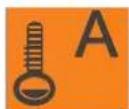
natural_image
Interior view of a vintage-style gas stove with open door, showing internal components and a numbered label (1) on the cabinet (no text or symbols beyond label)рис. А
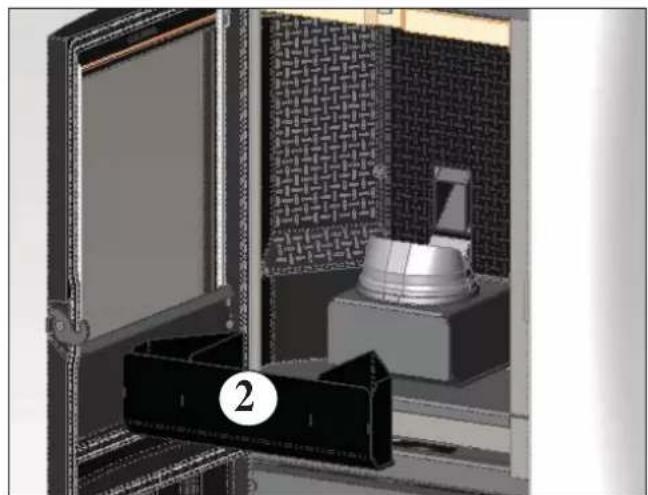
natural_image
3D rendering of a mechanical device with a labeled component (2), no visible text or symbolsрис. В
ЕЖЕНЕДЕЛЬНОЕ ОБСЛУЖИВАНИЕ
natural_image
Interior view of a mechanical or electrical enclosure with patterned panels and a central cylindrical component (no visible text or symbols)natural_image
Metallic cylindrical container with black hose and handle, no visible text or symbolstext_image
A B E C D G Ffig. 1
INFORMÁCIE PRE BEZPEČNÉ POUŽITIE
natural_image
Close-up of a metallic electrical connector with wires and connectors (no visible text or symbols)VLASTNOSTI
| TERMOTECHNICKÉ PARAMETRE podl’a EN 14785 | |||
| Nominálny výkon Znížený výkon | |||
| Tepelný výkon 6,5 2,4 kW | |||
| Účinnost' | 90,1 | 94,8 | kW |
| Emisie CO pri 13% O_2 | 0,014 | 0,041 | % |
| Maximálna teplota spalín | 133 71 | % | |
| Minimálny t’ah | 12 - 5 | 10 - 3 | °C |
| Objem častíc v spalinách | 5,9 | 2,6 | Pa |
| Spotreba paliva | 1,5 0,5 | g / s | |
| Obsah zásobníka | 18 | kg / hod. | |
| Autonómia | 10 | 30 | kg |
| Vyhrievaný priestor * | 170 | hodín | |
| Priemer spalinového potrubia (samec) | 80 | m^3 | |
| Priemer potrubia pre prívod vzduchu (samec) | 40 mm | ||
| Hmotnost's obalom | 170,5 / 166,5 | mm | |
natural_image
Interior view of a server rack unit with labeled component D (no readable text or symbols)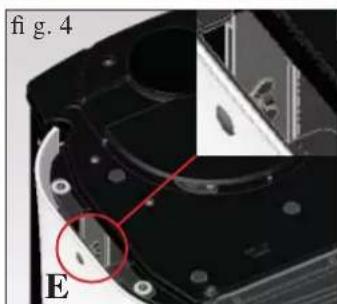
natural_image
Close-up of a mechanical component with a red circle highlighting a feature, labeled 'E' and 'fig. 4' (no readable text or symbols beyond labels)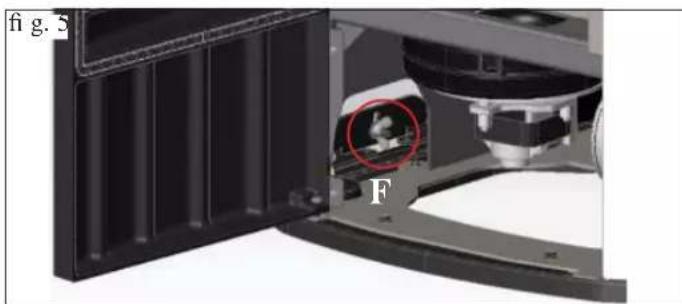
natural_image
Close-up of a mechanical device with a highlighted circular component labeled 'F', showing internal structure and no readable text or symbols.1) VERZIA S BOKMI A TOPOM ZO SKLA
natural_image
Exterior view of a cylindrical water dispenser device (no text or symbols visible)natural_image
Close-up of a white electronic device with a black lid and ventilation grille, labeled 'A' (no text or symbols on the device itself)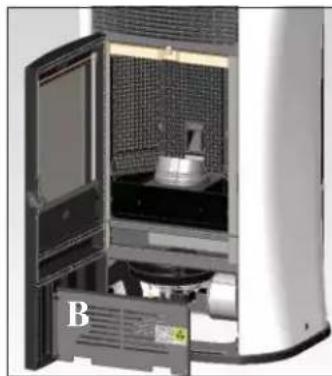
natural_image
Interior view of a laboratory or industrial equipment unit with a door open, showing internal components and a labeled component 'B' (no readable text or symbols beyond label)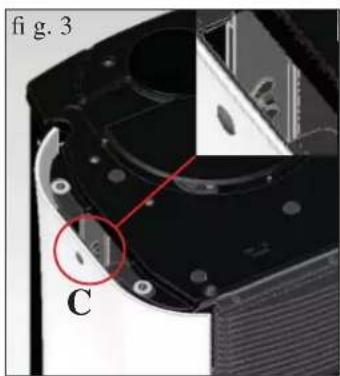
natural_image
Close-up of a mechanical component with labeled parts and a red circle highlighting a feature (no readable text or symbols)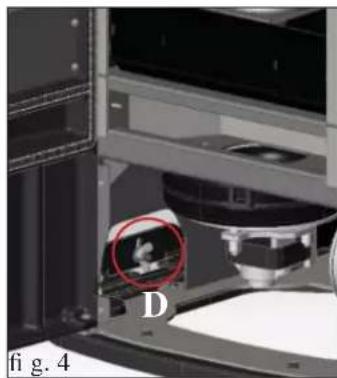
natural_image
Interior view of a laboratory or industrial machine with a highlighted circular region labeled 'D' and figure marker 'fig. 4' (no readable text or symbols beyond labels)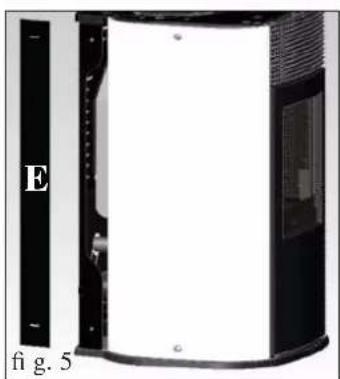
natural_image
Exterior view of a black and white electronic device with labeled section E, no visible text or symbols on the device itself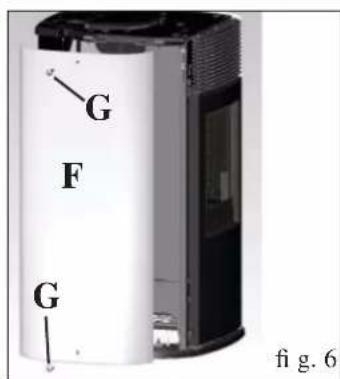
text_image
G F G fig. 6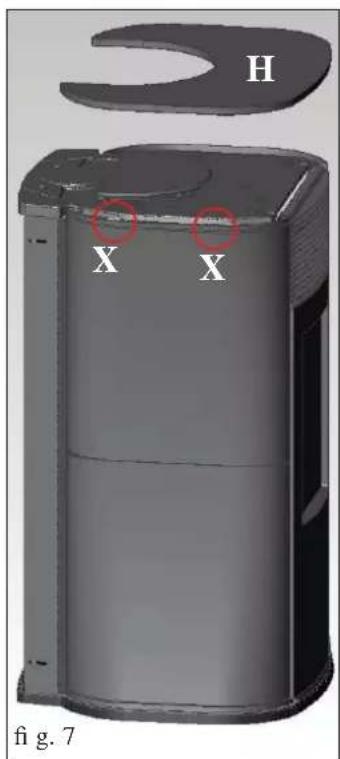
text_image
H X X fig. 7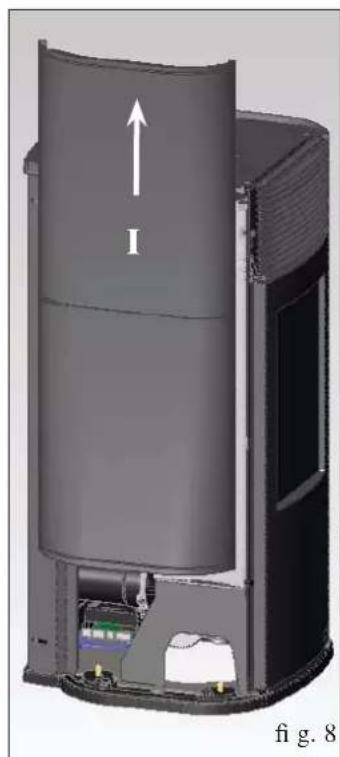
natural_image
3D cutaway diagram of a cylindrical device with internal components and an upward arrow labeled 'I', no readable text or symbols beyond the label.3) ODVOD SPALÍN CEZ TOP
natural_image
Close-up of a mechanical component with labeled parts I and H, no readable text or symbols beyond labels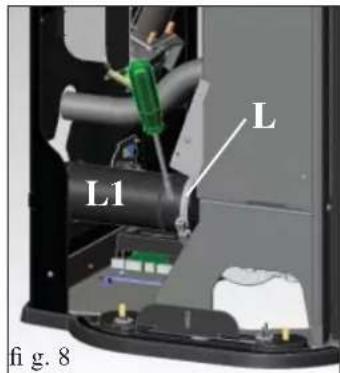
text_image
L L1 fi g. 8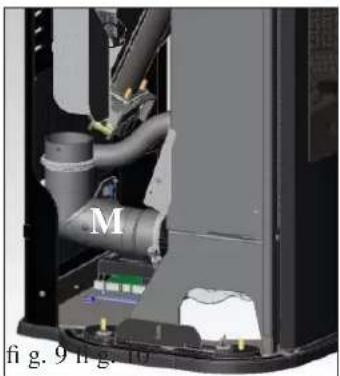
natural_image
Interior view of a mechanical device showing internal pipes and components (no visible text or symbols)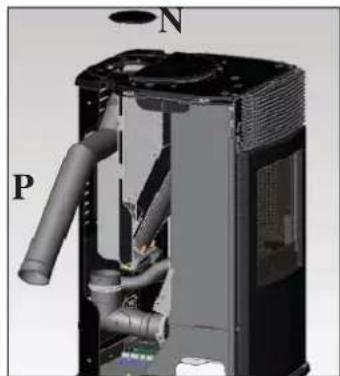
natural_image
3D cutaway view of a mechanical device showing internal pipes and housing (no text or symbols)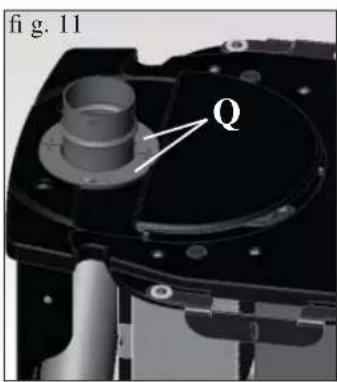
text_image
fig. 11 Q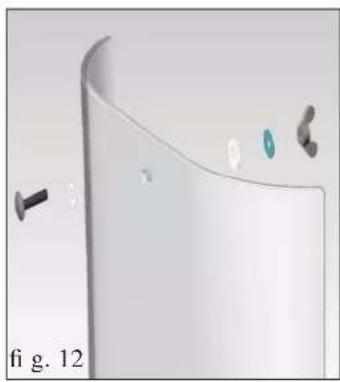
natural_image
3D rendered diagram of a curved surface with small components and a label 'fi g. 12' (no readable text or symbols)Montáž kitu pre odvod spalín cez top (PRE VŠETKY VERZIE)
natural_image
Close-up of a white and black industrial air purifier with a circular vent cover (no text or symbols visible)fig. 2
natural_image
Close-up of a black handheld electronic device with a green display screen and control buttons (no visible text or symbols)



natural_image
Interior view of a laboratory or industrial chamber with a metallic tank and textured panel (no visible text or symbols)fig.A
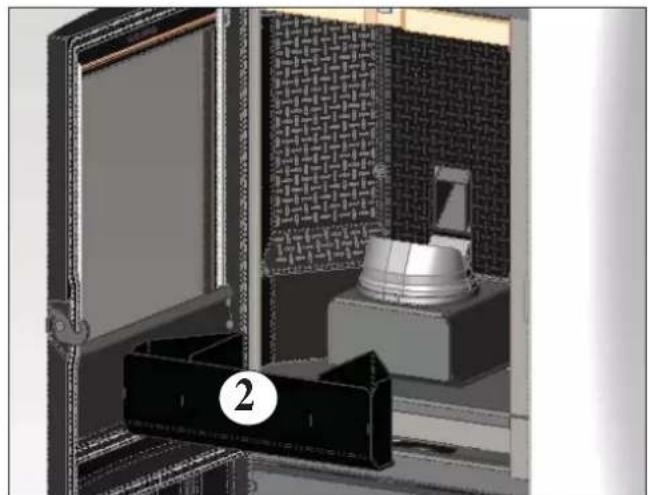
natural_image
Interior view of a modern kitchen appliance with a door, cabinet, and patterned wall (no visible text or symbols)fig.B
TÝŽDENNÉ ČISTENIE
natural_image
Interior view of a mechanical or industrial enclosure with patterned panels and a central cylindrical component (no visible text or symbols)RADY V PRÍPADE PORUCHY
natural_image
Metallic cylindrical container with black hose and cap, no visible text or symbolsWYMIARY I WERSJE WYKOŃCZENIA
PIECYK JEST PRODUKOWANY W 4 WERSJACH WYKOŃCZENIA:
natural_image
Close-up of a metallic electrical connector with wires and connectors (no visible text or symbols)CECHY TECHNICZNE
CECHY TERMOTECHNICZNE w myśl EN 14785
natural_image
Interior view of a server rack unit with labeled component D (no readable text or symbols)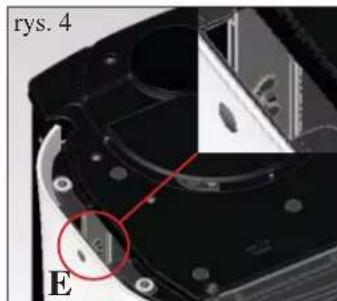
natural_image
Close-up of a mechanical component with a red circle highlighting a feature, labeled 'E' and 'rys. 4' (no readable text or symbols beyond labels)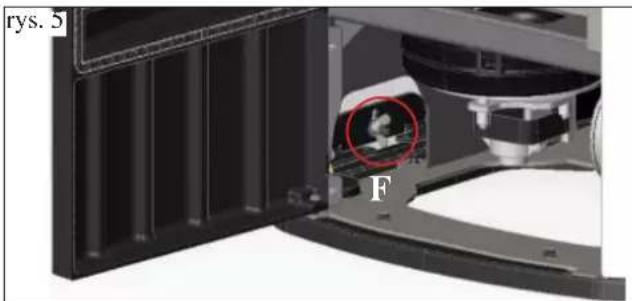
natural_image
Close-up of a mechanical device with a red circle highlighting a component, labeled 'F' and 'rys. 5' (no readable text or symbols beyond labels)1) WERSJA Z BOKAMI I PŁYTA GÓRNA ZE SZKŁA
natural_image
3D cutaway view of a portable water heater labeled 'H' and 'rys. 7', showing internal compartments and casing (no text beyond labels)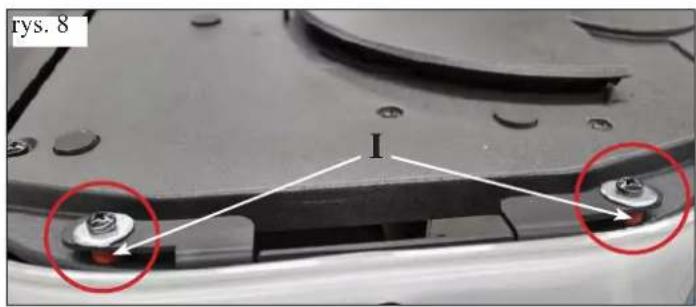
text_image
rys. 8 I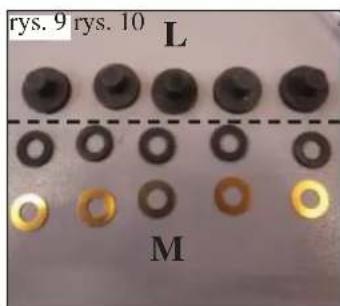
text_image
rys. 9 rys. 10 L M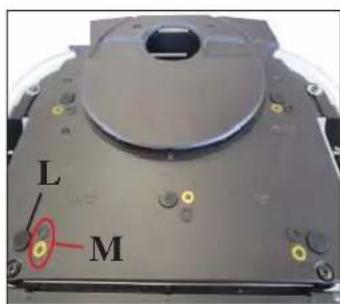
text_image
L M2) WERSJA Z BOKAMI STALOWYMI I SZKLANĄ PŁYTĄ GÓRNAĄ
natural_image
Interior view of a laboratory or industrial equipment unit with a door open, showing internal components and a labeled component 'B' (no readable text or symbols beyond label)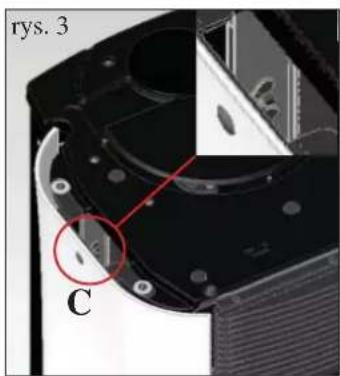
text_image
rys. 3 C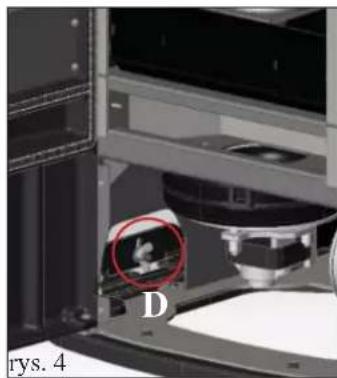
natural_image
Close-up of a laboratory instrument with a highlighted circular region labeled 'D', no visible text or symbols beyond the label.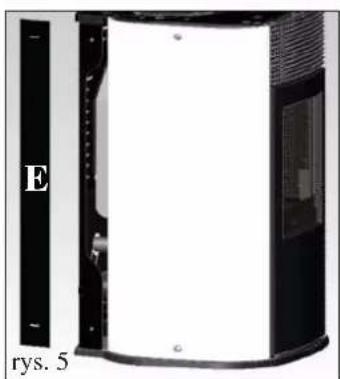
natural_image
Exterior view of a black and white electronic device with labeled section E and identifier rys. 5 (no readable text or symbols beyond labels)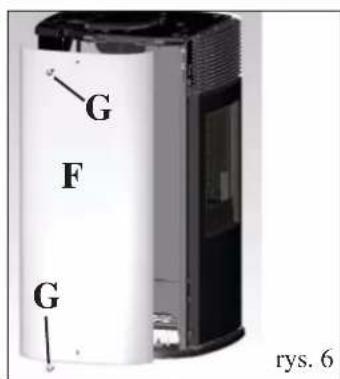
text_image
G F G rys. 63) ODPROWADZENIE SPALIN DO GÓRY
natural_image
3D cutaway view of a cylindrical device with internal components and an upward arrow labeled 'I', no visible text or symbols beyond the label.natural_image
Interior view of a mechanical device showing internal pipes and components (no visible text or symbols)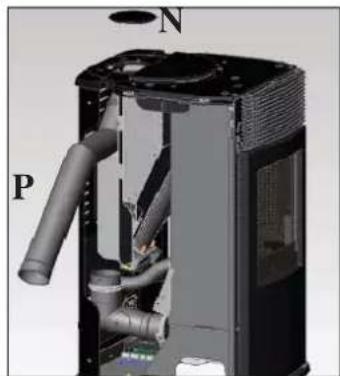
natural_image
3D cutaway view of a mechanical device showing internal pipes and housing (no text or symbols)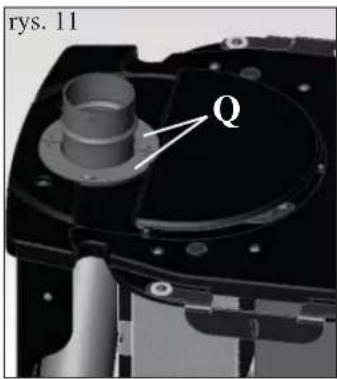
text_image
rys. 11 Q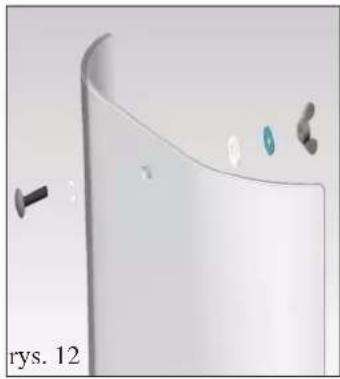
natural_image
3D rendered image of a curved white object with small metallic components and a black screw, labeled 'rys. 12' (no text or symbols on the object itself)natural_image
Close-up of a white and black appliance with a circular lid and ventilation grilles (no text or symbols visible)rys 2
natural_image
Close-up of a black handheld electronic device with a green display screen and control buttons (no visible text or symbols)

natural_image
Interior view of a vintage heating oven with a mounted dish and decorative panel (no visible text or symbols)rys. A
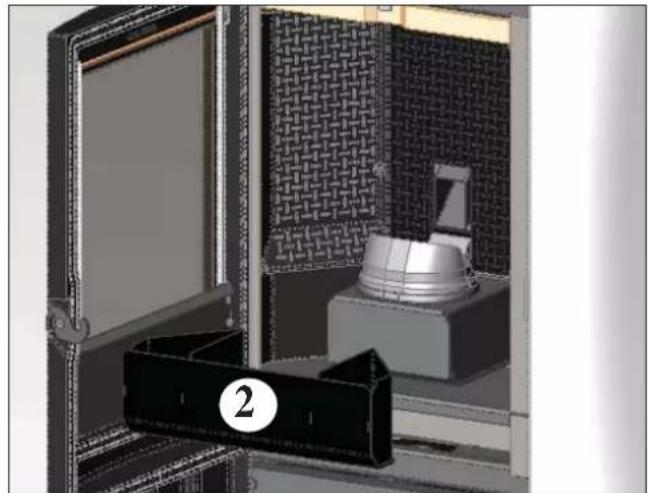
natural_image
3D rendering of a mechanical device with a labeled component (2), no visible text or symbols on the main subject.rys. B
KONSERWACJA COTYGODNIOWA
natural_image
Interior view of a mechanical or electrical enclosure with patterned panels and a central cylindrical component (no visible text or symbols)POSTĘPOWANIE W PRZYPADKU NIEPRAWIDŁOWOŚCI
WYPOSAŻENIE DODATKOWE
MODEM TELEFONICZNY UMOŻLIWIAJĄCE URUCHAMIANIE PIECYKA NA ODLEGŁOŚĆ (Kod. 281900)
natural_image
Metallic cylindrical container with black hose and handle, no visible text or symbolstext_image
A B D E C G Ffig. 1
INFORMAÇÕES DE SEGURANÇA
natural_image
Close-up of a metallic electrical connector with wires and connectors (no visible text or symbols)PORTA DE SÉRIE
text_image
Technical diagram showing a structural component with labeled parts A, B, and C, including dimension lines and annotations.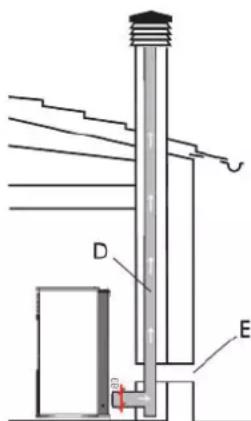
text_image
Technical diagram of a mechanical or electrical device with labeled components D and Etext_image
fig.1 figB2 A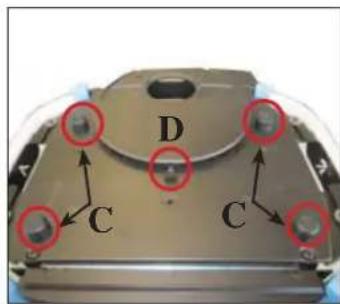
text_image
D C C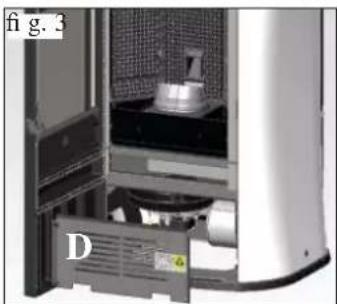
natural_image
Interior view of a server rack unit with labeled component D (no readable text or symbols)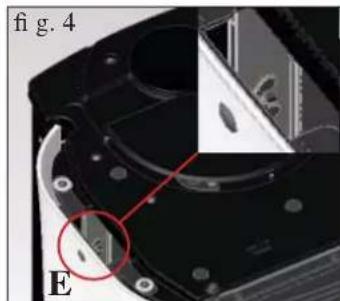
natural_image
Close-up of a mechanical component with a red circle highlighting a feature, labeled 'E' and 'fig. 4' (no readable text or symbols beyond labels)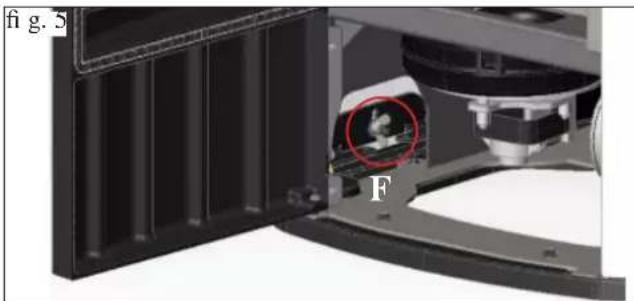
natural_image
Interior view of a mechanical device with a highlighted circular component (labeled F), showing internal structure and no readable text or symbols.1) VERSÃO COM FLANCOS E TOPO EM VIDRO
natural_image
Exterior view of a cylindrical device with labeled part 'H' and figure marker 'fig. 7' (no other text or symbols)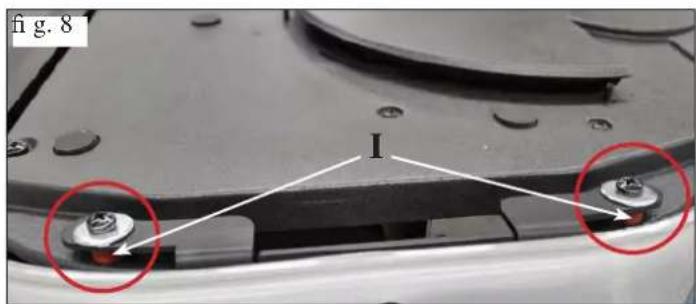
text_image
fig. 8 I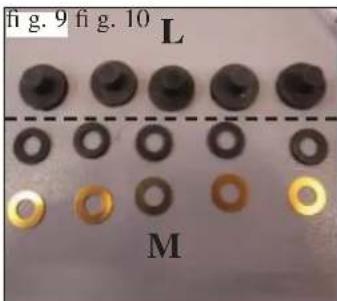
text_image
fig. 9 fig. 10 L M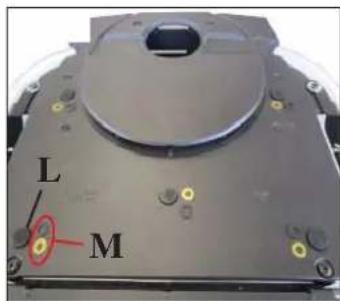
text_image
L Mnatural_image
Close-up of a white electronic device with a black lid and ventilation grille, labeled 'A' (no text or symbols on the device itself)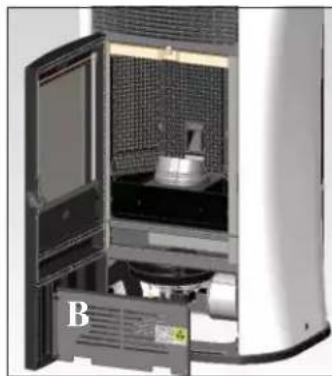
natural_image
Interior view of a laboratory or industrial equipment unit with a door open, showing internal components and a labeled component 'B' (no readable text or symbols beyond label)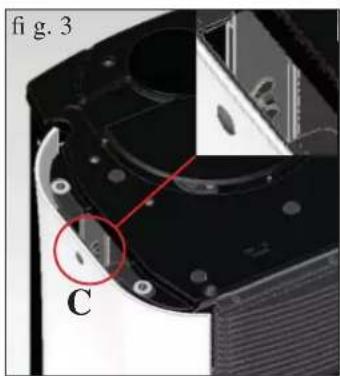
natural_image
Close-up of a mechanical component with labeled parts and a red circle highlighting a feature (no readable text or symbols)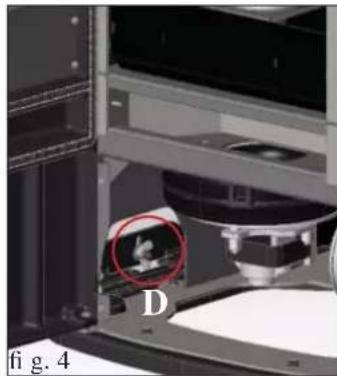
natural_image
Close-up of a 3D printer or scanner with a highlighted circular region labeled 'D', no visible text or symbols beyond the label.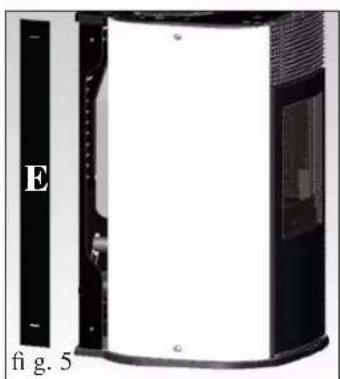
natural_image
Exterior view of a device with labeled section E and figure marker 'fi g. 5' (no other text or symbols)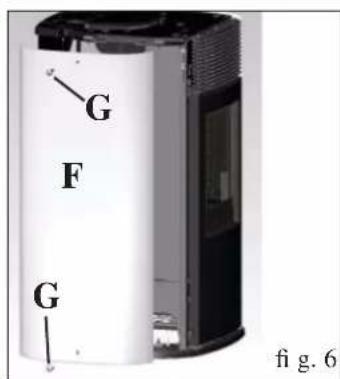
text_image
G F G fig. 6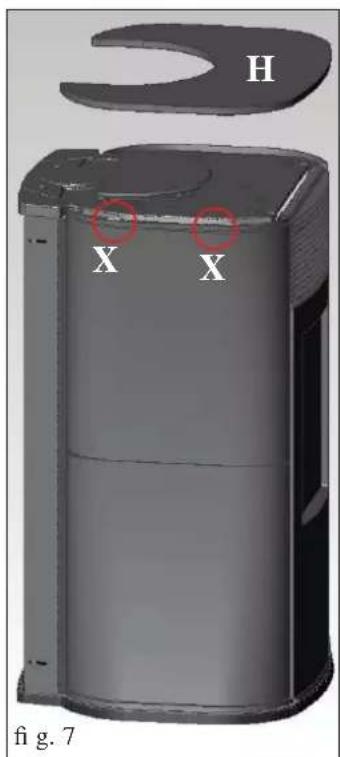
text_image
H X X fig. 7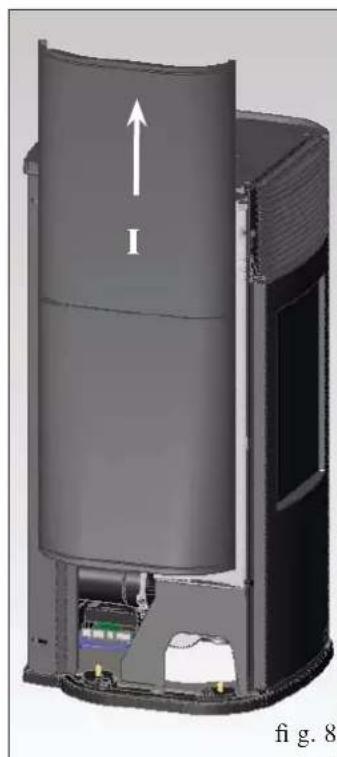
natural_image
3D cutaway diagram of a cylindrical device with internal components and an upward arrow labeled 'I', no readable text or symbols beyond the label.natural_image
Close-up of a mechanical component with labeled parts I and H, no readable text or symbols beyond labels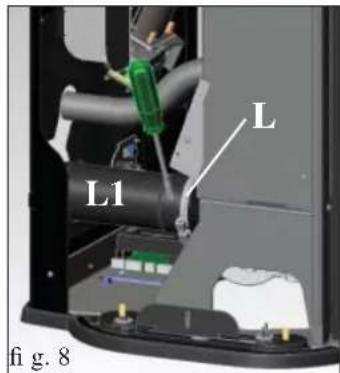
text_image
L L1 fi g. 8natural_image
Interior view of a mechanical device showing internal pipes and components (no visible text or symbols)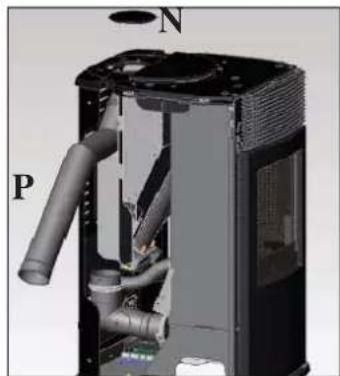
natural_image
3D cutaway view of a mechanical device showing internal pipes and housing (no text or symbols)natural_image
3D rendered white object with a curved surface and small accessories, labeled 'fi g. 12' (no text or symbols on the object itself)natural_image
Close-up of a white and black appliance with a circular lid and ventilation grilles (no text or symbols visible)fig. 2
natural_image
Close-up of a black handheld electronic device with a green display screen and control buttons (no visible text or symbols)



- ícone intermitente: controlo remoto à procura de rede
natural_image
Interior view of a vintage-style heating room with a door open, showing internal components and a numbered label (1) on the wall.fig. A
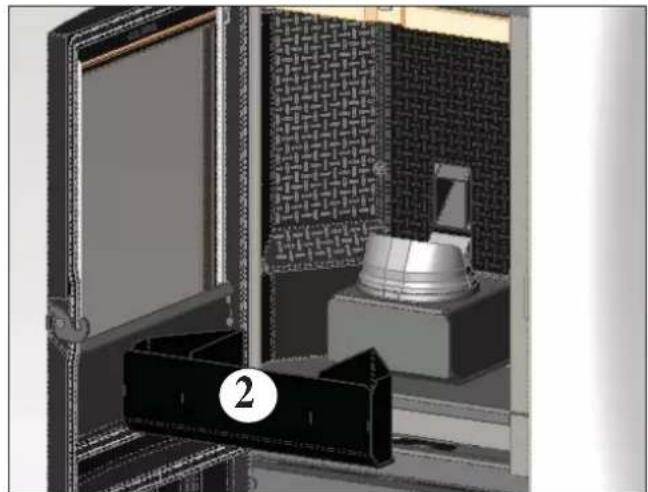
natural_image
3D rendering of a mechanical device with a labeled component (2), no visible text or symbolsfig.B
MANUTENÇÃO SEMANAL
natural_image
Interior view of a microwave oven with a central dish and patterned insulation (no text or symbols visible)CONSELHOS PARA POSSÍVEIS INCONVENIENTES
natural_image
Metallic cylindrical container with black hose and lid, no visible text or symbolsTanque aspira-cinzas sem motor (cód. 275400) Útil para a limpeza da fornalha