TV 292 - Measuring equipment Testboy - Free user manual and instructions
Find the device manual for free TV 292 Testboy in PDF.



| Product type | Infrared thermal camera |
| Brand | Testboy |
| Model | TV 292 |
| Dimensions (L × W × H) | 223 × 88 × 65 mm |
| Weight | 310 g |
| Power supply | 4 AA batteries (1.5 V) |
| Infrared resolution | 60 × 60 pixels (3600 pixels) |
| Visible image resolution | 300,000 pixels |
| Temperature range | -20 °C to 300 °C |
| Accuracy | ±2% or ±2 °C (whichever is greater) |
| Adjustable emissivity | 0.1 to 1.0 |
| Thermal sensitivity | 0.15 °C |
| Field of view | 20° × 20° |
| Frame rate | 6 Hz |
| Spectral band | 8 – 14 μm |
| Display | 2.4" TFT color LCD |
| Color palettes | Ironbow, rainbow, high contrast, grayscale (white hot / black hot) |
| Display modes | Visible/IR image fusion in 25% steps |
| Storage | Micro-SD card (not included) |
| File format | BMP |
| Auto power off | After 12 minutes of inactivity |
| Operating temperature | -5 °C to 40 °C |
| Storage temperature | -20 °C to 55 °C |
| Relative humidity | 10% – 80% |
| Standards | CE EN61326-1:2006 |
| Special functions | Hot/cold markers, LED light, background temperature compensation, fade-in |
| Maintenance | Remove batteries if not used for a long time; clean with a dry cloth |
| Safety | Do not point laser/LED beam at eyes; avoid strong electromagnetic fields |
| Spare parts and repairability | AA batteries, SD card; no user-serviceable parts |
Frequently Asked Questions - TV 292 Testboy
User questions about TV 292 Testboy
0 question about this device. Answer the ones you know or ask your own.
Ask a new question about this device
Download the instructions for your Measuring equipment in PDF format for free! Find your manual TV 292 - Testboy and take your electronic device back in hand. On this page are published all the documents necessary for the use of your device. TV 292 by Testboy.
USER MANUAL TV 292 Testboy
natural_image
Line drawing of a handheld device with no visible text, numbers, or symbolsde Testboy® TV 292 Bedienungsanleitung 3
en Testboy® TV 292 Operating instructions 14
fr Testboy® TV 292
Manuel d'utilisation 25
es Testboy® TV 292 Manual de instrucciones 36
pt Testboy® TV 292 Manual de instruções 47
it Testboy® TV 292
Manuale utente 58
nl Testboy® TV 292 Bedieningshandleiding 69
ro Testboy® TV 292
Instrucțiuni de utilizare
80
Inhaltsverzeichnis
Hinweise 4
text_image
Technical diagram of a handheld device with numbered parts and control panel displaynatural_image
Technical line drawing of a mechanical device with directional arrows indicating movement (no text or symbols)Menü
text_image
59.0 °C e=0.95 1 2 3 13:4:25 17:32:35 capture 17:32General safety notes 15
Introduction 17
Operation 18
Characteristics 18
Design of the Camera 18
Inserting/replacing the batteries 18
Menu 19
Fundamental Functions 19
Measurement 19
Setting the Backlighting 20
LED-Lighting 20
Colour palette 20
Reflection of the Background Temperature 21
Fading the Image 21
Hot/Cold Marks 21
Recording and Saving Images 21
Displaying Saved Images 22
Date and Time 22
Emissivity 23
Degree of Emission Table 23
Technical data 24
Notes
Safety notes

WARNING
Sources of danger are mechanical parts, for example, which can cause serious personal injury.
Objects are also at risk (e.g. damage to the instrument).
WARNING
An electric shock can result in death or serious personal injury, and also functional damage to objects (e.g. damage to the instrument).
WARNING
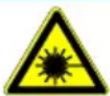
Never point the laser beam/ LED beam towards the eyes directly or indirectly, via reflective surfaces. Laser radiation can cause irreparable damage to the eyes.
General safety notes

WARNING
Unauthorised modification and/or changes to the instrument are not permitted, for reasons of safety and approval (CE). In order to ensure safe and reliable operation using the instrument, you must always observe the safety instructions, warnings and the information contained in the section "Intended use".

WARNING
Please observe the following information before using the instrument:
Do not operate the instrument anywhere near electrical welders, induction heaters or other electromagnetic fields.
After abrupt temperature fluctuations, the instrument must be allowed to adjust to the new ambient temperature for approx. 30 minutes before using it, in order to stabilise the IR sensor.
Do not expose the instrument to high temperatures for a long period of time.
Avoid dusty and humid environments.
Measuring instruments and their accessories are not toys, and must be kept out of the reach of children!
In industrial facilities, the accident prevention regulations for electrical systems and equipment, established by the employer's liability insurance association, must be observed.

Please observe the five safety rules:
1 Disconnect
2 Ensure that the instrument cannot be switched back on again
3 Ensure isolation from the power supply (both poles deenergized)
4 Earth and short-circuit
5 Cover adjacent live parts
Intended use
The instrument is intended strictly for use in applications described in the operating instructions. Any other usage is considered improper and forbidden, and can result in accidents or the destruction of the instrument. Any such application will result in the immediate expiry of all guarantee and warranty claims on the part of the operator against the manufacturer.

Remove the batteries if the instrument is not in use for a long period of time, in order to protect the instrument from damage.

We assume no liability for damages to property or personal injury caused by improper handling or failure to observe the safety instructions. Any warranty claim expires in such cases. An exclamation mark in a triangle indicates safety notices in the operating instructions. Read the instructions completely before beginning the initial commissioning. This instrument is CE-approved and thus fulfils the required guidelines.
All rights reserved to change specifications without prior notice © 2018 Testboy GmbH, Germany.
Disclaimer

The warranty claim expires in cases of damages caused by failure to observe the instructions! We assume no liability for any resulting damage!
Testboy is not responsible for damage resulting from
failure to observe the instructions
changes to the product that have not been approved by Testboy or
the use of spare parts that have not been manufactured or approved by Testboy
the use of alcohol, drugs or medication.
Accuracy of the operating instructions
These operating instructions have been compiled with due care and attention. No guarantee is given that the data, illustrations and drawings are complete or correct. All rights reserved with regard to changes, printing mistakes and errors.
Disposal
Dear Testboy customer: purchasing our product gives you the option of returning the instrument to suitable collection points for waste electrical equipment at the end of its lifespan.
The WEEE directive regulates the return and recycling of electrical appliances.
Manufacturers of electrical appliances are obliged to take back and recycle all electrical appliances free of charge. After that date, electrical devices may no longer be disposed of through conventional waste disposal channels. Electrical appliances must be recycled and disposed of separately. All equipment subject to this directive is marked with this logo.
Disposal of used batteries
As an end user, you are legally obliged (battery law) to return all used batteries; disposal with normal domestic waste is prohibited!
Batteries containing contaminant material are labelled with adjacent symbols indicating the prohibition of disposal with normal domestic waste.
The abbreviations used for the respective heavy metals are:
Cd = Cadmium, Hg = Mercury, Pb = Lead.
You can return your used batteries free of charge to collection points in your community or anywhere where batteries are sold!
Certificate of quality
All activities and processes carried out within Testboy GmbH relating to quality are monitored permanently within the framework of a Quality Management System. Furthermore, Testboy GmbH confirms that the testing equipment and instruments used during the calibration process are subject to a permanent inspection process.
Declaration of conformity
The product conforms to the actual directives. For more detailed information go to www.testboy.de
Introduction
The product is a Basic IR thermal imaging camera which links the mean temperature measurement to a digital image superimposed on a heatmap.
The heatmap function makes complex measurements of individual components superfluous, as is required by the classical point thermometers (radiometers). Scan a wide section in order to be able to display as a mixed digital figure with superimposed presentation of the heatmap and, thus, to find the temperature problems to investigate more precisely within a short time.
For better identification of problem zones, the instrument has a visual camera. Thus, it can be changed from the heatmap to visual presentation. Heatmap and visual images can be saved on a memory card in order to create measurement areas or to print the image recording. The product is designed very user-friendly. Only switch on and, after only a few seconds, an image is displayed. The product is particularly suitable for the maintenance of electrical installations, heating, ventilation and air-conditioning systems and other equipment and enables quick identification of problem zones.
Operation
Characteristics
- TFT-Colour-LCD-Display
- The adjustable degree of emission and compensation of the background reflection improve the accuracy of the measurement on partially reflecting surfaces
- Identification of cold locations, so that the user can detect the areas with the highest and lowest temperature in the infra-red heatmap
- Selectable colour palette
- Alignment of the visual and heatmap presentation
- Recording and saving the image on a SD-card
Design of the Camera
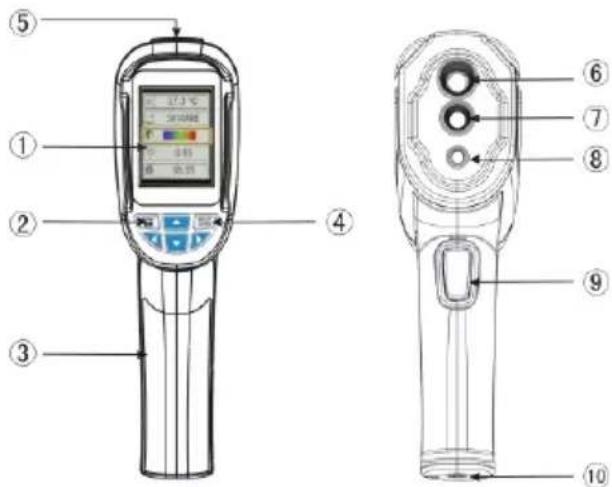
1 TFT-colour display with high resolution
2 On/Off switch and menu
3 Battery compartment cover
4 Selection/Input
5 SD-Card
6 Infra-red objective
7 Camera for visual images
8 LED light
9 Trigger for image recording
10 Tripod attachment
text_image
Technical diagram of a handheld device with numbered parts and control panel labels in ChineseInserting/replacing the batteries
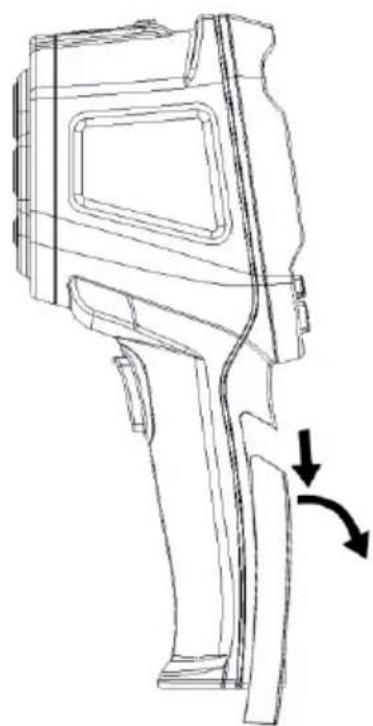
To open the battery compartment, slide the battery cover downwards and then remove it. If necessary, remove the batteries and replace them with new batteries in accordance with the graphic. Then re-apply the cover and slide it upwards.
natural_image
Technical line drawing of a mechanical device with directional arrows indicating movement (no text or symbols)Menu
 12:12 12:12 | Setting the time | |
 5000 5000 | Image memory | |
 50% 50% | Setting the backlighting | |
 °C °C | Setting the temperature unit | |
 5°C 5°C | Comparison of the background temperature | |
 0 MB 0 MB | Memory card capacity | |
 | Setting the colour palette | |
 0.95 0.95 | Setting the degree of emission | |
 ON ON | Hot/Cold Marks | |
 25°C 25°C | Setting the background temperature |
Fundamental Functions
To switch the measuring instrument on and off, press the button MENU and keep it pressed for 5 seconds. Once the measuring instrument is switched on, press the button MENU for 1 second in order to call up the display for setting the basic functions. Only five options are simultaneously indicated on the display. In order to also be able to display the other options of the menu, press the button. Using MENU, you return to the normal measuring mode.
After activating the button Menu in the basic function mode, press the button, in order to carry out settings of the basic functions. Using, select the required value for the respective setting. Once the required settings have been carried out, press the button, in order to exit the setting mode.
Measurement
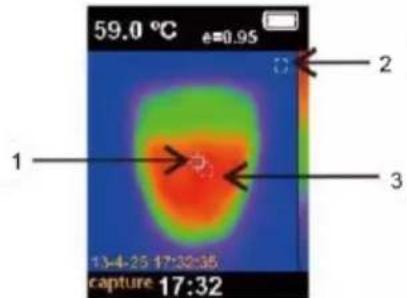
The temperature measured in the central area is indicated on the top of the display. The degree of emission is indicated on the top of the display. If the hot and cold marks are activated, move the instrument until the hot or cold location is in the central measurement area.
Align the instrument to an object that is probably hotter or colder than the surroundings in order to attain an optimum result.
1 Fixed measurement point
2 MIN value
3 MAX value
text_image
59.0 °C e=0.95 1 2 3 13:4:25 17:32:35 capture 17:32Setting the Backlighting
After calling up the main menu, use the button and select the option backlighting and press the button, in order to adjust the backlighting. Using, select the brightness and, using, exit the editing mode. A brightness of 50% is set at the works.
LED-Lighting
Press the trigger for image recording and keep it pressed for 5 seconds. The white LED is activated.
Colour palette
Using the colour palette menu, incorrect colour presentations of the infra-red images displayed or recorded can be changed. Different colour palettes are available for selection. Some palettes are better suitable for specific applications than others and are set as required.
1: Grey scales offer a uniform, linear presentation of the colours for the best possible presentation of the details.
2: The colour palette, High contrast, presents colours with appropriate emphasis. This colour palette is suitable for heavily pronounced temperature differences that can be presented as amplified contrast in the colour scheme between high and low temperatures.
3: The colour palettes Ironbow and Rainbow are a combination of the high contrast and grey scales palette.
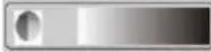 | Grey scales (white hot) | 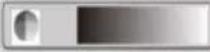 | Grey scales (black hot) |
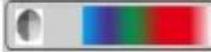 | Rainbow | 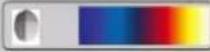 | Higher contrast |
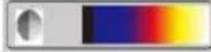 | Ironbow | ||
Reflection of the Background Temperature
The background temperature can be set at between 0 °C and 36 °C. Compensation of the reflected background temperature is set on the display using the background settings. If the objects are very hot or cold, the apparent temperature and measurement accuracy of the objective or object can be impaired, in particular if there is a low degree of emission at the surface. By setting the reflected background temperature, in many cases, the temperature measurement can be improved.
Fading the Image
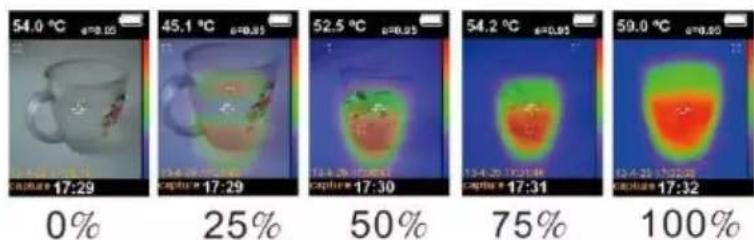
By cross-fading an infra-red heatmap with an appropriately aligned visual image, heatmaps can be presented clearer. With each heatmap, the camera also makes a normal recording of the image of the object, so that the target object can be exactly and better compared to others.
Using the buttons and, it is possible to set whether the normal image recording should not, partly, or completely be superimposed by the heatmap (in increments of 25%).
Hot/Cold Marks
Using the , call up the main menu and then, using , call up the option hot and cold marks ( ).
Subsequently, press the button SELECT and activate the hot/cold marks using
If this function is activated, hot and cold locations are indicated that, as necessary, should be again investigated more precise. If the function is not activated, the user can concentrate on the individual measurement pixels.
Recording and Saving Images
In measuring mode, press on the trigger. You are subsequently asked whether the photos should be saved or not.
In order to save the image, press , or , in order to discard the image recorded.
If the text "NO SD" is indicated at the bottom left on the display, that indicates no SD-card is inserted. If the text FULL appears at the bottom left on the display, it indicates that the SD-card is already full.
Displaying Saved Images
Using , call up the main menu and, using , select the image save module. Then select the required image using . Using the buttons and , the other saved images can be displayed. If you press , you are asked whether the recording should be deleted or not. In order to delete the image, press , in order to keep it, press . Using , you can exit the image display.
Date and Time
In the menu Set date and time, the date and time can be set.
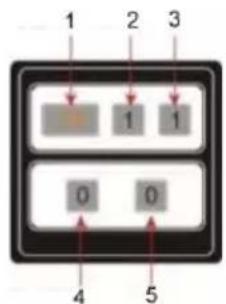
Using MENU, call up the main menu and, using ▼, select the menu for setting the date and time. Subsequently, press SELECT in order to call up the time interface and, using the buttons ▼ and ▼, set the date and time. Using the indicated value can be changed. Using , you can exit this menu.
1 Year
2 Month
3 Day
4 Hour
5 Minute
flowchart
graph TD
    A["1"] --> B["1"]
    C["2"] --> D["1"]
    E["3"] --> F["1"]
    G["4"] --> H["0"]
    I["5"] --> J["0"]
Emissivity
Using MENU call up the main menu and, using , select the degree of emission module. In order to set the degree of emission, press SELECT and then, using , select the value required. Using SELECT you can exit the selection.
Notes
Infra-red energy is radiated from all objects. How much energy is radiated depends on the actual surface temperature and the degree of emission at the surface. The measuring instrument records the infra-red energy radiated from the surface and, based on this data, calculates an approximate temperature value. Many objects and materials frequently occurring, for example, painted metal, wood, water, skin and fabric, radiates energy very good and readily enables very good measurements. For surfaces that feature good radiation characteristics (a high degree of emission), the degree of emission is ≥ 90% (0.90). Shiny surfaces or unpainted metals only have a degree of emission of < 60% (0.60). These materials do not have good radiation characteristics and, thus, only a low emissivity. In order to be able to more accurately measure materials with low emissivity, the degree of emissions must be accordingly corrected. By adapting the degree of emission, the actual temperature can normally be calculated more accurately.
Degree of Emission Table
| Material | Degree of heat emission | Material | Degree of heat emission |
| Aluminium | 0.30 | Glass | 0.90 to 0.95 |
| Asphalt | 0.90 to 0.98 | Iron oxide | 0.78 to 0.82 |
| Concrete | 0.95 | Paint | 0.80 to 0.95 |
| Leather | 0.95 | Synthetic material | 0.85 to 0.95 |
| Ceramic | 0.90 to 0.95 | Paper | 0.70 to 0.94 |
| Copper | 0.50 | Sand | 0.90 |
| Tile | 0.90 | Rubber | 0.95 |
| Carbon | 0.85 | Wood | 0.94 |
| Sealing agent, containing grease | 0.94 | Textiles | 0.94 |
| Frozen foods | 0.90 | Lead | 0.50 |
| Warm food | 0.93 | Marble | 0.94 |
| Ice | 0.96 to 0.98 | Fabric (black) | 0.98 |
| Snow | 0.83 | Mortar | 0.8 to 0.90 |
| Human skin | 0.98 | Water | 0.92 to 0.96 |
Technical data
| Display | 2.4"-Colour-LCD-Display |
| IR resolution | 60 × 60 (3600 Pixels) |
| Image resolution for visible light | 300.000 Pixels |
| Field of view | 20 × 20° |
| Thermal sensitivity | 0.15 °C |
| Temperature range | -20 to 300 °C |
| Accuracy | ±2 % or measurement value ±2 °C |
| Emissivity | Can be set between 0.1 and 1.0 |
| Image frequency | 6 Hz |
| Spectral band | 8-14 μm |
| Focus | non-adjustable |
| Colour palette | Ironbow, rainbow, rainbow higher contrast, grey scales (white hot) and grey scales (black hot) |
| Display options | Fading the visual images using the infra-red image can be set in increments of 25% between complete infra-red image and clear visual presentation |
| File format | bmp |
| Image storage | Micro-SD-Card |
| Indication of contents saved | Scroll list with all images saved that can be displayed on the screen |
| Energy saving mode | The instrument automatically switches off if it has not been used for 12 minutes |
| Operating temperature | -5 to 40 °C |
| Storage temperature | -20 to 55 °C |
| Relative air humidity | 10 to 80 % |
| Electromagnetic compatibility | CE EN61326-1: 2006 |
| Display overrun | Over |
| Power supply | 4 AA-Batteries |
| Weight | 310 g |
| Size | 223×88×65 |
Table des matières
Consignes 26
Cd = Cadmium, Hg = mercure, Pb = plomb.
text_image
Technical diagram of a handheld device with numbered parts and control panel, likely for medical or industrial testing documentation.natural_image
Technical line drawing of a mechanical device with directional arrows indicating movement (no text or symbols)Menu
text_image
59.0 °C e=0.95 1 2 3 13:4:25 17:32:35 capture 17:32text_image
Technical diagram of a handheld device with numbered parts and control panel displaynatural_image
Technical line drawing of a mechanical device with directional arrows indicating movement (no text or symbols)Menú
text_image
59.0 °C e=0.95 1 2 3 13:4:25 17:32:35 capture 17:32text_image
Technical diagram of a handheld device with numbered parts and control panel labelsnatural_image
Technical line drawing of a mechanical device with directional arrows indicating movement (no text or symbols)Menu
text_image
59.0 °C e=0.95 1 2 3 13:4:25 17:32:36 capture 17:32text_image
Technical diagram of a handheld device with numbered parts and control panel labelsnatural_image
Technical line drawing of a mechanical device with directional arrows indicating movement (no text or symbols)Menu
text_image
59.0 °C 0.95 1 2 3 13-4-25 17:32:35 capture 17:32Cd = cadmium, Hg = kwik, Pb = lood.
text_image
Technical diagram of a handheld device with numbered parts and control panel displaynatural_image
Technical line drawing of a mechanical device with directional arrows indicating movement (no text or symbols)Menu
text_image
59.0 °C =0.95 1 2 3 13:4:25 17:32:35 capture 17:32text_image
Technical diagram of a handheld device with numbered parts and control panel labelsnatural_image
Technical line drawing of a mechanical device with directional arrows indicating movement (no text or symbols)Meniu
text_image
59.0 °C e=0.95 1 2 3 13:4:25 17:32:35 capture 17:32Germany info@testboy.de