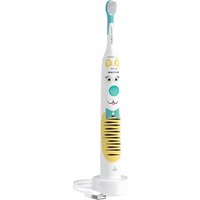
Sonicare For Kids HX3601 - Electric toothbrush PHILIPS - Free user manual and instructions
Find the device manual for free Sonicare For Kids HX3601 PHILIPS in PDF.
 FR
FR
 AZ
AZ
 BG
BG
 CS
CS
 DA
DA
 DE
DE
 EL
EL
 EN
EN
 ES
ES
 ET
ET
 FI
FI
 HE
HE
 HU
HU
 HY
HY
 IT
IT
 KA
KA
 KK
KK
 KY
KY
 LT
LT
 LV
LV
 MK
MK
 NL
NL
 NO
NO
 PL
PL
 PT
PT
 RO
RO
 RU
RU
 SK
SK
 SL
SL
 SQ
SQ
 SV
SV
 TG
TG
 TK
TK
 UK
UK
 UZ
UZ
| Brand | Philips |
| Model | Sonicare For Kids HX3601 |
| Product type | Electric toothbrush |
| Technology | Sonic |
| Power source | Rechargeable lithium-ion battery, USB 5V charger (wall adapter not included) |
| Battery life | At least 28 sessions of 2 minutes (14 days of use twice a day) |
| Charging time | Up to 24 hours for a full charge |
| Brushing intensities | 2: Low and Very low |
| Timer | KidPacer (4 zones) and SmarTimer (2 minutes) |
| EasyStart function | Yes: gradual power increase over the first 14 brushings |
| Mobile app | Yes: Sonicare for Kids (compatible with iOS and Android) |
| Brush heads included | 1 (child size, compact) |
| Head replacement | Every 3 months or sooner if worn |
| Cleaning | Handle: damp cloth; head: rinse after use; charger: unplug and clean with damp cloth |
| Safety | Suitable for children under adult supervision. Can be used on orthodontic appliances. |
| Included accessories | USB charger, decorative stickers, travel case, 1 brush head |
| Battery indicator | Yes: green (full/charging), orange (low) |
| Repairability | Battery not user-replaceable; removal by a professional for recycling |
| Warranty | International warranty (see Philips website for details) |
Frequently Asked Questions - Sonicare For Kids HX3601 PHILIPS
User questions about Sonicare For Kids HX3601 PHILIPS
0 question about this device. Answer the ones you know or ask your own.
Ask a new question about this device
Download the instructions for your Electric toothbrush in PDF format for free! Find your manual Sonicare For Kids HX3601 - PHILIPS and take your electronic device back in hand. On this page are published all the documents necessary for the use of your device. Sonicare For Kids HX3601 by PHILIPS.
USER MANUAL Sonicare For Kids HX3601 PHILIPS
natural_image
Illustration of a Philips sonicare electric toothbrush with cartoon face design (no text or symbols on the brush itself)
natural_image
Illustration of an open book with a grid and an arrow indicating the page direction (no text or symbols present)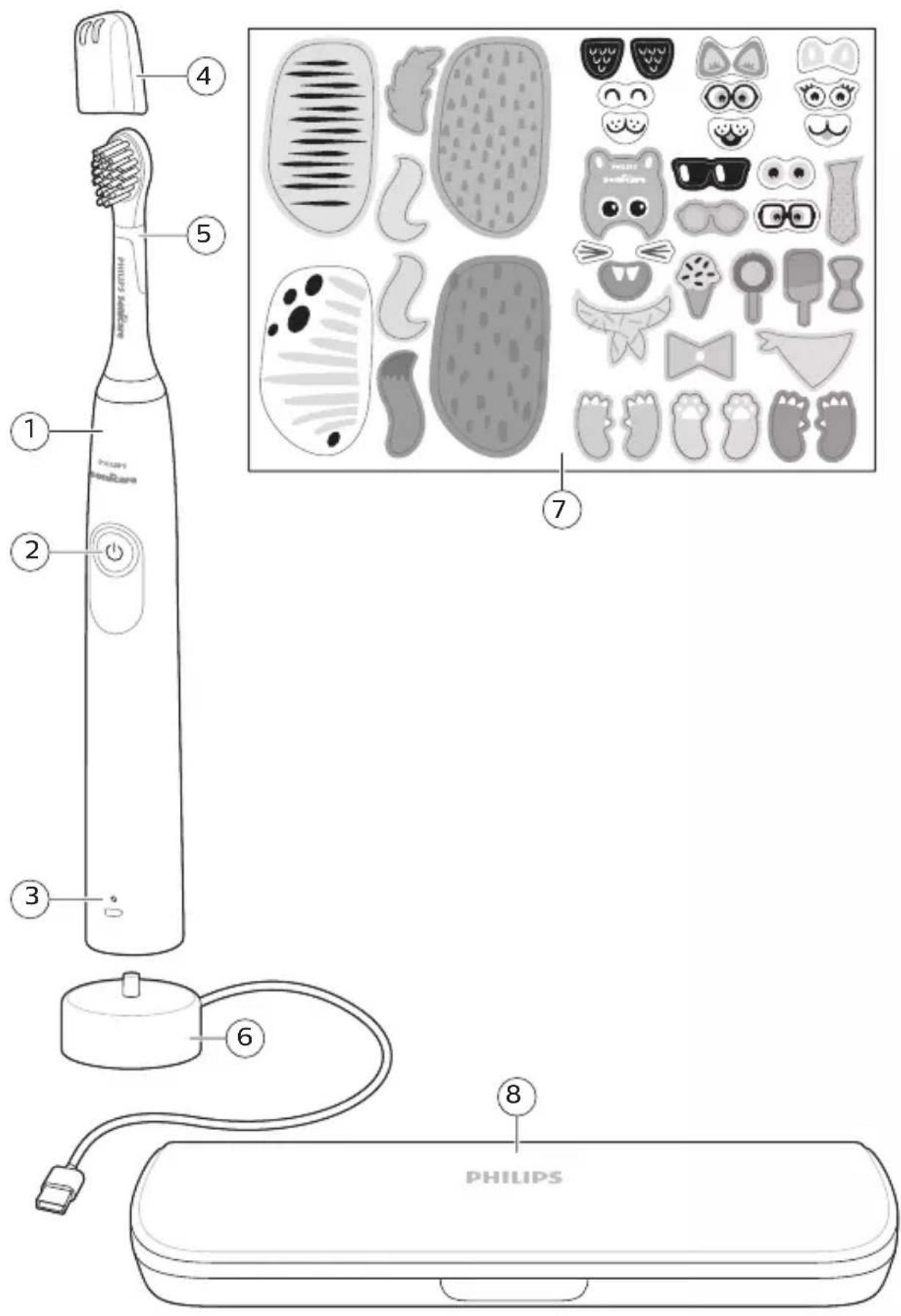
English 6
Azərbaycanca 21
Čeština 38
Dansk 54
Deutsch 70
Eesti 88
Español 104
Français 121
Hrvatski 138
Italiano 153
Latviešu 170
Lietuviškai 185
Magyar 202
Nederlands 219
Norsk 236
O'zbek 252
Polski 269
Português 286
Română 303
Shqip 320
Slovenščina 337
Slovensky 353
Srpski 370
Suomi 386
Svenska 402
Türkmençe 418
Ελληνικά 435
Български 453
Кыргызча 471
Македонски 489
Русский 507
Точикй 525
Українська 543
Қазақша 560
Ruijtntu 577
phosphorus 595
הכלה 613
Introduction
This toothbrush enables you to obtain superior plaque removal, whiter teeth and healthier gums. Using Sonicare's combination of gentle sonic technology and clinically developed and proven features, you can be confident that you're getting the very best clean, every time.
Further support and product registration are available to you at: www.philips.com/support
Welcome to the Philips Sonicare family!
Important safety information
Only use the product for its intended purpose. Read this important information carefully before you use the product and its batteries and accessories, and save it for future reference. Misuse can lead to hazards or serious injuries.
Warnings
- Keep the charger away from water.
- After cleaning, make sure the charger is completely dry before you connect.
- This appliance can be used by children and persons with reduced physical, sensory or mental capabilities or lack of experience and knowledge if they have been given supervision or instruction concerning use of the appliance in a safe way and understand the hazards involved. Cleaning and user maintenance shall not be made by children without supervision.
- Children shall not play with the appliance.
- Only use original Philips accessories or consumables. Only use the charger provided with the product. If supplied, only use the original USB cable and USB power supply unit.
- Do not use the charger outdoors or near heated surfaces.
- Do not clean any part of the product in the dishwasher.
- This appliance has only been designed for cleaning teeth, gums and tongue.
- Stop using a brush head with crushed or bent bristles. Replace the brush head every 3 months or sooner if signs of wear appear.
- Avoid direct contact with products that contain essential oils or coconut oil. Contact may result in bristles dislodging.
- Stop using the appliance and consult your dentist/doctor if excessive bleeding occurs after use, if bleeding continues to occur after 1 week of use or if you experience discomfort or pain.
- If you have had oral or gum surgery in the previous 2 months, consult your dentist before you use this appliance.
- If you have a pacemaker or other implanted device, contact your doctor or the manufacturer of the implanted device prior to use.
- If you have medical concerns, consult your doctor before you use this appliance.
- This appliance is a personal care device and is not intended for use on multiple patients in a dental practice or institution.
Battery safety instructions
- This appliance contains batteries that are only removable by skilled persons.
- Only use the product for its intended purpose. Read this information carefully before you use the product and its batteries and accessories, and save it for future reference. Misuse can lead to hazards or serious injuries. Accessories supplied may vary for different products.
- Only use original Philips accessories and consumables. Only use detachable supply unit HX6110
- Keep product and batteries away from fire and do not expose them to direct sunlight or high temperatures.
- If the product becomes abnormally hot or smelly, changes color or if charging takes longer than usual, stop using and charging the product and contact Philips.
- Do not place products and their batteries in microwave ovens or on induction cookers.
English
- Do not open, modify, pierce, damage or dismantle the product or battery to prevent batteries from heating up or releasing toxic or hazardous substances. Do not short-circuit, overcharge or reverse charge batteries.
- This appliance contains batteries that are non-replaceable. When the battery is at end of life, the appliance shall be properly disposed of, see section on recycling.
- To avoid accidental short-circuiting of batteries after removal, do not let battery terminals come into contact with metal object (e.g. coins, hairpins, rings).
Electromagnetic fields (EMF)
This Philips appliance complies with all applicable standards and regulations regarding exposure to electromagnetic fields.
Storage and transportation conditions
Temperature -10°C to 60°C (14 °F to 140 °F). The following symbols may appear on the product: Read Operator's Manual.

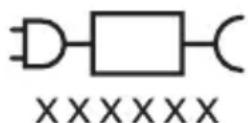
Detachable Power Supply Part: The "xxxxxx" indicates the model number of the approved chargers to be used.
Intended use
Sonicare for Kids - Design a Pet Edition power toothbrushes are intended to remove adherent plaque and food debris from the teeth to reduce tooth decay and improve and maintain oral health. Sonicare for Kids - Design a Pet Edition power toothbrushes are intended
for personal use. Use by children should be with adult supervision.
Your Philips Sonicare (Fig 1.)
1 Handle
2 Power on/off button
3 Battery indicator
Accessories
4 Brush head cap
5 Brush head(s)
6 USB charger (wall adapter not included)
7 Stickers
8 Travel case
Note: Accessories included may vary based on the model purchased.
Note: Wall adapter not included. Only use 5V IPX4 adapter (USB Type A).
Sonicare app - Getting started
Download the Sonicare for Kids App to support healthy habit building. The App is compatible with wide range of iOS and Android (TM) smart devices.
Note: If your device is not Bluetooth capable you can still use the Sonicare for Kids app on iOS and Android (TM) smart devices to enhance your brushing experience.
Getting started
Applying your favorite sticker
The Sonicare for Kids - Design a Pet Edition comes with several stickers to choose from. The stickers can be moved around to create the design you choose.
1 Apply your favorite sticker(s) to the handle
Note: Make sure the handle is clean and dry, and that stickers are fully pressed onto the handle with no air gaps to ensure full adhesion.
Note: Kids should not be left unattended when applying the stickers.
Attaching the brush head
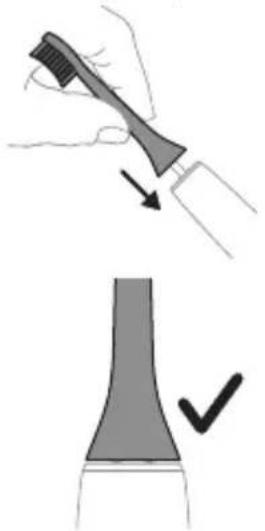
natural_image
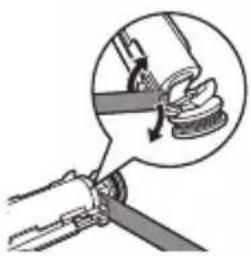
Illustration showing a hand holding a brush and a close-up of a tool tip with a checkmark (no text or symbols present)1 Align the brush head so the bristles point in the same direction as the front of the handle.
2 Firmly press the brush head down onto the metal shaft until it will not go any further.
Note: It is normal to see a slight gap between the brush head and the handle.
Using your Philips Sonicare toothbrush
If you are using your Sonicare toothbrush for the first time, it is normal to feel more vibration than when using a non-electric toothbrush. It is common for first-time users to apply too much pressure. Only apply gentle pressure and let the toothbrush do the brushing for you. Please follow the brushing instructions below for the best experience. To help you transition to your new Sonicare power toothbrush, it comes with the EasyStart feature activated. This feature gently increases the power over the first 14 brushings to help you adapt to brushing with a Philips Sonicare toothbrush.
Brushing instructions
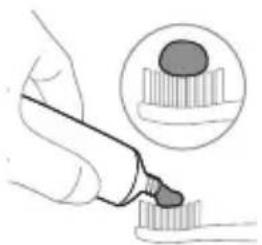
natural_image
Illustration of a hand using a pipette to apply liquid onto a surface, with an inset showing a droplet on a surface (no text or symbols present)Note: For children under age 8, it is recommended that a parent or adult caregiver perform toothbrushing.
1 Wet the bristles and apply a small amount of toothpaste.
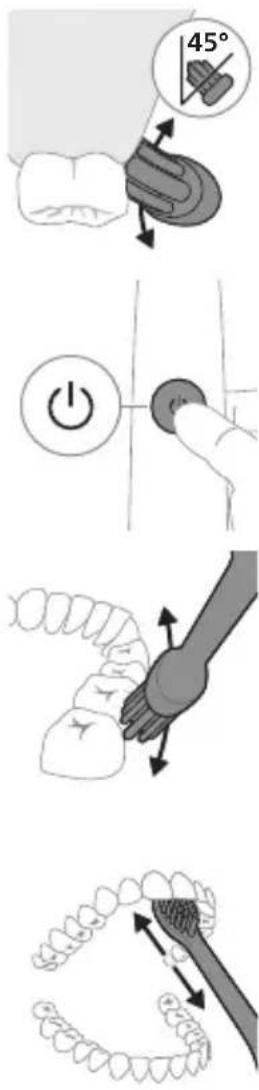
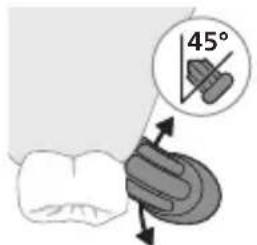
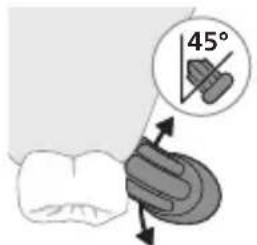
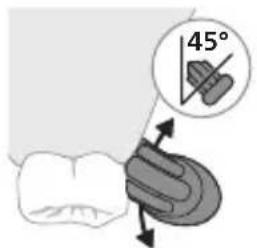
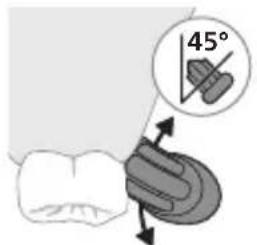
2 Place the toothbrush bristles against the teeth at a slight angle (45 degrees). Pressing firmly to make the bristles reach the gumline or slightly beneath the gumline.
Note: Keep the center of the brush in contact with the teeth at all times.
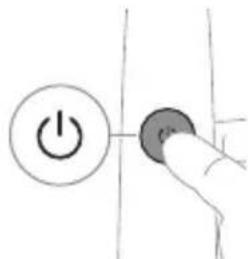
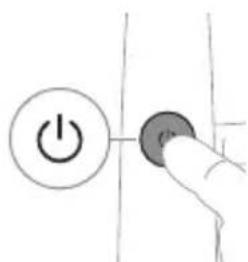
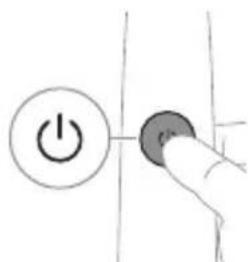
3 Press the power on/off button to switch on the Philips Sonicare.
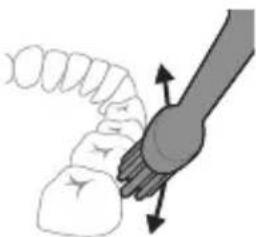
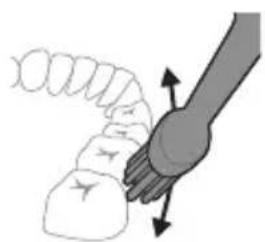
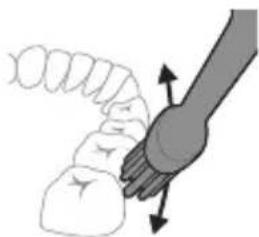
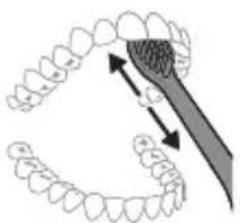
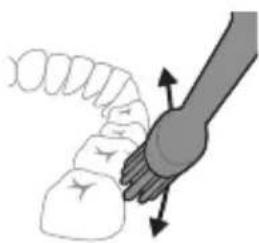
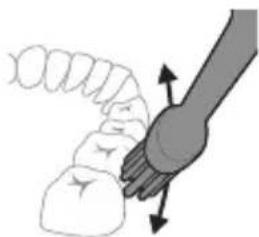
4 Gently keep the bristles placed on the teeth and in the gumline. Brush your teeth with small back and forth motion so the bristles reach between the teeth. Continue this motion throughout your brushing cycle.
Note: The bristles should slightly flare. It is not recommended to scrub as you would with a manual toothbrush.
5 To clean the inside surfaces of the front teeth, tilt the brush handle semi-upright and make several vertical overlapping brushing strokes on each tooth.
6 After you have completed the brushing cycle, you can spend additional time brushing the chewing surfaces of your teeth and areas where staining occurs. You can also brush your tongue, with the toothbrush switched on or off, as you prefer.
Note: Your Philips Sonicare toothbrush is safe to use on braces (brush heads wear out sooner when used on braces) and dental restorations (fillings, crowns, veneers) if they are properly adhered and not compromised.
KidPacer
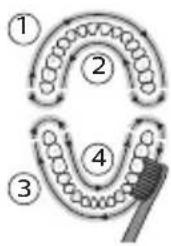
flowchart
graph TD
    A["①"] --> B["②"]
    B --> C["③"]
    C --> D["④"]
    D --> E["⑤"]
    style A fill:#f9f,stroke:#333
    style B fill:#ccf,stroke:#333
    style C fill:#cfc,stroke:#333
    style D fill:#fcc,stroke:#333
    style E fill:#ffc,stroke:#333
To make sure you brush evenly throughout the mouth, divide your mouth into 4 sections using the KidPacer feature. The KidPacer divides the brushing time into 4 equal segments and indicates when you should move to the next area. The segments are indicated with a short tune. The toothbrush automatically stops at the end of a brushing session with a congratulatory tune.
Note: Instruct your child to brush until they hear the congratulatory tune and the toothbrush switches off.
Intensities
Your power toothbrush is equipped with 2 different intensities: gentle and extra gentle.
Note: When you use the toothbrush for the first time, the default setting is extra gentle.
To change intensities:
- Press the power on/off button once to turn on the toothbrush
- Press a second time within 2 seconds to change the intensity
Press a third time within 2 seconds to pause. After 2 seconds of brushing, pressing the power on/off button again will pause the toothbrush
Extra gentle Gentle
| Benefit Reduced power | intensity used for training and introducing younger children to the sonic experience. | Full-strength intensity designed for older/independent brushes. |
| Recommended brush heads | Sonicare for Kids Compact or Standard brush head | Sonicare for Kids Compact or Standard brush head |
Total brushing time 2 minutes 2 minutes
How to brush
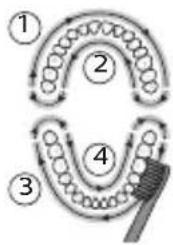
flowchart
graph TD
    A["①"] --> B["②"]
    B --> C["③"]
    C --> D["④"]
    D --> E["⑤"]
    E --> A
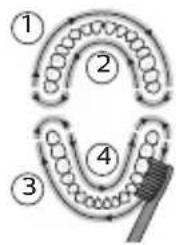
flowchart
graph TD
    A["①"] --> B["②"]
    B --> C["③"]
    C --> D["④"]
    D --> E["⑤"]
    E --> A
Features
- KidPacer
- SmarTimer
- EasyStart
KidPacer
The KidPacer is an interval timer that helps your child to brush evenly through the mouth by dividing your mouth into 4 sections.
SmarTimer
The SmarTimer indicates that your brushing cycle is complete by automatically switching off the toothbrush at the end of the brushing cycle.
Dental professionals recommend brushing no less than 2 minutes twice a day.
Note: If you press the power on/off button after you started the brushing cycle, the toothbrush pauses. After a pause of 30 seconds, the SmarTimer resets.
EasyStart
This Philips Sonicare model comes with the EasyStart feature activated. The EasyStart feature gently increases the power over the first 14 brushings to help you get used to brushing with the Philips Sonicare.
To deactivate EasyStart (see 'Activating or deactivating features').
Activating or deactivating features
You can activate or deactivate the following features of your toothbrush:
- EasyStart
Step 1: Place the handle on the charger.
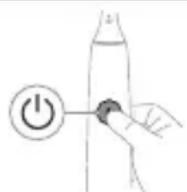
Step 2: Press and hold power on/off button for up to 3 seconds.
Step 3: Let go of the power on/off button when you hear 1 beep.
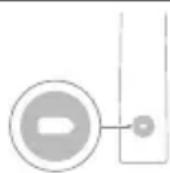
If you see the battery indicator flash green 2 times and hear 3 tones from low to high, then the feature has been activated
OR
If you see the battery indicator flash amber 1 time and hear 3 tones high to low, then the feature has been deactivated.
Note: Using the EasyStart feature beyond the initial ramp-up period is not recommended and reduces Sonicare's effectiveness in removing plaque.
Charging and battery status
This Philips Sonicare toothbrush is designed to provide at least 28 brushing sessions, each session lasting 2 minutes (14 days if used twice per day) on a fully charged battery. The battery indicator shows the battery status when you complete the 2-minute brushing session, when you pause the toothbrush, or while it is charging.
Note: It can take up to 24 hours to fully charge the battery before first use, but you can use the Philips Sonicare toothbrush before it is fully charged.
Charging
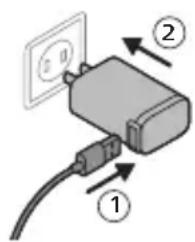
USB charging
Note: Accessories included may vary based on the model purchased.
1 Plug the USB cord of the charging stand into a wall adapter that is connected to a electrical outlet.
2 Place the handle on the charger.
- The battery indicator lights up and the handle beeps twice. This indicates that the toothbrush is charging.
Battery status
When the handle is placed on the charger, the battery indicator shows the battery level.
Battery status Battery indicator
Charging Flashes green
Full Solid green for 30 seconds then
switches off
Battery status (when handle is not placed on charger)
When the toothbrush is awake, the battery indicator at the bottom of the handle shows the battery level.
Battery status Battery indicator Sound
| Full Solid green - | |
| Partially full Flashes green - | |
| Low Flashes amber The handle emits 3 | beeps after brushing |
| Empty Flashes amber The handle emits 2 sets | of 5 beeps after brushing |
| Note: To save energy, the battery indicator will switch off when not in use. | |
| Note: When the battery is completely empty, the toothbrush switches off. Place the toothbrush on the charger to charge it. | |
| Note: To keep the battery fully charged at all times, you may keep your toothbrush on the charger when not in use. | |
Cleaning
Toothbrush handle

natural_image
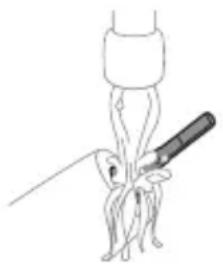
Line drawing of a medical procedure with a needle inserted into a tube (no text or symbols)1 Remove the brush head and rinse the metal shaft area with warm water. Make sure you remove any residual toothpaste.
Caution: Do not push on the rubber seal on the metal shaft with sharp objects, as this may cause damage.
2 Wipe the entire surface of the handle with a damp cloth.
Note: Do not tap the handle on the sink to remove excess water.
Brush head
natural_image
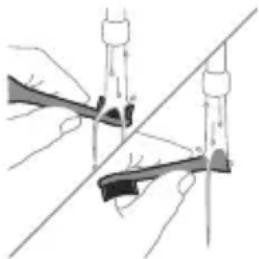
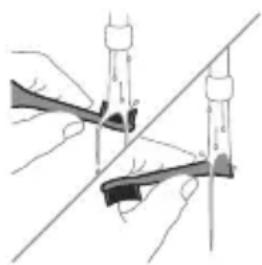
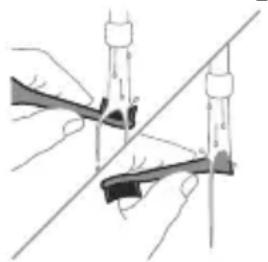
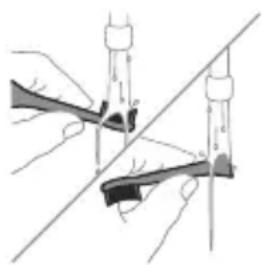
Diagram of two hands using a tool to lift or lift an object, with no visible text or symbols1 Rinse the brush head and bristles after each use.
2 Remove the brush head from the handle and rinse the brush head connection with warm water at least once a week. Rinse the travel cap as often as needed.
Charger
1 Unplug the charger before you clean it.
2 Wipe the surface of the charger with a damp cloth.
Travel case
Rinse with warm water and use a damp cloth to clean the travel case.
Storage
If you are not going to use the product for an extended period of time, unplug it from the electrical outlet, clean it and store it in a cool and dry place away from direct sunlight.
Replacement
Replace Philips Sonicare brush heads every 3 months to achieve optimal results. Only use Sonicare for Kids Compact or Standard replacement brush heads.
Locating the model number
Look on the bottom of the Philips Sonicare toothbrush handle for the model number (HX360XX).
Warranty and support
If you need information or support, please visit www.philips.com/support or read the international warranty leaflet.
Warranty exclusions
What is not covered under warranty:
- In mouth attachments including brush heads and nozzles.
- Damage caused by use of unauthorized replacement parts or unauthorized brush heads.
- Damage caused by misuse, abuse, neglect, alterations or unauthorized repair.
- Normal wear and tear, including chips, scratches, abrasions, discoloration or fading.
Recycling
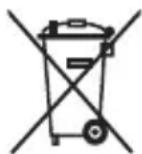
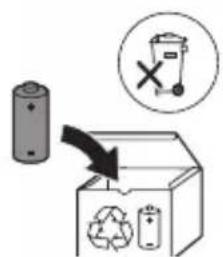
- This symbol means that electrical products and batteries shall not be disposed of with normal household waste.
- Follow your country's rules for the separate collection of electrical products and batteries.
Removing the rechargeable battery
CONTAINS LITIHIUM-ION RECHARGEBALE CELL. MUST BE RECYCLED OR DISPOSED OF PROPERLY.
The built-in rechargeable battery must only be removed by a qualified professional when the appliance is discarded. Before removing the battery, make sure that the battery is completely empty.
Take any necessary safety precautions when you handle tools to open the appliance and when you dispose of the rechargeable battery. Be sure to
protect your eyes, hands, fingers, and the surface on which you work.
When you handle batteries, make sure that your hands, the product and the batteries are dry.
To avoid accidental short-circuiting of batteries after removal, do not let battery terminals come into contact with metal objects (e.g. coins, hairpins, rings). Do not wrap batteries in aluminum foil. Tape battery terminals or put batteries in a plastic bag before you discard them.
To remove the rechargeable battery, you need a towel or cloth, a hammer and a flat-head (standard) screwdriver. Observe basic safety precautions when you follow the procedure outlined below.
1 To deplete the rechargeable battery of any charge, remove the handle from the charger, turn on the toothbrush and let it run until it stops. Repeat this step until you can no longer turn on the toothbrush.
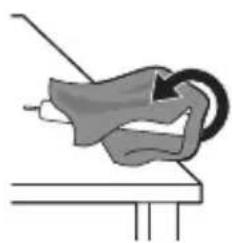
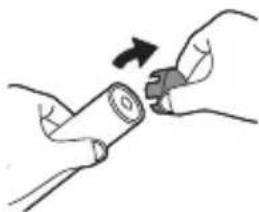
2 Remove and discard the brush head. Cover the entire handle with a towel or cloth.
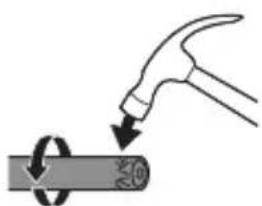
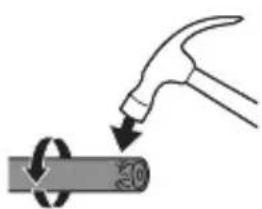
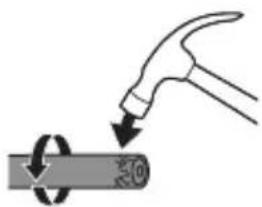
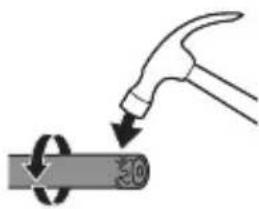
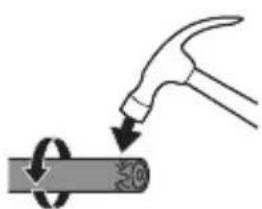
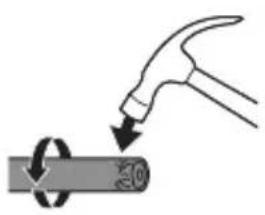
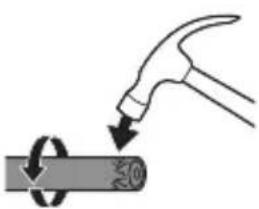
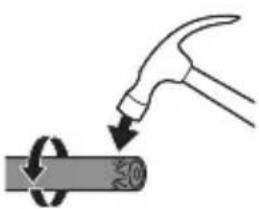
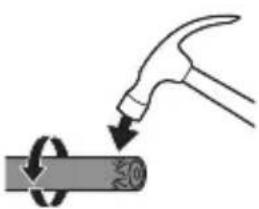
3 Hold the top of the handle with one hand and strike the handle housing 0.5 inch above the bottom end. Strike firmly with a hammer on all 4 sides to eject the end cap.
Note: You may have to hit on the end several times to break the internal snap connections.
natural_image
Simple line drawing of a mechanical component with a curved arrow indicating motion (no text or symbols)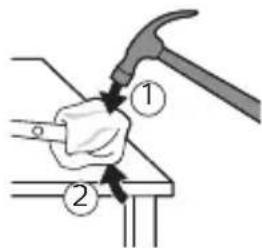
natural_image
Illustration of a hand hammering a cylindrical object with a circular arrow indicating rotation (no text or symbols)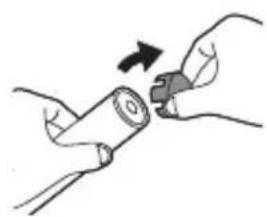
natural_image
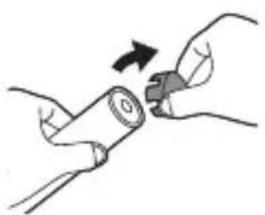
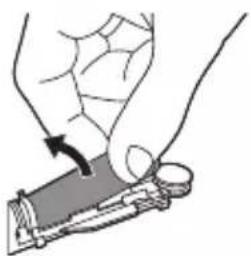
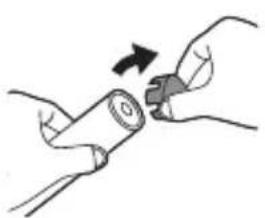
Illustration of hands holding a battery with a switch, no text or symbols present4 Remove the end cap from the toothbrush handle. If the end cap does not release easily from the housing, repeat step 3 until the end cap is released.
natural_image
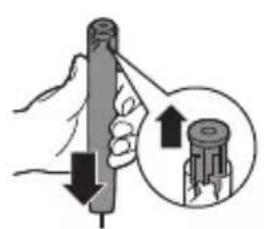
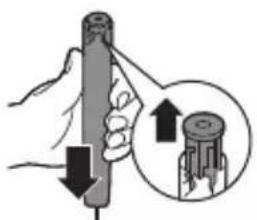
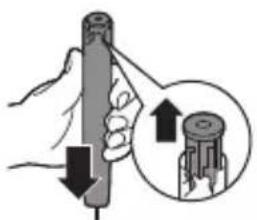
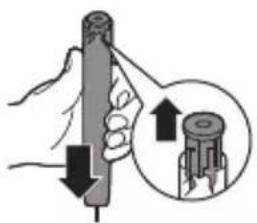
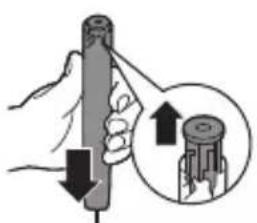
Illustration of a hand holding a cylindrical tool with an arrow indicating force direction (no text or symbols)5 Holding the handle upside down, press the shaft down on a hard surface. If the internal components do not easily release from the housing, repeat step 3 until the internal components are released.
natural_image
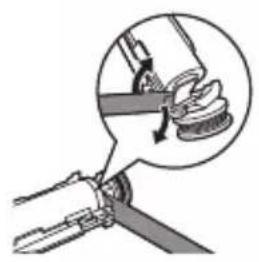
Illustration of a hand holding a tool with a magnified inset showing the blade being cut (no text or symbols)6 Wedge the screwdriver between the battery and the frame at the bottom of the internal components. Then pry the screwdriver away from the battery to break the bottom of the frame.
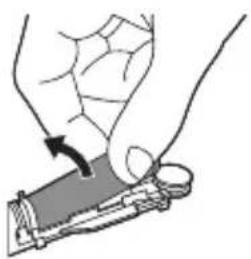
7 Insert the screwdriver between the bottom of the battery and the frame to break the metal tab connecting the battery to the printed circuit board. This will release the bottom end of the battery from the frame.
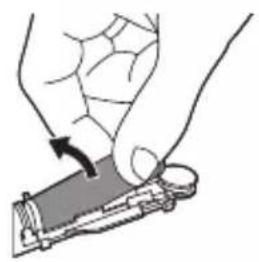
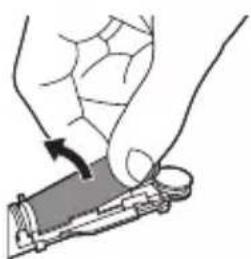
8 Grab the battery and pull it away from the internal components to break the second metal battery tab.
natural_image
Illustration of a hand holding a tool with an arrow indicating motion (no text or symbols)Caution: Be aware of the sharp edges of the battery tabs so as to avoid injury to your fingers.
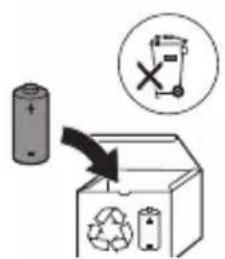
9 Cover the battery contacts with tape to prevent any electrical short from residual battery charge.
The rechargeable battery can now be recycled and the rest of the product discarded appropriately.
Note: Do not throw away the appliance with the normal household waste at the end of its life, but hand it in at an official collection point for recycling. By doing this, you help to preserve the environment.
Giriş
natural_image
Illustration showing a hand holding a toothbrush and a close-up of a tooth with a checkmark indicating a detail (no text or symbols present)natural_image
Illustration of a hand using a pipette to apply liquid onto a surface, with an inset showing a droplet on a surface (no text or symbols present)natural_image
Illustration of a hand gripping a small object with directional arrows indicating movement (no text or symbols)natural_image
Diagram showing dental tool application on upper teeth with magnified view (no text or labels)USB şarji
natural_image
Line drawing of a medical procedure with a needle inserted into a tube (no text or symbols)natural_image
Illustration of hands using a tool to adjust or install a mechanical component, no text or symbols presentnatural_image
Illustration of a mechanical component with a curved arrow indicating motion (no text or symbols)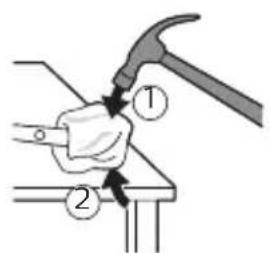
natural_image
Illustration of a hammer striking a cylindrical object with a ring, no text or symbols presentnatural_image
Illustration of hands holding a battery with a close-up of its tip (no text or symbols)natural_image
Illustration of a hand holding a cylindrical object with an arrow indicating upward movement, accompanied by a magnified inset showing the same object (no text or symbols present)natural_image
Mechanical assembly diagram showing a lever mechanism with a magnified inset (no text or symbols)natural_image
Illustration of a hand holding a small object with an arrow indicating motion (no text or symbols)natural_image
Illustration showing a hand brushing a tooth with a brush, and a close-up of a tooth being adjusted (no text or symbols present)natural_image
Illustration of a hand holding a pen with a magnified inset showing a textured surface (no text or symbols)natural_image
Illustration of a hand gripping a small object with directional arrows indicating movement (no text or symbols)natural_image
Diagram showing dental tool application on tooth structure (no text or symbols)USB nabíjení
natural_image
Line drawing of a medical procedure with a needle inserted into a tube (no text or symbols)natural_image
Illustration of two hands using a tool to lift or stand, forming a V-grip (no text or symbols present)natural_image
Diagram of a mechanical component with a curved arrow indicating rotation or force (no text or symbols)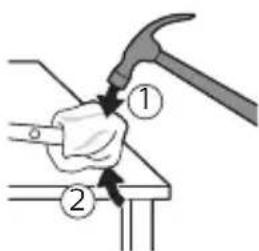
natural_image
Illustration of a hand using a hammer to tighten a circular component with a tool (no text or symbols)natural_image
Illustration of hands holding a cylindrical object with a button, no text or symbols presentnatural_image
Illustration of a hand holding a cylindrical tool with an arrow indicating force or direction, and a magnified inset showing the same tool's movement (no text or symbols present)natural_image
Diagram of a mechanical clamp or clamp assembly with a magnified inset showing a hand holding a spring (no text or symbols present)natural_image
Illustration of a hand holding a small electronic device with a scroll wheel (no text or symbols visible)natural_image
Illustration showing a hand brushing a tooth with a brush, and a close-up of a tooth being adjusted (no text or symbols)natural_image
Illustration of a hand using a pen to apply a sample onto a surface, with an inset showing a magnified view of the sample (no text or symbols present)natural_image
Simple line drawing of a hand pressing a button on a power button (no text or symbols)natural_image
Illustration of a hand holding a small object with directional arrows indicating movement or force (no text or symbols)natural_image
Diagram showing dental tool application on upper teeth with magnified detail (no text or symbols)Opladning med USB
natural_image
Line drawing of a medical procedure with a needle inserted into a tube (no text or symbols)natural_image
Illustration of two hands using a tool to lift or stand (no text or symbols present)natural_image
Illustration of a hand holding a tool with a circular motion arrow, no text or symbols present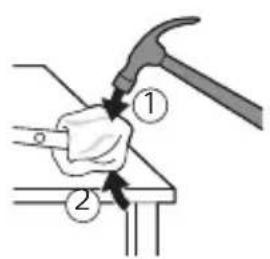
natural_image
Illustration of a hand hammering a cylindrical object with a circular arrow indicating rotation (no text or symbols)natural_image
Illustration of hands holding a cylindrical object with an arrow indicating rotation (no text or symbols)4 Fjern endedækslet fra tandbørstens håndtag. Hvis endedækslet ikke nemt løsnes fra kabinettet, skal du gentage trin 3, indtil endedækslet er løsnet.
natural_image
Illustration of a hand holding a cylindrical tool with an arrow indicating downward motion, and a magnified inset showing the tip of the tool (no text or symbols present)natural_image
Diagram of a mechanical tool interacting with a curved component, showing a magnified view of the tool's internal structure (no text or symbols present)natural_image
Illustration of a hand holding a small object with a curved arrow indicating motion (no text or symbols)www.philips.com/support
natural_image
Illustration showing a hand holding a brush and a close-up of a tool tip with a checkmark (no text or symbols present)natural_image
Illustration of a hand using a pipette to apply a product to a toothbrush, with an inset showing a textured surface (no text or symbols)natural_image
Illustration of a hand holding a small object with directional arrows indicating movement or force (no text or symbols)natural_image
Diagram of dental arching technique showing tooth arrangement and tool placement (no text or labels)USB-Aufladung
natural_image
Line drawing of a medical procedure with a needle inserted into a bulb (no text or symbols)natural_image
Illustration of two hands using a tool to adjust or install a mechanical component, with no visible text or symbols.natural_image
Illustration of a hand holding a small object with an arrow indicating motion (no text or symbols)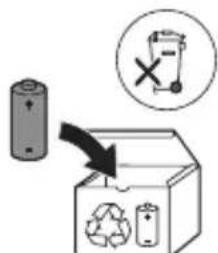
natural_image
Illustration showing a hand holding a tool and a close-up of a mechanical component with a checkmark indicating detail (no text or symbols present)natural_image
Illustration of a hand holding a pen with a magnified inset showing a textured surface (no text or symbols)natural_image
Illustration of a hand gripping a small object with directional arrows indicating movement (no text or symbols)natural_image
Diagram of dental arching technique showing tooth arrangement and magnified detail (no text or labels)USB-laadimine
natural_image
Line drawing of a medical procedure with a needle inserted into a tube (no text or symbols)natural_image
Illustration of two hands using a tool to lift or stand, forming a V-grip (no text or symbols present)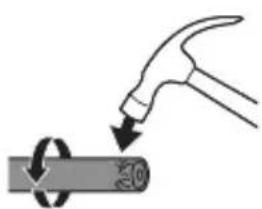
natural_image
Illustration of a hammer striking a cylindrical object with a ring, no text or symbols presentnatural_image
Illustration of hands holding a battery with a close-up of its tip (no text or symbols)natural_image
Illustration of a hand holding a cylindrical object with an arrow indicating upward motion, accompanied by a magnified inset showing the same object (no text or symbols present)natural_image
Mechanical assembly diagram showing a lever mechanism with a magnified inset (no text or symbols)natural_image
Illustration of a hand holding a small object with an arrow indicating motion (no text or symbols)natural_image
Illustration showing a hand brushing a tooth with a brush, and a close-up of a tooth being adjusted (no text or symbols present)natural_image
Illustration of a hand using a pipette to apply a sample onto a surface, with an inset showing a magnified view of the sample (no text or symbols present)natural_image
Illustration of a hand gripping a small object with directional arrows indicating movement (no text or symbols)natural_image
Diagram showing dental tool application on upper teeth with magnified view (no text or symbols)Carga de USB
natural_image
Line drawing of a medical procedure with a needle inserted into a tube (no text or symbols)natural_image
Illustration of two hands using a tool to adjust or install a mechanical part, with no visible text or symbols.Compact o Standard de Sonicare for Kids.
natural_image
Illustration of a hammer striking a cylindrical object with a circular arrow indicating rotation (no text or symbols)natural_image
Illustration of hands holding a cylindrical object with an arrow indicating rotation (no text or symbols)natural_image
Illustration of a hand holding a cylindrical object with an arrow indicating upward movement, accompanied by a magnified inset showing the same object (no text or symbols present)natural_image
Diagram of a mechanical tool interacting with a curved component, showing a magnified view of the tool's internal structure (no text or symbols present)natural_image
Illustration of a hand holding a small object with an arrow indicating motion (no text or symbols)natural_image
Illustration of a hand holding a toothbrush with a downward arrow indicating force or pressure (no text or symbols)natural_image
Simple diagram of a curved structure with a checkmark indicating a detail (no text or symbols present)natural_image
Illustration of a hand using a pipette to apply a sample onto a surface, with an inset showing a magnified view of the sample (no text or symbols present)Charge USB
natural_image
Line drawing of a medical procedure involving a needle inserted into a patient's leg (no text or symbols present)natural_image
Illustration of two hands using a tool to lift or stand (no text or symbols present)natural_image
Diagram of a mechanical component with a curved arrow indicating motion (no text or symbols)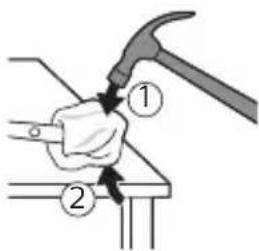
natural_image
Illustration of a hammer striking a circular object with a handle, no text or symbols presentnatural_image
Illustration of hands holding a cylindrical object with an arrow indicating rotation (no text or symbols)natural_image
Illustration of a hand holding a cylindrical tool with an arrow indicating force or direction, and a magnified inset showing the same tool (no text or symbols present)natural_image
Diagram of a mechanical joint or clamp mechanism with a magnified inset showing a coiled spring (no text or symbols present)natural_image
Illustration of a hand holding a small electronic device with a scroll wheel (no text or symbols visible)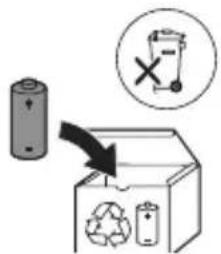
natural_image
Illustration showing a hand holding a toothbrush and a close-up of a tooth with a checkmark (no text or symbols present)natural_image
Illustration of a hand using a pipette to apply liquid onto a surface, with an inset showing a droplet on a surface (no text or symbols present)1 Smočite vlakna i nanesite malu količinu paste za zube.
2 Postavite vlakna četkice na zube pod blagim kutom (45 stupnjeva). Čvrstim pritiskom omogućite da vlakna dosegnu liniju desni ili malo ispod nje.
natural_image
Illustration of a hand gripping a small object with directional arrows indicating movement (no text or symbols)natural_image
Diagram showing dental tool application on upper teeth with magnified detail (no text or symbols)5 Kako biste očistili unutarnje površine prednjih zubi, nagnite dršku četkice poluuspravno i izvršite nekoliko vertikalnih preklapajućih pokreta na svakom zubu.
Punjenje putem USB-a
Napomena: Priloženi dodaci mogu se razlikovati ovisno o kupljenom modelu.
1 Priključite USB kabel stalka za punjenje u zidni prilagodnik priključen u električnu utičnicu.
2 Stavite držak na punjač.
- Upalit će se svjetlo indikatora baterije i drška će oglasiti dva zvučna signala. To naznačuje da se četica za zube puni.
Stanje baterije
Kad je drška postavljena na punjač, indikator baterije prikazuje razinu napunjenosti baterije.
Stanje baterije Indikator baterije
Punjenje Treperi zeleno
Puna Neprestano svijetli u zelenoj boji 30
natural_image
Line drawing of a medical procedure with a needle inserted into a tube (no text or symbols)1 Odvojite glavu četkice i isperite metalnu osovinu toplom vodom. Pobrinite se da uklonite svu preostalu zubnu pastu.
Oprez: Nemojte koristiti oštre predmete za guranje gumene brtve na metalnu osovinu jer to može prouzročiti oštećenja.
2 Cijelu površinu drške obrišite vlažnom tkaninom.
Napomena: Nemojte lupkati drškom po umivaoniku kako biste uklonili višak vode.
Glava četkice
natural_image
Illustration of two hands using a tool to adjust or install a mechanical component, with no visible text or symbols.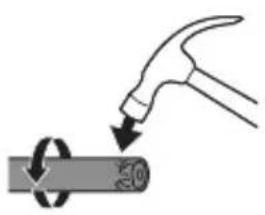
natural_image
Illustration of a hand hammering a cylindrical object with a circular arrow indicating rotation (no text or symbols)Napomena: Možda ćete morati nekoliko puta udariti krajnji dio kako biste prekinuli unutrašnje spojeve.
natural_image
Illustration of hands holding a cylindrical object with an arrow indicating rotation (no text or symbols)4 Uklonite krajnji čep s ručke četkice za zube. Ako se krajnji čep ne otpušta lako s kućišta, ponovite korak 3 dok krajnji čep ne bude pušten.
natural_image
Illustration of a hand holding a cylindrical object with an arrow indicating direction, and a magnified inset showing the same object (no text or symbols present)natural_image
Diagram of a mechanical assembly with a magnified inset showing a rotating component (no text or symbols)natural_image
Illustration of a hand holding a small object with an arrow indicating motion (no text or symbols)natural_image
Illustration showing a hand brushing a tooth with a brush, and a close-up of a tooth being adjusted (no text or symbols)natural_image
Illustration of a hand using a pipette to apply liquid onto a surface, with an inset showing a droplet on a surface (no text or symbols present)natural_image
Illustration of a hand holding a small object with directional arrows indicating movement or force (no text or symbols)natural_image
Line drawing of a medical procedure with a needle inserted into a tube (no text or symbols)natural_image
Illustration of hands using a tool to adjust or install a mechanical component, with no visible text or symbols.natural_image
Diagram of a mechanical component with a curved arrow indicating rotation (no text or symbols)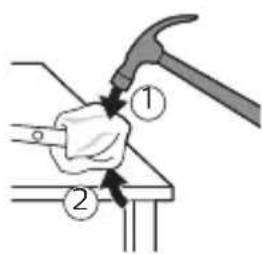
natural_image
Illustration of a hand hammering a cylindrical object with a circular arrow indicating rotation (no text or symbols)natural_image
Illustration of hands holding a cylindrical object with an arrow indicating rotation (no text or symbols)natural_image
Illustration of a hand holding a cylindrical object with an arrow indicating downward motion, and a magnified inset showing the same object (no text or symbols present)natural_image
Diagram of a mechanical tool interacting with a curved component, showing a magnified view of the tool's internal structure (no text or symbols present)natural_image
Illustration of a hand holding a small object with an arrow indicating motion (no text or symbols)natural_image
Illustration showing a hand holding a toothbrush and a close-up of a tooth with a checkmark indicating a detail (no text or symbols present)natural_image
Illustration of a hand using a pipette to apply liquid onto a surface, with an inset showing a droplet on a surface (no text or symbols present)1 Samitriniet sarus un uzklājiet mazliet zobu pastas.
natural_image
Illustration of a hand gripping a small object with directional arrows indicating movement (no text or symbols)natural_image
Diagram showing dental tool application on upper teeth with magnified detail (no text or symbols)USB uzlāde
natural_image
Line drawing of a medical procedure with a needle inserted into a tube (no text or symbols)natural_image
Illustration of two hands using a tool to adjust or install a mechanical part (no text or symbols visible)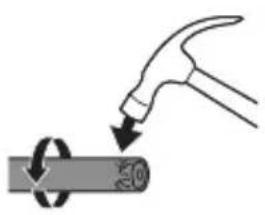
natural_image
Illustration of a hand hammering a cylindrical object with a circular arrow indicating rotation (no text or symbols)natural_image
Illustration of hands holding a cylindrical object with an arrow indicating rotation (no text or symbols)natural_image
Illustration of a hand holding a cylindrical object with an arrow indicating direction, and a magnified inset showing the same object (no text or symbols present)natural_image
Diagram of a mechanical assembly with a magnified inset showing a rotating component (no text or symbols)natural_image
Illustration of a hand holding a small object with an arrow indicating motion (no text or symbols)natural_image
Illustration showing a hand brushing a tooth with a brush, and a close-up of a tooth being adjusted (no text or symbols present)natural_image
Illustration of a hand using a pipette to apply liquid onto a surface, with an inset showing a droplet on a surface (no text or symbols present)natural_image
Illustration of a hand gripping a small object with directional arrows indicating movement (no text or symbols)natural_image
Diagram showing dental tool application on tooth structure (no text or symbols)USB jkrovimas
natural_image
Line drawing of a medical procedure with a needle inserted into a tube (no text or symbols)natural_image
Illustration of two hands holding a tool with arrows indicating motion or force direction (no text or symbols)natural_image
Simple line drawing of a hand holding a tool, with no text or symbols present.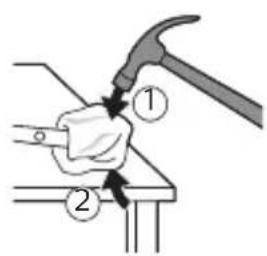
natural_image
Illustration of a hand hammering a cylindrical object with a circular arrow indicating rotation (no text or symbols)natural_image
Illustration of hands holding a battery with an arrow indicating rotation (no text or symbols)natural_image
Illustration of a hand holding a cylindrical object with an arrow indicating downward motion, and a magnified inset showing the same object (no text or symbols present)natural_image
Diagram of a mechanical assembly with a magnified inset showing a rotating component (no text or symbols)natural_image
Illustration of a hand holding a small object with a curved arrow indicating motion (no text or symbols)www.philips.com/support
natural_image
Illustration showing a hand brushing a tooth with a brush and a close-up of the tooth being checked (no text or symbols present)natural_image
Illustration of a hand using a pipette to apply liquid onto a surface, with an inset showing a droplet on a surface (no text or symbols present)natural_image
Illustration of a hand gripping a small object with directional arrows indicating movement (no text or symbols)natural_image
Diagram showing dental tool interacting with teeth (no text or labels)USB-töltés
natural_image
Line drawing of a medical procedure with a needle inserted into a tube (no text or symbols)natural_image
Illustration of two hands using a tool to adjust or install a mechanical component, with no visible text or symbols.natural_image
Illustration of a hand holding a tool with a circular arrow indicating motion (no text or symbols)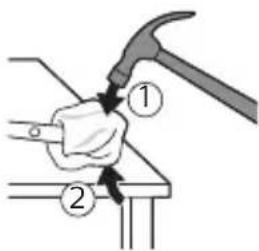
natural_image
Illustration of a hammer striking a circular object with a handle, no text or symbols presentnatural_image
Illustration of hands holding a cylindrical object with an arrow indicating rotation (no text or symbols)natural_image
Illustration of a hand holding a cylindrical tool with an arrow indicating force or direction, and a magnified inset showing the same tool (no text or symbols present)natural_image
Diagram of a mechanical joint or clamp mechanism with a magnified inset showing a coiled spring (no text or symbols present)natural_image
Illustration of a hand holding a small object with an arrow indicating motion (no text or symbols)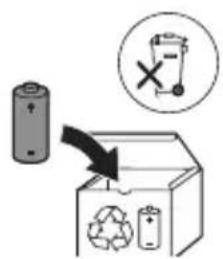
www.philips.com/support
natural_image
Illustration showing a hand holding a toothbrush and a close-up of a tooth with a checkmark indicating a detail (no text or symbols present)natural_image
Illustration of a hand holding a pen with a magnified inset showing a droplet on a surface (no text or symbols)natural_image
Illustration of a hand holding a small object with directional arrows indicating movement or force (no text or symbols)natural_image
Diagram showing dental tool application on upper teeth with magnified detail (no text or labels)Opladen via USB
natural_image
Line drawing of a medical procedure with a needle inserted into a tube (no text or symbols)natural_image
Illustration of hands using a tool to adjust or install a mechanical component, with no visible text or symbols.natural_image
Diagram of a mechanical component with a curved arrow indicating rotation or force (no text or symbols)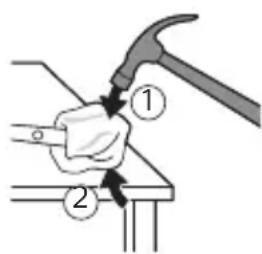
natural_image
Illustration of a hammer striking a cylindrical object with a ring, no text or symbols presentnatural_image
Illustration of hands holding a battery with a close-up of its tip (no text or symbols)natural_image
Illustration of a hand holding a cylindrical tool with an arrow indicating downward motion, and a magnified inset showing the tip of the tool (no text or symbols present)natural_image
Mechanical assembly diagram showing a lever mechanism with a magnified inset (no text or symbols)natural_image
Illustration of a hand holding a small object with an arrow indicating motion (no text or symbols)natural_image
Illustration showing a hand brushing a tooth with a brush, and a close-up of a tooth being adjusted (no text or symbols present)natural_image
Illustration of a hand using a pipette to apply liquid onto a surface, with an inset showing a droplet on a surface (no text or symbols present)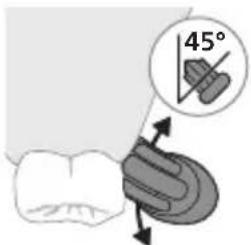
natural_image
Illustration of a hand holding a small object with directional arrows indicating movement or force (no text or symbols)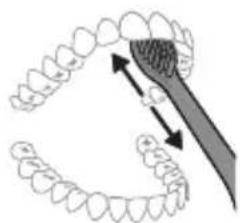
natural_image
Diagram showing dental tool application on upper teeth with magnified view (no text or labels)USB-lading
natural_image
Line drawing of a medical procedure with a needle inserted into tissue (no text or symbols)1 Ta av børstehodet, og skyll metallstangen i varmt vann. Pass på at du har fjernet alle tannkremrester.
natural_image
Illustration of two hands using a tool to adjust or install a mechanical component, with no visible text or symbols.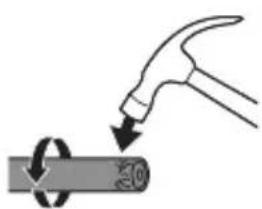
natural_image
Illustration of a hammer striking a cylindrical object with a circular arrow indicating rotation (no text or symbols)natural_image
Illustration of hands holding a battery with an arrow indicating rotation (no text or symbols)natural_image
Illustration of a hand holding a cylindrical object with an arrow indicating downward motion, and a magnified inset showing the same object (no text or symbols present)natural_image
Mechanical assembly diagram showing a lever mechanism with a magnified inset (no text or symbols)natural_image
Illustration of a hand holding a small object with a curved arrow indicating motion (no text or symbols)natural_image
Illustration showing a hand holding a toothbrush and a close-up of a tooth with a checkmark indicating a detail (no text or symbols present)1 Cho'tka tuklari dastaning old qismi bilan bir xil yo'nalishda bo'lishi uchun cho'tka kallagini tekislang.
2 Cho'tka kallagini u boshqa kirmagunigacha metall valga qattiq bosing.
Izoh: Cho'tka kallagi va dasta orasida kichik tirqish ko'rinishi – normal holat.
Philips Sonicare tish pastangizdan foydalanish
Agar Sonicare tish pastasidan birinchi marta foydalanayotgan bo'lsangiz, elektr bo'Imagan tish cho'tkasidan foydalanishga qaraganda ko'proq tebranish sezish normal holat. Odatda birinchi marta foydalanayotgan foydalanuvchilar ortiqcha bosim beradi. Faqat yumshoq bosib bering va tish cho'tkasi siz uchun tozalashiga imkon bering. Eng yaxshi taassurot uchun
natural_image
Illustration of a hand using a pipette to apply liquid onto a surface, with an inset showing a droplet on a surface (no text or symbols present)Izoh: 8 yoshdan kichik bolalar uchun ota-ona yoki enaga tish cho'tkalashda yordam berishi tavsiya etiladi.
1 Cho'tkani namlang va unga kam miqdorda tish pastasi surting.
2 Tish cho'tkasini tishlar qarshisida kichik (45 daraja) burchak ostida tuting. Cho'tkalar milk chizig'iga yoki uning tagiga yetishi uchun uni qattiq dosing.
Izoh: Cho'tka markazini tishlarga doimi to'liq tekkizib turing.
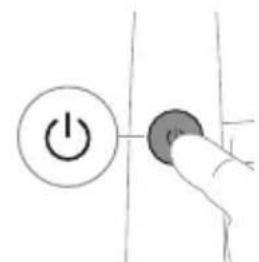
3 Philips Sonicare qurilmasini yoqish uchun yoqish/o'chirish tugmasini bosing.
natural_image
Illustration of a hand gripping a small object with directional arrows indicating movement (no text or symbols)4 Cho'tkani tishlar va milk chizig'iga yengil tutib turing. Cho'tkalar tishlar orasiga kirishi uchun cho'tka kallagini oldinga-orqaqa kichik harakatlar bilan tishlaringizni tozalang. Bu harakatlarni tish tozalash siklingiz yakunlangunga qadar bajaring.
natural_image
Diagram showing dental arch formation with a tool interacting with teeth (no text or labels)Juda yumshoq Yumshoq
| Foydasi Sonic taassurotini yoshbolalarga o’rgatish va tanishtirish uchunkamaytirilgan quvvat jadalligi ishlatiladi. | To’liq kuchdagi jadallik yosh kattaroq/mustaqil tish yuvuvchilarga mo’jallangan. | |
| Tavsiya etilgan cho’tka kallaklari | Sonicare for Kids ixcham yoki standart cho’tka kallagi | Sonicare for Kids ixcham yoki standart cho’tka kallagi |
| Jami tish tozalah vaqti | 2 daqiqa 2 daqiqa | |
| Tozalah usuli | 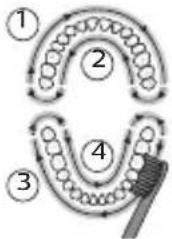 | 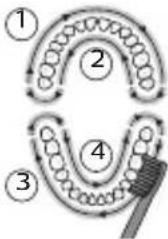 |
Funksiyalar
- KidPacer
- SmarTimer
- EasyStart
KidPacer
KidPacer – bu og'zingizni 4 qismga bo'Igan holda og'iz bo'ylab bir tekisda tozalashda farzandingizga yordam beradigan intervalli taymerdir.
SmarTimer
SmarTimer tozalash siklingiz oxirida tish cho'tkasini avtomatik ravishda o'chirish orqali tozalash siklingiz yakunlanganini bildiradi.
Stomatologlar kuniga 2 marta kamida 2 daqiga tish tozalashni tavsiya etadi.
Izoh: Agar tozalash siklini boshlaganingizdan keyin quvvatni yoqish/o'chirish tugmasini bossangiz, tish
USB quvvatlash
Izoh: Qadoqdagi aksessuarlar xarid qilingan modelga qarab farqlanishi mumkin.
1 Quvvatlash stendining USB kabelini elektr manbaiga ulangan devor adapteriga ulang.
2 Dastani quvvatlash moslamasiga joylang.
- Batareya indikatorining chirog'i yonadi va dasta ikki marta signal beradi. Bu tish cho'tkasi quvvatlanayotganini bildiradi.
Batareya holati
Dasta quvvatlagichga joylanganda batareya indikatori batareya darajasini aks ettiradi.
Batareya holati Batareya indikatori
Quvvatlash Yashil rangda miltillaydi
To'lgan 30 soniya yaxlit yashil yonib turadi va
keyin o'chadi
Batareya holati (dasta quvvatlagichga qo'yilmaganida)
Tish cho'tkasi faolligida dasta ostidagi batareya indikatori batareya darajasini aks ettiradi.
Batareya holati Batareya indikatori Tovush
| To’lgan Yaxlit yashil - | |
| Qisman to’lgan Yashil rangda miltillaydi - | |
| Kam Sariq rangda miltillaydi Tish tozalanganidan | keyin dastadan 3 ta qisqa signal jaranglaydi |
| Bo’sh Sariq rangda miltillaydi Tish tozalanganidan | keyin dastadan 5 tadan 2 ta qisqa signal jamlanmasi jaranglaydi |
| Izoh: Energiya tejash uchun batareya indikatori ishlatilmayotganida o’chadi. | |
| Izoh: Batareya to’liq bo’shlig’ida tish cho’tkasi o’chadi. Tish cho’tkasini quvvatlash uchun uni quvvatlagichga joylang. | |
| Izoh: Batareyani har doim to’liq quvvatlagan holda saqlash uchun tish cho’tkasidan foydalanmayotgan paytda uni quvvatlagichda saqlashingiz mumkin. | |
Tozalash
Tish cho'tkasi dastasi
natural_image
Line drawing of a medical procedure with a needle inserted into a tube (no text or symbols)1 Cho'tka kallagini chiqarib oling va metall val atrofini iliq suv bilan yuving. Har qanday tish pastasi qoldig'ini tozalaganingizni tekshiring.
Ogohlantirish: Metall valdagi rezina zichlagichni o'tkir narsalar bilan bosmang, bu shikastlanishga olib kelishi mumkin.
2 Dastaning butun yuzasini nam mato bilan artib oling.
Izoh: Ortiqcha suvni yo'qotish uchun dastani rakovinaga urmang.
Cho'tka kallagi
natural_image
Illustration of two hands holding a tool with a pointed tip, against a diagonal line (no text or symbols)1 Cho'tka kallagi va cho'tkani har foydalanishdan keyin yuving.
2 Cho'tka kallagini dastadan chiqarib oling va cho'tka kallagi ulanish qismini kamida haftada bir marta iliq suv bilan yuving. Sayohat qopqog'ini zarur bo'lgancha tez-tez yuvib tashlang.
Quvvatlash moslamasi
1 Tozalashdan avval, quvvatlagichni tarmoqdan uzing.
2 Quvvatlash moslamasining butun yuzasini nam mato bilan artib oling.
Sayohat g'ilofi
Iliq suv bilan yuving va sayohat g'ilofini tozalash uchun nam matodan foydalaning.
Xotira
natural_image
Diagram of a mechanical or electrical component with a curved arrow indicating rotation (no text or symbols)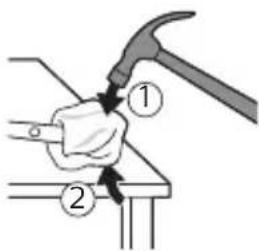
3 Dastaning tepa qismini bir qo'l bilan ushlang va korpusning ostki qismidan 0,5 dyuym (1,3 sm) tepaga uring. Uchidagi qopqoqni chiqarish uchun bolg'a bilan 4 tomonni qattiq uring.
natural_image
Illustration of a hammer striking a circular object with a handle, no text or symbols presentIzoh: Ichki fiksatorli konnektorlarni uzish uchun jihozning uchiga bir necha marta urishingiz kerak bo'lishi mumkin.
natural_image
Illustration of hands holding a cylindrical object with an arrow indicating rotation (no text or symbols)4 Tish cho'tkasi dastasi uchining qopqog'ini olib tashlang. Agar jihoz uchidagi qopqoq korpusdan oson chiqmasa, qopqoq chiqquncha 3-bosqichni takrorlang.
natural_image
Illustration of a hand holding a cylindrical tool with an arrow indicating force or direction, and a magnified inset showing the same tool (no text or symbols present)natural_image
Diagram of a mechanical clamp or spring mechanism with a magnified inset showing the hook (no text or symbols present)6 Buragichni batareya va ichki qismlarning ostidagi korpus orasiga kiriting. Keyin korpus ostidagi qismni sindirish uchun buragichni batareyadan uzoqlashtiring.
7 Batareyani bosma plata bilan ulab turadigan metall tilchani sindirish uchun buragichni batareya osti va korpus orasiga kiriting. Bu batareyaning ostki uchini korpusdan chiqarib oladi.
natural_image
Illustration of a hand holding a small object with an arrow indicating motion (no text or symbols)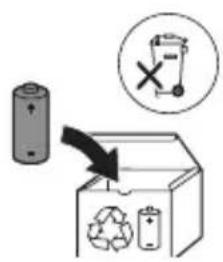
natural_image
Illustration of a hand holding a tool with an arrow indicating direction (no text or symbols)natural_image
Simple line drawing of a curved object with a checkmark indicating selection (no text or symbols)natural_image
Illustration of a hand using a pen to apply a brush to a nail, with an inset showing a nail being inserted (no text or symbols present)natural_image
Line drawing of a medical procedure with a needle inserted into a tube (no text or symbols)natural_image
Illustration of two hands using a tool to lift or lift an object, with no visible text or symbolsnatural_image
Illustration of a hand holding a small object with an arrow indicating motion (no text or symbols)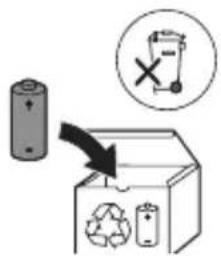
natural_image
Illustration showing a hand brushing a tooth with a brush and a close-up of the tooth being checked (no text or symbols present)natural_image
Illustration of a hand holding a pen with a magnified inset showing a magnified view of a small object (no text or symbols present)natural_image
Illustration of a hand holding a small object with directional arrows indicating movement or force (no text or symbols)natural_image
Diagram showing dental tool application on upper teeth with magnified detail (no text or symbols)Carregamento USB
natural_image
Line drawing of a medical procedure with a needle inserted into a tube (no text or symbols)natural_image
Illustration of two hands holding a tool with a pointed tip, crossed by a diagonal line (no text or symbols)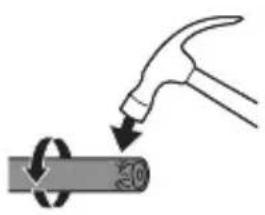
natural_image
Illustration of a hand hammering a cylindrical object with a circular arrow indicating rotation (no text or symbols)natural_image
Illustration of hands using a tool to adjust or install a cylindrical component (no text or symbols visible)natural_image
Illustration of a hand holding a pen with arrows indicating force direction, and an inset showing a magnified view of the pen tip (no text or symbols)natural_image
Diagram of a mechanical clamp or clamp assembly with a magnified inset showing a curved component (no text or symbols present)natural_image
Illustration of a hand holding a small object with an arrow indicating motion (no text or symbols)www.philips.com/support
natural_image
Illustration showing a hand holding a toothbrush and a close-up of a tooth with a checkmark indicating a detail (no text or symbols present)natural_image
Illustration of a hand using a pipette to apply liquid onto a surface, with an inset showing a droplet on a surface (no text or symbols present)natural_image
Illustration of a hand gripping a small object with directional arrows indicating movement (no text or symbols)natural_image
Diagram showing dental tool application on upper teeth with magnified detail (no text or symbols)Încărcare USB
natural_image
Line drawing of a medical procedure with a needle inserted into a tube (no text or symbols)natural_image
Illustration of two hands using a tool to measure a mechanical part, no text or symbols presentnatural_image
Simple line drawing of a mechanical component or tool with a curved arrow indicating motion (no text or symbols)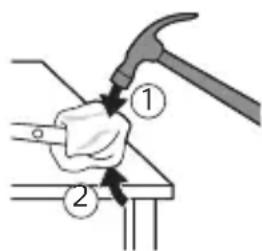
natural_image
Illustration of a hand hammering a cylindrical object with a circular arrow indicating rotation (no text or symbols)natural_image
Illustration of hands holding a cylindrical object with an arrow indicating rotation (no text or symbols)natural_image
Illustration of a hand holding a cylindrical tool with an arrow indicating downward motion, and a magnified inset showing the tip of the tool (no text or symbols present)natural_image
Diagram of a mechanical tool interacting with a curved component, showing a magnified view of the tool's internal structure (no text or symbols present)natural_image
Illustration of a hand holding a small object with an arrow indicating motion (no text or symbols)natural_image
Illustration showing a hand brushing a tooth with a brush and a close-up of the tooth being checked (no text or symbols present)natural_image
Illustration of a hand using a pipette to apply a sample onto a surface, with an inset showing a magnified view of the sample (no text or symbols present)natural_image
Illustration of a hand gripping a piece of bread with a knife inserted (no text or symbols)natural_image
Diagram showing dental tool application on tooth structure (no text or symbols)Karikimi USB
natural_image
Line drawing of a medical procedure with a needle inserted into a tube (no text or symbols)natural_image
Illustration of hands using a tool to adjust or install a mechanical component, no text or symbols presentnatural_image
Diagram of a mechanical component with a curved arrow indicating rotation (no text or symbols)
natural_image
Illustration of a hammer striking a cylindrical object with a circular arrow indicating rotation (no text or symbols)natural_image
Illustration of hands holding a cylindrical object with an arrow indicating rotation (no text or symbols)natural_image
Illustration of a hand holding a cylindrical tool with an arrow indicating force or direction (no text or symbols present)natural_image
Diagram of a mechanical tool interacting with a curved component, showing a magnified view of the tool's internal structure (no text or symbols present)natural_image
Illustration of a hand holding a small object with a curved arrow indicating motion (no text or symbols)natural_image
Illustration showing a hand holding a toothbrush and a close-up of a tooth with a checkmark indicating a detail (no text or symbols present)natural_image
Illustration of a hand using a pipette to apply a sample onto a surface, with an inset showing a magnified view of the sample (no text or symbols present)3 Zobno ščetko Philips Sonicare vklopite tako, da pritisnete gumb za vklop/izklop.
natural_image
Illustration of a hand gripping a small object with directional arrows indicating movement (no text or symbols)natural_image
Diagram showing dental tool application on upper teeth with magnified view (no text or labels)USB-polnjenje
natural_image
Line drawing of a medical procedure with a needle inserted into tissue (no text or symbols)natural_image
Illustration of two hands using a tool to cut or adjust a mechanical component, with no visible text or symbols.natural_image
Diagram of a mechanical component with a curved arrow indicating rotation (no text or symbols)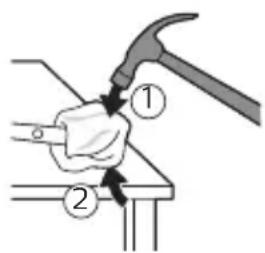
natural_image
Illustration of a hand hammering a cylindrical object with a circular arrow indicating rotation (no text or symbols)natural_image
Illustration of hands holding a battery with a close-up of its cable being inserted (no text or symbols present)natural_image
Illustration of a hand holding a cylindrical object with an arrow indicating downward motion, and a magnified inset showing the same object (no text or symbols present)natural_image
Diagram of a mechanical assembly with a magnified inset showing a rotating component (no text or symbols)6 Izvijač vtaknite med baterijo in okvir na spodnjem delu notranjih delov. Nato izvijač potisnite stran od baterije, da dno ločite od okvira.
natural_image
Illustration of a hand holding a small object with an arrow indicating motion (no text or symbols)natural_image
Illustration showing a hand brushing a tooth with a brush, and a close-up of a tooth being adjusted (no text or symbols present)natural_image
Illustration of a hand using a pipette to apply liquid onto a surface, with an inset showing a droplet on a surface (no text or symbols present)natural_image
Illustration of a hand gripping a small object with directional arrows indicating movement (no text or symbols)4 Jemne udržujte štetiny v polohe na zuboch a d'asnách. Zuby čistite krátkymi pohybmi dopredu a dozadu tak, aby štetiny dosahovali do priestorov medzi zubami. Tento pohyb opakujte počas celého čistiaceho cyklu.
natural_image
Diagram showing dental tool application on tooth structure (no text or symbols)Nabíjanie pomocou portu USB
natural_image
Line drawing of a medical procedure with a needle inserted into a tube (no text or symbols)natural_image
Illustration of two hands using a tool to adjust or install a mechanical component, with no visible text or symbols.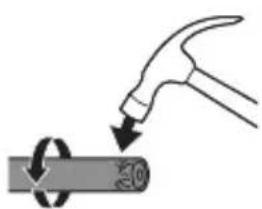
natural_image
Illustration of a hammer striking a cylindrical object with a ring, no text or symbols presentnatural_image
Illustration of hands holding a battery with a close-up of its tip (no text or symbols)natural_image
Illustration of a hand holding a cylindrical object with an arrow indicating downward motion, and a magnified inset showing the same object (no text or symbols present)natural_image
Diagram of a mechanical assembly with a magnified inset showing a rotating component (no text or symbols)natural_image
Illustration of a hand holding a small object with an arrow indicating motion (no text or symbols)natural_image
Illustration showing a hand holding a toothbrush and a close-up of a tooth with a checkmark indicating a detail (no text or symbols present)1 Poravnajte glavu četkice tako da su vlakna okrenuta u istom smeru kao i prednja strana drške.
2 Čvrsto pritisnite glavu četkice na metalnu osovinu do kraja.
natural_image
Illustration of a hand using a pipette to apply a sample onto a surface, with an inset showing a magnified view of the sample (no text or symbols present)1 Pokvasite vlakna i nanesite malu količinu paste za zube.
2 Postavite vlakna četkice za zube na zube tako da budu pod blagim uglom (45 stepeni). Čvrsto pritisnite kako bi vlakna stigla do desni ili malo ispod desni.
natural_image
Illustration of a hand gripping a small object with directional arrows indicating movement (no text or symbols)4 Nežno držite vlakna na zubima i desnima. Perite zube blagim pokretima unapred i unazad tako da vlakna mogu da dosegnu između zuba. Nastavite sa ovakvim pokretima tokom celog ciklusa pranja zuba.
natural_image
Diagram showing dental tool application on upper teeth with magnified detail (no text or symbols)5 Da biste očistili unutrašnju površinu prednjih zuba, nagnite dršku četkice u poluuspravan položaj i predite vertikalno četkicom preko svakog zuba tako da se potezi preklapaju.
natural_image
Line drawing of a medical procedure with a needle inserted into a tube (no text or symbols)1 Uklonite glavu četkice i isperite oblast oko metalne osovine toplom vodom. Obavezno uklonite sve ostatke paste za zube.
Oprez: Nemojte da gurate gumenu zaptivku na metalnoj osovini oštrim predmetima pošto to može da dovede do oštećenja.
2 Čitavu površinu drške obrišite vlažnom krpom.
Napomena: Nemojte da udarate ručkom o sudoperu da biste uklonili višak vode.
Glava četkice
natural_image
Illustration of two hands using a tool to adjust or install a mechanical component, with no visible text or symbols.natural_image
Simple line drawing of a mechanical component or tool with a curved arrow indicating rotation (no text or symbols)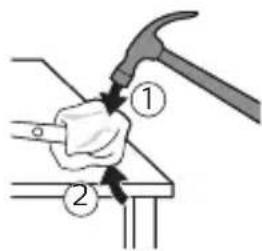
natural_image
Illustration of a hammer striking a cylindrical object with a circular arrow indicating rotation (no text or symbols)natural_image
Illustration of hands holding a cylindrical object with a button, no text or symbols presentnatural_image
Illustration of a hand holding a cylindrical tool with an arrow indicating force or direction, and a magnified inset showing the same tool (no text or symbols present)natural_image
Diagram of a mechanical clamp or clamp assembly with a magnified inset showing a hand holding a spring (no text or symbols present)6 Postavite odvijač između baterije i okvira na dnu unutrašnjih komponenti. Zatim odvajajte odvijač od baterije kako biste slomili dno okvira.
natural_image
Illustration of a hand holding a small electronic device with a scroll wheel (no text or symbols visible)7 Umetnite odvijač između dna baterije i okvira kako biste slomili metalni jezičak koji povezuje bateriju sa štampanom pločom. Na taj način će se donji kraj baterije odvojiti od okvira.
8 Uhvatite bateriju i odvojite je od unutrašnjih komponenti kako biste slomili drugi metalni jezičak baterije.
Oprez: pazite na oštre ivice jezičaka baterije da ne biste povredili prste.
9 Kontakte na bateriji zaštitite trakom kako preostali napon baterije ne bi prouzrokovao kratak spoj. Punjivu bateriju sada je moguće reciklirati, a ostatak proizvoda odložiti na odgovarajući način.
Napomena: Aparat koji se više ne može upotrebljavati nemojte da odlazete u kućni otpad, već ga predajte na zvaničnom prikupljalištu za reciklažu. Na taj način pomažete očuvanju životne sredine.
Johdanto
www.philips.com/support
Tervetuloa Philips Sonicare -perheeseen!
natural_image
Illustration showing a hand holding a toothbrush and a close-up of a tooth with a checkmark indicating a detail (no text or symbols present)natural_image
Illustration of a hand using a pipette to apply liquid onto a surface, with an inset showing a droplet on a surface (no text or symbols present)natural_image
Illustration of a hand gripping a small object with directional arrows indicating movement (no text or symbols)natural_image
Diagram showing dental tool application on tooth structure (no text or symbols)USB-lataus
natural_image
Line drawing of a medical procedure involving a needle inserted into a patient's leg (no text or symbols present)natural_image
Illustration of two hands using a tool to adjust or install a mechanical component, with no visible text or symbols.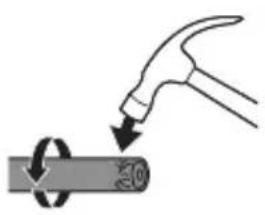
natural_image
Illustration of a hammer striking a cylindrical object with a circular arrow indicating rotation (no text or symbols)natural_image
Illustration of hands holding a cylindrical object with an arrow indicating rotation (no text or symbols)natural_image
Illustration of a hand holding a cylindrical tool with an arrow indicating force or direction (no text or symbols present)natural_image
Mechanical assembly diagram showing a lever mechanism with a magnified inset (no text or symbols)natural_image
Illustration of a hand holding a small electronic device with a circular button, no text or symbols presentnatural_image
Illustration showing a hand using a toothbrush to apply a tooth profile, with a checkmark indicating the correct direction (no text or symbols present)natural_image
Illustration of a hand holding a pen with a magnified inset showing a textured surface (no text or symbols)natural_image
Illustration of a hand gripping a small object with directional arrows indicating movement (no text or symbols)natural_image
Diagram showing dental tool application on upper teeth with magnified detail (no text or symbols)USB-laddning
natural_image
Line drawing of a medical procedure involving a needle inserted into a patient's leg (no text or symbols present)natural_image
Illustration of two hands using a tool to cut or adjust a mechanical component, with no visible text or symbols.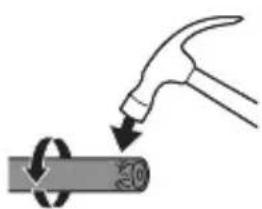
natural_image
Illustration of a hammer striking a cylindrical object with a circular arrow indicating rotation (no text or symbols)natural_image
Illustration of hands holding a battery with an arrow indicating rotation (no text or symbols)natural_image
Illustration of a hand holding a cylindrical tool with an arrow indicating force or direction (no text or symbols present)natural_image
Mechanical assembly diagram showing a lever mechanism with a magnified inset (no text or symbols)natural_image
Illustration of a hand holding a small object with an arrow indicating motion (no text or symbols)natural_image
Illustration showing a hand brushing a tooth with a brush, and a close-up of a tooth being adjusted (no text or symbols present)1 Gyllar tutawajyň öň tarapy bilen bir ugra seredip durar ýaly edip, nasadkany deňläň.
2 Nasadkany metal walyň üstüne ol aňryk baryp direyänçä dzümli basyň.
natural_image
Illustration of a hand using a pipette to apply liquid onto a surface, with an inset showing a droplet on a surface (no text or symbols present)natural_image
Illustration of a hand gripping a small object with directional arrows indicating movement (no text or symbols)4 Gyllary emaý bilen dişleriň üstünde we diş eti çyzygynda saklaň. Gyllar dişleriň arasyna yeter yaly edip, çalaja öne-yza hereket etdirip, dişleriňizi çotgalaň. Bu hereketi çotgalama döwräniziň dowamynda dowam ediň.
Bellik: Gyllar çalaja hüžžerip durmalydyr. El bilen ulanylýan diş çotgasynda bolsy ýaly, gazalap çotgalamak maslahat berilmeyär.
natural_image
Diagram showing a tooth profile with a shaded triangular object and directional arrows, no text or symbols present.USB zarýad bermek
natural_image
Illustration of a hammer striking a cylindrical object with a circular arrow indicating rotation (no text or symbols)Bellik: İçerki ilgiçleri döwmek üçin, tutawajyň ujuny birnäge gezek urmaly bolmagyňyz mümkin.
natural_image
Illustration of hands holding a cylindrical object with an arrow indicating rotation (no text or symbols)4 Uçky gapajygy diş çotgasynyň tutawajyndan aýryň. Eger uçky gapajyk koprusdan ÿeňillik bilen sypmasa, tä uçky gapajyk sypýança ädim 3-i gaýtalaň.
natural_image
Illustration of a hand holding a cylindrical object with an arrow indicating downward motion, and a magnified inset showing the same object (no text or symbols present)5 Tutawajy başaşak saklap, waly gaty üste basyň. Eger içerki komponentler koprusdan YEňillik bilen sypmasa, tâ içerki komponentler sypýança ädim 3-i gaytalaň.
natural_image
Diagram of a mechanical tool interacting with a curved component, showing a magnified view of the tool's internal structure (no text or symbols present)natural_image
Illustration of a hand holding a small object with an arrow indicating motion (no text or symbols)www.philips.com/support
natural_image
Illustration showing a hand holding a brush and a close-up of a tool tip (no text or symbols)natural_image
Illustration of a hand holding a pen with a magnified inset showing a textured surface (no text or symbols)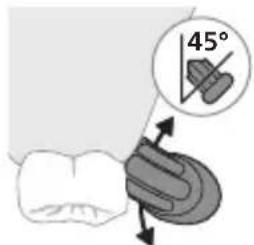
natural_image
Illustration of a hand gripping a small object with directional arrows indicating movement (no text or symbols)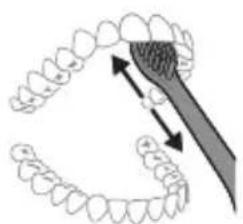
natural_image
Diagram showing dental tool application on upper teeth with magnified detail (no text or symbols)Φόρτιση USB
natural_image
Line drawing of a medical procedure showing a needle inserted into a bulbous structure (no text or symbols)natural_image
Illustration of two hands using a tool to lift or stand, forming a cross-section (no text or symbols present)natural_image
Diagram showing a mechanical assembly with a magnified inset of a tool interacting with a curved component (no text or symbols present)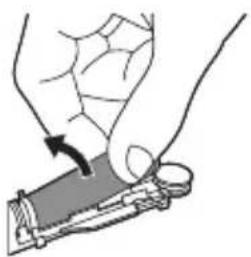
natural_image
Illustration of a hand holding a small object with an arrow indicating motion (no text or symbols)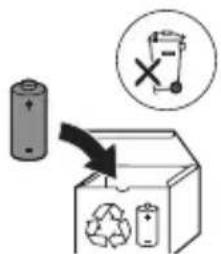
natural_image
Illustration showing a hand holding a brush and a close-up of a tool tip with a checkmark (no text or symbols present)natural_image
Illustration of a hand using a pipette to apply liquid onto a surface, with an inset showing a droplet on a surface (no text or symbols present)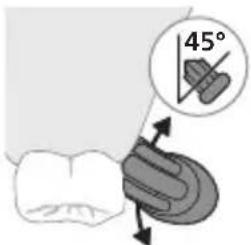
natural_image
Illustration of a hand holding a small object with directional arrows indicating movement or force (no text or symbols)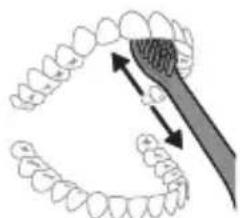
natural_image
Diagram showing dental tool application on teeth with magnified view (no text or labels)Зареждане с USB
natural_image
Line drawing of a medical procedure with a needle inserted into a tube (no text or symbols)natural_image
Illustration of two hands using a tool to adjust or install a mechanical component, with no visible text or symbols.natural_image
Diagram of a mechanical component with a curved arrow indicating rotation (no text or symbols)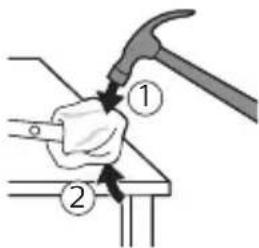
natural_image
Illustration of a hammer striking a cylindrical object with a circular arrow indicating rotation (no text or symbols)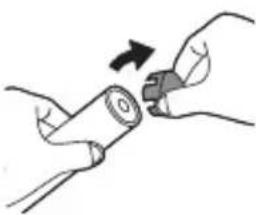
natural_image
Illustration of hands holding a battery with a switch, no text or symbols present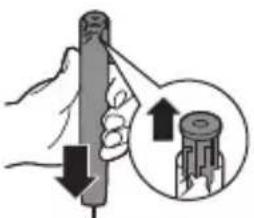
natural_image
Illustration of a hand holding a cylindrical tool with an arrow indicating downward motion, and a magnified inset showing the same tool's tip (no text or symbols present)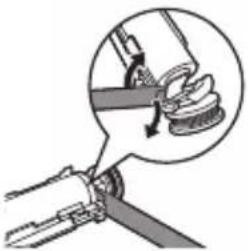
natural_image
Illustration of a mechanical clamp or tool interacting with a curved component, showing a magnified view of the handle (no text or symbols present)natural_image
Illustration of a hand holding a small object with an arrow indicating motion (no text or symbols)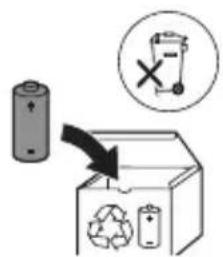
natural_image
Illustration of a hand holding a tool with an arrow indicating direction (no text or symbols)natural_image
Simple line drawing of a curved object with a checkmark indicating selection (no text or symbols)natural_image
Illustration of a hand holding a pen with a magnified inset showing a droplet on a surface (no text or symbols)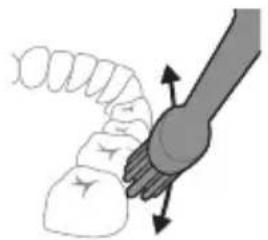
natural_image
Illustration of a hand holding a small object with directional arrows indicating movement or force (no text or symbols)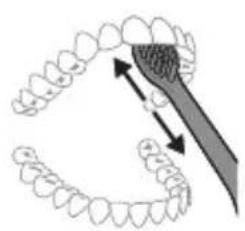
natural_image
Diagram of dental arching technique showing tooth arrangement and magnified detail (no text or labels)USB кубатталууда
natural_image
Line drawing of a medical procedure with a needle inserted into a tube (no text or symbols)natural_image
Illustration of two hands using a tool to adjust or install a mechanical component, with no visible text or symbols.natural_image
Diagram of a mechanical component with a curved arrow indicating motion (no text or symbols)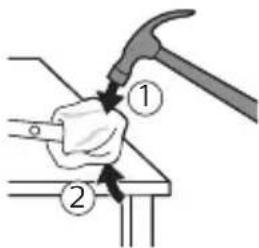
natural_image
Illustration of a hammer striking a cylindrical object with a circular arrow indicating rotation (no text or symbols)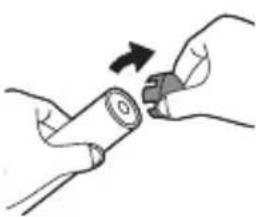
natural_image
Illustration of hands holding a battery with a switch, no text or symbols present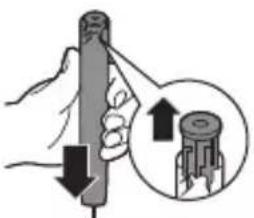
natural_image
Illustration of a hand holding a cylindrical tool with an arrow indicating downward motion, and a magnified inset showing the same tool's tip (no text or symbols present)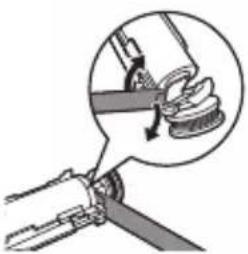
natural_image
Diagram showing a mechanical assembly with a magnified inset of a tool interacting with a curved component (no text or symbols present)natural_image
Illustration of a hand holding a small object with an arrow indicating motion (no text or symbols)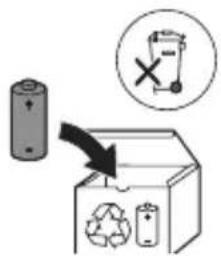
www.philips.com/support
natural_image
Illustration of a hand holding a toothbrush with a downward arrow indicating force or pressure (no text or symbols)natural_image
Simple line drawing of a funnel shape with a checkmark indicating completion (no text or symbols)natural_image
Illustration of a hand using a pipette to apply a product to a toothbrush, with an inset showing a magnified view of the product (no text or symbols present)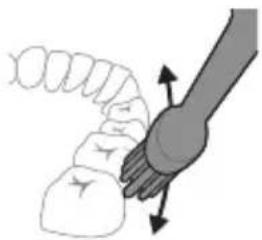
natural_image
Diagram of a hand holding a small object with directional arrows indicating movement or force (no text or symbols)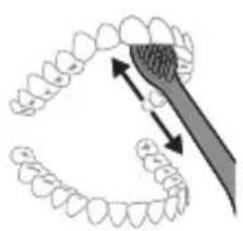
natural_image
Diagram showing dental tool application on upper teeth with magnified detail (no text or symbols)Полнење преку USB
natural_image
Line drawing of a medical procedure with a needle inserted into tissue (no text or symbols)natural_image
Diagram of two hands holding a tool with arrows indicating movement or force direction (no text or symbols)natural_image
Simple line drawing of a hand holding a tool with a circular motion arrow (no text or symbols)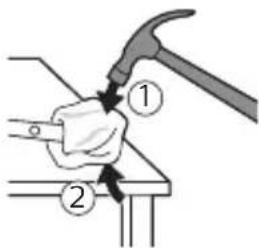
natural_image
Illustration of a hammer striking a cylindrical object with a circular arrow indicating rotation (no text or symbols)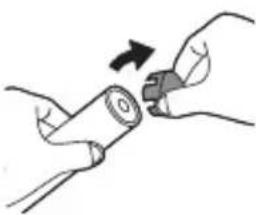
natural_image
Illustration of hands holding a battery with a close-up of its tip (no text or symbols)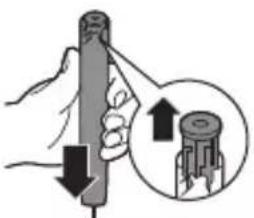
natural_image
Illustration of a hand holding a cylindrical tool with an arrow indicating downward motion, and a magnified inset showing the tool tip (no text or symbols)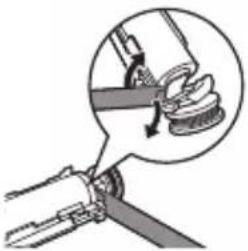
natural_image
Illustration of a mechanical clamp or tool interacting with a curved component, showing a magnified view of the handle (no text or symbols present)natural_image
Illustration of a hand holding a small object with an arrow indicating motion (no text or symbols)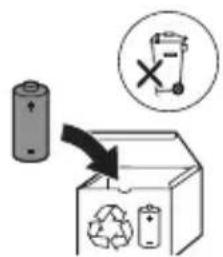
www.philips.com/support
natural_image
Illustration showing a hand brushing a tooth with a brush, and a close-up of a tooth being adjusted (no text or symbols present)natural_image
Illustration of a hand using a pipette to apply liquid onto a surface, with an inset showing a droplet on a surface (no text or symbols present)natural_image
Illustration of a hand gripping a piece of bread with a knife inserted (no text or symbols)natural_image
Diagram showing dental tool application on tooth structure (no text or symbols)USB-зарядка
natural_image
Line drawing of a medical procedure showing a needle inserted into a bulbous structure (no text or symbols)natural_image
Illustration of hands using a tool to adjust or install a mechanical component, no text or symbols presentnatural_image
Simple line drawing of a hand holding a tool, with no text or symbols present.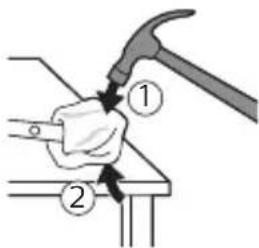
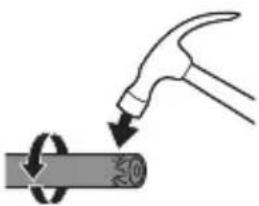
natural_image
Diagram showing a hammer striking a cylindrical object with a circular arrow indicating rotation (no text or symbols)
natural_image
Illustration of hands holding a battery with a switch, no text or symbols present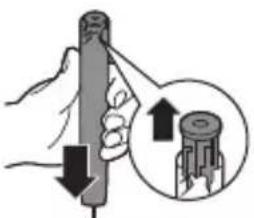
natural_image
Illustration of a hand holding a cylindrical tool with an arrow indicating downward motion, and a magnified inset showing the same tool's tip (no text or symbols present)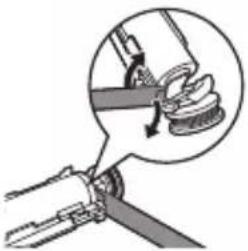
natural_image
Illustration of a mechanical clamp or tool interacting with a curved component, showing a magnified view of the handle (no text or symbols present)natural_image
Illustration of a hand holding a small object with an arrow indicating motion (no text or symbols)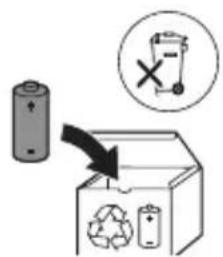
www.philips.com/support
Хуш омадед ба оилаи Philips Sonicare!
natural_image
Illustration showing a hand holding a brush and a close-up of a tool tip with a checkmark (no text or symbols present)natural_image
Illustration of a hand using a pipette to apply liquid onto a surface, with an inset showing a droplet on a surface (no text or symbols present)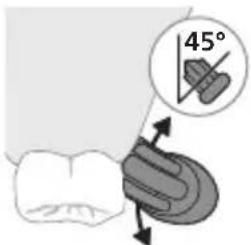
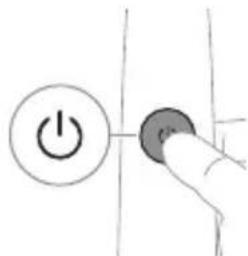
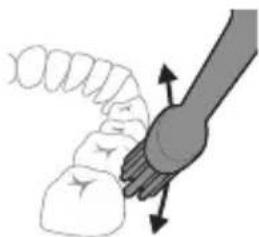
natural_image
Illustration of a hand holding a small object with directional arrows indicating movement or force (no text or symbols)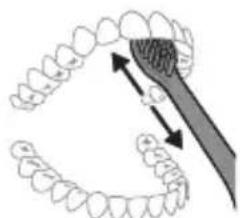
natural_image
Diagram showing dental tool application on teeth with magnified view (no text or labels)Баркпуркунии USB
natural_image
Line drawing of a medical procedure showing a needle inserted into a tube with tubing (no text or symbols)natural_image
Illustration of two hands using a tool to cut or mark a surface, with no visible text or symbolsnatural_image
Simple line drawing of a hand holding a tool, with no text or symbols present.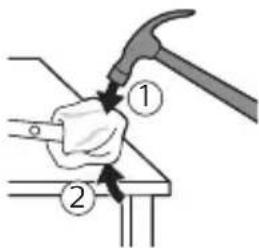
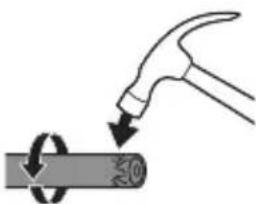
natural_image
Illustration of a hammer striking a cylindrical object with a circular arrow indicating rotation (no text or symbols)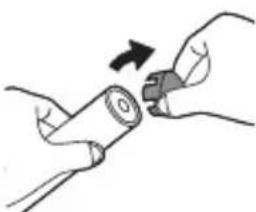
natural_image
Illustration of hands holding a cylindrical object with an arrow indicating rotation (no text or symbols)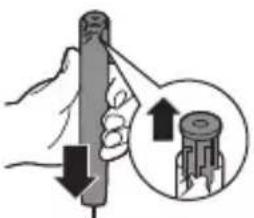
natural_image
Illustration of a hand holding a cylindrical tool with an arrow indicating downward motion, and a magnified inset showing the same tool (no text or symbols present)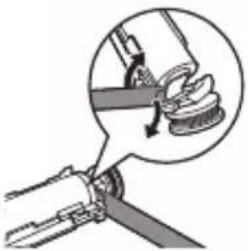
natural_image
Diagram showing a hand gripping a mechanical component with a magnified inset highlighting the mechanism (no text or symbols present)natural_image
Illustration of a hand holding a tool with an arrow indicating motion (no text or symbols)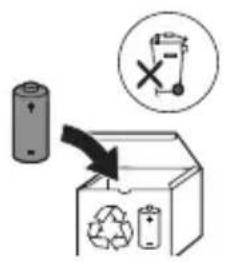
natural_image
Illustration of a hand holding a toothbrush with a downward arrow indicating force or pressure (no text or symbols)natural_image
Simple line drawing of a curved object with a checkmark indicating selection (no text or symbols)natural_image
Illustration of a hand using a pipette to apply a sample onto a surface, with an inset showing a magnified view of the sample (no text or symbols present)Заряджання по USB
natural_image
Line drawing of a medical procedure with a needle inserted into a tube (no text or symbols)natural_image
Illustration of two hands holding a tool with arrows indicating movement or force direction (no text or symbols)Sonicare for Kids Compact a60 Standard.
natural_image
Diagram of a mechanical component with a curved arrow indicating rotation (no text or symbols)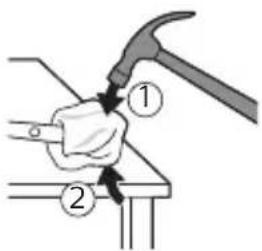
natural_image
Illustration of a hammer striking a circular object with a handle (no text or symbols)natural_image
Illustration of hands holding a cylindrical object with an arrow indicating rotation (no text or symbols)natural_image
Illustration of a hand holding a cylindrical tool with an arrow indicating force or direction, and a magnified inset showing the same tool (no text or symbols present)natural_image
Diagram of a mechanical joint or clamp mechanism with a magnified inset showing a hand holding a spring (no text or symbols present)natural_image
Illustration of a hand holding a small object with an arrow indicating motion (no text or symbols)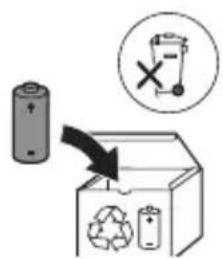
natural_image
Illustration showing a hand brushing a tooth with a brush and a close-up of the tooth being checked (no text or symbols present)natural_image
Illustration of a hand using a pen to apply a small object to a surface, with an inset showing a textured surface (no text or symbols present)natural_image
Illustration of a worm-like organism being inserted into a plug (no text or labels)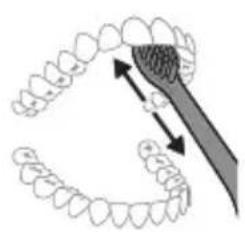
natural_image
Diagram showing dental tool interacting with teeth (no text or labels)USB зарядтау
natural_image
Line drawing of a medical procedure showing a needle inserted into a tube into a bulbous structure (no text or symbols)natural_image
Illustration of two hands holding a tool with arrows indicating motion or force direction (no text or symbols)natural_image
Diagram of a mechanical component with a curved arrow indicating rotation (no text or symbols)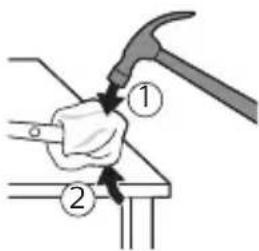
natural_image
Illustration of a hammer striking a circular object with a handle, no text or symbols presentnatural_image
Illustration of hands holding a cylindrical object with an arrow indicating rotation (no text or symbols)natural_image
Illustration of a hand holding a cylindrical tool with an arrow indicating force or direction, and a magnified inset showing the same tool (no text or symbols present)natural_image
Diagram of a mechanical clamp or fastener assembly with a magnified inset showing the hook mechanism (no text or symbols present)natural_image
Illustration of a hand holding a small object with an arrow indicating motion (no text or symbols)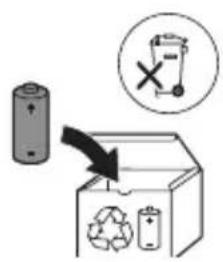
www.philips.com/support
Philips Sonicare nùunwùhp nngniùnuú tǎtq:
Stntlnipjniutn wuynwupnijwi uwhu
Uwnpù oqinnwqnndtp úhwjù puù tǔwwuunwlḥ: Uwnpn, nnu wùwnunyngutpn l u wputuniwnutpù oqinnwqnndtlnig wnwg lwnnwgtp wju lwnunn untntlywqhnp l u wwhtp wjù htunwqwjh hwiúwn: Nz tǔwwuunwlqujhù oqinnwqnndniún lwnnn l s wnwgugutl lwnwüqutn lwwí lning yìwwuulwóputn:
2qn12wgniu5utn
- 3t#n1 w#htp lhgpw#nnh# n gnhg:
- Uwpntinig htunn hwunqutip, nn jhgpwynnhyn jhnuhu snn t, uwhupwu wju uhwgutin:
- ৭thuwutp n u \$hqhylwlu, qqwnnwlywu lwwi uwwulnn panyl ywnnnnijajniutpnu lwwnhy lwwnn tu oqnwnpndt l wwnpn ihwju utnwhulnnnijawu utnpn, lwwi trat unwup unwgti tu oqnwnpndwu hwuwwwunwuhwu hnwhwujqutn l hwulwuniu tu huwnwulnn ynwujqutp: Uwnph uwpnuiu l uwwwwnlyuwu qnndnnnijajniutpnu stu lwwnn wnyl tnthwutph lynzhg, trat unwup stu utnwhulyniu:
- tenthuwutqn zwtunp 5 hwnwù uwnph htun:
- Uhwjù oqunwqnδtīp Philips-h onhqhùwūl wputuniwnùtn ywiú ðwhuulnn ūjniētān: Uhwjù oqunwqnδtīp uwnph htún unnwúwnŋluwð lhgpwwunnhsīn: Uhwjù oqunwqnδtīp onhqhùwūl USB úwīnhūn lù USB uünigúwù pǐnlyn (tṛtā ānwùp úwīnwylwnwnutī tǔ):
- Uh oqunwqnndtp lhgpwlnnhyn npuniu ywu unwp uwuynlunyrautnh ünn:
- Uh lujwgtip uwunph nnulş ćuwu uwuwuph lujwgúwù útiptúuwjniú:
- Uju uwnpn ̈uwhwinttuulwɔ̈ẗ ŝhwi̯ü winnwuttn̈, ̈hūnttn̈ ütqn̈ü uwpnẗnï hwi̯u̯n:
- Uh oqunwannôtip hunqwùwlyh qihuhyn, tṛtā hunqwùwlyh úwuttnn ひ2nulwǒ yhuú ðnúnulwǒ tǔ: Φnhwnhùtip hunqwùwlyh qihuhyn wútǔ 3 wúhun úty yhuú wútgh 2niún, tṛtā wju ð2wùuttnn hwjunùultǔ:
- funiuwhtp tiatnujhù jintn qwiú lynynuh jnin wwnniùwlynn wwnwùpùtnh htun 2chniúhg: chnniún ywnnn t hwiúqtgǔtì hunqwùwlyh úwqhútnh pawyhutjniú:
- Uh oqunwqnnp#tp uwnpn u lunnhnnwulgtp @tn wnuw#uwpnjdh/pd2yh htün, tprā oqunwqnnp#tlnig htunn wnjn#uwhnunipajniù 5 wnwgw#niú, tprā wnjn#uwhnunipajniùn 2wnni#uwylniú 5 wjù oqunwqnnp#tlnig htunn 1 2wpwja, lwwú tprā niut#niú tip unhwǎnipajniù lwwú gwuj:
- 6pti niutgti tip ptnwuh ywu jhuntnh uhnwhwnniajniu 'uwulhyu 2 wúuniú, hunhhnnwlgtip átn winnwúwwpnjch htin' 'uwupwù wju uwnpù oqnuwqnndtln:
- tpat oqunwqnndniú tþ unnh zhpúwulwn lquú wjl húwllwùunwulnnwð uwnp, lquwyltp átn pd2yh lquú húwllwùunh wnunwnnnnh htún` lwhupwú uwnph oqunwqnndniún:
- 6pt pd2ywlwù yunwhqnjiŋniùtn niútp, hunhhnnwlygtp àtn pd2yh htün` uwhupwù wju uwnpù oqinwqnndtln:
- Uju uwnpù wùàúwlywù hùwúph uwnp ٤ lù ǔwhuwintuulwò ٤ lùh puìh pnidwunniǔtngh lynŋúhg oqinnwqnδúwù huuíwn wunwúwwpnidwlywù wnwlynhlywjniú lyuì hwuunwunnijājwù lynŋúhg:
Uwnunlngh wùlùn wùqnlējwù gniŋniūtṛn
- Uju uwnpn wwnniuwyniú t úwnnyngutn, nnnúp wtúnp t htnwgultú úhwjù nnuwylnnluwó wùàwǔg lynúhg:
- Uwnpù oqunwqnδtρ úhwjù puù ùwwuunwlyh: Uwnpn, ηnw úwnnlyngútnη l u wwnwqwùtnù oqunwqnδtŋig wzuω g ywnnwgtp wju untntlywqhnn l u wwhtp wju htünwqwjh hwúwn: Ωs üwwuunwlywjhu oqunwqnδniún l ywnnn 5 wnwgwúti l unwùqutn lyuí jning l'uwuuulwópútn: Rtunn unpwúwnnluwð wputuniwnútnη ywnnn tǔ unwnptn jhùti unwnptn uwnpṭnh hwúwn:
- Uhwjù oqunwqnnpāp Philips-h onhqhùwù wputuniwnutn l u dwhuuunn tjniptn: Oqunwqnnpāp úhwjù hwiūnuḥ HX6110 uünigúwù pīnly
- Uwnpù ni úwnunlyngùtnŋ hīrni wuhtāp lynwuhg u úh ηntāp wùúhqwlywù wnh āwnwqwjpeùtnḥ unwù ywú pwnàn gtnúwuuuhǎwùwjħù wwjúwùùtnniú:
natural_image
Illustration showing a hand brushing a tooth with a brush, and a close-up of a tooth being adjusted (no text or symbols present)1 lunqwùwuh qihuhh hwulwwuntgntp wjùwbu, nn úwqhlyutnu ninnuud jhtu ünjü ninnnujwup, hùs pezuwuh nhúwgh ynnún:
natural_image
Illustration of a hand holding a pen with a magnified inset showing a droplet on a surface (no text or symbols)L2niú hunphnnn ξ unnu niú, nn úhúzú 8 unwntlywù tntghuwutnh winnwutupn tntghuwj hnhuwntǔ úwpnh hn ðünnp lywiú útyi wjj huúwúnn zwiwhwhwu wùà:
1 əngtɪp hunqwɪuwlɪh ʊwqhlyɪtnɪŋ ʊ ʌtɪngntɪp wunwʊh ʊwɒnɪlɪh phʒ pwiʊwʊlnɪŋəniː:
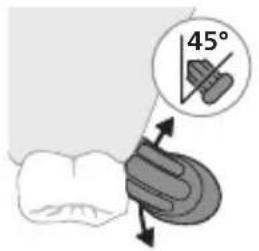
2 Umwúh hunqwùwlyh úwqhúutnn ŋntp wunwúutnh únw nnn2 wúlyjwiú unwú (45 wunhǎwú): Uúnín utnútip, nnwtaugh úwqhúutnn hwuútu jùntph tanwqðhù ywuí ŋnwùhg utnpu:
U2niú Uúpnnq dwúwúwly hunqwúwlyh ytúunnnún wuwhtp wunwúutnh htn 2zhúwú útg:
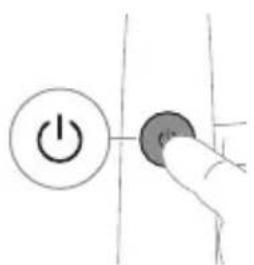
3 Utnútp hnuwùph úhwugúwù/wǔguwúnúwù lynówuyn Philips Sonicare-n úhwugútǐnì huuúwn:
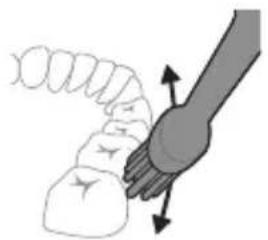
natural_image
Diagram of a hand holding a tooth with directional arrows indicating movement or force (no text or symbols)4 Unpntu wuhtp hunwuwlyh uwqtnu wunwutph unw untwnwnyuwo l juntth tanwqdnui: Uwpntp winwutph petaluwlyh htun ni wnwg 2wndnutpnu, nnwtuqh hunwuwlyh uwqhyutph hwutu winwutphu: Cwnniuwytpr wju 2wndniun atn uwpnuwu yhnih wupnng npawgpniu:
^12 niù hūnquùwǔh wùqhùtān wṭuṇ p t úh qhn p n l wju wú wù: hūnphnn zh unpniú wunwútān uwpnti wju wtu, hùw tu ŋnip lúwpnthp unlnnwlywù wunwúh hūnquùwynu:
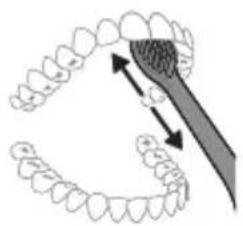
natural_image
Diagram showing dental tool interacting with teeth (no text or labels)5 Ungluh wunwutph utnuh uwwytnunyputnp
uwpntini hwuwipetptp hunqwuwlyh pnuwyn
yhuwninhn nhnpnyu u ih pwuh ninnwhwjug
uwpnnn 2wndniutp ywinwntp jninwpwuynin
winwuh ynw:
6 Uwpntihi yhniu wulwnntinig htunn lqwnn tpr
lnwgnighs dwuwuwly hwnlywgutl winnwutph
dwunn uwlvtntuutph n uwpntiniu u wju
hwunluwudtphu, nnuntn wnwgwuniu l powwnnniu:
Uwpnn tpr uwu uwpnti ltqnii' hunqwuwyn
wwhtinyl uhwgylwδ ywiś wugwinwδ, hùswtu
uwhupwnnniu tpr:
^12 niù 2tn Philips Sonicare winwùh hunquùwùn wùyúnwùq 5 winwùutnh pntytunutnh (hunquùwùh qihuhyn 2niun 5 úw2úniú pntytunutnh únw) u winwùutnp ytpnwlywùqūnn hwnúwnwùpútph (ignùnuiutn, 2wwhlyutn, ytǔhnutn) oqnwnqnòúwù ntiwpniú, tṛat ānwùp wwwn2wǎ tǔ oqnwnqnòúniú l ztiú huwhunuļniú:
KidPacer
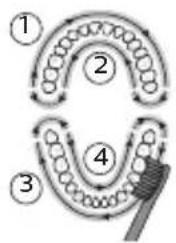
flowchart
graph TD
    A["①"] --> B["②"]
    B --> C["③"]
    C --> D["④"]
    D --> E["⑤"]
Змунqnqtini hwúwn, np hwúwwwnwzwiḥ tṛ úwρnniś wúpnŋo ptnwùn, ptnwùn 4 úwuh puḍwùtṛp oqnuwqnnδtlnu KidPacer qnpδwnznyjān: KidPacer unthùnlnqhwiú hunqwǔwlyíwiú dwúwǔwlyn puḍwùniś 5 4 hwúwwwn úwuh l u waŋwǔzwiùniś 5, pā tṇp 5 hwnlwyulnn wǔgǔtī hwqnnŋ hwnljuòhù: Зwinluwǒutnh wqnwu2wùniún untnh 5 niūtūniú lywná àwjùwjħu wqnwu2wùh úhqngnu: Umwúh hunqwǔwlyú wujnnúwun lytwnnu wǔgwunylniś 5 hunqwǔwyltini utguhwj huwrunhù l u waŋwnwnniú wjn úwuhù` úluwqwnytlnu hwúwwwnwnwhuwú útntnh:
L2niú 2tn tnthuwju untntlywgntp, nn wunwúutnn hwnlywulnn t úwpnti úhùzu wju wwhn, tnp uwnpn uqlwqwnlynui t hwiúwwywinwuhuu u tnttnh u wügwunyniu:
hùntùuhúlnípjuì wùnhǎwùutn
Eğluynwlywù hunqwùwlyù niùh 2 unwptn hùntùuhylnpəjwù ntādhūttn. útnú l u zwiħwqwiug útnú:
^12 niù' Uunwùh hunqwùwlyù wunwghù wùquwú oqunwqnndtǐhu lyuìhuwnnnluwǒ lwwnqwùlnnniún zwiuhwqwùg útnú ntdhúu ʒ:
USB lhgpwynnniú
L2nu` 3tunn unwuwunnuhn wputuniwnuttnl ywnnn tǔ unwnptnulti qùluò únntihg ywhuulwò:
1 Uhwgntp ihgpwulnnuwu hhuph USB lwnn wwnh hwnuwnwughshu, nnn uhwgulwδ ξ έιθγυnnwlywù ywnnwlyhù:
2 Stnwnntp pnuwln hgpwulnnhsh ynw:
- Uwnunlyngh lhgph gnighsh lnjyn qwnuyniú 5, hul pnüwyn tnyni wüqwú wqnwu2wú 5 inwihu: Uw u2wuwyniú 5, nn winuwúh hunqwüwynl hgpwwlnnyniú 5:
Uwnunlngh lwnqwulhǎwly
tnp pruwnyn untwnwnnuw8 t hgpwnlnnhzh ynw, uwnunlngh gnighzn gniyg t unwlhu uwnunlngh lhgph uwwwnwnwn:
Uwnunlngh lwnqwuhǎwly Uwnunlngh gnighs
Lhgpwwlnpniu əwnpniu ʒ hywüwş lnjuunu
natural_image
Line drawing of a medical procedure showing a needle inserted into a bulbous structure (no text or symbols)1 3twngntp hunqwùwlyh qihuhyn u luwgtp útunwnwlywù jhutzh hwnuŋwðn unwp gnnu: 3wúnqultp, nn htnwngntl tpr wunwúh úwðniyh útuwgnnnútqn:
2qnizwgniu' Uh hntp ntunhut yuhpn unin wnwnlywutpnu' ntuwh jhutnh utg, puuh nn wju lwwnnt ls hwuqtiguti yuuuulwoph:
2 Fnuwlyh wupnng uwlvtntun uwpntip hunuwul qnpouwopnu:
^12 niù' Uh hwnlquòtp pnùwlnu ljuwgunwuhù' wultinnn gnnn htnwugutni hwúwn:
hunqwuhghqihly
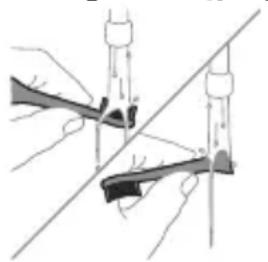
natural_image
Illustration of two hands using a tool to adjust or install a mechanical component, with no visible text or symbols.1 3nɪnwpwɪsɪŋn oqɪnwɑnnɒniʊhg hɪtɪnn lʊwɡtɪp hunqwɪwwlyh qɪhʊhʊn u ʊwəqhyʊtɪŋn:
2 3tnwgntp hunqwùwuh qlnihn prùwuhgh u wnùuwqù 2wpwàn úth y lwgtp hunqwùwuh qlhuhyn inwp gnnu: Llwgtp āwúhnnnwlywù ywhwnhsù wjùpwù hwǎwhu, nnpwù wùhnwdt2un ʒ:
Lhgpwynnhz
1 Uguwntp jhgpwulnnhyn` uwhupwu wju uwpntln:
2 Lhgpwulnnhsh uwlvtntun uwpntip hunuwwl qnnδuωδρnu:
natural_image
Illustration of a mechanical component with a curved arm and rod (no text or symbols)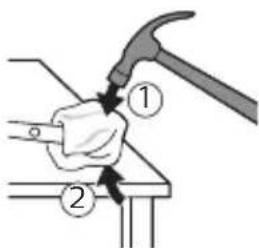
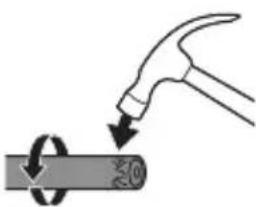
natural_image
Illustration of a hammer striking a cylindrical object with a circular arrow indicating rotation (no text or symbols)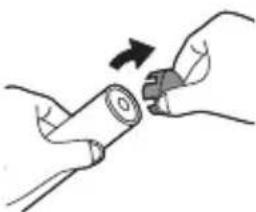
natural_image
Illustration of hands holding a cylindrical battery with a switch, no text or symbols present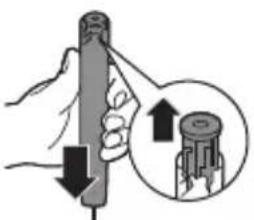
natural_image
Illustration of a hand holding a cylindrical tool with an arrow indicating force or direction, and a magnified inset showing the same tool (no text or symbols present)1 dtnwihgpwunnunn uwnunlngh ihgp n wwwntni hwiwn htinwqntp pnuwyn ihgwulnnhzhg, uhwqntp winwuh hunqwùwyn l pnyl unutip wju w2huwinh' uhùzlu ywiq wnutin: qnyutip wju pwjln, uhùzlu wjluu zhwnnnwuup uhwgutl winwuh hunqwùwyn:
2 3tnwqntp u peuhtp hunqwùwlyh qihuhyn: Uúpnng peuwwlyn chwutp unphsnyl yuwú yunnnnu:
3 Prùwuh ʊtnuŋ ʊh àtnpnu ʊwwhtp u hwnylwdtp prùwuh wwnjwuhü ʊtnpuh tqnhg 0,5 ŋnjiú pwnànniajwü ʊnw: Nidtın hwnylwdtp únipănu pninn 4 lnnútnhg` tqnh ywwhwnhzn ŋnniu hwùtini hwùwn:
L2niú 3ùwnwulnn 5' uinhuyuwó jhùap úh puùh wùqwú hwnylwǒtāl dōwjnhù 'utnphù pnùwlywih uhwgniuutānp huqṭjni hhuśwn:
4 3tnwqntp tqn h ywhwnhzn winwuh hunqwùwlyh pnùwlyhg: trā tqn h ywhwnhzn ht2nnipajwup zh wqwnyniś wwwnjwuhg, ynhùtp puji 3-n úhúzu tqn h ywhwnhzn nninu qw:
5 Früwyn qihuhuwyn wuhhtinu' jhutin' utnpu utnútp lyn2un üwyltinunyah ynw: trat utnphù pwnwnnhşutpn ht2unnipwup stu wqwnunniw wwnjwuhg, lynytup pwjl 3-n ühusl utnphù pwnwnnhşutpn nninu qwù:
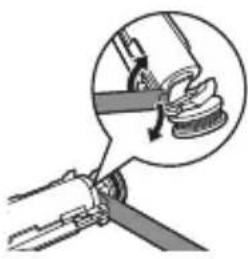
natural_image
Diagram showing a mechanical device with a magnified inset highlighting a component (no text or symbols present)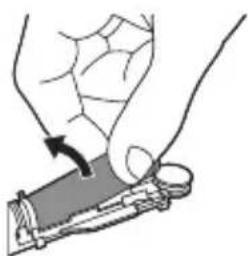
natural_image
Illustration of a hand holding a small object with an arrow indicating motion (no text or symbols)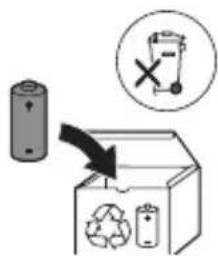
6 Stnwnptp wunnunwlywhwùn úwnunlyngh u 2ngwùwuh úhglu útnphù pwnwnnhsùtnh útnpluni: Ujùnhtunl qqniznptù htnwqntp wunnunwlywhwùn úwnunlynghg 2ngwùwuh útnpluh hwnuìwòn lynuntjīn huúiwn:
7 Stnwnntp winninwlywhwun uwnlnygh utnpuh u 2ngwuwuh uhqu lynuntini utinwnwlywu utnnhnp, nnp uhwguniu t uwnlnygn unwwuwjhu: Uw ypnlwguh uwnlnygh utnpuh tqnq 2ngwuwhg:
8 Anutp uwnunlngn u htnwgntp wju utnphu pwnwnnhsutphg, nnwtuqh ynuntp uwnunlngh tynnnnn utunwnjw utnphn:
2qn12wgniu' 2qn12wgtp uwnunlngh utnnhputnh unin tqntphg, npwtuqh huniuwhtp uwnutph uluwuqwdputphg:
www.philips.com/support
∂m∂g∂s∂m∂g∂n∂m Philips Sonicare-n∂ m∂s∂b∂n!
Sonicare for Kids - Design a Pet Edition grades & benefits grades & benefits & benefits & benefits & benefits & benefits & benefits & benefits & benefits & benefits & benefits & benefits & benefits & benefits & benefits & benefits & benefits & benefits & benefits & benefits & benefits & benefits & benefits & benefits & benefits & benefits & benefits & benefits & benefits & benefits & benefits & benefits & benefits & benefits & benefits & benefits & benefits & benefits & benefits & benefits & benefits & benefits & benefits & benefits & benefits & benefits & benefits & benefits & benefits & benefits & benefits & Benefits
Edition 30000000000000000000000000000000000000000000000000000000
Philips Sonicare (LgM. 1.)
natural_image
Illustration showing a hand holding a brush and a close-up of a tool tip with a checkmark indicating a detail (no text or symbols present)natural_image
Illustration of a hand using a pipette to apply liquid onto a surface, with an inset showing a magnified view of the surface (no text or symbols present)natural_image
Illustration of a hand gripping a small object with directional arrows indicating movement (no text or symbols)natural_image
Diagram showing dental tool interacting with teeth (no text or symbols)odds funds mgln bnd fund mgn odds fund mgln dshgbdg
odds funds funds funds funds funds funds funds funds funds funds funds funds funds funds funds funds funds funds funds funds funds funds funds funds funds funds funds funds funds funds funds funds funds funds funds funds funds funds funds funds funds funds funds funds funds funds funds funds funds funds funds funds funds funds funds funds funds funds funds funds funds funds funds funds funds funds funds funds funds funds funds funds funds funds funds funds funds funds funds funds funds funds funds funds funds funds funds funds funds funds funds funds funds funds funds funds funds funds funds funds Funds
odds funds funds funds funds funds funds funds funds funds funds funds funds funds funds funds funds funds funds funds funds funds funds funds funds funds funds funds funds funds funds funds funds funds funds funds funds funds funds funds funds funds funds funds funds funds funds funds funds funds funds funds funds funds funds funds funds funds funds funds funds funds funds funds funds funds funds funds funds funds funds funds funds funds funds funds funds funds funds funds funds funds funds funds funds funds funds funds funds funds funds funds funds funds funds funds funds funds funds funds funds Funds
natural_image
Line drawing of a medical procedure with a needle inserted into a bulbous structure (no text or symbols)natural_image
Illustration of two hands using a tool to adjust or install a mechanical component (no text or symbols visible)natural_image
Simple line drawing of a hand holding a tool, with no text or symbols present.natural_image
Illustration of a hammer striking a cylindrical object with a circular arrow indicating rotation (no text or symbols)natural_image
Illustration of hands holding a cylindrical object with an arrow indicating rotation (no text or symbols)natural_image
Illustration of a hand holding a cylindrical tool with an arrow indicating downward motion, and a magnified inset showing the tool tip (no text or symbols)natural_image
Diagram of a mechanical assembly with a magnified inset showing a hand holding a curved tool (no text or symbols present)natural_image
Illustration of a hand holding a small object with an arrow indicating motion (no text or symbols)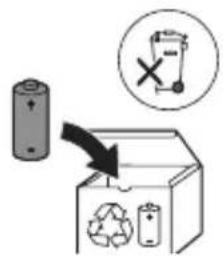
www.philips.com/support
!Philips Sonicare 70-10-10
.י physics pieces men

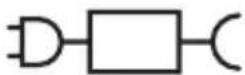
XXXXXX
"Xxxxxx" -ה:77ה 790
Sonicare for Kids - Design a 70-12-13-14-15
הַתְרָׁהִיָהִיָהִיָהִיָהִיָהִיָהִיָהִיָהִיָהִיָהִיָהִיָהִיָהִיָהִיָהִיָהִיָהִם Pet Edition
natural_image
Illustration showing a hand brushing a tooth with a brush, and a close-up of the tooth being adjusted (no text or symbols present)natural_image
Diagram showing dental tool application on upper teeth with magnified detail (no text or symbols).הכלהה כרְשׁה בְרַעָהִיָהִיָהִיָהִיָהִיָהִיָהִיָהִיָהִיָהִיָהִיָהִיָהִיָהִיָהִיָהִיָהִיָה Philips Sonicare 76, 10, 11, 12, 13, 14, 15, 16, 17, 18, 19, 20, 21, 22, 23, 24, 25, 26, 27, 28, 29, 30, 31, 32, 33, 34, 35, 36, 37, 38, 39, 40, 41, 42, 43, 44, 45, 46, 47, 48, 49, 50, 51, 52, 53, 54, 55, 56, 57, 58, 59, 60, 61, 62, 63, 64, 65, 66, 67, 68, 69, 70, 71, 72, 73, 74, 75, 76, 77, 78, 79, 80, 81, 82, 83, 84, 85, 86, 87, 88, 89, 90,
תָרִיּ
USB הַרְׁ
1
.שְׁרַעָה בִיֶתָה
. Ivory and Israel
- אַרְאָה אַרְאָה
natural_image
Line drawing of a medical procedure showing a needle inserted into tissue (no text or symbols)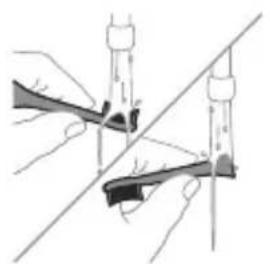
natural_image
Illustration of two hands holding rifles with a diagonal line crossing through them (no text or symbols)הַרְּוֹת
תְרָה בַרִי לְרָה
1
natural_image
Diagram of a mechanical tool interacting with a curved component, showing a magnified view of the tool (no text or symbols present)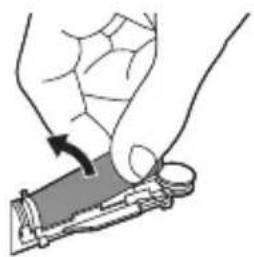
natural_image
Illustration of a hand holding a tool with an arrow indicating motion (no text or symbols)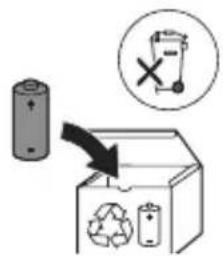
www.philips.com/Sonicare
©2023 Koninklijke Philips N.V. (KPNV). All rights reserved. Philips and the Philips shield are trademarks of KPNV. Sonicare and the Sonicare logo are trademarks of Philips Oral Healthcare, LLC and/or KPNV.
300010521861 (07/04/2023)


75 % recycled paper
75 % papier recyclé



- Introduction
- Important safety information
- Warnings
- Battery safety instructions
- English
- Electromagnetic fields (EMF)
- Storage and transportation conditions
- Intended use
- Your Philips Sonicare (Fig 1.)
- Accessories
- Sonicare app - Getting started
- Getting started
- Applying your favorite sticker
- Attaching the brush head
- Using your Philips Sonicare toothbrush
- Brushing instructions
- KidPacer
- Intensities
- How to brush
- Features
- SmarTimer
- EasyStart
- Activating or deactivating features
- Charging and battery status
- Charging
- USB charging
- Battery status
- Battery status Battery indicator
- Battery status (when handle is not placed on charger)
- Cleaning
- Toothbrush handle
- Brush head
- Charger
- Travel case
- Storage
- Replacement
- Locating the model number
- Warranty and support
- Warranty exclusions
- Recycling
- Removing the rechargeable battery
- Giriş
- USB şarji
- USB nabíjení
- Opladning med USB
- www.philips.com/support
- USB-Aufladung
- USB-laadimine
- Carga de USB
- Charge USB
- Punjenje putem USB-a
- Stanje baterije
- Stanje baterije Indikator baterije
- Glava četkice
- USB uzlāde
- USB jkrovimas
- USB-töltés
- Opladen via USB
- USB-lading
- Philips Sonicare tish pastangizdan foydalanish
- Funksiyalar
- USB quvvatlash
- Batareya holati
- Batareya holati Batareya indikatori
- Batareya holati (dasta quvvatlagichga qo'yilmaganida)
- Tozalash
- Tish cho'tkasi dastasi
- Cho'tka kallagi
- Quvvatlash moslamasi
- Sayohat g'ilofi
- Xotira
- Carregamento USB
- Încărcare USB
- Karikimi USB
- USB-polnjenje
- Nabíjanie pomocou portu USB
- Johdanto
- USB-lataus
- USB-laddning
- USB zarýad bermek
- Φόρτιση USB
- Зареждане с USB
- USB кубатталууда
- Полнење преку USB
- USB-зарядка
- Баркпуркунии USB
- Заряджання по USB
- USB зарядтау
- Stntlnipjniutn wuynwupnijwi uwhu
- 2qn12wgniu5utn
- Uwnunlngh wùlùn wùqnlējwù gniŋniūtṛn
- hùntùuhúlnípjuì wùnhǎwùutn
- USB lhgpwynnniú
- Uwnunlngh lwnqwulhǎwly
- Uwnunlngh lwnqwuhǎwly Uwnunlngh gnighs
- hunqwuhghqihly
- Lhgpwynnhz
- Philips Sonicare (LgM. 1.)
- odds funds mgln bnd fund mgn odds fund mgln dshgbdg
- odds funds funds funds funds funds funds funds funds funds funds funds funds funds funds funds funds funds funds funds funds funds funds funds funds funds funds funds funds funds funds funds funds funds funds funds funds funds funds funds funds funds funds funds funds funds funds funds funds funds funds funds funds funds funds funds funds funds funds funds funds funds funds funds funds funds funds funds funds funds funds funds funds funds funds funds funds funds funds funds funds funds funds funds funds funds funds funds funds funds funds funds funds funds funds funds funds funds funds funds funds Funds
- הַרְּוֹת
- תְרָה בַרִי לְרָה
Brand : PHILIPS
Model : Sonicare For Kids HX3601
Category : Electric toothbrush