
Sonicare Diamondclean HX9302 - Electric toothbrush PHILIPS - Free user manual and instructions
Find the device manual for free Sonicare Diamondclean HX9302 PHILIPS in PDF.


| Product Type | Electric toothbrush |
| Brand | Philips |
| Model | Sonicare DiamondClean HX9302 |
| Brush Head Type | Replaceable, recommended every 3 months |
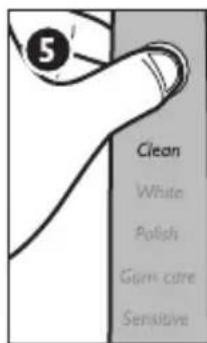
| Brushing Modes | 5 modes: Clean, White, Polish, Gum Care, Sensitive |
| Timer | Quadpacer interval timer (30-second intervals, 2 minutes total) |
| Easy-start Feature | Gradually increases power over first 14 brushings, can be deactivated |
| Battery Life | Up to 3 weeks on a full charge |
| Charging Time | 24 hours for first full charge |
| Charging Methods | Charging glass, charging travel case via USB |
| Voltage | Universal (via USB wall adapter) |
| Power Source | USB wall adapter (provided) |
| Water Resistance | Not waterproof; charging base and travel case must not be immersed |
| Cleaning Instructions | Rinse handle and brush head; wipe with soft cloth and mild soap; charging glass top-rack dishwasher safe |
| Safety Certifications | Complies with EMF standards |
| Included Accessories | Brush head, handle, hygienic travel cap, charging glass, charging base, charging travel case, USB wall adapter, USB cord |
| Compatibility | Only use Philips Sonicare brush heads |
| Warranty | International guarantee; does not cover brush heads, misuse, or normal wear |
| Color | White |
| Material | Plastic, ergonomic handle |
Frequently Asked Questions - Sonicare Diamondclean HX9302 PHILIPS
User questions about Sonicare Diamondclean HX9302 PHILIPS
0 question about this device. Answer the ones you know or ask your own.
Ask a new question about this device
Download the instructions for your Electric toothbrush in PDF format for free! Find your manual Sonicare Diamondclean HX9302 - PHILIPS and take your electronic device back in hand. On this page are published all the documents necessary for the use of your device. Sonicare Diamondclean HX9302 by PHILIPS.
USER MANUAL Sonicare Diamondclean HX9302 PHILIPS
Always here to help you / 始终如一地为您提供帮助
Register your product and get support at / 请登录以下网址并得到相应的帮助 www.philips.com/welcome


natural_image
White electric toothbrush with blue filter, no visible text or symbols on bodyPhilips Sonicare DiamondClean
PHILIPS sonicare
1 Important 3
2 What's in the box 6
3 Charging your Sonicare 7
4 Using your Sonicare 8
5 Getting used to your Sonicare 10
6 Travelling with your Sonicare 11
7 Cleaning your Sonicare 12
8 Storing your Sonicare 13
9 Environment 14
10 Guarantee and service 16


1 Important
Read this user manual carefully before you use the appliance and save it for future reference.
Danger
- Keep the charging base away from water. Do not place or store it over or near water contained in a bathtub, washbasin, etc. Do not immerse the charging base or charging travel case in water or any other liquid. After cleaning, make sure the charging base or charging travel case is completely dry before you connect it to the mains.
Warning
- Check if the voltage indicated on the appliance corresponds to the local mains voltage before you connect the appliance.
- Never use the charging base or charging travel case if it is damaged in any way. If the charging base, the charging travel case, the cord or the plug is damaged, always have it replaced with one of the original type in order to avoid a hazard.
- If the appliance is damaged in any way (brush head, toothbrush handle), stop using it. This appliance contains no user-serviceable parts. If the appliance is damaged, contact the Consumer Care Centre in your country (see chapter ‘Guarantee and support’).
- Do not use the charging base or charging travel case outdoors or near heated surfaces.
- This appliance can be used by children aged from 8 years and above and by persons with reduced physical, sensory or mental capabilities or lack of experience and knowledge if they have been given supervision or instruction concerning use of the appliance in a safe way and if they understand the hazards involved. Cleaning and user maintenance shall not be made by children unless they are older than 8 and supervised. Keep the appliance and its cord out of reach of children aged less than 8 years.
• Children shall not play with the appliance.
Caution
- Do not clean the brush head, handle, charging base or charging travel case in the dishwasher.
- Do not use the toothbrush in the bath or shower.
- If you have had oral or gum surgery in the previous 2 months, consult your dentist before you use the toothbrush.
- Consult your dentist if excessive bleeding occurs after using this toothbrush or if bleeding continues to occur after 1 week of use.
- The Sonicare toothbrush complies with the safety standards for electromagnetic devices. If you have a pacemaker or other implanted device, contact your physician or the device manufacturer of the implanted device before you use the Sonicare.
- This appliance has only been designed for cleaning teeth, gums and tongue. Do not use it for any other purpose. Stop using the appliance and contact your doctor if you experience any discomfort or pain.
- If you have medical concerns, consult your doctor before you use the Sonicare.
- The Sonicare toothbrush is a personal care device and is not intended for use on multiple patients in a dental practice or institution.
- Stop using a brush head with crushed or bent bristles. Replace the brush head every 3 months or sooner if signs of wear appear.
- Do not use other brush heads than the ones recommended by the manufacturer.
- Supervise children while they are brushing until they have established good brushing habits.
- If your toothpaste contains peroxide, baking soda or bicarbonate (common in whitening toothpastes), thoroughly clean the brush head with soap and water after each use. This prevents possible cracking of the plastic.
Electromagnetic fields (EMF)
This Philips appliance complies with all applicable standards and regulations regarding exposure to electromagnetic fields.
2
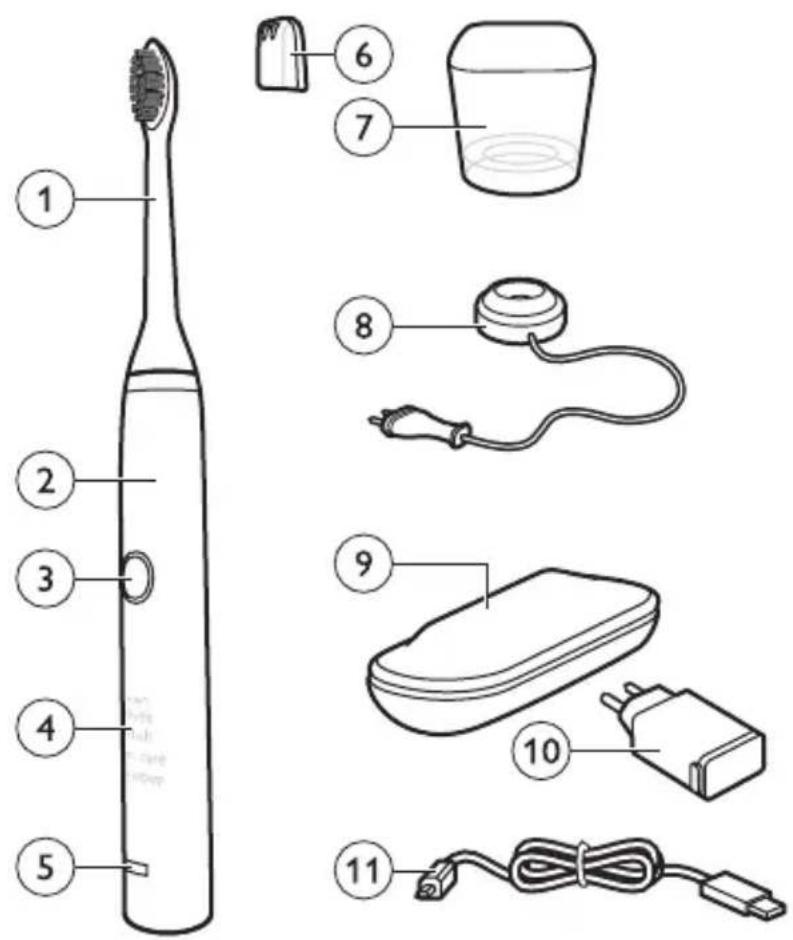
1 Brush head
2 Handle with ergonomic shape
3 Recessed power on/off button
4 Hidden brushing mode display
5 Charge indicator
6 Hygienic travel cap (specific types only)
7 Charging glass (specific types only)
8 Charging base (specific types only)
9 Charging travel case (specific types only)
10 USB wall adapter (specific types only)
11 USB cord (specific types only)
3
Charging your Sonicare
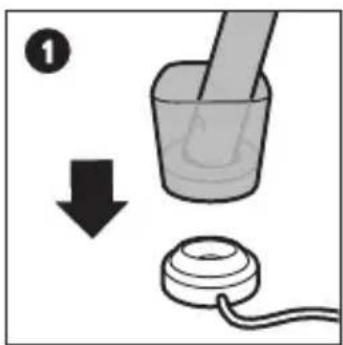
Charge for 24 hours before first use. The charge indicator fl ashes green until the Sonicare is fully charged. Rapid yellow fl ashing indicates that the battery is low.
Your Sonicare has been designed to last up to 3 weeks on a single charge. Read 'Travelling with your Sonicare' for additional charging methods.
The charging glass is designed to properly charge only one handle at a time. Do not place metallic objects in the charging glass, as this may affect the charging process and may cause the charging base to overheat.


natural_image
Illustration of a mortar and measuring cup with a tool, connected to two containers (no text or symbols)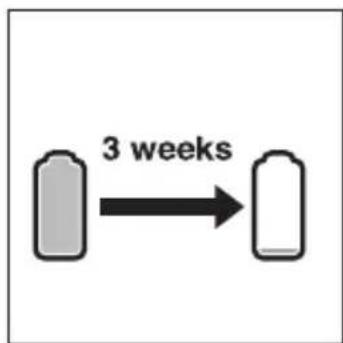
flowchart
graph LR
    A["Block 1"] -->|3 weeks| B["Block 2"]
4
Using your Sonicare
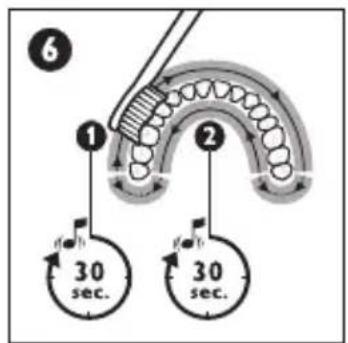
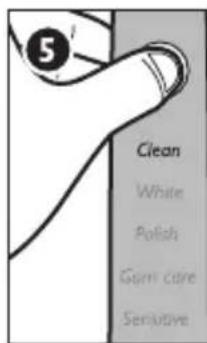
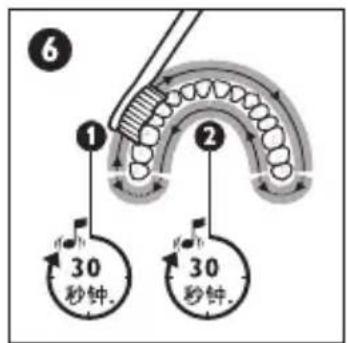
Brushing - Move the brush head slowly and gently across the teeth in a small back and forth motion so the longer bristles reach between your teeth. Do not scrub like a manual toothbrush. Apply light pressure to maximise Sonicare's effectiveness and let the Sonicare do the brushing for you. The Quadpacer is an interval timer that beeps and briefly pauses to remind you to brush the 4 sections of your mouth. Depending on the brushing mode you have selected, the Quadpacer beeps at different intervals during the brushing cycle.
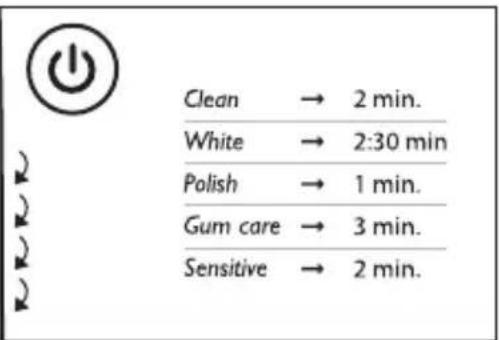
Clean - The ultimate in plaque removal (standard mode).
White - Whitening mode of 2 minutes to remove surface stains, plus an additional 30 seconds to brighten and polish your front teeth.
Polish - Quick 1-minute mode to brighten and polish your front teeth.
Gum care - Complete mode that combines the Clean mode with an additional minute to gently stimulate and massage your gums to improve gum health.
Sensitive - Extra gentle mode for sensitive teeth and gums.


natural_image
Illustration of a faucet with a water droplet falling into a pipe (no text or symbols)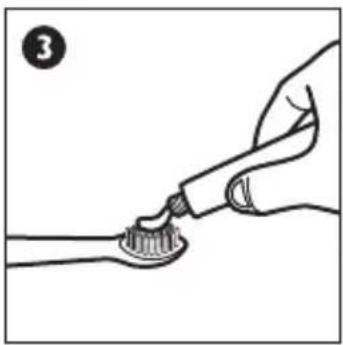
natural_image
Illustration of a hand brushing teeth with a toothbrush (no text or symbols)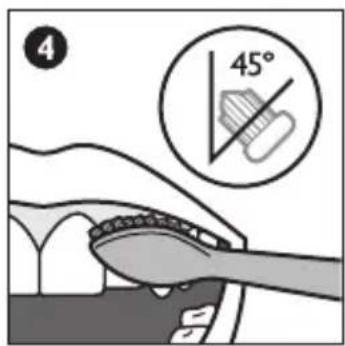



5
Getting used to your Sonicare
Easy-start - The Sonicare may feel ticklish upon first use. To help you ease into the Sonicare experience, the Easy-start feature gradually increases the sonic power over the first 14 brushings. Brushing must last at least 1 minute to properly advance through this ramp-up cycle.
Easy-start may be deactivated - Place the handle in the plugged-in charging base or charging travel case - Push and hold the on/off button for 2 seconds; 1 beep indicates the Easy-start feature has been deactivated; 2 beeps indicate the feature has been reactivated.
Clinical studies must be performed with the Sonicare fully charged and the Easy-start feature deactivated.

Travelling with your Sonicare
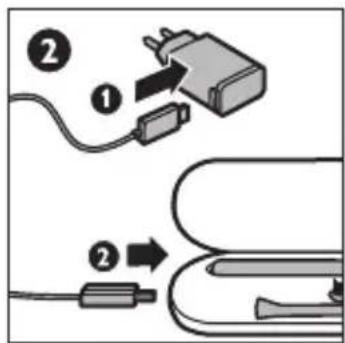
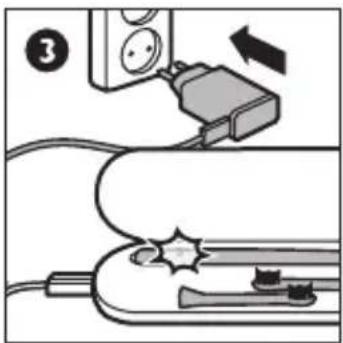
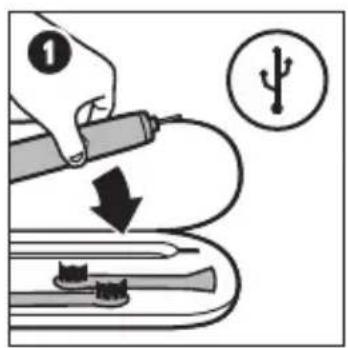
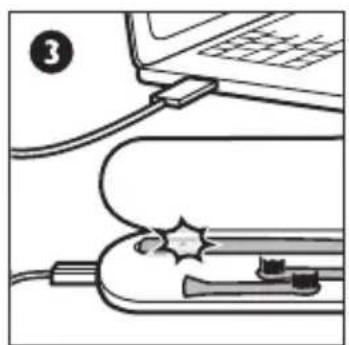
Charging via wall socket - Place the handle in the charging travel case, plug the USB cord into the USB wall adapter, and plug the USB wall adapter into a wall socket. The charge indicator on the handle fl ashes green until the Sonicare is fully charged.
Charging via USB - Remove the USB cord from the USB wall adapter and insert the USB plug into any USB port. Only use the USB wall adapter and USB cord provided.



natural_image
Diagram of a device with cables and a plug, no visible text or symbols7
Cleaning your Sonicare
Cleaning - Clean the Sonicare periodically. Rinse the handle and the brush head. Wipe down all surfaces with a soft cloth and mild soap, if desired. Do not use sharp objects to clean. Only the charging glass is top rack dishwasher-safe. Do not clean the brush head, handle, charging base or charging travel case in the dishwasher.

Storing your Sonicare
Storing - If you are not going to use the Sonicare for an extended period of time, unplug the charging base, clean all parts and store them in a cool, dry place away from direct sunlight.



Environment
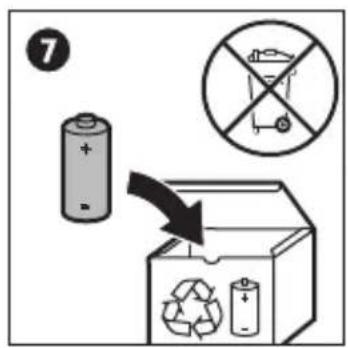
Do not throw away the appliance with the normal household waste at the end of its life, but hand it in at an official collection point for recycling. By doing this, you help to preserve the environment.
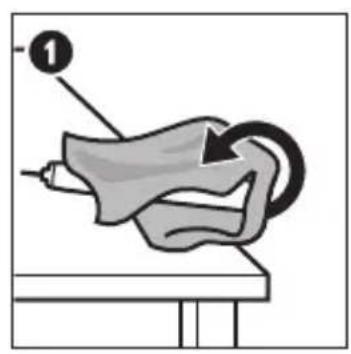
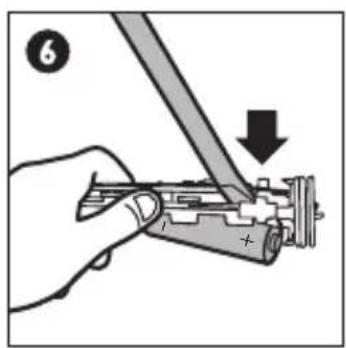
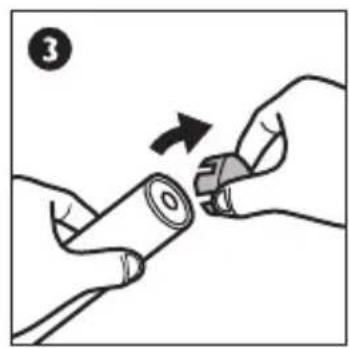
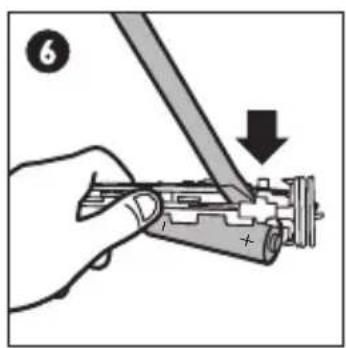
The built-in rechargeable battery contains substances that may pollute the environment. Always remove the battery before you discard and hand in the appliance at an official collection point. Dispose of the battery at an official collection point for batteries. If you have trouble removing the battery, you can also take the appliance to a Philips service centre. The staff of this centre will remove the battery for you and will dispose of it in an environmentally safe way.
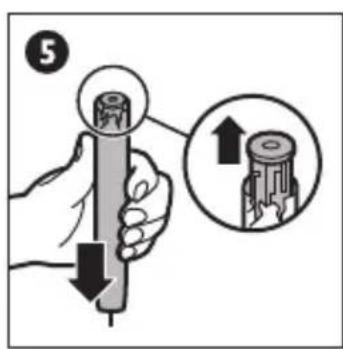
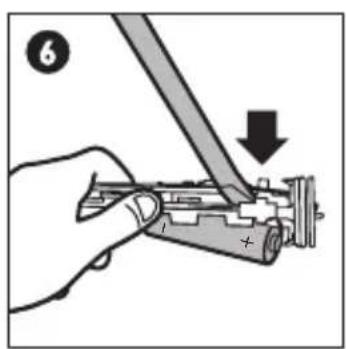
Removing the rechargeable battery. This process is not reversible.
To remove the rechargeable battery, you need a flat-head (standard) screwdriver. Observe basic safety precautions when you follow the procedure below. Be sure to protect your eyes, hands, fingers and the surface on which you work.
natural_image
Illustration of a mechanical device with a tool and labeled component (no text or symbols present)

natural_image
Illustration of hands holding a battery with a switch, no text or symbols present


10
Guarantee and support
If you need information or support, please visit www.philips.com/support or read the separate worldwide guarantee leaflet.
Guarantee restrictions
The terms of the international guarantee do not cover the following:
- Brush heads.
- Damage caused by misuse, abuse, neglect, alterations or unauthorised repair.
- Normal wear and tear, including chips, scratches, abrasions, discolouration or fading.


natural_image
Illustration of a beaker with a hammer and sparkles above it, connected to two containers (no text or symbols present)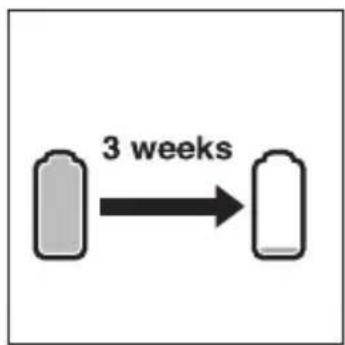
flowchart
graph LR
    A["Gray Device"] -->|3 weeks| B["White Device"]

使用您的 Sonicare
natural_image
Illustration of a faucet pouring liquid into a pipe with a small droplet on the surface (no text or symbols)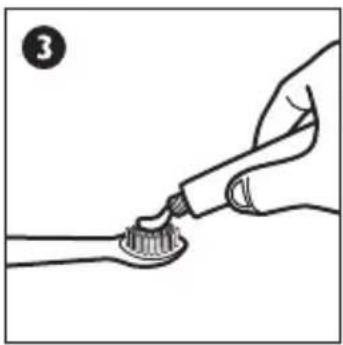
natural_image
Illustration of a hand brushing a tooth with a toothbrush (no text or symbols)


習慣使用 SONICARE 牙刷

攜帶 Sonicare 旅行



natural_image
Diagram of a medical device with tubing and a tool, no visible text or symbols
清洗您的 Sonicare
natural_image
Illustration of a medical or laboratory procedure showing a tool interacting with a device (no text or symbols visible)

natural_image
Illustration of hands holding a battery with a switch, no text or symbols present

10 保固與支援
natural_image
Illustration of a faucet pouring liquid into a pipe with a droplet on the pipe (no text or symbols)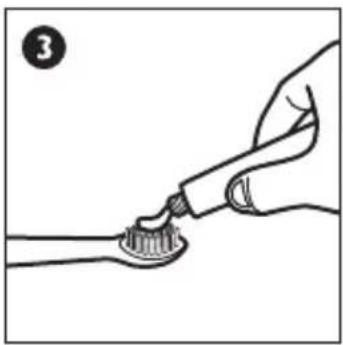
natural_image
Illustration of a hand brushing a tooth with a toothbrush (no text or symbols)


natural_image
Illustration of a mechanical device with a tool and labeled component (no text or symbols present)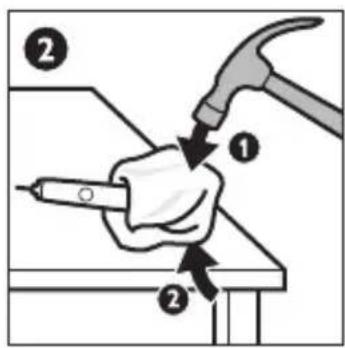
natural_image
Illustration of hands holding a battery with a switch, no text or symbols present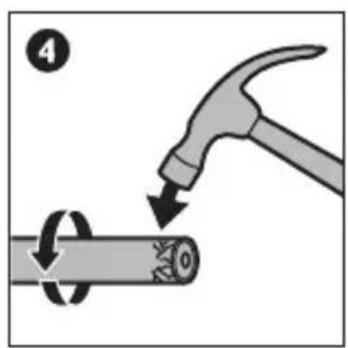

10 保修和支持
www.philips.com/Sonicare
©2016 Koninklijke Philips N.V. (KPNV). All rights reserved. PHILIPS and the Philips shield are registered trademarks of KPNV. Sonicare and the Sonicare logo are trademarks of Philips Oral Healthcare, LLC and/or KPNV
Protected by U.S. and international patents. Other patents pending. Reg. U.S. Pat. & Tm. Off.
Rating Label Location
标签位置
發行日期 13/09/2016
发行日期 13/09/2016

75% recycled paper 75% 循环再造纸
4235.020.5025.6




- Always here to help you / 始终如一地为您提供帮助
- Philips Sonicare DiamondClean
- PHILIPS sonicare
- Important
- Danger
- Warning
- Caution
- Electromagnetic fields (EMF)
- 2
- 3
- Charging your Sonicare
- 4
- Using your Sonicare
- 5
- Getting used to your Sonicare
- Travelling with your Sonicare
- 7
- Cleaning your Sonicare
- Storing your Sonicare
- Environment
- 10
- Guarantee and support
- Guarantee restrictions
- 使用您的 Sonicare
- 習慣使用 SONICARE 牙刷
- 攜帶 Sonicare 旅行
- 清洗您的 Sonicare
- 保固與支援
- 保修和支持
Brand : PHILIPS
Model : Sonicare Diamondclean HX9302
Category : Electric toothbrush