
Sonicare DiamondClean Smart HX9964 - Electric toothbrush PHILIPS - Free user manual and instructions
Find the device manual for free Sonicare DiamondClean Smart HX9964 PHILIPS in PDF.


| Product Type | Electric toothbrush |
| Brand | Philips |
| Model | Sonicare DiamondClean Smart HX9964 |
| Brush Heads Included | Premium Clean, Premium Gum Care, Premium White, Tongue Care+ (specific types) |
| Brushing Modes | Clean (2 min), White+ (2 min 40 sec), Gum Health (3 min 20 sec), DeepClean+ (2 or 3 min), Tongue Care (20 sec) |
| Intensity Levels | 3 (Low, Medium, High) |
| Pressure Sensor | Yes, with vibration and purple light ring feedback |
| Brush Head Replacement Reminder | Yes, amber light blinking |
| BrushPacer | Yes, interval timer with beep every 20 or 30 seconds |
| Easy-Start | Yes, gradually increases power over first 14 brushings (can be enabled/disabled) |
| App Connectivity | Yes, Bluetooth enabled (2402-2480 MHz) with Philips Sonicare app |
| Charging Time | 24 hours for full charge |
| Battery Life | Up to 2 weeks (based on 2x2 min brushing per day) |
| Charging Methods | Charging glass with base or USB travel case (specific models only) |
| Travel Case | Included (specific types); USB charging variant for select models |
| Cleaning | Rinse brush head and handle with water; wipe charger and travel case; glass and brush head holder dishwasher-safe |
| Warranty | International warranty (brush heads and misuse not covered) |
| Safety Certifications | Compliant with safety standards for electromagnetic devices; pacemaker compatible with physician approval |
| Model Numbers on Handle | HX992W/B/P/S/L, HX993W/B/P/S/L (check bottom of handle) |
Frequently Asked Questions - Sonicare DiamondClean Smart HX9964 PHILIPS
User questions about Sonicare DiamondClean Smart HX9964 PHILIPS
0 question about this device. Answer the ones you know or ask your own.
Ask a new question about this device
Download the instructions for your Electric toothbrush in PDF format for free! Find your manual Sonicare DiamondClean Smart HX9964 - PHILIPS and take your electronic device back in hand. On this page are published all the documents necessary for the use of your device. Sonicare DiamondClean Smart HX9964 by PHILIPS.
USER MANUAL Sonicare DiamondClean Smart HX9964 PHILIPS
Rechargeable sonic toothbrush

※スマートフォンは含まれません。
フィリップ スソニッケアー
ダイヤモンドクノマー発電式電動歯ブラシ
品番 HX9954 /55, HX9964/55 HX9924/15, HX9934/15 HX9924 /05, HX9934/05
取扱説明書
はじめに
Guidance in English 29\~50
● 保 証
保証とアフターサービス 51
仕様 52
無料修理規定 54
保証書 ...... 最終ページ
必ずお守り ください
natural_image
Simple line drawing of a 3D cube with a downward arrow pointing to its top face (no text or symbols)
natural_image
Line drawing of a USB flash drive with cable (no text or symbols)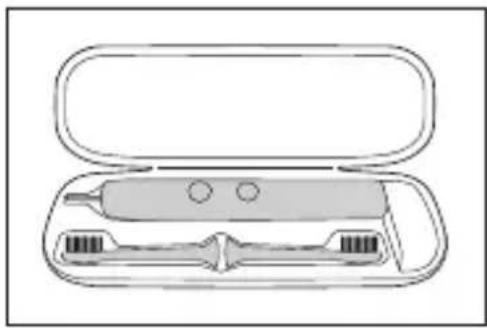
natural_image
Illustration of a toothbrush and toothbrush holder in an open case (no text or symbols)natural_image
Illustration of four toothbrushes arranged on a base (no text or symbols)保管のしかた (長期間使用しない場合)
natural_image
Diagram showing a cable being inserted into an electrical outlet with a right-pointing arrow indicating direction (no text or symbols present)
natural_image
Diagram showing a toothbrush inside a cabinet with an arrow indicating direction (no text or symbols)充電のしかた
この製品は通常24時間充電です。
満充電で約2週間使用できます。
(1日2回、2分間使用した場合)
natural_image
Simple line drawing of a container with liquid and a plug, no text or symbols present
natural_image
Illustration of a hand holding a glass with a brush and connecting a cable to a wall-mounted plug (no text or symbols)natural_image
Illustration of a hand using a tool to adjust or install a component, with no visible text or symbols.natural_image
Pure mechanical assembly diagram showing a bracket and mounting bracket without any text or symbolsnatural_image
Illustration of a hand brushing a tooth with a downward arrow (no text or symbols)natural_image
Illustration of a hand using a tool to apply a small object onto a surface (no text or symbols visible)natural_image
Illustration of dental arches and teeth (no text or symbols)natural_image
Diagram of a mechanical component with arrows indicating motion or force direction (no text or symbols)- ブラッシング後は、水で口をゆすぎます。
上手なみがきかた
natural_image
Illustration of dental arches with teeth and jawbone structure (no text or symbols)natural_image
Illustration of dental crowns with toothbrush and teeth (no text or symbols)natural_image
Illustration of two hands holding a pen, no text or symbols presentブラシヘッド
natural_image
Illustration of a hand holding a tool with a curved handle, resting on a table (no text or symbols)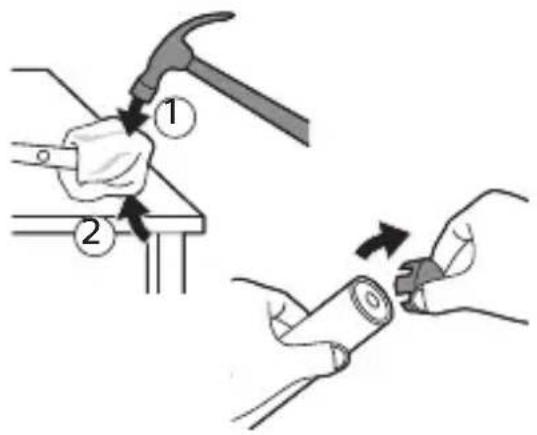
natural_image
Illustration of a hand holding a pen with a magnified inset showing the tip of a cylindrical object (no text or symbols)natural_image
Illustration of hands holding a device with a circular component and an arrow indicating rotation (no text or symbols)natural_image
Hand holding a mechanical component with a downward arrow indicating force or direction (no text or symbols)natural_image
Diagram showing a mechanical assembly with a magnified inset of a gear or tool component (no text or symbols)Introduction
Congratulations on your purchase and welcome to Philips! To fully benefit from the support that Philips offers, register your product at www.philips.com/welcome or via the Philips Sonicare app.
Important
Read this user manual carefully before you use the appliance and save it for future reference.
Danger
-Keep the charger away from water. Do not place or store it over or near water contained in a bathtub, washbasin, sink etc. Do not immerse the charger in water or any other liquid. After cleaning, make sure the charger is completely dry before you connect it to the mains.
Warning
-The main cord cannot be replaced. If the main cord is damaged, discard the charger.
-Always have the charger replaced with one of the original type in order to avoid a hazard.
- Do not use the charger outdoors or near heated surfaces.
ENGLISH
-If the appliance is damaged in any way (brush head, toothbrush handle or charger), stop using it. This appliance contains no serviceable parts. If the appliance is damaged, contact the Consumer Care Center in your country (see 'Warranty and support').
-This appliance can be used by children aged from 8 years and above and by persons with reduced physical, sensory or mental capabilities or lack of experience and knowledge if they have been given supervision or instruction concerning use of the appliance in a safe way and if they understand the hazards involved. Children should not play with the appliance. Cleaning and user maintenance shall not be made by children unless they are older than 8 and supervised.
-In order to effectively charge your Philips Sonicare handle do not place your charger base on a magnetic metal surface.
Caution
-Do not clean the brush head, the handle or the charger in the dishwasher.
-If you have had oral or gum surgery in the previous 2 months, consult your dentist before you use the toothbrush.
-Consult your dentist if excessive bleeding occurs after using this toothbrush or if bleeding continues to occur after 1 week of use. Also consult your dentist if you experience discomfort or pain when you use the Philips Sonicare.
-The Philips Sonicare toothbrush complies with the safety standards for electromagnetic devices. If you have a pacemaker or other implanted device, contact your physician or the device manufacturer of the implanted device prior to use.
-If you have medical concerns, consult your doctor before you use the Philips Sonicare.
-This appliance has only been designed for cleaning teeth, gums and tongue. Do not use it for any other purpose. Stop using the appliance and contact your doctor if you experience any discomfort or pain.
ENGLISH
-The Philips Sonicare toothbrush is a personal care device and is not intended for use on multiple patients in a dental practice or institution.
-Stop using a brush head with crushed or bent bristles. Replace the brush head every 3 months or sooner if signs of wear appear. Do not use other brush heads than the ones recommended by the manufacturer.
-If your toothpaste contains peroxide, baking soda or bicarbonate (common in whitening toothpastes), thoroughly clean the brush head with soap and water after each use. This prevents possible cracking of the plastic.
Electromagnetic fields (EMF)
This Philips appliance complies with all applicable standards and regulations regarding exposure to electromagnetic fields.
Radio Equipment Directive
-Radio Equipment in this product operates between 2402 – 2480 MHz
-Maximum RF power transmitted by the Radio Equipment is +3 dBm
Your Philips Sonicare (Fig. 1)
1 Hygienic travel cap
2 Brush heads
3 Handle
4 Power on/off button
5 Intensity light
6 Mode/intensity button
7 Mode light
8 Brush head replacement reminder light
9 Battery indication
10 Light ring
11 Charging base
12 Travel case
13 Cord storage compartment
14 USB cord (integrated)
15 Charging glass
16 Brush head holder
Note: The content of the box may vary based on the model purchased.
Brush heads

natural_image
Line drawing of four identical toothbrushes with textured caps (no text or symbols)Your Philips Sonicare comes with a range of brush heads which are designed to deliver superior results for your oral care needs.
The number and type of brush heads might change according to the toothbrush type you purchased.
1 Premium Clean brush head
2 Premium Gum Care brush head
3 Premium White brush head
4 Tongue Care+ brush head (specific types only)
Smart brush head recognition
Premium Clean, Premium Gum Care, Premium White and Tongue Care+ brush heads are enabled with smart brush head recognition technology.
A micro-chip inside the brush head communicates with the toothbrush handle. So when you attach a brush head, the handle automatically recognizes
the brush head and selects the recommended mode and intensity level to optimize your brushing performance.
Thanks to this feature the toothbrush also tracks your usage and gives a personalized reminder when you need to replace your brush head for the best oral care results.
Brushing modes
Your power toothbrush is equipped with 5 different modes to accommodate all your oral care needs (some models come with 4 brushing modes only). The following modes are available:
Clean mode
Clean is a 2-minute mode, recommended to be used with intensity level 3. It gives you a thorough and complete clean and is recommended to be used with the Premium Clean brush head. In order to reach optimal results, follow the instructions below.
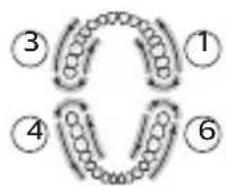
2 3 1 4 6 5
1 Begin brushing the upper right teeth (segment 1) and brush for 20 seconds, on both the outer and inner surfaces, before you move to the upper front teeth (segment 2). Continue doing this for segments 3 to 6 to ensure even brushing in all 6 segments of the mouth. You will hear a beep after each 20-second interval, to indicate that you should move to the next segment.
White+ mode
White+ is a 2-minute 40-seconds mode, recommended to be used with intensity level 3 and the Premium White brush head. In order to reach optimal results, follow the instructions below.

flowchart
graph TD
    A["①"] --> B["②"]
    B --> C["③"]
    C --> D["④"]
    D --> E["⑤"]
    E --> F["⑥"]
    F --> A
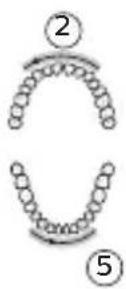
1 Begin brushing the upper right teeth (segment 1) and brush for 20 seconds before you move to the upper front teeth (segment 2). Continue doing this for segments 3 to 6 to ensure even brushing in all 6 sections of the mouth.
2 After completing all 6 of these segments, the toothbrush switches to polishing mode automatically.
3 To polish your teeth, brush the outer surface of your upper teeth for 20 seconds (segment 2) and then brush the outer surface of your lower teeth for 20 seconds (segment 5). The polishing motion used in this part of the mode will feel and sound different from the first two minutes of the mode.
Gum Health mode
Gum Health is a 3-minute 20-seconds mode, recommended to be used with intensity level 3 and the Premium Gum Care brush head. In order to reach optimal results, follow the instructions below:
flowchart
graph TD
    A["①"] --> B["②"]
    B --> C["③"]
    C --> D["④"]
    D --> E["⑤"]
    E --> F["⑥"]
    F --> A
flowchart
graph TD
    A["Step 1"] --> B["Step 2"]
    B --> C["Step 3"]
    C --> D["Step 4"]
    D --> E["Step 5"]
    E --> F["Step 6"]
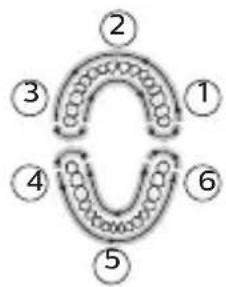
1 Begin brushing the upper right teeth (segment 1) and brush for 20 seconds, on both the outer and inner surfaces, before you move to the upper front teeth (segment 2). Continue doing this for section 3 to 6 to ensure even brushing in all 6 segments of the mouth.
2 Next, to take optimal care for your gums, brush the outer and inner surfaces of your upper right back teeth for 20 seconds (segment 1), then brush the outer and inner surfaces of your upper left back teeth for 20 seconds (segment 3).
ENGLISH

flowchart
graph TD
    A["①"] --> B["②"]
    B --> C["③"]
    C --> D["④"]
    D --> E["⑤"]
    E --> F["⑥"]
    F --> A

Continue brushing the outer and inner surfaces of your lower right back teeth for 20 seconds (segment 4), followed by another 20 seconds on the outer and inner surfaces of your lower left back teeth (segment 6). The brushing motion used in this part of the mode will feel and sound different from the first two minutes of the mode.
DeepClean+ mode
DeepClean+ mode length depends on whether or not the handle is connected to the app. In connected mode DeepClean+ runs for two minutes and provides BrushPacer feedback every 20 seconds. In non-connected mode DeepClean+ runs for three minutes and provides BrushPacer feedback every 30 seconds. In order to reach optimal results, follow the instructions below when brushing non-connected.
-Begin brushing in the upper right teeth (segment 1) and brush for 30 seconds, on both the outer and inner surfaces, before you move to the upper front teeth (segment 2). Continue doing this for segments 3 to 6 to ensure even brushing in all 6 segments of the mouth.
Tongue Care mode (specific types only)
Tongue Care is a 20-second mode, recommended to be used with intensity level 1 and the Tongue Care+ brush head. In order to reach optimal results, follow the instructions below:
1 Wet the micro bristles and brush your tongue with a back and forth motion. Clean as far back as comfortable.
2 Rinse your mouth and repeat the procedure two more times.
Based on the brush head you attach, the mode will be selected automatically. If you want to adjust the mode or intensity manually, you can do this by using the mode/intensity button. Press the mode/intensity button before brushing to change the mode, and press it while brushing to adjust the intensity level. Your selection will be remembered next time you attached the same brush head. If you want to go back to the initial recommended settings for your brush head, manually change it to the recommended setting described above.
Note: When the Philips Sonicare is used in clinical studies, it must be used at high intensity in the Clean mode, in White+ mode, in GumHealth mode, or in unconnected DeepClean+ mode to achieve the efficacy in plaque removal, stain removal, gum health or superiority (respectively).
Intensity settings

natural_image
Simple diagram with three circles and a central oval, no text or symbols presentYour power toothbrush gives you the option to choose between 3 different intensity levels: low, medium and high. Based on the brush head you attach, the intensity will be selected automatically. If you wish to change to a different intensity, you can do so by pressing the mode/intensity button while brushing. For optimal results it is recommended to use the automatically selected intensity. The intensity cannot be changed as long as the handle is powered off or paused.
ENGLISH
Using your Philips Sonicare
Brushing instructions

natural_image
Illustration showing a hand brushing a tooth with a tool, and a close-up of the tooth being held by a tool (no text or symbols present)1 Attach your desired brush head (see 'Brush heads'). Align the brush head so the bristles point in the same direction as the front of the handle.
2 Wet the bristles.
3 Apply a small amount of toothpaste on the bristles.

natural_image
Illustration of a hand using a tool to apply toothpaste (no text or symbols present)4 Place the toothbrush bristles against the teeth at a slight angle (45 degrees), pressing firmly to make the bristles reach the gumline or slightly beneath the gumline. A change in vibration (and a slight change in sound) and activation of the light ring alert you when you apply too much pressure while brushing.

Note: Keep the center of the brush in contact with the teeth at all times.

5 Press the power on/off button to switch on the Philips Sonicare.
natural_image
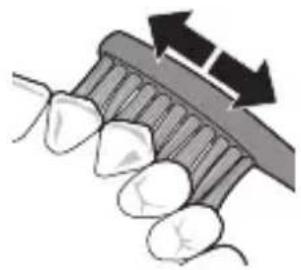
Illustration of a hand holding a toothbrush with arrows indicating direction (no text or symbols)6 Apply light pressure to maximize Philips Sonicare's effectiveness. Brush your teeth with a small back and forth motion so the bristles reach between the teeth. Continue this motion throughout the brushing cycle.
Note: The bristles should flare slightly. Do not scrub.

natural_image
Diagram of a mechanical component with arrows indicating motion direction (no text or symbols)7 To clean the inside surfaces of the front teeth, tilt the brush handle semi-upright and make several vertical overlapping brushing strokes on each tooth.
Your Philips Sonicare is safe to use on:
-Braces (brush heads wear out sooner when used on braces).
-Dental restorations (fillings, crowns, veneers).
Features and accessories
a App
b Pressure sensor
c Brush head replacement reminder
d BrushPacer
e Easy-start
f Travel case (specific types only)
g Brush head holder (specific types only)
a. App
Your Philips Sonicare is Bluetooth enabled and allows you to achieve superior oral health care with the Philips Sonicare app.
Using the Philips Sonicare app will help you to improve your oral health care habits. It gives you real-time feedback while brushing, informs you if you missed any spots when brushing, tracks your brushing behavior over time and provides useful tips and tricks for your healthiest mouth ever. In order to fully benefit from your Philips Sonicare, we advise you to follow these steps:
Connecting your toothbrush
1 Download the Philips Sonicare app from the Apple App Store or Google Play Store.
2 Confirm Bluetooth is switched on on your mobile device before you open the app. Check the settings on your mobile device to switch on Bluetooth.
3 Open the Sonicare app.
4 To connect the toothbrush to the app, remove the handle from the charger and press the mode/intensity button.
5 Follow the Sonicare app instructions displayed on your mobile device. The app automatically connects with the toothbrush. If the toothbrush does not connect, follow the troubleshooting steps provided in the app.
Note: For optimal data capture, keep your mobile device close during brushing.
b. Pressure sensor
Your Philips Sonicare is equipped with an advanced sensor that measures the pressure you apply while brushing. If you apply too much pressure, the toothbrush will provide immediate feedback to indicate that you need to reduce the pressure. The feedback is given in two different ways:

natural_image
Simple line drawing of a container with an oval shape and a small circular mark inside (no text or symbols)1 You experience a change in vibration and therefore brushing sensation.
2 The pressure warning light of the light ring will light up purple.
If you receive a warning, reduce the pressure. The light will turn off and the brushing sensation will adjust to the original sensation.
Activating or deactivating the pressure sensor
1 Place the handle, with a brush head attached, in the plugged-in charger.
2 Pressure sensor is enabled by holding the mode/intensity button and by pressing the power button twice while on a charger. The handle will beep twice to confirm it is enabled.
3 Pressure sensor is disabled by holding the mode/intensity button and by pressing the power button twice while on a charger. The handle will beep once to confirm it is disabled.
c. Brush head replacement reminder

Your Philips Sonicare is equipped with a smart feature that tracks the wear of your brush head. Depending on the pressure you apply and the amount of time used, the brush head replacement reminder light reminds you to change your brush head. It is important to change your brush head in time in order to guarantee the best cleaning & care of your teeth.
When the amber brush head replacement light starts blinking, you should replace your brush head.
Activating or deactivating the brush head replacement reminder
1 Place the handle in the plugged-in charger.
ENGLISH
2 Brush head replacement reminder is enabled by holding the mode/intensity button and by pressing the power button three times while on the charger. The handle will beep twice to confirm it is enabled.
3 Brush head replacement reminder is disabled by holding the mode/intensity button and by pressing the power button three times while on the charger. The handle will beep once to confirm it is disabled.
d. BrushPacer

flowchart
graph TD
    A["①"] --> B["②"]
    B --> C["③"]
    C --> D["④"]
    D --> E["⑤"]
    E --> F["⑥"]
    F --> A
The BrushPacer is an interval timer that has a short beep and pause to remind you to brush the different sections of your mouth. Depending on the brushing mode you have selected (see 'Brushing modes'), the BrushPacer beeps at different intervals during the brushing cycle.
e. Easy-start
The Easy-start feature gently increases the power over the first 14 brushings to help you get used to the brushing with the Philips Sonicare. The Easy-start feature works in all modes other than TongueCare+ mode. This Philips Sonicare model comes with the Easy-start feature deactivated.
Activating or deactivating the Easy-start feature
1 Place the handle in the plugged-in charger.
2 Easy-start is enabled by holding the mode/intensity button and by pressing the power button once while on the charger. The handle will beep twice to confirm it is enabled.
3 Easy start is disabled by holding the mode/intensity button and by pressing the power button once while on the charger. The handle will beep once to confirm it is disabled.
Note: Using the Easy-start feature beyond the initial ramp-up period is not recommended and reduces Philips Sonicare effectiveness in removing plaque.
Note: Each of the first 14 brushings must be at least 1 minute in length to properly move through the Easy-start ramp-up cycle.
Note: To achieve clinical efficacy, Easy-start needs to be deactivated.
f. Travel case (specific types only)
Your Philips Sonicare comes with a travel case to make traveling with your power toothbrush more convenient. It is designed to accommodate the power toothbrush handle and two brush heads. Some models come with a USB charging travel case which connects to your laptop via USB –this allows you to charge your Philips Sonicare when traveling. For information about charging your Philips Sonicare with the travel case, see 'Battery status and charging'.
g. Brush head holder (specific types only)

natural_image
Illustration of four toothbrushes arranged on a base (no text or symbols)The brush head holder is designed to keep and store your brush heads.
Battery status and charging
Charging with glass (specific types only)
1 Plug the charging base into a wall socket.
2 Place the charging glass on top of the charging base and place the handle in the glass.
The charging indicator flashes white until your toothbrush is fully charged.
Charging with travel case (specific types only)
1 Place the handle in the charging travel case.
2 Connect the charging travel case to a laptop, a wall-mounted USB socket or a suitable wall adapter. The USB cord is attached to the travel case and stored in the cord storage compartment.
3 The battery indication flashes white until your toothbrush is fully charged.
Important: The wall adapter must be a safe extra low voltage source, compatible with the electrical ratings marked on the device.
Important: Only toothbrush models HX993W, HX993B, HX993P, HX993S, HX993L can be charged in the travel case. Other products and batteries are not compatible with the travel case.
Note: It takes at least 24 hours to fully charge your Philips Sonicare. You do not have to fully charge your handle before first use, as the handle is pre-charged for first use. However, it is recommended to fully charge it after first use.
Note: This charger is designed to properly charge only one handle at a time. This charger is not compatible with other models of Philips Sonicare.
Note: Do not place metallic objects in the travel case, as handle charging may be affected and may cause the charger to overheat.
Cleaning
Note: Do not clean the brush head, handle or travel case in the dishwasher.
Toothbrush handle

natural_image
Diagram of a mechanical or fluidic device with a cylindrical component inserted into a pipe, showing internal flow paths (no text or symbols)1 Remove the brush head and rinse the metal shaft area with warm water. Make sure you remove any residual toothpaste.
Caution: Do not push on the rubber seal on the metal shaft with sharp objects, as this may cause damage.
2 Wipe the entire surface of the handle with a damp cloth.
Note: Do not use isopropyl rubbing alcohol, vinegar or bleach to clean handle as this may cause discoloration.
Brush head
natural_image
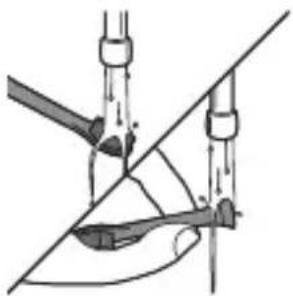
Pure mechanical diagram showing two intersecting rods and a curved tool, without any text, numbers, or symbols.1 Rinse the brush head and bristles after each use.
2 Remove the brush head from the handle and rinse the brush head connection with warm water at least once a week.
Charger and travel case
1 Unplug the charger and travel case before you clean it.
2 Use a damp cloth to wipe the surface of the charger and travel case.
Glass and brush head holder
1 Clean the glass and the brush head holder with water and some mild soap.
2 Dry them with a soft towel.
The glass and the brush head holder are dishwasher-safe.
ENGLISH
Storage
If you are not going to use your Philips Sonicare for an extended period of time, unplug the charger from the wall socket, clean it and store it in a cool and dry place away from direct sunlight.
Locating the model number
Look on the bottom of the Philips Sonicare toothbrush handle for the model number (HX992W, HX992B, HX992P, HX992S, HX992L, HX993W, HX993B, HX993P, HX993S, HX993L).
Recycling
-Do not throw away the product with the normal household waste at the end of its life, but hand it in at an official collection point for recycling. By doing this, you help to preserve the environment.
Removing the rechargeable battery
Warning: Only remove the rechargeable battery when you discard the appliance. Make sure the battery is completely empty when you remove it. To remove the rechargeable battery, you need a towel or cloth, a hammer and a flat-head (standard) screwdriver. Observe basic safety precautions when you follow the procedure outlined below. Be sure to protect your eyes, hands, fingers, and the surface on which you work.
1 To deplete the rechargeable battery of any charge, remove the handle from the charger, turn on the Philips Sonicare and let it run until it stops. Repeat this step until you can no longer turn on the Philips Sonicare.

2 Remove and discard the brush head. Cover the entire handle with a towel or cloth.
3 Hold the top of the handle with one hand and strike the handle housing 0.5 inch above the bottom end. Strike firmly with a hammer on all 4 sides to eject the end cap.
Note: You may have to hit on the end several times to break the internal snap connections.
4 Remove the end cap from the toothbrush handle. If the end cap does not release easily from the housing, repeat step 3 until the end cap is released.
5 Holding the handle upside down, press the shaft down on a hard surface. If the internal components do not easily release from the housing, repeat step 3 until the internal components are released.
6 Remove the rubber battery cover.
ENGLISH

natural_image
Hand holding a mechanical component with a downward arrow indicating force or direction (no text or symbols)7 Wedge the screwdriver between the battery and the black frame at the bottom of the internal components. Then pry the screwdriver away from the battery to break the bottom of the black frame.

natural_image
Diagram showing a mechanical joint with a magnified inset highlighting a specific component (no text or symbols present)8 Insert the screwdriver between the bottom of the battery and the black frame to break the metal tab connecting the battery to the green printed circuit board. This will release the bottom end of the battery from the frame.

natural_image
Illustration of a hand holding a small electronic device with an arrow indicating rotation (no text or symbols)9 Grab the battery and pull it away from the internal components to break the second metal battery tab.

Caution: Be aware of the sharp edges of the battery tabs so as to avoid injury to your fingers.
10 Cover the battery contacts with tape to prevent any electrical short from residual battery charge. The rechargeable battery can now be recycled and the rest of the product discarded appropriately.
Warranty and support
If you need information or support, please visit www.philips.com/support or read the international warranty leaflet.
Warranty restrictions
The terms of the international warranty do not cover the following:
-Brush heads.
-Damage caused by use of unauthorized replacement parts.
-Damage caused by misuse, abuse, neglect, alterations or unauthorized repair.
-Normal wear and tear, including chips, scratches, abrasions, discoloration or fading.
保証と アフターサービス
Philips Oral Healthcare, LLC.
22100 Bothell Everett Hwy Bothell, WA 98021 U.S.A.
Phone:+1 (800) 682-7664
Philips Oral Healthcare, LLC.
22100 Bothell Everett Hwy
Bothell, WA 98021 U.S.A.
株式会社 フィリップス・ジャパン
〒108-8507
MyPhilips登録のご案内

4235.021.0276.3(04/19)



- はじめに
- 必ずお守り ください
- 保管のしかた (長期間使用しない場合)
- 充電のしかた
- 上手なみがきかた
- ブラシヘッド
- Introduction
- Important
- Danger
- Warning
- ENGLISH
- Caution
- Electromagnetic fields (EMF)
- Radio Equipment Directive
- Your Philips Sonicare (Fig. 1)
- Brush heads
- Smart brush head recognition
- Brushing modes
- Clean mode
- White+ mode
- Gum Health mode
- DeepClean+ mode
- Tongue Care mode (specific types only)
- Intensity settings
- Using your Philips Sonicare
- Brushing instructions
- Features and accessories
- a. App
- Connecting your toothbrush
- b. Pressure sensor
- Activating or deactivating the pressure sensor
- c. Brush head replacement reminder
- Activating or deactivating the brush head replacement reminder
- d. BrushPacer
- e. Easy-start
- Activating or deactivating the Easy-start feature
- f. Travel case (specific types only)
- g. Brush head holder (specific types only)
- Battery status and charging
- Charging with glass (specific types only)
- Charging with travel case (specific types only)
- Cleaning
- Toothbrush handle
- Brush head
- Charger and travel case
- Glass and brush head holder
- Storage
- Locating the model number
- Recycling
- Removing the rechargeable battery
- Warranty and support
- Warranty restrictions
- 保証と アフターサービス
- Philips Oral Healthcare, LLC.
- 株式会社 フィリップス・ジャパン
- MyPhilips登録のご案内
Brand : PHILIPS
Model : Sonicare DiamondClean Smart HX9964
Category : Electric toothbrush