
Sonicare Diamondclean HX9308 - Electric toothbrush PHILIPS - Free user manual and instructions
Find the device manual for free Sonicare Diamondclean HX9308 PHILIPS in PDF.


| Product Type | Rechargeable Sonic Toothbrush |
| Model Numbers | HX9318/80, HX9318/00, HX9302/61, HX9308/80, HX9308/00, HX9302/11, HX9312/55, HX9352/55, HX9302/51 |
| Handle Dimensions (approx.) | Length: 9.8 in (25 cm), Diameter: 1.2 in (3 cm) |
| Handle Weight (approx.) | 4.6 oz (130 g) |
| Power Supply | Rechargeable lithium-ion battery; Input 100-240V AC, 50-60Hz |
| Charging Time | 24 hours for full charge |
| Battery Life | Up to 3 weeks (based on 2 minutes twice daily) |
| Brushing Modes | Clean, White, Polish, Gum Care, Sensitive |
| Timer | Quadpacer interval timer (beeps every 30 seconds) |
| Easy-Start Feature | Gradually increases power over first 14 brushings; can be deactivated |
| Brush Head Type | Philips Sonicare DiamondClean brush head (included) |
| Travel Case | Charging travel case included (charges handle via USB or wall adapter) |
| Charger Glass | Glass charging cup (top-rack dishwasher safe) |
| Water Resistance | Handle is waterproof (suitable for use in shower) |
| Cleaning | Wipe with soft cloth and mild soap; do not immerse charger |
| Warranty | 2 years limited warranty |
| Country of Origin | Manufactured in China for Philips Oral Healthcare, USA |
| Storage | Store in cool, dry place away from direct sunlight |
| Included Accessories | 1 handle, 1 brush head, 1 hygienic travel cap, 1 charging glass, 1 charging stand, 1 charging base, 1 charging travel case, 1 USB wall adapter, 1 USB cord |
Frequently Asked Questions - Sonicare Diamondclean HX9308 PHILIPS
User questions about Sonicare Diamondclean HX9308 PHILIPS
0 question about this device. Answer the ones you know or ask your own.
Ask a new question about this device
Download the instructions for your Electric toothbrush in PDF format for free! Find your manual Sonicare Diamondclean HX9308 - PHILIPS and take your electronic device back in hand. On this page are published all the documents necessary for the use of your device. Sonicare Diamondclean HX9308 by PHILIPS.
USER MANUAL Sonicare Diamondclean HX9308 PHILIPS
DiamondClean
Rechargeable sonic toothbrush
ソニッケアー ダイヤモンドクリーン
音波振動式電動歯ブラシ
HX9318/80, HX9318/00, HX9302/61,
HX9308/80, HX9308/00, HX9302/11,
HX9312/55, HX9352/55, HX9302/51
取扱説明書
保証書付
保証書は、この取扱説明書の最終
ページについておりますのでお買い求
めの販売店で記入を受けてください。
PHILIPS sonicare
はじめに
Guidance in English 21\~33
●保 証
保証とアフターサービス 36
仕様 37
無料修理規定 38
保証書 ...... 最終ページ
2
必ずお守り ください
ご使用の前に必ず取扱説明書をよくお読
natural_image
Simple line drawing of a cable with a circular component and a plug (no text or symbols)
充電トラ
ケース
(HX9302/61、HX9302/11、
natural_image
Illustration of a hand using a screwdriver to apply a black arrow to a nail, with no text or symbols present.
natural_image
Line drawing of a toothbrush with a black arrow indicating direction (no text or symbols)natural_image
Diagram showing a cable connector inserted into a wall-mounted socket, with an arrow indicating direction (no text or symbols present)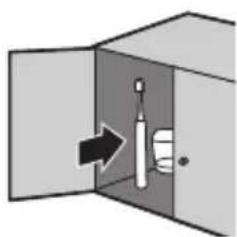
natural_image
Diagram showing a door opening with a toothbrush inside, indicating direction (no text or symbols)6
充電の仕方
この製品は通常24時間充電です。
満充電で約3週間使用できます。
(1日2回、2分間使用した場合)

注意
natural_image
Diagram showing a plug being inserted into a socket connected to a cable, with no text or symbols present.
注意

natural_image
Diagram of a medical or laboratory procedure showing tubing, clamps, and a tool with a starburst (no text or labels)充電表示
充電催促表示
natural_image
Illustration of a toothbrush applying material to teeth (no text or symbols)11
natural_image
Illustration of human teeth with root canal filling (no text or symbols)natural_image
Simple line drawing of a tool interacting with a surface, no text or symbols presentnatural_image
Illustration of dental braces and teeth (no text or symbols)歯の表側
natural_image
Illustration of a dental tool interacting with teeth (no text or symbols)奥歯の裏側
ヒント
natural_image
Illustration of a human tongue with an arrow pointing upward (no text or symbols)14
natural_image
Simple line drawing of a tool tip with a handle and droplet, no text or symbols present
natural_image
Illustration of a hand using a tool to adjust or install a component, with no visible text or symbols.To reduce the risk of electrocution:
• Always place and store the charger at a safe distance from water.
• Unplug the charger immediately if it falls into water.
• Never use a charger with a damaged cord or plug.
WARNINGS
To reduce the risk of burns, electrocution, fire or physical injury:
- Do Not use attachments other than those recommended by the manufacturer.
- Do Not plug the charger into an outlet with a voltage other than specified on the bottom of the charger. This product is designed to operate within a range of 100 to 240 volts. Voltage converters Do Not warrant voltage compatibility.
- Never force the plug into an outlet; if the plug does not easily fit into the outlet, discontinue use.
- Discontinue use if the product appears damaged in any way (brush head, handle, charger).
• Do not use the charger if it has dropped into water. - Keep the cord away from heated surfaces.
• Do not use the charger outdoors. - This product contains no user-serviceable parts. Refer to "Warranty and Service" if the appliance no longer works properly or needs repair.

natural_image
Simple geometric diagram with a circle intersected by two perpendicular lines (no text or symbols)- Use this appliance only for its intended use as described in this document or as recommended by your dental professional.
- This appliance is not intended for use by persons (including children) with reduced physical, sensory, or mental capabilities, or lack of experience and knowledge, unless they have been given supervision or instruction concerning use of the appliance by a person responsible for their safety.
• Children should be supervised to ensure that they do not play with the appliance. - Sonicare is a personal care device and is not intended for use on multiple patients in a dental office or institution.
- Use UL Listed computer, USB Hub, or USB duplex receptacle when charging the toothbrush handle in the travel case.
- When using a computer to recharge the toothbrush handle, the computer should be located away from sources of water (i.e. sink or tub) so as to avoid electrical shock.
MEDICAL WARNINGS
- Consult your dental professional before you use this product if you have had oral or gum surgery in the previous 2 months.
- Contact your dental professional if excessive bleeding occurs after using this product or bleeding continues to occur after 1 week of use.
- Discontinue use of this product and contact a physician/dentist if discomfort or pain is experienced.
- This product complies with the safety standards for electromagnetic devices. If you have a pacemaker or other implanted device, contact your physician or the device manufacturer prior to use.
- Consult your physician if you have other medical concerns.
Electromagnetic fields (EMF)
This Philips product has been tested and is compliant with safety standards for electromagnetic devices. If handled properly and according to the instructions in this user manual, the product is safe to use.
SAVE THESE INSTRUCTIONS


2


A Brush head
B Handle with ergonomic shape
C Recessed power on/off button
D Hidden brushing mode display
E Charge indicator
F Hygienic travel cap
G Charger glass
H Charging stand
I Charging base
J Charging travel case
K USB wall adapter
L USB cord
24


3 BEFORE FIRST USE
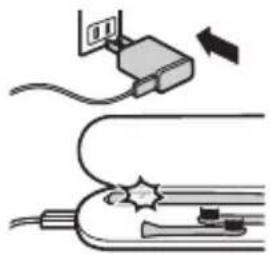
Charge Sonicare - Charge for 24 hours before first use. Charge indicator flashes green until fully charged. Rapid yellow flashing indicates charge is extremely low (fewer than 3 uses left). Your Sonicare has been designed to last up to 3 weeks on a single charge. Refer to “Traveling with your Sonicare” for additional charging methods.
The charger is designed to properly charge only one (1) handle at a time. Do not place metallic objects in the charger glass as handle charging may be affected and may cause the charger to overheat.
This charger is not compatible with previous models of Sonicare.

4 USING YOUR SONICARE
Brush - Gently move the brush head slowly across the teeth in a small back and forth motion so the longer bristles reach between your teeth. Do not scrub like a manual toothbrush. Apply light pressure to maximize Sonicare's effectiveness and let the Sonicare do the brushing for you.
The Quadpacer is an interval timer that has a short beep and pause to remind you to brush the 4 sections of your mouth. Depending on the brushing mode you have selected, the Quadpacer beeps at different intervals during the brushing cycle.
Clean The ultimate in plaque removal (Standard mode).
White 2 minutes of whitening mode to remove surface stains and 30 seconds to brighten and polish your front teeth.
Polish Quick 1-minute mode to brighten and polish your front teeth.
Gum care Complete mode combines Clean mode with an additional minute to gently stimulate and massage gums to improve gum health.
Sensitive Extra gentle mode for sensitive teeth and gums.
26
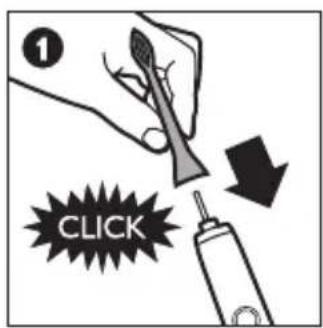

natural_image
Illustration of a faucet with a droplet on a surface, showing water flow (no text or symbols)
natural_image
Illustration of a hand using a tool to apply toothbrush application (no text or symbols present)


| Clean | → | 2 min. |
| White | → | 2:30 min |
| Polish | → | 1 min. |
| Gum care | → | 3 min. |
| Sensitive | → | 2 min. |


flowchart
graph TD
    A["Step 3: 30 sec."] --> B["Step 4: 30 sec."]
    B --> C["Step 7: 30 sec."]
    style A fill:#f9f,stroke:#333
    style B fill:#ccf,stroke:#333
    style C fill:#cfc,stroke:#333


5 GETTING USED TO YOUR SONICARE
Easy-start - The Sonicare may feel ticklish upon first use. To help you ease into the Sonicare experience, the Easy-start feature will gradually increase the sonic power over the first 14 brushings. Brushing must last at least 1 minute to properly advance through this ramp-up cycle.
Easy-start may be deactivated - Place the handle in the plugged-in charger (either charging base or travel case) - Push and hold the on/off button for 2 seconds; 1 beep indicates the Easy-start feature has been deactivated; 2 beeps indicate the feature has been reactivated.
Clinical studies are performed with the Sonicare fully charged and the Easy-start feature deactivated.

6
TRAVELING WITH YOUR SONICARE
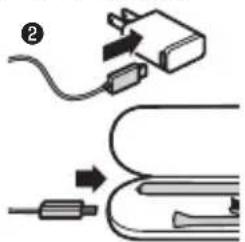
Charge via wall outlet - Place the handle in the charging travel case, plug the USB cord into the travel plug, and plug into an electrical outlet. The charge indicator on the handle fl ashes green until fully charged.
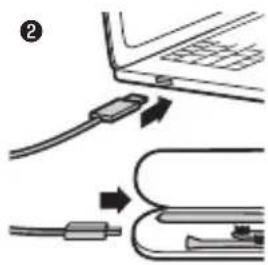
Charge via USB - Remove the USB cord from the travel plug, and insert the USB plug into any USB port. Use Only Philips USB wall adapter and USB cable provided.
Use Only UL Listed devices as an alternate method of charging the toothbrush handle in the travel case (i.e. UL listed Computer, USB Hub). This charger is not compatible with previous models of Sonicare.


natural_image
Diagram of a medical device with tubing and a star-shaped connector (no text or symbols)29
7 CLEANING YOUR SONICARE
Cleaning - Clean the Sonicare periodically. Wipe down and rinse the entire surface with a soft cloth and mild soap, if desired. Do not use sharp objects to clean. Do not clean brush heads, handle, charging base, or travel charger in the dishwasher. Charger glass is top rack dishwasher safe.

30

8 STORING YOUR SONICARE
Storing - If the Sonicare will not be used for an extended period of time, unplug the charger, clean the product, and store it in a cool, dry place away from direct sunlight.

9
PRODUCT LIFE
Please note this process is not reversible - Do not throw away the appliance with the normal household waste at the end of its life, but hand it in at an official collection point for recycling. Dispose of the battery at an official collection point for batteries. By doing this, you help to preserve the environment.
Only remove the battery at the end of the product's life - Doing so earlier will destroy the product. Observe basic safety precautions.
To separate the batteries from the housing case: Place the handle on a solid surface and lightly tap the housing one inch from the bottom edge with a hammer. Rotate the handle 90 degrees, and repeat until bottom cap separates from the handle.

32
10
SUPPORT

www.philips.com/support
LOCATING THE MODEL NUMBER
Look on the bottom of the unit for the model number.
WARRANTY AND SERVICE
Philips warrants its products for 2 years after the date of purchase.
Defects due to faulty materials and workmanship will be repaired or replaced at Philips' expense provided that convincing proof of purchase in the qualifying period is provided.
WARRANTY EXCLUSIONS
What is not covered under the two-year warranty:
- Brush heads
- Damage caused by misuse, abuse, neglect, alterations or unauthorized repair
- Normal wear and tear, including chips, scratches, abrasions, discoloration or fading
IMPLIED WARRANTIES
ANY IMPLIED WARRANTIES, INCLUDING IMPLIED WARRANTIES OF MERCHANTABILITY AND FITNESS FOR A PARTICULAR PURPOSE, SHALL BE LIMITED TO THE DURATION OF THE EXPRESS WARRANTIES SET FORTH ABOVE. IN SOME STATES LIMITATIONS ON DURATION OF IMPLIED WARRANTIES DO NOT APPLY.
LIMITATION OF REMEDIES
IN NO EVENT SHALL PHILIPS OR ANY OF ITS AFFILIATED OR SUBSIDIARY COMPANIES BE LIABLE FOR ANY SPECIAL, INCIDENTAL OR CONSEQUENTIAL DAMAGES BASED UPON BREACH OF WARRANTY, BREACH OF CONTRACT, NEGLIGENCE, TORT, OR ANY OTHER LEGAL THEORY. SUCH DAMAGES INCLUDE, WITHOUT LIMITATION, LOSS OF SAVINGS OR REVENUE; LOSS OF PROFIT; LOSS OF USE; THE CLAIMS OF THIRD PARTIES INCLUDING, WITHOUT LIMITATION, DENTISTS AND DENTAL HYGIENISTS; AND COST OF ANY SUBSTITUTE EQUIPMENT OR SERVICES. SOME STATES DO NOT ALLOW THE EXCLUSION OR LIMITATION OF INCIDENTAL OR CONSEQUENTIAL DAMAGES.
33


Philips Oral Healthcare, Inc.
22100 Bothell Everett Hwy Bothell, WA 98021 U.S.A.
Phone:+1 (800) 682-7664
Philips Oral Healthcare, Inc.
22100 Bothell Everett Hwy
Bothell, WA 98021 U.S.A.
日本販売代理店
小泉成器株式会社



- DiamondClean
- 取扱説明書
- PHILIPS sonicare
- はじめに
- 必ずお守り ください
- 充電の仕方
- 満充電で約3週間使用できます。
- 充電表示
- 充電催促表示
- ヒント
- WARNINGS
- MEDICAL WARNINGS
- Electromagnetic fields (EMF)
- SAVE THESE INSTRUCTIONS
- BEFORE FIRST USE
- USING YOUR SONICARE
- GETTING USED TO YOUR SONICARE
- 6
- TRAVELING WITH YOUR SONICARE
- CLEANING YOUR SONICARE
- STORING YOUR SONICARE
- 9
- PRODUCT LIFE
- 10
- SUPPORT
- LOCATING THE MODEL NUMBER
- WARRANTY AND SERVICE
- WARRANTY EXCLUSIONS
- IMPLIED WARRANTIES
- LIMITATION OF REMEDIES
Brand : PHILIPS
Model : Sonicare Diamondclean HX9308
Category : Electric toothbrush