
Sonicare FlexCare+ HX6926 - Electric toothbrush PHILIPS - Free user manual and instructions
Find the device manual for free Sonicare FlexCare+ HX6926 PHILIPS in PDF.


| Product Type | Rechargeable sonic electric toothbrush |
| Brand | Philips |
| Model | Sonicare FlexCare+ HX6926 (also HX6927/08) |
| Charging Time | 24 hours for full charge |
| Battery Life | Up to 3 weeks (based on twice daily 2-minute brushing) |
| Brushing Modes | Clean (2 min), Gum Care (2+1 min), Refresh (1 min), Sensitive (2 min) |
| Features | Easy-start, Smartimer, Quadpacer |
| Brush Head Replacement | Every 3 months for optimal results |
| Charger Voltage | 100-240 V AC, 50 or 60 Hz (universal travel charger) |
| Travel Accessories | Hygienic travel cap, travel charger |
| Cleaning Instructions | Do not clean brush head, handle, or charger in dishwasher. Rinse brush head and metal shaft with warm water. Wipe handle and charger with damp cloth. |
| Safety Warnings | Keep charger away from water. Do not use if damaged. Consult dentist after oral surgery or if bleeding persists. |
| Compatible Brush Heads | Only Philips Sonicare replacement brush heads |
| Guarantee | 2 years (excluding brush heads, damage from misuse) |
| Weight | Approx. 100 g (handle only, not including brush head) |
Frequently Asked Questions - Sonicare FlexCare+ HX6926 PHILIPS
User questions about Sonicare FlexCare+ HX6926 PHILIPS
0 question about this device. Answer the ones you know or ask your own.
Ask a new question about this device
Download the instructions for your Electric toothbrush in PDF format for free! Find your manual Sonicare FlexCare+ HX6926 - PHILIPS and take your electronic device back in hand. On this page are published all the documents necessary for the use of your device. Sonicare FlexCare+ HX6926 by PHILIPS.
USER MANUAL Sonicare FlexCare+ HX6926 PHILIPS
FlexCare+
Rechargeable sonic toothbrush
フィリッ プネッケア ー
フレックス ケ ア ー プ ラス
充電式電動歯ブラシ
HX6926/08, HX6927/08
取扱説明書
保証書付
保証書は、この取扱説明書の最終
ページについておりますのでお買い求
めの販売店で記入を受けてください
PHILIPS
sonicare
はじめに
Guidance in English 20\~32
●英文解説
保証とアフターサービス 35
●保 証
仕様 36
無料修理規定 38
保証書 ...... 最終ページ
2
必ずお守り ください
ご使用の前に必ず取扱説明書をよくお読
natural_image
Diagram showing a cable being inserted into a socket with an arrow indicating direction (no text or symbols present)
natural_image
Diagram showing a door opening with a tooth inserted into a wall, indicating direction (no text or symbols)6

充電の仕方
この製品は通常24時間充電です。
満充電で約3週間使用できます。
(1日2回、2分間使用した場合)
natural_image
Simple line drawing of a cable with two outlets and a terminal block (no text or symbols)
充電表示
充電催促表示
充電残量目安表示
No plug adapter required.
Plug adapter required.
natural_image
Illustration of human teeth with dental structures (no text or labels)natural_image
Line drawing of an electric toothbrush and its tip, showing the tooth being inserted (no text or symbols present)natural_image
Illustration of dental arches with tooth arrangement and toothbrush (no text or symbols)歯の表側
natural_image
Illustration of a toothbrush brushing teeth with dental crowns (no text or symbols)奥歯の裏側
ヒント
natural_image
Illustration of a mouth with teeth and a finger pointing to the tongue area (no text or symbols)natural_image
Simple line drawing of a tool tip interacting with a mechanical component (no text or symbols)14

モード設定
natural_image
Illustration of a hand holding a cylindrical object with a needle inserted, showing motion (no text or symbols)natural_image
Close-up of a hand holding a mechanical tool or connector with a black arrow pointing to a component (no visible text or symbols)Philips Sonicare FlexCare+
ENGLISH

FlexCare+

natural_image
Illustration of a hand holding a pen and a toothbrush, with an arrow indicating the process (no text or symbols present)
natural_image
Simple line drawing of a mechanical component with a star-shaped indentation and base (no text or symbols)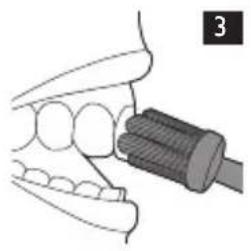
natural_image
Illustration of a dental tool interacting with teeth (no text or symbols visible)
4
5

5

natural_image
Diagram of a mechanical device with a cylindrical component and connecting rods (no text or symbols)The image is too blurry to recognize any text content.

natural_image
Pure mechanical diagram showing lever and fulcrum components without any text or symbols
natural_image
Illustration of a laboratory procedure showing a test tube inserted into a beaker (no text or symbols visible)The image is too blurry to recognize any text content.
9

natural_image
Illustration of a hand holding a pen with a downward arrow indicating force or pressure (no text or symbols)9

natural_image
Close-up of a hand holding a mechanical component with a black arrow indicating force direction (no text or symbols)ENGLISH
Introduction
Congratulations on your purchase and welcome to Philips! To fully benefit from the support that Philips offers, register your product at www.philips.com/welcome.
Important
Read this user manual carefully before you use the appliance and save it for future reference.
Danger
- Keep the charger away from water. Do not place or store it over or near water contained in a bathtub, washbasin, sink etc. Do not immerse the charger in water or any other liquid. After cleaning, make sure the charger is completely dry before you connect it to the mains.
Warning
- The mains cord cannot be replaced. If the mains cord is damaged, discard the charger.
- Always have the charger replaced with one of the original type in order to avoid a hazard.
- Do not use the charger outdoors or near heated surfaces.
- If the appliance is damaged in any way (brush head, toothbrush handle, charger), stop using it. This appliance contains no user-serviceable parts. If the appliance is damaged, contact the Consumer Care Centre in your country (see chapter ‘Guarantee and support’).
- This appliance is not intended for use by persons (including children) with reduced physical, sensory or mental capabilities, or lack of experience and knowledge, unless they have been given supervision or instruction concerning use of the appliance by a person responsible for their safety.
- Children should be supervised to ensure that they do not play with the appliance.
Caution
- Do not clean the brush head, the handle, the charger, the charger cover in the dishwasher.
ENGLISH
- If you have had oral or gum surgery in the previous 2 months, consult your dentist before you use the toothbrush.
- Consult your dentist if excessive bleeding occurs after using this toothbrush or if bleeding continues to occur after 1 week of use.
- The Sonicare toothbrush complies with the safety standards for electromagnetic devices. If you have a pacemaker or other implanted device, contact your physician or the manufacturer of the implanted device prior to use.
- If you have medical concerns, consult your doctor before you use the Sonicare.
- This appliance has only been designed for cleaning teeth, gums and tongue. Do not use it for any other purpose. Stop using the appliance and contact your doctor if you experience any discomfort or pain.
- Do not use other brush heads than the ones recommended by the manufacturer.
- If your toothpaste contains peroxide, baking soda or bicarbonate (common in whitening toothpastes), thoroughly clean the brush head with soap and water after each use. This prevents possible cracking of the plastic.
Electromagnetic fields (EMF)
This Philips appliance complies with all applicable standards and regulations regarding exposure to electromagnetic fields.
General description (Fig. 1)
1 Hygienic travel cap
2 Brush head
3 Handle with soft grip
4 Power on/off button
5 Mode button
6 Brushing modes
7 Travel charger
ENGLISH
Preparing for use
Attaching the brush head
1 Align the brush head so the bristles face the front of the handle. (Fig. 1)
2 Firmly press the brush head down on the metal shaft until it stops.
Charging your Sonicare
1 Put the mains plug of the charger in the wall socket.
2 Place the handle on the charger (Fig. 2).
The flashing light of the battery gauge indicates that the toothbrush is charging.
- 1 solid green LED indicates that the toothbrush is 34-66% charged.
- 2 solid green LEDs indicate that the toothbrush is 67-94% charged.
- 3 solid green LEDs indicate that the toothbrush is fully charged.
Note: If the battery charge of your Sonicare is low, you hear 3 beeps and 1 LED of the recharge gauge flashes yellow for 30 seconds after completing the brushing cycle.
Note: To keep the battery fully charged at all times, you may keep your Sonicare on the charger when not in use. Once the Sonicare is fully charged, the charger draws minimal energy from the wall socket.
Note: It takes at least 24 hours to fully charge the battery.
Using the Sonicare
Brushing instructions
1 Wet the bristles and apply a small amount of toothpaste.
2 Place the toothbrush bristles against the teeth at a slight angle towards the gumline (Fig. 3).
3 Press the power on/off button to switch on the Sonicare.
4 Apply light pressure to maximise Sonicare's effectiveness and let the Sonicare toothbrush do the brushing for you. Do not scrub.
ENGLISH
5 Gently move the brush head slowly across the teeth in a small back and forth motion so the longer bristles reach between your teeth. Continue this motion throughout your brushing cycle.
Note: To make sure you brush evenly throughout the mouth, divide your mouth into 4 sections using the Quadpacer feature (see chapter 'Features').
6 Begin brushing in section 1 (outside top teeth) and brush for 30 seconds before moving to section 2 (inside top teeth). Continue brushing in section 3 (outside bottom teeth) and brush for 30 seconds before moving to section 4 (inside bottom teeth) (Fig. 4).
7 After you have completed the brushing cycle, you can spend additional time brushing the chewing surfaces of your teeth and areas where staining occurs. You may also brush your tongue, with the toothbrush switched on or off, as you prefer (Fig. 5).
Your Sonicare is safe to use on:
- Braces (brush heads wear out sooner when used on braces)
- Dental restorations (fillings, crowns, veneers)
Brushing modes
Sonicare automatically starts in the default Clean mode.
1 Prior to switching on the Sonicare, press the mode button to toggle between modes.
The selected brushing mode illuminates.
Once a brushing mode has been selected, it remains active until another brushing mode is selected.
Note: When the toothbrush is switched on, you cannot toggle between modes. The following brushing modes are available:
Clean
Complete whole mouth cleaning (2 minutes).
Gum Care
Complete whole mouth cleaning (2 minutes) plus gentle cleaning for problem areas and along the gumline (1 minute).
ENGLISH
Refresh
Touch-up for a quick clean (1 minute).
Sensitive
Gentle cleaning for sensitive gums and teeth (2 minutes).
Note: When Sonicare is used in clinical studies, the default 2-minute Clean mode must be selected. The handle has to be fully charged. Deactivate the Easy-start feature. For areas where excess staining occurs, an additional 30 seconds of brushing time can be spent to help remove stains.
Features
Easy-start
This Sonicare type comes with the Easy-start feature activated.
The Easy-start feature gently increases power over the first 14 brushings to help you get used to brushing with the Sonicare.
Note: Each of the first 14 brushings must be at least 1 minute in length to properly move through the Easy-start ramp-up cycle.
Deactivating or activating the Easy-start feature
1 Attach your brush head to the handle.
2 Place the handle on the plugged-in charger.
- To deactivate Easy-start:
Press and hold the power on/off button for 2 seconds. You hear 1 beep to indicate that the Easy-start feature has been deactivated.
- To activate Easy-start:
Press and hold the power on/off button for 2 seconds. You hear 2 beeps to indicate that the Easy-start feature has been activated.
Note: Using the Easy-start feature beyond the initial ramp-up period is not recommended and reduces Sonicare's effectiveness in removing plaque.
ENGLISH
Smartimer
The Smartimer indicates that your brushing cycle is complete when it automatically switches off the toothbrush at the end of the brushing cycle.
Dentists recommend brushing at least 2 minutes twice a day.
Quadpacer
- The Quadpacer is an interval timer that has a short beep and pause to remind you to brush the 4 sections of your mouth. Depending on the brushing mode you have selected, the Quadpacer beeps at different intervals during the brushing cycle. See section ‘Brushing modes’ in chapter ‘Using the Sonicare’ (Fig. 4).
The Quadpacer feature on this type has been activated. To deactivate or reactivate the Quadpacer feature:
1 Place the handle with a brush head attached on the plugged-in charger.
2 Press and hold the mode button for 2 seconds.
▶You hear 1 beep to indicate the Quadpacer has been deactivated or you hear 2 beeps to indicate the Quadpacer has been activated.
Cleaning
Do not clean the brush head, handle, travel charger, in the dishwasher.
Toothbrush handle
1 Remove the brush head and rinse the metal shaft area with warm water (Fig. 6).
Do not push on the rubber seal on the metal shaft with sharp objects, as this may cause damage.
2 Use a damp cloth to wipe the entire surface of the handle.
Brush head
1 Rinse the brush head and bristles after each use (Fig. 7).

ENGLISH
2 Remove the brush head from the handle and rinse the brush head connection at least once a week with warm water.
Charger
1 Unplug the charger.
2 Use a damp cloth to wipe the surface of the charger.
Storage
- If you are not going to use the appliance for an extended period of time, remove the mains plug from the wall socket. Then clean the appliance and store it in a cool and dry place away from direct sunlight.
Replacement
Brush head
- Replace Sonicare brush heads every 3 months to achieve optimal results.
- Use only compatible Sonicare replacement brush heads.
Recycling
Do not throw away the appliance with the normal household waste at the end of its life, but hand it in at an official collection point for recycling. By doing this, you help to preserve the environment.
Removing the rechargeable battery
Please note that this process is not reversible.
To remove the rechargeable battery, you need a flat-head (standard) screwdriver.
1 To deplete the rechargeable battery of any charge, remove the handle from the charger, switch on the Sonicare and let it run until it stops. Repeat this step until you can no longer switch on the Sonicare.

ENGLISH
2 Insert a flat-head (standard) screwdriver into the slot located at the bottom of the handle. Turn the screwdriver anticlockwise to release the bottom cap. (Fig. 8)
3 Hold the handle upside down and push down on the shaft to release the internal components of the handle (Fig. 9).
4 Insert the screwdriver under the circuit board, next to the battery connections, and twist to break the connections. Remove the circuit board and pry the battery from the plastic carrier (Fig. 10).
Guarantee and support
If you need information or support, please visit www.philips.com/support or read the separate worldwide guarantee leaflet.
Guarantee restrictions
The terms of the international guarantee do not cover the following:
- Brush heads.
- Damage caused by use of unauthorised replacement parts.
- Damage caused by misuse, abuse, neglect, alterations or unauthorised repair.
- Normal wear and tear, including chips, scratches, abrasions, discolouration or fading.
Frequently asked questions
This chapter lists the questions most frequently asked about the appliance. If you cannot find the answer to your question, contact the Consumer Care Centre in your country.
Question Answer
Why doesn't the Sonicare toothbrush work?
You may need to recharge the Sonicare. Charge the Sonicare for at least 24 hours.
ENGLISH
| Question Answer | |
| The socket may not be live. The electricity supply to sockets in mirror cabinets over washbasins or shaver sockets in bathrooms may be cut off when the light is switched off.. | |
| You may need to reattach or replace the brush head. | |
| Why do I feel a tickling sensation when I use the Sonicare? | You may experience a slight tickling/tingling sensation when you use Sonicare for the first time. As you become accustomed to brushing with the Sonicare, this sensation diminishes. |
| Why is there a brief pause in the bristle motion while I'm brushing? | This is the Quadpacer feature reminding you to move to a new section of your mouth. This feature enables you to spend equal time brushing all areas of the mouth (see chapter ‘Using the Sonicare, section ‘Brushing instructions’). |
| The brush head chatters against my teeth. What can I do about this? | To avoid this, keep the brush head properly oriented, with the bristles placed on the gumline at a slight angle. |
| Why does the toothbrush seem less powerful? | You may need to charge the Sonicare. |
| The Easy-start feature may be on. Deactivate the Easy-start feature (see chapter ‘Features’). | |
| You may need to replace the brush head. | |
| Why doesn't the mode button work during brushing? | Brushing modes should be selected prior to switching on the Sonicare. |
ENGLISH
Question Answer
Do I need a special charger if I travel with my Sonicare?
The travel charger, can be used at common worldwide voltages between 100-240V AC, at either 50 or 60Hz. All you need is a simple plug adapter.
Travel tip: The Sonicare battery is designed to last up to 3 weeks between charges.

保証と アフターサービス
Philips Oral Healthcare, LLC.
22100 Bothell Everett Hwy Bothell, WA 98021 U.S.A.
Phone:+1 (800) 682-7664
Philips Oral Healthcare, LLC.
22100 Bothell Everett Hwy
Bothell, WA 98021 U.S.A.
日本販売代理店製造元
小泉成器株式会社
4235.020.3357.6(09/16)



- FlexCare+
- 取扱説明書
- PHILIPS
- はじめに
- 必ずお守り ください
- 充電の仕方
- 充電表示
- 充電催促表示
- 充電残量目安表示
- ヒント
- モード設定
- ENGLISH
- Introduction
- Important
- Danger
- Warning
- Caution
- Electromagnetic fields (EMF)
- General description (Fig. 1)
- Preparing for use
- Attaching the brush head
- Charging your Sonicare
- Using the Sonicare
- Brushing instructions
- Brushing modes
- Clean
- Gum Care
- Refresh
- Sensitive
- Features
- Easy-start
- Deactivating or activating the Easy-start feature
- Smartimer
- Quadpacer
- Cleaning
- Toothbrush handle
- Brush head
- Charger
- Storage
- Replacement
- Recycling
- Removing the rechargeable battery
- Guarantee and support
- Guarantee restrictions
- Frequently asked questions
- Question Answer
- 保証と アフターサービス
- Philips Oral Healthcare, LLC.
- 日本販売代理店製造元
- 小泉成器株式会社
Brand : PHILIPS
Model : Sonicare FlexCare+ HX6926
Category : Electric toothbrush