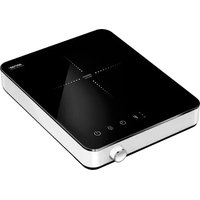
MKE-15 - Cooker MPM - Free user manual and instructions
Find the device manual for free MKE-15 MPM in PDF.



| Product type | Portable induction hob |
| Model | MKE-15 |
| Brand | MPM |
| Power | 2000 W |
| Power supply | 220-240 V ~ 50/60 Hz |
| Number of cooking zones | 1 |
| Control type | Touch sensitive |
| Main functions | Power (P) and temperature (°C) adjustment, timer, key lock, automatic shut-off after 120 minutes |
| Temperature ranges | 60 °C to 240 °C in 20 °C increments |
| Timer | 0 to 180 minutes |
| Compatible utensil diameter | 12 cm to 26 cm |
| Cable length | 1.5 m |
| Cooling fan | Yes, automatically stops after cooling |
| Standby power consumption | 0.71 W |
| Automatic standby shutdown | After 3 minutes |
| Safety | Overheat protection, short circuit, voltage fluctuation, utensil detection (EO display), child lock |
| Maintenance and cleaning | Clean after use with a soft damp cloth, ceramic glass cleaner, do not immerse |
| Error codes | E0 (no pan), E2 (fault/short circuit), E3 (overvoltage), E4 (undervoltage), E5/E6 (overheat/fan) |
| Recycling | Do not dispose of with household waste, take to WEEE collection point |
Frequently Asked Questions - MKE-15 MPM
User questions about MKE-15 MPM
0 question about this device. Answer the ones you know or ask your own.
Ask a new question about this device
Download the instructions for your Cooker in PDF format for free! Find your manual MKE-15 - MPM and take your electronic device back in hand. On this page are published all the documents necessary for the use of your device. MKE-15 by MPM.
USER MANUAL MKE-15 MPM
EN We wish you satisfaction from using the product and invite you to check a wide range of other MPHces
cz NAVOD K OBSLUZE 3
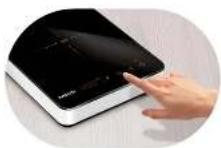

Touch function panel with LED dials Temperature melting range from 60°C to 240°C

Safety lock / Timer (from 0 to 180 min) / Power indicator with adjustment range 200-2000 W / induction heating zone with a diameter of 190 mm (for cookware with a diameter of 80 to 200 mm)
BEZPEČNOSTNÍ POKYNY PŘI POUŽÍVÁNÍ
Read the user manual before the first use.
The device is designed for home use only.
Due to rapid reaction of the induction plate to heat, do not use the plate unsupervised after setting it to a high heating level.
The device is not designed to be used in open spaces.
When cooking, a high velocity of heating the hotplate should be noticed.
Only specially designed pots, with thick bottom, may be used with the induction cooker.
Do not put empty pots when the heating plate is on in order to prevent overheating.
Exercise caution when cooking milk in special pots as water may be imperceptibly boiled away, which may damage the pot or the device.
▶ After finishing cooking, turn off the heating plate with a button.
- Oils and fats, due to its high temperature, can catch fire very easily. Maintain the utmost care when preparing food with the above-mentioned ingredients. Do not extinguish burning oils with water. Cover the pot with a lid and turn off the heating plate.
Do not leave the appliance switched on when unattended.
Avoid dropping heavy objects on the heating surface. Too heavy impact loading may cause permanent damage of a glass surface of the device.
In case of finding any damages on the device (e.g. cracks, scratches, chips), immediately turn it off because there is the risk of electrical shock.
If, for some reason, it is impossible to turn off the heating plate (e.g. the control module is broken), disconnect the plug or turn off the fuses and inform the service about the failure.
The power cord cannot have contact with the heating zones.
The cooker is not designed for storing any objects.
Before using put the cooker on a hard, flat and dry surface.
The heating plate is equipped in a safety system which disconnects the power of the heating zone when moving or removing the pot from the heating zone.
Do not put any flammable objects under the heating plate, as they may cause fire.
Note any carried metal objects (e.g. keys, decorations). They may be heated up and cause burns. This does not apply only to objects with magnetic characteristics (e.g. silver, gold).
Do not heat up closed cans or other containers as the increase of thermal energy inside the containers may lead to sudden burst.
Keep the sensor buttons clean. Do not put any objects on them.
If the content of the pot is boiled over on the sensor buttons, disconnect the plate and clean it. The heating surface is hot.
Take particular caution if there are children near the device.
After long operation, the heating surface of the plate may still be hot. Do not touch the surface as there is a danger of burn.
Regular checking whether there are any objects near the air outlets, which may impede the airflow, is recommended.
The power cord should be regularly checked whether there are any damages. Do not use the device if the power cord is damaged. In such a case necessarily contact your authorized service to repair the damage.
Do not use the device in places where the air temperature is high, e.g. near gas cookers.
- Clean the heating plate regularly.
The device is not designed to work with external time switches or a separate remote control system.
This appliance is not intended for use by children under 8 years of age and individuals with
reduced physical, sensory or mental capabilities, or lack of experience and knowledge, unless they have been given supervision or instruction concerning use of the appliance in a safe way and if they understand the hazards involved. Cleaning and user maintenance shall not be carried out by children without supervision.
Pay attention to children to prevent playing with the device.
Store the appliance and its cord out of reach of children under 8 years of age.
Do not pull the plug by holding the power cord.
Do not connect the power plug with wet hands.
In order to ensure your children's safety, please keep all packaging (plastic bags, boxes, polystyrene etc.) out of their reach.
WARNING! Do not allow small children to play with the foil as there is a danger of suffocation!
NOTE! Turn off the device if the surface is cracked to avoid electric shock.
NOTE! Do not put metal objects on the cooker, such as: knives, forks, spoons and lids, as they may become hot.
In order to ensure your children's safety, please keep all packaging (plastic bags, boxes, polystyrene etc.) out of their reach.
This appliance shall not be used by children. Keep the appliance and its cord out of reach of children.
Always disconnect the appliance from the supply if it is left unattended and before assembling, disassembling or cleaning.
WARNING! Do not allow small children to play with the foil as there is a danger of suffocation!

Warning! Hot surface! The heating plates can be hot after use. Do not touch.


ATTENTION! Do not touch the heating plate.
Do not leave the appliance switched on when unattended.
The temperature of surfaces may be higher when the appliance is in use.
Do not cover the ventilation openings.
APPLIANCE OVERVIEW
- Heating plate with a maximum power of 2000W
- Control panel
a. ON/OFF touch button
b. keypad lock touch button
c. touch button for timer function (TIMER)
d. touch temperature/heating power selection button
e. Heating power/temperature/timer indicator lights
f. LED display
g. function value change knob
- Ventilation openings
- Non-slip feet
- Power cord
GENERAL INFORMATION
- The induction hob generates a strong magnetic field that induces eddy currents in the bottom of the pan which produce heat. This means that only the pan is heated and not the hob, which saves a lot of electrical energy and significantly reduces the cooking time.
- Make sure to use a pan compatible with induction hobs. Do not use pans which have uneven bottoms, support feet or a diameter smaller than 12 cm. The maximum diameter is 26 cm. Do not use glass, clay or aluminium pots.
- Always keep the hob and the control panel clean. Use dry fingers and firm movements when operating the keyboard.
- The hob features an undervoltage and overvoltage protection system. If the voltage changes too much, the appliance will report an error (see the error table).
BEFORE FIRST USE
- Remove the appliance from the box. Remove all plastic sheets, bags and styrofoam inserts.
- During unpacking check appliance if there are not damaged.
- Clean the appliance (see CLEANING & MAINTENANCE).
- Make sure that your mains power supply corresponds to the voltage stated on the rating plate.
USAGE INSTRUCTIONS
- Place the appliance on a firm, level and dry surface.
- Plug the power cord to the mains.
- Place a compatible pan on the heating zone (1). Any attempt to start the heating process without a pan on the heating plate or with an incompatible pan will result in the "EO" error code on the display (2f).
- Turn on the appliance using the on switch (2a) and press the "Menu" button (2d) to go to heating parameter selection. If you take no action after turning on the hob, it will automatically turn off after 30 seconds.
HEATING POWER – use the function selection touch button (2d) to select heating power – “P” LED will light up, indicating that heating has begun. Use knob (2g) to select adequate heating power. The following power settings are available: 200, 400, 600, 800, 1000, 1200, 1400, 1600, 1800, 2000 W. The higher the power, the faster the cooker heats up, which ultimately means that meals can be prepared more quickly. The power can be re-adjusted at any time.
HEATING TEMPERATURE – if you want to heat the meals according to temperature, use the function selection touch button (2d) to select temperature – a LED will light up (°C), indicating that heating has begun. Use knob (2g) to select adequate temperature. The available temperature settings are: 60, 80, 100, 120, 140, 160, 180, 200, 220, 240 °C. The temperature can be re-adjusted at any time.
CAUTION! If you do not declare the heating time, the appliance will automatically switch off after 120 minutes.
HEATING TIME – from 0 to 180 minutes. Use the timer function touch button (2c) to select the timer – a TIMER LED will light up. Use knob (2g) to set the heating time in minutes (right turn adds 10 minutes, while left turn reduces the time minute by minute) and while a moment – the configured value will be lit up continuously, which means the timer has started working. The cooker will then alternately display the passing time and power or temperature. Once the configured time is up, the heating plate will be deactivated and a sound signal will be heard.
KEYBOARD LOCK FUNCTION – to lock or unlock the keypad, press and hold the button (2b).
-
If you lift the pot/pan or move it away from the cooking zone, the heating process will stop automatically ("EO" message). The hob will resume the process using the previous settings if you put the pot/pan back on the heating zone within 60 seconds. Otherwise the hob will switch off automatically.
-
You can stop the heating process at any moment using the "ON/OFF" button (2a).
CAUTION! The heating plates can be hot after use. Do not touch.
-
When the heating process is over, take the pot/pan away from the heating zone but do not unplug the hob from the mains while the fan cooling the inside of the appliance continue to work. You can safely unplug the hob only after the cooling fan stop.
-
When the plates cool down, clean the appliance (see: "CLEANING AND MAINTENANCE").
ERROR TABLE: CAUSES AND SOLUTIONS
| ERROR CODE | CAUSE SOLUTION | |
| E0 No pot | /pan in the heating zone. Incorrect cookware. | Put a pot/pan in the heating zone. Make sure your cookware is compatible with induction hobs. |
| E2 Damaged | temperature sensor. Electrical failure/ short circuit. | Contact an authorised service centre. Disconnect the device from the mains. |
| E3 Power | supply voltage too high. Make sure the power supply parameters correspond to the ones presented on the product's nameplate. | |
| E4 Power | supply voltage too low. Make sure the power supply parameters correspond to the ones presented on the product's nameplate. | |
| E5, E6 Device | overheating or cooling fan(s) damaged. | Turn off the appliance. Wait until it cools down, clean the airflow grills and turn on the hob again. Contact an authorised service centre. |
CLEANING AND MAINTENANCE
Clean the device after each use. Disconnect the device and wait until it gets cooler. Do not use petrol, thinners, brushes and paste to clean the device. Wipe the device with damp cloth with some dishwash. Using the vacuum cleaner remove the dirt from the air ducts and the fan grid. Clean the ceramic surface and the control panel with soft cloth and delicate means for cleaning ceramic surfaces. Take care and prevent running water on the device (water may cause the damage of the device).
Never immerse the device and the power cord in water or other liquid.
TECHNICAL DATA
| MODEL | MKE-15 |
| Power supply 220-240V ~ 50/60Hz | |
| Power 2000 W | |
| Availability of the shutdown and standby mode | availability |
| Power consumption in standby mode | 0,71W |
| Power consumption in the shutdown mode | - |
| Power consumption in network standby mode | - |
| Automatically goes into standby mode after 3 min. | |
| Automatically goes into the shutdown mode after - | |
| Network standby mode, if the device has a connection function with the application | - |
| Length of mains cable 1,5 M. |

CAUTION! MPM agd S.A. reserves the right to technical changes!
Proper disposal of the product (waste electrical and electronic equipment)

Marking on the product indicates that after the service-life of the product expires, it should not be disposed with other type of municipal waste. Used equipment may have a negative impact on the environment and health of people due to potentially containing hazardous substances, mixtures and components. Mixing electric waste with other types of waste or disassembling those in an unprofessional manner may cause a release of substances that are hazardous to the environment and health.
Used equipment should be handed-over to a point for collection of electric waste. In order to obtain detailed information regarding the electric waste collection points, the user should contact the municipal point of electric waste collection or used equipment processing department.
BESCHRIJVING VAN HET APPARAAT


Brand : MPM
Model : MKE-15
Category : Cooker