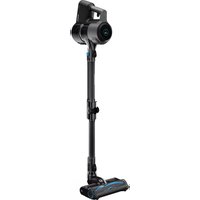
VCP 9131 - Vacuum Cleaner GRUNDIG - Free user manual and instructions
Find the device manual for free VCP 9131 GRUNDIG in PDF.



| Brand | Grundig |
| Model | VCP 9131 |
| Type | Cordless stick vacuum |
| Power supply | Mains charger 100-240V~ 50/60Hz, Li-ion battery 36V |
| Nominal power | 550 W |
| Charging time | 5 to 6 hours |
| Runtime (hard floor, minimum speed) | Up to 60 minutes |
| Runtime (hard floor, medium speed) | Up to 30 minutes |
| Runtime (hard floor, maximum speed) | Up to 15 minutes |
| Removable battery | Yes, model ZB 2007 |
| Display | LCD screen with battery indicator, remaining time and mode |
| Filtration | Metal filter, foam filter, EPA E12 filter, outlet foam |
| Included accessories | Motorized turbo brush, mini turbo brush, crevice tool, dusting brush, double-elbow extension, hard floor roller, wall charging station |
| Usage | Hard floors and carpets |
| Maintenance | Regular cleaning of filters and brush; do not wash the EPA filter |
| Safety | Automatic shutdown in case of blockage, overheat protection |
| Weight | Approximately 4.5 kg (with battery) |
| Dimensions (WxHxD) | Approximately 25 x 115 x 20 cm |
Frequently Asked Questions - VCP 9131 GRUNDIG
User questions about VCP 9131 GRUNDIG
0 question about this device. Answer the ones you know or ask your own.
Ask a new question about this device
Download the instructions for your Vacuum Cleaner in PDF format for free! Find your manual VCP 9131 - GRUNDIG and take your electronic device back in hand. On this page are published all the documents necessary for the use of your device. VCP 9131 by GRUNDIG.
USER MANUAL VCP 9131 GRUNDIG
2 In 1 Cordless Stick Vacuum Cleaner
User Manual

VCP 9131
Dongguan Yinli Electronics Co.,Ltd
Modellbezeichnung :
YLS0241A-E360060
Please read this guide first!
Dear Customer,
Thank you for choosing a Grundig product. We would like you to achieve the optimal efficiency from this high quality product which has been manufactured with state of the art technology. Please make sure you read and understand this guide and supplementary documentation fully before use and keep it as a reference. Include this guide with the unit if you hand it over to someone else. Observe all warnings and information herein and follow the instructions.
Symbols and their meanings
These symbols are used throughout this guide:

Important information and recommendations regarding the use of the appliance.

CAUTION:Warnings on personal injury or property damage.

Protection class against electric shock.
1 Important safety and environmental instructions
This section includes the safety instructions necessary to prevent the risk of personal injury or material damage.
Failure to observe these instructions will void any and all warranties.
1.1 General safety
- The device complies with international safety standards.
- This device can be used by children over 8 years of age, people with physical, sensory or mental challenges or people with lack of experience or knowledge; as long as control is ensured or information is provided regarding the hazards. Children must not play with the appliance. Cleaning and user maintenance shall not be carried out by unattended children.
- Do not use the appliance if the power cord or the appliance is damaged. Contact authorized service.
-
Your mains power supply shall be in align with the specified information on the type tag.
-
Do not use the appliance with an extension cord.
- To prevent the power cord get damaged, make sure that it does not get stuck, bent or contact with sharp edges.
- Do not touch the plug of the appliance with damp or wet hands while the appliance is plugged in.
- Do not pull on the cord while unplugging the appliance.
- Do not vacuum flammable materials and ensure that the cigarette ashes are cooled down before vacuuming them.
- Do not vacuum water and other fluids.
- Protect the appliance against precipitation, humidity and heat sources.
- Do not use the appliance near or on explosive or flammable environments or materials.
- Unplug the appliance before cleaning and maintenance.
- Do not immerse the appliance or its power cord in water for cleaning.
1 Important safety and environmental instructions
- Do not disassemble the appliance.
- Only use the authentic parts or the manufacturer's recommended parts.
- To prevent blockage of the filter or damage to the motor, do not vacuum cement, plaster or fragments of compressed paper
- Use the appliance with the adapter delivered with the appliance only.
- Do not use the appliance without filters, it may get damaged.
- Keep packaging materials away from the reach of children.
-
This appliance is not intended to be used by persons, including children, with physical, sensory and mental disabilities or those who have not adequate experience and knowledge regarding its use, unless they are under the supervision of a person responsible for their safety or they are informed about the operation of the appliance.
-
The children shall be supervised to prevent them from playing with the appliance.
- Unplug the adaptor and remove the battery pack before any cleaning or maintenance procedure.
- To avoid any risk of hazard, a damaged adaptor shall be replaced by the manufacturer, the authorized representative of the manufacturer or a similarly qualified technician.
- Keep your fingers, hair and loose clothes away from moving parts or clearances while vacuuming.
- Batteries shall be removed from the appliance before discarding the appliance.
- Disconnect the appliance from power supply before removing the battery.
- Please discard used batteries in accordance with local laws and regulations.
- The batteries included in this appliance may only be replaced with qualified persons.
1 Important safety and environmental instructions
- CAUTION: Use the YLS0241A-E360060 removable supply unit delivered with the appliance to charge to the battery.
- Please install/remove batteries as per the instructions specified in the user guide.
- Do not use batteries of different types or old and new batteries together.
- Batteries shall be installed with the correct polar layout.
- Remove the depleted batteries from the appliance and dispose of these batteries in a safe way.
- If you do not intend to use the appliance for a long while, the batteries shall be removed.
- Fluid may leak from batteries damaged as a result of incorrect operation. Do not contact this fluid. Discard damaged batteries as per the laws and legislation and contact the authorized service.
-
Do not short circuit the supply terminals.
-
Use with ZB 2007 batteries only.
- This appliance shall not be operated by children and people with limited physical, sensory and cognitive skills or people with lack of experience and knowledge unless they are under supervision or they are provided with the relevant instructions.
- The children shall be supervised to prevent them from playing with the appliance.
1 Important safety and environmental instructions
1.2 Compliance with the WEEE Directive and disposal of the waste product
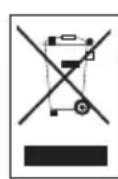
This product complies with EU WEEE Directive (2012/19/EU). This product bears a classification symbol for waste electrical and electronic equipment (WEEE).
This symbol indicates that this product shall not be disposed with other household wastes at the end of its service life. Used device must be returned to official collection point for recycling of electrical and electronic devices. To find these collection systems please contact to your local authorities or retailer where the product was purchased. Each household performs important role in recovering and recycling of old appliance. Appropriate disposal of used appliance helps prevent potential negative consequences for the environment and human health.
1.3 Package information

Packaging materials of the product are manufactured from recyclable materials in accordance with our National Environment Regulations. Do not dispose of the packaging
materials together with the domestic or other wastes. Take them to the packaging material collection points designated by the local authorities.
1.4 Information on Waste Batteries

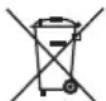
This symbol on rechargeable batteries/batteries or on the packaging indicates that the rechargeable battery/battery may not be disposed of with regular house hold rubbish.
For certain rechargeable batteries/batteries,
this symbol may be supplemented by a chemical symbol. Symbols for mercury (Hg) or lead (Pb) are provided if the rechargeable batteries/batteries contain more than 0,0005% mercury or more than 0,004% lead.
Rechargeable batteries/batteries, including those which do not contain heavy metal, may not be disposed of with household waste. Always dispose of used batteries in accordance with local environmental regulations. Make enquiries about the applicable disposal regulations where you live.
1.5 Actions to be taken for energy saving
- To avoid redundant energy consumption while using the device, set the speed levels according to the floor you are sweeping.
- Under normal conditions, low speeds are used to clean the hard floors, curtains and sofas, and high speeds are used to clean the carpets.
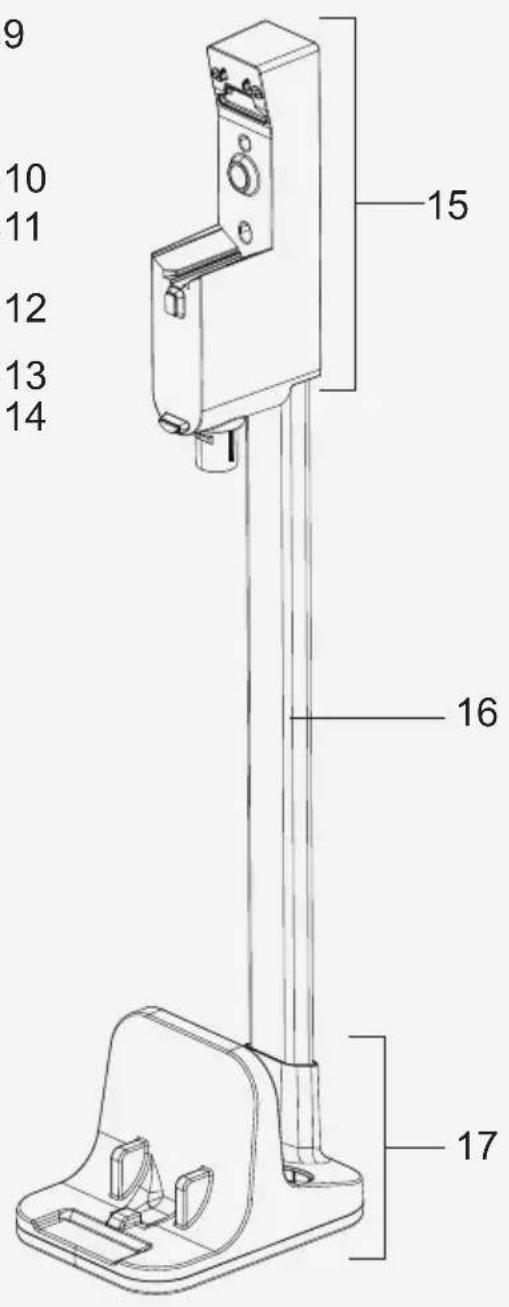
2 Overview

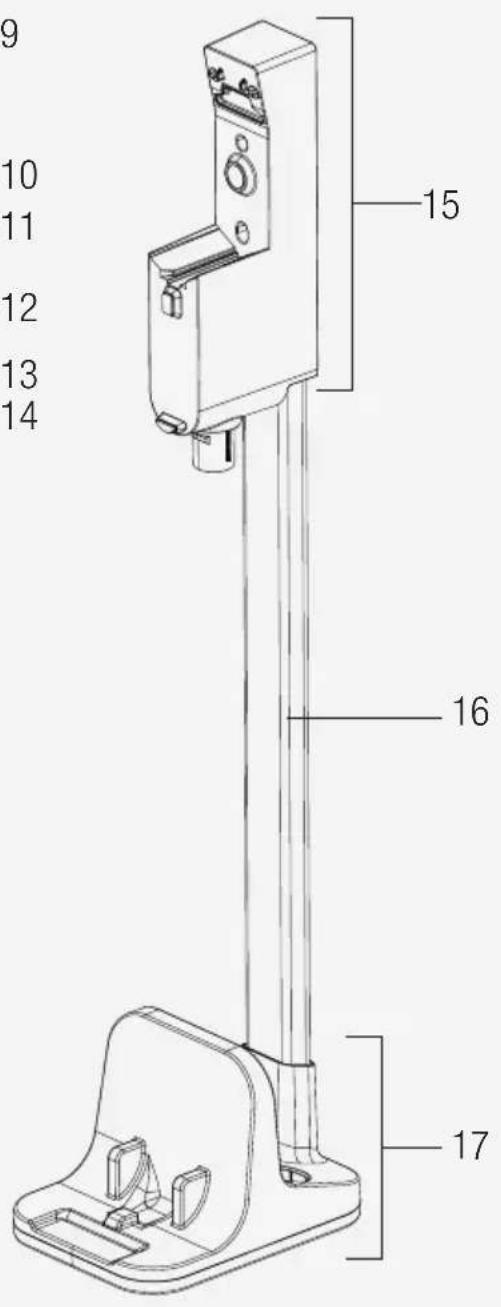
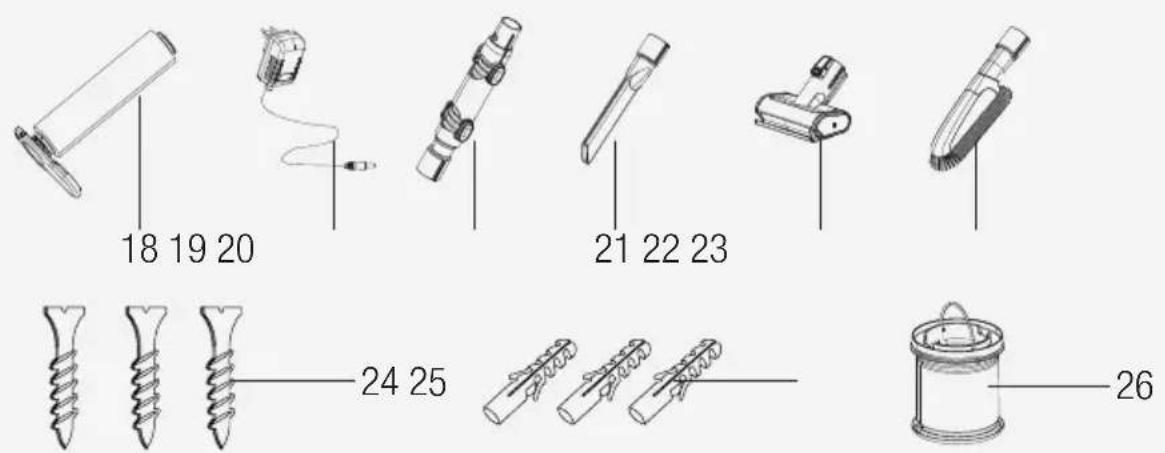
2.1 Controls and components
- On-Off switch
- Mode button +
3.Mode button - - LCD Display
- Filter cover release button
- Foldable tube
- Brush release button
- Electric turbo brush
- Battery pack release button
- Product body
- Dust container
- Dust container lid release button
- Foldable tube button
- Tube release button
- Charging dock
- Charging dock tube
- Charging dock base
- Hard floor roller
- Adaptor
- Elbow
- Crevicetool
- Mini turbo brush
- Dust brush
- Screw
- Dowel
- Replacement filter
2.2 Technical data
Nominal input power: 550 W
Input: 100 - 240V 50 - 60Hz0.8A (max.)
Output: 36V = 0.6A
Charging period: 5-6 hours
Operation period under maximum power:
up to 15 min.
Operation period under medium power: up to 30 min.
Operation period under minimum power:
up to 60 min.
The rights to make technical and design changes are reserved.
Parameter of External Power Supply
Manufacturer
Dongguan Yinli Electronics Co.,Ltd
Model Identifier : YLS0241A-E360060
Output Current : 0.6A
Output Power : 21.6W
Average active efficiency : 87.19%
Efficiency at low load(10%): 79.58%
No-load power consumption : 0.09W
The values provided with the appliance or its accompanying documents are laboratory readings in accordance with the respective standards. These values may differ depending on the use and ambient conditions.
2 Overview
| Intended Use | Speed rating Operating period | ||
| Hard floor | Minimum speed | Up to 60 min. | |
| Medium speed | Up to 30 min. | ||
| Maximum speed | Up to 15 min. | ||
| Carpet floor | Minimum speed | Up to 30 min. | |
| Medium speed | Up to 15 min. | ||
| Maximum speed | Up to 7 min. | ||
| Hand-held type | Minimum speed | Up to 90 min. | |
| Medium speed | Up to 30 min. | ||
| Maximum speed | Up to 8 min. | ||

The operating periods specified above are valid under full charge (100%)

Electric turbo brush (8) detects the floor automatically. Operating periods may vary as per switching between floor types during operation.

Operating periods for hand-held type are valid for operation with no accessories, and operation with an elbow (20), with a dust brush (23) and with the narrow mouth nozzle (21). Period varies in case of operation with mini turbo brush (22).
3 Installation
3.1 Intended use
This appliance is intended for household use and it is not suitable for industrial use.
3.2 Installation of the mobile charging dock

Install charging dock tube (16) to the charging dock base (17), then install the charging dock (15) to the charging dock tube (16).
Install the adaptor to the charging dock (15). Plug in the charging adaptor (19).
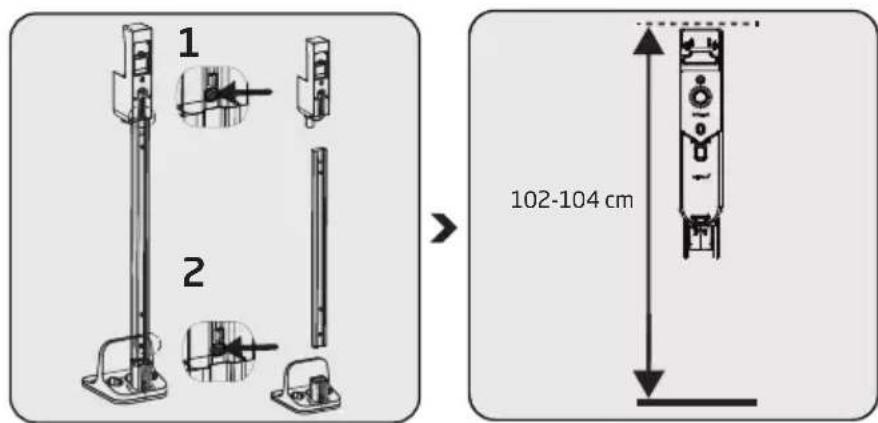
If you want to install the charging dock (15) to the wall, detach the charging dock from the tube (16) and support (17) using two separate buttons.
Position the charging dock (15) at a height of 102-104 cm from the ground.
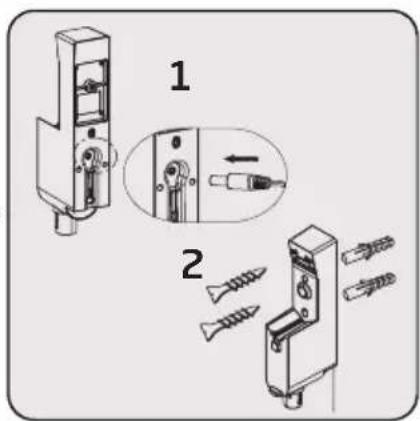
Install the adaptor (19) to the charging dock (15).
Put the cord of the charging adaptor through the power cord securing ring behind the charging dock tube and secure the cord.
Install the charging dock (15) to the wall using two screws (24) and two dowels (25).
3 Installation
3.3 Installation of the body and the brush
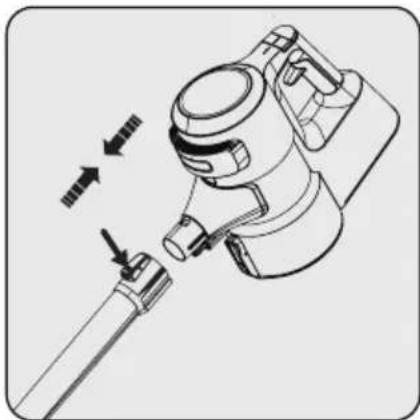
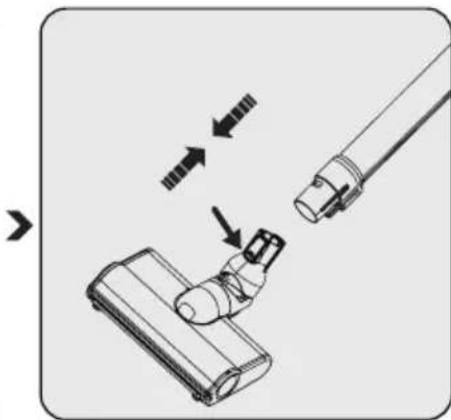
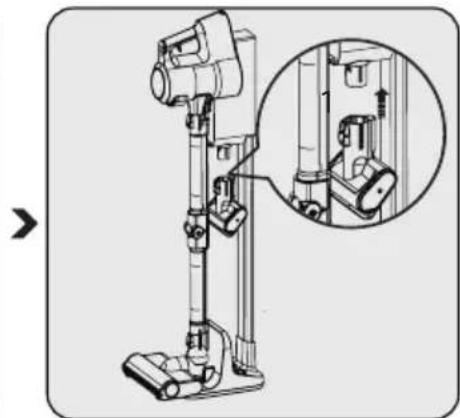
Install the tube to the end of the body (10).
Install the tube to the product body (10).
Press the electric turbo brush release button (7) on the electric turbo brush (8) and push it in the direction of arrow towards the wand.
Install the mini turbo brush (22) to the charging dock (15).
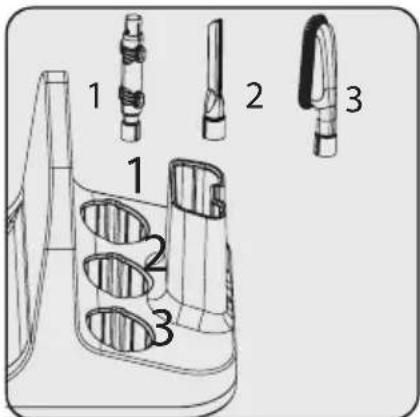
Place other accessories to the charging dock support (17).
4 Operation
4.1 Charging the appliance

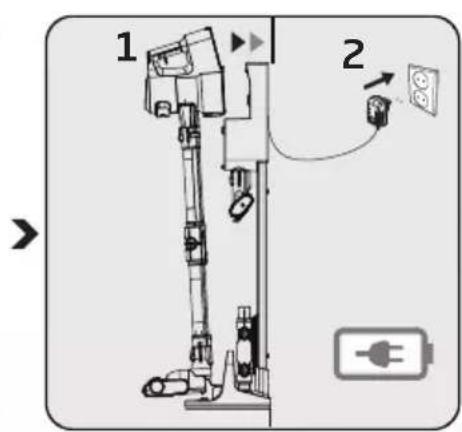
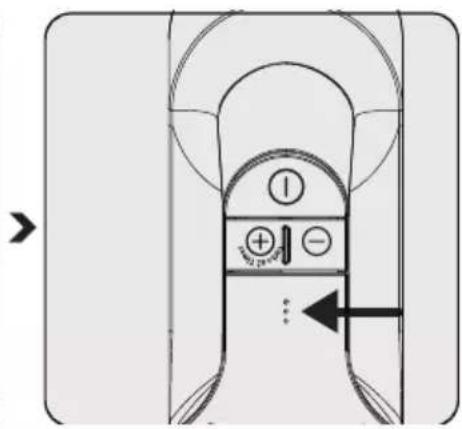
Secure the electric turbo brush (8) to the charging dock support.
Install the body (10) to the charging dock (15).
Plug in the charging adaptor (19).
Flashing of the charge indicator LEDs in white colour indicates that the appliance is being charged.
- When all levels of the charge indicator LEDs are illuminated, this indicates that the charging of the appliance is completed.

It takes up to 5 hours to charge the appliance completely. The appliance shall not be operated while charging.
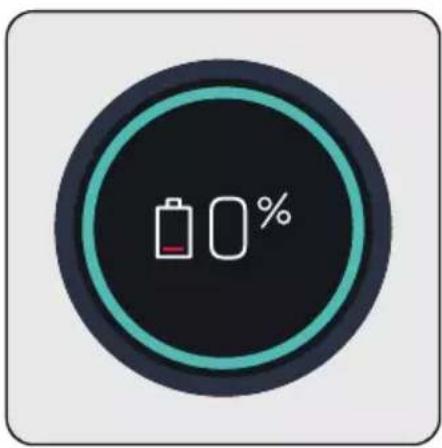
When you place appliance to the charging dock (15), it starts to charge and the battery charge percentage shall be displayed on the screen (4). Percentage (%) and battery charge indicator are increased as the appliance is charged.

The screen (4) darkens 3 minutes after connecting the appliance to the charging dock and the battery status is displayed by 3 LEDs on the appliance.
To see the charge percentage of the appliance, press + (2) or - (3) mode button once while it is charging.
4 Operation
4.2 Operation

It may be connected for charging before the complete discharging of the battery. The appliance may be kept continuously on the charging dock (15) until the next operation.
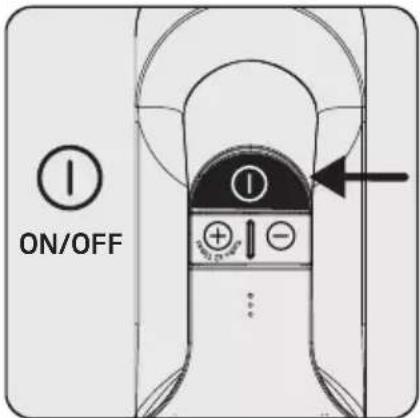
Press the on/off button (1) to operate the appliance. The appliance starts operating with the minimum speed when the on/off button is pressed.

Press the ^ 十 + ^ 一 mode button (2) once to operate the appliance with medium speed. Press once more to operate it with the maximum speed.

Press the " - " mode button (3) once to switch to a lower speed while operating at maximum speed or medium speed.
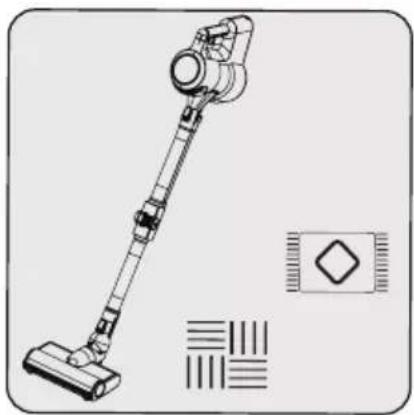
This appliance is suitable for use on carpets and hard floors.
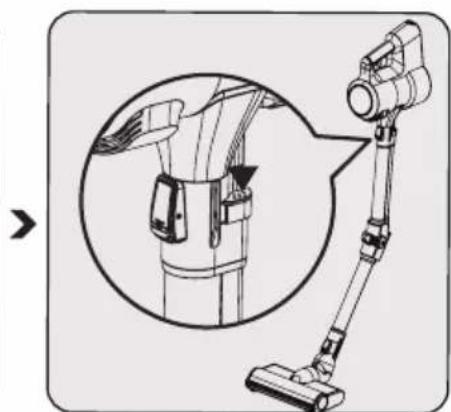
Press one of the two buttons (13) on the tube to fold the tube. Thus, you may reach hard-to-reach areas such as the areas under the seats.

If the adaptor on the charging is plugged in, the appliance stops operating automatically if it is placed on the charging dock (15) while it is being operated.
4.3 LCD Display
4.3.1 Main Screen
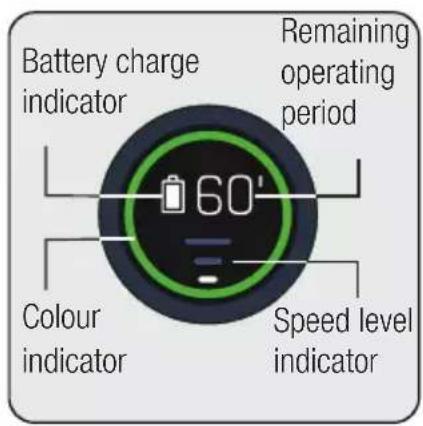
Battery charge indicator: Varies as per the remaining operating period.
Remaining operating period:
Indicates the remaining charge level in minutes as per the speed level and floor type used.
Colour indicator: Indicates your remaining operating period as green, yellow and red.
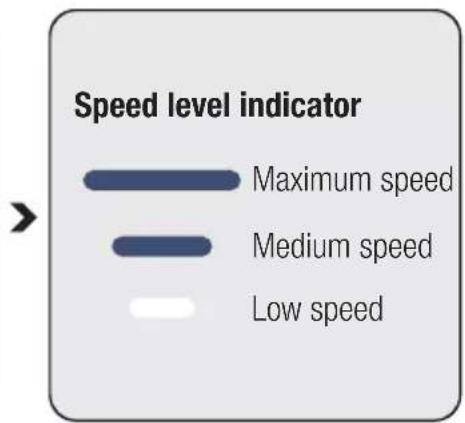
Speed level indicator: Indicates the speed level that the appliance is being used.
For example, all three bar indicators are illuminated in white while using the appliance at maximum speed.
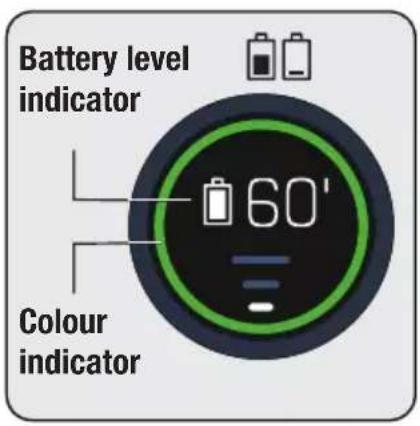
The circle around the display (4) changes colour as per the remaining operating period.
Simultaneously, the battery charge indicator changes as per the remaining operating period.
Colour indicator:
Low speed level
- Illuminates in green between 60 minutes and 30 minutes at full charge.
- Illuminates in yellow in the last 30 minutes to 3 minutes.
- Illuminates in red in the last 3 minutes of remaining charge.
Medium speed level
- Illuminates in yellow between 30 minutes and 3 minutes at full charge.
- Illuminates in red in the last 3 minutes of remaining charge.
Maximum speed level
-
Illuminates in yellow between 7 minutes and 3 minutes at full charge.
-
Illuminates in red in the last 3 minutes of remaining charge.

The remaining operating period, battery charge indicator and colour indicator displayed on the screen (4) vary as per the speed level and floor type used.
4 Operation
4.3.2 Changing the speed
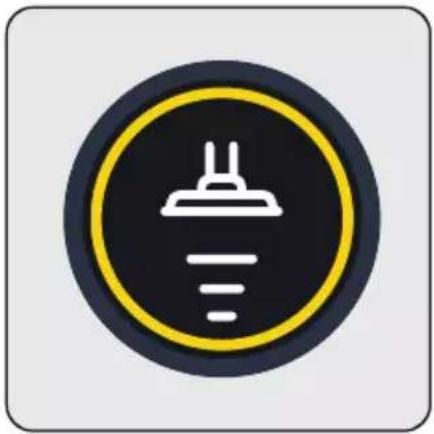
When the speed level is changed a moving brush symbol and the speed level indicator shall be displayed on the screen. Then, the main screen shall be displayed.
4.3.3 Charging
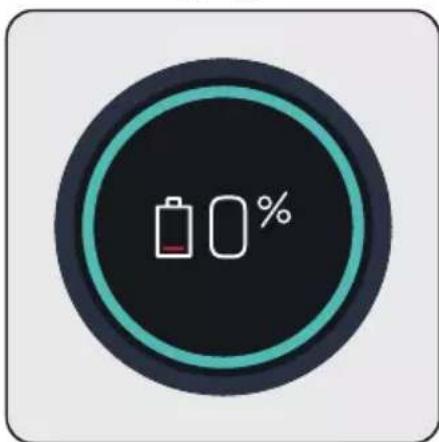
When you place the appliance to the charging dock (15), it starts to charge and the battery charge percentage shall be displayed on the screen (4). Percentage (%) and battery charge indicator are increased as the appliance is charged.
The screen darkens 3 minutes after connecting the appliance to the charging dock (3) and the battery status is displayed by 3 LEDs on the appliance. To see the charge percentage of the appliance, press + or - mode button once while it is charging.
4.3.4 Automatic floor detection

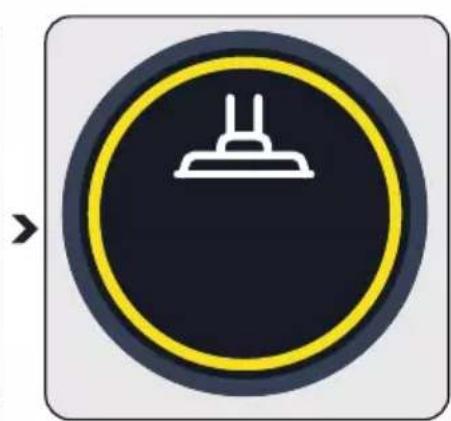
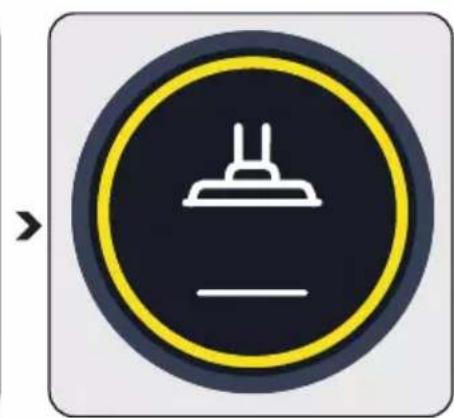
When the auto floor detecting brush (8) moves from a carpet floor to a hard floor, the figures shown above shall be animated on the screen (4).
4 Operation
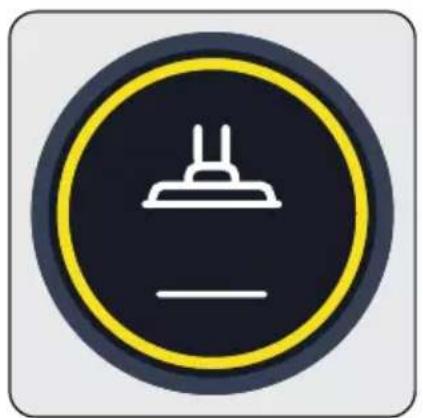
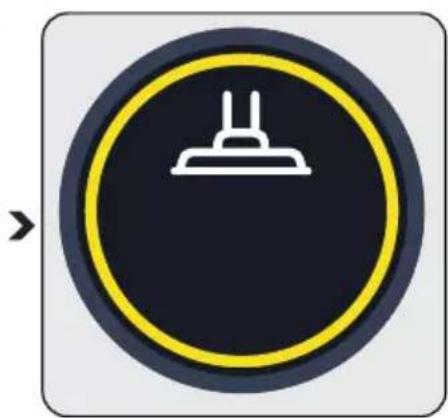
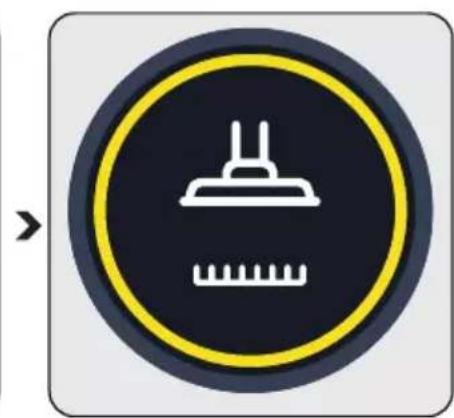
The smart floor nozzle detects the floor type faster when the suction tube is held more vertically.
4.3.5 Warning screens
4.3.5.1 Filter blockage warning
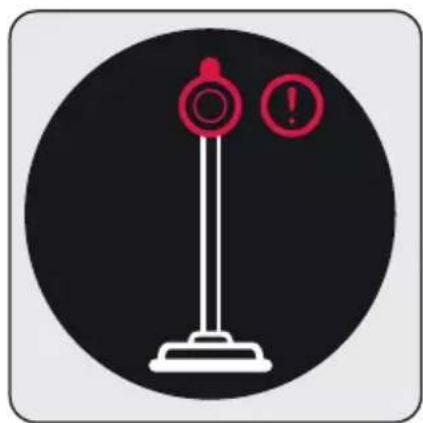
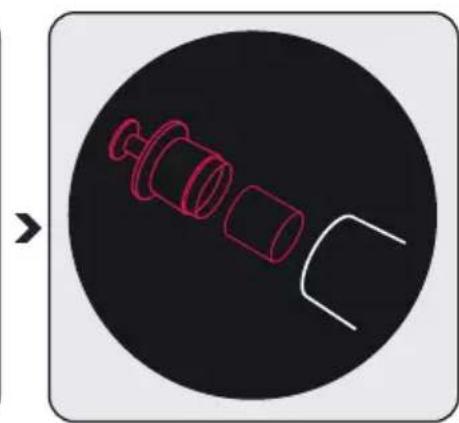
The filters shall be cleaned regularly to prevent loss of performance. When it is not cleaned regularly (in case of excessive dust), a filter cleaning animation is displayed on the screen for a very short period of time to indicate that the metal filter and inlet foam shall be cleaned. However, the appliance continues to operate.

It is recommended to clean the metal filter and the inlet foam as described in Section "5.2 Cleaning of the metal filter and inlet foam" before continuing with the cleaning.
4 Operation
4.3.5.2 Brush blockage warning

When the turbo brush is blocked or too many hair, etc. materials are tangled on the rotating roll, the animation indicating the brush blockage warning is displayed on the screen continuously and the appliance stops operating.

It is recommended to clean the brush as described in Section "5.4 Cleaning of the brush" before continuing with the cleaning. Remove the turbo brush (8) from the foldable wand (6). Inspect the turbo brush to the wand connection and remove any blockages.
4.3.5.3 Suction path blockage warning

When the suction path is blocked, the animation indicating that the suction path is blocked is displayed on the screen continuously and the appliance stops operating. Determine the reason of the blockage of the suction path.

It is recommended to determine the reason of blockage as described in Section "5.5 Cleaning of the blockages" before continuing with the cleaning. Remove the turbo brush (8) from the foldable wand (6). Remove the foldable tube from the body of the appliance. Inspect the turbo brush to the wand connection and remove any blockages. Inspect the wand from the inlet and outlet ends of the foldable wand, and remove any blockages. Inspect the vacuum nozzle of the appliance body (10) and remove any blockages.
4 Operation
4.4 Accessories
You may use the accessories by installing them to the end of the body.
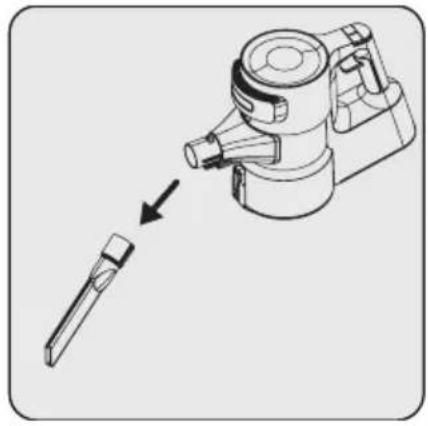
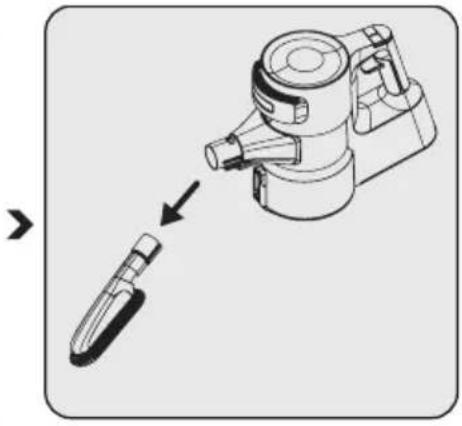
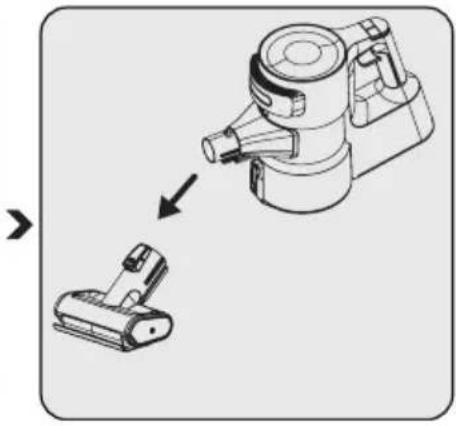
Crevice tool (21): Suitable for vacuuming the rear of the furnitures, hard to reach areas and narrow areas.
Dust brush (23): Suitable for vacuuming curtains, waxed furniture and delicate and fragile objects.
Mini turbo brush (22): Suitable for vacuuming floorings, stair steps, car interiors, sofas and seat, etc. It is also used for vacuuming pet hair on such surfaces.
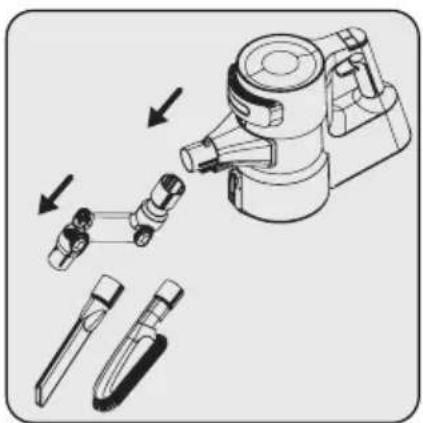
You may use the elbow (20) by installing it to the end of the body (10) to access hard to reach places.
This accessory is suitable for use on delicate hard floors (natural hardwood, etc.).
5 Cleaning and maintenance
Turn off and unplug the appliance before cleaning.

CAUTION: Do not use benzene, solvents, abrasive cleaners, metal objects or hard brushes to clean the appliance.

CAUTION: Deformation may occur on the filters within time as a result of usage. It shall be replaced with a new one to prevent loss of performance. Contact with the customer services to buy a new one. (see P. 25)
5.1 Cleaning of the dust container

We recommend you to clean the dust container (11) after each operation.

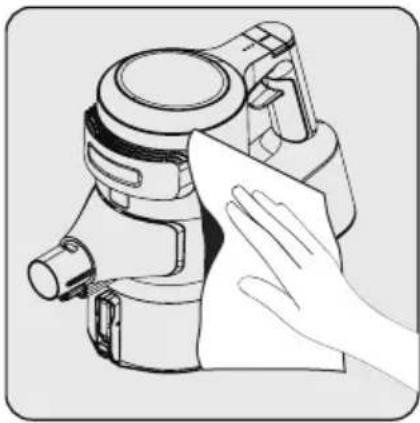
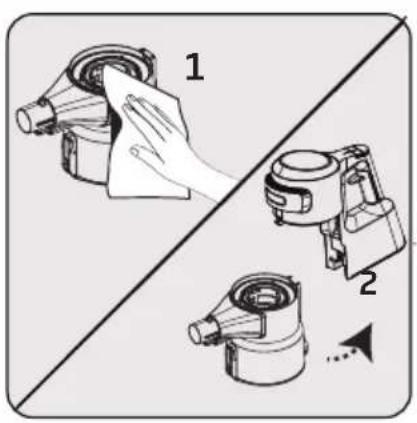
Wipe the surface of the body with a wet cloth (10).
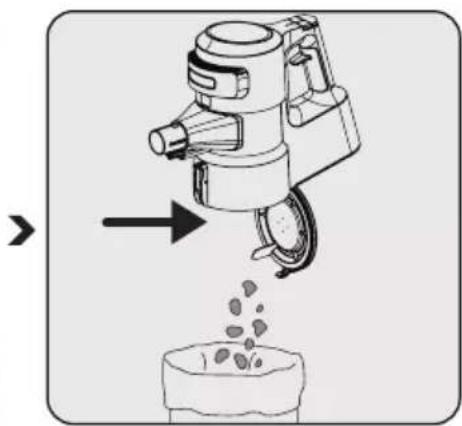
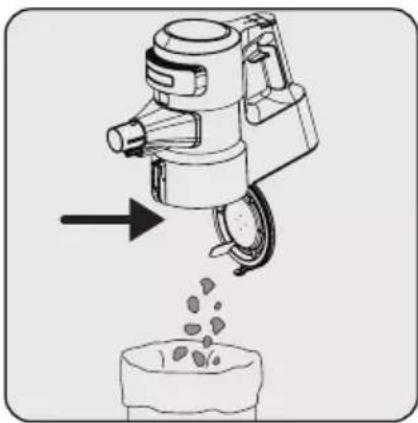
Press the dust container lid release button (12) to open the dust container (11) and discharge the dust collected inside.
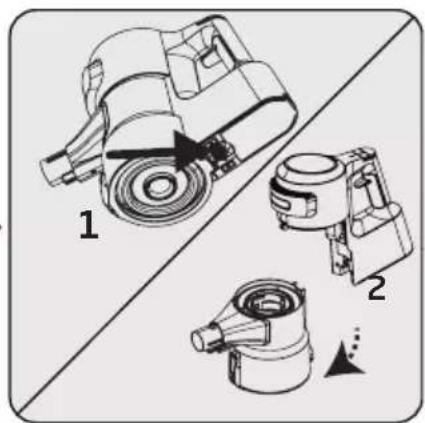
Push the trigger under the appliance to clean the dust container (11).
Detach the dust container (11) from the body (10).
5 Cleaning and maintenance
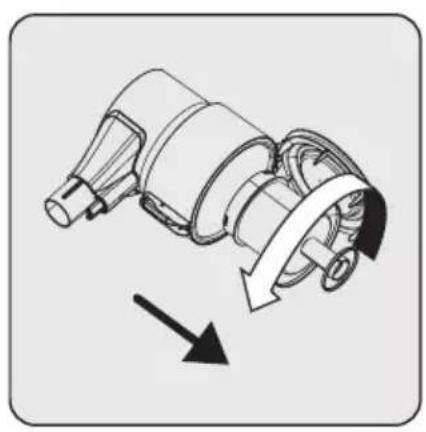
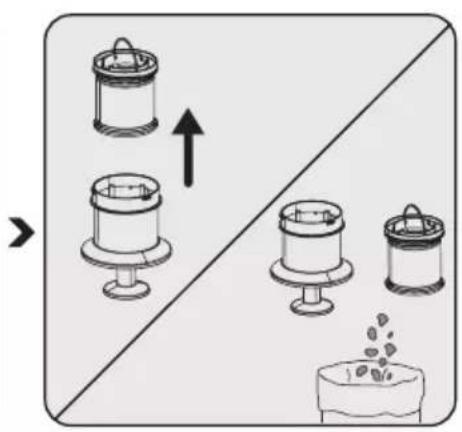
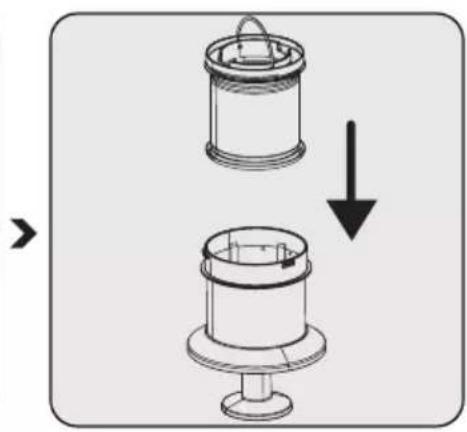
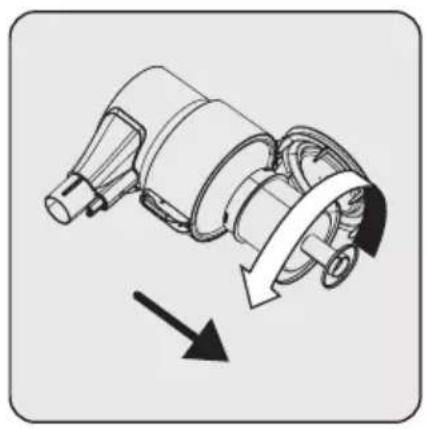
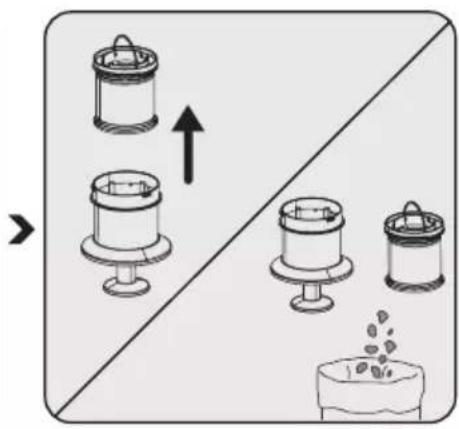
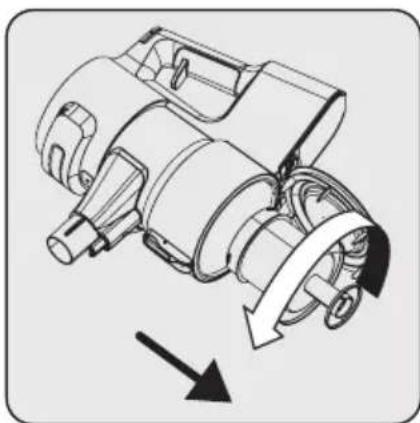
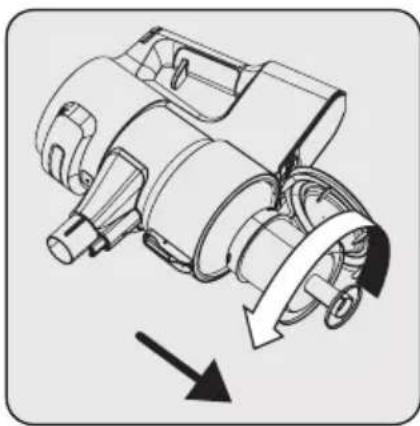
Remove the metal filter and inlet foam inside the dust container (11) by rotating the metal filter counter-clockwise.
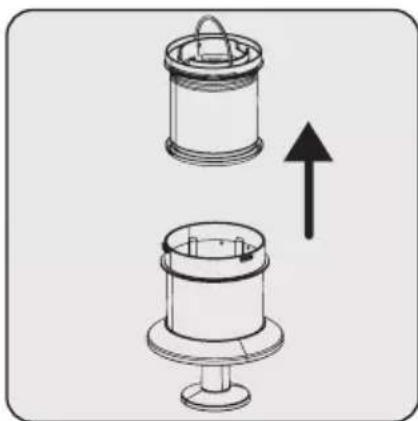
Remove the inlet foam inside the metal filter.
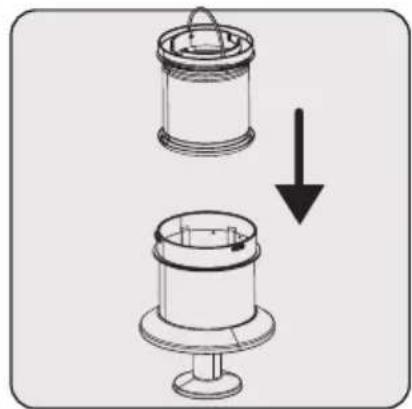
Remove the dust on the metal filter and inlet foam by tapping them to a hard surface such as a waste bin or by using a brush.
Install the inlet foam to the metal filter.
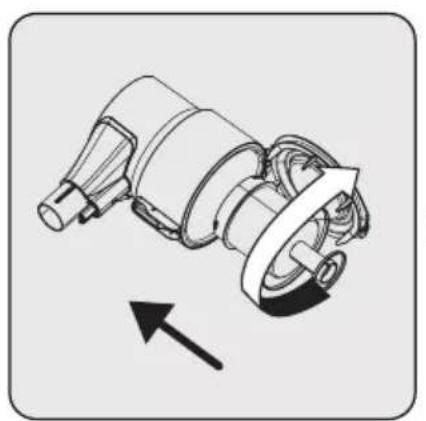
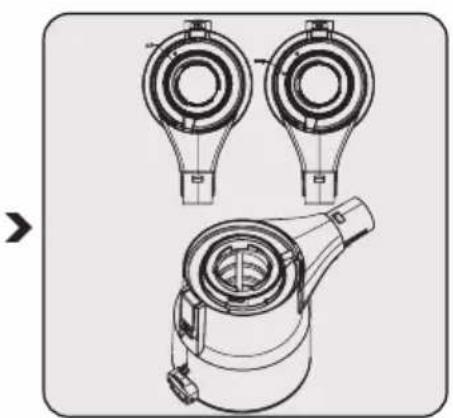

Install the metal filter inside the dust container (11) by rotating it clockwise.
While installing the metal filter and inlet foam to the dust container you have detached them from, place them as per the lock symbols on the dust container.
-
Wipe the body (10) with a wet cloth.
-
Install the body (10) to the dust container (11).
5 Cleaning and maintenance
5.2 Cleaning of the metal filter and inlet foam

The metal filter and inlet foam shall be cleaned regularly.
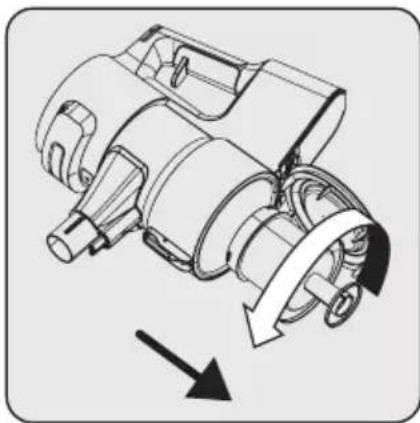

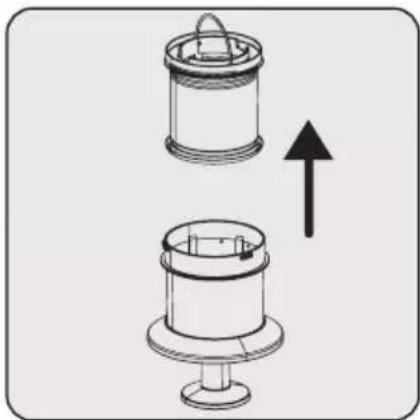

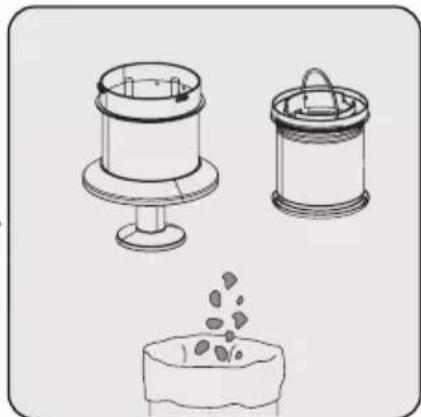
Remove the metal filter and inlet foam inside the dust container (11) by rotating the metal filter counterclockwise.
Remove the inlet foam inside the metal filter.
Remove the dust on the metal filter and inlet foam by tapping them to a hard surface such as a waste bin or by using a brush.
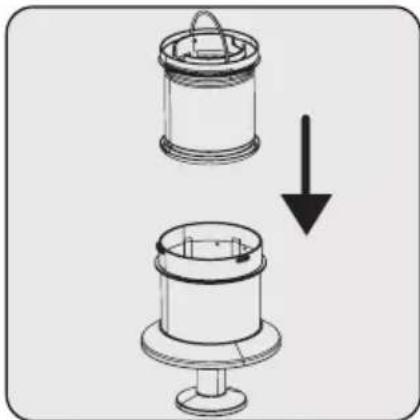

Install the inlet foam to the metal filter.
Install the metal filter and inlet foam inside the dust container (11) by rotating the metal filter clockwise.
5 Cleaning and maintenance

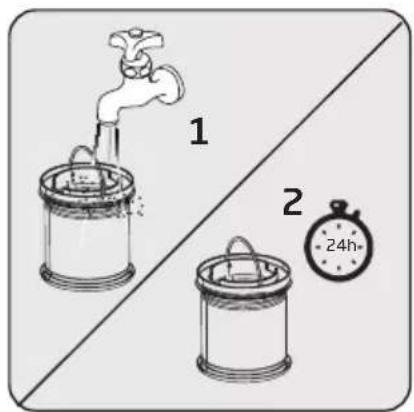
Clean the metal filter and inlet foam by washing under running cold water once a month after removing the dust on them.
Remove the metal filter and inlet foam inside the dust container (11) by rotating the metal filter counterclockwise.

Remove the inlet foam inside the metal filter.
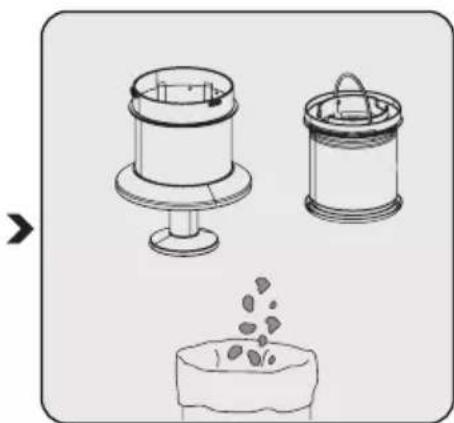
Remove the dust on the metal filter and inlet foam by tapping them to a hard surface such as a waste bin or by using a brush.

CAUTION: Wash with cold water. Warm water deteriorates the structure of the filter.
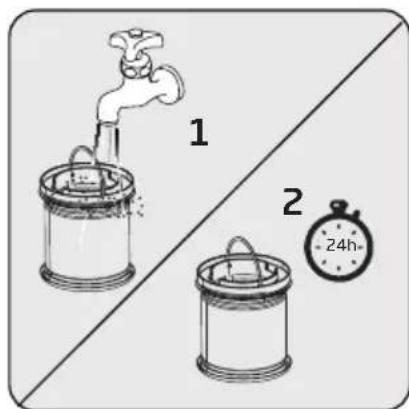
Wash the inlet foam under running cold water and let it dry.

Install the dried inlet foam to the metal filter.

Install the metal filter and inlet foam inside the dust container (11) by rotating the metal filter clockwise.

It may 24 to 48 hours to dry the washed inlet foam. Reinstall it once you are sure that it is dried.
5 Cleaning and maintenance
5.3 Cleaning of the EPA E12 Filter and outlet foam

Clean the EPA E12filter and outlet foam regularly.

CAUTION: Do not wash the EPA E12 filter.

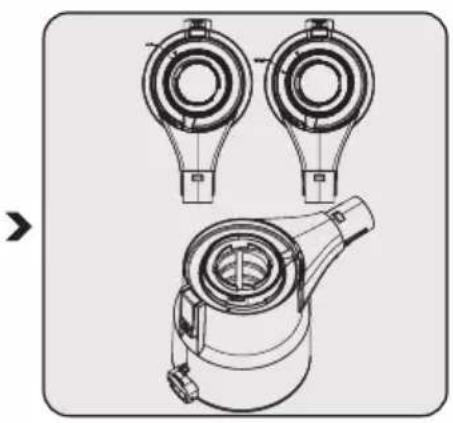
Remove the lid simultaneously while pressing the EPA E12 filter release button.

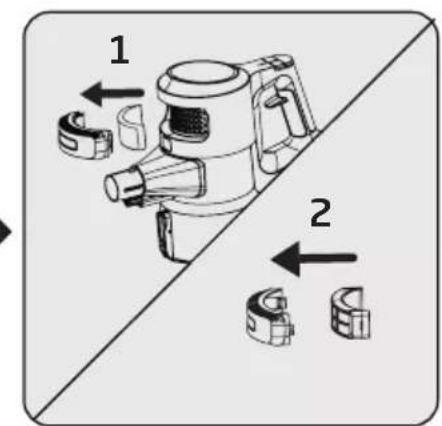
Remove the EPA E12 filter and the outlet foam inside it.


Remove the dust on the EPA E12 filter and outlet foam by tapping them to a hard surface such as a waste bin or by using a brush.

Inspect the outlet foam regularly. Clean it by washing under running cold water after removing the dust on them in case of excessive dust. Reinstall it once it is dried.


Install the EPA E12 filter and outlet foam to the lid.


Place the lid back.

CAUTION: Wash with cold water. Warm water deteriorates the structure of the filter.
5 Cleaning and maintenance
5.4 Cleaning of the brush

CAUTION: Do not wash the turbo brush (8) and the main roll brush.
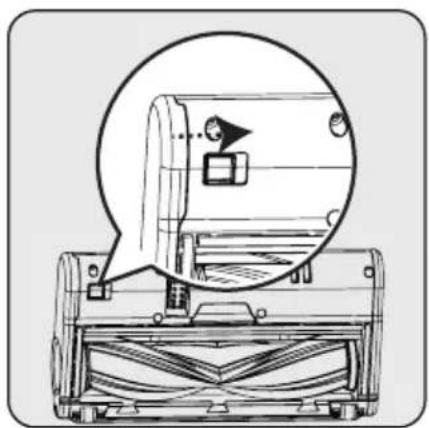


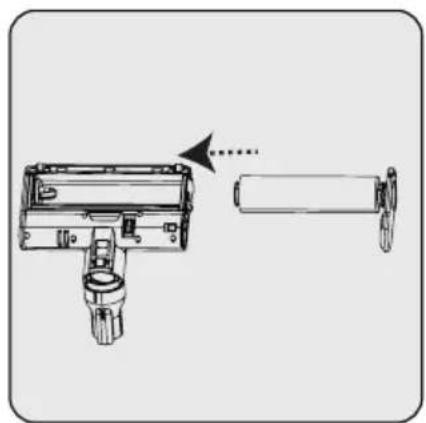
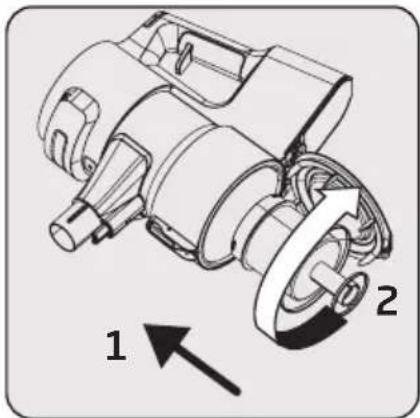
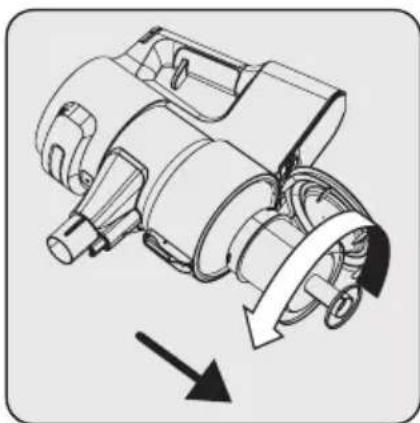
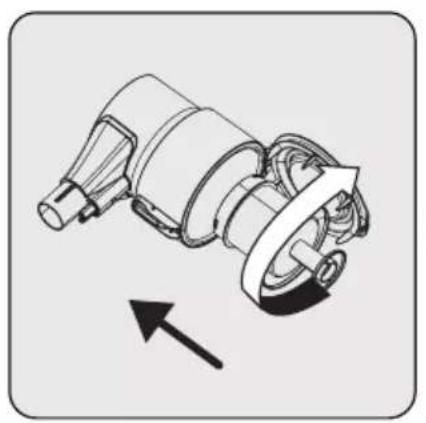
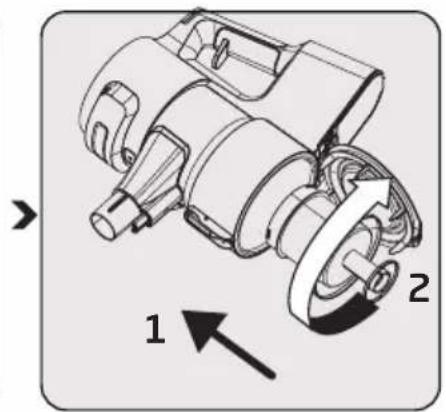
To remove the electric turbo brush (8), keep the roll brush release tab pressed so that the lock shall be opened in the direction of the arrow, rotate the roll cover towards yourself and pull it to the left.
Remove the main roll brush. Remove the dust on it by tapping it
lightly to a hard surface or remove the dust with a brush. If any hair, etc. is tangled, remove it by cutting it off.
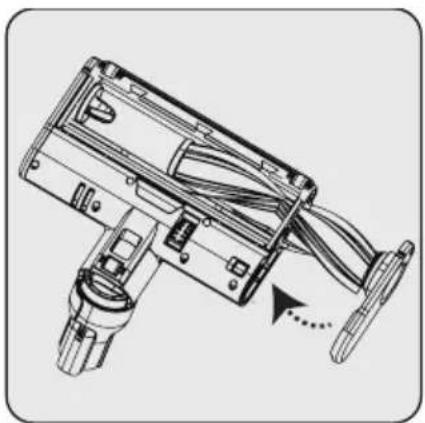

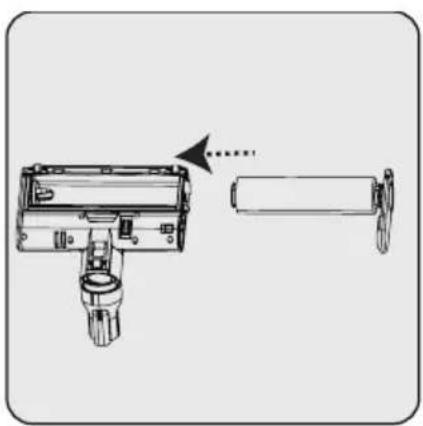
Re-install the main roll brush after cleaning it. A "click" is heard from the tab.
You may replace the main roll brush with delicate hard floor roll as per your preferences.
5 Cleaning and maintenance
5.5 Removal of the blockages
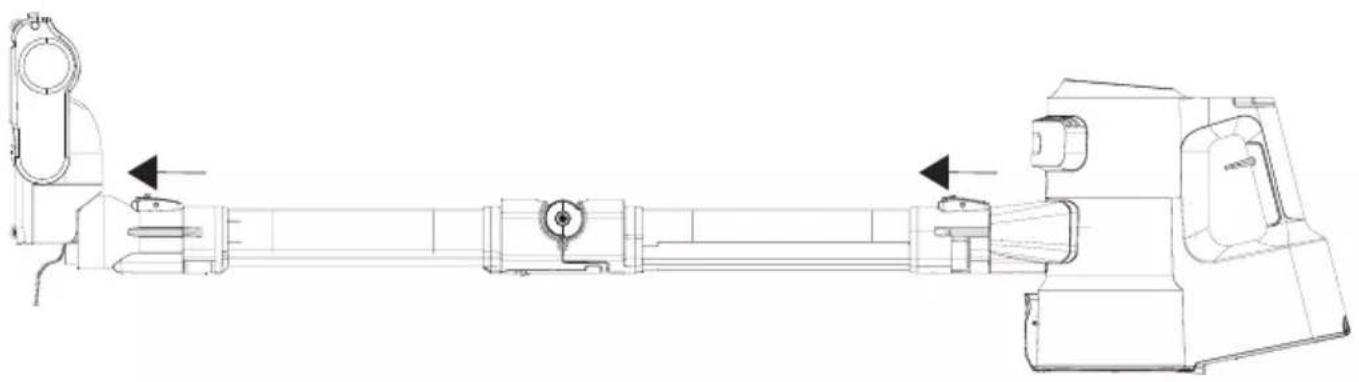
When you see the suction path blockage warning on the screen (4), detach the brush (8) from the tube (6) to remove the blockages. Detach the tube (6) from the body of the appliance (10).
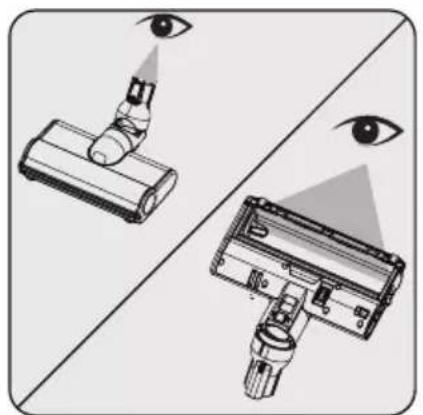
Inspect the connection point of the brush (8) and the vacuum path. Remove any foreign materials.

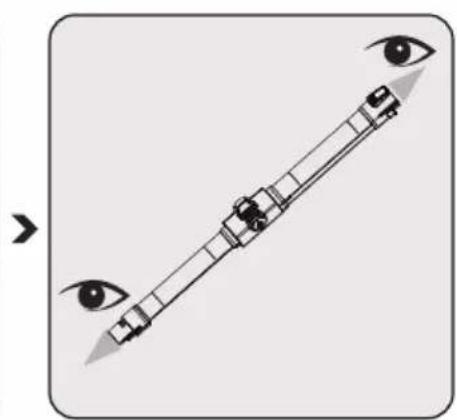
Inspect the inlet and outlet of the foldable tube (6). Remove any foreign materials.
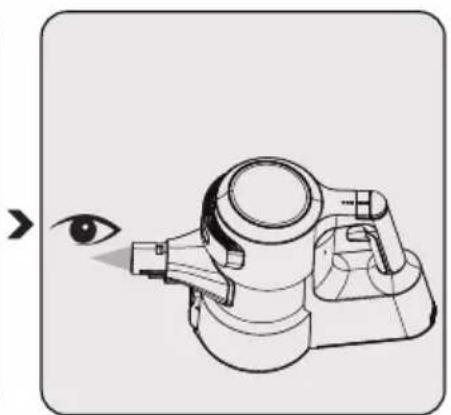
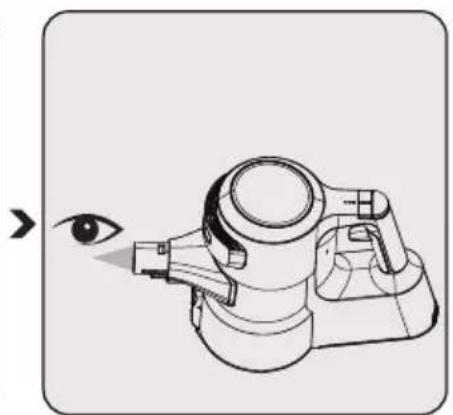
Inspect the vacuum path of the appliance body (10). Remove any foreign materials.
5.6 Storage
- If you do not plan to use the appliance for a long while, store carefully.
- Unplug the appliance.
- Ensure that the appliance is kept out of reach of children.
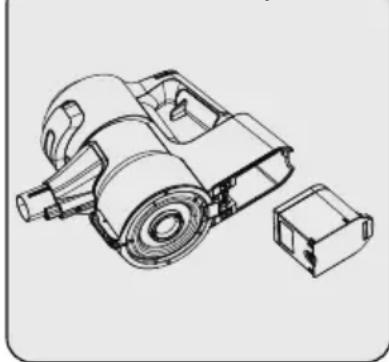
If you shall not be using the appliance for a long period of time, please keep the battery in a cool and dry place at half charged condition after removing it from the appliance. Do not charge or discharge completely.
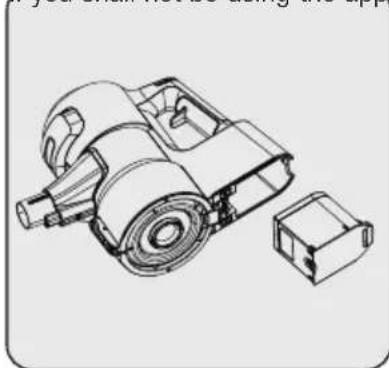
- Store the battery on a non-conducting material, and do not allow the battery to contact metal directly. This shall damage the battery.
5.7 Transportation and handling
- Keep the appliance in its package during transportation and handling. The package will protect the appliance against physical damage.
- Do not place heavy objects on the appliance or the package. The appliance may get damaged.
- If the appliance is dropped, it may malfunction or permanent damage may be inflicted.
6 Problems and remedies

CAUTION: Check the following points before asking for repair assistance from the service department.
| PROBLEM POSSIBLE CAUSE | SOLUTION | |
| Not operating | Battery is discharged. Charge it. | |
| Battery may be unseated. | Remove the battery and install it again. | |
| Vacuum connection is blocked. | Separate the appliance as body (10), brush (8) and wand (6). Inspect and clean the connection points. | |
| Suction power is getting reduced. | Dust reservoir (11) is full. | Clean the dust reservoir (11) and the filter. |
| You may have reached the cleaning period of the filters. | Clean the filters. | |
| Filters may be deformed as a result of operation and their replacement period may have come. | Please contact the customer services to buy a new filter. | |
| Motor inlet foam is not cleaned. | Clean the filters and recharge the appliance. | |
| Hair and similar materials may have tangled on the rotating roll on the turbo brush (8). | Clean the turbo brush roll. | |
| There is disturbing noise from the motor. | Vacuum connection is blocked. | Separate the appliance as body (10), brush (8) and wand (6). Inspect and clean the connection points. |
| Something may have stuck between the dust reservoir and the filter. | Open the dust reservoir and inspect the filter area. | |
| Cannot charge the vacuum cleaner. | The vacuum cleaner is not installed to the charging dock (15). | Install the vacuum cleaner to the charging dock (15). Make sure that it is seated properly. Check the connection. |
| Operates for a very short time after charging. | It is not charged for the adequate period. | Charge for 4-5 hours as per the instructions. |
| Motor inlet foam is not cleaned. | Clean the filters and recharge the appliance. | |
| Battery life is deteriorated. | Contact the customer services to buy a new battery. | |
| The colour indicator on the screen is illuminated in red. | Your appliance is about to discharged. | Charge it. |
| The animation indicating that the brush is blocked is displayed on the screen and the appliance has stopped operating. | Hair and similar materials may have tangled on the rotating roll on the turbo brush (8). | Clean the turbo brush roll. |
6 Problems and remedies
| The animation indicating that the vacuum is blocked is displayed on the screen and the appliance has stopped operating. | A blockage has occurred on the vacuum duct. | Remove the blockages. |
| The animation indicating that the filter is blocked is displayed on the screen and the appliance has stopped operating. | Filters are filled with excessively dust. | Clean the motor inlet foam and the metal filter. |
| The appliance has stopped operating while being operated. When the appliance is connected to charge, the charging screen is displayed on the screen. But, the battery percentage does not change. | Battery is faulty. Contact the customer services. | |
| The appliance stopped operating without any warning animation being displayed on the screen. | Battery may be overheated. | Wait for appliance to cool down and try to operate it again. |
| While charging, 1 LED light on the appliance flashes rapidly in red and the battery percentage on the screen does not change. | You may have inadvertently plugged the adaptor of another appliance, and thus the charge current is excessive. | Use the proper adaptor. |
| While charging, 1 LED light on the appliance is illuminated solidly in red and the battery percentage on the screen does not increase. | Battery be overheated than expected. | Contact the customer services. |
| While charging, 1 LED light on the appliance flashes both in red and white alternately and the battery percentage on the screen does not is shown as 00%. | The Body (10) is not installed properly to the charging dock (15). Or the battery is not installed properly to the body of the appliance. | Remove the adaptor (19) from the charging dock (15) and remove the body (10) from the charging dock. Ensure that the battery is installed properly on the body. Install the body (10) to the charging dock again and plug the adaptor to the charging dock again. |
| A bad smell (light humidity, dust, plastic material odour) occurs on the air outlet. | Have you purchased the appliance within the last 3 months? | It is normal that a bad smell (light odour of plastic) occurs within 3 months after the purchase date. |
| The dust reservoir (11) and the filters are not cleaned properly. | Clean the dust reservoir (11) and the filters. | |
| Filters may be installed while wet after they are washed. | Remove the filters and ensure that they are dry before installing them to the appliance. | |
| Filters may be deformed as a result of the frequency of operation and their replacement period may have come. | Please contact the customer services to buy a new filter. |
Dongguan Yinli Electronics Co., Ltd
Model: YLS0241A-E360060
Dongguan Yinli Electronics Co., Ltd
Dongguan Yinli Electronics Co.,Ltd
Modellidentifikator : YLS0241A-E360060
Inngangsspenning :100-240V~
Inngangsfrekvens : 50-60Hz
Dongguan Yinli Electronics Co.,Ltd
Modellidentification: YLS0241A-E360060
Matningsspanning: 100-240 V~
Utgangsspanning: 36,0 V
Utgangsström: 0,6 A
Uteffekt: 21,6 W
Aktiv medeleffektivitet: 87,19%
4.3.5.1 Varning for filterrengöring
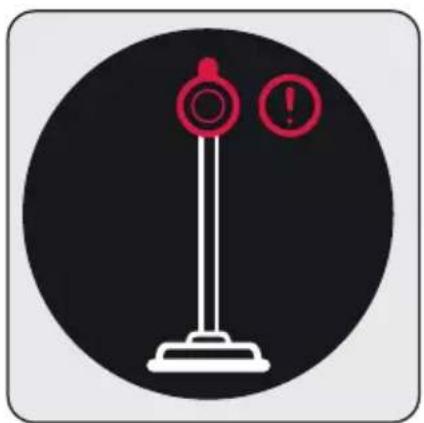

Dongguan Yinli Electronics Co., Ltd
Model ID: YLS0241A-E360060
Tensiunea de intrare: 100-240V~
Frecventa de intrare: 50 - 60Hz
Dongguan Yinli Electronics Co.,Ltd
Kωδικός Μοντέλου :
YLS0241A-E360060
Dongguan Yinli Electronics Co.,Ltd
Identifikator modela : YLS0241A-E360060
I I OJIb3OBaTeJIbCKOe 06cIyXnBaHne.
He ocyuaceTBJTe 3Kcnpnyatau npnbopa B clyuae nobpejdeHn IHNpa NtAHN nIIN BnIKn. O6patntecb B aBTOpN3OBaHHyO clyx6y.
Baw nCTOuHnK nHTaHnA OT CETn DOJKeH COOTBETCTBOBaTb TnPy nHTaHnY, yKa3aHHOMy Ha 6npke.
He nCnoJb3yIe np6op c ydnnHnTeJIem.
- UTo6bI n36eXaTb NOBpeJdeHnja Ka6eJa NITAHn, y6eINTecb, UTO OH He 3aKJIINHnBaET, He NepeKpyuNbAeTcN He TpeTcO6 ocTpblE KpaJ.
He npikacaiTecb K BnIKe np6opablaJxHbIMn IIn MOKpbIMn pykam, KOrda np6op BKIOueH B po3eTKy.
He TAHNTe 3a shHyp, OTKJIIOUyA np6Op OT CETN.
He nblneocbte IerkoBocPnIaMeHЯIOuIeCra
1 Baxhble Hnctpykun no 6e3oNaChocn n OxpaHe OkpykaIouei cpebl
MaTePnAJIbI y6eIntEcB,
yTo neIeN ot cnrapet
OCTbl, npexJe qem ero
PiJIneCocNTb.
He nbilecoBte Body n dpyrne KndKoCTn.
3aunuTe np6op ot atmocepHBIX ocakOB, BnaHn nCTOCHKOB TePna.
He n cnojb3yute np6op paoom C B3pboONaCHbIMn nn JERKOBOcPnaMeHraUOMNCa MaTePnaJaMn.
- Перед Вынонения оочстки BCeгда OTКлючайтупбор.
He okyuha Te npnbop nnn ero npOBOD B BODy dJa OunchkN.
He pa3bpaIte np6op.
- Исторьштей
- Толбко
opiniнайные detаи
detaи, pekomehdobahnhie
пождовлел.
ДляnpedotBpaaeHna 3acopeHnФиьтpa nIIN NOBpeJdeHn DBnraTeJI, He nbIneCocbTe ceMeHT, WtYkatypky nIIN φpaarmentbl
cXaToi 6ymarn
- Исторушипрувор
Толков с за Antером,
поставлием范围内 ррувором.
He nCloIb3yIte np6Op 6e3 ФИьТРОВ, 3TO Moxket npINBeCTN K erO NOBpeXdEHNIO.
XpaHnTe ynaKOBOHyIe MaTePnAJIb I B HeIoCTyHOMДЯ DeTei MeCTe. - 3TO yCTpOiCTBO He npedHa3NaUeHO dIJI NcNoIb30BAHnJIuamn, BkIIOUaJdTei, C fN3NuYeCKIMN,CEHCOPHbIMn I yMCTBeHNbIMn IpO6JIeMaMn IJIINJUaMn, He IMeIoUImN DOCTaToUHO ONbITa N 3HaHNIOTHOcHTeJIbHO eRO IcNOJB-3OBaHnA, 3a INCKJIIOUeHNEmClyuaEB, KOrDa OHI HaxoJdTcN Pod Ha6JIIODeHNEmJIuca, OTBETCTBEHHORO 3aNX 6e3OJaCHOCtB, IJIIN pOHHΦOpMnPOBaHbI O pa6Ote np6Opa.
1 Baxhblie Hnctpykun no 6e3oNaChoctn n OxpaHe OkpykaIoIe Cpebl
Cneinte 3a DetbMn, YTO6bl OHN He irpaNN C npnbopom.
- Перед Любов погодуров
Очирten Или обслужевая
OTКlioочаite щадапетер и
Вынмайе akкультор.
Bo n36eXaHne pncka BO3HKnHOBeHnAaAnTepeOJxHb 6bItb 3aMeHeH npOn3BODnteIeM, yNoIHomOueHnblm npEaCTaBNTeIeM npOn3BODnteJIy nn TexHnKcEcknM Cneu aNtOM C aHaIOrnHOn KBaIIΦnKaUnei.
Bo Bpem y6opkn He npnbnaKe Te naIbcuI, BOIOcbl n CBO6OndHyo OdeJy K DnKyuMcra Yactam N 3a3Opam.
- Перацем, Кам Великий ветахов,
- Ростав各项工作
- Дiversification
- Дiversification
- Дiversification
- Дiversification
- Дiversification
- Дiversification
- Дiversification
- Дiversification
- Дiversification
- Дiversification
- Дiversification
- Дiversification
- Дiversification
- Дiversification
- Дiversification
- Дiversification
- Дiversification
- Дiversification
- Дiversification
- Дiversification
- ДiversIFICATION
- ДiversIFICATION
- ДiversIFICATION
- ДiversIFICATION
- ДiversIFICATION
- ДiversIFICATION
- ДiversIFICATION
- ДiversIFICATION
- ДiversIFICATION
- ДiversIFICATION
- ДiversIFICATION
- ДiversIFICATION
- ДiversIFICATION
- ДiversIFICATION
- ДiversIFICATION
- ДiversIFICATION
- ДiversIFICATION
- ДiversIFICATION
- ДiversIFICATION
- ДiversIFICATION
- Дiversification
- ДiversIFICATION
- ДiversIFICATION
- ДiversIFICATION
- ДiversIFICATION
- ДiversIFICATION
- ДiversIFICATION
- ДiversIFICATION
- ДiversIFICATION
- ДiversIFICATION
- ДiversIFICATION
- ДiversIFICATION
- ДiversIFICATION
- ДiversIFICATION
- ДiversIFICATION
- ДiversIFICATION
- ДiversIFICATION
- ДiversIFICATION
- ДiversIFICATION
- Дiversification
- Перед ИЗВлесенем akкулаятора OTКлочитубор от заелкторсп.
•Утуни зр教你п
IcnoJb3ObaHhBle 6aTapeB COOTBETCTBnC MeCTHbIMN 3aKOHAMN INoCTaHOBJeHnA MNI.
-Батapestи,ВхODЯшпЕВ KOMПЛЕKT 3TOrO yCTpoIcTBA, MOryT 3aMeHЯТьСЯ TOLbKO KBaJI NΦИцIpOBaHHbIM nepcoHaJOM.
BHIMAHNE:ДляЗардкnaKKymyJIaTOPa nCNoIb3yIteCbemHbI 6JOK NITaHnYLS0241A-E360060,NOCTaBЯEMbI BmecTe CycTPOIcTBOM.
- UctaHaBnBaIte / n3BneKaIte 6aTapeu B COOTBETCTBnC INHCTpyKUЯMn, yKa3aHHbIMN B pyKOBoDCTBe NOlb3OBaTeJIa.
He nCnoJb3yIte 6aTape npa3HbIX TINOB INI IN CTapbie N HOBbie 6aTapeN BmecTe.
Batape n cyeT yctaHaBnBaTb C npabNbHOI NOJrPHoCTbIO.
- OTPa6oTaHHbIe 6aTapeHnHeo6xOdIMo n3BJIeYb n3
1 Baxhble nHctpykuu no 6e3oNaChocTu oXpaHe OkpykaUoJe cpebl
npi6opa n yTnIIN3npoBaTb 6e30nacHbIM cnoc6oM.
- Ecnn Bbl He co6npaTecb nCnoJb3ObaTb npN6Op B TeueHne dIInTeJbHOro BpeMeHn, 6aTaPeN DoJXHbI 6bITb n3BLeuEhbl.
JHKoCTb MoKet BbITEKaTb n3 6aTapei, NOBpeJdeHbIX n3-3a He npabNlboHoi 3KcNpyatau. N36eaiTe KOHTaKTA C 3TOJ XnKDocTbHO. YtIIN3npuyte IOBpeJdeHHbIe 6aTaapei B COOTBETCTBnC npabNlamn 3aKOHOdaTeNbCTBOM n O6paTntecb B aBToPi3OBAHHbI cepBnCHbI ueHtp.
He donyckaTe KOpOTKOro 3aMbikaHnY nCTOuHNKOB nITaHnY. - Историческая энциклопедия Толбкообатарен ZB 2007.
-ДаHHbIM yCTpoIcTBOM He DOJIxHbI NOJb3OBaTbcr DeTn IIOJN C OrpaHnueHHbIMn 0IN3nueCKnM, CeHCOPHbIMn KOrHnTnBhblm n CnOCo6HoCTaMn INIJIIOJN
C HeDOctaTKOM ObIta N 3HaHn, ecn OHn He HaxoJrTcNpIpcMOTpOM IIM PpeOCTaBHeHbICootBeTCTByUuNe INHCTpyKcN.
Cleinte 3a TebMn, T06bl OHN He irpaJIc npnbopom.
1.2 CoOTBcTCTBOBaHne Tpe6ObaHnM DnpeKTHBbI WEEE (DnpeKTHBa EC o6 OTxoJax 3JIeKTpNueCKoro N 3JIeKTpOHHoro 06OpyDoBaHn) n yTuIN3aCnna OTPa6OTabWeRo np6opa
Данhoe yctpoicTBO COOTBETCTByet ДиpeKTnBE EC WEEE no orpaHnueHIO ИСПОЛьЗOBaHЯ BpeДнБx BeIeCTB (2012/19/EU). Даньй пибор Имeel КлассФИКaцIHнь 3нak ДЯ
Otpa6oTaHHoro 3JIeKtpnueckoro n 3JIeKtpoHHoro o6OpydoBaHna (WEEE).
Takon 3nak O3Haayet, yTo nocne 3aBepWeHnaKcNpyatau np60p 3anpeaaetcBb6paCbBaTb BMeCTe C npOUMN 6bITOBbIMNOTXoamn. IcNoIb3OBaHHoe yCTPOJCTBO Heo6xOIMO BepHyTB B OPhiuaJIbHbI NyHKT npHema yTNIN3npyEmbIX 3NeKTpnuecknx N 3NEKTOPHbIX yCTPOJCTB. YTo6bl HaHTn TaKHe CNCTeMbI npHema yTnI, o6paNTecb B MeCThble yNOIHOMOeHHbI opraHbI Nn K pO3HnUHbIM npOdaBzam, y KOtOpbIX 6bl npno6peTeH npOdyKT. KaJdoe DomaunHee Xo3RJCTBO BbINOJIHReT BaxHyIO pONBOCCTaHOBJeHN H yTUN3aCn CTaporo 6obopyoBaan. HAdJeXauaY TnIN3aCn Otpa6oTabWero np60pa No3BOJAre TpeDnTBPATITB BO3MOXHbIE HeratNBbIE NocJeDCTBnI DnI OkpyaIoSeI cpebl I
1 Baxhble nHctpyKu nn no 6e3onacnoctn n oxpahe Okpyxauouei cpebl
3dopobbyyeNoBeka.
1.3 Информацnia六个月 ago

YnakOBka yctpoiCTBa n3rOToBneHa n3 nepepa6aTbIBaEmbIX MaTePnaIOB B COOTBETCTBn C HaUHOJIbHbIM 3aKOHoDa-TeJbCTBOM.
He BbI6paCbIbAaTe OTxOdbI yNaKOBKn BMeCTe C 6bITOBbIMN INI DpyrIMN OTxOdaMn, yTININ3uPyIn- Te INX B 30Hax C6opa yNaKOBKn, yKa3aHHbIX MeCTHbIMN BnaCTaMn.
1.4 Otpa6oTaHHbIe 6aTapeN
Y6eHntecb, YTO Otpa6oTaHHbIe 6bTapeN yTHn3npyOTcB COOTBETCTBNN C MeCTHbIMN 3aKOHAMN IN PabNJAmN. CmBOJ Ha aKKymyItope N yNaKOBKe yKa3bIbAet Ha TO, YTO aKKymyIaTOp, NOCTaBnReMbI
Cn3dienem, He cJeNyET paccMaTpNBaTb KaK 6bI-TOBbie OTXoDbI. B HeKOTOpbIX perNoHax 3TOT CmBONMOxET NcNOJb3OBaTbCBAcoHTAHIN C XIMNUeCKIM CmMBOLOM. EcN B 6aTapeAx coepKNTc8 60nee 0,0005% pTyTN 60nee 0,004% CBNHua, B KaueCTBe pTyTN DoabJIeTcX IMNUeCKoe BeIeCTBO Hg, a B KaueCTBe CBNHua DoabJIeTcX IMNUeCKoe BeIeCTBO C CmMBOLOM Pb.
ObecneuBaa npaBnIbHyIO yTnIIN3aCNIo aKKymyJrTOPOB, Bbl BHOcITe CBOB BKJaD B ppeDoTBpa-ueHne nOTeHuaJIbHO rUep6a OkpyKaIOuSei cpeE N 3dOpOBbIO JIODeN I3-3a HeNPaBnIbHOY TnIIN3aCNIu aKKymyJrTOPOB.
1.5 DeiCTBn, KOtOpbIe Heo6xOAnMo IpeDnpHrTb dJIa 3KOHOMN 3Heprn
Bo n36exaHne n36bIToUHOro notpe6JeHnnaheprn npn nCNoB3OBaHNy yCTpOInCTBa,ycTahOBInTe yPOBHN CKOpOCTN B COOTBeTCTBNN C TINOM NOJa, KOToPbI Bbl NJIeNEcOCInTe.
B HopmaJIbHbIX ycIOBnIX Hn3Kne CKOpOCTn NC- NOIb3yOTcI dIg TBepDbIX N0IOB, UTOp I DnBaHOB, a BbICOKNe CKOpOCTn dIg KOBPoB.

2 063op


Dongguan Yinli Electronics Co.,Ltd
Homep moe: YLS0241A-E360060
Bxodhoe hapjkeHne : 100-240 B
Bxodnay yactota :50-60T
BxoHOnTOK :0,8A
BbIXoHoe HapjXeHne:36,0B
BbIXoHHOI TK:0,6A
BbIXoHnaMoUHocTb:21,6BT
CpeHn aKTHBbI KpI 87.19%
Kpyr BOKpyr DnCpIe (4) MeHReT CBeT B COOTBeTCTBUN C OCTaB- shIMcR nepNoDom pa60TbI.
B To Jxé Bpem yka3aTeIb 3apra aKKymyIaTopa MeHareTcB COOTBeTCTBnC OCTaBUnMcpeNODom pa60Tbl.
CBeTOBOHdNKaTOP:
YpOBeHb Hn3KoN CKOpocTn
- TOpNT 3eIeHbIM cBETOM OT 60 Do 30 MmHyT npn PONHO 3a-paRdKe.
- Fopnt XeNTbIM UCBETOM B NocneHnE 30-3 MNHyTbI.
- Горот Красным цьETOM В постене 3 м尼нтул OCTаБшeroя Зарда.
UpoBHeB cpeDHei ckOpocTn
- Topint JeIbIM CBeTOM B npomexkyTe Mejdy 30 n 3 MnHyTaMn npn noHoi 3aprJke.
- Tognt KpaChbIM CBeTOM B NocneHnne 3 MHyTbIOCTaBWeOcra 3apya.
YpoBHeb MaKcHMaJIbHOJ CKOPOCTN
- Tognt JeNTbIM CBeTOM B npomexyTke ot 7 do 3 MInHyT npn noHoi 3apJKe.
- Tognt KpaChbIM LBeTOM B NocneHnne 3 MmHyTbIOCTaBWeOcra 3apra.

Octabshinca nepno paobtbl, yka3aTeIb 3apra aKKyMylTopa n cBeTHoYka3aTeIb, oTo6paXaembIe Ha dncnpee (4), 3abncrT OT ypOBHr CKOpocTu TnnaNCNoB3yEMoro NOKpbITnRA NOla.
UeTKa dIy nbIIN (23): IoIxOAnIT dIy YIcTKn WToP, IIOJIPOBaHHoM MeBEn, a TaKKe DeIINKaTHbIX IN XpyNkX npeDMeTOB.
MHH-Typ6oWeTka (22): IopxOHT dIy y6OpKn noIIOB, CTyIeHek, CaHOHOB aBTOMo6nJIeN, DnBaHOB, cndeHn n T. d. TaKke nCNoJb3yETcA dIy y6OpKn nbIleCOCOM 7epCTn DoMaHnX XINBOTbIX Ha 3Tnx NOBepxHOCTaX.

Moxho nCnoJb30BaTb r6kyu HacaKy (20), yCTaHOVB ero Ha KOHeK Kopnyca (10) dIydoctyna K TpyHDoCTynhBIM MeCTaM.

3TOT akceccyap NOxOHT
ДЯ NcNoIb30BaHnHa
AdeJNKaTHbIX TBepdbIX NOJAX
HaTypaJIbHoe DepeBO.
5 Ounstka n o6cnyxnbHne
Ipeed BbINOJIHeHnEM OUcTKn BCerda BBIKIOuayTe np6Op n BBIHMaTe BuNKy I po3eTKN.

BHIMAHNE: Hikorda He nCnoB3yTe 6eH30J, pactBopnteJI, abpa3nBhIe YnCTaIune cpeIcTBa, MeTaNueckne npedMeTbI IJI NKeCTKNe IeTKN dJIy ChSTKN npi6opa.

BHIMAHNE: Co BpeMeHem qnlbtpbl MoryT deqopMnpoBaTbcB pe3yIbTaTe HcnoJIb3OBAHn. Ix Heo6XoJIMO 3aMeHnTB HOBbIMN, YTO6bl PpeDToBpaTNTb NOtepIpo pa6OTocnoc6hOCTn. CBjKntecb co cnykbo nOndepkKn NOKyNaTeJe, YTO6bl npno6pcEtHnOBbl qnlbTp. (CM. cTp.25)
5.1 OuNTka pe3epByapa nIbIIN

PekomeHdyem ouuatab pe3epByap IJIy IIIN (11) nocne kaxdooro nCnoB30BaHnJ.



IpoTpnte NOBepxHocTb Kopnyca BnaXHO TkaHbIO (10).
HaXMMTe KHONky OTKpbITnKpbIshKn pe3epByapa dIyNbII (12), yTO6bl OTKpbITbNbIeScOpHnK (11) nN3BJIeYb NbIJb, co6paHHyIO BHyTpN.
HaXMMTe cnyckOBoi KpO- yOK noI np6opOM, YTObI OuNCTnTb nbIneC6OpHnK (11).
OTcoeHNHTe nbIne6OpHnK (11) ot kopnyca (10).
5 Ounstka n o6cnyxnbHne

CHIMTE pIbTp npedBapnteJbHOJ OUcTKn IpIbTp dJa MeKoDnC-epCHO JbIN, HaxOJa-UsncpePeKD KOHTeHepOMdJa c6opa Nbln, NOBepHyBΦIbTp npedBapnteJbHOJ OuNCTKN IpOTNB YacBOB CTpeJIKN.
BbTaunTe QnIbTp dIaYIe C PnIbTpO BnJIb, NOCTyUAB NMI O TBepdYIO NOBepXHOCTb IJI INCNoJIb3yA 1eTKy.
YcTaHOBInTeΦnIbTpДЯ MeJIKoDINCnepChOn IbIIN HaΦnIbTp npEdBaPHTeNbHOr OUHCTKN.
YcTaHOBInTe QnIbTp
PpeDvapnteJbHOn OuNCTKn
Ha KOnTeHep DnA c6opa
PbIIN, NOBepHyB erO nO
YacOBoN CTpeNke.
Ipn yctaHOBKe fNbTpapnpedBapnteJbHOO uNCTKN iNbTpa dJa MeKoDnCnepCHO nbln Ha KOHTeHep dJa c6opa nbIn,pacnoJoxte INx B COOTBetCTBn C CmBOnamn Ha KOHTeHep.
1.Протрикорпс (10) Bлжнов ТkaHBIO.
2.YcTaHOBnTe KOpnyc (10) B nblnc6opHnK (11).
5 Ounstka n o6cnyxnbHne
5.2 Ouchstka qnIbTpappeBapntbHOn OuchTKn n qnIbTpapdJI MeJkoDncnepcHOn nblln

ΦnIbTp npedBapnteHbHO OuNCTK IN ΦnIbTp dIa MeNkoNCepCHO Nbln HeO6xOIMO peryIpaTb.



CnHmTe pInbTp npedBapnteIbHOJ OUHCTKN IpNbTp dJa MeJKOHC-epCHOIbIN, HaxOJa-UsncpepeKDHTHePOMdra c6opa nbIIN, NOBepHyBΦnIbTp npedBapnteIbHOJ OUHCTKN IpOTNB YacOBOn CTpeJIKN.
BbTaunTe qnIbTp dJa MeNKoNcnepcHoi nbnn.
YdaIte c qnIbTpOB nbIb, NOCTyUaB NM O TBepdyu IOBepxHocTb NIN NCNoJIb3yA UeTKy.


YcTaHOBnTe QnIbTp dIaMeJIKoIDNCnepCHOIbINHaQnIbTp npEdBaPnteHOBOuNCTKn.
CnHmnte pInbTp npedBapntelbHO ONUCTKN IpNbTp DnA MeNKODNepCHO Nbln, HAXOJaUNcpePeKD KOHTeHepOM dLn c6opa Nbln, NOBepHyB pInbTp npedBapntelbHO ONUCTKn IpOTNB YacOBOn CTpeJIKN.
5 Ounstka n o6cnyxnbHne

OuHsaiTe fIbTp npedBapntelbHOJ OUHCTKN I FJIbTp dJa MeJkoDnCepCHO bIIIN, IpomBaI NOd pTOOH XoJODHO BODIOHN pa3 B MecaI nocJe ydaJIeHn C HIX PbIIN.


CHIMnTe pInbTp npedBapnteHOB OuNCTKN nPnlbTpIaMeNKoDnCnepcHOB nbIN, HaxOJaUncra nepeKDohTeHepOM dLn c6opApbln, NOBepHyB pInbTp npedBaPnteHOB OuNCTKN IpOTNB acBOB CTpeKn.
BbItaunTeΦnIbTpДЯ MeNKoDnCepCHOIbJI.
YdaHnTe cΦnIbTpOB
NbIb, NOCTyuaB MM O
TBepdyIO NOBepxHOCTb NJI
NCNoJb3yA 1eTKy.

BHIMAHNE: Mbyt b xoNoHoi Bdoi. Tenna Boda npTNT ctpyKtypy cnIbIpa.
PpomOnTe PnIbTp DnmeKoNcNepChOn NblnnnoCTpyeXOJODHOBbIN daTe emy BbICOXHyTb.
YCTaHOBInTe cyXoN 0nJIbTp DnA MeNkoINcnePCHOH Nbln Ha 0nJIbTp npeDbapNTeJbHO OUNCTKI.
BbCbIXaHne npOMbITo- roФnIbTpapnMeNkoDnc- nepCHO nblIM MoKeT 3aHrtb ot24do48yacOB.3aHOBO yCTaHOBNTeero,Kak TOnbKO y6eINTecb,HTO OH OKOHaTeNbHO BbCOX

Вьсьханце npOMbITOrO ФиNBТра ДЯ МELКODINСпсHО NBЛМ MOжЕТЗАнТБ OT 24do 48 yacOB.3aHOBO yCTaHOBHTe erO, KaK TOnbKO y6eДNTecb, YTO OH OKOHuaTeJIbHO BbICox.
5 Ounstka n o6cnyxnbHne
OcmoTpne MeCTo
coeHHeHnI uETKn (8)
N BaKyUHMHO CoPna.
YdaJIte BCE NOCTOpOHnE
MaTePnAbl.
PpOBeHnTe OcMoTp BXoHOrO n BbIXoHOrO KOHca CKJaADHO Tpy6Kn (6). YdaJIte BCE noCtOpOHHe MaTePnaIbl.
ПювадиTe OCMOTp
ВakyyMHOn ΦорсунК
Корпуca yctpoiCTBa (10).
Yдалnte BCE noctopoHHne
MaTePnAbl.
5.6 XpaHeHne
- Ecnn Bbl He co6npaetecb nCnoIb3OBaTb npnbop B TeueHne DoIrO BoBpeMeHn, XpaHnteero C BblIOJIHHeHm Mep npEdoCTOpOXHocTn.
- BbIKJIIOUHTe n3dJIe N3 po3eTKn.
XpaHnte npnbop B HeNoctynHom JnJeTeMecTe. - Ecnn BbI He HamepeBaTeCb NOnb3OaTbc np6opom B Teue
Hne DOnrOTo NepNoDa BpeMeHN, XpaHnTe aKKyMyJrTOp B npoxlaHOM n cyxom MeCTe B HanoNobHy 3apjXeHHOM COcTOAHn IocNe n3BLeueHn ero n3 npnbopa. He 3apjXaIte n He pa3pJaTe NOJIHOCTbIO.
XpaHnTe aKKymyIaTOp Ha HnpoBoIaIe MATEpnaIe n He DOnyCKaIe npAIMOrO KOHTaKTa aKKymyIaTopa C mTaIaIOM. B IpOTnBHom cnyae 6ydt MeTb MeCTo NOBpeXdHne akKymyIaTopa.
5.7 TpaHcnpTnpoBka n 3KcPnyatauia
- Пи Транспортукови в BO Врема образець с усточьхх ранite erо в уразкове.Уразкова усточьва 3auntHT erо OT Физунecкinx NOВржден.
He knainte TjkeIbI rpy3bHa yctpoNCTBO nIn ynakOBky. Bo3moXHO NOBpeJdeHne np6opa. - Ecnn yctpoiCTBO ypoHnTb, OHO MOKET BblTN n3 CTPOJ Nn Emy 6yDet Hanecen HeonpaBnMbI yuep6.
6 PpO6JIeMbI n cNoCo6bI nx yCtpaHHeNn

BHIMAHHE: IpeKHe Yem oBaAaTbCra 3a NOMOuI NO peMOHTy B cepBnCHbI UeHTp, npOBepbTe cIeDyUoee.
Karaagac Caddesi No: 2-6 Sutluce, 34445, Tpyn
CdelaHOBKnTae
Импорту на терпюрп PФ: OOO «БЕКО»
IOpndnueckn aDpec: 601021 Poccn, BnaMmPcka oBn., Knpkauchn p-H, Dep. FeOpOBCKoe, yI. CeIbcka, d. 49
IaTa N3rOToBnEHHa BKnUoyeHa B cepHbH Homep, yKa3aHHbH Ha 3TNKeTke, paCNoJIOXeHHoH Na npOdyKTe, cJeDyUoIIM o6pa3OM:
IepBbIe DBe zHcPbI cepnHOrO Homepa 6o3HaHaOT rOd BbInycka, a BTOpbie DBe - Meca.
Hanpimep, «10-05-100001» o3naaet, yTO npOdyKT 6bIл npOn3BeDeH B Mae 2010 roDa.
ДeиctByeT tolbko Ha TeppuToPn PΦ / Valid for Russian Federation only
GRUNDIG
TAPAHNTY 2 TODA
Aapec: 109004, Pocn, MockBa, yI. CtaHncIaBcKoro, d21, cTp 1. https://grundig.ru/ Tenepon ropuei nnHn8-800-200-23-56 (3BOHok 6ecnnaTHbI Ha BceI TeppntOpnn Pocnn)
TapaHTnHbI TaNoH cepra RUS NoI
Modenb
CepnHbH HOMep
Data npodaxn
Kompanna
Iopnnsc npoaba
NE4ATb
Data yctaHOBKn
KomnaHn
Iopnncb MaCTepa
NE4ATb
TenefoH
DAMUNUR,IMR,OmueceMeo
N3dennne npOBepaNoB B npncyTCTBn nokynatae;
PokynatJIb c yCIOBnAMn rapaHTn O3HaKOMJeH
Pnncs Pkynamena

OmpbienbIe kynohbi zapaHmuHozo manoHa yBnromc cpecmbeom omemhocmu 0 bInonHeuu cepueuchbIM ueHpmo zapaHmuHbix pa6om. Kynoh u3bimaemcr u3 zapaHmuHozo manoHa nocne ydoenembopeHu Bawux npemeh3ui.
GRUNDIG
cepnRUSNe

Data npoDAxN
GRUNDIG
cepu RUS No

Data npo#aXn
GRUNDIG
cepnRUSN

Data npo#aXn
NEYATb
MA7A3VHA

TAPAHNTN2TODA
NEYATb
MA7A3NHA

TAPAHNTN2TODA
NEYATb
MAΓA3NHA

TAPAHNTN2TODA


- In 1 Cordless Stick Vacuum Cleaner
- Please read this guide first!
- Symbols and their meanings
- Important safety and environmental instructions
- General safety
- Compliance with the WEEE Directive and disposal of the waste product
- Package information
- Information on Waste Batteries
- Actions to be taken for energy saving
- Overview
- Controls and components
- Technical data
- Installation
- Intended use
- Installation of the mobile charging dock
- Installation of the body and the brush
- Operation
- Charging the appliance
- Operation
- LCD Display
- Main Screen
- Remaining operating period:
- Colour indicator:
- Low speed level
- Medium speed level
- Maximum speed level
- Changing the speed
- Charging
- Automatic floor detection
- Warning screens
- Filter blockage warning
- Brush blockage warning
- Suction path blockage warning
- Accessories
- Cleaning and maintenance
- Cleaning of the dust container
- Cleaning of the metal filter and inlet foam
- Cleaning of the EPA E12 Filter and outlet foam
- Cleaning of the brush
- Removal of the blockages
- Storage
- Transportation and handling
- Problems and remedies
- Varning for filterrengöring
- Baxhble Hnctpykun no 6e3oNaChocn n OxpaHe OkpykaIouei cpebl
- Baxhblie Hnctpykun no 6e3oNaChoctn n OxpaHe OkpykaIoIe Cpebl
- Baxhble nHctpykuu no 6e3oNaChocTu oXpaHe OkpykaUoJe cpebl
- CoOTBcTCTBOBaHne Tpe6ObaHnM DnpeKTHBbI WEEE (DnpeKTHBa EC o6 OTxoJax 3JIeKTpNueCKoro N 3JIeKTpOHHoro 06OpyDoBaHn) n yTuIN3aCnna OTPa6OTabWeRo np6opa
- Baxhble nHctpyKu nn no 6e3onacnoctn n oxpahe Okpyxauouei cpebl
- Информацnia六个月 ago
- Otpa6oTaHHbIe 6aTapeN
- DeiCTBn, KOtOpbIe Heo6xOAnMo IpeDnpHrTb dJIa 3KOHOMN 3Heprn
- CBeTOBOHdNKaTOP:
- YpOBeHb Hn3KoN CKOpocTn
- UpoBHeB cpeDHei ckOpocTn
- YpoBHeb MaKcHMaJIbHOJ CKOPOCTN
- Ounstka n o6cnyxnbHne
- OuNTka pe3epByapa nIbIIN
- Ouchstka qnIbTpappeBapntbHOn OuchTKn n qnIbTpapdJI MeJkoDncnepcHOn nblln
- XpaHeHne
- TpaHcnpTnpoBka n 3KcPnyatauia
- PpO6JIeMbI n cNoCo6bI nx yCtpaHHeNn
- GRUNDIG
- TAPAHNTY 2 TODA
- TapaHTnHbI TaNoH cepra RUS NoI
- Modenb
- CepnHbH HOMep
Brand : GRUNDIG
Model : VCP 9131
Category : Vacuum Cleaner