GF439 - Vacuum packaging machines BUFFALO - Free user manual and instructions
Find the device manual for free GF439 BUFFALO in PDF.



| Product type | Vacuum packaging machine |
| Brand | Buffalo |
| Model | GF439 |
| Power supply | 220-240 V, 50/60 Hz |
| Power | 800 W (approx.) |
| Dimensions (approx.) | 400 x 200 x 150 mm |
| Weight (approx.) | 3 kg |
| Main functions | Automatic vacuuming, adjustable sealing, manual stop |
| Settings | Vacuum time (5-60 s), sealing time (0-6 s) |
| Display | Digital LED screen |
| Vacuum gauge | Vacuum level indicator |
| Sealing bar | Replaceable (part code: AE931) |
| Maintenance and cleaning | Clean with a damp cloth and soapy water after cooling |
| Safety instructions | Do not immerse; hot sealing bar; use only recommended bags |
| Thermal protection | Automatic shutdown in case of overheating (error code E) |
| Warranty | Manufacturer's warranty (details in manual) |
| Repairability | Repairs by Buffalo authorized technician |
| Included accessories | User manual |
| Packaging type | Compatible bags/pouches (not included) |
Frequently Asked Questions - GF439 BUFFALO
User questions about GF439 BUFFALO
0 question about this device. Answer the ones you know or ask your own.
Ask a new question about this device
Download the instructions for your Vacuum packaging machines in PDF format for free! Find your manual GF439 - BUFFALO and take your electronic device back in hand. On this page are published all the documents necessary for the use of your device. GF439 by BUFFALO.
USER MANUAL GF439 BUFFALO
Vacuum Pack Machine Instruction Manual
Model . Modèle . Modell . Modelo. Modelo . Malli GF439
UK
Safety Tips
- Position on a flat, stable surface.
- A service agent/qualified technician should carry out installation and any repairs if required. Do not remove any components on this product.
- Consult Local and National Standards to comply with the following:
Health and Safety at Work Legislation
BS EN Codes of Practice
Fire Precautions
O IEE Wiring Regulations
Building Regulations
- DO NOT immerse the appliance in water.
- The sealing bar becomes hot during use. DO NOT touch the sealing bar during or immediately after operation.
- Do not turn Off at the plug to halt operation; always use the Cancel button.
- Do not use the appliance for anything other than its intended use.
- Only use bags recommended by the supplier/manufacturer with the appliance.
- Always switch off and disconnect the power supply to the appliance when not in use.
- Not suitable for outdoor use.
- Keep all packaging away from children. Dispos of the packaging in accordance to the regulations of local authorities.
- If the power cord is damaged, it must be replaced by a BUFFALO agent or a recommended qualified technician in order to avoid a hazard.
- This appliance is not intended for use by persons (including children) with reduced physical, sensory or mental capabilities, or lack of experience and knowledge, unless they have been given supervision or instruction concerning the use of the appliance by a person responsible for their safety.
Children should be supervised to ensure that they do not play with the appliance
Introduction
Please take a few moments to carefully read through this manual. Correct maintenance and operation of this machine will provide the best possible performance from your BUFFALO product.
Pack Contents
The following is included:
- BUFFALO Vacuum Pack Machine
- Instruction Manual
BUFFALO prides itself on quality and service, ensuring that at the time of packaging the contents are supplied fully functional and free of damage.
Should you find any damage as a result of transit, please contact your BUFFALO dealer immediately.
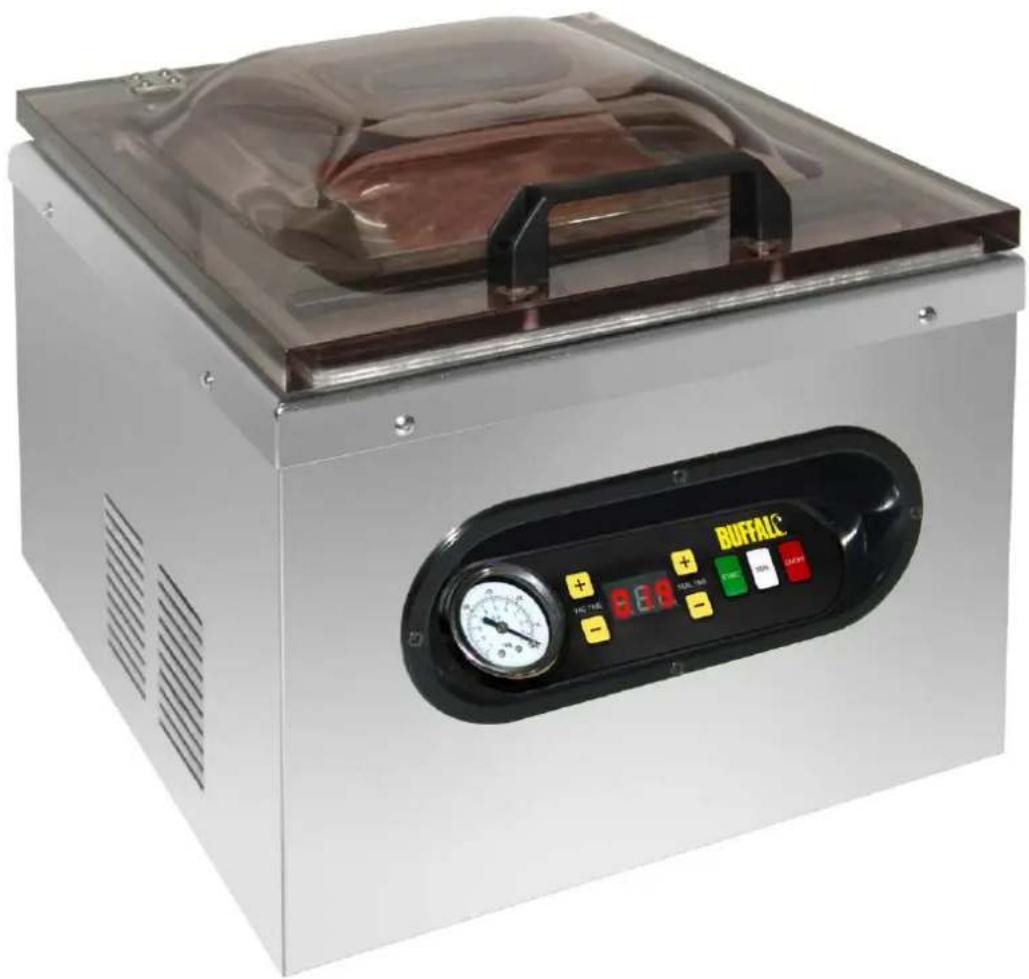
Location of Controls
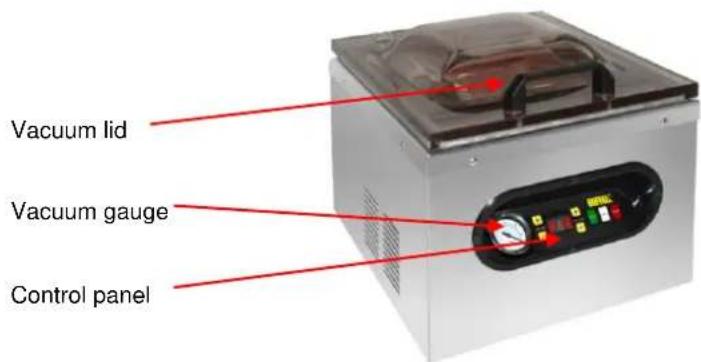
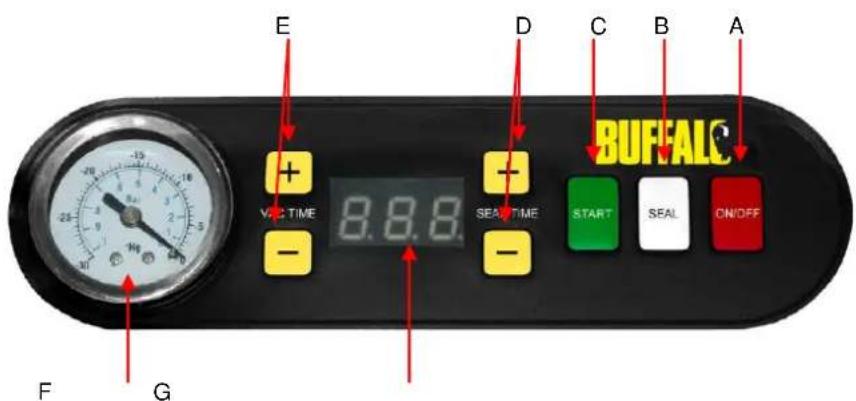
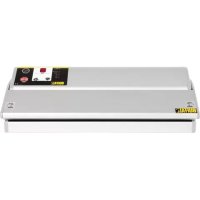
Controls
A. On/Off Button (On/Off)
After the machine is plugged in, LED display (G) will show Off, press the On/Off button, LED display (G) will show On. Now the machine is ready to use. After using the machine, press the On/Off button before unplugging the machine. During use pressing the On/Off button will stop the machine.
B. Seal Button (Seal)
Press the "Seal" button to stop the vacuum cycle and instantly seal the bag to prevent crushing delicate items.
C. Auto Vacuum Start Button (Start)
After closing the lid, press "Start" button. The machine will vacuum and seal automatically.
D. Seal Time Adjusting Button (Seal Time “+” or “-”)
Simply adjust the seal time "up" or "down" by using "+" or "-" buttons.
E. Vacuum Time Adjusting Button (Vac Time "+" or "-")
Simply adjust the vacuum time "up" or "down" by using "+" or "-" buttons.
F. Vacuum Gauge
Shows the vacuum level inside the vacuum chamber.
G. LED Display
- Shows the vacuum/seal time.
Operation
Plug in Vacuum Pack Machine and turn on Power Switch. The machine is now ready for use.
Vacuum Packing Food
- Place the food inside in the bag
- Allow minimum of 25mm-50mm of space at the top of bag to ensure a good seal.
- Place the open end of the bag across the sealing bar. Close lid
-
Press the Start button
-
The machine goes to vacuum cycle. When vacuuming, vacuum time will be shown on the Digital Display and count down from default setting to 0.
(Note: Vacuum time is adjustable from 5-60 seconds, default setting is 30 seconds.)
- At anytime during vacuum cycle pressing the Seal button will override timer and complete the vacuuming and sealing cycle.
- After the vacuum process the machine automatically goes to sealing cycle.
- When sealing, seal time will be shown on the Digital Display and count down from default setting to 0.
(Note: Seal time is adjustable from 0-6 seconds, default setting is 3 seconds. If the setting time is 0, the machine will not seal)
- Take out the bag and check the vacuum and seal. (Note: A good seal will look clear upon inspection. If the seal is spotty, incomplete, wrinkled, white or milky, remove sealed portion and run vacuum and seal process again.)
- Press "ON/OFF" button to stop the machine's at any time.
Please store the vacuumed items properly. All perishable foods must be refrigerated or frozen to prevent spoilage.
Cleaning, Care & Maintenance
Always allow to cool before cleaning.
Use warm, soapy water and a damp cloth to clean the appliance.
Dry thoroughly after cleaning.
A BUFFALO dealer or qualified technician should carry out repairs if required.
WARNING: Do not allow any water to spill into the appliance when cleaning.
Telephone Helpline: 0845 146 2887 (United Kingdom)
Troubleshooting
| Fault | Probable Cause | Action |
| The unit is not working | The Unit is not switched on | Check the unit is plugged in correctly and switched on |
| Plug and lead are damaged | Call BUFFALO agent or qualified technician | |
| Fuse in the plug has blown | Replace the plug fuse | |
| Power supply | Check Power Supply | |
| Internal wiring fault | Call BUFFALO agent or qualified technician | |
| Appliance does not remove all the air from the bag | Bag not correctly positioned | Open lid and reposition bag |
| Open end of bag is dirty | Clean bag | |
| Bag may be punctured | Replace bag | |
| Incorrect bags used | Call Vacuum Pack machine supplier | |
| Bags are not sealing correctly | Moisture in bag under the sealing bar | Ensure inside of the bag is dry and free from moisture where it is to be sealed |
| Incorrect bags used | Call Vacuum Pack machine supplier | |
| End of bag not placed above sealing bar | Move end of bag over sealing bar | |
| Heat sealing foam bar missing or incorrectly aligned. | Replace or re-position (Spare part code:AE931) | |
| Sealing Bar requires replacement | Call BUFFALO agent or qualified technician | |
| Error message E in Digital Display | Machine has overheated. | Switch off Power and leave for 20 minutes. |
| NOTE: Sealing bar replacement is not covered under warranty | ||
Technical Specification
| Model | Voltage | Power | Current | Vacuum Pressure (approx.) | Dimensions h x w x d mm | Weight (kg) |
| GF439 | 230v 50hz | 630W | 3A | -992mbar | 429 x 359 x 378 | 24.4 |
Electrical Wiring
This appliance is supplied with a 3 pin, moulded, BS1363 plug and lead, with a 13 amp fuse as standard.
The plug is to be connected to a suitable mains socket.
This appliance is wired as follows:
Live wire (coloured brown) to terminal marked L
Neutral wire (coloured blue) to terminal marked N
- Earth wire (coloured green/yellow) to terminal marked E
This appliance must be earthed, using a dedicated earthing circuit. If in doubt consult a qualified electrician.
Electrical isolation points must be kept clear of any obstructions. In the event of any emergency disconnection being required they must be readily accessible.
Compliance
The WEEE logo on this product or its documentation indicates that the product must not be disposed of as household waste. To help prevent possible harm to human health and/or the environment, the product must be disposed of in an approved and environmentally safe recycling process. For further information on how to dispose of this product correctly, contact the product supplier, or the local authority responsible for waste disposal in your area.
BUFFALO parts have undergone strict product testing in order to comply with regulatory standards and specifications set by international, independent, and federal authorities. BUFFALO products have been approved to carry the following symbol:

All rights reserved. No part of these instructions may be produced or transmitted in any form or by any means,
electronic, mechanical, photocopying, recording or otherwise, without the prior written permission of BUFFALO.
Every effort is made to ensure all details are correct at the time of going to press, however, BUFFALO reserve the right
to change specifications without notice
Veiligheidstips
Specifications techniques
| Modèle | Tension | Puisssa nce | Courant | Pression sous vide (approx.) | Dimensions h x l x p mm | Poids (en kg) |
| GF439 | 230v 50hz | 630W | 3A | -992mbar | 429 x 359 x 378 | 24.4 |
Câblage électrique
Limpieza,sciousness, and maintenance
DECLARATION OF CONFORMITY
-
Conformiteitsverklaring - Déclaration de conformité - Konformitätserkläragung - Dichiarazione di conformità
-
Declaración de conformidad - Declaração de conformidade
Application of Council Directives(s)
Toepassing van Europese Richtlijn(en) · Application de la/des directive(s) du Conseil · Anwendbare EU-Richtlinie(n) · Applicazione delle Direttive · Aplicacion de la(s) directiva(s) del consejo · Aplicacao de directiva(s) do Conselho
Standards
Standaarden · Normes · Normen · Standard · Estandares · Normas
Low Voltage Directive 2006/95/EC
EMC Directive 2004/108/EC
RoHS Directive 2011/65/EU
EN 60335-2-45:2002, EN 60335-1:2002
EN 62233:2008, EN 55014-1:2006
EN 55014-2:2006, EN 61000-3-2:2006
EN 61000-3-3:2008,IEC 62321/1CD
Buffalo
Fourth Way, Avonmouth, Bristol, BS11 8TB United Kingdom
I, the undersigned, hereby declare that the equipment specified above conforms to the above Directive(s) and Standard(s).