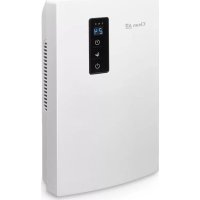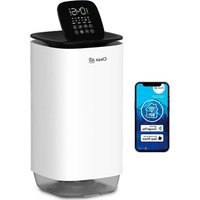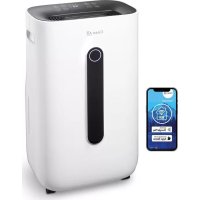
CA706 Smart - Dehumidifier Clean Air Optima - Free user manual and instructions
Find the device manual for free CA706 Smart Clean Air Optima in PDF.



User questions about CA706 Smart Clean Air Optima
0 question about this device. Answer the ones you know or ask your own.
Ask a new question about this device
Download the instructions for your Dehumidifier in PDF format for free! Find your manual CA706 Smart - Clean Air Optima and take your electronic device back in hand. On this page are published all the documents necessary for the use of your device. CA706 Smart by Clean Air Optima.
USER MANUAL CA706 Smart Clean Air Optima
Clean Air Optima® 2in1: Dehumidifier & Air Purifier
Model: CA-705 Smart / CA-706 Smart / CA-708 Smart
(EN) User manual
(DE) Gebrauchsanweisung
(NL) Gebruiksaanwijzing
(FR)Mode d'emploi
(ES) Manual del usuario
(PL)Instrukcja obstugi
(CZ) Uživatelská príroducka
(RO) Manual de utiliser
(LT) Naudotojo vadovas
(EE) Kasutusjuhend
(LV) Lietosanas pamaciba
(RU)PykoBoOdCTBO NOJIb3OBaTeJIa
(MK) Прпрачнк за корпостеbe
Find more languages on: www.cleanairoptima.com/ info/manuals
Read these instructions carefully before you start using this Clean Air Optima device and keep the manual for future reference..
Clean Air Optima
Table of contents
English 3
German 20
Dutch 37
French 54
Spanish 71
Polish 88
Czech 105
Romanian 122
Lithuanian 139
Estonian 156
Latvian 173
Russian 190
Macedonian 207
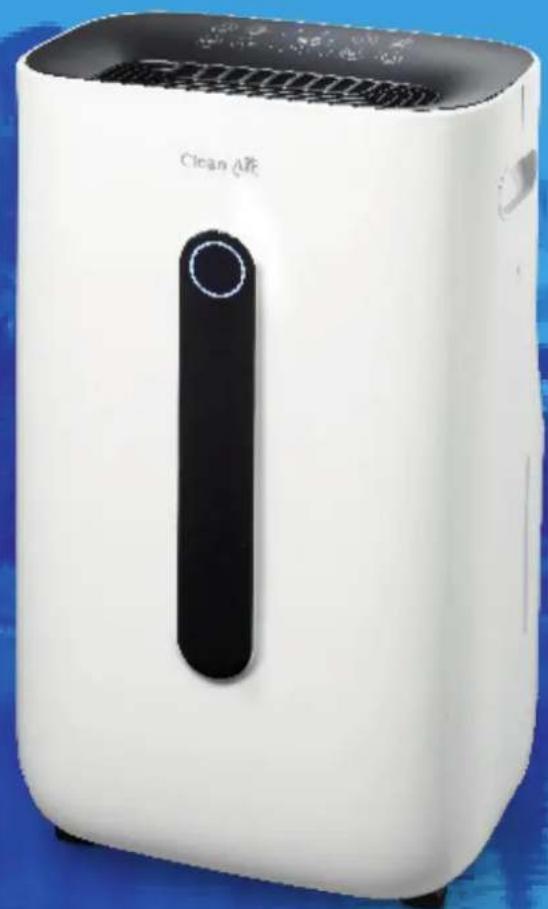
CA-705 Smart / CA-706 Smart / CA-708 Smart Main unit
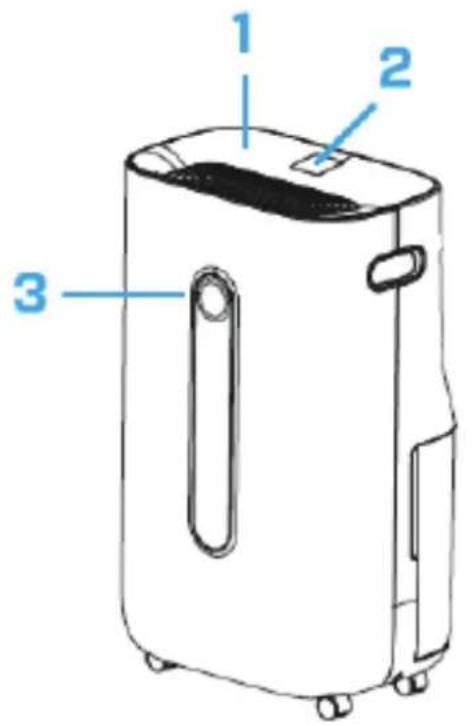
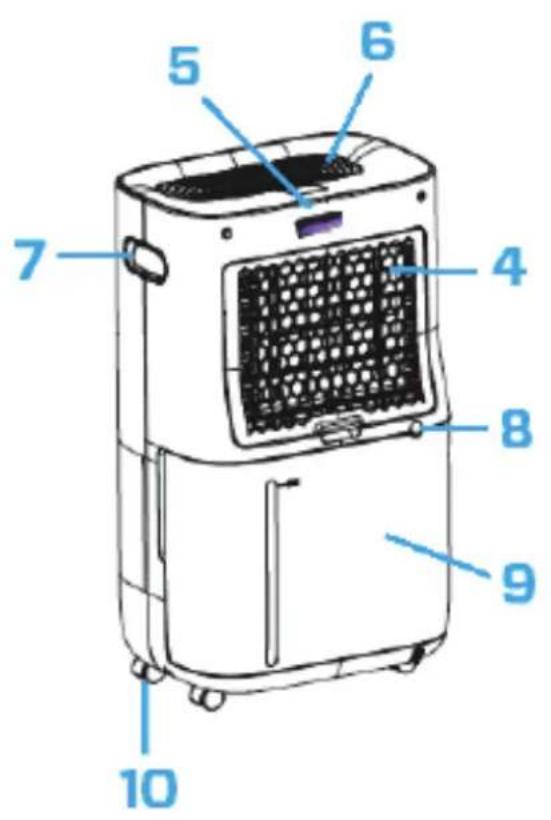
Clean Air Optima
English
Thank you for purchasing the Clean Air Optima® 2in1: Dehumidifier & Air Purifier CA-705 Smart / CA-706 Smart / CA-708 Smart.
We wish you many years of healthy indoor air with this efficient and effective product. Ensure that all safety precautions are followed when using this electrical appliance for the proper operation of the device. These instructions describe the safety precautions to be observed during operation. They are meant to prevent injuries and to avoid damaging the device.
Description
This Clean Air Optima device consists of the following main components:
- Control panel
- Digital display indicates relative humidity in %,WiFi and function settings
- Color LED monitor indicates relative humidity in blue (below 53% ), green (between 53% - 68% ) and red (above 68% )
- Air inlet and filter frame compartment, includes: Pre-filter, Activated Carbon Filter, True HEPA H13 Filter
- UV-C lamp position
- Air outlet and lonizer position
- Handle
- Continuous drainage (water drain, hose connection) Drain hose 1.5 meter included
- Water tank
- Caster wheels
Safety warnings
This device may only be used in accordance with this safety instructions. Take the following steps to minimize the risk of personal injury caused by for example electric shocks or fire.
- Leave the device to stand for at least two hours before use, especially after transportation.
- Only for indoor use. Do not use or store outdoors.
- Use proper voltage: AC 220V - 240V, 50/60Hz.
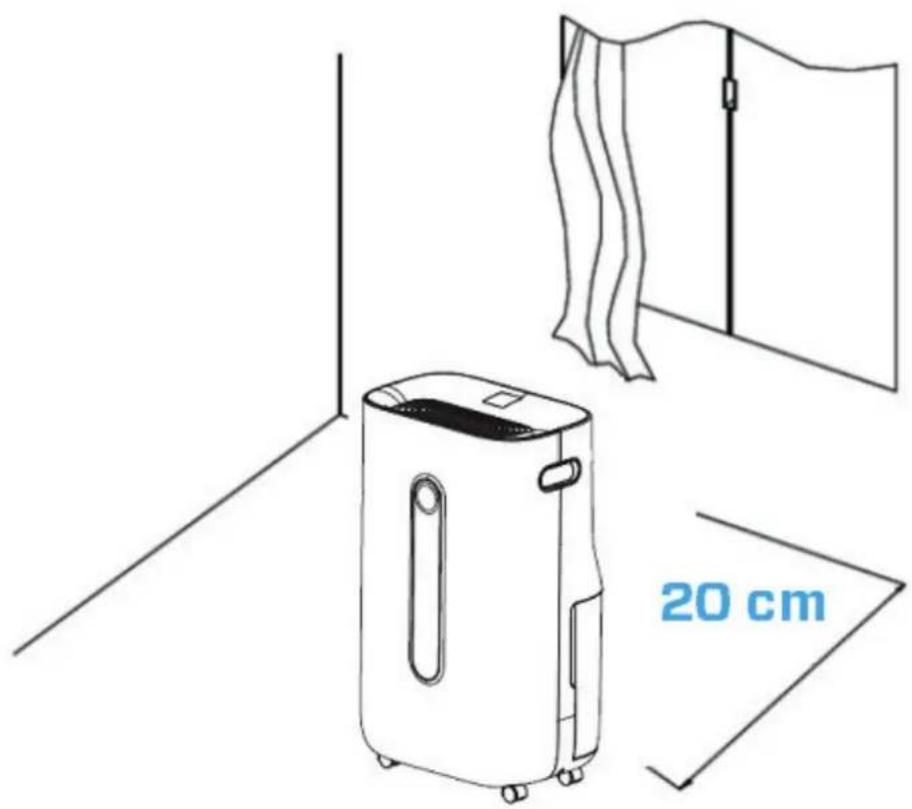
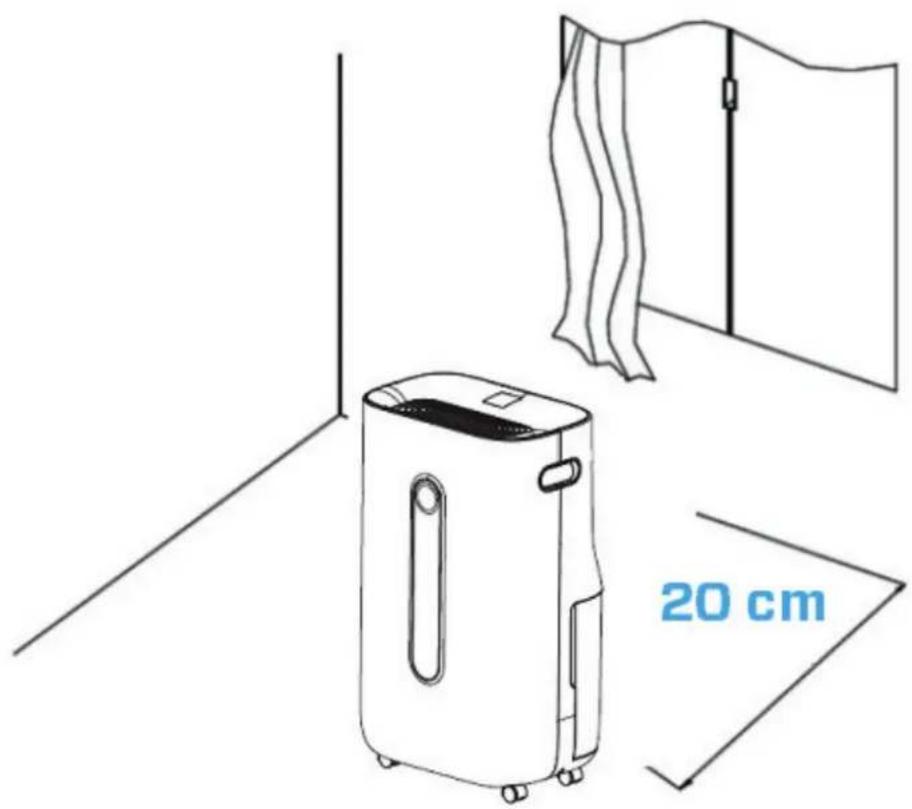
- Allow a free space of min. 20 cm around the air inlet and air outlet of the device.
- The appliance is not intended to be used by children or persons with reduced physical, sensory or mental capabilities, unless they are supervised by a person responsible for their safety.
- Do not use the device when there is visible damage on the electrical cord or on the device itself. Do not repair the device yourself in case of damage. Never pull the device by its cord. If the power cord is damaged, then it must be replaced by an authorized service person to prevent electric shock or fire.
- Repairs may only be performed by authorized service personal. Do not try to repair the device yourself to prevent electric shock or fire.
- Do not touch the power cord and plug with wet hands.
- Always switch off the device before disconnecting the plug.
10 Never attempt to turn of the device by disconnecting the plug. - Pull the plug when you do not use the device or when you clean internal or external parts of it.
- For safety use put the device in a steady, horizontal position. Do not move while using.
- Refrigerant: R290. This refrigerant complies with European environmental regulations. No part of the cooling circuit may be perforated.
- Do not use the device in rooms where inflammable liquids, gases are stored or close to heat sources like radiator, fire place or heat-generating devices like ceramic heater.
- Never insert any other object into the body to avoid breakdown.
- Never cover the air inlet and air outlet grid.
- Never disassemble or replace the device's inner parts.
- Use and store the device not under 0^ or above 40^ .
- Do not tip the unit to any side when the water tank is full.
2D. Do not put heavy objects on the unit. - Please avoid places with direct sunlight. There is a risk that the device discolors.
- Never immerse the device in water or other liquids.
- Empty the water tank regularly. In extreme conditions the water tank may be full after a few hours operation.
- Clean the Pre-filter regularly, if the Pre-filter is saturated with dust, it will lead to poor purifying and dehumidifying effect. The power consumption will increase, it can cause failure.
- Replace the Activated Carbon Filter and True HEPA H13 Filter every 3 - 6 months, if the Activated Carbon Filter and True HEPA H13 Filter are saturated, it will lead to poor purifying and dehumidifying effect. The power consumption will increase, it can cause failure.
- Use, maintain and clean the device as described in this manual.
Clean Air Optima
Installation
Make sure that the distance from the device is 20 cm away from walls and furniture, see the illustration below.
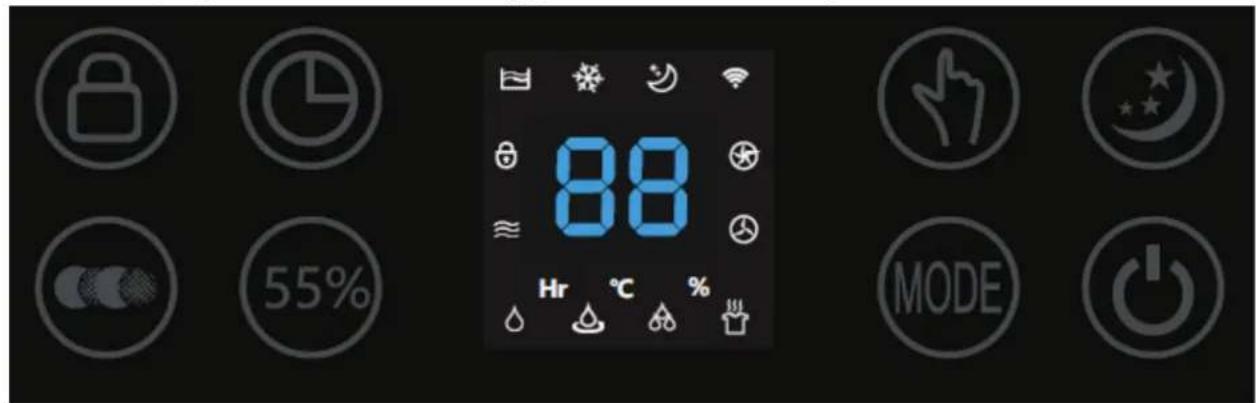
Control panel / Operation instruction
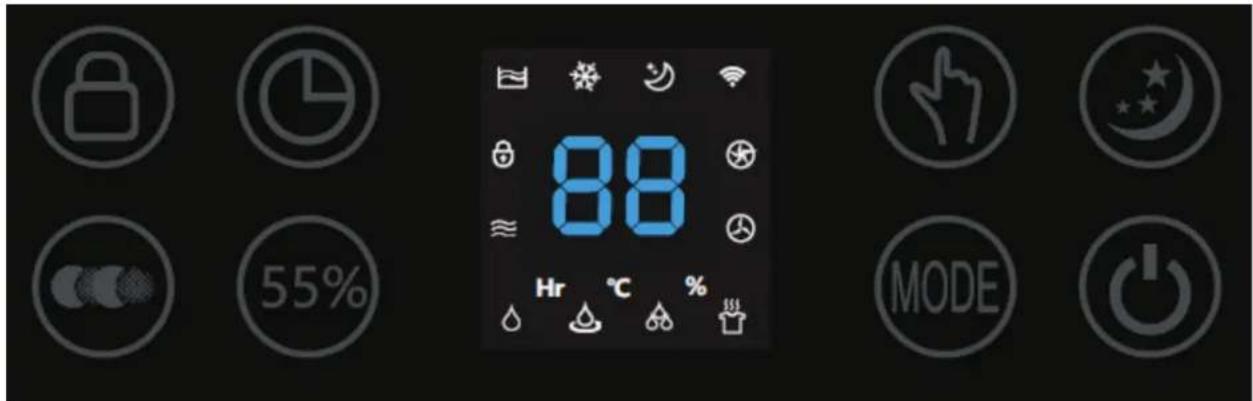

Power
Press the Power Button to activate the device. Press the Power Button again, the device turns off.

MODE
Press the MODE Button to select one of four desired programs:

- Normal dehumidification (adjustable fan speed and humidity setting) Icon with name in App: Normal
- Continuous dehumidification (low fan speed, humidity setting not adjustable) Icon with name in App: Continuous
- Strong dehumidification (high fan speed, fan speed and humidity setting not adjustable) Icon with name in App: Strong
- Dry clothes mode (high fan speed, fan speed and humidity setting not adjustable) Icon with name in App: Dry clothes

Humidity setting (Only for MODE program: Normal dehumidification)
By pressing the Humidity Button, you can select the desired humidity level by pressing this button repeatedly until the required humidity level is displayed (from 30% to 80% in increments of 5% ).
Once you select your desired humidity level, simply stop pressing the button and your humidity level will be set. When the humidity level in the room reaches the set humidity level, the device will go into automatic sleep state and stops dehumidifying and air purifying. When the room's actual humidity level increases again above your set humidity level, then the device will start dehumidifying and air purifying again. If the desired humidity level is reached at a constant level, you can switch with the air purification button for continuous air purification.
Clean Air Optima

Continuous Air Purification, icon with name in App: Air Clean By pressing the Air Purification Button you can use the device as an air purifier.

Fan Speed (Only for MODE program: Normal dehumidification and Continuous air purification) By pressing the Fan Speed Button, you can change the fan speed level. The 2 fan speeds offer individual air flow.

Timer Press the Timer Button to set 0-24 hours timing. Press the button one time, the timer will increase with one hour. When the device is operating, the timer that is set indicates when the device switches off. If the device is in stand-by mode, the timer that is set is to instruct the device when to turn on.

Sleep Press the Sleep Button and the sleep mode is activated, the display will turn off. Press the Sleep Button again to switch back in the settings before.

Child Lock, icon with name in App: Lock
Child Lock is switched on / off by pressing the Child Lock Button for ca. 3 seconds.
Child Lock protects from unwanted use of the device.

Water Tank Full Indicator Light
When the water tank is full, the device will stop automatically. The Water Tank Full Indicator Light turns on and lights up. Do not immediately remove the water tank, but wait 10 minutes. The water must first drain from the compressor. Drain the water tank, and return the water tank to the body of the device, the Water Tank Full Indicator Light will turn off. The device will work automatically again.
Negative Ion
In the four MODE program and Continuous Air Purification function the Negative Ion function will be automatically be activated. The negative ion generator has a total capacity of >3.000.000 negative ions / cm^2 that are spread through out the entire room and thereby neutralize pollutants and smells. Negative ions attach onto dust particles, microorganisms and other unwanted particles in the air and connect them to each other. This way, the particles become heavier than air and fall onto the ground so that you can no longer breathe them in.
Negative ions are most found in the forest, mountains and by the sea. Negative ions ensures fresh and healthy air.
Attention: The ionization function runs continuously and can't be turned off.

Defrosting Indicator Light
The evaporator in the dehumidifier may defrost automatically if it is operated with a room temperature less than 18^ . The defrosting device in the dehumidifier my start up and operate for some time (about 5 minutes) automatically every 25 minutes or even longer.
- During the defrosting operation, the dehumidification function and air purification function may intermit.
- Don't turn of the power or pull out the power plug of the device during the defrosting operation.
Room temperature increases during operation
The Clean Air Optima dehumidifier doesn't have a cooling function. The device will produce heat during operation and increase the room temperature between 1^ to 4^ .
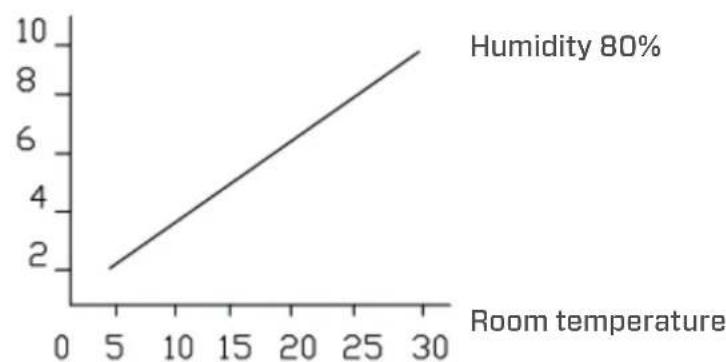
Dehumidifying capacity
The illustration below shows the dehumidifying capacity of the Clean Air Optima® dehumidifier. By different temperatures and relative humidity, the dehumidifier may have different dehumidifying capacities.
Dehumidifying capacity
Clean Air Optima
Operation with Clean Air Optima® App
Connectivity
Compatibility with smartphone and tablet:
iPhone, iPad and Android devices
Device connets via WiFi with App:
CleanAirOptima
Attention: The router must be set to the 2.4 GHz broadband. If the router is set to the 5.0 GHz, it is impossible to establish a connection.
SetupWiFiconnection
- Download and install the "CleanAirOptima" App in the App Store or Google Play Store.
- Make an account and log in.
- The router must be set to the 2.4 GHz broadband. If the router is set to the 5.0 GHz, no connection can be established.
- Make sure Bluetooth is enabled on your smartphone.
- Plug the device into the power socket and switch it on. The WiFi indicator will blink. If the WiFi light does not blink, press the MODE button for 5 seconds. Then the WIFI light will flash quickly. If the WIFI light blinks quickly, the device is ready to connect.
- Make sure that your smartphone or tablet is successfully connected to your WiFi network.
- Open the 'CleanAirOptima' App and click on 'Add device'. Your device is listed and you can select it. If not choose 'Auto Scan'. Follow the on-screen instructions to connect the device to your network.
- Choose to add the Clean Air Optima device on the App, follow the instructions in the App.
- When the device is paired, the WiFi indicator light stays on constantly.
- After the configuration is successful, you can use the Clean Air Optima App to operate the device.
Note:
- If your default network has changed, reset the WiFi connection, follow step 1 to 9 in the 'Set up WiFi connection' section.
If you want to pair multiple devices to your smartphone or tablet, you have to do this one after the other. - Make sure that the distance between your smartphone or tablet and the device is less than 5 meters and there are no obstacles. Also make sure you are in the same room as the device.
Reset the WiFi function:
- The device must be switched off.
- Reset the WiFi by pressing the 'Mode' button for 5 seconds, the indicator light of the WiFi will blink rapidly.
Turn off WiFi function:
- The device must be switched off.
- Reset the WiFi by pressing the 'Mode' button for 5 seconds, the indicator light of the WiFi will blink rapidly.
- Turn of the WiFi by pressing the 'Mode' button for another 5 seconds, the indicator light of the WiFi will go out.
Connect devices to multiple phones
Note: First the other person needs to install the Clean Air Optima® App on his/her phone and create a new account.
Share the device with limited access:
You can choose to share 1 device with several persons.
This person will then have access, but will not be able to manage all the settings.
Follow the instructions below to share the device with several persons:
- Go to the relevant device.
- Go to the pencil or three dots in the top right.
- Select 'Share device.'
- Choose 'Add sharing'.
- Choose the sharing method e.g. via email, Whatsapp, sms etc. and continue.
- The device will automatically appear in the Clean Air Optima App with the other account.
Share device with full access:
You can add a person or several persons to your home management.
That person will then have access to all your devices that are already linked and has full rights and permissions. You will always remain the main administrator.
Follow the instructions below to add someone to your home management:
- Open the Clean Air Optima App and go to 'Me'.
- Then choose 'Home Management'.
- Choose 'Create a home'
- Select the relevant 'Home' and 'Add member'.
- Choose the sharing method e.g. via email, Whatsapp, sms etc. and continue.
- The corresponding 'Home' will automatically appear in the Clean Air Optima App of the person with whom you have shared your 'Home'.
- On the other account:
Go to the home screen from the Clean Air Optima App. Go to the top left and select the 'Home'.
Clean Air Optima
Water Drainage
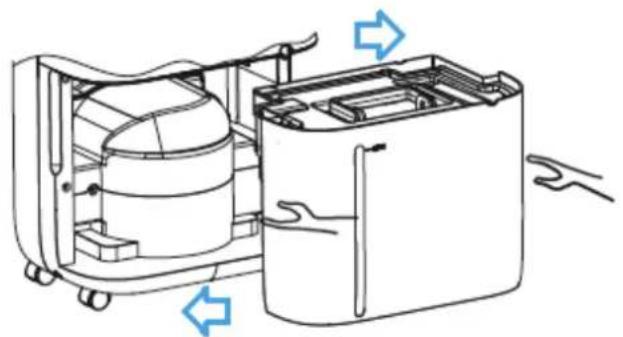
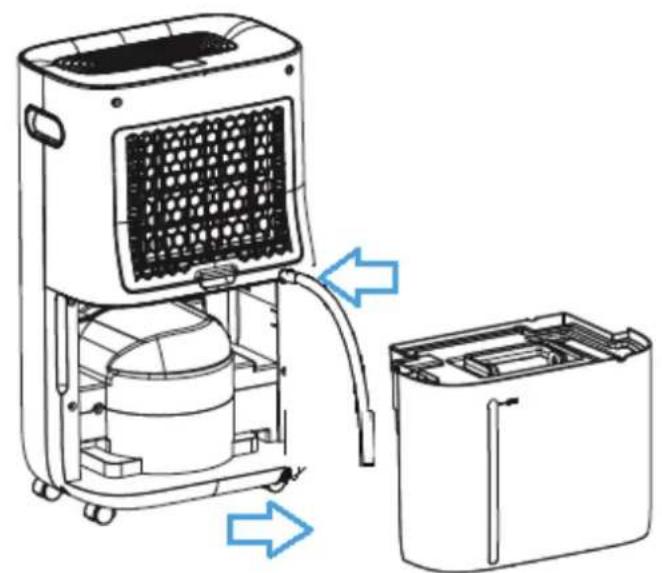
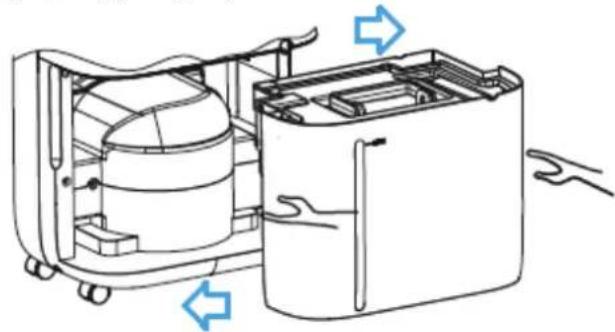
The Water Tank Full Indicator Light will light up when the water tank is full. Do not immediately remove the water tank, but wait 10 minutes. Take out the water tank and empty the water inside. Then put the water tank back into the dehumidifier correctly, see the illustration below.
Continuous Drainage
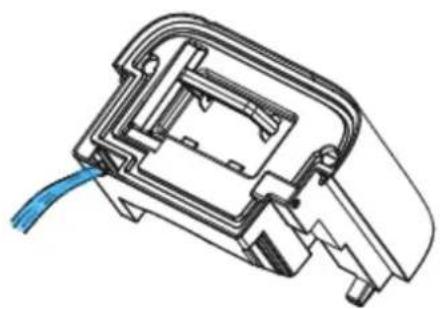
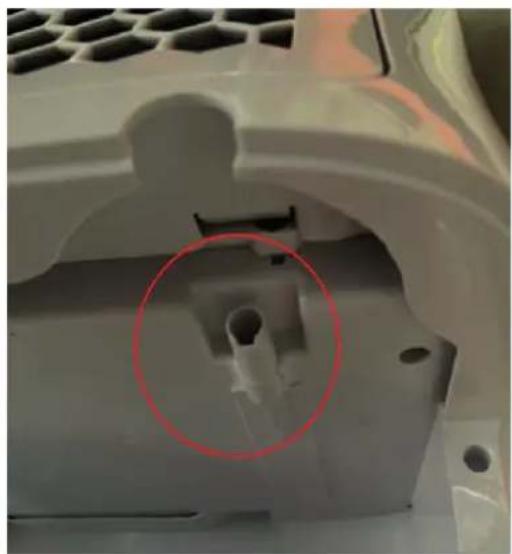
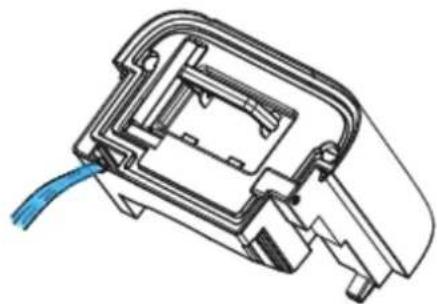
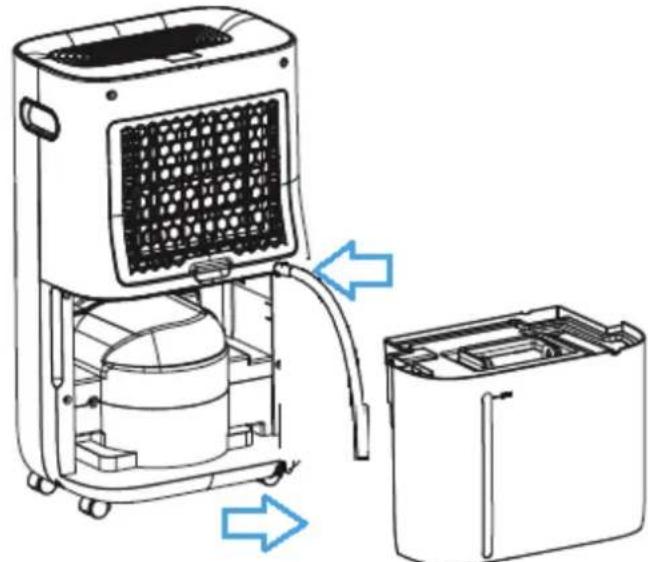
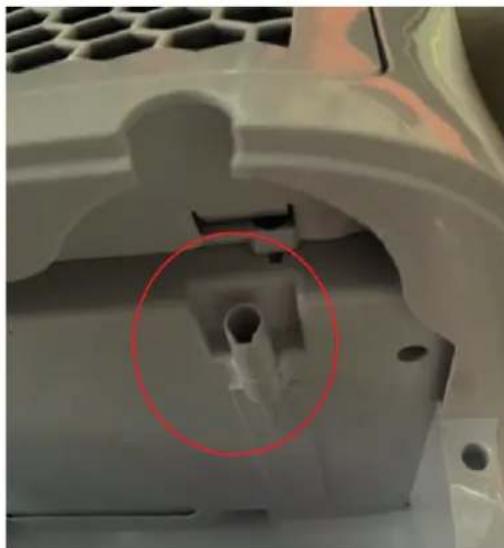
For continuous operation you can use the drain hose of 1.5 meter long that is included. Remove the water tank and install the hose to the water drain hose connection correctly, see the illustration below. Make sure the water tank is put back into the device.
Replacing the Clean Air Optima® True HEPA H13 Filter and Activated Carbon Filter
The Clean Air Optima CA-705 Smart/ CA-706 Smart/ CA-708 Smart Dehumidifier & Air Purifier is equipped with a filter lifespan surveillance mechanism that signals that the filters have to be replaced after 1000 working hours. To show that the filters needs to be replaced, the dehu
midifier emits a double zero indicator light in the display.
Reset the timer for the filter replacement by pressing and holding the Power button for about 3 seconds. If the indicator light goes out, the timer has been successfully reset and the dehumidifier is ready for use again.
Maintenance
Cleaning the housing of the Clean Air Optima dehumidifier
- Switch off the device and pull the plug.
- Use a soft and humid piece of cloth to clean the device. Do not use chemical solvent such as benzene, alcohol or gasoline.
- Make sure that no water gets into the device, do not sprinkle with water.
Replacing of filters
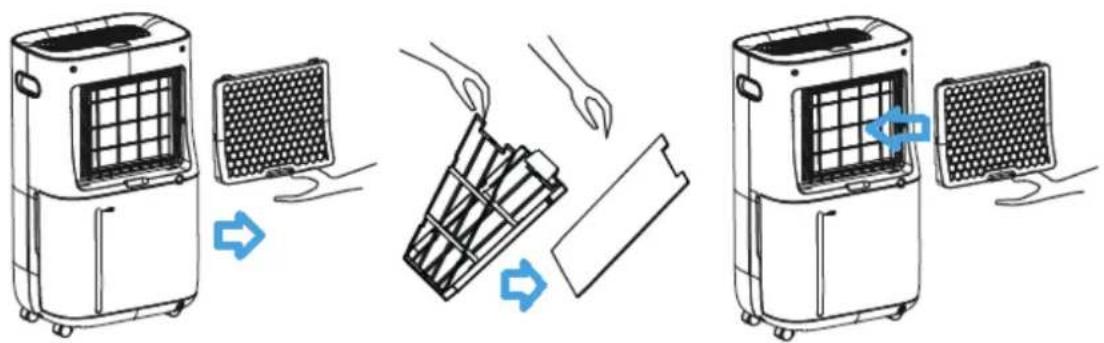
Depending on the use, the Activated Carbon Filter and True HEPA H13 Filter has a lifespan of approx. 3 - 6 months. The Pre-filter and UV-C lamp are permanent, no replacement needed.
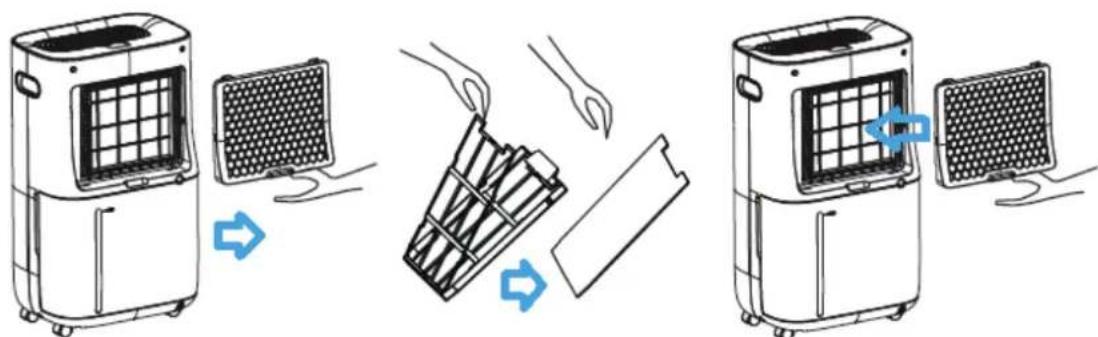
Take out the filters from the filter frame compartment. After filter replacement or filter cleaning reinstall the filters back into the filter frame compartment and assemble back to the device, see the illustration below.
Filter cleaning
The best effect for a longer lifespan of the Filters is reached by cleaning the filters once a month. If indoor air is extremely polluted, we advice to clean the filters more often ca. once per two weeks.
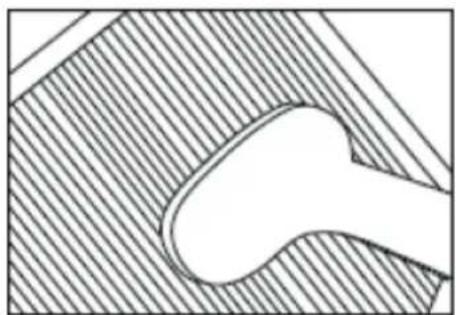
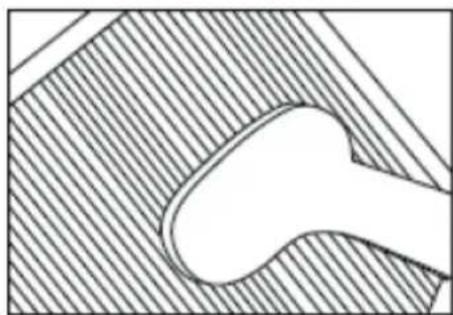
Clean the Pre-filter, Activated Carbon Filter and True HEPA H13 Filter carefully with a brush or your vacuum cleaner. That way bigger dust particles like lint, hair, dust and dander of pets can be removed from the filters.
Clean Air Optima
Warning!
Do not damage the filters, the filters must not be cracked. Damaged filters needs to be replaced.
Never wet or rinse the filters (Only for Activated Carbon Filter and True HEPA H13 Filter) with water. Filters that are rinsed with water needs to be replaced.
Signs for used up filters that needs to be replaced
(Only for Activated Carbon Filter and True HEPA H13 Filter)
Increased sound, reduced air flow, congested filters, rising presence of smells. Filters needs also to be replaced by new ones when the True HEPA H13 Filter changes its color from white to grey or black. If the True HEPA H13 Filter remains white, there is NO need to replace the filters.
How to order filters:
Contact Clean Air Optima Customer Service tel. +31 (0) 742670145 or visit our webshop: https://www.cleanairoptima.com/accessoires/mg/44/
Clean Air Optima® dehumidifier storage
If the dehumidifier will not be used for an extended period of time:
- Drain the water tank completely and make sure that there is no water stocked inside the water tank.
- Unplug the device and fold up the power supply cord.
- Remove and clean the filters. After cleaning reinstall the filters back into the device.
- Store the dehumidifier in a cool, dry location, away from direct sunlight, extreme temperature and excessive dust.
Troubleshooting
The following is a troubling shooting guide to help you solve any issues that you may have using the Clean Air Optima® dehumidifier CA-705 Smart / CA-706 Smart / CA-708 Smart.
| Problem Possible | Cause Solution | |
| Device does not switch on | The power cord does not connect correctly | Connect the power plug and power socket correctly |
| The water tank is full or water tank is not in the correct position | Drain the water tank and replace the water tank to the correct position. Once the drainage hose has been installed, the water tank must be placed back in the device. | |
| Inefficiency dehumidification | The filters are blocked by dust | Clean or replace the filters |
| The air inlet and outlet have a blockage | Clean the blockage from the air inlet and outlet | |
| The setting humidity is higher than environmental humidity | Set the humidity at least 5% lower than environmental humidity | |
| The dehumidifier is in Continuous air purification MODE | Change the operation MODE | |
| Noise | The device is installed askew | Make sure the device is installed uprightly |
| The filters are blocked | Clean or replace the filters | |
| Operation stops during spot dehumidifying | The room temperature is higher than the usable operating temperature | The dehumidifying operation will be started automatically when the temperature lowers |
| Washed clothes are not dried | The room temperature is to low W | Washed clothes are hard to be dried under low temperature conditions |
| Operation with Clean Air Optima® App does not work | Smartphone or tablet is not connected to WiFi network | Switch off the device and reset the WiFi on the device by pressing the Mode button for 5 seconds, the indicator light of the WiFi will blink rapidly. Then follow step 4 to 8 from chapter Operation with Clean Air Optima® App |
| The device has no connection to the network |
Clean Air Optima
WARNING!
If the above recommended solutions do not work, please contact Clean Air Optima® technical support at the telephone number for your region. Do not attempt to disassemble, reassemble, or repair the device as this may void the warranty.
Specifications CA-705 Smart
| Model | CA-705 | Smart |
| For rooms up to | 50m² / 125m³ / 540ft² | |
| Rated voltage | 220V - 240V, 50Hz | |
| Rated power | 240W | |
| Fan capacity | 195 m³/h | |
| Dehumidifying capacity | 16 liters per day at 30°C and 80%RH | |
| Working temperature range | 5°C - 32°C | |
| Water tank | 6,5 | liter |
| Air purification with: | Pre-Filter, Activated Carbon Filter, True HEPA H13 Filter, UV-C | lamp, lonizer |
| Filter performance | 99,97%, Sterilization rate 99.9% | |
| Negative ion | >3.000.000 ions/cm² | |
| Sound level | Silent fan < 30dB(A) Low / 48dB(A) High | |
| Drain hose | 1.5 | meter |
| Dimensions | 340 x 240 x 570mm | |
| Weight | 12kg | |
| Colour White / black | ||
| Refrigerant | R290 / | 55g |
| Complies with EU regulations | CE / WEEE / RoHS | |
Specifications CA-706 Smart
| Model | CA-706 | Smart |
| For rooms up to | 70m² / 175m³ / 750ft² | |
| Rated voltage | 220V - 240V, 50Hz | |
| Rated power | 320W | |
| Fan capacity | 195 m³/h | |
| Dehumidifying capacity | 20 liters per day at 30°C and 80%RH | |
| Working temperature range | 5°C - 32°C | |
| Water tank | 6,5 liter | |
| Air purification with: | Pre-Filter, Activated Carbon Filter, True HEPA H13 Filter, UV-C | lamp, lonizer |
| Filter performance | 99,97%, Sterilization rate 99.9% | |
| Negative ion | >3.000.000 ions/cm² | |
| Sound level | Silent fan < 30dB(A) Low / 48dB(A) High | |
| Drain hose | 1.5 meter | |
| Dimensions | 340 x 240 x 570mm | |
| Weight | 12.2kg | |
| Colour White / black | ||
| Refrigerant | R290 | / 60g |
| Complies with EU regulations | CE / WEEE / RoHS | |
Specifications CA-708 Smart
Model
CA-708
Smart
For rooms up to
90m² / 225m³ / 965ft²
Rated voltage 220V-240V,50Hz
Rated power 330W
Fan capacity
195 m³/h
Dehumidifying capacity 25 liters per day at 30^ and 80% RH
Working temperature range 5^ - 32^
Water tank
6.5
liter
Air purification with: Pre-Filter, Activated Carbon Filter, True HEPA H13 Filter,
UV-C lamp,
Filter performance 99,97%, Sterilization rate 99.9%
Negative ion >3.000.000 ions/cm²
Sound level Silent fan < 30dB(A) Low /48dB(A) High
Drain hose
1.5
meter
Dimensions
340 × 240 × 570 mm
Weight
14.5kg
Colour White/black
Refrigerant
R290
60g
Complies with EU regulations
CE/WEEE/RoHS
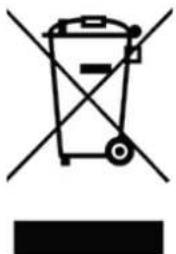
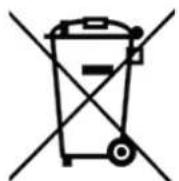
Ask your retailer or your municipality for updated information regarding the disposal of the packaging and of the device.
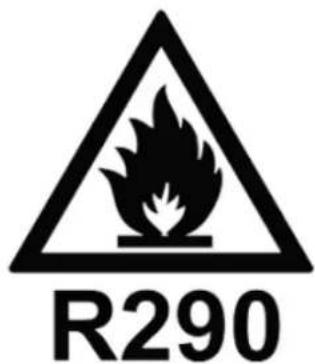
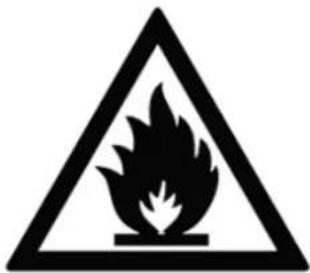
Danger
Natural refrigerant propane (R290)!
Clean Air Optima
Service
Warranty Certificate for the Clean Air Optima® Dehumidifier CA-705 Smart / CA-706 Smart / CA-708 Smart.
Date of purchase:
Customers name:
Address:
Telephone:
Email:
Seller's name:
Address:
- Please fill in completely this Warranty Certificate. Send it with the invoice and the unit, postage pre-paid and using the original packing box, to your distributor. Make sure to include the appropriate return postage for the package.
- Please enclose a short description of the damage, fault or malfunction, and the circumstances under which these problems arose.
The Clean Air Optima® Dehumidifier CA-705 Smart / CA-706 Smart / CA-708 Smart is subjected to strict testing procedures before leaving the factory. If within two years from the date of purchase the product does not perform according to the specifications, because of factory defects, the purchaser is entitled to free repairs or replacement of parts upon presentation of this warranty (provided that the malfunction or damage to the device and/or parts occurred under normal operating conditions). What is covered: All parts defective in material and workmanship. For how long: two years from purchase date. What we will do: Repair or replace any defective parts.
Other Conditions
The provisions of this warranty are in lieu of any other written warranty whether express or implied, written or oral, including any warranty of merchantability or fitness for a particular purpose. The manufacturer's maximum liability shall not exceed the actual purchase price paid by you for the product. In no event shall the manufacturer be liable for special, incidental, consequential, or indirect damages. This warranty does not cover a defect that has resulted from improper or unreasonable use or maintenance, faulty assembly, accident, natural catastrophes, improper packing, or unauthorized tampering, alteration, or modification as determined solely by us. This warranty is void if the label bearing the serial number has been removed or defaced.
Thank you for reading!

Share your feedback about the Clean Air Optima®
Dehumidifier CA-705 Smart/CA-706 Smart/CA-708 Smart on:
www.cleanairoptima.com

For frequently asked questions about the CA-705 Smart / CA-706 Smart / 18 Smart go to: www.cleanairoptima.com
and search for the CA-705 Smart/CA-706 Smart/CA-708 Smart

Download PDF instruction manual on:

airoptima.com/info/manuals
Clean Air Optima International B.V. | David Ricardostraat 9-7 / 9-9 | 7559 SH Hengelo (ov)
www.youtube.com
The Netherlands | Phone: +31 (0) 74 - 2670145
Clean Air Optima Germany GmbH | Enschedestraße 14 | 48529 Nordhorn | Germany
Phone: +49 (0) 5921 879-121
E-mail: info@cleanairoptima.com
Internet: www.cleanairoptima.com
Dimensions 340x240x570mm
Poids
14,5kg
Couleur
Blanc/ noir
Réfrigérant
R290/ 60g
Agent frigorific R290/55g
Agent frigorific R290/60g
Agent frigorific R290/60g
Agent frigorific natural propan (R290)!
Service
Certificat de garantie pour Clean Air Optima® Dezumidificator CA-705 Smart / CA-706 Smart / CA-708 Smart.
Data achiztiei:
Nume client:
Adresa:
Telefon:
E-mail:
Nume vanzator:
Adresa:
Pn6op Clean Air Optima coCTOnT n3 TaKx OCHOBbIX KOMTOHeHToB:
- NaheIb ynpaBJIeHnIa
- LufpoBOn DnCnIe, NOKa3bIBaHouuN OTHOCHTbHyO BnaXHOCTb B %, COCTOHNIOKJIUoyENr K cTeNi Wi-Fi n HacTpoKu
- CBetHOCBeTOIOHbIeKpaH, NOKa3bBaIOUm BeJIuHy OTHOCHTbHOB BlaxHOCTn: CINHM (Hxke 53 %), 3eJeHbIM (53-68 %) n KpachbIM (60ee 68 %) UBETOM
- OTBepCTne IJyBa B03dyxa nOTcK paMKn fNbTpoB, COCTOuIuN 3 fNbTpa npedBapnteHbHO uNCTKn, fNbTpa cAKTNBnPOBaHHbIM VrJEM N fNbTpa True HEPA H13
- yΦ-λaMna
- BbInyckHoe OTBepCTne HnoHN3aTOp
- RykoRTka
- HenpebHbCINB (CINB BObl,OTBepCTne IJRA NOCDcEHNHeHNAHra) CINBHOI 150 HON 1.5 MBXODNT B KOMJIeKT NOCTABKU
- Pe3epByap Dnla BOdbi
- Koneca
IpeDynpexKdEHHnoTexHnke 6e30nacHoCTN
Даньй пибор сеуET ИсплььзовыВ CTPOROM COOTBeTCTBИС HACTOIMnpaBNIamNTEXHnK 6e30anachoctn.Bo n36exKaHne TpaBM,ВчacTHOCn BCNECTBnE NOPaxeHЯ элкtpuyeckmTOKOM nII B03rOpAHnI,прдерЖвayTeCb cSeyUxNx npaBnI.
- Ipeed nCnoB3OBAHnem npi6op doJxHe HaxoDITbC B HeNoDBHXHOM COCTOHN He MeHee DByx YacOB, B Oc06eHHOCnI NOcE TpaHCnOpTnpOBKn.
2.ИспльзуITE np60р TOlbkoВnomeшнax.He nCpoIb3yIteи He xpaHITe np6Op Ha yInce.
3.Испольтугелпавильhoeнаряжени:220—240Впep.тoka,50/60Гц - OctabTe He MeHee 20 cm CBO6oHOrO npocTpaHCTBa nepei OTBepCTnMn IJycka N BbInycka BO3dyxa.
- 3ToT npu6op He npedHa3HaueH IJI NcNoB30BaHnI DeTbMn IIN JIuaM C OrpaHnueHHbIMN fN3UeCKmN, CeHCOPHbIMN IIN yMCTBeHHbIMN CNOco6HOCTaMn 6e3 KOHTpOJa IIN, OTBeTCTBeHHbIX 3a IN 6e3OnaCHOCTb.
- He nCnoB3yIe npn6op npn HauuHn NOBpeXdeHn 3JeKtpnueckoro Ka6eYnI npn6opa. He nbTaItecb peMOHTnpoBaTb npn6op camocToaTeJbHo. Hn B Koem clyuae He TAnHe npn6op 3a Ka6eYb NtAHn. Bo n36exaHne nopaxehn 3JeKtpnueckm TOKOM nIIN BO3rOpAHn IOBpeXDeHHb Ka6eYb NtAHn DOJIKeH 3aMeHbTyNOHOMOueHHb TeHXUeCKn CneLnaJIInCT.
- BbINOJIHrTb peMOHT DoJIKeH ToIbKO yNoIHOMoUeHHbI TexHnueckn cneuaJIaNCT. Bo n36exaHne IopaxEHnE JIeKtpuYeCKm TOKOM NII BO3ROpAHnE He nbTaIaTeCb peMOHTnpoBaTb npi6Op CAMOCTOrTeJbHO.
- He npikacaiTecb K uHpy nHTaHn MOKpbIM pyKaMn.
9.перд отcoeДинсьиьи ВИКИ ПИТаььклчаite npi6op. - 3aPpeaetc BbIKHuaT np6op, n3BnKa BnKy nntHaNn 3 pO3eKn.
- Ecn np6op He nCnoB3yETc, N6o OH noBepraetc ouHCTKe, np6op doJxeh 6bITb OTKJIuOeH OT NCTOCHKA PNTAHN.
- B cIeJx 6e3oNaChOCTn yCTaHaBnBaIte npi6op BycToHnBOe rOpNtAlbHOe noLoXeHne. He nepeDburai Te np6op BO Bpem er o pa60tbl.
- XlaadareHr: R290 3TOT XlaadareHT COOTBETCTByeT EbponeNCKM 3KOLORuecknM HOpMaM. Kateropueckn 3aIpeSeHo DeIaNb OTBepCTnB IIO6oJ uactn KOHTypa OxJaXdeHn.
- He nCnoB3yIe np6op B NOMeueHnX, rDe xpaHrTa NERKOBCnJaMeHraUOuHece XnKoCTN nn Ra3bl, a TAKKe pRdOM C NCTOUYHKamn TeTna (HaNPmep, 6aTapeA M N OTOnJIeHn, KaMnHaMn nn KepaMnueckumn O6OrpeBaTeJMaM).
- Hn B Koem cnuyae He BCTaBJIte noctopOHHne npedMeTb I KOpnyc np6opa. 3To npuBeTeK ero nolomke.
- Hn B Koem clyahe He 3akpbBaIte Bo3dyx03a6OpHN K BBInyckHoe OTBepCTne.
- Hn B Koem Cnyuae He pa36npaTe n He 3ameHnTe BHyTpeHHne KOMNoHeHtBi npi6opa.
18.Испьзуйт e xханite пибор пи Temператypax ot 0^ do 40^ - Ecn pe3epByap Iy BODbl 3aNoHHe, He HakoHny Te np6Op.
- He KlaaIte TaeKJIe IpeDMeTbHa np6Op.
- He donyckaite nonadHna npnbop npmbix coJIHeuHbIX lyue. 3TO MOxET npBecn Kero o6ecuBeuBaHHIO.
- KaTeOpnueeckn 3aPpeuENo nOrpykaTb npnbop B Body nn Dpyrne KxdkocTn.
- Perynpho onopoxHnTe peepByap nB BObl. B kctpeMaIbHbIX ycIOBnx peepByap nB OBObl MOKeT 6bITb 3aONHeH nOcne HeCKOJIbKx YacOB pa60tbl.
- PeryIaRHO ouHuaTe fHbTp npedBapntelbHou ouNCTK: ecn OH 3arp3HeH nbIbU, ouNCTKa n OcyuHHe BO3dyXa He 6yDyT BblONHraTbcra HndJexkaUIM o6pa3OM. Notpe6JIeHne 3HeprnYBEJIuHTcR, 3TO MOKeT Bbl3BaTb C60J.
- 3aMeHnTe fNbTp cakTNBnPOBaHHbIM yIeM n fNlbTp True HEPA H13 kaxDbie 3-6 MeCraE, Ecn OHN 3aRpy3HeHbI, OuncTka N ocUyHe N B03dyxHa He 6yDyT BblOnHrTbcr HaJIeXaUIM o6pa3OM. Notpe6JeHne 3Heprn yBelenuHTcra, 3TO MOxET Bbl3BaTb c6oN.
- B xode kcnnyatau, texnueckoro o6cnyxnbHna n ouncTk npnbopa cneyTe noLoxeHnMa HactoIero pykoBODCTBa.
yctahOBka
Y6eHITecb, YTO npu6op pa3MeaetcHa paCCToHHn He MeHee 20 cm OT CTen H Me6eJI (cm. pncyHOK Hxke).
Clean Air Optima
Panaelb ynpablenen / Nhctpykunno ekcnnyatau

Питанne
Haxmnte KhONky «Ntahne», yTo6bI BklnOHTb npn6Op.
YTo6bI BbIKHouHTb npn6Op, HaxMMTe KHOJky «ПntaHnry» NOBTOpHO.

MODE
Hakmnte KhoNky MODE, yTo6bBb6paTb OHy n3 YeTbIpex nporpaMM:

-
HopmaJIbHoe ocyuHeHne (perynpyemar ckopocTb BpaUeHn BeHTnIaTOPa n yCTaBka BlaxHOCTn) 3HaoycC HaBaHnEM B npuToXeHN: HopmaJIbHbI
-
HenpepbBHOe OcyuHe (Hn3Ka CkOpocb BeHTnlaTopa, yCTaBka BlaxHOCTn He perynpyeTc) 3Haayok c Hn3BaHne B npIOxKeHH; HenpepbBHy
-
CnIbHoe ocyuHne (BbICOKaCKOpOCTBeHTNJIaTOpa,yCTaBKn CKOpocTN BeHTNJIaTOpa n BnaXHOCTn He peYnuPvOTc) 3HaUOK C Ha3BaHnEM B npNuOKeHH: Strong (CnIbHoe)
-
CyuKa OdeJbI (BbICOKa CKOpOCTb BEHTNIATopa, yCTaBKn CkOpOCTn BeHTNIATopa IN BLaXHOCTn He peYUNIPyOTc) 3HaayOK C HAsBaHEm B pInIOxHeHH: CyuKa OdeJbI

YCTaBka BlaXHOCTN
(Tolbko ДяпорpaMMbl, ВьбраHHои n3doctyньix peЖIMOB: «Hopmaльhoe Ocyшен»)
KhONka peRyIINpOBKn BlnaxHOCTn N03BOJareT BbI6paTb Heo6xOaIMbI ypoBeHb BlaxHOCTn. 3Ty KhONky CneJeT HaxaTb HeckOJIbKO pa3, NOKa He OTO6pa3NTcra Tpe6yEmbl yPOBeHb BlaxHOCTn (OT 30 do 80% c warom 5%).
Iocne BbIbopa Heo6xOUMoro ypoBn BnaXHOCTn He HaxMaTe HnKaKne KhoNk.
Yepe3 HeKOToPOe Bpemr BbIbpaHbYPOBeHb BlaXHOCTn 6yDet 3aHaH. Korda
yPOBEHb BlaXHOCTn B NOMEuEHN DOCTnHT 3aHaHORo, pnp6op ABTomAtnueckn
peeyetB peKIM OxndaHn, a TAKKe IpeKpATNT OcyEHe n OChCTky BO3dyxa.
Korda oakTnueckn yPOBeHb BlaXHOCTn B NOMEuEHN CHOBA npEBicIT 3aHaHHb,
pnp6op BO3OBHbT OcyEHe n OChCTky BO3dyxa. Ecln Tpe6yeMbI yPOBeHb
BlaXHOCTn NOdepXnBaETcnoCToHNo, MOxHo nepeKluOHtbcra Ha npOrpaMMy
HepepbIBHO OHCTKn BO3dyxA C NOMOuBu KOHKn nepeXoDa B COOTBeTCTByUOUsn
peKIM.

HenpepbIBha Ounchka Bo3dyxa, 3Ha4OK C Ha3BaHneM B npInoJekn: Air Clean (Ounchka Bo3dyxa)
UTo6bI NcNoJIb3OBAbI npIbOp KaK OuNCTnTeJIb BO3dYxa, HaxMnte KHONky nepexoDa BpeXIM OUNCTkN BO3dYxa.

CkopoocTb BpaueHnBeHTnlaTopa
(Pa6oTaET TOnbko B pexmMax «HopmaIbHoe ocyuHne» n «HenpepbHna OuchTka BO3dyxa>
Haxmnte 3ty KhoNky, UTo6bI N3MeHnB ckOpocTb BpaueHn BeHTnJIaTopa.2 ckOpocTN BpaueHn BeHTnJIaTopa o6ecneuBaHO INDINuDyalHo HAcTpauBaembl NotOK Bo3dyxa.

Taimep
Haxmte 3ty KhoNky, yTo6bI 3aDaTb BpeM oT 0 do 24 cAcob. C kaxdbim HaxaTneM KhoNkBpeM yBeInuBaetcHa OAnH cac. Bo BpeM pa6tbl np6bopa TaImep NOKa3bIbAeT BpeM DO BbIKluOeHn. B pexime OxndaHn TaImep yCTaHaBnBaETcI Ira BKlUoyHn np6bopa Hepez 3aDaHHoe BpeM.

Pekmcha
3Ta KhoNka nepeboNT npnbop B pekm cHa, B KOtOpom OTKlnOuaTc DaCnIe. 1To6bI BepybC K npdebldyuIm HAcTpOuKaM, eue pa3 HaxMnte 3Ty KhoNky.

HdikkaTop pa3MopaxnBaHHa
IcnapnteB OcyuHTeMe MoKeT aBTOMaTHueckn pa3MopaxNBaTcR, eCNI OH pa6oTaET npN KOMHaTHoI TeMnepaType MeHee 18°C. YcToPcTBo pa3MopaxNBaHn B OcyuHTeJe aBTOMaTHueckn 3aNyckaetcN pa6oTaET b TeueHne HeKOTopoRO BpemeH (OKOLO 5 MInHyT) KaXdIe 25 MInHyT nIIu Chepe3 BoJIbShn IpomexyTok BpemeHn.
-BoBpeMa pa3MopaxnBaHna yHKun OcyuHeHn n OuyntKn Bo3dyxa MoryT He pa60TaTb.
- He BBiklouaTe nITaHne I He n3BlekaTe BnIky nITaHna np60pa n3 po3eTKu BO BpeMa pa3MopaxuBaHn.
BybTe octopoxHbI, yTo6bI He nobpeNTb fNtbpI, Ha Hx He doJXHbI 06pa3OBbBaTbcr TpeunHbI. NobpexdeHHbIe fNtbpI Heo6xoJIMO 3aMeHnTb. HkOrda He cMaunBaIte n He npMbIaIte fNtbpI C aKTHBnPoBAHHbIM yrJIem N True HEPA H13 BOdof. fNtbpI, npMbITbIe BOdoI, Heo6xoJIMO 3aMeHnTb.
Пизнakи ИСпОьБОВаHHbIX ФИльТРОВ с AkTиВирОваньIM yrIeM n True HEPA H13, NOДlexаux 3aMeHe: NOBiiSeHHbI ypoBeHb шуMa, Ocna6JIeHHbI nOTOK BO3dUxA, 3acopeHHbIe ФИльТрbl, NOBiiSeHHoe npCytCTBnE 3aJaxOB. ФИльТp True HEPA H13 Heo6xoДmO 3aMeHITb, ecIn erOцBet n3MeHnLcA C 6eIoro Ha cepbI nIu chePbI. EcIn ФИльТp True HEPA H13 OCTaETcA 6eJIbIM, 3aMeHЯт b erO He hyxHo.
KaK 3aKa3bIBaTb ΦNlbTpbl:
Cbryntecb co cnyx6oN noDepkKn KIneHToB KOMpaHn Clean Air Optima® NO TeJefoHy + 31 (0) 742670145 nnn noceTte NaW INTePHeT-MaRa3nH: https://www.cleanairoptima.com/ accessoires/mg/44/
XpaHeHne ocuHTeJ Clean Air Optima
EcnOcuynteHb 6ydtncnB3oBaTbcB TeueHne nnTehoro nepnoa BpeMeHH:
- NolnoctbO CneIte BDOy n3 pe3epByapa n y6eINTEcb, UTO B HEM 60JIbSe HeT BObl.
- Otklouhnte npnbop ot nctouHnka nHTaHn i cNoxte Ka6ebn pntaHn.
3.ИЗВЛЕКИТЕи OУСHTINTEФИЛБТРБI.ПОСLE OУСHTKYNCTAHOBITeФИЛБТРБI O6paTHOВ npn6Op. - XpaHInTe OcyuINTeB C cyXOM npoxlaHOM MecTe, He Doyncka Bo3deNCTBnI pRmblx COJIHeUHbIX Lyuei, 3KCTpeMaJIbHbIX TempepaTyp n nbII.
ДиагстикaN yctpaHenne HeNCnpaBHOteN
B Tablne Hnke npNBOaTcYka3aHnNo dnaHocTKe N yCTpaHeHNO HeNCnpaBHOCTe, KOtOpBie NOMOyT peuNTb BO3MOXHbI e npo6JIeMbI npn EKcPJIyaTaun OcyuHTeJr Clean Air OptimaCA-705 Smart / CA-706 Smart / CA-708 Smart.
MoHocThBeHTnIaTopa 195M3/4
OcywnTeBnaCnoc6HocTb 16 nB deHb npn 30^
N OTHOCHTeJIbHOI BIAJXHOCTN 80%
Dnana3oH pa60uX Tempepatyp 5-32°C
06bempe3epByapaIINBAOdbI 6,5
Pa3Mepbl 340x240x570MM
Macca 12kr
BET BeIbI/YeepHbI
XnaaareHT R290/55r
CoTBeCTByeT HopMaM EC CE/WEEE/RoHS
TexHnueckne xapaKTepeNcTnKn np6opa CA-706 Smart
MoeIb CA-706 Smart
IopxoadnIpa nomeuHn do: 70 m²/175 m³/750 cyTOB²
HOMnHaJIbHoe HApJxKeHne 220B-240B,50T
HOMnHaJIbHaJ MOUHOCTb 320BT
MoHocTb BeHTnIaTopa 195 m³/4
OcywnTeBnaCnoc6HocTb 20nBdeHb npn 30^
N OTHOCHTeBHOI BIAKHOCTN 80%
Dnanaoh pa6ounx Tempepatyp 5-32°C
06bempe3epByapaIINBODbl 6.5n
Pa3Mepbl 340x240x570MM
Macca 12,2Kr
CBeT BeIbI/YeepHbI
Xnaaarent R290/60r
CoTBeCTByeT HopMaM EC CE/WEEE/RoHS
Texnueckne xapaKtepcntkn np6opa CA-708 Smart
MoDJIb CA-708 Smart
IopxoindTJnIponMeueHnD0: 90M²/225M³/965yTOB²
HomHaIbHoe HaipxKeHne 220B-240B,50Tc
HOMHaJIbHaMa MoUHocTb 330Bt
MoHOCb BeHTnIaTopa 195M3/4
OcyuHTeBnaCnoc6HocTB 25IbDeneH npn 30^
N OTHOCHTeJIbHOB BnaXHOCTn 80%
Дианэон pa6ouous TempepaTy p 5-32°C
06bem pe3epByapa nla BOdbI 6.5n
CpeCTBa OunchKn Bo3dyxa: ΦnIbTp npeBaupntelbHou OunchKn,ΦnIbTp
caKTNBnPoBaHHbIM yIJIeM,ΦnJIbTp True HEPA H13,
yΦ-λamna, noHn3aTOp
Pa3Mepbl 340x240x570MM
Macca 14,5K
CBeT BeIbIy/YeepHbI
Xlaaarent R290/60r
CoTBeCTByeT HopMaM EC CE/WEEE/RoHS
3a npocnte y BaIero npoabua nnn npedctabnte I MeCTHO OpraHa ynpabIeHn o6HOBJIeHHyU nHOpMaunno yTuIN3aunnyakobkn npu6opa.

R290
OnacHo!
PnpoHbI xnaaareHT - nponaH (R290)!
TexHnueckoe 6cIyKnbHne
TapaHTnHbI TaIOH ocyuHTeJIa Clean Air Optima CA-705 Smart / CA-706 Smart / CA-708 Smart.
Даразпокурки:
Ф.И.O.KlneHTa:
Ampes:
TeIefoH:
3n. nouta:
HaMeHOBaHne npOaBua:
Ampes:
- 3aONHnTe HactoIgIraPANTnHbI TaHO. OtnpaBte erO Bmecte co CuetOM-kaKtpyoi n np6Opom B opunHaJIbHO ynaKOBKe CBOeMy DnCTpn6bHTOpy NO NoT, PpeBaPntJIbHO ONlAITN B NOTOBbie paXOdbI. YkaxnTe COOTBeTCTByUOyHO CTOnMOCTb BO3BpTa NocblKN.
2.ПиВeДИTe KpaTkoe OписаHne NOBpeXdEHHa,deΦeKta NnHHeNcnpaBHOCTn,a TAKKe 6OCToRteJIbCTBa, npN KOToPbIX BO3HnKIn 3TN npo6JIembl.
Ipepe noctynenHem Ha pbHOK ocyuHTeHn Clean Air Optima CA-705 Smart / CA-706 SmartpOxOaTCTPOrHe 3aBODckne nCbTaHn. EcnB TeueHne DByX let C DaTbI NOKyKn IpoDyKT He pa6oTaET B COOTBeTcTBn C TexHnueCKmX xaPAKTePnCTNkAMn I3-3a 3aBODcknx DeEkeTOB, NOKyNaTeJIb IMeET npaBO Ha 6ecnlaTHbI peMOHT nn 3ameHy DeTale Nocle PpeDCTaBHeHn HacToaUeJ rapaHTn (Pnp yCIOBn, YTO HeNCnPabHOCTb NN NOBpeJdeHne UcTPOJCTBa N/nn DeTale NpOIN3OUnn PnHOPMaNbHbIX pa6OuNx ycNOBnx). YTO NOKpbBaetc rapaHTne: BCE Detanl C DeEeKtAm MaTePnaLoB IN3rOToBHeHn. Cpok rapaHTn: Dba roDa co dHa NOKyKn. YTo 6yDet cDeLaHo: PeMOHT nn 3aMeHa HeNCnPabHBix DeTaleN.
Dpyrue ycnoBna
IIOLOXeHnHa HAcToaSeI rapaHTn 3aMeHOTcI IIOBOI ppyoN NcBMeHHO rapaHTnei, BbipaxeHHo nnnoPdpa3yMaEMoN, NcBMeHHo nnu yCTHO, BKIOUaJ IIO6yo rapaHTNO TOBAPHO npiroDHOCTn nnnpiroDHOCTn dJe OnpedeJIeHHo CEJI. MaKcImaJIbHa OTBeTCTBeHHOCTb PpON3BOIDTeJI He DoJxHa PpeBbIaTb oakTuYeCKyO CTOMMOCTb NOKyIKn, ONlaueHHyo 3a daHHe n3deJIe. Hn npK kAnx OcbTOrTeJIbCTBax npOn3BOIDTeJIb He HecET OTBeTCTBeHHOCTn 3a OCObIe, ClyuaHbIe, NocJeYIOUe Ne NN KOCBeHHbIe y6bITKn. HAcToaJra paoTHnI He pacnpocPaHReTc Ha DeΦeKT, BO3HKnW B pe3yJIbTaTe He npabInbHOro nn HepaZymHOro nCNoIb3OBAHn nn TExHnueCKOro 6CbJxNBAHn, He npabInbHOr c6Opkn, HeCyactHOr cLuyA, CTnxNHBIX 6eDCTBNI, He npabInbHOr yNaKOBKn nn HecaHKUHOHPOBaHHO BMeWATEJIbCTBa, n3MeHeHn nn MoNΦkaUu, KaK opDeJIeHO NCKLIQUHTeJIbHO Hamn. HAcToaJra paoHTnAhhnyIpyeTcR, eCIN 3TtKeTKa C cepHbIM HOMEpom ydaJIeHa nn nobpeJdeHa.
Cnacn6o 3a
Bнманne!

ПоделNTecь сбОиМ MнЕнeм 06 осушптеле ВOSTДУха Clean Air Optima® CA-705 Smart / CA-706 Smart / CA-708 Smart на сайт e www.cleanairoptima.com

Чтоби OзнakOMNTbC C OTBeTAMn Ha ChaTO 3aJaBaEmbIe BOnpOcBi O npi6opax CA-705 Smart / CA-706 Smart / CA-708 Smart, nepeiDnte Ha caIT www.cleaniroptima.com И надnte пибop CA-705 Smart / CA-706 Smart / CA-708 Smart.

3arpy3ntb pykoBODCTBO no 3KcNlyatauIN B opMaTe PDF moXHo Ha caIte mairoptima.com/info/manuals

C aHIMaIIOHHbIMN BVideopOLnKamN O npOdykTe Clean Air Optima MoXHo 03HaKOMNTbcra Ha caYte www.youtube.com
Clean Air Optima International B.V. | David Ricardostraat 9-7/9-9 | 7559 SH XeHreNo (OBepeNccen) HndepnaHdbI | TenefoH: +31 (0) 74 - 2670145
Clean Air Optima Germany GmbH | Enschedestraße 14 | 48529 Hopdxopn | TepMaHnTenefoH: +49 (0) 5921 879-121
Iobp3eTe ypeiHa nobKe TelefoHn
3a6euleka: PpBo dpyroTo Inue Tpe6a da ja nHctanpa anIkaunjata Clean Air Optima@ Ha CBOJOTeEoH n Da CO3dae HOBa CMeTka.
CnoJeIeTo ypeDoT co orpaHnueH npicTan:
Moxete da n3bepete da cnoJeIne 1 ype co HeKoNky Iuca.
JIueBO notoa ke HMa npCTan, HO Hema da Moxe da ynpaByBa CO CITE NOCTaBKn.
Cnepe Tn ynatcbata doy 3a da ro cnoeJeTe ypeoT co HeKoJky Iuca:
- OndeHa peIeBaHTHnOT ypeI.
- OndeHa NkoHaTa 3a MoJIb NII TPN TOKN Rope DecHO.
3.ИЗбете „Share device"(СпобелуpeД).
4.ИЗберетe „Add sharing"(Долaj сюделуваьe).
5.Изберете ro haunhot ha cnoJeLyBaHbe,Ha npimep,пpeky e-noTu,WhatsApp,SMS nTHnnpoJxkeTe. - YpeodT ATOMaTcK Ke ce nojABN BO annkaunjata Clean Air Optima® co npyra cmetka.
CnopeIe ro ypeoT co cenoen npncTan:
Moxete da odaede Te eHNO nIIN NOBeKe Iua BO ynpaByBaHbETo CO Domet.
Toa Inue nToa Ke IMa npictan Do Cnte Bauu ypei uTo Ce Beke NoBp3aHn Ke IMa ueIOChn npabaNdo3BOJN. Bne cekoraaw Ke 6ndete rnaBHNOT aDMNHCTpaTOp.
CleTe rnyuata doJy 3a da odaTe Hekoj BO ynpaByBaHbETo CO DOMOT:
- OTbopTe ja anlkauniata Clean Air Optima® n oTe Ha „Me" (MeHe).
- Iotoa n36epete "Home Management" (Unpabvbahe co doMoT).
3.ИЗберетe „Create a home" (Coэдaj DOM).
4.ИЗберето релеванnot „Home" (Дом) и поа ИЗберет „Add member"(Ддaj улен). - Ιзберете ro haunhot Ha cnóde lyBaHbe, Ha npimep, npeky e-noTa, WhatsApp, SMS uTH. n pOdoJxete.
- CooDBeTHNOT DOM aBtOMaTcKn Ke ce npkaKe BO anlkaunJaTa Clean Air Optima® HaJIuTeTO CO KOE CTe FO CNODeJIIne BAuNOT DOM.
- Ha pyrata smetka: Odete Ha noyehnoT ekpan od annilkaunjata Clean Air Optima®. Odete rope lebo n 36epete "Home" (dom).
Clean Air Optima
Ppaa3HebeBoda
Инданахрскata сижлчka 3a пон peзервога за Вда ке CBethe kora peзервогот ke ce habоли. He ro otstpaHybajte BeDAsh peЗервогot 3a Вда, Tyky noyekajte 10 MInhytN. BODATA mopa npBO da ce IncseDn od komпесорOT.N3BaTe ro peЗервогot 3a Вда ИСпраЗнete ro. ПOTOA, павино Вразеу ro peзервогot 3a Вда BO OДВлaxHybaHT, BИдeTe ja Илүстрацида дoly.
NocTojaHo npa3HeBe
3a KOHTINHynpaHa pa6oTa, Moxe da ro KopnCTte UpeBOTo 3a ODBd OJIo 1,5 MeTpN Koe e BknyeHo. OTrpaHete ro pe3epBoapOT 3a BOda n npabInHO nOCTaBeTe ro UpeBoto 3a ODBd 3a BOda, BnDEte ja nIyctpaunjata noDony. IpOBepTe daHn pe3epBoapOT 3a BOda e NOBTOPOBHeBO ypeDoT.
3aMeHa Ha ΦnItepot Clean Air Optima® True HEPA H13 n ΦnItepot co aKtNbEh jaJIeH
Clean Air Optima CA-705 Smart/ CA-706 Smart/ CA-708 Smart oBlaXHyBaH npOuNCTyBaH a Bo3dyx e onpeMeH co MexaHn3am 3a Hnd3op Ha XNBOTHOt BEK Ha fNlTePOT KOJ CnHaHn3npa deka fNlTpnte Tpe6a da ce 3ameHaT no 1000 pa6oTHn Yaca. 3a da ce nokaxe deka fNlTpnte Tpe6a da ce 3ameHaT, OdBlaXHyBaOH npOuNCTyBaOH Ha BO3dyx NcnyWta
INDNKATOPCKO CBETLO CO DBOJHO Hyla.
Pecetnpajte ro tajmepot 3a 3ameHa Ha fHnTepOT co npntncKaHe n dpxeHe Ha konyeTo 3a BknyBaHbe okony okony 3 cekyHn. Ako noka3HO TO cBeTIO ce n3rache, TajmepoTe ycneuHo peceTnpaH.
OdpxkyBaHe
YnCTeHe Na KyKmTTeTo Ha OdBnaJxHyBaUOT Clean Air Optima
- NcknyuyeTo ypeoN n3BneUeTe ro npNKyuOKOT od ctpya.
- KopncTeMeKo N BnaXHo napYe TkaeHnHa 3a YncTeHe Ha ypeIoT. He KopncTeTe Xemnckn pactBopvBauch, kao 6eH3eH, ankoXoI nn 6eH3nH.
- BhimabajTe da He Hablne BoDa BO ypeIoT, He npckajTe co Boda.
3aMeHa Ha 0nItpn
Bo 3aBnchocT od ynoTppe6ata, fntepoT co aKtueh jaIeH n fntepoT True HEPA H13 maaat XNBOTeH BEk oD np6nnxHo 3 do 6 meceu. Ppe-ntepoT uV-C cbetukkata ce TpaJHn I He Ce 3aMeHyBaat.
I3BaTe rH fHnTpHe oN npepaDAta 3a paMka Ha fHnTepOT. I0 3ameHaHa fHnTepOT nn HcTeHBeTo Ha fHnTepOT, NOBTOPO HnCTaIIpajTe rH fHnTpe Bo npepaDAta 3a paMka Ha fHnTepOT n coCTaBeTe rH Ha3aD BO ypeoT, BnTe ja nnucTaunjata noDony.
UncTeHbeΦnTep
Hajodabepfekt3a nooJr XIBOTeH Bek Ha fIITpIte ce noCTnHyBa co uNCTeHe Ha fIITpIte eHaM MeceHNO.AKO BHaTpeHHNt BO3dY eEKCtpeMHO 3araJeH, Bu COBeTyBame da Tn UcCTnTe fIITpIte NoecTo OTKOLKy edHaW Ha DBe HeDen.
Icunctete ng nped-phiuTepot, pfntepot 3a akTuben jaJIepoN n fuiTepot True HEPA H13 BnMaTeJHo co ueTka nn npabocmykaJaKa. Ha Toj NaHm Moxe da rO TcTaPAnTe oD fuiTpnte IORoJIemTe yeCTNUKn PpaUHa, KaKO BnaKHeHcaTa Od TkaeHNH, Kocata N npByTot Od MInJeHUnb.
Clean Air Optima
Ppeynpeybahe!
He ouTeTyBajTe rH fNlTpnte, He cMee da ce HanykHaTn. OuTeTeHInTe fNlTptn Tpe6a da ce 3aMeHaT.
Hnkoraa He HabnaKHyBajTe rnnn He nlaKHeTn fNtprte (fntep 3a akTuben jarlepOd n fntepot HEPA H13) co Boda. FNTpTe KOI ce nCnlaKHeTn co Boda Tpe6a da ce 3aMeHaT.
3Haun 3a NCKOpncTeHn HnTpn KOn Tpe6a Da ce 3aMeHaT (cAmO 3a HnTepoT co aKTHBEn jaJIepeoN HnTepoT True HEPA H13)
3roIeMeH 3Byk, HamaIeH IpoTOK Ha BO3dyx, 3aTHaTIu FNITpN, 3roIeMeHO npscycTBo Ha MnpNCn. FInTpTe Tpe6a da ce 3ameHaT co HObN aKO fInTePOr True HEPA H13 Ke ja cMeHn 6oJata oD 6ena BO CnBa nn CpHa. Ako fInTePOr True HEPA H13 e 6en, HEMA noTpe6a od 3ameHa.
Kako Da HapaaTe FnItpn:
KoHTaKTnpajTe ja cnjx6ata 3a Kopncnucn Ha Clean Air Optima®, TeI. + 31 (0) 742670145 nnn noCeTeTe ja haAata nHTepHeT-npOdaBnua: https://www.cleanairoptima.com/accessoires/ mg/44/
CklaIpaIbe Ha oBJIaXHyBaUOT Clean Air Optima
Ako OdbnaXhyBaOHT He IlaHpaTe Da ro KopnCTnte NdoJr BpeMeHcN nepnoD;
- Lelocno nCnpa3HeTe ro pe3epBoapOT 3a BODa n yBepTe ce Deka Beke Hema Boa BO pe3epBoapOT.
2.Иckluyte ro ypeodnt n co6epete ro ka6eJot 3a HanojyBaHe. - ⅢBaTe Te n HcHcTeTe r n fntpnte. NocTeHeTo, noBTOPO HCTaInpajTe r n fHnTpnte BO ypeDTo.
- Yybajte ro OdBnaJxHyBaOH TaJaHa, CyBa IOKaunja, daJeKy oD dIpeKTHa COHueBa CBeTInHa, ekCTpeMHa TeMnepaTypa n ppeKymepHa npaUnHa.
CnpaByBaHe co npo6JIemn
CneDyBa yNaTCTBO co ChJa NOMOJI Ke rN peShnTe npo6IeMnTe OkOly pa6Otata Ha ODbJaxHyBaUOT Clean Air OptimaCA-705 Smart / CA-706 Smart / CA-708 Smart.
HOMnHaJIHa MoKHOCT 330W
KanaunTeHaBentnlaTopo1 195m³/4
KanaHTeT 3a ODbIaxKyBaIbe 25IITpn Ha DeH Ha 30^ n 80%RH
Oncer ha pa6oTHa TemnepaTpa 5°C-32°C
PeepBoap 3a Boda 6,5 nItpn
IpoounctyBaHBe Ha Bo3dyxOTo: Ppei-phiInTeP,phiInTeP co aKTHBEN jaIepoD,
fntep True HEPA H13, UV-C cbetnka, joHn3aTOp
Перформансин ha Фиntерот 99,97 %,стanka Ha стетплзациja 99,9 %
HeraTINBnJOH >3.000.000 JOHn/cm²
HnBO Ha 3ByK TnBOK BeHTnlaTop < 30 dB(A) Hncko / 48 dB(A) Bncoko
UpeBO3aOdB 1,5 metpn
ДиMuH3n 340x240x570mm
TexnHa 14,5kg
Boja Bela/ucpHa
CpeDCTBO3aIaIeHBe R290/60g
Bo cornacnoct co nponncnte Ha EY CE / WEEE / RoHS
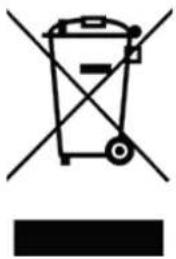
PpawajTe ro npoDAbauyot nIOnnTnHaTa 3a HajHOBn HhOpMaun BO Bpcka CO nCpPaHbeto Ha am6aJaxKaTa n Ha ypeDTo BO OTnAd.
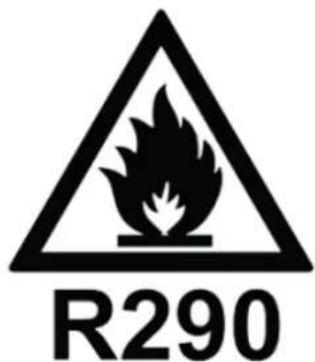
Onachoct
PnpnoHcpeDCTBO 3a IaIeHe nponaH (R290)!
Clean Air Optima
CepBnC
TapaHTeH cepTnФИKaT 3a OДВlaЖHyBaYoT Clean Air Optima CA-705 Smart / CA-706 Smart / CA-708 Smart.
Датун ha kynyahe:
Ime Ha kynyauch:
Adeca:
Telefoh:
E-Nowta:
Ime Ha npodabauot:
Adeca:
-
Понолнete Гелосно OBOJ rapaHTe срtnФИКAT. ИспаTe Г Do BaUNOT ДИСТРИБЕТ Задно-co ФakTypaTа и уpeДOT, палTeHa NOшТариHa в BO opRnHaJIHATA КУТЯ 3a NaKуВаНe. Гледajteда ja ВКлuynte цeHATA за поштapиHa на kakETOT.
-
PpInoxTe KpaTOK ONc Ha WTeTaT, rpeKkata Nn DeΦeKTOT N OKoHocHTe NOd KOn ce nojabnle npo6JIemnte.
OdBnaxHyBaOT Clean Air Optima CA-705 Smart / CA-706 Smart / CA-708 Smart ce n3noxyBa Ha cTporn TeCTnpaHa nped da ja HanuyuTn faprkata. Ako BO pOK oD DBe rOHN Od DeHOT Ha KnyBaHeTo npOn3BOoT He paBToN CnopeCneuΦnKaunTe Nopadn fapnckn DeΦeKTN, KnyBaOT mHa npABo HA 6ecnLaTHn NoppaBKn IIN 3ameHa Ha JeLOBn OTkako Ke ja npInoXn OBaa rapaHcNuJa (doKoLky DeΦeKToT INN OwTeTyBaHbETo Ha ypeDoT N/INN DeLOBnTe Ce cIyHIO npn HopMaHn ycNoBn Ha paBota). LTo e onfateHo: Cnte DeΦeKtn Bo nOrleH na MatepnjAot n 3paBoktata. Kolky doJIro: DBe roDNHn OD DaTymOT Ha KnyBaHe. LTo Ke CTOpUme: POnpabKa nn 3ameHa Ha DeΦeKTHnTE DeLOBn.
DpyuynocnoBn
Ondep6nte od Obaa rapaHnju ra 3ameHyBaat kon 6nilo dpyr nncMeHr rapaHzni, 6e3 pa3nka daJI Tne ce n3pa3eHN nn mIIMIIuIupaHN, nIcMehn nn yCHN, BklyCyBajKn I KaKBa 6nilo rapaHnzja 3a npodaxHnot kapaTeP nn cooDBetHOCTa 3a odpeJeHa HameHa. MakcImaJHaT a ODROBOPHOCT Ha npoIN3BOIDHTeOT He Tpe6a Da ja HADMNHyBa BVCTNHCKata KynOBHa ZHeA StTo KnyBaOH J a NpOIN3BOIDHTeOT He ODROBAPa 3a noc6Hn, CnyajHn, NocleIOBATEHN nn INHInpeKTTH WTeTN. Obaa rapaHnzja He NOKPbNA deΦekTI STO npoIN3JIeYBaAT od HecooDBETHa nn HepaZymHa YNOTpe6a nn ODPXyBaBe, NorpeShO CKIoŋyBaHbe, HecpeKa, npipOAnH KAtAcTpoΦn, HecooDBetHO nakyBaHbe nn HeOBNaCTeHO MeShaHe, MeHyBaHbe nn MODnΦnKaUJHa H DeJIOBtE, OHaka KaKO WTO e ONpeDeJeHO cAmO od Hac. Obaa rapaHnzja e HeBaXeUka Ako etNKeTaTCo cepnckn 6proj e OTCTpaHe Ta nn OStTeHa.
Ви 6лагорадаме За чптаheveto!

CnopeTe ro BaSeTo MncIeHbe 3a Clean Air Optima OdJIaxHyBaU CA-705 Smart / CA-706 Smart / CA-708 Smart Ha: www.cleanairoptima.com

3a HajecTo noctaByBaHnTe npaHaBa 3a CA-705 Smart / CA-706 Smart / CA-708 Smart oTe Ha: www.cleanairoptima.com n no6apajTe ro modeIoT CA-705 Smart / CA-706 Smart / CA-708 Smart

Ппeзмete ГуиаТСВаТа 3a уnotpe6a BO PDF Формат Ha: mairoptima.com/info/manuals

IorneHeTe ro ceIoTo aHmnpaHo Bndeo 3a Clean Air Optima Ha: www.youtube.com
Clean Air Optima International B.V. | David Ricardostraat 9-7 / 9-9 | 7559 SH Hengelo (ov) XoIaHnJa | TenefoH: +31 (0) 74 - 2670145
Clean Air Optima Germany GmbH | Enschedestraße 14 | 48529 Nordhorn | Германija Телегон: +49 (0) 5921 879-121
E-owTa: info@cleanairoptima.com
Be6-ctpaHnca: www.cleanairoptima.com