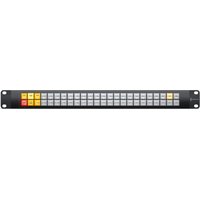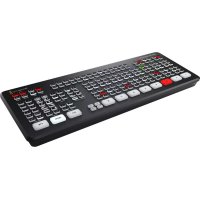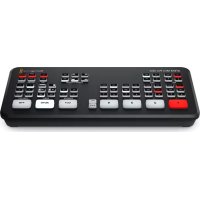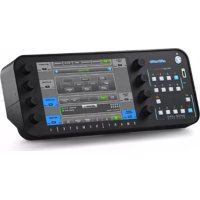
Ultimatte Smart Remote 4 - Controller Blackmagic Design - Free user manual and instructions
Find the device manual for free Ultimatte Smart Remote 4 Blackmagic Design in PDF.



| Product Type | Controller for Ultimatte compositing systems |
| Brand | Blackmagic Design |
| Model | Ultimatte Smart Remote 4 |
| Operating System | Integrated Windows |
| Display | Color touchscreen |
| Ports | Front USB (compatible with NTFS, exFAT, FAT32) |
| Power Supply | Mains, 100-240 V AC, 50-60 Hz |
| Dimensions (W x D x H) | 480 x 150 x 44 mm (1U rack estimate) |
| Weight | 3 kg (estimate) |
| Main Functions | Compositing control, software update via USB, network configuration |
| Included Software | Ultimatte SR4, Smart Remote Setup |
| Maintenance and Cleaning | Do not splash liquid, avoid dust |
| Safety | Plug with protective conductor; indoor use, altitude <2000 m, temperature <40°C |
| Spare Parts and Repairability | Not user-repairable; contact Blackmagic Design service |
| Warranty | 12-month limited (hardware and manufacturing defects) |
| General Information | Compliant with FCC Class A, WEEE, various certifications |
Frequently Asked Questions - Ultimatte Smart Remote 4 Blackmagic Design
User questions about Ultimatte Smart Remote 4 Blackmagic Design
0 question about this device. Answer the ones you know or ask your own.
Ask a new question about this device
Download the instructions for your Controller in PDF format for free! Find your manual Ultimatte Smart Remote 4 - Blackmagic Design and take your electronic device back in hand. On this page are published all the documents necessary for the use of your device. Ultimatte Smart Remote 4 by Blackmagic Design.
USER MANUAL Ultimatte Smart Remote 4 Blackmagic Design
natural_image
Studio setup with two hosts in front of a green screen, surrounded by cameras and a TV (no readable text or symbols)Languages
To go directly to your preferred language, simply click on the hyperlinks listed in the contents below.
English 3
日本語 12
Français 22
Deutsch 32
Español 42
中文...52
한국어 62
Русский 72
Italiano 82
Português 92
Türkçe 102
Contents
Updating your Smart Remote 4 4
Uninstalling Software 4
Installing Ultimatte Smart Remote Setup 6
Help
9
Regulatory Notices and Safety Information 10
Warranty
11
Updating your Smart Remote 4
The first step to updating your Smart Remote 4 is to uninstall the SR4 software from your smart remote.
Tap on the 'info' icon in the Smart Remote 4 file control section of the control panel to find your current SR4 software version number. Follow the sections below based on whether you have SR-4 v1.0.5 or earlier or if you have SR-4 v1.1 or later.
Uninstalling Software
Before uninstalling the SR4 software, ensure the application is not running.
To quit the SR4 software:
1 Tap on the 'info' icon in the smart remote 4 file control section in the control panel.

text_image
MATTE MENU2 In the 'options' tab, tap on the 'exit to desktop' button.
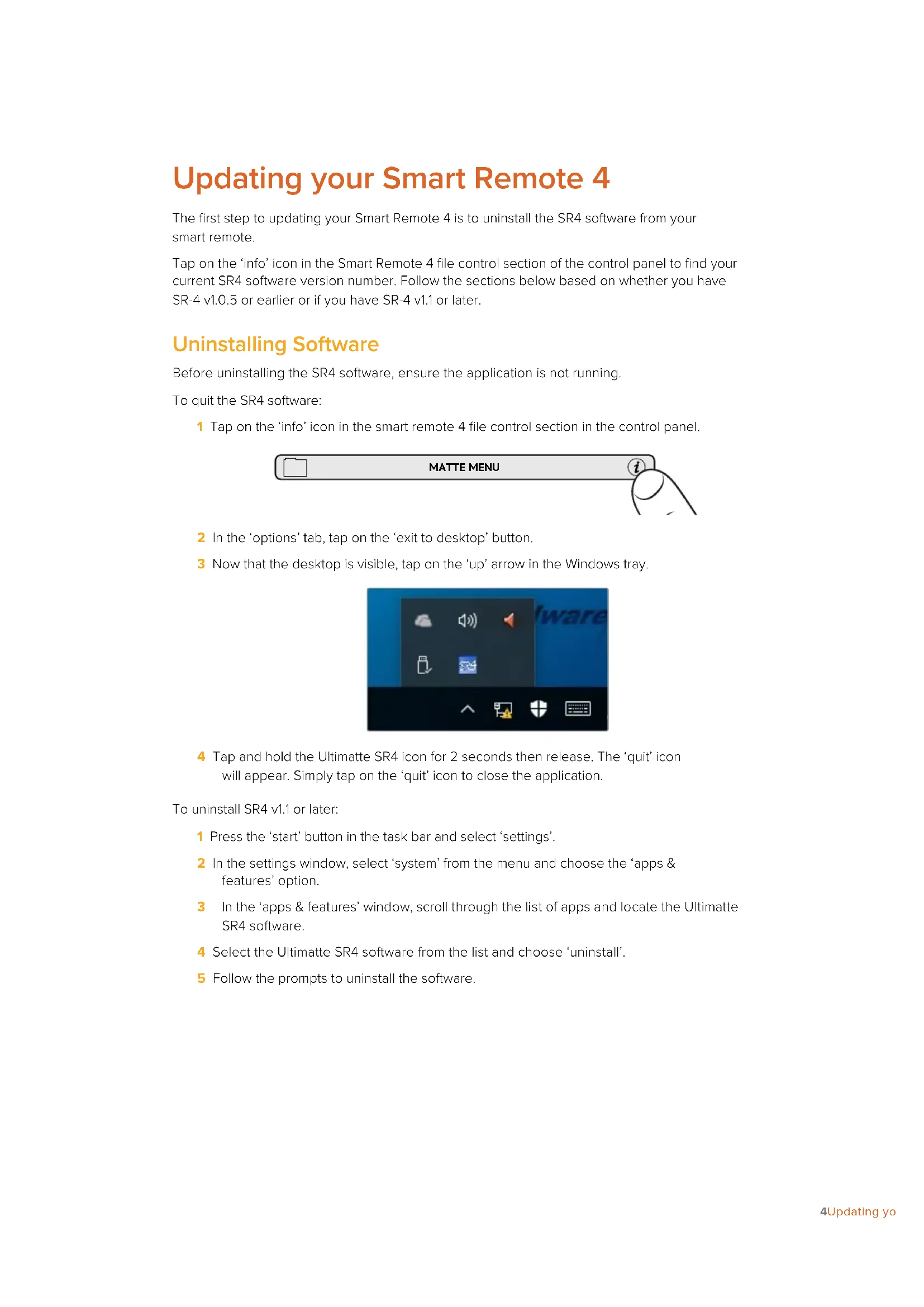
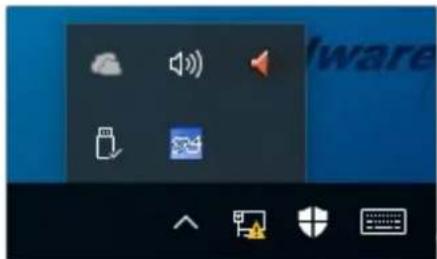
3 Now that the desktop is visible, tap on the 'up' arrow in the Windows tray.
text_image
Screenshot of a macOS desktop with icons for audio, sound, and file management functions4 Tap and hold the Ultimatte SR4 icon for 2 seconds then release. The 'quit' icon will appear. Simply tap on the 'quit' icon to close the application.
To uninstall SR4 v1.1 or later:
1 Press the 'start' button in the task bar and select 'settings'.
2 In the settings window, select 'system' from the menu and choose the 'apps & features' option.
3 In the 'apps & features' window, scroll through the list of apps and locate the Ultimatte SR4 software.
4 Select the Ultimatte SR4 software from the list and choose 'uninstall'.
5 Follow the prompts to uninstall the software.
To uninstall SR4 v1.0.5 or earlier:
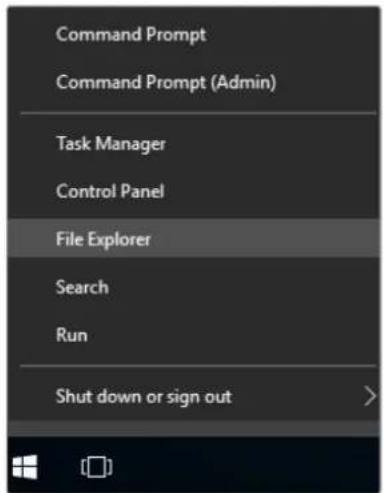
1 Tap and hold the Windows logo in the bottom left corner, then tap on 'file explorer'.
text_image
Command Prompt Command Prompt (Admin) Task Manager Control Panel File Explorer Search Run Shut down or sign outTap and hold on the Windows logo, then tap file explorer
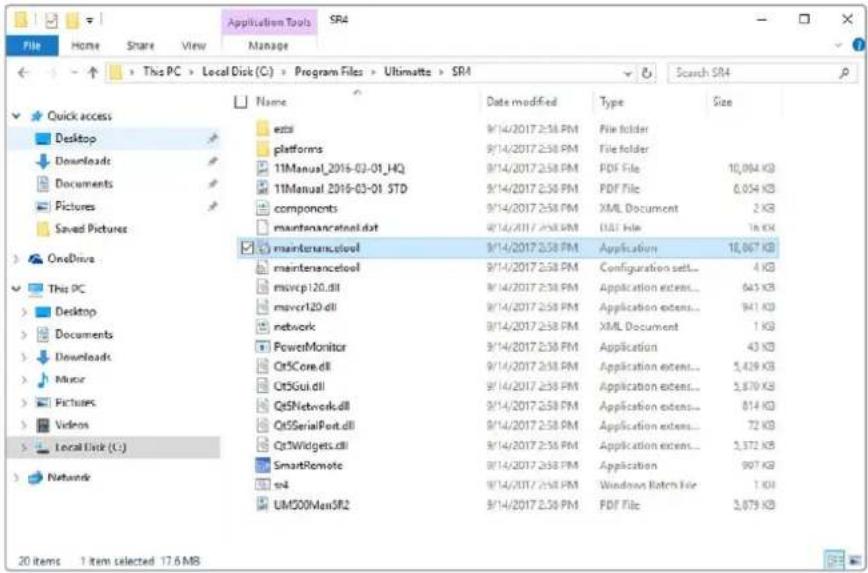
2 In file explorer, navigate to: C:\Program Files\Ultimatte\SR4, and double tap on the maintenance application labelled, 'maintenancetool.exe'
text_image
Application Tools SR4 File Home Share View Manage This PC > Local Disk (C:) > Program Files > Ultimate > SR4 Search SR4 Quick access Desktop Downloads Documents Pictures Saved Pictures OneDrive This PC Desktop Documents Downloads Music Pictures Videos Local Disk (C:) Network exts platforms 11Manual_2016-03-01_HQ 11Manual_2016-03-01_STD components maintenancetool.dat maintenance.stool maintenance.stool movcp120.dll movcr120.dll network PowerMonitor OtsCore.dll OtsGui.dll Ots5Network.dll OtsSerialPort.dll OtsWidgets.dll SmartRemote sn4 UMS00MenSR2 9/14/2017 2:58 PM File folder 9/14/2017 2:58 PM File folder 9/14/2017 2:58 PM PDF File 10,064 KB 9/14/2017 2:58 PM PDF File 6,054 KB 9/14/2017 2:58 PM XML Document 2 KB 9/14/2017 2:58 PM DAI File 16 KB Application 10,067 KB Configuration set... 4 KB Application extens... 643 KB Application extens... 941 KB XML Document 1 KB Application 43 KB Application extens... 5,429 KB Application extens... 5,870 KB Application extens... 814 KB Application extens... 72 KB Application extens... 2,372 KB Application 907 KB Windows Retch File 1 KB PDF File 3,879 KBBrowse 'local disk C:\' and double tap on the required folders to open their contents
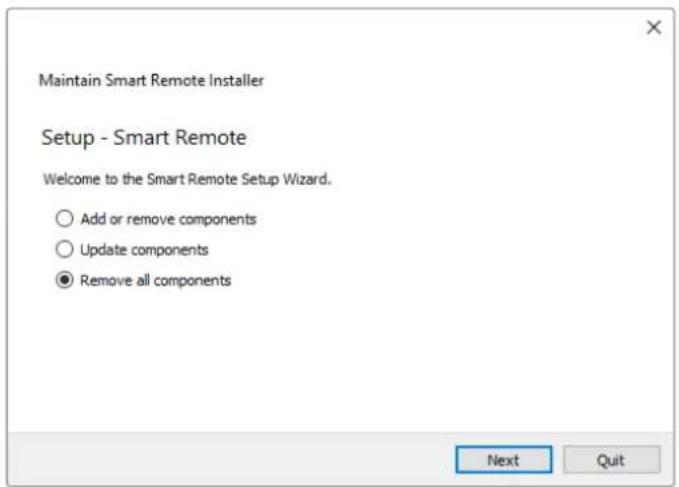
3 On the maintenance application window, select 'remove all components' and tap 'next'.
text_image
Maintain Smart Remote Installer Setup - Smart Remote Welcome to the Smart Remote Setup Wizard. ○ Add or remove components ○ Update components ● Remove all components Next QuitSelect 'remove all components' and tap 'next'
4 The maintenance application will now let you know it is ready to uninstall. Tap 'uninstall' and allow the application to make changes to your Smart Remote 4 by tapping 'yes'.
5 Tap 'finish' on the 'completing the smart remote wizard' window.
The Ultimatte Smart Remote 4 software has now been uninstalled.
Installing Ultimatte Smart Remote Setup
The first step is to download the latest Ultimatte Smart Remote 4 Setup software from the Blackmagic Design support center at www.blackmagicdesign.com/support. Copy and paste the Smart Remote .msi file onto a portable USB storage unit, for example a USB flash drive.
Plug the USB drive into the USB port on the front of your Smart Remote 4. Smart Remote 4 will automatically read the USB drive and open the file explorer.
NOTE The portable storage drive used to install the software on your smart remote must be formatted as the master boot record using one single partition. Your Smart Remote 4 recognizes NTFS, exFAT and FAT32 formats.
To install the software:
1 Double tap on the smart remote installer icon in the storage drive.
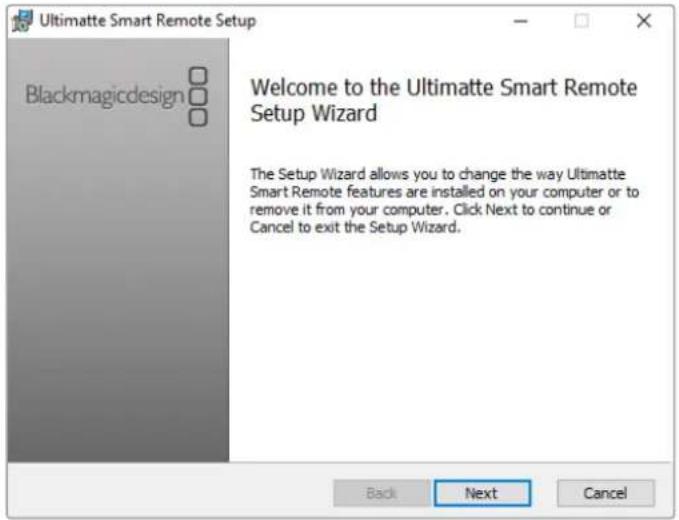
2 Tawp 'next' in the setup wizard and follow the prompts until you reach the 'install' option.
text_image
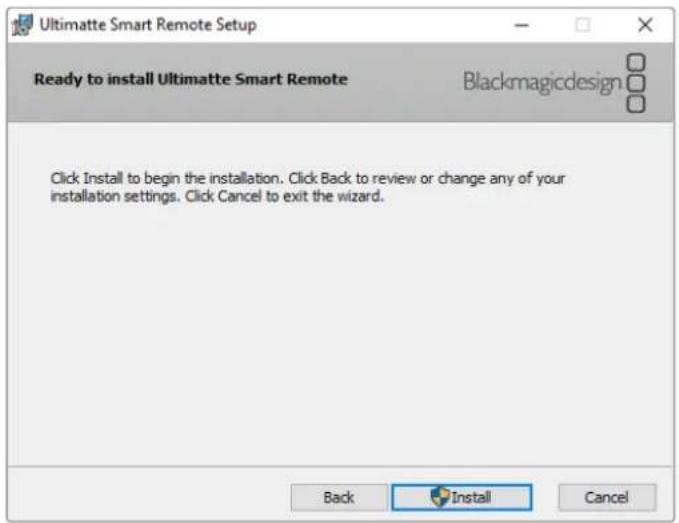
Ultimatte Smart Remote Setup Blackmagicdesign Welcome to the Ultimatte Smart Remote Setup Wizard The Setup Wizard allows you to change the way Ultimatte Smart Remote features are installed on your computer or to remove it from your computer. Click Next to continue or Cancel to exit the Setup Wizard. Back Next Cancel3 Tap 'install' and allow the installer to make changes to your Smart Remote 4 by tapping 'yes' when prompted.
text_image
Ultimatte Smart Remote Setup Ready to install Ultimatte Smart Remote Blackmagicdesign Click Install to begin the installation. Click Back to review or change any of your installation settings. Click Cancel to exit the wizard. Back Install Cancel4 Tap 'finish' to complete the installation and 'yes' to restart your Smart Remote 4.
Your Smart Remote 4 will restart and automatically launch the latest version of the Ultimatte Smart Remote 4 control panel.
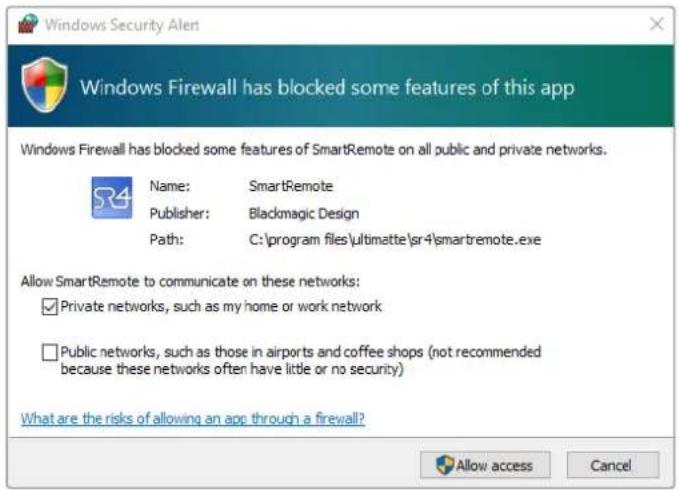
5 A Windows dialogue box will appear prompting you to allow Smart Remote to communicate over a network. Select 'private networks, such as my home or work network' and tap 'allow access'.
text_image
Windows Security Alert Windows Firewall has blocked some features of this app Windows Firewall has blocked some features of SmartRemote on all public and private networks. Name: SmartRemote Publisher: Blackmagic Design Path: C:\program files\ultimatte\sr4\smartremote.exe Allow SmartRemote to communicate on these networks: ✓ Private networks, such as my home or work network □ Public networks, such as those in airports and coffee shops (not recommended because these networks often have little or no security) What are the risks of allowing an app through a firewall? Allow access CancelHelp
Getting Help
The fastest way to obtain help is to go to the Blackmagic Design online support pages and check the latest support material available for your Blackmagic Ultimatte or Smart Remote 4.
Blackmagic Design online support pages
The latest manual, software and support notes can be found at the Blackmagic Design support center at www.blackmagicdesign.com/support.
Contacting Blackmagic Design support
If you can't find the help you need in our support material, please use the 'Send us an email' button on the support page to email a support request. Alternatively, click on the 'Find your local support team' button on the support page and call your nearest Blackmagic Design support office.
Checking the version currently installed
To check which version of Blackmagic Ultimatte Setup software is installed on your computer, launch Blackmagic Ultimatte Setup and click on the 'about' tab. The software version number will be displayed in the 'software information' section.
How to get the latest updates
After checking the version of Blackmagic Ultimatte Setup software installed on your computer, please visit the Blackmagic Design support center at www.blackmagicdesign.com/support to check for the latest updates. While it is usually a good idea to run the latest updates, it is a wise practice to avoid updating any software if you are in the middle of an important project.
Regulatory Notices and Safety Information
Regulatory Notices
Disposal of waste of electrical and electronic equipment within the European union.

The symbol on the product indicates that this equipment must not be disposed of with other waste materials. In order to dispose of your waste equipment, it must be handed over to a designated collection point for recycling. The separate collection and recycling of your waste equipment at the time of disposal will help conserve natural resources and ensure that it is recycled in a manner that protects human health and the environment. For more information about where you can drop off your waste equipment for recycling, please contact your local city recycling office or the dealer from whom you purchased the product.

This equipment has been tested and found to comply with the limits for a Class A digital device, pursuant to Part 15 of the FCC rules. These limits are designed to provide reasonable protection against harmful interference when the equipment is operated in a commercial environment. This equipment generates, uses, and can radiate radio frequency energy and if not installed and used in accordance with the instructions, may cause harmful interference to radio communications. Operation of this product in a residential area is likely to cause harmful interference, in which case the user will be required to correct the interference at personal expense.
Operation is subject to the following two conditions:
1 This device may not cause harmful interference.
2 This device must accept any interference received, including interference that may cause undesired operation.

MSIP-REM-BMD-201707003
Safety Information
This equipment must be connected to a mains socket outlet with a protective earth connection.
To reduce the risk of electric shock, do not expose this equipment to dripping or splashing.
This equipment is suitable for use in tropical locations with an ambient temperature of up to 40^ C.
Ensure that adequate ventilation is provided around the product and is not restricted.
When rack mounting, ensure the ventilation is not restricted by adjacent equipment.
Only use the designed threaded holes on the base, see Rack Mounting section for details.
No operator serviceable parts inside. Refer servicing to your local Blackmagic Design service centre.

Use only at altitudes not more than 2000m above sea level.
Warnings for Authorized Service Personnel
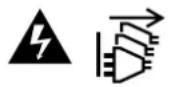
Disconnect power from both power inlets before servicing!
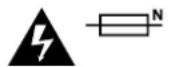
Caution - Double Pole/ Neutral Fusing
The power supply contained in this equipment has a fuse in both line and neutral conductors and is suitable for connection to the IT power distribution system in Norway.
Warranty
12 Month Limited Warranty
Blackmagic Design warrants that this product will be free from defects in materials and workmanship for a period of 12 months from the date of purchase. If a product proves to be defective during this warranty period, Blackmagic Design, at its option, either will repair the defective product without charge for parts and labor, or will provide a replacement in exchange for the defective product.
In order to obtain service under this warranty, you the Customer, must notify Blackmagic Design of the defect before the expiration of the warranty period and make suitable arrangements for the performance of service. The Customer shall be responsible for packaging and shipping the defective product to a designated service center nominated by Blackmagic Design, with shipping charges pre paid. Customer shall be responsible for paying all shipping charges, insurance, duties, taxes, and any other charges for products returned to us for any reason.
This warranty shall not apply to any defect, failure or damage caused by improper use or improper or inadequate maintenance and care. Blackmagic Design shall not be obligated to furnish service under this warranty: a) to repair damage resulting from attempts by personnel other than Blackmagic Design representatives to install, repair or service the product, b) to repair damage resulting from improper use or connection to incompatible equipment, c) to repair any damage or malfunction caused by the use of non Blackmagic Design parts or supplies, or d) to service a product that has been modified or integrated with other products when the effect of such a modification or integration increases the time or difficulty of servicing the product. THIS WARRANTY IS GIVEN BY BLACKMAGIC DESIGN IN LIEU OF ANY OTHER WARRANTIES, EXPRESS OR IMPLIED. BLACKMAGIC DESIGN AND ITS VENDORS DISCLAIM ANY IMPLIED WARRANTIES OF MERCHANTABILITY OR FITNESS FOR A PARTICULAR PURPOSE. BLACKMAGIC DESIGN'S RESPONSIBILITY TO REPAIR OR REPLACE DEFECTIVE PRODUCTS IS THE WHOLE AND EXCLUSIVE REMEDY PROVIDED TO THE CUSTOMER FOR ANY INDIRECT, SPECIAL, INCIDENTAL OR CONSEQUENTIAL DAMAGES IRRESPECTIVE OF WHETHER BLACKMAGIC DESIGN OR THE VENDOR HAS ADVANCE NOTICE OF THE POSSIBILITY OF SUCH DAMAGES. BLACKMAGIC DESIGN IS NOT LIABLE FOR ANY ILLEGAL USE OF EQUIPMENT BY CUSTOMER. BLACKMAGIC IS NOT LIABLE FOR ANY DAMAGES RESULTING FROM USE OF THIS PRODUCT. USER OPERATES THIS PRODUCT AT OWN RISK.
© Copyright 2022 Blackmagic Design. All rights reserved. 'Blackmagic Design', 'DeckLink', 'HDLink', 'Workgroup Videohub', 'Multibridge Pro', 'Multibridge Extreme', 'Intensity' and 'Leading the creative video revolution' are registered trademarks in the US and other countries. All other company and product names may be trade marks of their respective companies with which they are associated.
Thunderbolt and the Thunderbolt logo are trademarks of Intel Corporation in the U.S. and/or other countries.
Ultimatte Smart Remote 4
のアップデート
natural_image
Studio setup with two hosts in front of a green screen, surrounded by cameras and a TV (no readable text or symbols)目次
text_image
Screenshot of a software interface with icons for audio, sound, file, and other functionstext_image
Maintain Smart Remote Installer Setup - Smart Remote Welcome to the Smart Remote Setup Wizard. ○ Add or remove components ○ Update components ● Remove all components Next Quittext_image
Ultimatte Smart Remote Setup Blackmagicdesign Welcome to the Ultimatte Smart Remote Setup Wizard The Setup Wizard allows you to change the way Ultimatte Smart Remote features are installed on your computer or to remove it from your computer. Click Next to continue or Cancel to exit the Setup Wizard. Back Next Canceltext_image
Ultimatte Smart Remote Setup Ready to install Ultimatte Smart Remote Blackmagicdesign Click Install to begin the installation. Click Back to review or change any of your installation settings. Click Cancel to exit the wizard. Back Install Canceltext_image
Windows Security Alert Windows Firewall has blocked some features of this app Windows Firewall has blocked some features of SmartRemote on all public and private networks. Name: SmartRemote Publisher: Blackmagic Design Path: C:\program files\ultimatte\sr4\smartremote.exe Allow SmartRemote to communicate on these networks: ✓ Private networks, such as my home or work network □ Public networks, such as those in airports and coffee shops (not recommended because these networks often have little or no security) What are the risks of allowing an app through a firewall? Allow access Cancelヘルプ
ヘルプライン
natural_image
Studio setup with two hosts in front of a green screen, surrounded by cameras and a TV (no readable text or symbols)Sommaire
text_image
Screenshot of a software application interface showing icons for audio, video, and other functionstext_image
Maintain Smart Remote Installer Setup - Smart Remote Welcome to the Smart Remote Setup Wizard. Add or remove components Update components Remove all components Next Quittext_image
Ultimatte Smart Remote Setup Blackmagicdesign Welcome to the Ultimatte Smart Remote Setup Wizard The Setup Wizard allows you to change the way Ultimatte Smart Remote features are installed on your computer or to remove it from your computer. Click Next to continue or Cancel to exit the Setup Wizard. Back Next Canceltext_image
Ultimatte Smart Remote Setup Ready to install Ultimatte Smart Remote Blackmagicdesign Click Install to begin the installation. Click Back to review or change any of your installation settings. Click Cancel to exit the wizard. Back Install Canceltext_image
Windows Security Alert Windows Firewall has blocked some features of this app Windows Firewall has blocked some features of SmartRemote on all public and private networks. Name: SmartRemote Publisher: Blackmagic Design Path: C:\program files\ultimatte\sr4\smartremote.exe Allow SmartRemote to communicate on these networks: ✓ Private networks, such as my home or work network □ Public networks, such as those in airports and coffee shops (not recommended because these networks often have little or no security) What are the risks of allowing an app through a firewall? Allow access CancelAide
Obtenir de l'aide
natural_image
Studio setup with two hosts in front of a green screen, surrounded by cameras and a TV (no readable text or symbols)Inhaltsverzeichnis
text_image
Screenshot of a macOS desktop with icons for audio, video, folder, and system toolstext_image
Maintain Smart Remote Installer Setup - Smart Remote Welcome to the Smart Remote Setup Wizard. ○ Add or remove components ○ Update components ● Remove all components Next Quittext_image
Ultimatte Smart Remote Setup Blackmagicdesign Welcome to the Ultimatte Smart Remote Setup Wizard The Setup Wizard allows you to change the way Ultimatte Smart Remote features are installed on your computer or to remove it from your computer. Click Next to continue or Cancel to exit the Setup Wizard. Back Next Canceltext_image
Ultimatte Smart Remote Setup Ready to install Ultimatte Smart Remote Blackmagicdesign Click Install to begin the installation. Click Back to review or change any of your installation settings. Click Cancel to exit the wizard. Back Install Canceltext_image
Windows Security Alert Windows Firewall has blocked some features of this app Windows Firewall has blocked some features of SmartRemote on all public and private networks. Name: SmartRemote Publisher: Blackmagic Design Path: C:\program files\ultimatte\sr4\smartremote.exe Allow SmartRemote to communicate on these networks: ✓ Private networks, such as my home or work network □ Public networks, such as those in airports and coffee shops (not recommended because these networks often have little or no security) What are the risks of allowing an app through a firewall? Allow access CancelHilfe
Hilfestellung
natural_image
Studio setup with two hosts in front of a green screen, surrounded by cameras and a TV (no readable text or symbols)Índice
text_image
Screenshot of a macOS desktop with icons for audio, sound, folder, and network componentstext_image
Maintain Smart Remote Installer Setup - Smart Remote Welcome to the Smart Remote Setup Wizard. Add or remove components Update components Remove all components Next Quittext_image
Ultimatte Smart Remote Setup Blackmagicdesign Welcome to the Ultimatte Smart Remote Setup Wizard The Setup Wizard allows you to change the way Ultimatte Smart Remote features are installed on your computer or to remove it from your computer. Click Next to continue or Cancel to exit the Setup Wizard. Back Next Canceltext_image
Ultimatte Smart Remote Setup Ready to install Ultimatte Smart Remote Blackmagicdesign Click Install to begin the installation. Click Back to review or change any of your installation settings. Click Cancel to exit the wizard. Back Install Canceltext_image
Windows Security Alert Windows Firewall has blocked some features of this app Windows Firewall has blocked some features of SmartRemote on all public and private networks. Name: SmartRemote Publisher: Blackmagic Design Path: C:\program files\ultimatte\sr4\smartremote.exe Allow SmartRemote to communicate on these networks: ✓ Private networks, such as my home or work network □ Public networks, such as those in airports and coffee shops (not recommended because these networks often have little or no security) What are the risks of allowing an app through a firewall? Allow access CancelAyuda
Cómo obtener ayuda
natural_image
Studio setup with two hosts in front of a green screen, surrounded by cameras and a TV (no readable text or symbols)目录
更新Smart Remote 4 54
卸载软件 54
安装Ultimatte Smart Remote Setup 56
帮助 59
监管告知与安全信息 60
保修 61
更新Smart Remote 4
text_image
Screenshot of a software interface with icons for notification, audio, download, and security toolstext_image
Maintain Smart Remote Installer Setup - Smart Remote Welcome to the Smart Remote Setup Wizard. Add or remove components Update components Remove all components Next Quittext_image
Ultimatte Smart Remote Setup Blackmagicdesign Welcome to the Ultimatte Smart Remote Setup Wizard The Setup Wizard allows you to change the way Ultimatte Smart Remote features are installed on your computer or to remove it from your computer. Click Next to continue or Cancel to exit the Setup Wizard. Back Next Canceltext_image
Ultimatte Smart Remote Setup Ready to install Ultimatte Smart Remote Blackmagicdesign Click Install to begin the installation. Click Back to review or change any of your installation settings. Click Cancel to exit the wizard. Back Install Canceltext_image
Windows Security Alert Windows Firewall has blocked some features of this app Windows Firewall has blocked some features of SmartRemote on all public and private networks. Name: SmartRemote Publisher: Blackmagic Design Path: C:\program files\ultimatte\sr4\smartremote.exe Allow SmartRemote to communicate on these networks: ✓ Private networks, such as my home or work network □ Public networks, such as those in airports and coffee shops (not recommended because these networks often have little or no security) What are the risks of allowing an app through a firewall? Allow access Cancel帮助
获得帮助
natural_image
Studio setup with two hosts in front of a green screen, surrounded by cameras and a TV (no readable text or symbols)목차
text_image
Screenshot of a software interface with icons for audio, sound, and home control toolstext_image
Maintain Smart Remote Installer Setup - Smart Remote Welcome to the Smart Remote Setup Wizard. ○ Add or remove components ○ Update components ● Remove all components Next Quittext_image
Ultimatte Smart Remote Setup Blackmagicdesign Welcome to the Ultimatte Smart Remote Setup Wizard The Setup Wizard allows you to change the way Ultimatte Smart Remote features are installed on your computer or to remove it from your computer. Click Next to continue or Cancel to exit the Setup Wizard. Back Next Canceltext_image
Ultimatte Smart Remote Setup Ready to install Ultimatte Smart Remote Blackmagicdesign Click Install to begin the installation. Click Back to review or change any of your installation settings. Click Cancel to exit the wizard. Back Install Canceltext_image
Windows Security Alert Windows Firewall has blocked some features of this app Windows Firewall has blocked some features of SmartRemote on all public and private networks. Name: SmartRemote Publisher: Blackmagic Design Path: C:\program files\ultimatte\sr4\smartremote.exe Allow SmartRemote to communicate on these networks: ✓ Private networks, such as my home or work network □ Public networks, such as those in airports and coffee shops (not recommended because these networks often have little or no security) What are the risks of allowing an app through a firewall? Allow access Cancel도움말
지원받기
natural_image
Studio setup with two hosts in front of a green screen, surrounded by cameras and a TV (no readable text or symbols)Содержание
text_image
Screenshot of a software interface with icons for audio, sound, and other functionstext_image
Maintain Smart Remote Installer Setup - Smart Remote Welcome to the Smart Remote Setup Wizard. ○ Add or remove components ○ Update components ● Remove all components Next QuitВыберите Remove all components и нажмите Next
text_image
Ultimatte Smart Remote Setup Blackmagicdesign Welcome to the Ultimatte Smart Remote Setup Wizard The Setup Wizard allows you to change the way Ultimatte Smart Remote features are installed on your computer or to remove it from your computer. Click Next to continue or Cancel to exit the Setup Wizard. Back Next Canceltext_image
Ultimatte Smart Remote Setup Ready to install Ultimatte Smart Remote Blackmagicdesign Click Install to begin the installation. Click Back to review or change any of your installation settings. Click Cancel to exit the wizard. Back Install Canceltext_image
Windows Security Alert Windows Firewall has blocked some features of this app Windows Firewall has blocked some features of SmartRemote on all public and private networks. Name: SmartRemote Publisher: Blackmagic Design Path: C:\program files\ultimatte\sr4\smartremote.exe Allow SmartRemote to communicate on these networks: ✓ Private networks, such as my home or work network □ Public networks, such as those in airports and coffee shops (not recommended because these networks often have little or no security) What are the risks of allowing an app through a firewall? Allow access CancelПомощь
Как получить помощь
natural_image
Studio setup with two hosts in front of a green screen, surrounded by cameras and a TV (no readable text or symbols)Indice
text_image
Screenshot of a macOS desktop with icons for audio, sound, folder, and system toolstext_image
Maintain Smart Remote Installer Setup - Smart Remote Welcome to the Smart Remote Setup Wizard. ○ Add or remove components ○ Update components ● Remove all components Next QuitSpunta la casella Remove all components e prosegui con Next
text_image
Ultimatte Smart Remote Setup Blackmagicdesign Welcome to the Ultimatte Smart Remote Setup Wizard The Setup Wizard allows you to change the way Ultimatte Smart Remote features are installed on your computer or to remove it from your computer. Click Next to continue or Cancel to exit the Setup Wizard. Back Next Canceltext_image
Ultimatte Smart Remote Setup Ready to install Ultimatte Smart Remote Blackmagicdesign Click Install to begin the installation. Click Back to review or change any of your installation settings. Click Cancel to exit the wizard. Back Install Canceltext_image
Windows Security Alert Windows Firewall has blocked some features of this app Windows Firewall has blocked some features of SmartRemote on all public and private networks. Name: SmartRemote Publisher: Blackmagic Design Path: C:\program files\ultimatte\sr4\smartremote.exe Allow SmartRemote to communicate on these networks: ✓ Private networks, such as my home or work network □ Public networks, such as those in airports and coffee shops (not recommended because these networks often have little or no security) What are the risks of allowing an app through a firewall? Allow access CancelAssistenza clienti
Assistenza tecnica
natural_image
Studio setup with two hosts in front of a green screen, surrounded by cameras and a TV (no readable text or symbols)Índice
Atualizar o Smart Remote 4 94
Desinstalar Software 94
Instalar o Ultimatte Smart Remote Setup 96
Ajuda
99