SB400BT - Bluetooth speaker THOMSON - Free user manual and instructions
Find the device manual for free SB400BT THOMSON in PDF.



| Brand | Thomson |
| Model | SB400BT |
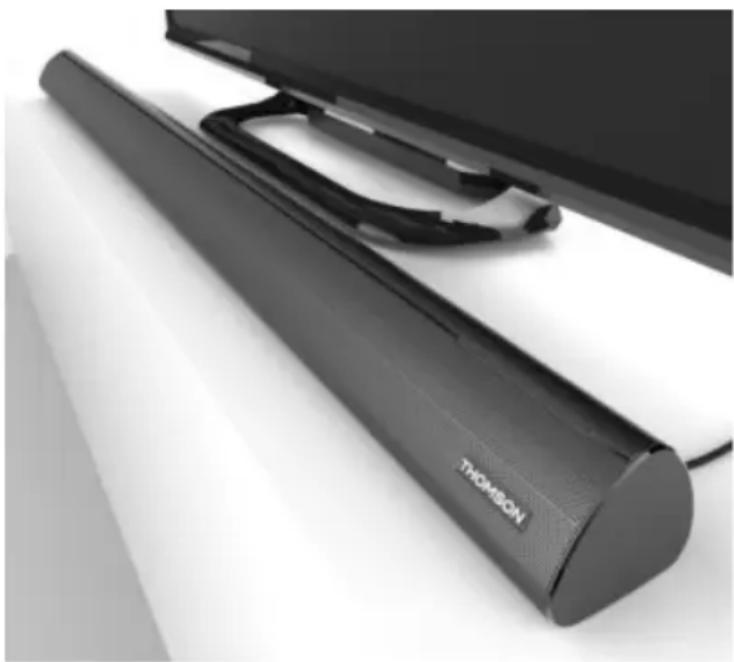
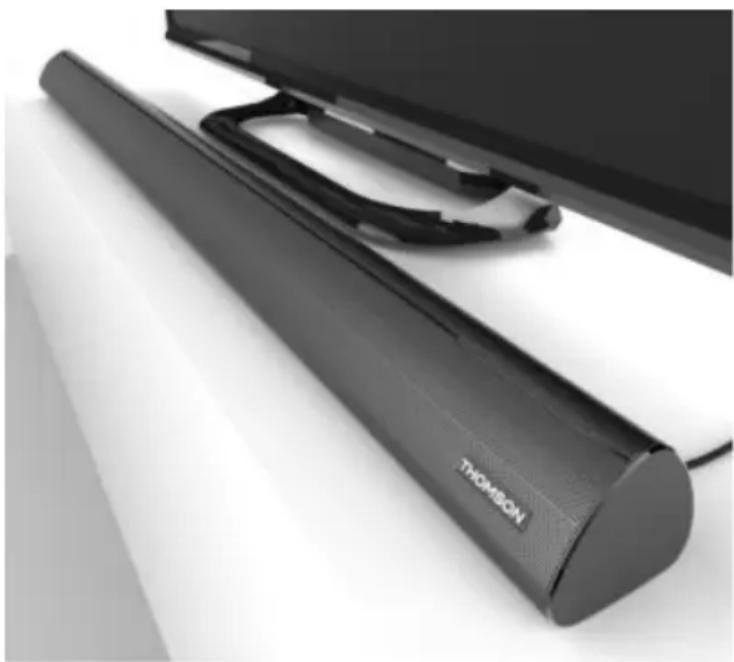
| Product type | 2.1 soundbar with external subwoofer |
| Power supply | 12V / 3A DC power adapter (input 100-240V AC) |
| Total power consumption | 36 W |
| Standby power consumption | ≤ 0.5 W |
| Output power | 2 x 7W + 15W (at 10% THD) |
| Speakers | 2 full-range 5cm / 8W, 2 bass drivers 5cm / 10W |
| Wireless connectivity | Bluetooth® v2.1+EDR (range 10 m) |
| Audio inputs | HDMI (IN/OUT), optical, line (3.5mm jack), auxiliary (RCA x 2) |
| Video output | HDMI OUT (up to Full HD 2K) |
| Remote control functions | On/Off, source selection, volume, equalizer (Rock/Pop/Jazz/Movie), bass/treble adjustments, mute, Bluetooth pairing |
| Remote control battery | 1 CR2025 battery (included) |
| Auto standby | After 10 minutes without audio signal |
| Maintenance | Unplug before cleaning; use a soft, damp, lint-free cloth |
| Safety | Do not expose to moisture; do not open; refer repairs to qualified personnel |
| Package contents | Soundbar, remote control, power adapter, user manual |
| Standards | CE, RoHS, ErP2 |
Frequently Asked Questions - SB400BT THOMSON
User questions about SB400BT THOMSON
0 question about this device. Answer the ones you know or ask your own.
Ask a new question about this device
Download the instructions for your Bluetooth speaker in PDF format for free! Find your manual SB400BT - THOMSON and take your electronic device back in hand. On this page are published all the documents necessary for the use of your device. SB400BT by THOMSON.
USER MANUAL SB400BT THOMSON
customerservice@bigben-interactive.be
ESPANAsat@bigbeninteractive.es
ITALIA, support@bigbeninteractive.it
www/bigben.eu
SB400BT
2.1 SOUNDBAR with external subwoofer Bluetooth® / HDMI / OPTICAL / LINE IN / AUX IN

OPERATING INSTRUCTIONS
PLEASE READ THIS USER MANUAL CAREFULLY BEFORE OPERATING THIS UNIT AND RETAIN FOR FUTURE REFERENCE
Contents
Getting started 1
Safety information 1
Caring for your product 2
Package contents 2
Using the Soundbar 3
Bluetooth® mode 3
Volume
Back panel 4
Remote control 4
Power 5
Auto standby 5
Features 6
Product Specifications 6
Remarks 7
4
Getting Started
- Remove the appliance from the box.
- Remove any packaging from the product.
- Place the packaging inside the box and dispose of it safely.
Important safety instructions
- Read these instructions.
- Keep these instructions.
Heed all warnings. - Follow all instructions.
Refer all servicing to qualified service personnel. - Do not expose the unit to dripping or splashing and make sure that no objects filled with liquids, such as vases, are placed on it.
- The adaptor connects the device and should remain operable during use.
- To disconnect the unit from the mains, the adaptor should be fully disconnected from the mains socket outlet. The adaptor should not be obstructed and should be easily accessible during use.
- When a power indicator light is on, it indicates the unit is connected to the mains supply. When the light is off, it indicates the unit is fully disconnected from the mains supply.
INFORMATION ABOUT BATTERIES (applicable only if batteries included)
- Polarity must be respected when inserting batteries.
- The batteries should be inserted in such a way as to avoid any short circuit.
- Do not mix used and new batteries.
- Do not mix alkaline, standard (carbon-zinc) and rechargeable (nickel-cadmium) batteries.
- Do not expose the battery to excessive heat such as sunshine or fire.
- Remove the batteries when they have not been used for a long time.
- If the liquid contained in the batteries comes in contact with eyes or skin, immediately and carefully wash the affected area with clear water and consult a doctor.
- The product/remote control may contain a coin/buttn type battery:
WARNING
Do not ingest the battery. Chemical burn hazard. This product contains a coin/button cell battery. If the coin/button cell battery is swallowed, it can cause severe internal burns in just 2 hours and can lead to death. Keep new and used batteries away from children. If the battery compartment does not close securely, stop using the product and keep it away from children. If you think batteries might have been swallowed or placed inside any part of the body, seek immediate medical attention.
CAUTION
Danger of explosion if battery is incorrectly replaced.
Replace battery only with the same or equivalent type.
Caring for your product
- Always unplug the appliance when not in use and before cleaning.
- Do not play music at excessive volume levels, as this may cause hearing damage or damage the product.
- Do not use this unit in wet or damp conditions.
- Always disconnect the unit from the mains power supply before cleaning. Clean the appliance with a soft, damp and lint-free cloth. Do not use abrasives or harsh chemicals.
Caring for the environment

Your product is designed and manufactured with high quality materials and components, which can be recycled and reused.

Your product contains batteries covered by the European Directive 2006/66/EC, which cannot be disposed of in normal household waste. Please inform yourself about the local rules on separate collection of batteries, as correct disposal helps to prevent environmental damage and protect your health.

When this crossed-out wheeled bin symbol is attached to a product, it means that the product is covered by the European Directive 2002/96/EC. Please inform yourself about the local separate collection system for electrical and electronic products. Please comply with your local waste collection rules and do not dispose of your old products in your normal household waste. Disposing of old products safely helps to prevent environmental damage and protect your health.
Package contents
Check and identify the package contents:
- Main unit
Remote control - User manual
- AC adapter
Using the Soundbar
Top panel

POWER switch
- When the power adapter is connected to the Soundbar, the red LED lights up on the front panel and the unit enters standby mode.
Press and release the 'Power/Mode' button on the top panel or the 'Power' button on the remote control to turn on the unit. When the unit is turned on for the first time, the default audio input mode is HDMI.
- When the unit is on, press and release the 'Power/Mode' button on the top panel or the 'Power' button on the remote control. The unit will enter standby mode and the red LED will turn on.
MODE selection
When the unit is on, press and release the 'Power/Mode' button on the top panel or one of the 'HDMI/ Optical/BT/Line in/Aux in' buttons on the remote control to select the playing mode.
The blue LED lights will turn on for 3 seconds. The corresponding input sockets can be found on the back panel.
In standby mode, press the 'Power/Mode' button on the top panel or the 'Power' button on the remote control. The unit will turn on and switch to the most recent playing mode.
Note:
If the unit is not going to be used for a prolonged period, unplug the power cord.
Bluetooth®
You can use Bluetooth®-enabled audio devices (such as phones, tablets, etc.) to stream music to the Soundbar via the built-in Bluetooth® function.
When the unit is on, keep pressing the 'Power/Mode' button on the top panel until you reach Bluetooth® mode, or press the 'BT' button on the remote control. The blue LED will flash and the unit will enter pairing mode.
- Use any device with a Bluetooth® audio transmission feature (such as phones, tablets, etc.)
- Enable Bluetooth® on your audio device and search for 'SB400BT' on the device's Bluetooth® interface.
- Once 'SB400BT' appears on your device, select 'SB400BT' to pair your device with the Soundbar.
- You will hear two short 'beep' tones when you have successfully paired your device with the Soundbar. The blue LED will stop flashing and stay constant.
- You can now stream audio wirelessly from your Bluetooth® device to the Soundbar unit.
- You can play/pause the audio on your device by pressing the button on the unit or remote control.
- Press and hold the button on the top panel to unpair your device. Once you have unpaired your device, you can pair the Soundbar with another Bluetooth®-enabled audio device.
Note:
Not all Bluetooth® devices may be compatible with the Soundbar.
Volume
To increase the volume, press the 'Vol+' button on the top panel. To decrease the volume, press the 'Vol-' button.
Note: Before switching on the machine, please be sure to set the volume to a low level in order to avoid hearing damage.
Back panel
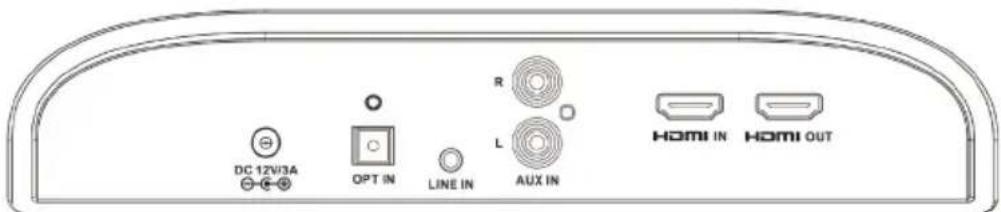
HDMI IN/OUT
HDMI IN: Connect an external HD video source to the HDMI IN socket. The unit can decode up to 2K Full HD video and audio signals. Audio will be played from the soundbar.
HDMI OUT: Connect the HDMI OUT socket to a TV or monitor with an HDMI socket. Only video signals will be sent to the TV or monitor; audio signals will not be sent.
DC power input
Connect the Soundbar to the external power adapter with a 12V/3A DC power supply (included with product)
External digital/analog audio signal input
OPTICAL input for digital audio input, AUX IN (RCA jack x 2) and LINE IN (3.5mm jack x 1) for analog audio signal input
Remote control
- Power On/Off button
- LINE IN/BT/OPTICAL/HDMI/AUX IN: Select input mode
- Rock/Pop: Select Rock or Pop equalizer effects
- Treble -: Decrease Treble effect
- BT function: Previous track, Play/Pause, Next track
- Bass -: Decrease Bass effect
- Reset: Reset to factory settings (high/low tone/volume)
- VOL+: Increase volume
- Mute: Temporarily mute or unmute. LED lights on the panel will flash to indicate mute status.
- Treble+: Increase Treble effect
- Bass +: Increase Bass effect
- Jazz/ Movie: Select Jazz or Movie equalizer effects
- BT Pair: Press and hold the 'BT PAIR' button for at least 3 seconds to terminate the Bluetooth® connection and connect another device.
- VOL-: Decrease volume
- Battery compartment (on back): Requires 1 x CR2025 battery (included with product)

Power

CAUTION
- Risk of product damage! Make sure that the mains voltage corresponds to the voltage printed on the back label.
- Risk of electric shock! When unplugging the AC power cord, always pull the plug from the socket. Never pull the cord.
- Before connecting the AC power cord, ensure you have connected all other cables.
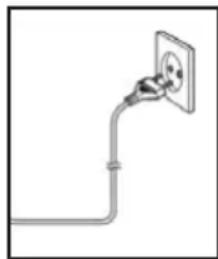
When using the AC power supply...
Place the unit in the desired position and unravel the mains cable. Insert the plug into the mains socket and switch on (if necessary).
Auto standby
When playing media from a connected device, the product automatically switches to standby if:
- No audio is transmitted from a connected device for 10 minutes.
Features
- HDMI/OPTICAL/LINE IN/Bluetooth®/AUX IN
- Bluetooth® v2.1+EDR Multimedia A2DP/HSP/HFP/AVRCP HDMI VIDEO
- HDMI transmits video and audio signals simultaneously, and provides a clearer picture
- High quality 192kHz / 24bit digital audio decoder
- 2 × 2 "8W/4Ω Full-range speakers
- 2 × 2 " 10W/4Ω Low-frequency speaker
- High efficiency digital power amplifier circuit
- Receive high-quality OPT fiber optic audio signal decoding
- Full function remote operation
- 12V/3A power adapter (AC Input100-240V)
- AC 100-240V multi-voltage power supply
- Complies with ErP2 Power Management
- Complies with CE safety requirements
- Complies with RoHS
Product Specifications:
Soundbar
Power adapter Input: 100-240V AC Output: 12V/3A DC
Total power consumption 36W
Output power- 2× 7W + 15W@10% THD
Bluetooth® range -≥10m
Remote control range- 6m
Total standby power consumption -0.5W
The product specifications may be changed without prior notice in order to continue to improve the product.
Remarks:

Don't discard the electrical and electronic appliances in the regular waste disposal.
a) Take them to a collection point.
b) Some components in these appliances may be hazardous to health and the environment.
- In order to save energy when the unit has no sound output for a while, the unit will be switched to stand-by automatically. It can be switched ON by using the POWER selector again.
- If there is an incoming call while the SB400BT Soundbar is connected to your cell phone for music playback, playback will pause when you answer the call and resume after the call ends. (Depending on your cell phone, playback may not resume after you finish a call.)
- The Bluetooth® word, mark and logo are registered trademarks owned by Bluetooth SIG, Inc. and any use of such marks by Bigben Interactive is under license. Other trademarks and trade names are those of their respective owners.
- THOMSON is a trademark of TECHNICOLOR SA or its affiliates used under license to Bigben Interactive.
- Hereby, Bigben Interactive SA, declares that the SB400BT device complies with the essential requirements of the directive 1995/5/EC of the European Parliament and of the Council of 9 March 1999 on radio equipment and telecommunications terminal equipment and the mutual recognition of their conformity.
To download the full statement, please visit our website: http://www/bigben-interactive.co.uk/support and the section "declaration of conformity".
Imported by BIGBEN INTERACTIVE SA
396, Rue de la Voyette
CRT2-FRETIN
CS 90414
59814 LESQUIN Cedex - France
www/bigben.eu






REACH
m - 1 0 ;

customerservice@bigben-interactive.be
ESPANA, sat@bigbeninteractive.es
ITALIA, support@bigbeninteractive.it
www/bigben.eu
SB400BT
2.1 BARRA DE SONIDO con subwoofer externo Bluetooth® / HDMI / OPTICAL / LINE IN / AUX IN
customerservice@bigben-interactive.be
ESPANA, sat@bigbeninteractive.es
ITALIA, support@bigbeninteractive.it
www/bigben.eu
SB400BT
SOUNDBAR 2.1 con subwoofer esterno Bluetooth® / HDMI / OPTICAL / LINE IN / AUX IN
ISTRUZIONI D'USO
PRIMA DI UTILIZZARE L'APPARECCHIO, LEGGERE PER INTERO IL PRESENTE MANUALE E CONSERVARLO PER CONSULTAZIONI FUTURE.
Index
customerservice@bigben-interactive.be
ESPANAsat@bigbeninteractive.es
ITALIA, support@bigbeninteractive.it
www/bigben.eu
SB400BT
2.1 BARRA DE SOM com subwoofer externo Bluetooth® / HDMI / OPTICAL / LINE IN / AUX IN
customerservice@bigben-interactive.be
ESPANAsat@bigbeninteractive.es
ITALIA, support@bigbeninteractive.it
www/bigben.eu
SB400BT
2.1 SOUNDBAR mit externem Subwoofer Bluetooth®/HDMI/OPTISCHER/LINE-/AUX-EINGANG
BEDIENUNGSANLEITUNG
customerservice@bigben-interactive.be
ESPANA, sat@bigbeninteractive.es
ITALIA, support@bigbeninteractive.it
www/bigben.eu
SB400BT
2.1 SOUNDBAR met externe subwoofer Bluetooth® / HDMI / OPTICAL / LINE IN / AUX IN
VEILIGHEIDSINSTRUCTIES
Productspecificities:
Soundbar
Netadapter Invoer:100-240VAC Uitvoer:12V/3A DC
customerservice@bigben-interactive.be
ESPANA, sat@bigbeninteractive.es
ITALIA, support@bigbeninteractive.it
www/bigben.eu
SB400BT
2.1 SOUNDBAR med extern subwoofer Bluetooth/HDMI/OPTICAL/LINE IN/AUX IN
ANVÄNDARMANUAL
LAS DENNA ANVANDARMANUAL NOGA INNAN PRODUKTEN TAS I BRUK.
Innehäll
customerservice@bigben-interactive.be
ESPANA, sat@bigbeninteractive.es
ITALIA, support@bigbeninteractive.it
www/bigben.eu
- SOUNDBAR with external subwoofer Bluetooth® / HDMI / OPTICAL / LINE IN / AUX IN
- OPERATING INSTRUCTIONS
- Contents
- Getting Started
- Important safety instructions
- INFORMATION ABOUT BATTERIES (applicable only if batteries included)
- WARNING
- CAUTION
- Caring for your product
- Caring for the environment
- Package contents
- Using the Soundbar
- Top panel
- POWER switch
- MODE selection
- Bluetooth®
- Volume
- Back panel
- HDMI IN/OUT
- DC power input
- External digital/analog audio signal input
- Remote control
- Power
- When using the AC power supply...
- Auto standby
- Features
- Product Specifications:
- Soundbar
- Remarks:
- BARRA DE SONIDO con subwoofer externo Bluetooth® / HDMI / OPTICAL / LINE IN / AUX IN
- ISTRUZIONI D'USO
- Index
- BARRA DE SOM com subwoofer externo Bluetooth® / HDMI / OPTICAL / LINE IN / AUX IN
- SOUNDBAR mit externem Subwoofer Bluetooth®/HDMI/OPTISCHER/LINE-/AUX-EINGANG
- BEDIENUNGSANLEITUNG
- SOUNDBAR met externe subwoofer Bluetooth® / HDMI / OPTICAL / LINE IN / AUX IN
- VEILIGHEIDSINSTRUCTIES
- Productspecificities:
- SOUNDBAR med extern subwoofer Bluetooth/HDMI/OPTICAL/LINE IN/AUX IN
- ANVÄNDARMANUAL
- Innehäll
Brand : THOMSON
Model : SB400BT
Category : Bluetooth speaker