OMP 10 - Smartphone OK - Free user manual and instructions
Find the device manual for free OMP 10 OK in PDF.


| Product Type | Smartphone |
| Brand | OK |
| Model | OMP 10 |
| Dimensions | 104.6 x 43 x 13.8 mm |
| Weight | 93 g (with battery) |
| Battery | Lithium Ion, 3.7 V / 500 mAh, model BL-4C |
| Talk time | Up to 5 hours |
| Standby time | Up to 84 hours |
| Power supply | AC adapter 5 V / 1 A, charging via Micro USB |
| Supported networks | E-GSM900 and DCS1800 |
| Dual SIM | Yes, two slots |
| Memory card | MicroSD up to 32 GB |
| FM Radio | Yes (requires earphones) |
| Camera | Yes, photo and video |
| Audio player | Yes, supports MP3 |
| Maintenance and cleaning | Clean with a damp cloth, avoid solvents and immersion |
| Safety | Read the safety instructions before use |
| Repairability | Removable battery, SIM and memory card access |
Frequently Asked Questions - OMP 10 OK
User questions about OMP 10 OK
0 question about this device. Answer the ones you know or ask your own.
Ask a new question about this device
Download the instructions for your Smartphone in PDF format for free! Find your manual OMP 10 - OK and take your electronic device back in hand. On this page are published all the documents necessary for the use of your device. OMP 10 by OK.
USER MANUAL OMP 10 OK
M OMP10 180S90 VOL A HR Info 2
30578 907 am
HERZLICHEN GLÜCKWUNSCH!
Thank you for your purchase of an ok. product. Please read this manual carefully and keep it for future reference.
IMPORTANT SAFETY INSTRUCTIONS. READ CAREFULLY AND KEEP FOR FUTURE REFERENCE.
- Read this user guide carefully before first use. It contains important safety information as well as instructions for the use and care of the device. Save the guide for later reference and pass it on with the device when transferring it to a third party.
- To avoid dangerous situations, do not use the device for any purpose other than those described in the instructions. Improper use is dangerous and voids the warranty.
- This product is not intended to be used by persons (including children) with reduced physical, sensory or mental abilities or lack of experience and / or lack of knowledge unless they are supervised by a person responsible for their safety or have received instructions on how to use the product.
- Children must not play with the product.
- The product shall not be exposed to dripping or splashing and no objects filled with liquids, such as vases, shall be placed on the product.
- Care should be taken so that no objects or liquids enter the enclosure through openings.
- No naked flame sources, such as lit candles, should be placed on the product.
- Only use the provided adaptor.
-
The adaptor power plug is used as the disconnect device; the disconnect device shall remain readily operable. To completely disconnect the power input, disconnect the adaptor power plug.
-
DANGER! Excessive sound pressure from

earphones and headphones can cause hearing loss. If you listen to loud music for a long time, your hearing may be impaired. Set to a moderate volume.
-
Caution! There is danger of explosion from improper replacement of the battery. Replace battery only with the same or equivalent type of battery.
-
Never expose rechargeable batteries to excessive heat (e.g. bright sun, fire), and never throw them into fire. The rechargeable batteries could explode.
-
Never damage the rechargeable battery. Damaging the casing of the rechargeable battery might cause an explosion or a fire!
-
Never short-circuit the contacts of the rechargeable battery. Do not throw the rechargeable battery or the product into fire. There is a danger of fire and explosion!
-
Charge the rechargeable battery regularly, even if you are not using the product. Due to the rechargeable battery technology being used, you do not need to discharge the rechargeable battery first.
-
Never charge the rechargeable battery of the product unattended.
-
Remove the battery from the product before disposal.
-
Use only under normal room conditions (temperature and humidity).
-
The product is intended to be used in moderate climates only. Do not use in tropical or very humid climates.
-
Do not move the product from cold into warm environments and vice versa. Condensation can damage the product and electric components.
-
The use of accessories and parts not specifically recommended by the manufacturer may cause injuries or damages and will result in forfeiture of the warranty.
-
Do not touch, press or rub the surface of the product with sharp or hard objects.
EN
- To reduce the risk of fire or electric shock, do not expose the device to rain or humidity.
- Make sure no objects or liquids penetrate through openings into the housing.
- Never immerse electric parts of the product in water or other liquids while cleaning or using it. Never place the product under running water.
- Do not place the product in the vicinity of devices producing strong magnetic fields (for example motors, loudspeakers, transformers).
- Do not expose the product to direct sunlight, humidity, dirt, hot light sources or strong magnetic fields. Do not expose the product to high temperatures and strong vibrations and avoid high mechanical stress.
- If the product shows damages, do not use it any longer and have it repaired by a qualified technician, or contact our customer service department. Do not disassemble the product, and do not try to repair it yourself.
- Attention! In the event of a malfunction as a result of electrostatic discharge and momentary electrical surges, unplug the appliance and plug it in again or remove the batteries and install it again.
INTENDED USE
This product is only suitable for making and receiving calls within a mobile phone network. Any other use can lead to damage to the product or personal injury.
The Imtron GmbH assumes no liability for damage to the product, for property damage or for personal injury due to careless or improper usage of the product, or usage of product which does not meet the manufacturer's specified purpose.
COMPONENTS
A. Speaker
B. Display
C. Function key
D. Navigation key
E. Pick up call key
F. Numeric keypad 0-9, special characters, special keys
* key: deactivate the key lock
key: Silence, vibrate and normal
G. Micro-USB charging jack
H. Headphone jack
I. Microphone
J. End call/ ON/OFF key
K. Function key
L. Speaker
M. Camera
N. SIM card slot (2x)
O. Memory card slot
P. Battery
Q. Cover
R. Charging cable with micro USB plug
S. Adaptor
EN
DISPLAyED SyMBOLS
 | Network's signal strength |
 | Battery's charging status |
 | New SMS |
 | Alarm set and activated |
 | Ringtone deactivated |
BEFORE FIRST TIME USE
Remove the product and accessories carefully from the original packaging. It is recommended to keep the original packaging for storage. If you wish to dispose of the original packaging, please observe applicable legal provisions. Should you have any questions regarding proper disposal, contact your local waste management center.
Inspect the delivery contents for completeness and damages.
Should the delivery contents be incomplete or damaged, contact your sales outlet immediately.
Before it is used for the first time your mobile phone must be assembled and the battery must be fully charged. Follow the directions in the following section in that regard.
INSERTING THE SIM CARD AND THE BATTERy
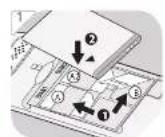
1 Remove the cover from the back. Slide a SIM card (A1, A2) into the appropriate slot. If you wish, insert a memory card (B) into the appropriate slot (lift the clasp, insert Micro SD card, close the clasp and lock by sliding it). Insert the battery provided. Make sure that the contacts are located on the correct side. Put on the cover.
Note: This mobile phone can be used with 2 SIM cards.
CHARGING THE BATTERY
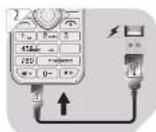
2 Connect the adaptor with the charging cable and plug in the mirco-USB plug into the Micro-USB charging jack of the mobile phone.
Please note: Before the device is used for the first time, the battery must be charged for 8 hours. The average charging time of an empty battery amounts to 2 hours.
OPERATION
Switching it Off/On
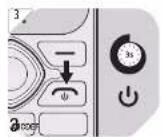
3 Hold the ⏻ key down for approx. 3 respectively 5 seconds, in order to switch the mobile phone off or on.
FIRST TIME SWITCH ON
Date and time
When switching it on for the first time you will be asked to enter the date and time. Use the navigation key and number keys to enter. For later changes, see Setting / Phone Setting / Time and Date.
Language setting
The phone is factory set to English. You can change the language at any time under Setting / Phone Setting / Language as described.
Key lock
- If the buttons are locked, press the "Unlock" button and immediately afterwards the button * to unlock the buttons.
- If the display is switched off with the key lock activated, press any key beforehand to activate the display.
EN
Call and Hang up key
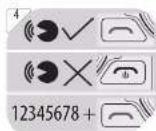
4 Accepting a call
In order to accept an incoming call, press the ⚡ key.
Declining / Ending a call
In order to decline an incoming call, or to end a conversation, press the ⏻ key.
Calling
Enter the number with the number keys and press the key.
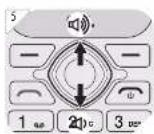
Volume
5 You can change the speakers volume during the telephone call by pressing the navigation keys up/down.
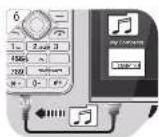
6 CONNECT TO PC (MICRO-USB)
Connect the mobile phone to a computer to transfer pictures and music. You can connect the mobile phone to a computer with the included USB cable. You can then use drag-and-drop to copy or move data between the mobile phone or memory card and the computer in the File Explorer on the computer.
-
Connect the switched-on mobile phone to the computer with the supplied micro USB cable. The following options will be available:
-
Charging
- U-Disk
-
PC Connecting
-
Select "U disk" and press OK. The phone memory and the SD card are displayed as external drives on your PC.
CONFIGURING MENU SETTINGS
The menu can be called up by pressing the right function key when Menu appears on the display. To navigate (up/down/right/left), press the navigation keys. In order to select a menu item, press the left function key when OK appears on the display. The following items can be selected below:

Call log

Contacts

FM radio

Calendar

Messaging

Multimedia

Application

Games

Settings
EN

Contacts
Options (Choose one contact)
- To search for a name, insert the name into the search field by using the number keys. Alternatively, you can also scroll through the entries with the navigation keys.
- When found the desired contact, press the call button to make a call.
For more options, press the Options button. In the submenu the following choices available:
① New:
Add a new phone number to the phone book record. Choose the storage mode for SIM cards or cell phones.
② Delete multiple:
Delete several selected contacts.
③ Delete All:
Delete all contacts.
④ Delete Phone:
Delete contacts from the phone.
⑤ Copy:
Copy/move contacts to phone from SIM.
⑥ Import/Export:
Import/export contacts.
⑦ Others:
Speed dial
Memory status

Messages
To navigate (up / down), press the navigation key up or down. To select an option press the center of the navigation key.
① Write message:
1. New SMS
Choose this menu to write a new SMS.
1) Send:
Select the recipient to send the message.
2) Insert template:
Insert phone SMS template (you can customize message templates).
3) Add contact info: Add a contact to recipient list.
4) Add phiz:
Insert phiz if needed here.
5) Save as draft: Save edited SMS into draft box.
6) Exit: Quit SMS edit interface.
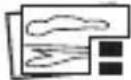
2. New MMS
Follow the on screen instruction to write a new MMS. You can attach a picture, audio or video file to the MMS.
| Symbol | Function |
 | Enter receiver or select from contacts. |
 | Insert subject line |
| TEXT | Insert text message |
 | Attach pictures |
 | Attach audio files |
 | Add pages |
EN
② Inbox:
View received messages.
③ Outbox:
View the SMS which are not sent yet.
④ Drafts:
View the SMS saved in the draft box.
⑤ Sentbox:
View the sent SMS.
⑥ Templates:
View the SMS templates.
⑦ Broadcast Message
⑧ Voice mail server:
Manage voicemail messages (contact your service provider to check these service settings).

Call logs
① Missed calls:
You can view all missed calls.
② Dialed calls:
You can view all dialed numbers.
③ Received calls:
You can view all received calls.
④ Rejected calls:
You can view all rejected calls.
⑤ Delete all:
Delete all call logs.
⑥ Call timers:
Record the time for last call, the total time of dialed, received calls and a chronology of all the calls.
⑦ GPRS counter

Multimedia
Multimedia functions
| Key/button | Function |
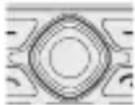 | Take photo, start a recording or video playback |
Note:
- The phone has a small built-in memory to save pictures which can be used as wallpaper in standby menu or as contact photo.
- If you want to make further use of multimedia functions, it is necessary to insert a micro SD card of up to 32 GB (not supplied) to save the contents.
① Camera:
Press button to take pictures when entering camera mode.
② DV (video recorder):
Press camera button to shoot video when entering camera mode, then refer to the related menu for other options.
Note: It is necessary to insert micro SD card before shooting video.
③ Image:
Playback of pictures which are saved on the phone or a micro SD card.
④ Audio:
Create a folder and name it as you wish in the memory card and copy some MP3 files in it.
Note: Audio player can playback music from micro SD card.
⑤ Video:
This function allows to playback videos in "3gp" format which are saved on the micro SD card (not supplied).
⑥ Sound recorder:
Allows to make voice recording through the built-in microphone.

FM Radio
When you select radio you will be prompted to plug in the earphones. Activate the automatic search. After the scanning is completed, the searched channels are stored. In the options menu you will find all functions related to FM Radio.
Follow the instructions on the display for all items.

Application
① Alarm: Creates up to 3 alarms.
② My files: Manages all files on the phone and, if inserted, memory card. Use the options menu to see all available actions.
③ Browser: Internet access via browser.
④ Calculator: Use calculator by pressing digits directly and use up/down keys and OK key to modify the operation type.
⑤ World Clock: Set and add world clocks.

Settings
① Call settings
1) Dual SIM:
Adjust SIM card settings.
2) Call Divert:
You can switch on immediate forwarding for calls.
3) Call Waiting:
Setting behaviour if there is a further call during a conversation.
4) Call barring:
Setting up blocking for outgoing and incoming calls.
5) Hide ID:
Set to display or hide the own phone number on the receiver phone display when calling.
6) Others
Note: You may have to contact your local operator first in order to use some functions.
EN
② Phone settings
1) Date & time: Setting time/date format
2) Language settings: Setting menu and input language
3) Shortcuts settings: Setting shortcut feature to enter certain menu with UP/DOWN keys.
4) Auto power on/off: Setting of the phone to automatically power on or off on specified time.
5) Restore factory settings: Restore factory setting and erase all saved data. The code is 1234.
③ Display
The following options are available:
- Wallpaper
- Idle display settings
- Contrast
- Backlight
- Keypad backlight
Select setting with Up/Down key and confirm with OK.
④ Security
Changing security settings such as turn on/off PIN/PUK (PUK2), change PIN code, turn on/off phone lock and change phone password etc.
⑤ Profiles
Settings for ringtones, notification tones, ringtone volume, etc. can be set.
- General
- Silence
- Vibration
- Indoor
⑥ Connections
Select automatically select or manually select networks.
CLEANING AND CARE
- Warning! When cleaning, never use solvents or abrasive materials, hard brushes, metallic or sharp objects. Solvents are harmful to human health and can attack plastic parts, while abrasive cleaning mechanisms and tools may scratch the surface(s).
- Clean the product's exterior surfaces with a slightly damp cloth and then dry them thoroughly. Make sure that no water enters the product interior (for example, through the switch).
TROUBLESHOOTING
If there are any problems during operation, please refer to the following table. If problems cannot be solved as indicated under Solution, please contact your manufacturer.
| Problem Possible | causes Solution | |
| Product does not function | Battery emptyRecharge batteries | |
| Cannot make/receive calls | No network connectionSIM card not correctly inserted | Carry out a network searchCorrectly-insert the sim card |
| No ringtone• Ringtone set to off mode | Set ringtone to ON | |
| Cannot take pictures, record a video or voice | Internal memory is fullMemory card is full | Delete some old filesReplace memory card with a new one |
DECLARATION OF CONFORMITY
Hereby, the Imtron GmbH declares that the radio equipment type OMP 10 is in compliance with Directive 2014/53/EU. The full text of the EU declaration of conformity is available at the following internet address:
Max. radio frequency power transmitted:
GSM900:33 dBm ± 2 dB
GSM1800:30 dBm ± 2 dB
Battery (ShenZhen Utility : Lithium Ion, 3.7 V= / 500 mAh
Power Source Co., Ltd.) BL-4C
Max. talk time : 5 hrs.
Period of availability : 84 hrs.
USB connection : Micro USB
FM radio : 87.5 - 108 MHz
Measurements : 104.6 x 43 x 13.8 mm
MicroSD card : Support up to 32 GB
Weight : 93 g (with battery)
Plug in network supply and charger
(Shenzhen Baijunda Electronic Co., Ltd.): UT-133E-5100
Prim./sec nominal voltage Input: 100 - 240 V\~, 50/60 Hz, 0.2 A
The crossed-out wheeled bin logo requires the separate collection of waste electric and electronic equipment (WEEE). Electric and electronic equipment may contain dangerous and hazardous substances. Do not dispose of this appliance as unsorted municipal waste. Return it to a designated collection point for the recycling of WEEE. By doing so, you will help to conserve resources and protect the environment. Contact your retailer or local authorities for more information.
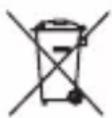
Please dispose of batteries in an environmentally friendly manner. Do not put batteries into the household waste. Please use the return and collection systems in your community or contact the dealer where you purchased the product.
ENHORABUENA
④ Drafts (Borradores):
① Missed calls (Llamadas perdidas):
③ Received calls (Llamadas recibidas):
④ Rejected calls (Llamadas rechazadas):
⑤ Delete all (Borrar todo):
- General
- Silence
- Vibration
- Indoor
⑥ Connections (Conexiones):
Salida: 5,0 V = , 1 A
① Camera (Appareil photo):
- General
- Silence
- Vibration
- Indoor
⑥ Connections (Connexions)
DÉCLARATION DE CONFORMITÉ

Contacts (Επαφές)
- General
- Silence
- Vibration
- Indoor
⑥ Connections (Συνδέσεις)
- General
- Silence
- Vibration
- Indoor
5) Save as draft (salva come bozza):
① Camera (Telecamera):
3) Call Waiting (Chiamata in attesa):
- General
- Silence
- Vibration
- Indoor
⑥ Connections (Collegamenti)
Peso : 93 g (with battery)
- HERZLICHEN GLÜCKWUNSCH!
- IMPORTANT SAFETY INSTRUCTIONS. READ CAREFULLY AND KEEP FOR FUTURE REFERENCE.
- EN
- INTENDED USE
- COMPONENTS
- key: Silence, vibrate and normal
- BEFORE FIRST TIME USE
- INSERTING THE SIM CARD AND THE BATTERy
- CHARGING THE BATTERY
- OPERATION
- Switching it Off/On
- FIRST TIME SWITCH ON
- Date and time
- Language setting
- Key lock
- Call and Hang up key
- Accepting a call
- Declining / Ending a call
- Calling
- Volume
- CONNECT TO PC (MICRO-USB)
- CONFIGURING MENU SETTINGS
- Contacts
- Options (Choose one contact)
- Messages
- ① Write message:
- New SMS
- New MMS
- Call logs
- Multimedia
- Note:
- FM Radio
- Application
- Settings
- ① Call settings
- ② Phone settings
- ③ Display
- ④ Security
- ⑤ Profiles
- ⑥ Connections
- CLEANING AND CARE
- TROUBLESHOOTING
- DECLARATION OF CONFORMITY
- ENHORABUENA
- ⑥ Connections (Conexiones):
- ⑥ Connections (Connexions)
- DÉCLARATION DE CONFORMITÉ
- Contacts (Επαφές)
- ⑥ Connections (Συνδέσεις)
- ⑥ Connections (Collegamenti)
Brand : OK
Model : OMP 10
Category : Smartphone