OMP 1201 - Smartphone OK - Free user manual and instructions
Find the device manual for free OMP 1201 OK in PDF.


| Product type | Smartphone |
| Brand | OK |
| Model | OMP 1201 |
| Network | GSM 900/1800 MHz dual-band |
| Battery | Lithium-ion, 3.7 V, 800 mAh |
| Talk time | Up to 7 hours |
| Standby time | Up to 168 hours |
| Weight | 93 g (with battery) |
| Main screen | LCD screen (not specified) |
| Secondary screen | Integrated secondary LCD |
| External memory | microSD card up to 32 GB |
| Connectivity | Micro USB, 3.5 mm audio jack |
| Camera | Built-in camera |
| FM radio | Yes |
| Flashlight | Yes |
| SOS button | Yes |
| Power supply | Power adapter: input 100-240 V~, output 5 V / 1 A |
| Included accessories | Phone, charging station, USB cable, adapter, battery, user manual |
| Operating temperature | Moderate climate, avoid extreme temperatures |
| Cleaning | Damp cloth, avoid solvents and immersion |
| Repairability | Removable battery, other repairs by qualified technician |
Frequently Asked Questions - OMP 1201 OK
User questions about OMP 1201 OK
0 question about this device. Answer the ones you know or ask your own.
Ask a new question about this device
Download the instructions for your Smartphone in PDF format for free! Find your manual OMP 1201 - OK and take your electronic device back in hand. On this page are published all the documents necessary for the use of your device. OMP 1201 by OK.
USER MANUAL OMP 1201 OK
M OHPI20-1 200401 A V02
www.sse.com


OMP 120-1
Großtasten-Mobiltelefon // Big button mobile phone // Teléfono móvil de botón grande // Téléphone mobile à grosses touches
DE GEBRAUCHSANWEISUNG ? (P) MODE D'EMPLOI 32
IN USER MANUAL 13
GR OAHFIES XPHENS
ES MANUAL DEL USUARIO 22 HU HASZNÁLATI ÚTMUTATÓ 52

IV_OKP120-1_200401_A_V02_HR.indb 11:420.328 pm
IV_OKP120-1_200401_A_V02_HR.mdb 21/420 3:29 pm
HERZLICHEN GLÜCKWUNSCH!
FM Radio :87,5-108 MHz
Thanks for your purchase of an ok. product. Please read this manual carefully and keep it for future reference.
IMPORTANT SAFETY INSTRUCTIONS. READ CAREFULLY AND KEEP FOR FUTURE REFERENCE.
-
Read this user guide carefully before first use. It contains important safety information as well as instructions for the use and care of the device. Save the guide for later reference and include it with the device when transferring it to a third party.
-
To avoid dangerous situations, do not use device for any purpose other than those described in the instructions. Improper use is dangerous and voids the warranty.
-
This product is not intended to be used by persons (including children) with reduced physical, sensory or mental abilities or lack of experience and / or lack of knowledge unless they are supervised by a person responsible for their safety or have received instructions on how to use the product.
-
Children should be supervised to ensure that they do not play with the product.
-
The product shall not be exposed to dripping or splashing and no objects filled with liquids, such as vases, shall be placed on the product.
-
Care should be taken so that no objects or liquids enter the enclosure through openings.
-
No naked flame sources, such as lighted candles, should be placed on the product.
-
Only use the provided adaptor.
-
The adaptor power plug is used as the disconnect device; the disconnect device shall remain readily operable. To completely disconnect the power input, disconnect the adaptor power plug.
EN
- DANGER!
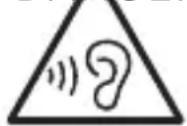
! Excessive sound pressure from earphones and headphones can cause hearing loss. If you listen to loud music for a long time, your hearing may be impaired.
Set to a moderate volume.
-
Caution! There is danger of explosion from improper replacement of the battery. Replace battery only with the same or equivalent type of battery.
-
Never expose rechargeable batteries to excessive heat (e.g. bright sun, fire), and never throw them into fire. The rechargeable batteries could explode.
-
Never damage the rechargeable battery. Damaging the casing of the rechargeable battery might cause an explosion or a fire!
-
Never short-circuit the contacts of the rechargeable battery. Do not throw the rechargeable battery or the product into fire. There is a danger of fire and explosion!
-
Charge the rechargeable battery regularly, even if you are not using the product. Due to the rechargeable battery technology being used, you do not need to discharge the rechargeable battery first.
-
Never charge the rechargeable battery of the product unattended.
-
Remove the batteries from the product before disposal.
-
Use only under normal room conditions (temperature and humidity).
-
The product is intended to be used in moderate climates only. Do not use in tropical or very humid climates.
-
Do not move the product from cold into warm environments and vice versa. Condensation can damage the product and electric components.
-
The use of accessories and parts not specifically recommended by the manufacturer may cause injuries or damages and will result in forfeiture of the warranty.
-
Do not touch, press or rub the surface of the product with sharp or hard objects
- To reduce the risk of fire or electric shock, do not expose the device to rain or humidity.
- Never immerse electric parts of the product in water or other liquids while cleaning or using it. Never place the product under running water.
- Do not place the product in the vicinity of devices producing strong magnetic fields (for example motors, loudspeakers, transformers).
- Do not expose the product to direct sunlight, humidity, dirt, hot light sources or strong magnetic fields. Do not expose the product to high temperatures and strong vibrations and avoid high mechanical stress.
- If the product shows damages, do not use it any longer and have it repaired by a qualified technician, or contact our customer service department. Do not disassemble the product, and do not try to repair it yourself.
- Attention! In the event of a malfunction as a result of electrostatic discharge and momentary electrical surges, unplug the appliance and plug it in again or remove the batteries and install it again.
- LED's are not replaceable.
- Attention! Please do not look directly into the light emanating from the LED. Do not point the LED light directly into the eyes.
INTENDED USE
This product is only suitable for making and receiving calls within a mobile phone network. Any other use can lead to damage to the product or personal injury.
The Imtron GmbH assumes no liability for damage to the product, for property damage or for personal injury due to careless or improper usage of the product, or usage of product which does not meet the manufacturer's specified purpose.
EN
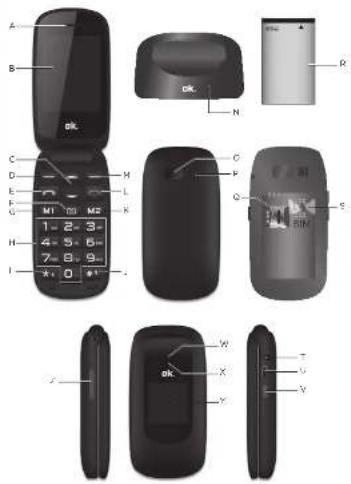
CONTROLS AND COMPONENTS
A. Receiver
B. Main Display
C. Up & Down navigation key
D. Left soft key
E. Call key
F. Camera key
G. M1 key
H. Numeric key
I. key+ J. key
K. M2 key
L. Hang up key
M. Right soft key
N. Charging base
O. SOS button
P. Speaker
Q. MicroSD Card slot
R. Battery
S. SIM card slot
T. Audio jack
U. Micro USB port
V. Torch power key
W. Camera
X. Torch
Y. Sub LCD
Z. Volume +/-
DELIVERY CONTENTS
1 x Mobile phone
1 x Charging base
1 x Charging cable
1 x Charging adaptor
1 x Rechargeable battery
1 x Instruction manual
BEFORE FIRST TIME USE
Remove the product and accessories carefully from the original packaging. It is recommended to keep the original packaging for storage. If you wish to dispose of the original packaging, please observe applicable legal provisions. Should you have any questions regarding proper disposal, contact your local waste management center.
Inspect the delivery contents for completeness and damages. Should the delivery contents be incomplete or damaged, contact your sales outlet immediately.
Before it is used for the first time your mobile phone must be assembled and the battery must be fully charged. Follow the directions in the following section in that regard.
INSERTING THE SIM CARD AND THE BATTERY
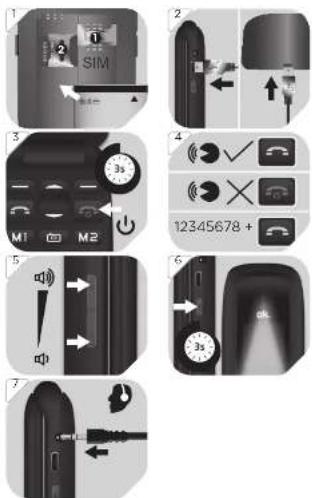
1 Remove the cover from the back. Slide a SIM card (1) into the appropriate slot. If you wish, slide a memory card (2) into the appropriate slot. Insert the battery provided. Make sure that the contacts are located on the correct side.
CHARGING THE BATTERY
2 Connect the charger and the plug-in power supply unit with the USB cable. Connect the supply unit to an outlet. Insert the mobile phone into the charger. Alternatively, you can also connect the micro USB charging plug directly to the micro USB socket.
Note: Before the device is used for the first time, the battery must be charged for 8 hours. The average charging time of an empty battery amounts to 2.5 hours.
EN
FIRST TIME USE
After inserting the SIM card and the battery, press the button 🔍 for about 3 seconds.
- You will be prompted to set the date and time. Enter the date and time using the number keys and confirm with Save.
- You may be prompted for the PIN for the SIM card. This 4-digit number is included in the documentation of your SIM card. Confirm the entry with OK.
OPERATION
Switching it Off/On
3 Hold the -key down for approx. 3 seconds, in order to switch the mobile phone on or off.
Call and Hang up key
4 Accepting a call
In order to accept an incoming call, press the key.
Declining/Ending a call
In order to decline an incoming call, or to end a conversation, press the 🔒 key.
Calling
Enter the number with the number keys and press the key.
Volume
5 You can change the talk volume during the telephone call by means of the volume rocker switch.
LED
6 Turn the LED on/off with the On/Off switch.
Head-/earphone set
7 Connect the earphones to the earphone jack to listen music.
CONFIGURING MENU SETTINGS
The menu can be called up by pressing the Menu key. To navigate, press the rocker (up/down) key up or down. In order to select a menu item, press the OK key. The following items can be selected below:
- Contacts
- Messages
- Call logs
- SOS
- Multimedia
- FM radio
- Organiser
- Settings
CLEANING AND CARE
- Warning! When cleaning, never use solvents or abrasive materials, hard brushes, metallic or sharp objects. Solvents are harmful to human health and can attack plastic parts, while abrasive cleaning mechanisms and tools may scratch the surface(s).
- Clean the product's exterior surfaces with a slightly damp cloth and then dry them thoroughly. Make sure that no water enters the product interior (for example, through the switch).
DECLARATION OF CONFORMITY
Hereby, [lmtron GmbH] declares that the radio equipment type [OMP 120-1] is in compliance with Directive 2014/53/EU. The full text of the EU declaration of conformity is available at the following internet address: http://de.ok-online.com/nc/de/suche.html
EN
20
TECHNICAL DATA
GSM Standard :900/1800 dualband
Frequency range:
E-GSM900 :880.2-914.8MHz (TX), 925.2-959.8MHz (RX)
DCS1800 :1710.2-1784.8 MHz (TX), 1805.2-1879.8 MHz (RX)
Max. radio frequency power transmitted:
GSM900 :33dBm±2dB
GSM1800 :30dBm±2dB
Battery (Shenzhen) : Lithium Ion, 3.7 V = /
Chaonengtong Technology 800 mAh
Co., Ltd) BL-4C
Max. talk time :7 hrs
Period of availability :168 hrs
USB connection :Micro USB
Headphone connection :3.5 mm jack connection
FM radio :87.5-108 MHz
Measurements :99 x 51 x 21.6 mm
MicroSD card :Support up to 32 GB
Weight :93g (with battery)
Plug in network supply and charger
Manufacturer: Shenzhen Baijunda Electronic Co., Ltd.
Model :UT-133E-5100
Input voltage :100-240 V\~
Input AC frequency :50/60 Hz
Output voltage :5.0 V
Output current :1.0 A
Output power :5.0 W
Average active efficiency :74.59 %
Efficiency at low load (10%) :--
No-load power consumption :0.065 W
Protection class :II
DISPOSAL
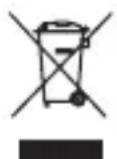
Do not dispose of this appliance as unsorted municipal waste. Return it to a designated collection point for the recycling of WEEE. By doing so, you will help to conserve resources and protect the environment. Contact your retailer or local authorities for more information.
Please dispose of batteries in an environmentally friendly manner Do not put batteries into the household waste. Please use the return and collection systems in your community or contact the dealer where you purchased the product.
ENHORABUENA
Radio FM :87,5-108 MHz
Dimensiones :99 x 51 x 21,6 mm
DÉCLARATION DE CONFORMITÉ
Radio FM :87,5-108 MHz
Dimensions :99 x 51 x 21,6 mm