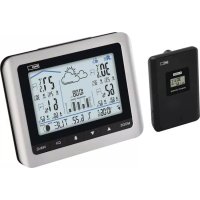
E0316 - Weather Station Emos - Free user manual and instructions
Find the device manual for free E0316 Emos in PDF.



User questions about E0316 Emos
0 question about this device. Answer the ones you know or ask your own.
Ask a new question about this device
Download the instructions for your Weather Station in PDF format for free! Find your manual E0316 - Emos and take your electronic device back in hand. On this page are published all the documents necessary for the use of your device. E0316 by Emos.
USER MANUAL E0316 Emos
natural_image
Technical line drawing of a rectangular electronic device with a central button and labeled component (no text or symbols beyond basic diagram)2
text_image
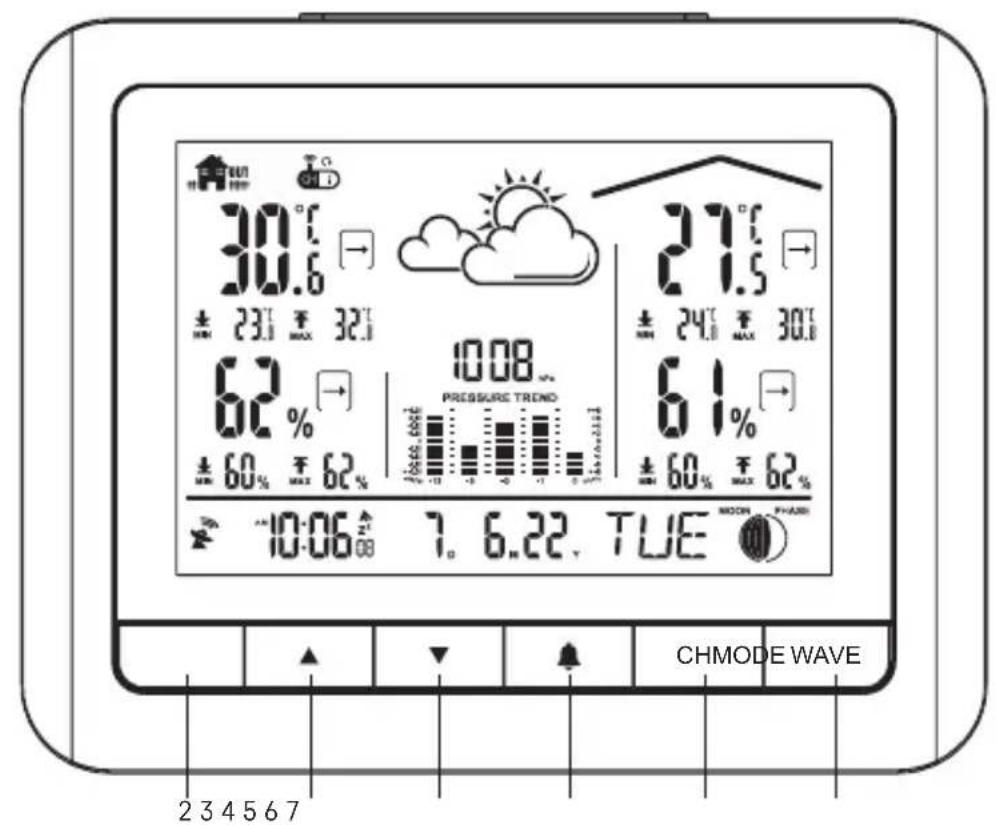
30.6 ± 23.1 ± 32.1 62 % 10.08 ± 60 % ± 62 % 10:06 7. 6.22. TUE CHMODE WAVE 2 3 4 5 6 7 21.5 ± 24.1 ± 30.1 61 % ± 60 % ± 62 %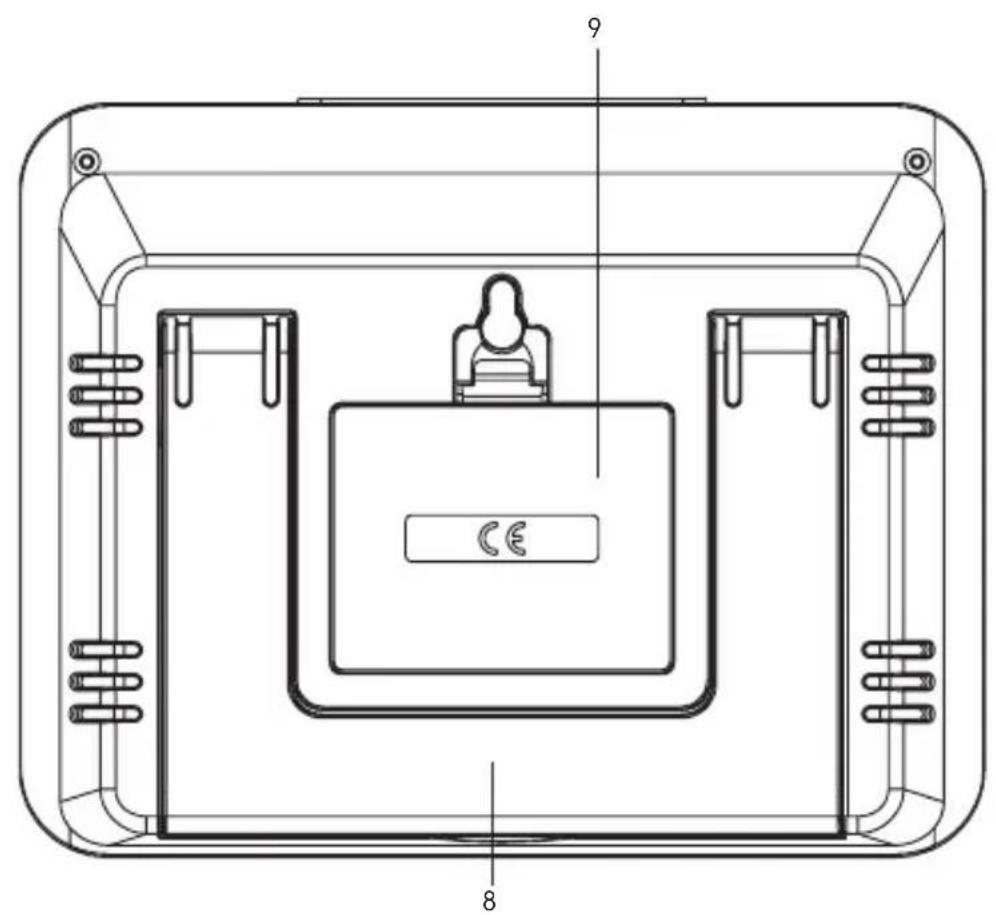
text_image
9 CE 8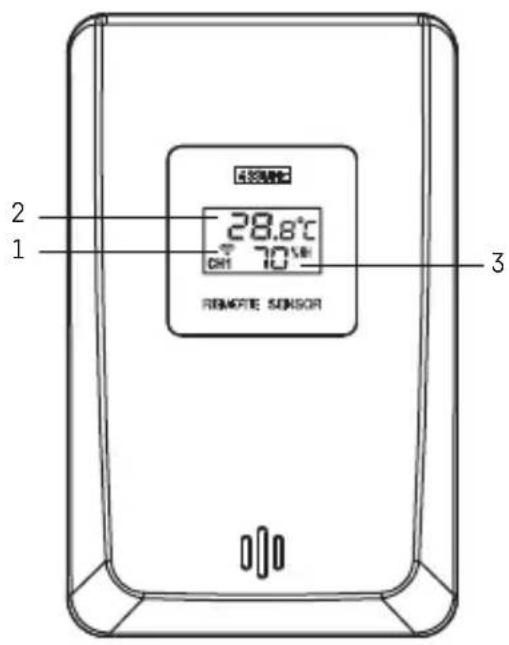
GB | Wireless Weather Station
Read this manual carefully before using the product.
Specifications
radio-controlled clock
time format: 12/24 h
indoor temperature: 0 °C to +50 °C, 0.1 °C resolution
outdoor temperature: -20 °C to +60 °C, 0.1 °C resolution
temperature measurement accuracy: ±1 °C for 0 °C to +50 °C range, ±1.5 °C for other ranges
indoor and outdoor humidity: 20 % to 99 % RH, 1 % resolution
humidity measurement accuracy: ±5 % RH in 40 % to 80 % range, ±8 % RH in other ranges
barometric pressure measurement range: 850 hPa to 1,100 hPa
unit of pressure: hPa/mb/inHg
radio signal range: up to 60 m in an open area
transmission frequency: 433 MHz, 10 mW e.r.p. max.
number of sensors: max. 3
power supply:
main station: 3× 1.5 V AA batteries (not included)
sensor: 2× 1.5 V AAA batteries (not included)
size:
main station: 30 × 166 × 131 mm
sensor: 29 × 60 × 96 mm
Weather Station – On-Screen Indicators (See Fig. 1)
1 – data from outdoor sensor 14 – day of the week
2 - outdoor sensor channel number, station 15 - year
batteries low 16-month
3 – weather forecast 17 – day
4 – pressure value 18 – alarm activation
5 – indoor temperature, sensor batteries low 19 – time
6 – indoor temperature trend 20 – DCF signal reception
7 – min. indoor temperature 21 – max. outdoor humidity
8 – max. indoor temperature 22 – min. outdoor humidity
9 – indoor humidity 23 – outdoor humidity
10 – indoor humidity trend 24 – max. outdoor temperature
11 – min. indoor humidity 25 – min. outdoor temperature
12 – max. indoor humidity 26 – outdoor temperature
13 - moon phase
Button Description (See Fig. 2)
1 - SNOOZE/LIGHT 6 - CH
2-MODE 7-WAVE
3-up arrow 8-stand
4-down arrow 9-battery compartment
5 - alarm
Sensor Description (See Fig. 3)
1 - sensor channel number (CH 1, 2, 3) 5 - sensor channel number switch (CH 1,
2 - temperature 2, 3)
3 – humidity 6 – unit of temperature switch (°C/°F)
4 - TEST button 7 - battery compartment
Getting Started
- First, insert batteries into the weather station (3× 1.5 V AA) and then into the wireless sensor (2× 1.5 V AAA). When inserting the batteries, make sure the polarity is correct to avoid damaging
the weather station or sensor. Only use 1.5V alkaline batteries of the same type; do not use rechargeable 1.2V batteries. The lower voltage may cause both of the units to not function.
- Place the two units next to each other. The weather station will detect the remote sensor signal within 3 minutes. If signal from the sensor is not detected, long-press the CH button on the weather station to repeat the search.
- If the outdoor temperature reading disappears from the screen, long-press the CH button on the station and press the TEST button on the sensor. The weather station will reset all the values and repeat the search for sensor signal.
- We recommend placing the sensor on the north side of the house. The range of the sensor may decrease substantially in areas with a large number of obstacles.
- The sensor is resistant to dripping water, however, it should not be permanently exposed to rain.
- Do not place the sensor onto metal objects; doing so will reduce the transmission range.
- If the low battery icon is displayed, replace batteries in the sensor or weather station.
Switching Channels and Connecting Additional Sensors
- Repeatedly press the CH button on the station to select the sensor channel of choice - 1, 2 or 3. Then, long-press the CH button. The icon will begin flashing.
- Remove the battery cover on the back of the sensor and move the channel number switch to the channel number of choice (1, 2, 3).
- Insert batteries into the sensor (2× 1.5 V AAA); the channel number will be displayed on the sensor's screen.
- Data from the sensor will be loaded within 3 minutes.
- If sensor signal is not detected, repeat the process.
Displaying Data from Multiple Sensors, Automatic Cycling through Values from Connected Sensors
Press the CH button repeatedly to display data from all connected sensors one by one. You can also activate automatic cycling through data from all connected sensors:
1. Turning on cycling
Repeatedly press the CH button until 🔒. appears on the screen.
Data from all connected sensors will be shown automatically and repeatedly one after another.
2. Turning off cycling
Repeatedly press the CH button until the 🔒. icon disappears.
Radio-Controlled Clock (DCF77)
After being registered by the wireless sensor, the weather station will automatically start searching for DCF77 (DCF for short) signal for 7 minutes; the 🎨 icon flashes. During the search, no other information on the screen will be updated and the buttons will be disabled (except SNOOZE/LIGHT). Once the signal is detected, the icon will stop flashing ( 🔍 stays on the screen) and current time will be displayed. If no signal is detected, the DCF icon will not be displayed.
To repeat the search for DCF signal, long-press the WAVE button. To cancel the search for DCF signal, short-press the WAVE button. DCF signal will be synchronised daily between 2:00 and 3:00 am.
During daylight saving time, DAT l be displayed on the screen.
Note: If the weather station detects DCF signal but the current time on the screen is incorrect (e.g. shifted ±1 hour), you must set the correct time zone for the country where you are using the station, see Manual Settings.
In standard conditions (at safe distance from sources of interference, such as TV sets or computer monitors), the reception of time signal takes several minutes. If the weather station does not detect the signal, follow these steps:
- Move the weather station to another location and try to detect the DCF signal again.
-
Check the distance of the clock from sources of interference (computer monitors or television sets). The distance should be at least 1.5 to 2 m during the reception of signal.
-
When receiving DCF signal, do not place the weather station near metal doors, window frames and other metal structures or objects (washing machines, dryers, refrigerators, etc.).
-
In reinforced concrete structures (cellars, high-rise buildings, etc.), the reception of DCF signal is weaker, depending on the conditions. In extreme cases, place the weather station close to a window in the direction of a transmitter.
Reception of DCF radio signal is affected by the following factors:
- thick walls and insulation, basements and cellars;
- inadequate local geographical conditions (these are difficult to assess in advance);
• atmospheric disturbances, thunderstorms, electrical appliances with no interference elimination, television sets and computers located near the DCF receiver.
Manual Settings
-
Press and hold the MODE button.
-
Then, repeatedly press the MODE button to choose settings for: hours – minutes – year – date format – month – day – calendar language – time zone. You can navigate between the values by pressing the MODE button; set values using the up ▲ and down arrows.
Calendar languages are as follows:
(ENG – English, FR – French, IT – Italian, ES – Spanish, NE – Dutch, DA – Danish, GE – German)
Setting 12/24 h Time Format, °C/°F Unit of Temperature
Repeatedly pressing the MODE button switches between 12/24 h time format.
Repeatedly pressing the ▲ button switches between °C/°F unit of temperature.
Atmospheric Pressure – History
The pressure value is displayed in field no. 4.
Below it is a chart of pressure history in up to the last 12 hours.
Repeatedly long-pressing the ▼button switches units of pressure between inHg and hPa/mb.
Moving the weather station to another place will affect the measured values.
Measurement will stabilise within 12 hours of battery insertion or relocation of the weather station.
Temperature and Humidity Trend
| temperature and humidity trend indicator | → | → | → |
| rising constant | falling |
Moon Phases (See Fig. 4)
The moon phase is displayed in field no. 13.
1 – Full moon
5 – New moon
2-Waning gibbous 6-Waxing crescent
3 – Last quarter
7 – First quarter
4 – Waning crescent 8 – Waxing gibbous
Displaying Maximum and Minimum Temperature and Humidity Readings
Measured values for outdoor temperature are displayed in fields no. 24 and 25, indoor temperature in fields no. 7 and 8.
Measured values for outdoor humidity are displayed in fields no. 21 and 22, indoor humidity in fields no. 11 and 12.
The memory of measured values is automatically erased every day at 00:00.
To manually erase the memory of measured values, long-press the ▲button.
Setting an Alarm
Long-press the button; the time setting will start flashing.
Use the and buttons to set the alarm time.
To confirm and navigate in the menu, press 🔊
The alarm is activated by short-pressing the button; will appear on the screen.
Press the 🔊 button again to deactivate the alarm; the 🔊 con will disappear.
Snooze Function
Alarm ringing can be postponed by 5 minutes using the SNOOZE/LIGHT button located on the top part of the weather station.
Press the button once the alarm starts ringing. The ^2 icon will be flashing.
To cancel the SNOOZE function, press any other button – the Z^ icon will stop flashing and will remain on the screen.
The alarm will trigger again the next day.
Brief Illumination of the Station's Screen
Pressing the SNOOZE/LIGHT button illuminates the screen for 5 seconds.
Weather Forecast
The station uses changes in atmospheric pressure to forecast weather for the next 12–24 hours for an area within the radius of 15–20 km.
The accuracy of weather forecast is 70–75 %. The forecast icon is displayed in field no. 3.
As the weather forecast may not be 100 % accurate, neither the manufacturer nor the seller can be held responsible for any loss caused by an incorrect forecast.
When you first set or reset the weather station, it takes approximately 12 hours before the weather station begins forecasting correctly.
Weather Forecast Icons (See Fig. 5)
1 - Sunny
4 - Rain
2 - Cloudy
5 - Snow
3 - Overcast
Battery Replacement Warning
Replace the batteries in the station or the sensor once the screen of the station or the sensor shows the low battery icon
Upkeep and Maintenance
The product is designed to serve reliably for many years if used properly. Here are some tips for proper operation:
- Read the manual carefully before using the product.
- Do not expose the product to direct sunlight, extreme cold and humidity and sudden changes in temperature. This would reduce measuring accuracy. Do not place the product in locations prone to vibration and shocks – may cause damage.
- Do not subject the product to excessive pressure, impacts, dust, high temperatures or humidity – doing so may cause malfunction, shorten battery life, damage batteries and deform plastic parts.
- Do not expose the product to rain or moisture if it is not designed for outdoor use.
- Do not place any open flame sources on the product, such as a lit candle etc.
- Do not place the product in places with inadequate air flow.
- Do not insert any objects into the product's vents.
- Do not tamper with the internal electrical circuits of the product – doing so may damage the product and will automatically void the warranty. The product should only be repaired by a qualified professional.
- To clean the product, use a slightly moistened soft cloth. Do not use solvents or cleaning agents – they could scratch the plastic parts and cause corrosion of the electric circuits.
- Do not immerse the product in water or other liquids.
- The product may not be exposed to dripping or splashing water.
- In the event of damage or defect of the product, do not perform any repairs by yourself. Have it repaired in the shop where you bought it.
- This device is not intended for use by persons (including children) whose physical, sensory or mental disability or whose lack of experience or knowledge prevents them from using it safely. Such persons should be instructed in how to use the device and should be supervised by a person responsible for their safety.

Do not dispose with domestic waste. Use special collection points for sorted waste. Contact local authorities for information about collection points. If the electronic devices would be disposed on landfill, dangerous substances may reach groundwater and subsequently food where it could affect human health.
Hereby, EMOS spol. s r. o. declares that the radio equipment type E0316 is in compliance with Directive 2014/53/EU. The full text of the EU declaration of conformity is available at the following internet address: http://www.emos.eu/download.
urni format: 12/24 h
(ENG – English, FR – French, IT – Italian, ES – Spanish, NE – Dutch, DA – Danish, GE – German)
Postavljanje 12/24 satnog oblika prikaza vremena, °C/°F jedinica temperature
Pritiskom gumba MODE nekoliko puta zaredom mijenjate između 12/24 satnog oblika prikaza vremena.
Pritiskom gumba nekoliko puta zaredom mijenjate između °C/°F jedinice temperature.
station principale: 3× pile de 1,5 V de type AA (pas fournies)
station principale: 30 × 166 × 131 mm
18 – wekkeractivering
19 - tijd